#ue4-general
1 messages · Page 486 of 1
 rotund scroll
you also have no way to break line of sight by way of cover since putting anything into the corridor leaves 0 space for traversal
it may not be integral to your gameplay currently, but you may want to consider making them wider so you allow for more gameplay opportunities from the player's side
 next cloak
yo guys
anybody know of a good way to have default values for components you spawn via blueprints?
next cloak
took a look at it, but isnt quite what I need
what Im trying to do is to add a physics constraint to where Im aiming on click
but I want it to have some default values, so as to not have to set them manually in bp
rotund scroll
so what's the issue exactly? you can set default values
next cloak
It'd be cleaner if I could extend physics constraint actor, set default values via details, then add this new bp actor on click
but cant do that with bp
Im trying to add component, not spawn actor
but I will try with spawning, as long as physics constraint can constrain a component in a different actor from itself, that would work
 half plank
whats up guyss
I need some helppp
I have an actor that I'm trying to change the scale of, I can do it but when I activate physics I can't do it for some reason
 plush yew
er disable physics then scale then reenable ? xd lol no idea never messed with that
half plank
as in I want to use an input to affect the scale while in game
i need physics enabled to pick up the actor too
 sharp crest
Discord Developer Portal
Integrate your service with Discord — whether it's a bot or a game or your whatever you wildest imagination can come up with.
best location for dlls lol
whats the path for that 
Project/Binaries/Win64?
 tiny pier
Where do I actually get the examples mentioned here: https://docs.unrealengine.com/en-US/Resources/ContentExamples/Animation/index.html
Overview of the samples provided in the Animation and Physical Animation Content Examples.
?
sharp crest
@tiny pier it's in the examples project thing
tiny pier
What examples project thing?
sharp crest
go to ur epic games launcher
then go to unreal
then go to learn ors omething
then search for 'content examples'
this
tiny pier
Yeah, I see it, thanks.
plush yew
How is this model? Made it myself
 radiant haven
does someone know how to rebuild a skeletal mesh?
plush yew
@plush yew Maybe try going to your project settings -> navigation system and then add a supported agent. On the character movement component of your AI character blueprint under nav movement -> movement capabilities make it the exact same values. You can try decreasing the Nav Agent Radius, to see if it gets rid of this spot, also you probably will have to untick Update Nav Agent with Owners Collision on the character movement component.
Or maybe you just have to scale the nav mesh up a bit
 frank iron
@plush yew it's pretty good apart from the torso, that looks 18+ lok
 lament slate
Guys can anyone how to make the enemy character attack me when nearby instead of just following me
 misty stone
In this video we extend our AI and make them able to add damage to the player. From here you could add damage to the AI themselves and do all sorts of cool e...
@lament slate
plush yew
Guys i have an issue i need resolved. I made a low poly man in blender and rigged him, but when i import it into UE, It says import failed
missing group information
 lament oxide
Does anyone have some general advice on controlling a characters movement attributes for high speed gameplay mechanics, such as a grapple hook or wall run. At the moment I use launch character and just add velocity but getting a balance of making the player start to move at a high speed to begin with but not too much that the player gains too much momentum and goes flying off and the player loses all control is difficult.
Are there any easy alternatives to launch character?
Or is clamping the players max velocity the best way to go?
next cloak
@lament oxide if you're adding speed in some kind of loop, then multiplying the speed to add with 1 - (currentSpeed / maxSpeed) should make you accelerate faster in the beginning, then slowing down until reaching the speed cap
rotund scroll
you could also use a curve or timeline if you want minute control
 queen tundra
@twilit mica try this https://www.lluisgarcia.es/ue-tools-addon/
, https://github.com/xavier150/Blender-For-UnrealEngine-Addons


GitHub
I have created this addons for export asset from Blender to Unreal Engine 4 - xavier150/Blender-For-UnrealEngine-Addons
radiant haven
can someone tell me whats the solutoin?
Unreal Engine Forums
For iOS developers to discuss development and ask questions.
 faint ingot
@next cloak You could try using the Construction Script. It fires off when you place the actor in the editor
 grim ore
what types of lights are you using? have you tried testing in the editor with that shader model and setup?
grim ore
does the mesh itself disappear or the material on it?
radiant haven
Idk actually
It just disapper
I can click it and has hitbox...
Its just not visible
grim ore
then chances are the material is not compatible with ES2
grim ore
the other option is your skeleton is not compatible with ES2 now
does the output log show anything when you switch?
radiant haven
No
grim ore
then I am at a loss. Either you have too much weighting on the skeleton at 4.21+ is hiding it on mobile or your material is not compatible
the first one would show an error in the output log, the 2nd would show an error in the material editor
 cunning siren
Alright so I7-7770 & gfx 1070. Is that good enough to realistically create a game in unreal?
radiant haven
No problems with mesh
grim ore
these are 2 separate skeletal meshes tho right?
grim ore
so you have it fixed then? you said its on another mesh that is the same and it works
grim ore
you said you have it on an other mesh and no problems with mesh
@cunning siren that CPU and GPU are fine for working in UE4 for most things. You will not be creating a high end cinematic experience due to the GPU but it will work for probably 95% of the stuff you want to make
radiant haven
No then u misunserstood it?
grim ore
maybe. Where did you get the model from?
radiant haven
I made it myself
grim ore
https://answers.unrealengine.com/questions/848288/skeletal-mesh-is-not-visible-in-mobile-preview-aft.html?sort=oldest might be of some help, if you are beyond the 4 limit for max influences you need to fix it for mobile targets. there are links in there on how to do it in Maya, Blender, and in the engine
I wouldn't rule out the material being an issue as well since I have no idea what yours looks like but it should be the issue above or the material if it just poofs
cunning siren
@grim ore think it’s worth 800$?
grim ore
for those 2 parts or a complete machine?
cunning siren
The complete machine. 16g ram, 250 ssd 1tb hdd
grim ore
it doesnt seem horrible. I would still say a ryzen is a better "value" in the end if programming just due to the # of cores you get for the price but what you have there is perfectly good
16GB ram is about the minimum you want to dev on tho if you plan on making anything above the basics so keep that in mind in the future
cunning siren
I’m trying to get it at 650$.
grim ore
well cheaper is better of course lol. I can't really comment on prices due to location, quality, if its new or used, blah blah
spec wise the 7700 and 1070 are a good pair for normal game dev
 obsidian nimbus
@grim ore you can still create a high end cinematic experience on a weak rig 😛
cunning siren
The Ryzen build I was going to get is 2000$. So if I can get this and upgrade a bit on the ram I think I’m better off
grim ore
@obsidian nimbus 😛 I can work on my 840m laptop in bed as well but it doesn't mean I would enjoy it lol
I was doing that last night working on learning landscapes and materials and ooof... dual core 2.4ghz mobile CPU with an 840M was uh.... 1 material change required 5 minutes of compiling the material lol
obsidian nimbus
once its all compiled its not that bad 😛
grim ore
you are correct on that one 😃
obsidian nimbus
well landscaping is something else than cinematics
grim ore
once the materials got compiled it was not too bad, painting the landscape was a pain because "hey even tho we compiled lets redo the compile since it's now using a layer blend on a landscape while you are drawing"
obsidian nimbus
u can render the cinematic at full frames/full cinematic quality. this also takes more time on a weak rig tho 😛
grim ore
at a certain point you just need better for productivity and sanity lol
sooooo happy 1060 laptops are getting super cheap, a 1060 is such a sweet spot for a GPU
obsidian nimbus
yea laptops get dusty and cooling paste is often crap tho, and the intentionally make it harder to fix those things these days
like superglue all components
ilike laptops but also hate em a lot more
grim ore
first thing I do on a new laptop, even from the factory, is repaste it
obsidian nimbus
yea they put the cheapest paste on 2000$ laptops
plush yew
I have a question. So this guy made a game where you try to avoid a jellyfish from spongebob, and if Big Lenny, its name, catches you, the camera shakes and it shows him shocking you and it fades out as you respawn. Is this done by level sequence?
obsidian nimbus
they should put the paste in the system specs but they never do
grim ore
which part are you asking about @plush yew
plush yew
@grim ore ```
the camera shakes and it shows him shocking you and it fades out
camera shake can be done with the camera shake class built into the camera manager, it can also be done using a simple timeline and movement of the camera or player
fade the same, there is a fade for cameras built in
plush yew
where what is the shocking and the jellyfish moving around like its shocking? Is it just a simple animation?
its not thirdperson
grim ore
it sounds like animations
plush yew
it must be a camera animation
grim ore
sure you can use a sequence for all this as well
plush yew
hold on can i show you a video?
grim ore
you can but I don't think it would change anything. There are always more than one way to do anything
plush yew

LittleBigPlanet3 New Spongebob Squarepants LBP3 Who's in Squiwards House! and where is Spongebob and Patrick going? A Spongebob Battle for Bikini Bottom Time...
It starts where im talking about
Can you tell me how to do that?
grim ore
@plush yew how are your wheels setup?
grim ore
@plush yew what does your wheel blueprint look like? have you tried it without a custom collision mesh and using the default circle?
 thick rampart
I have downloaded a starter kit for UE4, and this is my first project.
I created a variable for the player team in a blueprint, and wanna know how "Cast To" works... I need the object, and don't understand: how do I know what to set as the object?
If I search on the internet everyone say "player character", "player controller" or something like that, but none of them is working in my case.
grim ore
well it's definitely weird you are using capsules instead of spheres, for the wheels
but ignoring that have you tried the wheel setup with the default collision mesh (nothing) and letting it create one
grim ore
nope
 tacit harbor
Lol
U know which buttons correspond to xbox controller s?
Trying to map out some things but not sure which one is which
Like which is x button in the input
grim ore
@tacit harbor gamepads are based on the location of the button, so it would be face button bottom, or face button left. X on an xbox would be face button left
tacit harbor
Ty @grim ore
grim ore
@plush yew in your wheel blueprint, at the top remove the cylinder (clear it) and this will tell UE4 to use a sphere instead and see if that helps
I have no idea why it's the wrong direction, Your cylinder seems correct my only other idea is your rotation on the bone for the wheel is rotated when coming in but it doesnt look like it in the skeleton
 hushed hare
Procedural level generation starts off hard and gets so much harder as you want to add more
I am trying to add dead end detection and holy frik this is hard
Component names actually came in handy for once
frank iron
Is there anyway to test/See UI for mobile games without having to go through the lengthy process of launching it on a mobile?
grim ore
change the screen size option in the UMG editor to see what it looks like it editor. Alternately you can Click on Play -> Mobile preview and preview it like that. You can go into advanced settings under play and changfe the game viewport settings to match a mobile device
 modern sinew
is there any blueprint that just says "go to X Y Z"? Or do I have to do a loop to do it
grim ore
? moving with a nav mesh or just poof teleport?
modern sinew
moving, not teleport
grim ore
if using a nav mesh Simple Move To works, if no nav mesh then you have to move it yourself
modern sinew
Because my new game is, wen you restart, there's a clone of you that does what you did for each of your prevous iterations, to allow you to do multiple things at once
grim ore
for something like that, since you want it to replay how you want it, you will probably want to save the important information as it goes along then play it back manually
modern sinew
yea
The main probem I have now is, ok, so I want to hand off the various arrays to the most recent duplicate, but have all the others retain their individual arrays, how do I do that?
@grim ore
plush yew
hey is there any youtube or twitch channel to watch someone just building a map or game in ue4?
grim ore
@modern sinew Every instance has its own variables, setting the array on that copy won't affect the rest
 junior solstice
http://prntscr.com/obhnqh http://prntscr.com/obhnx3 why dont work

 hushed hare
Does the button not do anything
oh wai
t
uh
The public connections is 0
that might be a problem
idk I haven't done networking in a while
tacit harbor
@grim orety
modern sinew
Anyone know how to make an endless array? One that you can keep adding numbers to?
junior solstice
@hushed hare idk
hushed hare
try setting it to one
radiant haven
@grim ore still here?
frank iron
Could anyone help me? My frame rate is 20-30fps and vehicles are moving slower than usual
 wary wave
eh? Unreals default array type is already 'endless'
plush yew
I think he means of dynamic size
wary wave
it is dynamic size
 wet widget
@frank iron use delta time to avoid changing the speed of cars with the framerate. But for the low FPS Idk maybe you don't have a strong enough PC to run UE at 60 FPS
frank iron
@wet widget no what happened was I put some scenery into my game and my fps ingame dropped and cars move slower but my characters speed is unaffected
 dark depot
are you moving things on tick
wet widget
Well check if your cars use delta time and if you're the one who made the models make sure to optimise them by reducing the amount of polygons in them
frank iron
@dark depot yes I'm using ticks for vehicle movement
dark depot
use delta time like hex is telling you then
frank iron
@wet widget I didn't make the models is there any way to reduce its quality
@dark depot not sure how to use delta time
plush yew
@merry gazelle was it you who made the black friday game? Looks like it's done fairly well https://www.youtube.com/watch?v=ssUpZ-3_keA maybe this will make people play the game

Follow this step by step tutorial on how to shop and you will leave feeling fabulous! ▬▬▬▬▬ Twitter: https://twitter.com/Angory_Tom Patreon: https://www.patr...
frank iron
https://blueprintue.com/blueprint/gte_qxwj/ @wet widget so this my movement code, how would i use delta seconds?
BlueprintUE
dark depot
you should just go out and try to learn how to do it yourself. if you cant figure this out how do you expect to finish a game. like i said read the docs or go to the learn tab there are also alot of videos on this subject... but since you just want the answer and not learn multiply speed by delta seconds...
it will make it alot slower but then you will be moving at a constant rate that is frame rate independent
so you make the speed greater
wet widget
Yes he's right, But what you need to do is get the world's delta seconds and multiply it by the speed like he said
There's a node called GetWorldDeltaSeconds
the return value is
what you need
frank iron
I see so I still keep the event tick but then get delta seconds and multiply by speed?
plush yew
or maybe someone stole your idea lol
 versed spear
where is the best place to find testers for your games?
I have not had any experience with google play yet and our game is going on sale tomorrow. I wonder if it will get placed on the sale section. That would help us get the feedback we need. I have tried Facebook groups with a post to our free version but it got overlooked. It seems difficult for new indie devs.
frank iron
I managed to solve the movement speed, thanks @dark depot and @wet widget . However, my framerate is still really bad
Goes below 20FPS at times 😦
dark depot
well step one is good then. for the rest look at the docs for profiling tools built into the engine. also i would look at what you want your target specs to be your rig needs to be better then that because of editor overhead
are you spawning all those things and destroying them or reusing them
there is alot of htings you can use to debug this
wet widget
Yeah make sure you destroy the cars once they're out of vision (if you're making a endless runner)
dark depot
what are your own pc specs
versed spear
you dont want to go off the fps when ran in editor. try stand alone
dark depot
^
this doesnt look like alot tho so i would use the stat commands and other profile tools
unless you are running this on a potato... in which case you know why its running like crap
frank iron
my specs are AMD cpu and GTX 960
dark depot
AMD cpu doesnt mean anything
frank iron
Yeah sorry let me find the right number
versed spear
when you profile it will most likely be your movement if your calling simple move to every frame. like read said there is not much going on so my guess is it is something in your event tick.
dark depot
yeah even with that you should be running faster
versed spear
is it stats game?
frank iron
what do you mean by stats game?
versed spear
that will show you what things are taking in milli seconds
dark depot
imagine it has to do with how your spawning things or something else. run the profiling tools. and run in standalone to see if you get the same drop
maybe you are spawning more then you think
frank iron
I think i know why its running so slow. I couldn't delete actors in the children tiles I created so i had to keep the extra actors on
frank iron
like the arrow points where the vehicles spawn
I can't delete actors in child tiles since they are locked to parents
ill show you whats happening
dark depot
you can delete whatever you want.. its more a matter of knowing how. are you following a tutorial or anything for this . you might want to look at the learn tab And maybe some good youtube tuts to learn more about the engine before diving into things you are not understanding atm
frank iron
I couldnt delete the arrow actors in child tiles so i had to move the spawn under the map lol
yes im following VIRTUS endless runner
dark depot
oh that explains why
frank iron
but i changed everything and tried to do my own things
dark depot
follow something else
frank iron
is there any way to delete actors in child blueprints ?
dark depot
get a reference to them like anything else. but in the end something like this i would spawn a set amount of cars and stuff you want then reuse them when they go off screen i imagine this is a mobile game no need to spawn and delete things if you dont need to
 mossy nymph
there are many reasons why performance in editor can be bad
if you have a blueprint debugger on, that can take more resources then an average game
if your output log is getting spammed with messages/warnings and/or errors
that kills your framerate like you wouldn't believe
frank iron
whoever suggested "Standalone" . Thanks I get better frames on there. 40FPS
mossy nymph
i have a networked game, i started it standalone, with logs printed to windows console, and i was at 60 FPS
then i typed in log LogNet veryverbose
which showed every single network action message
and my framerate dropped to 1,5 FPS
point being: some ways to measure performance are completely unreliable
frank iron
i see, i think my issue is that i cant seem to delete extra actors which means im spawning 2x as many cars as i need to
mossy nymph
arrows are not usually actors, but actor components
and they can be ticked EditorOnly
versed spear
now that you got that figured out you going to want to think about what read said. Find a system that works for you where you can reuse actors instead of constantly spawning new ones and deleting them. Maybe use the distance from you main character.
frank iron
yes but i cant delete them since its inherited from parent
mossy nymph
you can edit the parent, but i suspect you're doing something strange there 😄
frank iron
lol i dont know how to explain lol
plush yew
any cool ideas for some kind of mini challenge to help me learn? I have this medieval scene, I did some stuff with vertex displacement for fire and I think the vignette is cool, I just want to learn something not too hard.
I know sounds very nerdy XD
 copper flicker
hi, I have a problem with animation bps
cna I change the skeleton that the anim bo si based on?
bp **
oooook.. I think I figured it out. it's not possible. either retarget, which doesn't work for 2 completely diff skeles, or simply make a new anim bp each time you have a new skeleton O o
this duplicates content and is a needless waste of time..
dark depot
#animation might be a place to ask
copper flicker
neah, i never ask anything in other rooms
versed spear
they do seem dead
copper flicker
not cuz of that, but I can get admins teaching me how not to write there
I prefer to ask in the most generic room
where it's ok to talk anything, without censorship
hopefully...
😄
versed spear
lol I trolled this channel so much there are some people that will not respond to any of my questions.
cunning siren
@grim ore I went with the i7/1070. Got it for 750$.
I’m just learning lol, I ain’t gonna make the next masterpiece of graphical quality anytime soon
grim ore
that should work well enough for a while 😃
 next badger
What is the best way to check if a bool array has at least one true state?
Afaik there are no binary masks in blueprints.
frank iron
Ah man. I tried it on my mobile for the first time and I'm getting 12 FPS :(
faint ingot
Should I shoot for having every asset be green when viewed in the lightmap density view mode?
 dry shuttle
I keep getting an error when trying to build a game. Its the same error no matter what settings i use. Does anyone know how to fix this.
versed spear
@frank iron did you look into profiler or stats commands? They will help you find the issues.
Transparency can be a big game killer on mobile.
 fresh hatch
would this be an adequate tutorial for the engine? https://www.raywenderlich.com/771-unreal-engine-4-tutorial-for-beginners-getting-started#toc-anchor-001
I'm trying to look for something where I can learn to use the engine
I don't really mind videos either
grim ore
Materials are seriously kicking my ass lol 😦 Stuff I think should be easy, taking 2 materials and making the 2nd one randomly layer on top of the other, are beyond my grasp heh
grim ore
an hour of FFXIV for "research" on landscape materials has been very helpful 😃
it really comes down to a capable artist doing art stuff to make something look good. All of the textures in here look like stuff I have been using they just have actual art design behind the flow of the level and doodad placement to cover up seams and such
 soft crescent
are Epic still on holiday?
 torpid vortex
cunning siren
torpid vortex
cunning siren
Does epic install vs alongside the engine or no? I can't remember
plush yew
Can someone tell me what a vector does and how it sets?
 silent frost
Enjoy the videos and music you love, upload original content, and share it all with friends, family, and the world on YouTube.
Depends which Vector you mean 😃
plush yew
What kinds are there?
hushed hare
I have a problem with not being able to finish a project
Every time I start one
I eventually either can't figure out a problem
or find out someone else already did it
and get discouraged
and just quit
Also making a game is pretty hard when you can't do 3D modelling
plush yew
@silent frost what kinds of vectors are there?
silent frost
Check that link, and it'll list a load of different ones. Mathew's WTF series is brilliant as they are short, precise explanations.
hushed hare
so instead of starting another unfinished project should I just make a C++ project and start studying the templates in it
silent frost
@hushed hare I can imagine there's many of us in a similar position. You're not alone.
hushed hare
I wanna build a team but I can't pay
 cobalt scaffold
someone needs to make a tinder for indie game devs
plush yew
Ok @silent frost but how would a vector choose a models location to store?
silent frost
Check out the #looking-for-work maybe, @hushed hare ? Might find a modeller willing to help
That, I'm afraid @plush yew I don't know. I'm a noob
Isn't there a Get Character Location node?
cobalt scaffold
@hushed hare do you need to finish a project ?
plush yew
Yes but a vector only has a return mode @silent frost
hushed hare
I don't need to
plush yew
Node
hushed hare
I am just mad at myself for losing interest or gettingg discouraged so easily
silent frost
You can split the pins into the 3 different vectors
plush yew
So you can use set vector to attach get location to vector then attach the vector to something else?
silent frost
Umm.....without testing that theory I can't be sure. As I say, I'm pretty new. Only going off the brief knowledge I have.
It's actually GetActorLocation (not GetCharacterLocation) btw

What is a Vector in Unreal Engine 4 Blueprints? Source Files: https://github.com/MWadstein/wtf-hdi-files
hushed hare
10 minutes into messing with C++ and I already crashed the engine
 plain elbow
Can someone please do a Kingdom Hearts fan game featuring KH3 Sora?
versed spear
nice save game object does not get lost when updating app on android. I was worried about that.
 lime gull
To anybody who has made a 2d game, tile sets don't have to be pixels do they? Like can I do a cartooney grass texture (draw ill show an example) as a tile set? And is there a better way?
Rough example) but could I make it so I can customize the length of something like that with a tile set, or should i try something else
I'm aware if I did use told set id need to get the bumps in the grass to all lead into eachother
if anybody answers can you @ me, thank you )
 autumn elbow
@hushed hare I feel ya pain. I'm now on my 3rd project. The first 2 were abandoned.
hushed hare
third project here too
autumn elbow
I'm also a programmer with very little 3D modeling/animation skills.
What I've learned, from watching tons of GDC vids on YT, is without structure, the entire game falls apart. So, @hushed hare , I'm starting with pen and paper.
autumn elbow
Write it all down. Make a Game Design Document. Collect concept art. Collect style boards. Add a whole bunch of channels for 3D
Meet people, make friends. Comment on people's work in the Showoff room.
Play games that are similar to your ideas.
@hushed hare when you start to get frustrated, or loose sight of your path... take a look at your GDD, and Inspirational Art that you've collected.
As you work on your game, you will get more game ideas.
hushed hare
Every project I start from now on will have it's own discord server to keep me organized
Probably a Trello board too
autumn elbow
Make folders and keep all your ideas. You can get to them when you finish a project.
You can even combine the ideas instead of abandoning. Add your new game, to your Last some how.
Also, show your work off. It's a good way to get feedback.
silent frost
Some sound advice @autumn elbow
I've been using Notion for all my ideas, projects, trello style boards, agendas etc. It's pretty much a one-stop shop for all my needs. Available in browser, mobile and desktop apps.
notion.so is the website
autumn elbow
Didn't know about Notion. 😀 I'll look it up.
silent frost
Yeah I didn't know either until recently.
autumn elbow
@hushed hare I forgot to mention... Epic has released tons of art- both dev and production. There are also Tons of free models and animations online. You can even borrow stuff from other engines like Unity. theFree3D.com rips PC games and posts game assets. Of course you can't use it for your final game, but you can use it to PITCH your game idea to others. It's a great way to get other people interested in working with you.
hushed hare
epic
autumn elbow
Added you as a friend 😀
soft crescent
Hey so I'm changing the state of a level upon the player reaching a certain part of it, and I'm thinking of storing the parts that change in a sub level and streaming that in upon a trigger being hit?
Is that a good idea?
 crisp fable
anyone know how i track down memory usage in ue4?
mine just climbs ~10mb a minute
if i leave it open overnight it crashes
versed spear
@crisp fable Thats unreal for you. I have found that setting page file in windows to the amount of ram that I have helped in my case. We are getting to a point were UE4 is so unstable that soon it will not be usable.
crisp fable
i dont think it is, it's something i've done - it's not a blank project
in fact i've found unreals stability to be excellent - whenever it crashes it tells me why
versed spear
the more you add the worse it gets like i said for me turning off system manage page filing fixed it for me.
crisp fable
ok thanks, ill flick it off
versed spear
well not off but set the amount manually to the amount of ram you have.
 distant loom
PlayerInputComponent->BindAxis("MoveForward", this, &ASpherePawn::MoveForward); im getting red squigglys under PlayerInputComponent, what did i do wrong?
distant loom
nvm
plush yew
Forgot
How do I snap an object to the ground?
Like if its floating, how do I force it to touch the ground
 weary basalt
End?
 cloud cobalt
"Out of memory", apparently
radiant haven
has someone an idea how to reduce the amount of influences?
 prime gust
is there a way to set a static mesh by its name to some other static mesh socket by c++ or bp command?
for example attachments on a gun
(beginner question)
plush yew
@lime gull I don't know if anyone answered you, but 2d assets do not need to be pixels. A tileset could be made from something like the image you showed, but it may need a little more symmetry in order to line up correctly. In my project (which happened to be done using pixel images), I made two edges and a center piece so that they could be easily connected regardless of length. The center piece was placed in multiple times. But you could use more than one to change up the ground.
 bitter ice
Random question. Demo files, are they split into bins? I'm looking at a games demo files and it's split into files like: _start.bin, 1.data.bin, 1.hdr.bin, Lobby.comp. Is this a common pattern?
 bitter iris
Would there be anyproblems making imposters with VR?
lament slate
Hello help needed
I created a box collision in which if the character goes it takes his damage but even when the bullet from my gun goes through the box collision it takes the damage
How to solve this
 placid locust
Does anyone know where can I find / buy UE4 melee combat animations like in Mordhau and Chivalry?
cloud cobalt
Nowhere
Both game have incredibly complex anim setups
You won't buy anything like that, it's completely dedicated to one game
 still moth
aah.. animations.. a choke point for me
bitter iris
im trying to change my foliage size via the grass types but they arent changing size why is that?
 sudden agate
the size is applied when painting. it doesnt change existing ones
lament slate
I created a box collision in which if the character goes it takes his damage but even when the bullet from my gun goes through the box collision it takes the damage
Does anyone how to stop that
still moth
yeah, you can set your box collision to ignore certain types of actors, or to only collide with certain kinds of objects
 grave nebula
Erghh wasn't it bugged when min and max size are the same ? @bitter iris
bitter iris
doesnt matter what i put it too doesnt work deathrey
grave nebula
Naa I remember there was an issue with grass instance scaling. Something either min and max the same isn't working or anything below 1 wasn't working. Something like that. You will figure it eventually.
 lusty carbon
Hi! I have a VR project I want to upload on the web. something like webGL. is there a way to do that in ue4?
 hollow bloom
Hello everyone
frank iron
Im willing to pay anyone now to help me fix my game 😦
still moth
whats wrong with your game?
grim ore
mobile HDR is off?
I guess the pertinent questions would be, 1) what device and 2) what is the performance of a blank/basic scene (FPS/TPS template map)
grim ore
you are not "supposed" to as they are higher performance cost and with VR you have the maintain the high FPS. No one can say for sure for your project tho, you would have to test
frank iron
@grim ore TPS template runs at 50FPS
 azure shore
hi can anyone tell me what dropdowns are actually called in widgets?
is it combobox?
widgets are generally a nightmare for me
I have no idea how Id put stuff in dropdowns and stuf
azure shore
-_-
plush yew
yo dj,instead of sending faces like that,why dont u google ur question
@azure shore http://bfy.tw/OSxB

LMGTFY
prime gust
kinda hard to understand whats on your picture @plush yew
plush yew
i import a mesh into ue4,and the pivot is so far away for no reason
prime gust
its cause of the origin point
where did u import it from?
did u make it yourself or downloaded?
plush yew
downloaded
prime gust
u have blender?
plush yew
yep
prime gust
u know how to set origin points?
plush yew
never heard it
XD
Hi can someone help me i got an error on building the project ? Pastebin -> https://pastebin.com/2w3QinNT

but i will search it
azure shore
I did try and theres not much specific help for widgets online
prime gust
well import the fbx into blender and just make it so the origin is in the middle of the mass or something
grim ore
Drop downs are combo boxes in ue4 umg and there is plenty of info out there on how to handle them
prime gust
yes its basically just one click of a button
grim ore
https://youtu.be/GWJbNuWXgrY pivots
 storm burrow
@bitter iris I am working on a VR Title. You should only use dynamic lighting if you have a veeeery well optimised game/scene or if you have a very simple artsyle
 jade hawk
Any advice on why my planar reflection is not showing in game. I set it below the water line and it looks nice in the editor. When I jump in game though it looks way different.
 frail sun
Just found the "Bulk Edit Via Property Matrix" tool in ue4. Mind. Blown. lol
sudden agate
@jade hawk planar reflections need to be put directly onto the surface
jade hawk
So I need to go into the mesh and add it there?
 tough talon
Hi, is it possible to set minimum landscape LOD?
sharp crest
why when I use my custom game state the game is frozen
and when I switch back to the default one it works
I only added 2 vars to my custom ones no other changes
4.22
grim ore
Which game state did you use for your parent
Also the same question for your game mode
You need to make sure your game mode and game state have the same basic parent setup. Either **Base or the non Base version but they have to match
next cloak
yo, anybody know if physics constraints can move with the constrained component?
as in, if one constrained component is simulating physics and the other isnt, can the physics constraint component be part of the moving component
asking cause Im getting weird behavior with the rotation of the moving component if the constraint is part of the static actor
cunning siren
Any idea what I've done wrong here? D:
plush yew
guys i need low price gun sounds packs
youtube and audiacity are your friend to make free gun sounds :3
 serene birch
the first errors are intellisense errors and might not be related to your compilation error
filter them out
cunning siren
Well that just leaves the bottom error.
serene birch
aren't there other non intellisense errors?
cunning siren
nope
plush yew
@plush yew i am diying to get realistic gun sound with realistic effects
Uff
like this one
its shit
and not realistic at all
cunning siren

38 Gun Sound Effects all in one Kit for your post production audio needs. A free gift to you from Exploring Filmmaker! Please take a minute to support the creation of this free product by subscribing to our YouTube channel: http://www.YouTube.com/ExploringFilmmaker
you're welcome
@plush yew https://youtu.be/kqIs3ji2JQ4?t=66 demo of some of them

Filmmakers LOVE guns and they are a big part of lots of movies. I recorded some cool gun sounds with my buddy Chad from Green Light Shooting (see link below)...
plush yew
@cunning siren 😍 ma Dude !
cunning siren
😃
Anyone got any idea on that compile issue? I have no idea where to even look....
versed spear
anyone here experienced with deploying games to google play? Looking for any information on how to get our game listed on the "games on sale" section. Currently our game is on sale but not showing in that section.
plush yew
maby you have to contact google to make that happens ?
versed spear
ok I will try that. I just went to the site to contact them but the chat will be available tomorrow. They are off on the weekends.
cunning siren
Found my issue. Turns out VS is useless at catching specifics pertaining to the reflection system. smh
UPROPERTY(VisibleAnywhere, BlueprintReadWrite, Catgeory = "Item | Collision")
plush yew
None of the above was a sentence. It's hard to help you if you don't describe what you need. But seeing as you mention source code, this is most likely not the right channel.
Hi I'm looking for source code for the game engine, which structure is
 primal prairie
Curious about correct use of levels and maps
Would you make a separate map for a main menu at the start of the game?
sudden agate
yes
grim ore
it would be a smart idea as that lets you use it's own game mode
Level streaming is a consideration tho so keep that in mind
primal prairie
Thank you!
And then if it would flow into a lobby (thats actually a 3d scene) ?
oh i just realised you are the youtuber 😄 @grim ore thanks for all the videos you make, have looked at them a lot
grim ore
😃
levels are independent of each other unless you use level streaming so you need to figure out how you want it I guess. you can have a standalone scene that is the menu then have it load in the lobby scene as a separate map sure
primal prairie
I'll try out our options, thanks again!
plush yew
I'm looking for source code for the game engine, which structure is
 brave birch
Okay.... I'm having a really stupid issue
Every time I try to save anything,
It gives me a "failed to save" error
And doesn't save the project
It has 100% deadlocked the entire project
primal prairie
run as administrator?
brave birch
🤔
I'll try that
I just tried hard-deleting a particular file though,
It may have potentially gotten corrupted
stupid green texture
🤦
The following assets failed to save correctly:
/Game/VirtualRealityBP/Maps/BoarZone_BuiltData
This has been the same issue I've had for 24 hours now
And nothing I does even affects it
silent frost
There's a way to fix/resolve references isn't there, by right clicking the asset in the Content browser? Or doesnt that do what I think it does?
brave birch
Yeah,
Fix up redirectors
or whatever
I tried that,
But I'll try what you tried, Scotty
🤦
silent frost
Ah Ok, thanks @plush yew
brave birch
I'll also try running as administrator
I haven't gone that a go yet
Oh,
I actually--
Okay so parts of this project are imported
Would that affect it?
🤦 🤦 🤦
plush yew
I'm in no means ready, just asking. How do I know if I'm ready for a big project?
plush yew
I dont have a manager
brave birch
Then don't start a big project
Not unless you have a lot of time and money
And nothing to put it towards
plush yew
Virtually you are a bot EHHHHH
plush yew
Yea
 plush yew
Watch ssundee I got that joke from hin
brave birch
I used to lol
Ages and ages ago
Ok wait hey I'm getting distracted
I have an issue to solve
So Scotty I'm going to try to
"copy a file
copy another build data
rename it to that
put it in the folder
open your engine"
Although it's kind of vague I don't really understand what you mean
I'm brand-spanking-new to UE4 so I'm barely following
But I'll do my best
Sorry
All right
So I would need a build data uasset from a different project??
I'll have to make one, I don't have a second yet
👍
I mean I moved the project file to open from a github folder for the sake of source control
But it should be fundamentally the same right?
Lemme check
I don't see--
oh found it
It was one more folder in
Yeah I have a backup, uh,
umap and uasset
brave birch
crap
These are no good
They're from 3 minutes ago
?!
I wish man
So go to autosaves?
All right, so this looks about right
Now it's delete-drag-drop?
well probably,
delete-copy/drag-drop
frick
💀
This is gross
I wish I had anydesk
Or knew what it was
P sure I don't have any
👍
ok actually
You know what,
I do appreciate your offer to help and I appreciate everything you've done for me up until now but I'm not confident security here
I'm just gonna restore from a backup,
The whole project is on github so it's start-over time from a few days ago
grim ore
eeep a few days between backups?
brave birch
👍
Thank you again, Scotty
and yeah 🤦
we're way too new at this
I don't have any industry-standard experience yet, myself,
But I'm trying to get there
And, painfully and slowly, it's happening
I'll be making backups more frequently from here on out 😅
grim ore
even if you don't want to commit to the github repo you can still commit your daily work to your local repo and not push it
brave birch
Actually I may have done that fairly recently
oh wait
Okay, so I did do that, but the issue was that there were conflicts and it never would let me go back to a specific restore point because I fucked it up,
I didn't know I needed to restore step-by-step backwards
So yeah I'm stuck between a rock and a hard place
I'm lucky that I get to start over from a few days ago at this point
plush yew
I'm looking for source code for the game engine, which structure is
grim ore
plush yew
Thank you
 sacred smelt
Why sometimes code write in cpp works only after reopen editor (project)?
 abstract relic
You need to use live++ for reliable hot reloads
sacred smelt
thanks @abstract relic
 stable spire
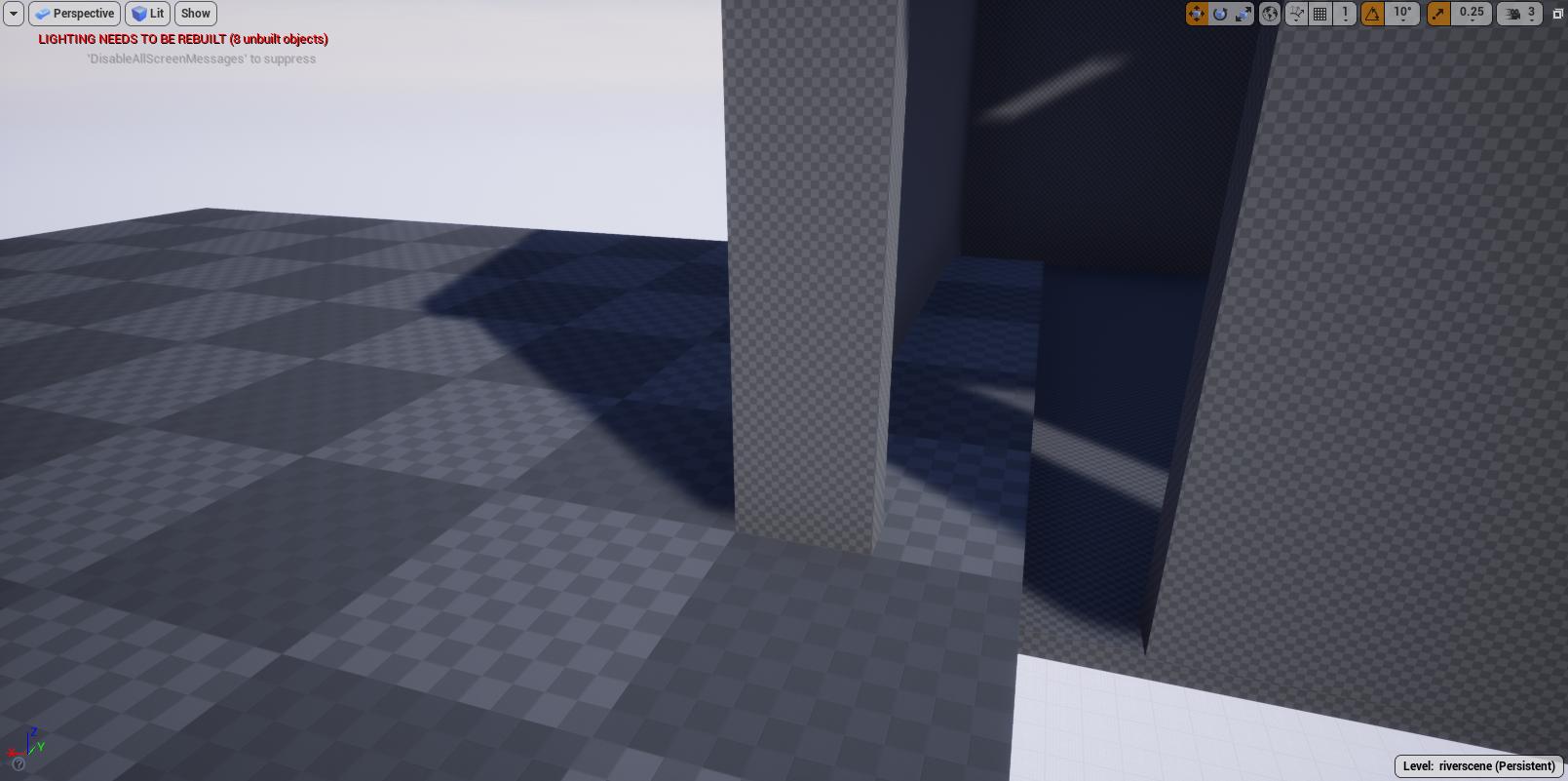
using datasmith to import sketchup model to ue4. The sketchup model has a super small grid when imported, so textures end up the wrong size, anyone know how to I fix this? https://i.imgur.com/N7FBYVo.jpg Would really appreciate any input because I'm new to this and these initial problems are the most demoralising!
 grim ore
I would assume the "super small grid" is the default material on the mesh and your UV map on the model being super odd
so you need to make a more appropriate UV map for the model, or scale up the material you put on it using the texture coordinates
stable spire
im not sure its possible to edit uv maps in sketchup
so I've been trying to fix it using texcoord
but i cant get that to work (im new)
heres a startercontent material i duplicated https://i.imgur.com/eppCWMj.png
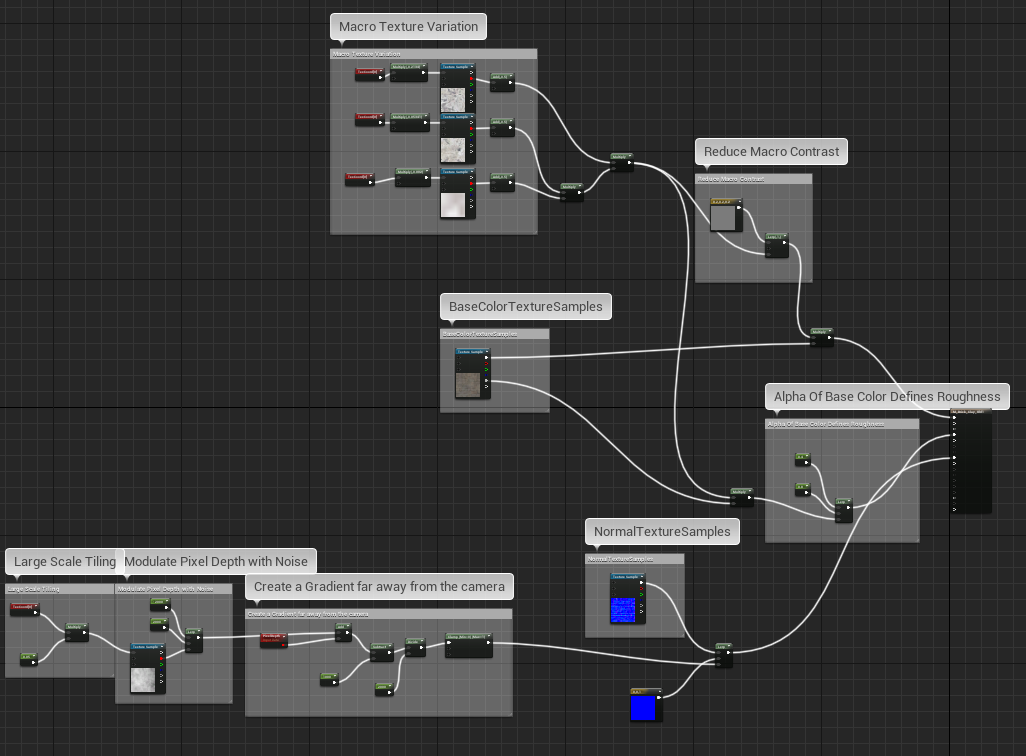
where the hell do i feed texcoord?
ive tried editing all the values in the existing texcoords
and ive tried plugging in a new one in various places
ive literally been at this for hoursand now I'm here to beg for help!
grim ore
it looks like there are already texture coordinate nodes in there, adjust the U and V tiling on them
if this is a normal material without all the fancy stuff the texture coordinate node goes into the UV input on the texture sample
stable spire
there are 5 texcoords, some feed into multiply, others done
dont*
there are several UV texture samples
grim ore
okdoke
stable spire
i cant understand why
grim ore
doesnt change what to do
you have more than 1 texture in there
so it might be making one macro texture larger than another then blending them together for more variety
which is exactly what the top part is doing as this looks like a weird variation on a landscape texture
the base color texture sample, more than likely what you "see" when you see the material on the mesh, has no texture coords going into it so it's going to map based on the UV mapping directly which you say is too small. That node should have a texture coords plugged into it with a different tiling value
of course then your normal map should get the same texture coords plugged into it so it has the same scale or it's going to look weird
stable spire
i figured out everything up to the last part on my own, but couldnt get it work so I assumed I was completely wrong
I've plugged the texcoord into the normal sample aswell
and it works instantly
i wish i was exagerating when i say hours of headache
thankyou so much
grim ore
It's ART, ART is hard
stable spire
im really struggling to learn ue because its trivial things like this that just stop me dead
but im determined, thnaks for your help
grim ore
yep yep 😃
stable spire
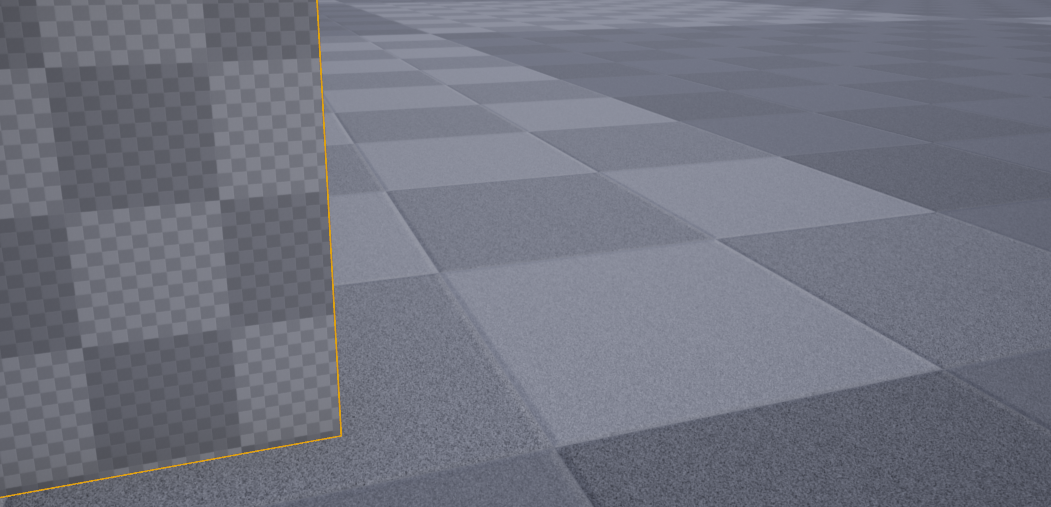
little further question, looking at this https://i.imgur.com/cvmV4tM.png, with the left being the mesh from sketchup and the right being the default floor on a blank level, would you say the uv map on the sketchup is too big or too small?
 forest holly


 grim ore
the uv map isnt too big or too small, it's supposed to be correct for the amount of detail and surface space you want the textures to take up on the model
stable spire
@grim ore thanks very much, it makes sense now you put it in a simple sentence
grim ore
for a tiling texture it's not going to matter too much since you can adjust the texture coords 😃
stable spire
i just need to figure out how to have it import with the correct sizing so i dont have to go about duplicating and tweaking every material i have
wish me luck
stable spire
I think ive found a solution; if i import the model WITH textures, it seems to scale the textured zones' uv maps properly
now i can sleep content
grim ore
nice
stable spire
i tried that before based on something i read online, but it didnt work. now that I was using textures to fix a different problem, the old problem is fixed and i shan't question it because im all out of steam
sweet victory
 sonic pagoda
whats a good console command for looking at what is making up the triangle count in a scene at runtime
abstract relic

Console commands specific to displaying game statistics.
sonic pagoda
dude
i know how to do that lol
and i know how to see the triangle count
i mean
how can i break down
that triangle count
for example in statistics
you can see exactly what makes up what
but at runtime
that doesnt seem to work
how to break down that triangle count?
 normal burrow
break down as in find out whats attributing to it?
unless your certain Reinaldo triangle count may be the wrong thing to focus on if this is optimization related. may want to check overdraw and shader expense
 shy silo
not sure if this is the right place to ask, but how would I go about highlighting the object being hit with a trace under cursor?
 halcyon flame
has anyone ever experienced the focus for certain actors being off center? I was adding some small components (that I've since deleted) and when I press F to focus on these actors the camera blatantly no longer pivots around their center of mass....
sonic pagoda
@normal burrow yeah.. i mean im just confused, if i set my character mesh to hidden, the tri count drops to 30k, and unhidden its 200k, but the character mesh only has 20k tris
so im just confused as hell
to where all those extra tri's are comming from
its a local 4 player game, so having 800k tris is unacceptable (just on the character being rendered).. that is a test map as well.. theres nothing in the scene
abstract relic

Use custom render depth to draw outlines. Pawel's excellent article: http://www.michalorzelek.com/blog/tutorial-creating-outline-effect-around-objects/ Sampl...
normal burrow
unsure how many times a single mesh renders to fill the gbuffer in deferred reinaldo. if your using forward rendering, its possible that the number of lights affecting the model may trigger multiple passes of it
but i've never used forward in ue4, so don't know if it uses a add style specular method
normal burrow
yea, wouldn't hurt to check the docs on it for things to watch out of. not sure how it blends lights.. but most of the time there will be a limit to how many can be drawn on an actor before re-rendering is neccisary
sonic pagoda
just turned light to static and 200k went to 130k so you definitely got me in the right track
normal burrow
shweet
theres probably a point where deferred will perform better, but i'm assuming this is stuff with quest yea? hardware restrictions
sonic pagoda
no im actually working on a pc game right now... i just "figured" forward would be better for a simple top down game
from the docs, ue4 says forward is just faster... but maybe i misinterpreted it
normal burrow
ah yea, only if you intend on limited amounts of dynamic lights
the upshot to deferred is that lighting is handled in a final combination pass instead of per object. completely screen space i mean
sonic pagoda
so for a scene with a lot of dynamic lighting deferred is better?
normal burrow
essentially yes.
just keep in mind that shadows are mostly irrelevant between the two
same overhead afaik
but lighting itself is faster on deferred. you do give up ability to do transparently lit things though
this is my interpretation anyways, would recommend making sure the triangle count correlates to frame time though
sonic pagoda
@normal burrow good point
halcyon flame
asking again in case anyone has ever seen this issue... added an arrow component that completely threw off the CoM of my actor. since deleted but it still doesn't focus on center... anyone ever seen this before?
normal burrow
how you gathering CoM?
halcyon flame
I'm not, I just mean when I press F to focus on an actor, and pivot the view around (I do this a ton) it's clearly off
I have some plain meshes elsewhere in the scene where centering the view still works properly.
normal burrow
hm yea not sure how it collects that
halcyon flame
reverting. I'm turning off save on compile globally. damnit this is frustrating
 upper wasp
I have this inventory button blueprint, so whenever I press a key, it shows the widget, but when i press the key again, it duplicates it, how can I make it so when I press it the second time, it will go away?
 fringe pivot
So if I want to attach different static meshes to a skeletal mesh at runtime, but some of those meshes don't fit properly and need to be rotated or translated in different ways, how can I do this? How can modify them in the editor to fit correctly in the socket?
Figured it out I think.
@upper wasp you are probably just creating a new instance with every click, hard to tell without showing your stuff
What you really need to do is to create the widget just once, and then in your button onclick event you check widget visibility and add or remove it from the viewport accordingly.
 ruby folio
Anyone know of any good resources for setting up melee combat?
versed spear
there is the action rpg example by epic
ruby folio
Does it show off Anim BP's for combat and whatnot?
versed spear
i think so
ruby folio
Will have a look, cheers
still moth
hah.. people consistently making better games with unreal, really triggers the unity crowd, doesnt it?
versed spear
using unreal triggers me lmao
abstract relic
This crowd usually don't take the unity bashing bait. But nice try 😛
still moth
its not bait
versed spear
im hooked the wrong way lack of documentation broken or abandoned systems bug after bug with every new release the list goes on
still moth
i havent had those issues, but i havent been using unreal for a couple months, been busy with other stuff
versed spear
yea its my falt I use paper 2d on a 3d engine
still moth
ive always felt that if someone wanted to make a true 2D game that there are enough great 2D engines that focus on 2D that they'd be better off using
theres so many components devoted to 3D on unreal that i just dont think the outcome would be as good as a polished 2D engine where developers are focusing on that, and that only
versed spear
your right but I do like blueprint system
yea our release is 2.5D
one thing that rely bugs me is texture streaming for flipbooks. It loads the lowest mip map every time it first loads. It looks horrible but there are hacky ways around it.
where? I'm always down to lean new things
never stream is not an option for me btw
tried it does not work in my case.
the way I found around it is by loading the flipbooks behind the loading screen playing through every sprite that will be used in that level
the problem I was having was that they were all being loaded into memory. It caused high ram use and engine ran horribly. So what I did was made all main characters never stream and all monsters in the game stream. That was the balance I had to go with and it runs now at about 700mb ram .
plush yew
is there a way to set world position materials based on the ORIGINAL position of the mesh only, i.e. ignoring any changes made in-game (such as being picked up by the player)
 remote fulcrum
i need some help
i keep getting this error after trying to import an fbx with its own skeleton and animation, i selected "none" in the skeleton menu so it may create it's own, but it for some reason thinks im trying to match it with a different skeleton
it was exported from blender
silent frost
You don't have duplicate named skeleton, maybe?
Also, you have the correct skeleton assigned to the mesh, I presume?
Or is that literally on import that you get the error?
remote fulcrum
@silent frost error's on import, and there was no preexisting skeletons in this project file
and yes, i mean i exported the fbx from blender - the armature and the mesh, the exact same process worked for another model and it's skeleton
doesn't for this one tho
silent frost
Strange that it;s just that one import in that case. Not sure what else to suggest, sorry.
plush yew
@remote fulcrum what's your armature's name in Blender? It must be literally "Armature"
remote fulcrum
ah... it's not armature... tho that didnt cause an issue with the other ones 
autumn elbow
If I have to save multiple variables, lots of it. Why shouldn't I just put all of them in the game instance? It's easier to save and load. The alternative is in the actual blueprints where I have to make duplicate vars, and create functions to assign and save them.
silent frost
Good to know - was that it needed to be named 'Armature' in Blender?
autumn elbow
Best way to save a actor tree? (Actor with added pieces)
I created IDs for everything, but I'm still having trouble packaging it in a Array Struct
The parent/child relationship is difficult to save...and then load.
Anyone have ideas?
autumn elbow
Parent Child Relationship. Cockpit is the main parent and everything else gets attached as diagramed
 meager tinsel
Hey all! Do i need to add a certain plug in to see my call stack for BPs? I've been looking online and only found options for it under Window > Developer Tools which it doesnt not exist for me at that location.
 vivid vale
If I do a divide by 0 will the player's game crash?
 gilded plinth
anyone messed with the experimental midi input plugin detailed here? https://forums.unrealengine.com/development-discussion/audio/117240-setting-up-a-blueprint-midi-manager-with-4-14-version-of-midi-device-support-plugin
Unreal Engine Forums
Discuss and get help with the new Audio Engine, sound design, third-party tools/middleware, and share what you're working on!
I have it 100% working but i'm stuck trying to get clean continuous control data into an anim BP. For some reason I'm getting a consistent repetition of the same value before it changes and repeats the next value. Not sure what I'm doing wrong. If someone could give me a nudge in the right direction i'd much appreciate it!
 coarse turtle
Anyone knows how to fix this issue with Procedural Foliage Spawner? "Unable to spawn instances. Ensure a large enough surface exists within in the volumn"
 wraith field
Hello, I'm looking for some advise on how big a Unreal project can get and if it gets too big will Unreal have performance issues in the Editor?
I am looking at using Unreal for animation. We'd only be working in the Editor using Sequencer. We'd render out of Sequencer and never go into Game Mode. On a large animation project we could have 2500 shots. So right now as we look at Unreal we think each shot would have it's own unique Level and Level Sequence. So the question is, if we put that many levels and sequencer files into the Editor, will the editor performance degrade (get laggy, slower FPS in the viewport?
I unfortunately come from an animation background so i have no idea how big a big game project can get and what the challenges are with a lot of assets in Unreal.
thx
gilded plinth
@wraith field having files imported into your content browser shouldn't have any influence on editor speed, if by editor speed we're talking viewport or overall speed of navigating the ui
placid locust
Hello, I'm having issues with my landscape textures in play mode and I don't know why... help???
ive added 2 pics to show you how it looks in editor mode and in play mode.
play mode
wraith field
@gilded plinth Yes i'm talking about viewport FPS and overall speed of navigating the UI. That's good to know. Unfortunately it seems like some of the folks i work with are very concerned about Content Browser "clutter." There is obviously a clutter problem as it relates to finding what you are looking for but they are also very concerned that clutter will lead to poor performance in the Editor.
plush yew
How come when i built my lighting, my shadows went all badly shaped like this and my grass/ambient occlusion went real dark and weird
 honest vale
because you didn't increase the lightmap resolution on the surces that receive shadows
lighting in UE 4 101
plush yew
But they were fine before,
it was only when i built the lighting
Also before i built the lighting the grass LOD was making the shadows disappear when i got too far but now its like it just broke
sudden agate
Foliage shouldnt use baked shadows
next cloak
yo, physics question for you guys
plush yew
This room use to be lit up normally now its completely black
next cloak
I've got a physics constraint on a box in the air and on the player character
works fine, pawn can swing and all
but setting angular limits to locked will make the pawn swing around the point where it spawned, instead of around the actual physics constraint actor
Im confused 😄
@plush yew shot in the dark but did you check your view mode?
plush yew
Yeah when i walk in there its completely black
sudden agate
An overview of the Lighting example level, example 2.1: Static Light
grave nebula
Was cable component meant to simulate physics of some kind of is it just a visual thingy ?
grave nebula
ai ai cheers
sudden agate
cable component has physics. it reacts to physics collisions atleast
plush yew
@sudden agate So howecome it went from high resolution and correct lighting to super dark lighting and low res shadows from just building the lighting? Do i up the res somewhere to do with when i build?
Like this is what the grass use to look like with the correct shadows and lighting
 vernal relic
This is fog sphere made in post process volume
This is post process material, how to make all black transparent like additive blend mode?
 rustic imp
guys
my camera yaw only rotates in like 45 degree angle max
did I turn something on accidentally
vernal relic
where
sudden agate
in your material
placid locust
Does anyone know why my landscape looks different in editor mode and play mode?
 teal tulip
Is marked as visible in game and that ?
placid locust
Sure
 meager loom
hey
i have a question : i have intel i3, 8gb ram and nvidia 750ti graphics card. Will that be enough to start with ue4 ?
and my friend got the same besides he has intel pentium
cloud cobalt
Should be enough to start it, though of course you might feel limited
cloud cobalt
Stuff like using C++ or static lighting will definitely make you want better hardware
plush yew
ive a nvidia 480
cloud cobalt
Basically the best hardware you can buy is what is recommended
 ember notch
Is it hard to make a open world game or a game like Red Dead Redemption 2?
plush yew
might be 470 dont think 480 exists lol
wary wave
@ember notch - that game took a team of hundreds of professionals several years to make
cloud cobalt
@ember notch Well, how many people were needed for that
^
Looking at the credits menu for every game is a good metric of "can you do it"
And "how much time will you need"
sudden agate
@ember notch yes, but dont expect it to be good in 2 years if you are working alone
sudden agate
depends on you
Open World(tm) isnt something you should be developing anyway. only professionals should work with Open World
 supple tide
Hey Fellows i hope you guys are fine 😃
cloud cobalt
@ember notch Puzzle games would be an excellent start
supple tide
i am facing a little problem in sequencer, can i discuss that here?
wary wave
you could, but there's also the #cinematics channel
supple tide
I am facing this weird problem with the sequencer renderer, can any one help me, what is causing it go un responsive?
Please watch the video for better understanding. it is only few seconds long
Everything works perfectly, but when i press render it stop working.
still moth
hey, do you guys all use multiple monitors when youre using unreal engine? how beneficial is it?
 thorn vector
can increase productivity
i use one screen for main game view one for the other stuff
still moth
what size and resolution screens do you have? because i do some live streaming and i want to add a couple monitors so i can monitor the stream, chat, etc as well.. but im wondering what sort of requirements i should consider if im going to use it for game development as well.. my plan is to add a couple 16" monitors mounted sideways to the ends of a 27"
so, they wouldnt be full size, full resolution monitors, so im not sure i could really put the game view on one of those
wary wave
I struggle to work without two displays
I would personally lean towards three 22" displays
still moth
im getting a 27" 144hz 2k monitor soon to act as my main display
so, id need something to go with those, my idea was the vertical mounted 16" monitors which, when mounted vertically, would have the same height as the 27
 blissful trail
is it possible to show the files in a specific folder inside of a widget ?
blissful trail
like a menu
still moth
and folders that are actually part of your PC, right?
blissful trail
yes
still moth
i dont know specifically, but i'd imagine so
blissful trail
also is there any way to have an auto update system
cloud cobalt
Updating is not a game feature, it's a distribution paltform feature
Steam, console, phone, your own launcher if you're not selling through a store
vernal relic
This is fog sphere made in post process, i need to fix 1 problem, it can be seen through the objects, how to fix that?
this is post process material
plush yew
how long to get a game on steam, once they verify my tax info
is it easy or hard? not talking in terms of success I mean just technically getting it on!!!
 wide gorge
it doesn't take long, they can review the build files quickly to make sure it runs - the biggest thing is you need to have a visible pre-purchase store page for awhile before you can release it
plush yew
ok but would I be okay with just a zip downloadable file, it says I need to do weird stuff with steam sdk or something
wide gorge
no - you'll have to use their system for uploading builds
wide gorge
not really, you just use some simple little app to bundle and upload the files
plush yew
ok
i get like 10 hours free a week and i just want to release this thing especially as i have now paid rofl
wide gorge
they have pretty good documentation on it in the Steam Partner website
yea I know the feeling, it's easy to release on somewhere like itch or gamejolt with just your zip
lament slate
Hey guys
When I change my camera angle the cross hair moves but the gun stays in the same position
So how to move the gun with the camera
lament slate
@honest vale But if I attach my camera to the gun the screen doesn't move
I mean with the mouse I can't rotate
Horizontally or vertically
wary wave
other way around
lament slate
I don't understand if I attach the follow camera to spring component to the character it works properly ,but I can't move the gun direction I mean the crosshair moves with the camera but the player stands just like the eye button in pubg
But if I attach the follow camera to the gun ske.mesh or to the character directly I can't do any camera movement
@wary wave How
lament slate
Yep
wary wave
in which case you need to determine the aim direction and everything else is handled in animation
this is not a 'one line answer' kind of deal
Using an Aim Offset, a character aims a weapon in the direction of your mouse or controller.
lament slate
But wait I can just make it fpp by attaching the follow camera to the character right @wary wave
But if I do that the screen doesn't rotate with the mouse
 silver edge
What's the worst that can happen if I don't update UE4?
cloud cobalt
Not much ?
If you don't have any bugs and don't need a particular new feature, it's fine to not update
silver edge
I would like to have one huge node with references to all assets in my viewport. Can I do that and how?
lusty carbon
Urgent! I need source tree masters to help me recover a disastrous loss
serene birch
you mean git ?
lusty carbon
yes
serene birch
git reflog
serene birch
you made the commit? good
lusty carbon
Lost all of it. it's not in the list
serene birch
once you make a commit, it's saved in your local git repository for a long time
and you can use git reflog to track it
lusty carbon
serene birch
it basically shows you the "history" of your locally selected branch
lusty carbon
how does that help me?
serene birch
try the gitk <stuff> command to find your missing work
lusty carbon
serene birch
where <stuff> is the hex code in yellow
lusty carbon
as you can see here my latest commit appears to be 23 Jun
I must have done something wrong. how can I revert this?
serene birch
I think your work is in the commit of the second line
lusty carbon
what second line. It's 19 Jun
serene birch
nah I mean in the git reflog output
serene birch
try the gitk 545fefb command and see if that's what you are looking for
btw here's the Atlasian tutorial for the git reflog command in case you need it : https://www.atlassian.com/git/tutorials/rewriting-history/git-reflog
Atlassian
Reference logs, or "reflogs" are a mechanism Git uses to record updates applied to tips of branches and other commit references.
serene birch
the first commit is your missing work?
serene birch
then you can probably just cherry-pick it
git cherry-pick 545fefb could work
if you don't have some conflict 😃
lusty carbon
I sure hope your right man
serene birch
no it's not gone because you have it's ID 😃
lusty carbon
cause it's a month progress
cloud cobalt
If you have a month worth in a single commit you're doing it horribly wrong
But it's still not lost
lusty carbon
ok, how do I save it from here?
serene birch
you are more than one person working on that project?
lusty carbon
just me
serene birch
from what I see, your missing commit was built on top of work done the 2019-06-19
and your master branch has one extra commit done after that
lusty carbon
ok...>?
serene birch
that "broken commit" do you know what is in it?
lusty carbon
Im a total git noob brother. I need practical guidance to recover my stuff
serene birch
it's the name of the most recent commit you put on your master branch
well recovering your stuff requires know what's in those two commits because they conflict together it seems
serene birch
are you ok to lose that work? (I just say that cause then it's super easy to restore your other commit)
though it will never be really lost either
(at least for two weeks)
lusty carbon
I do have this tho. the Staged files are my latest stuff but im too scared to touch anything at this point
Im okay with losing anything as long as it restored to my latest work precisely
@serene birch I'm willing to give you remote access to my computer if need be. anything
cloud cobalt
First, make sure to make a copy of your entire project in its current state somewhere (that will include the git repo)
Then Git doesn't love local changes when doing operations
You just chery-picked something, so I have no idea what the current state of your local copy is - it has conflicts, too
serene birch
something I don't like in Sourcetree is that it makes it pretty hard to see you are doing some operation 😢
cloud cobalt
Did you have local changes before runnign commands here ?
serene birch
use git cherry-pick --abort to cancel that
he gave a screen of sourcetree earlier that points to seemingly no local changes
lusty carbon
what do you mean local changes?
I feel like I had overridden an early commit or something. no idea what I pressed I was distracted while doing it.
and now im left with a month old version
serene birch
the cherry pick I asked you to do conflicts so it's best to "clean up" the state back by aborting it