#ue4-general
1 messages · Page 467 of 1
 next badger
 wintry glade
good morning guys. I am working on a stream engine in UE4 to control my studio and trying to find what would be the best way to get in-game events from fortnite client and convert either to midi data or something similar. I am trying to create events on DMX robotic lights when something happens, for example when the player gets a kill, the lights will go nuts in the room.. or something.
I can't find what would be the best way to get live events from Fortnite client
 teal tulip
Don't think you can get the game events ?
Other than with a injector thats illegal ?!
wintry glade
an injector is the opposite of what I am trying to do though. The client grabs event data from the network, that's all i need.
 plush yew
@regal mulch https://forums.unrealengine.com/development-discussion/blueprint-visual-scripting/1624078-help-with-servertravel-crash-for-clients-since-4-22 https://answers.unrealengine.com/questions/899424/help-with-servertravel-crash-for-clients-since-422.html
Unreal Engine Forums
i'm Blueprint only.
I'm getting some kind of error about an array sometimes (sometimes the crash prompts the ue4 crash reporter to pop up), other times i've just
seems like a similar issue to what I was experiencing but I didnt find a good resolution. I finally found the files that were causing my issue and had to re-migrate the project without the files. It was weird though because I couldn't find any references or anything even related to the files or why/where they were even being called
wintry glade
oh, nvidia's overlay is getting events from fortnite client. NVIDIA graphics get live events from fortnite to record a replay.
 regal mulch
@plush yew Hm, yours looks like it's caused by a Particle Component?
And after a ServerTravel, ours is on alunch hm
Ours seems to happen on GarbageCollection
wintry glade
hmm does fortnite write live in-game events at the replay file? maybe I can read the data from that
 wooden cypress
heya, just joined. a bit overwhelmed about the amount of channels, so not sure where to go with the questions I have
I have some about the .ini files, where should I go with these?
regal mulch
Could probably just post here
If it goes too much into one direction we can still redirect you
wooden cypress
okay, I have read that configuration files should be able to edit any property with the config type, but I have some integers that don't seem to change at all when editing the config file. Other values work just fine under the same section, so I'm not sure why that happens
wooden cypress
It's not my project but I'm trying to understand how things work, I have read the config documentation and it's not very clear by seeing the results
in the same class, there are several integers with config type, some seem to change the behaviour ingame, others don't
"config int lvl" vs "config int xp"
 safe rose
You can do config variable in BP also
So is this in C++ or BP?
Also, how are you determining that it's not being properly set?
regal mulch
Well the base form of any config class/variable is this:
UCLASS(config=GameUserSettings)
Where GameUserSettings is the ini file you are targeting
And then each variable being defined like this:
/** Window PosX */
UPROPERTY(config)
int32 WindowPosX;
This is a direct copy/paste from a UE4 Engine file
wooden cypress
I think it's an older version of UE, not sure how to tell the difference in the code between bp and c++, looks like c++ to me
regal mulch
Blueprints is visual coding
safe rose
You'd know the diff instantly
wooden cypress
yes, the class has that "Config=", as I said, changing some of the keys in the .ini do change the values in-game
and both the keys/variables I mention have the config too
regal mulch
Not sure then. It should def work if the variables aren't changed somewhere else
wooden cypress
hmmm
I guess they might be changed by some function elsewhere in the project then, I'll check better
 sleek spear
i want to make a character or pawn, like the default one where you float in the air, look with the mouse and move with the keys, how do i do that?
 misty creek
Create a new BP in the content browser and select Spectator Pawn as the class it should inherit from.
sleek spear
@misty creek thanks, it works
 topaz thunder
is there a section were i can ask for help or can i just say it here? (i just joined and can't find a help room)
misty creek
No problem. 😃
That depends on what you need help with
If you need help with blueprints try #blueprint
topaz thunder
oh ok ❤ i recently started UE4 (from unity) and i found the "Post Processing" tab on player camara and when i change the things i can't seem to see the changes in preview is there a way to prevew Post Processing?
sleek spear
well, it is very hard to customize though, the spectator pawn @misty creek
misty creek
@topaz thunder There probably is a way to preview it, but I do not know how that is done. People is #graphics might have a better idea as to how that would work.
@sleek spear What are you trying to customize?
topaz thunder
Alright thanks for responding!
misty creek
Can't you just override the function you want to change?
Sorry I wasn't of more help
safe rose
Sigh... when you forget to disable VR plugins on new projects (or other projects that forget to do it) and they are all Non-VR projects and you hit Play... makes you wonder why Epic hasn't changed the default for that by now.
 visual belfry
goes to do that on his most recent project 🤦
visual belfry
I don't have any vr software installed anymore, but yeah..
safe rose
They take 5-10 secs to load
 maiden swift
^Part of why I started making my own project templates.
 polar hawk
holy fuck that pink is bright
safe rose
PewPew
Get yours now
Yeah, I have a VR Project Template myself
But I guess I should do a Non-VR one
visual belfry
boosting a partnered server 🤔
polar hawk
we now get that sweet sweet higher voice bitrate for our bustling voice channels
safe rose
oh btw @maiden swift where's the animated icon?
just make it get smaller and bigger or loop around it self 😉
visual belfry
make it morph into the unity logo
safe rose
^ rofl
polar hawk
just use this
safe rose
only server I know that has one
polar hawk

visual belfry
@polar hawk oh crap, now they're out of sync
 visual belfry
destructive nod interference
safe rose
is the Playstation one
polar hawk
maiden swift
We're still sorting out how to best address server boosting. We didn't have much time to prepare before the feature went live for everyone.
safe rose
Well, I hope the color will be addressed
polar hawk
best address it by using my face as the logo
visual belfry
clearly we need more memeotes stat 👍
safe rose
At the very least, give us a poll to choose what Color for Boosters
 sage grotto
hey guys I have a question for you I want start learn UE4 but I dont know what I should choose blueprint or C++
thanks for help
plush yew
can anybody think of a way i can mirror a whole map without using planar reflections
so certain objects arent there but when you look at the ground you can see where they are
 tall pendant
for smaller parts you could use the oldest trick to get reflections. mirror geometry.
its limited sure but still works
plush yew
yeah only issue is the floor is concrete with water ontop
tall pendant
should still work if you vertex paint the non reflection parts
i guess i could give it a go this weekend
sage grotto
Dizco can u help me
tall pendant
depends on what you want to achieve really
i'd say BP is fine for starters or artists
 tall pendant
aye.
plush yew
i was thinking about a giant scenecapture2d and then use "owner no see"
but that just seems like the biggest pain
 heavy ether
@topaz thunder there are many possible points to adjust post processing at. Easiest way, IMO, is to drop a PostProcessVolume into your level, set the "Infinite Extent" property to true, then start playing. That should cover the world, and doesn't require that you have a player camera.
 spare sun
isn't there an option to encode them or smth
 slender vale
Tips and tricks on grass?
tall pendant
put it in a vaporizer
tall pendant
So am i. 😄 For foliage you def. want to minimize overdraw. I'd say use meshes with a slightly higher polycount instead of just planes with translucent materials.
spare sun
theoretically it's possible to extract them from vram anyway no
 calm widget
Does higher polycount reduce overdraw? I'm not sure how it works. I got MASSIVE overdraw on my grass
tall pendant
if you shape the geometry properly it does.
obv. just adding more vertices won't reduce overdraw 😄
 upbeat tendon
why can't i get the data table row by row number?
calm widget
Cool, got any reference what is proper for grass? I just got 4 planes rotated in a circle with a few segments through them.
upbeat tendon
seem the data table is more like a hashmap
 wary wave
they don't have numbers, they have keys
visual belfry
yeah they literally are maps under the hood
upbeat tendon
ah well i will just make a quick update and add a key,
i guess it won't matter if i change things that way
 dim dragon
Kind of a dumb question. How do you ensure two objects are aligned in a camera-view and both are in the middle of the screenish even if one object is significantly closer to the camera than the other (where parallax will make the camera closer to the nearfield object)? I've been experimenting with projecting world to screen and doing offset calculations accordingly but it makes this kinda yucky rubberbanding effect. https://blueprintue.com/blueprint/tet1d_i5/
BlueprintUE
 sage tree
Work station upgrade! Did it mostly for UE4.
heavy ether
you'll want to bump that center display up enough to fit another display under it
dim dragon
Yeah also what feels aesthetically tidy isn't always the best workspace. Best lesson I ever got was whack a 4K in the middle and keep all of your important shit on the bottom row because if you look up, you hurt your neck.
https://cdn.discordapp.com/attachments/414860403064176643/565973427823968267/image0.jpg
 heavy ether
dim dragon
heavy ether
dim dragon
Fuck yeah keyboard
https://cdn.discordapp.com/attachments/414860403064176643/565973652219363337/image0.jpg @heavy ether yours a Model M? I'm using an Apple II Extended, which is what I grew up on.
 heavy ether
i actually do have room illumination, but the displays make the phone overcompensate
dim dragon
Ye
heavy ether
USB Model M from around 1996 i think
dim dragon
Badass.
I love how I've got my desk all nice in this shot but truth be told its a sodding mess
Mine looks like yours w/ paper everywhere, notes, odd things here and there etc
PRODUCTIVITY IS MANY MONITORS, LOTS OF MESS AND A CHONKY KEYBOARD
lmao we even have the same webcam
uncanny
heavy ether
my mess is temporary, i hope. my household is in the process of moving our two side businesses out of our house, which will get rid of a ton of clutter, and then i'll care if i have junk
but since you pointed it out, i did just throw away the candy bar wrapper and napkin from lunch
😃
i questioned the usefulness of 4 monitors for quite a while, after i upgraded from 3, but once i got back into unreal, it became quite useful
 hidden aurora
Damm the setup
heavy ether
i can't take a picture of it, but due to my job until recently involving smart tv functionality, i have 3 more regular sized displays to my left, and a pair of 50" displays to my right
 mossy nymph
i find 3 is just right for the editor or VS, but then you need 4th for miscellaneous stuff
heavy ether
it looks like a tv manufacturer setup in my house. which is kinda what happened. unfortunately, i can't use these displays for much of anything
 manic pawn
mfw everyone has more monitors than me
manic pawn

heavy ether
"productive" .. i'm just doing compiling today.
manic pawn
your pc is very productive today
 nocturne knot
anyone know if it's possible tolaunch a python script in ue4 from outside ue4 ? i.e from pycharm etc?
I tried with commandline, but that opens a new project 😛
if only could use commandline on current open project
mossy nymph
nocturne knot
I did ask if people used much pythonin there but channel seemed bit quiet so i tried to ask here seemed bit busier 😛
 woven flax
Hey quick question, anyone know how to change the default unreal engine grid scale? basically right now a 1 "meter" cube is 100 units across, and i would like to change the unreal grid system such that the same cube would be 1 unit across
wary wave
1 unit = 1cm in the physics engine
woven flax
i am aware, im asking how i can change that such that 1 unit = 1 meter instead
plush yew
how do you prevent your character from being shot far away?
like an abrupt movement of an object
 tender rose
@hidden aurora try deleting the intermediate, binaries, DerivedDataCache and Saved folders
and reopening the project
if you are using your custom built engine (built from source)
you should try rebuilding, or clean and rebuild (I know, quite a hassle)
Most of the time when I have seen this issue is when I am using my custom built engine, with a project that is also source (C++)
hidden aurora
How hard rebuild form source is it
tender rose
@hidden aurora thats's why ask, are you using your own custom built engine (from source) or just using the one from the launcher (installed binaries)
also, is your project c++ or blueprints?
hidden aurora
Im using default engine but the project isnt mine ivde downloaded it. I t was orignialy 4.15 but someone upgraded it to 4.21
UE4Editor.dll is modified i think
tender rose
on the project?
hidden aurora
That one is the problem i think
I bought it and someone modified it so it was usable in 4.21
 wary barn
Hi all! I've got a question. I want to move all the assets(~100-150) in a level by a specific amount of units. Is there an easy way to do this?
heavy ether
select all, move them
wary barn
Yes, but that doesnt allow me to move them by a specific amount of units?
visual belfry
are you moving by 100 or 102.67321
the first case is pretty easy with selecting all and turning on grid snapping
 rotund scroll
I can't remember if it works, but what you could try is addition in the movement box
visual belfry
I don't think it'll work when the box says Multiple Values
wary barn
yup that is my problem, otherwise it'd have been easy 😛
But I managed it by moving 1 ref object to the correct location
then moving the rest according to that ref object and changing the grid snap to 1 unit instead of 10
its now close enough
visual belfry
👍
wary barn
made it a case of not letting good enough turn into an enemy of perfect
 grim ore
if you want to do this in the editor, this is a good use for the Editor Utility Widget 😃
wary barn
I'll check it out! Thanks all for the answers!
plush yew
Still don't understand how to move the chain. :(
Did you guys have any tutorial to move gear like this?
spare sun
ur probably better off animating it separately, moving it link by link will be a pain
dim dragon
How do I get the bounding box for two actors or points where the points of the box is rotated to say, match a camera or an arbitrary rotation?
All I want to do is centre the camera on two objects, without which is in the nearfield and which is further away causing the camera to not centre them in screenspace blaaah...
 cyan bough
Everything I look at says this is how you make the AI chase you. However the self node won't hook up where it's needs to. How do I write this now in 4.22?
mossy nymph
your simple AI has to inherit from AAIController in order for Self reference to be compatible with AIController pin
 digital anchor
or from a pawn (assuming its a npc), and using GetController()
topaz thunder
does anyone know how i can make the emmision not effect my image?
you can see only a faint of the cracks
i want it to look like just the white and the cracks just on top of it withought being the slightest effected by the glow or whatever
digital anchor
multiply
topaz thunder
ill try that
wait how do i remove the little rope things that connect nodes?
i presumed its delete but it dosent do anything
digital anchor
alt + click the node's pin
topaz thunder
thank you sorry im super new xD
hmm the cracks seems to appear a bit blue but the cracks are wayyy more visable so thats something
(the cracks are all black but have a white background)
so im not sure why it appear a bit blue
next badger
@topaz thunder i think it's not blue, it's just your color is 1+ brightness, and due to color profile white above 100% is emitting bluish glow
topaz thunder
oh
can this be solved?
oh wait
one sec
u just told me what i had to do
sorry
and thanks so much!
i dident even notice i added color to basecolor o3o
next badger
also, try to set roughtness to 1
topaz thunder
how do i add a vector1?
next badger
to eliminate specular reflection
topaz thunder
i cannot seem to find it
next badger
just make 1 vector and plug it in the channel
plush yew
where the peeps
 soft thunder
where the peeps
cyan bough
@mossy nymph @digital anchor ty both
next badger
@topaz thunder to make nodes you could use hotkeys, like 1-4 and some of the letters
topaz thunder
oh that makes life much easier. Thanks a lot!
next badger
@topaz thunder also, right click is for opening a search popup
topaz thunder
i always press space thinking itll bring up the search popup but it just refreshes since in unity its spacebar to open it xD
(im from unity)
next badger
@topaz thunder yeah, seems my fault there...i always thought it's a space, it seems it just became a habit
next badger
i'm using Substance Designer...probably that;s the reason -_-
hidden aurora
Im currently attaching the rifle to a socket that is a child of the r hand. But how can i make the rifle to "sitck" the other hand so that it follows the animation
 stoic moth
hello, about what size is normal for a 4k texture? looking at the Size Map for an asset of mine i get around 13 MiB for normal map and around 25-27 MiB for Albedo and same for the channel independent MetallicRoughnessOcclusion texture
if i dare export the texture out of UE4 it goes to 50 MiB (the albedo one for example)
tall pendant
~22mb is normal for an 4k (dxt5 compressed)
stoic moth
aha
 honest vale
@hidden aurora use IK to put the hands where you want them
Inverse Kinematic systems allow for reactive animation, such as foot placement on non-planar terrain.
woven flax
hi everyone i could use some help here, i need to figure out how to call (from a c++ class) the unreal engine blueprint function from procedural mesh component that generates a box of a specified size, problem is i cant seem to find the file in which that function is defined, any help would be appriciated
 autumn socket
how can install the unreal build for UWP in this link https://github.com/MICROSOFT-XBOX-ATG/MICROSOFT_UWP_UNREAL
on second thought i think imma stay away from uwp
 ember notch
I have my own open world game see #work-in-progress
 grizzled coyote
anyone else having problems with Blender shape keys not importing into UE4 4.22 and not showing up at all?
 subtle bloom
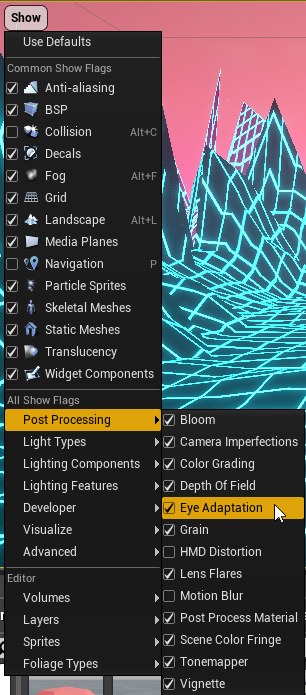
Any idea why my scene is always bright even when I turn off off the sky lights?
honest vale
because you're probably using stock eye adaptation settings
grizzled coyote
yer try this https://i.imgur.com/15fEwYO.png
 subtle bloom
@grizzled coyote that's checked on already
 forest solstice
@subtle bloom do you hve sky light lowered?
subtle bloom
I had the scene baked already that's why It wasn't changing
honest vale
check the eye adaption settings
by default the lower limit is really low
or just set the viewport exposure to something
 willow void
Ive followed 3 or 4 different tutorials and the displacement ends up the same.. ripping apart my mesh. Ive also tried about 5 different textures with there displacements.. Could the problem be with the mesh itself ?
 static raft
Hello! I've setup a packaged pixel streaming example (based on the third person example) on a AWS instance (G2.2xlarge). When I try to run the exe shortcut I'm getting this error:
Fatal error: [File:D:\Build++UE4\Sync\Engine\Source\Runtime\RenderCore\Private\RenderingThread.cpp] [Line: 826]
Rendering thread exception:
Assertion failed: Result [File:D:\Build++UE4\Sync\Engine\Plugins\Experimental\PixelStreaming\Source\PixelStreaming\Private\NvVideoEncoder.cpp] [Line: 189]
Unable to create NvEnc API function list
I've installed the prerequisites. The packaged game works fine on my main computer where I have UE4 installed but for some reason it throws this error on the AWS instance.
next badger
@grizzled coyote are you talking about importing morph targets?
 sullen wraith
am I able to select all of one actor in the editor, and replace all selected with a different one?
next badger
@sullen wraith yes, right click the selected actors and find "replace" (you need to select target actor in browser)
sleek spear
in a spectator pawn, i want to add roll functionality but not just that camera roll (because if i roll only the camera, its very hard to control the character), i want the whole actor to roll, how do i do that?
hidden aurora
@honest vale thanks ill have a look
 scarlet charm
anyone here experienced in C++ and Windows API?
 sudden agate
tga doesnt use 16 bits afaik, atleast the specification only states 32 bits for a single image pixel
and i dont liike png because of the Photoshop alpha shenanigans
(I am talking about 16 bits per channel btw)
 flat idol
Raildex, imported heightmaps does use 16f afair. Probably higher resolution is also possible with tiffs. Are you sure you cannot import regular images with similar properties? Guess HDR images should be 16 bit as well per chan?
scarlet charm
so i cannot build or open my newly created C++ project with error
-waitmutex" exited with code 5. Please verify that you have sufficient rights to run this command.
any ideas for a solution?
hidden aurora
Im using FABRIK node to move the hand to the desired location
next badger
@scarlet charm lot of reasons, file is running, uac kicks in, not running as admin etc
generally this means "access denied" in windows
scarlet charm
ok
next badger
@scarlet charm even that https://forums.unrealengine.com/development-discussion/content-creation/106792-waitmutex-exited-with-code-5-please-verify-that-you-have-sufficient-rights-to-run-this-command
Unreal Engine Forums
Talk about Level Design, Static Meshes, Physics, and more.
 steep garnet
Hi! I would like to start learning 3d modelling, but I don't know from what tool to start. I've heard that blender, maya and 3ds max are best modelling tools that interact with gamedev. However, I'd like to know which one is better and which is the easiest one?
 proven ivy
blender 2.8
next badger
@steep garnet max is easier...blender is free, maya is industry standard
both max and maya(not LT) are expensive af
tall pendant
Maya is mostly used in VFX and Animation tho. I'd consider max the industry standard for modelling.
then you have the odd birds like Modo and such. And ofc some even more specialized tools.
steep garnet
As I understand, if you learn one of these it won't be a problem to get into another one, yes?
proven ivy
no
next badger
My friend is in AAA, he says everyone uses maya. He was max user as well.
tall pendant
Yes. The principle is always the same.
proven ivy
if you learn on blender 2.79 you will have a gap to cover to adapt to other tools, but Blender 2.8 is close enough
tall pendant
@next badger Well, i was (still am) a Maya user aswell. So yeah it's used for modelling aswell in some places.
I'm still in the process of switching to Modo
proven ivy
maya was essentially created to cover rigging and animation
tall pendant
But max was No.1 in the Studios. granted i left years ago...things change quick in gamedev hehe
proven ivy
because max is not provided at modeling schools
next badger
yep, i've always used max when worked in studios, time has changed -_-
steep garnet
I've got a student license for 3ds max and maya. And not considering about money ..
Thanks for you answers!
next badger
you will be eventually...either buying one or using "sea rover's" version
scarlet charm
ok, so i took out the C++ source and readded and the error i get in engine is this,
An explicit Category specifier is required for any property exposed to the editor or Blueprints in an Engine module.
just starting to learn C++, so that's why the many questions.
proven ivy
you need to clear the precompiled header
scarlet charm
ok.... how? open it in VS?
proven ivy
you need to delete the Inc folder in {ProjectName}/Intermediate/Build/Win64/UE4Editor/
scarlet charm
there is no "Inc" folder at that location.
proven ivy
? It should be there if you are compiling the sources
scarlet charm
well ue4 doesn't even compile the source, that's where the error comes in.
 cloud cobalt
Is it a Github build ?
scarlet charm
ue4 says source compile error, or couldn't compile source code, or something like that
no its not
cloud cobalt
You can't rebuild launcher builds
proven ivy
I guess it's a project
scarlet charm
yes it is a project...
cloud cobalt
Did you make changes to the engine ?
scarlet charm
no
proven ivy
well try to delete .vs, Binaries, DerivedDataCache, Intermediate, and Saved folders
then right click projectname.uproject and generate visual studio project files
proven ivy
then launch VS
scarlet charm
alright, her is my VS build error
cloud cobalt
The actual error in VS
Nah
Nt the error list window
Output log window
Should be around 20 lines
scarlet charm
1>------ Skipped Build: Project: UE4, Configuration: BuiltWithUnrealBuildTool Win32 ------
1>Project not selected to build for this solution configuration
2>------ Build started: Project: CinemaVR, Configuration: Development_Editor x64 ------
2>Creating makefile for CinemaVREditor (no existing makefile)
2>D:\Program Files\Epic Games\UE_4.22\Engine\Plugins\Marketplace\RunebergVRPlugin\Source\RunebergVRPlugin.Build.cs : warning : Referenced directory 'D:\Program Files\Epic Games\UE_4.22\Engine\Source\RunebergVRPlugin\Source\Public' does not exist.
2>Parsing headers for CinemaVREditor
2> Running UnrealHeaderTool "E:\Unreal Projects\CinemaVR\CinemaVR.uproject" "E:\Unreal Projects\CinemaVR\Intermediate\Build\Win64\CinemaVREditor\Development\CinemaVREditor.uhtmanifest" -LogCmds="loginit warning, logexit warning, logdatabase error" -Unattended -WarningsAsErrors -installed
2>D:/Program Files/Epic Games/UE_4.22/Engine/Plugins/Marketplace/CuteCodeAccess/Source/CuteCodeAccess/Private/CuteCodeEditorSettings.h(18) : LogCompile: Error: An explicit Category specifier is required for any property exposed to the editor or Blueprints in an Engine module.
2>D:/Program Files/Epic Games/UE_4.22/Engine/Plugins/Marketplace/CuteCodeAccess/Source/CuteCodeAccess/Private/CuteCodeEditorSettings.h(22) : LogCompile: Error: An explicit Category specifier is required for any property exposed to the editor or Blueprints in an Engine module.
2>C:\Program Files (x86)\Microsoft Visual Studio\2017\Professional\Common7\IDE\VC\VCTargets\Microsoft.MakeFile.Targets(44,5): error MSB3075: The command ""D:\Program Files\Epic Games\UE_4.22\Engine\Build\BatchFiles\Build.bat" CinemaVREditor Win64 Development -Project="E:\Unreal Projects\CinemaVR\CinemaVR.uproject" -WaitMutex -FromMsBuild" exited with code 5. Please verify that you have sufficient rights to run this command.
2>Done building project "CinemaVR.vcxproj" -- FAILED.
========== Build: 0 succeeded, 1 failed, 0 up-to-date, 1 skipped ==========
cloud cobalt
Thanks
CuteCodeEditorSettings.h(18) : LogCompile: Error: An explicit Category specifier is required for any property exposed to the editor or Blueprints in an Engine module.
^
Fix that
scarlet charm
yea, im using cute code accessor from the marketplace
 jade hawk
I have been following the inventory system tutorial from UnrealGamieDev. It's a bit outdated but I have managed to get the inventory stuff working, I know the inventory works from debug print stings. I moved on to creating the UI stuff. The way he casts the nodes just does not work in 4.22.2 I tired my best to recreate it using the nodes available. Any suggestions on where I went wrong? Im sure its happening from the slots panel array section which is where it differs greatly from the old 4.12 tutorial.
Thank in advance for any suggestions.
hidden aurora
Does someone knows why the weapon "vanishes" when its near the camera?
 versed spear
Anyone know how I can handle this tool tip widget issue I am having. I have an overlay that has a tool tip widget bound to it. The tool tip triggers when I hover over over the overlay. The issue I am having is that on Android I can not hover over the overlay so the tool tip does not get triggered. I would like to get rid of the binding and change to show the tool tip with a mouse up override. I just wish there was other options for the binding on the overlay but it only works when hovered.
If I remove the tool tip binding and call the get tool tip function from the mouse down override I am seeing the print fire then it calls the tool tip function but the tool tip is not showing.
flat idol
@hidden aurora It's called near clipping, and it's set to be 10.0 or something, which is why anything close to the cam will gets clipped. You can adjust the near clip to 1.0 but distant objects will start flashing etc. Also the left hand IK is kinda looks bad, you might want to adjust on that. Not related but noticed.
versed spear
lol my bad. I guess the binding on the overlay handles adding and removing the tooltip from the view port. I was able to just add add to viewport to the function and it works now.
 lilac wedge
im trying to make a large space game and not too sure how to go about it. Problem im facing is the size of the map. I would like players to be able to fly from one solar system to an other but no sure if its possible to do. Instead would i have to have two solar systems in seprate levels and the player will have to load between the solar systems?
versed spear
That depends on how big your levels are if you want to split them up. You should be able to get away with big levels if you set up streaming levels right.
lilac wedge
I really could prefer everything to be on one map but this seems really unrealistic. I would like to make the solar systems as large as possible. Dont know if youve ever played no mans sky but i would like at least 3/4 solar systems on the same scale.
For the leveling streaming would you suggest having one solar system per level or one planet per level?
visual belfry
you could have each planet in a streaming level with its own skybox
unreal might break down at typical solar system scale (:
hidden aurora
@flat idol thanks, i know it looks bad but working with animations and weapons and ik is not easy
slender vale
LOL
rotund scroll
that is memeable
scarlet charm
who would like to assist myself in a small scale VR project?
rotund scroll
 pallid flint
Thinking about making a Service, where you can store information on users and such for ue4 developers. Since man I keep getting contacted to help peole setup sweb servers for their games XD
 high musk
quick question , how to change my keyboard to azerty inside of unreal ?
grizzled coyote
@next badger yes
anyone else having problems with Blender shape keys (morph targets) not importing into UE4 4.22 and not showing up at all?
 bright plume
how to get calculate direction in anim bp to work?
grizzled coyote
any reason while UMG widgets would be flickering on mobile?
@plush yew sounds like some sort of bridge addon
wary wave
Houdini as an example has a bridge
bright plume
that doesnt work
wary wave
I don't know if Max/Maya has such a feature
ember notch
Do you want a joke: Unity
ember notch
Unity destroys my source code. I worked for a game 12h then unity destroys the code
...
cloud cobalt
That's great news, please go talk to Unity about it, no one cares.
ember notch
No unity is a joke and I don't want a troll engine 😛
cloud cobalt
Like, no one cares, this is a tech channel, not a "uNiTy Is TroLl"
Go spam elsewhere
ember notch
The reason is I made a game and I published to the Google play store and I said the game don't have ads one week later my app was removed from the Google play store reason: ads
cloud cobalt
Go talk to #lounge about it
Come back here if you have questions on UE4
Or answers to someone's questions on UE4
ember notch
Have somebody a idea how to make a weapon system like gta?
tall pendant
as if people in lounge would care for such a talk
 river magnet
Hello everyone, if you would like to help me create an FPS multiplayer game like Skyrim
Please friend me and tell me
rotund scroll
nah, thanks though
river magnet
I’m trying to create a team
 bitter iris
Is there any way of mass moving items into different folders and keeping links of materials etc?
rotund scroll
you can just do it and the editor keeps track of it via redirectors
you can then fix up the redirectors which will cause you to resave all assets, if you want
 spark sonnet
How can I get a spline location? I am trying to make a car follow a spline :/
rotund scroll
use get transform at time
 ancient otter
Hey guys
So im getting 2 weird problems

You can see it tilts depending on where i am looking for some reason (?)
ancient otter
ok
bitter iris
@rotund scroll If I move static meshes into 1 folder will materials break?
rotund scroll
nothing should break
you might get redirectors
which aren't visible unless you filter for them
but nothing should break
bitter iris
ahh okay thanks
spark sonnet
What would be the target? For the get tranfsorm at time
bitter iris
need to sort out my modify list of assets as theyre scattered
rotund scroll
@spark sonnet the target is the spline itself obviously?
spark sonnet
yeah but how do I do that?
rotund scroll
did you not create a spline first?
spark sonnet
I did
rotund scroll
so.... what's the issue?
spark sonnet
a landscape spline right?
grizzled coyote
any reason why UMG widgets would be flickering on mobile?
 unreal spoke
How to move an active camera with blueprints? I'm actually changing the whoel transform (and printing it to check) but the camera doesn't move.
and solved. That was working but I didn't have that camera activated.
bitter iris
when packaging, is there a way to only package whats in use?
plush yew
You can migrate your project
bitter iris
?
plush yew
Per level
bitter iris
so if i migrate the map itll transfer all items used?
plush yew
It's kind of like copy and paste to empty project. Migrate map copies only the dependencies if each map
hi, is there a way to create a new movement mode, i got the basics walk, crouch, fly, swim etc. but i want to create another. Is there a way to do that? if someone knows a tutorial or a something else, please tell me, that would be grateful.
bitter iris
must be an actual method rather than that
plush yew
You also need to reconfigure project settings and plugins
Well it doesn't take long
Just select all maps and migrate
visual belfry
@bitter iris in packaging there's an option for Cook Only Maps
Set the maps you use further down and it'll only packaged referenced assets
 dawn vessel
There’s definitely a way. Otherwise you’d see every developer’s game include content that shouldn’t be in the files yet, e.g future DLC.
plush yew
Well i don't understand packaging very well but I don't see the issue with just migrating unless I am miss ing something which could well be the case. I thought the main catch was needing to redo project settings. Ignore me if I'm not helpful
bitter iris
You're helpful just wondering if theres an actual way in packaging settings or something
regal mulch
Well yeah, you can specific what to package in your packaging settings lol
If in doubt go through the unreal frontend
You don't have to migrate your project
And you also shouldn't :D
plush yew
Why not?
regal mulch
I can barely think of a reason to migrate code. The packaging stuff you mentioned is 100% not one of them.
rotund scroll
there could be cases where some wonk from an early ue4 version persists or comes back in a newer version, migration could kill issues like that... but at a cost
regal mulch
Only reason I would migrate stuff is if I have some standalone setup of Actor or Asset in general
And I want to move that from one project to another cause I don't want to recode it
rotund scroll
I would copy the code instead in those cases
bitter iris
So if i have things in separate folders, what then? i meant like package in use items not specific folders
regal mulch
Copying the code can take lots of time
rotund scroll
so can migration 😄
regal mulch
Not really true
rotund scroll
depends on the dependencies
regal mulch
If it's a closed system of Actors that reference each other it's totally fine
Or if it's a material with some material functions and textures etc.
rotund scroll
well yeah but the complexity gets exponential real quick
regal mulch
If it's just an actor with 2 events, yeah copy paste.
But a clean actor is most likely having functions and you can't just copy paste those, you need to create them at least with inputs and outputs
rotund scroll
unless I'm missing some shortcut of ensuring that the migration is solved for all dependencies
dawn vessel
In the project settings, there’s a Directories not to cook you can use
But this requires you to put stuff cleanly in separate folders you don’t want to cook
bitter iris
hmm annoying lol
regal mulch
:P Keep your project organized
dawn vessel
So like a Test folder, put all junk in there. Put the folder into the Do not cook
dawn vessel

regal mulch
We always have a DEV folder with crap no one needs.
And if assets aren't used anymore they get removed from the project
bitter iris
so theres no physical way of doing all used , i have to manually put them in a folder
rotund scroll
dev folders don't get cooked, do they?
visual belfry
Like I mentioned before Cook Only Maps will chase down actual in use items after you specify which maps to include @bitter iris
regal mulch
Yop
 dawn vessel
That could do it yeah
polar hawk
oh man
dawn vessel
bitter iris
@visual belfry ill give it ago
polar hawk
fuck thats the best emoji
bitter iris
😂
polar hawk
fuck I just had to add that to like 4 servers and my office server
 gleaming creek
It's like that dancing parrot one on steroids
rotund scroll
that's some dedication
plush yew
hello
Hello
google didn't get me a good answer on this, so I was hoping someone here could help me answer this question... with all the new AAA games coming out with modern/AZDO/multithreaded command buffer batching & everything else being done on the GPU, is there any developer engine (ue4 included) that has official plans for implementing a pipeline in that regard?
spark sonnet
Is there a way to make the vehiclemovement a bit more realistic?
rotund scroll
painstakingly animating it yourself
rotund scroll
isn't there a vehicle movement component? maybe take a look at that and see if there's any modifiers for acceleration and decceleration
spark sonnet
yeah im using that i just dont know what to change yet
rotund scroll
experiment with the values
I know nothing about vehicles but that's what I would do
spark sonnet
Im trying 😄
hidden aurora
Is the hand right?
bitter iris
On the main menu, if I click singleplayer, how would I put a loading screen to cover the stall after hitting the SP button?
 past zenith
I'm trying to make my player ship flicker with i-frames when it collides with an obstacle
I have attempted to use a few different methods, to little avail, but the current one I'm trying is a for loop
 paper kernel
forloop doesn't go backward
wary wave
^
 azure shore
ok I found something interesting
with my ai monsters, if you're on a platform they can't reach, they'll run around in circles like crazy, but if you click out of the viewport you know how it goes to like 1fps, well they throw themselves off they edge of the platform theyre on
past zenith
Am I correctly using the modulo operation to create an oscillating effect?
I've changed the blueprint to use Set Actor Hidden in Game
Actually, nevermind. This is an ancillary game function, I need to focus on other things first
I do have a rather pressing question, that being how should I make bullets?
Would that be pawns?
 indigo fractal
Is anyone able to help me with an issue I'm having with my project with the visual coding? I'm fairly newer to UE4 coming from Unity, I can screenshare also
 tribal pebble
uhh does anyone know if you can bake UE4 effects and send them over to blender?
like Fire Explosions , Auras Magic
ecc
cuz Blender is crap big crap with FX
spark sonnet
Whats the problem @indigo fractal ?
indigo fractal
So I tried to make a grid space system, and mind you i'm fairly new to c++/visual coding so I used set transform if tranform is equal to something like this
but sometimes when i say press w and it moves me to the next space, it will skip a space or even all of them
but it works on some other spaces randomly even though the cody is literally copy pasted
@spark sonnet
indigo fractal
How does this work?
spark sonnet
Then it will only do the task once each time you press the button
spark sonnet
you could hook released to reset
indigo fractal
ok so
I would do it after the set actor location or between setactorlocation and the branch?
spark sonnet
oh
indigo fractal
for example i only changed the S key
then my w started skipping to another space, which was working perfect before i changed the s keys
it's very weird
i can screen share if you want
spark sonnet
the variable called space
indigo fractal
oh
spark sonnet
space0, space2
spark sonnet
so if its executing that task once it should move exactly one grid?
indigo fractal
yes
spark sonnet
then the do once should work
indigo fractal
but sometimes when i edit something it just stops working in other places
spark sonnet
could you send a screenshot again
indigo fractal
yeah
for reference
here is one grid space, my default space
here is the entire grid in order
spark sonnet
try adding a do once node before the branches and nothing on reset
spark sonnet
Oh. Well then I dont know. Sorry. Maybe someone else here knows @indigo fractal
indigo fractal
It's all good, thank you for trying @spark sonnet
spark sonnet
is it not possible to line trace a component that is within my player blueprint?
 surreal gyro
Does anyone know a place where there's a Sonic FBX. I can't find one anywhere
 dark depot
Blender has a built in Sonic fbx
visual belfry
Royalty free 3D model Hedgehog for download as 3ds, obj, fbx, blend, and dae on TurboSquid: 3D models for games, architecture, videos. (1301337)
That's where I got mine
 ashen brook
Note to self: don't hit compile on a complex blueprint that you have a lot of instances of in the current level...
dark depot
Darn I forgot to check back I was going to tell the guy to make it
 grave spruce
sullen wraith
grave spruce
sullen wraith
i realiesd the issue i was going over >1200
when it was -1200
so i had to go <-1200
 mint sequoia
Sigh sequencer is so awful
It just changed my camera without me changing it
Now all the work I did is ruined
Just after I got it looking right
Just has all these weird little issues
Otherwise it would be good
 sharp pelican
grim ore
sharp pelican
grim ore
😃
next badger
@ashen brook sorry, but how then? make new level?
ashen brook
Yes
Make an empty level, make your class changes, reload the other level
Save minutes of compile time
next badger
so, compile time increasing when it's in the level?
ashen brook
Yeah, the more active instances there are
next badger
TY for the tip
next badger
 indigo fractal
Does anyone have an idea on my question from earlier?
or that can join my screenshare i can show there too
slender vale
I need help really badly please. I got some really nice grass, and this guy showed me what my grass I made looks like, and mine is SUPER FUZZY compared to his clear grass.
plush yew
How would I replicate a line by trace channel line?
 ancient lotus
@plush yew you would just have a multicast function with your like trace code inside it, then call it from the server
 ancient lotus
when your player dies, just have it change your light(whatever light your using as your sun), for example rotating it changes the time of day, if its facing straight up its night time, straight down is full day time. make sure the light is set to moveable and not static
slender vale
IT'S A MIRACLE
ancient lotus
what is it suppose to look like lol
slender vale
@ancient lotus I spent hours on looking how to fix this!
ancient lotus
what was the fix
ancient lotus
looks better atleast, still fuzzy
subtle bloom
Anyone know why all my assets disappeared after I saved the project?
 whole quarry
u sure you opened the right project?
ember notch
How to make a cheat menu like in gta v
whole quarry
Widgets, textboxes, variables etc
 velvet finch
is there something we can do to make shaders compile faster?
apart from the default open a UE project and let it compile?
cloud cobalt
Better CPU
subtle bloom
Why is there no Used with Landscape option?
sudden agate
why should it?
 thorn vector
hi anyone know any tutorial on Gaea?i used this for level creation
 terse skiff
Quick q, I have an instanced static mesh of a 1cm x 1cm x 1cm cube, with one material for each face. However, when I apply a Paper2D Texture to each face, I get a single colour per face rather than a texture. Does anyone know what's causing that so I can read the docs?
I made sure to enable "Used with Instanced Static Meshes"
paper kernel
@terse skiff you need to determine it by UV map
or, alternatively do a tri-planar projection

► Texture Projection: Part 2 of 2 — Tri-Planar mapping. Read here for the topics timings. 00:44 - Material creation 01:22 - Pixel vs Vertex normal 02:32 - Ge...
 stray smelt
dunno if this is the best way, but; i've tried to make a blueprint where i can set different values for day/night. The question: Can I group the day-components by some sensible root actor? or do I just need to add some invisible actor to fill that role?
it's just for making it easier to read when editing the blueprint. E.g. all DAY-actors will appear under some "DAY" root. no practical purpose other than that
terse skiff
@paper kernel thank you!
stray smelt
seems like the scene component is a good fit for that. problem solved i guess
 hidden tendon
My editor is stuck where I can't drag and drop files into the content browser, not the thing where you have to wait a bit before releasing the mouse button. It has the "no" symbol. Thanks.
If anyone has any ideas, much appreciated.
 brittle gulch
Do you know how I can make the wind really stronger in order to fold the branches in high wind?
wary wave
are you sure the asset can actually bend more?
spark sonnet
Maybe it doesnt support that file? What kind of file is it @hidden tendon ?
versed spear
Is there a command that clears the amount of ram unreal is using. When I first open my project everything is fine. The more I use UE4 the worse it gets. If I restart unreal everything is fine again until I use it for a bit then ram gets full again.
Because my ram is getting full I notice that my hard drive has more issue than anything but I have seen the disk issue corollate with when my ram is getting full. I understand that as I load maps and use assets that they are being loaded into ram but I hope there is a way to clear that.
Right now just opened UE4 ram is sitting at 78%. After using it for awhile and loading different maps it will get to 90+ %. This is when my hard drive starts to max out and things start freezing UE4 because they take so long to load/save/do anything.
 serene birch
how much RAM do you have in your computer?
grim ore
did you right click your uproject and point it to the source version of your engine?
grim ore
at some point the instructions should have told you to make sure your project is using the source version of the engine for it's engine. You right click the .uproject and switch unreal engine version
plush yew
Ohhh ye
grim ore
otherwise it's still pointing to a launcher version which does not have the server code in it
plush yew
The told how to change if u got a BP project, But I don't think that the told me to change the version
Maybe I just missed it
Thanks
 cloud eagle
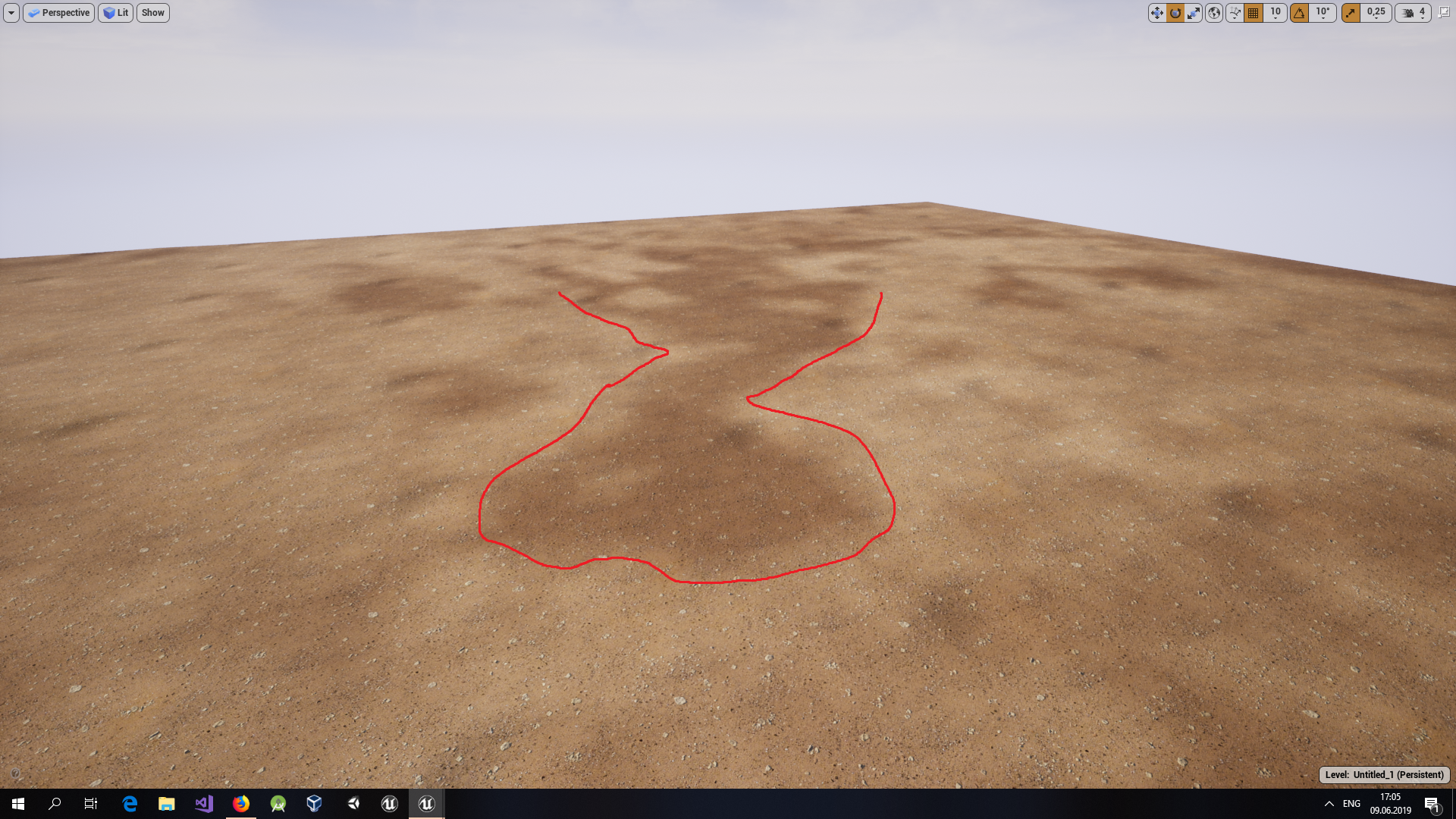
es anybody know how to get rid of dark spots after macro texture variation ? https://ibb.co/7pxScY8
 versed spear
@serene birch I have 8 gig of ram and I know that is not enough but I was hoping there was a way to free up the ram once it got out of hand.
 thick herald
I have an Asset Manager question (at least I think that's what I should be using) I have a folder which contains static meshes, it's only used during the design of a level ie for the editor not runtime. I'd like to be able to essentially get the static mesh and do 'things' in a blueprint.
I can obviously do this manually, but I'm trying to streamline things and make it more user friendly. Is asset manager the right thing to be using here, or am I off the mark? Any help or pointers are greatly appreciated.
plush yew
https://photos.app.goo.gl/T7mjFPo9YqcFEYiy8 dynamic shadow distance is already at 20.000

Google Photos
this aint goodo
hidden tendon
@spark sonnet I can't drag and drop ANY file into the browser, I've tried jpg, png, obj, fbx...
spark sonnet
oh. Have you tried using the import button @hidden tendon ?
hidden tendon
@spark sonnet Yes, that works but I am still interested in figuring this out for the sake of convenience
 brave nacelle
hello, can anyone help me make a base decal material?
the problem i have is i need for it to be able to be switched from opaque to translucent in the instance
on*
hidden tendon
@brave nacelle You should be able to change that in the parent material unless I musunderstand
brave nacelle
allright
azure shore
hey, if I use one of these, is it possible to move around the texture on surfaces in the world?
for example if I have black and white tiles, I have to have the world positions perfect or else it'll loop at the sides, so it would be really convenient if I could move the texture itself
next badger
@cloud eagle depends on your shader, generally clamp is enough
spark sonnet
Is there a way to get actor tag and print it?
rotund scroll
print it how
next badger
@hidden tendon make sure you are running ue4 as admin
rotund scroll
as a string?
next badger
@hidden tendon UAC prevents drag and drop between apps that has different authority levels
spark sonnet
Yeah. I am trying to show the name of the object im looking at
azure shore
ok so - anyone?
hidden tendon
@next badger Thanks, that was the first thing I tried but no luck even as admin.
cloud eagle
@next badger CLAMP тут не может 😦
rotund scroll
if you drag out your object and write get name you'll have your options for that
if you want tags it should be the same
just get tag
spark sonnet
But its always saying none
next badger
@azure shore yes, this node may allow you to drag texture in the world, but you have to have BP that will feed the parameters in to it
rotund scroll
then that means whatever you're hitting has no tags
you can try get name instead to see what it actually hits
spark sonnet
ok ill try that
azure shore
oh, how would that work s-ed?
rotund scroll
so if the actor has no components, it won't show up anything
spark sonnet
ok its not hitting the components but it works with another line trace i have
next badger
@azure shore you need to make a bp that will have a control, like gizmo box, then you make a dynamic material instance, then you feed the transfroms from the gizmo to that DMI parameter etc...
azure shore
oh I wouldnt know where to start with that then...
spark sonnet
nvm figured it out. Forgot to uncheck ignore self
next badger
@azure shore learn dynamic material instances
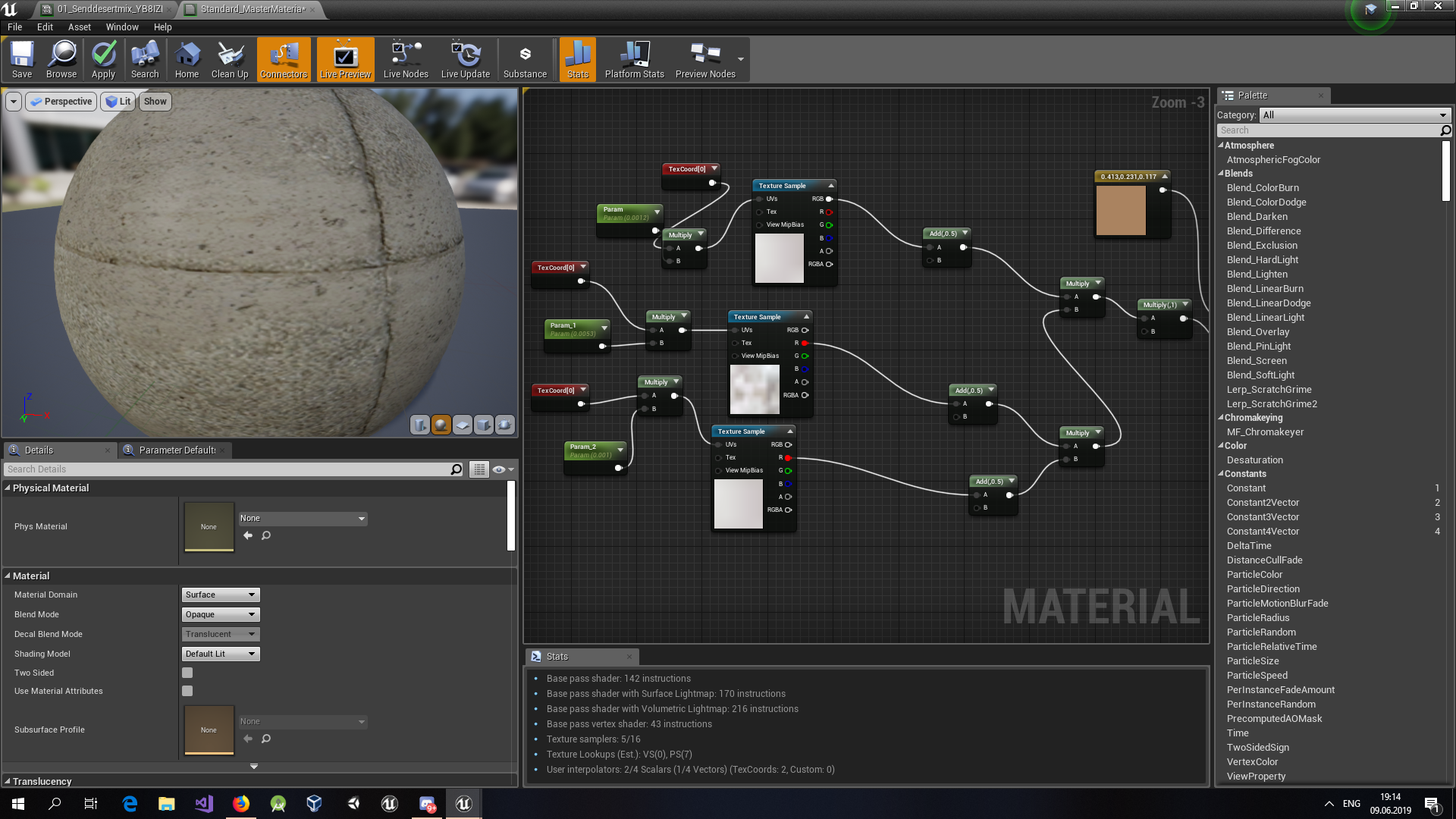
@cloud eagle as i've said, it depends...you have not posted a shader graph, so no one could tell...also #graphics for that kind of questions
cloud eagle
https://i.ibb.co/VLcXtGy/macrovar.png @next badger
 limpid surge
Not sure which channel to ask this in, but: Anyone notice a weird pulsing "chug" when moving the camera in-game in a deployed build? Even with a blank project if I pull the camera up, look down at the grid platform, and move it side to side, it "pulses" visually.
topaz thunder
is there a way to like import fbx with the materials/textures already attached?
ember notch
How I do that he stops all sounds and plays only 1?
plush yew
Is there a way to up the poly count for basic shapes like floors and walls as i have materials with very detailed tessellation/displacement maps, but when i place my material on my floor or wall its just jagged and weird im guessing its just the floor doesnt have a high enough poly count as when i place the mat on a sphere it looks much better...?
https://www.youtube.com/watch?v=wn6ejP_baDY&t=312s for example in this vid he must have a very high poly count on that surface mesh.

Introducing the Quixel Megascans and Unreal Engine 4 Live Link - enabling ultra-fast, super-simple exports from Megascans Bridge to UE4. For more on Megascan...
next badger
@cloud eagle and, why can't you clamp?
cloud eagle
i used clamp but everything became like this https://i.ibb.co/wyT5snK/macrovar55.png @next badger

i used clamp on macro textures
limpid surge
Video example of the chugging issue I'm running into if anyone has any idea what I can do about it. This is a completely fresh, blank UE4 C++ project running an unedited default map with the default flying camera, built on 4.22 in standalone "shipping" mode on Win64. https://www.youtube.com/watch?v=RKKuZ0FgfYw (view at 60fps on YouTube).
 next badger
@plush yew GPU tesselation is for that, however it not magical
An overview of the Material Instances example level, example 1.8: Tessellation
@cloud eagle i need to see the graph...looks like you've clamped the UV's
@ember notch #audio
high musk
Guys , how can i change the pawn to move with zqsd instead of wasd i couldn't find the setting under edit->editor preference ->keyboard shortcuts
plush yew
@next badger So im guessing i need a PN triangle mesh if so we're can i get this or whatevs
next badger
@topaz thunder No. FBX will be imported with materials attached, but without textures, exception is diffuse only materials
topaz thunder
ah alright thanks!
next badger
@plush yew it's just how the models are made, either with smoothing groups, or without one...in PN Triangles mode it will use SG to move the tesselated verts accordingly, but for texture displacement it's fine to use flat
plush yew
Do you know of a tutorial to get flat or change a mesh to flat?
Like does unreal have already made meshes i can use or?
plush yew
Yeah i'll have to learn, but where abouts is the tessellation under
next badger
also, tesselation is a dx11 feature, so keep in mind it may not work for all users/builds

What is the Main Material - Tessellation Property in Unreal Engine 4. Source Files: https://github.com/MWadstein/wtf-hdi-files
ember notch
I can´t find delay
next badger
@ember notch uncheck the context sensitive search
ember notch
i still don´t see the delay function
next badger
maybe you're in Construction script
ember notch
How can i activate it?
 prisma crest
Hey guys, I have a simple game design I want to work on but have no idea where to start. Any recommendations? Like do I start with the art, level design, etc. I just don't know what to do.
 maiden sundial
How should i move my 20gb project from my HDD to my SSD without getting problems ?
prisma crest
Shit, I don't even mind working on it with someone
 gilded igloo
I would recommend to start by watching tutorials, so u understand what you are doing, at least on basic levels, and after that just start playing with it. do rly small projects just to learn and evolve.
I think its rly good to work with a friend so u dont get frustrated. find anyone that wants it and learn together.
prisma crest
I would love to. But none of my friends are dedicated.
gilded igloo
ye, mine nither
prisma crest
I have already done plenty of tutorials. But it feels harder to work on something I thought up myself
gilded igloo
start by doing the really easy stuff. even if it seems too easy.
it will build ur comfidance
and teach you much better
prisma crest
You wana work on it with me?
scarlet charm
anyone here good with C++? if so, DM me.
gilded igloo
I can help u learn, but i wont work on this project with u all the way, i got my own project 😃
speaking of - I need some help... I created a white laser beam particle system and i want to add a filter to its color, so through the filter there will only be Green laser, anyone have any idea how can i do dat?
 vapid narwhal
I am looking for ways to blend separate (skeletal) meshes together. Ray marching seems to be the way to go, but I can't really figure out how to approach that best and if it even is the right approach. I'd much appreciate DMs if someone has a better approach or some resources about ray marching :>
safe rose
Seems like a feature to me not a bug
spark sonnet
haha
safe rose
But uh, you need to let us know a bit more info
Is that when you import it into unreal?
Is the FBX being exported correctly AFAYK ?
spark sonnet
Yes I imported it from mixamo just like all the other animations
safe rose
Ah mixamo anims
spark sonnet
Yeah im just using mixamo anims before making them myself
safe rose
@spark sonnet I'm assuming all mixamo animations are doing this?
Cause they are all broken
spark sonnet
No its just this one
safe rose
In UE4 by default
spark sonnet
safe rose
Open it in Maya/Blender, w/e?
spark sonnet
This is using the same skeleton and everythng
safe rose
See if it downloaded correctly
spark sonnet
I dont have maya
safe rose
download blender
spark sonnet
I have blender
 halcyon flame
does anyone know how to use the "Get Level Viewport Camera Info" node? I don't know how to get a reference to PlacedEditorUtilityBase
spark sonnet
But I dont know how to use it 😃
prisma crest
@visual belfry That was a weird read
plush yew
How do I get a log on my dedicated server?, As I would like to see info on it
Fixed it, Nevermind
 radiant haven
can someone show me a cubemap
gilded igloo
like that?
plush yew
After I've made a dedicated server, Do I still have to package the game?
?
My question?
radiant haven
@gilded igloo no i mean a sky
a night sky
i watched some tut and they all had a cubemap
gilded igloo
lol
plush yew
?????
gilded igloo
I need some help... I created a white laser beam particle system and i want to add a filter to its color (by filter I mean a different mesh, like a transparent one), so through the filter there will only be Green laser, anyone have any idea how can i do dat?
forest solstice
https://www.youtube.com/watch?v=HkG7XZOhVZE&feature=youtu.be
This is giving me headache guys, been trying to fix it for days now, the yellow sqaure shows where my linetrace ends, for some reason when aimed on a char with background it's way lower than you actually aim
 plush yew
If i create a dedicated server and can launch it, Do i also have to package the game?
sudden agate
@forest solstice what is the start and what is the end point of your trace?

 safe rose
@forest solstice Did you try to simplify all this yet?
forest solstice
Well, no, it's from the weaponcomponents pack
safe rose
ah, Marketplace crap
forest solstice
the pack I bought from market place but it full of issues
safe rose
😃
forest solstice
I've solved liek 4 now, but this one is very horrific to fix
safe rose
Yeah, you should just do a simple line trace from sractch imho
the problem is obviously the end point bool select
forest solstice
yee but I'm like 2 weeks into unreal so no idea how to do that XD thats why I bought the pack
forest solstice
oo well that's a good start
forest solstice
Ooo
safe rose
you should learn how to Debug BP at least
so you can troubleshoot it more in depth
but for now. making it easy
Move that pin up one
I'm assuming this has to do more with how the physics asset is set up
But no clue without looking at the rest of the logic
failing that, for whatever reason
forest solstice
Ooo I could show you if you have the time and want of course via teamviewer
safe rose

try that, otherwise, read this: https://docs.unrealengine.com/en-US/Engine/Blueprints/UserGuide/Debugging/index.html
Pause execution using Breakpoints to inspect graphs and the values of variables.
and learn to debug
Specifically, look for why the vector end point is being changed
after that
radiant haven
?
forest solstice
your screenshot you want me to put enpoint into select vector A
forest solstice
oo I can show
forest solstice
safe rose
If that doesn't solve the issue, then the line trace isn't the problem
first one anyway
my heart skipped a few beats
use the line trace debug
but as you can see
or maybe you don't
forest solstice
well that sovles it in the sense that it's now off aim everywhere not just character
forest solstice
yee thats good
forest solstice
yee thanks for help, now I can figure out what is offstting it
or I will start from scratch
safe rose
truthfully the issue is, you are doing two different things
You debug is using a different end point than the actual line trace end point logic 😃
forest solstice
oo
safe rose
essentially, you should choose the one you want 😃
there, you are using Trace End Point
here you are using either Impact Point or Hit Location now
Or
Also, make sure nothing is changing when you call "ApplyImpactDmg"
which is probably feeding some hit result
 peak acorn
how can i make an actor public
or
alter values if its variables
using some other actor when an acton in performed
 severe glen
guys is projectile destroy itself?
peak acorn
u can make it destroy upon collision
i want to increase value of a variable in another actor when a switch is pressed,how can i do so?
severe glen
what do you mean by another object?
peak acorn
actor*
thorn vector
anyone here can help me make minimap like the one in fornite or any br game
i watched some tutorials on it and i got the basic down with the render target thing
 little warren
hi guys question about blueprints
if you set Can Blueprints Tick by default to false
can you set a single blueprint to tick?
visual belfry
Yes
brittle gulch
Some of you are familiar with speedtree over here? I want to delete some specific nodes for certain LODs, but there's this confusing "weight" slider, I don't get how it works at all
 amber tangle
Question about overlap - I have a function that spawns an item as long as it's not overlapping. Trouble is, it only seems to be able to detect items that were placed on the map by hand, not items spawned recently. GetOverlapping always returns null - unless I save/load the game, then it detects everything. Any ideas what's going on there?
It's almost like the new items aren't having time to register or something
This never sees anything overlap anything created recently (in the last few seconds)
gilded igloo
Damn
amber tangle
Ok, it's definitely some sort of timing thing. If I pull it out of the same function that spawns it, it works fine. It's gotta be a timing thing
so for now, I have it on begin play for the spawned item
versed spear
So no way to limit the amount of ram the editor uses?
gilded igloo
Guys I really need some help... I created a white laser beam particle system and i want to add a filter to its color (by filter I mean a different mesh, like a transparent one), so through the filter there will only be Green laser, anyone have any idea how can i do dat?
rotund scroll
versed spear
I have a 3.0 usb stick that I am going to try and use for ready boost. Anyone think that will help with ram issues?
 abstract relic
That’d be just as effective as downloading more ram
spark sonnet
https://downloadmoreram.com/ here @versed spear
DownloadMoreRAM.com - CloudRAM 2.0
upbeat tendon
how can i tell if i am in dedicated server mode?
 merry gazelle
Guys what was that news about UE opening up their servers to Devs? I remember something along these lines a few months back
 blissful trail
idk what is happening but it aint working lol
spark sonnet
Whats not working?
blissful trail
its meant to randomly hide or show an effect
versed spear
The link you sent me lol
spark sonnet
😃
blissful trail
right as the game starts
spark sonnet
And whats not working with it @blissful trail ?
blissful trail
it doesn't hide it
blissful trail
yup
blissful trail
yeah i just wanna get it working first
spark sonnet
But that means it always goes to true?
blissful trail
it says it goes to 0.002 or 0.001
spark sonnet
What if you just make it never activate, Then it wont activate right?
blissful trail
yeah but im trying to get it to have a chance of activating
spark sonnet
Yeah but then it means its always going to True
blissful trail
now i put a tick and a delay and it turns on at the start then turns off but doesnt turn on again
 vague vigil
probably because you're using == with a float
blissful trail
what should i use ?
hidden aurora
What do you want to achieve?
blissful trail
idk anymore
hidden aurora
Lmao
 mint vine
Please I need quick Answer how to change the location of "Follow Camera"
 vocal anchor
 weary basalt
@remote kayak We do not allow Discord Server Links, please read the #old-rules
 remote kayak
sorry
blissful trail
why would you send a server link ? its basically a rule not to on 99% of discord servers
remote kayak
Our team is working on a Open world multiplayer survival game with a stylized art style to it
@spark sonnet
spark sonnet
What makes your game special compared to all the other survival games out there @remote kayak ?
remote kayak
Most zombie survival games, or survival games in general always look realistic, and there is not many other games out there with stylized texturing and models
I think its a new and different approach to survival games
And this game will feature very in-depth customization
spark sonnet
So its just the art style thats different?
l like the idea but I dont see how this would be a hit
remote kayak
For example look at the game Dauntless
abstract relic
How does art make any difference
remote kayak
With the stylized texturing and models, it grabbed lots of attention
spark sonnet
Isnt this kinda what you want? https://www.youtube.com/watch?v=xoTBd6r08vg



 abstract relic
I speak as an artist. Visuals doesn’t make gameplay.
remote kayak
I know
spark sonnet
You need some different mechanics or something new
remote kayak
But it is something you look at most of the time
Sebb
Customization will take things to another level
spark sonnet
It is
remote kayak
Making a weapon from complete scratch and naming it yours
spark sonnet
But that wont make a whole game
remote kayak
I know