#ue4-general
1 messages · Page 464 of 1
 pseudo swift
 cinder iron
if it's for a simulation then complex to simple will help you, still, not ideal. https://docs.unrealengine.com/en-US/Engine/Physics/SimpleVsComplex/index.html
What the UseSimpleAsComplex and UseComplexAsSimple flags do, and when it is appopriate to use them.
 royal cobalt
Is it possible to place a camera in game, and have it record footage that can then be timelapsed?
pseudo swift
where can i find the collision complexity?
cinder iron
Static Mesh Editor under the Static Mesh Settings category
also you have some buttons on the top row that showcase the collision of the car
the complex and the simple one
pseudo swift
yea well this is a skeleton mesh so i dont have the same editor im afraid
or wait am i stupid
i mean im setting up the collisions in the physics asset
is there also a way to scale collision boxes down further? they seem to stop scaling after reaching a certain size
cinder iron
okay lol xD good you said it's a skeletal mesh
if you are creating the physics assets then do it by hand, it will be better anyways
however, there is a automatic convex hull generation tool included in this editor
that you might find useful
Editor to setup physics bodies and constraints used for physical simulation and collision for Skeletal Meshes.
take a look here for more information
pseudo swift
hmm, weird my collisions are close to what i want but now my car stopped moving with the new collision shapes
the wheels are spinning body not going anywhere lol
 cyan bough
How can I run a delay in a UI blueprint? The delay node isn't in there...
pseudo swift
wait ill send a vid this is so funny
cinder iron
delegate that functionality to other Blueprint
cyan bough
Ok thank you :)
pseudo swift
what do I need to add in order to add controls for reverse? like driving backwards, i know its super simple im just really new to all this
 carmine scroll
youll want a negative forward mov
carmine scroll
yes, just like that
pseudo swift
😃
any easy way to increase turning speed? not sure if my collision affecting it somehow or if i just simply doesnt have settings for it
turning speed might be the wrong word, i know i can change the turning but it seems like the speed slows down alot everytime the wheels turn
cyan bough
Ok I am going a bit crazy here. I have written this a ton of different ways moved it into its own blueprints, put the counter on the event tick, tried moveing it all over the skills event chain.
No matter how I write it it eaither breaks the skill casting or just flashes on the screen without moving the progress bar. Can someone please tell me what I am doing wrong here.
 plush yew
https://youtu.be/IQvdUy6XxzI whats wrong with this engine lol, wtf

 visual belfry
is it possible to share a derived data cache between projects? or will name collisions make it go boom
 umbral patrol
@manic pawn @mint hill If y'all are interested in keeping up with the int64 in UE editor issue, this is the bug issue that the team made in response to my report https://issues.unrealengine.com/issue/UE-71305
pseudo swift
so im trying to render out the path i drove with my vechicle but in the render the car doesnt move at all, also the wheels are missing, any ideas why it doesnt move in export when everything work perfectly fine in PIE?
its like the timeline doesnt play when exporting
 grim ore
@plush yew that does not look like the wheels causing problems, they should not visually spawn anything. I also see you are spawning another vehicle at the same time. perhaps you are seeing something else spawning in as well?
plush yew
i use this command to draw wheels
grim ore
@radiant haven what should it looks like? that looks like a skeletal mesh . Is it possible you imported just an animation or skeleton without any mesh on it?
grim ore
@plush yew Gotcha, yep I see that now. The only difference I can see on your vehicle compared to the stock on is it has a base bone after the root then all the tires are offset from that not the root
 radiant haven
 fringe pivot
Is there a way I can determine the order in which actors in the scene are created?
pseudo swift
i can record an animation of the bp but only the wheels are visible
if I check root motion then the whole mesh is visible but then of course its not moving along its path
grim ore
@radiant haven at the top is a set of menus, when you are in the menus for Character -> Mesh is Mesh checked? if so what does the skeleton lok like on this
grim ore
yes one of them says character in the viewport
grim ore
I see it on your screen, it says Character in the viewport at the top. Next to Show and LOD Auto
grim ore
yes then Mesh and see if it shows Mesh checked in the next menu
 manic pawn
@umbral patrol your bug got "backlogged" which is basically the same as "won't fix"
radiant haven
@grim ore its the ES2 thing but idk why
manic pawn
so that wasn't very successful lol
grim ore
so when you click the ES2 Preview button the mesh comes back?
radiant haven
no
grim ore
then it is not that
radiant haven
without ES2 it shows up
grim ore
oh
radiant haven
with es2 it disappears
grim ore
well do you need it to run on android?
grim ore
and when the ES2 Preview is disabled it shows you mesh stats in the top left of the mesh window? like LOD 0 and Current Screen Size and the Triangle count of the mesh?
but with ES2 enabled it just says Previewing Reference Pose?
pseudo swift
so when i record my drivable car the sequence recorder captures an animation which works as intended the only problem is that the car body is really tiny and the wheels huge
the scale is fine before recording, so i have no idea why this happens
grim ore
radiant haven
@grim ore they are just people who have the same problem xD
grim ore
and there are solutions to the problem and an explanation of the problem in there
@plush yew you can set the default pawn in the game mode that is currently running, it won't save it permanently just for the time that game mode is loaded
change default pawn class? yes it has a setter and getter in the game mode.
pseudo swift
any ideas why my wheels / carbody become so scaled after being recorded?
plush yew
Hey, apologies for the silly question. But I'm trying to import a railway track to UE4, which should have the correct measurements (1,435 mm) But it appears to be rather small compared to the starter content chair. Is this because my model is wrongly scaled or are the starter content props wrong?
 cloud cobalt
@plush yew Check in the mesh viewer the approxmiate dimensions
For 1435mm long, the larger dimension should be 143.5, using UE's default to one unit = one cm
 zinc rivet
it looks like it was imported with 1 unit = 1m
cloud cobalt
Can you check that your design software exports something that is 143 units long ?
If that's not the case, you need to apply scaling at import (uniform scale).
By the way, 1435mm should be 1.435 meter, so accurate in this case
Though I'm guessing you meant 14.35m
plush yew
I did a little test, a friend sent me an fbx that he exported using blender, which has the correct scale when imported into UE4. But when I import the same mesh into 3ds max and then export it again as an fbx the size is shrunk. So it's definitely something wrong with my export prosses
 deep basin
plush yew
deep basin
plush yew
Looks like I have to set the units to cm in the fbx export settings, and not millimeters or meters. Thanks a lot for the help btw!
 wary wave
more likely your mesh is scaled incorrectly
hehe
you found it anyway
"priority playercharacter (0)"
I don't even know what that means
the local player controller however is always index 0
 obtuse timber
as I haven't found a material channel I thought of asking it here...
I've received textures/materials uassets not through a repo since it's not a public thing I can ask for unfortunately, I didn't even get the correct structure so I opened in notepad to check at least the structure, made it, textures load in well.
Materials find the textures, but I get a few "Unspecified Functions". Are those some custom made things that I should ask for? Are they material functions that I should ask for? Any help would be great, didn't really found a conclusive answer on the net so far.
 kindred viper
obtuse timber
kindred viper
obtuse timber
@kindred viper cheerio
 ember notch
Has someone a good name for a open world game?
cloud cobalt
"Unreleased Title" ?
ember notch
No
visual belfry
Video game name generator. 10,000's of names are available, you're bound to find one you like.
ember notch
Is the name Lyte City good?
 devout flint
sounds good to me
though if someone asked me if I had seen lyte city and I hadnt and googled it, i would google light city @ember notch
Anyone know what I should do here?
I just want it to spawn a cube every 3 seconds
wary wave
"Open World Game"
ember notch
Stop trolling lol
pseudo swift
how can i make my car go faster? I tried increasing the throttle but doesnt seem to do much
devout flint
carl can you help me?
devout flint
above your post
devout flint
and look at your vehicle movement component you might have a max speed
pseudo swift
max rpm?
devout flint
I need an event in the event pin but the beginplay doesnt work.
that or max velocity
devout flint
pseudo swift
so what do you wanna achieve? spawning a cube?
devout flint
I do not need that it is the timer giving me trouble
the only other timer is function and that needs like 3 things I dont want to plug in
I just need to know what to put in the event pin
pseudo swift

Sometimes you just want your objects to move through the world at a given rate. In this video we show you how to create an actor that does just that, using i...
try this one
here they are spawning bunch of shit
i know its about the conveyor belt but they also have a bp spawning cubes
Im not good enough with Bps to know what you need otherwise I would just try to look at your bp but idk
devout flint
thanks
devout flint
ah ok thanks man
did you test if RPM helped?
brilliant before you posted that I did something that froze UE4 😦
pseudo swift
haha
always
yea i also found a video on the topic but its still fkng too slow
seems so weird that something this easy would be so difficult
lol
im messing with the torque curves and the rpm and it only feels slightly better
theres also like nothing about it on google lol
 blazing shell
When somebody tells me do edit r.MipMapLODBias, how do I find the correct ini file for this?
pseudo swift
hmm i can decrease the mass of the car but then it does of course less impact with collisons
 storm burrow
If I already have a bunch of existing Material Instances, is there a way to automatically assign these to newly imported objects?
I've tried using the SlotName blueprint nodes, but they only work on a component, not actor level.
devout flint
@pseudo swift can you send me a pic of the vechicle movement settings
you could maybe decrease the mass mut increase the inertia.... why cant you just supercharge the torque?
pseudo swift
so i can make it go faster if i set the mass to 1 but i need it to run into things and push things around which is why its really nice if it is 1500
i have no idea what the inertia does
 versed spear
finally got my animation issue figured out.
pseudo swift
@devout flint any ideas? it turns really slow also
hmm the curves reset
everytime i modify them wtf
man i dont get this like i changed the input values and the curves and followed a forum thread and i still cant turn in a circle since the handlings so terrible
was reading this
devout flint
@pseudo swift looking at it sorry was playing Vader Immortal
@pseudo swift Try multiplying your gear ratios by 100
Also try changing the MOI
pseudo swift
changes gear ratio makes car stand still
changing moi to 100 also prevents it from moving, 0.1 seemed maybe slightly better
the weird thing is when im driving forward i can barely turn
its soo slow
plush yew
what's wrong with this model? all wheels spawn at root bone
Any whatsapp grup please add me there,
plush yew
yes
pseudo swift
same
so apparently a lot of people had this problem, the solution is said to apply rotation and scale to your model before you export
but it didnt work for me
another issue is that blender is by default meter and unreal cm
so you have to mess with the scaling its a pain
i did a workaround by importing them and having the wheels at root, then offsetting their position in the BP so place them correctly
you can tweak it in your vechicles BP here
 rustic imp
wut
 sudden agate
<@&213101288538374145> the same in #visual-fx
 urban meadow
anyone have any problems not being able to remove sublevels in the level window? (4.22) i remove them but when i reopen the level sublevel returns. this is a project upgraded. from 4.17 to 4.22
grim ore
I think he is upset that we are not making enough money off the engine
visual belfry
sometimes it makes me upset too 🤷
pseudo swift
still trying to increase the steering, can someone explain why the car turn so slow even though wheels are maxed out angle
its like its driving forward trying to turn but has no turning power
ember notch
Is your vehicle system self made
pseudo swift
yea
ember notch
lol I bought a vehicle system for 5€ xd
carmine scroll
Well @ember notch no point making games if you didnt actually make it 😛
rustic imp
it's not truth though
pseudo swift
any one know how I can improve the handling?
rustic imp
it's a smart decision to invest in premade tools to help speed up your development process instead of spending time and money on making it yourself if the thing you find works perfectly like you want it
carmine scroll
you dont spend money if you make it yourself
rustic imp
well you do if you work at a company
carmine scroll
companies dont buy car systems.
visual belfry
Sure they do
rustic imp
believe me
visual belfry
By outright hiring people as well
rustic imp
maybe not the billion dollar studios, but definitely indie to mid size companies
ember notch
PUBG using a house kit from marketplace
carmine scroll
Im more of a believer of ' Learn to do it yourself' Buying marketplace blueprint systems to me, is cheating and something that wont be unique to your game.
plus, many, many people use only marketplace assets
and its terrible
not everyone, but many ppl
rustic imp
I'm all for that too, I'm just saying it can be a wise decision to buy premade tools
of course I love learning things myselfl, but I'd rather have the company spend 20 euros on a plugin than someone working on it for a week for 100s of euros
you get me fam
carmine scroll
I understand it from that point of view yes
for people on here, many are new or learning, so simply saying 'buy it from the store' isnt cool
rustic imp
but saying it is not game development isn't cool either
carmine scroll
maybe not. But you wont understand what your doing, buying it all
visual belfry
the idea that everything has to be handmade has held back many a prospective game dev
carmine scroll
I dont think so. Over 40 games a day go on steam, many of different types
visual belfry
that's unrelated
visual belfry
🤦
 polar hawk
you tell me do things i dun runnin
visual belfry
don't forget to make your own engine, etc etc etc
 maiden swift
@polar hawk I actually know what you're referencing. lmao
rustic imp
yeah lol, was thinking the same @visual belfry
pseudo swift
alright well is there anything I can change in my BP to improve it, i tried changing like all the settings and nothing seems to improve it
carmine scroll
@visual belfry I dont understand your point. People need to learn to make good things and not use free stuff all the time?
pseudo swift
carmine scroll
whats the issue in that
pseudo swift
visual belfry
there's no harm in learning, but there is harm in gatekeeping
difference between "It's good to learn" and "You have to learn or you can't progress past this point"
maiden swift
Marketplace assets are fine and plenty of companies use them wisely.
rustic imp
yeah e.g. if you're interested in programming, you don't have to spend months becoming decent 3d artist
of course asset flip games that use everything in their entire game from bought things is an other thing
visual belfry
it's unfortunate that code is one of the least visible things 😛 I heavily rely on asset packs to flesh out my game atm until I have a more complete vision for contracting out
maiden swift
That's another great use for Marketplace assets. Higher-fidelity placeholders for quick prototyping.
visual belfry
or even as stepping stones for learning
I learned a lot by dissecting Allar's interaction component 👍
carmine scroll
I suppose its fair for coders to buy 3d models, or the other way around. I didnt want to sound like it was the worst thing in the world. But my main point is regarding those to buy everything or use all free stuffs, and throw a game out.
That I dont think is cool
maiden swift
Sure, I get where you're coming from there.
carmine scroll
And, on the same note, to someone who is learning, to then turn around and just say they can buy a pack online, isnt cool either. Since they wont learn but turn to buying it all
which is what sparked this from a comment ^^
maiden swift
I could say the same thing about so-called tutorials that are actually just recipes for x thing. You don't learn much, but you get a result you need in the moment.
I think it's OK for both to exist. They serve different needs.
I personally prefer tutorials that teach concepts and empower me to do more on my own.
polar hawk
if people spent as much time shipping their own game instead of wondering how other people ship their games, we'd probably still not be any better off
visual belfry
rather than ones with misleading AAA game thumbnails and 30 minutes of wordlessly scrolling around blueprints for something that's sorta the same if you squint? 😛
 azure shore
guys, hows the best way to speed up map load times? I know one way is baking lighting but that feature is completely broken for me so its not an option
maiden swift
The best tutorials - and Marketplace assets too, honestly - enable developers to be more autonomous.
polar hawk
the best tutorials are when you create something from scratch because a marketplace asset does everything you want wrongly
carmine scroll
Just gotta make sure you watch the right tutorials. As @visual belfry said, many are miss leading
or teach quick 'get it working' systems, that are not efficient
but then I suppose, as a learner, its not easy to tell them apart
you dont know whats good and bad until you find those good tutorials
which can involve redoing many systems etc.
visual belfry
builds character 😎
carmine scroll
yeah its true, it does
rustic imp
you learn from mistakes
carmine scroll
which I think is far more worth it, than buying the systems
using an exact matching skeleton @plush yew ?
to the ue4 one
azure shore
guys, hows the best way to speed up map load times? I know one way is baking lighting but that feature is completely broken for me so its not an option
azure shore
does it literally just come down to better pc, faster load times?
carmine scroll
also can depend on how much your loading on start
azure shore
well, wouldnt that be the whole map?
azure shore
am I supposed to make some way to load it in chunks or something like that
visual belfry
new fortnite dance \o.
azure shore
soooo
visual belfry
how big is your map?
azure shore
some way to load the map as you progress through it could be good I guess?
visual belfry
right click it on the content browser and do Size Map... to get an estimate of how much actually needs to be loaded to open the map
azure shore
not even that big right now, but any maps seem to take ages
visual belfry
in standalone and not editor?
azure shore
its quicker to load in editor
polar hawk
inb4 3gb map
rustic imp
I don't see any problems with that animation
azure shore
much quicker
grim ore
so you probably cant make it load any quicker but maybe you can make it feel quicker? load just the area near them with a streaming level then stream in the rest while it is playing?
azure shore
yeah, how would I do that?
polar hawk
@grim ore I googled a thing and the only thing that came up was a WTF Is and I was like... heh, neat
visual belfry
Asynchronously loading and unloading levels during play to decrease memory usage and create seamless worlds.
azure shore
thankss
grim ore
@polar hawk awesome 😃
visual belfry
someone's quick on the draw 😢
polar hawk
hes got it bound to his elgato steamdeck
grim ore
.... I uh.... considered buying a stream deck lol
polar hawk
ayyy
visual belfry
I've used a G13 in previous jobs to run small scripts 🤣
polar hawk
you're only cool if you use an Elgato Streamdeck
grim ore
I use the F Keys for OBS shortcuts but sometimes I fubar and end up in wirescreen lol, considered the stream deck for that purpose
visual belfry
useful when build is bound to some monstrosity like alt-shift-ñ-b
visual belfry
chord 19 of them for a ton of keys 😎
visual belfry
you got one finger left over for the actual input
polar hawk
so actually you only need 7 stream decks to replace a keyboard
who has got $1050 so I can make a dumb youtube video
plush yew
https://youtu.be/O3ICPvWqyi8
i cant rotate wheels lol
 pseudo swift
mine looks like this @plush yew
try change your bp if you cant steer
check also you have binding in the project settings
polar hawk
You may want to look into using axis inputs
instead of wasd
or not
sometimes you only know one speed: go
booo you broke it
pseudo swift
im just doing a really really simple cartoony car and do not need any accurate physics stuff, but i want to increase the handling/the top speed how can I adjust that @polar hawk
polar hawk
handling will definitely be better with axis value inputs
top speed, iunno, im sure the wheeld component has a max speed property
pseudo swift
alright, is there alot of tinkering to get up and running?
polar hawk
nah
project settings -> input -> axis mappings
im sure if you made a new project with the vehicle bp template
it'd show you how
i think
pseudo swift
got any example? sorry my bp stuff is horrible
polar hawk
yes
pseudo swift
and in the project settings how do I setup the inputs?
pseudo swift
its like this atm
wait
here are the axis ones
maybe they're fine?
hmm i changed everything out but my behaviour is still the same
i dont get these car things feels like nothing i change make a difference lol
polar hawk
well now you can use a gamepad and use analog input
which is way better for handling
to change how the car actually handles you're gonna have to dig into the vehicle component
polar hawk
you gunna have to talk to a vehicle expert
pseudo swift
yep i guess
from what i understand modiyfing these curves should help but i can get it to work
 honest vale
...
I was running automation tests and they crashed the engine without any stacktrace
nice
 thorn prairie
I'm not sure where this go but I need help with Unreal Engine, I've downloaded UE4 launcher but when I click it to open it nothing happens
I even check the task manager and it'll just sit there before vanishing
How do I open it
pseudo swift
did you download the epic launcher
thorn prairie
Yes
pseudo swift
and what engine version are you running?
plush yew
sketchfab
polar hawk
ask your neighbor
ember notch
Hahaha
thorn prairie
The latest launcher
pseudo swift
you should be able to start a new project from here
if its not working then reinstall? check that your system is compatible with it?
 sonic panther
Hey guys. I'm looking to be involved in a project. I do a lot of different styles of art but I need some project based work. My friend is working on a game but he keeps asking me for art and isn't implementing any of it. I would like to be involved in something that is actually going somewhere
Please contact me here if interested. Thank you for your time.
thorn prairie
@pseudo swift Epic games launcher won't open so I can't
rustic imp
have you tried opening it as administrator specifically maybe
thorn prairie
yep 😦
azure shore
ok so I timed it and it takes about a minute and a half to load my maps playing in standalone
level streaming better help me out here
 lusty meteor
Is there a way to set the scalability options for the editor without having the editor up? (project not opening, so wanted to see if it was scalability related)
thorn prairie
Does anyone know how I can fix my problem ?
 bright plume
dont want to be that guy who post a problem right when someone else is having a problem :<
thorn prairie
lol
pseudo swift
do you also experience issues opening other software?
what happens when you open to launcher?
what location did you install unreal at?
wait wtf you have 2 ram
im really no expert at these things but it seems like your computer (laptop) is really old/would need more ram to run unreal
i think basically you cant run it cause you lack the hardware
@thorn prairie
thorn prairie
Yeah I experience the same thing with Cryengine but fixed that by downloading vs redistribution 2017 and up. It might be like you said low on RAM lol darn it all
 heavy ether
i just realized i can have multiple virtual desktops in windows that span all 4 displays.. so i can run each of my environments simultaneously.. without having them cluttering up.
though the computer really drags down with two copies of unreal and a copy of unity running
pseudo swift
@thorn prairie I would seriously recommend investing in a better computer if you wanna continue with any 3d/animation/game engine type of stuff
@thorn prairie dont even think you have to spend that much to get a laptop which you can start running ue etc. with, good hardware is getting pretty cheap these days
thorn prairie
ok
 vapid karma
hey guys
I did an inteview for Unreal
here

Unreal Engine
Unbound: Worlds Apart is developer Alien Pixel’s first foray into development with the Unreal Engine and the game is shaping up beautifully.
 latent fable
https://gyazo.com/6a05466533f9ee3b363ed448f3684a9f
Does anyone know what's up with this flickering?

 coarse basalt
Im trying to paint tree foilage without aligning to normalbut want to get rid of these gaps under my trees is there a way to push them into the ground so theres no gap
 radiant haven
@409009686134915072
ember notch
How to import a fbx model???
heavy ether
press the import button
wary wave
ember notch
No he import 62 models...
rustic imp
can't you normally just drag drop into the content folder?
maybe there's 62 separate objects in the scene you exported?
sudden agate
there is a "Combine Meshes" Optione when importing
ember notch
Where I can get good vehicle models?
 dark depot
that are game ready? nearly no where
ember notch
How long does it take to import a 117 MB fbx?
wary wave
does not sound game ready
cloud cobalt
Basically if it has more than 100k triangles, it's probably not going to work well in UE4 (and will take hours to load)
 frank escarp
not at all
ue4 eats the 100k tris fbx no issue
hell, ive dealt with million triangle fbx just fine
ember notch
5000 years later
cloud cobalt
I'm just saying, rule of thumb for random Internet assets.
I've also used 500k tris FBX before or worse - just saying that, if you get that from someone, it's likely to not be game ready (no UVs etc)
ember notch
How long does it take to import 5mb fbx?
carmine scroll
like 2 seconds
dark depot
depends on your pc
cloud cobalt
Depends on what's inside
dark depot
but yeah that shouldbe instant nearly
grim ore
make an input and set it to V, make an event from that input in your player blueprint. use the Set View Target with Blend Node to swap between Camera 1 and Camera 2 (2 cameras in your character, 1 for first and 1 for third). Alternately just move your camera from one spot to another in your player and adjust your spring arm and camera settings
pseudo swift
guys when i enter my firstpersonCharacter i can only look up and down, (yes i did google) is there a specfic setting i should look for that enables free cam movement?
grim ore
how are you entering them? and yes it's going to be one of the settings on the camera and character movement and the springarm if you have one about rotation and using rotation and such (unless you just messed up your input settings)
pseudo swift
might be my input cause its the same project where i messed with the input for the vehicle
carmine scroll
is it also the default fps ?
pseudo swift
yep its the default one but i made a lot of changes in the project so might be a bit wonky
entering through play by possessing at event start
carmine scroll
is that level bp?
grim ore
well we know it goes up and down so how are the mappings for left and right in the player?
pseudo swift
how can i check that?
grim ore
and if its the camera it would be axis mappings not action
grim ore
find the look right node then in your character
carmine scroll
lol that would be it
ember notch
How I can crash UE4 Editor?
dark depot
plenty of ways
pseudo swift
alright I got it, added the missing bindings in the seettings thanks @carmine scroll @grim ore
pseudo swift
@ember notch just use it 😃
ember notch
xD it's a bad idea to import fbx
cloud cobalt
uh...
dark depot
are you looking at the spec of these random FBX your adding in
for all you know your attempting to bring in multimillion poly things haha
cloud cobalt
^
heavy ether
@carmine scroll your name doesn't appear at the top of the list. not that that would matter much
@ember notch fbx as far as i can tell seems to be the preferred format .. so..
carmine scroll
lol what list?
heavy ether
the list of people in the room
cloud cobalt
FBX is obviously the default format to use
heavy ether
you said people need to read your name .. but they won't see it unless they scroll waaaaaaaaaaay down
carmine scroll
its a joke dude..
heavy ether
... :shocked pikachu: 😃
cloud cobalt
Might want to move that fascinating thread to lounge 😬
 honest rune
Would a poly-count of approx 120K for character models be reasonable with average modern PC hardware? Assuming say 40 characters and perhaps a few thousand lower poly inanimate actors?
honest rune
that would be including all armor & weapons etc and submeshes would be merged at runtime
 lilac wedge
Ive got a very large planet that renders in my viewport but not visible when i start the game. Any ideas?
it only gets visible when very close and thats only bits of it not the whole thing
polar hawk
mesh bounds?
pseudo swift
yea sounds like bounds
honest rune
so character poly counts should probably still be kept down to like 60k or 80k at most if I want lower-end hardware?
I don't plan on having too much going on in the levels really; plan to use static mesh instancing where possible and not a ton of clutter
I'm not even sure what common low-end hardware would be capable of nowadays lol I would figure modern hardware should handle a fair bit more than say 10 years ago
visual belfry
I seem to recall the docs had a page on rough mobile optimization guidelines
honest rune
I don't plan on targeting mobile but I suppose if I go by that, pretty much any PC should be fine
I'll try to find that. thanks
visual belfry
it's not a bad stand-in for low-end hardware, except actual low end laptops seem to have worse GPUs 🤣
honest rune
ugh tell me about it. My "work laptop" is crap lol can't even run minecraft lol
pseudo swift
so i have these cartoony characters with material with 0 specular, but for some reason the guy in the back gets weird shadows, his mesh is clean and i buillt lighting, any tips?
hmm think it is actually only the shadow on the guy in the air
ember notch
How to make undo
plush yew
ctrl+z
 hidden aurora
Does someone knows about a complete replicating guide
polar hawk
yes
 upbeat tendon
I am calling my http service and pulling back some json, i am controlling the actor from umg, i want to emit an event the umg can use to update the UI
grim ore
This is about as close as you can get for a complete replicating guide http://cedric-neukirchen.net/Downloads/Compendium/UE4_Network_Compendium_by_Cedric_eXi_Neukirchen.pdf as your project will be your project and a guide will not be specific to your needs
hidden aurora
Thanks mathew for you persistent and fast help
grim ore
make a box, then make the box turn into a cat! ⬜ 🐱
ember notch
Can someone send me a vehicle model? xD
polar hawk
no
grim ore
There is a buggy in the driving demo on the learn tab
 wraith lark
then use google @ember notch to find some more
grim ore
there is a blue car in the normal Vehicle Template, that is 2 then
ember notch
@wraith lark I tested the vehicles that I found but there don't work
@grim ore I have this car
 fickle iris
Hey can someone lend me a really quick hand, I have what is most likely a simple problem, except im not very smart so have not been able to fix it. It would be greatly appreciated!
hidden aurora
Tell me
grim ore
everyone in here might be able to help if you toss out the problem and wait a day or 2 😛
fickle iris
Ok Ok 😄
One second
Basically, I have a blueprint setup where I can change from a top down camera to a free move camera which is moved by the cursor nearing the edge of the screen, and can be toggled on and off using a keybind. Much like in LOL. Also, when you enter the free cam mode, the initial starting camera location should be the same as that of the regular top down, so if you were to press the button, there would be no teleporting to the camera spawn, as the spawn would be = to the world location of the main top down camera
I can send a screenshot of the blueprint if I am allowed, and I kind of overcomplicated it.
hidden aurora
Whats the issue
fickle iris
It doesnt work
 gusty dune
Hi all 😄 Just joined the Discord
fickle iris
The starting location of the freecam is not that of the location of the main camera, its the spawn, and the movement of it doesnt work, moving the mouse cursor to the edge of the screen does not result in a movement
And hi Josh
hidden aurora
Can you share screenshots
fickle iris
Do you want me to Dm you or am I allowed to post here?
hidden aurora
Its the same
fickle iris
?
Ill take that as a yes
In logical Order, not including function order;
They're not uploading, Ill make an imgur quickly and post the link: (Its a gallery not a single picture)
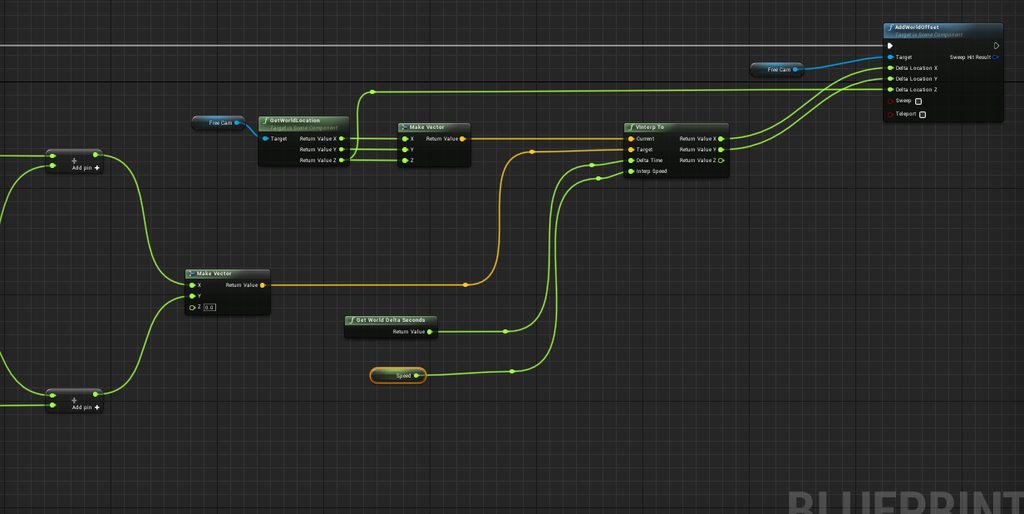
There you go
I hope you can fix it 😛
It was written from one of sams tutorials: https://www.youtube.com/watch?v=FYtLXR4-VZc&t=751s

One popular feature in modern MOBAs and Top-Down Games is unlocking the camera from your character to freely look around the map without putting it in danger...
hidden aurora
Whats the value of speed float
fickle iris
For the interp speed in the move function? 1
hidden aurora
yep
hidden aurora
Let me see the photos
hidden aurora
My internt is running so slow
hidden aurora
Literally 32kbps
bright plume
i :<
enabled a plugin (Unrealvoxel Toolkit)
says ue4 needs to be restarted
Restarts ue4
everything in world outliner is deleted and im left with a blank viewport
how to bring the default scene back :<
hidden aurora
Delete the plugin foolder?
bright plume
it worked b4 and in a new file i havent even the slightlest clue as to why it just decided to do this
 flat idol
Unreal keeps backup of saved files earlier versions in the Saved/Backup also /Autosaves might have some remnants of your work if the map is lost, you should lokk in these locations. Disable the plugin to not cause further issues.
 dense gate
Do you ever wonder why a character doesn't dash for so long that finally you find out you were applying a status effect that specifically doesn't allow moving
bright plume
derp
dense gate
I feel incredibly stupid because I was wondering what was causing that "bug" for 2 months
bright plume
derp
azure shore
I really hate how I get angry way too easily with ue4
anyone would say that I shouldn't be doing it because of how stressed it makes me, but I usually resolve the problems soon enough in some way and the stress wasn't worth it
dense gate
I avoid getting angry at it by having multiple things on the todo list
azure shore
but when it's CONSTANTLY crashing and undoing loads of work at a time, it's hard not to get angry
dense gate
Oof
Even though I'm with a garbage PC under the min requirements, I know what's causing all my crashes, and it's most commonly running out of RAM or VRAM
azure shore
I mean with the pc I have I really shouldn't even bother, but I'm stuck with it and I'm not gonna let it stop me achieving basically all I ever wanted to do with my life
I can't even run my own game for crying out loud and it's a really cheap to run game
dense gate
I'm with the equivalent of a GTS 450 right now, I know your pain
azure shore
sometimes for me it literally freezes and crashes because I hit undo
dense gate
Resolution scale is a saving grace tho
azure shore
undoing usually takes like at least 5 seconds
flat idol
Use autosaves, you loose least amount of work. Find the reasons of crash and avoid to happen.
 rotund scroll
I mean one thing is being angry about it, another is constantly posting about it
dense gate
Undoing is indeed slow
azure shore
yeah, all games I play I have to use tiny res scale
I do have autosaves and they never work
dense gate
I can't even run most games released from 2015 onwards no matter the settings
manic pawn
undo is just so powerful it undoes all of your work today by crashing
rotund scroll
lmao
dense gate
But the editor has been arguably the most stable program in my entire PC
Learn to press Ctrl-Shift-S regularly
azure shore
when I play test my game in standalone I have to have it super blurred with lowest effects and shadows settings
azure shore
nah but I can't quite get the same fps in the editor
standalone runs a LOT better
but I rarely touch it because of how long it takes to load
dense gate
Weird, PIE in selected viewport runs a ton smoother for me
azure shore
thanks to my pc at least pretty much anyone will be able to run the game
generally quite cheap to run
dense gate
Also, one thing I've noticed, static mesh tabs soak up GPU power even if they aren't focused
azure shore
models aren't super detailed, textures are often just slightly blurred, shadows have to be on low because I myself can't run high, etc
dense gate
Check if you have any of those up and close them whenever possible
azure shore
oh wow, thanks for telling me
I do worry though that at some point my pc just won't even be able to handle my damn map
the maps are generally sorta like doom maps in some ways
dense gate
Also if you want to test "optimal" FPS at high settings, use "t.OverrideFPS 0/30/60", it slows or speeds the game up to match the FPS
azure shore
oh that's good
hidden aurora
@manic pawn CTRL + Z spam lol
dense gate
It's kinda what the Record Movie does if you've used it
Quite the useful tool to record max settings demos even if your PC is garbage
Check #work-in-progress to see mine
Ran on an i7-3632QM (4 cores, 2.9 Ghz), 8 GB DDR3, Radeon HD 7650M 2 GB (OCed, equivalent to GTS 450)
As a wise man once said, if there's will, there's a way
fickle iris
@hidden aurora did you ever find a solution?
hidden aurora
Still looking at it but it doenst seems to be an is sue
Can you remind me the pr oblem please
fickle iris
Scroll up a bit if you can, I'm on my phone now and C+P crashes it for some reason
Sorry
Anyone else have any ideas either?
dense gate
I'm missing context on the entire deal my dude
hidden aurora
Have you checked that the code is the same as in the video
dense gate
And discord is painfully slow at sending messages right now
 mellow turret
fickle iris
mellow turret
fickle iris
Ye I have, you can too if you want
And meh, basically the code I sent doesn't work
And it should do
dense gate
Have you tried setting control rotation instead?
gusty dune
I've downloaded a running animation from Mixamo, and when I try to play it in the anim blueprint it is facing the wrong direction. All the other animations worked fine though. Any idea what would cause it?
dense gate
In my Countess vid in #work-in-progress I had the same issue and instead got the pawns controller and set the control rotation instead of the actor or component's rotation
It's a rotation interp to look at Countess in the vid if you're curious, then that interp is set as the control rotation
plush yew
@gusty dune not sure, but if you've ever used a 3d software like maya or blender, you can just import the animation, rotate it, then export it again
dense gate
Alternatively add a curve value with a single key to the root bone that rotates it by whatever angle you need
In the UE4 editor
gusty dune
Ah alright. Thanks Biscuit, although I don't know how to use 3D software yet
Oh it can be adjusted in engine?
gusty dune
It only messes up the animation when I enable root motion
plush yew
The alternative I suggested is much simpler no?
gusty dune
Otherwise it looks smooth in the animation preview window
plush yew
Takes about 15 seconds
dense gate
It's not simpler for me since I work with marketplace assets with high visual fidelity
plush yew
But you're not a mere mortal like the rest of us
gusty dune
😄
dense gate
Also the Paragon assets can't be exported for whatever reason so that has been extra hard for me to do out of editor
gusty dune
The thing that makes me hesitant to do anything is that the animation looks fine when it moves without root motion
plush yew
Probably because they are not intended to use outside of UE4
so they dont let you export them somehow
dense gate
I couldn't export a texture to generate normal maps and such for it
plush yew
@gusty dune Do you want root motion in a running animation?
Running in place works better most of the time
gusty dune
I may be a bit confused here, apologies if I go over the same thing at all
plush yew
Do you have a 3d software installed?
gusty dune
All my other animations have been set up with root motion enabled, which has worked great. When I tried unchecking root motion on this run animation it made it look good, but it snaps back to the character when moving
I have Maya installed, yeah
plush yew
thats because
when you download the running animation from mixamo
you need to check
"In place"
or whatever that option is
and then download the animation
gusty dune
Ahh, not 'fix' it by messing with root motion in engine?
plush yew
nah
gusty dune
Gotcha
gusty dune
Sadly the Mixamo website was changed recently, so when you download an animation pack you can't edit each animation. You can only select it if you do it one by one
plush yew
Yeah just download the running animation by itself
gusty dune
Thank you, I'll give it a try
 crisp hawk
So if you have for example, hundreds and hundreds of floor tiles in a level, and each tile can do something, such as use a different texture, i've realized that making a blueprint actor for the tile and then in the construction script spawning all of them is NOT a solution (i assumed that ue would instance these)
anyway, i realize i have to create static instance meshes, which is totally fine, but i'm trying to figure out how i might be able to provide some per instance values
plush yew
did you drop to 5 fps?
crisp hawk
i could do this easily in ogl or dx by passing an instance array buffer
haha, yes i did @plush yew
plush yew
Ive been there
crisp hawk
didn't take me long to realize that was not the right thing to do!
crisp hawk
yeah, i think i had like 200 cube tiles
instance static meshes will totally work, i just can't figure out how to give the material some parameter for each of these instances to choose the correct texture for a tile
i'm only coming across some setrandomint or something
plush yew
well, I quit the project because I didnt want to bother figuring this out so, Im tapping out here .D
gusty dune
@plush yew it works perfectly now, thank you 😄
plush yew
you're welcome ❤
crisp hawk
if ue doesn't have a way, i'll probably just do something like they are doing with the randominstanceint or whatever but make it not random, but there's gotta be a way
an per instance buffer is no different from a vertex buffer really, so it seems strange they would only implement a random int for per instance data
plush yew
Do your tiles switch texture at points during the game?
crisp hawk
yeah, they do
crisp hawk
basically like, the tiles will blink, and if your not on a "good" tile, you die
plush yew
yup
I was doing something similar
I'd be very curious to know if you solve this
so I can resume my project one day 😄
crisp hawk
the worst case scenario i suppose i could create multiple instances each with different materials, and just show/hide an instance
that would give me like 3 or 4 draw calls instead of hundreds
alright, i plan to solve this within the next couple days ;P so i'll let you know when i do! haha
plush yew
best of luck 😃
crisp hawk
haha, thanks
"How do I set per-instance material parameters on instanced static meshes?" -> answer: "According to someone at Epic, you can't do this. Just thought I'd update this post for reference."
haha, not very promising
plush yew
okay so
crisp hawk
i know thats not true though
because you at least have the random int thing
and if they can do that, they can certainly do NOT a random int
plush yew
you know the classic games of like, when you walk on a cube, it turns into your color, and whoever has the most floor tiles colored by the end of teh game wins?
crisp hawk
yup, totally
crisp hawk
that exact kind of thing is what i want (the tile coloring i mean)
crisp hawk
that would be ridiculous if you couldn't do that
plush yew
agreed
crisp hawk
its such a common thing i'd think
crisp hawk
alright, i'll try there, thanks
crisp hawk
haha, it actually is, so i'll need these variables to be replicated too!
but, thats step two
plush yew
just integrate it into ur question, smart people there too
crisp hawk
haha, alright
gusty dune
Is it possible to use an Interface for animations, rather than using casting?
gusty dune
Also, can you check if an anim montage is complete with a bool?
 chilly gale
@sand nacelle Why is it we have to wait over a minute sometimes 2 minutes to get the code to log into the launcher, it's painful having such a long delay
flat idol
Last month i had to wait 3700+ seconds, checked with the mail logs. Code was dead on arrival, obviously.
grim ore
Too many people and not enough bandwidth to handle it
visual belfry
if only it had some sort of integration with standard authentication apps 🤔
flat idol
It's the fault of the mailer service they use i think.
grim ore
nothing is capable of being perfect, google had that major outage the other day and its google
@chilly gale basically nothing is perfect, they are working on it, it sucks when it happens, and hopefully it doesn't happen at a bad time.
chilly gale
Thanks for the reply, it maybe longer to for us at the bum of the world lol
grim ore
It shouldnt need a new code every time you log in tho unless your IP keeps changing 😦
chilly gale
Oh ok I was no aware of that so maybe I shouldn't delete the message as soon as I used it
grim ore
not that. It shouldnt ask for a new code every time you log in unless your IP keeps changing. it should also keep you logged in so you don't even need that. I only use a code once whenever I reset my machine personally.
chilly gale
Mine seems to, we'll see now that I upgraded to Win 10, it might store info better
I'm just wading through the re-install
grim ore
hopefully so. the 2FA shouldn't be an annoyance for a steady user, just for people who constantly move or try and login to your stuff
flat idol
No it's as MathewW says you shouldn't require code for every single login, unless your IP is in change. There may be someone else is also using your email thus gaining access to the launcher.
Change the password on both places, see if that helps.
chilly gale
Could it be because Google in it's wisdom ( much to my anger) merged both of my email address's now I get two of everything
really pee'ed me off I had a private email and a gaming email and they linked em so bot get all my mail
flat idol
I'd say unrelated issue, but it is indeed can be annoying. Not sure how such a thing have happened to you.
You probably have a redirection from one address to the another, which makes a carbon copy on arrival. Check with the settings in both accounts if you can log into separatedly.
chilly gale
Might be a little/lot me as I got older I seem to loose the plot abit with tech stuff at 70 I might be getting slow lol
Will go through my setting again a little slower
It' keeping the brain active for sure lol
flat idol
Well you should remember the new passwords. Time to unleash the yellow stickers to the monitor.
 bright aspen
Is there a quick way to check whether a hit actor off of a raytrace has a specific component?
 hardy flume
couldn't you just cast to the actor and do a branch? (not an answer, asking someone)
flat idol
@bright aspen No if there would be such a thing, it would be a similar implementation to what you probably already have. For.loop->hascomp()
grim ore
Break hit -> Hit Actor -> Get Components by Class (your class) -> see if array has any results?
assuming you aren't trying to get the actual hit component and just want to see if it has say "InventoryComponent" or something
I guess technically the Get Component(without s) version would work better if you just want to check if it exists at all lol
bright aspen
Well, I have a "pick up" component and I just want to check if the thing I'm hitting can be picked up (my character already has a "pick up" function)
are components not the correct way to do this?
grim ore
... Most annoying thing ever getting VR again is the damned steam vr popping up every time you run the editor because epic
usually an interface would be easier to implement to handle this IMO
flat idol
MathewW you can disable steam plugin by default won't show up again. You can enable in project where needed.
grim ore
but I dunno if your actual pickup component does anything or you are just using it as an indicator
bright aspen
I was just using it as an indicator, yeah
grim ore
I know I can disable it but... too lazy lol
yeah if just using it as a boolean check basically look into using interfaces
hardy flume
I have a quick question. I was planning on having someone in my game knock down doors, would a level sequence be the best way to do this?
grim ore
make an interface like CanPickup. add the interface to any blueprints you want. when you hit an actor you can use the Does Implement Interface node to easily check to see if something implements it. The other alternative is to use the interface for your "pickup function" on the item and just go randomly calling pickup thru the interface on everything lol (but it sounds like your player is handling the pickup event and not the item which this wouldnt work well for)
chilly gale
If I unpack an asset I brought of, say Gumroad into a folder in the vault will I be able to use that the same as a asset I download via the launcher or will it not show up please?
bright aspen
Thanks a lot you're always a big help when you answer my questions : o
chilly gale
I'm hoping to make adding those assets easyer to add to projects
flat idol
Without a manifest file i think it won't show up ever, tho don't take my word for it just go ahead and try.
grim ore
@chilly gale in theory yes if they are following the correct format. "unscrupulous sea faring people" do that and it adds them to their launcher just like a purchased asset
but yes ^ you need the correct manifest for it
chilly gale
Thanks guys
grim ore
@hardy flume it depends on how you want knocking down doors to be. sequences for animation would work if its more of a one and done, like hit E to break door -> pause player -> break door -> resume player playing if not there is a way to use animation in the mesh itself and you can just play it if you want something more dramatic.
chilly gale
I brought The Old Scandinavian Village and hate having to copy it every time
hardy flume
alright that makes sense thanks @grim ore
flat idol
MathewW so the manifest is not unique to launcher. Launcher should do evaluation of vault contents and automatically delete illegal content that is not assigned to a particular user.
grim ore
darn there is no way to make your own manifest yet but... what about making your own feature pack instead and using the add new option in the editor?
flat idol
Probably this is exactly why it never deletes content, because multiple user can login.
chilly gale
If it check it would NOT know about stuff brought from outside site either and delete those which might upset a lot of users right
flat idol
The launcher is for the marketplace content only :)
Thanks for using our services, here is the clumsy launcher for ya'll
chilly gale
that shows the vault library tho right, so it would show what ever is place in that folder structure I was thinking
grim ore
man I can never find the docs for it but the feature pack would work fine for what you want
chilly gale
Worth a shot I guess that can't hurt they can only say no or just do it
flat idol
You can try seller too that's more likely actually
chilly gale
I did that and he said he was working on it but that came to nothing
flat idol
More people need those yellow stickers, send one to him
chilly gale
Will do thanks for ALL your help
 dull rapids
Hey guys, not sure where I should put this question but:
Off the top of your heads, what naming restrictions for Unreal assets do you guys know? Like "if you want Unreal Engine to recognize this asset automatically like this, you must name it with this suffix/prefix", or stuff like that. I heard something about that with some of the texture importings, but I wasn't actually sure. If you guys know a good place where all this is compiled, feel free to point me to it as well, because I couldn't find it on google...
 tight sun
Hi, Just looking for some guidance on how I can tackle this, I want to make a very basic level with two floors and an elevator that moves between them. I'm just wondering what the best way to go about this is, should I say animate the elevator doors in blender, or would you just use matinee or sequencer? Then either move the floors or move the elevator between the floors when triggered by pressing E on the control panel, again I'm mainly just trying to see the best way to do it.. most tutorials seem to use matinee but it shows as 'legacy' now and it seems that sequencer is the correct tool to use now? Is that correct? Sorry I know this seems super stupid, just looking for some guidance on terms or concepts I should watch tutorials on etc, Thanks
plush yew
Hello
tight sun
👋
plush yew
I have a question
If you have the editor open, can you move uassets into the project folder or does the editor have to be closed?
plush yew
Ok installing it now
Also question
If I RIP a blueprint file out of a game with UE viewer and move it into your project folder, will UE recognize it as a blueprint file?
 scenic warren
any idea what might be causing this ui flickering?
 runic narwhal
Is there a way to tone-down the eye-correction of the default camera? It's making working in the engine and gauging results a little ridiculous. I've even got bloom turned off and just looking at a brighter texture on the ground pushes white levels higher and higher.
This is actually dirt and rocks. 😐
 wind siren
@scenic warren World's been going around that Nvidia users need to update their drivers. Don't know if that's what it is, but that's all I've got
 steel patio
I believe that flickering is just Z-fighting, happens in all engines. Doubt drivers would make any difference tbh but happy to hear (and update) otherwise.
scenic warren
i dont have any intersecting geometry or geometry that's occupying the same space. unless i'm mistaken on what z-fighting is, I dont think that's it
I will make sure I'm using the most recent nvidia drivers
wind siren
@runic narwhal Make sure there is a post process volume in your scene. Make sure the post process volume is set to Unbound. In the details panel, under Lens > Exposure, enable Min and Max brightness, set them both to 1.
steel patio
The orange outline would be in the exact same space as the edge of the box, so its z-fighting against itself
steel patio
the way to fix it would be to offset the bbox + 1px, but i'm sure they're not fussed about it, it doesn't cause problems tbh.
runic narwhal
@wind siren Appreciated! Thanks.
dark depot
yeah pretty much that you can make the lines thicker in editor settings see if that makes it clearer ffor you
scenic warren
Alright, thanks for the help, guys. I guess I'm glad to hear this isn't an isolated issue.
coarse basalt
https://gyazo.com/af269ce8b4d3d919c12694fdc7f06953
im new to unreal and trying to create a map for a open world survival game and when rebuilding lighting get these errors any help is appreciated thanks!
 sudden agate
Open world and baked lighting shouldn't be used together
 real pasture
Do you guys suggest Udemy for a beginner?
cloud cobalt
Some of the courses are great
 soft crescent
Is there an equivalent to symbolic links to assets in ue4?
 lapis bronze
@plush yew i'd try utilizing something to do with Vertex Color painting
@real pasture yes, there are some good Epic Games certified courses on there too
not sure what you're after exactly
but maybe Blend Shapes could be an alternative answer
 tardy sapphire
How do you move a whole level to another position, like, 50 particle systems and 100 meshes at once, how do you move that around lets say 1000 units in the x direction?
 whole quarry
why would you want to move it tho?
tardy sapphire
lol
Coz I load it in a persistent level
And I need to position it properly
In my large world
whole quarry
tried selecting all objects and just... move it?
whole quarry
thats a lot more than the previously stated 150 objects
well ye...
lagging while moving isnt a problem though
once its in place, its in place
tardy sapphire
hmm
lags a lot :/ but okay I think I know what to do
I can put all objects under a single object as children
Duplicate the single object, move the single object to desired position
Copy position, paste position
Maybe like that
whole quarry
ye idk if you want to do that
dont over complicate trivial things like moving x amount of objects
KISS applies here as well
tardy sapphire
I cant move it otherwise
It lags
Too many objects
I have a beast PC but still
tardy sapphire
Lol nvm
whole quarry
since its a editor thing, it wont affect gameplay
or do it in batches
like move 50 objects per time
 spare sun
well cant you just do a +1000x in the coordinates
whole quarry
maybe world compositor would be of use for him
System for managing large worlds including origin shifting technology.
seems like you can adjust the position of a sub level
 lusty carbon
Ok this one is driving me nuts! right mouse button click for panning around the viewport, keeps popping the context menu, won't let me roam around. any fix?
spare sun
you can move the camera a bit while holding rmb
or just enable keyboard controls even when rmb isn't pressed
lusty carbon
Red
"you can move the camera a bit while holding rmb"
that's what im talking about
spare sun
you sure ur mouse doesnt trigger a second rmb click when you release?
if I move my camera even an inch, context menu doesnt pop anyway
lusty carbon
outside of ue4 my mouse is perfectly fine
 regal mulch
That or you simply never realized it's broken
Simple enough to get some sort of key recorder and see what your mouse button does
Or just bind a print string to it and click it ingame
:D
lusty carbon
Unreal Engine Forums
Tell us how to improve Unreal Engine 4!
 shell jacinth
Hey, can someone tell me why my unreal engine does compile 1000+ shader when i make a very very simple material?
In 4.21 it compiled 30+ shaders with the same material and now when i save something its compiling about 1000+ shaders...
Does anyone has an answer for this? 😃
(this happens everytime)
whole quarry
Did you apply the material in the world?
 somber quail
It will do that if it has many instances or is applied to many objects.
Does anyone know what would cause a mesh to collapse in on itself like this?
I've been testing a project on the Quest and it just started doing this out of the blue
 rose glen
Hey guys,
Im making an FPS game, and i have already rigged the hands and the first weapon (SCAR)
i have done the animation and everything, but since i added everything to UE4 i have to work on two seperate Animation BluePrints , since in the end they are two diffrent skeletons
so i was wondering before i proceed with the rest of weapons. should i remove the weapon rig, and create them on the hands ? this way i will have one skeleton with one animation blueprint and i can control both at the same time
if any one had experince on working on an FPS game before, please enlighten me 😃
 crisp mesa
rustic imp
crisp mesa
rustic imp
wouldn't your weapon just be a mesh that you attach to the skeleton of your character?
or why do you have 2 animationblueprints?
lusty carbon
what am i doing wrong?
rose glen
Unreal Engine Forums
Talk about Level Design, Static Meshes, Physics, and more.
cloud cobalt
Check the material
lusty carbon
it is liner color
could be that the color parameter was a vector 3 instead of vector 4?
that fixed it
although the mask seems inverted?
 thorn vector
hi idk if this a bug using 4.22.0 source but i cant use procedural foliage volume in world composition
anyone can help?
plush yew
@rose glen you can simply manage both animation blueprints from one blueprint, that has the hand and weapon actors, just get the skeletal mesh variable pull of it and type in "Get Anim Instance" then cast the anim instance to the anim blueprints
plush yew
rose glen
ok now comes the next part. after casting the animation blueprint
since i dynamically set the animation sequence in the animation blueprint using struct
Reload animation has sequence for the hand and a sequence for the weapon
if i cast the animation instance. i get the variable inside the animation blueprint ?
plush yew
You can get and set all anim blueprint variables from the cast node
call events, functions and so on
rose glen
oh great ! i will try that, thanks @plush yew ❤
plush yew
your welcome 😄
rose glen
@plush yew uhh i did the casting and all but that did not work 😄
the ABP by default asks for which skeleton you want to make it for
but both skeletons are diffrent
plush yew
So would you make 2 anim blueprints then?
I mean you can make 2 anim blueprints and steer them both with each skeletal mesh in one blueprint
rose glen
yeah seems so
2 Animations BPs
But i was wondering what could go wrong if i make the weapon Bones with the character bones
to have same rig
lusty carbon
Any good resources on how to do sound design? not just throwing sounds in the level but specifically starting and stopping them depending on movement and params.
plush yew
@rose glen When you make the weapons separate actors you can give them physics assets and then drop them f.e.
I mean having all of the weapon bones on the same rig would be possible
rose glen
Currently i have a base skeleton for all weapons
and a base skeleton for the hands
eventually all weapons should share the same skeleton mesh with diffrent animations depends on the weapon
But since i have to export each animation twice. one for the gun and one for the hand
My Struct would be like this
Running is the weapon Animation
Running Hands is for hands
its the same animation but when imported i have selected each skeleton
so i had to import same animation twice
when i exported the FBX i chose both Hands Bones and Weapon Bones . so the animation has both bones in it. so when selecting the skeleton when imorting it went fine
but two animation sequences
plush yew
So in your modelling software the animation is on one armature that has the bones of hands and weapon?
@rose glen
rose glen
two armatures, one for gun one for hands
i thought id make it one armature but i dont know what could go wrong
plush yew
well why not export them seperately as .fbx?
ok so 2 armatures, but they both have keyframes for their bones in the same animation?
rose glen
yes
plush yew
well I'd make separate actions for each armature though