#ue4-general
1 messages · Page 463 of 1
 wraith lark
well that is a matter of opinion
 latent fable
where should i put firstperson blueprint? I've looked on google but cant find anything
(sorry that im just stupid in general)
 tough fossil
Can I self teach my self c++
latent fable
i am confused, i cant figure out why it wont work
 ancient lotus
is there no way to use non seamless travel with steam?
 carmine scroll
huh?
ancient lotus
ive read online of people having issue using the online subsystem steam with non seamless travel. as a test i tried it and it causes the connected clients to crash but seamless travel works just fine
 mossy nymph
you should be able to use steam lobbies to keep players... connected
and use hard travel
i don't recommend the practice tho
latent fable
@carmine scroll i've googled and tried what i can think of but i cant find out why it wont work
or im just stupid
carmine scroll
as I said. When you migrated the first person stuff. You didnt also migrate the FP game mode
 azure shore
right is there anything that actually stops lighting builds?
latent fable
Oh sorry i didnt understand your wording
azure shore
it sits on 0 and doesnt move
carmine scroll
the cancel button @azure shore
latent fable
where is the game mode located? sorry for being uh stupid
carmine scroll
its located where the first person blueprint is @latent fable
it might just take time
depending on the level
and your pc
azure shore
800 something unbuilt objects, is that expected to take a real long time?
on a practically empty map with just a few objects its just a few seconds really
carmine scroll
depends on lighting quality too
 dense gate
I got myself in a whirlpool and need some help, couldn't find anything in google
azure shore
I keep shadows on low if that means anything
dense gate
I got a crash while moving through the map in the editor, after that all static meshes suddenly glitched out
azure shore
I've tried deleting unneeded folders, (build, intermediate etc) restarting unreal, restarting pc, NOTHING works, yet lighting builds still work fine on other maps
it was working fine on this map too but suddenly it just STOPPED
carmine scroll
so what happens when you play it now?
dense gate
Visual demonstration if this helps, it changes literally every frame
 versed spear
delete all levels builtdata - close the project, open it and rebuild all levels
azure shore
thats all I was told really
delete this and that folder
I did make copies just in case
argh its just a joke at this point
carmine scroll
maybe
versed spear
Close the editor and delete (or rename) the folder "Saved" from your project.
For example: "C:\Users[user_name]\Documents\Unreal Projects[project_name]\Saved"
Then open it back up and rebuild your lighting.
azure shore
tried that
carmine scroll
also, what sizes are your lightmaps
carmine scroll
lightmass volumes or in the settings for the lights? Cant remember
I rarely touch them
azure shore
oh, I dont even have a lightmass volume
but literally it was fine the other day, then the next time I tried to build that same day it just refused
latent fable
does anyone know why this wont work
carmine scroll
Close the editor and delete (or rename) the folder "Saved" from your project.
For example: "C:\Users[user_name]\Documents\Unreal Projects[project_name]\Saved"
Then open it back up and rebuild your lighting.
try what Mat said
or mattox
idk his name
but that dude
azure shore
yeah, I already did, sure Ill try again
carmine scroll
delete that score nodee @latent fable
and drag from the cast and search for Score
azure shore
things like this really make me want to give up
its so INFURIATING
just BUILD THE DAMN LIGHTING
OMG
IT HEARD ME
 surreal gyro
OK so I went over to the Models resource and imported Giga Bowser's mesh, and he's on his back for some reason
 kindred viper
lazy giga bowser
carmine scroll
to do with the import axis settings
surreal gyro
Import axis?
carmine scroll
I believe you can change the axis its imports the data on
or that might be only for exporting
but you can put it through a 3d software and rotate it correctly to see if thats the issue
dense gate
There's an "Import Rotation" for both static and skeletal mesh imports
I think adding 90 to the Y rot will work
carmine scroll
yeah okay, I did think there was
surreal gyro
@dense gate It's the X rot, not the Y
dense gate
Ah, my bad
 next badger
@surreal gyro if you have no animations for his skeleton, you may have a tough time
surreal gyro
@next badger Why
next badger
the skeleton topology is quite different
 fossil ore
Hey guys I have a problem with IncrediBuild
It looks like license expired... and I dont have new
next badger
@fossil ore well, ask for the new one from IncrediBuild...
fossil ore
next badger
IB is for distributed building (with cache)...
kindred viper
yeah I got confused for a moment
next badger
actually makes no sense to use a free one
kindred viper
I was thinking of Live++
fossil ore
its just weird
kindred viper
brainfart excuse me. room full of noisy kids 😄
next badger
@fossil ore you don't need IB to build a project, if you want to use one - get a license
fossil ore
so I can delete it?
next badger
free one is useless, since it's limited to 4 or 5 cpu cores (i can't remember)
and modern cpus are 8+
fossil ore
Is this IncrediBuild (dont remember how I got it) is necessary part of UE4?
next badger
no, this one is not
surreal gyro
@next badger Wait, is there actually no way to make new animations for meshes directly inside UE4?
 plush yew
Alright so I tried all the anti-aliasing options, non of them fixed anything. Its a very bricky model with material, no texture. I can understand why its looking like this but Im lost as to what to do about it
surreal gyro
I mean, can I not make new animations for Giga Koopa's skeleton
next badger
ue4 has embedded XGE engine in UBT pipeline, that can utilize IB, but you may just ignore it
@surreal gyro there is AllRight Rig...the only way to animate in ue4
surreal gyro
I'm guessing it's not very useful from the ellipsis
next badger
it is very useful...but v.1 is meh...and v.2 is paid
@plush yew your issue is not about aliasing, it's about normals...your mesh has no "smoothing groups"
iirc you could generate SG when importing the mesh
or, you just forgot to import them when imported the mesh
plush yew
@next badger I'll check my default import settings
@next badger Dont see such a thing. If I tell my modeler they're missing smoothing group, would he know what to do?
or is it a ue4 thing
 mint hill
so im importing some models from blender but when i do it makes so many duplicates...
next badger
@plush yew um, well, you just need to look on model in the editor (blender or whatever it is)...
@mint hill names are different, not dupes to me
 dark depot
@mint hill i imagine you have more then one component in your blender scene clean it up and if you are meant to have more then one then use merge meshes
mint hill
ok ty
next badger
@mint hill green one are materials, you could merge one
@mint hill ofc depends on textures
dense gate
Depending on the editor, even when you combine meshes it goes ham and separates them when importing
next badger
@mint hill it is better not to merge the meshes (if you don't know what you are doing)
since instanced meshes = less draw calls
plush yew
Would you recommend after the map is complete, to merge all the meshes into one?
does that reduce drawcalls?
dark depot
no
plush yew
dark depot
because then then everything has to be drawn
that isnt what i meant when i said merge meshes people make their things up on multiple parts in blender etc and dont realize it will come into the editor as two objects
next badger
@plush yew https://www.youtube.com/watch?v=oMIbV2rQO4k

Download assets: http://cbr.sh/od53nz Learn how to render millions of polygons with Hierarchical Instanced Static Mesh in Unreal Engine 4. Optimize draw call...
dense gate
Quick reminder for y'all to check whether you've accidentally left tessellation on for something that shouldn't have it
plush yew
Thanks alex, will watch it
dense gate
Dropping that one in since I forgot mine for a material used a lot everywhere and it skyrocketed my performance
next badger
@plush yew 4.22 now has automatic instancing (it just replaces everything similar by the instance)
when you merge - no instances may be produced anymore
since it's literally new mesh
dense gate
TFW upgraded to 4.21 right before 4.22 previews started rolling out and currently too many things aren't supported for 4.22 yet 
next badger
@azure shore means Swarm process failed to spawn, or firewall cut the link
plush yew
To add to what alexey said, I think you need to compile unreal lightmass
next badger
Swarm agent - app that calculates Lighmass
azure shore
so like, what do I do
next badger
check if swarm is running (generally has an icon in the tray)
azure shore
ok all I did was clear stuff from its cache folder
guess that was wrong or something
yeah that was it
still though
lighting building is still broken
0
bloody
percent
 languid star
Hey, I am trying to follow this tutorial on Morph Targets (https://youtu.be/haQBRXjQOJQ?t=104) The author adds a timeline, which is fine, but the feature doesn't appear to exist anymore?
In this Unreal Engine 4 tutorial I show how to import a Blender fbx file for using Morph Targets from the Blender Shape Keys. I import the fbx to UE 4.18 wit...
dense gate
It usually stays on 0 for a while then ramps up in speed
dark depot
timelines still exist @languid star
languid star
I guess my question lies at how to create one
next badger
yeah, timeline is kinda fundamental element
dark depot
right click in a blueprint and type timeline
languid star
I didnt get the add timeline option
dark depot
are you in a function or somewhere they are not supported
languid star
EventGraph for animation
dense gate
Only Event Graph can have time-based nodes
 toxic rivet
Does anyone have experience with building a client using the source code?
next badger
@toxic rivet ofc, but better to ask on #engine-source
dense gate
AnimBPs don't support time-based functions
Try using a curve value node inside the anim graph
I'm so lost in English right now
toxic rivet
@next badger Would you be able to help me? I am running into a problem that I cant seem to solve
azure shore
is this bad
dense gate
A node like this
next badger
@dense gate he was following tutorial...
 rotund scroll
nice, I always wanted to quantify holiness
dense gate

dense gate
Ah, wait
languid star
I am fine with going off the tutorial
dense gate
He adds the timeline inside the controller
languid star
I am really just looking for a method to generate a sine wave
dense gate
Whatever "Tree_MT_Controller" BP is
Not the AnimBP
I don't think there's anything you do in the AnimBP itself
I don't think it's even opened in the vid
 weary void
um.... how do i get rid of this box that jsut appered, i cant use the contetn browser anymroe
dense gate
Try pressing shift/alt/ctrl or drag the window around
weary void
thx
languid star
Yea. Now that I am looking at it, it looks as though he uses an actor blueprint instead of an animation blueprint
languid star
Hahaha. Was trying to adapt an existing blueprint I had for dynamic skeletal animations with morph target animations
The existing one I was using was a animation blueprint.
Didn't know about the locked features to each one
weary void
um... so why can't i fnd my player controller, its like it doesnot exist. Im using first person template
dense gate
Well, you can always modify curve with a simple node, especially since you're doing a simple sine wave
Something like this can be slotted into the animBP and adapted to modify the MorphTarget curve
languid star
Yea I went with this
next badger
@weary void cause, it's not a BP class
dense gate
Quick tip: Multiplying is faster than dividing a float
So having X / 2 is slower than X * 0.5
weary void
ahh thank yuo
languid star
Fixed
Interesting
Now. An interesting component to this - if I decide to speed up the animation, the animation "frame" so-to-speak will skip based on the changed constant.
toxic rivet
I can't seem to build a development client, It fails about server functions that are surrounded by WITH_SERVER_CODE
Anyone know why this would happen?
languid star
So use DT to add to an accumulator?
rotund scroll
if it's just for a limited time, an accumulating value doesn't really matter
because amortization ayyy
dense gate
You can always add a simple "saw" float like this
And use that for the sine
I've had some values accumulated so far that float inaccuracy kicks in
rotund scroll
what have you been using them for
dense gate
Curves for some animations mostly
rotund scroll
although I get your point, I would love to have doubles for certain elements
dense gate
I'm using exclusively BPs, so it's not really an option for me to use doubles
rotund scroll
I was referring to BPs not having doubles
dense gate
Oh, for sure
azure shore
I'm sick of this
dense gate
But simply making a saw float did the job for me
Especially since I feed it into a sine/cosine
azure shore
I've been trying for TOO LONG to fix a problem that shouldnt fucking exist
WHAT is WRONG with my damn lighting build?
just SITS there on 0 percent
next badger
@azure shore have you tested the empty project?
azure shore
it worked fine the other day, its NOT just taking a long time because when it did work it was quick, I've tried everything suggested and I'm sick of it
it works fine in other maps
dense gate
Anything that could be doing lighting a dirty?
azure shore
like what?
dense gate
Lightmass importance volumes sometimes caused issues for me
azure shore
I didnt even have one
dense gate
Any more special lights from the RTX features?
next badger
or some "infinite" settings
dense gate
Try killing the swarm process
next badger
@azure shore btw what the swarm log says?
next badger
@azure shore i have those too, those are not important
azure shore
it ends like this
next badger
@azure shore try to clean cache (in the menu)
azure shore
yeah I keep doing that
I got a single lighting build earlier but thats all Ive managed in two days
dense gate
Might be a stupid question but is your HDD/SSD full?
On 8 GB RAM I have no issues building an >1500 mesh instance map
azure shore
I got 8gb ram too
next badger
@azure shore try to go to settings and set the verbosity to Verbose
@azure shore also take a look on Message log in ue4
next badger
eh...it stores cache on C: -_-
azure shore
which settings @next badger ?
azure shore
ok
yep still nothing
NOTHING
I hate unreal so much right now
it literally works fine on any other map
 lapis bronze
I thought you needed a lightmass importance volume
( could be wrong )
all of my maps have one
azure shore
nah, it was working fine without oen
well I tried deleting like half the map and then it let me build
do you think my pc is physically incapable or something
lapis bronze
Im not sure, i used to have a problem baking similar to that
i just deleted and recreated my light mass importance volumes
or deleted my lighting data from the actual file folder
and restarted
azure shore
wheres the lighting data?
lapis bronze
lemme find where it goes.. it usually sits next to the actual maps
azure shore
do you mean builtdata?
lapis bronze
Yeah
azure shore
yeah I tried that
lapis bronze
aw
You using Unreal 4.22.2?
Im trying to scroll up to catch up to your issue before asking too much haha
azure shore
yeah, definitely 22. something
dense gate
I'm using 4.21 so it might be an issue from 4.22
toxic rivet
I can't seem to build a development client, It fails about server functions that are surrounded by WITH_SERVER_CODE
Anyone know why this would happen?
 cyan bough
Im working on a Cast timer for one of my skill. I want it to display the bar as a percent bar and count down based on my variables. For some reason my bar just flashes and does not count down. Any suggestions on what I am doing wrong?
Yes I know they are division is wrong in the second it should be cast time devid by cast timer. I was checking that to make sure it was not the problem and grabbed that screen by mistake.
dense gate
Do you really need the branches in the first image if you know what's going to happen?
If there's something that can affect the countdown from outside the BP, aight
cyan bough
Made it easier to break down using the sequence
dense gate
Also I think the progress float should be Countdown ÷ Time, not the other way around
I assume the countdown is the current cooldown in that case however
cyan bough
Yeah i screen grabbed a test.
dense gate
I personally have an "execless print X" pure function that accepts a float input, prints it, then returns the same float, has saved me a few headaches in debugging
I'd work down my issue starting from the final product that isn't working, in this case the progress bar, then work down to what isn't working as intended through trial and error
E.g. If the ÷ is wrong, the progress bar would show values commonly >1
Then if it shows a constant 0, I'll see where the countdown isn't done right
cyan bough
Ok thanks for the advice. Will go give it another try.
dense gate
Also you can always enable debugging mode and start slomo testing things
Hit the play button, type console command "t.OverrideFPS 500", start up your test, Shift-F1, pause, then debug
cyan bough
Will give it a try ty so much for all the help.
 deep basin
so, the function GetMyPlayerIndex return -1, even though my controller is valid. how is that possible??
rotund scroll
is there such a thing as an escape character for string in UE4?
plush yew
@rotund scroll you mean like \n?
rotund scroll
yea
apparently you can just do shift enter for \n, but really if there's a page for what escape characters work/how they work in BP strings that'd be amazing
rotund scroll
it printed \n for me
plush yew
I havent tried with blueprint, but in c++ it works correctly
rotund scroll
unless there's an escape character for escaping BP into c++
yeah I figured c++ would be standard
rotund scroll
well like I said, shift enter works, so you can put in literal linebreaks
I suppose they do have string builder for more advanced stuff like %d
dense gate
There's a free marketplace plug in right now for rich text
rotund scroll
it's all good I'm using it just for debug
deep basin
where can I change the camera components collision settings? It seems my camera blocks my AIs projectiles, lul^^
plush yew
@deep basin does it have a springarm component?
deep basin
it does, yes
next badger
@azure shore the black one is Skylight ?
deep basin
and the probe channel is the equivalent to its collision preset?
plush yew
dont see why it shouldnt be
deep basin
oh i see
languid star
Is there a way to pass in a bone transformation to a blueprint as a parameter? I want to find the location of the base of the bone and tip of the bone.
deep basin
mhhhh, for some reason my camera still blocks bullets, even though projectiles are by default set to pass through..... any ideas?
I just made the camera really small now... what a pain
plush yew
@deep basin another solution would be to give your camera a tag
And in the collision check function of the bullet
Make sure the hit object is not a camera
if(!HitComponent->ComponentHasTag("MyCamera")) // If the hit component is not of type camera, continue
 meager zealot
Can somebody dm me if they know how to fix error UE4? Thanks
 weary basalt
Dont ask ppl to DM you, just ask your question.
weary basalt
This is not a Fortnite Discord Server.
meager zealot
Well just the error :T
versed spear
uninstall ue4
weary basalt
This is a Discord Server for the development of games using UE4. We do not fix errors with Fortnite, please go to one of the official platforms for Fortnite.
meager zealot
Okay then
 raw elk
Does anyone know why this is happening to my text in UMG? It looks fine in the UI editor, but in game, I get this.
 rapid acorn
My light build stays at 0 for a long time before running, anyone know what is being done while it's at 0?
versed spear
@rapid acorn did you check other levels and see if they build fine?
rapid acorn
@versed spear Lighting builds fine, but it spends about half the time at 0. I am just trying to understand if there is something being calculated before light build
 grim ore
Wootie McWooterson. Finally found an oculus quest in stock 😃 Now I can make some new VR videos
 turbid mesa
Hey all, does anyone know why I wouldn't have the ability to see the raytracing debug view modes? I have raytracing enabled in the project and I have an RTX card but it just isn't there
Edit: actually it may have to do with my windows version, didn't realize windows had new updates that didn't pop up in windows update
dark depot
@rapid acorn you can look at swarm to see what its doing
 wind siren
Anyone interested in trying my Demo to see if it works? I haven't tried it on another computer yet.
I used to have two computers. Now I wish I still did.
 vivid girder
Why did they change Blueprint Macro Libraries to require a parent base class?
seems like a bug
wind siren
@grim ore You are a personal hero of mine.
grim ore
😃
wind siren
I go by Deep Fried Carp Lips on youtube, I suggested you make a patreon
grim ore
@vivid girder when did they not have you require a parent base class?
weary basalt
@vivid girder Its always been like that
vivid girder
Oh, thought it was like BFLs
grim ore
@wind siren I looked into patron but then I am beholden to the peoples and I was like "I can barely hold onto myself so I should really not do that" lol
vivid girder
What's the reason for a Library having a parent class?
wind siren
If anyone would like to try my game demo, I'm planning to submit it for a Megagrant later this week, could use someone to verify it works on other PCs.
lapis bronze
@plush yew you can use an anim notify in your animation BP to play a sound sure
thats how footstep sfx are setup usually
lemme screenshot how i have it setup
So using my animNotify event in my animation BP
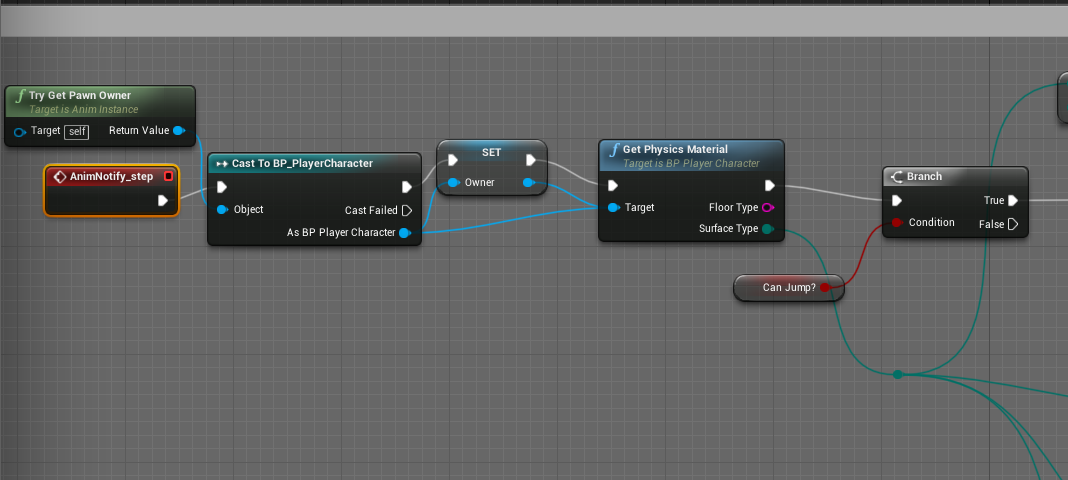
(keep in mind this is a dirty way to do it)
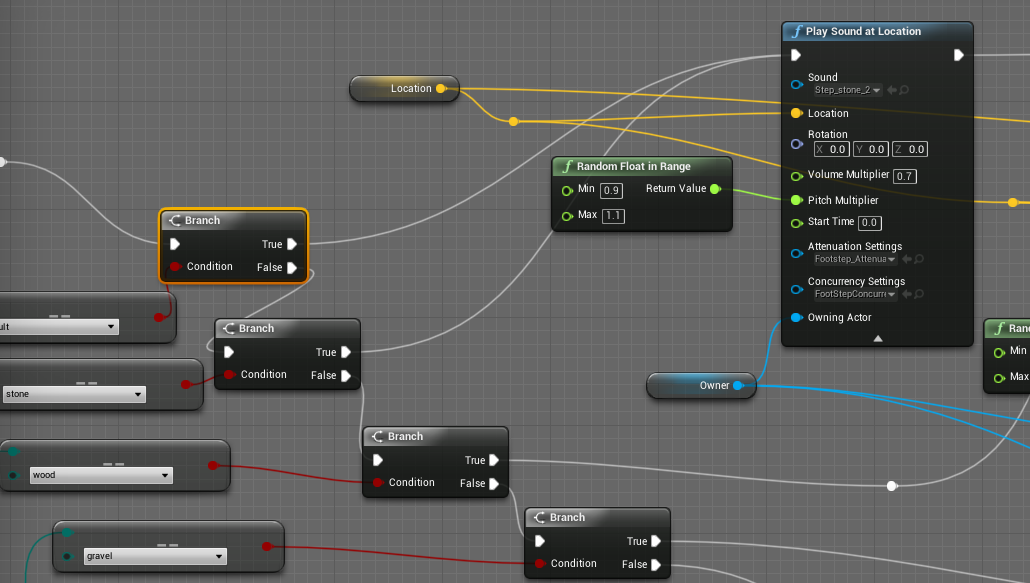
i have my physics materials trigger different sound effects for footsteps
one for gravel, stone, wood, etc.
you can setup a way cleaner version of this im sure
you know how to add the notify right
then you can find it as an event
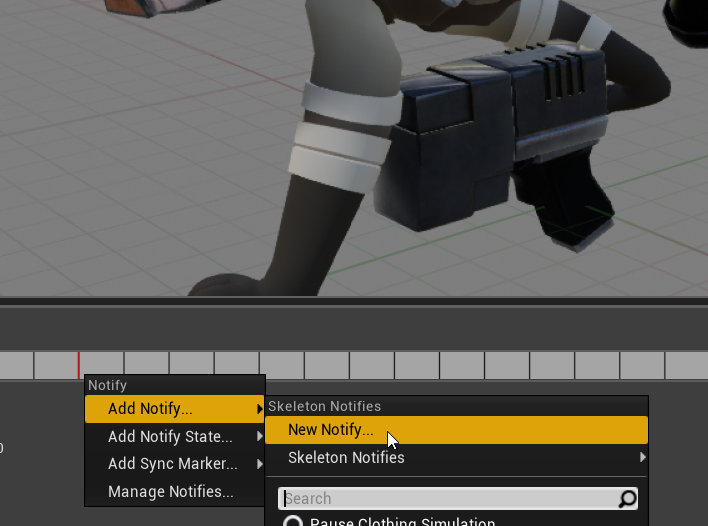
yeah new notify, or if it exists already
Skeleton Notifies -> name of your footstep notify
its the same thing

no prob, i learned about this stuff awhile ago and its difficult to find an example not knowing what to search
use notifies to trigger stuff
dont use the built in functions like these

you should have all your footstep logic on your Anim BP
so here's me creating a New notify and linking it

here's another video, hope that clears it up
kewl
np mang! good luck
lapis bronze
weird
I think i had that happen also once, but i forgot what i did to fix it
but it was in 4.21 not 4.22
check the Window at the top
There's like viewports you can enable
try toggling them there
ah yeah thats it
shit happens
😦
 lusty carbon
Migrated BP_CommentaryBox into my VR project. it doesn't trigger with my VR pawn. help?
plush yew
good
lusty carbon
Migrated BP_CommentaryBox into my VR project. it doesn't trigger with my VR pawn. help?
im talking about this
it has proximity range and pops up when pawn overlaps. not triggering with my VRPawn
(I migrated it from the Architecture Vis example project by epic)
it does find my camera look direction though so it's always facing the player
 flat gorge
I can't figure out what's causing the travel failure, ik it's the path of the level but everything seems to be in order and idk what else could possibly be going on
plush yew
@flat gorge You can't travel when the game is played in editor
you have to launch as standalone game
alternatively, go to the folder where your .uproject is, right click then launch
 shell jacinth
hi Community i have a difficult question - Can someone tell me what the unreal engine PROJECT (not the engine directly) saves in the registry and where?
I could find this in the log: "UnrealBuildTool.VCEnvironment.SetupEnvironment(CppPlatform Platform) in D:\Build++UE4\Sync\Engine\Saved\CsTools........" But D:\ doesnt exist anymore so which file / config etc ask for D:\ ? 😮
I had a hard drive problem and now my project dont find the Visual Studio Universal CRT and get an build error - But when i create a blank project it packages perfectly.
I moved my old project to my new hard drive and now Visual Studio and the engine is installed on K:\ because I:\ was defect. All runs perfectly now except that i can not package my old project anymore
I hope someone can help me :/
@plush yew Ok i try it thank you
Now i get many other errors, i try now to move all the files to a complete blank project...
 amber rivet
Hello, I need some help
basicly I need help with the resolutions and screen stuff
Anyone?
shell jacinth
Yea i thought already that this will be a bigger problem.. the main problem is that the engine and visual studio were on another defect hard disc and i try no to change all the registry entries to my new disc so this is the problem.. the Computer things there is another disc which i removed a day ago because it was defect
shell jacinth
I found the problem... my visual studio is defect also after several new installations - this shit software dont uninstall all its components
 flat idol
Check the logs what are the latest entries and crash
 sage linden
I had an issue like that too, I used to use Sculptris and my projects never got exported
Not exactly the same issue but yeah something like that
 safe furnace
@flat idol what’s the Log Location, as I can’t see a log
flat idol
Saved/ in your project there will be logs.
safe furnace
👍
plush yew
How to set auto possess player to player 0 after 5sec of game start
does anyone know the sqrMagnitude equivalent in ue4 c++?
deep basin
I still dont get how it is possible that my AI doesn't hit my player when the camera is tunred away. it is programmed to aim at the spine_02 bone of the player, yet when I face the camera 90° or more away from the enemy, he misses almost every shot. When I zoom oput the camera to a top down position this doesnt happen, so it must have to do with the camera position. any general ideas?
actually when I face the camera away completey and the enemy is not in sight, the bullets are not even generated so I think this has something to do with general engine settings??
are there any settings where I can say to increase the rules, when actors are created and when not? since in my game it can easily happen that the player is in a medium/ long range fight, turns away from the enemy and bullets stop spawning...
 radiant haven
for what is this Map_build_data
 sonic pagoda
@radiant haven make sure you dont have 2 copies of the same project opened
map build is for built lighting
you can cancel it if all else fails
since you can always build ligthing
radiant haven
@sonic pagoda when i open my project "failed to save/load map......., when i compile or like this "failed to savemap"...
well can i just delerte it
sonic pagoda
you can delete the map build yes, just dont delete your map because that is your level
i would be careful though in any case, because if its failing to save / load something might be wrong
usually happens when you have 2 of the same project open... or you move maps around
deep basin
Camera facing the enemy, everything works
https://i.gyazo.com/9c1a68fd8154141703b7f529b50b0379.mp4
Camera facing away, no bullets are hitting, when checking for hit event they hit the barricade the AI is behind.
https://i.gyazo.com/c8a3bd064d14fcaca941303fe0bea9ad.mp4
anyone any ideas??
sage linden
Well it all looks good, 👍
deep basin
not really, the player can't be hit if the camera is facing away from the enemy
 pseudo swift
hello all, i cant figure out how to enable physics on a static mesh without having gravity affect it, i also do not wanna lock the position, is there a way to just have it act like a simple rigid body?
kindred viper
physics but no gravity?
pseudo swift
yea well collision without gravity
flat gorge
@plush yew thx, it really was the editors fault, now I just need to fix the menu when I press start it opens level
weary void
how do I set a movie?
i followed a tutorial and it didnt work
i went to project settings and clicked on movies and added my mp4 file to the array but when I launch game, it does not work
kindred viper
do you mean a launch movie?
if so, its probably the mp4 encoding, which needs to be exactly the same as the docs tell you
 brisk sluice
guys, is OK use stationary lightning for trees?
weary void
oh okay
pseudo swift
this black plane in the middle is a cube from ue i scaled down, is there a way to fix the collision so that it follows the thin resized cube instead of the default blue box area?]
kindred viper
paths wrong. cant find files. etc
radiant haven
which files i need
kindred viper
you tell me. its your project lol
weary void
@kindred viper I tried to find what the encoding needed to b but I cant find it, do you know what it is and how I do it?
radiant haven
well i broke my project thats why
kindred viper
Technical information regarding Media Framework in Unreal Engine 4.
kindred viper
@radiant haven There isn't enough information there to say what it is exactly. But thats what the thing says
weary void
its just a table,
kindred viper
@weary void its the encoding rules for support
kindred viper
you re-encode it
what I tend to do, is get the Unreal Logo mp4 they use, then check what it is in VLC, then use that setting
weary void
oh okay
 upbeat tendon
i was wondering what the best way of managing the work flow for updating character stats
i've created a website using hugo that generates a .json file of all the characters health etc, i would like some way to import this into the blueprints for each character
editing each character by hand doesn't seem to be the right solution
weary void
@kindred viper where do u get the unreal logo mp4?
kindred viper
well, I looked for it in one of the projects. Perhaps the content examples one
 thick herald
Hey guys, I've spline based question. Where best to ask for help?
carmine scroll
Here is good to ask @thick herald
weary void
alright
thick herald
Hmm. I'll try to make sense. I'm using splines for a cave system. I can create a linear spline easy enough, I can spawn a 'room'. What I'd like to do is use the sockets on the static mesh to be the location that the room uses to aligned itself, and to in turn use the rooms sockets as start points for new splines.
 pallid compass
Quick question, is there any way to create a base animation pose easily with out having to to create a motionless animation outside of the engine?
carmine scroll
You can move bones in an already made animation
pallid compass
I dont already have one,
carmine scroll
but I dont believe you can make one without using an external software
pallid compass
Need to generate one from scratch.
weary void
@kindred viper yea... i give up xD, i can't find that mp4 and even if i did I dunno how you find the settings or how I change the settings of the mp4 i am trying to use, this is alot of bloody hastle for one 10 second video
 whole quarry
maybe the play anitmation doesnt seem to work because the animation from the animbp is triggered immediatly after it
on what? the anim bp?
weary void
@kindred viper so i founf out that my video does have all the correct settings
and i put it in my project folders, Then i went to project settings and went to the movies tab
i added my mp4 file to the array
and it jsut does not play
lapis bronze
@plush yew yeah it's kinda weird but there's a difference between a physics material and a physics material type
Ah true, I haven't touched terrain yet actually lol
My whole game is basically static mesh dungeon blocka
radiant haven
UATHelper: Packaging (Android (ETC1)): LogInit: Display: -----------------------------------
UATHelper: Packaging (Android (ETC1)): LogInit: Display: CookResults: Error: Unable to cook package for platform because it is unable to be loaded: C:/Contasty/Saved/Cooked/Android_ETC1/Contasty2/Content/World/Materials/wall_mat.uasset
have some porblems
this is my texture
xD
well but still have this error
what is a sampler
oh
ok
yeah got only one
still have this message
FTW
pseudo swift
anybody know why my car is not moving after its been captured with the sequence recorder? got this working on another map
radiant haven
UATHelper: Packaging (Android (ETC1)): LogInit: Display: CookResults: Error: Unable to cook package for platform because it is unable to be loaded: C:/Contasty/Saved/Cooked/Android_ETC1/Contasty2/Content/World/Materials/wall_mat.uasset
 gloomy sandal
What the poop is keeps crashing
This is exported tbg
It works fine on mac
but after upgrading to 4.22 the cooked windows version stopped working
 rain moss
hey guys i need some guys who knows how to make a NPC enemy
versed spear
Is there a node I can use to iterate through an animation sequence? I am trying to clean up my animations. I'm using a project that uses a 3d character and its animations to create sprite sheets. The sprit sheet is not getting the right position for the animation so I would like to iterate through the animation so I can get the correct pose for the sprite sheet.
kindred viper
FlipBook node in a material is for spritesheets
versed spear
no I would like to stop on the first on the first key frame then run my function to add that keyframe to the sprite sheet then set the animation to the next keyframe. All I need to know is how to control the animation to stop on a specified key frame.
kindred viper
anim notifies.
versed spear
What? I am looking for a blueprint solution. I don't want to add notifies to the animation. I want to stop the animation on a keyframe in blueprint.
rotund scroll
you can add notifies in blueprint
versed spear
ok thx
deep basin
Sorry for spamming the channel, but my problem seems to be an engine issue, which I reported, for anyone curious, here is what caused a massive problem:
When referring to a character as an object and rotating towards it, the actor that is supposed to fulfill the rotation, will actually rotate towards the closest component it seems and not towards the root of the character. This results in AI that is supposed to rotate towards an object key where a character reference is stored in, to rotate towards its camera, if that camera is the closest point and not to the root of the character. I suppose this would happen with other components as well.
rotund scroll
they're just events that fire when the animation is at a certain time
versed spear
will it pause the animation on that key frame?
rotund scroll
not unless you instruct it to
it's just an event
like any other events
you can whatever you want with it
you can pause the animation
if you want to
versed spear
ok so I will use the notify to know when it is at that key frame then I pause the animation .
rotund scroll
you can do that
versed spear
cool I can figure out the rest just needed some direction.
rotund scroll
Notifies are a system for setting up and receiving events in Animation Sequences to perform external actions.
radiant haven
Has Someone much Experience with mobile
rotund scroll
nope. that's a can of worms I'm not keen on opening
versed spear
haha I am the same way with mobile. I wish everything would work like it does on pc. @radiant haven you are going to have to find another way to do what you want. There is no easy solution for lighting.
radiant haven
well, one thing I solved
that the material doesnt show up
but still looks like unlit
versed spear
People in graphics might be able to help. Show them what issues you are having with some pictures.
languid star
Can you not put a breakpoint in animation blueprints?
Is that feature disabled for animation blueprints?
 elfin jacinth
Anyone available to try and login to the Academy site for me?
Someone just reported that it was not working and I am on the road
 unborn matrix
tips to optimizing game thread?
I'm doing so much but im running some physical animations
so any tips are appreciated
oh dang @elfin jacinth https://accounts.epicgames.com/login/index?client_id=17ce2d2864834898ab71847859286c81&response_type=code&state=academy-login
It freezes me on this page
elfin jacinth
K thanks
unborn matrix
yeah if I try and login to the page first
then login to academy it still freezes
mozzila firefox
wraith lark
It dont freeze at my end
kindred viper
Anyone have any info on the default markup for Rich Text Block? ie. I have a Datatable with a Default text asset entry. I want to set the size in markup like Default.TextStyle.Font.Size="96" etc. Having trouble with anything other than just the Row Name
I can't use a C++ decorator class either in this case
 manic pawn
the default rich text does not support that
kindred viper
thats what I suspected.
now I hate it again
if I want to animate through font sizes and colours, I have to create data table entries for all of them
kindred viper
if I had decorator classes, I can live with it, but in pure blueprint, its a wall. I shall think of a different approach
manic pawn
decorators don't make sense for this
they're like for integrating an image into the text
they don't have access to the context they're being embedded in so you can't use them to change font parameters
kindred viper
I thought you could use them to mody the markup you use in the Text content. So you can apply font size changes through a <style Size="12" /> approach
manic pawn
and there's only a single level of markup
<bla>stuff<ble>stuff</>stuff</> does not work
pseudo swift
any1 know why sequencer doesnt record the transforms/rotation of bp car? it captures the movement fine but the wheels are static
kindred viper
https://forums.unrealengine.com/community/community-content-tools-and-tutorials/1536690-inline-styling-decorator-for-rich-text-block This seems to have the right idea
Unreal Engine Forums
Hey cool people,
When I upgraded my project to 4.20 I realized that the experimental RichTextBlock in the engine (that I was using via this discontinued plugin
manic pawn
an even better solution would be to rewrite the parser and stuff to support hierarchical markup
like our rich text widget handles <color="#ff0000">blah <b>blah</></> but it was a lot of work to get there
kindred viper
yeah at least the basics of html markup should have been entertained. It's kind of a given now that its simple and effective
I think Nick Darnell made this so it's probably done the way it is, because thats the ideal way within Slate for extensibility, but on a blueprint only level, Im kinda stuck
well, not stuck, just annoyed that my first, simple plan didn't goto plan 😄
manic pawn
animating the rich text does not seem efficient at all though
kindred viper
its not. but I dont need efficiency at this particular place
manic pawn
you would have to re-parse it every frame and rebuild all the text runs just to change the font size 
elfin jacinth
@unborn matrix Can ou check again?
unborn matrix
still stuck
kindred viper
I had planned on the text being bound to update with the vars input. So when I animate the values, the text updates. Not great way at all if you need performance, but I don't so why not 😃
 gleaming lotus
Hey guys, trying to figure out how I can find a bug in my landscape material. Everytime I try and paint with the last material in my blend, the landscape just goes to the default grey material after its built. Any idea where I could be going wrong? This only occurs when I paint with the last material in the blend, and I've checked to make sure that it is correctly set up. Can someone give me some ideas of where I can look to find the bug?
ancient lotus
both of those things you linked in marketplace are completely differnet
plush yew
Overwatch has a ''Reduce Buffering'' setting to reduce mouse input latency.
https://youtu.be/mzc2GtLaRiU
Does UE4 offer a similar option?
The recently released Splitgate: Arena Warfare has a significant amount of mouse input lag.
Would be great if Epic could fix it once and for all for all UE4 games that require a more responsive mouse "feel" such as shooter games.
ancient lotus
their not comparable for the price. they are literally 2 separate use cases, one is for entering a car and one is for leaving note things around in the editor. if you feel like you need either of them, buy it.
 ember notch
@ancient lotus I updated the question
ancient lotus
responde
latent fable
Why has this texture appeared on my game all of a sudden? it wasnt therre before
(The "preview" thing
gleaming lotus
Build lighting 😃
latent fable
Let me try it 👍
gleaming lotus
It may take a while if you havent done it before
1034 unbuilt objects is quite a bit
gleaming lotus
Oh I never knew that lol
latent fable
I don't know why they even added the preview texture, looks like an anti piracy thing rather then an issue with unbuilt lighting lol
carmine scroll
Its under , Show > Visualise > Preview shadows
latent fable
thanks
gleaming lotus
To be honest thats a fair point, it is kinda pointless when you have that big red text in the corner
carmine scroll
no, it is to show what the lighting might look like when built
and the look will only be shown full once the computer can calculate it
hence, why its a preview
latent fable
Does anyone know how to set the default spawn point in unreal? It just comes up with respawn points and stuff when i search it up
 grave nebula
Maybe use a dedicated forum section instead of shady site ?
plush yew
That has been done before and no one replied to the thread.
gleaming lotus
Epic literally has a process for taking in feedback to gather how many of people want what.
plush yew
Seems like it isnt very efficient then
carmine scroll
Use a 'Player Start' @latent fable
plush yew
Mouse input latency has been plaguing UE games since 2007.
plush yew
We had settings to work around this with UE3 thx to "onethreadframelag 0" but that doesnt work anymore with UE4.
Modifies the way thread syncing is performed to greatly reduce input latency.
carmine scroll
is it really a big thing?
It doesnt seem like something I've ever experienced
or anything thats had a big enough impact for me to care about
grave nebula
Unfortunately, in current realities of universal engine, performing game logic on start of the frame, while rendering in the end of the same frame is unrealistic. @plush yew
plush yew
What would be a possible solution?
Stick to an older engine?
Id Tech 3, Source (HL2), etc.?
Can't Vulkan and DX12 help?
Like, what can be done about it?
grave nebula
Generally, or applicable to UE4?
plush yew
Both
grave nebula
Generally, you want an engine without dedicated rendering thread
plush yew
Would you have examples? This is really not my area of expertise.
Are Id Tech 3 and Source examples of this?
Would it be possible to modify UE4 to not have a dedicated rendering thread?
latent fable
@carmine scroll thanks
carmine scroll
np
radiant haven
what to do "3) Set up a Lightmass Importance Volume that encompasses your entire visible game scene " ??????
carmine scroll
should be an option in the settings to make it cover the whole level
so it wont have any bounds
same for post process volume
plush yew
@grave nebula
In CSGO players can turn off Multicore Rendering, is this a solution?
carmine scroll
there isnt? Post pro does, so I'd assume lightmass did
rotund scroll
post processing volume uses the renderer directly, whereas lightmass adheres to the scene
carmine scroll
thats fair enough, just assumed, thats all.
carmine scroll
^
grave nebula
@plush yew Yes, Unreal Engine can be rewritten for that. Likely, that will cost you the same, as developing your own engine from scratch.
grave nebula
nope
current culture trend is to deal with input latency in favor of better visuals.
plush yew
If I would want to learn how to change this, where would I need to look in the code
I have a background in programming, not this kind of programming
latent fable
I have show engine content enabled but can't see the engine content folder in content browser
grave nebula
You are safe letting it go for now.
plush yew
lol
carmine scroll
restart unreal @latent fable
latent fable
@carmine scroll okay
carmine scroll
or you didnt correctly enable it
should be visible as soon as
actually should be visible by default
but yeah
grave nebula
@plush yew I mean, I do get your pain and remember times when shooter games did not take eternity to react to your action, but reality is harsh and current games have 4 times higher input latency than first shooters.
plush yew
Yeah I know.
And Im willing to fix it myself.
I just need leads
latent fable
@carmine scroll where is the engine content folder?
carmine scroll
click on the folder next to 'Content'
rotund scroll
@plush yew I think the point is that this is something so fundamental to the engine that you "trying to fix it" would likely break the engine
carmine scroll
and select engine content
latent fable
ah, thanks
carmine scroll
np
plush yew
@rotund scroll
Yeah, Im aware of this situation.
But for me it's either change it or dont make games
I just cannot stand this input lag at all
I'd rather stop playing games.
Or fix it
rotund scroll
I would suggest going back to old engines then
plush yew
Fine
radiant haven
can someone help me here:
next badger
can you actually feel the latency of 10ms?
plush yew
It's not 10ms.
It's 22-60ms
next badger
at what fps?
plush yew
Quake 3 had 8ms
Even if I run UE4 with 800fps, it is still there
technically, UE4 displays 1ms
120fps, 6-8ms
I don't know how UE4 does it but, it's like there is massive amount of input lag by default no matter what the frame rate is
60fps is like 12ms I think with STAT FPS
Not sure how accurate that is
The UT dev team said that input-to-photon...
Quake 3 Arena had 8ms and UT Pre-Alpha has 22ms.
grave nebula
@next badger Yes Alexey, you can. Perceptional difference between UT4 and UT2004 input is huge.
plush yew
If you go play Splitgate or Overwatch there is massive amount of input lag when you move the mouse, notably left, right
next badger
@grave nebula ok, i'm just not that kind of gamer...probably it won't matter for me
latent fable
https://gyazo.com/40601be235be146aaacfd51621f06f56
Does anyone know how to make the texture loop and not stretch when I change the size of the actor?
 plush yew
Overwatch isnt made with UE4, but the same concept applies
grave nebula
won't matter for anything that is not a borderline cyber sport.
latent fable
Thanks 😃
rotund scroll
I know for SFV they managed to get the input latency down
from 8ms to 5ms
and that is ue4
plush yew
Yeah I think it's related to the Low Input Latency page I linked earlier
rotund scroll
but they have a very specific game context
grave nebula
nope, you can't achieve that kind of input latency with UE4, the number is off.
plush yew
Modifies the way thread syncing is performed to greatly reduce input latency.
rotund scroll
@grave nebula well they did apparently. I haven't checked it myself to be fair, but I'm certain they wouldn't just lie in their patch notes
patch notes to the public
that is
plush yew
70ms sounds like Splitgate
rotund scroll

EventHubs
Update: DisplayLag's Adeel Soomro uploaded their findings from testing the new Street Fighter 5 update for input delay in video format. They note that their results show an average of 5.3 frames of lag which they say pretty ...
ah that's frames, fair
next badger
um...isnt monitors around 3-5 ms persistence now?
rotund scroll
monitor refresh rate goes on top of input lag
rotund scroll
they are in the sense that you have to wait for the monitor to update for you to see anything
plush yew
The only FPS that came out in recent years that didnt have significant amount of input lag was DOOM 2016
but I havent touch that game in a while... I could be wrong
rotund scroll
even though you could probably make the argument that 1ms is negligible
next badger
@rotund scroll well, yes, the delay is there but relation is different...
 spare sun
monitor only decides the lowest amount of perceived input lag you can get
and refresh rate raises that amount in case of vsync
plush yew
Obviously, the input lag is more obvious when you have to aim at opponents that can actually challenge your aim.
next badger
@spare sun well, for someone who uses 1ms gaming display vsync is probably around 144hz or more
spare sun
if ur playing without vsync, ur gonna perceive less input lag simply due to newest frames being displayed albeit with tearing
plush yew
I use MG248Q, 144Hz, 1ms and G502 mouse with 1000Hz polling rate.
spare sun
but the 1ms doesnt necessarily go on top
next badger
having 8ms input lag...and ping 60
rotund scroll
@next badger the relation isn't any more different than it in the end affects the end user, so perceived input lag and input lag might as well be the same thing
plush yew
I was wondering if players were getting the same amount of input lag with High End PCs.
rotund scroll
true it doesn't necessarily go on top because you might be lucky, but worst case
plush yew
I compare the input lag with UE4 games to driving a boat.
😅
If I dont touch the mouse. When I start moving it there is a weird thing happening, when the mouse is continuously in motion and I do circular movements it's fine, but to go back and forth left and right or doing flickshots and stopping at X moment doesnt work well
Reminds me of Killzone 2 on PS3
rotund scroll
have you checked how much inherent input lag your input device has?
plush yew
I don't know how to do that.
I just know that with CSSource I can't tell if there is any.
But in other games it's quite massive.
spare sun
cs:s doesn't have as much postprocessing I believe
and you can get quite higher fps there
next badger
not much people generally optimizing input lag....since ue4 is not widely used for competitive games (well, except FN)
plush yew
yeah, I do have to disable post processing with any game
it does add
not sure if it's just how it is
or if it's just what I need to do with my hardware
Does it behave like that with a high end pc as well?
rotund scroll
you should be able to check the input lag on your input device on the brand of the device's website
plush yew
Is there a difference between input latency and ''baseline input latency''?
 vagrant flax
Hello all, hope you can guide me in the right direction, I'm trying to create a blacklight effect that makes certain materials visible when the blacklight is shined on them, is this possible ?
vagrant flax
Ah, thanks
 burnt vault
Quick question is there a script that can tell my how large my Max file is including textures etc. I’m trying to determine what RTX card I can get.
 grim juniper
I'm trying to make an alpha brush, but it won't let me put the heightmap I've imported into the texture slot. Does the texture need specific properties or something?
oops, I was on pattern instead of alpha... Either way it still doesn't let me select my texture
 devout flint
How do I close a blueprint without saving it?
versed spear
maybe a verify would work.
devout flint
me?
versed spear
yea
devout flint
how do I do that?
versed spear
right click the blueprint and under asset action do reload it will tell you it was not saved and you will lose the changes
 cinder iron
lag
versed spear
is there a reason why unreal maxes out disk when closing the project?
spare sun
because it's saving maybe
grim juniper
I can use a png I made in paint as a landscape brush, but not a specially made heightmap as a landscape brush? 
grim juniper
It works if I import it into paint and then save it out, but I think it loses some data that way
like it has a bunch of stepping when it should be smooth
 slim crater
anyone here who can help with a terrain material?
 idle stump
Curve Editor: is there any way to scale a keyframe/tangents? AKA "weighted tangents"? I found some old post from 2016 saying it's a "planned feature" but I still can't find how to do it. If not, is that coming in 4.23? I read on the Trello that they are redesigning the curve editor.
 jade cobalt
How does an open-world TPS John Wick game based off of the movies story sound?
slim crater
@plush yew hey sorry, Im creating a terrain material and the layers panel is consistently empty.
I was able to get the terrain to show the materials by first placing the material during creation and creating the layer info files from there. otherwise it was always empty
grim ore
@idle stump weighted tangents exist in the animation editor, not in the curve editor yet. in 4.23 the curve editor is updated but I can't tell if they are in the main curve editor yet
wind siren
Hey Mathew, I'm watching one of your UMG tutorials and I'm wondering... where did "Tomatoes?!" come from?
grim ore
out of randomness, was a play on words for Tutorial with one of my kids trying to read it and saying it wrong
wind siren
nice! love it
reminds me of one of those interactive kids books where they're supposed to click on the next part of the story, and it saays something funny if you pick the wrong one. "The blue car drove very fast. They drove it to the..." A. Store. B. Beach. C. Tomatoes.
weary basalt
@jade cobalt Sounds like a lawsuit waiting to happen
jade cobalt
its a good thing I'm gonna try to get the licensing for it then 😃
grim ore
@idle stump it does look like the latest 4.23 master branch has weighted tangents on normal curves https://i.imgur.com/0Yh9s9T.png
idle stump
@grim ore Nice! Thanks for looking into it.
grim ore
yep yep, was a good question as I did a video on the weighted curves and was super confused when you asked when it was being added... I never noticed they only added it to the animation tracks lol
idle stump
Yeah, specifically I was just trying to use it in Niagara
grim ore
is it just a normal float curve in there?
idle stump
I believe so
grim ore
to the master branch!
idle stump
You can edit a curve directly within Niagara or import a curve asset
slim crater
thanks for the help
grim ore
ah crap my master branch has a corrupted niagara lol. well If it's a curve asset (the ones you get when you do like new -> misc -> curve and select a type, then yes it will support weighted with the new editor
wind siren
do I have this right: An event dispatcher is useful when (1) You need one-to-many communication, (2) you need one side of the conversation to not necessarily know about the other (but not both sides - i.e., one side must know about the other, not both necessarily)
grim ore
uhh... nope lol. It's an art thing and I am not an artist. It's a FX editor more than just a particle editor
uses modules that are c++ or BP based and it can directly access stuff now, not just like HLSL shader stuff but stuff like mesh info and things not just in the gpu
idle stump
Niagara is kind of unintuitive to use, but 4.23 says they are improving it a lot. I wonder if that's when it will be enabled by default?
grim ore
I think so. I really don't know I am not an artist and there are so many buttons in the niagara editor 😦
but I know the modules have inputs and outputs that you can modify at runtime
it looks and feels like it would be awesome if you know what you are doing
 tawdry wren
UE4Editor_Core!rml::internal::isLargeObject<0>() [l:\dev\partner-intel\engine\source\thirdparty\inteltbb\inteltbb-4.4u3\src\tbbmalloc\frontend.cpp:2424]
UE4Editor_Core!rml::internal::internalFree() [l:\dev\partner-intel\engine\source\thirdparty\inteltbb\inteltbb-4.4u3\src\tbbmalloc\frontend.cpp:2594]
UE4Editor_Core!FMemory::Free() [d:\build\++ue4\sync\engine\source\runtime\core\public\hal\fmemory.inl:76]
UE4Editor_RenderCore!FPendingCleanupObjects::~FPendingCleanupObjects() [d:\build\++ue4\sync\engine\source\runtime\rendercore\private\renderingthread.cpp:1280]
UE4Editor!FPendingCleanupObjects::`scalar deleting destructor'()
UE4Editor!FEngineLoop::Tick() [d:\build\++ue4\sync\engine\source\runtime\launch\private\launchengineloop.cpp:3890]
UE4Editor!GuardedMain() [d:\build\++ue4\sync\engine\source\runtime\launch\private\launch.cpp:174]
UE4Editor!GuardedMainWrapper() [d:\build\++ue4\sync\engine\source\runtime\launch\private\windows\launchwindows.cpp:145]
UE4Editor!WinMain() [d:\build\++ue4\sync\engine\source\runtime\launch\private\windows\launchwindows.cpp:276]
UE4Editor!__scrt_common_main_seh() [f:\dd\vctools\crt\vcstartup\src\startup\exe_common.inl:283]
kernel32
ntdll```any reason why my editor is crashing by just loading up a BP or playing basically a empty level
idle stump
The whole module list flows top to bottom, but there are weird module dependencies where sometimes things have to go after other things. The UI for that is pretty nice. It tells you when you are missing a module that you need.
The weird thing to me is, inside of a module, like setting a variable, it sort of flows bottom to top. IDK it's hard to wrap your head around.
grim ore
^ that's the issue I have with it and the fact that I don't understand enough art to even know what I should be trying to do with it lol
but there are so many things that are just "fuck it let's make it a variable and set/gettable" for every option
hey you want the color to be random? sure lets make a random vector. You want just the R to be random but from a stream and in a range? sure why not
you want that range to actually be driven by another variable like lifetime of the object? sure why not
wind siren
Learning unreal is interesting because it's a AAA engine, so it has tools for the bleeding-edge, hardcore, world class developers... and also tools for solo indies.
grim ore
@tawdry wren since it's a rendering crash all I could think of it making sure drivers are up to date and you meet the min specs
and if you are using nvidia, don't have the latest drivers as they crash lol...
tawdry wren
@onyx zinc i have a 580 RX 8gb 32Gb of ram and a ryzen 5 1600x
Man i can blink and this mf editor will crash
50 shades of crashes over here
ye i haven't updated my drivers since i gotten the card
prolly it
my driver update is 18.9.3 on radeon
new is 19.4.1
ye installing
is there any other settings i need? @plush yew
well if you find out or remember please DM me @plush yew would greatly appreciate it
is 4.22.2 stable?
versed spear
no
tawdry wren
figured so
versed spear
I use 4.19.2. It has been stable for what I am using it for.
yea my inventory system images were all messed up after upgrading so I just stayed with 4.19.2
tawdry wren
Updated it @plush yew and still getting
I have 2
ye
but i've disabled
almost all my code
versed spear
I'm not having any luck with this animation stuff. 😦
 surreal viper
any idea what a CPU Stall is waiting for in TG_EndPhysics / ReleaseTickGroupBlock/GameTaskGraphStalls?
the listed calling functions are on pool threads which didn't do anything in the whole frame, and yet the stall takes 4.3 ms 🤔 🔫 any idea how to figure out what's going on?
 restive vine
how to apply mixamo animation into the default maniquen in unreal engine 4??
there are different skeleton types for different animations so its really hard since they are not compatible
plush yew
Hello everybody! I am currently working on a voxel based survival game(no not a minecraft ripoff) and have been dealing with lighting issues. The problem is on mobile I can not use dynamic lights due to the limitations of ue4. So I looked into using fake dynamic lights with particles however it did not create the effect I was hoping for. I was wondering if there would be a way in runtime if you were to say place a light on a block with a light strength of 7 it would detect the 7 blocks within that radius and apply a different light value for each block and multiply the material with the light value to give off an effect for lighting. I am also open to other ideas if anyone has a suggestion. Thanks!
 somber quail
Have you looked at render targets? Could have a master material that uses a spheremask to draw to the render target and overlay the diffuse with an orange colour to fake lighting. Wouldn't support multiple lights though.
 wary wave
render target on a mobile device D:
wary wave
does it even run?
 languid shard
kinda
never running at max framerate tho
and RTs are using somewhere between 25 and 50% full res
mostly used with mirrors
lusty carbon
What is a good way to make a end game fade out screen to black and text "Thanks for playing bla bla" ?
carmine scroll
theres a fade to black node
easiest way I can think of
or make a black screen in the end game UI and make it fade in
either works
lusty carbon
how about a level sequencer?
Example of how you can fade in/out your Level Sequence with the Fade Track.
not sure if I can display text over it tough
carmine scroll
You can always make it so that once the screen is faded to black, to then add the text to screen via a widget
lusty carbon
is it a valid way to go then?
carmine scroll
yes, I suppose so
lusty carbon
it fades to black but when the sequence is done it shows the screen again lol
how do I keep it black?
carmine scroll
I've not used sequencer much
but I dont think its good for what you want to do
I would animate that in the widget
or something like that


 thorn topaz
Is there a way to tell if an actor was spawned vs placed via editor?
cinder iron
@frank escarp maybe you know this...... do you know any way to send input to different game viewports with just GEngine and GEditor? Basically I am in a context agnostic to the ULocalPlayers. It's for functional testing.
 frank escarp
nope
cinder iron
It seems to be impossible... hopefully it is not
frank escarp
no such thing as impossible in C++
cinder iron
yeah. I know. I just don't want to go beyond the ue4 api.
grim juniper
Do the custom landscape brushes not support 16-bit textures? It let's me drag my 16-bit textures into the box for it, but doesn't actually change it to that texture. It works just fine for normal textures, but then I has stepping from not having enough bit depth... This has been confusing me all day...
This texture works fine
this one doesn't
pseudo swift
anyone who can help me with why my collision boxes for my wheels are in the wrong place, i linked the wheelBP with my car BP
grim juniper
And so I'm getting this extremely noticeable stepping that could be easily avoided if it'd just use the higher precision texture...
pseudo swift
my wheels spawn at root instead of given bone locations, any ideas?
 autumn socket
So I am trying to get Player Controller in a transition between animation states
and I'm getting "Node Result uses potentially thread-unsafe call Get UnityChan Controller . Disable threaded update or use a thread-safe call. Function may need BlueprintThreadSafe metadata adding. "
what should I do
 honest vale
like, in the anim graph?
autumn socket
yes
I'm quite unsure what these thread things mean and their impact as well as the common practice when dealing with them
the documentation isn't written in layman term either
honest vale
if I recall correctly, you should read the variable in in the anim graph update phase and cache the value there
and then inside the blends and such use the cached value
pseudo swift
i know my wheel issue has to do with scaling but i tried everything exporting from blender and they are still placed in the root position, no one has vechicle experience?
honest vale
the part that looks like blueprints anyway
honest vale
inside your landscape material
whole quarry
^
honest vale
read the basic landscape tutorials on docs
How to create Materials to be used for your Landscape.
autumn socket
@honest vale thanks
carmine scroll
@latent fable You'll need to make a landscape Mat. This will contain the layers for your terrain. Its pretty easy to setup as well, so should find some great tutorials out there.
pseudo swift
is there a way i can generate more accurate collision hulls than this? I maxed out the settings but i need it to be even more refined, this seems to work with static meshes but i don't know why it is lower resolution with skeletal ones
somber quail
Custom modelled collision?
pseudo swift
yea the car model is a custom one
i just need to drop a ragdoll inside the car with physics
so in order for the body to collide with the seats it would be good if the collisions were a bit better
somber quail
i mean use a custom mesh for the collision rather than auto generated
pseudo swift
i would need to prepare that in blender or something right?
somber quail
yeah
somber quail
either works
pseudo swift
alright thanks alot, i will try replacing the hull with simple shapes following the shape of the seats etc.
let see how it works out
cinder iron
you can use complex as simple
and adjust the complexity of the complex generated colli
but it's better going custom
carmine scroll
not great for draw calls @cinder iron
somber quail
yeah that can be danmgerous
cinder iron
you didn't let me finish xD