#ue4-general
1 messages · Page 460 of 1
 plush yew
The docs refer to the udk scripts as .u and such
But the unpacked upk archive contains .Class, .Function and so on
 kindred viper
upk was pretty much just an archive for the files iirc. What are you trying to load externally?
plush yew
Nothing just yet
kindred viper
thats easy then. do nothing :p
plush yew
Currently, I need to find out what counts as a valid package metadata header
kindred viper
have you tried the UDN?
plush yew
To compose a valid DLC directory and trick the game into loading it as proper dlc
UDN?
 next badger
@languid star does the skeleton works in the 3d app? ue4 warns you that some bones were not bound
kindred viper
unreal developer network. it was the source of all good info before Answerhub
 languid star
@next badger No it does not load with the Windows 3D app
plush yew
Hm
kindred viper
@plush yew also, I know that I was loading DLL's for external code in UDK. I can only remember assets being in the unreal format before import though. So I couldn't really say. Someone here should know though. There are many old school people in here
plush yew
There is one huge problem I'm fearing though
Because I've heard that this build of UE was someone modified by the developers
languid star
@next badger
plush yew
So I am always facing the potential issue that this is just something custom
languid star
That is the logs from the import
kindred viper
If you are modding a custom engine build, you might be running into legal territory there. UDK was heavily licensed in terms of tools and such. It was free as the UDK but custom licenses are a different matter
 mellow turret
void AGameplayAbilitiesTutCharacter::PossessedBy(AController * NewController)
{
    Super::PossessedBy(NewController);

    AbilitySystem->RefreshAbilityActorInfo();
}
The wiki on ability system usage tells me to override the pawn's PossessedBy function but i get "member function not declared on class" error, is there something wrong? it doesn't specify to do anything to the header
plush yew
It might help to say that the game I'm trying to mod is Borderlands
Currently, we're trying to build a custom Vault Hunter character, but to get it to work properly we need to get custom DLCs working
plush yew
I mean
Legal issues only arrive once you actually modify the existing game, right?
Oh, also https://i.imgur.com/lAkLI27.png
 kindred viper
yeah im not even sure if they run it anymore, but I also remember you had to be licensed to read it
Modifying the existing game is what you are doing technically. The compiled nature of binary files in terms of UDK setups comes under reverse engineering if you are adding mod ability. Unless you can do it completely externally through memory hooks and hacks.
plush yew
To be fair
No game that had no official mod support is legally against modding
But I suppose this means I can't hope for any help about this from official channels like this
 cloud cobalt
Modding is legally quite gray, if not simply illegal by default
kindred viper
Im not saying you will get chased for it, but its an issue. There were some legal issues left over with UDK that leave it in a sticky place thanks to the way it was constructed from other licensed software and distribution technicalities
cloud cobalt
Is Borderlands UDK though ?
kindred viper
apparently yeah
cloud cobalt
More like heavily forked UE3, no ?
kindred viper
might be full UE3
plush yew
All I know is that Borderlands is UE3
kindred viper
yeah UE3 != UDK
plush yew
And from what I've heard, the engine in itself has been modified
cloud cobalt
Shipped a full year before UDK released so it's definitely UE3, older than first UDK releases
And probably heavily forked
kindred viper
then if you touch it, pray.
next badger
@languid star windows 3d app is not an authoring app, i'm talking about maya. max or blender
plush yew
I mean
Legally, I don't think GBX would prosecute me
Borderlands 1 had the exact same issue
cloud cobalt
They might though, tbh
plush yew
BL1 had no official mod support and relies on hex editing and third party apps to be modded
But no action has been taken by GBX
kindred viper
I would go straight to the horse's mouth and ask their legal department if you can. It should only take a couple of weeks to get a reply :p
next badger
@languid star well, from the error i see, you could either bind the meshes in blender, or delete them, and import separately. but the issue with separate mesh import is additional drawcalls
 hidden aurora
Guys can you show me your working layout i want to try new ones
next badger
ue4?
kindred viper
I use the default layout but CodeKitten just released a plugin to change layouts and save them.
hidden aurora
yep
next badger
 honest raven
Do anyone know the build command UE runs when you click on 'Generate Project Files'?
kindred viper
it runs a batch in the engine folder
honest raven
ohhh, so that the trick
kindred viper
UnrealEngine\422\Engine\Build\BatchFiles
honest raven
Coooooool, thanks man
kindred viper
no worries
next badger
"blah-blah\Launcher\Engine\Binaries\Win64\UnrealVersionSelector.exe" /projectfiles "%1"
honest raven
Gonna try both. Wanna make some CLI to make some workflow faster, and this was the last missing piece
Thanks guys 😃
@next badger @kindred viper
next badger
"blah-blah\Launcher\Engine\Binaries\Win64\UnrealVersionSelector.exe" /switchversion "%1" - for switch engine ver
languid star
@next badger So, given option 1. The teeth and eyes are separate objects in blender. Mainly because they use separate textures. They are appropriately linked to the skeleton and move appropriately in blender. I guess the FBX format or the import to UE4 doesn't know how to handle that? Then given option 2, the suggestion was to create separate FBX files, one for each of the separate entities (ie. left eye, right eye, etc)?
kindred viper
Im surprised FBX even works in blender :p
next badger
@languid star they are linked in blender - maybe, but not by the skin modifier
languid star
What do you mean by the skin modifier?
next badger
@languid star sorry...i think it's called armature in blender...(skin in all other apps)
yet the process is called skinning 🤦
languid star
hahaha
languid star
Yea, that was the article I was just looking at
 maiden sundial
agree
languid star
I gotta use what I gotta use ;_;
But is there a problem with having the eyes and teeth as separate objects for the export to FBX?
Or rather the skeleton structure?
 surreal gyro
how do I import a inhuman skeleton (IE Bowser or Sonic)
next badger
@languid star if you will have eyes and teeth separated, you don't need them to be skinned at all, just use BP to place them (attach to bone)
languid star
Hmmm
kindred viper
@surreal gyro the same way you import any skeleton
surreal gyro
So if I grabbed Giga Bowser from The Models resource, I'd import it that same way
@kindred viper
kindred viper
a skin is a skin. you asked about a skeleton though ?
or do you want to take a skin from somewhere and put it on the UE skeleton?
ie. retarget
sorry.
surreal gyro
So if I grabbed Giga Bowser from The Models resource, I'd import it that same way
kindred viper
thats the anim part. losing it today
surreal gyro
were losing the anim part today?
next badger
Skeleton in UE4 is just hierarchy.
kindred viper
im losing the plot. im not well today and its grinding on me over time :p
surreal gyro
So I import Giga Bowser's skeleton like I would any other skeleton
next badger
you could import "hierarchy" from fbx with skinned mesh, or use existing one in the project
you can't import skeleton w/o mesh tho
surreal gyro
mesh? like the skin?
kindred viper
its just a term people used. I like to call it "meatfleshing" but it didn't catch on
surreal gyro
Skinned mesh, like Giga Bowser's pallet?
 cinder iron
a skinned mesh is a special 3D model that you can animate moving bones
kindred viper
it's like when you put your finger in a jellyfish and make it dance
cinder iron
exactly
next badger
I'm having Crush3r vibes now
 urban gyro
Hey guys, can anyone give me an idea how Modular bits are done? Is it a skeletal mesh that I swap the meshes of the bone? Or do I define sockets in engine?
As an example: Say a lamp post had different lamps. I have to create a skeleton for a lamp post, and then export the body and lamp separately, then I swap at runtime. Is this the best approach?
Or is it better to use the "gibs" method of replacing the entire mesh?
cinder iron
@next badger 👉 😉 👉
@urban gyro it depends a lot on what you are doing, but for a static object I would advise you against skeletons
urban gyro
I want to make a modular arrow. Separate arrowhead, shaft, and feathers.
I'm not sure if I need a skelleton with sockets for that
i've got 2 ideas in my head, dunno which is better
the other one is just using transforms as a location to spawn meshes
as components
next badger
@urban gyro no, you don't need skeleton, skeleton meshes are heavier for the cpu
urban gyro
so what, just use scene components and then mesh stuff in ye?
 dark depot
just swap out the meshes
next badger
@urban gyro yep, use static mesh components, you could attach them to predefined positions (as example by placing the dummy boxes)
dark depot
or model it in a way you can swap materials
urban gyro
yeah that's the idea, but they gotta allign yaknow
next badger
imo still simpler to place in sub components, like collision box
urban gyro
cuz i see lotsa modular weapon packs and they seem to be using sockets
languid star
@next badger I tried combining the meshes, redoing how some of the bones worked. Nothing. Then looking at the model I noticed that the position of the incorrectly placed eyes and mouth were... familiar. Turns out, the initial position was exported/imported with the test pose translation & rotation.
urban gyro
well i can use anything as a transform marker
next badger
modular weapons may have animations on them, so you have to use sockets
 upbeat tendon
I want to place something in a blueprint used as the location to spawn actors
i was going to use an arrow but that is only for editors
languid star
I am so happy that the problem was easily fixable
urban gyro
for the ironsights?
i mean I'm just curious cuz i'm animating a bow and i'm split on that too
 grim ore
@upbeat tendon use a scene component, that is just a transform basically you can use
next badger
@urban gyro yep, sights. silencer, ammo...most of them using sockets since the mesh is animated already
urban gyro
i see. I will use sockets on my bow then, and use transform components for the arrows.
upbeat tendon
thanks @grim ore
urban gyro
@next badger thanks
next badger
@urban gyro you can make animation with a generic arrow, then just remove it and place a socket where arrow was, later in BP you could attach an assembled arrow there
but arrow itself could be just a bunch of static meshes
no need to rig it
urban gyro
yeah i spose that could work
animation gotta be pretty precise tho then
was kinda hoping to have a socket on the arrow and then attach to bowstring
and release upon fire instead of destroying and spawning
next badger
it is possible to do that with two-bones IK
urban gyro
imma need a socket on the arrow anyway for skelletal mesh impalements
next badger
in ue4
upbeat tendon
hmm vs2019 sure does crash a lot
next badger
2019 released?
urban gyro
ye
next badger
hmmm
urban gyro
been using it for a while and aside from intellisense screwing around with a few macros it's all good
try repair?
@next badger I will try 2point IK, have never used it b4. Never thought of it. Behave the same IK as in Maya?
next badger
@urban gyro ik in ue4 is kind of different...but acts the same way (i.e. same purpose)
urban gyro
ill check it out in the dox, thanks for tip
upbeat tendon
i wish they would simply use version numbers and not years
next badger
@urban gyro *2 bone ik
urban gyro
I wish the old installers could pull the new version without me having to download a new one from their website
@next badger right, I'll play around with that. Tx again.
cinder iron
@plush yew no, blueprints are amazing. A good entry point!
plush yew
i've never coded before and thanks i really wanna make a game and im willing to put in the work but im just wondering how difficult it would be for me
urban gyro
you can learn bp pretty quick
cinder iron
the best thing you can do is to start with a simple game, like... collecting coins to go through levels
 wanton zinc
"bp is easy" - me, artist, knows jack shit about programming
cinder iron
that way you'll learn gamemode logic, interaction logic, and some other basic Stuff
urban gyro
yeah just make sure to check out the game architecture in the dox
so u know what game mode, game state, hud, player controller and all that is
cinder iron
I recommend you checking this channel in case you get lost with any BP node https://www.youtube.com/channel/UCOVfF7PfLbRdVEm0hONTrNQ

YouTube
This channel is dedicated to exploring Unreal Engine 4 and the Blueprint programming language that it uses. You can think of it as a companion to the API doc...
urban gyro
when I started i started making my own game mode, only to realize it was already available
 dim plover
Learning BPs might be a bit hard if you have no programming experience. You can follow some Udemy thing. I wish I went the Udemy route.
urban gyro
post factum
plush yew
i'll do all of these thank you smm
grim ore
The https://preview-academy.unrealengine.com/home/dashboard has some intro stuff along with the https://docs.unrealengine.com/en-US/GettingStarted/index.html docs section
grim ore
I liked doing them, hoping to do them again if I get time and resources 😃
grim ore
😃 I enjoy that part, always something fun to find. Same with going thru the github daily
cinder iron
your tutorials are sane Mathew, I don't have other words to describe them 😄
urban gyro
well I'd spend half my time if I went through release notes on everything I use
substance then davinci then maya then this then that
pain in the arse 😛
grim ore
Substance is nice enough to give preview videos as well 😃
urban gyro
yes
i hope Adobe won't kill that
love previews under 30 mins, yours are exceptional cuz of short and consise
anyway nice chattin, imma peace out, thanks for the info guuys!
 vague walrus
Why isn't it possible to add call for parent? In parent class I have all logic for hit detection, so it works for everyone. I've created child class and I'd like to add a branch if other actor is a player to prevent enemies hitting each other, but without this it'll be impossible?
 weary basalt
Because its whats called a Multicast Delegate Event
vague walrus
in human language?
kindred viper
you didn't shout loud enough
weary basalt
@vague walrus A Multicast Delegate can have multiple "subscribers" which are entirely separate to eachother. They do not share implementation details at all.
Think of it like a newspaper subscription, there is only 1 newspaper, but it gets mailed out to many unique users. 2 users might live in the same house, but because they registered to receive the newspaper individually, they get 2 separate copies of the newspaper at the same time.
weary basalt
So if you want to override a parent implementation you would have to wrap it in a function.
Then you override the function instead
vague walrus
not really override, just a branch to either call it or skip calling it
weary basalt
Yeah, wrap it in a function, then you can either call Super or not
vague walrus
I don't know how to wrap an event in a function
weary basalt
Not the event itself, the body of the event.
vague walrus
But then the body would be called either way by event?
Or I would have to manually add function calls for all overlap events in each child
weary basalt
No just the parent can contain the function call
Then the children override the function
vague walrus
I don't get it..
that's my parent overlap event https://i.imgur.com/33bkPk8.png
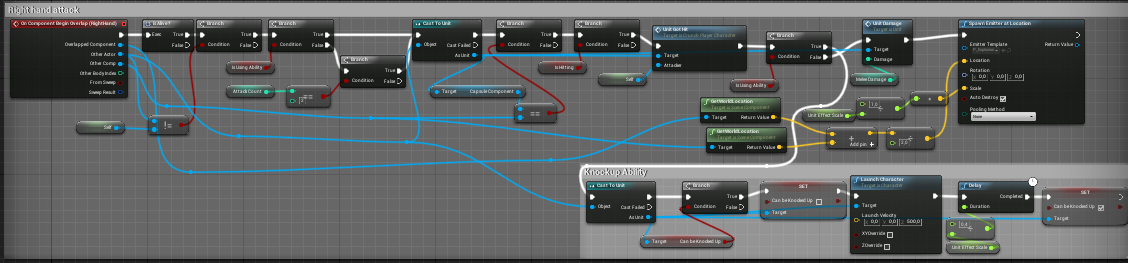
how do I properly wrap it up in a function to be able to override it later?
It's using event arguments
plush yew
Hello mates, do you know if there is any change on the "ragdoll" on 4.22, simulate physics just have a weird behaviour on the third person template character, doesn't ragdoll anymore
Acrivec you can select all right click collapse to a function
just don't select the event
vague walrus
Okay, now I understand
So, if I add children overlap event it will prevent parent from calling overlap event in it's body
yes?
weary basalt
No
vague walrus
thus making it possible for me to override function
vague walrus
but long story short if I do not add the event in child it will use parent
but if I add it - it has it own event thus ignoring parent
weary basalt
Yes, both will be called even if you add the event to the child.
Because its a Multicast Delegate
Multicast is the operative word here
vague walrus
if both will be called then I do not see a reason to add the overriding function
weary basalt
...
vague walrus
yes, child event will not fire, but parent will do
 neat forge
What programs do you guys use for rigging and importing your mesh to an fbx?
plush yew
Blender
neat forge
Having a tough time because when I import the bones get all screwed up
vague walrus
this is what do I understand you are telling me @weary basalt
yes, child will skip but parent will still be called
in one object
one object used of course
weary basalt
Your confusing yourself here, i never said that the Child was going to call that function. It simply OVERRIDES it.
weary basalt
Both Events
Not function
I never used the word function there.
The devil is in the details mate.
vague walrus
but if both events are fired, and both events are connected to function in one way or another, both functions will be called
weary basalt
Correct, but again, i neever said both Events are connected to a function
Look at the images i posted
weary basalt
Only the Parent is hooked up to the function. I made mention that the bottom one was the child overriding the function
vague walrus
bottom - child - connected with branch
weary basalt
If i wanted the child to call the function i would have said so.
vague walrus
eh
weary basalt
The child is only Overriding the function
vague walrus
if it works the way i want it to work, it would mean that, in child object, parent event and thus the function is overriden when using the same event in child
but you said both will fire
languid star
Every time I attempt to open Unreal Engine now, it crashes. Is there some recovery to revert back somehow, or is this project just hosed?

 deep basin
So, I am currently fiddling around with multithreading and get crashes over crashes or other errors. Therefore my question, when does it really make sense to use multithreading in ue4? since it is really a pain...
kindred viper
if you need it, yes. if not, no
deep basin
when do you normally need it? I wanted to pack a bigger calculation on another thread to ensure that I can have more instances of my AI running around. But oh boy.....
kindred viper
honestly its a case by case thing. But let's say I wanted asyncronous function calls. I'd probably head into another thread for it. Not that Im the best person to ask. I haven't actually done it in practice 😄
 silver crown
Multithreading is tricky to get right
Especially if you're not experienced with c++
deep basin
I just get a GetValueOnGameThread error or something like that the whole time....
 rotund scroll
has anyone noticed an increase in infinite loops in 4.22? I get stuff giving me error messages that was working normally before
kindred viper
only when I cause infinite loops. Which I did the other day, but it was my fault :p
rotund scroll
on two separate occasions I've seen infinite loops happen when in previous versions they were working fine...
or did they change trigger events? I seem to get a lot more triggers from just overlapping some actors once
 languid aurora
Unreal 4.22.2 Keeps crashing randomly. Here is the log file: https://pastebin.com/6fc9LAhu
And there's a picture of the crash
languid aurora
Bump?
vague walrus
Does EnvQuery for all actors of class return child classes of that class too?
@grim ore
languid aurora
Bumping in the vain hope someone has encountered this problem and knows how to fix it
dark depot
No need to bump
 safe rose
@languid aurora That, and also, you can ask in GameDev.TV discord
look it up in that course
(or forums)
But, I don't think they made that in 4.22 and haven't done a rerelease
So, your best bet first off is to do it in whatever version they did it in
As there are a lot of changes in C++ API usually
That log you posted. All I can guess is some incompatibility with your GPU. Check your drivers
I simply googled the actual error
Unreal Engine Forums
I keep facing constant crashes with version 4.19 within a minute or so of opening any project. I can't figure out any possible causes and no one seems to be
hope that helps, if not, just google some more
 mint hill
so im trying to find out how to animate the ThirdPersonExampleMap character but im lost. Do i need a separate program and if so what would would be very beginner friendly? (free)
grim ore
what do you mean by animate? add new animations? If so you can keyframe new animations from existing ones if you want (which is horrible to do and not very good but does work). The correct way would be to use a 3rd party DCC program like Maya or Blender (free)
grim ore
there are some punch animations in the content examples learn project you might be able to use
 abstract relic
Or use paragon’s asset and retarget it
grim ore
heh the new curve editor in 4.23 is really really... big and unwieldly lol
 fleet cedar
Are there any training lessons which give you a screwed up project and you have to fix it?
Something like too many dynamic lights for mobile or a blueprint is doing too much on tick, those kinds of things
 iron merlin
@rare pulsar im sure theres quite abit on youtube?
@rare pulsar you might want to look at ue4 blueprint communication tutorial
 sly lily
I am making an Rpg game, no price limits. What should I acquire in the market place?
kindred viper

This toolkit is designed for beginner to intermediate developers that want to make a role playing game. The RPG Engine Toolkit is a database driven RPG solution.
not sure why its redirecting to the china site....
perhaps someone on the team should notify someone about that
 grim juniper
The part of that link "zh-CN" tells what language. So if you replace that with "en-US" you'll get the US site in english
kindred viper
oh I know. I was a web dev for like 15 years :p Im just saying, it shouldn't do that
as far as I know, my ISP isn't in china so why its sending me there I can only think is to do with the URL rewrite or the recent updating going on has skewed something
 potent wing
Can someone help me fix this?
I cannot edit my world or anything, just blackscreen
safe rose
I was about to say, just buy a new cellphone
As for "black screen"
Uh, that's probably the first level in a new project
If not, you created a new one without the NewLevel wizard
Either case, just put a skylight
and other lighting
Or just use the wizard that does it for you
potent wing
I think the problem is on the "eye" of the world
safe rose
I think the problem is I don't understand
Regardless, you don't have anything in there for lighting, so it's going to stay black
good luck
potent wing
There is light and stuff
I was just editing the world
Then when i get back to UE, this happen
 upper heart
Has anyone had an issue with UE4 dropping inputs?
 queen canyon
I turn my character in first blueprint. It works well. Second ifs animation blueprint and I cannot get actor's rotation - always the same, but if I'll try to get actor's location, for example, it works well...
What's wrong with rotation?
 whole quarry
@safe rose There is a new level wizard?? 😮
@potent wing As seen in the World outliner, there is nothing in your level, thus its black (like space). Perhaps you opened a wrong level (like no Open Level On Startup in the Project Preferences), if there is no default map, the engine will just make a new one when launching it
SInce itsd called Untiteled, its the latter
potent wing
Guys, if i put an "E" keyboard on Actor blueprint, its doesnt work
But if i put it on Character blueprint it worked
And @whole quarry thx, thats the problem
whole quarry
Any actor? Like no player actor? Then you need to getPlayerController and EnableInput
potent wing
No i mean
If its connected still doesnt work
I was trying to connect it with Cast to character
potent wing
Doesnt work
Nvm it worked
I put insert the player controller on Self, then i change it to Player controller.
Thx man
whole quarry
that didnt make any sense to me
also, calling a bp "NewBlueprint" is like lifetime in prison worthy
potent wing
I changed it
I also have a question
How do i make (door) only interactable if the player is on box collision and their crosshair is at the door?
whole quarry
Im not a fan of using any box collisions for doors unless they are automated doors
I just give the player a constant traceline thst goes like 1 meter in front of him, if any object gets traced thats interactable,magic things start to happen
that way i've a system that can interact with all sorts of things, like buttons, switches, doors, objects etc
One of the great things of OOP
 devout gulch
whole quarry
devout gulch
whole quarry
But to awnser your question: add a bool i.e. PlayerIsInProximity, on Box collision beginOverlap -> set to true, on EndOverlap, set to False. @potent wing
Then you just have to choose when you want to enable the Input on that particular door actor
potent wing
I done for the collision
Anyone know how the player can only interract with (door) if the crosshair is on the (door)
?
whole quarry
You need to make a traceline from player location to like 100 infront of him
Also, depending on approach (I always choose to use tags), if trace hits something, get its tag, if tag is i.e. == door -> get actor reference and add maybe a widget that says "Press E to open door"
BUT.... in that case you wont need any box collisions as the trace will only see things within 1 meter (100uu = 100cm = 1 meter)
(the traceline isnt much different than most of the 'Fire Projectile' tutorials)
potent wing
I done the traceline
 honest vale
I'd have some sort of overlap check with the player on the door and then notify the player that "hey, you're within range of something that can be interacted" and only then you start doing traces
or you could just do traces I suppose
I'm not sure if it matters in the end
 light seal
Not really sure where to put this question, however I learned the basic of spawning projectiles like a fireball into my project. https://cdn.discordapp.com/attachments/188135618658697216/582835142997835776/Beast_Hunters_-_Unreal_Editor_5_28_2019_2_37_25_AM.mp4
However i do not understand how i could make a projectile come out from the hand of the character, into the sky, then back onto the ground. Can someone show me how would that be possible to implement?
whole quarry
bone sockets, particle effects, timelines
 languid shard
also, math trajectories
 modern sinew
So I'm tryig to follow this tutorial: https://www.youtube.com/watch?v=LPWEGCaxviE And I did what they did, but theirs is working and mine isn't :/
Hey everyone! Welcome to our fifth entry into let's create. Let's create is a video series where we look at a game mechanic and develop it. In this episode w...
Can someone help?
I'm also getting this error in the same set of blueprints, so it may be connected
 regal mulch
Not enough information to help you.
You need to tell us what exactly isn't working and what is.
You can't expect us to watch that tutorial and magically know what is wrong with yours.
The error means that you are accessing the "HitActor" of a HitResult variable which isn't valid.
modern sinew
I know, but I didn't want a wall of text and figured that anyone who wanted to help could ask me for specifics, maybe you to Main
 broken shadow
"My script isn't working what the fuck did I do wrong?" are the fodder of #blueprint
But before going forth, what I would suggest is carefully going over your script and doing a node-by-node comparison once or twice if that hasn't happened already. It's often some silly, devil-in-the-details error that stops a script dead in its tracks like that. Could be something like a boolean being true when it needs to be false or vice versa.
 wary wave
learning to debug your own code is kind of important
asking in here all the time helps nobody in the end, just wastes all of our time
broken shadow
We here at Unreal Slackers are not afraid of the details. We live and breathe details everyday of our lives 😛
UE4 also has functionality for watching a BP graph execute in real time
It's invaluable when you've got larger, hairier Blueprint scripts to untangle
wary wave
it does, but it's usefulness tends to be limited in my experience, I prefer to static debug and use the output log
broken shadow
I figure you already know about this crap and then some 😄 I'm more talking to RedPanda here
whole quarry
By the power of PrintString, I debug you!
sly lily
what should handle spawning, should the Map Blueprint have a transform, or should the game mode? What should save last trasform location when exiting a map? how do i refrence this in other BP's?
 lusty carbon
UE4 VR supports use of SLI?
lusty carbon
...
does that mean my VR project will get performance benefit if I plug an SLI bridge?
or do I need to integrate Gameworks in my project first? it seems pretty technical
wary wave
you need gameworks integrated, otherwise SLI is pointless
cloud cobalt
Basically either use the Nvidia branch of UE4 if you want SLI
 chilly gale
I just had to reinstall the editor after updating to Windows 10 and find I can only install 4.22 no other version, is this now a stanard?
 pallid compass


 chilly gale
I click the + button and get 4.22 and then the + button turns grey and unusable
 tame crypt
hey guys I have a question, in many games things change when you look at them (eg a characters name and health appear when your crosshair is over them), but the only way I can think of to do this would be ether a linetrace on tick or comparing lookat rotation on tick, both of which sound kinda heavy processes, is there a better way or ...
 surreal laurel
Hey guys any help on this problem i'm having would be awesome - i'm following along a tutorial and am getting "Accessed None trying to read property AnimInstance" errors every time I play. I think it's an issue with a animation BP reference variable, but TBH i'm a beginner and don't really know for sure. Let me know if you can help and I'll share more info
 rustic imp
on the end of the error it will say where the erro happens, double click it it will open the blueprint, at that point your AnimInstance variable is not properly filled in
 runic iron
Hey guys, I read that spawning/destroying components a lot at runtime isn't good practise, can someone confirm that please ? And if so why ?
iron merlin
@tame crypt add timer to tick so it will call the hover event every x interval time.
 mossy nymph
you don't want to linetrace on tick in a class that you have 10000 instances of
you only have 1 player controller
if you want a smooth feeling for the player and also to get information of whatever is under your mouse
linetrace is the way to go
tame crypt
ok good to know, also a classmate was saying that if you parent a long box collision to the camera and stretch it out and use that instead of a linetrace its better as a linetrace also returns data you wornt use but if you are just checking what you are looking at all you need is the actor or component. is this true?
 frosty copper
"linetrace returns data you wont use"
so it has multiple uses. you're using one of them.
wary wave
collision events also return data you won't use
¯_(ツ)_/¯
tracing is cheaper, generally speaking
frosty copper
exactly. xD was trying to think of another example but couldn't. :p
tame crypt
I think his point was if line tracing returns 50 variables but collision boxes return 20 and you get the variable you want from both then go for collision, but ill tell him that it turns out linetraces are cheaper than we thought :) thx guys
frosty copper
pretty sure the number of return variables has nigh on zero correlation to the cost of a function.
and, for reference, my uni team's game used a shitload of linetraces, that were being done every tick, from multiple actors, and there wasn't a performance problem.
now... when one of said team members changed every light source to be 16k metres long, and 100 wide... THAT caused a big performance hit. 😂 and I died on the inside, but details!
 river apex
hi guys' I'm getting a wrong reading from "getActorLocation" node, anyone knows what can cause it?
frosty copper
wrong how? :I
frosty copper
🤔
frosty copper
I mean... why not just re-use the "location to"? 🤔
river apex
than i add some stuff to stuff to find the next spline location and voila
it also gives me the wrong location!!!!
even after actually setting my character in the correct place
 maiden otter
Is there any way of offloading building lighting / compiling shaders to a server
frosty copper
probably a problem with the origin point of the model, then
regal mulch
The art of putting as little information into a screenshot as possible
river apex
regal mulch
How about you actually show us the movement code?
And not just a SetActorLocation node
river apex
yeah lol
frosty copper
river apex
its sprad across a couple functions
maiden otter
Thank you @frosty copper I'll take a look
frosty copper
couple years out'f date, but the general info on there is accurate~ 👍
river apex
This determines the next spline distance to move to
than goes in here to determine the location to
the whole floor is built out of separate splines, so i need to know when to move to the next spline
than the set actor location node
frosty copper
imma jus'... die on the inside from those screenies. x_x
river apex
what 😦
rustic imp
Is there a way I can get the stat commands to show info in a separate window instead of on top of my viewport
frosty copper
@river apex Why you spaghet?!
https://cdn.discordapp.com/attachments/221798862938046464/455831544330715136/unknown.png
https://cdn.discordapp.com/attachments/221798862938046464/455834678956392480/unknown.png


 frosty copper
so was mine. still had time to keep it neat & under control. :P
river apex
...
frosty copper
😁
river apex
anyway, I'm trying to figure this thing for a while now..
rustic imp
let the man have spaghett if he wants it
river apex
tru
frosty copper
Shamefur. much shamefur dispray.
should always follow best practices. not make exuses to be sloppy!
anyway, as for the issue, personally think it's a problem with the origin point of the model.
river apex
its a plane with a texture, its centered
tho the capsule component s the root of all things here
frosty copper
when it's selected, where are the manipulators? 🤔
river apex
not in center....
but its not behind or below
just closer to the camera
I mean, theres a reason its offset, and even so why is ACTOR location is determined by the mesh comp?
frosty copper
Actors have their own origin point
unless you're specifically using the location of a component, the origin point is used for getTransforms.
river apex
i dont get it, how can a variable give 2 different values
my roots are correct
I mean, you can see the sphere is on the floor
yet that same var gives me a different location IN THE SAME FRAME
(using caps cause no bold text)
frosty copper
because I can't see the damn origin point in that screenshot.
frosty copper
Every actor has an origin point.
Child components have an origin point.
If you simply getLocationof the actor, you're not getting the child component origin.
You're getting the absolute parent origin.
 digital anchor
@river apex maybe its penetrating on DrawDebugSphere's tickgroup, but on TG_PostPhysics its not anymore
(idk if you read what i typed in blueprint)
river apex
not the case @digital anchor
frosty copper
right, I need to bugger off to work. \o\ have fun fixin'.
river apex
i have some pickup objects that suppose to move towards the actor
they move to this weird location instead
 blissful hare
hello, could someone help me?
river apex
good luck @frosty copper ♥
blissful hare
its 7 am . I havent slept yet... there is aproblem when packaging my game ,
that it looks for a game mode "functionalgamemode" that apparently it gets created on its own. And this is causing Superstruct to fail
regal mulch
Stupid question: How does it look like if you don't move the actor along the spline but just draw the debug?
river apex
it gives me the correct location
blissful hare
I override the game mode but still Its looking for this gamemode
river apex
its a degredation in accurecy
frosty copper
@regal mulch there's never a stupid question in game dev debugging. xD
anyway... work! \o\
river apex
the faster i am the worse the location
blissful hare
Please help.... does some one knows how to avoid this?
river apex
@blissful hare try to regenerate c++ files
regal mulch
Given that it's correct when it stays still, it's either part of the moving or the drawing and actually setting of the location happens at two different points
digital anchor
how far u are from origin? could be a floating point precision error
blissful hare
thaks, @river apex where is that option?
digital anchor
but i still bet its the difference from tick groups
regal mulch
Yeah sounds like it's processed at different points
river apex
what do you mean different points? as if im setting the var in different functions?
regal mulch
No
digital anchor
you are seeing it at Pre-physics, and its different at Post physics
regal mulch
That the drawing happens one frame later
river apex
ok
regal mulch
Are you drawing post or pre movement update?
regal mulch
Well are you calling DrawDebugSphere after or before you set the location
regal mulch
Okay, can you try calling it before?
river apex
yeah
regal mulch
The idea is that you issue both tasks in the same frame -> Change Location and Draw Sphere.
The Change location happens instantly, but the Draw Sphere is queued, only executing next tick.
And maybe even after your stuff has moved once more.
Not sure if that's the case, but worth checking
river apex
now its before, it doesnt make any sense
also, this thing is the homing pickup, and this is where it thinks my player is
blissful hare
Like on window exploreer ? or on the unreal platform?
river apex
windows
digital anchor
where should the debug sphere appear in that screenshot?
river apex
the sphere is alright now
blissful hare
Its in Spanish, but I dont see the option
regal mulch
This is a BP only project :P
You should ask if the users uses C++ before suggesting C++ solutions :D
river apex
yeah... sory
regal mulch
It does look like the project isn't recognized by the engine though
But not sure if that is a problem
You might want to put your build/package output log into pastebin.com
blissful hare
yes, actually its only BP, but for some reason its adding a c++ blueprint on its own
regal mulch
And post it to #packaging
river apex
@digital anchor the object i circled is supposed to move to where the sphere is
it has a lerp from it location to the players location
river apex
yeah
regal mulch
All of it :D
river apex
caught me red handed
blissful hare
ok @regal mulch I'll try it
river apex
sec
 crisp fable
You know what's a bit annoying
Datasmith imports thousands of objects fairly easily
Try doing that with 1000 small fbx files
It'll take hours to import
regal mulch
All good, you would benefit from making functions and using local variables
digital anchor
were those following the sphere before the fix?
regal mulch
The "LerpVector" is that actually correct?
river apex
they went to the incorrect location
regal mulch
I mean shouldn't a Lerp be from one Static Value to another?
You are using GetActorLocation for A, which is changing
I guess ultimately it will reach B
Just wondering
river apex
should i do this with iterpTo?
yes
it will
the lerp power is gradually rising
0-1
thing is, the B it aims for is wrong
when it shouldnt be
regal mulch
The clamp and then map range clamp is kinda redundant
river apex
how?
regal mulch
You are clamping the value to 0-1
That's already enough
The MapRangeClamp is not doing anything
It just maps 0-1 to 0-1
regal mulch
LerpPower = TickTime + LerpPower
Should already be enough?
I mean takes a second of course
regal mulch
Fair enough
There is a "GetTimeSinceCreation" or so node
That gives you the life time of the actor already
Just so you know :P
river apex
ill remember that
regal mulch
Not sure why the location is wrong though
river apex
these actors are pooled
regal mulch
I would try to setup a simple example
To reconstruct that
And see if it still fails
blissful hare
hello again @regal mulch I posted this on the site you told me https://pastebin.com/edit/Q2Cgc1Af

Pastebin
not sure how to add tags though
regal mulch
#packaging ! :P
blissful hare
thats weird I did select public
potent wing
Guys, are Texture or "Skins" for Third person can be used on First person?
wary wave
there is no answer to that question
that 100% depends on how you've implemented your art
 sacred smelt
I found this topic (https://www.reddit.com/r/unrealengine/comments/46aq01/im_taking_an_unreal_engine_exam_for_a_job/d03wqyi?utm_source=share&utm_medium=web2x) and this question What are the major classes when creating a new game? Describe the major function of each.. What this means? Which class is major? For example AActor?
reddit
28 votes and 39 comments so far on Reddit
rustic imp
I have a problem
I have a character with the character move component
and it doesn't move for some reason
but when I move the actor like 200 units in editor
he suddenly reacts and starts moving
dafak
anyone know why?
with AAIController::MoveToLocation
 glad stone
hello
I have a set of modular pipes that I assembled into 4/5 kits
when I import into Unreal
as a "grouped" FBX
my UV channels get joined into 1
isnt it possible to have more then 1 UV map channels on an FBX ?
abstract relic
Yep
glad stone
so what is the maximum ?
and why does UE4 "stacks" them both
im really having an issue with this
abstract relic
Importing them as combined mesh will basically throw your channels out the window. Combine them in whatever software you are using and assign channels from there
Though do double check the static mesh, you should have multiple material slots
glad stone
i have multiple material slots
im pretty confused haha
so .fbx basically squashes the UV sets to 1 ?
abstract relic
Ah you don’t. Unless the pipes are meant to have overlapping uvs?
abstract relic
Then you need to remake your uvs
glad stone
and the end caps are part of another material/UV
why ?
and in what way
they do not have any custom bakes, only use tiling textures
glad stone
abstract relic
You’re using a tiled texture for the pipes. As you said, there isn’t any bakes. So it doesn’t matter if the pipe uvs are overlapping
glad stone
but it does for the lightmaps doesnt it ?
abstract relic
Lightmap is auto generated unless you specified otherwise upon import
But yes. Never have overlapping uvs for lightmap
glad stone
alright thanks for the info 😃 it seems I still have enough to learn concerning this
 void blade
hey everyone I have an AR question. I have access to a hololens 1 and I got streaming to work. I can look around but not walk around the scene. How do I move the player pawn around the scene? Is it possible to do so with streaming on the hololens 1?
wary wave
void blade
yup asked there already just wanted to give it a shot here since things move slow over there ❤
wary wave
they will do, not many people use Hololens, and even fewer will use Unreal with it tbh, because the hardware is just so weak
void blade
yeah i'm also quite frustrated with the hardware. I did a unity project with it and streaming got me excited for more visual fidelity. But if you can't move around the scene it seems useless sort of. but then again I figured if I can already look around, walking around should also be possible?
 crisp arrow
can someone explain what exactly .po files do?
wary wave
not without context
crisp arrow
Sorry I have very little context here too - it seems like they're generally used for localization, but I don't know how to work with/otherwise apply them
glad stone
hmm
cant get the lightmaps to work correctly
and im guessing its because UE4 can only use 1 lightmap per asset
because unlike tiling materials, where overlapping does not matter, all lighting is unique relative to the world ?
so having 3 lightmap UV's will not work
 ocean hemlock
Is there anywhere where i can share work on this server for free
What tab should i put it on
 surreal tundra
Wild question, is there anyway to export an entire scene to c4d? If I changed my mind and want to render it in c4d instead of ue4? Hehe
 upper sluice
Quick question: Can you merge items in the editor? Because i downloaded an item and it is separated in pieces
glad stone
you can import as a "group" .fbx , but keep in mind it merges all UV channels
rustic imp
also under window > developer tools there's an actor merge tool
upper sluice
Thank you guys
plush yew
Hi! I just updated to 4.22.2 and I'm having ridiculous lag in editor. Completely new blank project with no content and everything is lagging.
I have a 1070 ti and have updated to the latest drivers
windows is also updated
Has anyone else had these issues? Just right clicking on something and moving the pointer over the items in the menu lags
grim ore
make sure you have nothing running that is an overlay like nvidia shadowplay or msi afterburner
 lapis bronze
Adding unreal editor to steam overlay or discord lags me hard. Might be helpful to remove those also
plush yew
Don't have steam running and i'm using discord in the browser
lapis bronze
Ah nevermind that then.
plush yew
Turned off all the geforce sharing options and shadowplay
Downloading 4.21 to see if it's the same there
wary wave
are you on a laptop?
plush yew
Nope
Not an amazing PC but 4.21 definitely worked smoothely. i5 4 core at 3.4 ghz, 16 gb ram and a 1070
Still waiting for the reinstall of 4.21
grim ore
use stat fps in the console and if you are in the viewport is it smooth fps? if it is when you mouse over a toolbar item and wait for the popup does the fps tank? if so it's an overlay issue
plush yew
I just started a completely new project and I see the most isseus when I created a material and just moved around nodes
grim ore
well technically it could be a Gsync issue as well as new drivers added support for newer monitors recently
I keep forgetting they have gsync enabled by default now on newer monitors and driver updates
plush yew
I have a gsync monitor but I had it previously as well when I used 4.21 smoothly
 rancid lynx
how do i replace foliage instance meshes with a blueprint ? without linetrace, using overlaps connected to my player. or, how do i get the index of a instance foliage without linetrace? i know how to get the index with a trace, but im making VR, i want to use box collision.
grim ore
make sure gsync is disabled for Ue4 then, it should be off for the editor. maybe it got turned on
rancid lynx
bom bom bom bom bom. tommatoes X_x
grim ore
😃
plush yew
How do I disable gsync for Ue4?
grim ore
Nvidia Control Panel -> Manage 3D Settings -> Program Settings -> Find the editor and disable Gsync for it in the list of options
plush yew
Something has happened, I don't know what. I recentyl moved and haven't used my PC in maybe a month
Jesus christ, everything is so slow
building this shader took 25 second
And like I said, dragging nodes around lags like hell
rancid lynx
do you know how to replace foliage instances meshes with a blueprint, using box collision MathewW ?
grim ore
ok soo.... stupid question, did you plug the monitor into the video card and not into the motherboard?
plush yew
Video card for sure
No stupid questions, grateful that you're taking the time to answer
And I love your videos
grim ore
damn I think I am out of ideas lol. bulding shaders doesnt use GPU so that is weird that would take 25 seconds
so it sounds like the entire machine is running slow
plush yew
Yep, maybe it got sad after the move
grim ore
open up task manager and the performance tab while running UE4 and just make sure the CPU and GPU are running well. maybe its stuck in low power mode or it's not really using the GPU 😦
but at this point it seems like something went wrong if you checked the other stuff 😦
grim ore
yep that looks right, max CPU use and some GPU from the editor
plush yew
while dragging nodes around neither GPU or CPU work very hard
grim ore
the only time I ran into the issue with the "lagging" editor interface was due to an overlay like shadowplay or msi afterburner trying to inject stuff into the editor menus. It would show the FPS counter in the file menu lol
plush yew
Hmm :/
grim ore
@rancid lynx I don't know if you can replace them as I have not used the landscape system much. I know you can put blueprints in for painting on the landscape but I don't know if the foliage system works for that
rancid lynx
putting blueprints in for painting would be wonderful
but my bp's dont show up in the foliage tab.
how do i make a foliage blueprint ? i tried google X_x
i saw the tiny blueprint drop down menu in the foliage menu, but it only showed "foliage instance"
grim ore
the googles say "Users can create a Blueprint subclass of FoliageInstancedStaticMeshComponent to respond to Hit or Damage events and hide or remove instances, spawn effects, spawn real Actors in place of an instance etc."
I'm fighting with a VM right now so I can't actually test it yet lol
 violet veldt
We have a finished project and VS 17, but we cant integrate VS to UE4 to pack the project.
grim ore
I want to cover landscape stuff but man it's so art related and complicated but... it's on a list somewhere lol 😃
right now trying to finish up the VisLog and Automated BP Testing stuff because it looked like fun
rancid lynx
foliage to blueprints is pretty specific for 6 minutes vid
subclass, ill search about that
grim ore
when you make a blueprint, go to the bottom list where you can search/drop down to all classes. make a new BP with the parent type being that foliageinstancedstaticmeshcomponent
that should then allow it to show up in you foliage picker list
"should" lol
rancid lynx
ohhh. yea. i think so
 urban bridge
Hey everyone, I don’t know if I’m posting this in the right place or not, but I’m having trouble with unreal and don’t know who to ask or even really what to ask. I have a scene that I want to record to make a video with an animated character in it and I’m really struggling with every single step of this. I was wondering if maybe someone would be patient and kind enough to sort of screenshare with me and guide me through the process? I understand if that’s a lot to ask, I’m sorry if this is in the wrong place again, I’m sort of just freaking out about deadlines and stuff and panicked.
plush yew
@everyone Can Unreal Engine do mesh merging (Boolean) on a character like in Blender?
rancid lynx
Your videos inspired me to learn more UE4. alot, i think alot of kids out there will learn alot from your tomatoes. thank you : )
i got stuck and quit many times, but your videos helped me keep going.
grim ore
I love doing the learning and the videos so 😃
plush yew
I have a blender character which has a boolean type facial rig
grim ore
@plush yew you should try not to use everyone and no the engine itself does not do mesh manipulation out of the box in the editor for existing static meshes/skeletal meshes
@urban bridge Virtus has a series on sequencer covering the basics and exporting out a video https://www.youtube.com/watch?v=azzJiMMM3LY
plush yew
A little trailer for a Pac-Man prototype I developed in order to learn about Unreal Engine 4. Created in just under a month. Available in 1080p/60. Hope you ...
 thorn topaz
Explain this to me, two components with the same collision settings. the parent collisions are working, the child component is not.
plush yew
An example for this video
plush yew
@grim ore Thanks for the help! I restarted the PC and closed some other programs running in the backgroud, i think that helped. I had direct folders, searcheverything and f.lux which i remembered is an overlay program.
No i have a smooth unreal :)
action rpg is crashing if i duplicate goblin blueprint class someone now why?
grim ore
wow so f.lux was causing the issue?
which is possible depending on which mode it runs in. I stopped using it and just use the built in Win10 night light so I wonder if it started having issues at some point
 dim merlin
with unreal 4.22 i often see all my models / textures have a low setting, anyone knows why?
they seem to go low q after a wile :S
grim ore
going low resolution? sounds like changing to a lower mip map settings which is normally memory related if I am not wrong
it is possible you have auto turned on for performance settings in the editor and it's adjusting it down to low due to fps as well
surreal tundra
does anyone know if theres a way to export ue4 scenes to c4d? like if i want to render my ue4 scenes in c4d
and i dont mind the time
would be such a killer if that would be possible
lol
grim ore
you can export the scene out to FBX is about all you could do
but I don't know exactly what goes out when you do it, It's definitely not going to be complete
surreal tundra
: II
its just so much quicker to work in ue4 for video but the render quality is not near a non-realtime rendering
surreal tundra
no i know, thats what im wishing for i guess
but it takes a lot more work to get that quality
like i feel like you can get a good vid with shitty assets in c4d but to get some depth in ue4 the assets have to be all 8k
surreal tundra
yea
plush yew
@grim ore I'm not sure if it was f.lux, I did too many things at the same time, restarted PC, turned of f.lux and other software so I'm not entirely sure on which part of it was the culprit :(
Still having ridiculous shader compile times though
Browsing around and trying everything but nothing helps
grim ore
well what is ridiculous shader compile times?
 ember cypress
If you don't need bloom at all, just disable it in the project settings.
Adjust your auto-exposure settings
What do you mean by no auto exposure/
grim ore
find the sky material, duplicate it, make it unlit, profit?
ember cypress
^
grim ore
alternately I know there are multiple light channels now
man these unrealfest videos are fan friggin tastic
so even with auto exposure off in your project, is it possibly enabled in a post process volume?
I just find it weird that it whites out like that, does it do that in a new blank scene?
I mean a new blank scene with your light source enabled
I tried to duplicate that here and no issues
yep you showed them earlier
plush yew
on a new project
ember cypress
Just for my own curiosity -- why are you using an upward-facing directional light?
OOOOOOOOH
Oh oh oh oh.
Ok.
plush yew
In the new project the light doesn't affect the sky
ember cypress
Can I offer a potential alternative solution?
grim ore
did you change the atmospheric fog at all?
because I changed mine to 100 for the sun multiplier and it causes that issue
😃
grim ore
I am just watching Unrealfest videos and waiting on a VM to finish updating so not much else to do right now 😦
ember cypress
Ooooh, hmm. I'd need to double check.
I was going to suggest using a Skylight with a pure white HDRI sky texture. Doing so gave me this lighting + I could keep a normal directional light for lighting.
But, this is fully baked.
I don't know if the dynamic GI would allow for that, but I honestly haven't tried.
plush yew
alrighty, because i'm currently on dynamic due to the unreal import messing the majority of my asset's texture mapping somehow lol
ember cypress
Shadow color I think can change with a post process effect -- it's been a while since I dug through those settings.
Ah, that I'm not sure for use.
Did you give it a proper lightmap UV on import?
(or before import)
I feel that small-team pain.
light seal
one man army here 😦
ember cypress
And all the resources
 sullen wraith
is there a reason this doesn't work? i thought should be able to toggle hud if i get it?
it is
plush yew
also your target toggle seems to be for scene components? isn't your hud a widget?
 worthy flame
is there a way to set the text to show the scale of a mesh, i can display it like
scaleX
scaleY
scaleZ
in different text render components.
but any way to make it in a one text component, where it will show me scaleX, scaleY, scaleZ
?
grim ore
what text? text render component or UMG?
grim ore
either way the scale of a mesh should be a vector and you can use the Vector -> Text node to convert it, just drag off the vector and into the set text node Value input
grim ore
yes, then you are setting the world scale? so after that get the world scale and it will give you a vector
worthy flame
oooooooooooooh
grim ore
alternately you can use an append string node to put all 3 into a single string them do that -> text, but I think getting the current scale is easier
worthy flame
and how do i get the world scale?
grim ore
same way you set it
grim ore
😃
neato, 2 new evangelist jobs opened up for Epic in North America. I think they are trying to stop the European team from getting bigger than them lol 😛
lapis bronze
that's... epic
honest raven
hey guys, trying to create a CLI for UE4
I did my template, and generated a file like:
#include "CoreMinimal.h"
#include "UObject/NoExportTypes.h"
#include "CreateTodoPayload.generated.h"

/**
 *
 */


UCLASS(Blueprintable)
class RETRYING_API UCreateTodoPayload : public UObject
{
    GENERATED_BODY()
public:
};
And run the generate project files
but for some reason the CreateTodoPayload.generated.h is not found :/
Is there an extra step to make the Engine to generate the generated files? x )
So basically I created a .h and .cpp file in the Private and Public without using the Editor, then generated the VS files, BUT no .generated files were generated
...
:/
grim ore
https://answers.unrealengine.com/questions/740950/cannot-open-source-file-namegeneratedh.html did you follow all the steps to regenerate your files completely?
honest raven
Hmm could not be compiled, might cant handle my 'hand' generated files :/
@grim ore Cool, its working
Thanks man 😄
grim ore
yay
honest raven
It's cool UE at least notes which command it's runs, so I can just point to it from the CLI 😛
mellow turret
I don't get what combined tags means, anyone knows? the tooltip is rather confusing, anyone has experience with gameplay effects?
plush yew
Hmm. Every time I try to switch to DX12 in 4.22.2 I get severe UI artifacting issues. If I click one of the top drop-down menus it gives me a menu-sized duplicate image of my monitor's display, and if I hover over an item in the content browser the entire screen turns black except for three duplicate tooltips (which flicker when I move my mouse). I'm using an RTX 2060 with the latest game-ready drivers as of one week ago, considering switching to the creator-ready variant in case it fixes the issue.
Those issues don't occur in DX11, haven't tested Vulkan yet.
 worn granite
@mellow turret you can add tags or remove tags.
Your parent class will have tags also.
If you add a tag, you have any tags that you already got from the parent, plus this new tag.
You can also remove a tag.
The combined tags just show the actual tags applied (either by you or the parent)
grim ore
@plush yew do you have geforce experience installed, perhaps shadowplay is enabled. I can say I have a 1080 with the latest using DX12 and have no issues. Shadowplay/msi afterburner/and other overlay programs can cause issues.
plush yew
Yeah, I have Shadowplay enabled, the only other overlay that might be interfering is Discord. I'll try disabling it, maybe switch to the Game Bar.
grim ore
try disabling shadowplay and see if it helps
I dont think discord interferes, its more the ones that inject into the DX layer to do stuff like capture or show FPS
plush yew
Good day everyone! I'am trying to simulate physics on tongue and got some progress already, but it doesn't look good enough. Anybody has tutorials for this on UE4 or examples how to do it properly? Thank you for paying attention!
mellow turret
So I don't need to mess with "combined tags"? Is just information so I don't have to look at the parent blueprint in order to see the tags it applies?
Also are there any resources you recommend regarding the gameplay ability system aside the wiki/documentation? @worn granite
 hardy flume
How do I get the forward vector of a point if I'm rotating the character in a topdown game?
in blueprints
mellow turret
@hardy flume use the "get world rotation" on the root component, then use the "get forward vector" node on the rotation returned
 heavy ether
someone in here was complaining yesterday about the nvidia drivers regularly crashing unreal out.. looks like that's a problem with the drivers that were released yesterday.
operations are crashing the editor left and right with those drivers
reverting back to creator/studio drivers now to see what happens
grim ore
😦 are these the 430.39 drivers?
heavy ether
studio driver is currently 430.86 released yesterday.. i'll check in a second when it's done installing what the game driver is
grim ore
oh wow, I'm 2 versions behind lol. maybe it's the latest ones then as I have no issues with .39
heavy ether
yea i had no issues with the game ready drivers i installed on Fri, then i saw an update available today, and grabbed it, and now the editor crashes regularly either with a "video driver restarted!" message or just a flat out debug crash to visual studio complaining about some NVidia dll
yea game driver version today is also .86
grim ore
oy... sooo.. the VRS stuff looks neato but I think I will not update for a bit
heavy ether
yeah it's not blowing up anymore with the Studio drivers
grim ore
OOH
heavy ether
?
urban gyro
Guys, real quick, what class do I inherit from for a function library in c++ (wanna expose some static funcs to BP)
heavy ether
blueprintfunctionlibrary ?
urban gyro
oh
plush yew
hi guyz
plush yew
could someone help me out? its about ini files
urban gyro
ive only played around with resolution and some default settings
so i don't think id be much of help to ya 😛
urban gyro
ye? wasup
plush yew
but to start with
my GameUserSettings.ini file was blank
and even when my friend paste his specs to me
i paste it into mine
and it still doesnt seem to have any effect
urban gyro
u mean it always goes blank again?
urban gyro
are you loading them ?
iirc u had to load them
or mebbe im confusing with save file
plush yew
well im not a developer or anything, isnt it supposed
to load itself?
like ive played other games and changedi ni files
and i just saved it
then played the game
and i would see the changes np
urban gyro
yeah but in other games theres code that reads it off at beginplay
hold on i got on old screw around project to see what was what
been a year
plush yew
ok
 molten fractal
hi
plush yew
i think its not the case about this game cause my friend just modify and save the .ini file
using notepad++
and he will see the changes
molten fractal
can I use your project in the game?
urban gyro
yeah so everywhere i've used them i had to get the user settings
and then set whatever
so yeah u need a getter
also i have no idea what you're trying to do so thats my best info 😛
grim ore
he is trying to modify a already built game it sounds like
urban gyro
well in that case things like resolution or mouse sensitivity or volume would prolly work
plush yew
Hi people I would like to pause the game in such a way that player input is enabled, but nothing else in my level ticks - I already have logic to disable player movement
urban gyro
u mean like freeze time?