#ue4-general
1 messages · Page 456 of 1
 radiant haven
 lusty carbon
Is there a way to build a project for Mac from Windows pc?
 tawdry maple
Can somebody tell me how I can combine these?
radiant haven
just combine it 😂
 sudden agate
eh, just put them after each other
radiant haven
hmm
tawdry maple
can you explain it? the ue4 is new to me, i just started 2 weeks ago
got it a Sequence note
sudden agate
Play Sound -> Set -> Delay
 cinder iron
can't you use a sequence node? @tawdry maple
however the way yoy are laying out that data seems weird to me
but you'll improve on that
tawdry maple
@cinder iron yes correct sequence worked for me thanks
cinder iron
👍
keep working, at some point you'll return to that project and you'll end up refactoring everything
that's natual progression
tawdry maple
it hurts
cinder iron
we all go through that process haha
and ofc, don't get afraid to ask
I recommend you checking on Mathew Wadstein tutorials
to understand the majority of UE4 functionalities
tawdry maple
some of them yes
hard to find the exact tutorial you want
yes my next problem is my projectil doesnt hit the wall if I am to close to it
 glad gulch
Hey there. Can somebody help me out to understand this better?
https://docs.unrealengine.com/en-us/Engine/Landscape/TechnicalGuide
My queations is now: Wich size of grayscale texture i can use / i need for the perfect result of the landscape/terrain components. Sadly i dont get it. Thanks in advance.
(Edit: For example: how many componets fits for a tex size of 256x256px, 512x512px, 1024x1024px and so on)
cinder iron
@tawdry maple that's a design problem then. Where do you spawn your projectile at?
 leaden dust
why is it that my project sometimes builds when I have forgotten to forward declare a class but the next time I build the same code it throws an error
 serene birch
because some other .h file you included did have the forward declare/the whole declaration
radiant haven
Hello I have a problem
Well I wanna change the Size of the texture and want to attach it to some meshes
problem is that I have too much meshes

all of them need to change size and apply texture
some ideas to dont waste time and make it manual?
 unreal yoke
Hey everyone,
I have a slight issue with an inventory I have set up from a tutorial. I know the issue is not with the tutorial as when I am using the third person camera the inventory mouse input works perfectly fine. Yet, when I switch to my first person camera the mouse cursor is shown as it is in the third person camera but I cannot actually input anything. It seems the problem is with my first person camera but I am unsure as to why that is since there is not much that I change other than the camera it uses and the max/min pitch.
Here below I will post my blueprints actions for the camera switch:
I hope I placed this in the right channel, sorry I'm new here.
lusty carbon
Hey ya'll! When adding or removing uv maps from a mesh in blender and reimporting into UE4 they uv maps don't update! I usually have to delete the asset and reimport it from scratch! any way to avoid it?
 plush yew
can somebody tell me how i can perfectly blend my cinematic camera into my player camera
 honest vale
question regarding how uassets are stored internally: are textures stored compressed in DXT form? For example, if I download a marketplace asset and export a texture from it, does it export a DXT compressed texture?
and is exporting and re-importing DXTs a lossy process if I don't change the image data at all?
sudden agate
uasset contains source file
 wary wave
for textures, yes
uncooked assets tend to contain source data
cooking removes this data
honest vale
cool, it indeed seems to be uncompressed, did a quick import/export process for a gradient texture
nice
plush yew
having this issue where part of the landscape wont compile, anyone know how to fix this?
sudden agate
too many texture samplers used in the material
sudden agate
you mean 5* number of material inputs
change the texture sample node's source to Shared
plush yew
Where do i go to do that?
oh wait
nevermind fuck
yay it fixed it, thank you
for some reason the catrig animation i tried to import does not work, how do i troubleshoot?
 blissful echo
So recently I did a bug submission via the form. Got a reply back saying it was a legit issue and that its been logged as a feature reuqest. Got a number (UE-74737). However doesn't seem to be a ticket at issues.unrealengine.com , so is there some other tracker that I'm not aware of for feature requests?
 kindred viper
might be a jira ticket num?
blissful echo
As in jira, internal to epic?
kindred viper
well not sure if the jira is open or not. I couldn't say for sure
 coarse vector
simple question, how do i get my camera to move around an object instead of the entire level
kindred viper
there is a few tutorials on youtube for that
coarse vector
do you have any to recommend? every time i try and search it comes up with totally different things
kindred viper
I recommend going to youtube and looking up "ue4 rotate camera around object"
coarse vector
i tried that but it just comes up with blueprints and stuff, im talking about whilst in perspective viewport 😄
 abstract relic
While you’re editing? There isn’t a method out of the box I believe. You gotta get the source engine and make it yourself.
Good keyword for that is camera orbit
 grim ore
you want to rotate the viewport camera around an object? hold ALT when you move the camera. F to focus on the object first if that matters.
https://docs.unrealengine.com/en-us/Engine/UI/LevelEditor/Viewports/ViewportControls for reference, it's also linked in the help menu in the editor
unreal yoke
Hey everyone,
I have a slight issue with an inventory I have set up from a tutorial. I know the issue is not with the tutorial as when I am using the third person camera the inventory mouse input works perfectly fine. Yet, when I switch to my first person camera the mouse cursor is shown as it is in the third person camera but I cannot actually input anything. It seems the problem is with my first person camera but I am unsure as to why that is since there is not much that I change other than the camera it uses and the max/min pitch.
plush yew
for some reasons my bones dont show up in the hierarchy
is it because i dont have a root bone?
i dont need root motion
plush yew
when i load in the fbx into max the bones are there but not in unreal?
 tiny karma
If I make a school project in unreal do I have to put made in unreal at the beginning?
grim ore
no, and generally you cannot unless you fill out the form to get permission to do so https://www.unrealengine.com/en-US/branding
 jade hawk
Could someone lete know where I made my mistake. I'm making a sprinting system. It keeps decreasing the stamina bar I created even when I release the key.
 regal mulch
- Use Variables if using TimerHandles.
- You should set your Stamina to a flat 0 if it's <= 0 as well as to Max if it's >= Max, otherwise your stamina is out of the limits
 fringe pivot
Isn't it required for widgets to include "UMG", "Slate", and "SlateCore" in the build.cs file?
Thought it was but I removed them and widgets seem to work anyways.
regal mulch
Depends on where the UUserWidget class sits in
fringe pivot
for instance?
regal mulch
Which is in Runtime/UMG
So technically you should include UMG
Or rather add it to the build.cs file
fringe pivot
Can I skip the other 2? I had an issue where editor used to take 10 minutes to load and more to compile the 3rd person project
When I removed them problem disappeared
regal mulch
Depends on you using classes from the modules
At some point it won't find stuff and you'll notice
fringe pivot
Now that I check I had Slate and SlateCore in the public list and they supposed to be private, hope it was something to do with that.
A curious thing is that huge delay on editor load happens just when I open it after it being close for a while.
I guess it's somehow unloaded from RAM after a while.
jade hawk
Thanks
 rotund scroll
is there any way to make anim notifies show up anywhere else than the anim blueprint? I've seen some anim notifies show up in other blueprints, including custom ones , but it's not consistent
anyone got experience with this?
plush yew
What is a good alternative to clicking for other hardware
I was thinking have a moveable circle and you press s button it clicks the thing under it
And yeah it's slow er but player's click rarely and where there is a react time needed I can just slow stuff down
grim ore
I just checked @rotund scroll and you can use Event Dispatchers in the Anim BP. You can have anything else listen to an ED that the anim bp can call when that event notify is fired off in the blueprint. https://i.imgur.com/xfZN6bh.png
 smoky escarp
I have one quick question I'm trying to bind numbers from 1 to 0 on my keyboard, I'm not talking about the num pad one but the binding doesn't work. I no that in unreal since those are already used for some engine key binding they won't work inside the editor but the thing is that even when I build the game these keybind doesn't work
 normal burrow
sure its only the number keys? you tried other ones?
normal burrow
how many keyboards have you tried?
smoky escarp
this one but I think I got it I need to put the character under the number on in input settings
not the number
normal burrow
i'd just forward you to the installed engine page radius. I use one with my team. theres a part about how the registry works, are you familiar with this? https://docs.unrealengine.com/en-us/Programming/Deployment/UsinganInstalledBuild @plush yew see the Registering an Installed Build part
 surreal gyro
Are there any places to get animations that would work with the UE4 Mannequin right away?
normal burrow
can bring the mannequin into mixamo too, but you'd want to add tail bones to the fingers, head, and ball (foot toes) bones to get realy good quality ones from there. (mixamo looks for these and gives you better results when stuffs named after their rigging system). but you can get some passing quality animations without that effort too by just uploading the mannequin in from export fbx. too bad mixamo doesn't just have the mannequin up there
surreal gyro
How do I upload the mannequin to mixamo
abstract relic
There’s a nice big Upload Character button
surreal gyro
So how do I drag the mannequin out of UE4?
abstract relic
There’s a nice Export button
surreal gyro
Which do I export
normal burrow
yes though, pink to me. right click this, asset actions -> export (iirc?)
 coral patio
Hey guys! Does anybody have some experience with the animation/rig export pipeline from Maya to Unreal with a rig that utilizes follicle systems? The lion I created a while ago is now rigged but my rigger used a follicle system for its mane (which also split the combined clumps up into single haircards). How do I get that to work in Unreal? And is there a way of combining the hair cards again without disrupting the rig's functions?
normal burrow
graphics or animation may be good places to find people whom know maya
 mellow turret
Regarding BlueprintNAtiveEvent
This means that in a Blueprint derived from this class, events can be placed that override OnOverlapBegin and OnOverlapEnd, and are executed when the function would normally be called. If one of those events does not exist, the C++ implementation of the function executes instead.
So this means if I have a BlueprintNativeEvent function, for example "OnOverlapBegin", with certainc c++ defined implementation, the implementation defined in the C++ file would be called if there are no "OnOverlapBegin" nodes in the blueprint graph to override this implementation
normal burrow
#cpp would know the right answer here but yes, i believe this is the case. you can call the "base" (native) implementation i think some how, depending on how its overriden maybe
mellow turret
thanks, also nice to know there is a cpp channel : P
 mint sequoia
Is it normal for UE4 to separate vertices by UV groups
Noticed when import to UE4 it does this, it also breaks weighting in the process
4.22
Haven't tested on other meshes yet
 sullen wraith
is there limitations on unreal legally, Ie. is there things I am not allowed to make with the unreal engine?
grim ore
yes
surreal gyro
what aren't you allowed to make
sullen wraith
I'm more meaning from the unreal standpoint
obviously following all local laws
I mean more are there restrictions set by unreal?
grim ore
it is in the EULA and FAQ, controlling nuclear items is one of them
sullen wraith
lol, my nuclear simulation game is now cancelled 😛
so to sum it up, from a game perspective, there isn't anything
I was thinking they could ban gambling or something
surreal gyro
@grim ore what exactly do you mean by "controlling nuclear items"?
grim ore
gambling is one
sullen wraith
ahh interesting
that Mathew
one more stupid question, is unreal cut %30 or %5, I was under impression it was %30 up until now where I saw on a release and royalties page %5
grim ore
was in a dungeon ```(iii) General Restrictions
You may not engage in any activity with respect to the Licensed Technology, including as incorporated into a Product, (1) for any gambling-related activities or Products (as defined by law in the jurisdiction of use); (2) for operation of nuclear facilities, aircraft navigation, aircraft communication systems or air traffic control machines, or for military use in connection with live combat; (3) in violation of any applicable law or regulation; (4) in which the Licensed Technology is rented or leased; (5) that misappropriates any of Epic’s other products or services; (6) in support of a claim by you or any third party that the Licensed Technology infringes a patent. You also may not sell or grant a security interest in the Licensed Technology.```
again from the EULA and FAQ ```5. Royalty
You agree to pay Epic a royalty equal to 5% of all worldwide gross revenue actually attributable to each Product, regardless of whether that revenue is received by you or any other person or legal entity, as follows:
so you can't make a flight sim?
grim ore
simulation is not the same as real life
surreal gyro
so you can
sullen wraith
you can, but you can't implement it into hardware for use in air traffic
is my understanding
also
(as defined by law in the jurisdiction of use
if I met the legal requirements in my country
then I can use unreal for it
surreal gyro
ok
sullen wraith
thanks big time mathew 😃
surreal gyro
(are there any good UE4 models for Sonic The Hedgehog?)
normal burrow
sega probably has some good ones
 sly lily
I had at one point had two characters, but now meshed them into one, how do i get my character to spawn when entering a map?
grim ore
the default game mode determines the default pawn(character) that will spawn when the level starts in
sullen wraith
@grim ore In one of your live streams, you did an RTS selection box, have you used this much? I've fixed a couple bugs with it, but it seems to select items that aren't even in it's selection box
surreal gyro
Why doesn't UE4 let you animate within the engine itself?
grim ore
it seems to select items behind or around the camera instead of ones on screen only yeah 😦 one fix was to check to see if it was recently rendered and remove it from your list if so
you can animate in the engine, it's just slow and annoying and painful
sly lily
alright so, when my character leaves the map, what should hold the location variable it uses when it returns? I cant seem to refrence a vector variable i made in the map BP
see i set a variable in the map blueprint for the default spawn in location when FIRST entering the map, then left the map via another exit wich changes the variable so it spawn in right spot when i come back
sullen wraith
ahh, so do you think it's pretty much just worth scrapping this selection box system and looking for a different one?
by slow do you being perfomance wise, or getting it to work
sly lily
im not sure what else to use
sullen wraith
Pagan
plush yew
how do you use the bot to put out a request for talent?
sly lily
srrry thought yopu were talming me
sullen wraith
you could save the vector location as a variable and pass it onto the next map and back?
sly lily
but what should hold that variable?
the character?
a bp?
i made a BP for that particular map for it to refrence when spawning into that map
but it kept spawning me below the map no matter what i didd
correct spot, just under the map
grim ore
@plush yew there is a pinned note at the top with the info
sullen wraith
if it's spawning you at the correct location just under the map
it could even be your collision settings
try always spawn ignore collisions
sly lily
yeah i have messed with those already, didnt seem to work, even moving it up higher to spawn didnt work
plush yew
@grim ore Thanks figured it out
sullen wraith
maybe you're not passing the correct height variables?
sly lily
well im using an actual object world location and offsetting it slightly higher that
This is the Map BP
This is the location it is refrenceing
rotund scroll
@grim ore thanks, I'm aware of the dispatchers. It's my current setup. I was specifically wondering if there is a consistent way of getting anim notifies carried over, since I have seen some anim notifies carry over, even some of my own custom ones. it's obviously inadvertent by the engine, but I figure there has to be a way to make it happen
sly lily
i also get this error when attempting to play
surreal gyro
How do you get stuff from the marketplace into the actual project
sly lily
unless you can added it into project from epic games launcher, it says create project. you would have to "Merge" it into your current project
surreal gyro
how do i do that
sly lily
"Merging can be done by right clicking on folder in the content directory in the editor and selecting migrate. The same can be done on a specific asset by right clicking on it, selecting asset actions, and then merge. As for doing things such as migrating two blueprint into one, etc., I don't believe there is currently a solution for that type of merging."
but you can "Merge" it into another contenet folder
usually the author will have a video on it, check the page you got it from
he/she will fill you in if you have missing pieces like variables
sullen wraith
@sly lily that error means its not finding the first cast to
its failing
im fairly sure
dont you want to spawn the actor first
and then cast to it?
 zenith flower
Widgets should have a "Insert child at index"
 prisma ridge
Does raytracing work with the gtx drivers?
Official documentation says need an rtx with the drivers but since the new drivers enable raytracing on gtx i thought id give it a shot
Haven't seen any confirmation online so if anyone can do that itd be appreciated
sullen wraith
does anyone know of any tutorials on "regional" map making? think europa universalis, crusader kings, etc etc. I've seen some on like hexagonal systems, but can't find anything on this.
regal mulch
@sullen wraith Like proceduraly generated with different areas ?
sullen wraith
more of a set region over a real map, where you can move between neighbouring provinces,
think first strike, eu4, plague inc
etc
obvious part is a 2d image/map
but im more curious how provinces would be dealt with
 paper kernel
splines, perhaps ?
well, depends really how accurate you want the interaction to be
sullen wraith
saw someone talk about splines, but there was no information on how you would implement them, can you merge splines? find out if you're clicking inside a spline?
paper kernel
you would probably make sharp loops outlining of each region, and project to nearest
or alternatively use hidden color coding for the areas using invisible texture
then just read the color under the cursor and compare it to existing list
sullen wraith
thinking that's the way to go something like that
wary wave
splines aren't accurate, I would use some kind of render target faffery
paper kernel
yea spline projections aren't accurate and are relatively expensive to compute
 zinc heron
What can be a reason, that my game works well in engine editor, but after I package it, it's missing content or even logic?
For example, I have mechanics where the player clicks some UI buttons, and some Actors with mesh will be spawned.
But nothing happens in the package.
The UI buttons are clickable tho.
tawdry maple
Deutsche Programmierer unterwegs hier?
honest vale
english please
 fierce tulip
^
 languid shard
rip monolinguists
fierce tulip
and perhaps, people only focussing on their own country
other neighbor had a hissyfit about it, and fire-starters said sorry, and put fire out
fierce tulip
lets go to lounge :p
 odd wyvern
Maybe somebody here can help me, tried in the UE4 forums and reddit but got no answers.
How do I get a plane to cast shadows? The scene is dynamically lit. All other objects and meshes are casting shadows. Already tried everything (Two-sided shadow, 2 sided material, etc. )
fierce tulip
@odd wyvern its seriously the first google answer.
put the side thats not hidden when 2-sided material is disable towards the light source.
if you need it to be both sides, dont make it a plane but a very thin cube.
odd wyvern
@fierce tulip I googled al the suggestions and nothing helped, I need it to be a plane since I'm going to use it for foliage.
odd wyvern
@fierce tulip do you get a shadow when you drag a plane (from the geometry tab) into your ue4 scene?
regal mulch
BSP has planes?
regal mulch
Neither, but I'm also on 4.20 atm. Don't know if they added that
Usually it's just 3 stairs, cube, cone, sphere and cylinder
odd wyvern
sry I meant in the basics tab its the plane mesh
@fierce tulip can I see a screenshot because I cant get it to work even with a imported mesh
@regal mulch I meant the plane mesh from the basics tab
regal mulch
Why do I recall having read this already once
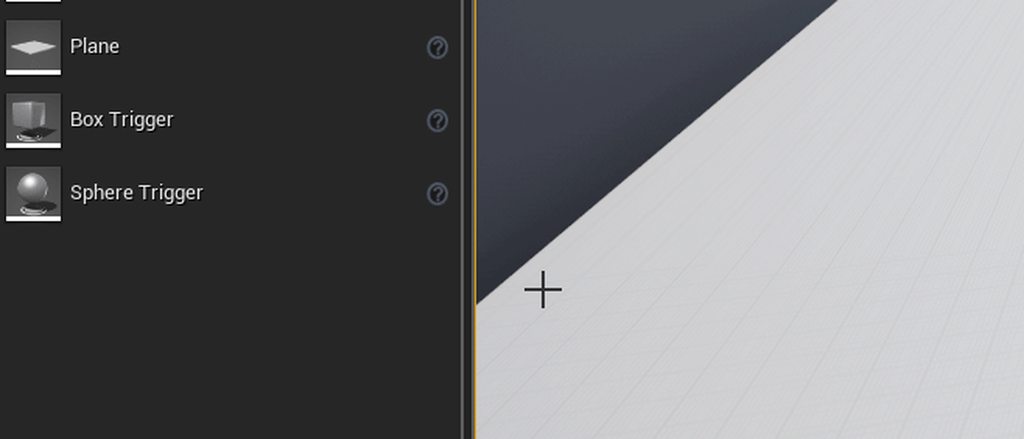
Do you maybe have the settings for shadows etc. low?
odd wyvern
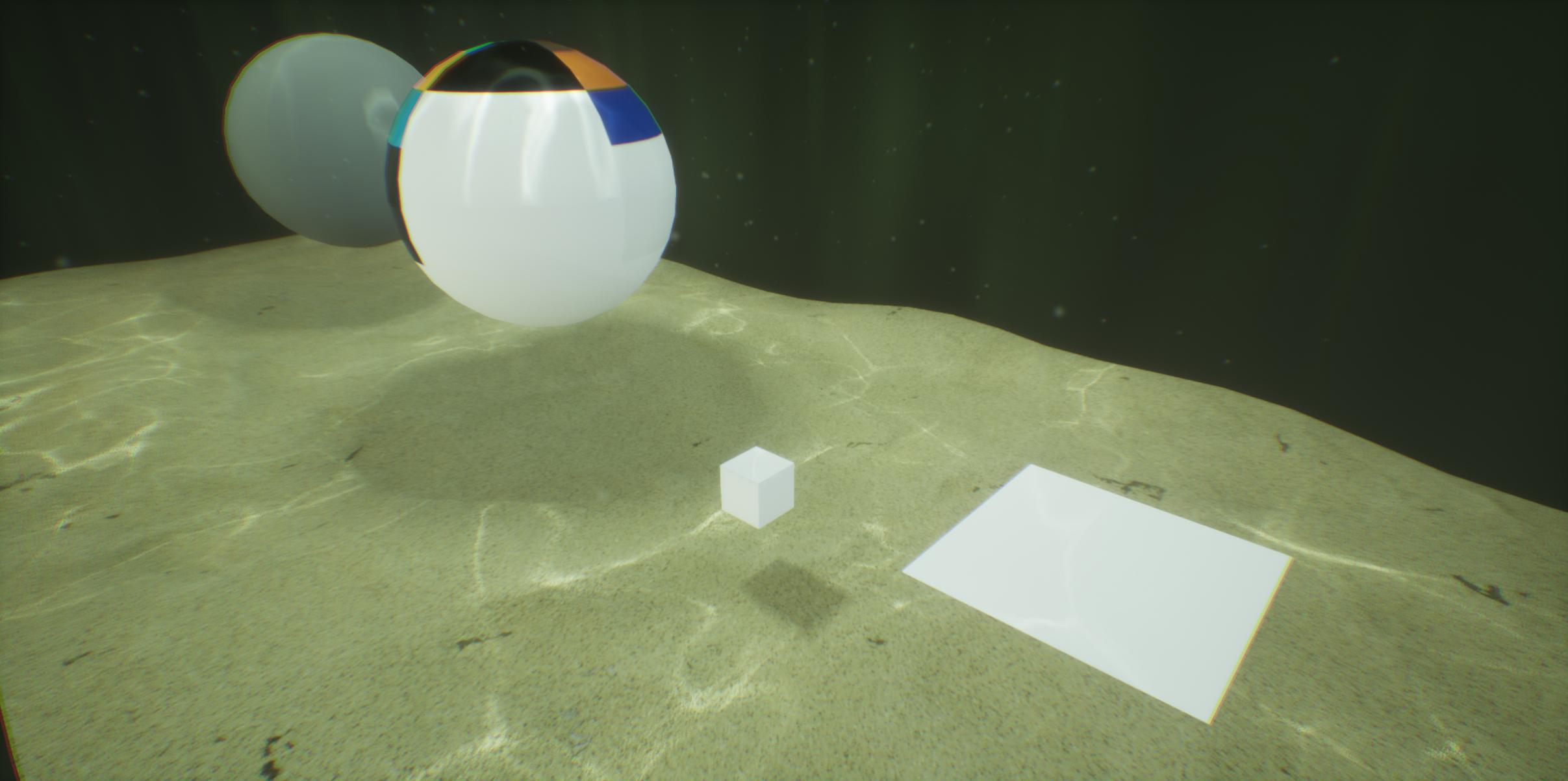 regal mulch
Can you create a new level and see if it works there?
odd wyvern
I get shadow from every mesh except from planes even when I import custom meshes
I'll try give me a second
It works in a new level...damn first of all thank you. But how can I fix that in the current level?
fierce tulip
in that case you might want to double check the lighting settings
before moving to a new level
but generally it could be so many random factors its hard to pinpoint an answer
odd wyvern
Maybe something in the world settings?
fierce tulip
iunno
odd wyvern
still thank you very much
fierce tulip
good luck!
 violet goblet
unreal cloth painting:
how can i select/paint only the skirt?
(shoes and skirt share same material/uv)
the brush is too inaccurate, i always paint the shoes too :/
 deep basin
I was asking myself two things regarding ue4's architecture, I'm sure some of you know the answer.
I know that ue4 does not allow regular multithreading and solves many tasks by using their custom delegate system.
So my first question is, are tick groups in their own respective thread, apart from the main game logic thread?
And the second one is, are events called in a seperate thread since they can have assigned ongoing, parallel tasks and report back if they are done,?
 twilit hill
As far as i know both are in the main game thread
 void kraken
standalne game always starting in full screen, how can I make it windowed
deep basin
alt + enter doesn't work?
void kraken
it does but on every launch it goes back to full screen
prisma ridge
Theres a solution with a shell blueprint
Hold on
@void kraken put this in the event graph of the level blueprint
worked for me
change resolution as required
void kraken
Thanks @prisma ridge that worked
prisma ridge
Cheers
 next badger
@gleaming narwhal Sorry to poke, but could you tell us when new Wiki will be available? It's been locked for months now.
 visual belfry
too bad the content doesn't seem to be licensed in a way that a fan wiki could spring up and bootstrap from it 😦
 elfin jacinth
Hey all, we have not abandoned the wiki, we are working on solutions for it.
 shell jetty
Wiki is doomed
next badger
getting where?
wary wave
ain't that the question, hehe
tbh, we've been hearing "we're working on it" about various things for years now :/
so I'll just have to believe it when I see it
kindred viper
We are all doomed?
visual belfry
at least images on the wiki work now 🤣
next badger
I've asked Epic about copyright of the docs/wiki, and if I can copy that data, but got no answer...
 obsidian nimbus
i tried the new learn portal cuz they said there would be quiz stuff, but couldnt find any quiz
will there be highscores on those?
kindred viper
there is one on the blueprint basics but I didnt see any on the others
but it was 3 questions... that you couldn't really get wrong
its a participation trophy is what im saying
obsidian nimbus
aww thats lame
next badger
3 in a row!
obsidian nimbus
bet i can get top score on that 😛
ill script the button pushing
only see blueprint essential and enterprize
grim ore
only some of them have quizzes, and they are between videos as a separate step. Blueprint Essential Concepts for examples has quizzes. no high scores that I can see right now but who knows 😃 intro to UE4 and touring the new UE4 learning portal has some as well lol
kindred viper
I got 100%. I knows me some stuffs
next badger
got 146% (local meme, https://euvsdisinfo.eu/how-to-get-a-146-election-result/)
 harsh lodge
Hi! New here, I'm not sure where to ask my question ? It's about Discord RPC and multiplayer sessions 😃 Thanks!
next badger
harsh lodge
Thanks!
plush yew
How do I lock the x-axis (not constrain to the x-axis) for characters?
these parameters are a bit confusing
regal mulch
Contrain to Plane means that it can only move in the Plane you define.
If you don't want it to constrain to X, you need to create a Plane that represents the YZ coordinate plane
The Origin should technically not be important
You have some settings enum at the bottom that should already have something for that
But generally, the Normal of a plane stands exactly straight on the plane
You can picture that by putting a pen on your desk and make it face directly up
The pen is the normal, the table is the plane
So here you would need to have a 1,0,0 normal
That one would stand 90° on the YZ plane
 austere hinge
Can I import maya complex rig into unreal using Allright rig?
next badger
@austere hinge afaik...no...it's a #plugin-dev question
austere hinge
Ya I know.. But to get reply quickly I posted here
regal mulch
@plush yew Yeah should work
It's "double" cause one is the compact view the other the more extended one.
That's just a Vector struct thingy
plush yew
ah it automatically fills for both
regal mulch
Yeah
plush yew
thanks!
regal mulch
Cheers
austere hinge
What's the best way to import complex rig containing curve animations etc into unreal..
next badger
@austere hinge you can't...the only way to import animation is to bake all to bones
that's how generally it works in games (ofc if you're not using custom pipeline)
austere hinge
Ya I know it's fbx.. But animation is not coming properly.. Baking is having issues with complex rig.. Any other way like using iclone 3dxchange etc @next badger @plush yew
I think 3dxchange can import complex rig from there we can export to unreal
next badger
@austere hinge baking should not have any issues with any rig...but the process of baking is custom for each case
austere hinge
Currently we are working on production rigs.. I think you know how complicated they are.. Any better solution? @next badger
next badger
@austere hinge i have no clue what "production rig" you mean
game engines are not meant for realtime constraints simulation for the skeletal meshes...
you can do that, but that's not mainstream thing
and no, you still can't import complex maya rig in ue4 since ue4 has no any tools for that anyway
i can't tell if AllRight Rig could do that
and by "no tools" i mean no tools for the complex bone constraining, not import (you could make your own tho)
 true leaf
I was running ue4 and my project on an old harddisk and it was soooo slow it was a pig especially when my project got bigger. My pc is fast too. So I just got a 1tb ssd for less than $100 and wow ue4 is ten times faster at everything lol . Worth it. My game used to take 40 seconds to boot now it takes 8 - to test things
grim ore
here is hoping SSD's will replace normal drives in machines in the near future, it's such a big difference to the normal feel of a machine
true leaf
Yeah the price is way lower now
regal mulch
I have like 3 M2s by now
There is basically no HDD or normal SSD in my PC anymore.
It's incredible how much faster they are and so small * . *
 dim plover
I'd imagine they're also much more convenient to install.
next badger
there are no so much m.2 slots
regal mulch
Like the GPU, or the water cooling pipes
next badger
you have to spare pcie
grim ore
there is a crappy mechanical in the $1200 imac at work it's the most ridiculously slow thing in the world and near impossible to replace 😦
serene birch
SSDs are practically extra RAM nowaways 😄
next badger
@serene birch yeah...with the same price
serene birch
SSDs are so fast the whole literature on database optimisations needs to be thrown out
because most ideas on their implementations were to work around the fact HDDs were slow
regal mulch
@next badger You are right, I thought my MB had 3 slots, but it's 2.
Still having an old M2 here somewhere that I wanted to add. sad beep
grim ore
picked up a oneplus7pro on friday, 90hz screen. going to see if UE4 runs well on it 😃
regal mulch
I still have my 1+X. I gotta get a new one eventually
It's super slow and crashy by now
grim ore
just got lucky that TMobile carries them and I have a lease ready to upgrade. It's an insane phone I can't wait to see what UE4 can do on it. Pokemon Go feels sooooooo weird at 90hz
plush yew
does anyone know the way to stop the startup form getting stuck at 45%
grim ore
wait
it's not stuck, it's compiling the DDC (derived data cache, storage for shaders and common stuffs for the editor and project)
plush yew
its been like that of about an hour
grim ore
open your task manager, see if it's got your cpu at 100%. see if the UE4 editor and shader compiler worker are running
and it could be hours or days depending on the spec of your machine, or minutes or some combination of time
plush yew
is there a way to stope it happing in the future
grim ore
yes, let it finish
grim ore
it's compiling the cache for future use
it's specific to the editor version as well as the project so each time you open a new one of those it will add more to the cache. It also might stop around 86% to do more.
plush yew
thanks
grim ore
it might be stuck but if your cpu is at 100%ish and you can see shader compiler workers and the editor using cpu then it's doing its thing
 vale silo
still no 4.22.2 hot fix release in sight ?! 😦
normal burrow
Would show on launcher, if any
vale silo
right, but that wouldn't be "in sight" 😉
abstract relic
You gotta bribe the epic staff with pastry treats for that
surreal gyro
how do you make a projectile disappear on contact with terrain?
normal burrow
SetVisibility on the primitive drawing it
surreal gyro
No, "disappear" as in, it is destroyed when it touches terrain
fierce tulip
on collision > kill
or if you want a more direct google-able one:
"ue4 destroy actor on collision"
or
"ue4 destroy projectile on impact"
normal burrow
pew pew particle pack on mp has some good examples too
fierce tulip
"on random naughty thought > destroy"
surreal gyro
and how do I stop said projectiles from being actually solid
Wait, uh, which asset is the terrain in the third person example map?
sullen wraith
what is the correct channel to ask anyone if they want to test a game with you if any?
was thinking game-jams but wasnt sure
fierce tulip
thats where siblings, neighbor kids, and parents come into play
disclaimer: asking parents if you can borrow their kids to play a game can be enough for them to call the police
 ember cypress
Bribe your testers with food
Especially if you're in college -- it's a good incentive if you offer a slice or two of pizza.
grim ore
yaaay lots of videos https://www.unrealengine.com/en-US/events/unreal-fest-europe-2019
 manic pawn
why does it keep changing the url to add ?sessionInvalidated=true
 maiden swift
@grim ore Just posted about this in #unreal-news. There's a treasure trove of stuff there!
So many topics covered.
grim ore
need more time in the day to not work lol
 worn sparrow
@grim ore beat me too it
https://www.youtube.com/playlist?list=PLZlv_N0_O1gbmtS-hQFAVEF_zBOJPCaaX

wonderful day today xD
tawdry maple
need help. everytime I shoot a destructible cube it flakkers. You can see for a short moment trough all cubes
obsidian nimbus
ehm looks like delay in culling or something
looks like the cube is supposed to be gone, but the next cube isnt there yet
 fringe iris
when i make my conveyor belt model use a material with the panner node it doesnt work properly. it either is not there or it isnt centered. did i do something wrong with my model or what?
obsidian nimbus
i dont know much about voxel stuff tho
obsidian nimbus
WIP or graphics
fringe iris
ok
 light vigil
Hi guys, I am trying to deploy to ios but unrealdoesn't recognize itunes as installed (I installed it from apple, NOT from the windows store) - anyone know why this may be?
grim ore
deploy to ios from your windows machine? so package your project and play it on your IOS device? if so you need a macOS machine to do that
sullen wraith
what'd be a better option then text render for this
it just looks a bit odd in-game
and they get glitchy
grim ore
you can put UMG widgets on them so you can style the look if you want, beyond that images with text on them or a material with text.
rotund scroll
what's glitchy about them?
sullen wraith
sometimes they are completely black
they get weird with rotating
just overall not pleasant
rotund scroll
but you want to keep them in world space?
sullen wraith
I want them to be above the planets at all times
rotund scroll
are you already using code to rotate them to face the camera always?
rotund scroll
I don't have your code, but I do have a similar object that works. could you draw debug lines to check if your text is indeed facing the camera? because that could be why it shows up as glitchy
failing that I can give you the code I used for mine and see if that makes a difference
 icy mulch
Does anyone have a isalnd height map
 dusky vault
Hey, I've noticed that taking high res screenshot disables post processing, is there any way to have it capture the scene with it? besides of a regular screenshot
 sacred sun
you can use world position offset to rotate the text if you want. https://docs.unrealengine.com/en-US/Resources/Showcases/Stylized/Materials https://forums.unrealengine.com/development-discussion/rendering/118396-help-with-camera-facing-material
Unreal Engine Forums
For discussions about Materials, Textures, Lighting, Particle Systems, and Post Process Effects.
 idle stump
I see in the UE4 Roadmap in Trello that "Curve editor revamp" is coming in 4.23. Does anyone have any screenshots/videos of this new editor? Or know what they changed?
 zinc island
is it possible to export Blender Cycles Materials like glass or glow to unreal engine 1:1?
obsidian nimbus
dont think so, it should get closer with evee but not there yet i think
dont even know what colorramp translates to in unreal
 sage tree
Has there been any more information since GDC about the 3Lateral Character systems that are supposed to be coming to UE4?
 worthy flame
any of you have any good stuff on a good health system with bp?
grim ore
what kind of health system? there are a few basic ones on YouTube and there is an advanced health setup in the Action RPG Learn example
worthy flame
ex, health that has a starting health of 100 and max of 125 and if it gets something like a upgrade it can go up to 125 and it can regenerate and for damage. and that regeneration happens slowly over time. i saw a couple on yt, but i didnt find any that could help me
@grim ore
grim ore
what was wrong with the ones on youtube?
it sounds like you are looking for a couple things, you don't all need it from one tutorial
worthy flame
not really in depth, cant use them later
yeah im trying again from the tutorials to gather the info and select what i need
grim ore
the RPG Tutorial series from Virtus has all of these, have you seen it?
if not health and max health are just 2 variables. taking damage is just subtracting from the variable. regenerating health is on tick or on timer adding to your health until it gets to max.
grim ore
so out of that what is still missing?
worthy flame
nvm now im off to bed
plush yew
How do I make it so that if I have different input axis options set up they don't add so the character moves double speed if someone presses eg d and right
grim ore
when you add to your movement speed clamp the input. if you are doing something odd with movement speed like processing multiple axis at different times then character max walk speed or try and take all input and then process it separately so you can clamp it
plush yew
Ok thanks
zenith flower
I turned this:
into this:
Using:
and:
I call it Advanced Video Settings*
*aka I've-lost-my-mind-but-im-at-peace Video Settings
its fully dynamic, if unreal ever updates or changes the scalability settings, I will have very very little work to do, if any
zenith flower
? I have those, as the general presets
that was easy, there are tons of examples out there
I have every sub-variable included, and even auto/show hide sub-dependent-variables
For example if VolumetricFog = 0, then all the r.VolumetricFog.* settings are hidden
Its about 80 console settings, with each button for each preset, and a tooltip that shows you what the actual value is.
On top of that, if multiple buttons share the same value, they all are "checked"
This way, if somevar@low = 1 and somevar@med = 1, if you press either of them, both get highlighted. This way you know that you won't make a difference if you choose one or the either
Which is why in the screen shot you see multiple selected buttons on the same line
 polar hawk
lol its a punchcard used to torture new programmers in the 60s
 worn granite
Yeah you can
zenith flower
How? Or. what do you mean?
worn granite
You just gotta set fill rules tbh
And justification
you can probably even go through and make it change the tabbing a bit to indicate hover/navigation state
p o l i s h
 pallid compass
polish or die
zenith flower
I can't?
I generate each line independently. I would somehow have to at the very end, loop through everything, get the max "desired" size, and then re-set everything via fill value.....
ugh.... I guess....
zenith flower
?
zenith flower
Sure, just not sure why you are saying it
worn granite
¯_(ツ)_/¯
zenith flower
?
next badger
@zenith flower align to right?
zenith flower
@next badger
next badger
looks better
zenith flower
Took about 30 tries to get all the alignments right. (I have multiple base widgets)
@pallid compass Approve?
grim ore
that is cool looking, would be nice if there was a "display text" option available in the options for those cvars to make them prettier but alas 😦
zenith flower
You mean like a "Show friendly name" kind of thing?
pallid compass
Layout does not look right at all
zenith flower
Only sub-categories shift
I re-named ultra to epic, to better fit the 4 or less idea
sullen wraith
@grim ore any chance you can put up a screenshot of your recently rendered fix?
grim ore
i dont have one but actors have a was recently rendered property you can check to see if its on the screen when you get the selected actors
manic pawn
isn't this a bit too many settings for a game
most players would either be scared of that menu or set everything to the absolute max
sullen wraith
probably under "advanced settings" zeb 😛
manic pawn
more like "basically a dev" settings
 quasi orbit
hello folks :3
is there a way to get to game logs/information from a locally installed UE4 game? like default engine command line switches and similar
zenith flower
Also useful for in-game dev stuff
While, you could just console it, this way, i can see all the various values used. And don't have to look them up
manic pawn
makes sense
 minor pulsar
What's the current best multi-user collaboration for unreal engine? Source control
 weary basalt
minor pulsar
weary basalt
minor pulsar
Thank you DevilsD 😄 ill look into perforce
manic pawn
perforce good but unaffordable once team grows past 5 users
icy mulch
Does anyone know how to make a object fall in a mount time like the moon from majoras mask but I would like the sun to fall so how would I do that in unreal engine
 split wedge
hello im trying to make it so when my character dies he loses exp and if he just leveled he can lose level, i got it to take exp away and take the level away but the exp comes back in viewport as negative number how can i fix that?
 icy bone
anyone tried the nDisplay plugin yet?
sullen wraith
in multiplayer, host has no lag at all, everyone else has terrible fps lag, is there a way for me to find out where is causing it to lag?
 limber torrent
Hi guys. Need help. I haven't used Unreal Engine engine for 5 years. How do you enable the vertices so I can see them in the corners of every mesh/prop in the editor? Pls @ me. TQ
 olive schooner
My shipping build has a really weird heisenbug... there is one particular spotlight (my character's flashlight source) that doesn't want to work. My dev build, in editor testing and launched project all work like a charm.
I have no clue how to start to debug it... The function that's supposed to turn on the flashlight is working because it signals my "tutorial widget"...
(btw kind of a cross-post, my co-dev posted yesterday in #packaging 😛 )
 surreal sun
languid shard
surreal sun
languid shard


[Quick Preview] #UE4 Editor Scripting Tools : Details panel customization using Blueprint Only :) #UnrealEngine #unrealdev #gamedev https://t.co/7ZzD2UO4LZ
 Twitter
D:

 soft crescent
So our prototype has a tutorial which is controlled thru the animation blueprint system
Like it has just a norma state machine
olive schooner
@soft crescent
https://giphy.com/gifs/the-office-2tKmQRAaYsanC

Also, Epic giff first class state machines 😦
wary wave
you need to set up a type and editor for it, but it's pretty simple from what I've seen
soft crescent
Ah ok
Yeah this is a prototype we have 9 days for so next time but if you could link me to somewhere I could read about this that’d be super cool @wary wave
wary wave
I don't think there are any articles on it
soft crescent
Docs? API?
wary wave
I wouldn't know where to look
soft crescent
So no wonder I hadn’t heard about that
 iron merlin
Hey guys, do i need to download unrealVS to open unreal through visual studio?
 cloud cobalt
No
iron merlin
Do i even need unrealVS? How do i open unreal through visual studio?
And it seems that i can't find my c++ class in content browser..
cloud cobalt
What do you want to achieve by "opening UE through VS" ?
Debugging it ? Just hit F5
If you want to use your code in UE, just build in the default conf (development editor) and start UE
iron merlin
Hmm i can't seems to find my c++ files in UE
cloud cobalt
C++ files don't exist in UE, classes exist
The compiled result of your C++ code is what will exist in UE4
iron merlin
They are in Source folder but i can't find it.
cloud cobalt
Did you compile your code ?
C++ is a compiled language, you need to close UE4, compile in VS, open UE4 to see your new classes
cloud cobalt
Yes, because you need to compile your code. If you don't know what compiling is, I suggest looking at a C++ tutorial first, because C++ is extremely convoluted
This isn't Unity where your code is just a resource like any other
UE4 game code ends up as part of the actual UE4 editor
When you mess up, the editor doesn't start anymore, etc.
I'm happy to assist with C++ issues, but this is pretty much tutorial level.
iron merlin
Ahh yeah, i think the problem was that my visual studio isn't up to date.
I forgot to install C++ component for visual studio.. Thanks for the help!
soft crescent
we've come up with a new development rule, when you're printing debug strings make sure you put what is printing that string in the message
 brittle gulch
Does someone here use Cloudscape seasons? I can't get the clouds showing in editor
 proven ivy
the south korean band?
worthy flame
how to slowly increase a variable over time to a set value?
its not on a event tick, but on component begin overlap
plush yew
yes
I want to create a BTS MMORPG with a portfolio

NOT Dedicated Server Boost C++ Server A-Z develop character eyesight(시야), move(움직임 동기화) test
I am building a server with boost c ++
It is a draft version.
MMORPG Monster Please give me some AI source?
 crisp fable
hey dudes
you know how animations bob around and stuff
very technical, i know
but in first person, where should you put the actual camera? if i parent it to the head it will make people sick
and if i hover it in about the right spot, even if i turn the head mesh off, the torso is going to be all over the place
wary wave
traditionally the camera isn't attached to the character mesh
crisp fable
yeah i know
wary wave
you usually have a dedicated first person mesh (even if in 'full body' visibility), so that you don't run into these issues
 crisp fable
perhaps even separate first person animations where the torso is relatively static
haha
actually im kind of doing that, in my animation blueprint i have a IsLocalPlayer variable that shrinks the head bone to 0
the other issue is the capsule - it needs to be big enough that the camera doesnt clip, but small enough that the player can fit through tight spaces
 rustic imp
I made a build of my project, but it has a fatal error when I run the exe, are there any logs I can find where I could read the error?
nvm I think I found them
 dire coral
GeorgeR: check out shootergame, its got seperate meshes for 1st and 3rd person
and yes it uses seperate anim bp and all that
rustic imp
how can I debug an error that happens on game executable startup?
cause you can attach your VS to the build, but no way I can do that before it boots up
honest vale
You could do some weird full body IK smoothing with real 1st person anim systems where you attach camera to head 😛
dire coral
run it from VS itself
honest vale
probably
dire coral
set VS to "debug game editor" and then press debug
 runic iron
Hello guys, sorry if I'm off topic but I didn't find any really suitable channel. I wanted to know : do you think that the new GameplayAbilities would be a good choice for a BTA game ? Or should I stick to a more traditionnal approach ?
runic iron
Beat them all, like Devil May Cry/Bayonetta !
honest vale
yes
I don't see why not

Unreal Engine
In this Unreal Fest Europe 2019 presentation, Matt Edmonds of Splash Damage Games takes a qualitative look at the Gameplay Abilities System (GAS) to help decide if it’s right for your team or project. Then, he switches gears to deliver some quantitative examples to help dri...
runic iron
I'm a bit worried with the compatibility with anim notifies and such because I heavily rely on it for my combo system
honest vale
watch the vid
pallid compass
If your not super familiar with c++ then dont even think about it
runic iron
thanks for the link
Oh ok, I didn't know about that before lol
I'm good with c++, coding won't be a problem
honest vale
with GAS you need to worry less about replication
and it seems like a rather simple system based on that vid 🤔
pallid compass
It is quite the opposite as simple.
runic iron
I'll watch it asap ! Thanks a lot for the help !
plush yew
Does anyone know what R1 L2 and corresponding Xbox buttons correspond to in 'gamepad' input in ue4
wary wave
trigger / shoulder
plush yew
Ok but I see only trigger has an 'axis' option, will shoulder work in axis mapping?
Also does this also apply to PS4 (and/or PS3 and lower)
dire coral
If epic actually documented the GAS, I might use it.. but honestly, I'd rather not touch anything with UI that Epic design until its been through at least 1000 iterations 😉
wary wave
I don't think any gamepad has an axial shoulder
 scarlet birch
Does 4.22 crash a lot for many people? I've tried source and binary several times now and the rate of crashes and bugs on even fresh projects has rendered it unusable for me. Is this the norm? or is it generally stable?
wary wave
Ps3 / Ps4 has axial triggers though
plush yew
I wanted to use L1 R2 etc to move a crosshair replacing the mouse on other platforms
wary wave
I'm not sure you ever really want to do that
that seems like it would be very hard to control
plush yew
It's not in every level just if you want some UI information
fierce tulip
i'd use the analogue
cloud cobalt
If you're porting mouse cursor to console without remaking your entire UI from scratch, use the sticks like Destiny does
though it's best to remake the entire UI from scratch too
scarlet birch
PS4 you can also use motion tracking and the touch pad
cloud cobalt
Yup
Though i'd keep those as additional fine input
I've literally never used the touchpad on the dualshock
scarlet birch
Yeah, I use it but not often and wouldn't want to have to use it constantly
plush yew
I'll use right stick
plush yew
Why does quixel brige give me Error could not send data over port when i click export
bridge
plush yew
Or is there somewhere else you can get realistic assets
abstract relic
Substance designer is generally preferred
plush yew
Ah nice ty very much
sullen wraith
if you wish to add dlc to your game, is that another product submission fee from steam?
cloud cobalt
No.
 surreal tundra
hey, im using udim textures in ue4 through this method https://polycount.com/discussion/188423/udims-in-ue4

polycount
Hello. I have a question about UDIM's Unreal Engine 4. From what I've read UE4 does not support UDIM's.
everyyhing works except my normal map
abstract relic
surreal tundra
anyone know anything about this?
cloud cobalt
So what's the problem with the normal map ?
mellow turret
when editing a game mode, can default pawn class used be a pawn class that inherited from the defined default pawn class or does it need to be that specific defined default pawn class
surreal tundra
first off it looks strange in the preview
either if its on normal or hdr
and when applied to the model, it just messes up the texture
this is sampler type linear color and textures hdr
and this is sampler type normal and textures normal
either way it looks broken
but both the base color and the specular look great
this is with basecolor and specular
fierce tulip
you cant really flip a normal map and expect it to work. and it almost looks like its trying to bake both sides of the mouse to one half since you are flipping uv's and overlaying em
abstract relic
It looks like a bad bake honestly
abstract relic
as I use overlapping uvs all the time for my normals

 serene birch
the normalmap texture is used for both sides? as in mirror?
surreal tundra
hmm okay, any solutions to this? i just got it from my modeler and its for film so it has to be high res, she said this was the best solution as we couldnt get fur to work
abstract relic
Shush sparkle man 😜
serene birch
you'll need to mirror the normal if you are on the wrong side triangles
surreal tundra
no its not flipped, its one texture per side
serene birch
ah
fierce tulip
expensive much for a mouse
serene birch
yes they look strange for normalmaps
surreal tundra
its the main character for a film luos
serene birch
the second texture isn't imported in "normal map" mode btw
fierce tulip
could have said that beforehand, unless I missed it
surreal tundra
no i know, but the top example is with normal map mode
but they both look as bad 😦
fierce tulip
still though, better to keep it one normal map, both sides on one texture.
properly horizontally aligned even
surreal tundra
okay, my modeler said that this would give better results, but she isn't right then?
fierce tulip
that depends on what she focusses on. but you can see yourself the results are not right hehe
abstract relic
She baked it improperly
minor pulsar
:0
languid shard
4.22.2 is out lads
abstract relic
Looks like. I’d add a roughness too. Gets better results.
 kindred mountain
Unreal Engine Forums
The 4.22.2 Hotfix is now live!
Feel free to discuss this release on the 4.22 forum thread (https://forums.unrealengine.com/unreal-engine/announcements
surreal tundra
hmm okay, thank you so much!
soft crescent
do they still update cascade?
kindred viper
but a nice list for a nominal update
I kind of want to get it, but I really can't be arsed rebuilding the engine today. Its too sunny 😄
fierce tulip
they dont update it, but do promise to fix stuff, only to not fix it (time pressure?)
kindred viper
will Cascade stay in the forseeable engine releases or is the plan to entirely remove it once Niagara has enough legitimacy?
soft crescent
nah they wont remove it, if there were a ue5 thats probably when they'd not include it
kindred viper
it seems like a crazy situation to be in co-development on what can work together, but one is meant to replace the other
but then it would make sense for transition purposes
fierce tulip
not co-development. itll just be around for a year or two and then depreciated
kindred viper
hows your niagara skills coming along?
sullen wraith
@grim ore I tried recently rendered, and its still selecting things outside the box :\
rustic imp
I've set up CI for out project that makes automatic builds, any suggestions on how to spread those builds to other pcs easily for testing?
kindred viper
kind of a networking issue really. You could batch it, powershell pipe it, etc
 copper charm
how can i set up a particle system emitter to destroy a destructible mesh? I have a flamethrower emitter that collides with the destructible mesh, but I want to add a constant force that applies to the area of effect
fierce tulip
please politely wait for the answer and dont spam it in other channels
abstract relic
Making your own game engine basically?
sullen wraith
you'd essentially need to do a lot of branch logic
if "string" ==
etc etc
and come up with your own logic for what would "pass"
 woeful furnace
Nigg
cloud cobalt
It's important to nail the scope for such a project first
If you understand well the limits of what you want to give the player, it can be pretty easy
copper charm
sorry about the spam just kinda encapsulated a lot of topics
cloud cobalt
You should look at the games from Shenzen IO's dev
pretty much that kind of stuff
I would look for something like LLVM, but much smaller and meant for interpreting, not compiling
Like a generic language interpreter that doesn't take source code as an input
Lua is a common language to embed in games but it's clearly meant to be written in text
And the language is just quite bad for modern standards
plush yew
where would be a good place to learn the basics of unreal? I've never rly coded too much before
grim ore
 safe rose
@grim ore As far as you know, Is there a "quick start" to just getting people familiar with UMG, but they don't need to do a single bit of blueprints. All I can see are things that have to do with logic implementation, but nothing that's just "UI Art" related (like DPI, anchoring, etc) focused.
I mean we have this https://docs.unrealengine.com/en-US/Engine/UMG/UserGuide
But more of a step by step
Seems like this is too hard for some newbs and non-programmer types
grim ore
I dont think there is that I have seen. so more of the ui/layout side and less of function. so just one covering form?
technically that link has it all it's just in separate sections, no real "hey lets learn this in a learnable fashion" tho
 hollow briar
safe rose
hollow briar
safe rose
Right, exactly @grim ore , it would be nice to just have something straight up, step by step, like the Editor overview I guess, but for UMG Editor
grim ore
yep I could see that being useful, a real artist to cover it would be nice lol.
I wonder if I could do that in a series, like UMG How To but for the art side. covering those sections that are in the docs in video form as a quick start
 sleek willow
 broken stream
good day

so it gets 10 points, but i take out 9 of them so its 1 point, but i like to take out 9.5 so it's .5 points instead of 1
how will i do somthing like that
 harsh tiger
@grim ore Hello mate, I just watched your new video https://www.youtube.com/watch?v=jZZRulZLcqQ
an i was wondering what is the purpose of this? Can you not just click the save all button an get the same result? the same thing applies for creating new levels using a template. could you not just duplicate a map in the content browser and change the name?
i'm sure there is more to it but i just dont see it haha.

What is the Save Current Level node for Editor Utility Widgets in Unreal Engine 4
grim ore
this is for automating things more than just conveinence. You could create a new level, import a CSV file with some level layout information, spawn in the level, then save it out. This would let you create/edit/manipulate level design in another program and then automate the creation/update of it in the engine @harsh tiger
kindred viper
plus it saves you the hell of going into the really shady editor plugin stuff 😄
grim ore
and think of this more of a general purpose engine, maybe you have some CAD drawings of a machine part you could easily reproduce it in the engine in pieces rather than an FBX file and bring in other things like text and other things not normally in an fbx file in terms of layout out a scene
I love source control but when you forget to sync the files between work and home your gonna have an unproductive day lol
mellow turret
is it possible to use pawns that inherit from the default pawn class defined in the game mode or only the specific default defined is usable?
scarlet birch
You can use whatever pawn you want. A default is simply that.
 bright root
had this problem with 4.22 . various random artefacts on the edges of transparency anyone else encountered this? i cannot figure it out.
broken stream
@grim ore Hi sorry to ping you, but do you know what i can do to my question ?
grim ore
@broken stream you have to change to using Floats instead of integers. a float will let you use a decimal point.
broken stream
o i see, well let me do that
grim ore
@mellow turret if you mean the Default Pawn, it's just a class in the engine. You can create a new blueprint, then open the list at the bottom and search for Default Pawn and use it as your parent class when making your new class
broken stream
thanks man, dont know way i did not think of that..
 lost ember
4.22 update?
bright root
yeah, now 22.2 same assets etc are fine in .21 or .20
serene birch
patching 4.22.2 was a lot faster than the usual UE patches
is that their "improved" delta patching the store added recently?
 sand sentinel
@icy bone yes, we are using nDisplay on 4.21 and have tested 4.22 (improved) and are happy with it so far. For max frame rates, you'll want to have quadro and quadro sync.
lusty carbon
how come I have sunlight leaking in a sealed environment when bake?
wall made of zero thickness planar modules
cloud cobalt
Can you show the lightmap density view
lusty carbon
just blocking out, didn't create uvs yet
cloud cobalt
Old Lightmass or GPU Lightmass ?
cloud cobalt
I haven't used Lightmass in a decade
So I really can't help
Moving back to static lighting after Helium Rain, but I only use GPULM
lusty carbon
could it be because im using planar modules? should I give the walls some thickness?
grim ore
are they edge to edge for the edges? if they are try making the outside walls longer so they completely cover that edge with overlap
also adding a thicker wall probably couldn't hurt, there is quite a few posts online about this stuff 😦
cloud cobalt
Using Lightmass it's probably best to plan for an additional outside wall
LM just sucks
lusty carbon
A question about modular building that's been bugging me for a while now. should the modules overlap to maintain the grid, like in instance #2 ? or do they need to snap like #1? thanks!!
cloud cobalt
Like, I'd do the walls 256 wide and 512 high for example, and have the origin in the bottom left corner
That way you can design and stay on the grid all the time
lusty carbon
that's the case with my origin. always to one of the corners
Here, should the origin be the blue or red?
 hidden tendon
Does anyone know why in an empty level the GPU and Frame spike in my unit graph on mouse up? Also I get bad stutters when I move the camera with the mouse button held down. Something about the mouse is really messing things up.
mellow turret
this would call the jump function with the jump z value that is defined before the set node? or would it somehow use the value set after the function call?
tawdry maple
does anybody has a tutorial for 2event hit replication"
regal mulch
EventHit, if the Actor is replicated, already calls on everyone and doesn't require replication
tawdry maple
but why doesnt replicate the directins of the bullets
it always only shoot straight
harsh tiger
@mellow turret put the set jump z node first
hidden tendon
Does anyone know why using WASD Only When a Mouse Button is Pressed is causing my camera movement to stutter really badly? If I use WASD without the mouse button it is fine.
rotund scroll
what are you doing on mouse click?
because it sounds like you're doing something really heavy lifting cpu wise when clicking the mouse button
 rotund scroll
jump velocity is only taken into account when actually jumping
hidden tendon
It is an empty scene, I right click so I can move the camera. Bascially the simplest thing you can do.
If I add a landscape, the stuttering gets really bad in the foreground, not so bad in the distance. It only happens with the WASD mode that requires mouse click, If I switch to the other mode it is silky smooth but that isn't really an option because I need to be able to look around lol
rotund scroll
so you mean in editor?
hidden tendon
Yes
rotund scroll
test if your graphics drivers are up to date
if that's good, then reinstall the engine version
hidden tendon
I already did all of that two days ago
rotund scroll
have you tried other engine version as well?
hidden tendon
Yep, thats where I am at. I think I need to reinstall UE.
I just updated today to 4.22.2
rotund scroll
I would try other engine version as well to see if you have the same problem
if you do, it's more likely than not an issue with your graphics card or cpu
hidden tendon
It was working fine until the other day, I had a crash during a save. Could that have screwed the engine up?
rotund scroll
beats me
I guess anything is possible these days
maybe there was some corruption taking place
hidden tendon
Yep, looks like I am going to have to nuke it from orbit and start with a fresh install.
rotund scroll
like if you were really unlucky and an autosave was happening at the same time
of an object of importance
idk just spitballing here
hidden tendon
I had a power outage in the middle of the save
rotund scroll
most likely a corruption then
hidden tendon
I lost the level but looks like it might be corrupted like you said
 storm venture
quick question; video speaks for itself
 digital anchor
umg doesnt have anti aliasing
 real pasture
Just a reminder to everyone. UE4 took off the Jetpack asset that was in the free for the month and replaced it with this one. https://www.unrealengine.com/marketplace/en-US/slug/death-animations-mocap-pack

16 Character Deaths - Dying in many colorful and dramatic ways.
coral patio
Guys, how do I set a certain range of frames to render in the matinee/render settings? I'm trying to render a .avi directly with Unreal but the problem is that it never finishes rendering after the animation is done and keeps on just adding black frames, effectively creating an infinite playblast which is useless to me.. Of course I can also just render out an image sequence and then put it together in Photoshop to get an .mp4 but the problem with that is that my Photoshop always literally takes about 2 hours for rendering and I want to create playblasts for about 10 animations..
 short onyx
I don't really know where to put that question so there it is :
Why all my shadow don't show up anymore when i'm in Ortho view with the cam of the player ?
🤔
ok wtf
soo, no dynamique shadow in Ortho 😐
 lament star
yeah, that's so disappointing
split wedge
Hello so I got my character to lose experience and level on dying to enemies if the experience is in range of losing a level, I got the experience for next level to change to previous level also. My question is that when my character loses a level the experience is negative now, how can I fix that?
split wedge
Cool thanks I'll that a shot :)
 native cradle
Hi guys, I have a general question
Should GameMode contain logic?
I am designing a turn based game. Should we design a separate combat system to handle that or will it be fine to go ahead and write our logic for it in our gamemode
fierce tulip
id make a seperate blueprint, but im not a coder/blueprinter.
depending on either you might wanna ask in #blueprint or #cpp
abstract relic
Game mode is server side only.
dim plover
If I have a lot of items that are dropped and I want to play a Timeline on them. Would it be significantly better for performance to drive that Timeline in a manager class vs. have each item drive their own Timeline?
zinc island
is there a video to export blender eevee materials 1:1 to unreal engine?
or did i need to set up the materials manually in unreal engine 4?
split wedge
Ok so now my problem is how would I set it up so that this function will set the current experience to be the new current experience it is after the character down levels let's say 400/800 and he loses 500 so that would put him at 300/400 on previous level
abstract relic
Manually. Blender and unreal have different render engine
zinc island
@abstract relic also with the new Eevee engine? :/
abstract relic
Why would it?
hidden tendon
Hey guys, does anyone know why my green components are all flashing with r.VisualizeOccludedPrimitives ? I think this is the source of my stutter. It gets better when I switch over to HZB occlusion but it's still there. The green boxes flash even if the camera isn't moving like it can't decide to cull or not
 tardy fossil
apologies for spam and stupid question...
is there a way i can "edit" a texture object ? (mask it and feed it that way)
paper kernel
apart from material parameters, dont think so
but you can use pretty much any image-of-sort as material parameter
 real mantle
Hi guys. How do you manage source control?
Is blueprint diffing really a thing? Is there any way to diff Maps?
Do you usually do lock file policies when someone is working in something or you do rebase override merges?
Did you find using feature branching a pain when dealing with Blueprints and other assets?
I'm happy to hear your experiences
 cyan bough
Is there a node to enable physics on anctor? For example on death I want them to slump over onto the ground in a pile as opposed to just using the destroy actor and and effect.
 pine sand


 mellow turret
Set View Target with Blend Set the view target blending with variable control
This node just changes the camera being used and the "variable control" means the variables that define how to blend from one camera to the next?
kindred viper
@real mantle 1. Perforce but Git is well used too. 2. Yes but its more of a manual affair. The blueprint Diff tool lets you see changes side by side so you can move what you want around. 3. Lock everything is my rule, but then you may have cases with level design where that is not a problem. 4. A good starting setup wins all. If you have branches and distribution between your coders and artists all setup, its plain sailing, until its not 😄 #software
real mantle
thanks Marc for sharing 😄
 deep citrus
There's a Blueprint Diff tool? Ooh, I have to take a look at that!
 gentle ivy
yeah its under file->source control->diff I think
deep citrus
Thanks!
real mantle
does it work only for blueprints or also for things like Behavior Trees , Anim blueprints, Maps, etc?
austere hinge
Iam planning to buy i9 9900k tboost 5.0 ghz
Is this good for building light in unreal engine?
It has 8 core 16 Threads
scarlet birch
is something changed with the editor viewport in 4.22. On a character blueprint I'm seeing the mesh preview not change in the editor when materials are changed on the mesh. I'm also seeing things like spring arm offsets not updating after being changed. The only fix seems to be to close the BP and reopen it.
sly lily
Anu deep, I'm running 4.3ghz on a 6 core and I m doing fine. I got a Intel 8700k
I can oc with it upto 5.2ghz, guess I hit the silicone lottery though.
But on average I'm guessing 4.3ghz is its regular oc range
austere hinge
@sly lily how much time it is taking to build light
sly lily
I guess it depends on how much light you have to build
This is one level, took about 5-9 mins
 fading tendon
Hello All. I am having trouble with my installation. Is there anyone that could help me please?
sly lily
You installing in epic launcher?
fading tendon
I am initializing and Unreal Engine 4.22.2 . It is stuck at 45%. I read that this is a common problem and I have tried all the troubleshooting steps I can find.
Everyone said turn off the firewall.
So I did.
it looks like it's trying to work.
sly lily
How long does it sit?
fading tendon
I waited 2 hours the first time, and then I restarted it and its been another 2 hours
I restarted it once in between and waited about 45 minutes actually, this is the 3rd restart
sly lily
Are you loading a project or installing unreal?
fading tendon
I'm just trying to install unreal for the first time.
fading tendon
I heard the first time opening it can take 30ish minutes for the initialization
No, I havent ever installed UE before
sly lily
Yeah, mine took a while. But not that long, what's your pc specs?
fading tendon
Lol probably not good enough.
sly lily
Dell right?
fading tendon
Yes. Thanks for the help BTW
sly lily
Aight lemme check the specs right quick
 iron linden
Quick question; If I remove bones in a Skeletal Meshes LOD and I have blueprint animation "Transform(Modify) Bone" nodes that affect those same bones, do those nodes get skipped in the animation blueprint for the further LODs where the bones are removed? I assume they do (much like normal animations), but would like to have a little confirmation before I spend too much time redesigning something that might hinge on the answer to that question.
sly lily
I'm not much of a software person, but if I was in your position, I would build it from their source code in worse case scenario
I dont see any problems installing, but running it might be a bit slow
fading tendon
Hmm, its weird because in the help forums they said that the CPU should be at near 100% while its initializing, and to just be patient
sly lily
Yeah, like I said, you should have no problem installing, so it may be a software issue.
fading tendon
I can tell its working becasue the .exe's are changing, both near 30% always
between like 30-33%
sly lily
Is windows up to date?