#ue4-general
1 messages · Page 455 of 1
 dark depot
hmm not sure try deleting the Intermediate folder for your project then building again if you still have the issue post about it in #packaging
 wind siren
will do, thanks
 plush yew
I've got three different colors of a triangle that are the same size. I need to switch the image that the triangle is using, forums online suggest that I make 3 images and stack them then simply change the Z order so that whatever color I need is sent to the front. Is there not just a "set image" node or something? Where I can just change the image that my triangle us using?
looks like make statebrush is what I want
 violet goblet
cloth painting for simulation:
how can i delete the painted area again? or paint with its initial color(pink?)
 bright pebble
When your engine decides to let your grass go flying  😲
😲
 paper kernel
 There's a hotkey to straighten blueprint connections now
select nodes + Q
this changes everything
 leaden dust
How can I make lambdas in UE4? And Can I use them as delegates for timers
 mossy nymph
FTimerHandle MyTimerHandle;
FTimerDelegate MyTimerDelegate;
MyTimerDelegate.BindLambda([<capture list>]() { <exec>; });
GetWorld()->GetTimerManager().SetTimer(MyTimerHandle, MyTimerDelegate, ...):
 pseudo swift
morning guys, how can i hook up my two media players to start at BeginPlay? I basically wanna play two videos at the same time on different objects
 sudden agate
just connect the white arrows
pseudo swift
it only allows me to connect to one at a time
sudden agate
you have another arrow on the right side
pseudo swift
sorry im terrible with bps, what do you mean? the beginplay has only 1 out
sudden agate
pseudo swift
just getting stills with that setup:/
like they are frozen on frame 1
oh wait its wonky
it does work
i can see how the beginplay flow correctly
thanks! i will fiddle with it
seems like the viewport really doesnt like multiple videos simulating
sudden agate
you know in Turn Based battle systems, how would someone implement "choreographed" attacks with special camera movement etc.?
Level Sequences?
 serene birch
heck, I'm interested in that question for anything turn based 😄
plush yew
Hey guys, im new to ue4 and have a problem, is this the place where i can ask for help or is that somewhere else?
sudden agate
I'v never worked with Sequencer before. Could be interesting 
 uneven fractal
what does "applyAOTtobasepassscenecolor" refer to?
 uneven fractal
😦
plush yew
so basicly i started with the Quickstart for the AI
and now i need to do my behaviortree, i just stumble upon a problem at task 11. Make a service @ https://docs.unrealengine.com/en-us/Engine/AI/BehaviorTrees/QuickStart
Where they tell me to create the follow Graph.
https://docs.unrealengine.com/portals/0/images/Engine/AI/BehaviorTrees/QuickStart/11/fullGraph.png
on the total left top corner, is a AI CON ref. which his a blue line to ... which has a red line to the branch ´Condition´
i would like to know how do i make this thing between the ai con and the branch. kinda stuck on that..

 steep garnet
Guys, I've just packaged my project but the sound doesn't work inside packaged one, although it works perfectly in ue editor. Could you help me?
 loud kernel
Hey!
I want to add my game icon (Windows). I created icon in https://www.icoconverter.com/
But I have a problem.
Any ideas?
Converts images to the ICO format for your websites or applications.
 thorn vector
Hi so i wanna try to put voice for my npc similiar to those in rpg
Is there any voice changer that i could use since i cant afford to hire actor
 worthy flame
 covert flame
 honest vale
what is "the new Unreal Engine learning portal"? I can't find any learning portals
the one mentioned here https://forums.unrealengine.com/unreal-engine/feedback-for-epic/1620445-what-content-would-you-like-to-see-on-the-learning-portal
Unreal Engine Forums
Hi All,
You've probably noticed that we've recently begun previewing our forthcoming learning portal. We are in the planning stages for our 2019/2020 courses
there's a survery about it and I don't even know what he's referring to
I can't find it either
is it the academy thingy?
wtf
"Sorry, you are visiting our service too frequent, please try again later."
can't log in
first time logging in today
 wary wave
"Unreal Academy"
it's been there for a while, but it was pretty poor when it launched
haven't looked at it since
basically a new page for the video tutorials - they divided it into categories based on industry
which didn't work because basically every tutorial more or less ended up in every category
honest vale
are they all videos?
 soft crescent
it seems more archviz aimed than game dev
 regal mulch
Is attaching a continues act or a one time action?
So if I attach something to a Mesh including a SocketName.
And I change the Mesh which also has the same Socket, will it adjust or sit on the same location where the old Socket was?
wary wave
one time action
mossy nymph
whatever you're attaching also has a reference to what its attached to
regal mulch
So whenever the Mesh changes, I want to attach again?
wary wave
if the socket ceases to exist, the thing that was attached will cease to be attached
because the old mesh is not there
regal mulch
It's mainly cause we have Pawn Mesh customizations and the Weapons are attached to the WeaponSocket of the PawnMesh.
Now I can't guarantee that the PawnMesh is assigned on the Client when the Weapon is attached.
The Pawn has a default mesh that has the same Socket (not transform but name) as all other Pawn Meshes.
But I guess I will just tell the Weapon to reattach again when the Mesh changes
soft crescent
so whats special about the prefab plugins for ue4? what do they do that you cant already do with blueprint?
wary wave
I'd attached the weapon whenever the pawn mesh value is changed
regal mulch
Yop doing that now
mossy nymph
you can just have a delegate fire on PawnOwner when the mesh changes, and Weapon handling it by reattaching to predefined socket name
wary wave
prefabs let you stick a load of blueprints together in specific configurations etc
what @mossy nymph Zlo said ^
 ember cypress
https://academy.unrealengine.com/ @honest vale This is what they're referring to, specifically the Preview in the yellow banner at the top. If you head there you'll find what you're looking for
You can also get to this page from the "Video Tutorials" button on unrealengine.com (under the learn drop down) or in the learn tab on the Launcher.
 sullen wraith
I've been using a timer which plays every 0.005 seconds, obviously with a hundred or so of these ships spawning, it causes a lot of lag, I'm wanting to know a better way to make my ship fly to a point. it doesn't need to check for collisions, or dodge anything, just a straight flight path, any suggestions?
 dim merlin
Hi, anyone has any advise on how to make city building games regarding characters (like having ~ 50k humands walking around) ? would the only possible way be vertex shader animations?
wary wave
you probably want to implement a custom solution
soft crescent
@sullen wraith use sequencer?
wary wave
we have skeletal mesh particle systems for that kind of thing
soft crescent
also use an object pool
sullen wraith
@soft crescent how would sequence change anything? I'd still be running a loop every0.0005 seconds
wary wave
you probably want to group those actors together into a single actor
I assume those ships are moving together
sullen wraith
nah, it's an rts game, each ship is different
a player will send them to a location
so the screenshot is there "moving" blueprint
soft crescent
oh it's a player thing
sullen wraith
constantly changing it's ship location
soft crescent
i thought it was something the player couldnt interact with
sullen wraith
no no, it's litterally just a flying ship from point a to b
every second its changing the actor location
 opaque salmon
is there a way to get unlit sprites to not show up black in a lit world?
dim merlin
@wary wave u was talking about my question?
wary wave
initially, yeah
you probably want to implement a custom solution
we have skeletal mesh particle systems for that kind of thing
dim merlin
'skeletal mesh particle systems' ?
wary wave
yes
wary wave
well, it's a particle system, that uses animated skeletal meshes as particles
effectively it's a mass skeletal mesh instancing setup
dim merlin
okay, but why not just animated mesh?
wary wave
but it has to be rolled completely custom
because you need a way to control the mesh population
the existing particle systems already handle simple behaviours for large numbers of simple instances
you don't have to use it, I've built a swarming system before that didn't, but it also used static meshes with vertex anims
dim merlin
okay, that sounds like a thing to investigate, thanks.. so i would not have to look into vertex shader animations?
wary wave
but that was for fish; humanoids probably want skeletal meshes because of the number of joints and complexity of animation
 next badger
@sullen wraith have you tried to debug?
 atomic onyx
Can someone tell me what my approach would be on slicing skeletal meshes?
 cloud cobalt
Not doing it ? 😬
I've done it once by removing an entire bone tree, and spawning a static mesh instead for the base
Like for limb removal, remove the limb, spawn a limb fragment in place
Add some FX and you're done
Do it for every segment and voila
next badger
Unreal Engine Forums
Talk about Level Design, Static Meshes, Physics, and more.
leaden dust
@sullen wraith Why don't you just do it on tick
and this kind of logic is best done in c++
because it can handle math on tick well
blueprints, on the other hand, doesn't do math on tick that well
and after looking at your logic, there are two rough solution, I, as an inexperienced person can think of
first make the ships as a character
disable the skeletal mesh
add a static mesh
and make the capsule much taller to get it to hover in the air
and use the AI moveTo function
or on the other hand
check the marketplace and the forums for a plugin for 3d pathfinding
and also, as an optimization
you might want to set the rotation only once
since it won't change
as you're going directly straight towards the destination
and use a VLerp ease in out if possible for the location
*setting the location
Both of these will save a lot of performance
 rain marsh
hy everyone
I have an issue for exporting executable file from unreal.. And being a complete noob, I dont know how to get it anyway.
paper kernel
you can use higher frequency timers no problem, as long as they only do the math
and actual visual changes are done on tick
leaden dust
@paper kernel I know you can, but he is doing visual changes
and high frequency timers aren't really all that useful in most cases
since you don't even need to update that fast
paper kernel
yup, anything past 250Hz is pointless, as the hardware to show that minor changes doesn't exist
 kindred viper
you should buy one of my new range of "Quantum Monitors". They run at consciousness hertz. Which means I take a cardboard cut out of a monitor and stick a picture of your desktop on it.
 lofty wave
I have a question!
I'd like to make an animation with the standard-mannequin!
But whenever i import the fbx file into Blender its just the bones
And not the Model
How can i fix/do anything against that?
 glad gulch
Hey champs. I look for the right keyword: Is there a special name for this kind of materials like.. "Terrain-materials" or.. "multi-layer-materials"?
 grim ore
@lofty wave how are you exporting it out? exporting out the skeletal mesh should work with the mesh as well as the bones
lofty wave
i exported the idle animation to edit it
Then the model wasnt there @grim ore
glad gulch
that was too easy. >.< But thanks a lot.
wary wave
hehe
grim ore
that is correct then since you only exported out the animation. there is a checkbox on the bottom of export
lofty wave
oh
 ornate hatch
is there a way to unlock the framerate in editor mode and play mode please ? I keep getting 60fps and i'm having hard time to see how I could change it since I'm aiming for 120 fps
grim ore
open the console (~ key) , then t.maxfps XXXX
or open the project settings and change your fps settings. Project Settings -> General Settings -> Framerate section
but by default it should be ~120fps in a new project for the cap
ornate hatch
Thanks a lot ! 😃
Found it! It was caped at 60.
grim ore
😃
lofty wave
@grim ore what checkbox are you talking about??
sorry for answering so late*
grim ore
when you export an animation at the bottom under animation is a checkbox for Export Preview Mesh. the better way might be to export out the skeletal mesh itself normally and the animation then bring them both in to work on
lofty wave
grim ore
oh weird, what version of the editor?
you might have to export the SKM and the Animation separate then
lofty wave
its Version 4.21.2
grim ore
yeah they must have added it in 4.22 then
the animation is just the animation frames, independent of the mesh so you will have to export both and bring them into blender if you want to see the mesh itself
lofty wave
ok
plush yew
how to make the game determine the frequency of the monitor for fps cap
not t.maxfps
grim ore
?
plush yew
I have a 75 Hz monitor. I want the game to determine the monitor frequency and limit the frame rate that the monitor has
fps
 manic pawn
that's called vsync
manic pawn
it's a bit weird in the editor
plush yew
hmm
manic pawn
I don't think it actually works at all
because the editor draws multiple windows from one thread
kindred viper
yeah the editor needs a monitor independent frequency
manic pawn
which makes it sync several times if you enable it
kindred viper
if your game is 60fps. And the editor needs to run at 120fps for the logic to work (for some reason) then it needs to differentiate between what is output by the renderer and what the under-the-hood logic is fixed to
plush yew
ok its works in compiled game
thorn vector
@covert flame thanks i'll look into it appreciate it
is the process easy for the voice to become.wav?
 copper charm
whats the best way to have a fireball explode on impact and destroy a destructible mesh
every tutorial i see does it a bit differently using radial force or just regular force
 coarse vector
anyone know why my lighting is getting all weird
its fixed when i rotate directional lighting but when i build the lighting it breaks again
copper charm
right now im trying to make a hollow cube that can be destroyed completely from the inside, but it doesnt seem to replicate it properly
grim ore
@coarse vector when you rotate it, you switch to movable light (not static, not lightmap). when you build it builds the lighting and uses a lightmap. This indicates your UV's are bad for your lightmap, or you have bad lighting settings for baked/static lighting
coarse vector
so i should change the uv maps in my modelling software to fix
grim ore
that might help, you say your lighting is weird but I don't know what weird is. #graphics might have more help if you have some specific issues you need fixed.
if there are extra "black" areas then your UV Lightmap is a good place to start
coarse vector
ok ok, ill try that, tyvm
 north stone
Guys, any idea why my actor is hidden in editor, but not if i simulate/play ?
i think its something related to the material, but i'm not sure
ornate hatch
I'm trying to package my project and I get this error. I already have Visual Studios 2017 installed. I don't get it
@coarse vector Maybe your normals aren't good and it makes your model sharp.
If you get squared shadows it means the model isn't smooth
 hidden heart
you need to install the tools with 2017 for C++ game dev @ornate hatch
its in the yellow text
coarse vector
ya tbh i'm completely new to uv unwrapping, texturing etc and importing to unreal
learning as i go
ornate hatch
Not only UV mapping, it's with smoothing groups and if your model has correct normals
@hidden heart Sorry didn't notice! Thanks 😃
hidden heart
You're all good, hope it packages for you! (always a pain point)
ornate hatch
We'll see :D
Second thing is that I can't seem to find a VR option for packaging though I have created the project with a VR template
this is the one to check ?
hidden heart
yes
ornate hatch
@hidden heart Ok thanks! 😃
hidden heart
🍕
soft crescent
is it possible to offload shader compiling to an aws server?
 hidden aurora
Unreal should make a post process asset, where you can save a post process volume settings and then use that present in a volume and can switch between them
manic pawn
the post processing settings is a struct that you can put into a data asset
or you can make blueprints of the volume
 crisp arrow
Is there a publicly available implementation of the OnlineSubsystem for Discord?
plush yew
Hey would it be possible for a solo dev to make a battle royale?
manic pawn
no
hidden aurora
Its too much work for just one person but try if you want
sullen wraith
what.. how is it to much work..
battle royale is a very easy concept..
to achieve..
quality is a different story
serene birch
making something that works well in multiplayer for big servers with a lot of players might be hard
hidden aurora
I know its basic but it has a lot of mechanics
plush yew
Ok I have a problem
I created a new level but everything is unseeable unless i choose unlit
ive already tried building the lighting
serene birch
did you try placing a light? 😛
plush yew
No @serene birch as soon as i asked i went back to UE4 and I had no light lol
I thought when you made a level it came with lights
serene birch
wut XD well sometimes you just have to ask the basic one 😃
the empty level preset is literally empty of everything including lights
plush yew
oh
sorry
I apologize lel
but how do i change the hud text size?
i just started using unreal engine, i have no experience in any other software either. im trying to make a game where i collect items in order to finish it. something like slenderman. i've been searching online for like 3 days now but i cant find anything that talks about that. any help?
Are making UE4 animations hard?
paper kernel
well yes, but engine isn't intended for making animations in the first place
hidden aurora
Im not sure if you can make animations in ue4
hidden aurora
But animations is relative
paper kernel
ye you can pick a 0-frame long t-pose and start adding frames to it inside the engine
will take you forever to make anything, but possible
 woeful furnace
hey! is there something to change on my project, if i want to publish my vr game on the ps4?
grim ore
Anything you need to change will be covered in the SDK and other documentation you have when you are an authorized PS4 developer
 summer aspen
I'm hoping to create a time-stop visual effect. Any suggestions or examples of good ways of achieving a time freeze visual?
I'm making a Simultaneous Strategy game, and we want an effect to visualise the beginning of the planning phase, and to let players know clearly which phase they're in
A quick screenshot to show what we look like in case it helps with suggestions on viable effects. Thanks for any tips or pointers!
 twilit hill
mhh .. seems like using the text render actor with the default engine fonts is broken
pseudo swift
guys does anyone know if it is possible to make a kind of first person shaky handheld cam without a vr controller?
ive only done it before with a vive set
@summer aspen look at like world of warcrafts mage time stop ability
if I record a camera movement with the sequence recorder, is there a way to add random shakines to it?
without keyframing the transform properties it by hand
 vagrant flax
Wondering if anyone can help me with this, I'm trying to create a dynamic Wire or cable that is attached to an actor that is movable with another actor on the other end, so something like a toaster with a power cable attached, is this possible with UE4?
pseudo swift
check the cable actor
it can be attached to two seperate objects

Swing my beauties. Swing! Twitter: https://twitter.com/Play_Ruff Patreon: https://www.patreon.com/deanashford Discord: https://discord.gg/gPnr339 Royalty Fre...
hopefully this helps you
for my problem im trying to apply the camera shake blueprint class to a camera in my viewport but I cant get it to shake, what am I doing wrong?
vagrant flax
That is actually extremely helpful, thank you so much!
 onyx wave
So I'm trying to import a sample video into my project and then play it in a media player. So first created an File Media Source and then created a new media player and when I try to play my video it simply doesnt and tells me LogMediaUtils: Error: Cannot play file://D:/Programming/Unreal Engine/VR_TEST/Content/SampleVideo_1280x720_5mb.mp4, because none of the enabled media player plug-ins support it: LogMediaUtils: | MagicLeapMedia (only available on Lumin, but not on Windows) LogMediaUtils: | MagicLeapMediaCodec (only available on Lumin, but not on Windows) LogMediaUtils: | MagicLeapCameraPreview (only available on Lumin, Android, but not on Windows) LogMediaUtils: | AndroidMedia (only available on Android, but not on Windows) LogMediaUtils: | AvfMedia (only available on iOS, Mac, but not on Windows) LogMediaUtils: | ImgMedia (URI scheme or file extension not supported) LogMediaUtils: | WebMMedia (URI scheme or file extension not supported) LogMediaUtils: | WmfMedia (URI scheme or file extension not supported)
I already installed multiple plugins containing the word media...
yet nothing works
video file is .mp4, but also tried .wmv, .avl
pseudo swift
" file extension not supported" i always run jpg/png image sequences and it works like a charm
try that out
here u go
hidden aurora
Does someone know how to use the mouse position to rotate an actor on its pivot?
grim ore
mp4 should definitely be supported if the codec is valid, mp4 is just the container, what is the codec info for the mp4?
you can see the supported actual codecs and recommended settings here for videos https://docs.unrealengine.com/en-US/Engine/MediaFramework/TechReference
pseudo swift
hey Mathew 😃 I watched your video regarding the camera shake class but now Im wondering if it is possible to apply it to a cine camera actor that has a keyframed animation
my bp is above
grim ore
I dont know if the shake class applies to cine cameras 😦
hidden aurora
https://www.youtube.com/channel/UCOVfF7PfLbRdVEm0hONTrNQ Lol i didnt realize that that mathew was the mathew on this discord lmao

YouTube
This channel is dedicated to exploring Unreal Engine 4 and the Blueprint programming language that it uses. You can think of it as a companion to the API doc...
pseudo swift
damn, do you know if I can apply like a random shakiness to a cine cam somehow? 🤔
grim ore
if the camera shake doesnt work off the top of my head would be something like a sequencer event, then have it use a timeline to move the camera. between your points randomly. have you tried the shake itself on the cine camera itself outside of the sequencer?
onyx wave
the codec is of the video is h264, tried it with ImgMediaSourceFile still cant open the video in the media player
pseudo swift
im trying to recreate this type of camera movement
https://youtu.be/Q2VMWR8xlls?t=23

DRONE. STUNT. RAVE. by @nikitadiakur SUBSCRIBE: http://bit.ly/AdultSwimSubscribe About Adult Swim: Adult Swim is your late-night home for animation and live-...
grim ore
@onyx wave is the file imported into UE4 and in your asset browser?
pseudo swift
i was thinking of using the sequence recorder to control a camera which I pilot and then add some shakiness to it
grim ore
did you read that page, it shows you how to use unsupported codecs as well as see the info on the file to see if that is a problem
onyx wave
i got an plugin which had the option to allow for unsupported codecs
but that didnt help
infuriating... how can such a simple task be so difficult
grim ore
did you try with the sample file on the page? If that doesnt work then you might be doing something weird and if it does then your source file is incompatible
pseudo swift
hmm cant even get the sequence recorder to record my cine cams perspective now even, thats supposed to work no?
nvm found a youtube vid
grim ore
pseudo swift
still wondering about the shakiness though:)
grim ore
ok so yeah shake does work with cine cameras, just tested it
I think a big issue is your amplitudes are way too small for any visible effect
try changing your amplitudes in the shake itself to 100 and see if you can see it working
pseudo swift
hmm interesting
grim ore
and the 2nd issue is the camera shakes affect the player camera manager which I don't think matters for sequences
grim ore
so I dont think they are going to work since you never use a player camera manager
pseudo swift
like my plan is to use this one
Unreal 4 Sequencer How to Output Video From First Person
where he basically records his gameplay through the player camera
grim ore
actually lol I dont know if it is, Ive never seen the play world camera shake before lol
pseudo swift
so my question to you is like do you think given how the example video works that I could record gameplay in a similar way and then add some shake to it
1:20 he walks around
i will do something similar and then just add shake if poss
grim ore
ok yeah if you are doing that you can use the camera shake for sure
since that is using the player camera
pseudo swift
the player camera has a camera component which i dont see how it differs from a cine cam? can it have dof and stuff?
grim ore
you can change out to a cine camera if you want
pseudo swift
otherwise I can just attach a cine cam to the player one after one also
grim ore
the set view target with blend node allows you to set the current player camera and it can target a cine camera
pseudo swift
i guess i have to migrate these first person things from a new project?
grim ore
the first person character?
grim ore
click the green add, then the top add feature pack, then choose the first person pack
pseudo swift
@onyx wave update your engine?
onyx wave
is latest version
pseudo swift
@onyx wave read the manual on how to play an image sequence and just load the example vid the steps are the same
onyx wave
already did
i simply cant put the video as a file media source OR as an image sequence into the media player
onyx wave
LogMediaUtils: Error: Cannot play file://C:/Users/ClusterFunk/Documents/SEP Projekt/RobotVR/Content/Movies/Infiltrator Demo.mp4, because none of the enabled media player plug-ins support it:
LogMediaUtils: | MagicLeapMedia (only available on Lumin, but not on Windows)
LogMediaUtils: | MagicLeapMediaCodec (only available on Lumin, but not on Windows)
LogMediaUtils: | MagicLeapCameraPreview (only available on Lumin, Android, but not on Windows)
LogMediaUtils: | AndroidMedia (only available on Android, but not on Windows)
LogMediaUtils: | AvfMedia (only available on iOS, Mac, but not on Windows)
LogMediaUtils: | ImgMedia (URI scheme or file extension not supported)
LogMediaUtils: | MfMedia (only available on XboxOne, but not on Windows)
LogMediaUtils: | WebMMedia (URI scheme or file extension not supported)
LogMediaUtils: | WmfMedia (URI scheme or file extension not supported)
``` thats the error message not that he cant find a file or somethingi added the sample file, added a new media player, selected it in the media player and https://i.imgur.com/hFq6hL9.jpg works fine, raw 4.22 FPS template project
so the question is how are you putting this file in the project
onyx wave
import select the video
grim ore
and you get that error on import?
onyx wave
nope everything fine
when i double click inside the media player on my imported file
then i get the error
grim ore
and when you open up the file media source for the file you just imported what does it show?
grim ore
what options does it show are valid for windows?
onyx wave
img sequence webm and wmfMedia
grim ore
actually I just thought of something else, where is the source file at? it seems to be pointing to your project itself
pseudo swift
so how do i get the firstpersoncharacter into the bp? his setup is to the left, and he doesnt have any variables created
onyx wave
sits in Contents/Movies
pseudo swift
i tried dragging off the posses in pawn and search for it
@onyx wave i never have my files imported to the project but pointing the path to your downloads for etc.
it probably doesnt like pointing to your contents
grim ore
I thought it might have been due to it being in the content folder but it works here =/
so in the media player under info what does it show for the info for the file?
or does it just fail to open and nada
grim ore
@pseudo swift you can just use the Get Player Character and I would assume it would get your player
grim ore
@onyx wave at this point maybe try a new blank project and see if it works, or a new engine version. perhaps something got disabled for some reason but it should work out of the box
pseudo swift
u see the node at the bottom which also has a target
grim ore
the item in your screenshow is the first person camera,
pseudo swift
yea but i cant hook it up to the possess
grim ore
what is the first person camera?
pseudo swift
this is my scene
i only dropped in the firstpersoncharacter
which is selected in the viewport
grim ore
you can just right click in your level blueprint and add a reference to that if you have it selected
onyx wave
verified my version and all files, created new project same error -.- ok I'm off this is retarded af
thanks for trying to help
pseudo swift
i think i just create a variable for it? maybe they remade things?
and grab it through an object reference
like this i think?
doesnt say from level though
i compiled and selected my assset in the menu
hmm but im not possing the fps during PIE
okey nvm i dont know what i did wrong but i managed to create a reference to it now
grim ore
it's only going to come up as an option if this is your level blueprint
pseudo swift
i cant posses it though
grim ore
and contenxt sensitive would have to be on
pseudo swift
\
im positive this is correct now
im just wondering why it doesnt put me in into fp mode
grim ore
its possible your other settings are overriding it. put a delay after begin play to see if it works
otherwise just change out your game mode or your default pawn to the first person one
pseudo swift
how can i change that?
grim ore
game mode is in project settings -> maps and modes
 cedar moon
Is it not possible to derive blueprints from USphereComponent? It isn't listed in the blueprints
grim ore
you can yes, its just a setting
cedar moon
you can switch back of course
cedar moon
that isn't what the game mode does
pseudo swift
delay also didnt change it, so how come i cant possess my fpchar on beginplay then
its simulating from where my viewport cam is located
cedar moon
perhaps you have the wrong default classes set
grim ore
that is a good question on the possess because I just tested it and it worked here, hitting play possesses the first person character I have in the scene
pseudo swift
are all these correct?
grim ore
do you have anything else overriding like auto possess on objects?
hidden aurora
I need comment boxes in behaviour trees!!
pseudo swift
what about this?
hhmm no
why am i stuck in viewport mode lol
does it have to do with the fact im simming? no?
yea
i changed it and now it allows me
alright mb
@grim ore so i recorded a sequence with the fp character but afterwards when i enter the recorded sequence there is no way to look trough the camera, so i tried creating a cine cam and attach it to the keyframed fp cam but it doesnt follow since its a spawned actor
how can i switch out the default fp cam to a cine one? seems difficult since it is referenced in bps i think?
grim ore
add the new camera to the player, use the set view target with blend node to swap between the old and new camera
grim ore
either works but since both cameras are in the player I would do it in the player on begin play
grim ore
it looks like the player
pseudo swift
its not the event graph though with beginplay? not sure where I add the set view target one
grim ore
that screenshot is a function in the player
pseudo swift
alright
thorn vector
hi do anyone know how to make dynamic season and weather system?for season i have the asset(textures from procedural landscape ecosystem) can anyone guide me?
pseudo swift
"set view target with blend node to swap between the old and new camera" not sure how to follow this, can you elaborate a bit more?:)
do i need to edit the function of the player?
the cine cam is added its just not possessed since the other one is still the main one
even if I switched cam, would it still record my viewport look-around changes? do I still possess the first-person if I switch?'
grim ore
you want to control the first person, which you can do now right?
grim ore
and it is using a normal camera that is inherited?
pseudo swift
yes the default first person cam which is not a cine cam
i can look through it and use it, so the whole first person thing is working
grim ore
it's not, so you can just add a cine camera, move the stuff that is under the current camera to it, then delete the normal camera
pseudo swift
yea so i added a cine cam component, not sure what happens if I move the stuff and delete the normal one
grim ore
do you need the gun and arm meshes?
pseudo swift
nah
pseudo swift
lol aight
grim ore
at the worst it explodes and the computer melts and we don't have a problem, at the best it works and we dont have a problem. either way, no problem.
grim ore
the FirstPersonCamera since that is what you want to delete
pseudo swift
aight
grim ore
deleting one camera and adding a new one
grim ore
find where it is broke
I am guessing something was using the gun and the arms. perhaps the firing animation? if you dont need the firing stuff just delete the entire code part that deals with firing
grim ore
you can just delete that, it was for attaching the gun to the hands
grim ore
click on the target link
grim ore
it says Target with an eye glass, you can click on that in the error
grim ore
in the compiler result you linked above
pseudo swift
took me to the event graph
something with the arms
maybe i just remove the arm animation montage?
from the montage play?
hmm still error
so the target must have a connection
i tried dragging and dropping my cine cam
but doesnt connect
grim ore
you can remove that entire section that happens when you fire
pseudo swift
okay compiled now
!
lets see if I can posses it
it does enter fp mode but it only moves sideways and not rolling/yawing
like the cam is locked in x/y axis
grim ore
it might be, there are settings on the camera that determine how it moves with the character
pseudo swift
think this fixed it!!!!
lets do a test rec
alright it works
so do you think it would be even possible to add shake to this somehow?
the player function is using a camera manager which you mentioned earlier
its also keyframed now from the recording which maybe makes it more difficult
would be great if the level blueprint could just add random shake to the area where the player cam is and have it affect the cam
pseudo swift
ill try adding it tomorrow, goodnight! thanks for all the help MathewW!
much appreciated as always
 mellow turret
soo transient variables are initialized to 0 and not serialized...?
plush yew
Hey guys so i have this small problem, for a tutorial i need to make this as seen below but the one with the circle around it i have no idea how to create this! could anyone help me?
mellow turret
do you have the AI CON Ref already?
did you try to drag the pin and type "!=" in the search box ?
 quartz grotto
I've got a blank UE4 project. I did not choose to include any of the starter content, etc. Isn't there a way to import the Mannequin into my project? I seem to recall some sort of popup that allowed me to select just that one thing to import.
Or is the only way to create a starter template project and migrate the mannequin?
dark depot
you can migrate from another project or hit add new then template project and add a third person or something that has what you need
plush yew
IS there an off-topic chat?
 tiny karma
Can someone PLEASE tell me how to fix this, Idk what happened but nothing is working
quartz grotto
i must be wrong about this. what are the default units in the editor for the grid? i have my measurement units as the default (everything is default), which is centimeters.
and according to google, 1 foot is about 30 cm
wait nvm, somehow this scale is set to 900 not 30
that would be my problem
ok yea, so this is my question ... I have a plane scaled to 30cm x 30cm
but it looks huge compared to the mannequin and the grid
kindred viper
1u = 1cm
quartz grotto
yea, ive got scale to 30x30 that should be 30cm right?
for a generic plane
in the editor it feels more like 2000cm relative to the mannequin
 sacred sun
the default plane in the engine is 1 meter or 100 centimeters when its scale is 1 xyz
sacred sun
you can use the ruler tool if you go into the top orthographic mode. just hold and drag the middle mouse button
dark depot
is that a default plane if that is larger then 1cm but 1 meter
quartz grotto
this is just a fresh C++ empty project and i added a plan to the scene
and the mannequin
dark depot
open the plane see how big it is
the 30 there doesnt mean size of the object in CM but Scale compared to its original size
quartz grotto
ah ok i see, so Cel's info and yours adds up then
plane isn't 1cm x 1cm like i assumed
i didnt think to open up the plan and look at it
wish i knew the metric system fluently lol
tiny karma
I really need help, this project is due soon
thorn vector
anyone can help me create dynamic weather and season?
tiny karma
The viewport shakes, all my models are either see through or weirdly textured, some of my models are just gone, my skeletal mesh is behind models that are much further into the distance than it
Basically everything has gone completely out of order and I really don't know what happene
kindred viper
did you have a backup?
tiny karma
My backups are doing the same thing
kindred viper
Perhaps your engine build then. I dunno
 maiden swift
Here I was trying to figure out how to loop through enums in Blueprint, only to discover every enum gets their own for-each loop.
https://i.imgur.com/iKShYIi.png
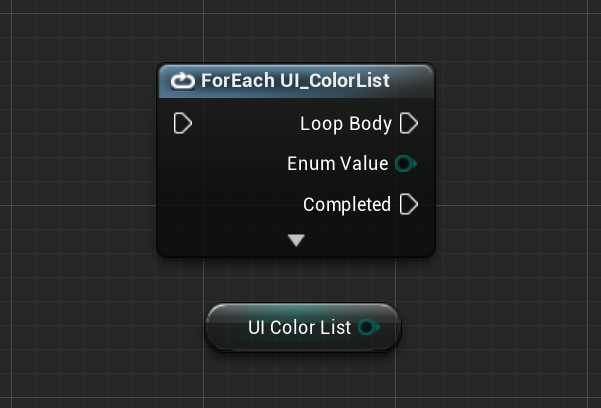 sacred sun
are your models opaque? sometimes there are sorting issues with translucent stuff. is your viewport shaking if you make a new map?
kindred viper
@maiden swift wait what? I've been looping with byte representations all this time?? When did this go in?
maiden swift
I have no idea, but I just discovered it and had my mind blown.
kindred viper
yeah. I didn't even know the C++ enum could do that
maiden swift
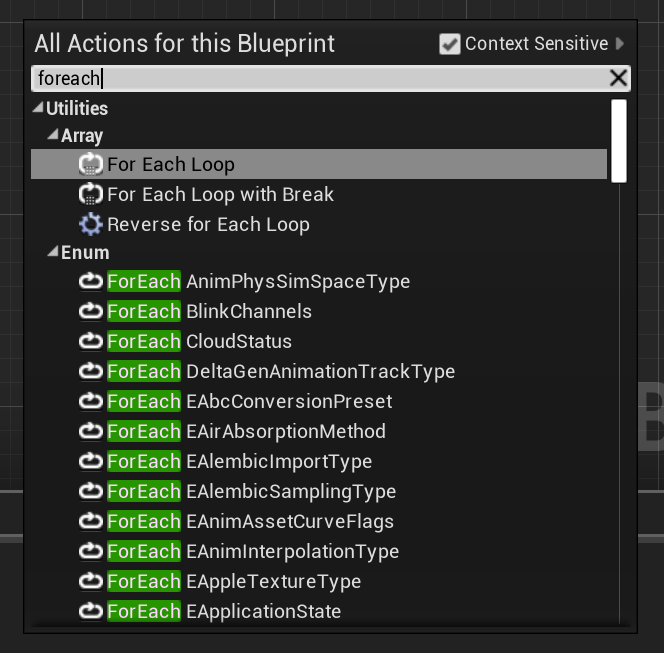 kindred viper
ok never noticed it. But I only moved into 4.20+++ territory a couple of months ago. Been stuck in 4.19 and don't remember it there
but I might have just missed it
plush yew
I've got an idle animation that sets a boolean on my character on frame 0. The problem with this is that you can enter that idle animation on a frame other than 0, which means the entire animation needs to loop before the boolean is set. Is it possible for me to set that boolean WHENEVER the idle animation is playing? Like during the transition or something?
 restive seal
I have a problem.
This might be better suited for the answerhub or a bug report. But I want to know if anyone has run across this before.
I use brushes to block out my levels.
Sometimes, when I have the level as a sub streaming level. When I Build Geometry, the sub level's brushes will break.
The brushes keep their shape, but they lose their transform.
They will then behave differently:
- You can't press F to "find" them in viewports.
- They no longer draw edge lines in any viewport or preview, but vertexes show up when selected.
I have previously just reverted to the last commit when this happens... once I notice.
I have one of these .umap files if anyone is interested
But I want to know what causes this and how to fix it.
kindred viper
@plush yew AnimNotifies
plush yew
That only happens on frames though, right? Which is where my issue is occurring. Is there a different way to trigger notifies?
kindred viper
@restive seal by Brush do you mean a BSP brush?
restive seal
I do
kindred viper
its been long advised not to use them anymore. Other than box modelling a proto level
plush yew
I could put a notify on each frame but that doesn't seem efficient
kindred viper
it's not in-efficient really. It's just an event call basically
plush yew
I guess I'll put that down for now but I'm going to work on finding a different solution in the mean time. I've got a lot of frames in my idles
Oh, and thanks for the tip!
kindred viper
yw
restive seal
I have begun using models to block out my levels, but that is slower.
And I have 40 levels of my game currently blocked out in brushes, so id like to avoid this bug as I change their order
kindred viper
you can convert Brushes to static meshes iirc. Im not really sure anymore. Last time I used BSP was in UE3
restive seal
you can, but then the level structures would be locked in place as one giant blob.
I'm just using them until I have some stuff to kitbash overtop
kindred viper
I dont mean convert them all to one static mesh. Take sections and convert. So if I were to do this, my workflow would be something like :
Drop a brush, shape it out, convert to static mesh, next shape....
restive seal
I use subtractive brushes though, so each level is one brush carved out
kindred viper
then you double fudged yourself sorry
restive seal
well, only one level is broken, I can revert it to yesterday.
I just don't like these bugs
kindred viper
one of the reasons I came to UE in the first place was to get away from the horrible subtractive BSP in Source engine.
Additive is the way
restive seal
I loved source engine, but it didn't have subtractive brushes iirc
kindred viper
well of course it did. It only had subtractive though
or maybe they changed that and Im thinking of the original Hammer
kindred viper
Im pretty sure I had subtractive in the leaked HL2 devkit. But its a long time ago I dunno anymore.
restive seal
ue4 > source
kindred viper
for sure
what amuses me is that UE4 is open source but the Source engine is the most hacked game engine in history :p
restive seal
woof
source engine is.. sorta open
they need to open hammer if they want people to use the engine
maiden swift
I sure hope Epic finishes that mesh editor in the not-so-distant future.
kindred viper
yeah me too
although what I have seen so far, its got some decent cleanup stuff already
maiden swift
Yeah? Last time I turned it on to tinker with it was like a year ago, and it was very rough.
kindred viper
they did a bit of an update in 4.20 or 21 or 22 I can't remember
maiden swift
Had a weird bug where editing an instance of a mesh would also edit the source asset. lol
kindred viper
heh wonder if thats something to do with hot reloading assets?
restive seal
I don't think thats a bug, but it should save a new version
maiden swift
Maybe not a bug but a workflow problem.
It didn't feel right to drag a mesh into a level, edit that instances' verts, and see those changes reflected in the content browser immediately.
restive seal
yeah
maiden swift
Although my primary interest is as a designer/developer who isn't great at 3D art.
For solo projects and game jams, I'd love to be able to bash out simple meshes myself right in the engine.
kindred viper
yeah me too. Everything I do is placeholder and it takes longer to make a placeholder in a true 3d app than it would to create a simple mesh in engine
maiden swift
I have a background in level design, but I never went very far down the environment art path.
kindred viper
perhaps you should have added the path to your environmental art first :p
ahh gamedev jokes.
maiden swift
lmao
 past pilot
Can someone tell me how to stop the engine from auto expanding all the folder in the world outliner when dedicated server is enabled? If i turn it off the folders stay as i put them. if i enable dedicated server it expands all the folders in the outliner every time i hit play
googleing shows this as a problem since 2014
 velvet finch
just curious those royalties to epic for using UE4 is only for games and arch vis?
So what happens if you make prints rendered in UE4 or a UE4 game?
Do you have to pay royalties on that?
 tall pendant
for compiles a threadripper helps greatly
 stray sparrow
 languid tusk
hey...after importing and applying normal to my mesh....my output is coming out to be like this...any idea?
 cedar snow
@stray sparrow yes
leaden dust
I question
what does a & after an data type mean?
while declaring a variable
eg.
FHitResult& OutHit;
 wild ginkgo
@leaden dust It references an object, basically holding its memory location. It will still hold that location when the object is moved in memory so you should know what you do when you use it. Refer to https://stackoverflow.com/questions/388242/the-definitive-c-book-guide-and-list in any case as your question clearly exceeds the scope of a disc reply.

Stack Overflow
This question attempts to collect the few pearls among the dozens of bad C++ books that are published every year.
Unlike many other programming languages, which are often picked up on the go from
leaden dust
This is a very noob question but how can I make a class variable
instead of object
and pass it as a parameter in function
I don't know how to declare class variables
I would be very thankful if could get an answer quickly, as I have to try to finish this in 15 minutes
 latent moth
Ue4 crashes on me at least 20 times per hour (every 5 minutes). This happens when I work on a rather charged character BP. What can I do to limit this issue? It makes it practically impossible for me to be productive.
I just have to create a variable, a function. It will randomly crash.
wild ginkgo
fix your code ^^
hate to say it
the debugger should give you at least some hints, likely memory violations
latent moth
...fix my code?
it breaks if I add a variable or a function.
any variable or function.
sometimes at save, sometimes just by adding one.
in a total random way.
wild ginkgo
can be literally anything, you should look at the output, the callstack and at what the vs debugger can catch
in any case build a debug build so you get a non-optimized output
latent moth
what is a build useful for
it's crashing in editor when adding a variable. will post the callstack
wild ginkgo
a debug build does not optimize out code so you get a more reasonable callstack and all data
 wild ginkgo
you should run from visual studio to get better debug infos
this log here basically just further indicates that you indeed violate memory
if you have a blueprint-only project it might well be you ran into an engine bug
latent moth
yes it's BP only.+
adding a VARIABLE into a BP crashes the engine. I don't know how differently to say that 😄
wild ginkgo
do you have visual studio installed?
latent moth
yes
wild ginkgo
run the project from there
build debuggame editor, not development editor
then reproduce the crash
latent moth
i'm really not following
WHY do I need to run the game THE CRASH HAPPENS IN EDITOR
adding a variable
wild ginkgo
because ue4 self is not a good debug enivronement
vs is a proper tool to debug c++, ue4 has no comparable functionality built in in that regards
latent moth
so how do I go in debugging the UE4 Editor from Visual Studio.
wild ginkgo
as shown above
run your project from within vs while building debuggame editor
oh and that being said, you also will want to install debug symbols in the ue4 launcher
that's in laucher -> ue4 tab -> library ->
latent moth
what do you mean with "run the project"
wild ginkgo
latent moth
yes i have that
wild ginkgo
rightclick the uproject file in your game folder, select "generate visual studio project"
then double click the sln
latent moth
i have all of that
latent moth
are you telling me I can debug a EDITOR crash (not running the game!) with visual studio
RUN WHAT
wild ginkgo
yes
latent moth
(sorry for caps)
wild ginkgo
run the solution
latent moth
this will start the game, no?
wild ginkgo
no
 wild ginkgo
likely you do not have everything installed that is required to open/run ue4 from vs
you need to make the right checks in the installer, windows 10 sdk, c++ development etc.
latent moth
ok thanks will see.
tall pendant
the thing with BP's is..at some point you really should move stuff to code
BP's are just not solid enough for whole projects
(depending on the projects size/scope ofc)
wild ginkgo
I guess for learning, hobby, small projects, projects that can be done entirely with the default bp api there's little reason to jump into c++, especially if there's no programming background
 dense crypt
Hello. Can anyone try to help me with a simple (i think), blueprint, please?
Google can't help me at all 😃
wary wave
 frank snow
Is this server only for UE4?
wary wave
yes
latent moth
Does anyone know why setting the camera to the socket rotation like this results in the camera being rotated 90 degrees?
https://gyazo.com/fa9a6acbb77af1fe8a7531f77a2f2c8a

mesh transform is
https://gyazo.com/d791ff2b9eabc51d6a57d22668b4499f


I've tried various combinations of rotators to no avail...
wary wave
the socket is probably rotated
 novel schooner
Hello folks!
What would you recommend for a server station that will:
- Cook LARGE project
- Generate level LODs for World Composition/Level Streaming?
Intel Xeon or Threadripper?
@south hatch @abstract tangle @brisk obsidian @gusty trail @hot carbon @cerulean thunder @elfin jacinth @glad saffron
We want to have multiple cpu threads processing content (1,2 above). What would you recommend?
tall pendant
randomly tagging epic staff with that question...https://media.giphy.com/media/EeBiJUEHxCOA0/giphy.gif

 worn granite
He didn't even get everybody wtf
@ancient ore_Staff 
o. rip, actual dude with epic as name
 digital anchor
lol
 surreal tundra
does anyone know if there is a tool for doing this stuff? https://vimeo.com/64407522
stylizing animation from an example
https://www.youtube.com/watch?v=0ueRYinz8Tk&t=15s

Results video for the paper: Fišer et al.: Example-Based Synthesis of Stylized Facial Animations, ACM Transactions on Graphics 36(4):155, SIGGRAPH 2017. This...
posting here bc thought maybe there is some kind of post process for this, but maybe its more probable that it would be a stand alone app if so
the first one is from 2013 so thinking maybe there exists something like it?
sullen wraith
hey all, I've been watching the steamworks sdk tutorial video on uploading my game to steam, however the game he uploads has the steam_dll files and stuff in its root folder, where as the game I package via unreal, even though its using the steam plugin, does not seem to have these filse
is there something specific i need to do with unreal
cedar snow
maybe you need to add them in the package settings? but that's just a wild guess
novel schooner
@worn granite @tall pendant what is your problem?
worn granite
lol
 wraith lark
....
 abstract relic
Sigh
tall pendant
do i have a problem? https://thumbs.gfycat.com/OfficialGlossyIndianelephant-size_restricted.gif

dont think so
abstract relic
<@&213101288538374145> got a ping happy kid here. Pinged the epic folks.
 upper heart
@novel schooner Don't mass ping like that and especially not Epic Staff.
worn granite
whats ur problem bruh let the man ping
manic pawn

novel schooner
I apologize if that was rude. My thinking is that what for Discord chat is created - one have possibility to ask any unreal-related question people who actually develop the engine
@upper heart ok
worn granite
Well I'm not any of the people you pinged, but even if they do make the engine (they probably don't) they might not do the part you're asking about
And in this case you can objectively conclude which to go with so
upper heart
They are here on a volunteer basis and this server is not affiliated with Epic Games. No problem you have is high enough priority to ping every single Epic Game staff with. Just letting you know so you don't do it again. I appreciate the apology.
worn granite
@pallid compass hey xeon or tr
tall pendant
hardware recommendations are hardly a question for dev staff imho
but Rei might know 😄
tall pendant
for server i'd also say Xeon
novel schooner
@upper heart i got you, ty for explanation.
abstract relic
Feed Xeon cookies and he’ll give you words of wisdom
tall pendant
i heard Xeons prefer jaffa cakes
 normal burrow
Epyc or we is ryzen server chips TR is more prosumer
upper heart
Yeah it's either Xeon or Epyc for servers
 novel schooner
thank you
pseudo swift
anybody know why my custom binds doesnt work when I close and startup ue again?
i can see the hotkey is assigned and if I find the action in the menu it also has the key next to it, just does nothing when pressed
plush yew
Think I spent 4 months working on the most... Eccentric game ever
pseudo swift
no one has a guess when it comes to the hotkeys?
 pallid compass
 autumn valley
how can i get 4.23
abstract relic
Use a time machine
autumn valley
can you find it for me
abstract relic
I will invoice you 😜
 sage tree
Is there any info anywhere about the upcoming Virtual Texturing feature? Ive been wanting something to do Megatextures for a long time, but the only solution I can find is $900.
sage tree
yeah I must have.
manic pawn
all the info we have right now is in messages in that channel
sage tree
cool, ill search there.
 worldly stump
 earnest cape
Hey I'm looking for a good tutorial on rigging characters in blender for the unreal skeleton. Are there any you guys would suggest?
abstract relic
No but general rule of thumb: make sure you rename the rig to anything but Armature, don’t have multiple roots, use scene scale (cm), and use Action Editor so you can import multiple animations through one file.
Oh and cloth simulation is hell on blender rigs. Good luck
earnest cape
Damn
Was hoping there would be at least one good tutorial by now
Like I found this but it seems like he's just trying to sell his addon https://www.youtube.com/watch?v=kuqeG6oGQJM

This video shows how to use the Uefy Script to enable Blender's rigify addon to pose and rig any character with similar bone structure as the UE4 mannequin f...
abstract relic
Use general rigging tutorials. Exporting is nothing special save for those quirks as stated about
earnest cape
Alright, in that case are there any you would suggest?
coarse vector
once ive imported all the things i need and i just need to save what's in a level
what save setting do i use
plush yew
Why does quixel bridge tell me could not export over my port when i click export
wary wave
string to name
mellow turret
the "Apply decorator scope" property will remove all decorators not attached to that scoped node in the branch after scoped node?
 sick escarp
Where should I go for UI critique? Work-in-progress? I am pretty clueless about good UI design
 zenith flower
WIP or UMG probably
@plush yew that is string to text
text does not have localization for languages, once you convert a string to text, you loose language support
sick escarp
Looks more like string to name
zenith flower
sure
sick escarp
But yeah it's a conversion
zenith flower
Just pointing out the loss of localization if I'm correct. (Should be fine at runtime, unless you store the variable and the user THEN changes the language somehow)
zenith flower
cool, explain
hidden aurora
Does it look like a grenade path?
sudden agate
make it less bouncy
hidden aurora
The first one i know im trying to figure out with math
 midnight mantle
any good podcasts related to ue4/gamedev?
 spark sonnet
is there a way to have a box collision on characters instead of capsule?
 scenic wharf
help me
 robust viper
Hard to help without more details, what happened before the crash, can you step-through your code?
 dim plover
For games that do critical hits, how do they handle projectile hits on the character? A skeletal mesh that generate overlaps is a bit heavy and has some weird problems with overlapping other primitive comps. Do you think putting collision comps on the skeletal mesh is a good idea as an alternative?
 azure shore
hey so if I have for example a random map generator that spawns rooms all over the place, is it possible to set up the navmesh properly for that?
 rotund scroll
is your skeletal mesh part of a blueprint?
azure shore
the ai enemies dont seem to work with it
rotund scroll
set the navmesh to be dynamic
azure shore
oooohh 🤦 hahah thanks
is there a sort of size limit for it?
ok wheres the dynamic option?
azure shore
ah, got it
rotund scroll
there is no size limit but keep in mind of course that it's an operation that has a cost proportional to its size
azure shore
uuuuhh ok I still cant find dynamic
rotund scroll
👌
 coarse basalt
https://gyazo.com/4972d0648bf2e617ea53f39ddc8626d5
https://gyazo.com/bb86f0e9d66aba8f0375c16cb835e2f1
Anyone know whats wrong im trying to jump out of a plane but only server can the clients cant

 grim ore
when you say Server can do you mean a listen server or dedicated server?
I assume you mean listen and if you tried it on a dedicated setup it wouldnt work at all.
quartz grotto
I see that AActor provides the CalcCamera method. This method I guess allows the actor to control how a camera functions when viewing this actor. It seems a little strange to me that the actor controls the camera, though. Is this CalcCamera method the most common way of specifying where the camera should be, etc?
like, if the camera logic resides inside the actor, how would you go about creating a generic camera that just does like a third person follow for any actor?
 halcyon flame
is it possible, without building a plugin, for a BP actor to serialize all of its components (static meshes) into data?
I want to build a masterclass in which I assemble different buildings with modular parts, and when I'm done store them all in a struct map so that I can use iterations of that building instead of needing to copy individual parts around levels / between levels
 vast shadow
I'm changing the material on a particular static mesh element at run time and instead of rendering the material, it renders the default grey squared material. Any ideas why?
rotund scroll
have you checked if the other material is actually working?
inside the material editor
rebuild it manually
should also fix any shader issues
then make sure you're calling the right material reference
vast shadow
How do I rebuild it manually?
 safe rose
when you're trying to use the launcher to search something on marketplace...
and nothing
Sigh, the launcher is getting worse and worse
I and many others have been advocating that they should separate the Store(Well it used to be Fortnite) and Unreal Engine
At the very least it will help with congestion issues
vast shadow
@rotund scroll The Material Object Reference wasn't being passed through to the HUD button that was doing the swapping, so it was setting it to None -_-
 ancient otter

 lofty sandal
oh my god
 sly lily
Hey, im still having trouble with my level change thing, if anyone can point me to a webpage that would be shweet
i dont have too much experience, but i asked before, i thought i knew what they were talking about and i confused my self. so the issue is, coming when i goto map 2 from map 1 and goto map 3, then change my mind to go back to map 2 i would end up where i went into map 3. i have multiple characters and plan to have more, so im not sure what to exactly do to get the player to return to specific spots on the map
 minor pulsar
When i import using datasmith almost half the materials have this error http://prntscr.com/nqfkgx

I've just been removing the erroring part but is there a way to prevent this?
quartz grotto
is it possible to make a player camera manager automaitcally attach its camera to a spring arm on an actor?
i have a character with a spring arm and no camera
and i was hoping the camera manager would attach the camera to that spring arm
instead of to 0,0,0
tiny karma
Having a minor issue, one of my shots is importing the blendshapes, and physics but not the actual animation from my Maya scene
plush yew
hey can some1 help me pls with exporting my game?
quartz grotto
@sudden agate yes but the camera manage class CREATES a camera
it brings its own camera
plush yew
hey can some1 help me pls with exporting my game?
hey can some1 help me pls with exporting my game?
....
i have to release my game....but i dont know how to export it right
cuz if i export it and run the game....i get errors
quartz grotto
well thats not very 1337
sudden agate
@quartz grotto no, it does not
quartz grotto
its my understanding that it creates a camera
what makes that camera when you run the game
if i have no cameras anywhere, something makes a camera
i was told last night that the player camera manager will make a camera
quartz grotto
so in my map with no cameras what is creating the camera
sudden agate
the local client
the CamerManager just determines what "view" you see.
If no camera is present, it will use the root of your pawn
quartz grotto
if no camera is present it uses the root of the pawn with what camera
sudden agate
none
sudden agate
your "camera" is just a description of :
Where
What Direction
FOV
Post Processing
quartz grotto
so the engine will render something even when a camera is not present at all?
sudden agate
yes
quartz grotto
and it just falls back to what- rendering from 0, 0, 0?
or i guess that just depends on the view target or whatever
quartz grotto
ok so i had never heard that before that without a camera you still will see something
so in my map, there is a camera though. something is making a camera.
you said the local client?
I think I looked into this like a year ago when I last tried getting into UE, I think it's the game mode or player controller that makes this default camera
sudden agate
    // spawn the temp CameraActor used for updating CameraAnims
    FActorSpawnParameters SpawnInfo;
    SpawnInfo.Owner = this;
    SpawnInfo.Instigator = Instigator;
    SpawnInfo.SpawnCollisionHandlingOverride = ESpawnActorCollisionHandlingMethod::AlwaysSpawn;
    SpawnInfo.ObjectFlags |= RF_Transient;    // We never want to save these temp actors into a map
    AnimCameraActor = GetWorld()->SpawnActor<ACameraActor>(SpawnInfo);
It seems this camera is used for Animations
this is in the CameraManager
plush yew
How difficult is it to get health bars to float above characters with UMG?
Right now player and enemy bars are just fixed at points on the hud but that isn't going to work anymore
wary wave
widget components in the actors
plush yew
I'm still looking for a guide but if anyone has one that they already know of I'd love to hear it. My widgets already exist and are functional I just want them to hover over my actors rather than staying in fixed positions on screen
OH, like literally add a component that is the widget wow I'm dumb
thanks @wary wave I haven't found a guide but that will actually probably be enough
 whole quarry
on a 1-10 for scale, its difficulty 1
plush yew
Yeah this looks completely doable. The only pain is going to be redirecting everything related to my widgets to the component
whole quarry
what?
the component to add to the actor is the widget, the actor forwards the information to the widget
 stray smelt
Is there any reason not to use blueprint nativization? Why is it not default?
plush yew
I have a health bar and some other widgets that need to hover over the character
It's basically a standard health bar and the melee widgets from For Honor
whole quarry
@stray smelt same reason Tick is enabled by default for every actor
tho I would prefer Tick to be disabled by default and nativization to be on, in 99% of the cases it the game benefits from it when packaged, the 1% gives problems and there its worth looking for whats bugging it out..
auto tick is just nasty :<
plush yew
I got the widgets working but they're obscured by my actors' meshes. is there a way to like, bump them up a layer so they aren't obscured by anything?
found it, they render on screen rather than world now
 restive vine
Yo, what the hell is the difference between "cast to third person character" and "cast to character" As far as I know, they literally do the same thing
Another difference i cant tell is object that they connect to
such as "try get pawn owner" and "Get player character"
?????????????
whole quarry
lol
Character is child of the pawn class
the casting thing depends on to which actor you want to cast
could be Cast to Tree Rock House ¯_(ツ)_/¯
honest vale
cast means that you coerce a type of something to another type
you can't cast to an unrelated type
robust viper
@restive vine It would be beneficial to read up on Inheritance and Polymorphism.
But put simply, ThirdPersonCharacter "is-a" Character and can cast down to the parent. But you can't go the other way around.
In UE, UObject is the base for all gameplay objects. Actors are the base for all objects that can be placed (or spawned) in the world, and Pawn is the base for all Actors that can be controlled by the player or AI directly.
honest vale
you can go the other way too if the concrete type of a character is a ThirdPersonCharacter
if it isn't then the cast will fail
restive vine
so if it has to do with my pawn that i move around as a third person character. I use chast to third person character
robust viper
Right, but you can't just spawn a Character and expect it to cast to a ThirdPersonCharacter
honest vale
basic OOP concepts
restive vine
a place I can read about ur4?
honest vale
read about them
restive vine
thanks
honest vale
OOP even
restive vine
@robust viper Thanks for the help dude! I will read into this
stray smelt
I have a simple PlayerCharacter that I've disabled gravity for. It works until I add a "add offset"-node to one of the inputs (despite me not even pressing it). Then it just starts falling through the map/enables gravity. How do I stop it from doing this?
Tried to set Flying in the movement component on Begin Play but still it keeps falling. I just want it to not react to physics. A simple actor that stands still regardless of gravity
 lusty carbon
Is there a way to build a project for Mac while using Windows?
 radiant haven