#ue4-general
1 messages · Page 453 of 1
 undone sinew
 grim ore
yep yep but 1fps indicates something is definitely wrong.
a 6xx series igpu on a newer intel laptop should be able to do 30+fps in the default scenes
undone sinew
yeah. I was able to run 4 million polygons on a 2005 laptop in Unity in 2013, so I know there is something wrong
I just don't know what it is
 mint sequoia
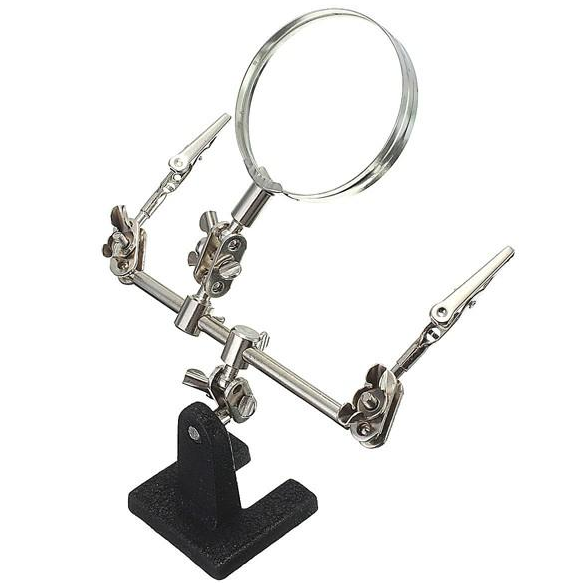
Soldering is easy to pickup, if you're in the states buy a hakko fx 888d and one of those little holder things ( https://i.imgur.com/buePms0.png ), watch a YT vid or two and you're good to go
 undone sinew
maybe its the current version of Unreal that is the issue
grim ore
check your device manager, what does it show for the display adapter?
undone sinew
I'm using the latest unreal*
I'm asking my friend, cause he has the newer laptop 😛
I tested first on mine, but its too old I think for this to be fair.
But weirdly, my 9 year old laptop, had better FPS than his 4 year old xD
grim ore
welp like I mentioned I used to dev on an i3317u machine with an iGPU and it ran atleast usable fps, 20+ in a default template
maybe its running on low power mode if its a laptop and the gpu is clocked down but even then weird
undone sinew
I'm trying to keep my friend from using one of these lightweight engines that have nothing, no editor, no importers, its just a renderer only.
He already wasted time and money on a custom engine, and the coder ended up not finishing, so, RIP
If you can use an engine that already has an editor, saves alot of time and money. 😛
grim ore
@plush yew download the engine from unrealengine.com ?
 plush yew
after that 😄
grim ore
if you need the lightest possible there are lighter than UE4 for sure but machines in the last 4 years are more than capable of running UE4 well enough depending on the project which is important
plush yew
ty very much ^D^
undone sinew
I know Unity is doable, but I'd also like to avoid using Unity XD
plush yew
can I ask a couple of neophyte questions?👀
 silver relic
I'm having some problems with menu-widgets. i have to click to release mouse and stuff like that. can anyone point me in the right direction? 😃
it's like, start game > click to see curser > click start > click to control first person... etc.
undone sinew
okay, 4.16 vs 4.22 on my laptop, is 15 fps vs 4 fps
So, definitely has to do with engine changes, probably dropping legacy support.
I'm installing 4.0.2 xD
silver relic
the future is now 😄
undone sinew
better to use an older version of Unreal 4, if it performs better, than some other engine that has no editor, ugh.
plush yew
4.0.2 is more lighter? : )
undone sinew
So far 4.16 is lighter than 4.22
So, its a good assumption I think
3 times faster, and 4.16 is 2017*
plush yew
i see : D
undone sinew
4.0.2 is 2014
plush yew
Are projects already started with highter version compatible with older versions?
 scarlet birch
It's not.
plush yew
oki
scarlet birch
At least it's not by means that would be worth the effort it would take.
plush yew
is there much difference between the latest versions and those?
undone sinew
I'd wager its more down to, newer is more new hardware features, old is legacy shaders
occasionally, an older build has more advanced stuff that is later removed, like global illumination stuff
I think alot of the newer features, aren't really worth the cost to be honest though, which is why I'm interested in seeing how much can be adjusted
plush yew
what are the features that are not present in the most recent versions?
sorry for the questions😂
undone sinew
Yeah im getting better FPS in unreal 4.0.2, despite screen space reflections being in the scene by default
undone sinew
Okay so, with 50% screen, im getting 15 fps on the laptop in 4.0.2, versus 4 fps on 10% screen in 4.22 (50% on that version is probably like 0.5 FPS)
15 fps on a 9 year old laptop, is actually good. Can't complain. Question is, whether I can get 4.22 to behave the same. What is it about the newer builds, that is so bloated & costly for older hardware, and can I disable it.
 vale silo
hmm... Issues website is down it seems (SSL certificate issue?) @wary wave not sure if I should poke forum mods about that (no idea who to poke from Epic Staff)
plush yew
if I start a project in C ++ I will totally exclude the possibility of using the blueprint in the same project right?
undone sinew
No
its the other way around
Always start with C++ 😛
I remember hearing something a long time ago about, being able to switch from BP to C++, but "its a headache" or "complicated"
scarlet birch
You can use either whenever it suits you and the first time you add a c++ class to a project that was created as a BP project it will create the files you need for c++. So for the most part, it doesn't really make a difference which you choose.
undone sinew
Was it always like that?
plush yew
@undone sinew @scarlet birch i see 😃 ty ❤ ^^
plush yew
I ask a question that could be quite stupid, but I'm a beginner👀
 cursive dirge
better just ask
or better if you first ask google the same question if you feel it's simple
plush yew
is it possible to call functions written in C ++ from a program written in blue print?
cursive dirge
you can call c++ functions from bp, yes
 bitter iris
Is there a reason why custom depth doesnt work on landscapes?
plush yew
ty very much 😄
cursive dirge
I think there might be some wiki entry for that, but basically you just make sure your c++ function is compatible with UFUNCTION macro on unreal and then just slap that to your c++ header file for that function
@plush yew if you need to expose project wide thing, look for https://wiki.unrealengine.com/Blueprint_Function_Library,_Create_Your_Own_to_Share_With_Others
plush yew
ty very much : D
cursive dirge
that lets you do generic custom nodes for your project
otherwise just extend some actor/pawn or component with your own stuff and inherit it to your blueprints
plush yew
seems easy🤔
can I modify global variables either by a blueprint function or by a c ++ function in the same project, right?
bitter iris
Tried to render my map in 8k, think some things broke lol, guess i will stick with 4k
cursive dirge
no idea what you mean by global variables in this context
but it sounds like you want something that lives in game instance (look it up if you don't know what it does in unreal)
plush yew
ok, thank you so much ^w^
I also wanted to ask about sharing the project with other members
if I am working in a group, can I export my project and pass it manually to the user or is there some represtory where it is possible to work online?
 mellow turret
// header file
UCLASS()
class DIABLOONE_API UScratchCharacterOne : public UObject
{
    UPROPERTY(VisibleAnywhere, Category = "Scratch", meta = (AllowPrivateAccess = "true"))
    class UCapsuleComponent* capsuleCollision;
}
// cpp file
    capsuleCollision = CreateDefaultSubobject<UCapsuleComponent>(TEXT("collision"));
Im getting error C2027: use of undefined type 'UCapsuleComponent' for some reason
cursive dirge
your error tells where the issue is
you have undefined capsule component
include the header for it
mellow turret
oh my
cursive dirge
I mean, include the header for it in your cpp file, forward declaring itself on header is probably fine (as you only need pointer to it)
mellow turret
Ty, I know the compiller was telling me that but man the documentation could have said that somewhere
cursive dirge
UE4 got more strict on these recently, in past it would have worked on some global engine header include automatically
now you gotta include pretty much everything you use
mellow turret
I'll keep that in mind : D
hype, took me 6 hours to add 4 components to an empty class but it finally compiles, thanks to the people that helped xD
grim ore
@mellow turret so the documentation does tell you that you needed it, http://api.unrealengine.com/INT/API/Runtime/Engine/Components/UCapsuleComponent/index.html , and look at the bottom
that bottom part is SUPER important to pay attention to as it will give you the header you need AND the module you need. Only some modules are included by default so things like UMG and Slate and other stuff is not going to compile out of the box if you use it unless you add the module to your build file to include it
mellow turret
Well at least for a newbie it doesn't seem very explicit that having a "Reference" section in the component page means "include it into your header file" 😅
grim ore
the C++ is not newbie friendly 😦
but now you know and hopefully it doesn't bite you in the future. the module part is especially important as it will give a weird ass extern errror when compiling and not link directly to the issue lol
mellow turret
haha I'll make sure to check modules then
grim ore
in your .build.cs file in your source directory in the module directory (your module name) you will find the modulename.build.cs file with the following line PublicDependencyModuleNames.AddRange(new string[] { "Core", "CoreUObject", "Engine", "InputCore", "HeadMountedDisplay" }); which covers most things you will end up using but you will eventually run into an issue on larger projects where you need to access other modules such as the ones here http://api.unrealengine.com/INT/API/Runtime/index.html
so if you get a weird extern error just make sure you add the module that is needed if it's missing from the bottom of the API page 😃
mellow turret
im looking for the file but source folder in vscode is not showing any files nor directories, nice lol
grim ore
well for me for example my project is called tppcpp so it's in the "tppcpp\Source\tppcpp" folder
mellow turret
yeah i can see it in the windows file explorer but vscode hiding everything inside that folder for no reason : D
grim ore
ah lol, how rude
undone sinew
😄 I did alot of testing
 west pendant
Hi, not sure where to ask this, but has anyone had any problems capturing UE4 editor with a Game Capture window in OBS Studio? It works at first, but then whenever I hover over a hint or some kind of UE4 window popup thing the Game Capture captures that instead as its own window and won't show the editor again.
grim ore
try switching to monitor capture instead of window capture
west pendant
Yeah that works, I was just hoping to capture UE4 only. 😅 But I can live with it! Thanks.
grim ore
I know I had issues with window capture so swapped to monitor, not worth the trouble to figure it out. just try and hide your taskbar if you can 😃
mellow turret
I kind of get when to inherit from AActor but when would I want to inherit from UObjects?
undone sinew
I was looking into the Quake 3 engine, and its open source, under a GPL license.
It doesn't say so far that you can't sell something made from it, but it sounds like you'd have to release your product open source to not violate?
grim ore
if you want something to be handled in UE4 but it doesn't have to go in the world itself then a UObject would make sense
also if you look at the hierarchy chain as it is now almost everything in the engine you will be using inherits from UObject
mellow turret
yes I read the docs but my imagination couldn't work with the info, I can't imagine a case to implement a custom uobject
grim ore
static mesh is inherited from Object
lets say you wanted a lighter weight static mesh replacement you would inherit from Object and go to town
for example
so anything you might want to add to the engine is probably going to inherit from Object. Add being the key here, if you are just working with the tools provided then you probably never need to worry about it. making your own character? inherit from ACharacter. making a door? inherit from Static Mesh, etc.
vale silo
@undone sinew but why?!
undone sinew
@vale silo Performance
vale silo
🤷
undone sinew
my friend wants to use this
Sounds like alot of work, so I'm investigating other options 😛
But his target audience are people who don't have dedicated graphics cards.
vale silo
@undone sinew I wish someone used this https://github.com/motorsep/StormEngine2 😃 (and fixed it up along the way 😛 )

GitHub
Storm Engine 2 (modified RBDoom 3 BFG game engine) - motorsep/StormEngine2
 real mantle
Hi guys, does anyone know if it's possible to run an automated test from command line in headless mode? (without opening the window and all the graphical environment)
 still moth
hey
 coral shoal
maps are specifically not ordered
 zenith flower
So how does it determine order then?
If I don't modify the default MAP, everything is fine
If I create a child widget, with some default settings in that MAP, and I change them. It goes nuts
I didn't have a problem with the order before the child widget
coral shoal
it's a data structure that is open to being reordered depending on how stuff gets added and removed. usually maps have some hidden background optimizations happening on them
basically if you need a structure with preserved order, try multiple arrays or an array of custom structs
zenith flower
I'm not adding or removing
coral shoal
sure but, the way maps usually work is that the keys get organized in the background for effecient lookup
using whatever i-dont-need-to-know method
its just the wrong tool if you need order
zenith flower
I still believe this is an editor issue, not an engine issue (I get it they are the same)
The order is preserved just fine for default settings, until you have a child that modifies the defaults. (not during runtime, but during editor time)
From what you are saying, it would appear the engine, takes the parent's map, and THEN modifies it to the childs version by removing and adding as needed. Which is ridiculous, and should just modify the map directly, we are not running the game, we are designing a game, where order matters.
Anyways, guess I'll have to stick with defaults the best I can
 sly lily
Hey all, i have an issue i hope ya'll can help me with
So i have 4 Maps lets call them 1,2,3,and 4
i travel from map 1, to map 2
but in map 2 there are 3 exits from the map
say i take the exit that brings me to map 3
when i go back to map 2
it brings me to where i come from when i travel from map 1
any way i can set specific points to spawn on map depending on what way you came in?
im kinda new to unreal, about 5 months of experience
 undone sapphire
Sure there's lots of different ways to do it a quick and dirty way would be to get the players transform as they click to leave then set it to that when they come back (save it as a variable and apply it once upon coming back into the level)
sly lily
i see, so if a hitbox where to be the trigger to exit level, i would have to slightly alter it out side fo the box?
i assume spawning in the exit trigger would freak the game out
grim ore
There is a Game Instance which is created when the project starts and is destroyed when the project ends, it persists thru level loads. Make a blueprint that you can re use that will handle the level change and also store a value you can set and is set to editable so you can edit it in the world. the value can be a transform. when the player enters this blueprint ( you can use a trigger box for example) it will take the value you set, store it in the game instance in a variable, and then load the level. When the player is loaded in the new level it can get the game instance , get that variable, and set it's transform to that value.
undone sapphire
You could spawn slightly outside of the trigger by spawning on trigger + vector far enough away from trigger as to not move player into other level again
grim ore
this would let you use a re usable blueprint that you just drop in the level, set the level name to load and the transform for when you get there, and repeat as needed
undone sapphire
Yep that works too 👍
sly lily
thank you guys sooo much, this has been a struggle for a couple days now.
i usually google things on my own but to no avail i found you guys.
 storm burrow
is there a way to use more than 16 materials (not textures) on one asset?
don't want to split it up currently
grim ore
turn on the shared sampler
https://forums.unrealengine.com/filedata/fetch?id=1088270&d=1443368153 wrap or clamped based on how you are using it
sly lily
what do you think would be the best for handling spawning? the level BP or the Game mode BP
storm burrow
game mode
then use a blueprint spawnpoint class
Also, @grim ore meant materials, not textures 😃
grim ore
There should be a limit of 64 material ID's on meshes
plush yew
when i import my fbx stage from blender to UE4 why does UE4 split up my 1 file into several different independent objects?
it also hides some of the objects faces at certain angles
storm burrow
it also hides some of the objects faces at certain angles
something with the mesh might be funky. check verts/normals in blender 😃
plush yew
thank you @sudden agate that worked and it did mesh them all together but @storm burrow I still have that weird disappearing thing going on, I'll check what you said to
 azure shore
I still don't know if it would be possible for me to sell my game some day, but if I could, I assume I couldn't use any creative commons licensed music in it without direct permission?
plush yew
i dont know what the problem is still
storm burrow
show pictures
plush yew
alright
 languid shard
Open the map with a newer version of the engine
There's no other solution @plush yew
Assets are not backward compatible only forward
plush yew
in blender everything is fine, i exported as fxb with smoothing the faces
everything is solid but for some reason UE4 just doesnt like it
 paper kernel
since you're using 2.8, why not try exporting as glTF
(you can enable gltf importer from engine plugins)
 cloud cobalt
Looks like the normals are flipped.
Just fix that 😉
You can display them in Blender to see which faces are wrong
paper kernel
for the box yes, but the circular faces aren't smooth
cloud cobalt
They're not smooth in Blender either
cloud cobalt
Display settings in the top right corner
 lusty carbon
Help! Package failed! https://pastebin.com/kf6q6BV9 and the list goes on
 cloud cobalt
How much RAM does your computer got ?
cloud cobalt
Hit the grid button
cloud cobalt
Right, let me look
lusty carbon
I once deleted some folders in the project files and it helped with the packaging. which was them?
lusty carbon
I mean what are the folders ppl usually delete to fix issues? I think its binaries, intermediate and more
cloud cobalt
Fix the warning first - Google it and see if you can find something
cloud cobalt
What do you mean what warning ? You have 5000 of the same one
azure shore
(^that looks pretty cool)
I still don't know if it would be possible for me to sell my game some day, but if I could, I assume I couldn't use any creative commons licensed music in it without direct permission?
cloud cobalt
@lusty carbon It looks like you're loading multiple levels with the same landscape or something like that.
lusty carbon
tha fuck
cloud cobalt
Are you loading levels dynamically ?
What are Showcase_mountain_4 and Showcase_mountain_3 ? Sub levels ?
cloud cobalt
What's your level called exactly ?
plush yew
@cloud cobalt what do you mean the normals are flipped
cloud cobalt
@plush yew I mean the normals of faces on your box are inverted and pointing inward
If you're asking about the visibility issue
plush yew
but all i did in blender was just scale them
paper kernel
yes, and if you scale to negative side it will invert the faces
plush yew
i think i understand what youre saying
cloud cobalt
Google "Blender inverted face normals"
It's a common problem
Made worse by Blender 2.8 now defaulting to a rendering that does shows double-faced faces
plush yew
alright
paper kernel
just do the usual, select all and hit shift-n
genuinely curious why do 3D modelling softwares even allow negative normals in regular workflow
they aren't that common in real world applications
cloud cobalt
It's not always possible to define what's negative
If the mesh isn't closed for example
Or closed but linked to other geometry
plush yew
well my issue is fixed. I guess i scaled the wrong way without knowing, like you said. I made extra sure i was scaling outward positively
thank you guys for the help
@paper kernel what does that "select all shift-n" do?
paper kernel
shift-n re-calculates normals
plush yew
oh okay!
paper kernel
or, could be. they have been changing around the hotkeys a little with the 2.8
if not, then it's under the mesh menu on the bottom bar
plush yew
have you ever imported a character model from blender into UE4 and it was messed up?
lusty carbon
there's a great blender discord server by the way
plush yew
oh that would be awesome, can i get the link please?
lusty carbon
plush yew
thanks
lusty carbon
@cloud cobalt so what could it be with the packaging issue?
I remember deleting some project folders and regenerating files that fixed my issues in the past
can you refresh my memory on which folders are they?
cloud cobalt
@lusty carbon Can you list what's in Content/Maps ?
lusty carbon
just a single map
now, if I launch the project from epic launcher i get some errors, if I compile from VS it's all fine
could be related
cloud cobalt
Your problem is entirely unrelated to compilation
lusty carbon
this happens if I launch from the epic games launcher and not from VS
and my truck bp disappears
cloud cobalt
You have many different problems
The one in the packaging log is caused by something called PhotoR_Backgrounds
lusty carbon
background mountain models i have around my level
what's the matter with em?
theyve got some showcase levels there. could this be the problem?
cloud cobalt
What you should do is configure your project properly
So that it only bakes the maps you actually use
Packaging section, cook maps
 wary wave
yeah, that's one of your problems
lusty carbon
whats cook maps?
cloud cobalt
Go to the packaging settings, look for the list of maps to cook, set it
lusty carbon
done
ill try to package again
can I safely delete the levels I don't use from my content?
cloud cobalt
You can, though it won't be necessary once your project is set up
lusty carbon
as for the truck problem?
Why some things don't work when I launch from the Epic Launcher compared to VS?
cloud cobalt
If you've compiled "Development editor" in VS, it will behave the same.
lusty carbon
I don't know what you mean there
I usually delete binary and intermediate folder when that occurs and it helps
like re-generating files
cloud cobalt
Neither of these are necessary
Launching from Epic launcher or launching from Visual Studio (F5 / CTRL F5) after compiling (with the editor closed, of course) in the default "Development Editor" configuration will always work exactly the same
As to your truck issue, it looks like it's corrupted somehow. Make sure it looks okay when you edit it, to start with.
lusty carbon
my truck is fine
 soft crescent
Fucking physx
cloud cobalt
@lusty carbon Specifically the "door" components ?
soft crescent
We are having the issue of objects colliding and flying to the unknown
lusty carbon
Everything is fine man.. regular BP setup. child of a cpp Truck class.
soft crescent
And we’ve tried substepping and ccd
lusty carbon
It still works perfect when I hit F5 from VS though.
 dim plover
I also occasionally have physics stuff colliding and exploding upwards.
lusty carbon
I don't quite get what you're saying how is it the same thing if matter of fact launching from unreal launcher does all these log issues
cloud cobalt
So specifically the components you see warnings on are fine and display properly ?
cloud cobalt
I'm 100% positive you're doing something wrong here. How exactly do you start from VS ?
cloud cobalt
What's your build configuration right now ?
lusty carbon
that is?
cloud cobalt
Like I just said, between undo/redo and "win64"
It's also wrong, of course
Like I said
It needs to be development editor
lusty carbon
what are you looking at?
oh I found it
it is in debug mode
but idk nothing about this stuff
cloud cobalt
The default is Development Editor (always have been, always will be)
So you changed that
The Epic launcher uses Development Editor all the time no matter what you built last
cloud cobalt
And you won't be getting them in launcher anymore either
cloud cobalt
Probably google "UE4 build configuration"
The first result will probably be a doc page that explains it all
Like for most questions 😉
lusty carbon
thanks a lot stranger.
you should win an award for sticking around the discord server helping people all day long
cloud cobalt
TBH as long as people learn the stuff and don't ask the same question the next day I'm fine
 deep basin
when would you choose to use an FVector4 object? I know from engine programming that the w component is responsible to determine if something is a vector or a point in space. but when are you using said struct when programming inside of ue4??
cloud cobalt
FVector4 is commonly used as a color
RGB + A
It's also relevant if you need something that's really a collection of 4 float values.
deep basin
ah I see, that makes sense. but there is not really a case where you use it to do position operations then I gues
*guess
cloud cobalt
Depends what you call "position", since a position in regular 3D space is going to be a FVector
soft crescent
Is the person who maintains the custom Gameworks branch on this server
soft crescent
I’m wondering since there is a branch with physx4 if it’s worth trying to merge with our blast branch
wary wave
I don't think there is
wary wave
fair enough
soft crescent
It’s not a good solution imo but this is meant to be a prototype done In 2 weeks
wary wave
you'd spend much of your prototype time just merging the branches
soft crescent
Yeah hence why I was going to ask the person who does this also I wonder of blast is causing issues
languid shard
wait what
chaos is already in engine ?
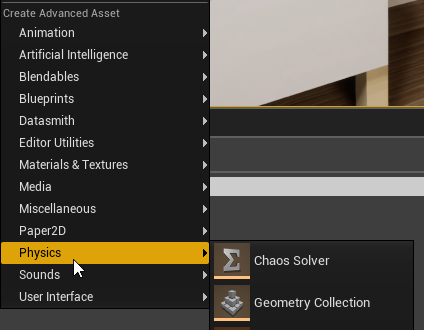
it doesnt do anything when I try to open a Chaos Solver asset 😦
mint sequoia
Yeah I tried it on master a while back
Same thing
Just gotta wait for them to put it in
languid shard
aww
mint sequoia
IKR
Biggest anticlimax of my entire life
We were basically building chaos ourselves (networked destruction running on nvidia blast, at least) before they announced it
languid shard
ah 😅
happens a lot these days
team starts building an awesome feature, gets to prototype > Epic makes it happen in house
mint sequoia
Stole our thunder but that's ok saves us time
languid shard
😬
mint sequoia
Huh I just fetch/merged 4.22 into our 4.22 fork to get the hotfix and its on 4.22.2 but I don't think its released 🤔
Is that normal
Guess its just partially done 🤷
On an unrelated note, packaging is failing because of modules we don't use and have no idea how to find out the reason its even trying to compile them
I've yet to try in a blank project, trying to give epic the benefit of the doubt 😄
Well w/e I'll try tomorrow, too tired
wary wave
lol, my BP has a capsule component
if you right click on it in the component view, the editor crashes
it's just a capsule component, wtf
mint sequoia
Not inherited?
wary wave
nope


this engine sometimes
gonna rename it "DONTRIGHTCLICKME" and have done with it
 twilit hill
wary wave
twilit hill
wary wave
goddamnit, there's another component that randomly cannot be right clicked on
 sudden agate
Restoring files never worked. And when the popup comes, I cannot click anything :D
need to restart the editor then
 river apex
hello everyone!
anyonw knows a way to increse grain size in the post process volume?
 pseudo swift
good day everyone, how can I edit static meshes collision boxes?
 leaden dust
Can I set default values of variables of primitive data types in .h files?
languid shard
you cant really edit a collider's shape
only add multiple simple shapes, let UE build one, make your own UCX collider mesh, or use complex as simple (will use the mesh geo as collider, not recommended)
 serene birch
can UE4 autoinstancing basically draw two different meshes (but same material) in a single draw call?
wary wave
no
serene birch
are there engines that allow that?
pseudo swift
@languid shard i found the thread, it helps, i was able to build a new one that works! Next question is can I have a mesh with physics without having it falling by gravity? unticking gravity doesnt seem to do anything
ah found the lock position!
that works!
languid shard
😃
serene birch
I was thinking of having a vertex shader that would fetch the vertex info on a generic buffer holding all the meshes together, and basically creating a virtual mesh at runtime
seems NVidia doesn't have good performance doing that kind of custom vertex fetches though :/

TLDR: If your only platform to support is a recent AMD GPU, or console, then yes. :) I am working on a “game engine” nowadays but mainly focusing on the rendering aspect. I wanted to ge…
 fringe pivot
do I have to worry about unused stuff under content folder or the engine just ignore that when the game is packaged?
fringe pivot
even stuff that is not referenced anywhere?
wary wave
though reasonably, there's no way for this not to be the case
well yes
what if you want to load things with soft references?
like most games do
problem is you just don't know what is going to be loaded
fringe pivot
damn, that's an issue when you want to use 3rd party stuff but not the whole package
I guess ill start manually deleting things
and that will break pretty much everything 💩
 ember notch
Does Unreal Engine 4 work on Microsoft Surface Go 8 GB RAM?
wary wave
possibly, not sure I'd want to try it
fringe pivot
you will kill yourself as soon as it start compiling shaders in your mobile device
plush yew
hi
wary wave
if it doesn't melt in the process
 vague raptor
Hello, im semi-new to the engine. how would i start a driving system? is there a resource online that could assist me with this?
ember notch
I want to buy a Microsoft surface go 8gb ram would UE4 work?
fringe pivot
@ember notch UE4 requires a lot of computing power
Can't tell you if it runs or not in that device but if it does it will be painful
wary wave
if it's supports Dx11, it'll run
languid shard
Surface go tablets are not really made for gamedev
wary wave
but that processor is a 1.6Ghz mobile piece of crap
languid shard
poor luos always redirecting us to lounge
 fierce tulip

 fierce tulip

 bold wyvern
I have a project that is stored on a passport drive; I am worried that working on my project using two different computers might cause data corruption (which might lead to crashes).
 distant socket
sorry okay!
fierce tulip
(sweet work though)
distant socket
hehe thanks !
languid shard
might want to remove your post in #epic-games-store
and post that in #released instead
cloud cobalt
@bold wyvern Source control
pseudo swift
guys how can i flip this messi word/texture upside down?
fierce tulip
proper unwrapping, or inverting the V of the UV
pseudo swift
fixed it by adding another tex coord with negative values
 gleaming lotus
So I've got my level streaming set up and its working almost correct, I'm having a problem where the parts of the level are not being moved after loaded. What am I doing wrong?
(To explain this system, it basically places down a section of the map from a random selection of sections, then moves it to the next space in the grid)
I think its because lanscape cant be moveable? Is that it?
silver relic
Hi! i made this walk/sprint thing and using it on the SHIFT key. but i have to tab the SHIFT key before i can start using it. (it starts the game as if SHIFT is pressed down) how do i fix this?
 regal mulch
What is the default speed you are using on your character?
The MaxWalkSpeed default value on the characterMovementComponent
 minor pulsar
So where do you guys get your free assets? Just the marketplace?
cloud cobalt
Free assets aren't much of a thing for me
minor pulsar
Yeah I'm wanting to learn with a limited budget
I found a few good sites but some more would be quite nice
cloud cobalt
If you want stuff that looks remotely good in UE4, there isn't much outside of the UE4 store
Free Internet stuff usually looks like shit, isn't compatible with UE4, or usually both
Use the UE4 learn tab, starter content, free MP assets
cloud cobalt
@minor pulsar If you can't have art made for your project, and don't want to spend a ton of money, the best is to find an art style that is easy to do, and do that. Stuff like low-poly art which is pretty trendy right now.
You can spend an afternoon learning Blender and have basically that
minor pulsar
Yeah I have around 4 gb of assets im testing different stuff on.
Looking for more 'packs'
Ill look into blender though thanks for the suggestion
 cerulean nova
can old hardware be the result of strange artifacts in UE4? ^^
I get something like a "Whitenoise" on all textures for example even in games produced in ue4
cloud cobalt
Got a screenshot ?
cerulean nova
let me see
and another thing that looks like all is leaving a transparent of it self for a short time
it looks like motionblur but its not
cloud cobalt
Hard to get an idea of what you're describing.
The noise can be perfectly normal if it's reflections for example
 latent moth
Has anyone seen the LogCollisionProfile: Warning: Profile (NoCollision) - Custom Channel Name = 'GameTraceChannel4' hasn't been found warning? I've had about 50 crashes in the last 2 hours
cerulean nova
above the wall
latent moth
I've deleted/recreated them, to no avail
cloud cobalt
@cerulean nova And what's the game like for others ?
cloud cobalt
Driver up to date ?
cerulean nova
yeah i even had problems with shader complexity
undone sinew
Guys, question regarding smooth/beveled edges (chamfering for you max people)
Is it better to:
- Have it in the model, as LOD 0, and have LOD 1 with hard edges.
OR - Use a shader in the engine to simulate the smooth edges?
Which is more expensive? I'm assuming option 1 looks better, less prone to issues, but greatly increases polygon counts, which even with LOD, still means more SSD and RAM usage right?
With option 1, I'm only using 1 face for the bevel, and weighted normals to make it look like 4 segments.
cloud cobalt
You forgot the most common option 3
Normal maps
But 1 is best
2 plainly doesn't work
 abstract relic
Materials are great but they aren’t miracle workers
undone sinew
3 is good for props, no doubt, but I'm dealing with larger stuff, environments, tiling
cloud cobalt
Poly count is irrelevant on PC today, unless you're already pushing more than 5-10M tris
If you're on mobile it's different
undone sinew
I think the LODs should handle the onscreen/visible tris/quads part fine, and theres always tessellation too, but figured I'd ask, cause I never used the shader option
cloud cobalt
Building a smoothing shader is no small task, it's going to be incredibly difficult
In UE4 in particular
grim ore
@cerulean nova try tuning off TXAA and see if it helps with the ghosting
cloud cobalt
You basically need to fork the engine to plug a new render pass
undone sinew
thats why I do the weighted normal method
cloud cobalt
I'm on option 1 myself, LOD0 with bevel and LOD1 as hard edge. the memory cost is negligible, and the render cost is even less than that
The biggest problem I have is making sure Blender's bevel modifier doesn't fuck with vertex color, which is not a big issue 😛
undone sinew
Its so odd, years ago, I didn't mind the hard edges, but now, if something has a 1/16" bevel IRL, and my model has a hard edge, I can't unsee it lol
atleast for the upclose stuff
cloud cobalt
Bevels do add an immense amount of visual quality
undone sinew
its crazy, how a tiny bevel makes simple building geometry look way better
and with a nice normal & bump on top.
 grave nebula

 kindred viper
yeah and their toastie maker construct a fine cheese and ham sarnie.
no wait that's Breville
undone sinew
Certain surfaces still look good with hard edges, but I'm dealing with smoothed concrete 😛
cerulean nova
@cloud cobalt
undone sinew
Is that ray tracing noise?
undone sinew
anyone else fill up their desktop with files?
They are pouring over into my 2nd monitor now X.X
cerulean nova
jup
then sometimes i do folders where i put everything in
...then it goes into having alot of folders where i then put folders into folders
undone sinew
yeah, I had a folder with desktop files in it, from 2014
I finally sorted it last year
 cerulean nova
@cloud cobalt Sorry for tagging again but the noise is only visible when moving 🤔
i try to capture it...
cloud cobalt
Its normal
cerulean nova
hmmm 🤔
grim ore
did you disable TXAA?
cerulean nova
in the game i played there is no option for that
grim ore
then ask the devs to allow you to disable it
look up TXAA / TAA and ghosting
low FPS and TXAA causes the issue due to the way TXAA works
plush yew
Coding takes too much time, but blue printing takes way less time and it is better then I expected
kindred viper
coding takes less time than blueprints once you get a good workflow. Blueprints can lead to workarounds you don't need in C++
cerulean nova
am i on drugs or do pixels move and everything is flickering 🙈
look close on the texture on the ground
u can see pixels flicker
i zommed in and its poor quality because discord only allows up to 8mb but u can clearly see it in full screen
plush yew
Blue prints remind me of texturing in blender a little bit
See
I am already use to seeing this kind of style, but I am still a noob with blueprints
 lament star
@cerulean nova I've seen that happen before, not sure why or how to fix it
cloud cobalt
To be clear, the noise on the default material is 100% normal
The texture is just like that
The material is, more accurately
@cerulean nova Did you set screen percentage, or disable TAA, or use a texture that doesn't have mipmaps ?
Check for zfighting too
mellow turret
hmm im trying to use a FString as the path for a FObjectFinder call, getting "cannot convert fstring to const tchar* " error, should I be using another type for text variables?
mellow turret
it works, is the asterisk used for dereferencing in this case?
vale silo
@elfin jacinth @gleaming narwhal @wicked tiger can someone please provide answer for this https://forums.unrealengine.com/development-discussion/android-development/1416325-how-to-properly-patch-mobile-applications (or better yet a training stream covering both mobile and PC as far as patching and DLCs)
Unreal Engine Forums
Hello everyone,
I'm currently struggling to understand how patching of mobile applications is supposed to work.
Now to give some information upfront:
- I used
kindred viper
Considering I have to download 7-8gb downloads whenever I update Fortnite, I would say thats probably a good question :/
imagine how bad that wrecks an ADSL connection with 4 kids in the house 😄
 smoky escarp
hey guys I created a c++ ActorComponent with EditDefaultsOnly Variable but each time I restart the editor all the data in those variables is erased. How do I stop unreal from doing that please ?
 opaque salmon
I have a semi translucent handpainted grass mat/mesh plane I'm using as foliage grass and it looks fine in the mesh viewer but in game on the landscape they're super translucent to almost not visible, I believe it's due to how much light in the scene but I can't easily change that with my setup, is there an easy way to adjust a grass foliage's non-totally transparent pixels?
abstract relic
Use masked instead if you want grass
opaque salmon
aha, changed mode from trans to masked, alpha to masked
latent moth
today i've had so many UE4 crashes and bugs that I can't even tell. This is the latter, when building lights:
 severe ibex
Anyone noticed a "heartbeat" in their project? I've got a 4 second beat when a draw call and the GPU spike
 manic pawn
use the profiler to see what's going on with those frames
 onyx berry
hey i have a question. i have grass and trees in my scene but when i move the camera the opacity on the leaves have dots moving around and it really dosent look good

 elfin jacinth
@vale silo - I'll look into it for you
 broken stream
can some one help me
i press O key then widget open
on click then cast to BP string say hallo ?
this is not working
what am i doing that its so hard for this 2 to work togeter ?
grim ore
what is the variable door 90 degrees?
broken stream
object type refrent to the door BP
grim ore
is it pointing to the exact door in the world?
broken stream
the Door is in the world
grim ore
so there is A door in the world, an instance if your door bp. does your umg widget know about that exact door?
broken stream
well i cant pick actor from scean from the widget
grim ore
correct, all you have is a variable that can reference a door but right now it is referencing nothing. it does not know about your exact door.
broken stream
how will i do that
 spare kernel
https://gyazo.com/66f1f476942d164d19b76beb0cb216ad < trying to find epic games twitch channel

:/
 heavy ether
@wary wave So, found a better solution for my streaming level problem.
Persistent level is all black void
LoadStreamLevel with visibility toggle set FALSE
When Load is complete, Unload old level
When Unload is complete, start a fade out from black, and set the incoming level to visible
now, if i can find a notification for when a fade is complete, i could fade out to black before starting the process.
broken stream
so i can make a Bool that in the interface ?
o let me see
no i cant figer this out
i do have a interface in theat BP
grim ore
so the goal is to have a button on the UI that the player clicks and it talks to one specific door and does something?
broken stream
yes
grim ore
honestly the easiest way might be to just tag the door, use a find with tag, and go from there. if its only going to be a one time thing
unless there is only 1 copy of this door ever
broken stream
hmm, well im looking at a video i found now, lets se if i can figer this out
 maiden swift
@spare kernel Search for "unrealengine" instead.
maiden swift
Yeah, some of those are pretty ridiculous. lol
heavy ether
i also wonder if there's a way to only start the fade-in once textures are all streamed and fully visible.
 eternal urchin
hey ive got a question about databases.
does some one wanna talk about it with me?
trying to wrap my head around online savefiles
heavy ether
walks to the other side of the room
if i knew anything about the topic, i'd be happy to, but i don't 😃
eternal urchin
mäh ^^
np there probably some here ^^
but he probably just walked to the other side of the room too
😀
grim ore
you can ask generic questions we might be able to generically help you?
or specific I guess if you have something in mind already and just need feedback.
 wary barn
I do have one, if you dont mind helping me?
I want to create a circle capable of expanding(and keep on expanding to a certain size) and I would like actors to hit detect the expanding circle, is this possible?
(and preferably have it expand at 340m/s)
eternal urchin
id like to create online savefiles.
can i do that with blueprint or do i need a extern MySQL database?
wary barn
I want to simulate a soundwave, and use the hits to calculate the location of the sound/circle source
grim ore
i dont see why you cant do that @wary barn you have a blueprint that has the collider inside of it, you can then just expand it on the tick and using the delta make sure it's a set size per second. actors should be able to collide with it using overlap
@eternal urchin there is nothing built in right now to do online saves, they are local only. There might be steam support for that but I don;t know for sure. You would have to connect to a 3rd party server and send it data to save locally in a database or whatever format you want right now. I am pretty sure there are already 3rd parties that provide this stuff as well in plugin/sdk form.
 zinc rivet
tbh the easier way to do that would be to decide on a max radius for the sound, and add a delay to the sound effect start based on distance.
for everything inside that radius
most things move slow enough that they won't have significantly different effects
unless you're doing something like shockwaves from planes at near sound speed
wary barn
The actors will be standing still, and it needs to be at sound speed preferably
and the actors need to gather the data, I cant get the info from the environment/simulation
I want to use that data for my BSc thesis
eternal urchin
well im intending of loading and playing it from a server. i dont want the client to have a local save file (under respect of its needs)
wary barn
But thank you for the help & suggestions @grim ore & @zinc rivet
grim ore
@eternal urchin then you need to create your own server and database setup to store the data for you or look into a 3rd party that might offer that like playfab or gamespark etc.. if you are using mobile you can use the ios/android services to do it. steam probably does as well if you are using that
in the future epic may be offering these services thru the epic game store but it's not public right now
wary barn
if you run linux, its about 30 min to set up a local server + DB
grim ore
if just storing/loading data it's not a ton of work. You can use JSON in the engine to store/load variables to strings. Send the strings over HTTP to a serer running something like node.js and mongo, and then save/load the data
wary barn
dunno about MS
eternal urchin
ok ill look into it thx man 🙂
grim ore
I did it for a silly mmo project on a live stream once, the actual implementation is pretty easy once you get it set up as you are just sending / receiving data. knowing how to handle it on the server side is about the only hard part if you don't have much code/scripting knowledge but hey the internet has tutorials 😃
eternal urchin
exactly and there is a nice app called Mimo
also learning by doing :D
right gotta hit bed. gn8 and thx again
wary barn
Goodnight!
 restive vine
what is addative settings and why am i not allowed to place more then one animation into the blendspace, please help
heavy ether
gah i miss the days when i had a project manager that would write all my jira tasks to be assigned out.
 wild condor
Im new to unreal engine.... Anyone got any tips... For everything?
wary barn
Tutorials?
grim ore
@restive vine open up the animation (double click on it) and change the Additive Anim Type
but chances are if it's set this way it is for a reason, the paragon assets might not use the default setup
restive vine
@grim ore Do yo meant he blend space? I have not created a animation blue print for this characture
yet
That is what I thought
grim ore
if you double click the animation, the jog fwd, you will get a details panel that has an additive anim type option
restive vine
Paragon assests are wierd
AHH ok let me checkl
how do i go back to the blend space after double clicking?
takes me to the key frame animation
grim ore
its in the list on the right with the animations
restive vine
the animation tab still takes me to the key frame area though?
Hey Math, thanks for the help dude
grim ore
your blendspace is on the top is it not?
grim ore
I see it on the top of that list, its yellow and says blendspace
restive vine
AHHH its on the
grim ore
the bottom right is your asset browser, it lists all animations montages blendspaces etc.
restive vine
animation lsit
like you said
sorry
But DUDE!!!
IT worked!!
I spent hours looking
Mathew, thanks for the help man
grim ore
welp hopefully it works well from here, I don't animate so I don't know why it was on the other setting
grim ore
it looks like it is for things like aim offsets, used in blending
restive vine
sure is, the problem is i have no clue on how the blended the jog with idle,
since there is a start jog animation and an and jog animation
grim ore
I dont think we ever got the anim blueprints for paragon did we?
restive vine
I think they did it in the animation machine
but ya I dont know
@grim ore I was right. Looking at there already built in state machine, you can see that there in no blendspace anywhere in sight. Its just a idle animation that triggers the job animation that is split into three pieces.
that is why you cant blend idle with jog
grim ore
ah
restive vine
but none the less, thanks for helping me out!
grim ore
interesting to see they didnt use a blend space, maybe for keeping the top and bottom easily blendable
 hoary silo
Im having a problem where whenever I end the simulation of my game, the engine completely crashes
does anyone know how to fix this?
This is what is says when it crashes: Assertion failed: IsInRenderingThread() [File:d:\build++ue4\sync\engine\source\runtime\rhi\public\RHIResources.h] [Line: 100]
UE4Editor_Core
UE4Editor_Core
UE4Editor_Core
UE4Editor_Core
UE4Editor_RHI
UE4Editor_Renderer
UE4Editor_Renderer
UE4Editor_Renderer
UE4Editor_RenderCore
UE4Editor_RenderCore
UE4Editor_SlateRHIRenderer
UE4Editor_SlateCore
UE4Editor_Slate
UE4Editor_Slate
UE4Editor_Slate
UE4Editor_MessageLog
UE4Editor_UnrealEd
UE4Editor_UnrealEd
UE4Editor_UnrealEd
UE4Editor
UE4Editor
UE4Editor
UE4Editor
UE4Editor
kernel32
ntdll
 ancient lotus
im not quite sure where this question belongs, but im hoping someone can help me out as it has been roughly 2 days that ive been trying to solve this and other small issues. i was trying to get started on making animations for the weapons and character such as idle/reloading. so far those things seem ironed out, but due to creating
how can i prevent this from happening when i export with blender. everything is zeroed out the mesh and skeleton and their in the correct location, but because im not exporting it in the center of blenders world it shows this. in UE4 it pivots around the origin, but when i attempt to attach it to something, its way off(its where the center of the blender world would be). i have been struggling with this for quite some time
https://gyazo.com/1893ff4e22102f4fae903f234fff1b85
https://gyazo.com/3fbc78fbf70c9e633b99008d09f7c26e


 sonic pagoda
Can anyone explain the pooling enum at the bottom of the spawn emitter node
Should i be setting it to auto, if that particle is going to appear in game a lot (even tho it is in different actors and each actor uses it once only)?
 cyan bough
On a very tight budget but running into problems with specs on my machine for the ge I want to build.
Currently have an i7 with 4gb ram and a very shity gtx 450 graphics card.
I only have 2 ram slots and 1 graphics card slot.
If I get these parts do you think I would be able to run unreal and 3ds max at the same time and be somewhat ok?
I know I should get 2 of the 8gb ram but I already have the 4gb stick on the way.
ancient lotus
dont mix and match ram. get a 16 gb ram kit(2 8gb sticks for dual channel) of whatever ram your board takes(ddr3/ddr4)
grim ore
@cyan bough the biggest issue is we have no idea what game you are building so we can't guess at if that will be enough. 8gb ram and a 1050ti will allow you to run the editor at decent speeds if you have an i7. with that said decent speeds could be 30fps in a sample scene from infinity blade assets but something like boy and his kite or infiltrator will not be usable at full settings.
cyan bough
Yeah I only did that because I have already ordered the 4gb ram. I then found a bit more in my budget for upgrades. So I thought with the 8gb I would end at 12 rather then the 6 I would have.
Mostly I just want to be able to build my lighting and package. I have not been able to build my lighting in a while because I run out if VRAM. :(
The game is pretty intensive graphics wise. When I run it I get huge blur on camera rotation. Despite all that though I'm still working on it :)
grim ore
well vram should not cause lighting to fail unless you are using the GPU mapper, your normal ram is the issue.
blur on camera rotation could be your motion blur + TAA being on, it wont fix it but it will help for now. low FPS is the cause of that
cyan bough
Ok I will take your word on that. I am, still super new to all this.
grim ore
I have a 1050ti and i7-2600 with 8gb ram I use at work and it can run UE4 without too much issue. yes it's slow but I can open most intermediate project and have them run around 30fps if needed
the 450->1050ti will be a huge difference, and going from 4->whatever memory will help for sure. You should be in a better place for sure. 12gb will be better than 8gb on a machine that old (only dual channel if you only have 2 slots)
cyan bough
Ok that's good to know. I really appreciate all the help and advice y'all have given over the last few weeks while I try to teach myself how to make games :)
ancient lotus
and its an older i7 so hes limited to dual channel unless he wants to do a full system overhaul(which might not be a bad idea if you can save up the funds). if you end up having memory compatibility issues make sure you can return it just to be safe, if their the same brand/model you should be safe but theres always that chance unfortunately
grim ore
@ancient lotus the center of the blender world is the pivot (0,0,0) point on a mesh when you import it in. If you don't want that you would have to re import it with an offset or move it in blender before exporting.
ancient lotus
noticed, i was hoping to get around setting it to the dead center of blender each time for exporting ://
grim ore
you should be able to or when you import/reimport use the transform options to give it an offset and move it to where you want it
cyan bough
Yeah a whole new rig is definitely on the list. Sadly I have 5 kids so they come first. My extra money is non existant lmao. If I can get more of the game built and package a bit of a demo then maybe I can gofund me a new computer to keep going lol
More then likely I will keep buying 1 peice at a time as I can afford it.
After this round of upgrades is a new mother board so I can have more slots then I do now.
ancient lotus
thats good, atleast you will have a nice bump in performance in general when the parts come in
grim ore
we just did a piece at a time for my oldest, ended up with a 1060, ryzen 5 1600, and 16gb ram over 2 months
cyan bough
I really just want to run 3ds and unreal at the same time. Closing one to make a small change to mesh then bringing it back takes me like 15 mins on loading time.
cyan bough
Thanks again all. Really appreciate it.
heavy ether
hey all. there's probably a stupid simple answer here, but i'm totally missing it.
One machine that is trying to run our game in editor, it comes up with the default PlayerController, despite having it properly configured in the GameMode, the blueprint for the custom PC all seems to be correct, and the correct HUD is also coming up. But the PlayerController is not.
Any ideas?
grim ore
is it set to override in the map?
heavy ether
no, but we also tried forcing it to the correct one in the map too, and it didn't
and it's a direct clone of a git repository that i just checked out here, and it worked fine
grim ore
did you restart it just to be safe?
heavy ether
yes
grim ore
eep. so the same project on 2 machines with the same map open have different results?
heavy ether
yes!
i'm about to have her clone another copy of it and diff it
i'm half suspecting that some file change didn't occur somewhere even though git thinks it did
grim ore
the only other difference is the engine itself
but yeah maybe their local copy is not really the same as yours
heavy ether
the log output looks identical right up until the PlayerController spawns, I have a log in my BeginPlay that does not appear there, and then it branches all over as the default PlayerController starts doing stuff
grim ore
even if its different tho, opening a new level and hitting play should spawn in the default stuff atleast
and if it doesnt and the default stuff is the default stuff then overriding it in the world settings should spawn it in and if it still doesnt then..... uh oh lol
ancient lotus
@grim ore are you still on?
grim ore
sorta lol
 sacred inlet
Does anyone know how to trigger an emitter with the click of a button?
like toggling it on and off
ancient lotus
lol how experienced are you with exporting animations into UE? i made a test animation(reload) for the rifle and im still having issues. ive been struggling for quite some time with getting what i see in blender to be seen in UE. i thought fixing the origin point would fix it(it fixed part of it) but it didnt fix the animation issues. for an example heres what im talking about
https://gyazo.com/ad57b608168c58d2c6b0e9a127460c00

like a particle emitter?(sorry never used them but may be able to help)
sacred inlet
yea a particle emitter
I basically want to press a button andd have an emitter turn on and off
ancient lotus
when you say press of a button, do you mean like a keyboard press, a gui button press or what
grim ore
I wish I could help with animations but I can't art 😦 I know how they work but I use Modo and just for static stuff.
sacred inlet
like click E to press an in game button
I can make that
but then how to have it interact with an emitter farther away
ancient lotus
ah gotcha, this issue has been putting me at a hault for 2 days and im about to have a break down. sooooo many hours have been put into this without 1 working result
cpp or blueprint?
sacred inlet
bp
grim ore
try in #animation is my only idea, blender has some weirdities with UE4 that I have heard
heavy ether
looks to me like your animation with the magazine is rotated the wrong direction
but i'm absolutely positively useless with art.
my boss keeps asking me "how can we make everything we've got look better" and i keep saying "hire an artist" and he keeps saying "how many more programmers do we need"
😒
grim ore
lol
sacred inlet
@ancient lotus blueprint sorry
ancient lotus
its simple, have a programmer take over the artists role, then he will no longer be looking for more programmers lol
heavy ether
at some point, he's going to come to a realization that no matter how much computing power we throw at rendering quality, we have the best turd polish ever, but it's still just polishing turds.
ancient lotus
heres the result in blender which is fine, but when i export it in order to have the grip matchup with the socket on my character i have to export everything with the grip in the dead center of blenders world
https://gyazo.com/242753c2af44d5eedc3d3898f1650b99
 heavy ether
rotate your socket?
oh, the magazine is part of the animation, not attached to a socket
ancient lotus
im not familiar with blueprint, but how do you have your emitter setup? i would make an actor with a public function to toggle it on/off, just get a pointer to the actor and call the function from there
correct, the weapon itself is attached to the socket
ancient lotus
let me play around with one real quick and ill let you know. you can add an emitter to an actor
grim ore
it's weird that if you moved the root of the object in blender and exported the skeletal mesh and the animations from that new spot that the animations dont match up
otherwise export it back out in the correct position, skeletal mesh and animations, then import them in with an offset
you can turn on and off the emitter no problem you just need to have a way to talk to it
sacred inlet
is there any tutorial on something like that?
grim ore
well it would be simple blueprint -> blueprint communication. Where is the emitter at?
ancient lotus
sorry tom, power cut out a few minutes ago. looking into it now
grim ore
ah, well yes you can activate and start/stop emitters without issue using bp.
sacred inlet
What would be the starting point to do that @grim ore
grim ore
so what is the emitter for?
sacred inlet
The emitter just emits an effect
for a lighting fixture
so ideally I want to press a button and then have it spark
but the button is in a different location than where the spark will be
ancient lotus
alrighty @sacred inlet is this what you were trying to do? when i hold the E key it activates the particles
https://gyazo.com/654ad74aa0e716bec1746448f4776c45
 sacred inlet
yeah thats perfect
and so what I would use is "spawn emitter at location"
instead of what you have?
ancient lotus
i placed down the emitter in the world in the editor
ancient lotus
are you trying to have it spawn in after the game starts? or do you want it to be there from the beginning?
sacred inlet
I want it to be default off
and have to click a button from farther away
to start it
ancient lotus
i mean the emitter itself, not whether or not its on/off.
for example this emitter is always there like this
https://gyazo.com/1355e0ce12a9caf2e461db26ba185c11

and i just activated/deactivated it. is that what you want or do you want to spawn it in later in the game?
sacred inlet
I think having is spawn initiaally is fine
does this make a difference to the player?
spawn initially and then have it toggle-able would be ideal
ancient lotus
heres the current bp
https://gyazo.com/27da9db30cc882472696c1a077bc650b

right now you have to hold it for it to be on, but you can add a variable to the emitter to hold its state(on/off). so when the key is pressed, do an if statement, if the emitter is on, then run the deactivate, if the emitter is off, run the activate
sacred inlet
ok thank you I will give that a shot
ancient lotus
goodluck
@sacred inlet
heres an example, this would be somewhere on your character and the self node would be your reference to the emitter your trying to turn on/off. that part i cant help you with
https://gyazo.com/1c21e734d18c189132581ca78c0d781e
 ancient lotus
i know you could do this easily by putting it in the level blueprint but im not sure if thats the right way. hopefully someone else chims in on that
one way you could get a reference to it is by spawning it and storing the emitter in a variable on your character
grim ore
try your best to make things work together if you can. this is a emitter on a light? is the light a bp or just an item in the world
ancient lotus
so far seems to be an item in the world
sacred inlet
Im trying to get this working will update soon
hmm ok here is what I have
the first one is just a button
and then the second one I am trying to communicate that to the emitter
grim ore
by button you mean an item in the world, like a BP?
sacred inlet
yeah its a world object
ancient lotus
make a function on your emitter and put the blueprint that i sent you(minus the key press) inside of it so the blueprint runs when the function is called. then you just need to get a reference to the emitter and you can simply call the function and thats it
sowwy 😦
grim ore
@weary quest put something like a grid or uniform grid in the scroll panel then your buttons in that
grim ore
is the BP you are trying to call that from, where you need the emitter reference, a blueprint somewhere in your world right now?
ancient lotus
guy above you
sacred inlet
uhh
it was in my world
but now it says "BP BAD"
and the visual isn't showing up
grim ore
probably because you have nothing plugged into that emitter
if you make a new variable in that BP, since it is in the world with your emitter, you can make that BP editable which will let you set it inside the world
you can then assign your emitter that is in your world to that blueprint so it knows the exact emitter you want to talk to
sacred inlet
hmm..
grim ore
you can then use that variable, that is linked to the emitter in the world, to do what you need to do
I think at some point a few wires got crossed and this is getting harder than it should be
sacred inlet
right...
so I have 2 boolean variables
1 for the switch. 1 for the actual emitter
the switch bp is the one that is messed up it seems
grim ore
@weary quest you can make the grid panel fit to the entire scroll box now, then when you put in items they should fit in the grid pattern when you set them up
@sacred inlet starting from the top you have a blueprint somewhere that does what? your button or whatever. what is it set up like
grim ore
and does the button take input correctly? normally you don't just have items in the world taking input like that
grim ore
it looks like tho when you enter this blueprint area you are enabling player input?
sacred inlet
yeah so then that allows me to click E
grim ore
yeah blueprints generally don't just take input, you can do that, but normally it would go thru the player. It looks like there are a few problems here =/
that would allow your player controller to accept input, but not this blueprint
so you want it when the player gets to this location and hit E it activates an emitter somewhere else?
sacred inlet
yeah
grim ore
and do you have that "hit e to do something" working anywhere at all already?
grim ore
is it set up the same way?
grim ore
make a particle emitter variable in this blueprint, your button one, and click the eye so it can be editable
then go into your world where it is and click on it so you get the details then assign the variable you created that is now in the details panel to your emitter in your world
this will atleast link them together for now
then you can drag in your emitter variable inside where you have your E to do whatever and tell the emitter to activate/deactivate
ancient lotus
to keep it simple, for the function on your emitter do this(minus the player input). anytime you call that function it will toggle itself and keep its state. as for getting a reference to it, you can easily do it in the level blueprint(probably not a good way but if its just 1 emitter it should be ok)
https://gyazo.com/1c21e734d18c189132581ca78c0d781e
sacred inlet
Im getting a little lost here
I have 2 variables
1 for the emitter actor
and 1 for the button
IsActive is linked to the button
ancient lotus
only need 1 variable. game is almost over
you only need the emitters state(which is the bEmitterOn variable shown above). you get a reference to the emitter, call the function. the function checks if the emitter is on from the variable, if it is then it deactivates the emitter and sets the variable to false, if the emitter is off then it activates the emitter and sets the variable to true
sacred inlet
@ancient lotus so
I have this
which is practically identical
this is a function
and then I go to my switch right?
ancient lotus
ooo i see what you meant. yes that is correct, in begin play, try to set Emitter 1 to the emitter in the world, or is that where your stuck now?
grim ore
@weary quest it might already be set to fill, in the Uniform grid panel for the alignment. If it is have you tried adding buttons into the grid panel?
plush yew
I have a question
sacred inlet
@ancient lotus can i share screen
plush yew
How can you mute licensed music using a toggle?
sacred inlet
@ancient lotus I feel like these two are setup correctly, these go to the Emitter that is actually placed in the world
Then in a separate BP
I have the button
Which is now fucked up
ancient lotus
i dont see where your actually getting and storing the emitter though?
ancient lotus
once you get your emitter stored it should work just fine. google how to get a reference to map actors
grim ore
@weary quest yes now if you add items to that grid panel and change the column and row they are in they will fit in your panel like your picture. You still need to set them correctly
@sacred inlet what is the blueprint name for that blueprint with the emitter in it?
sacred inlet
It is called Emitter @grim ore
The BP for the button is called ValveButton
There are 2 blueprints, I think the emitter one is correct
grim ore
ok in your valvebutton make a new variable, make it of type Emitter (your blueprint type)
click the eyeball next to it to make it editable (shown in the world when you are working on an instance of that blueprint)
sacred inlet
ok
grim ore
go back to your world, click on ytoure Valve Button instance you have in the world, in the details panel should now be a variable called whatever you named it when you made it that you can then set to the Emitter you have in your world (I would guess only 1 option since only 1 should be there)
sacred inlet
as soon as I did that
grim ore
once it is set your Valve Button now knows exactly who to talk to so you can then drag off the variable you made in your Valve Button blueprint, and call your emitter time function you created
sacred inlet
it made the graphic in game disappear
plush yew
@grim ore how would I mute music using a button as a blueprint?
grim ore
ignore the blueprint bad and finish setting it up
grim ore
your E should pretty much just be on pressed -> emitter time with the variable you created for your emitter as the one hooked up to it
grim ore
@weary quest I don't really know where you are getting confused at. The uniform grid panel is a panel that sets up the children in columns and rows equally. you are trying to create a grid that has button in it that are the same size right?
grim ore
add 15 buttons to the scroll box and change the row and column on each botton to the row and column you want it in
ancient lotus
lets hope it does
grim ore
are you expecting it to automatically add in the buttons in the correct spots when you drop them into the UMG system? if so then no, you have to code that yourself.
you will have to code that then, you would keep something like an array of objects that is in your inventory then put them in your widget in the correct spots
you can see here https://i.imgur.com/rmQbEL7.png I have 15 buttons in my grid, each assigned to the correct row and column I want them in, and the panel is in scroll box
It's only this simple because I have been doing this for years and I know how it works
@plush yew how are you playing the sound in the first place?
plush yew
@grim ore idk it's from a popular game made in ue
grim ore
@weary quest the parent, the grid controls the size of the children in the min desired slot size settings
alternately you set them up with a size box around them
@plush yew how is the sound being played in the game? you are asking how to mute it so how did you start it playing
grim ore
so it's an audio track in a sequence? and you want to be able to push a button and it mutes?
plush yew
yes
grim ore
yes your items are not sized to the container, they are smaller than the space available. If your container is 500 wide and you have 3 items that are 25 wide you are going to have empty space. you need to make the buttons the correct size to fit your parent
 regal orchid
Heyo
I'm new here
I wonder what's the perfect channel to ask a question, I'm only seeing this channel and nothing else? If I'm wrong, correct me
zenith flower
Is there a way to manually clear the log in code or blueprint?
I am manually setting some graphics variables via console, however, if I try to reset everything to defaults using the scalability, I get warning that "whatever variable" was manually set in console, so we will not reset this one" kinda deal
What I learned, was clearing the log would allow this to work again... Weird.... that you would track what variables I set.... in a log.... but okay.
plush yew
Does UE use scenes?




 grave spruce
missing texture