#ue4-general
1 messages · Page 452 of 1
 regal mulch
 hidden aurora
Totally agree
regal mulch
Just give us a tool or an Editor setting where we can import styles
hidden aurora
True
 grim ore
about the only issue I could see is making documentation and tutorials even harder to follow lol 😦 😿
regal mulch
tbh, someone who starts is not gonna change the style
And if you do, it's your fault
hidden aurora
Let the user choose the style
 ocean hemlock
hidden aurora
ocean hemlock
hidden aurora
lol
regal mulch
As far as I know it's basically a webbrowser, so it's not properly loading the page
grim ore
yeah... you guys think that is not gonna happen but we have people in here who dont read the docs, want hand holding, and try and import uassets directly into the engine on a semi regular basis
hidden aurora
Lmao
regal mulch
Yeah but I don't see a simple theme change being a problem
hidden aurora
who imports uassets?
regal mulch
Beginners usually don't even know about the option
grim ore
when they can't tell the difference between a component and a variable and you try and walk them thru what the UI should look like... your gonna have a bad day
regal mulch
Point is that a beginner that directly changes the UI is not our problem
hidden aurora
Let the user choose from flat ui or normal ui
grim ore
lol everyone who comes in here is our problem
regal mulch
Also flat vs normal is not the world. Everything si still at the right place
No one here is a "problem". You are free to not help anyone.
All I see here is knowledge hungry people who want to live their game dev dream and have a few questions.
And Crusher
hidden aurora
I feel like we need more people to help people lol cause theres no much people that a ctually help
regal mulch
That's normal, there is always more beginners than experienced members
grim ore
everyone in here can help in one way or another, it's just timing and desire that stops it. I think the best way is to just spam all the channels with the question every 8 minutes to get the highest success rate
 mint sequoia
OK I'm really over this. I reported a bug that affects anyone using ACharacter in multiplayer. Its reasonably bad. The repro was extremely simple yet took many emails for them to get there and they claim that many others on the team couldn't repro it either. Thats really appalling. And now that they finally see the bug, they went and filed it under a different bug report that has nothing to do with it whatsoever and isn't even remotely related to it saying that its similar!! This needs to stop.
Who do I complain to
grim ore
if we are lucky the mods will end up banning everyone who does that and then only the polite people will be left 😛
mint sequoia
Not interested in having a whine, I need them to fix this procedure in a meaningful way
 wary barn
I dont have game dev dreams! 🖐
mint sequoia
These people do not know the engine
wary barn
and I know nothing of the engine
regal mulch
AnwerHUB/Forum/BugReport form. Or you annoy the community managers here.
But generally you have no way of reaching the inner circle.
mint sequoia
@gleaming narwhal please read up a tad and tell me who to talk to
grim ore
If you want the bug fixed, dig out the C++ code and fix it. If you can't, pay someone to do it. Alternately pay for a UDN access and direct support and have them fix it.
regal mulch
Bah, UDN..
grim ore
It's a business, your priority is not the same as theirs
mint sequoia
Did I mention this affects everyone ever?
That uses ACharacter in multiplayer?
Why is it my job to fix it?
grim ore
if it affected everyone, it would affect Epic, and they would fix it if it was that severe.
mint sequoia
OK you're just wrong
regal mulch
Cause apparently "everyone" doesn't seem to care about the issue?
What's the issue anyway
mint sequoia
Its a new bug introduced in 4.22
grim ore
Epic has a large game using Multiplayer so anything that causes issues with it would be a high priority to them in daily use.
regal mulch
I don't need reprosteps. I just want to know the bug
mint sequoia
Simulated proxies slide after stopping movement
With 0ms latency
Or any latency
Or changing direction
Occurs in SimulateMovement
 flat idol
Do they stop sliding when hitting a wall or they will penetrate?
regal mulch
If it's in 4.22, you sure should be able to compare the CMC with 4.21
flat idol
This is a question whether the wall will stop them or not
mint sequoia
Here you can have some repro steps too then.
1. Make project from third person template, blueprint only is fine
2. Remove the character's animation instance (makes it more apparent, not necessary)
3. Enable Dedicated Server and set player count to 2
4. Play in new window, make sure you can see other player's  screen, move and change direction a lot and stop a lot, its now very obvious
I never used 4.21 actually, so maybe it was introduced then
Its very obvious, I don't know how you guys haven't noticed it
regal mulch
Well what version did it not happen in?
mint sequoia
4.20
flat idol
How many is the slide amount btw? In centimeters.
mint sequoia
Sec I have a vid
 gleaming narwhal
@mint sequoia Do you have a link to the issues tracker?
mint sequoia
Notice how every time you stop it slides back a few frames (a FEW frames, without any latency) https://streamable.com/k0wix

The email has a reference ref:_00D1aL44R._5002LsndN7:ref and this is what they posted it under (wrong) https://issues.unrealengine.com/issue/UE-74459 @gleaming narwhal
 icy mulch
How do you make grass bigger
mint sequoia
I need you guys to go back to the previous bug reporting method. We find a lot of bugs (most more obscure than this) and report them but its become pure grief. In the future we will simply fix the ones affecting us internally and not report them.
I guess I should double check that I didn't get it in 4.20, maybe I simply didn't notice it until recently
grim ore
so the same bug does not affect listen and dedicated server? only dedicated?
mint sequoia
It has nothing to do with listen or dedicated server
Nor animations
You can test it in listen server if you want
I don't need any help fixing it, I reported it because its widespread enough that I didn't think I should have to
We don't have all the time in the world, in fact we have very little time
gleaming narwhal
Could you fill me in what's wrong with the bug report? Their repro steps seems very similar to yours but with slomo added which seems like it's been added to better visualize the issue since it's difficult to catch at full speed
mint sequoia
Maybe the slomo helps, who knows, haven't tried it. Whats wrong with the bug report is the people on the other end aren't qualified 🤷
Even for the most preposterously simple of issues
And then it becomes purely on me to deal with them, theres no community involvement
And other people with the same issue can't search answerhub for workarounds that could stem from it
Its a massive step backwards
Oh, sorry
I get what you mean
I thought you meant the bug report process
Lets start with the title
Client movement and animation are heavy jittered on listen server
- It has nothing to do with animation.
- Its not jitter
- It has nothing to do with listen server
And the report as a whole doesn't even mention the problem at hand
grim ore
is it possible it was moved to that one because the cause of the issue is the same and the devs know this and are fixing it?
mint sequoia
No
In "Results" Character will be teleporting and updating its animation once in a few seconds. Character does not teleport at all and there is no animation issue (or any relation to animation)
And I already told them exactly where this is happening
So fixing it wont be the same
regal mulch
Between 4.20 and 4.21/4.22, this changed in void ACharacter::PostNetReceiveLocationAndRotation()
    if( Role == ROLE_SimulatedProxy )
    {
        // Don't change transform if using relative position (it should be nearly the same anyway, or base may be slightly out of sync)
        if (!ReplicatedBasedMovement.HasRelativeLocation())
        {
            [...]
            CharacterMovement->bJustTeleported |= (OldLocation != NewLocation);
            [...]
    }
    CharacterMovement->bNetworkUpdateReceived = true;
}
These two characterMovement lines got added
The rest [...] around that is the old smoothing code
mint sequoia
I haven't double checked that it doesn't happen on 4.20, I never noticed it on 4.20
One sec
One thing I noticed is that NetworkSkipProxyPredictionOnNetUpdate makes it a lot less apparent
So I figure it will be something to do with where it processes that flag
 quaint hull
I have an engine crash bug where should I post it? I don't want to break this discussion up
gleaming narwhal
Thanks for reporting a bug with the Unreal Engine 4. Here you will find information on how to submit a report and what you can expect afterwards.
mint sequoia
( lol )
regal mulch
@mint sequoia In the CMC it changed this in UCharacterMovementComponent::SmoothCorrection:
// if is new, inside was without before
if (NewLocation != OldLocation)
{
    const FScopedPreventAttachedComponentMove PreventMeshMove(CharacterOwner->GetMesh());
    UpdatedComponent->SetWorldLocation(NewLocation, false, nullptr, GetTeleportType());
}
// New
const double MaxOffset = ClientData->MaxClientSmoothingDeltaTime;
const double MinOffset = FMath::Min(double(ClientData->SmoothNetUpdateTime), MaxOffset);

// Adjusted
const double MaxDelta = FMath::Clamp(ServerDeltaTime * 1.25, MinOffset, MaxOffset);
@mint sequoia I will leave a note that you've expressed that the repro steps aren't focusing on the issue at hand (animation vs character movement) and I'll stay as a follower so that I receive updates in regards to it
mint sequoia
And who do I talk to about the bug report process as a whole
gleaming narwhal
Unreal Engine Forums
Tell us how to improve Unreal Engine 4!
regal mulch
I never had issues with the process tbh, but well
mint sequoia
This isn't the first time
I still have an outstanding bug report that they struggled with as well, also regarding CMC
I'll fix that one myself in the end I'm sure, no choice
regal mulch
I'm not really sure, but I think most of the peeps handling the initial bug report contact don't work with the engine.
Cause the peeps working with the engine, well work with the engine
hidden aurora
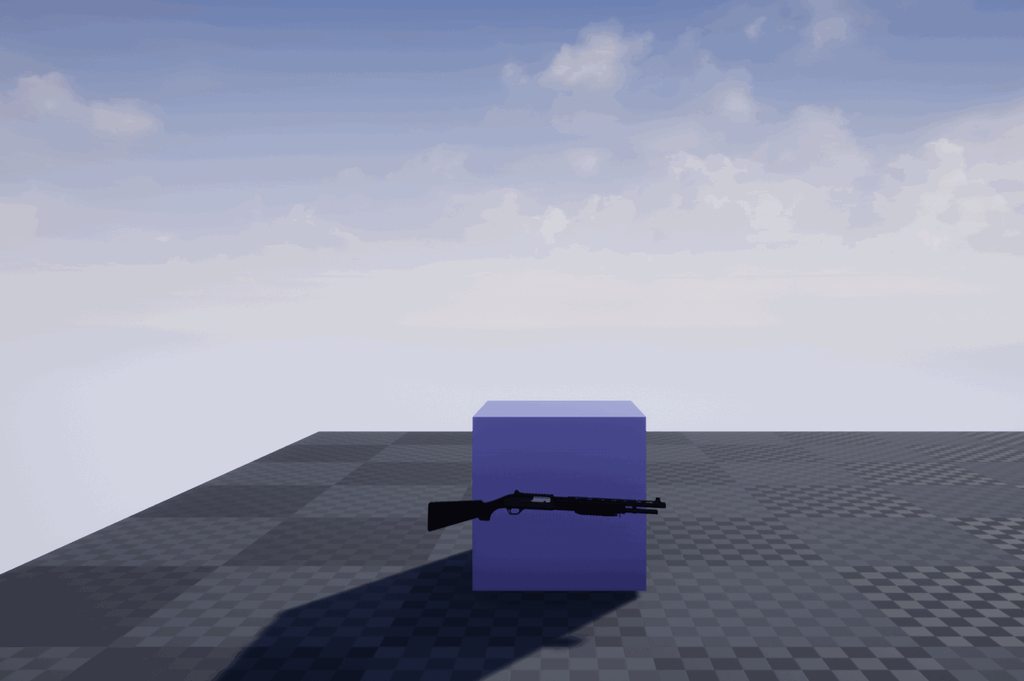
https://imgur.com/a/MxUUNXi suggestiions are accepted
 mint sequoia
Yeah but the thing is they don't escalate
If they can't figure it out on their end they don't ask someone who can
They just keep coming back to you
mint sequoia
Asking you to ELI5 it multiple times
regal mulch
That's not really clear in the gif :P
hidden aurora
I was showin the muzzle fx indeed
mint sequoia
You can't actually do robust turn in place systems with ACharacter due to the other bug
 midnight timber
Adding recoil would make the muzzle flash a lot more impactful overall though, so that's some suggestion :D
mint sequoia
Coz if you set mesh rotation to absolute and update it via code, it will jitter like crazy on simulated proxies, as a workaround you can change network smoothing to linear but they couldn't reproduce it and just gave up
I set everything up for them and sent them an example project and they never replied
Basically threw in the towel
hidden aurora
Yep thats right but first i want to figure out how to make the Mouse X Y position into a rotator for thegun
mint sequoia
So if they're the first contact, they're also the only contact
regal mulch
Even back with Alex and Chance, that's the wall you will always face. :P
mint sequoia
And didn't place everything entirely on you
The whole community focused thing is noticeably going away
gleaming narwhal
@mint sequoia We read all of the topics on the feedback for epic channel, and your feedback would be easier to digest in a forum post
regal mulch
Let's not get started with that :P @mint sequoia
mint sequoia
OK, I'll make a forum post
grim ore
I go back to what I said earlier, if it's a big deal it will get fixed since Epic uses the engine. If it does not then you can pay someone to fix it for you. It's a business and they have to do what is best for them.
mint sequoia
Lol
regal mulch
They most likely have that fixed in the custom Fortnite Character already.
grim ore
the issue is in .21 and .22 for sure, we saw that. If it's not in .20 then roll back the changed code yourself for the fix and carry on
regal mulch
Epic does what is best for them, as Mathew said. If they don't need the fix or it's not totally breaking everything, it will wait.
I submitted a bug with Splitscreen and Focus and that exists in 4.20+ and is still unresolved.
I will most likely fix that myself at some point
But I'm not mad, it's totally normal.
gleaming narwhal
It's worth noting that engine fixes for Fortnite goes to UE/Main
grim ore
the engine is a bajillion lines of code used by a quatillion people, not everyone is going to be happy and get what they want 😦
regal mulch
@gleaming narwhal Yeah, that's what I aimed at with "It's fixed already [..]"
grim ore
I want to be able to save objects to disc in only blueprints but apparently Epic does not think I am special enough to do that for me
mint sequoia
@grim ore I think you need to work on your comprehension, this isn't about a bug, its about the bug report process
flat idol
And we are most unhappy with bugs, Matthew
mint sequoia
You seem so sure that you know better than me 😃
regal mulch
That's not really about you or him :P
mint sequoia
Sure sounds like he wants it to be 😉
regal mulch
You are making a bigger thing out of it though
grim ore
I know what the issue is about, I just don't see the reason to argue about it because it's not my say in how they run their business
regal mulch
:P So calm down
grim ore
my process is deal with the issue at hand, the bug, and move on lol.
midnight timber
@mint sequoia Epic prioritizing bugs is part of the bug report process though 🤷♂️ unfortunately just because you perceive a certain method as better doesn't mean that Epic agrees
grim ore
"my house is on fire, the tv shorted out" would want a person to address the fire issue itself and not calling the tv people for support while the house burns down. deal with the fire, then you can deal with the other stuff once the immediate issue is dealt with.
midnight timber
Not sure I've worked out the details enough to know what I'm asking yet, but would this be a good place to seek advice on starting a tutorial series for UE4?
grim ore
start at the beginning, "how to turn on your PC"
mint sequoia
Umm
regal mulch
Don't think we have a channel for "How to do resources.", so I guess this is the closest you can get
mint sequoia
Well thanks for the advice but no thanks
regal mulch
@mint sequoia Welp, you'll understand eventually.
grim ore
he doesnt have to, my kids don't understand it either
mint sequoia
See, condescending
Matthew, you don't really know what you're talking about 🤷 So get off your high horse
flat idol
Boom
regal mulch
And you know what you are talking about why exactly?
mint sequoia
Why does he?
mint sequoia
Dude.. I'm voicing my concerns with the bug report system and this guy is being condescending and self-righteous
regal mulch
You are unhappy with the bug report system.
Fair enough, go to the feedback forum thead and that's it.
mint sequoia
Why does it matter
grim ore
It's not condescending at all, My middle kid doesn't understand the concept of dealing with the issue first. It's something I learned in customer service.
midnight timber
Although I have no say over what happens here, I think this conversation would benefit from people stepping away from it for the time being
It is no longer being constructive
mint sequoia
Dude, keep your kids to yourself
Whats your problem
I'm 31
Lol
Do you think having kids who don't understand shit makes you special? Or experienced? I don't get it
grim ore
I was using a real life example in my experiences to disagree with exi on your having to understand eventually. I was agreeing with you
mint sequoia
You don't have valid experience, then
Your parenting experiences have nothing to do with game dev
C'mon
regal mulch
Welp, let's just stop here then (:
Not the right place anyway.
Will give you your voice back in a few minutes. Use the time to go to the feedback forum or chat with your kids, /whatever
@midnight timber So to get back to your question: What exactly are you struggling with?
We don't have a channel for "How to do resources." so just post away here
midnight timber
I'm not particularly struggling with anything yet, I'm just in the early stages of planning and was hoping at some point to poll for opinions on best practices
Mostly just wanted to make sure I was posting in the most applicable space beforehand
regal mulch
Yeah you might run into some traffic here about default ue4 issues. If you find someone that does this content (MathewW for example) then maybe just take it to a DM (:
midnight timber
And tip off my direct competition?  (jokes)
regal mulch
Exactly!
 deep basin
how can i play an animmontage in any direction? My shooting anmation always snaps back to its forward position, if I aim up or down
regal mulch
You are probably feeding your whole animation stuff at the end through a Slot or?
The slot that your Montage uses?
I'm not doing animations that often, but I would assume you want to rather blend that
grim ore
More tutorials is good! I love watching tutorials, no competition here 😃
 true leaf
This is a dumb question maybe but are there better ways to debug in unreal than just TONS of printStrings littered thruy blueprints ?
deep basin
blending would've been my guess... mhhhhh
regal mulch
You can also add Breakpoints @true leaf
true leaf
It's getting a bit ridiculous I can't see things in console. Oh hmmm
It would be amazing if there were like debug message types and filters or a third window or something with jsut debug stuff 🤔
Pipedream lol
mint sequoia
Message Log
regal mulch
Can you post into that from Blueprints?
grim ore
look into using UMG widgets as well for debugging? sorta like onscreen stuff
mint sequoia
I have a plugin that lets you somewhere
regal mulch
That's handy
Otherwise it's mostly Breakpoints and PrintStrings.
In C++ you also have LogCategories to filter a bit better
But well
 worn granite
It was surprising they didn't expose message log to BP
mint sequoia
I'll just update it then link the git
deep basin
I wish debugging c++ code would offer a little bit more straight forward tools....
 pseudo swift
alright so i have this mesh with an animated armature and im trying to add hair to the character in blender but i cant get it to follow in unreal, i know this is prob a blender fix but im clueless
worn granite
Debugger is mostly good in cpp
mint sequoia
I have something for that too @deep basin gimme a min
worn granite
Always room for improvement
 gleaming creek
Looks like I missed an argument about the bug tracker
mint sequoia
@true leaf @regal mulch https://github.com/Vaei/messagelogger

GitHub
MessageLogger is a UE4 plugin that provides an easy way to print messages to the Message Log using both Blueprint and C++ - Vaei/MessageLogger
gleaming creek
Not sure I want to read all that, but suggesting that they'll fix those issues if you complain on the forums is a joke
mint sequoia
Allows posting to message log from BP and C++ (much better than doing by hand)
gleaming creek
They've ignored the feedback for well over a year at this point
mint sequoia
Theres also a MessageLogEndPlay function that you can use to exit out if something critical isn't set, whereas you'd usually use a fatal, just to avoid crashing the editor
It just ends PIE and pops up the message log telling you whats wrong
And @deep basin This can generate a project or plugin specific helper file that has logging macros (theres a precompiled win64 binary there) https://github.com/Vaei/VHelperMaker
GitHub
Quick and dirty C# application to generate a useful helper file with common logging functions for UE4 - Vaei/VHelperMaker
I wrote that one pretty poorly but does it's job, don't have time to redo it
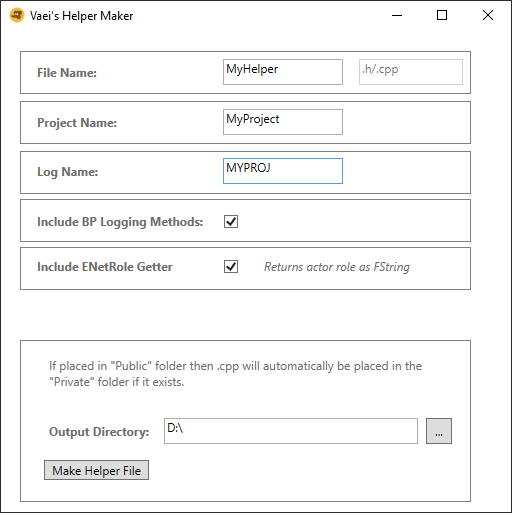
Then you'd just #include the MyHelper.h in a PCH
And you get LOG_MYPROJ("this is a log msg with float value %f", myfloat);
Also has _WARNING _ERROR _FATAL
And gives you access to those from BP
The macros are basically stuff I found online that other people came up with, and includes net role and function name, etc
mint sequoia
@gleaming creek Ah the classic provide a dump for the feedback we don't want trick
gleaming creek
I'm sure you've seen my ranting in the bug tracker thread
Spent quite a while pointing out all the flaws and explaining why it was bad and suggesting areas to improve it
The only response from Epic? Someone said they were going to read the feedback and get back to us.... and never came back
mint sequoia
I guess they meant metaphorically
gleaming creek
There's a lot of anti-Epic stuff going on right now because of EGS, most of it completely made-up nonsense
mint sequoia
Gets in the way of the real issues, huh
gleaming creek
You don't need to make up fictional reasons to dislike Epic
mint sequoia
Back in 2015-2016 I fully supported them, but now I somewhat question them
gleaming creek
Same
They used to be cool when the engine was new
You'd ask and the staff would immediately reply and help you
gleaming creek
Now they've hired an army of people to smother any feedback and make sure it never reaches anyone who can do anything about it
mint sequoia
Winning Allar's stream was the real victory
Hmm
I thought the right way to do that was to filter the feedback not gatekeep it
gleaming creek
Yes
A hundred times yes
The thing is, every other company can manage a bug tracker
Yet Epic somehow can't
A bug tracker needs to be public
So people can post on the bugs, discuss potential solutions, whatever
You can have a team who look through bugs and classify them, and filters to hide ones that haven't been classified from devs
mint sequoia
In many cases Epic didn't even have to fix them because the community would PR a fix as a result of said discussion
gleaming creek
But right now we just have gatekeepers who do their upmost to reject your bugs
mint sequoia
Its probably not even their fault, they might genuinely be trying to help, but the system wont let them
Thats another common tactic amongst companies so that the people dealing with them feel sympathy rather than anger
gleaming creek
They lost that long ago
I always wrote really good bug reports, because I have a background in IT and know how to write 'em
I saw lovely things like: my entire detailed analysis thrown out for a three-line description when the bug finally made it to the tracker
Though I was still foolish enough to raise them when I found more
But the last straw was when they told me an outright bug was not a bug, working as designed
Nothing can make me angry faster than someone trying to pretend that something is "won't fix - working as designed" when it definitely isn't working and was probably never designed
Met that way too much in my day job
mint sequoia
The thing that really makes me sigh is that when you complain about how they handle bug reports you don't have a link showing the whole communication
gleaming creek
Thing is, when you're doing bug reports? You're doing their job for them. You know how much good testers are worth?
So you give your time doing useful work to benefit them, for free, and they throw it back in your face by burying your feedback
There's no incentive to try to make the engine better when that's their attitude
 serene birch
good testers never catch everything so for the sake that you are never better served than by yourself you'll always end up doing some bug reporting yourself
gleaming creek
True, but I don't quite get how that's relevant?
Epic's approach is more like "I will ignore bugs coming in from the testers and instead only look at bugs I've found myself"
 versed spear
or only fix bugs that will effect their next game
gleaming creek
Well, that's really the summary of everything
versed spear
With all the issues i ran into with systems that are broken and never improved on, I don't see why anyone should have to pay any royalties.
gleaming creek
I mostly get the impression that if you're just a small dev, they don't care about you at all, even if you find legitimate bugs. They only care about the bigger devs who pay them lots of money.
serene birch
I think they just have too many bugs to close quickly
mint sequoia
@versed spear You should have to pay royalties because otherwise you'd have to make all those systems yourself 🤔
serene birch
like just now I saw a bug reported by an user closed right now
gleaming creek
There would be some merit in that
serene birch
the bug was reported in january 2018 😃
gleaming creek
If they put the bugs in the backlog
and said "won't fix for a while"
But they don't
They mark them as won't fix
mint sequoia
Yep
gleaming creek
or reject them outright
They go out of their way to try to annoy everyone who wants to help them make their engine better
mint sequoia
Also a bug dated January 2018 is nothing special, you'll be able to find bugs from 2014,15 easily
That aren't fixed
gleaming creek
Yup, often really important ones
serene birch
well any project of that size tends to have important bugs coming in faster than non important bugs get solved 😃
gleaming creek
True enough
serene birch
the difficulty is in scaling their operations, aka hiring competent staff mostly
gleaming creek
Another big part of the problem is that a lot of the knowledgeable devs got reassigned to Fortnite-specific stuff
so the bugs will pile up even more
serene birch
I don't think it's malice or the like but that it's literally extremely hard to scale their team up to absorb the demand
and the nature of the IT industry is that bug fixes don't actually bring in that much money 😢
gleaming creek
I'd go with Hanlon's Razor on that front
But putting that extra step to prevent people using their bug tracker was definitely a conscious decision by management to reduce the number of bug reports
versed spear
They would rather have people stuck in dev mode rather than release games. Then they will keep getting their market sales.
serene birch
a "not curated" bug tracker quickly devolves into a LOT of time spent by devs dealing with fake bugs and duplicates
gleaming creek
But they'd be getting engine royalties from finished games sold (and/or a cut from EGS)
serene birch
a 'highly curated" bug tracker is annoying but also acts as a kind of "priority voting", aka if the reporter couldn bother doing the work to get the bug filed, then maybe the bug wasn't important 😄
versed spear
well they are not making it easy on us
serene birch
real life isn't fun :/
gleaming creek
.... no
Priority voting is when you have a public bug tracker where people can vote on the bugs
and maybe only let devs see ones with more than X votes
Or have them curated before the devs see them
A private bug tracker is only good for burying bugs
serene birch
why do you say the bug tracker is private btw?
isn't it https://issues.unrealengine.com/ ?
serene birch
so it's "guest read only"
serene birch
by dev you mean "Epic dev" right?
yeah
hmm I didn't check but can we at least login to vote?
serene birch
btw, what about https://epicsupport.force.com/unrealengine/s/ ?
 dark depot
you realize its because its no longer a couple 100 devs submitting but 10s of thousands its the only way to do it right otherwise you would be flooded with spam and crap. no bug or feature request with that many submissions with be fully public you wouldn't have the manpower to clean it up
serene birch
yeah the problem is that open bug trackers don't really scale well
gleaming creek
@serene birch that is the bug submission page
serene birch
gitlab has 15440 open issues 😃
gleaming creek
The problem is that if you post something there, it goes into the void
eventually someone from the first-line support may look at it
And then they either decide they don't care and reject it
or try to reproduce it
and raise their own bug with their own wording
throwing out your entire bug report
serene birch
well I saw a bug posted there Feb 22 and it was filled in the real bug tracker May 1st
gleaming creek
In the mean time, no one else can see the bug or discuss or contribute to it
serene birch
so it seems there's like a two months of backlog
gleaming creek
You also can't post on bugs to give more information
dark depot
like it should be half the people submitting dont even know how to fill it out or report things that are not bugs
gleaming creek
either as the submitter (which is insane) or as another person who's also seen the bug
Yeah, they added that submission form because people were not filling the old form out properly
Which would have been fine if they actually submitted the bugs to the tracker and then others could see it / talk about it / add to it
But the way it is, it just feels like throwing bugs into the void
dark depot
i do feel comments would be nice
serene birch
just post the bug on https://answers.unrealengine.com/ so that people discuss it and mention the fill in number there at the same time
Enterprise solution for all your Social Q&A needs.
as a workaround 😄
gleaming creek
Yeah, if you post bugs there the staff reply telling you to use the bug tracker, IIRC
serene birch
We've recently made a switch to a new bug reporting method using a more structured form. Please visit the link below for more details and report the issue using the new Bug Submission Form. Feel free to continue to use this thread for community discussion around the issue.
they say to fill the bug with the form AND to continue discussing it on the forum
well that was two months ago 😛
gleaming creek
Two months ago?
Has only been one post there in the last two months ant it wasn't by Epic
serene birch
ok that's getting close to 3 months ago
 tired oracle
how do you attach to a mesh socket instead of the regular socket? confused what the point of a mesh socket does, I cant seem to tell a difference
gleaming creek
Did you try building through Visual Studio?
 proven forum
yes
deep basin
I solved the animation problem btw. if anyone is curious.... I created two new slots, for both arms, which are both playing the same animation, these are getting blend to the upper body and the lower body
deep basin
oh and thanks @mint sequoia 😃
gleaming creek
I mostly work with blueprints, don't usually have build errors with those
If you're doing C++ stuff, you have to learn how to debug it, check those build logs mentioned and check the error logs in Visual Studio
mint sequoia
I wish they'd add physics asset retargetting 🤔
Wonder if anyones made something like that
I'm sure I could do it in code
 honest rune
Does FName have a max char length? I thought I remembered reading somewhere that FName's can only be up to 32 chars
mint sequoia
Loop through each bone, look for matching bone name in other skeleton, create identical shapes and constraints, copy settings
pseudo swift
when I parent one mesh to another mesh which has physics enabled the entire thing just flies off like crazy, is there a way to attach a new meshes to another mesh that has physics and have the new mesh just follow it as a child?
honest rune
disable physics on the child
pseudo swift
i did
but it still flies off like crazy since its the child is attached to a socket on the parent, and it seems like the parent mesh doesnt like that when it has phys enabled
mint sequoia
Oh you can change the skeleton assigned to a physics asset, that works 😄
No retargetting but yeah
honest rune
oh sorry ignore that. That sounds like its a collision issue
parent colliding with child type thing
pseudo swift
omg i wanna cry i set the collisions to none on the child and it works
 fierce tulip
#OutOfContextQuotes
"disable physics on the child"
pseudo swift
thank you @honest rune
get the pun XD
i been stuck with this issue trying to find a solution to my rig in blender for hours
honest rune
after yelling at vehicle physics issues for so long I should have immediately known that lol
wheels are the devil
pseudo swift
haha no but seriously i cant describe what a relief this is
jesus i been tech grinding this for so long was about to give up
@fierce tulip thats a good one hahah
honest rune
I was almost positive I had read before that FNames can only be up to 32 chars in length. Anyone know if thats the case or is it just like strings?
(aside from invalid characters etc)
pseudo swift
hey af regarding the phys on vehicle's did you solve motors and wheels? is there anywhere i can see what you did with it?
honest rune
vehicles was just a side project. Really wanted to do something inspired by twisted metal but physics issues were just too much to be worth the little extra time I have lol. May play with it again when chaos system is out of beta maybe
pseudo swift
alright so lets say i was planning on making a simple physics car just for a cinnematic would that be possible?
honest rune
oh yeah of course
physx vehicles integration works "fine" mostly. Its just when networked physics come into play it gets ugly fast
pseudo swift
alright, i just started with constraints and physics stuff in ue so idk how it works really with basic 2wheeel drive etc
im doing string figure rigs for animating characters quick and dirty
honest rune
@vale osprey has a nice plugin he created for mechanically driven vehicles. some really cool stuff in there
pseudo swift
so basically no keyframing and controlling them with constraints in real time
you know the name or how i can get more info on it?
honest rune
just checking now
Unreal Engine Forums
Main_Menu.jpg
No C++ is needed, this works as Rama's Victory plugin - it adds extra nodes and classed to BP. There is no need to write C++ code unless you really
some really cool stuff in it
honest rune
it was more complex than i needed but fun as hell to play with
 placid yarrow
Big picture question: For a traditional top-down RPG that has one player and up to five other NPCs in the party, which class is best to own the inventory class and the UI -- player controller, player character, or something else?
mint sequoia
@placid yarrow PlayerState for inventory
HUD class for UI
Controller would work for inventory more or less, but PlayerState is ideal
placid yarrow
@mint sequoia ,thank you!
pseudo swift
is there things like motor constraints which has parameters for force/speed etc?
grim ore
what does your .uproject look like
proven forum
I did not understand?
grim ore
your .uproject file in the directory where your project is at, it is a text file, what is inside of it?
also did you enable/disable any plugins
proven forum
I added a few houses and cars
a few material packages from the epic store
@grim ore
grim ore
this normally has to do with something stopping a package. a plugin or other bad settings. if we can see your .uproject file we might be able to guess.
proven forum
I also uploaded another version of visual studio
grim ore
you can try to package the project and see if any errors show up
proven forum
I've tried
one minute wait
https://i.hizliresim.com/v6kXA6.png @grim ore
packing failed
'D:\UE_4.21\Engine\Plugins\AdvancedSessions\AdvancedSessions\Intermediate\Build\Win64\UE4\Development\AdvancedSessions\AdvancedSessions.precompiled' File not found
grim ore
are you using the advanced sessions plugin? if not disable it
 fluid nexus
anyone know how to make it when shift is pressed the third person character will go into a run animation?
grim ore
held or pressed? and are you using any default templates like the 3rd person
fluid nexus
held and when released they stop running and go into walk or if they stop moving they go into idle
grim ore
if using the default template 3rd person character change its max walk speed in the character to something like 200. set up a key for shift pressed (using input manager or just shift key). on shift pressed set max walk speed to 600 (default) and when released set it back to whatever you set it to in the first place
the default 3rd person character has a blendspace set up to handle the idle -> walk -> run when the speed changes
fluid nexus
yeah but i want to add an animation with it
like when shift is held it will play the running animation
grim ore
the animation is handled by the blend space
grim ore
its set so when you are at 0 speed it plays idle, 200 can be walk, and 600 can be run
fluid nexus
sorry i am a bit new to ue4 but i kinda understand
dark depot
well you can look at the default 3rd person project to see what we are talking about and use it to learn how to do it on your project
fluid nexus
ok i will try
grim ore
https://docs.unrealengine.com/en-US/Gameplay/HowTo/CharacterMovement/Blueprints if you are not using the template
or just for something to do since it walks you thru a complete anim blueprint setup
 quartz grotto
In general, what is the most appropriate method of adding a camera to a map that just sits there? Currently, I think the default player controller + camera manager is just creating a new camera and attaching it to the default pawn
I have a camera floating in the map, but it still just uses a camera attached to the pawn
dark depot
you can use SetViewTarget with blend ryan to have it use the camera you want
 bitter plover
So you know the cross platform sdk epics going to release is it basically a subsystem/ master server?
grim ore
is the camera going to be controlled by the player or just like a static camera like resident evil?
bitter plover
Would it be better to hold off implementing steam works and just wait for the sdk
fluid nexus
how do i find the third person characters blendspace?
grim ore
add the camera to your world, find the Auto Activate for Player option and set it to player 0
 quiet rampart
I am trying to make an indoor environment but i see my sun reflected into my glass materials, anyone know how i can fix that ?
quartz grotto
@grim ore ooo that works, cool thanks
fluid nexus
how do i find the third person characters blendspace?
 worn spade
That's in animation blueprints I think
Or, you make your own and use it in animation blueprints
quiet rampart
 fierce rampart
One day UE4's rendering pipeline will be more flexible.
As much as I like UE4 for PBR stuff it's fairly locked down set in stone rendering leads to a few problems.
 manic pawn
it would be very nice to have something similar to unity's srp once they finished with the render graph stuff
fluid nexus
@grim ore thank you, it worked!
does anyone know a link where i can get footstep sound effects from
 glacial shore
Could anyone help explain to me how the animation is done here? I'm struggling to understand how the pinata has non-constant motion (i.e they move in "steps"), I guess it could be achieved via scripts but I don't understand how this coincides with the animation. (Apologies for the weird color shift)
 weary basalt
Its most likely RootMotion.
glacial shore
Aha! I had the right idea then, just couldn't find the right wording to get any relent results
Thank you very much!
 lone swallow
hi, i am working with lens flares, specifically my project uses a 2D lens flare as a widget. however! it seems that you cannot apply postprocessing to it. for example, we have nightvision goggles with postprocessing, and the flares are not affected while using the goggles, they just draw over top of them. we've looked at retainer boxes, didn't work. tried making a widget component and then putting the widget onto that component, didn't work. are there any other solutions that are known?
 coarse wigeon
Epic games purchased TwinMotion

Twinmotion joins Epic Games as the latest Unreal Engine offering to help visualization professionals in the architecture, construction, urban planning, and l...
 pure owl
Is Server returns true on both listen and dedicated servers, for listen servers it will return true for the client.
Is Dedicated Server only returns true on dedicated servers, it will not return true for the client.
I only tested a play in editor listen servers so mileage may vary.
 zenith flower
I've lost my mind, and then some:
Fully dynamic, and even hides variables that are useless when certain settings are turned off, like all the volumetric sub variables.
lone swallow
@zenith flower 😮 !
i am curious what some of those options do as i've not seen them
i remade our games' options menus and i'm always looking for more options to add
zenith flower
Good ue4 scalability settings and you'll find about x4 more than this. (I've got a few more days of work to do xD)
Google*
lone swallow
thanks, how are you applying those settings if you don't mind me asking?
i am just using some of the bp nodes
zenith flower
These are sub settings that get auto set by the "presets" you are using
I'm allowing manual control
And I'm executing console commands to set those variables
I had to create a special c++ to read some of the variables because the blueprint ones don't work for certain console variables (getconsolevariable)
I'm headed to bed, ping me tomorrow and I'll post my code for that fix
 wispy comet
since UE has now bought twinmotion
do you think we'll be able to import twinmotion assets to UE4?
without too much hassle, and possibly even use them in games? it seems like a far simpler tool for level design, especially with that huge library of assets
 honest vale
what's twinmotion?
 drifting bough
has anyone ran into an issue (potentially when using cull volumes) where an actor (and all its components) dont show up at all. Completely unselectable outside of manually searching the outliner?
Its driving me insane. All my "show" types are default. Everything is set to visible. If I place down a new instance of the actor it works as intended, but all existing ones are busted. Tried rebuilding the level too... nothing....
 latent moth
happens only on moving clouds...
anyone knows what this could be due to...?
talking about the contouring
honest vale
could be anything
need more info
but my first guess would be that your cloud texture has a black background
regal mulch
@mint sequoia Thanks for the link! Was already sleeping at that time :P
latent moth
@honest vale i'm using a purchased asset that didn't use to make this noise...
https://gyazo.com/97ab09f842209bfc8bd173341afffaec
 honest vale
you might want to ask the author of the asset then :\
latent moth
😃
fierce tulip
O_o
latent moth
ok apparently 4.22 ray introduction has had an impact on the asset... i got the fix. thanks 😃
fierce tulip
explosions
 opaque ferry
how are all the good looking levels made? All the buildings and streets must have some kind of base?
Like this huge floor I used?
 worn sparrow
reddit
0 votes and 0 comments so far on Reddit
deep basin
@opaque ferry you should maybe look into tutorials for level art and level design
 thorn vector
HI rn im prototyping siege system like in mmorpg with castle siege guild wars and city siege
do u guys know how to make it an event and how to make a working catapult with destructible
i cant find a single forum post or yt video for the catapult
 wary wave
for an MMO?
 lusty carbon
anyone else crashes upon light baking in 4.22?
wary wave
you fake it, completely
wary wave
you script all the behaviour so that it's 100% deterministic
thorn vector
i dont really understand what u mean by that
lusty carbon
Is there a way to know if certain material that is sitting in my content browser is being used anywhere around the map?
dark depot
Khai ambershee means what they said fake it
need a wall to go down you fake it
animation and stuff
dont use destruction
thorn vector
i have the animation n stuff for the catapult
can guide me for the process making it?
fierce tulip
if you google "ue4 catapult tutorial" you actually get quite a few catapult tutorials
 grave nebula
@latent moth Shader might be writing not a numbers.
 lusty carbon
Is there a way to know if certain material that is sitting in my content browser is being used anywhere around the map?
 obsidian nimbus
try delete it
 languid shard
@fierce tulip everytime someone mentions NAN I think of the Indian delicacy
obsidian nimbus
it wil ask u to replace with new material if so
lusty carbon
@obsidian nimbus okay.. so ill take it as a no
lusty carbon
well it doesn't
even trying on materials that do exist in the level. all I see is some node setup
thorn vector
@fierce tulip tried that but it not what im looking for unfortunately so thats why im here asking if anyone developed it before
lusty carbon
also
Ensure: ReflectionCaptureBuffer.IsBound occurs when building texture streaming for the first time
epic says they fixed it. I still crash every time I bake light. I hit continue in VS
but it's still annoying
wary wave
it'll show the level if the level is using that material
wary wave
if there is an asset that uses it as a default material, then it'll show the asset
the reference viewer needs work tbh
lusty carbon
any idea about the bake crash thingy?
obsidian nimbus
i should prolly not tell any1 to hit delete, altho this does work
wary wave
no idea about the baked light issue - try changing the quality up or down a step, that's randomly helped crashes in the past
 twilit hill
Dont try to delete folders with lots of materials inside lol
 river apex
hole hombres
twilit hill
Took 30minutes to recover, on a m2
river apex
is it possible theres no paralax when using an orthographic camera?
wary wave
not only is it not possible, that's kind of the point of orthographic projection
river apex
ughhhh i knew ittt
wary wave
there's no depth - ergo it is impossible for there to be parallax
river apex
is there a way i can fake an orthographic "flat" look with the perspective mode?
or use a cinecamera in the character bp
wary wave
you could flatten all your geometry I guess
river apex
yeah i thought about it, would rather wait with that solution
wary wave
if everything is planar, but otherwise in 3d, you'll get something similar
river apex
do you not think using a telescopic lense would be simpler?
wary wave
I'm not sure you'd get the desired effect (though I'm not really sure what the desired effect is)
river apex
lol ok
its an endless slider game (left to right) and i need big titles to show in the background
and for the titles to spawn in a specific location of course
midnight timber
You can just create your own parallax effect by moving things at different rates to fake the effect. Might take some fussing to get it right, but it shouldn't be too hard I wouldn't think.
fierce tulip
@thorn vector you cannot expect a tutorial to be 1:1 what you want, you follow said tutorial, occasionally follow multiple tutorials related to the subject or an aspect of the subject you are dealing with and adapt what you learned to get the result you want.
river apex
@wary wave @midnight timber thanks 😃 flattening the meshes did the trick ♥
midnight timber
I contributed nothing  You're welcome :D
 warm timber
Is there a way to copy a post process volume and paste it in another level?
 open merlin
ctrl+c, ctrl+v
I believe this also works between engine versions (old > new) but not backwards.
warm timber
awesome thanks
honest vale
most (if not all) things in UE 4 editor can be copy pasted
they get copied onto your clipboard in a textual representation of the thing
try copying some object in editor and paste it in notepad
warm timber
and a final question about post process, this volume I have from an asset does not seem to be a box, it covers the whole scene
how do you set that?
 paper kernel
latent moth
paper kernel
latent moth
@grave nebula thanks
 plush pike
Hey guys does anyone know if there is any sort of asset like unity3d rewired for unreal?
regal mulch
Don't think so as UE4's InputSystem is a lot better than Unity's default one iirc.
So there was never really a need for this
 sudden agate
@plush pike Unreal has native support for pretty much every input controller
wary wave
eh, not every control, but several of the mainstream ones
 heavy ether
good morning all 😃 couple things i'm having issues with that i'm hoping someone might have an idea for. 1- when i stream in-then-out a level, i get a brief bright flash on the screen. i'm not sure if it's somehow enabling auto exposure, or multiplying postprocess effects or what. there should be no change. 2- .. um.. hmm. i can't remember what 2 was now.
wary wave
the flash is probably lightmaps loading in
you're probably getting one frame where they're not, and getting horrific colours instead
are lightmaps involved?
plush pike
Thanks @regal mulch and @sudden agate
heavy ether
oh yeah #2 is about the editor loading the wrong map at start, but i think i remember there's a setting for that somewhere
plush pike
But I am just wondering is there support for steel series nimbus? Is a MFi controller
heavy ether
@wary wave hmm. good question. i suspect there would be. the levels that are streaming around are laid directly on top of each other
plush pike
Cause I am building a game for mobile
Or maybe I could just input the same as Xbox or PS4? Cause they pretty much has the same buttons except for the middle ones
heavy ether
i was hoping to not have to go to black or empty first, but i suppose i might have to
wary wave
you may need to fade in or something, yeah
we had a similar problem on a game I worked on a while back; we implemented a function for when the sub-levels were loaded and visible, and faded in from black only when they were
heavy ether
yeah, i've got notification when the levels are loaded/unloaded, and i'm doing it serially, so that i don't have multiple copies of same purpose actors around (cameras and such) at any given time.
i destroy all transient actors in the level, load the new level, unload the old level, then send out a notification to all interested parties that the new level is loaded, so they can find camera and other references
 dim merlin
hi, in what units is the character speed? how do i know what 5km/h is (walk speed) ?
dim merlin
okay, thanks!
heavy ether
lol. ok, so i implemented a fade, and i had to set it incredibly fast, and it almost cancels out the white flash. still looks a bit wonky. maybe i need to figure out a way to fade out first before even starting the load process, so it doesn't look so wonky.
 iron merlin
Hey guys, can i ask if theres any limitation for using blueprint instead of c++?
heavy ether
everything has limitations. some people write their entire games in blueprint. i think they're insane, but you use the tools you know. 😃
regal mulch
Some people only use C++ when using UE4. Equally insane.
regal mulch
Best usage is to mix them. Blueprints are C++ Child Classes.
C++ Classes can define what is available in the Children, so whatever Epic didn't expose to the BPs is the limition
heavy ether
as a lifelong programmer i default to writing code, but i'm sure i'll find some good uses for blueprint programming along this journey
regal mulch
Welp, as a lifelong programmer you should know that you should obey the framework
heavy ether
outside of binding actions to console commands which is all i use it for right now. i did write a socket server in blueprint, but after realizing that i was going to spend the next 300 days chaining together lines to a switch for string processing, i went and did it in code 😃
iron merlin
Hmm i still dont get how blueprint works. Can a blueprint be used on multiple different objects?
 cloud cobalt
Blueprints in UE4 are unavoidable unless you're throwing most of the engine away
 tawdry maple
hey can somebody tell me where i can find the advanced session 4.22???
regal mulch
In the Thread of that Plugin
tawdry maple
Unreal Engine Forums
Advanced Sessions Plugin
Message to users 09/08/2017
I'd like to note that the original intent of this plugin was to shore up blueprint support for sessions
i downloaded it from this page but in the plugins it shows me 4.21
 graceful sky
surprised its still kept relatively up to date
cloud cobalt
Maybe no one updated it yet
regal mulch
It is updated by the person who made it
iron merlin
Hmm so if i want to make a function that works for different objects, i will have to do in code?
tawdry maple
but it stands 4.22: https://drive.google.com/file/d/1xBz...ew?usp=sharing
cloud cobalt
Blueprints are classes, @iron merlin
regal mulch
The version could just be wrong
tawdry maple
its up to date u can see the edit of the post... damn
 ember cypress
Yes and No
regal mulch
If it works with UE4 4.22 then it's fine
tawdry maple
it doesnt thats the problem
heavy ether
i need to hook up with some other unreal developers, so that i can learn how other people achieve various things. as is, i'm the only dev experienced with unreal on this team, and so i just do things the way i'm used to doing them
cloud cobalt
@iron merlin Writing Blueprints is defining classes of objects, that you can then drag an drop into levels as instances, overriding settings for each instance if you want to.
tawdry maple
it works in the standalone play... but I have errors if I package projekt
cloud cobalt
I am aware
I was answering to "Can a blueprint be used on multiple different objects"
The answer is yes
regal mulch
One should look at what BPs offer to them. A Viewport for example. An ordered Default Value List.
A way of properly orgnanizing UI elements upfront. etc.
cloud cobalt
Multiple convos here
sudden agate
Well, a Blueprint is literally a blueprint. A Template for objects. Just like classes
regal mulch
Yeah it's just a C++ Child Class if you want to keep it simple.
It has access to the non-private properties via UPROPERTY and UFUNCTION macros
iron merlin
Maybe i still dont get the concept of actor and etc. Im used to unity.
regal mulch
Just forget what you do in Unity :P
tawdry maple
Where do I have to add the code line?
ERROR: Missing precompiled manifest for 'AdvancedSessions'. This module was most likely not flagged for being included in a precompiled build - set 'PrecompileForTargets = PrecompileTargetsType.Any;' in AdvancedSessions.build.cs to override.
using UnrealBuildTool;
using System.IO;
public class AdvancedSessions : ModuleRules
{
public AdvancedSessions(ReadOnlyTargetRules Target) : base(Target)
{
    PrecompileForTargets = PrecompileTargetsType.Any;
    PCHUsage = PCHUsageMode.UseExplicitOrSharedPCHs;
    //bEnforceIWYU = true;

    PublicDefinitions.Add("WITH_ADVANCED_SESSIONS=1");

   // PrivateIncludePaths.AddRange(new string[] { "AdvancedSessions/Private"/*, "OnlineSubsystemSteam/Private"*/ });
   // PublicIncludePaths.AddRange(new string[] { "AdvancedSessions/Public" });

    PublicDependencyModuleNames.AddRange(new string[] { "Core", "CoreUObject", "Engine", "InputCore", "OnlineSubsystem", "CoreUObject", "OnlineSubsystemUtils", "Networking", "Sockets"/*"Voice", "OnlineSubsystemSteam"*/ });
    PrivateDependencyModuleNames.AddRange(new string[] { "OnlineSubsystem", "Sockets", "Networking", "OnlineSubsystemUtils" /*"Voice", "Steamworks","OnlineSubsystemSteam"*/});
}
}
cloud cobalt
@iron merlin Actors are 3D objects that exist in the game world, can support network replication, etc. Read up on the actor framework.
Docs are quite good
regal mulch
Unity works different in a lot of places, E.g. in Unity you put an OBject into the scene and add scripts.
An Actor is basically both in one
You can add scripts to Actors too, but they are Components.
So this whole thing is inheritance oriented instead of component based like Unity
cloud cobalt
(though you can use components for logic too)
regal mulch
Yeah sure
But it's better to just forget about Unity at that point. It makes it hard to understand waht UE4 does
You should see this as a new software
iron merlin
Yeah i see
regal mulch
UE4 has a complete framework that expects you to understand and utilizie the classes
E.g. You need to understand what Actors are, UObjects, UActorComponent, USceneComponents etc.
So you can properly utilize them
wary wave
the whole Unity thing of dragging scripts onto shit in the scene drives me nuts, haha
it's so wrong
iron merlin
So its like creating a class with full of class variables in it to combine function?
regal mulch
It feels wrong, yeah, then again I hate that I can't properly communicate between multiple components on one actor
heavy ether
the Unreal for Unity Developers document was quite nice to bring me up to speed when I came back to Unreal after many years away, but had been working in Unity for several months
regal mulch
As said, in Unity you have an Empty Object and you place Script A to Z onto it.
In UE4 you make an Actor, which is a 3D Object + a base script already on it.
ember cypress
There's also a solid Unity to Unreal video course on the academy
regal mulch
You then add Components to it to further add Meshes, Audio etc.
ember cypress
Breaks a lot of this stuff down.
ember cypress
https://academy.unrealengine.com/Class/Unity_UE4 video 3.3 onwards talks about Objects, Actors, Prefabs etc.
regal mulch
You could imagine it as Unity's GameObjects having a unique Script with it.
You are here for ages :P
iron merlin
Great infos, thanks guys!
regal mulch
Actually your account isn't old wtf
Now I'm confused. That profile icon and name are familiar
OH
That makes a lot more sense haha
I was like "How can that Joined Date be correct?!"
Yeah just go to #multiplayer
Awesome!
And yeah, technically it's a place to hangout. This channel here is for UE4 though, we have a #loungs for offtopic stuff.
Check the #old-rules and #more-resources channels for that
You are missing out the newest 4.22 features with that though
Also is your project even 4.21? Cause the Server and the Client should be done on the same
THen 4.21 is correct anyway
languid shard
up to 50% more performance depending on how your scenes are organized
give a month or two and it should be alright
 mellow obsidian
alright, so, i'm currently having a little issue
well, to say little is an understatement
i tried to package my project for windows 64 bit, but got an error, i looked up that error, and someone said to get it to work they deleted their intermediate and saved folders
so i did, and started up the project again, only to find the entire level i had created vanished and reset to the default little platform with two chairs and a table
is there a way i can recover said level?
 cyan bough
Is there a way to merge prims in unreal. Exporting my shapes to merge them 3ds is time consuming with a old rig.
cloud cobalt
Put the error on #packaging
graceful sky
Possibly recover it from your recycle bin ?
Not sure if its works tho.. I've had the same thing happen to me once, and i had to start over, sadly.
cloud cobalt
Problem was fixed as of another channel
lusty carbon
On the GPU Profiler- ResolveSceneDepthTexture takes up a lot of performance. what is that?
Also I Post Processing although there's no post process volume in my scene
cloud cobalt
PP volume controls post processing, it doesn't add it
PP is integral to the engine, you can use a PPV to disable parts of it
lusty carbon
and as for the ResoleSceneDepthTexture?
wary wave
scene depth is one of the render passes
lusty carbon
so can't do nothing I guess?
cloud cobalt
Probably not
lusty carbon
if I add a PPV everything is disabled anyway.
cloud cobalt
PPV defaults are far from everything disabled
Pretty sure you have motion blur as a default and that's not the cheapest part
lusty carbon
I dont have motion blur
cloud cobalt
You mean you've explicitly set it to zero in PPV ?
lusty carbon
it's not ticked in project settings
sudden agate
if you have nothing in the PPV enabled, it will have the default ones
cloud cobalt
If you add a default PPV without changing any setting, its defaults should override project settings
Meaning you're re-enabling stuff
Add a PPV, go over every setting with a fine comb
That way you're pretty sure what you really have enabled
cloud cobalt
Short of insane stuff like >100 screen percentage, you should look at motion blur, SSR quality, AA, bloom.
Convo bloom isn't going to be the default
Lighter stuff like lens flare, vignette or chroma aberration can be disabled too
lusty carbon
i should say this is a forward shading VR project
I didn't know need to add a PPV and disable stuff tho. that's good to know
thought if u dont have any ppv you simply dont have post processing done
lusty carbon
hmm
What's a quick way to add a roaming fps controller to a VR project and setting it to the default character instead of VRPawn ?
 light thunder
download a template that has that fps controller, migrate the BP of the controller over to your project, then change the input on your VRPawn's BP? @lusty carbon
 gleaming lotus
I'm not too sure how I should create the functionality of a system, essentially, this is what I'm trying to create:
Every level in the RTS game I'm making will have a map made up of different sections, these sections will be swapped out while the level is being generated - So, for instance, section D has three pre-made sections that could be loaded into the space. This results in every level of the game being slightly different from the last (Every section will have different building layouts / terrain differences)
What I need to figure out is how I'm going to store each section of the map. Do I use level streaming or something, and hold every section in its own level and then load that level and offset it by its location in the grid? I'm pretty confused as to what would be the best way of doing this, any suggestions would be very much appreciated! 😃
wary wave
look up instanced level streaming
gleaming lotus
Thank you!
wary barn
Hi all, is it possible to get the time difference between hits down to the ms?
 covert flame
I don’t know if this is the right place to ask this but I’m looking for a good place to learn c++ I’m new to the programming world and eager to join
light thunder
@covert flame Check Udemy, there are loads of C++ courses you can take. Youtube also has some good ones. There is also an Unreal course that uses C++ a good majority of the programming. Pick something and finish the course, set aside time of your day to at least get through one lecture (most are less than 20 minutes long)
heavy ether
i am absolutely 100% the worst at visuals in this engine. 😐
 abstract relic
That being said. Don’t learn cpp and unreal’s api on top of that.
 lament star
Don't?
lament star
is that an array?
paper kernel
array of actor references
lament star
interesting
what I meant btw was last index minus one, not last index is -1
although it's not len
paper kernel
no that would be array Length
sudden agate
is the array filled?
paper kernel
it is filled as the loop goes
it just checks is there something blocking the space where it's suppose to spawn
pseudo swift
hello all, hope you are doing good, im trying to fix my cloth collisons, any tips much appreciated! (the white parts are the legs clipping through)
paper kernel
if yes -> add the existing actor to that array, otherwise spawn a new one
then it get's the last index of the array and gets actor location for the next location trace
that location get is throwing the error
 dim plover
Are you destroying actors referenced by that array?
paper kernel
nope, spawning more
I guess it's one of those weird bp data-race quirks
much like if you get integer value using delegate while simultaneously count the integer up using loop@tick, you always get the same value
sudden agate
you cannot change an array while iterating over it
paper kernel
I'm not iterating from the reference array, only adding to it
welp, that's fixed now
lament star
how?
heavy ether
that's interesting. i'm just sitting here reading up on some things in the documentation, and all of a sudden the engine goes "950 shaders left to compile" ...
 plush yew
How much is this in SEK (Swedish vaulve) Cus i don’t trust a site as the show diffrent every time same date
wary wave
plush yew
Ok thanks
pseudo swift
no one has ideas about my cloth clipping issues posted earlier?
and is there a fast way to reset the pivot point than right clicking and setting the pivot to "set pivot offset here", can you keybind it perhaps?
 drowsy elk
Does UE4, have something similar to unity such as Colliders that prevent verticies from entering? You could look into that.
icy mulch
Hello I need help
paper kernel
@drowsy elk Primitives, I guess
drowsy elk
Unreal Engine Forums
i made my players hair a cloth. but how do you set the collision so my cloth hair doesnt go through there head??
paper kernel
oh
drowsy elk
this should help, I think.
pseudo swift
it does but idk it works with cloth the colliders are mostly for rigid body stuff
paper kernel
yea, most collisions are limited to primitive shapes such as box, sphere and capsule
cloths has vert based simulation but it can only check against primitive shapes
afaik
drowsy elk
well, those primitives are still regions you can keep bones/joints/rigid bodies out of. I don't know what cloth engine you're using carl, but most would use one of those, I'd think.
If it's not then it's something specialized that would need it's own components to be with it.
icy mulch
When I import my height map it's not smooth
heavy ether
next winter i'm going to heat my house with a Unreal Swarm farm
 kindred viper
run Path of Exile in 4K with everything on and play a summoner. Free heating. Only £0.99p an hour :p
heavy ether
i should probably setup an AWS network for doing swarm building actually
pseudo swift
@drowsy elk im just using the default one in unreal, i believe its physX?
also dont know how to set it up with other meshes like the floor etc
drowsy elk
It looks like it does support collisions.
But as mentioned, you probably need to set up primitive colliders in places on your mesh. They should act as 'do not enter' zones.
pseudo swift
yeah i did but then my flag acts like a static rigid body cube and doesnt fold etc.
i also cant seem to group actors randomly, the option just dissappears
 fading oasis
Is there a Tab for helping people...Im new to unreal anddd im trying to make a cube player model andddd i dont know how to animate it... Help?
pseudo swift
what exactly is your issue?
fading oasis
well i made a basic minecraft player but thats all i have done its just a bunch of blocks, i would like to animate it but i dont know how.
pseudo swift
does it have an armature? is it rigged?
fading oasis
no
pseudo swift
okey so in order to animate your character, you need a skeleton which binds the mesh together so each part know how to bend and move
what software are you using?`
fading oasis
unreal..
 mellow turret
how do I know the path when using ConstructorHelpers::FObjectFinder<UTexture2D>? what's the name of the root folder from which to start searching the asset? "/Content "? "/Game"?
dim plover
You can right click on the asset and click Copy Path or something.
mellow turret
oh yeah it was under the name of "copy reference" instead of path thanks
pseudo swift
@fading oasis Unreal is a game engine, its not primarily used to create assets, i recommend building your character in blender/maya/cinema whatever you choose and then after creating the character, create a skeleton for it, exporting it into unreal for setting up a scene/game whatever
fading oasis
I can create a skeleton in blender?
fading oasis
Alright, I'll try that. Thanks for the help. I might be back later if i run into anymore problems
pseudo swift
Start with the basics in blender, and if you dont know how to do it, search for it on youtube
heavy ether
@mellow turret FPaths::ProjectContentDir()
mellow turret
thanks
im about to create a blueprint from a custom class, is there any debugging/compiling tools I should have to avoid/get feedback from editor crashes I think i read something about that happening and something about symbols to help with it
grim ore
debug symbols are used for when the launcher editor crashes to give you a full debug stack
mellow turret
do I need to download/set it up or is it the window that appears on crash already?
grim ore
but if you are using the source version in debug mode then you have the debug files already
and its in the window that pops up, the crash reporter. If you dont have symbols it will just show generic info rather than specific
pseudo swift
is there a way to lock actors, for example smoke that covers my viewport, makes me unable to select other actors
grim ore
you can turn off translucency select (T) to see if that helps, otherwise you can click the eyeball in the world outliner next to the item to hide it. Other than that out of the box I don't think we have locking support yet
pseudo swift
ah thanks alot:) that helps!
its mostly the translucency which is messing things up for me
grim ore
yep
pseudo swift
do you know any quick way of resetting the pivot point to a mesh?
(im aware of the right click offset to selection etc)
looking for something more efficient
 restive vine
can some one explain to me how I can control a new thirdperson charature? I made a copy of my third_person_character and then added a new mesh to it. The problem is when I drag and drop the new thirdpersoncharter to the game and press start. I always play as the defult mannequin
grim ore
@pseudo swift changing it permanently?
 hexed quartz
@pseudo swift If it's in a blueprint, you can use a Scene component at the root then put your static mesh under that to reposition the origin. Other than that, I'm not aware of any way of changing the origin without re-importing it.
pseudo swift
yea permanently
its not in a blueprint
im also trying to fix this light which looks good before I build lighting and then become darker and less emissive afterwards, what am I doing wrong?
grim ore
then you will have to reimport it or do the method above to give it a fake offset
pseudo swift
the thing is, the pivot is like that on import
grim ore
if you have the original you can change it, there are options to offset the pivot on import
or fix the original item
pseudo swift
alright, you know exactly which setting i should look for when importing?
grim ore
if the item is already imported double click to open it and scroll down in the details panel to the asset import data, then adjust the transform and import it again
pseudo swift
hmm okey, think the offset method might be quicker for me to use, im just missing custom hotkeys like blender allows you to rightclick any setting and bind it to whatever you want
any tips on the light issue?
grim ore
there are hotkeys (keyboard shortcuts) you can assign in the editor preferences. there are ones for setting pivot as well.
fierce tulip

In this, the first of two videos, we will start with the basic version of the technique to show you how to simulate a simple translucent effect by using only...
google is so handy
pseudo swift
i actually already looked through the thread and i got the subsurface thing working its just building that messes with it
fierce tulip
I used that bottom one a while ago, does work well
pseudo swift
@grim ore thanks i was able to keybind it! speeds it up alot!
alright i guess ill have to follow it, thanks for the link luos!
grim ore
try and fix the pivot when you can and no more problems in the future 😛
pseudo swift
oh btw i switched the lights to movable and now they build correctly
grim ore
my YT page is in my notes on my profile, besides that I have no "real work" that I show off lol
grim ore
😃
mellow turret
So... I'm creating an empty class, making it a UCLASS() but I can't compile because I need a generated.h file, and it wasn't there at the beginning like other classes get at start, how do I get that file?
oh I wasn't adding it as the last include : D
worn sparrow
Can anyone explain to me in layman's terms why the camera position effects this code?
https://www.reddit.com/r/unrealengine/comments/bog4nv/is_there_a_way_of_doing_this_without_the/
reddit
1 vote and 3 comments so far on Reddit
grim ore
that was my thought as well but it's got the weird blue stuff when it first starts as well even on the mesh to the left so shrug
gleaming lotus
I've got a slight problem with my editor. I'm trying to do the thing in top view where you hold middle mouse button and drag to find out the distance between two points
However, my middle mouse button is broken and I'm trying to rebind it but cannot find the name of the shortcut, any idea what its called?
Also Mathew, currently watching your video on instanced level streaming, its been SO useful, thanks!!
mellow turret
it seems that I can't assign to char[] is FString type good for string variables or should I use string type by importing std library...?
mint sequoia
You should be using FString for strings
Don't use std::anything
UE4 types exist for everything and will be compatible with the engine
cloud cobalt
@mellow turret FString for stuff like paths, FText for user-displayed text
grim ore
@gleaming lotus it looks like it is called the measuring tool and it cannot be rebound, just the units changed 😦
grim ore
I had to buy a 10 key for the AI debug stuff so I know how that is lol
gleaming lotus
Yeah I might move to a 10 key next, this corsair has lasted me many years but I think its time to let it rest.
grim ore
I can't fit a full size on my desk keyboard tray and nothing has really ever needed it before butthead UE4
gleaming lotus
Not sure why I didnt think of using this earlier
grim ore
it works but super annoying as it scales as you zoom in/out
gleaming lotus
I'm using instanced level streaming to have a map that changes every time you play by changing the map in a grid system
yeah lol
I figured each grid is 2x2 of landscape, which is 125 meters
So I'll loop through how many rows there are and offset by 12500 every time on the X, and then add 12500 onto the Y variable when I need to go down a row
In theory should work just fine 😄
I've got your demo project from the YT video to help me
grim ore
lol
 vast fossil


 fair fable
hey guys live edit is new right? but how to use it I mean I can start the server and that stuff, BUT if my friends are in the same Lan(Hamachi or OpenVPN) it wont work.... they cant connect to it, cant even see the server.... does anyone use that allready and would be able to help me=
mellow turret
anything wrong with this lines
    capsuleCollision = CreateDefaultSubobject<UCapsuleComponent>(TEXT("capsuleCollision"));
    characterMovement = CreateDefaultSubobject<UCharacterMovementComponent>(TEXT("characterMovement"));
I'm getting "use of undefined type" error for each---
grim ore
I am always doing more stuff, it just takes longer now 😃
 undone sinew
I'm doing benchmarking with Unreal on lower end hardware. I set the graphics to mobile, and the default map is blank, and even with that, the FPS is like 1.
grim ore
@fair fable I don't know if anyone actually tested it with "fake networking" software but have you opened the correct ports on your router and firewall to let them connect to the server?
undone sinew
I've also had to add target commands -d3d12, because it gives a DX11 error otherwise and won't open.
Any idea what could be running in the background in a blank scene, that is so costly?
grim ore
@fair fable https://forums.unrealengine.com/community/general-discussion/1606552-multi-user-collaboration-lan-only-vpn-possible has some info on alternatives and changes that might help
undone sinew
I'm just using the default FPS template, btw.
grim ore
what is the GPU hardware you are testing on?
undone sinew
It is integrated graphics
grim ore
and that is weird, you should not have to force d3d12
undone sinew
If I were getting 15 FPS, I wouldn't be surprised, but 1 or less, something seems wrong.
grim ore
there are hundreds of variants of iGPU but it should atleast give usable FPS with the rendering resolution set to 50% and low for the scalability
assuming your iGPU is from the last 7 years
final fantasy XI, one list and I don't have to sort by size lol
undone sinew
What are some extreme options I can take to disable expensive features?
grim ore
set scalability to 50% and resolution to the far left. if its still 1fps at that point something else is wrong or you are using a dual core pentium from 1999
mint sequoia
@grim ore this thing has been great for ue4 specific keybinds, not cheap but it's programmable and can do any key/sequence
Beats having a clunky mouse
grim ore
yeah I was looking at one of those streamdecks as well for keybinds
mint sequoia
Theres instructions to make these yourselves if you have some soldering and 3d printing skills too
grim ore
I ran UE4 on an i3 3317u portable PC and on those settings I got atleast 20fps in the default TPS map. if you are getting 1fps something is wrong 😦
undone sinew
Yeah, thats what I figured
grim ore
I would start with trying to figure out why you have to run in d3d12. perhaps you have no drivers installed and its using the basic display driver
heh I have 3d printing ability but my soldering skills are 😦
undone sinew
The target hardware for my friend's game is laptops, but nothing older than 4 years.