#ue4-general
1 messages · Page 447 of 1
 void raft
 grim ore
other than that you can just do import into game and look at all the formats supported
oof lol... so some pages say UE4 uses FBX 2018 pipeline and some say FBX 2016 pipeline soo.... /roll D20 and see what comes up
 plush yew
ok
void raft
viewport navigation works way better in unreal then unity, that's one thing i'm definitely appreciating about the swap so far
 shell jacinth
Solved my Crash => CRC Error , my level was damaged, my backup solved the problem. Idk why this happened over night
plush yew
is there any node to access previous level?
 coral shoal
just use a 2017 version of UE and you know which pipeline it uses for sure
Not exactly the best solution though, i guess
void raft
So if I wanted to add a script to an object in the scene, that would control that object's activities - say I want to add a script to the skylight that makes it track a timer and do a day/night cycle - is the correct way to do so to select the light, go to "Add Component" and add a new c++ component?
and then I assume unreal has some built in functions for a script attached to an object to be able to effect it, the same way that Unity has those for scripts attached to gameObjects?
 odd timber
Hey guys, quick question, we're working on a space game with a very large level and have the problem that the range of the directional light is not high enough so our space ship pawn loses its shadow rendering at some point if the distance to the light source gets too big. What approach should we choose to address this?
plush yew
Isn't directional light supposed to model a light source that's infinitely far?
 stiff basin
Hey everyone,
Im a long time programmer with a few years in Unity under my belt and just trying out Unreal engine now. After a few days if testing im noticing it seems best to use a mix of blueprint nodes and code make my game objects. So what ive been doing is getting hard to referance things and doing simple things like type conversion in the blueprint nodes and then making my own nodes for actually running more advanved code. Is this the preffered way of "coding" in unreal? This seems like the best approach to me rather than commiting to one or the other method.
 viscid jetty
Afaik thats what most people do.
odd timber
@plush yew That's what our Level Designer thought as well but somehow shadows are stopping to be rendered at some point. He made an experiment we some cubes, where half of them still have the shadows and the other half doesn't.

 scarlet birch
If the distance is actually the issue, just move the light. It
Its location should be mostly irrelevant
odd timber
Yeah, that's what I thought as well, so I am not sure what other thing might be the issue. He already tried making the directional light moveable and move it along with the pawn which didn't work either apparently
scarlet birch
Is it dynamic?
odd timber
Yes, he says he made it dynamic
 coarse basalt
Im following a tutorial and cant get the WeaponToGive variable to work when i type it on my charter event graph it dosnt show up
https://gyazo.com/fdace6d53a6f261a15982ac75fd68984
https://gyazo.com/439318792c27db7d7b248121c830fe49
I need to put my variable here ^


 abstract relic
If it’s attached to a skysphere, it’s location is irrelevant
odd timber
Alright, we'll check that, thanks :)
plush yew
Hey everyone! I dont know where to post my question, maybe someone can guide me to the correct one:
I have the basic Third Person Template, I Added a new Level with other gamestate, mode and controller to create some Main menu.
The problem is, the main level (the default map) can be played without problems in PIE.
But if I open the level from antother level via OpenLevel, it looks like there are no phyiscs, collisions or what ever.
Every asset is flowing in air and the player character just falls through the floor.
Any Ideas?
Thanks!
Omg. Solved it accidently.
I used to load the OpenLevel with a Name which i copied via right click "copy reference"
The STring looked like: World'/Game/ThirdPersonBP/Map/MyMap.MyMap'
This loads the map, but with the error above, I changed it to a absolute reference: /Game/ThirdPersonBP/Map/MyMap
Works.. wt*
 languid star
Hey there, I am trying to import a model in UE4 with skeletal rigging, but the alignment for the two eyes and mouth are off.
The image shown above shows the issue.
It appears to be properly connected to the rig. Manipulating the joints for a preview shows the eyes and mouth moving. However the alignment is off.
plush yew
Are they joined in your 3d software
languid star
Yes. They are positioned correctly in blender.
What exactly do you mean by joined?
Do you mean to fuse the objects together as a single mesh?
Is there a way to fix the alignment in Unreal Engine's editor?
 hidden aurora
How can i rotate an actor along its x axis with the players x mouse position like when moving the mouse to the left rotate the actor to left
 hearty yarrow
What is the best guide to follow you learn how to use Unreal?
I know c++, and I know how to use Unity
hearty yarrow
Thank you
void raft
@hearty yarrow As someone in the exact same position who started today and asked that about 4 hours ago
I got linked this
It's a good guide
hearty yarrow
@void raft That is a great link, Thanks!
void raft
No problem. Feel free to PM me if you want to be equally confused about unreal together, lol
I've spent a few hours today messing with it
hearty yarrow
That sounds fun haha!
void raft
advance warning: if you say the words "prefab" or "script", people round here will laugh at you
hearty yarrow
Seems like a warm and welcoming community
void raft
lol
I mean, it's exactly how people in the unity discord would react to someone talkin about blueprints
hearty yarrow
I was trying to make a joke haha
But yea, I get it, a little friendly jabbing at each other is always good!
 fringe pivot
Is there a workaround for OnMouseButtonDown and OnMouseButtonDoubleClick not working with LMB?
People have been reporting it as a bug since 4.17 or earlier
coarse basalt
Im newer to ue4 and making my first game is there a reason i cant open a variable on a different blueprint ive been stuck for a few hrs now cant seem to figure it out im pretty desperate
abstract relic
Variables are only inherited from parent class. If you want to change a var remotely, you need to reference the target bp then the target var. Blueprint interface is a good start for bp communication
abstract relic
 valid slate
Anyone have experience with the HTML5 networking plugin?
 obsidian nimbus
you cast to the BP its like saying talk to thisguy
 severe ibex
I’m still not great with casting to go but I understand custom events and passing information through them.
 tawdry raptor
how do we stop making the mouse scrool wheel effect the speed in the editor?
since 4.22 its been like this
abstract relic
Editor settings. This a mouse wheel to pie speed in there
 pulsar ledge
Can somebody help me understand how to sweep in front of the character in blueprints? I’ve been googling for ages and all I’m getting is people saying they have problems with it, but nobody mentions how to actually do it in the first place
 still moth
hey.. i get some audio gear tomorrow.. i should be able to do some videos of some of the things ive been doing.. it may make it easier to explain some things
 sacred inlet
Just spent the whole day trying to work through this cylinder problem
if anyone has any insight please let me know!
trying to get a cylinder to roll with realistic physics
and can be turned by the player
 raw elk
If I have ray traced translucency enabled in a cell, is there any way to disable it for specific translucent materials? The refraction and translucent effect work great but there are a few translucent materials I have such as a translucent & masked pane of glass that RTT breaks
if I toggle the whole actor off 'Visible in Ray Tracing' it completely breaks the glass material making it totally invisible
:\
 low trail
Hey guys, I have a question
for those who use blender, do you use the default shortcuts? or do you modified them to be more like unreal engine (or any other 3d program)
 fickle elbow
hey everyone,
I have an issue when importing my mesh from Blender.
The bones are changing location and sometimes UE4 is creating new bones.
This is an example of a simple cube with some bones.
Sorry, very new to all this.
@low trail I just use the default, but changing them more like UE4 sounds like a good idea.
low trail
@fickle elbow ty man, i appreciate the feedback
im learning blender now but im not quite sure about learning it by the default or chaning it to be more like a standard 3d program (i came from maya)
fickle elbow
Every time I jump back to blender from UE4, it always takes me a moment haha
It makes sense to me to change early.
raw elk
@low trail I would recommend learning something like Maya or Max, but only because they can do so much more. I'm in the process of learning Max, and it's been great for things like sculpting, animating etc
 harsh pike
Does anyone know where to assign which Landscape Layers the procedural foliage spawner is allowed to spawn on to?
harsh pike
It was hiding in the advanced tab
harsh pike
next question - does anyone know how to prevent foliage from floating like the rocks on the hill? Is that Landscape tessellation causing this issue?
 hallow sleet
so i have my ship and its able to go up and down, left and right, roll left and roll right and move, but when i try to go forward and fly around it crashes the editor, what would be the cause of that?
raw elk
Is there any way to fix this ^
Ray tracing breaking particles
None of my particle effects work with ray tracing translucent features enabled. I can't really find anything on this in the documentation
Trying to work with a level that has a lot of water and glass in it, and it's driving me nuts
 modern sinew
Negative gravity scale is doing nothing and idk why
 broken birch
Hello, I’m new here in the topic of creating games.
I only worked with Java before, but in the last times I learned a little bit about the C++ Syntax.
But now, I have a couple of ideas for a game.
For this game I need the possibility to create a dynamic ground. I don’t want to create a static Level with the Level-Creator of the Unreal Editor. I need a dynamic Level which is generated fortuitously. But it should not only be generated once times, a few disasters should be able to change the terrain. For example after a volcanic eruption the volcano has no top anymore. The material of the top of the mountain is now scattered in the whole landscape. The game should also be ready to generate new rivers while playing the game. An other feature I would like to add to the game would be a dynamic water level. For example: When it is raining, the water level of rivers or lakes should be raised up. If there is a drought, the water level should be sinking.
I know that this will be quite complex to code, but therefore I’ve a really important question: Is the Unreal Engine able to handle these features? I don’t want to develop an own engine, because this is too much work for only one game.
 fierce rampart
I'd say calm down with the ambition, tinkering with level destruction and proc gen on a first project seems like a bit of a bad idea.
UE4 can definitely do a lot of those things but that sort of thing is the kind of thing that's best not done on a first project.
 wary wave
well, out of the box UE4 can't do much of it at all
most of what is being described is well within the realms of having to be engineering from scratch, UE4 or otherwise
fierce rampart
True it'd probably require some engine modification.
wary wave
but yeah, I'd definitely agree on the point that it's not something someone new to games, or the engine probably wants to be looking at
fierce rampart
Making a physically accurate voxel landscape as a first game is sorta like building a rocket as a first engineering project.
wary wave
well, if it's even voxel - but things like the water table simulation are the kind of thing I've never seen in a game, and probably for good reason
 frank escarp
voxel landsape is actually not that hard to get a basic thing going
plush yew
hello guys I have problem with the scalling
I can't scale the object
these don't work
I can only with writing numbers but I can't do it with only writing numbers because I need to make collusion box for big object
how to fix the problem?
I fixed it
ty
guys I have another problem
I have this buildimg (house) and I want to can enter in it it has empty space for doors but the whole building has collusion I can't remove the collusion what to do?
here I can't enter
raw elk
Did you give it basic or complex collision?
plush yew
it has collusion without I to set to it basic or complex collusion
raw elk
Open the static mesh up in UE4
plush yew
plush yew
raw elk
THEN make sure your character collision isn't too large to enter the doorway
raw elk
then save the mesh, and see if you can go in the doorway
raw elk
By default, w/o editing the project settings, imported meshes will not have any collision
raw elk
You can change this in your project settings to the setting I showed you for a default, or tag it as a default import option
plush yew
ok I will use this option for the other things
raw elk
for smaller things I recommend using the simple collision
plush yew
and now I can put the doors to make animation for them and all to work?
raw elk
well, that's another story
raw elk
If you have an animated mesh in, lets say, 3ds max. Export it as FBX w/ skeleton
Import it to UE4 with skeleton and anims

plush yew
what is w/? with or without?
raw elk
with
raw elk
Yeah, you need to animate the door in the 3D editor of your choice first
raw elk
When you import it into UE4, check the box to import skeleton, and make sure the import animation box is ticked
I'm not sure
I animate in 3ds max and just cut the animations in UE4
plush yew
ok
modern sinew
Why does setting the gravity scale to -1 not cause you to fall up?
raw elk
Because that doesn't invert gravity
Gravity is 0 to x IIRC
0 being none whatsoever. I may be wrong, it's been a long time since I've messed with it
 warped quartz
also having an gravity thing atm. since i have to use "custom" gravity, im building character walk to work with the physics system. Using linear physic velocity to simulate gravity.
But now i have the problem, that every small thing on the ground gets the camera shaking. so what i need is some kind of "step height" to build. Does anyoneone know how to do that?
 wary wing
@warped quartz could you perhaps explain a little bit about how your character and gravity system work? It will be hard to make suggestions without knowing. Is the shaking occurring because of the character colliding with objects on the ground and sorta getting stuck in them?
warped quartz
Hi, i think i made it work now. I use Linear Physic Velocity for gravity and also used it for movement, but now i testet using AddWorldOffset and it works way better.
Is there a better way to implement a own walkingsystem? I really need the custom gravity, since i want the character to be able to walk around an upside down spaceship
plush yew
Hello guys in which folder were the doors that are by default in the projects because I need but I can't find?
wary wing
@plush yew Do you have starter content in your project? Do you get nothing if you put 'door' into the content browser filter?
@warped quartz Are you using a character with a CharacterMovementComponent or are you doing 100% your own thing?
warped quartz
@wary wing i have to do it myself, because the charactermovement only works with normal gravitation.
plush yew
aa
wary wing
And you have orientation and stuff working ok, like your character's feet can point at the ground?
wary wing
np! Hope it works
warped quartz
Yes my character gets turned with the ship, as long as its inside its "gravity" box
wary wing
Your current approach sounds like it can work ok @warped quartz. Other options might be a hybrid with a CharacterMovementComponent and regular gravity disabled. I'm gonna try something with that and let you know in a moment if it works. As far as stepping into things in concerned, using a trace to detect objects in front, or detecting overlap and adjusting for it would probably be my first instinct
@plush yew Yay! 🎉
 earnest cape
How can I set global variables in design time? I'm trying to make a UMG theme switcher. It works fine on the game instance but that only works during PIE or run time
plush yew
yup
so
why I can go through the door?
this is the door that I used from starter content @wary wing
can you help me to fix the problem with the collusions?
wary wing
@plush yew is the door a static mesh or what? Do you just want to go through it like a ghost?
If so change the collision settings so that it ignores Pawn
earnest cape
Set the collision to block all
You can set it to be more specific too like block pawns
wary wing
@plush yew So it sounds like you want to open the door right? You'll need some game logic to do that for you. Do you have a door blueprint?
plush yew
I will make the door bp don't worry
but now I can throught the door like ghost but I don't want @wary wing
wary wing
Oh I see
Sorry I misread your question earlier
As @earnest cape said, set collision to BlockAll
earnest cape
I misread it at first too. He used a double negative lol
wary wing
@plush yew Try chaning your View Mode (top left of the viewport, 2nd button from the left, normally says "Lit") to Player Collision and see what the door looks like
wary wing
 compact lotus
How do you make objects transparent? I wanted to make my character invisible upon zooming in (already got the zooming in/out done with mousewheel) but yeah it's a bit annoying when you zoom in all the way to first person and see your head bobbing around, obstructing your view ;rip;
earnest cape
On the material you have to set it to transparent and then set the opacity
This is the whole thing from starter content
In your character bp you just set the mesh material to that
Also, use alt + 8 to view shader complexity.
 maiden sundial
Could someone give me an video tutorial for a field system ?
Like this kind of fields which, as example, civ uses
wary wing
@warped quartz this uses a regular CharacterMovementComponent in Flying mode with an AddForce for 'gravity' and rotation correction applied
 stray smelt
How do I set a decal material to be opaque? I get error if I set anything but translucent. Tried masked blend mode + normal decal blend mode
my problem is that decals colors are being washed out by the color from the directional light
wary wing
@stray smelt so not washed out by the colour coming through from under the decal? Is it actually an opacity problem?
stray smelt
I doubt it because I have the same ground material elsewhere but it's far more visible due to different lighting. Let me give it another try...
wary wing
Are you using DBuffer decals?
stray smelt
I tried that just now but it seems worse.
this is current setup
i'd prefer it to have no translucency. Only masking with the texture you see below
warped quartz
@wary wing oh wooow, thank you so much for testing this! i will test it later or tomorrow, and will give a feedback! ❤
wary wing
Look forward to hearing how you get on with it 😄 You can leave a DM if I'm not active in the channel
sacred inlet
Ok day 3 boys: I am trying to make a rollable-controllable cylinder. I have some blueprints laid out but still struggling. If anyones willing to help diagnose I can share screens. Would really like to get this working!
void raft
Day 2 of learning unreal: I was going to play around with the prebuilt setups for new projects of various genres, like the First Person setup and such. Are those well built starting points for various projects, or do people usually just start from blank?
stray smelt
If you're just beginning stick to the templates. Unless you're creating something big/different which you shouldn't considering it's day 2
wary wing
Yeah templates are the way to go to start off with
stray smelt
if you create a custom first person template it's probably going to have similar functionality anyway
wary wing
@sacred inlet you've been trying to get this working for a while? I'll DM you and we'll sort it
@stray smelt I've never actually noticed but even the opaqueiest decals aren't opaque 😦
sacred inlet
Thanks Jette
wary wing
One thing that can catch you out is it you're not writing to the Normal the underlying normal will show through and so you pick up lighting that looks like the original surface
stray smelt
ah yeah
wary wing
That's good to hear though!
void raft
Sounds good, thanks. I’ll stick to the templates for now, if only because I can use them to learn how to implement the various features they have, I can try to reverse engineer it
 night bridge
does anyone know where to find good lake water
stray smelt
There is a free water planes demo by Epic in marketplace. If not there's dozens of tutorials on youtube + several cheap options on marketplace (<=5usd i think)
night bridge
i have just typed water in the marketplace and found one thats free downloaded it gonna check out how it looks like
stray smelt
i don't think it has foaming and stuff but there's some tutorials on how to add that
night bridge
ikr
like im not creating an ocean if i was then it would be something different
@stray smelt also where can i find my ques>
?
stray smelt
ques?
stray smelt
You mean the downloads? It's in Vault below the Projects-heading
stray smelt
yeah sorry, vault.
night bridge
lol
 glad gulch
They there. Is there a way to apply different "new" materials at once to "loose parts" of my static meshes at once?
glad gulch
i will show up, hold on
I hope it's okay for a non-UE screenshot. Normaly i define the "parts" in a 3d programm. (No namecalling 😃 ) then it looks like this in ue4:
and now i try to save time.
That i dont have to "prepare" all my static meshes (and they are a lot) in the 3D programm. So thats my question: Is ue4 able to identify different object isles (loose parts) to keep it simple? or any advice to fasten it up a bit?
abstract relic
As far as I’m aware. No. You need to set up the mat ID before importing. Unreal isn’t a 3D modeling tool yet 😜
glad gulch
Sadly. 😃 But anyway - thanks for help 😃
 fierce tulip
@glad gulch the way that is set up results in 4 drawcalls for such a tiny mesh. if you want poor performance, you are doing it right :p
 worthy flame
HELP: i can select my hud in world settings, how to fix??
fierce tulip
@glad gulch generally you'd want to try and keep one drawcall for everything, unless multiple blending modes are needed for "hero" objects, or where its really unavoidable.
if you want decent documentation, i'd just purchase one of the better low poly packs, they tend to use a tiny atlas with gradients and uv accordingly.
basically what Synthy does: https://i.gyazo.com/79f557757180bd9bd7af805f0ae492d0.png
 glad gulch
Ah. I know this method. "All in one texture". But, then on the opposite, i have to make different "versions" of the object.
I start with this method as well. But then somebody told me "Its non destructive" and so on
fierce tulip
smart masking/hueshifting/saturating/contrast stuff in material
and if you uv-smart and set up a good texture, can easily move uv's around to change colors
glad gulch
Hm. And a time saver as well 😃 I guess - i will return to this roots.
fierce tulip
good luck
glad gulch
Thanks a lot mate
 paper kernel
but using atlas affects lightmap resolution, if Im not mistaken
guess it's not a big issue for foliage, but maybe for larger objects
fierce tulip
nah, as you'd have a seperate uv channel for lightmap
paper kernel
does it have a different layout?
fierce tulip
yup
fringe pivot
Guys, why this bp that compiles without problems appears broken every time I restart the editor?
paper kernel
delete function, compile, save, add it again, compile, save
fringe pivot
I have rebuild it from scracth several times
paper kernel
and/or unplug the red pins if the variables no longer exist
 kindred viper
you can right click the node and refresh it too in cases where the function signature has been changed
paper kernel
refresh doesn't always work depending on compile order
fringe pivot
yes I know that, but what I would like to know is why it gets broken just by restarting the editor, I'm not making any changes
kindred viper
well refresh is for function signature mostly
paper kernel
gotta compile parent class before the refresh works on child class, even if you made no changes to it
non-existing variables can be exposed on spawn and the game will run, but restarting editor will always throw you that error
until you fix the red pins
I might add that there's a minor issue with class-specific functions that they forget the default values that would be exposed
which you can get around making a dummy class variable, then casting it
void raft
What's the technical name for this menu/code process?
This is a pretty foreign thing to me from unity to have actual code and logic happening like this so I need to read up on it more
plush yew
anyone know how to change libcurl stuff like verifypeer or verifyhost in an compiled game?
fringe pivot
How can be "self" a non existing variable?
 brazen forum
can anyone help me understand what this icon means in visual studio?
plush yew
compiling i think @brazen forum
 sick escarp
Someone here who's knowledgeable about BT's? I posted a question in ai that I can't come up with a solution to
 pale estuary
Help ! my UE4 keep crashing ! does anyone know how to read the crash log / get some help on it ?
pale estuary
I have an actor using HISMC, and when I set its mesh within the editor it crashes
 radiant haven
is it attached to smth?
radiant haven
try it maually
pale estuary
I will
radiant haven
sometimes he doesnt compile it right
pale estuary
Oh ok I will try that in a second
radiant haven
x
pale estuary
@radiant haven Still crashing :/
pale estuary
After editing static mesh in the viewport so when calling construction script of my actor
 grizzled condor
hello guys is anyway to online face rig ?
just like mixamo website
online body rig
still moth
i have no idea about face rigging
sacred inlet
If you just take the free stuff from the market place
like the map textures and all that stuff
like platformer can you throw that in your game
without paying anyone
 summer turret
how would i make a top down camera that moves directionally depending on which side of the screen is closer to cursor?
 midnight bolt
What is the quick/easy way to let light pass through static mesh ? Acting like a glass, but not transparent
void raft
how do you see printf statements while running things in unreal?
Or do you have to do that GEngine thing to display to screen instead
 still island
What's the current Vulkan status as of UE 4.22 ?
tawdry raptor
everytime I scrool my mouse wheel in 4.22 it slows down my editor how do I make it like before?
sacred inlet
Anyone how how to get Nvidia Flex into 4.22.1
or maybe have 2 versions of unreal on the computer so I can import nvidia flex stuff
 bitter plover
Can some one help me with enums?
I want to assign an enum to each of the weapons I have
And then in the anim graph play the appropriate animations
Dunno if I should make a blueprint base of my weapon class and do the enums in there or the cpp "master class"
 zenith flower
@bitter plover Yes, thats what I do for a lot of things, create a base class, with a default enum , and then change the children accordingly.
However, I also, just use casting to parent class , and casting to base classes for the same kinda stuff.
Note: I have not worked with Anim Graph.
bitter plover
So make an enumerator
Add all the weapons
But then how do I assign the appropriate weapon to the anim?
Enum *
@zenith flower
 dark depot
why not just use a datatable
zenith flower
NO!
zenith flower
Its a handwritten list, of mapping one things to another
It will work
but if you ever make a significant change, you have to edit every item in the data table
zenith flower
Yea, you want something dynamic
bitter plover
Is there a node which I can assign them to?
So in the base weapon class assign each enum to each weapon?
 worn granite
Wut
worn granite
Enums over datatable with the argument of flexibility
dark depot
enum is just a number a DT or even a struct can carry alot more info so you dont need to create 100 classes just to change out a weapon
worn granite
Yeah you don't need different classes for each weapon at all
Though you do need something to tie all the weapons info together
bitter plover
But let's say I have a pistol and sniper rifle
worn granite
Including animation
bitter plover
Each need own animations and there variables set
worn granite
May I suggest... A Data Asset
dark depot
^
bitter plover
I made an sweapon class which has all the variables etc then made a weapon base blueprint for further modification and derived all new weapons from that
Are you just saying make one weapon bp and then using enums check what weapon is equipped and assign the appropriate variables to it And swap out the mesh?
worn granite
Not exactly
zenith flower
I would stick to what you have so far
worn granite
If you already have something, I'd suggest sticking with it
bitter plover
Yh what I'm doing is working
worn granite
You already know how it works
bitter plover
But I only have 1 weapon at the minute
zenith flower
Are you trying to re-use an animation, and make them slightly different per weapon using anim graph?
bitter plover
For the rifles the same animations work but for pistols and shotguns it's different
I've seen some tutorialsn
zenith flower
Can you feed variables to the anim-graph?
bitter plover
Yep
bitter plover
Yep
worn granite
Well, I don't see why you can't think about which model works best for you
If it maps better to you to use an enum or different classes, go for it
bitter plover
With the anim graph u can use a blend by enum node and add animations depending on the weapon
zenith flower
Open the weapon_base class, add "weapon_type" enum
Create an enum with "rifle" and "pistol"
and feed that into the anim graph
bitter plover
Ok
zenith flower
Then I would make a child of weapon_base, two of them
Weapon_Rifle -> Set the weapon_type enum to rifle
Weapon_Pistol -> Set the weapon_type enum to pistol
and then reparent your weapons to these two classes
Then you can just grab the "weapon_type" enum from the weapon at runtime, and it will get the correct type
bitter plover
Ok so using the weapon base make two classes derived from it and then set the weapon type enum to the weapon
And in the anim graph use the weapon type enum in the blend pose
zenith flower
Its what I did, and its done me well. Super easy to add a new class, or even change a weapon (by reparenting)
bitter plover
Wdym reparent though
zenith flower
Like say you are working on a missle launcher right
bitter plover
K
zenith flower
and you start working on "homing" stuff.
when you are done, you just create a sub class of weapon_base
and reparent your new homing launcher to this class
the enum "should" just change with it
bitter plover
But
zenith flower
(sorry, i would make homing a subclass of missle launcher)
bitter plover
Why don't i just make a new class derived from the weapon base and call it missile launcher bp
And then do all the homing function in that
zenith flower
because you share code right?
bitter plover
And assign the enumerator missilelauncher to it?
zenith flower
weapon -> fire
missle -> spawn ammo with projectile movement component
missle -> same as above, but with "homing" functionality
no
bitter plover
Hmm seems like a weird way of doing it
zenith flower
if its parented from missile, it would stay missile
Here is why, say you want to fix the OnFire code, you would only have to fix the base class
if you wanted to fix the missle fire code, you wouln't have to change the missle and homing
zenith flower
Its up to you, however you want to differentiate between them
Yes, and in each, they may have a class, that other classes are derived from
bitter plover
Ohh I get it now
So you have more flexibility basically
So 1 rocket
And 1 missile
As there own classes with there own functions etc
zenith flower
yup
zenith flower
so it would go
weapon->rocket->homing
bitter plover
Yh I've just realised I did something like that with my grenade launcher
zenith flower
So in rocket, i have projectile movement component, which homing will now have by default
zenith flower
And, in weapon I have "ammunition" class, which I can override anywhere down the chain
bitter plover
So missile is just more code added to rocket
zenith flower
basically
A rocket is dumb, and only needs a projectile movement component
homing missile, is a smart rocket, we can use the "dumb" one and just add to it
bitter plover
And if something is wrong in missile u don't have to change rocket and if something is wrong in the rocket u don't change the missile
zenith flower
yup
bitter plover
But
Ok so
I make a class derived from sweapon called weapon base which I've already done
I have this cuz I like blueprint more
Then I make a new class derived from weapon base called missile launcher
Then I make a new class derived from missile launcher called rocket
And then the same for missile but derived from rocket
zenith flower
Weapon_Base:
Rifle
Pistol
Missile Launcher->GuidededLauncher
bitter plover
So u do derive
zenith flower
yes, because Guided uses the same projectile movement component as Missile
zenith flower
in weapon_base, create two variables
Of Type Class "Ammo Used"
Of Type Enum "Weapon Type"
zenith flower
leave it then
bitter plover
K
zenith flower
I setup my ammo using the same system
bitter plover
K
zenith flower
Ammo_Base:
Projectile
Energy
Hybrid->Missile->Homing
Actually, nearly all my stuff is setup this way. body parts, weapons, modules, ammo ect
hell, weapons is a sub class of module xD
bitter plover
Then set the enum in each weapon class
zenith flower
You should only have to set the enum in the Rifle, Pistol,Missile base classes
all the children will get the correct copy
bitter plover
Yep that's what i mean
zenith flower
k
zenith flower
Yea, you can even cast to weapon_base and pull the enum, and it will be the correct type
bitter plover
How will it be the correct type
zenith flower
that way you don't have to cast to every type
bitter plover
Also I have an issue with casting
bitter plover
Yeo
zenith flower
Rifle->Cast Weapon_Base->Get Weapon_Type = Rilfe
This way
you can just use Weapon_Base variables
bitter plover
Ahh ok
But 1 thing
With cast to sweapon which is my cpp base and not my blueprint weapon base what would the object be?
zenith flower
sweapon
bitter plover
Yep
zenith flower
another way to think about it, is just create variables depending on the lowest class that has the data you want
this way you can cast down easily for all children without creating a ton of variables
bitter plover
I tried get all actors of class sweapon and then casted to my rifle which then does the reload on all actors in the scene
zenith flower
eh
bitter plover
Um for the casting thing
zenith flower
there should be a better way
bitter plover
So it's Cast to sweapon and then I'm getting the ammo variables
zenith flower
no
sweapon does not have the ammo enum
unless you were going to set it up that way
bitter plover
But in sweapon in c++ I've settled up ammo and reload with int32 ammoPool and loaded ammo
zenith flower
I don't really use c++, so when I say weapon_base, i mean sweapon
bitter plover
There both exposed aswell
Yh that's fine
I made new class derived from sweapon called weapon base cuz I don't want to carry on with c++ in that class
But the casting issue is a problem
No object works
zenith flower
teamviewer?
bitter plover
What's that
zenith flower
ah okay, teamviewer would allow me to control the mouse, and look at things without having to have to tell you where to go
bitter plover
Yh that's fine
It's just casting should be easy but it's so annoying
Casting from the character is easy
But from sweapon there literally is no object I can attach
zenith flower
btw, you could just cast to weapon_base, and you can still reach sweapon stuff from that cast
Now, that I think of it, you don't need to cast to sweapon ever
zenith flower
I use actor
and attachment to my main char
(i have a modular, vehicle style system)
bitter plover
When I tried get all actors of class it did the reload on all actors/ players
zenith flower
Yea, you need to stop using get actors of type
bitter plover
And use?
zenith flower
You can either A:
Attach weapons to char, and then
Char->Get attached actors ->cast weapon_base ->if valid -> use this
OR
When you spawn a weapon for a player, add it to an array stored in the player's char
bitter plover
So get player character and get his gun and plug that into the object
K I'll try that tomorrow
Is that method still good if the player is holding another weapon on his back though?
Cuz that's what I'm going to work on next
He cam put 1 weapon on his back and use the other one at the same time
Shouldn't be any issues should there
@zenith flower
zenith flower
sorry, im back
You could use a "currently used weapon" variable, that you set every time you swap weapons
bitter plover
What type?
zenith flower
weapon_base
bitter plover
Bool
zenith flower
no
bitter plover
Cuz he can only hold 2 weapons
zenith flower
make it an array then
zenith flower
okay, s
o
Char-> Weapons (weapon_base) array
Char-> CurrWeapon (weapon_base) single
If you only plan on ever having two weapons, you could just use two single variables
bitter plover
Char is the player pawn right
zenith flower
and just set "is using" bool in the weapons
bitter plover
Yh only 2 weapons
zenith flower
Char, can be character or pawn, as character is a child of pawn
bitter plover
On the player
bitter plover
Not in total
bitter plover
Nah the player can only use 2 weapons at a time
But more weapons are available for equip etc
zenith flower
and a single variable for the currently held weapon
and the other one for the weapon on his back
Okay, you get the idea though
zenith flower
for what?
bitter plover
The variable for current weapon and holstered weapon
zenith flower
If you can only have two weapons in total, I would just create two variables in the character
CurrWeapon
BackWeapon
of type Weapon_Base
zenith flower
On pickup
CurrWeapon = (spawn actor of class (weapon pickedup)
OnSwap
TempWeapon = BackWeapon
BackWeapon = CurrWeapon
CurrWeapon = TempWeapon
bitter plover
Yh acc I've already done that in my cpp file
zenith flower
OnDrop
Curr Weapon = none
bitter plover
K I'll try that out tomorrow then thanks for your help!!!
Why the temp weapon though?
zenith flower
Because if you do Back=Front
And then do Front = Back
you get Front,Front xD
Another way you can do this:
Char->WeaponArray[1]
Then WeaponArray[0] = front always
and WeaponArray[1} = back always
Then you can just use the swap node in blueprint on the array!
bitter plover
K thnx
zenith flower
 thorn hazel
how do I add the default third person character ?
 open eagle
can someone help me with event dispatching, I'm trying to call an event on my level blueprint from my widget blueprint
 fluid nexus
anyone know how to make a death jumpscare
 fast finch
 split zinc
So beside the base funding ideas like grants, Kiackstarter ECT how else would you guys suggest i go about funding a game project to help pay for devs???
 tender halo
Animation blueprint for my ai is not working some pls help
 vast fossil
hello guys. Can someone help me with this :
Open your Engine code project (can't use a binary build, need to change the engine for this)
how do I open engine code ?
any youtube tutorials on this ?
tender halo
I ve the the blue print i dont know what is casuing my ai anim to not work
 sudden mirage
I'm trying to make a first prototype of a bullet hell. Specifically I just want a projectile to come out of an actor right now. But I have no idea where to start. I tried looking up a few tutorials on how to use blueprints and what everything is, but I couldn't find anything that made sense to me. Where should I start?
tender halo
PLZZZZZZ i really need help
 languid flax
@sudden mirage https://www.youtube.com/playlist?list=PLZlv_N0_O1ga2b_ZaJoaR5dLHOFw4-MMl This is a really old series, but it still holds up and it's pretty straight forward.

YouTube
Video Tutorial Series Categories: Blueprints
sudden mirage
thanks!
 dim arch
well, PC cut the power out during a build, look like it corrupted my engine
 weary basalt
Good thing you use Source Control.... right...? 😃
 dim plover
Also, perhaps get a UPS.
dim arch
well I am pretty sure its corrupted one of the built files which is in the gitignore
idk, I rebooted and a bunch of my project .cpp files were corrupted with void characters, but its trying to rebuilt the engine and its still givingme this error
so I guess UBT itself is borked?
ok
rebuilt UBT , its working
-_-
is there some way to do a CRC check or something on built binaries etc
because for all I know something else has corrupted. building UBT didnt detect anything, I had to rebuild it
 keen flicker
can someone help me Spawn objects at the location of touch input?
 sudden agate
why do we have FRotator if FQuat is basically an FRotator in the Editor?
(this is an FQuat)
plush yew
@sudden agate It's because rotations are all calculated using quaternions (to avoid gimble lock). They're converted to FRotator for convenience (to make the values human readable).
sudden agate
thats not my question.
Why do FRotator exist in the first place if we have FQuat displayed as 3 Axis Rotations for human readability?
plush yew
Because from what I can see the FQuat struct mainly deals with quaternion math. No euler math or utility. The 3 numbers representation of a quat is a conversion to euler angles.
sudden agate
Would make more sense to have FQuat only and exposing FRotator only for Make FQuat
plush yew
afaik blueprints only use FRotator and not FQuat, specifically to hide complexity from the blueprint users
besides, sometimes you don't need to worry about gimbal lock and just want to do some straightforward rotation math
not to mention, there is also some legacy issues, pretty much anyone coming over from ue3 would expect there to be an FRotator
 hollow falcon
Anyone noticed the landscape sculpt tools broken since the new version of UE4? Nothing happens when I try to erode the ground.
weary basalt
Is the tool strength high enough? Depending on the settings it might not be causing enough erosion to be visible.
hollow falcon
I rebooted the pc and that seems to have fixed it. : /
 crisp fable
Good god are you using manitee
 jovial berry
Might be best asking your question in #animation
Best guess from looking at it though is that you may have to add the sub objects within Door1 rather than grabbing the parent object.
Since you're only grabbing the parent object, you are only moving the object itself and the children within it, rather than animating the 2 children instead.
 dim dragon
I want to call these events in a camerashake blueprint but I need a target reference and playing world camerashake doesn't create one. How do I get a reference to camerashake? I don't seem to be able to spawn one either in scene or as a component.
My goal is to drive these values to represent airframe buffeting/vibration to indicate how close the player is to aerodynamic stall, how much stress the engines are under and what their stability is (which affects firing accuracy).
Like, to drive these values in realtime.
 dim merlin
Hi, is it possible to mix character input and ai, e.g. AIMoveTo ?
dim dragon
Can't you grab the navigation path as a spline and just do that?
bitter plover
my game keesp crashing whenever i press play
worthy flame
can someone help me with the level loading slow when i press play
how to make that work?
bitter plover
yeesss i fixed the reload
i used the refrence to current weapon as the object and its all good.
 dry cloak
Can I recruit people here?
 tall pendant
Yes. in #looking-for-talent.
dry cloak
Ok thx
thorn hazel
I downloaded my mesh from blender.. a landscape.. and placed my 3rd person character on it.. but my player keeps falling through
YELP!

worthy flame
how to load faster when you press PLAY, i wait around 4-5 mins
what to do? optimize change something
i cant find anything on google
bitter plover
@worthy flamewhat kinda pc do u have?
 sinful mesa
Can anyone explain to me how the hell Unreal can eat 10GB of RAM when importing SINGLE 4033 res heatmap to a terrain layer
?
single heatmap
from 700MB to 12GB
grim ore
that's a weird question, should it not?
sinful mesa
i dont think so
so if u have 4 layers to import
its 48GB
inseane
because UE does not release this memory afterwards
worthy flame
its pretty good, it can do well
16gb ram
graphics card is decent
but thats not what im looking for
there are ways to optimize things and make it work
so i can have it render faster i just dont know
@bitter plover
plush yew
I've got a really basic scenario, it's been bothering me for a week and I hate to waste space here asking it, but I just cannot figure this out node-wise.
I'm trying to do directional flinching. So that a wounded character will flinch away relative to the direction it was hit from. I thought the find look at rotation node would solve it, but it didn't. All I need is the angle between the direction the hit character is facing, and the location of it's attacker, right?
Find look at rotation gets me the same value no matter where the attacker is relative to the character
 sharp crest
How long does HTML5 packaging takes
Windows took me 1 minute
HTML is loading for like 10 minutes
plush yew
Hello guys I import a new chaarcter in ue 4
sharp crest
gg
plush yew
and tried to put him the animations that are in ue 4
with the default character
but they dion't support the chatracter
why?
here doesn't have anything
😭
can you tell me why? anyone to now?
you probably need to retarget the animations to your imported character
I want to use these animations
how to do this? @plush yew
I don't know, I make my own rigs and animations. I would just search retargeting animations in UE4. It sounds pretty basic based on how often I see guides for it
ok
dry cloak
How do you import a character from blender?
bitter plover
@worthy flame hmm either you reduce the rendering settings (Settings engine scalability) or if that doesn't work it's probably an issue with ur version of unreal. Try reinstalling
bitter plover
@dry cloak export as fbx and import into unreal
worthy flame
i did all of that
version is ok
its a big landscape
i know there is a way to reduce the load time when i press play
i just dont know how
 exotic thicket
grim ore
exotic thicket
grim ore
@plush yew https://docs.unrealengine.com/en-us/Engine/Animation/RetargetingDifferentSkeletons and the bone names you need to match up would be based on the original rig you are importing
@sharp crest chances are if this is the first time you are packaging to HTML5 it needs to compile all the shaders to that platform.
 azure shore
guys, where do I find the option in physics asset to turn off visibility for bodies whilst simulating?
cant find it anywhere in 4.22
nvm found it Im dumb
plush yew
I understood what to do I folow the steps but I am confusing between the ORG and DEF names-which is what and for what? @grim ore
How do I get the direction my capsule is facing? I can't use control rotation since the control rotation can be different than where my character is facing.
As in, I need the direction that red arrow is pointing
 proper quiver
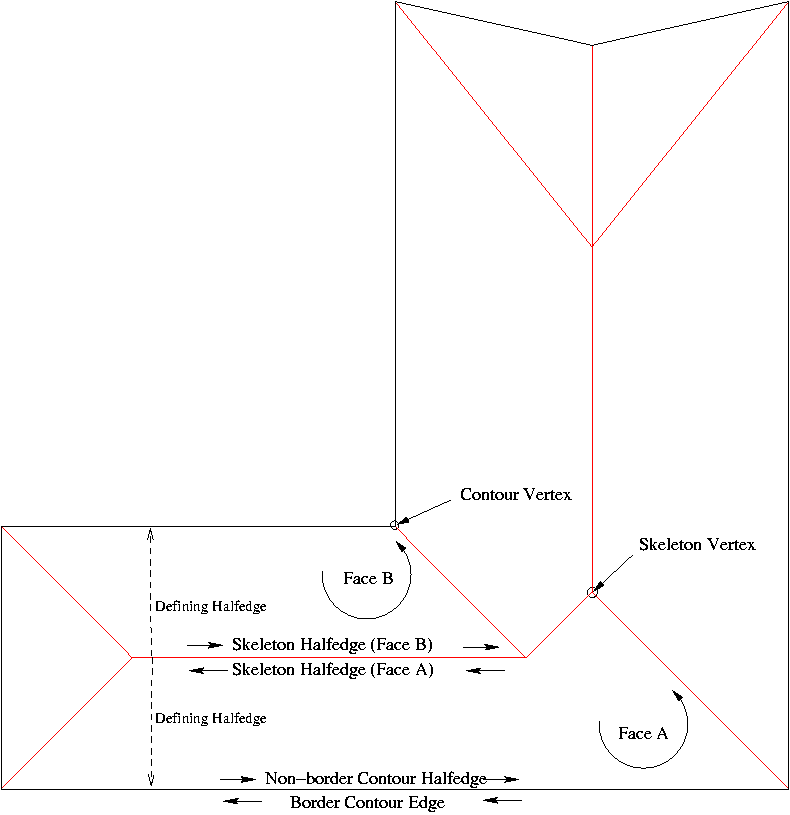
does Unreal have some helper functions to generate straight skeletons? https://doc.cgal.org/latest/Straight_skeleton_2/fig6.png
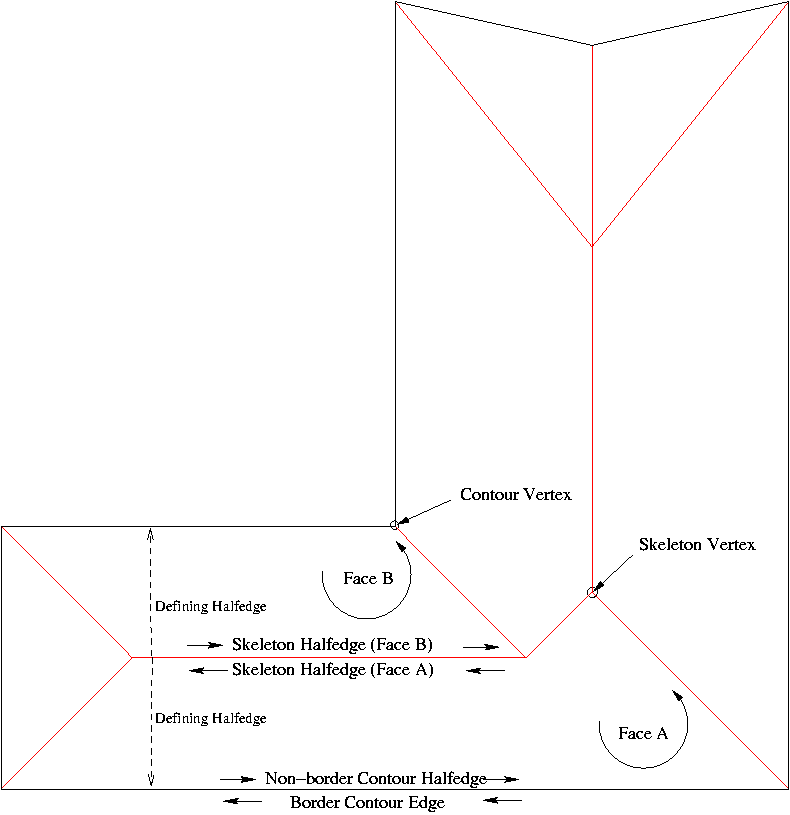
useful for rooftops https://ars.els-cdn.com/content/image/1-s2.0-S0925772114000807-gr001.jpg

and thickening splines http://fcacciola.50webs.com/figure1.png

I thought about using spline meshes but it will be difficult to know the edges that are produced afterwards
 sullen wraith
what's the best way to change my camera? I want to be able to left click on an object and then follow it :3
sullen wraith
no as in i want to "detatch" from my player character, and view an object
i cant control it
just to follow it
plush yew
o idk sorry
hidden aurora
wut
Cannot open the editor
It poped up a minute ago never happened before and now i cannot open the editor
hidden aurora
Im using a 2060 and the latest nvidia drivers idk why it happend
kindred viper
bad driver usually. if you can rollback I would, or update. Sometimes with Nvidia, you simply just have to skip a release.
hidden aurora
And now a blue screen 😃
 jaunty ravine
 idle garden
Anyone using puglin VaRest here?
kindred viper
I have done why?
kindred viper
better to post here. get more help that way
idle garden
Ok
PIE: Error: Blueprint Runtime Error: "Accessed None trying to read property CallFunc_GetField_ReturnValue1". Blueprint: W_Login Function: Execute Ubergraph W Login Graph: EventGraph Node: Branch
kindred viper
well it means its not set the value of the return value. So something went wrong before it got there.
idle garden
the php script
I know, but supposedly is 'result'
idk what to do to resolve it, I've been following a tutorial
kindred viper
im not sure about that script tbh. its echo'ing multiple times in a while statement. That doesn't made sense as it should be a whole statement
dont forget to json_encode your data on the way back too
@idle garden here is an example of how I check for a valid connection to the database, and if it fails, I send back an error code
        if ($link->connect_error)
        {
            echo(json_encode(array('ResponseCode'=>"Connection failed: " . $mysqli->connect_error)));
            die;
}```so I would be accessing ResponseCode from blueprints
idle garden
In Unreal output log is getting me more 1 error and 1 warning @kindred viper
 analog blaze
@plush yewForwardVector
idle garden
LogVaRest: Error: UVaRestJsonObject::SetRootObject(40): Trying to set invalid json object as root one. Reset now.
LogVaRest: Warning: JSON could not be decoded!
plush yew
@analog blaze THANK YOU! That worked
azure shore
is there a way to stop pawns bouncing on top of each other? instead Id like them to just act like normal objects and be able to go on top of each other
oh nvm, the can step up on thing
harsh pike
Does anyone know why foliage spawned on the hill ends up floating as I move away? Maybe some kind of displacement or tessellation is happening on the terrain so it shrinks/grows?
sullen wraith
im using a text render to display a text to all players, however if you goto the back of it, all you see is black. is there a way to make it always face player
 vague vigil
you rotate it based on the player or camera you want it to face
plush yew
@harsh pike possibly the landscape is shrinking due to higher lod
sullen wraith
@vague vigil as it's in the world though, wouldn't it be buggy due to multiple people?
harsh pike
@plush yew That is probably true. I am using Brushify and it uses lots of LOD. Is there any way to avoid that? Or a way to tune it to decrease the effect?
plush yew
You could maybe make the first lod fade out later so you don't see the effect. Or move all the foliage down and scale by z. Other than that idk
sullen wraith
this was my first attempt, nothing happens :\
nevermind
fixed that part
they now rotate around, but it still sometimes faces the "broken" side towards me
ahh wait.. its because it gets the actor, not the camera
 spark sonnet
you could use the same @plush yew
azure shore
guys can ai move to work with flying pawns in any way?
spark sonnet
I think you would need to make your own ai move to then. Just like cars @azure shore
azure shore
wdym?
spark sonnet
you would need to make it yourself. The ai move to will only work on characters
azure shore
it is a character, just with 0 gravity
simply just moving in the direction of the player would be enough
soooo how would I do that?
azure shore
hmmmm
spark sonnet
you could add force or add throttle/movement speed and rotate it towards the character @azure shore
azure shore
yeah right now I got it sorta just charging at the player and bouncing off walls
guess itll do 🤷
brazen forum
guys I'm confused. So you know how when you test the third person template with 2 players and a dedicated server the replicated movement looks real good? well for some reason when I create a blank project and re create the thirdperson template, the movement of other characters when I test mine looks kind of messed up. I even tried copying and pasting the code from the third person template character to my character and the movement still looks messed up. When I move on one screen the character responds normaly on the other screen, but then when It stop, it looks like it puts the character back an inch or 2. So my question is that why does mine do this but the template version doesn't? I litterly copied exactly how the template's character was made and it still has this result.
 mint sequoia
Its a bug in 4.22 (maybe 4.21, never tried it), likely introduced with this setting that they would have enabled in Fortnite and not tested without it. It makes the effect a lot less noticeable. https://i.imgur.com/yDrqpX3.png
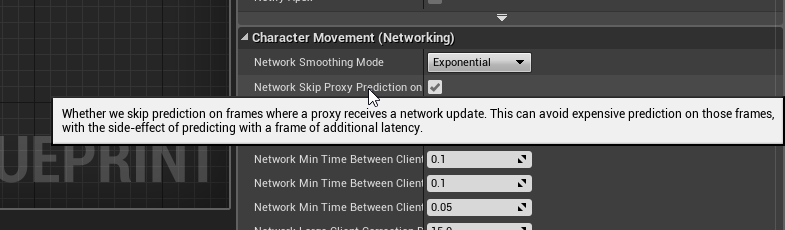
@brazen forum
plush yew
currently remastering a game
spark sonnet
which game @plush yew ? 😃
plush yew
SOS 😉
spark sonnet
its a battle royale game? @plush yew
brazen forum
@mint sequoia bro u saved me so much friggn time thx!
mint sequoia
@brazen forum No worries, it wont fix it btw but its bearable that way. I submitted a bug report and hopefully Epic will fix it by 4.23
Not likely tho
If they don't I'll fix it myself
brazen forum
@mint sequoia So a proxy is the same thing as a client correct?
mint sequoia
A simulated proxy is an actor that you're not controlling and the server doesn't own
In this case, a simulated proxy is any non-local player @brazen forum
brazen forum
ok cool thx!
 livid finch
Hello,
Do you know why my character is not fixed in my blendspace? As far as I remember it remains the same position. ( I haven't used UE4 for a long time). Thx 😃
abstract relic
Disable root motion
hidden aurora
Is there a way to delete actors that have been attached to for example a mesh
livid finch
Thx !
 wise lagoon
@hidden aurora wouldn't you just find a reference to the actor and destroy it?
abstract relic
Open a 3d modeling tool of your choice and add smooth group to the mesh
kindred viper
uassets are a binary format. they can be opened in unreal engine though and some stuff can be exported
sacred inlet
how can I export the mesh?




 sacred inlet
I don't see an option for exporting though
abstract relic
Asset action >>> export
sacred inlet
hmm for some reason thats not an option
Is there a static mesh library somewhere
for more complex shapes
sacred inlet
its not possible to apply brushes to existing static mesh right?
viscid jetty
Yo I have an any keybind but when I have it my other keybinds don't work. When I disable it by removing it. My keybinds work. I only use the any keybind once so is there a way to disable it via blueprints?
grim ore
Click on the any key input node in the blueprint you use it and make sure consume input is not enabled.
viscid jetty
Oh thanks 😄
 upper wasp
i'm thinking of making a certain game
sacred inlet
I just downloaded some uassets
but its not letting me import them
they dont show up
 icy mulch
How do you scale a parameter
worn granite
very likely the uassets are for a different engine and won't open
icy mulch
I cant find my post processing
sacred inlet
help plz
icy mulch
How do you remove motion blur
 tacit harbor
Hi anyone online?
 rotund scroll
has anyone had this issue where the right click context menu in a view port just doesn't show up?
tacit harbor
Not sure
 shrewd island
@rotund scroll which engine version are you on?
rotund scroll
4.22
4.22.1
I looked around a bit before asking, there seems to have been some issues before but I can't tell if they were related to this exact thing
funny thing is it was working normally a few days ago
shrewd island
Hmm, I've seen stuff like this in 4.12.5, but not in recent ones
sacred inlet
I downloaded some assets, but I can't drag and drop the file into UE4???
rotund scroll
@shrewd island any chance you know how it got fixed? I made a separate project on 4.22.1 and it didnt have the issue
plush yew
Does purchasing assets accept PayPal balance or not?
Cus for me the didn’t, When chose PayPal the tryed drag the balance on my card when I got everything on PP balance
 safe rose
yes it can
but you need to specify that in PayPal itself
look for "approved vendors" thing
I had to do it myself to get it from using one card to something else
plush yew
Well I’ve changed it to PayPal as my preferred method
 dawn latch
Hey, i am having issues with a blueprint for my survival game i am building in my free time on the weekends..
Today i came across an issue that i have tried fixing for a few hours with no result..
Anyone here good with blueprints and willing to help out whenever you have the time?
Send me a message if you can, thank you in advance. 👌
 hot drum
ok i have a thing that's scrambling my brain
and it's probably super simple to you guys
because it's like beginner level
buuuut
it needs to be done
So I'm in the UI
editor
and I want it so when I click the options button it unloads the widget that has play and options and the main menu on it
and load the options widget
the problem is
I have no clue how to do it
so I made this
but the value for the cast in undefined
Now, I've made it a public value so I can set it
hot drum
I mean
plush yew
Even when I got 59€
plush yew
The won’t accept the PP balance
And when I emailed them the said we don’t accept PayPal at the moment 😂
Even when the got a PayPal payment tab available
raw elk
Is there any way to bulk change a flag for a massive amount of static meshes outside of the UE4Editor?
It keeps crashing as I go along, even doing them in small chunks, it inevitably crashes, a lot of times crashing during save-all
I'm wondering if I can execute a change to these files using the UE4 command line tool
hot drum
OOooooh I resolved my problem
I figured out I can create other widgets inside of widgets lmfao rip
 lusty carbon
Hi urgent help needed for anyone
Using Source Tree, I hopped back to prev version and now when trying to get back to latest commit it goes
sudden agate
Reading helps
lusty carbon
I stashed it and worked
sudden agate
git is easy peasy tho
lusty carbon
idk much about git
I also use sourcetree with gui all tutorials are with commands and stuff
too technical for me
 cloud cobalt
Git is nowhere near easy, it's definitely the most complex / powerful VCS
If you keep it on a single branch it's somewhat easy, but you're also using 1% of it
cloud cobalt
Also Gitkraken is probably the best GUI for Git these days
Sourcetree has... problems
lusty carbon
stressful stuff indeed
in fact I get so many mini heart attacks using VCS that I'd rather just save the entire project elsewhere on disk
for tracking my shit
cloud cobalt
VCS is an absolutely vital tool, especially when you're using C++ and actively developing / trying features
I regularly just delete code I'm not sure I need and then add it back in seconds from Git 6 months later
lusty carbon
it's a CS degree in itself just to learn git
plush yew
I use memory stick fine for single person right
cloud cobalt
No, use source control instead.
It's not about backups, it's about complete traceability of every change ever made
And it's free
Well, Git and SVN are free and pretty great.
wary wave
Perforce is free for individual use
raw elk
I've been using sourcetree for a while with minimal issues, although sometimes I do revert back to using just a command line... But most of the time, common sense and reading can help out more than anything. When it spits out an error, read the error. It usually tells you what the problem is in plain english, like the above image -- It just wanted user to commit their file changes prior
wary wave
(well, up to 5 seats)
cloud cobalt
I hate to recommend Perforce because it's a way worse deal than it was a decade ago, but...
dim merlin
hi, that is the most common way to fix relative location of a attached object (like a weapon) to hand bone ?
i tried relative location, however this seems to be different in other levels, its not acurate
 short shuttle
Does anyone know if the DayZ/Tarkov type inventory system actually has a common name? I'm trying to find resources on how to build something like that but I have no idea what it's called. I found a thing on the marketplace called Jigsaw Inventory System and that's very close to what I'm looking for, but no resources by the creator actually discuss how to make something like it, just how to use the framework he created
cloud cobalt
Get that and build upon it to make it how you want
short shuttle
Well I'd rather not drop $40 on something that I don't know is going to work, plus it doesn't help me learn, which is kind of the point
cloud cobalt
I guess people call that a jigsaw inventory since that was your question. I call that the resident evil inventory
 bitter iris
@short shuttle jigsaw aint replicated to take note
short shuttle
Yeah, that's also kind of a big deal
cloud cobalt
Then again, there's probably not a plug-and-play store package that does exactly what you need 😃
 twilit hill
I redid such an inv system, its really just called multigrid inv
 steady summit
I have two objects that need to overlap each other. When it was both static meshes, it would generate overlap events just fine, but now that one of them is a skeletal mesh, those overlap events do no longer work. I wonder why, and how do I fix it?
sudden agate
make sure they have a physics asset assigned and that Generate Overlap Events is true and that the Collision is set to Overlap for both Skeletal Meshes
steady summit
It's only one skeletal mesh and one static mesh but yes it has a physics asset and does collide with other objects if I set it to block. Generate Overlap Events is enabled and when I set everything to Overlap nothing happens and no event is generated and the NotifyActorBeginOverlap() function of the static mesh is not being called 😦
 honest vale
did answer hub get some sort of badges a while ago?
I just noticed I have received 4 and 5 year badges
and a newbie badge
😄
 surreal tundra
hey, im trying to trigger an event mapped to a key on my keyboard in the level blueprint throug the sequencer, someone knows how to do that?
so basically i want to add in the sequencer that the keyboard presses a certain key at a certain moment?
or can this be done with scene capture somehow?
hidden aurora
@wise lagoon I a Italy used a get child actors and then a for each loop and compared the class and if it was the same destroy the actor
paper kernel
Question: how do I import custom collision using glTF
UCX_ prefix doesn't seem to work
steady summit
Ah so my problem was apparently a bug in the engine. If you enable OverlapEvents via C++ it works, but if you enable it in the blueprint or in the level editor then it won't work (all other settings do however).
surreal tundra
nvm worked it out
worthy flame
no discord invites
hollow falcon
ah, didn't see that! Will delete! Sorry.
 languid shard
no probs !