#ue4-general
1 messages · Page 445 of 1
 polar hawk
 wary wave
lol
 rose sorrel
Could I bother you for a question about Perforce
wary wave
pfffff
polar hawk
naming conventions are the first victim of age
which is why most of us still use _D
when basecolor/albedo != diffuse
and why we still prefix bools with b
wary wave
I still do that for some reason
polar hawk
and there is no reason they still do it
 plush yew
so can i simply update to hotfix 1 without redownloading ue4.22 ????
 languid shard
yes ????
 cloud cobalt
Though ofc it will redownload large volumes of data
plush yew
then no need wasting bandwidth. waiting for .23 😃
cloud cobalt
Lol no, seriously get the update
Then don't update to 4.23.0 which will be broken
And wait for 4.24 to release to move to the now-stable 4.23.X
Moving to newly released major versions is what you shouldn't do if you haven't got serious connectivity
Like, specifically 4.22.1 brings 10s compile time & fixes loading screens
 clever flare
Is there a plugin or something that estimates build time? Or some way to show it in any way
clever flare
Lighting
 languid shard
Unreal Engine Forums
Click image for larger version Name: image_138398.jpg Views: 1 Size: 82.0 KB ID: 1478783
Disclaimer:
This is a very simple and early version of my GPU lightmap
clever flare
Thank you man
languid shard
do read the full post
cloud cobalt
It's also closed-source, so use at your own risk etc
languid shard
it works a bit differently than CPU lightmass
 sudden agate
it crashes a lot
languid shard
results are not the same
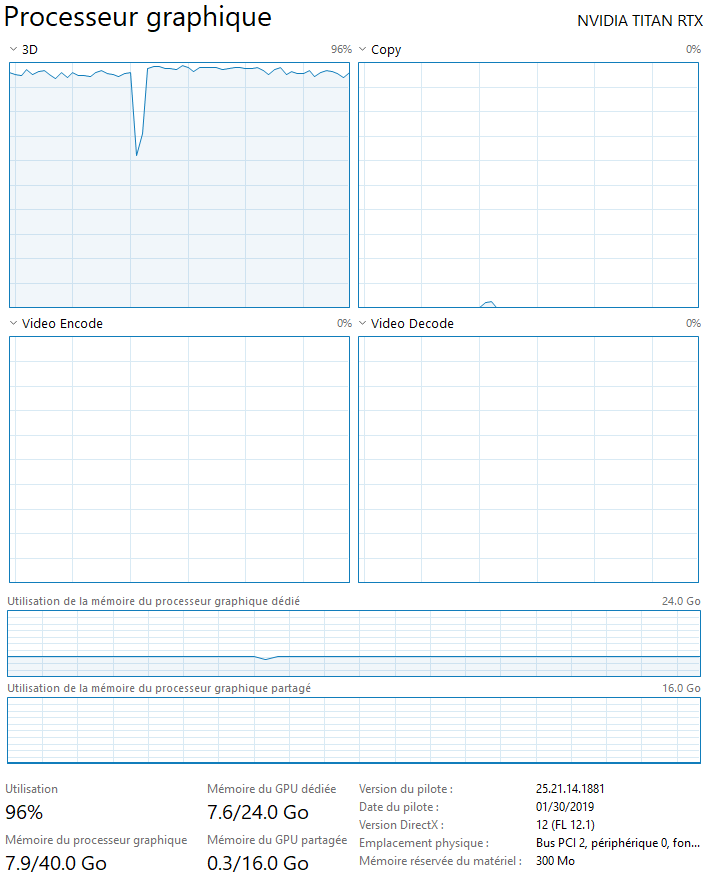
it crashes if you dont have enough VRAM
where CPULM is using RAM
clever flare
RAM
sudden agate
16 GB VRAM would be godlike
sudden agate
cries in 6GB
languid shard
rip
cloud cobalt
I have 4, it's fine.
languid shard
unless you build massive scenes with loads of 1024/2048px res on objects
you'll be alright
clever flare
I'm just building one single room
languid shard
its fine then 👌
sudden agate
does GPULM keep everything on the GPU until everything is done?
clever flare
So hopefully I'll be fine
languid shard
dont think so @sudden agate
sudden agate
I cannot explain why it crashes then
 languid shard
not really if you've got projects paying for it
clever flare
Well I've got no income atm cause I'm stuck in school :(
languid shard
¯_(ツ)_/¯
clever flare
But thanks for the knowledge
 deep basin
is there a way to initialize class defaults from a datatable before runtime?
 short coral
I got this error in my package game. What is its mean ? How do I know which objects cause error ?
It happen when I load level from the main menu level.
I can run in editor without crash. But it crashes in package game.
plush yew
whats a good beginner animation tutorial for UE4?
 grim ore
well the crash says something on the ~tick~ Update Animation event on your anim bp on your skeletal mesh is causing it to go crashy. did you do anything to any of those systems?
short coral
@plush yew
https://youtu.be/7b9WM8TVdpA

(00:05) - Intro to Blend Spaces (02:02) - Blending between different animations (04:30) - Creating a Blend Space (07:00) - Apply Parameter Settings (08:25) -...
I do not know which part of my animation cause problems.
grim ore
yep neither do we so start debugging. for something like this maybe just start unhooking execute wires from the start and then readd them one at a time and test to see what is causing it then try and fix it
it should be in the anim bp in the main event graph, something is not valid or working right on the main update loop
plush yew
@short coral thank you
short coral
@grim ore I cannot find error in when I play in editor.
deep basin
start to unhook your wires in the blueprint one by one and start building
if building works after you found the broken wire you know where the problem lies
I would go backwards btw, otherwise you unhook your whole logic at once....
grim ore
@short coral yep so disconnect some of the wires that execute and repackage and run and see if it crashes. repeat over and over until you find the bad part of the code and then try and fix it. You can also try setting a breakpoint in the code and walking thru it node by node and see if anything is weird.
short coral
😰 I try.
grim ore
for example an invalid access check/null check on an object in the editor will just throw an error but still continue, in standalone it might crash like this. are there any errors when you Play in editor in the output log?
short coral
How do I open output log ?
It appear only when I get error.
deep basin
window -> output log
grim ore
window -> output log probably or window -> developer -> output log
you can just open it in the main window and dock it next to the content browser so it's always there for example
 honest rover
https://github.com/Temaran/UE4RenderDocPlugin
These installation instructions are telling me to Generate Project Files , but I cannot find that option.
where can a nibba find this
GitHub
A plugin that adds easy access to Renderdoc inside UE4 - Temaran/UE4RenderDocPlugin
short coral
I open output log.
grim ore
what does it show when you right click the .uproject file @honest rover ?
honest rover
In the Windows file explorer?
grim ore
yes
short coral
Can not find warning about animation. 😢
honest rover
Aha, there it is
grim ore
time to start debugging then and learn how the flow of the engine works
honest rover
Oh.
grim ore
also as an alternative it might be a good idea to try and redo the learning maybe with this tutorial https://docs.unrealengine.com/en-us/Gameplay/HowTo/CharacterMovement/Blueprints as the video one is out of date and might have problems.
 spark sonnet
is it possible to make a progress bar with more than 100% ? I have a character that has 100% health first but later gets 200% How can I show this in the progress bar?
 misty creek
Couldn't you just change his current and max health?
spark sonnet
?
misty creek
Divide current health by max health
grim ore
is 200% on the health bar going to be the end of it or do you want like 100% is the end of it then 200% is farther along?
spark sonnet
I was thinking to keep the same size each time. So the first thing you said
misty creek
Right that is why you would need to divide the current health by your max health. That would give you a value that is 1 or less
spark sonnet
ok thanks I'll try that
misty creek
You would need to change the max health too
spark sonnet
so I set both of them to 2?
misty creek
Yep
honest rover
Apparently Generate Visual Studio project files is not the same as Generate project files. Or something else is going wrong.
 shell compass
The hardest part of development might be coming up with good names for functions and variables and figuring out the best place to put them in.
My GameInstance is growing very fat because that's where most things seem to end up
cloud cobalt
@honest rover Did you compile in Visual Studio in Development Editor after generating files ?
honest rover
My project does not have any code
It's only a map with a sequencer scene
This is what the plugin folder looks like btw, if that's of any importance
cloud cobalt
Looks like the plugin does have code
Which means your project does have code
Which means you need to compile in VS
It's possible that your project needs to be made into a C++ project just for that, haven't played with BP only projects that have C++ plugins
honest rover
I'll see if I can compile it in VS code
honest rover
Update: I can't
Not sure if the problem lies in the project or in VSC
What I did was generate an empty test class in another project, then copy it to Project\Source\Project\class.cpp\
I was able to Generate Visual Studio Project Files after setting my source editor to be VSC. Then I could open the project in VSC.
grim ore
did you add that as a valid module in your .uproject? you should have created the blank C++ class in your existing project so the project can set itself up correctly
honest rover
I cannot add a blank C++ class in my existing project since it doesn't open
grim ore
if you are trying to get it to open and it won't due to not being able to compile, edit the .uproject file to remove the module section and it will behave just like a normal BP only project
then you can open it, add the C++ class, let it create the correct .uproject and .sln. then start over with the tutorial adding in the plugin source and such
honest rover
Jesus Christ is it that simple
So the problem lies in the damn plugin. The buildtool exception is because of ModuleRules and BuildConfiguration
yeee boi. Apparently Renderdoc is a built-in plugin and i was shooting myself in the foot by messing with the github repo
clever flare
i have downloaded and pasted the plugin gpulightmassintegration but when i try to build maps now it still only uses cpu and memory rather than gpu and a message ends up on screen saying "out of memory" and scene can't be built
 wild prism
How do I find/install 4.22.1?
cloud cobalt
Click 'update" on your 4.22 launcher icon
wild prism
I don't see that option
Probably because I'm an idiot
Oh
my god
I am actually fucking stupid
Ban me
Wait
Christ I'm rambling. Launch JUST changed to Update I SWEAR
(Thanks)
 tawdry raptor
4.22 has been a nightmare, I am having freeze save issues, worked on my map for 3 hours saved and now this
 manic pawn
are you saying you didn't save in 3 hours? 
plush yew
guys I want to ask you I have programmer that he can code on c++ I work with bp and he will make some of the things in c++ and then we will give it to me to add it to the originial project because it is bp only so it should give me the cpp gfile only or the whole project? I am cinfusing
 astral plume
If some Programmer have time for a little Question in the Programming Editor-scripting channel. Thanks a lot !
 tawdry sierra
quick help please. I got a character blueprint that has a spring arm with a camera attached to it. I want to set a different location to that camera when the player crosses a line with the set spring arm rotation node. It works but it is an instant transition. How can i animate the camera that is inside the blueprint
 knotty harness
@tawdry sierra If it's the same camera you should be able to use a timeline to create a transition from one to the next
sudden agate
@tawdry sierra Timeline, Timer, Event Tick.
Pick one
 hallow sleet
are outdated tutorials still good? or has to so much changed for them to be useless?
tawdry sierra
@knotty harness @sudden agate so how can i do it with a timeline? thanks for the replies
 lusty carbon
Hey ya'll I need the settings for 2km x 2km landscape
No idea how to do it and I can't understand the docs
knotty harness
@tawdry sierra Here is a quick example of using a timeline to modify the Field of View on a camera; but you can modify any value.
The Timeline graph is given the start and ending values for the variable and the length of time over which to move from one to the other.
 sullen wraith
is there a way to view breakpoints and such in the standalone version?
testing mp features, andit wont work inv iewport
plush yew
guys I want to ask you I have programmer that he can code on c++ I work with bp and he will make some of the things in c++ and then we will give it to me to add it to the originial project because it is bp only so it should give me the cpp file only or the whole project? I am confusing
grim ore
if you are mixing C++ and BP then the project needs to be told it now has a C++ module/code so it will load it up. This basically turns the project into a C++ project at this point as the new C++ code has to be compiled to use in the project.
you should be using a source control system so you can both work on the project and then he just checks in his changes
grim ore
if you add them into the project in the file explorer yes. if you add them as new C++ files and let UE4 manage them no. if he gives you files that are already created and your project is not set up for them then you will have problems.
plush yew
so
grim ore
UE4 needs to know about the C++ files inside of the editor so it can handle them correctly. C++ files should be created in the editor and the editor should manage them.
plush yew
what I should to do to can add the cpp file and to work ?
sullen wraith
I'm having issues with my RTS controller, it works fine ingame, however if I start on a menu map and then transfer to the main map
it stops working
these functions will still fire.
but like none of these will.
grim ore
the project should be pushed to source control so you can both work on it. Then a C++ file should be added so it can be considered a C++ usable project. Then it should be pushed again so he can then download it and work on the c++ part while you work on the BP part and both people should be committing changes as needed.
@sullen wraith when you transfer does your viewport have focus? did you change the input type at all in the menu screen so it doesnt accept input anymore?
 fading umbra
Does anybody know why, I can't go into my game when I press play, its been bugging me for ages
I have it set to the main menu screen, but it doesnt transition to my game level
but the music and everything restarts when i press play
sullen wraith
just put this in the begin play on the controller
tried it after
and still didn't work
@grim ore
grim ore
@fading umbra what does the code look like for your play button?
grim ore
and if you open the run level itself in the editor and hit play it works as expected?
I am wondering if you are using the default game mode in your run level so it's causing problems when it is set to your main menu game mode as the default
plush yew
I want to can work with c++ and bp files widget and classes @grim ore
so is there a way?
sullen wraith
well it works perfectly fine in the menus mathew
and its changing it all on map load
i did the prints to make sure the controller was being added aswell
fading umbra
@grim ore In RunLevel the game automatically plays in RunLevel and doenst bring up the menu
grim ore
@plush yew yes convert the project over to using C++ and BP then work with it
plush yew
what to convert?
I want I have for now only bp things
I will add c++ files
and then what to do?
grim ore
@fading umbra weird then. so with the default game mode in the project settings to main menu if you load the run level it works fine?
@plush yew all you have to do is add a c++ file, it can have nothing in it, and then the project can use C++ files.
grim ore
it will add a C++ file, add a module entry for that C++ file to your .uproject, try and create the .sln file, and then compile the module. You will need visual studio at this point for the project
fading umbra
@grim ore No, in the defualt gamemode, if I put it under MainMenu, the game when packaged and the editor doesnt allow me to press play to go into the game
Just does this
grim ore
@sullen wraith definitely weird then. all I could think is the game mode was being set in the main menu to UI only or ignore player input and it was never being changed back on the main level
plush yew
ok Mathew
so to add new cpp file new clear by clicking right button and add new c++ class and choose what?
fading umbra
same in the editor when ive set game mode to main menu
sullen wraith
or do i njeed something in the level blueprint?
grim ore
@plush yew if you have not backed up your project and you don't know what you are doing when adding in C++ I would stop now and read more on the documentation page. You can break your project at this point.
grim ore
@fading umbra in your world settings for your run level, set the overriden game mode to your run level. This will force it to use that game mode when the run level loads up which you said works?
plush yew
so I will add new class and compile and then to add the file from the other person-right?
grim ore
ah
@plush yew you can't just "add" the file from the other person into UE4. If he gives you code you could create a new C++ file, make sure it's the correct class, then copy/paste your code into that file and let UE4 compile it. You cannot drag/drop a c++ file into your project or add it into the file browser and expect it to work.
fading umbra
@grim ore You beautiful human being its finally working
works whilst packaging as well, ty soo much
but before I go, is it possible for a bit more help in game, i have issues with my turning rotation and camera when i hit a wall
grim ore
you can always ask, people might be able to help
fading umbra
the game is based off the the free runner tutorial in youtube but ive replaced the defualt character with a ball. When I come to turns in the corner, the character if pressed at the wrong time or if you dont press it gets stuck
as well as when i come to the closer side of the wall it decides the camera to close up to it, im using springarm
Better example
^^the code for the ball/player movement
my left and right corners are simple, im sure the error is coming from the ball character
cloud cobalt
Nah it's a common bug
deep basin
Ive made a derived class of a class where I set up collision. while the child class inherits the collision sphere, it doesn't register any collision. Someone ever came across that problem?
 azure shore
how do I disable the error report coming up every single time I end a test
 hidden aurora
r.Streaming.PoolSize 2000 try that in console cmd
azure shore
right why suddenly when I walk into an enemy pawn it flings it away
something about the capsule component I guess but what could cause that
 unborn matrix
I'm torn between going lit / unlit
hidden aurora
How can i run a custom event when player enters collider and when exits stop running it?
misty creek
clear and invalidate the timer when the player exits
 twilit hill
anyone else noticed that performance in 4.22.1 is complete broken compared to 4.22?
azure shore
cant really put my opinion on that, my pc cant handle shit
game development on a crap pc is fun! 😊
no but seriously there have been times where my brain actually almost hurts from trying to understand what the hell has happened in ue4
ok wtf
how can something with query only collision enabled still block the player
my brain
plush yew
Hey guys?
I have a problem
when I try to load my project, it says: "failed to initialize after loading"
and when I enter the sln file and build there are some errors that were not there before the update. (this is still a 4.21 project)
 finite arrow
@sullen wraith you got get your character and then you can get the player state.
plush yew
Error MSB3075 The command ""C:\Program Files\Epic Games\UE_4.21\Engine\Build\BatchFiles\Build.bat" MyProjectEditor Win64 Development "C:\Users\demat\OneDrive\Documents\Unreal Projects\HorrorGame01\HorrorGame01.uproject" -WaitMutex -FromMsBuild" exited with code 5. Please verify that you have sufficient rights to run this command. HorrorGame01 C:\Program Files (x86)\Microsoft Visual Studio\2017\Community\Common7\IDE\VC\VCTargets\Microsoft.MakeFile.Targets 44 ```
using UnrealBuildTool;
using System.Collections.Generic;

public class MyProjectEditorTarget : TargetRules
{
    public MyProjectEditorTarget(TargetInfo Target) : base(Target)
    {
        Type = TargetType.Editor;

        ExtraModuleNames.AddRange( new string[] { "MyProject" } );
    }
}
If I change the target it still gives me the same errors.
to the project's actual name
grim ore
is the module correct in your .uproject?
plush yew
Im missing HorrorGame01.target.cs but I have HorrorGame01Editor.target.cs
I might just create a new project
and copy the content folder
what?
missing HorrorGame01.target.cs?
didnt delete it, I swear
fading umbra
Anybody know how to sort this issue with the camera out? when it collides with a wall
plush yew
<@&213101288538374145>
 snow crown
?
plush yew
I have a big problem
plush yew
Ue4
snow crown
ok, at-moderators are for issues with this discord server
 mossy nymph
you're more likely to find it if you do not so aggressively demand it 😛
plush yew
Sorry
I just have had a really hard time trying to fix this problem.
I don't mean to sound aggressive.
grim ore
since this is a cpp problem you might get more knowledgeable help in the #cpp channel but beyond that is your .uproject correct?
fading umbra
Anybody able to help with my issues
been at these dumb issues since like january lol
feelsbadman when deadlines in 1 day
the game is based off the the free runner tutorial in youtube but ive replaced the defualt character with a ball. When I come to turns in the corner, the character if pressed at the wrong time or if you dont press it gets stuck
as well as when i come to the closer side of the wall it decides the camera to close up to it, im using springarm
Better example
https://blueprintue.com/blueprint/yj1g1rk0/
^^the code for the ball/player movement
my left and right corners are simple, im sure the error is coming from the ball character
Anybody know how to sort this issue with the camera out? when it collides with a wal
 eager crypt
is it weird UE is crashing on nullptr checks? I feel like I'm missing something obvious
 dim plover
Not initialized.
eager crypt
I'm 100% I have initialized it 😂
dim plover
Maybe it's pending kill? Check with IsValid().
eager crypt
is there a way to check if its initialized, in the debugger? besides just seeing the code
one sec
huh, still crashing
 fair pike
Hey, does anyone know how to solve an "Unsolved cooking error"? It seems to have something to do with game files but I have never moved gamefiles whatsoever.
It's weird because it seems to do it only with particle related things and nothing else.
Unreal hasn't done anything in a solid 10 minute window, I'm getting desperate. I need to turn in my project for university.
okay it's moving
Okay it didn't actually package it, what's going on??
Found a source stating that I just need to reassign the game map in the maps and modes, and it seems to be the source.
plush yew
eh just had a thought... I want to extend my game to Xbox and playstation but I have a level that is click based... what would be analagous on those platforms?
 open eagle
hey guys I have a question, I have a hud widget that has a button for jump on it, how do I make it make my character jump with casting? I tried this but don't know what to connect object to!
 weary basalt
@open eagle You can use a node called GetOwningPlayer
Which returns a Controller. You then need to call GetPawn on that Controller to then pass to your Cast
I cant remember if there is a GetOwningPlayerPawn for Widgets which simplifies that for you.
weary basalt
👍
open eagle
@weary basalt oh yeah one more thing, how can I check if a mobile device is running the game
weary basalt
Maybe use the Platform name?
weary basalt
I guess so
 zenith flower
Not really sure what category to ask about sequencer, but her goes:
Is there any way to use the sequencer in a non-level dependent way?
I need some sort of way to play an audio file (already using instance class to keep playing across level load)
and fire off events throughout various levels that are loaded
I have a single blueprint that does all of this, its my "Trailer Video" bp.
My issue is that, if a level takes a second longer to load than normal, it throws off the chain of delays I have setup.
I can bind actors at runtime, in sequencer, but only if they are in a level. I guess I could create a blank map, with a list of actors I want to use.... and just override them at runtime
open eagle
How can I make a blueprint button make the player controller possess a pawn
zenith flower
go to #blueprint ill help you there
open eagle
im there
 sonic ruin
Hey, so how would I be able to import this so I can use it cause I try to import it and it doesn't let me need help fast
grim ore
did you install the substance plugin into ue4?
sonic ruin
no is it free?
grim ore
yes it should be on the marketplace on the launcher
 charred charm
is it turned on?
sonic ruin
well if I add it to the project than it would be right?
charred charm
no
sonic ruin
so how would I turn it on?
grim ore
Edit -> Plugins
sonic ruin
Edit? where at
grim ore
in the editor, the edit menu
sonic ruin
ok
fading umbra
Hey guys quick one, my mate is trying to package her work but its doing an error whats up with it
zenith flower
Whats the name of the exe?
I would remove "test" from the name if you guys happened to call it that
Of course you screenshotted half the error
grim ore
The issue is likely that you named your project "test". I ran into the same issue and solved it by creating a new project named "whatever". Also, make sure that you running the server shortcut from the folder "WindowsNoEditor\whatever\Binaries\Win64".
sonic ruin
and Matthew you don't need to be a dick everyone starts at a point ok now don't be a dick
zenith flower
Hey
back off
I agree with him
that guy was asking for a handout
The tone might have been off
charred charm
any hangouts
zenith flower
but it wasn't totally unwarranted
sonic ruin
Evo you teling me to back off
zenith flower
We are GLAD to help, but don't come here asking for a step by step, for the most basic things a quick google search would answer
sonic ruin
ok I am just asking tho you don't need to say shit ok I was just asking
fading umbra
Thank you @zenith flower and @grim ore
zenith flower
yw
fading umbra
I'll pass it on to her
grim ore
that is an amusing error tho as bad as it is 😦
fading umbra
btw @grim ore Thank you for your YouTube guides, It's helped me a tonne since I started uni, I watched your event dispatcher today. Was some quality content, had to watch it like 4 times though, I'm a dumbass, take things in slowly
charred charm
i think am going to have the same issue when am done
grim ore
it should only be an issue if your project is named exactly test
zenith flower
which should be prevented by the editor... guess someone didn't think about it
sonic ruin
Matthew ok I am sorry for the language but ok I just got back into this again after a little break and forgot so I am sorry but everyone comes back and forgets ok
zenith flower
Who names their game test? xD
charred charm
😂
grim ore
@fading umbra lol, glad some of it was helpful 😃 It takes me a few times as well to get it understood so nothing bad about it taking a bit to get it.
I can see the Tweet now "TEST, the New FPS MMO from Bungie, delayed due to not being able to package the project"
charred charm
i dont think he expected to get to that point when he named it test 😃
np @sonic ruin
zenith flower
lol
fading umbra
our game designer workflow, is test, test1, test2, test 'recurring',final, the list goes on, till we have on submission lol
zenith flower
In stores now "Test" the stress test simulator in realistic school settings with over bearing parents
 spiral island
Please no I have enough of that IRL
zenith flower
Not enough apparently, you here aren't you? Shouldn't you be studying? xD
zenith flower
I broke sequencer! I love abusing stuff
I made an empty map, put in the actor I wanted to override, then put it in the sequencer, and then deleted the actor from the map
Then I create the sequencer dynamically, and override the "null" actor
And what do you know? it works xD
Why don't they just let us add actors without this roundabout way ?
hallow sleet
are outdated tutorials still good? or has to so much changed for them to be useless?
 abstract relic
Basics are still basics. No matter how old
 mint sequoia
@grim ore
"TEST, the New FPS MMO from Bungie, delayed due to not being able to package the project"
Fast forward two years and they'll be sueing anyone with 'test' in their game name
Trademark law is hilarious in all the wrong ways
spiral island
Unreal seems to have a lot of these hidden gotchas when it comes to naming things
mint sequoia
Never had an issue myself
 coral shoal
that trademark should really get rejected
 earnest cape
How do I server travel in blueprint?
mint sequoia
@coral shoal Just like Apple and Candy and Saga 🤔
 faint cedar
has anyone here had this one lovely issue
where if you stream a level in, then out, then in again
it streams in incorrectly?
Like, half the actors in the level are positioned incorrectly or just not loaded at all
wary wave
nope, that's new to me
 warm timber
Does UE have something like Unity's UMA?
wary wave
I don't even know what this is
languid shard
@faint cedar shit just had something similar an hour ago
loaded a level with sublevels
a lot of actors were placed at 0.0.0
wary wave
I had a problem recently where my static mesh actors had lost their asset references
languid shard
loaded the scene again
wary wave
but I couldn't reproduce it
faint cedar
Going to see if this happens in a build, because it's kind of a game breaker here
twilit hill
Oofff when i read this things 😂
Yesterday i found some grass meshes on my map which hated to be looked at from a certain angle, draw calls went from 400 to 6000
#just4.22.1things
plush yew
I am having an issue in some of my maps where shaders keep compiling until I build lighting which then takes ages. Just now I had shaders keep going down and get to compiling -100 before I built lighting.
sudden agate
negative shader compiles is not an error. It's just Epic messing things up since the new Layer System came to surface.
You should not bake light until the Shaders are completely compiled
dim plover
What/Are UObjects destroyed on map change like seamless servertravel? If... the outer is not destroyed, then the UObject would also not be destroyed?
manic pawn
outer has nothing to do with gc, if you want it to stay alive, you need to reference it from something that stays alive
 kindred viper
or use ObjectRef->AddToRoot(); which will prevent it from being GC'd
 valid root
Hiya, isn't there supposed to be a built-in map in the engine that shows the color cards and 50%grey spheres etc? i can't find it
 worthy flame
hey ive followed some tutorials and my AI could roam, but now it cant roam. it only moves if it sees me
ive done it with a behavior tree
worthy flame
nvm fixed it
 quasi horizon
Hi there, I have a very simple VR project that runs fine when I press "play" but when I try to "launch" it or package it the result is just a black screen. I have set my startup map correctly so I don't get why it fails. Any pointers? Ideas? I quite stressed out and in a hurry to get this to work....
grim ore
so your game startup map is correct and the same as your editor startup map?
quasi horizon
Yes the same maps is set for both startup and editor
Works fine when I press "play"
grim ore
play in standalone in the editor gives the black screen?
grim ore
oof... =/
quasi horizon
I had to migrate this project to 4.22 today since It failed to build/package for win64 and the was the solution suggested on forums
grim ore
the only one I see is For me, what worked in fixing the black screen was turning Anti-Aliasing from None to TemporalAA in the Projects Settings-> Rendering section. for vr itself
all the other suggestions are the obvious wrong map
quasi horizon
ah, already had it at temporalAA :/
grim ore
I know it's a weird suggestion but make a new map with the default scene, the flat level with the sky. save it. set that as your startup maps and try that. see if you can eliminate it being the map itself
quasi horizon
when starting as "standalone" the HMD never leaves oculus menus/home but the environment sounds start to play
ok, I will try that as a quick test
this was a blank BP project when started so no starter content.... a new level is just a black void
oh, sorry Im so stressed out...
grim ore
when you go to new level in the main menu it has an option for 3 levels
file -> new level
quasi horizon
yeah, I forgot
a basic level works, but I need it to be VR
btw, huge thanks for caring!
I tested some more: it seems to actually start the level (it is just very dark) but never seems to posses the pawn or something
(I have a "Motion controller Pawn" in the map)
grim ore
is it set to auto possess?
grim ore
it should ignore the player start if you have auto possess on but regardless of that you should have some graphic somewhere especially if you put on the headset and move around.. unless he is outside the level and its black?
the default map just has the player start so maybe remove your pawn and replace it with the player start only?
quasi horizon
Sound is there and the montor window shows the view from the pawn position at floor level that is close to black
HMD show Oculus home/menues
grim ore
well the player start worked in a blank level yes? maybe try duplicating that and see what happens without the pawn. at the worst its the same lol
oh gotcha you dont have the vr pawn as your default pawn in the game mode I am assuming?
was reading back what you said before lol
quasi horizon
Never touched gamemode, just using "gamemodebase". this is "archviz" type of stuff and I usually just run it from the editor
grim ore
ok so your vr level uses a vr pawn which is set to auto possess but does not seem to work in standalone but you tested a blank level with a player start in standalone and it worked (just no vr pawn?
quasi horizon
yes
the odd thing is that it has worked before (packaging that is) so I really don't get what can be wrong this time around
grim ore
if you move your VR pawn to a different place in the level, somewhere above the ground lets say floating, see if it works? maybe its stuck in the floor on startup
I would suggest replacing the vr pawn in the level with an actual player start and setting up your default pawn in the default game mode in settings to the correct pawn but that is more work lol
quasi horizon
Ok, I can move the player around it seems, I'm just stuck at the floor level as well as having no output to the VR headset
quasi horizon
I I lauch it instead, the HMD blacks out and there is no sound, but the "monitor windows" shows me running around at the floor 😃
grim ore
If the Rift is not working in a Packaged game, make sure that Start in VR is checked. Start In VR can be found by going to Project Settings > Description > Settings. ?
worthy flame
can anyone help me add a second idle animation?
grim ore
here is a random way to do it https://forums.unrealengine.com/development-discussion/animation/107255-multiple-idle-animations, setting a random value in your main graph and then your animation graph transitions based on it
quasi horizon
yes, that checkbox worked for launching!
more about this thing: https://forums.unrealengine.com/development-discussion/vr-ar-development/1430391-vr-does-not-start-in-standalone-game
Unreal Engine Forums
My VR works fine in VR preview but it will not start in standalone game.
I toggle VR as per the following BP. Any ideas as to what I need to do to get VR to work.
grim ore
wooof.... that is weiiiiird I wonder when they changed that
quasi horizon
thanks for helping me debug this Mathew!
kindred viper
need to toggle the stereoscopic on?
grim ore
😃 glad we got it, I haven't used VR in a year or so and had no issues then with my vive. durned UE4!
quasi horizon
I guess this setting disappeared when I migrated the project or something since it used to work!
worthy flame
i was just looking at that @grim ore lool
grim ore
oh for heavens sake lol... https://docs.unrealengine.com/en-us/Platforms/Oculus/BestPractices
quasi horizon
😬 hehe
grim ore
so that was added in 4.13... so it's been there for a bit but I think its mainly for magic leap and oculus rift
which explains why I had no issues on my vive
quasi horizon
I used to use vive mostly as well,. have the vive now just since it is easier to setup in cramped env. and has built in sound
the rift I mean ...
grim ore
.... the patch notes for 4.13 and 4.14 both mention that option being added lol
yep I prefer the rift as well if I have to use one due to the setup requirements being so much easier with the sensors
worthy flame
@grim ore i dont quite understand the IdleRandomizer integer in that tutorial
do i need to set that anywhere else or?
or do i just make that variable and do as its done in the tut
grim ore
it's just basically setting a random # that will be used in the anim graph as a transition rule
there are other ways as well to do it just in the anim graph I think but I haven't played with animations much
lusty carbon
vr project navmesh fir second floor not working. vr player falls to the floor below
worthy flame
yeah i figured it out
plush yew
anyone have any tips on converting click top down to WASD/arrow controls
I dont need the guy to jump
hmm nvm kinda got it
 silk leaf
Also, if it's still not working, sometimes installing SteamVR helps. It loads looking for the rift and will make it connect when play-testing.
 wispy raven
am i doing this in the right way?
grim ore
what is the top node we cannot see?
 fringe pivot
same as the one below but with a value of 240
grim ore
so it would seem it's not firing because it's never exactly 240.0 or 340.0 which is definitely possible
fringe pivot
yeah, what's wrong there?
oh wait
yeah I think it makes sense, sun angle value is delta * some int around 5
I will need a different approach
 graceful sky
More than + less than
graceful sky
Doesnt timers reset ? I think they do
grim ore
you are trying to do the timer every tick, that is weird
fringe pivot
ahh, I should put it on begin play I guess
sudden agate
and you need to set the Object to the object you want the function from
in this case "self"
fringe pivot
ikr
 abstract marten
can you take blueprint and put it into text form I have a AP board program that I want to submit but I want to showcase the code better
grim ore
techncially you can copy/paste the blueprints nodes into something like notepad and it will come out in text form but it's not exactly human usable
plush yew
can someone give me a good tutorial for when the player attacks the npc, the npc looses health. Im having problems with that and i cant find any tutorial.
grim ore
attacks the npc is too generic. ranged, melee, invisible space bees, collision, npc is a space hamster, player is a chicken taco using salsa to defeat the armada of rabid churros, etc.
I guess a generic answer would be player hits attack button, npc subtracts health.
warm timber
About modular characters, if i define let's say the torso as master pose component, is it supposed to include the whole skeleton? and the child shouldn't have any bone? Is that correct?
 split crypt
I'm working with Sequencer and I have a simple blueprint with a skeletal mesh. I assigned a material to it and everything works fine when scrubbing the sequencer timeline, but when I simulate the material disapears. Has anyone seen this?
 steady cipher
Anyone have any experience with Cull Distance Volumes on PS4? Mine work fine on PC but on PS4 they dont work at all.
worthy flame
how to make a function last some time?
split crypt
timeline?
grim ore
@split crypt it should not work like that for sure, there is a material switcher track you can add to your skeletal mesh that might cause it. If this is not the case maybe add that track and set your material on the first frame to force it on
split crypt
yeah, I set my material parameters on there and it's still just basic grey "no material" looking. i'll try the switcher
sequencer is so awesome and so odd!
Also, side note. I LOVE YOUR VIDEOS
😄
sullen wraith
I'm having issue with my multiplayer, the first player spawns in fine, all subsequent players spawn in but can't move do anything
does anyone know what can cause this?
common issue?
 digital anchor
gonna need code to know
split crypt
Man, the code switcher is funny. now it works for a frame, and then deletes itself back to they grey mesh. how odd
material switcher*
grim ore
ah, ok then make sure you are not switching it in code then
stuff like tick and construct will not run in editor when scrubbing just simulate or play
split crypt
I have no code on it, it's blank!
grim ore
yeah that is super weird then. I just tested your problem and no issues here 😦
split crypt
actually I have a set morph target
i'll cut that out and recompile
see if that s doing it
noooo
why meeeeee
I got an idea
restarting unreal
grim ore
lol
split crypt
seriously. it's the morph targets
wtf
BAM
Thanks Mathew
You're my favorite 🦆
grim ore
that one is super annoying because you never realize it's an issue until building most of the time
grim ore
the alternative is materials build for all targets and then people complain about build times and resource cost lol
split crypt

plush yew
so I copied my project, what would be better trim down the original and save the copy or trim down the copy? Worried it'll take too long to compile shaders and stuff when I delete saved stuff
sullen wraith
do I need to set "get player pawn" when it's set to 0? or will 0 always get the local player
grim ore
normally the shaders cache is not in your project itself, its in your DDC somewhere else, so that should not be an issue
and for the most part you want to try and only backup/save the required files as the rest can just be re created in the future.
plush yew
I deleted saved the rest i wasn't so sure
grim ore
https://github.com/github/gitignore/blob/master/UnrealEngine.gitignore is a .gitignore used to ignore files that are not needed for UE4 projects. If it's on this list it should be safe to remove

GitHub
A collection of useful .gitignore templates. Contribute to github/gitignore development by creating an account on GitHub.
plush yew
k remembered for next time
grim ore
Content, Source, and the .uproject are all you really need. Config is smart to keep if you have any custom config settings like input/etc.
plush yew
thanks
sullen wraith
this works for some players
others i get the error
so I spawn 3 multiplayer players
2 of them work
1 of them won't.
fringe pivot
How do I get delta value in a custom function that is executed through a timer?
plush yew
link the function
fringe pivot
sorry I don't know what you mean
plush yew
post a screenshot otherwise it's a bit vague so people can't help
 little sparrow
Delta as in delta from event tick?
little sparrow
Get delta time
grim ore
look for Get World Delta Seconds if you need it outside of something that has it
little sparrow
^ what i meant lol
fringe pivot
I dont have such node, tried with the one @grim ore mentioned and it's not updated
little sparrow
Are you sure delta is what you're looking for
fringe pivot
yes I'm sure, and nvm Get World Delta Seconds works, it just doesn't reflect the value in the output until you plug it to something else
thanks
worthy flame
question. if there are more than 2 texture. example 3 or 4. how to set them up in the layer blend and that stuff on the landscape material?
misty creek
This should get you started: https://docs.unrealengine.com/en-us/Engine/Landscape/QuickStart/4
open eagle
yo guys what object do i connect to when casting to my hud from a widget
open eagle
yeah
worthy flame
what are these 3 for?
do i only use the 2 for when creating a material
or I can use all 3?
deep basin
does anyone know a tutorial to get started with a grid turn based game, like advance wars or fire emblem?
worthy flame
since i want to make a landscape material with multiple ones and i want to know if its possible to do more than 2 textures
grim ore
the naming of those 3 indicate color, displacement, and normal
grim ore
if you are using landscape materials then no, not really
worthy flame
hmm
then what is a way?
i know for the base and normal but ive never used this one
grim ore
well the first 2 are ok, but you are doing nothing with the displacement and I have no idea what it would even be used for. These textures are not intended for PBR use.
grim ore
I don't know where they came from and I could be wrong, if they are included in an asset what does it say to use them for?
worthy flame
and ive tried detaching it to see if theres any difference i cant see any
they are just textures
grim ore
you wont see a difference the node you plugged them into is disabled (grey)
worthy flame
yeah i also thought about that too
grim ore
they are just textures but that does not mean they are intended for use in a PBR workflow that UE4 uses.
worthy flame
ok then nvm
i wont use it
but what confused me is that ive seen people use like 5-6 for one texture
grim ore
you can ignore it yes, it is probably intended for depth so you could put it in the world position offset or even in the world displacement if you enabled that
I think you are using texture and texture to mean different things at the same time
warm timber
you need to google a bit pal
worthy flame
im just looking for the dimensions
 bitter edge
Anyone want to confirm this for me? Moving this spline or its points leads to an engine freeze followed by the spline or it's point not moving.
 sleek otter
Hi all, im trying to find a setting for i guess its field distance view? I have no idea what its called to be honest. My problem is, i have enemies that patrol around but at a distance they just stand still and do not move, when i get closer they teleport to wherever they are on the patrolling point. How do i adjust the distance of being able to see them move further away?
 hazy swan
What is the mac version of %USERPROFILE%\Documents\Unreal Engine\Engine\Config\UserEngine.ini from Windows? I'm trying to redirect global crash reporting (DataRouterUrl setting) to myself
 fluid nexus

Game Jolt
(Disclaimer) All designs made in this game are owned by Walt Disney and Disney channel. This is my first game so dont judge to harshly. You play as mickey trying to escape the clubhouse because...
dis my first game lol
its made in ue4 obviously
 radiant fable
baum baum baum baum baum baum
tomatoes?
 dire zealot
Hey guys! is it me or does the read pixel from render target node only works with RGBA8 rendertargets and not with R8 ? 😃
returns 255 on sampling a black texture
with any format other then rgba8
 crisp fable
hallow sleet
crisp fable
hallow sleet
when i try to activate my thrusters nothing happens, i am following a tutorial
 hidden tendon
Does anyone know how to turn on "always on top" for editor windows?
 fallen zinc
Hello everyone. I've been researching network replication for my new project. I'm using the new SteamVRInput Unreal Plugin. I was having trouble properly replicating each clients but got it with the following:
I was wondering if anyone would do anything different.
This method feels a bit janky.
tawdry raptor
hey I made a mistake I use to make 1 level and pack my game now I have a persistant level and then 3 levels after that, when I pack my game, do I just tell it to load the persistant level in the settings? or do I put all 4 levels?
 primal karma
Hi how do I create my own player from scratch
 broken stream
anyone can help me with if i want to remove decals, on a target so if i press E it will clear the decals on that mesh ?
grim ore
@primal karma https://docs.unrealengine.com/en-us/Gameplay has how to's at the bottom but "player from scratch" could mean a few things
primal karma
Ok thanks
grim ore
@broken stream how you remove them would depend on how you create them
 obtuse path
Hey all, with the 4.22 static mesh pipeline changes - what's the performance boost like? Wondering whether it's worth updating our project from 4.21 to 4.22
Please at me with your answers (so I get the notification) many thanks!
grim ore
@tawdry raptor it depends on how your persistent level is loading up the sub levels. If they are always loaded then it should package them automatically, if they are set to load thru code you might want to force the packaging of them in the packaging option in the project settings. It might honestly be safer just to force package all your maps you know you are using
broken stream
it's a bullet hole decal, so when i hit a target in my shooting range i want it to clear when i hit e key..its set to a timer the decal but i want to clear it also manually
 ruby wren
@obtuse path Basically the most important feature is the auto-instanciation who decrease the amount of drawcalls from 25 to 75% (depending on your usage of your assets 😉 )
in our case we went from 800 to 250 drawcalls in the lobby ^^
(i quickly tried it one the openWorld map and i got a reduction of 25%. But i think we can easily improve this number 😉 )
 sonic panther
Hey everyone....im a bit of a noob but I'm excited to be learning unreal and join the community.
grim ore
@broken stream the decal is an object so you would have to keep track of it, line in an array, then remove all the decals in the array when you press the key
zenith flower
Hell yea! I have a level sequencer that can persist across seamless travel!!!
Now I can have one seamless trailer!
 tawdry quail
hi, sorry for bothering. Opening a 4.21 project with ue4.22 and unreal can't see any .uasset or .umap, any ideas?
zenith flower
@tawdry quail There shouldn't be an issue. I would delete it, and make another copy of your 4.21 project
Then, delete the binary, intermediate and .vs folder
Then right click the .uproject file, and press the "switch unreal engine version"
change it to 4.22
right click it again, and "generate visual studio project files"
Then you can open the project, it will ask to compile ect.
Or, you can open visual studio, and see if there are any errors when you compile
tawdry quail
oh man, sorry for having you write all that. I just figured it out in this very moment, it was a problem with git LFS
basically I wasn't fetching the files, just pointers. I am so ashamed
 dusty sand
May i ask about UE4, something strange
When i scroll with middle mouse, it's supposed to move forward/backward in Unreal Editor
But lately in the latest build, some thing strange is happening
When i move forward close enough to an object, the movement becomes slower and slower, until infintely slow
until no movement is possible anymore, basically i'm stuck
quasi horizon
In my level blueprint I access my player character (A modified VR MotionControllerPawn) that has a WidgetComponent of a class I call "WBP Hud". That hud have a few text blocks and bars etc. In the level blueprint at "BeginPlay" I try to access the pawn and then get the hud and promote that to a variable that I use for different event. All of this works fine in "VR Preview" but when I launch for real using "Launch" it seems the reference is invalid. I don't get why. is the Pawn not full constructed when BeginPlay fires ?
there is some info on this if I used C++ but this is in blueprint: https://answers.unrealengine.com/questions/865724/view.html
warm timber
About modular characters, if i define let's say the torso as master pose component, is it supposed to include the whole skeleton? and the child shouldn't have any bone? Is that correct?
sullen wraith
doing my first linux build and i got this
UATHelper: Packaging (Linux): ERROR: Missing precompiled manifest for 'Factions'. This module was most likely not flagged for being included in a precompiled build - set 'PrecompileForTargets = PrecompileTargetsType.Any;' in Factions.build.cs to override.
does anyone know where factions.build.cs is?
I can't find it anywhere
quasi horizon
For anyone interesting in the issue I wrote about above: a hacky workaround was to add a delay in the blueprint...
 jaunty vault
Hi, just ran into an issue with blueprint structs. If I add a new variable to some of my structs, those strange "REINST SKEL" entries appear. Any ideas why this happens? Should I care about this or can I ignore this?
 kindred crag
Hey, so I cant make an executable build since I get this error message all the time. Any help?
sudden agate
reading helps
kindred crag
but VS 2015 is installed?
I've seen numerous people have ran into this issue but havent found a workaround
 velvet finch
quick question is it possible to use the light maps UV arrangement and have a static mesh read that when applying the material?
 iron wadi
hey, starter content keeps readding itself to my project, even if I delete it, how do I make it stop?
velvet finch
or can we only use the regular uv channel?
plush yew
having an issue where my 'input axis move right' gives a very high rotation rate when my 'input axis move forward' is 0, I have tried multiplying it by a function of the 'input axis move forward' value but it doesn't seem to help
fringe pivot
I attached a particle emitter to the default sky sphere blueprint, in the viewport I can see the expected effect working but then once I run the game it doesn't appear. Any idea what could be causing it?
 tawdry hedge
Hey, everyone. I'm working on a small hobby project, and I was wondering whether ALL textures in my project need to be in the power of two? For ex. most of the in-game ones are, but my main menu texture is 2500x1435
Ah okay, figured it out. For UMG stuff, non power of two textures are fine 😃
 leaden dust
how do I make a texture be mapped to view
instead of the uv of the object
I don't know if I am making sense here
but kinda its projected in 2d on an object on screen
I need a sphere with a fresnel multiplied with pattern
so the pattern appears only on the edges
but it should not be curved
but instead projected
sudden agate
@leaden dust use ScreenUVs
plush yew
hey guys. When loading a save game slot, should i reload the level first, to remove actors that aren't contained in my save game object? Or how would I accomplish this?
 worn granite
For resetting?
sullen wraith
quick question, multiplayer was working in the editor, however when my friends do join lan or join online
they cant see the server?
worn granite
Most games will reload and then add serialized changes back, yes.
Slower, but way easier
Not a quick question.... #multiplayer
 silent tapir
Where can I set the kill distance? For some reason my game kills me when I'm at a certain depth and I don't have a kill volume so it's probably a standard setting?
warm timber
landscape, killz value
silent tapir
Found it, thanks 👍
plush yew
Yes @worn granite. My player can construct machines within the level, but whenever I load a game from slot, the new actors (that have not been saved) shouldn't be there. I guess I need to reload the level.
 real pasture
May free month packs are up if anyone cares.
There's 12 total and a lot of pretty good.
 plush bear
free bobby schmurda
fringe pivot
Where is the proper place to create UI widgets, level blueprint or player character?
 misty stone
If it's level specific then Level BP but if it's a HUD or smth then player character
fringe pivot
ok thanks
 heavy ether
hmm. i just grabbed the 4.22.1 update, and started my project, and it seems to be stuck forever at Initializing 45%
hmm. a ton of ShaderCompileWorkers running, guess it's doing stuff, i'll let it go for a while longer eh
 dim merlin
Hi, how should i get the aim location (screen center) in blueprint?
 low trail
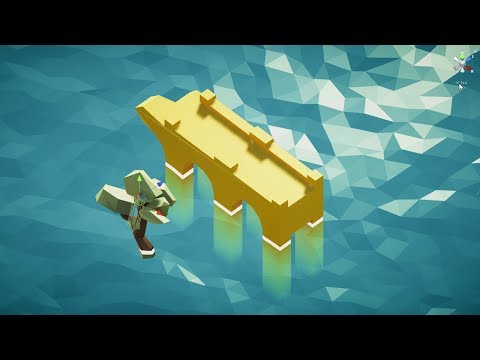
Hey guys, do you know if is it possible to create a water like that in ue4?
Anyone knows how something like that can be achieved?
Ok if find this for anyone interested: https://www.broad-strokes.com/2015-01/coconut-express-bonus-content-low-poly-mini-tutorials/
Broad Strokes
This post is an addendum to my guest blog on the official UnrealEngine website. Enjoy!How to use flat-shading on a landscape materialThis is pretty simple, actually! If it were a Static Mesh instead of a Landscape, you could simply import it without smoothing groups for flat ...
Gonna try it
grim ore
@dim merlin are you trying to get the center of the viewport/camera in the viewport space (1/2 width and height) or are you trying to get that location in world space so you can do a line trace for example
dim merlin
actually i want to point right hand to it, like its a lazer/spotlight
using fabrik or twobone in animation
i already have the aim location, assuming its deprojectscreentoworld
 shell jacinth
Hello UE Community!
I hope this is the right channel for this problem but i hope someone can help me with it...
I packaged my game for testing and when i start it, its extremly lagging. When i play in the Editor i have 90-120 FPS but in my exported game its between 21-60 FPS but not constantly, it changing non stop between 21-60 FPS... Any Idea where I can start to search for this problem ... ?
https://youtu.be/KvkbZ_OnEkk
You can see the problem in the graph in the left bottom corner
dim merlin
@shell jacinth also try #packaging
shell jacinth
@dim merlin Oh yea i dont saw it sry^^
wary wave
eh? The Composure plugin documentation pages are throwing up an access denied at me?
ah, the URL has randomly changed
https://docs.unrealengine.com/en-us/Engine/Composure2
'Composure2' instead of 'Composure'
WHY
also it turns out it's not the plugin I was looking for anyway -_-
 void blade
hey all. i am looking for a way to edit a variable in multiple BPs at the same time. I am using a microphone input and would like to access the clamp values I set from some sort of controller dummy in the editor instead of having to go through all the BPs and adjusting the input clamps one at a time. any pointers about what to search for to make this possible would be greatly appreciated since I am a little lost on what to search for
 dim arch
you probably need to use the python editor scripting

Misc: This playlist is home to my quickfire tutorials and general updates about this channel, Life, the Universe, and Everything. This Video: In this video, ...
make custom editor widget, get it to call python to loop through all the BPs which have the target variable and set it
in this case you need to know in advance which BPs have that var, so they should all be of the same class, or cache a list of them
you can also do it in cpp but need a source engine to modify the editor iirc
Unreal Engine Forums
I have been digging around, but I have been unable to find anything that looks like a way to edit an Animation Blueprint directly. There are ways to create
lusty carbon
importing UASSETS without this nightmare anyone?
lusty carbon
it';s just a pack I got from gumroad
abstract relic
Smack the author for it
lusty carbon
any good and free trees pack?
abstract relic
Both do not exist together
sudden agate
good
free
choose one
grim ore
you can use the free trees from the learning projects. the open world, the high resolution boy and kite stuff, the boy and kite itself
abstract relic
You need a nasa computer to run that 😜
abstract relic
Blender has a tree generator plugin. Not optimized for game but it works.
lusty carbon
those are terrible for real time
grim ore
not for the landscape open world learn project. Also some lower quality ones in the Content Examples and the Blueprints learn project
hell I see some in the Sun Temple which is optimized for mobile
plush yew
anyone know how I can go about accessing landscape components from a landscape?
when making a game with a ready to use game engine, do I have to care about memory magement, multithreading and other technical stuff? O just leave the engine handle it all for you?
grim ore
you can care about it yes, especially memory management, but on a higher level not if you need to alloc or release memory and such.
 dry moon
How would I make it scale but keeping the bottom there alligned
to the white block
In Houdini its just getting the scaleY / 2 right
but here its clearly something else
 tribal pebble
anyone uses the PRODUCT VIEWER template???
 valid slate
Hey so our game we exported to web is having texture issues, each map upon load displays low play environment and assets. Does anyone know what might be causing this?
plush yew
I have this weird white cube on screen and it won't let me click in the viewport, how do I turn it off?
grim ore
turn it off and back on again, that is the widget for when you move a window and it is showing you where you can snap it.
you can also try moving the viewport and putting it back but off/on is easier
plush yew
alright thanks
grim ore
sooo.... completely random question but these api page from the docs http://api.unrealengine.com/INT/BlueprintAPI/Utilities/GetAllActorsOfClass/ and the C++ version https://api.unrealengine.com/INT/API/Runtime/Engine/Kismet/UGameplayStatics/GetAllActorsOfClass/index.html are just the /** comments **/ from the source along with the input/output types. What would make these pages "better" for people coming to them or why would someone come to this page and what would they expect to see that is missing?
 scenic delta
I'm making train scene/level and player should be able to move around and explore train while train is moving.Problem is that if i make train move that will kill fps count (if i do that i move hundreds of objects at same time) .How should i make train move (going through city for example) and still be able to have decent fps?
grim ore
https://www.youtube.com/watch?v=a5Rx8V9SeXM , move the background not the train
tribal pebble
Matthew did you use the ProductView template of Unreal Studio?
i am trying to tinker with the Product view and atm trying to get the MouseWheel speed ,but there is nothing pointing towards it 🤔
scenic delta
I was thinking about moving background but then i'll need to simplify my background,does moving foliage have great impact on fps?
grim ore
I have not used Unreal Studio so no 😦 Is it a weird template?
tribal pebble
not really its like a Sketchfab model viewer in ue4 ,but i export it as HTML5 and the mouse wheel is very slow but i can't find any clues on what is giving it speed
grim ore
gotcha, sounds like a fun template
 silver torrent
Im playing a game which i can only have 110 FoV. But i need to increase this to make things better. 110 is the highest in the game options.
Are there any ways to bypass this? Config commands, console commands, third party programs, aspect ratio/resolution tweaks etc?
grim ore
@tribal pebble ~lol trying to figure out how to get the templates to show up.... instructions are not correct~ have to have datasmith installed for them to turn up.
@silver torrent there is no way of knowing how the game is implementing it, it might be best to ask on the forums/developer support pages
fringe pivot
Is it a bad idea to do things like calculating character resources regeneration and that kind of stuff in every tick?
grim ore
depends on what you are doing. math is not too resource intensive. If you don't need it on a tick tho maybe move it off to a timer? like regen every 0.5 seconds or 1 second or 6 seconds or whatever instead
fringe pivot
yeah I built a health/energy system and something I immediately noticed is that my bars do regenerate progressively, and in most games I remember you clearly notice the ticks.
That's telling me something
tribal pebble
ye i mean its on their website one sec if you wish @grim ore
grim ore
yep yep
yeah I will check it out when I get home, maybe I can figure it out
it's compiling shaders still here at work and I leave in 2 minutes heh
tribal pebble

Create stunning real-time visuals for architecture, product design and manufacturing. Unreal Studio drastically reduces iteration time through efficient transfer of CAD and 3ds Max data into Unreal Engine.
its teh Get the free beta now button
grim ore
yep I got that, the issue was if you don't install datasmith the templates don't show up
@fringe pivot even if you do your regen with a timer every so often you can still lerp the values from the old to the new over time to make it "smoothly" go up
fringe pivot
@grim ore ikr thanks, I'm just worried about performance so far
hidden tendon
How do I get the material editor window to be "always on top". Every time I click out of the window it goes away and it's a pain
 compact echo
so it seems there's new feature in 4.22 - radial motion blur, which would suit me greatly, and there's a doc page - https://docs.unrealengine.com/en-us/Engine/Rendering/Materials/HowTo/RadialMotionBlur
which details that we should create enveloping actor mesh with material MI_RadialMotionBlur - but I could not find this material anywhere
i guess it is probably in some example or showcase project, but I just failed to find it
 severe ibex
@grim ore oh my good lord, are you the guy who does the incredible WTF YouTube videos?
severe ibex
Love it. His videos are so good. I watch them just to think of ways to use it.
grim ore
😀
severe ibex
You’re a sage. You enable so many shitty blueprint bois like myself it’s unbelievable.
grim ore
Awesome that you found some of the stuff useful, that is the goal 😃
 spice spire
Good Evening Chaps. One question that has been bugging me regarding Slot Saving with Screenshot. Is there a usable function in UE that takes a screenshot and allows to assign a name /path to it? the Automation Take screenshot does not seem to respond to any input and the Command HighresShot does not have any input for naming
severe ibex
@grim ore I find it all good. I know that if I have a problem, google it and a video you’ve done turns up then I’m either sorted or in for another hurdle of learnding.
grim ore
heh. I try and fill in the holes I find when I find them so hopefully at some point everything has a video lol
severe ibex
Most appreciated, you’re a great asset to the community.
grim ore
@tribal pebble the mouse speed for zoom in/out is handled in the ProductViewer_Base_Pawn in the Smooth Zoom Input section, it looks like it interps it from the new input when you scroll from the old over time. Did you find this?
grim ore
and I've got no issues here with the mouse scroll speed but it is backwards on html5 lol. its the reverse for scroll in/out compared to PIE
shell jacinth
Can anyone tell me how i can enable a debug mode on my game? When i start it its loading the level but then it crashing and i really wanna know why... it was a ton of work :/
grim ore
when it crashes does it give a log or debug screen? is this in editor or standalone or packaged or ?
 red hollow
Is there a weather mod that creates realistic weather based on the level terrain, i.e. moisture from bodies of water forming clouds, temperature from different locations causing wind patterns, and all that?
shell jacinth
Its packaged, in editor and standalone its working perfectly without any issues - I found a log in MyGame\saved \logs\ but there is no error that can cause the crash, i dont was logged in in steam but i dont think this causes crashes because i also dont was logged in when i played it in the editor ... :o
https://pastebin.com/twsBSCqk
 grim ore
yeah nothing crash related in there. At this point you might need to see about getting the crash reporter hooked into your project so if it crashes you can see the stack trace or start debugging it slowly removing parts to see what causes the crash point
https://answers.unrealengine.com/questions/731462/how-to-debug-shipping-build-exclusive-crash.html to get full logs in a shipping build but after that making a full debug shipping build and debugging it with VS
I would try and figure out what changed since the last time you tested a packaged build and start there
shell jacinth
Oh that sounds like fun.. thank you! i will test it after my backup finished
I think it must be something in my sublevel, but i dont know, i builded it today with the project launcher and after i loaded my level in the packaged game, it starts lagging as hell and my fps was jumping between 22 and 80 fps (and CPU 90%), after i exported this game with the package for win64 option it crashes completly, i think the engine hates me 😃 , Can the "bUseLoggingInShipping " thing show me if its a blueprint problem ?
grim ore
it should show anything warning or error related
shell jacinth
Thanks for the tip with the bUseLoggingInShipping 😃 Btw. you make awesome videos, its funny to see here so many people i watched on youtube! :)
I test it in 10 minutes when my backup finished, thank you! 😃
grim ore
😃 packaged crashes are the most pain in the butt to track down
 honest rune
nevermind, misread
eager crypt
anyone spot anything wrong with this piece of code for derived class of AIController?
AGoblinController::AGoblinController(const FObjectInitializer& ObjectInitialiser)
: Super(ObjectInitialiser)
{

    BrainComponent = BehaviourComp = ObjectInitialiser.CreateDefaultSubobject<UBehaviorTreeComponent>(this, TEXT("BehaviourComp"));

    UE_LOG(LogTemp, Error, TEXT("Initialise components"))

    bWantsPlayerState = true;
}


void AGoblinController::OnPossess(APawn* InPawn)
{
    Super::OnPossess(InPawn);

    AGoblin* goblin = Cast<AGoblin>(InPawn);
    if (goblin && goblin->GetBehaviourTree())
    {
        if (goblin->GetBehaviourTree()->BlackboardAsset)
        {
            Blackboard->InitializeBlackboard(*goblin->GetBehaviourTree()->BlackboardAsset); // relying on using default blackboard for goblin BT
        }
        BehaviourComp->StartTree(*goblin->GetBehaviourTree());
    }
}
getting strange Access Violation error though I'm pretty sure everything's initialised correctly
particularly, getting violation on the line BehaviourComp->StartTree(*goblin->GetBehaviourTree());
snow crown
why are you derefecerncing goblin->getbehaviortree()?
eager crypt
StartTree takes a reference UBehaviorTree
UBehaviorTree&
GetBehaviorTree() returns me a pointer
shell jacinth
@grim ore Yea ur right, thats the biggest *** that can happen .. ^^
They talking in your UE Answer Hub URL about the Target.cs, i only worked with blueprint so i created a empty C++ File inside my game and loaded it into VS2017, now i found a XXXX.Target.cs File in my \Source\ folder, i think this is the right one what they are talking about?
 maiden sundial
How should i work on an anti cheat for an MP game ?
I actually didn't thought about this problem bcuz i was mainly only working on some SP games where it's no problem when someone use cheat enigne or so
tribal pebble
@grim ore thx mathew i'll check into it more , so you found a ZOOM ? because i could just word search it as zoom i guess
maiden sundial
Can i maybe just add an anti cheat program into my game ?
snow crown
@maiden sundial i would recommend finding a 3rd party anticheat solution like easy anticheat
it's hard to do anticheat
 vale silo
maiden sundial
vale silo
maiden sundial
Alright, i gonna look up on it tomorrow
abstract marten
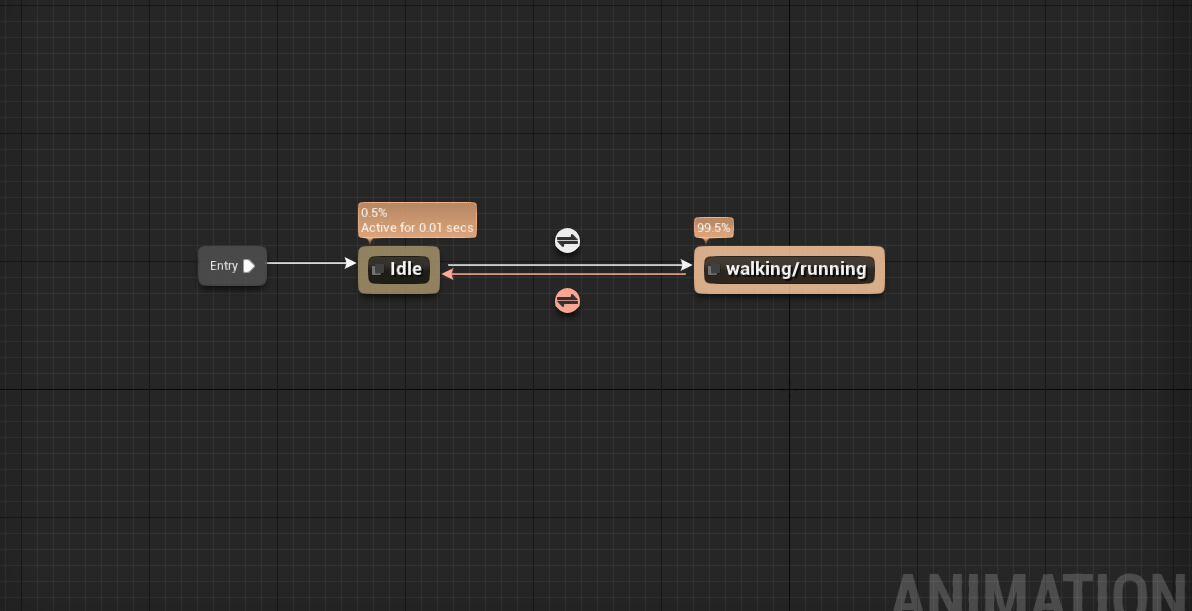
can someone help me with my walking animations they are screwed up for my main character
no one has helped me, and i don't know why its happening
 cerulean sorrel
@abstract marten whats going on?
abstract marten
could i get into a call with you? @cerulean sorrel
abstract marten
it hard to explain, like i put in walking animations and they work, but sometimes my chacter just hovers instead of preforming the walking animation
cerulean sorrel
you sure you set everything up right one time i mad a tiny tiny mistake and it screwed up everything
abstract marten
yeah im 100% thats why i wanted to call, so you can see my bp to see if you see something that i am not seeing
 cerulean sorrel
theres more?


 abstract marten
 cerulean sorrel
you say it works sometimes
abstract marten
yeah and half the time my pawn just hovers across
cerulean sorrel
now i'm confused
wtf
should work
i don't understand
everything is right
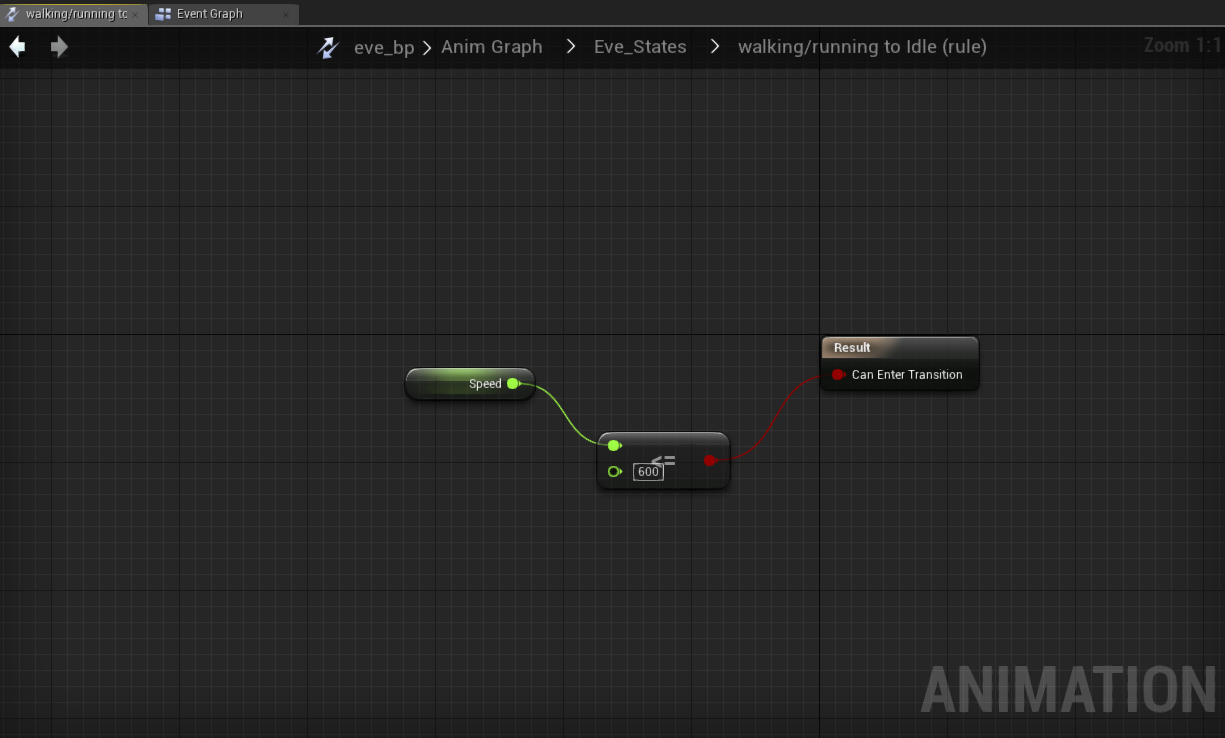
one question is that walking to running or are you going from idie right into walking/running
@abstract marten you making walking and running one rule???
abstract marten
i think so, i just followed a tutorial
abstract marten
should i change it?
abstract marten
the walking/running to idle?
cerulean sorrel
wait
so right now it seems like you start with a speed of 600 in idie which makes no sense
get what i'm saying
cerulean sorrel
isn't idie 0 then <0
entering walking
and then shound't walking and running be two things
cerulean sorrel
was i right
abstract marten
ye
cerulean sorrel
your such a noob


 cerulean sorrel
haha
i'm still learning this too
i know this allready though
youu nub
i was like wtf is this 600
WHATTT
abstract marten
XDDD