#ue4-general
1 messages · Page 431 of 1
 kindred viper
 grim ore
you can also change the default collision property in your settings
kindred viper
thats handy
grim ore
it's why one of the options is project default.... lol
kindred viper
i dont pay attention to such things until I need them
 plush yew
thank you
 low zenith
Is it possible to extract whole map?
 azure shore
anyone know my arm shapes on my physics asset are very bad at staying in place
they just slide around all over the place and in game the arms and hands keep having an offset
plush yew
lol tell me about it I have a manual script in some of the levels that attaches character hands to arms
 cerulean sorrel
@low zenith wut you mean
azure shore
wow is it that bad
low zenith
@cerulean sorrel from the game
low zenith
Whole map from Ratchet and Clank @cerulean sorrel
kindred viper
You can do it, but you have to work to do. It won't be like you expect it to be
low zenith
I understood it takes real work
 abstract relic
Just as a forewarning
kindred viper
ill give you an example. I wanted to use a Counterstrike map as a testing ground for a game I was working on. So I ripped the map. But it was all seperately laid out. So I cheated and merged them all into one mesh. Then I baked the entire scene into a texture so I could wrap the level mesh. So everything all worked. But the missing elements that were dynamically created and my texture was only 8k when it needed to be around 16k. But it was good enough for test purposes. That was just messing around tho. If I wanted to do it seriously, it would take a lot longer... a lot.
low zenith
but I can see files in 2nd and third games
ONLY Issue 2 Issues I have here is how to extract the wad files AND how to view hidden files in Ratchet and clank 1
 cerulean jackal
Flawless Entertainment HD Remake of old games Remastered
We Remake game 2012 and under any game outdated, Remastered games in current Gen Graphic. Also Remastering the story and adding new contented.
kindred viper
extracting wads isnt an issue. thats been done a billion gazillion times and you can find info on how to do it
low zenith
@kindred viper not the one that made by insomniac games for Ratchet and Clank
abstract relic
You're not likely to get much help riping assets here. No one will stop you though. Many are just against such practice
low zenith
why is it against the practice?
kindred viper
ripping assets isnt a problem as long as you aint distributing or selling them. But you can't use them in anything that makes money and need to rep them in the credits
low zenith
well I don't expect in making money of it anyways
abstract relic
It isn't a problem in such cses. Even a great learning tool
low zenith
I just do it because it's fun to do
abstract relic
but there's a good portion who contract themselves out. You won't believe how many clients will try to scam you or overall devalue your time by claiming it should be free.
kindred viper
reasons why I left web development #001. The clients.
abstract relic
I can't imagine for the web. 1000x worst? 😛
low zenith
If we can separate hobbies and work then we should be ok but some people even try not to pay with my work in repairing their vehicle/equipment
but IF we are building a game for profits, that's a real job to do and not let yourselves getting scammed OR get in a legal troubles
low zenith
@cerulean sorrel test the map ripping?
cerulean sorrel
Yes
low zenith
not yet but I know some guys who have done it with PS3 HD version which aren't very friendly with newbies
I have bit problem with blender
I kinda can't move camera or enable moving camera if I press center it just rotates or zoom the focused area
any hotkey?
 wintry forge
Ay its commando
cerulean sorrel
Yes its me @wintry forge
low zenith
I don't know how to explain but it's bit weird
low zenith
I want to move the camera to point at the object but it just rotates the world
cerulean sorrel
You nub that's the viewpoint
Now I got confused
I thought you wanted to make the comara follow an object
😬 😬 😬
low zenith
I mean the model is far on right in Blender and I cant view it by zooming or rotating
low zenith
but I figured out by holding shift and press center mouse
cerulean sorrel
You mean pinning the viewpoint
low zenith
I guess whatever that was called
cerulean sorrel
You need to explain clearly several things are very alike
There is the viewpoint
Then there is the carmara object itself
This gets really confusing
low zenith
sometimes I don't know how to explain this since it's new to me
Next time I will say viewpoint
cerulean sorrel
Yes that's what the view is called in blender
low zenith
like you try to fix a car and you explain something to me but you don't know what it was called
cerulean sorrel
Yeah
low zenith
I am watching a tutorial video how to rig a model
do anyone have a decent note with list of all simple hotkeys or shortcuts to Blender AND unreal?
cerulean sorrel
@low zenith no it's huge
Hitkey list
Go the settings you will we what I mean
It's huggggggggggg
 deep basin
Has anyone ever tried to map multiple actions to the same input? I am trying to double map my right thumbstick xAxis, but it doesn't work as I expected. I've set bConsumeInput = false for all axis mappings (to be sure...) but still cannot map more than one action. Do they need to be on seperate input components?
nvm, recompile solved it... lol
 zenith flower
Funny how that works
Framerate:
0 = unlimited (actually means 120 fps max)
1-120 = 1-120
121+ = 121+
How is unlimited less than 121+ lol
 hoary pier
Where are you seeing these options?
hoary pier
sounds like the answer
 grim juniper
The easy answer is probably landscape splines. If for whatever reason you don't want/can't to use those then there's some good tutorials on YouTube
 icy mulch
Couldn't save package, filename is too long".
grim juniper
You supply the mesh, so it can be wall if you want. People use it for fences too
low zenith
funny most people prefer consoles but almost all games runs in 60 fps or 30
icy mulch
Does anyone know how to fix
Couldn't save package, filename is too long".
cerulean sorrel
@low zenith consoles are cheap lol
$200 for console compared to $1200 for one RTX CARD hmmmmmmm.........
i wonder why
low zenith
@cerulean sorrel many graphic cards are around 200 to 400 too lol but not overkill RTX card
cerulean sorrel
@low zenith yeah loll
 worn spade
any ideas on blender fbx export giving this error?
wintry forge
What does TryGetPawnOwner do in animations?
pawn = an actor that can be controlled by AI or the Player
trygetpawnowner = tries to find the controller of the pawn? (so either an AI or a player)
atm its sequencer -> cast to thirdpersoncharacter (whose object is "trygetpawnowner")
i guess i dont understand what an "object" is in this case either
low zenith
@cerulean sorrel one time I get called port begger when I told people in PlayStations that I liked PC
wintry forge
Ay mathewW 😄
grim ore
@wintry forge when the animation is fired the TryGetPawnOwner nodes tries to get the pawn the animation is playing on currently, so if in game the character normally who called this animation to play/run, and returns back the resulting pawn or nothing. The key for this one which the default animations mention is the animations might be playing in the editor when previewing them but not actually on a pawn so you use this node to prevent errors from popping up while previewing. This is why it's normally the first node in the anim graph after it fires off. and yes if you plan on using it to get values from your character while the game is playing, direction/speed/whatever, you need to cast to that character after getting who is running the animation with the TryGetPawnOwner
I guess a more robust way of naming the node might have been "Try and get the pawn that owns this animation that is currently running"
wintry forge
so its checking which of the "thirdpersoncharacters" it should be working on? or its naming it for future use?
if the pawn is already running the animation then wouldent it already know which pawn it is?
worn spade
 man I'm at a wall now
wintry forge
sorry my guy, i tried googling your problem but couldent find anything 😄
grim ore
this animation blueprint could be running on a billion characters, yes all uniquely, but this blueprint doesn't really know who called it just that it was called. the anim graph. internally yes it knows which is what the try get pawn owner node does by trying to be safe and not crashing if this node is running without a pawn (the preview)
wintry forge
thanks mathew 😃
grim ore
the try get pawn owner is special because it won't return back a valid pawn if you are not actually in the game, if you hook up the Get Owning Actor for example it will run the entire anim bp in the preview
wintry forge
is there a purpose to having one that works in the preview and one that doesnt? sounds like there should only be one (unless the preview is super laggy I guess?)
zenith flower
So it appears, there is a REASON unreal caps at 120fps
grim ore
some stuff might fail since the preview is not actually in the world so yeah there is a valid reason for using the try get pawn owner node
wintry forge
i see, thanks
zenith flower
It causes all kinds of weird issues with blueprints (maybe c++ too, who knows)
wintry forge
so my animBP is considered a parent of ThirdPersonCharacter? (which is why cast to thirdpersoncharacter works?) im guessing its the case that animation BP automatically become parents to whatever they are animating on
grim ore
nope your animbp is not considered a parent of the third person character
the pawn the animbp is on is considered its owner, it spawns it in and uses it. in this case it could be your Third Person Character
parent and owner are not the same thing so that is important
the pawn, or character in this case, uses the animbp to determine how it should animate. when it starts up it creates a copy of the animbp for itself and becomes the owner for that copy.
worn spade
Confusing
wintry forge
so this pawn creates a copy of animBP, and the animBP uses its owner's parent designation to cast to thirdpersoncharacter specifically
grim ore
doesnt use the parent status
parent shouldnt be mentioned in here anywhere from what I can see
wintry forge
casting is only from parent to child right?
grim ore
nope casting is telling something exactly what it is, or well how you want to talk to it technically
wintry forge
thought i understood casting and now im not sure haha 😄
grim ore
in theory you could have a character that you have called MyAwesomeDude and cast it to a pawn but that would be weird most of the time
You have an object, its the top of the food chain, or the first "parent"
below that you can have the pawn, then below the pawn the character, then below the character your specific character (third person character)
in this specific chain if you want to talk to the "SPECIFIC" stuff that is part of your ThirdPersonCharacter you would take this object and cast it to the ThirdPersonCharacter
this would let you access anything the parent chain has access to and the specific stuff in the ThirdPersonCharacter
wintry forge
could firstpersoncharacter cast to thirdpersoncharacter in this case?
they are siblings but not parent-child
grim ore
now if you took that same object and cast it to say pawn you would still be talking to the same object in the world but it would have no idea about anything that is specific to the Character or ThirdPersonCharacter
wintry forge
right
grim ore
you can technically cast anything to anything but it will just fail if it's not valid
wintry forge
it sounds like its still exclusively parent-child then
grim ore
a FirstPersonCharacter does not have a ThirdPersonCharacter anywhere in it's chain so it cannot be cast
wintry forge
or like parent-(any offspring)
grim ore
they can both be cast to characters tho
wintry forge
so in my chain i mentioned, what is the chain of command?
animBP event graph: on animation update, casts to thirdpersoncharacter
animBP is on pawn, so pawn is casting to thirdpersoncharacter?
grim ore
in your animbp case that node is saying "hey who owns me? I want the pawn that owns me and i will tell you who that is"
the animbp is not really on the pawn, it just owns it when the pawn is created it creates the animbp so it can use it.
if it helps to think it's on it that is fine but its not "on" it
wintry forge
its more like its reading the rules for it
and it can take different rules later if it changes animations ect
but im talking about the casting portion specifically- so the pawn is reading "cast to thirdpersoncharacter" from animBP and does so itself?
basically pawn is casting to thirdpersoncharacter because its reading from animBP?
wintry forge
yea, not sure what it is
grim ore
the animbp is created and it has an event that updates the animation on the item it is created for
now this event could be empty, it could do nothing if you wanted and you could just use the anim graph itself with the state machine
the event graph part of this animbp is to process information or handle information normally, one of the events if the update animation event which fires whenever the animation is updating (so normally a tick, you can think of it as an animation event tick)
now the animbp knows who owns it, that was part of the info that was passed to it when it was created
during the tick you want to pass in information such as the speed you are running and maybe if you are jumping
this one animBP can be anywhere on any pawn. it doesnt care if its on a character or a pawn, or if its a third person character or an enemy AI, it just needs a pawn to play animations on
so during the animation tick the blueprint is saying "hey who owns me? I want that pawn" and the node gives it to you.
the next part, the casting, is getting the specific pawn that owns this graph so we can get the specific info from it
if you check out the default third person project you will find it doesnt even cast, it gets the falling and velocity from the pawn itself since it can get the movement component from the pawn and get that info
wintry forge
where does the blueprint say "who owns me?"
grim ore
the TryGetPawnOwner returns the Pawn that owns it
grim ore
that is the part that is going "hey anim graph, who owns you? get me the pawn that owns you"
after that you do what you want with the specific pawn that owns that anim graph in that event graph at that time
wintry forge
ok yea i think i get it, but i have the same flowchart in my head as earlier that you said was missing a step
grim ore
maybe its just misunderstandings on my part
wintry forge
trygetpawn owner creates a pawn, which casts to thirdpersoncharacter
er
not creates*
grim ore
it might create in your graph sure but it doesnt have to
grim ore
i am guessing its casting in your graph because something on the third person character has the exact data it needs that the pawn class does not have
wintry forge
then it casts to thirdpersoncharacter to get specific data from thirdpersoncharacter
grim ore
yes the trygetpawnowner returns the exact pawn that this anim bp is running on
yep
i dont know what the graph is doing on your side so it might be doing that just because as well lol
like maybe it only wants to run this specific stuff if the animbp is on a player and not on an enemy
wintry forge
its short so far, im gonna grab "aimrotation" to bend the spine of a skeleton in order to make the gun follow my camera
but right now i wanted to figure out what trygetpawnowner was, but the answer i got was confusing me as to how this script was casting to thirdpersoncharacter
grim ore
ah yeah then you would have to if that aimrotation is a variable on your specific character class you created/changed
wintry forge
so in the "object" portion of "cast to" its asking for what is the parent, is my final conclusion?
grim ore
gotcha, you might be used to using like get character or get player character or something normally when getting the character
wintry forge
yea, exactly. still not understanding those either kek
grim ore
well the object is the object, objects are the basis for pretty much anything you work with in unreal
its the parent parent parent parent class lol
wintry forge
pawn is above character, and then below character is a specific kind of character. playercharacter is the pawn/character being controlled by the player controller?
but the object its specifically asking for in "cast to" is the parent right?
grim ore
well the object its asking for is whatever you want to talk to and cast to third person character, in this case it's the owner of the animbp specifically
i mean you can put in a player controller or a save game object if you want but they would fail
wintry forge
the only thing(s) that wouldent fail is one of the parents though, is what im asking
grim ore
well the only thing that wouldnt fail would be a third person character or any of its parents yes
assuming it is a third person character in the end
wintry forge
ok cool. thanks 😃 i get now how i misinterpreted some of your info before and made this chain of questions haha
grim ore
a parent of a third person character is a character for example but you cant plug in a first person character and have it work
and you cant plug in a character that is a first person character because again it would fail to become a third person character in the end
wintry forge
i was looking for a direct answer and your answer mentioning that theres other possibilities but that they would not work/be applicable confused me. I should have realized you meant that its not close ended and thats where a lot of issues can arise
i appreciate the help man 😃 ill proly be back as I progress through these tutorials
grim ore
yeah its just a communication thing, there is a ton of intricacy for this stuff
and its hard to wrap your head around if you just go "damnit I want that one to do that thing" and it seems like it should work lol
wintry forge
lol i feel ya, programming always has that issue regardless of the form 😃
worn spade
Matt you know anything about blender fbx export errors?
grim ore
I have never used blender, I am not an artist 😦
 wind siren
i just overcame some blender fbx problems myself
abstract relic
They’re getting errors from addons. A bit more tricky
worn spade
who what now
abstract relic
and addons on 2.8 beta from a pulled git branch. For shame 😛
worn spade
wat
I guess my last character was exported in 2.78. 2.8 dont play nice with fbx export?
I didnt realize fbx export was an addon, but I see it there, I guess that's a little direction for deciphering this error
abstract relic
Fbx has to be reversed engineered for every new version (of fbx). I’m willing to bet that addon is an attempt for this year’s version
Take it to the #lounge they love that stuff
worn spade
I cant export an obj with animation can I
 proven oxide
Ok i have no warning but i have a problem i am not sure how to fix in converting from 21 to 22
1> [14/16] UE4Editor-UnrealGhosts.lib
1> Creating library F:\Development\Unreal\SectionNine\Intermediate\Build\Win64\UE4Editor\Development\UnrealGhosts\UE4Editor-UnrealGhosts.lib and object F:\Development\Unreal\SectionNine\Intermediate\Build\Win64\UE4Editor\Development\UnrealGhosts\UE4Editor-UnrealGhosts.exp
1> [15/16] UE4Editor-UnrealGhosts.dll
1> Creating library F:\Development\Unreal\SectionNine\Intermediate\Build\Win64\UE4Editor\Development\UnrealGhosts\UE4Editor-UnrealGhosts.suppressed.lib and object F:\Development\Unreal\SectionNine\Intermediate\Build\Win64\UE4Editor\Development\UnrealGhosts\UE4Editor-UnrealGhosts.suppressed.exp
1>LINK : error LNK2001: unresolved external symbol IMPLEMENT_MODULE_UnrealGhosts
1>F:\Development\Unreal\SectionNine\Binaries\Win64\UE4Editor-UnrealGhosts.dll : fatal error LNK1120: 1 unresolved externals
1>f:\Visual Studio 2017\Common7\IDE\VC\VCTargets\Microsoft.MakeFile.Targets(44,5): error MSB3075: The command ""F:\Epic Games\UE_4.22\Engine\Build\BatchFiles\Build.bat" UnrealGhostsEditor Win64 Development -Project="F:\Development\Unreal\SectionNine\UnrealGhosts.uproject" -WaitMutex -FromMsBuild" exited with code 5. Please verify that you have sufficient rights to run this command.
1>Done building project "UnrealGhosts.vcxproj" -- FAILED.
========== Build: 0 succeeded, 1 failed, 0 up-to-date, 0 skipped ==========
abstract relic
No. Obj doesn’t support rigs
grim ore
I want to say unresolved externals is normally a module missing from your target.cs file
you would spend as long as you wanted learning it I suppose
worn spade
forever
proven oxide
@grim ore The "missing " module is my code.
grim ore
are we sure that is the issue and not another module?
proven oxide
well it compiled fine yesterday on 21.
grim ore
you would need more info. You can learn to use UE4 and make a new project within 4 months for sure.
proven oxide
Well if you don't have a version 5 gfx card and only have v4 then you can do it (very laggy) on 4.14
 dim plover
Theresa, maybe check out the last comments in #cpp, maybe it's related to your thing.
I think some other guy has an issue with updating plugins for 4.22.
proven oxide
yeah but in this case the "plugin" is my game....
so is there a change in the way the Target files are done?
public UnrealGhostsTarget(TargetInfo Target) : base(Target)
{
Type = TargetType.Game;
ExtraModuleNames.Add("UnrealGhosts");
}
}
that basically tells the game to add my game to the build
grim ore
there is a few versions back but I am pretty sure that method still works ExtraModuleNames.AddRange( new string[] { "CPP_Examples" } );
what does your module .cpp file look like?
and you did nuke your intermediate and build before regenerating the .sln for .22 and rebuilding yes?
proven oxide
yes
low zenith
@abstract relic you're saying it OBJ doesn't support rigs?
why does many people use that file?
 meager violet
The Switch EULA version support forums are pretty dead. 😦
I have an issue with UE4.22, that made my ortho camera act odd.
I have an ortho camera set at 16:9 / 1.78 aspect ration (width: HDTV 1080), aspect ratio locked, but when playing it in a standalone window or on the Switch hardware small black bars appear either side of the screen (as if the camera locked at 16:9 can't fully fill a 16:9 screen).
This happened only in 4.22 (didn't happen in 4.21 or before).
Any insights into what changed in 4.22 that would cause this? (Or better yet, how I can fix it?)
plush yew
I have a stupid question.
How do you deactivate Text hitboxes that are over buttons ?
Because it blocks the button's hitboxes.
plush yew
Thanks, it's perfect.
Okay, I havent saw the channel, sorry. I'm not used to post at the moment.
 upper heart
no problem
 mint umbra
Do you need to submit a prototype of your game when applying for a MegaGrant or is it enough with a video showcasing it?
 leaden dust
is there something like map range clamped for shader graaph?
 lusty carbon
How do I get rid of these seams? lightmaps are fine
lusty carbon
Unreal keeps crashing when reimport static meshes wtff
 sudden agate
@lusty carbon lightmaps are fine
they are not. obviously
plush yew
@YCBKay black bars at the sides is a camera setting
 upper quartz
hi everybody , who konw how to use "sendGameplayEvent"?
or have any doc in the official website.
azure shore
would anyone know how to set up water ragdoll physics?
so they float to the top smoothly and float there
 dapper idol
can someone tell me why I stay in the air? I just sculpted some mountains and then this happened (I already saved so no way back)
dapper idol
well first of thanks, that fixed it, I had bake material pos offset.. activated, but it was activated before and it worked so wta
 toxic fossil
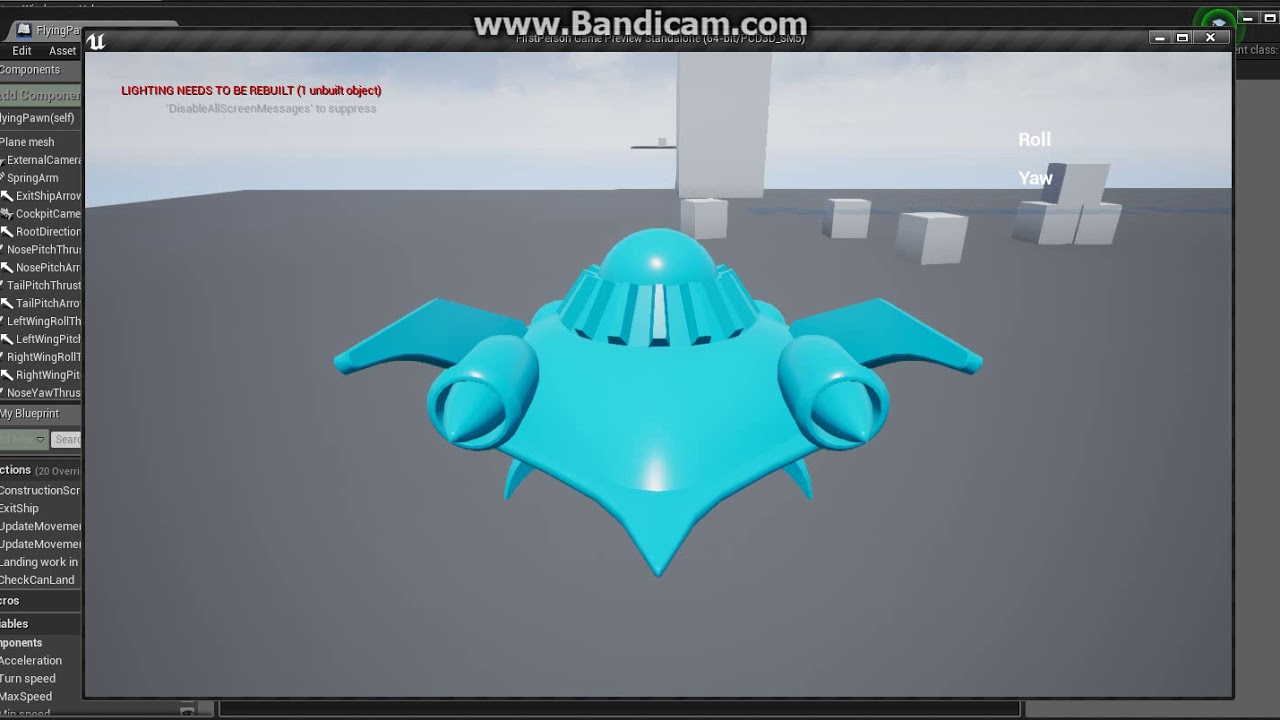
Hello all ! https://www.youtube.com/watch?v=TZzCQsClgfA&feature=youtu.be trying to do landing and take off ability from froject SpaceShipsTest419 WIP: Space ship vehicle, interactable all forks fine , but when plane land and i exit it the mesh size change to smaller , what it could be ?
 icy mulch
I need help i get this message when ever i try to package my game Does anyone know how to fix
Couldn't save package, filename is too long".
 delicate turtle
How long are your filenames?
icy mulch
Is it the file size if the game
 wispy raven
hi, i'm having troubles with importing animations from mixamo
the animation is imported incorrectly
plush yew
any potential issues if i rename my project?
azure shore
would anyone know how to set up water ragdoll physics?
so they float to the top smoothly and float there
 lunar plaza
Hello I’m new 😂
plush yew
When you change the Hue on an Emissive Material the Intensity also changes
wispy raven
Here, is there a way to fix this?
delicate turtle
Did you try what I suggested in #animation ?
hoary pier
Either your animation is bad or as Toxe suggested, it contains root motion which if not enabled for that anim,.
plush yew
guys is there a way to update my vxgi to v2 without compiling ?
@wispy raven that is how I run. Do you have a problem with that?
wispy raven
No, I din’t retarget the animation
I uploaded the model in mixamo
The re-downloaded the animations
@delicate turtle I’ll try that
 worldly axle
hey, someone know how i can delete this black thing? the alpha thing just deletes everything xd
 latent moth
what is the best way to find a location that is 30 degrees right from where the actor is pointing at?
doing this... https://gyazo.com/030eb50e0c38d28cd755f82cf0860bbf

seems to work but not sure this is the best approach
grim ore
I tried it using just a RotateVector node from the Get Forward Vector and then going from there with the multiply and it seemed to work as well but I dont know your end goal 😃
 versed spear
Just noticed my AIPerception is detecting actors I don't want it to detect. I imagine if I can exclude those actors It would be better than detecting all those actors I don't want it to.
 worthy flame
question if you buy the things from the unreal marketplace and you use them in your game and sell it you cant get any issues since you bought it, or if its free its the same result?
sudden agate
you are allowed to use any marketplace content in your game.
You are however not allowed to resell the assets you purchased
worthy flame
yeah i didnt mean to sell i was just asking if i could use them, but thank you for the answer
 honest rune
Is there any support in the engine for FString interning or is FName the only string type that uses it?
worthy flame
if the props support 4.15-4.21 can i run it on 4.22?
plush yew
Hey guys
Can anyone help me transform a human to werewolf
in ue4
i wanna make that
I dont know where to start tho.
help would be appreative
honest rune
can't tell if trolling or not
abstract relic
You’re not going to (generally) find issue with static meshes regarding engine versions
worthy flame
same
abstract relic
Trolling
honest rune
@plush yew There's a discord specifically for Unity that you could ask for help with Unity in. This is Unreal Engine 4 up in here
UE4 gang signs
worthy flame

abstract relic
Skeletal mesh retargeting and morph targets is the keyword you’re looking for
honest rune
Not specifically for that all-in-one.
worthy flame
ok i have bought some props where can i find them ? in somewhat storage?
honest rune
for your question I mean
@worthy flame You can add them to your project from the launcher
worthy flame
i saw that but ty anyway
plush yew
anyonehelp
how do i do
like
i want to have my skeleton transform into a werewolf
anyone explain that in dms
worthy flame
also do any of you know where can i learn to make a game from scratch all other tutorials on udemy are either on learning to code or with already ready projects for me to jump into and explainning the same thing over and over.
i just want to know how to just begin so i have something to work with. another tutorial is explaining on how the mapping works
i dont need that atm
if u dont know ill figure out a way, im patient
whats the difference between these 2 boxes and what does the blue and the red one do. if i add a box next to it to increase the level will that increase or do i need to increase it?
 paper kernel
the point is, tutorials will teach you a very particular thing.
at some point, you have learned enough particular things to start a project on your own
and you will stumble into a problem you dont know how to solve yet -> you look for a tutorial for it
rinse/repeat
 worn granite
I'd say there's no mystical point where that suddenly becomes a worthy approach
versed spear
Anyone know any other option other than AIPerception?
worn granite
Pick an arbitrary small goal (make a cube that spins) and look up what you don't know.
paper kernel
@versed spear AI perception is really just bunch of delegates and traces
worn granite
PawnSensing (but its the old way)
versed spear
one way I was thinking is using each actors transforms and save them in an array for each team. Then I can have an event that checks those arrays for actors near by if the actor is near by do a raytrace?
worn granite
perception is better in just about every way other than you having to learn perception
You working in BP?
versed spear
yea
worn granite
Okay. You can go down that path if you really wanna. But I don't think you'll like it.
 frank escarp
well at least perception is C++ couse faster, but i dont know of any game that actually uses it
not even epic games uses it i think
the mayority of games create something similar, but tailored to their needs
worn granite
Perception is awkward to use in BP, so you'll want to dip into C++
Like I said though its definitely possible to write your own
versed spear
The problem I am having is I have 100 actors using AIPerception so they are all hammering though it trying to find a valid target. With arrays and comparing location of all enemies then ray tracing to make sure they are not behind a wall might be less load on the game.
worn granite
That's already what perception is doing
I guess you could batch them all together
Check if the group is visible at all, then the individuals
Sight doesn't use overlaps
 hidden aurora
I have a setup that has an int that determinates the amount of line traces to show, i want a float that modifies the spacing between lines, if someone knows how thanks
Its for making a procedural tree placing
along only one axis
grim ore
How do you determine the spacing now?
versed spear
it seems to be random from the ss
hidden aurora
It adds a random float on the x axis
What i want t o change is the spacing between each one
Wait im stupid
versed spear
yea just change it to a float variable and set it to the spacing you need.
hidden aurora
Thats the same
versed spear
How so? One is random spacing and the other would be a set spacing.
 bitter iris
Has anyone had a mess around with the multi user editing on 4.22? if so how is it?
wintry forge
is there a shortcut to moving a pin connector from the source to another source
ie i want to move a pin connector source from X to Y
abstract relic
Hold ctr to drag from an existing output to a new pin
wintry forge
tyvm 😃
abstract relic
Or shift double click for each pin
wintry forge
We are trying to rotate the model's spine to have the hands follow the camera.
Is 0° straight down, and 180° straight up?
When Currentangle * -1 results in a negative degree under 180, wont the angle be behind the player?
versed spear
could you use look at rotation maybe to get the rotation you need.
wintry forge
Also another issue:
When the snap for transform is 1 or no-snap, the red transform arrow becomes bi-directional. It wont just move in the red axis. A strange issue. I found out its because im trying to change the camera position while the model is animating "idle" and its head lightly bobs up and down. Idk how to pause the animation but this is a weird glitch.
@versed spear maybe, im following a tutorial but he doesnt explain the calculations
we have "get control rotation" -> break rotator -> the calculations -> select float -> divide float by 3 (because we have 3 spines) -> make rotator -> thats the output
it works, but im wondering what those calculations mean
we dont use "look at rotation" probably because of the 3 spines (though idk what look at rotation is, im just guessing)
 zealous jasper
Hi there, I'm not entirely certain which chat to put this in but this seemed to be the most appropriate, I'm trying to import fbx files to the engine and after I select the file and hit okay, nothing happens in the engine. It isn't letting me drag and drop files either
versed spear
@wintry forge so its working you just want to know how it is working? Control rotation is based off its rotation in the world. Maybe 0 is north in the world and 180 and -180 is south.
 fickle osprey
Going through the quick start, and I'm having some trouble setting my environment to night. I tried rotating the directional light to make it "night" but everything's way too dark, as opposed to the image shown
https://docs.unrealengine.com/en-US/Engine/QuickStart
Any fixes?
wintry forge
@versed spear well its strange because the values seem like they are pretty varied. [360 - (180 to 360)] would result in a value [0-180], and [currentrotation*-1] would be [0-(-180)]
versed spear
That math seems to keep it in the range of 180 to 0 and 0 to -180 no matter what Y is.
wintry forge
yea but thats a full rotation isnt it? its 360°
maybe im not understanding what the numbers are representing
versed spear
yea
wintry forge
we can only look at our feet and the sky, we cant look behind ourselves
im guessing dividing by the 3 spines in the end fixes the problem somehow
https://youtu.be/AAd7g8tvheI?t=347 this is what im looking at

Today we take a look at how we can use the player's control rotation to affect the position of the characters weapon. Doing this will make the player's weapo...
so you can have the full picture
 buoyant meadow
Saw this while browsing reddit, might be useful for any fps devs

reddit
25 votes and 4 comments so far on Reddit
wintry forge
neat 😃 im just trying to learn and using any tutorial to do so, but ill check that out too 😄
wintry forge
how do you find what is the Y (pitch) of your camera/model? Is eye level 0°? straight down? makes it hard to figure out this calc but im gonna skip it and come back sometime i guess
worn spade
finally fixed my export debacle, getting new build of blender seems to have fixed it.
wintry forge
i saw that when i looked it up but I thought youd have the most recent version 😄
worn spade
quick question, how do I just add a node with an integer in material blueprints
nevermind I got it
I guess thats the risk with using beta build. last version was only about a month old
wintry forge
broodmud
did you update blender separately from ue4?
or is it a part of ue4 you can update to update blender
worn spade
separately. deleted old blender and downloaded new build.
 summer turret
How do i find out what goes in parent slot to be able to cast to mainmenu?
mainmenu is a widget
versed spear
your main menu is an object?
summer turret
all i know is get player character
i am trying to get a variable from mainmenu blueprint but i dont know what goes in the object slot because it is a widget
buoyant meadow
You need a reference to your main menu
versed spear
When you spawn the widget you can save it to a variable to use it later.
buoyant meadow
yeah this ^^
summer turret
yeah nvm i was trying to create a mainmenu as overlay but i figured its better to let it have its own level then switch back to playable level when they click continue
 brisk osprey
I have a issue : When adding lights to a scene crashes unreal 4.21 (This is a editor for another game for making mods)
plush yew
How do you simply deselect an actor?
 hasty flame
I'm looking into integrating Nvidia gameowrks with my UE4 project. I've run into lots of conflicting information. If I get gameworks working in ue4, will it only work with Nvidia GPUs?
 vapid galleon
so shot in the dark here, is there a way to essentially create preferred sorting in the material editor?
Like if I right click and type lerp it used to be a standard Linear Interpolation node. In later versions it's random lerp functions. Not a big deal on my desktop 'cause I have a mouse so I can just hold L and left-click my mouse. Can't do that on my laptop though
grim ore
probably not but you can favourite the ones you like if it works like the normal event graph, yes it does sorta as there does not seem to be a favourites panel but they go under a favorites category when you right click
wintry forge
trying to add an asset from marketplace, says its not compatible with 4.22, its only compatible with 4.22 😄
cant add it but ill just use fireworks for a muzzle flash for now heh
vapid galleon
weird!
yeah that's true @grim ore
I know you can type linear (which used to pull linear gradient...) and it gives you a proper lerp, just bad muscle memory now haha
wintry forge
oof the marketplace->vault assets are permanant, you cant delete them
even ones that are outdated and unusable
rip
summer turret
is there a way to use keyboard input in a widget?
plush yew
Ooo
hoary pier
Listen For Input Action. Make an input called something like UMG_Escape. Tie that to Escape. In ListenForInputAction listen for UMG_Escape
Otherwise, handle your escape input in a function in PC and have it decide where to send it. Unreal's blueprint input is kinda wonky, you can't just send the input out and bubble it up, choosing to capture or not
 zinc spire
which channel do i go to get help in?
hoary pier
Whichever fits your question best
abstract relic
zinc spire
ok well i think here fits
my ssd is full and i want to download an asset from the library in the Epic Games Launcher
how do i change the location of this download, whenever i click on it it says drive is full
i have an hdd that i want to download it on, my project is also on my hdd
 storm venture
anyone have a good recommendation for a vehicle physics system on the marketplace?
looking to get a nice feeling truck working
zinc spire
nvm ended up just copying everything to my hdd then deleting it off my sdd, once i opened it up it fixed the shortcuts for me
grim ore
@zinc spire the preferences in the launcher should have an option for the directory for the vault cache
 fresh hemlock
Yo my water shows up black when I enable lighting but looks fine with light off
plush yew
Does anyone know why client 2 is not calling a function on the server but client 1 does?
plush yew
Hello i'm new here.
 ancient otter
hi guys
 lime girder
Diving into the GIT LFS 2 - anyone have trouble with it?
ancient otter
nvm its in spanish lol
hoary pier
@fresh hemlock Do you have lights in your scene?
fresh hemlock
Yes
They diffuse texture just shows up black if have lights on but if i use an emmissive texture then that will color it but the diffuse looks better
hoary pier
@plush yew Could be any number of reasons. I would verify your server code isn't using GetPlayerController. You may be always getting client 1 that way
plush yew
So i'm new to unreal and wanted to know if it be easy to recreate a low poly style simulator and recreate it to look actually real?
hoary pier
@fresh hemlock Probably need to rebuild lighting or make the water dynamic. Maybe you have metalness more than 0 on your water?
@plush yew New to Game Development in general or just new to Unreal?
fresh hemlock
yea my metal is 1
hoary pier
Set it to 0
Unless it is liquid Mercury or a special style you shouldn't need metallic water 😛
plush yew
Hi anyone know how to stop movement and input in a top down level? Its just for level transition as next level opens right after
hoary pier
@plush yew Do you just want to stop time or actually just stop pawns from moving and input from being processed?
plush yew
stop pawns, need to stop them for three seconds while i fade to next level
only one actually
@hoary pier Game development in general, I want to create something or learn the genre of everything.
I figure coming to a community that knows this stuff could guide me down a long beating path 😃
hoary pier
@plush yew It will be long and difficult but all the resources exist to get you moving. I recommend trying to beginner tutorials and once you start developing specific questions come on in and ask around
plush yew
Would you recommend learning the within Unreal or move down to Unity?
hoary pier
@plush yew Honestly either direction is fine. If you aren't big into coding maybe Unreal would be easier to start but I am really not sure anymore. I wouldn't think of Unity as a move down either, just different strokes
Unreal can take you a long way now with a visual node based scripting language but Unity will require learning how to script in C-Sharp (C#)
plush yew
Yea not much of a coder, I have a idea for a game and just seeing has visually insane this game is it would look so nice!
Would you have any references for me to check out to get started possibly? @hoary pier
fresh hemlock
Thanks @hoary pier
hoary pier
@fresh hemlock No problem 😃 Someone has the exact same issue just an hour ago
plush yew
I really want to make like a driving simulator for motorcycles since I have yet to seen many that just focus on Open World Driving, mainly it's track racing.
@hoary pier
hoary pier
@plush yew You are aiming super high. You'll need to spend a while just learning game dev in general. I recommend just searching for some basic start tutorials. I know Udemy has some unreal starter stuff for like 12 bucks if you wanna try that. I honestly don't know the best place for beginner tutorials
cerulean sorrel
@plush yew that's high
plush yew
See that what I was thinking. I'm just trying to visually see what i'm capable of doing right now.
grim ore
wintry forge
I feel like a mediocre motorcycle framework would take you maybe a week of dedicated after-work studying if the assets were already available
Well, at least to get to the point to make it yourself
Youd still be looking up stuff and having issues but at least youd know how to go about doing it
Im like day 3 or 4 of dedicated studying
hoary pier
full time study maybe (40 hours)
There's just so much to learn about game dev and basic engine functionality that will make it slower than that i believe. If you just want to place a motorcycle asset in a level and mess with rendering then you can do that easier but still a good amount to learn
grim ore
The Crew games are good open world motorcycle games 😃
kindred viper
I made a motorcycle using the vehicle component. It was a pain in the butt. It took me some time to figure out that physx setup for wheels requires a minimum amount without customisation. So I ended up spoofing it with 2 dummy wheels. But it screwed up the authenticity. My advice, if you make a motorcycle, make it from scratch and try not to use the VMC unless you are willing to get stuck into the physx code
plush yew
Still having some weird issues with addrotation, world relative and local. I need to rotate an item's hurtbox when it's equipped to a character. I figured add rotation would work fine but it's behaving really bizarrely. For instance, if I rotate 90 degrees on the Z everything works fine. If I also want to rotate the y 90 degrees then it ignores both rotations. If I go 89 on the y, 90 on the z it works fine, but not symmetrically. As in, even though it's fine on the right hand the left hand won't rotate.
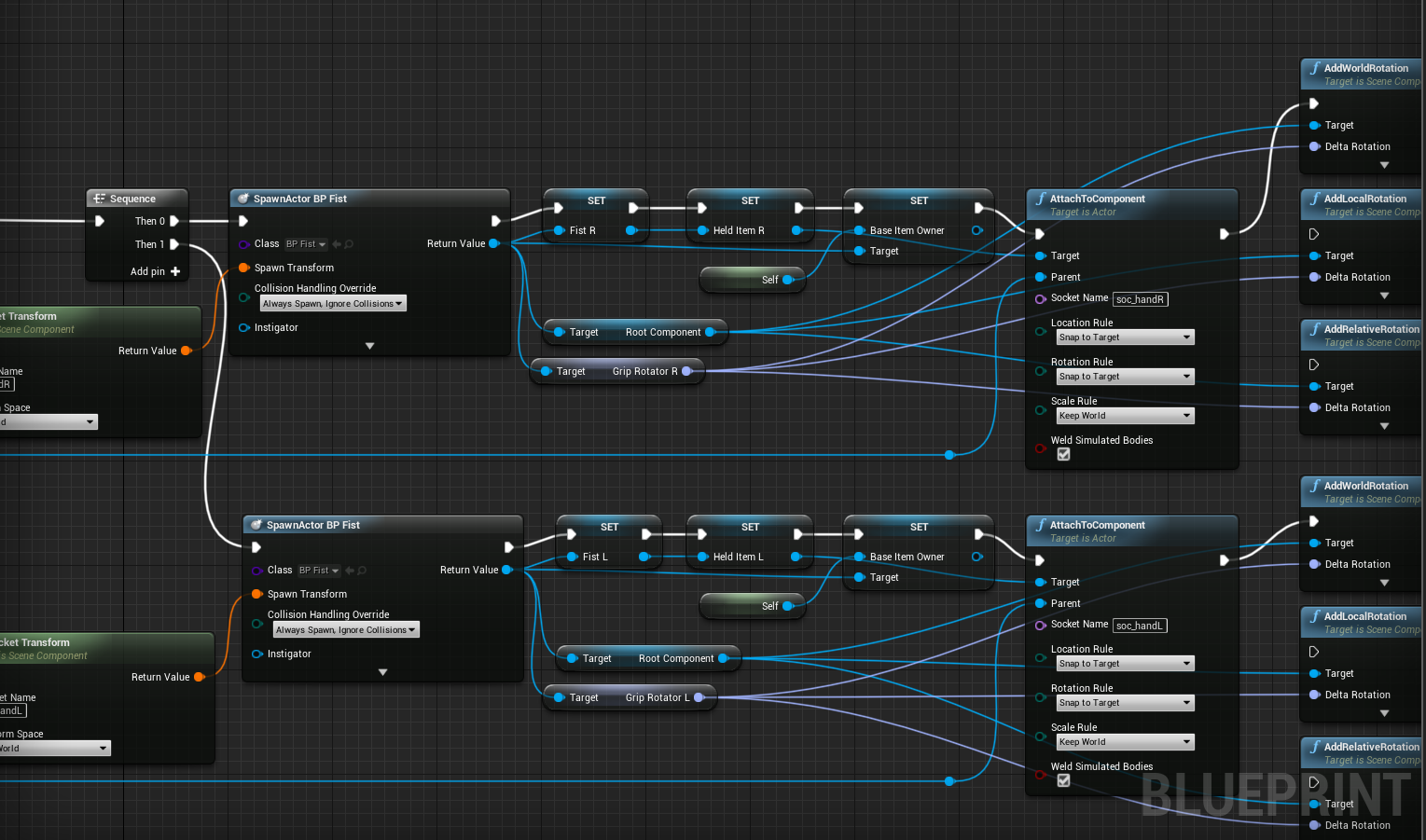
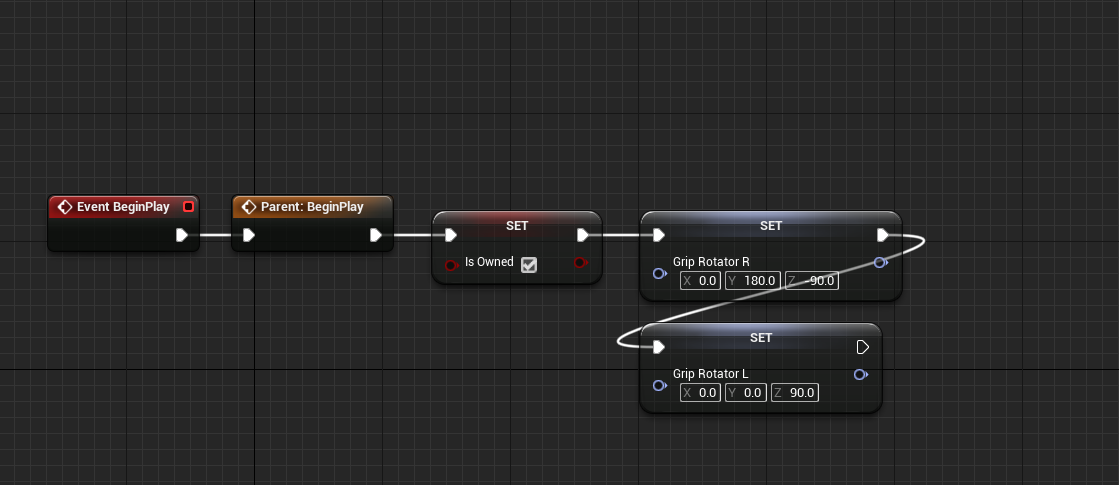
Most of my other items only need to be rotated 90 degrees so this isn't an issue but now that I have a fist weapon (like brass knuckles) that needs to be rotate on more than one axis I'm running into issues
abstract relic
You need to punch the artist that gave you assets with improper orientation
cerulean sorrel
😬 😬 😬
plush yew
Oh I hit myself daily. This is really only a problem for items that are ambidextrous and need to face the same direction in either hand. So my idea for brass knuckles was that when in the left hand I'd rotate them 90 one way, and when in left rotate them 90 the other
And like, this works fine it's just that I apparently can't rotate in two directions at once if those values both need to be 90? Very frustrating, since I can bump everything one degree at a time and get very close to what I'm looking for but never exactly what I need. AND then for some reason it just won'
t work on the left hand. So even if I scuff it up on the right hand the left hand just won't play ball
cerulean sorrel
OK....
dim plover
Is this the result of gimbal lock?
 brazen forum
Guys. When using an ik node to adjust animations, can you also do this for MAKING animations. Like for instance I have a walk animation but I want my guy's right arm to punch using ik when you press space.
Basically im asking is there a way to animate ik to through script that way the animation can be fully script driven?
wintry forge
is there a way to emulate an inputaction? im trying to make it when i shoot with no ammo in clip, it automatically activates "inputaction reloadammo" (which is bound to R in project settings)
i could just have a pin go cross country on my event graph but it'd look ugly
plush yew
Where could I find gimbal lock?
deep basin
Gimbal lock is something you don't want to find.... but sometimes it finds you 😄
plush yew
So is there just like a quaternion node or something?
plush yew
Well, I guess I'll be working on my inventory system next rather than combat
dim plover
There are plenty of BP-exposed Quat stuff on the marketplace.
deep basin
I recommend reading briefly into quaternions, at least why and how they are used for rotations so you can tell if you absolutely need a quaternion for your task or not
as far as I am aware they take less computations in the long run, since you create a new axis you rotate around instead of constructing a rotation along the usual x, y, z axis. therefore they are most of the time a better choice, but thats just what I learned in general theory stuff
wintry forge
guys I have two huds and both of them have the same code for making a reticle visible/invisible
i dont know why but the 2nd hud doesnt work
it has the reticle visible linked by function, the function code is the exact same
the one on the top doesnt work, the one on the bottom does
both visibilities are linked to their respective functions, as you can see
its the exact same code copy pasted, and it should work generically. idk why its not working
the vid im watching he only does what iv done, and it worked for him x_x
 whole quarry
what doesn't work exactly?
wintry forge
when right clicking to zoom on the gun, it doesnt set widget/reticle's visiblity to hidden
on the other with the same code, it does
wintry forge
that doesnt really explain anything, but im also a nub so i cant explain why the engine physics would do that
plush yew
is this possibly a navmesh issue?
wintry forge
ill add my issue to the list of "things i cant fix and I want to figure out" (its only 3 things so far so not bad)
why cant I use "AI_moveto" in a function? i thought itd be convenient if I could just have a function "aware of player" but it wont let me use it in there
same with delay
plush yew
delay not being in functions drives me crazy
wintry forge
im trying to have an AI pawn alert all nearby ai pawns if it gets hit
if they are all "simple_ai", could i just use cast to simple ai - > ai moveto somehow?
 valid pewter
blueprints remind me of looking at a railway map
plush yew
@plush yew check your collision. You may need to enable 'use complex as simple' on some of the meshes you added, especially if they are imported.
Definitely not 100% the problem but it's possible.
 ashen brook
Yo folks! Who's going to Unreal Fest Europe? Let me know and I'll add you to our private group channel we set up for this purpose!
plush yew
Which is better for ue4 intel i3 8100 or ryzen 5 2600?
plush yew
Is your problem with the lines or that there are two spots of light?
 steady summit
When I have too many debris from destructibles, then unreal starts removing old ones. How can I prevent it from automatically deleting old debris or change the max limit?
plush yew
probably if you have the money
sudden agate
@lusty carbon whats your lightmap resolution?
 gleaming lotus
Hey guys, trying to get my facts straight here - This is called BSP, right?
Where you use a shape brush and then edit it in the mode panel?
 fierce tulip
yup
 fluid stag
gleaming lotus
fluid stag
gleaming lotus
Thanks Luos
 twilit hill
I thought its called „forget uv settings when u look at it“
gleaming lotus
Just was fact checking because I'm writing a dissertation right now and I'm writing about blocking out a level 😛
 cloud cobalt
I'm not sure that DX12 is the fastest renderer on Windows
Last I checked it was way slower than DX11
Might be different now, but profile it
lusty carbon
@sudden agate 64
sudden agate
too low
 gloomy aspen
hello there
is there a way to make a drag and drop in the same widget?
i've created a widget in which i've a 2x5 grid.
in the first column are images and in the second are texts.
now i wana make a drag an drop for changing the order of the images and/or the texts because the images and the texts have to match each other and they should be placed in the right order.
the images should only be allowed in the first column and the texts in the second one.
sudden agate
@lusty carbon it isnt
change the Min Lightmap Resolution to 32 and regenerate the Lightmap UVs in UE
lusty carbon
what about the actual res?
what's the min for anyway?
should I change the lightmap res to 128 or keep 64 with a 32 min?
sudden agate
@lusty carbon the Min Resolution repacks the Lightmap with proper Padding between UV Islands. the smaller the Min Lightmap Res, the bigger the Padding between islands
sudden agate
the black spots you see on the wall are padding issues
summer turret
when i click on the button it just goes to full screen and doesnt change resolution
sudden agate
modular assets
lusty carbon
the blocky shift in color value
sudden agate
either hide with static meshes or merge the meshes together
cloud cobalt
@opaque vector This is something you need to profile for your game. Last time I checked, UE4 DX12 was a work in progress with terrible performance - the engine needing a completely different renderer to be efficient with DX12
lusty carbon
no clean way to get over that?
sudden agate
wait for GPULightmass
summer turret
anyone know how to change resolution?
all it does is go to full screen
instead of changing resolution
cloud cobalt
Vulkan is the primary backend for Linux on PC, and there is no good reason for it to be bad on Windows, other than UE4 devs not caring about it
So you can profile it too
 opaque vector
Cool. Appreciate it. @cloud cobalt
summer turret
@opaque vector thanks thats what im doing now, but i wanted to apply the changes when user presses accept instead of automatically applying when using console commmands
ty
 analog blaze
@lusty carbon https://www.youtube.com/watch?v=3TqQH1fZAtM ezpz
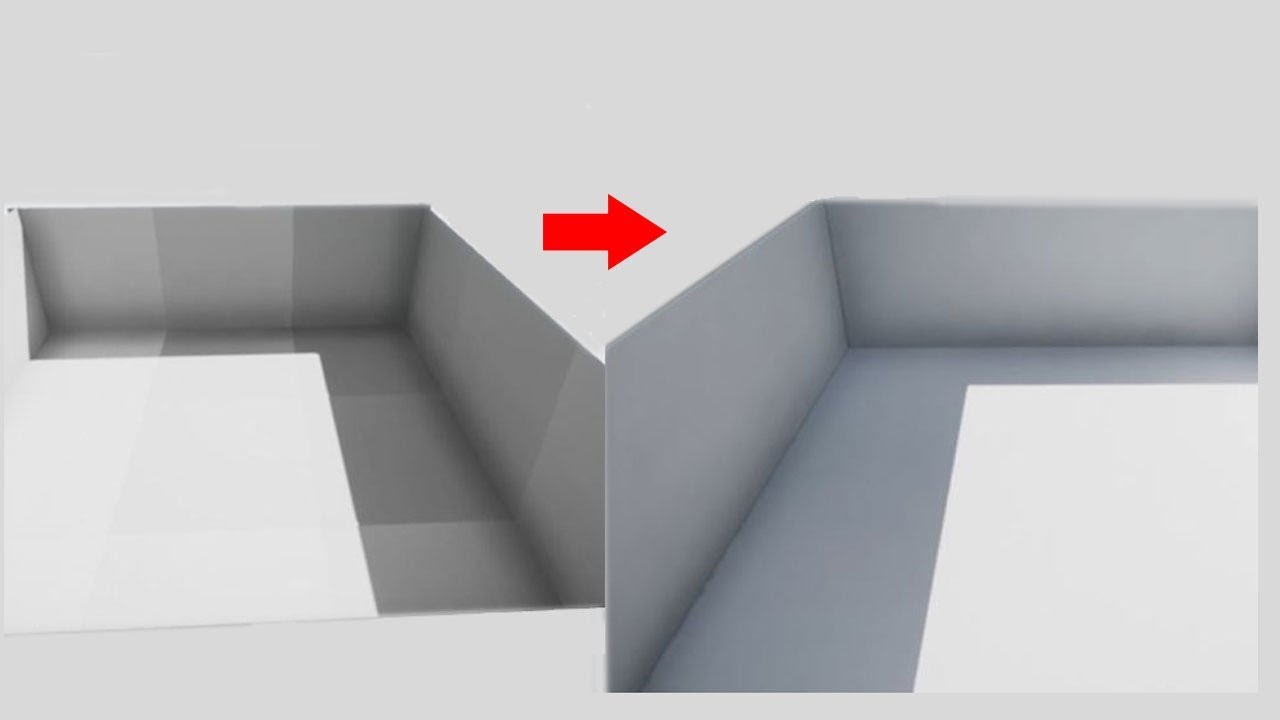
lukestilson3d.com Grid spacing/snapping, best practices for materials and UVs, exports and imports, basic lighting setup, and post processing - get rid of th...
 brave grove
Hey guys. I really need some help with a material. I have a black and white image and I want every value under a certain value to become black. Like cut it off from a certain value. Is that possible in UE4?
 wary wave
tools like clamp / floor / ceil are what you're looking for
kindred viper
yes
brave grove
thank you!
grim ore
@summer turret the issue you are having is it is setting to your resolution, you just have not given it a fullscreen mode option so it is default to fullscreen. There is a Set Fullscreen Mode node that should be used as well
 regal mulch
So, I got a Quat that has its Up-Vector as (0,0,1) at the start and the RightVector is somewhere in the X,Y plane.
I removed the Z Axis Rotation, so at the start the rightvector is (0,1,0).
Now I call "Add" on the quat with an angle (in rad) and the right vector as axis.
At some point, the freaking thing starts rotating around roll....
brave grove
I think I am not really smart because I can't really figure out how to do this. The image on the left contains a few different values. What I want is to somehow scan for a certain range and make an alpha from this value up>white, and from the same value down>black...
I hope I managed to explain what I'm trying to do ... can somebody help me please?
regal mulch
Are you able to do it for one of the two?
E.g. Value to White?
I'm not an Artist, but I know I did things like these in Substance. So it should be easy in a Material too.
If you know how to do it for Value to White, you could just invert the left image and then do it from (1-Value) to White. That is the same as Value to Black.
brave grove
I know how to do it in photoshop and substance
but not in unreal .. for some reason I decided that it should be easy 😄
regal mulch
In Substance you use a Levels node I assume?
brave grove
yeah ..
I tried with clamp here, but it leaves me with a pale image
not "black and white" for an alpha
abstract relic
Clamp and multiply
brave grove
@abstract relic can you be a bit more specific?
kindred viper
@regal mulch did you try combine?
regal mulch
@kindred viper Quats are usually combined via QuatResult = Quat1 * Quat2 and I'm doing that already
ControlQuat = FQuat(Axis, AngleInRad) * ControlQuat
kindred viper
I thought the function had some specific routine for it tho
regal mulch
It might be part of the code that I use to modify the pitch value
Currently trying around -_-
Hm, yeah using a fixed axis produces the same
abstract relic
Texture >> clamp (pick a range you want masked) >> multiply (pick a absurdly high number to white out the mask)
regal mulch
Gnah there I hoped my view pitch clamp was working
grim ore
@brave grove try using the If node
brave grove
@grim ore I will, thank you.
grim ore
 scarlet birch
Building from source with 4.22 requires .net be installed?
 manic pawn
yes
scarlet birch
No biggie, just caught me by surprise. I should probably read those release notes again.
manic pawn
it always has though
scarlet birch
I'
scarlet birch
I've never had it installed and this is the first time I received a warning when generating the project
ah
manic pawn
(that's an optional package in the vs 2019 installer under the .net desktop development thing)
scarlet birch
I'm using 2017. But yeah already added it and building. I was just wondering what changed.
Is it worth switching to 2019? Do I gain anything?
cloud cobalt
Slightly better build time
manic pawn
significantly faster and more accurate intellisense, live error checking is now actually useful for unreal
scarlet birch
anything that improves intellisense, I'll take.
The error wanted 4.6.2, any reason to install anything other than that? i.e. 4.7.1 or others?
grim ore
you should install the one it wants, it checks for that one specifically.
kindred viper
how do you even have a computer without .NET runtimes on it in 2019? 😄 #respect
manic pawn
it needs the dev tools not the runtime, so most don't have it
scarlet birch
The SDK
 jolly haven
help
im trying to make a car but I cant get to move it fast
I got no idea what could cause this
Ive tried increasing the torque in the torque curve but that doesnt change anything
sudden agate
Intellisense is better? Still squiggles generated.h and Macros lololol
 fathom bridge
Humanball can you show yout code?
jolly haven
@fathom bridge its the default blueprint car
brave grove
@grim ore thank you for the help. Here's the result: https://youtu.be/dXo76XjAvOg
 fathom bridge
@Humanball oh okay. I haven't messed with it but I would assume the blueprint had a max speed?
plush yew
is the xeon 5650 better than the r5 2600?
and is it gonna be good fore ue4 development?
 coral shoal
it might have a max accel too
plush yew
the xeon is gonna be better i think @coral shoal it has 12 cores
and can go up to whooping 4.5ghz!
That is gonna be a beast for ue4!
fathom bridge
@Humamball yeah there must be an acceleration property. If you don't want any you could code the movement yourself...
plush yew
if I do basic project like this
and package for windows (was testing compiling.) when I click my project .exe it makes
I just get a black screen?
buoyant meadow
Try adding the third person content pack
Click add new "the green button"
Then assign the game mode that is in the content pack to the level by going to "world settings" on the right
buoyant meadow
No problem


 buoyant meadow
No, the add new button in the bottom left
plush yew
ah ok
buoyant meadow
To get the world settings to show up you'll have to go to 'window' at the top and click world settings
grim ore
If this is a new project it is due to your Game Default Map being the Entry map which is blank, you need to change that in your project settings
plush yew
ah ok thanks
I was just testing it out mainly, the compilation after reading some stuff above
buoyant meadow
If it's a new project won't it default the default map?
Or does that only happen when you start with a content pack
grim ore
if it's a blank project there is no default map
plush yew
I try not use assets ever
even if it makes my life harder
copied code = makes me worse programmer
😂
buoyant meadow
It's good to learn from at the start imo, helped me find out how a character works
But you do you 😀
plush yew
yeah I learned all my 2d programming this
and read an entire book on 2d game physics
to me creating 3d games in an engine, is clicking of the mouse a lot more plus z axis lol
scarlet birch
Yeah, over an hour trying to figure out what was wrong with an anim BP. I had exposed Play Rate Basis and not Play Rate. The word Basis wasn't visible. That was fun.
plush yew
I've been there. Worst was 3 months trying figure out why myshot gun wouldn't fire projectile.
Turns out somehow I ended up with a complex collision on them that had something like 2000 convex hulls. 🙄
Couldn't handle generating 30 of those
scarlet birch
The way it looked I assumed it was something in the transition rules failing so wasted too much time trying to figure that out.
plush yew
I recently picked up some the free packs been adding them in 🤯
Have some buttons that are set to collapsed unless a variable is valid.
They are doing the opposite 🙄 I've print string everything. No idea what is up 😭
grim ore
don't print string, use debugging.
plush yew
🤔
What.
plush yew
😐 you're ready with that aren't you
scarlet birch
In all fairness it wouldn't have took so long if I wasn't wrestling my keyboard from a toddler constantly
plush yew
Oh yeah, kids and cats
How have I not learned about this debugging yet!?!
I've been at this 18 months and this is first debugging I've seen 😂
Thanks @grim ore
 thorn vector
Anyone know a yt channrl on how can i learn houdini fx
plush yew
@grim ore Hey! Is the xeon 5650 good for ue4?
i know you a experienced in old pc stuff
and pc building
 sleek spear
can i somehow bake lighting using 4.22 pathtracing?
grim ore
@plush yew it would be good enough for grunt work. It does not clock very high out of the box but it has 6 cores/12 threads which will help for light mass/baking/shader compiling/C++ code. depends on the cost and what other options there are
proven oxide
Me I am trying to use skeletal meshes but with no animations even showing up for them it’s sucky
 teal tulip
@sleek spear no
plush yew
@grim ore the pc itself has 8gb ddr3 ram a rx 580 8gb the xeon 5650 for 350$
my other options is the rx 580 8gb with a ryzen 2600 for 500$
i think the xeon build is much better for unreal
i think the xeon build is a beast
and i think its better than the 2600
grim ore
if you overclock the Xeon yes, if you do not overclock it then no.
grim ore
"could" be is not the same as is
plush yew
wdym?
 true leaf
Tbh you can run ue4 on a weaker pc like that but it's going to waste so much of your time waiting for stuff to load
grim ore
it might be able to do 4.4ghz, it might be able to do 3.4ghz, it might fry with any overclock
plush yew
@grim ore aha
true leaf
My computer is really powerful but I'm running on spindle HDD and it's a DOG literally I need to get up and get a drink a lot of times to wait for random things
plush yew
should i ask the person who i am buying it from to overclock it for mee?
he owns a pc service
true leaf
Like ... Oh you want to rename a file? Please wait 30 seconds. Close these tabs? That will be 60 seconds
true leaf
I neeeeed a solid state drive
So bad lol
Luckily doing BPs and editor stuff is quick
Anything with files is a nightmare
cerulean sorrel
i flat out don't understabd bluepeints any got any ideas i tired watching videos
 blissful willow
I like to grab demo files from the learn tab and break the blueprints until I figure out what each node does
true leaf
Blueprints are just code --- I learned from reading sample blueprints and just trying stuff ... Yeah use the sample projects
Getting started is tough
cerulean sorrel
yep i have no backgrounf in code
cerulean sorrel
so it's even harder for me
grim ore
the content examples is full of stuff to break apart, but besides that the question is why you dont understand them. Are you trying to do to much and dont understand what to do with them or you dont understand the concept of Blueprints themselves or etc..
true leaf
Blueprints are literally like Java but function blocks .
So just displayed to the coder a bit differently
cerulean sorrel
i have like no background in code like none
grim ore
shouldnt matter for learning, you didnt know math before someone taught it to you.
true leaf
Hmmmm yeah that's the problem then, the more programming languages you learn the better you will be
Because you will learn not only how to code , but good architecture practices and that just comes w time and your own preferences
true leaf
Well what do you want to do
Break it down into tiny tiny bits
Want to spawn an actor based on a timer ?
true leaf
Or ... Do something when someone steps on something?
grim ore
Every part of code has a purpose, determine your purpose then find the code that does that
true leaf
'get' nodes? Like for an array ?
true leaf
Oh ... That uses some magical ue stuff
true leaf
You have to learn the magic stuff ue does for you with pawn possession
true leaf
You don't need to know get vector unless you are doing ray trace stuff right now
 harsh tiger
the 4 bools are true by default. but the second one of them is false. the branch goes false. but i only want the branch to do false when all 4 bools are false. instead of 3 true and 1 false. any way to achieve this?
true leaf
Clients can possess pawns and so get pawn returns the possessed pawn of a player client
Player[0] on the client is always .. self
true leaf
Yeah
cerulean sorrel
i understand what that code e just posted does
true leaf
Also one of the advanced beginner topics is actually ray trace and so after you learn about possessing then learn about raytraces
Basically Every 3d game uses tons of ray tracing
Because... That is how 3d things interact
cerulean sorrel
hmmm
i see the first person shooter template use lots of get nodes
got confused
harsh tiger
can anyone help me?
true leaf
F5, put an invert between each bool and the AND
And then flip the true and false outputs
OR use something like NAND I think
harsh tiger
is invert "not"?
true leaf
Correct
harsh tiger
I tried NAND an still didnt work
true leaf
Type !
harsh tiger
only sometimes
scarlet birch
F5 "or"
harsh tiger
its super random
cerulean sorrel
why do i seee get nodes in every template
true leaf
No I don't think OR would work , he's checking for them all to be false together
harsh tiger
still doesnt work like that
true leaf
Nand wouldn't work actually n
 stark jasper
hmmm, isnt that the exact case where OR should work?
true leaf
That just flips the output
scarlet birch
yeah, so if any one is true "or" is true
scarlet birch
c'mon guys
harsh tiger
when the 4 bools on the left are all false i want it to fire false
not when 3 are true and 1 is false haha
grim juniper
Is XOR a thing?
true leaf
Yeah but that's way different
That's about the number of true inputs being odd or whatever
grim juniper
It's been a while since I've delt with XOR so I don't really remember
plush yew
I’m currently wondering how would one go about implementing euphoria type ragdoll physics/ dynamic body animations In current ue
It’s not a software package you go out and buy from what I can tell
Does anyone have some basic information on this?
scarlet birch

HowStuffWorks
Gates allow you to build combinations that will implement any digital component you can imagine. Learn about gates and find out how the AND gate is used.
grim ore
it might be simpler to do just 2 checks, AND for true and if that fails AND for false, and handle the other options however you want.
true leaf
@plush yew there is an article on unreal docs about physically based rendering.... Read that
plush yew
Got a link?
true leaf
Physics driven animation. Prob the best start
Looks like a decent way to do car suspension and stuff like that but I've never done it
harsh tiger
The OR works perfectly fine an i fixed another issue an the system is working now, thank you ^^^
grim juniper
I think we all just overly complicated the whole thought process. Yeah, OR is all you need
true leaf
Yeah I thought there is a law in Boolean logic
Something like if you invert all the inputs and the output it's the same as switching from AND to OR
De Morgan ?
DeMorgans theorem :D it was just applied
harsh tiger
now i know its or an not and and i take a step back an think about it logically OR makes sense and AND doesnt haha
but ty again
true leaf
NOT (NOT A AND NOT B) == A OR B
Because you are checking that both are not 0 .. either way
Also that is a theorem not a law ^ so if someone can write a proof then they will be famous lol
plush yew
is 8gb ddr3 1330 mhz too slow for ue4?
grim ore
8GB is a bit on the low side for medium+ projects but the speed isn't a huge issue in the end
true leaf
I doubt memory speed would be a bottleneck ... Harddrive speed definitely tho
plush yew
ill uprgrade 16 gb
grim ore
its because you have dual channel ram more than likely in that old of a board, so the limit is going to be there no matter what
plush yew
right
cerulean sorrel
Is an 3.4GZ cpu good?
plush yew
so 1330 mhz is ok?
true leaf
Technically you can't reason about computer hardware based on Hz alone. That's a unit of frequency only 🤔
Use benchmarks like toms hardware
 bleak pagoda
my character fly why its flaying only in the extra part i add to my map
harsh tiger
https://www.youtube.com/watch?v=_55n1zXi_rw this is what i was working on before. thanks again for the help

Over the last 2-3 days I've been working on a window barrier building system in UE4. The player can pick up the planks of wood and use the hammer to put 2 na...
plush yew
@grim ore So is the pc im willing to get good for a starter ue4 dev?
will it do the job for 4-5 years?
xeon 5650 8gigs of ram and a rx 580 8gb
fathom bridge
4-5 years? That's a stretch isn't it? UE already has real time ray tracing now
 pallid compass
u do not want a Xeon
plush yew
im a kid that just started ue4
why not
its awesome
350$ for xeon 5650 8gigs of ram and a rx 580 8gb
sounds good to me
frank escarp
you do not want a xeon
plush yew
why?
frank escarp
they are more expensive than normal intels in general
for 350 you can get an 8 core ryzen that is a beast
plush yew
hah no
frank escarp
or you mean 350 for the whole thing
plush yew
the whole thing
frank escarp
holy shit thats one deal
plush yew
mhm...
frank escarp
you can flip that PC in ebay for 800 dollars easy
plush yew
wait really?!
frank escarp
yes
frank escarp
lemee check that xeon
plush yew
is that good
 odd osprey
hey guys, im kind of a noob and i have a simple question
plush yew
yea
frank escarp
but bit slowish at 3 ghz
plush yew
ill oc
frank escarp
seems to be sandy bridge?
frank escarp
sandy bridge gen cpus overclock like crazy
analog blaze
Lmao
odd osprey
i have a player bp, player controller bp and camera manager bp, where am I supposed to handle input and rotate the camera?
frank escarp
so yeah 4 ghz 6 cores easy
bleak pagoda
still looking for help anyone
odd osprey
wait are you from bulgaria?
plush yew
yea
odd osprey
same
frank escarp
350 euros for that pc is an absolute steal
plush yew
im getting it then 😄
frank escarp
yeah, its old, but it was a strong workstation when it was build like 5 years ago
the 580 GPU is very modern
8 gb of ram tho.... thats low
try to save for another 8 gb when you can
plush yew
?
analog blaze
before you manage to open ue4
frank escarp
mate its a sandy bridge xeon
analog blaze
it's a 5650
frank escarp
i used a sandy bridge not-xeon for a while on ue4 and had no issue
analog blaze
it's westmere
plush yew
it goes up to 4ghz with 6 cores
bleak pagoda
help
odd osprey
or actually a more appropriate question would be how do I handle input in a playercontroller blueprint instead of in the pawn itself
i have 2 axis set up for the mouse y and mouse x
bleak pagoda
my character fly why its flaying only in the extra part i add to my map
wintry forge
ay guys 😃
guys I have two huds and both of them have the same code for making a reticle visible/invisible
i dont know why but the 2nd hud doesnt work
it has the reticle visible linked by function, the function code is the exact same
both visibilities are linked to their respective functions
its the exact same code copy pasted, and it should work generically. idk why its not working
the vid im watching he only does what iv done, and it worked for him x_x


pics of the settings/code for both huds
bleak pagoda
Don't bother yourself
i have a problem a i have been asking from the morning but still no one helps
20.000 community but nothing
8m very disappointed
bleak pagoda
And im leaving this discord
pallid compass
Bye!
wintry forge
@bleak pagoda jesus christ lol its noones obligation to help, just come back when people are available
 digital anchor
why no work
wintry forge
or yea, just leave lmao
scarlet birch
Most of us are pretty busy.
pallid compass
Il help anyone, for money >:)
digital anchor
i had time, i clicked all his screenshots, too bad they were 300x200 in size
wintry forge
personally iv had half of my questions answered and thats more than enough- people take classes for this kind of help
pallid compass
Oh is that the guy with tiny af screen shots
Yeah i clicked that then was like nope
lmfao
scarlet birch
@bleak pagoda I searched your posts. You really have to give people something to work with if you want help.
summer turret
is there a way to save custom collision presets?
pallid compass
What do you mean by custom Col settings, changes you have made per Collison hull?
pallid compass
Project settings, Collison somewhere