#ue4-general
1 messages · Page 430 of 1
 wispy raven
 azure shore
what's the problem
 sudden agate
@wispy raven bad uvs
wispy raven
so, what do i have to do?
sudden agate
make better lightmap uvs
azure shore
if I wanted to make a doom clone, how would I even start to go about the logic of detecting what angle they're at and switching to the right sprites
sudden agate
FaceDirection Dot CameraDirection
azure shore
oh ok, but I wouldn't know how to turn them themselves
sudden agate
this returns a float from -1 to 1.
1 means 90°, 0 means looking straight towards each other, -1 would mean same direction
azure shore
if they turned their back to you whilst you're still in the same place
wispy raven
i took the cubes directly from the explorer on the right, so it was something built in
 versed spear
@azure shore you any good at math? The rotation is -180 to 0 and 0 to 180 . You can use look at rotation node to get the rotation of the monster from its location to the point it is moving to. Then you would use the look at rotation from the camera to the player. With the output of both the monsters look at rotation and the players look at rotation you can set the correct facing of the monster. The whole issue I ran into and had to account for is that when doing the math between the two rotations it can go under -180 or it can go over 180. Say the rotation math came out to -190 the math would add 180 to get it to -10 then you would -10 from 180 to get a rotation of 170. It took me a long time to get that math right.....
 scarlet birch
Is this correct about Anim Notify States? It states in the doc you are guaranteed to get the tick between the beginning and end notify, and you are guaranteed to get the end notify. So can I rely on that even if the animation is interrupted and not played in full I will still get the end notify event from an Anim Notify State?
 swift yarrow
@fast finch did you figure this out? I'm having the same issue trying to build unreal 4.21
 fast finch
@swift yarrow I uninstalled both vs 19 and 17, reinstalled 17. Now building again
so dont knoe yet
I'll let you know once the build is done
azure shore
thanks yeah I assume it wouldnt be too hard to program just takes a while to get your head around it
static objects would be easy
swift yarrow
@fast finch yea installing vs2019 was something i did recently too
 solar quarry
ok, now I'm struggling to figure out how to set up a crouch run system
I've set it up, so my character can run if I press shift, but I want it to also work when I'm crouched
 latent moth
can someone tell me why i don't have the "collision" module...?
i simply need to kill particles on collide
 weary bridge
Does this discord have like a help channel for users that need help within Unreal?
 lime cobalt
btw double clicking on a blueprint node makes visual studio show up... is there any way to disable this ?
@weary bridge also yes you can ask the questions right there or in specific channels if you feel your question belongs there
but it's ok to ask there... worst case scenario the question gets redirected to a specific channel
fast finch
@weary bridge this is basically the channel for that
 upbeat peak
So it says the reason I’m getting my error is because InitializeModule function was not found.
 worthy flame
i asked a question before on where can i learn ue4, and i wend away so couldnt respond and im currently learning something on udemy, so im asking if udemy is the best one out there. since i want to know how to make a game from scratch. i have some knowledge on programming and i just need help with the steps, what do i need to do first in order to have it functional
weary bridge
So I ripped a map from assettio corsa and I have imported it into maya. Everything looks good, texture are all there. I then exported it as fbx (with its textures), then tried to add it to Unreal. When I add it to unreal it shows the object with no textures and the object is no longer smoothed. What do I do? I needed I can send the maya file, so that you may export it yourself or do what ever you want to do to the file
The model that I ripped from Assettio Corsa, was the Akiba Mountain Pass (Initial D map), so that I can Import it to my racing game
I would appreciate any help I can get with the matter
 wary wave
you're probably not going to get help with ripping assets in here....
 regal mulch
@weary bridge Yeah we don't really like ripping assets :P
You are free to do whatever you want (as you have to deal with the consequences), but please don't expect much help from here.
weary bridge
@regal mulch ah okay, sorry about that. It was just to make a school project of mine look good. Copyright stuff dont apply right if I dont use it commercially and only use it for education value, ie only my teacher and I have it. And I dont actually think its from the game itself. I pretty sure its just from a mod that someone created for it
regal mulch
I never looked into it that much, but even ripping and using stuff in free games is really a shitty move. Also wouldn't your teacher know it's not from you?
How is that adding any value to your school project?
If I know you added a ripped asset I wouldn't count it into your grade.
 cerulean sorrel
Haha I make my own stuff in blender
weary bridge
@regal mulch We are allowed to use already made stuff, like maps and and characters. All he cares about is the code and if it works
cerulean sorrel
Wait we're Llowed though right
regal mulch
Fair enough, well up to you.
cerulean sorrel
@weary bridge
weary bridge
Which is all done. I just wanted to add an extra map to the game. Oh, we have to reference it though
regal mulch
Well okay, people here still might not want to help you with ripped stuff.
weary bridge
@cerulean sorrel I dont think we are in the same class, so Im pretty sure its changes depending on class
 fading yoke
Hellooo
regal mulch
Most of us earn money with what we do here and ripping is not so welcomed then :P
weary bridge
@cerulean sorrel lmao why did u ask if we are allowed to do it then? Like I mean u decided on your own if u can do it or not, just dont break copyright ect....
cerulean sorrel
Like I can use the free epic stuff right
weary bridge
@regal mulch yeah sorry about that I didnt know, btw has anyone ever said that u look like voyboy before?
cerulean sorrel
Wut
weary bridge
wrong preson
cerulean sorrel
😬 😬 😬
weary bridge
lmao thats better
cerulean sorrel
Voyboy?
weary bridge
professional league of legends player
regal mulch
Is he newer?
cerulean sorrel
Haha I like to be @weary bridge
regal mulch
I stopped watching when Krepo and Snoopeh were still a thing. :P
However that's offtopic, so let's keep it at that
weary bridge
ah okay
cerulean sorrel
Leaning unreal engine hardest part I find is the scripting logic snice I've never programmed before
azure shore
in that case it depends
cerulean sorrel
@azure shore
azure shore
yeah
swift yarrow
@fast finch I uninstalled 2019 then did a repair on 2017 and it worked - i had to do a reboot first
azure shore
...
azure shore
well, I already had some programming knowledge, and my first game is pretty much an indie shooter thing kinda like doom but Im struggling all the way
 kindred viper
if you are struggling, embrace it. Fight against the urge to quit and you will learn more than you ever thought you could
kindred viper
I once had to teach myself calculus. I understand how you feel.
kindred viper
it depends what your expectations of the final result are. I mean, it could go on indefinitely.
or you can settle for a prototype
kindred viper
what is your strongest area of expertise?
cerulean sorrel
Wut
kindred viper
well programming? artwork? animation?
kindred viper
its the best animation system I've worked with so far. its got key concepts down in a solid fashion and its modular nature in terms of code let you do magical things
cerulean sorrel
I don't understand I tried diving into it
@kindred viper yes because you understand it lol
kindred viper
yeah I knew how to do animation before Unreal though and it doesnt change much between apps. But Unreal has a few tools that make it super easy to do magic stuff.
kindred viper
harder than you thought it would be?
kindred viper
It never stops being that way. Its what makes it interesting for the long term. But burnout is common
cerulean sorrel
Burnout?
kindred viper
Im always learning. Thats my true goal in life
fast finch
@swift yarrow thanks for the info, I uninstall 2017 and reinstalled it, should have the same effect as a repair. Still building though :p
kindred viper
yeah when you work too hard and end up worse for wear
I've taken 6 month breaks before because I was spending my time doing 2 day sessions
have to be careful
kindred viper
dont try to understand everything. Just try to understand what is in front of you
kindred viper
what is the issue? Just remembering things or are you having a specific issue you cant get past?
swift yarrow
I need that new 30+ core 5ghz I9 - my 4790K is starting to feel slow with UE4 builds
kindred viper
all that comes with time. But in the case of a shooter game, you can pick a lot of important stuff up from the official projects and perhaps the Generic Shooter project on the marketplace.
cerulean sorrel
Yes I tired I don't even undertand the official template it's so sad😭
I can make the meshes and put the in the level set lights ec
kindred viper
sometimes I dont like to use tutorials because I waste time trying to understand why they did it a certain way. So what I do is break down the project into parts and take on each part seperately. So I know with a shooter I need a first person setup, with an ADS system, and various other staples of FPS games. Just take one at a time and learn that. Write it down if you have to. A giant TODO list somewhere
I tell you now... you have an advantage of being an artist. You can teach an artist to code, you can't teach me to be an artist
 delicate turtle
If you struggle and your project feels like too much to handle: Make something simpler. Do not try to build your dream game in your first project, this will only crush your hopes. Start with Pong or Tetris or something like that.
delicate turtle
Then learn how to program first and forget about Unreal until then. 😉
kindred viper
You can use Unreal to learn programming
in fact I wish I had it back in the day :p
cerulean sorrel
Huh I thought blueprints was not coding
kindred viper
of course its coding
every node is a C++ function, event, etc
its just a shiny wrapper
kindred viper
there is a plugin called Code View you can enable which shows you the code of each node. And if you have Visual Studio installed and run a C++ project, you can double click a node and goto the code. Its pretty cool
cerulean sorrel
I thought it was....
kindred viper
you can inline edit but I dont do that. sounds dodgy to me :p
delicate turtle
Personally I'd say: Learn programming somewhere else, in another language that is not bound to a framework or engine. Just learn how to program in Python on a simple shell.
kindred viper
but then with new live coding it might be worth it
cerulean sorrel
So it's still c++
kindred viper
python would be good. plus it transfers to ue4 now
kindred viper
yeah its stlil experimental but its built in 4.22
cerulean sorrel
C++ is so trickly to lrean for me
 dim plover
What can you do in UE with Python?
kindred viper
its tricky if you take it as a whole. But the individual parts are pretty easy to learn
cerulean sorrel
Ohh
delicate turtle
The point is: Throw all the garbage that bogs you down overboard. If you want to learn to program in Unreal, you have to learn how to use Unreal as well.
cerulean sorrel
Oh no I know how to use UE4
kindred viper
@dim plover whatever you like really. Dynamic editor stuff, core engine interfacing at realtime. Create tools on the fly. loads of stuff really
cerulean sorrel
Just the blueprints....
I'm gonna try making something really simple
Realy really basic
delicate turtle
That is the best start.
kindred viper
Sometimes I get bogged down in a complicated task. So I take a break and make something random. This weekend its a slot machine 😄
cerulean sorrel
Loll
kindred viper
I haven't done the RNG code yet, so it just wins every spin :p
kindred viper
im gonna see if I can use the new niagara random generator to make some funky RTP
kindred viper
Do you understand the object heirarchy?
kindred viper
basically everything derives from an Object. And is an object of some kind. An object can have properties. These can be variables or functions or events. That you know. Everything else is just pre-built functionality. So all you need to find your way is the concept of this and some good documentation. Then follow the rabbit hole.
 lament star
How expensive are complex line traces compared to normal ones?
kindred viper
@lament star relatively negligible in most cases
kindred viper
yeah it didn't work the first time I tried. So I tried again. I've been trying for years. But I know more than when I started.
kindred viper
well I've been coding for 20 years. Been doing game dev for 10 on and off. Been using UE4 almost daily since it launched. Taken some time off though post-projects.
kindred viper
not a pro. experienced. I just have the time served
cerulean sorrel
20 years 😬 😬 😬
kindred viper
a pro to me is some aspberger's kid who codes an OS before he leaves school :p
cerulean sorrel
No I need too. Make something on a month
 abstract relic
Welcome to the beginning of your journey. Get comfortable and enjoy the ride 😜
delicate turtle
I'd say you are jumping WAY ahead of your current knowledge and abilities. Personally I would forget about Unreal for now and learn how to program in general first. At the moment it is like you want to run a marathon but just learned how to walk. One step at a time.
 proven oxide
I want to reparent a blueprint to use a class I have, but its not letting me (not showing the class in the seelction)
cerulean sorrel
@delicate turtle sso I should lrean programming consrpts first?
delicate turtle
consrpts ?
kindred viper
if you want to learn programming, do that first. If you don't, find a programmer who needs an artist and ask them to do the work in exchange
you can't do everything
delicate turtle
I would recommend Python.
kindred viper
sorry you can do everything, but you wont do it all well
delicate turtle
Once you know how programming in general works learning a new language is easy. Although C++ in general can be rough, but still.
kindred viper
there are things I learned in C++ that I had never touched as concepts in other languages. That was my wall to climb over.
cerulean sorrel
What is in general?
proven oxide
Does it need to be a specific type of class?
kindred viper
neither did I until I needed to know
proven oxide
class UNREALGHOSTS_API ASectionNineWeapon : public AActor
so the class extends AActor
 frosty bloom
Step one to becoming a game dev, learn how to do research
kindred viper
its possible. I;ve used every part of the engine in some way
i wouldnt say im a particle expert tho
or even good at it
in fact I would say avoid my particle work
cerulean sorrel
Oh yes I'm great at particle
delicate turtle
@frosty bloom very true
cerulean sorrel
I understand that
kindred viper
im gonna get into niagara. thats more my thing now its a full scripted setup and not cascade modules
kindred viper
its restrictive but yeah its useful for purpose
cerulean sorrel
Not the new one so much
frosty bloom
Step two is do your research, ask questions later
kindred viper
when the creators of Cascade write an entirely new system to replace it, you don't think "awww I like cascade". You think "yeah screw that crap it's just old hat now. Niagara forever!"
if you think you can make rain in Cascade, wait until you see the rain that will come with Niagara.
cerulean sorrel
Now I need to learn niagra
kindred viper
Cascade is great if you want to code your own modules but thats hard work and requires recompilation etc.
cerulean sorrel
Yes I can make rain in cascade it's easy actually
kindred viper
niagara is fully dynamic though
kindred viper
if I were to put it any way I would say it like this. The difference in potential between the two is purely based on what you do with either. But given a good artist and a good coder, you can do more with Niagara than Cascade lets you.
cerulean sorrel
Do you need to code for niagara
kindred viper
not to mention all the new GPU stuff that it supports. And raytracing is here now. Games are gonna be sick pretty soon
well, its like blueprints for particles
kindred viper
because logic flow
kindred viper
do you want to do the coding or is it just a necessity?
cerulean sorrel
A wut
 fierce tulip
cascade > particle editor
niagara > special effects editor
cerulean sorrel
@kindred viper I just want to I don't have to
kindred viper
then you can do it.
cerulean sorrel
?
kindred viper
@fierce tulip so you would be making the base particle system in cascade anyway with niagara? Then just scripting it out instead of relying on modular functionality?
@cerulean sorrel I firmly believe that if anyone wants something enough, they can do it. By that I mean really want, not just desire. 100% commitment
cerulean sorrel
Yes I really want this 😬 😬 😬
fierce tulip
you can recreate or use the pre-build modules in niagara to recreate cascade stuff.
but you can do a lot more than just generic particle stuff with it
cerulean sorrel
Hmmmmmm going to try it today
fierce tulip
it can be used as a cascade replacement, but since it has hooks in almost everything, you can pull data from a gazillion sources
kindred viper
Im gonna see if I can get the editor to throw out some particles when I crash the editor
cerulean sorrel
Lolllll wut
kindred viper
you use the new raytracing by having a GPU addiction
kindred viper
I don't know im only using a 1080ti
cerulean sorrel
I'm using an imac
kindred viper
lighting and art are not my thing tho
cerulean sorrel
Yes I'm sooo good with setting up lighting
Like really good
Is there setting to turn it on or something
.????
kindred viper
im sure there is a documentation page on it
abstract relic
I don’t think you have the hardware to support it
cerulean sorrel
But you need the new gpu. To see it on game right
@abstract relic yes I don't think so
 ebon hedge
Dunno. All i've seen in the docs is in blueprints
 worn sparrow
speedtree grass not rendering on landscape
4.22
https://www.reddit.com/r/unrealengine/comments/b9h3uq/bug_speedtree_grass_not_being_rendered_on/
reddit
2 votes and 0 comments so far on Reddit
 versed siren
how do I apply an impulse to an actor?
 dry moon
What does he mean speedtree grass
Just the speedtree node in general?
He might have set it up wrong
 blissful willow
For some reason, Volumetric Scattering Intensity is greyed out on my spotlights. Is there a way I can turn it on? I can't get the volumetric fog to work. I have an Exponential Height Fog object in my scene with Volumetric Fog checked...it just doesn't seem to be doing anything.
worn sparrow
@dry moon Yeah that's the problem... When I remove the material from the mesh (so it's the default world grid mat) it will render, but once I try plug ANY material (speedtree or otherwise) it stops rendering... Can't see any geometry rendering in wireframe either
adding a material with only a v3 for the basecolor doesn't work either
worn sparrow
@dry moon nope :/
if I replace the mesh in the grasstype asset with something other than speedtree grass then those will show
dry moon
Yeah then you might need to edit the wind settings in speedtree or in the material editor
 turbid wigeon
allright, friday night, spring sale time, let the kidney selling begin
dry moon
if the values are incorrect, it'll just disappear
worn sparrow
@dry moon what do you mean by incorrect?
Does landscape grass not support the wind effects?
dry moon
It does. Try using something larger than grass from speedtree
like a tree
and plug that in and see
worn sparrow
ok, so this is supper freekin weird...
When I try add in a speedtree tree it wont render, but if i change any one of those material slots to some random material then the tree will render
@dry moon
exporting with no wind doesnt fix either
dry moon
Hmmm not sure then, I wouldnt think it would be an issue. I know few people using speedtree bushes in their landscape grass type
worn sparrow
ah bummer... thanks a lot for taking the time, I have a bit more info to take with me ❤
 fresh hemlock
Hey I was wondering if any of you guys could help me with my parallax textures in unreal
 mortal cedar
the 4.22 blog mentions a new
Animation Sharing Plugin but I cant find where to get or how to use it
has anyone used it?
Oh, its on by default. does anyone know if it gets utilised automatically or if theres something I'm required to do
oh never mind, found the page for it:
 dark depot
they need a page that shows all recently added docs
 manic pawn
there used to be one and then it was killed
 harsh kiln
Hi all, I have a really silly problem, should I ask it here?
Solved, I had to restart it
 analog blaze
@dark depot lmao docs is not Epic's strong point
dark depot
idk about that
i would say the site isnt
but it have never not covered what i needed
analog blaze
do you code?
dark depot
and yeah zeb i remember when they removed that bummed me out
bp only i know the code side is lacking
 deep kernel
Hi, I’m completely new to Unreal. Have no prior experience with game dev or any other engines. Can anyone point me to any guides and such? I have a large amount of time on my hands and am willing to put in several hours daily to learn.
analog blaze
@deep kernel Do you model?
 spare sun
nice nickname
deep kernel
No prior experience in that either, no. 😅
analog blaze
A game engine is just a tool to put everything together
dark depot
youtube/docs/learntab of the launcher
analog blaze
if you can't model, then UE4 is useless to you
i mean you could use existing assets, but there's no fun in that
dark depot
that isnt true haha i have seen plenty not know how to model and release a game
analog blaze
Those asset flippers are the worst
dark depot
hell learn to code then pay someone
some of the top indies just payed for art im not talking asset flip 😛
deep kernel
I’m not here to publish a game. I have no financial interest in this.
deep kernel
@dark depot Thanks I’ll take a look.
analog blaze
@deep kernel First learn 3d modeling if you wanna make something 3D
spare sun
2 hours aint a lot of time but you can try udemy paid ue4 c++ course, heard it's quite good. or academy.unrealengine.com
Then there's always documentation. I see youtube guides in most cases as a last resort
deep kernel
Where could I learn? @analog blaze
 maiden sundial
Hey, got here a generall question about working together with someone else.
Let's say a level designer wanna join my team, how should we share the same content/ made level from him ?
analog blaze

Notion
A new tool that blends your everyday work apps into one. It's the all-in-one workspace for you and your team
@spare sun There are better Youtube guides than there are Udemy courses
most of them are crap
same goes for Pluralsight
 icy mulch
Does anyone know how to make a ai chase similar to baldi?
spare sun
well that's your opinion, I only used 1 course from udemy so can't speak for all of them.
deep kernel
@analog blaze Thanks.
spare sun
had a bad experience with youtube though
analog blaze
I doubt you have watched even 20% of the content on youtube tho
Udemy is not that big
spare sun
@maiden sundial he wants to join mid-development or you starting out together?
maiden sundial
More like early-development 😃
analog blaze
@maiden sundial What parts of level design can he do?
There's levels to level desin
design
pun intended
maiden sundial
Basically some kind of open world level
analog blaze
Nah that doesn't answer a thing, and what tools does he use
maiden sundial
Do you mean by tools something like blender ?
analog blaze
Have you seen his work or is he a newbie who calls himself a level designer?
maiden sundial
This person doesn't exist atm xD
That was more a question for the future
analog blaze
Ooo
Well then in the future there's gonna be a collab feature for UE4
So you can all work together, it's in preview phase right now
maiden sundial
You mean by future like 4.23 or even higher ?
analog blaze
It's already here
maiden sundial
Ow
analog blaze
@maiden sundial There's also Perforce
maiden sundial
Never heard of that
analog blaze
It's source control
maiden sundial
So basically git ?
analog blaze
Git is shit for games
 cloud cobalt
Except it works with game dev
maiden sundial
What's the big difference which makes perforce better than git in game dev ?
maiden sundial
Hmm ok
analog blaze
There's also something called Plastic SCM which I would say
is better
in most ways than SVN/Perforce
cloud cobalt
Haven't heard anything good about it
deep kernel
Thank you! Greatly appreciated.
Hahahah.
Sounds like my kind of travel.
Huh. Damn.
New, as in, new to everything.
Hahaha. I’ve been blown away by some of the stuff people make and I wanted to give it a try myself.
That’s pretty neat.
I came across this community when one of my “coworkers” for Front introduced me to it. I’m thirsty to get a taste of it myself.
Sick! I really appreciate you helping me out.
Oooo, sounds enticing.
Hahaha.
Hahahaha.
 pallid talon
@plush yew Are you looking for help or offering help?
pallid talon
Never mind..
 restive fern
So in Diablo 1
dry moon
Error C1083 Cannot open include file: 'foundation/PxPreprocessor.h': No such file or directory
Anyone know why VS won't locate engine files despite it existing?
 spark sonnet
Hello guys. So I have a weird question. Is it possible to make a map in unreal engine 4 and then use the map in a game thats using unreal engine 3?
 pallid compass
Highly doubtful.
azure shore
does anyone have any metaphorical pills to save me from stressing myself out so much
everywhere I look in my project its just problems problems PROBLEMS AARGH
cant take it
pallid compass
Problems are good, its how you get better.
spark sonnet
Guess I'll have to learn how to use unreal engine 3 😦
 tame stag
does physics and destructibles works on android`?
pallid compass
Well that is where you have growth, continuing to improve your skills and searching for the required information to better your own engineering.
 paper kernel
I don't think android has the computational power to do destructibles
spark sonnet
But its so advanced and difficult to use. I just want to create a map for a game
paper kernel
as such surely you can do a simpler version on your own
fresh hemlock
Yo so the wiki page on landscaping seems to just be completely wrong here
how in the world do i create a new target layer so i can paint?
spark sonnet
could you send a screenshot of your project @fresh hemlock
spark sonnet
here @fresh hemlock https://docs.unrealengine.com/en-us/Engine/Landscape/QuickStart/5
fresh hemlock
Same problem as the last wiki page i read
 grim ore
If your material does not have a layer blend then you will not have a layer in the landscape level
does your material on your landscape have layers?
versed spear
is there a way to change the culling distance around the camera. My assets are getting culled on screen. It is top down angled orthographic view.
fresh hemlock
Why are unreal textures so manly?
spark sonnet
How do I spread a line trace? Like, make it wider
abstract relic
For debugging or function
spark sonnet
function. Im using it as sensors for a car
abstract relic
Use shape trace then
spark sonnet
shape trace?
abstract relic
spark sonnet
Thanks but how do I select the object line trace?
 plush yew
How do ppl do spiral particles in ue4 lol
I'm doing one by just appending several different basic radial particles to different sockets on a spiral animation skeleton :s
pretty expensive
theres gotta be an easier way
Here's a weird one: I'm using line trace by channel to try and get the z location of my line. In a
in a sample project it works how I'd expect, by returning the z location of the hit in the world space. But for some reason in my BP the same node returns a relative z location? So in the sample if im 50 units up it reports the trace at 50 units. In my case it reports the location as 0, even though it should be 50
grim ore
debugging the line trace it's starting, hitting, and ending in the correct spots?
plush yew
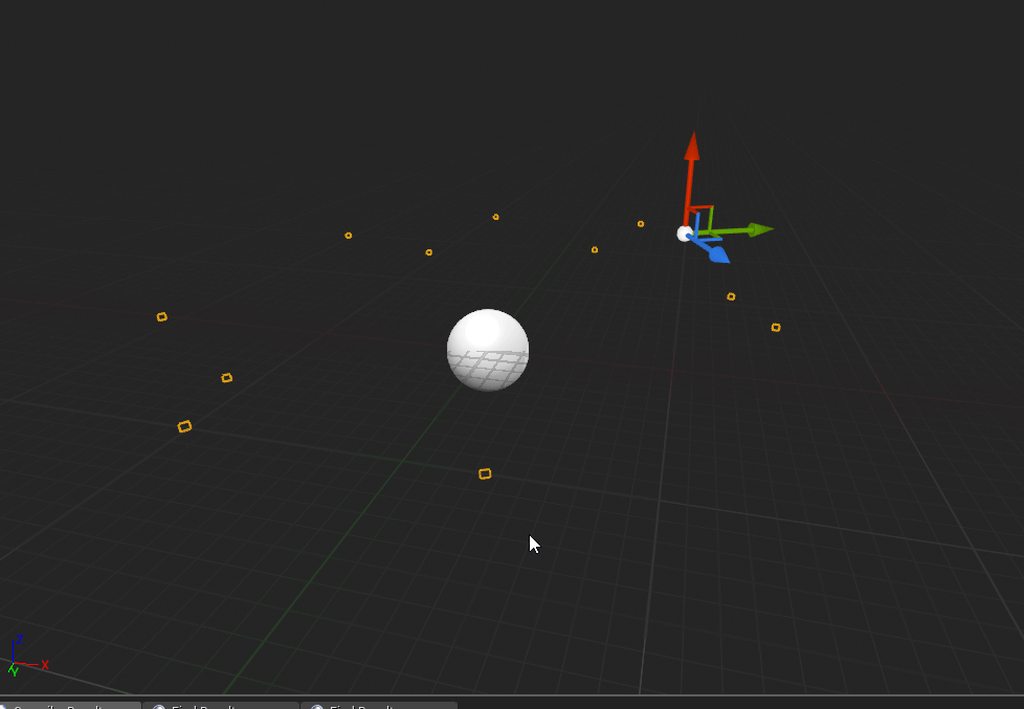
particles completely invis lol.
Yeah in both projects I'm tracing from 50 units above to 50 units below my character. I set the trace to blue and its working and hitting where I'd expect. But in one project It's giving me the world location of the hit and in the other it's giving me a relative location? So normally if I'm standing on a box I'd expect it to return 50 but right now it's giving me a 0 even though it's showing the hit on the box
grim ore
and on that new one you can confirm its starting from the same spot? it's not starting at the bottom of say the capsule now instead of the middle of the mesh. Technically it would be reversed since the actor location of the capsule would be the middle where as the mesh is probably the bottom for alignment purposes
confirming it with the line trance debug visibility I mean
 deep basin
Anyone else has the problem, that since 4.22 VS doesn't find the classes in the Kismet directory anymore?
and intellisense goes nuts lol
plush yew
Yeah I'm looking at the traces in both projects and both are starting and stopping in the same relative position. It's all based on the mesh I think. I'm using "GetOwningComponent."
grim ore
does not appear to be an issue here with a small project and VS 2019 and 4.22. no abnormal intellisense issues and Kismet includes and class files and functions seem to be working
deep basin
mhhh weird, I am using VS2017 though. But doubt that makes the difference.... weird
grim ore
I would check with 2017 but I installed 2019 only to see if it works with new projects in UE4 and forgot I did that lol
deep basin
I see^^ thanks anyways, now I know that it seems to be a problem exclusive to me xD
plush yew
Haha, let me check out a totally fresh project and see how it's working for me there
 humble ruin
Hi. Has anyone encountered a problem that UE 4.22 generates UE4.vcxproj file without filled NMakeSearchPaths, so my VS 17 cannot find any included headers in engine sources?
deep basin
yep!! I got that one too
haven't found a soplution yet though. I am currently downloading VS2019 lol
plush yew
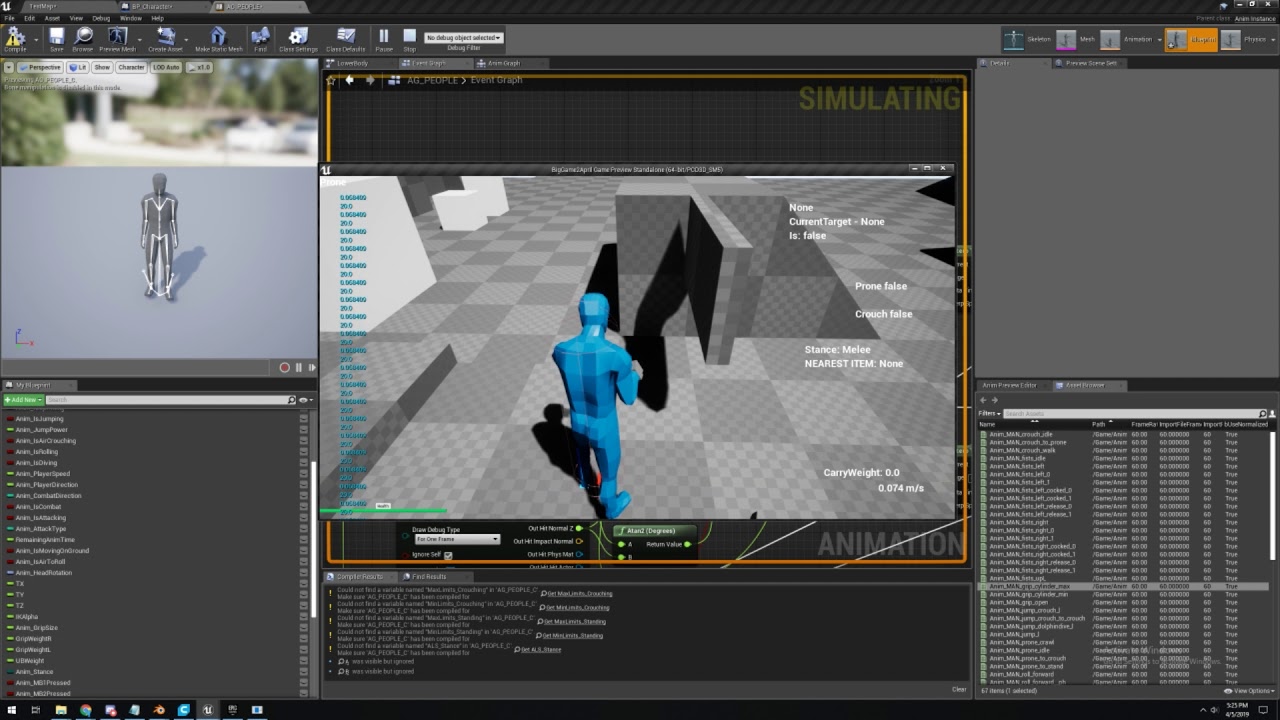
Yeah, it's working as expected in this fresh project. https://www.youtube.com/watch?v=_VL6wRjfNqA&feature=youtu.be
There's a 2 minute video showcasing the issue. It's probably a lack of understanding on my part but on the off chance it isn't where can I report bugs?
 plush yew
@plush yew That's not quite the issue. https://i.imgur.com/F8niLuY.png
Here's an image I drew of two different scenarios. On the left is what currently happens, where the trace reads 0 if I am standing on flat ground. On the right is what should be happening, where it reads 50 because it is impacting at a height of 50 units
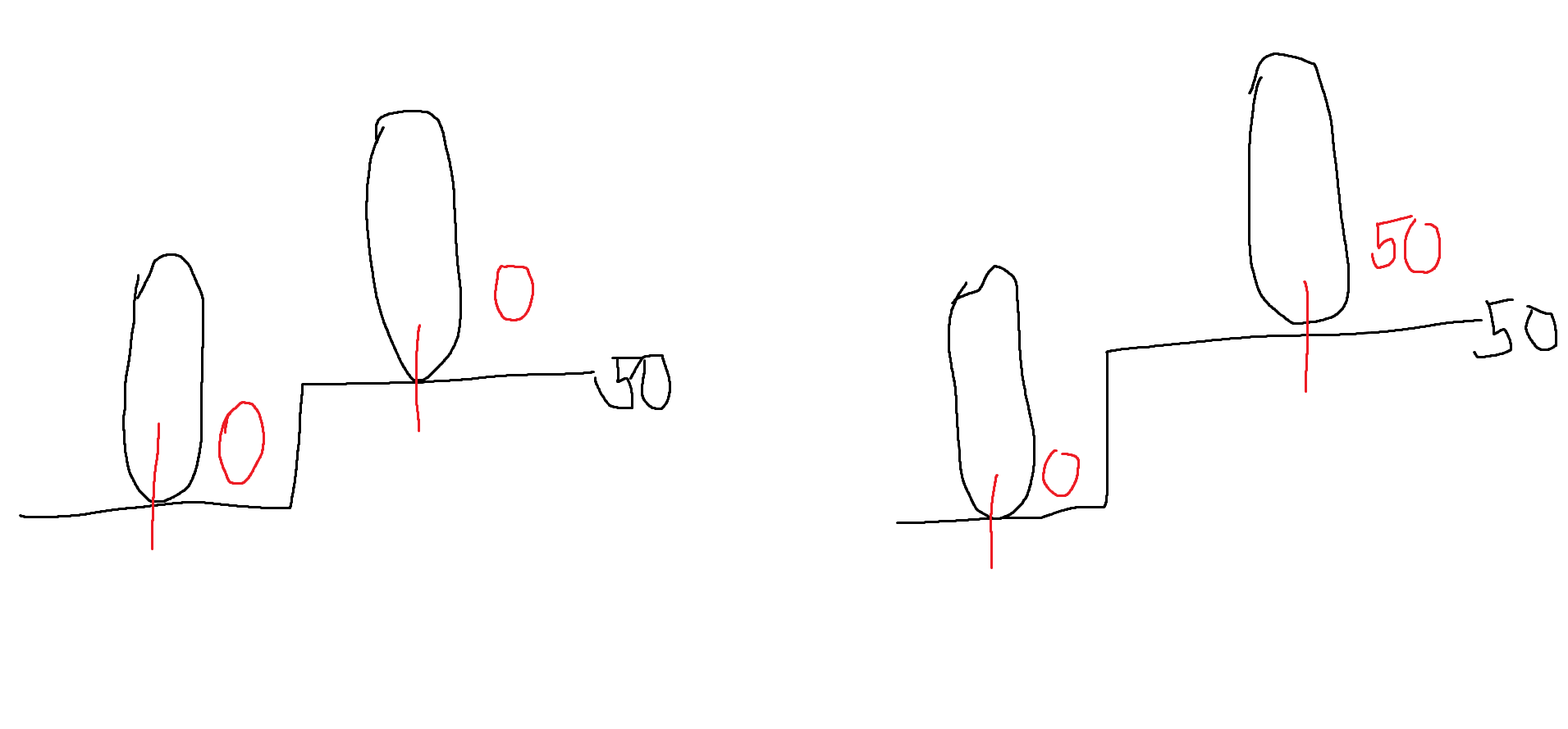
If I open a fresh project and use the line trace it outputs the values that I would expect it to, but in my project for whatever reason it's always outputting a 0 if I'm on flat ground. OR if I move my foot off the ledge it traces beneath the foot and gives be the difference between the impact location and my character. But it should always be giving me the world height of the hit location
I have a question about why when I look down it gets brighter as if the sun if reflecting off the ground and shining in the camera?
oh okay my b
dim plover
That's auto exposure, you can disable it in project settings or in a post processing volume settings.
plush yew
alright thanks!
That's weird, I don't have to do anything extra in the other projects. I'll keep looking at the thread you linked though maybe I can figure it out. Thanks!
I'll look into that right now
So weird, it works totally fine after being migrated
I haven't dealt with anything like this before, should I just migrate everyhing over to this blank project or could that cause other issues?
 worthy oyster
Guys! don't know where to ask this, but how does everyone manages loading screens and main menues? i've seen that the common case is to use level streaming, but that has some issues with changing game modes
just wanted to get some feedback to know if that's the common way to do it
(besides for some reason, level streaming takes less to load a level than normal opening levels, i assume because it doesn't unload everything like when closing a level)
sorry if i'm not on the correct channel
 wicked onyx
Im not sure where to ask for help either, but I would recommend trying to ask questions in rooms related to your question maybe?
versed spear
I add the loading widget in the level blueprint begin play. When everything is loaded, I remove it.
 silver crown
grim ore
silver crown
grim ore
ok man @plush yew you can't figure out this problem because you aren't isolating the issue.
I watched your video and it looks like that trace node is correct, you are asking for the location of the item you hit in the Z and I see it go from like 20 to 40 to 70 to 120 as you get higher up which indicates that is the Z location of the item you are hitting under you. the whole 0 and -20 is a completely different print string....
you need to only have one print out, you need to debug out what you are hitting to make sure it's hitting the right item (which it looks like it does but you can print the actor to find out), and you need to clearly define what you are trying to do.
plush yew
Oh come on, I feel so dumb. Glad I threw in that "probably just me misunderstanding something." I initially started typing about how that second string belonged to the AI roaming around but I went to double check and no, it doesn't. That second string is what I was looking for. This is so embarrassing. I wasn't paying attention to it because I thought it was the AI's. My bad everyone
the reason it's a 70 is because the whole map starts 20 units above 0. Thank you so much I can't believe I wasted everyone's time about this
plush yew
If I ever get to the point where I actually have engaging gameplay I'll be sure to give you a shrine in-game
plush yew

Maze Creator allows you to create completely random mazes in a matter of seconds!
thinking of buying this
as I can't find a decent tutorial on youtube for maze creaiton using procedural on youtube
ideally in c++
not in blueprints
 flat estuary
@plush yew lol, just copy the logic from BP to Cpp, what's the point?
 proper wharf
Hey guys! The question is, is Unreal Engine really so freaking freezing? I mean, it freezes ~10 times a day without any particular reason. But, for instance, I 100% can't bake a light. Am I the only problem with such problem?
Windows 8.1, x64
proper wharf
Hm. Wow. But what's now? 😃 Thank you for the response, btw.
cerulean sorrel
Seems to be much better with 4.22
cerulean sorrel
@proper wharf no it's 4.22
You sure it's 4.212
Lastest is 4.22 that is stable update fix
@proper wharf
😬 😬 😬
proper wharf
Don't really see any big UPDATE button, only news, @cerulean sorrel
Ow, I've found it! 😃 Please, don't keep digging! 😃
grim ore
I can say that the engine should not freeze that many times a day normally, something must be conflicting with your setup 😦
cerulean sorrel
4.22 is alot more stable anyone notice this
Everything feels faster too
@grim ore
@proper wharf nice
 hallow frigate
Hey guys I have a question about physics in Paper2D
I want a platform to fall down but it seems stuck in one place
I've done everything exactly like the official tutorial
Also, if I try to do the same thing in the premade/template 2D Side Scroller project the platform falls down
Can someone explain why it works with one project and not the other and how to fix it?
plush yew
@timber bloom activate windows xd
 leaden dust
i am moving to unity
the c++ building is too f**ked up for my liking
The same code will sometimes compile and sometimes throws like 40 errors
 median vale
Hey guys I want to export several wav files in my project. Is there an easy way to automate this?
 sullen wraith
Anyone know why it's not firing when the players walks into it?
plush yew
@patent cobalt yo man
@proven oxide you might have a blueprint / c++ system that's using depreciated code that causes a mesh / char / pawn to be not possessed anymore?
restive fern
: s
leaden dust
What is the best way to add new parameters to an already defined UFUNCTION which has already been given a definition
hallow frigate
Stupid question, but how do I select multiple sprites at once?
 heady locust
so I'm creating a kinda warning material
with a sine going on
and I'd like the sine to be dorment
then the BP of the static mesh would power the sine at like 1 or 2 value
then do its thing
which I've programmed
but I'm seeing that setting a constant or scaler paremeter isn't powering the Sine
there is a more expensive method of setting up this asset, which is setting it to change to an instanced material that has less emmissive
in a matter of ticks
flat estuary
@plush yew just like in another game or engine, but in this engine you'll need to spawn some meshes as "walls" =)
 true leaf
oh dear. So in 4.21 my project is now crashing and not opening. The editor wont even open. Says some class has missing variables, like ArchetypeClass and bAllowInstancing are erroring 'variable is optimized away'
is there an easy fix o.o
plush yew
why does unreal assume int/int = int... so annoying
true leaf
this line of code is the breakpoint
if ( !ensureMsgf(!bSuperHasBeenRegenerated, TEXT("The archetype for %s has been regenerated, we cannot properly initialize inherited properties, as the class layout may have changed."), *Obj->GetName()) )
okay i fixed it by recompiling the Development Editor, running Debug, 'continuing' through the erroring breakpoint and then Reparenting the glitched blueprint
fun times !
 fleet sundial
Not sure where to post this, but does anyone here have much knowledge of Gamespark with UE4?
azure shore
wtf, I have a reload animation that works fine but when I respawn my player it just refuses to play
what could be preventing animations from playing?
the player actor is destroyed and then spawned again
 hoary pier
Are you possibly originating that call from a reference to the character that is not being updated to the new character you spawned?
 foggy horizon
Hello all! Random tech/scripting question: I've been checking forums/vids etc and can't seem to find out how to...
Adjust post process settings via either a level blueprint or a class blueprint. My goal is to use a timeline to fade a transition to the effect. I can only seem to get the effect to appear binarily. It's a blur I've set up as a material instance. I've tried to put it as part of the player camera, the post process volume in the level, nothing works. The effect is either toggles on or off. No fading. Checked a million places and am pretty stuck. Anyone else had a similar problem? Thanks!
grim ore
how is the material set up to do the blur?
 upper quartz
anyone knows how to get this?
 summer turret
is there a way to return min/max value range of a variable in blueprints?
hoary pier
@summer turret I don't think so, especially not in game. It's a editor only value if i am not mistaken
summer turret
okay thanks coz im trying to set my reload function to set the value of the ammo to max
hoary pier
@upper quartz Not too sure what that is but the problem comes from you needing to get the NewLocalVa0 struct, break that, then get the ModifierMagnitude and break that to get magnitude
Any of which may be inaccesible to blueprint depending on how/where it was implemented
@meager grotto It looks like your LevelExosystem expects a different owner than EnvQueryManager. Maybe where that is being loaded you could provide it with something it expects. No clue about the actual systems though
 meager grotto
How I fix
harsh kiln
Is there a way to decrease the audio in unreal? I mean the audio of all the programme
hoary pier
No clue, I don't know what systems those are :/ Is this a plugin @meager grotto ?
meager grotto
no
 hidden aurora
Does anyone knows about a tutorial of spawning actors in grid
meager grotto
no have any plugin
hoary pier
@harsh kiln In the windows Volume Mixer you can lower the volume just for unreal
in the start menu search paste "sndvol" in windows 10
harsh kiln
@hoary pier where is it? Settings? Windows?
delicate turtle
Oh my, I just realized that you can right click on a Get/Set node in Blueprint to replace a variable with another! How could I miss that?! 😍
 dusty elm
Hello My Name is Nick and i am from Athens Greece i am looking for people to make a team to create a video game with unreal engine . The video game i want to make its like tag with guns, zombies and with a lot of players i am noob on unreal and i still learning who ever want to join me contact me here. Thnx guys have a nice day 😃
abstract relic
#looking-for-talent read the pinned message there
 timber bloom
@plush yew and why would I do that?
worthy oyster
guys, i'm having some issues opening levels via "OpenLevel"... there're some weird things happening like the character not initing correctly (the character movement component has a null owner).
Also, some physics constraints send errors due to weird things like saying the ends are static... which they aren't
is that a bug or am i missing something here?
GOTCHA!
if i call
/Path/to/Map/Package/MapName.MapName
it won't work
but calling /Path/to/Map/Package/MapName
works
is that intended guys?
 mental shale
yo, How should I check if my game has a memory leak?
like, which tool do I use?
I wanna leave my game open for like an hour, and come back to see if the memory usage has increased
plush yew
@mental shale task manager
mental shale
the engine doesnt have anything built-in?
hoary pier
@harsh kiln I'm talking about Microsoft Windows 10, your operating system
mental shale
ah, ok
 worldly axle
hey i wanted to make an animated button for a menu of my game so i followed a tutorial and when i wanted to create a media texture from my video, it didnt worked and i cant open my video in the ue4 player (im a newbie so this might be stupid)
cerulean sorrel
@worldly axle you nub
worldly axle
ye
 shrewd shuttle
Hey, i am using the First Person Shooter Template and i replaced the default weapon with another gun mesh but it is not letting me adjust it around, i want to resize it and move it around so it fits in the hand. Help
grim ore
what does it do instead of letting you adjust it around?
worldly axle
But please @cerulean sorrel answer my question anyways xd
kindred viper
@worldly axle if your media texture isn't working then 99 times out of 100 it will be the codec of the video at fault
shrewd shuttle
@grim ore it just kinda glitches the gun to the side for a split second and moves the arms slightly, it doesnt go any where else after that
worldly axle
Ok thanks ive been trying others codecs but imma try others again
kindred viper
there is only one codec you will be using per platform I guess
look for the page that gives you the perfect settings for your media texture's video
worldly axle
Ok 
 wet blaze
Hey i'm new here and i'll probably be joining the UE4 game making club soon
Is an rtx 2060 and i5 9600k enough for not-very-complex game development?
grim ore
@shrewd shuttle which mesh did you change on the character?
a 2060 and 9600k will be fine for most game development
proper wharf
How to remove a C++ component? I created my new FloatingActor, but, actually, derived not from Actor, but from ActorComponent class 😃 Now I want to remove it: I removed the .h and .cpp files, but, seems, it's not enough. What else should I do?
proper wharf
Yeah, that's exactly the reason I'm asking how to remove it.
worthy flame
um okay ive beeen following a tuotiral and ive somehow clicked something and i when i click play i dont start with my player that i started with everytime
it starts with everything but i cant control the player, its zoomed out and i have the crosshair and i cant do anything more
proper wharf
How to remove this item
worthy flame
that will fix mine @kindred viper ? ^^
cloud cobalt
No, @proper wharf 's issue
kindred viper
^^
worthy flame
ok
kindred viper
perhaps you switched the game mode or a property of it?
worthy flame
i was adding ai and added the nav mesh and after that this happened
proper wharf
It didn't help 😢 Yes, I can't 'Edit' the source code now (since I removed the files). Yeah, I 'build' the solution and 'compile'd it in the Editor. But, FloatingActor is still in the Content Browser.
kindred viper
did you absolutely regenerate the solution files before you built it?
worthy flame
well since it was a tutorial ill just abandon it and continue watchin since im almost done with it
proper wharf
No, I just clicked on 'Build'. How can I regenerate it?
kindred viper
should be a batch file in your base dir
grim ore
should be an option in the file menu as well in UE4
kindred viper
yeah right click the uproject file
cloud cobalt
And build from VS, UE4 closed
proven oxide
is there much to be fixed in upgrading from 21.2 to 22?
mine is just sitting there Building 5 actions with 4 processes...
kindred viper
dont upgrade if you dont absolutely need to yet. Let a few patches settle in
proven oxide
unfortunately we need some of the new stuff, like faster compiles and live++
kindred viper
yeah go for it but be aware there are still things to work out
cloud cobalt
Right now faster compile isn't a thing because of a UHT bug
It's not going to be like 50% faster either
proven oxide
sure, i think i did see something about UnPossess declared final
function declared as 'final' cannot be overridden
cloud cobalt
Yes that's the point of final
proven oxide
yep so that means that possess and unposess are declared final in the new engine
they werent before
proven oxide
well the code use to work fine in 21
proven oxide
also : error C2039: 'bTraceAsyncScene': is not a member of 'FCollisionQueryParams'
cloud cobalt
There's an API migration thread on the forum.
grim ore
right from the notes // DEPRECATED(4.22, "Posssess is marked virtual final as you should now be overriding OnUnPossess instead")
so its OnUnPossess and OnPossess now
kindred viper
Whatever unpossessed them to change that? :p
grim ore
it looks like they split it out now into separate C++ and BP Functions as the BP one is now ReceivePossess
cloud cobalt
I'd rather have more methods split into a final one with all the internals and a nice shiny event
kindred viper
sounds kinkier I must admit
proven oxide
ah! but does the event have furry handcuffs?
kindred viper
no the dispatcher failed
proven oxide
Stranger, have you got a link to the forum for API migration thread
warning C4996: 'APlayerController::ClientPlayForceFeedback': Use version that specifies parameters using a struct instead of a list of parameters Please update your code to the new API before upgrading to the next release,
cloud cobalt
Unreal Engine Forums
Dear Community,
Yay for 4.22!
Here is a thread where you can post any issues you encounter while upgrading to 4.22, with a focus on C++ compile issues.
VSta
kindred viper
I wonder how difficult it would be to create safe migration tools for purpose. I mean I know very, but impossible?
cloud cobalt
It's not like it takes a lot of time to upgrade the C++ API
kindred viper
true if you keep up with it. Miss a couple of versions with an important change between and you get no error messages from the upgrade tho as the deprecated stuff is removed
 carmine wind
guys does someone know how can i rebuild a plugin manualy to move it from a older version of ue4 to a newer version
cloud cobalt
That's true.
proven oxide
@carmine wind If you find out let me know, I need to look at recompiling a module that is on the market for 18/19 only but the github code is for 22
kindred viper
you simply load up the plugin solution and recompile it in VS
proven oxide
so there is no config that needs changing?
kindred viper
there might be a few things pop up but it should tell you what you need to do
going from 4.18 to 4.22 is probably not gonna be nice for some complex stuff tho
proven oxide
the github code should be up to date
kindred viper
i would wager 4.18 to be not worth the time either
proven oxide
UETopia
https://www.unrealengine.com/marketplace/en-US/slug/uetopia-online-subsystem?sessionInvalidated=true

OSS features: Identity, Sessions, Matchmaker, Recent players, Friends, Party, and Chat
carmine wind
it says could not be compiled. Try rebuilding from source manually
cloud cobalt
So compile from VS and read the errors
Of course it's not going to build without changes
plush yew
How can I stop my characters being pushed by flying bits of debris out of the plane constraints I have set them?
proven oxide
untick the "apply impulse on damaged"?
plush yew
doesnt work right off but I will have a look at those settings
carmine wind
@cloud cobalt how
cloud cobalt
How... what ?
proven oxide
I am still learning but that sort of thing seems about in the right area
carmine wind
how do i compile it with vs
hoary pier
@carmine wind You must download Visual Studio (there are free version) and open the source code solution and rebuild manually. This process is involved and moderately advanced.
cloud cobalt
I'm guessing he does have VS or UE4 woudn't offer building at all ?
hoary pier
Odds are good it will not compile and changes to the source must be made. If you do not have the source, there is no way to do what you want.
It will still try to rebuild local plugin modules
without VS.
It will always fail in my experience
But I have gotten the popup. Also he may be on a school/shared computer that has VS installed.
proven oxide
what that means is close UE4 and double click the sln file in the project folder and build from there
cloud cobalt
@carmine wind Do you have VS installed ?
proven oxide
and on the loaded solution you right click your project name at the top not the UE4 bit and select build
then debug where needed
carmine wind
yes i do
proven oxide
You can also delete the following folders with VS and UE4 closed and they will be regenned when you right clikc on the uproject file and select generate vs files
carmine wind
i dont see the option to build
proven oxide
 mossy pike

 proven oxide
@carmine wind Have you compiled before? or are you missing the C++ stuff in VS?
carmine wind
i never use visual studio i only have it there
kindred viper
time to dust it off 😄
 low zenith
I just started using unreal engine today and I tried import a 3d character for my 3rd person and seem like it comes broken even I tried converting it to FBX and still looks damaged
carmine wind
well i did used it to make websites for my class lol but theres no build option here
ill reinstall it
low zenith
 lament plaza
Would anyone know where in the editor where is the default resize for tabs? Each time I open a character or an asset, it only appears as a thin line with a tab sticking out in the middle of my screen before I can grab it and carry it next to the viewport or whatever.
plush yew
when I call open level from within that level does 'begin play' fire from level blueprint?
low zenith
any suggestion for a newbie??
plush yew
whats the matter with it
low zenith
I imported a 3ds model and it comes as broken
can you see screenshot I showed above?
plush yew
yes but what do you mean 'broken' because I can't tell it's broken unless I know the original
low zenith
in blender it shows as the model is intact with textures
plush yew
show the blender then
Blender gives a lot of issue, make sure your export orientation is 'x forward' and 'z up' also make sure smoothing groups is face or edge
sometimes you need to change the scale to .01
but saying something is 'broken' is useless as this is game design anything goes, how do I know your model isn't of a floating torso
low zenith
4 meshes
plush yew
join them
select them all and press ctrl J
or export separately
one possibilty is the normals on your legs are flipped
low zenith
edit mode where?
plush yew
at the bottom where it says 'view' 'se;ect' etc to the right it says 'object mode' click on that and go to 'edit mode'
lament plaza
@plush yew To answer your question about OpenLevel: Yes. BeginPlay fires up when a level is opened, either directly as a default level when you start the game or indirectly when you use OpenLevel at any moment.
plush yew
ok thanks
plush yew
make sure to press N
low zenith
plush yew
if you press N a window will come up you need to scroll down in that window until you see three cubes one has a face selected, that will show face normals
low zenith
now it's gray again
plush yew
press A to select all
low zenith
got it
plush yew
and deselect
it's possible your leg normals are flipped but not certain, could be export settings
low zenith
which 3 cubes hmm?
sorry for late reply, forgot my pizza in oven
I selected second cube or the middle one
or third cube
plush yew
but you should see lots of lines sticking out right
low zenith
it is
low zenith
seem legit?
plush yew
zoom in on the legs
wait
first you see to the right of the cube it says 'size', change that to something bigger like 1
low zenith
now it is set to 1.00
plush yew
that makes the lines easier to see thats all
low zenith
now it looks like cactus lol
low zenith
plush yew
they look ok you could try pressing ctrl + N
low zenith
seem like nothing happened
low zenith
file > export right?
plush yew
yes
low zenith
FBX
plush yew
yes
well fbx it says in blender
FBX is what you get if you import into blender
idk if the same
low zenith
blender uses obj and autodesk use fbx I think
now it has legs but at least it doesn't look like ray man anymore lol but how do I import textures to this
plush yew
ah so the issue was to do with materials
odd that the legs would just appear invisible
well it looks like your model is not UV unwrapped
specifically the legs
either you can UV unwrap the legs, but it will be disconnected from the body. or you can remove all the UV maps and put a UV map on the whole body]
but then you won't have separate materials for the body parts
You should probably reseparate the mesh in blender and then you can assign a different material and UV map to each part
low zenith
Sorry my Internet just got cut off
strange
I just looked in autosdeask and it appeared as texture is intact and the window 3d model viewer
lament plaza
@plush yew A good mini-blender tutorial 👍
plush yew
How do you enable Unreal Engine Beta?
lament plaza
@low zenith On the left, the green slots left over. You have one used but three unused.
low zenith
oh dam I was looking all over blender
lament plaza
Unreal Engine beta is usually on your Launcher, marked "Preview" when a beta comes out. We're now at 4.22 release. There's no more beta for the time being.
Unless you want the bleeding edge with the source code ... 😋
@plush yew ^^
plush yew
Oh okay xD
low zenith
@plush yew sorry they were busy helping me <(^-^)>
plush yew
Its fine xD
I did ask something in #visual-fx a while ago but didnt get an answer so Im asking again
Not sure if its even possible tho
low zenith
Do I have to move texture into my project folder?
plush yew
Also oh snap I was on Unreal 4.21
lament plaza
Yes, if those textures are identical to your blender / 3ds . You will then need to transform them into a material to put into those slots.
low zenith
ok because seem like I can't browse outside this folder
lament plaza
No. But there is a shortcut to open Explorer and import your textures inside the Content browser.
Right-Click: Import asset ...
low zenith
wait they don't accept png images
lament plaza
Of course 😃
low zenith
why it's not showing a png file?
plush yew
Will projects become corrupted if you update them to a newer version?
low zenith
@plush yew shouldn't be
abstract relic
No. If it’s simple
plush yew
I will back it up, I was installing a newer version of UE4 right now while working on my project lol
low zenith
@lament plaza where do I press to import a png file?
lament plaza
@low zenith Right click on your destination folder, Menu item: Import asset: Import to ...
low zenith
open asset?
lament plaza
low zenith
I tried right click in that area and nothing happens
abstract relic
There’s also a giant green import button or you can just drag and drop onto the grey area of the content browser
low zenith
ah I need to go to another window
lament plaza
@abstract relic True for the second option, but are you taking about the Add New green button? It is only to import packages or templates from inside the engine.
low zenith
azure shore
why do physics assets seem to have such huge size limits for shapes
like Ive just got this shotgun and the capsule shape size limit is like 3 times the size of the barrel
wont let me go any smaller
low zenith
@azure shore try shrink capsule maybe?
plush yew
do you think players will notice if the main character has no head until he has died at least once
worthy flame
if any of you know any tutorials on how to start a game from scratch ping me with a answer thank you
lament plaza
@low zenith Looking good.
low zenith
what's next?
lament plaza
Let's do this the simple way: For each of the texture needed on your character, create a material.
Right click on it, Create Material.
Materials are shaders, they can be very powerful and complicated, but a simple diffuse shader will suffice for now.
Open up the Material and show me a screen shot when done.
low zenith
@lament plaza sorry for late reply
lament plaza
Open it
low zenith
it's opened
 half acorn
https://media.discordapp.net/attachments/564208558934196238/564208630879223878/unknown.png?width=1062&height=491
its look like a class?

 half acorn
yes
lament plaza
So, you should see nodes and stuff that completes your material and a sphere on the left that shows, yeah, a weird mapping.
low zenith
wow impressive
low zenith
@half acorn are you new to 3ds modeling?
kindred viper
Well photons travel at a constant speed. /insert further naked gun jokes
lament plaza
+1 Naked Gun.
lament plaza
Ok, @low zenith. So whatever that weird ball is a part of, simply drag and drop that material in one of your character's material socket.
@mossy pike Dude, that's hot. Can't wait to shoot in there. 😉
low zenith
finally it works!
Seem like it took like a min to load
lament plaza
Normal.
Shaders take a long time to compile.
Wait until you have a full room of shaders to compile. 🙄
lament plaza
3.5 ? I've a got a custom i7 4.0. So yeah, 🤓 Trust me, it can take some time.
But the results ... 😙 Unreal ...
lament plaza
Image plz
low zenith
lament plaza
Congrats!!!
lament plaza
It's a start. 😃
low zenith
this is amazing!
lament plaza
My turn for dinner. Good luck. Welcome to the family.
plush yew
you are better off looking at how to rig and/or animate in blender, then how to correctly import animations
you can change software if you like but I see you are using blender at the moment.
 worn spade
yeh a basic skeletal rig aint too hard in blender.
low zenith
@plush yew which is better Austodesk 3ds max or blender?
cerulean sorrel
😀
kindred viper
which is better? one is free. one is expensive. take a guess :p
cerulean sorrel
@low zenith i'm using mac so got no chice
have to use blender lol
@kindred viper i tired learning AI it's so hard
wtf
whole page of blueprints for one basic task
wtffffff
kindred viper
3ds took me a good 6 months before I got my head around it for sure. But then Blender messes with me too. Not taking anything away from blender but 3ds always does the job so switching is moot unless its for the money
id use blender more if I could
plush yew
I only use blender and I'm not even good at that. I think blender is quite bad for beginners actually
cerulean sorrel
i use blender @plush yew
kindred viper
its probably worse for those who have used other software and have their setup down
abstract relic
Of you’re a student, you have free access to autodesk stuff for three or so year
plush yew
It's extremely confusing at the start with the bad layout and is quite unintuitive, now I have used it a bit I don't find it so bad but still have issues with animation a lot
low zenith
using student version free for 2 or 3 years doesn't sound too bad
I have both tho
but it does crash few times with me
I haven't experienced more deeply with blender because it was too complex for me
abstract relic
It crashed every 30 mins for me. It’s about as unstable of an industry standard software as you can get
kindred viper
its never the complexity that bothers me with blender. Its the time I need to invest to learn it all when I can use what I already know in another app
low zenith
@cerulean sorrel what does the update have?
low zenith
so massive update to make it less complex?
abstract relic
Blender is simplistic it just has an ui design intended to be tweak by the user.
plush yew
I am sure to the intermediate user it's just as easy as other software but as a beginner I was very stressed by it
low zenith
@plush yew yes it was very stressful as for beginning
abstract relic
I don’t know about that. Autodesk user usually raise more of a stink when they try blender for the first time.
low zenith
my first try was with autosdesk but I might consider blender
cerulean sorrel
@low zenith
low zenith
yes?
cerulean sorrel

Home of the Blender project - Free and Open 3D Creation Software
the update @low zenith
low zenith
wait it's already out?
cerulean sorrel
also ratchet is not last lombax
low zenith
oh a BETA
low zenith
I know
low zenith
As long I stay focused and I still need a job
I need new Power supply unit before buying a graphic card
cerulean sorrel
@low zenith the rtx card
😀
ratchet and clank remaster with ray tracing support

low zenith
If I could do it I would remaster and make it exact same only better graphic
same music and everything no storyline changes or bullcrap
dang! the graphic card cost $1200

NVIDIA
We’ve brought together real-time ray tracing, AI, and programmable shading. A whole new way to experience games.
low zenith
can it run on like 10 televisions??
plush yew
is there any way to mass edit scenes? If I build a scene of 100 meshes and import it do I have to check 'use complex as simple' 100 times really?