#ue4-general
1 messages · Page 426 of 1
 flat idol
 paper kernel
offset, current speed, direction -> target speed
flat idol
Like, you would have the unique vector curves in your asset, but then feeding in some strange values to them - what would be the outcome of that?
I think it's logically is impossible to do something like this. Reducing 3 unique values to 1.
paper kernel
I guess you would need projection 🤔
flat idol
Take your example. You draw your offset as 1,30,70 speed as 5,90,120, direction as -90, 0, 90, then you feed in the following values: offset=20, speed=120, direction = 90. What float value should come out of this equation?
It will just not work
paper kernel
these are all 0-1 values tho
well, offset can be -1 to 1
so it's not going backwards in time axis
flat idol
that makes no difference actually, the equation here is complex if not impossible to make
i think
these curve assets are rather simple, you feed in one float and get out a projected value on all axes. it doesnt realyl work the other way around since the curves can be exotic, and thus incomping values would confuse the equation to produce the right output.
What you can perhaps do is to create a vector curve asset, and use the curves as a weighting mechanism. The output floats will be used to contribute in an equation you do manually, that will multiply the base speed value.
 jaunty niche
Hey guys 😃 I have a weird issue. Whenever I make a material instance of my landscape material the landscape turns into a mirror :C
Im using layers in my material
flat idol
Doci sounds like a nice game idea. Mirror scapes.
flat idol
YEah great ideas sometimes starts out as a bug. Later you call them features.
jaunty niche
yeah ^^
 neat rune
hi guys does the Light Propagation Volumes still works on 4.21 ?
flat idol
Doci, probably your material instance has a roughness set to 0, so it will be shiny by default. Not sure if its RTX specific bug, or the material is the culprit here.
jaunty niche
Nuh I dont have a RTX card ^^ Just joking with reflections and RTX 😉
The material works if I apply the master material to the landscape
it breaks when I apply an instance of that material to it
I want to do that so I can more easily iterate on my textures
flat idol
Your image is super tiny, and doesnt explain a thing. But what i can gather from the colors, i'd say that roughness property is the problem, and your material instance starts out with a 0.0, that makes it shiny.
 small basin
When I select a camera in-editor, I get the little preview in the corner. Is there a way to rezise this preview? It's quite small...
jaunty niche
It´s driven via roughness maps and non of them is black 😐
I packed them. The roughness is in the blue channel
flat idol
Doci, when you select that layer blend node and look at the details panel you can set a preview value. If you set it to 1.0 instead of 0, do you get a black overall output maybe?
Its possibe that your layers are not defined, or they are empty, so they will produce zeros, thus resulting in roughness =0.
 whole quarry
press "G" @sullen wraith
jaunty niche
Uh I gonna check that !!
@flat idol It worked 👌 Thanks a ton man !!
Would have wasted hours
You are awesome, dear sir 😛
flat idol
Nice
 wintry willow
@wary wave do you know how i could add the foliage instance back after removing it? basically i have the character walk up, the foliage removes and adds an actor in its place so i can interact with it. but once i'm done, i want to eventually add back the instance again. the foliage is painted
hiding or disabling it would be better, but i don't see a way to do that looking through the docs
flat idol
viperscape just set its scale to a super tiny value, then set is back to normal
that's the cheap way to hide it
 high ore
Hey guys im looking to make a top-down mmo using ue4 and I'm clueless when it comes to multiplayer aspect of my game, do u think that this tutorial would be useful to learn to implement multiplayer to my rpg game? https://www.udemy.com/unrealmultiplayer/

Udemy
Use Epic's Unreal Engine for online game development in C++. Covers LAN, VPN, Steam, and more.
 keen frigate
When it comes to multiplayer tutorials you can't go wrong with the one from Tom Looman on Udemy
keen frigate
I am suggesting it because you emphasised on the fact that you have no idea how to implement multiplayer.
Udemy
Unleash the power of C++ and Blueprint to develop Multiplayer Games with AI in this Epic Games-approved course.
Applicable to any kind of game and Tom is a great instructor.
keen frigate
Can you be ore specific? What do you mean by "what was used"
high ore
Like I dont think this was made in unreal engine 4
keen frigate
Errrm why not?
high ore
It's like a seperate server that hosts players, worlds items and stores them etc
If I was less clueless I could probably explain what I mean.
keen frigate
Where to store your data and serve players comes after you learn how to implement multiplayer in UE4.
But in general UE4 is very versatile when it comes to MP.
high ore
What I'm trying to make is , an open-world game with multiple servers so like 200 per server to make it manageable
 languid shard
is it your first game ?
high ore
The question now is, which one is better for my purpose: https://www.udemy.com/unrealmultiplayer/ https://www.udemy.com/unrealengine-cpp/
Udemy
Use Epic's Unreal Engine for online game development in C++. Covers LAN, VPN, Steam, and more.
Udemy
Unleash the power of C++ and Blueprint to develop Multiplayer Games with AI in this Epic Games-approved course.
More or less yeah first game, I know you're gonna say start something simple, but i wanna learn stuff and implement them to my game as I learn.
languid shard
allow me then
keen frigate
Both are good but I would go with an Unreal Engine guy and that is Tom Looman
languid shard
 high ore
The one I sent has extra 7 hours of content 🤔
 still bay
I would go for the tom looman course just because he's an unreal engine evangelist and it's an epic games approved course.
keen frigate
What you describing is Quantity vs Quality. Both courses come from excellent tutors. But and it's a big but for me, I would go with Tom's course because he uses UE for years and if I wasn't covered by him I would choose the other course. But that's just me.
@still bay Thanks, couldn't remember if he was en evangelist. 😉
high ore
Yeah
Was waiting for them to go back to £10.99 before i buy
Poor people that bought the courses for original prices..
languid shard
😄
keen frigate
@languid shard I pitty the guy who saved money to buy a course at full price... I'm sure he's out there
high ore
I'l go for the Tom course.
still bay
you could watch tom's 1hr unreal c++ tutorial on youtube and get a sense of his teaching style
high ore
Btw the game i want to make is similar to this. like structure is same but the theme will be different, I reckon it's easier than third person mmo's so i'll give it a go.

Runescape was one of my first games I actually remember playing, it's also the game(along with a few others) that really sparked my interest in game developm...
The reason why i was leaning towards Ben was because I already bought a course with him as an instructor, covering C++ in ue4
keen frigate
A huge undertaking but, good luck to you anyway.
high ore
huge undertaking? but It doesnt look too complicated compared to those bigger projects involving fancy abilities and combat system in third person view
 regal mulch
Is there a way to check if I used "Simulate" when starting the game?
EWorldType doesn't seem to have something for that
 sullen wraith
is there a way to "replace" a staticmesh actor with a blueprint easy?
so i dont need to manually remove all from the world
and place their blueprint version :3
 grim ore
@high ore that screenshot you posted is from UE4, its from http://www.sabredartstudios.com/Marketing/FreeTrial , and there is a complete series on it
sullen wraith
ie. i want to remove the spoon on the right
with the bp version ive made?
easy way to do it? or manually do it for all
grim ore
right click the item you want to replace in the viewport and choose the replace option?
high ore
@grim ore I was gonna use that but when I tried the trail version, all the stuff u manage is based on his website, if i buy the full version will i get all the source files etc and be able to fully modify the software?
 wary wave
@regal mulch - there is, but not exposed to BP
(annoyingly)
it's also somewhat unreliable
I can't recall what it is unfortunately, but there is an enumerator for it
grim ore
@high ore I have no idea, I don't use that, but I don't beleive so. It is designed to work like you see it with the management being on the website
regal mulch
@wary wave EWorldType would be that
But it's not featuring any sort of Simulate entry
high ore
@grim ore That's exactly why I want to create something like that myself, hence I'm buying that multiplayer course in hopes that I can create something like that for myself, fully customizable.
wary wave
weird, I'd have expected it to be there
regal mulch
namespace EWorldType
{
    enum Type
    {
        None,
        Game,
        Editor,
        PIE,
        EditorPreview,
        GamePreview,
        GameRPC,
        Inactive
    };

    DEPRECATED(4.14, "EWorldType::Preview is deprecated. Please use either EWorldType::EditorPreview or EWorldType::GamePreview")
    const EWorldType::Type Preview = EWorldType::EditorPreview;
}
@grim ore thanks! I was doing it in the folder section to the right
regal mulch
Simulate is EWorldType::PIE :/
 manic pawn
✅
wary wave
Can't wait to crash the editor beyond return with multi-user editing
 boreal topaz
Has anyone been to Unreal Academy?
grim ore
aww 4.22 is out?
boreal topaz
i work in unity but looking at switching over to unreal. how much of a learning curve is there. i understand theres c++ ?
languid shard
anyone wants to try out the multi user stuff ?
 dim plover
Will there be a 4.21.3?
languid shard
like make discord conference and giggle trying to break everything
manic pawn
you probably need to have the same project to start with that right?
grim ore
ooof...unrealengine.com is broked 😦
 cedar snow
@boreal topaz
grim ore
@dim plover very unlikely unless there is a critical bug
boreal topaz
you srs
 wicked tiger
We're working on resolving the site problem 😮
cedar snow
@boreal topaz 😄
grim ore
@boreal topaz C++ is a very angry beastie compared to how nice C# is. You can still use Blueprints tho in UE4 and I would recommend it as well if just starting out.
languid shard
@boreal topaz you could do a full program with just blueprints
cedar snow
^ what these guys said
boreal topaz
thanks for all the info
languid shard
yeah C# is twiddlethumb compared to C++
boreal topaz
unreal is hosting a class has anyone been to the academy?
cedar snow
i switched from unity to ue4 with c++
languid shard
but blueprints is really close to unity's C# in terms of logic
cedar snow
been quite the ride
grim ore
@boreal topaz do you mean this? https://academy.unrealengine.com/ or something else?
boreal topaz
yes
grim ore
those are all pre made classes and a good place to start
boreal topaz
what im wondering is where do I start
languid shard
@boreal topaz here https://docs.unrealengine.com/en-us/GettingStarted/FromUnity
boreal topaz
did someone mention theres an issue with their wesbite:? https://www.unrealengine.com/en-US/page-not-found
grim ore
https://academy.unrealengine.com/Browse/get-started-with-ue4 and if you scroll right there is some stuff like making the switch from unity to UE4, Editor Basics, and Project and File Structures
and yep they know aboot the website issues
boreal topaz
thx for all the help fellas
 proven oxide
Confuzzlement abounds
boreal topaz
we saw Unreal at the GDC in san francisco last month. they are doing big things while unity seems to be stuck in limbo
dim plover
I thought Unity was doing some notable things.
 cloud cobalt
They're doing different things.
grim ore
Everyone is doing big stuff, just different stuff
proven oxide
I want to have a Menu with a 3d character showing in the backgroundf
grim ore
Unity is going more for a SAAS with the engine in the future while UE4 is going more for the engine stuff then moving into SAAS.... it's... convergence lol
proven oxide
I have a level with a camera actor and the static pawn in the view with a camera but it will not let me play the level as it says it cannot spawn the player
i supposed I could have a player start added but then how can i lock the view ?
grim ore
you can make a pawn with just your camera, set it to auto possess player 0, and that is your camera view when it starts
 honest vale
Unreal Engine Forums
What's New
Unreal Engine 4.22 continues to push the
dang that's a long-ass change log
grim ore
don't have a player start, that will spawn in your default pawn. Have a new pawn you created just for this in the scene and have it set to auto posses player 0 in it's settings
the other option is to not spawn in a player at all, set default pawn to none for this level, and then spawn in your own camera and set the camera view to that camera
proven oxide
stupid overrides
for some reason it had overridden with a non existant player controller class
ok its not showing the camera view not sure what i am missing now
ok, sooo confusing
grim ore
hit play, get mouse control (shift-F1), and unpossess/eject and see what is actually being spawned in for your "camera" or where it is
 dull wraith
How would I make a health bar deplete over time? For my platformer it's going to act like a timer. You pick up 10 collectibles throughout the level which fill up a progress bar (fills 10%) whilst the health depletes to add pressure.
 supple totem
yay 4.22
 scarlet birch
Anybody whose good with Maya around? Something broke in my rig and while I am now aware of the lovely incremental save feature, I was not before this. Maya crashed while animating and on reload, even loading a scene from way back I am having an issue with weird translations on the joints. Loading animations that were created on the same rig is resulting in unwanted joint translations. etc... The weird part is animation on the control rig is not distorted. Baking it to the control rig the animation looks correct.
proven oxide
Heres a question, Is there a way to restrict the camera view to a portion of the screen
scarlet birch
grim ore
@proven oxide so only show the camera view in a corner? what would be in the rest?
scarlet birch
asked here and in animation please @ mention if you reply
proven oxide
Its a 3d view from a camera but the subject in the middle of the camera view would be in the top right
so apparently it has to be a 2d scene capture
and then add that to the UI image
grim ore
correct
but if you are looking at the subject in the camera why not just move the subject to the top right in the scene?
 maiden swift
Hello 4.22. Time to grab a coffee and read some release notes! ☕
 frozen slate
pog guys 😄
 plush yew
Is Chaos available for 4.22?
 sick estuary
me outside: aw hell yeah new features
me inside: most likely gonna break something :(
plush yew
hot
maiden swift
@plush yew No, Chaos is coming in 4.23.
 agile wigeon
hey guys! im new here
maiden swift
Welcome! 👋
 maiden sundial
- Live Coding for C++ (Experimental)
THAT sounds sexy af
maiden swift
Yeah. Seems to be a successor to Hot Reload.
manic pawn
hot reload but actually works
maiden sundial
I wish i could try the new version out, but my project would be rip :feelsbadman:
 maiden sundial
Thought you can only work with the UE version in which you created that project
maiden swift
Nope you can upgrade. Just be careful about it.
manic pawn
takes like a day at most to make everything work properly again unless you used a feature that was straight up removed
 fast finch
Backup your project first
maiden sundial
Just be careful about it.
Sounds not nice xD
maiden swift
I recommend making a copy first, testing that copy in the new version before upgrading the original.
Gotta be sure it's going to work and be worth it.
manic pawn
why make a copy, just revert in source control in case of failure
maiden swift
Because Perforce.
 slate acorn
that live coding feature seems like something i've been dreaming about for long time
grim ore
Learn to make projects faster. You have 1 release cycle for your project from start to finish and then start the next project on the next version. Faster Faster FAAAASTER! 😁
dull wraith
How would I attach a health (progress) bar to a timer feature? I want to decrease the health 1% every second, and have the timer feature in the level blueprint already
plush yew
4.22 finally arrived!
slate acorn
is there only a preview version for now?
maiden swift
No, the stable version released today!
plush yew
Hi, just got UE, is it easy to learn? I use Maya for 3d renders and stuff
slate acorn
hmm i dont see it in a launcher, probably have to restart it
maiden swift
Yeah try restarting the launcher.
proven oxide
do i need to add some form of update in ticks for a UI to display the scenecapture2d output?
grim ore
@plush yew We can't say if it's easy or not because we are not you. There is plenty of new user tutorials and documentation tho for the engine to follow.
 tropic marsh
real time ray tracing
holy shit finally
proven oxide
ie Update UMG brush image with scene capture 2d
 sleek hearth
hello! from what i've read it seems like ue4 likes to use its own containers and stuff rather than the STL's ones
my question is: are there any problems if I'm gonna use STL for algorithms that are not directly using ue4 classes?
dull wraith
Wait, would a health variable (well, Current Health and Max Health) be in the character blueprint or game mode blueprint?
sleek hearth
depends on the game I guess
if there will be more than one health variable I guess you should store them in the character
dull wraith
Making a timer so the health will drain 1% every second
sleek hearth
if it's only one, it's fine to store it in the game mode
dull wraith
Not sure if that belongs in the game mode or character bp
 azure shore
ok so is the new ue4 update just for ultra bloody realistic af graphics or what
if so then I'm not interested
hoping for optimisations but thats not really fair to say since no one seems to have as many problems running it as I do
and I chose it for game development
maiden swift
@azure shore Certainly not. Ray tracing is in early access and requires high-end hardware. There's tons of features in there for everyone else.
maiden swift
Including faster build times and a refactored mesh renderer.
tropic marsh
didnt crytek show off their own raytracing technology that allows somewhat smooth raytracing on non-rtx hardware?
azure shore
havent tried this much at all, but does upgrading a project to a newer version mess things up? I'd assume not, but I know you cant port to lower versions
 fluid cipher
We must to active dx12 on command to use RTX in this release?
fast finch
@azure shore do it properly and it should be completely fine, although back your project up first for obvious reasons
azure shore
cus itll be a pretty large thing, and it takes a long time
and I feel Ill find it wont improve performance for me
fast finch
Are you coding in c++?
fast finch
Are you far into your project?
azure shore
ish yeah
fast finch
Look at the new features in the blog
plush yew
wtf
your not using version control
?!
its simple to upgrade
if you use version control
 alpine wigeon

Unreal Engine
Unreal Engine 4.22 is now available on the Epic Games launcher and GitHub. Push the boundaries of photorealism in real-time environments with ray tracing, capture live performances and composite them in real-time, and take advantage of the fastest version of UE4 with up to 3...
azure shore
yeah I didnt initially see any optimisation stuff where I read
lol we're talking about it rn
plush yew
if your not backing up your code in some way
or other
ah fair enough
I just hope 4.22 works still
only got the other version working yesterday after 3 days of trying lol
azure shore
I do actually find it awkward to save copies of my project, you need to duplicate the whole folder right?
my project list is just full of duplicates which all save as one anyway
fast finch
If you dont have some source control setup
just zip it
You can remove a lot of folders though
binaries, intermediete, saves
dont need them
plush yew
it wouild not pick up visual studio 2017 enterprise
fast finch
saved*
 valid slate
Hey everyone, running into an error exporting a game to HTML5. Getting an extremely long error, was wondering if anyone can help diagnose it?
plush yew
@azure shore just use github
its easy
you dont have to keep making duplicate copies this way
alpine wigeon
Just be aware of the repository size limit 😃
fast finch
@valid slate post the error buddy
valid slate
valid slate
It's for the FPS shooter demo. We got into the loading screen just fine, but this is the error that appears when trying to actually launch into the game'
fast finch
@azure shore it is extremely easy if you find the right tutorial
Does the game have multiplayer @valid slate
 steep thistle
This is the Shooter Game example project
We're trying to create a version of it for HTML5
azure shore
yeah github isnt for like full projects though is it?
fast finch
@azure shore its for anything your heart desires
azure shore
oh...
fast finch
Not sure what you mean by shooter game example
Do you mean the first person template?
fast finch
I could literally explain it to you in 2 minutes
And even dumb and dumber would get it
valid slate
@fast finch it does have multiplayer yeah. We think we'll need to set up networking somehow, so that it plays nicely with the web
plush yew
my github is pro anyway
fast finch
@valid slate if you read the first line of the error, it says unsupported socketcall
so its definitely network releated
the error
sleek hearth
I might be retarded
but does "- Live Coding for C++ (Experimental)" mean you don't have to wait for a full compilation, just like in unity?
again, I might be retarded
fast finch
No nullptr
fast finch
Unity coding is equivalent to blueprints
you dont have to compile and wait for blueprints
thats how unity works
The live coding for c++ just compiles your code faster
at least 30% faster
sleek hearth
sounds great
plush yew
🤔 is 4.22 preview 7 the final release?
fast finch
Final release
fast finch
alpine wigeon
it is no longer a preview
plush yew
I'll try that then thank you
sleek hearth
and what is Multi-user editing btw?
plush yew
ok it worked thank you LittleSpider
 pastel perch
Np
plush yew
Anyone having trouble getting the modular subway thing to load
 brisk osprey
Did not Nvidia announce DXR running on 1080ti ?
plush yew
It freezes at 18%
 misty creek
flat idol
misty creek
flat idol
First time use of assets take very long indeed

 wild ginkgo
:feelsbadman:
plush yew
I do have a pc at home, guess I just have to be patient
wild ginkgo
yy
plush yew
Is UE easy to learn? I use maya for 3d renders
im super interested in those photorealistic things
dull wraith
How do people memorise blueprints? Have to memorise a blueprint I made (posted in #blueprint ) for a 20 hour exam this week and next week. And a load of other blueprints as well...
flat idol
You dont memorize the blueprint. Instead you memorize the idea, and you use the practice to recreate at will.
dull wraith
(exam with no internet access and exam conditions for 4 hours at a time)
plush yew
I don’t want to use UE for games, just interactive photorealistic scenes
 sick escarp
If I'm using 4.20 should I still download 4.21 when upgrading to 4.22 or would it be unnecessary?
grim ore
@plush yew https://academy.unrealengine.com/Browse/visualization and watch away. we cannot tell you if it is easy or not, that is based on your skill level
plush yew
Thanks! I was looking for an official tutorial
Wow UE runs horribly on a mac
And it crashed
sick escarp
@dull wraith Do you mean actually memorize or just remember HOW it works, because if you just remember that instead you don't need to memorize the BP. Because if it's something you need to recreate again later without internet access just try to understand how it works and it will be way easier to remember
 icy mulch
Hey does anyone now how to make a cutscene but im trying for example i want the character to open his eys and look around for a few seconds as a cutscene
dull wraith
Well, after about an hour and a half of trying to figure it out, it might be a bit hard memorising this...
flat idol
There is no development without internet.
dull wraith
Some nodes I've never used before like float decrement, set timer by event, etc
flat idol
You can use the right output pin of a Set CurrentHealth Float, subtract 1 and connect it back to the input pin, that is essentially the float-- does. Nothing fancy but works just the same.
dull wraith
It's set by BTEC (in the UK, doing a L3 Games Dev course) and it's supposedly to test my skills and show I've learned things in the past 2 years. Not the best way to do this though... (first of all using pixel art with photoshop and not something like Asesprite)
sick escarp
Just remember that you created a custom event that lowers the health, you call it on a timer that you started on begin play and then you add the widget to the viewport. If you really wanted too you could just call the drain health on tick and set the tick interval to 1s and it would be easier
It isn't the cleanest way to do it but it's simpler
flat idol
DanF2000 that's crazy indeed. Not sure what these teachers actually think.
grim ore
no internet is awesome, it's like saying "hey we are going to make you do some work like this and you will never have to do it again like this and we do this because we are dicks"
dull wraith
Yeah. Have to get a pass to pass the course as well...
Even the teachers don't agree with it
flat idol
Yes its very dickish indeed.
dull wraith
Plus sitting down in front of a computer (on hard plastic chairs as well) for 4 hours straight...
grim ore
The entire IT industry would catch fire if Stack Exchange disappearead lol
icy mulch
Hello?
sick escarp
I have never done cutscenes sorry
plush yew
how do I check out this live coding stuff?¬
grim ore
your best bet would be in #animation @icy mulch but if you are looking for easy look into morph targets on the face
plush yew
@grim ore yesterday I was getting stressed with there april fools joke
icy mulch
Im trying to make my characters eyes open like he was sleeping
plush yew
I use stack over flow mainly more for LaTeX and academic writing questions than programming stuff though
 frank escarp
@plush yew Enable it in settings, and it Just Works
plush yew
which settings?

Introducing Rebirth, a real-time cinematic produced by Quixel, harnessing the power of Unreal Engine and real-world scans from the Megascans Icelandic collec...
vs studio?
This looks so amazing
plush yew
I dislike quixel
frank escarp
you just make sure to enable it, and then press control-alt-F11 to trigger recompile
plush yew
substance is way better
frank escarp
it only hot-reloads functions
plush yew
I’ve never used quixel
frank escarp
no UFUNCTIONS or UPROPERTY or new classes
plush yew
I mean substance
frank escarp
but it works incredibly well
plush yew
i have used megascans and stuff
maiden swift
I've been trialing Megascans and Mixer. Love it so far.
grim ore
crap I think the 4.22 source code setup.bat file is wonky... It's downloading all targets (android, windows, mac, linux) for the dependencies lol
plush yew
its the fact your using assets I dont like thus you are limited
maiden swift
@grim ore Oof, hope you have plenty of free space. lol
grim ore
9.1G for the dependencies compared to ~4 for just windows 😦 and I checked lol
plush yew
got it nw
They used megascans for metro exodus
And it’s like, not rendered at all
its all live, you can walk around in that scene
fast finch
Anyone gotten a chance to try out live coding?
plush yew
yes
it sucks
its literally just a console

Interactive photorealism is now possible in real-time at 60+ FPS on mainstream hardware with a single 1080Ti, thanks to UE4 and https://quixel.com/megascans ...
but substance is better standard imo
in terms of workflow
e.g. I use maya and mudbox
I’ll try substance sometime
i use maya but I don’t use pre made models
I like quality in my game and no use of assets or other peoples code
I like my games to be pure


😂
at most I’ll use textures
 hasty barn
anyone tried the live c++ yet? just downloading it now. Curious how well it works
plush yew
and I did not like its lack of cusotmisation and how it fitted into my workflow
yes I have
its just
its just a console
I am on a very expensive pc anyway
so it will work fast the other aspects of it
hasty barn
as am I
plush yew
how much?
hasty barn
excited to try it out. Usually takes ~5-6 seconds between builds atm
plush yew
mine is worth around $2500
looking to get a better one soon though
budget around $25000
manic pawn
that's quite the expensive workstation
hasty barn
i have an i9 and sli 2080 ti
plush yew
I do AI programming
so I use the cloud on top of this as well
its never enough power
hasty barn
(even though 2080 ti sli doesn't actually work all that great...)
manic pawn
did you mistype the $25000
sleek hearth
- crying in i5 8gb RAM *
 fierce tulip
nice for you buddy.
plush yew
PC perhaps around $17000
dim plover
Wtf?
plush yew
?
manic pawn
wtf are you putting inside, multiple quadro rtx cards?
plush yew
ideally
manic pawn
⏩ ✅
flat idol
Let's create universe game template.
regal mulch
Added Hide Unconnected Pins button to Class Defaults.
Finally not needing to hide them one by one
Improvement: Renamed bSpawnPawn to bSpawnPlayerController for UGameplayStatics::CreatePlayer.
@livid haven Remember that "bug"? :D #onlytook22versions
fierce tulip
Exi, url me pl0x
regal mulch
regal mulch
I actually wonder why they didn't just remove the boolean
BP users adding players that don't have a PlayerController still sounds bad
fierce tulip
siiiigh
"Bug Fix: Fixed a number of DPI issues in Cascade."
sadly not the one that has been present since 4.17 and up
<_<
fierce tulip
oh well, since I am recording anyway, bug report it is
 topaz pebble
does anyone know of any example scenes that showcase the new real-time raytracing features? I have an RTX but inexperienced with Unreal and I want something to play with. thanks :)
 ruby wadi
so the "raytracing" in ue 4.22 only works with RTX cards? so no dxr fallbacks?
wild ginkgo
I think simply turn it on on any scene
there's likely a doc, or will be, how to enable it
ruby wadi
as far as I know you can just turn it on by turning on skin cache and raytracing in the project settings but I cant verify because I don't have a card
wild ginkgo
same, generally unfun to adopt first releases of experimental feats anyways ^^
 meager dove
unrelated though, I wonder if you can run an UE4 html5 instance inside the UE4's webbrowser widget
ue4 inception
scarlet birch
That's an ambitious update. No wonder it took so long to get out. There's several things in the release notes I can get excited about.
 topaz pebble
I know you can just turn it on but I'm looking for scenes that would be good to use with it
Like a lot of reflections and such. I cant even get a mirror material
plush yew
how to make entirely black material
 livid haven
@regal mulch Hah, well, 'grats. Someone noticed and put the time in. :)
sick escarp
Will all "custom added" plugins be unusable or only the ones they warn about when you install it?
 hidden heart
:)
livid haven
@plush yew Return black for all material outputs?
Or even make it emissive and black.
flat idol
Set it to unlit, and it will be black
regal mulch
@livid haven Yeah probably cause I posted that to Chris Murphy when he was sharing the "20 sec to get splitscreen working" tweet :D
hidden heart
what bug were you getting exi? just curiius
regal mulch
You mean Splitscreen?
fierce tulip

 abstract flax
Has anyone managed to get the new Collaborative editing plugin "concert" which shipped with 4.22 working?
regal mulch
@hidden heart https://issues.unrealengine.com/issue/UE-70794
hidden heart
hmm thats a not fun bug!
regal mulch
Not at all
 fleet inlet
Hey guys, does anyone know if the live coding feature work if you’re working with plugins? From seeing it in action, the feature was used only for game’s source...
plush yew
why is everyone obsessed with live coding?
cloud cobalt
Because iteration time
plush yew
iteration time?
cloud cobalt
Closing editor, building C++, relaunching takes 2 solid minutes
And hot reload barely works
plush yew
closing editor?
cloud cobalt
Yes
abstract flax
have you ever tried using Git with UE4? That's one hell of a nightmare, because everything is binary
plush yew
2 mins?
cloud cobalt
Yes
sick escarp
I only close the editor when I edit structs
cloud cobalt
How large is your project ?
fleet inlet
Lol. So did anyone test out live coding with plugins yet :X?
cloud cobalt
With 200 files and 130 000 lines here it takes more than seconds
frank escarp
for ref, PUBG takes straight up 5 minutes to open editor from NVM SSDs
tho that one is comically massive
DWVR , a more small/medium sized project, still takes 2-3 minutes to open
abstract flax
yeah no. Doesnt solve my problem. I mean everything is binary, so you cant merge. You can get around that by 10000 sub levels but thats no fun.
cloud cobalt
@abstract flax Git user here - don't use Git for content.
frank escarp
using git in unreal is suicidal. You bloat it to hell
SVN is good, or Perforce
forget about branching btw
abstract flax
exactly, that's why i want live level editing i want to colab my content
cloud cobalt
No.
plush yew
but what about git ignore
cloud cobalt
😬
grim ore
@abstract flax I have used it in the preview, does it not work for you?
plush yew
solves all the problems
frank escarp
unless you reall want the git workflow and are ready to pay the cost of 2 source controls at once
plush yew
only commity the cppfiles
frank escarp
i tried SVN + git myself, was a huge pain
plush yew
maybe
abstract flax
@grim ore I and my friend couldn't connect to eacht other no.. What do i have to do? Same network? Do i need to forward a port
plush yew
I only ever create one version though
grim ore
you would need the port open yes and allowed thru your firewall and router if needed
fleet inlet
@cloud cobalt I think git is usable if you have a way to cut off your code from the main game. F.E keeping you content in Perforce, while having a plugin in git as your FW
cloud cobalt
@fleet inlet Yup
grim ore
after that it should say the group and port # 6666
abstract flax
i just forward that and then my firend can connect over the internet?
grim ore
you would have to open that port in your firewall and your router and make sure it's forwarded to your machine but yes it should work then. I am trying to see if it uses other ports
abstract flax
Will try! Thanks!
cloud cobalt
Git vs SVN vs Perforce gets discussed a lot on #source-control but really there isn't any answer, other than Git for content doesn't really work unless you are alone and have little content.
If you want Git for code because of how amazing it is, you have to split up the project
And Perforce is still a safe (and boring and painful) default choice
frank escarp
im highly impressed how well SVN works at the AAA scale
we use it in pubg
400 gb of a repo
and
it works
perfectly
really did not expect SVN to scale this much
cloud cobalt
Does SVN has branches now ?
plush yew
is the latest ue4 .22 has less then 2.9 gb dowlnoad ?
frank escarp
not like you use a branchy workflow on binary files anyway
plush yew
or am doing something wrong
frank escarp
SVN is really good for artists and "trunk" development
where you just have a main branch and push into it
grim ore
@abstract flax Looking thru this I don't really even know if this will work on a different network 😦
frank escarp
artists love it becouse with tortoise svn its the simplest source control system of all
there is literally nothing simpler
tortoise svn, click project folder -> svn update
to download changes
to commit changes, click folder you changed, and click svn ->commit and select files
thats it
 merry gazelle
anyone got any tips for having an actor screen widget fade / cull out based on player distance? Already tried "set max draw distance" but that doesn't help.
abstract flax
@grim ore that is what i was thinking too... Tried over hamachi but didn't see any results. But it does work in the same network?
grim ore
yeah I am testing it now and its working fine on the same network
plush yew
editor only has 2.3 gb download ?
abstract flax
hmm gotta try that! Thanks!
grim ore
yeah sorry about the internet stuff. I am trying other things but there doesnt seem to be a way to enter a specific IP if needed and discovery seems to only discovery locally
abstract flax
but on your machine the server also says Initializing bridge on interface 0.0.0.0:0 right?!
grim ore
even the auto connect server info says name for now
yeah that just means the local interface listening on all addresses
abstract flax
hmm.. really gotta start looking into networking lol.
grim ore
definitely weird it doesnt mention local or remote at all in the notes
abstract flax
but is there any writeup on what this is about?
like what they want it to do eventually?
grim ore
just the notes in the release notes which is super basic
I'll have to play with it later at home, work prevents fun right now lol 😃 I really do hope there is a way to make it work over the internet but I am starting to think its a negative
 spare sun
can someone explain the difference between live++ and previous hot-reload?
manic pawn
old hot reload = 💩
live++ = ✅
 upper heart
Does anyone have a custom spring arm implementation that doesn't allow the camera to get inside of the character mesh?
grim ore
now that we have 4.22 and vs 2019 we just need Nvidia to give us old 10x0 series cards our low quality ray tracing lol 😃
grim ore
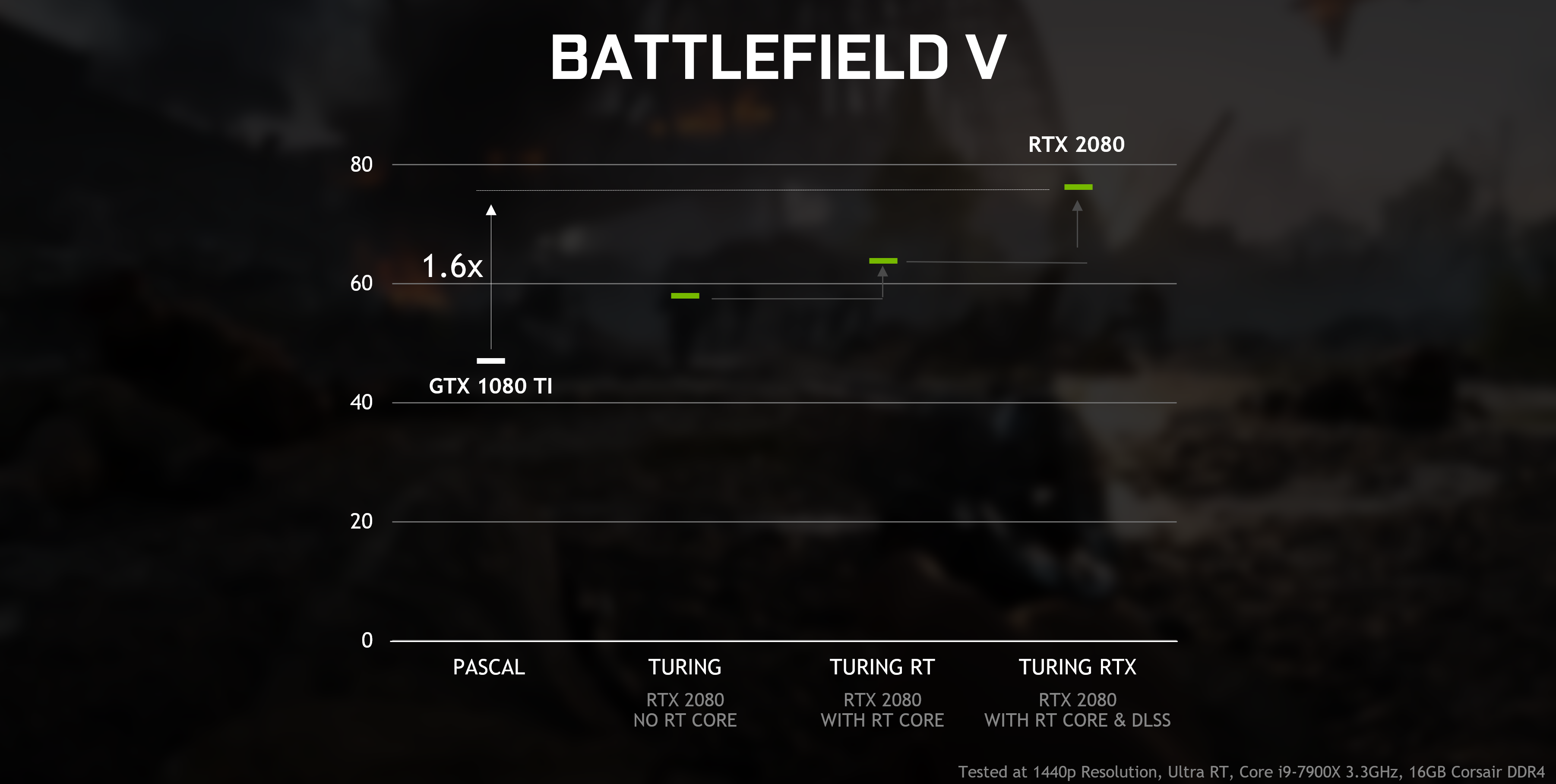
according to the slides... https://cdn.vox-cdn.com/uploads/chorus_asset/file/15970946/geforce_rtx_gtx_dxr_supported_gpus_march_2019.png
manic pawn
I'm guessing they're talking about the sacrifices you have to make for real time performance
it would be ridiculous to have actually limited dxr
 dry moon
Anyone getting The reference assemblies for framework ".NETFramework,Version=v4.6.2" were not found. on 4.22
maiden swift
I was told by an NVIDIA rep at GDC that the GTX support doesn't restrict features, just enables less rays than RTX.
grim ore
I dunno.... the nvidia peoples on that slide say "suck it 10x0 users"
I don't mind tho 😃 saves me a couple bucks to preview the feature without having to buy an RTX card
maiden swift
Same. I'm looking forward to playing with it.
cloud cobalt
@grim ore The language probably means that real RTX support with full effects will just grind your GPU down to a crawl
So just basic effects
cloud cobalt
Well probably wait until UE4 supports it at least
grim ore
well VS 2019 should be final now, not in preview, and UE4 supports it in 4.22
grim ore
I would still wait tho lol 😃
cloud cobalt
Well holy shit at 4.22, most impressive release in quite a while
 abstract relic
General rule of thumb: preview is just that. A preview. Never use it for projects
cloud cobalt
Not a preview anymore
Either 4.22 or VS2019
Errr
Yeah they released today both of them
cloud cobalt
Released today.
fast finch
more like released 10 minutes ago
because I checked 10 minutes ago
and it was only in preview
cloud cobalt
This is confusing
fast finch
When I checked the website 10 minutes ago, it said download 2019 preview
now I go to the same site
cloud cobalt
But yeah they did release today, out of preview
fast finch
it says full version
fast finch
Any idea whats new in it for UE4?
grim ore
I dunno, the 2019 twitters show 3+ hours ago
 austere badge
Could someone explain to me what each of these things are doing? I understand that the E key is pressed and then it is brought into a node that sets the players fuel. It then goes into a print string node that makes it output the value on the screen. But why do I need to have a player fuel node connected to the subtraction node when the subtraction node already connects to the set player fuel node?
abstract relic
It’s needs to know what it’s subtracting from
 cloud plover
does anyone know about any good animation packs that has shooter animations?
I've seen a few on the marketplace, but they all have pretty bad reviews
abstract relic
Mixamo if you’re daring
abstract relic
You can always contract an animator
cloud plover
Yes, but that would probably be way more expensive than an animation pack. And I'm not planning on using it commercially yet, just for university assignments and learning
abstract relic
You get what you pay for. I’d suggest making them yourself in that case. Autodesk is free for students for a few years and there’s always blender
grim ore
what kind of firing? the animation starter pack has pistol and rifle firing animations and is freeeeee
abstract relic
Doesn’t paragon have a few too?
austere badge
What does the cast to side scroller character node do?
cloud plover
I've looked at the Animation Starter Pack and its missing a lot of tings. Like a "firing" animation for the pistol and turn in place animations
grim ore
yep your going to need to buy a full pack then or use mixamo stuff and clean it up probably 😦
cloud plover
Alright 👍🏽
grim ore
like mentioned before tho the paragon characters do have animations so you might be able to use some of those, they just might need some cleanup for differing skeletons
Revenant and Twinblast are both pistol users for example
austere badge
Does anyone know how to fix this?
cloud plover
@grim ore I'll have a look at those 😄
 clever flare
even though i build my lighting it still says that it needs to be rebuilt. i don't understand why
 worn sparrow
do you actually need an RTX card to see raytraced lights in action?
Or can you use a non RTX card but with a huuge performance decrease?
I'd like raytracing enabled for screenshots, but don't want to spend money on an RTX card.
I'm running in DX12 with it enabled, but can't see a difference while toggling it in my directional light
icy mulch
When ever i use hill tree 02 it build lighting it takes hours
worn sparrow
@icy mulch hell tree 02 is cursed... it hitches every time I try to load it into memory
worn sparrow
@icy mulch you could maybe try export then reimport, or load it up in an older version of the engine where it works then migrate to your current project
It never used to do that in older versions
icy mulch
Well im making Forrest level i can just use a 3d tree model
worn sparrow
^^
grim ore
@worn sparrow ray tracing needs RTX cards for now, GTX 10x0 and 16x0 cards will support it later this month.
worn sparrow
@grim ore my poor 970 xD
cheers dude
icy mulch
Does anyone know how to make blueprint for example every time i pick up a item a enemy starts to go faster and faster
worn sparrow
blueprint communication documentation would be a good start @icy mulch
grim ore
pick up item -> get all enemies -> loop thru all enemies -> make them go faster would be the easiest. the looping thru enemies wouldn't be the best so replacing that with something that knows about all the enemies in the level would be better but if there is not a ton and you just want it to work the first way is fine
worn sparrow
@frank escarp how many RTX lights enabled, out of curiosity?
guess you'll get more performance once its implemented properly for those cards?
frank escarp
oh, i comment that if you try rtx on 10 series gpus is not going to go past 5-10 fps
just extremelly slow
worn sparrow
ah yeah xD
grim ore
the official slides say it will get "ok" performance https://cdn.vox-cdn.com/uploads/chorus_asset/file/15970950/geforce_rtx_gtx_dxr_battlefield_v_performance.png but not as good as an RTX card of course
we just need to wait on Nvidia at this point.... just waiting..... waiting
spare sun
soontm
maiden sundial
Tried to update my project. It says that i have to compile in manuelly again.
But VS can't find a path for UE4.exe
spare sun
ok why cant 4.22 build new projects with vs2019 if its the only one installed
Discovering modules, targets and source code for project...
WARNING: Visual Studio C++ 2017 installation not found - ignoring preferred project file format.
ERROR: Visual Studio 2017 must be installed in order to build this target.```Did you set VS2019 as default in your project
grim ore
I wonder if it's actually broke 😦
spare sun
hm
thought its only in project settings that you gotta change to 2019
that worked ty
grim ore
I would not be surprised if what you are doing is broken 😦
cloud cobalt
No reason it would be
spare sun
well 4.22 isnt preview anymore and neither is vs2019
so I wanted to move everythin and see how it works
cloud cobalt
I'd wait a month or two to avoid the worst issues but well
spare sun
worst case I reinstall since I backed up my 2017
 restive fern
@spare sun i like ura vatar
 bitter iris
sucks that the guys from Scene Fusion put a lot of effort into their systems, then Epic just frys them 😦
grim ore
It's not the same system for now, still plenty of room for a more robust offering from Scene Fusion
bitter iris
Yeah, i guess for now, wish epic would of hired the team to do it for them would be an awesome opportunity for them
but epic probs worked on it for a long time or something before hand
grim ore
even if epic wanted to hire them it doesnt mean they wanted to be hired, some people just like to do their own stuff 😃
bitter iris
yeah i get that, hope it works out
wary wave
scene fusion?
 timber bloom
So I'm using the basic fps start up in unreal to test and learn some stuff
Is importing sounds easy?
I want to replace the firing sound with other noises
 modern sinew
Where are the player controls in the C++ FPS preset?
I want to add running and sliding
plush yew
Does anyone know how to make client 2 on a dedicated server also call a function
@plush yew are you trying to make server call the function then replicate it to the clients?
maiden sundial
Unable to start program C:\Program Files\Epic Games\UE_4.22\Engine\Intediate\Build\Unused\UE4.exe The system can't find the given path
Help :feelsbadman:
cloud cobalt
From VS ?
maiden sundial
Yes
plush yew
@plush yew Im trying to have a client in the player controller tell the server his new chunk position i'll dm a screen shot
kk
maiden sundial
Seems to work, thanks 😃
modern sinew
Where do i find the FPS player controls on the C++ version?
supple totem
Either in the character or player controller. Can't remember
maiden sundial
Got here a question about the new live coding.
What does class layout changes mean in this case ?
Can i as example add a new variable to my class ?
modern sinew
@supple totem what file tho
grim ore
@timber bloom adding sounds is very easy, you import the sound file then you can replace it in the play sound node in the blueprint
fast finch
Anyone having issues with the live coding?
I understand it doesnt work after you hot reload, it says you have to restart editor for it to work again, Ive restarted many times and it just keeps telling me to restart editor to make it work
Seems like a bug
timber bloom
@grim ore alright that's what I thought thanks
icy mulch
Is building light need to pack the game cause i really want to add hill tree 01
grim ore
switch all your lights to movable and then you wont need to build lighting at all
it will just not perform as well
you should try and fix the issue with the mesh tho if possible
spare sun
hmmmmm
Live++ seems to have quite some drawbacks and breaks once you hot-reload. Breaks like.. forever? Even restarting the editor doesn't help.
Maybe restarting the pc would
modern sinew
I still can't find where the key inputs are
grim ore
the key events or assigning the key -> input ?
modern sinew
there's like 200 different files here
@grim ore I want to add to the FPS demo Shift to run and Control to crouch
grim ore
in the FPS template?
grim ore
have you set up the input in the project settings?
and it looks like the binding of events is in the Character.cpp file where it should be
 stoic sentinel
Not sure where to ask about this, When tryin to use the new 4.22 release with my project it asks to rebuild the plugins im using. Something it had no problem doing on 4.19.. "Dungeon_Masters could not be compiled. Try rebuilding from source manually" is what im getting. Any tips on how to fix this??
cloud cobalt
Open in VS and build
grim ore
and I only see 4 C++ files in the FPS Template so..... you shoudl not have 200 @modern sinew
cloud cobalt
New versions usually have breaking changes
stoic sentinel
Ok ill try that now.
grim ore
why would you be in there when your source code for your project is in the Source folder in your project?
paper kernel
I actually managed to print out 2 different values from same variable
on tick print is changes correctly, log print says always 2
grim ore
https://i.imgur.com/Cv8V2dc.png @modern sinew
fast finch
@spare sun yeah same for me, once you hotreload which you have to when you make new classes, can't ever use it again on the project apparently, because restarting editor aint fixing shite
modern sinew
found it
grim ore
@paper kernel is it a pure node you are getting the value from?
modern sinew
??
paper kernel
just pawn reference
it's the delegate that prints the wrong value
and tick is the proper one
I guess it's a loop execution being too slow again
modern sinew
how do I lower friction? How do I lower the camera and hitbox? I want slide to do that
I created the classes
@grim ore
grim ore
if it's a character you would change the capsule half height more than likely
grim ore
you would get the capsule half height and change it, friction I have no idea it's in the physics section
stoic sentinel
The build failed inside VS: /
modern sinew
@grim ore Still don't know how to do that, you just restated it, which is why I clarified "(using code)"
timber bloom
I heard that in 4.22 you can edit with 2 people in real time is this true?
 dark depot
modern sinew
dark depot
modern sinew
does anyone know the code to get the capsule height>
timber bloom
HOLY FUCK
YES
im so happy
no more needing to file share
i just realised
you have to be on the same network
rip
abstract relic
Source control been around for decades 😜
stoic sentinel
: / why tho..
I think i figured it out, one of my plugins looks like its not 4.22 compatible.
plush yew
Sequencer Editor Plugin is also not available in new Unreal Engine 4.22 for anyone having problems with their sequencers animations.
icy mulch
Does anyone know how to spawn a character at different locations casue i just want it to reappear and disappear and different locations
 grave spruce

How is this not higher up the list?! This is amazing!
In fact, this release of @UnrealEngine is pretty damn amazing.

 Twitter
how will work
restive fern
Hi
grim ore
https://docs.unrealengine.com/en-US/Editor/MultiUser @grave spruce
 mint sequoia
How do I get ue 4.22 to show up in our custom fork that was forked from 4.20, I hit fork again while on 4.22 but just says already forked
grave spruce
it super useful for company and small teams
plush yew
I'm 100 % certain that all traces besides line trace aren't currently working in 4.22. No signal is being detected, only line trace works.
icy mulch
@plush yew okay it works thanks also is there away for example i want my character to be thrown by invisible force like in cutscene how would i do it cause i already did one for the waking up part
 unborn fractal
Hey, I am new to unreal (switched from Unity) and I am finding that Unreal on a brand new project is painfully slow when opening projects. I saw a few forum posts suggesting Visual Assist which helped a bit but it is still incredibly slow. Would picking up an SSD help?
plush yew
@unborn fractal SSD will help with loading time and compiling significantly.
unborn fractal
@plush yew Ok thanks 😃 Do you have any recommendations for SSDs? I saw that they dropped in price significantly since the last time I checked on them.
plush yew
Yes now is one of the best time to buy one. To be honest I am fond of Kingstons
Never had problems with it plus they arent that expensive. Currently have two 256 GB (one for the system second for the project) I also have one 1 T HDD for assets only.
unborn fractal
240GB Kingston for only 29$ wow
dim plover
Should I delete Binaries/Intermediate before switching engine versions?
icy mulch
@plush yew hello
unborn fractal
@plush yew Would upgrading from 8GB of Ram to 16GB be beneficial aswell?
plush yew
You can but won't have to to be honest but you will have to rebuild new .sln
@unborn fractal It will of course, you won't see much difference when it comes to overall speed while working but you will while testing a specially. If your project isn't massive (over 20 GB) you won't need more than 8GB to see radical difference in your workflow.
@icy mulch Hello
icy mulch
@plush yew do you know how to make a cutscene for example i want my character to be thrown across the paltform
plush yew
@icy mulch There is a lot of ways to do something like that, you can use timeline with changing player position, you can use physics and custom gravity system, you can just even force player movement. It all depends on how often you will use it and how much control you need with the system.
For cutscene i advice to use Sequencer.
icy mulch
Level or master
 tropic oracle
6 versions of UE installed and then today I see this..
icy mulch
Cause i already have one for the wake up animation
plush yew
@tropic oracle Oh damn
tropic oracle
just got the email saying 4.22 is out. Was waiting cause Preview 6 didn't seem fully done. Guess I'll check back later and they'll fix this
not sure where to post this for devs to see though, lol
ie Epic official devs
plush yew
@tropic oracle There are still problems with 4.22 for example every type of Trace (without line trace) is not working.
tropic oracle
oh damn
icy mulch
@plush yew im guessing i can only have one animation at a time
plush yew
@icy mulch You can have unlimited numbers of Sequencers in a level, you can even have many activated at a time. But the best way of handling a cutscene is to put everything you need in to a single sequencer, you can use of course another one after that.
 jade plaza



 thorn topaz
Is there a way to either disable the console in development builds or enable logging in shipping builds?
dim plover
With 4.18, you can just add "bUseLoggingInShipping = true;" to the TargetRules constructor in your Target.cs file.
https://answers.unrealengine.com/questions/383407/how-to-log-in-shipping-build-win.html
thorn topaz
Just read that, haha thanks
dim plover
Though, for me, my shipping client doesn't have logging when I tested on 4.19.
thorn topaz
I'm in 4.20, maybe they fixed it haha. I'll find out soon
thorn topaz
@dim plover yea, doesn't seem to be working
 storm venture
anyone know how to join a multi-user editing session remotely?
spare sun
well one option could probably be port forwarding. Not sure whether you can enter target ip manually in this plugin, but port would be 6666 (from what I see in the console) and the ip to connect to would be the public ip of the host once forwarding is set. udp btw
Another option would be lan simulator like hamachi and such
storm venture
ill try 6666, i had 7777 before,
 worn spade
beginner question, I made a variable in my game instance and I've cast to it in my level blueprint and trying to get or set that variable, but I cant find it
 proven aurora
Is multi-user editing available in the new version of UE4?
grim ore
@worn spade show the screenshot of your code that is not working? might be something simple
proven aurora
Oh sweet, thanks!
worn spade
yeh Im just starting out. I made an integer variable in game instance I made, trying to access it from this cast to gameinstance node
grim ore
so is your Game Instance that you made called Game Instance? is your Game Instance named Game Instance?
I am assuming if you made your own Game Instance you called it something else, like AwesomeGameInstance or MyGameInstance or RadicalGameInstance
worn spade
It's named GameInstance without the space
flat idol
I'd go with the radical game instance
grim ore
oof. ok might try renaming it then to something a bit more specific to start with to make this easier, call it like MyGameInstance
then try casting to MyGameInstance instead to make sure it knows you want your specific game instance you created and not just the base Game Instance class
plush yew
Hello Unreal Users!... I just red about this discord on the Unreal Forums,. I hate to start with a question, but i do have alot of experience with older build and am learning ue4 now: how do i manage a Landscape Visibility Node to plugin to my Material? any help would be very much appreciated
flat idol
I think you would connect it to the mask input, then set the material to be masked
grim ore
I did test it tho, you can name your Game Instance to GameInstance (don't do this....) and it should work soo.... you might have another issue. After casting did you drag off the As Game Instance node on the right and try to get your variable by name?
worn spade
I guess renaming it worked. I noticed I had the option to cast to mygameinstance, and mygameinstance class, maybe I did class before. anyway it seems to be working now, thanks
grim ore
😃
worn spade
I keep finding your tutorials too
flat idol
MathewW there is a blue 'note' at the bottom indicating the cast will not be required since the class is the generic game instance already. So he is using the wrong cast node in this unfortunate case.
grim ore
yay glad it worked, I never thought of naming it like that either lol so learn something weird every day
@flat idol that was my thought as well but I couldnt find that actual node when I tested it for casting
oof nevermind, blueprints was smarter than me. you can't do it wrong if you have context sensitive on lol
man and there is like no way of knowing which one is which from looking at the nodes or the node finder.... yeah... don't name your stuff the class name is the lesson here 😃
flat idol
There is some pretty print feature enabled by default in the engine you can perhaps turn that off
It may be affecting the search too as well
grim ore
well if you just search you get both cast to gameinstance nodes but if you drag off the get game instance and then cast it's the correct one. This is a fantastic lesson to pass on tho
flat idol
Indeed
plush yew
@flat idol TY for the advice, going to try it now!
flat idol
Wyked, there is a page in the documentation for this i believe, that you may find useful
plush yew
doesn't rally have specifics... would a 50% gretscale texture work for the mask texsample, then plugin it into OpMask, then set mat to masked??
flat idol
mask usually has a threshold set to be something like .3 or something, so in that case the 50% should hit the limit indeed
Not tried to do it like this before tho, i just connected up the recommended path and it was working for me
You maybe have to feed the landscape coordinates into the texture to get the right content being sampled at a given coordinate
plush yew
Ok Thanks again
worn spade
alright time to break Choose Player Start again
bitter iris
is that multi user plugin working or
plush yew
Landspace Visibility Mask Directly plugs into Opacit Mask of Final Texture Node, Node set to Maskes, The: Hit Apply! LOL i didn't hit apply, and that's what was wrong
so tired gah
 waxen dock
Are there any help chats here?
worn spade
think this channel mostly
 worldly temple
Hello people! Just joined! This server seems awesome
plush yew
funny that ray tracing option is not grayed out and can activated.
but still no raytracing.
plush yew
Anyone know why the server only gets the 1st clients values?
flat idol
hello, you can close any opened tabs and windows, they sometimes contribute to the measurements
plush yew
Who me?
flat idol
Who are you?
plush yew
The one who posted about the server values @flat idol
flat idol
I can see that yes, but i have no idea what you are showing there.
plush yew
This updates those values. But the server gets the 1st client's value but neither the second nor the third clients value gets replicated to the server
flat idol
It is because on the server the playerindex(0) means you are only addressing the first client, not the two others. You may want to access the player controller by pulling a "get controller()-> cast to player controller()" combination instead. That way you will have access to the client 2 and 3 as well as the first client. It's the context you are missing here.
plush yew
This is on my player controller so whenever I call get controller it doesnt work since this isnt a pawn
Is there another way to get the players IDs?
flat idol
If this RPC is already being executed on the player controller, then why are you trying to get access to a player controller. I don't get it.
You can just call update position and you're done.
remove the rest of the junk there
plush yew
Whenever I dont use cast the values all use the 1st clients value
flat idol
They are accessing the first client because you are specifically looking for playercontroller(0) which is - client 1 by all means.
plush yew
This is what happens when I remove cast and get player controller
Both server values are using the first clients value
flat idol
No they are not. Your tick will execute the update as well, and becuase client 1 was joined earlier it is 1 index forward to client 2.
plush yew
So how would I get the server to get clients 2 value?
flat idol
But perhaps other reasons are there that confuse you. Maybe you should print out sensible informations, that helps you track the flow of informations.
Not sure what do you mean by the question.
plush yew
So basically what this system is doing is I have a world that generates in chunks. It gets what chunk the player is in then only has collision in that chunk. So what I'm trying to do is have all the clients tell the server what chunk they are in so the server can add those chunks
flat idol
But are you aware the fact, that there is already a server representation of your characters and controllers? The client doesnt have to tell anything to server, because server can gather this information on its own already.
is server-> branch -> true -> my location is x,y,z store and spawn
nothing have to be RPCd here i'd say
plush yew
Sorry I am very new to networking have never dealt with it before
This is the first project I'm doing that I need it for
flat idol
You can try the concept with simple examples perhaps, and build your knowledge that way.
plush yew
Yeah. I've gotten simple stuff working before just as test and have gone through and read all of the network condenium guide but still having trouble getting basic multiplayer working with this project.
So how do I get the server to access the clients values? @flat idol
flat idol
Just imagine the server is a singleplayer game. The tick() will execute on server, thus you can access the getactorlocation() and so you can already know where the player is in the world.
Clients are slaves in a networked game, they are going to adjust to the location server will dictate. If client wants to go off the position, server will force the location on the client, because server is the authorative. It better be.
So the best information here is you can use is what the server already has about the location of the player. Nothing has to be accessed from client specifically.
You can perhaps connect a IsServer->branch(true)->print(get actor location) to the tick, and you will see it will print out the current location of the clients. It should make this clear.
You may also want to enable this checkmark, so the controller will actually be in sync with the panws.
 brave beacon
hey anyone able to help me with a issue?
flat idol
But perhaps moving your code to the acutal pawn (the character) can be more straightforward after all.
plush yew
i'm no expert but maybe i can help
sullen wraith
downloaded a materials pack
not sure how to start painting them onto my terrain?
plush yew

In this video you'll learn how to use different layers from a landscape material and use them to paint your landscape or terrain inside of Unreal Engine 4. W...
 analog blaze
If you guys are experiencing slow shader compiling on launch
run the exe in admin mode
and it'll supercharge it
the way it works is via priority
of the processes
in charge of shader compiling
plush yew
Maybe someone can convey this to documentation team? *In UE 4.22 Release Notes.
plush yew
hey since you're learning about painting landscapes, try this documentation, on screating roads on yoour landsccape: https://docs.unrealengine.com/en-us/Resources/ContentExamples/Landscapes/1_2
worn spade
it's 1 sentence 
sullen wraith
just purchased a auto landscape plugin thingy