#ue4-general
1 messages · Page 421 of 1
 plucky reef
 plush yew
@dapper idol why not make the landscape two sided?
 dapper idol
doesn't work
plush yew
is it a directional light?
dapper idol
yes
 dull wraith
@plush yew (for what I said earlier, had to go out for a bit) Yeah, i love how you can spend hours on one problem and it's solved with changing one or two nodes 😅
 modern sinew
can anyone help me find a C++ tutorial for building like Planet Coaster has?
plush yew
I recommend this @modern sinew Not a tutorial but it's very good
https://www.unrealengine.com/marketplace/en-US/slug/train-and-rail-system

Highly customizable system to build trains, roller coasters or anything that runs on a track. Parent carriages to form trains, derail them on sharp bends or disable realistic features to create stylized effects. 100% Blueprint and easy to extend.
modern sinew
Well I meant more building building. Working on an Airport tycoon
 fierce tulip
I dont see why an airport tycoon cant have rollercoaster tracks XD
modern sinew
😛
plush yew
I heard planet coaster and i thought rollercoaster lol
fierce tulip
"ladies and gentlemen, please fasten your seatbelts as this airplane is going to lift off ater this sick 5 duoble helix corcscrew"
plush yew
lmao^
@modern sinew what type of building building do you mean? Like when you place stuff or?
@dapper idol was the light shining through the floor lol?
modern sinew
but yea, I mean more the building construction, like walls and roof and stuff
plush yew
oof that's weird. I fixed it by making the landscape two sided but never had a problem with a torch shining through a cube
plush yew
what does the cube look like?
dapper idol
simple cube with a simple bump texture
plush yew
I mean image of it shining through
plush yew
@modern sinew no exact tutorial but look at ue4 inventory and building systems on youtube. Need to come up with a custom solution though.
@dapper idol looks like the light is too close to the wall. Have you tried changing the light source length?
dapper idol
yeah I think it's too close to the walll since it's not shining trough multiple walls
I'll see what I can do, later
thanks tho
plush yew
np, and it also could be a mesh problem. I had to go into blender and actually make the wall "thicc"
dapper idol
hmm, could be
but I hope they will fix the landscape light leak problem in upcoming 4.22 updates
I mean cmon
 hasty lintel
Anyone know of any good tutorials on how yo achieve dirty windows, using base colour and roughness ? I would still like light to pass through it ofc.
Like this ^
dapper idol
maybe increase roughness at those dirty parts, and specualrity in or decrease
idk how tho sorry
 nova blade
Spotted this on 80 Level the other day - could help you with your glass

Ryan James Smith shared a great workflow, where he shows the way you can build glass materials.
hasty lintel
Excellent, thank you
 proven oxide
I am having a problem with lighting on an internal level, I add lights they show but when i rebuild lighting the light shows for a brief time then vanishes unless I move the light
hasty lintel
Check your auto-exposure settings
set min-max brightness to 1.0 on your post process volume
proven oxide
it works on other levels
hasty lintel
Ah
hasty lintel
Is your lighting dynamic or static?
proven oxide
static as far as I know
hasty lintel
Try increasing the indirect lighting
hasty lintel
wow
proven oxide
then it goes black
nova blade
do you have errors when you build lighting?
proven oxide
the light importance volume is quite large
lighting results blank
mapcheck 0 errors
nova blade
is that BSP or Static Mesh?
proven oxide
static mesh
nova blade
UVed ?
proven oxide
collision block all and use complex as simple
nova blade
Overlaping UVs?
proven oxide
nope
just gonna go down the mesh and add a tecture to every slkot - most are set to world grid
 cloud cobalt
@proven oxide Do you have lightmaps ?
proven oxide
nope
proven oxide
other levels are ok, because they are outside maps this is completely enclosed
 maiden swift
The Yerba Buena talks are starting to come online! First one up is the audio rendering talk (much to my delight). 😄

During GDC 2019, Epic’s Aaron McLeran walks through the Unreal Engine team’s development process for the new audio renderer, which includes balancing live Fo...
I'll write a post in #unreal-news once all the YB talks are up.
cloud cobalt
Great ! Can't wait for the Chaos one
 manic pawn
nice
all the gdc videos are in this list https://www.youtube.com/playlist?list=PLZlv_N0_O1gYrzsn-fTzsrJq4sQPlAiqb
 maiden swift
Indeed. Once all the YB tech talks are up, that playlist will be complete.
 proven oxide
is there any quick way to apply a material to multiple elements
manic pawn
what's with this secret society
maiden swift
Of the YB tech talks, I'm most interested in the mesh rendering refactor.
I didn't get to see any of the YB tech talks live when I was there.
And there was nothing about the mesh rendering refactor at the booth.
plush yew
Hey guys, quick question. I am making a quest system and its UI system together. What is the new option in order for me to set an anchor to the UI canvas? I cant find the anchor setting anymore
 grim ore
the anchor is part of it's parent slot
plush yew
So that means I have to add it to the first input button which sets it to the rest?
grim ore
you would take the child that you are adding, slot as XXX where XXX is the slot type, then you get access to all the slot data like anchor and position (if it has it)
you can probably just cast to XXX slot from that add child return as well to get access to it
proven oxide
wierd adding glass to a window texture and I can see the directional light but point lights and rect lights arent working
plush yew
MathewW Do you mind if I PM you? I don't particularly want to flood the chat with small questions as such (Assuming they are logical to most). I am very new to this and still getting the hand of things
grim ore
I don't read PM's but here is an example of both ways https://i.imgur.com/RDxm948.png
everything after the add child is one of the 2 ways, the top is casting your return from adding to a canvas slot then setting the anchors. the bottom is getting the item you created/added/whatever, the actual widget itself, slotting it as the slot (getting parent and casting it to slot is what this does), then setting the anchors
obviously this is using a canvas panel so you need to cast or slot correctly based on the parent this item is in
plush yew
I will try and see how I can change things around, thank you for the guidance 😃
grim ore
either one of those should work, I tested it. The key for UMG is the parent controls how the child will lay itself out in the UI. If you look at the widget you can see that it shows the parent type at the top with all of those layout options since it controls it. You have to tell the widget that you want it's parent as the correct slot (casting basically to the parent to get it's properties) so you can then tell the parent how the child should behave
proven oxide
ok sorted the light, had to tell the skylight to not cast shadows
 honest rune
When you use TSoftClassPtr and TSoftObjectPtr, the class or object pointed to is detected for cooking right? Or do you still need to use object libraries to make sure they are cooked in release builds?
I think I remember reading somewhere in the documentation that they will be cooked but I'm not 100% sure
 dim plover
I think they are only automatically marked to cook if you reference them via editor because I reference them by path and mine do not cook.
honest rune
I use spawners (Actor-based) that are placed into streaming levels and those actors contain soft class pointers to the things they are able to spawn. So in that case, they should be detected and cooked right?
dim plover
The spawners would be detected, but I don't think those soft class pointers would be if you use FSoftObjectPath in the Spawner class.
At least, that's what I've experienced.
*By FSoftObjectPath, I meant if you set the path in code. Like FSoftObjectPath("Game/Path") as opposed to using the editor to select the objects. It seems that Primary Data Assets are the perferred way to, I think, manage assets which mark them to be cooked, but I haven't really figured out to use them conveniently.
honest rune
Oh ok. I was hoping that would be enough to get them detected by the cooker. I guess I'll have to play around and see what I can do, or fall back to object libraries if nothing else
thank you
 meager stag
Editor freezes when trying to open certain assets (on like 50-70% loading bar). Nothing special about them in size/complexity, it's part of a pack and most other assets work fine. Team-mates can open them just fine. Any idea what is happening and how I can debug this?
honest rune
TSoftClassPtr basically just wrap a FSoftObjectPath so the behavior will probably be the same as what you've experienced
fierce tulip
@meager stag generally they dont freeze permanently.
but the wait can be annoying af
meager stag
@fierce tulip Been waiting for about 4 min now
It's a pack of cave tunnels, they should all be pretty much same. Couple of them cause engine to freeze
But I'm gonna leave it over the night, I guess, and see
fierce tulip
is it by any chance my cave pack?
fierce tulip
yea, a few of the very complex setups take really long. I submitted a report about it many years ago but never found out why
grim ore
4 minutes? waaaaaaaait longer 😛
fierce tulip
even on my high end pc it would occasionally take up to 10 minutes.
meager stag
@fierce tulip Do some of the T-shapes fall under "complex" ones?
fierce tulip
but once it loads, it always loads fast unless you delete the data cache
cant remember as its been a while, generally they load fast when they are in a level, just the mesh viewer is like "I unno, f00k this mesh"
though one of the bigger T-shape meshes has that issue yea
meager stag
Welp, guess I hit the jackpot. Gonna let it load for a while, thanks.
meager stag
Really well thought-out pack, btw, fun to work with.
fierce tulip
it might have something to do with the tangents, as I had to use uv0 for very VERY weird unwraps to make the tangents and normals work correctly with the shader-setup of being bale to use any seamless textures
well you might be happy to find out i'll be submitting an update soon for 4.19 and up that significantly improves on the shader, its instructions, and better hlod stuff
and a few better made textures
meager stag
Looking forward to it!
fierce tulip
https://forums.unrealengine.com/unreal-engine/marketplace/33884-luos-s-modular-rocks-cave-package?p=1474995#post1474995 some screenshots in this post and the last one
Unreal Engine Forums
UPDATE: 4.19 will soon have a new update optimizing the shaders a bit, and improving upon them.
See my latest post about it here:
hmm, I should add a color tweaker to the material.
meager stag
@fierce tulip Thank you, took it 15 min but asset loaded. Did not expect that time so I thought something was wrong with engine.
fierce tulip
same XD
when I was writing the first report, halfway into it it loaded.
"dafuq"
now it should SHOULD load fast
 analog blaze
@maiden swift Hey bro, Preview 7's out~~~
maiden swift
So it is! Thanks for the heads up. Added a post in #unreal-news. 👍
plush yew
Guys... Im returning with the same problem as before as i simply can not figure it out and where it belongs... Out of my little blueprint here (Its part of the ThirdPersonCharacter), where can I add an anchor in order to display my UI to the size I have set it, rather than locked to the top of the screen? I have tried so many combinations and I simply just cant wrap my head around it.
This is the BP
I would greatly appreciate it 😃
plush yew
Matthew, they are both standard Widget Blueprints, working off each other I suppose. The way I have noticed in the video I am following, is that the Quest UI will only appear based on whether or not the HUD appears which, which is why I have set it to appear when a button is pressed.
So from my little knowledge, I kinda gathered that there is a UI within an UI, made for multipurpose I suppose?
Incase I want to expand on what I want on my screen
grim ore
what does the layout for your HUD Canvas look like? the item you are adding your Quest UI Widget
plush yew
Its just an empty canvas with a border, set as a variable
grim ore
and the HUD Canvas variable points to the widget itself that you created or part of it?
grim ore
ok so then yes the HUD Canvas is a variable that points to the Canvas Panel in your HUD UI
so you would want to do a Cast to Canvas Panel after your add child, then you can access any of the layout nodes such as set anchors
plush yew
That being within the character itself?
grim ore
that being wherever you have that first screenshot where you are doing your add child
 woeful thorn
LogProperty: Error: UStructProperty::Serialize Loading: Property 'StructProperty /Game/WeaponComponent/Blueprints/BPA_ParentWeapon.BPA_ParentWeapon_C:WeaponStored'. Unknown structure.
EDIT: For everyone who is having problem with something like this, duplicate the variable of the Structure, change from the old one to the new one, then save -> compile and it works!
Anyone have a clue of what's wrong?...
I didn't even changed the file
plush yew
Right i see, I will try that right now
 glad gulch
Can i import my .fbx and say, that i wanna only complex collision?
grim ore
you can change that in the mesh editor, double click on the mesh and change it's collision settings in the detail panel
glad gulch
For 200+ meshes - would be hard a bit D:
I know, per double-click -> collision -> Use Complex -> Save.
 abstract relic
Highlight all the asset >>> bulk edit
glad gulch
but i hoped, there is a easier way. Like - reimport it and say that i want just the ..
hold on, never heard that.
grim ore
~bulk edit doesnt have that option~ I take that back it was hidden lol
abstract relic
That sneaky bulk edit
grim ore
the other option is if they are all set to project default you can change the project default and profit as well
yeah that option is not under collision because... why not
glad gulch
Not so fast. I dont get it. I'm a Greenhorn doodle. 😄 So.. bulk edit..
grim ore
its under asset actions
grim ore
right click a ton of stuff, asset actions, bulk edit via property matrix
search for the complexity and change it
plush yew
Fantastic, it is working now 😮 Thank you so much
glad gulch
Hell. Thats great.
Thanks @grim ore You saved me really a lot of time!
200+ assets, round about* 40 terrain elements and props. I thought: Dayum - the whole night for clicking the assets options and reset this
 frigid adder
Hi, I am an experienced game dev but new to Unreal and trying to figure some stuff out. I'm looking for an option to filter textures by nearest neighbour like in this screenshot:
 grim ore
Hightide mentioned it first 😃
 ember phoenix
Is there a way to set up a VR pawn in a First-Person project? To allow it to run in VR? Are there any specific requirements as re-creating my project would be much slower
frigid adder
anyone know where I can get to this menu option? Thanks!
glad gulch
@abstract relic Thanks as well champ. MathewW for that explaining.
grim ore
open up your texture and that option will be in the texture window @frigid adder
@ember phoenix the default first person template has VR support, you just only get the HMD pretty much. If you want hand controls and such you can import the VR Feature pack (green add new button at the top left of the content browser)
frigid adder
excellent, thank you!
grim ore
or you can make a new project using the VR template and then migrate over the vr character to the other project. both should get the same result
 bitter iris
what the, why is there 500 instructions for a mat that has nothing in it, i litterely just created it
ember phoenix
@grim ore how would that affect the height though? From what I understand the start needs to be on the ground for VR to work properly and then the user picks up the headset off the floor and the camera adjusts. My pawn is currently of type "Player Start" rather than a "FirstPersonCharacter" blueprint. Is it looking for that blueprint by default as my logic inside it seems to be working just fine
grim ore
your pawn can't be of type player start, that is an actor that is used to determine where the default pawn goes in a level if they don't exist already. chances are you are using the First Person Character as the default pawn. If you bring in the VR Character and change the default pawn to it you can see what happens
ember phoenix
So I bring in the VR character by adding it as a feature pack? Does that just add the character with no extra stuff? Also, where do I change the default as I have no FirstPersonCharacter placed in my level
grim ore
when you add the feature pack it should add the VR template stuff, character and anything else it needs, in its own folder. You can then go to your game mode and change your default pawn to the vr pawn that was just imported
project settings -> Maps and Modes -> Default Game Mode.
you might even have a VR Game mode that it imports with all the settings
ember phoenix
Right, awesome. I will test it out by adding the VR template stuff and changing the settings tomorrow when I go to the place I have a VR Headset
Thanks a lot
grim ore
I just checked the add new feature pack and it seems to come in with no game mode but it does come in with 2 VR pawns and the controllers and blueprints. The biggest issue is the inputs are not set up so they give errors until fixed
 brisk spire
Does Discord have issues tracking when you're running the unreal editor for you guys?
ember phoenix
Well I'm just gonna have a couple of custom controls so I'll delete the rest that give errors. Moving won't be needed for my project I believe
I need like 2-3 buttons tops
glad gulch
Is there a tut, or short doku, where is explain this different? At pic. one: Light is build, physics off.
The other. And no issues.
brisk spire
Have you built lighting in your stage since placing the building?
glad gulch
Check.
brisk spire
Movable objects use dynamic lighting, so it's constantly updating the lighting, but static objects only update when told to
Do you have a lightmass importance volume?
glad gulch
i guess not.
grim ore
one big thing is movable lights and static lighting will not look the same
static lighting especially since it uses your UV Map for lighting
glad gulch
Normaly, correct me when i think wrong: A house, is smth. static like.. non moveable. A sword, a.. plant smth. like that i can kick needs moveable lights.
Ah. I have light uv's also.
grim ore
which lighting you use also depends on your desired look and performance
brisk spire
He's talking about the way the shadows just kind of.. aren't there
I don't have any lightmaps on most of my stuff, and the the engine usually resolves things normally
glad gulch
may i ask, wich settings do you use? IRL-like "static &/or moveable" or all the same way? 😄
grim ore
a proper light uv map and static lighting will give the best performance but then all your lights are baked and never change. a little of both isn't a horrible idea depending on the goal
brisk spire
You were right in assuming movable would be good for things like a sword, or a soccer ball, and static is good for a building
glad gulch
okay. hold on. I got the vision of "static" - "moveable". Thats not the point at all. And i got it also, that fixed baked light 's also not good at all (destructible buildings for example). My major question is (i guess we passed each other a bit 😃 ): What can be the problem of wrong backing (except of the uv's)
Or did i miss the point, that these are shadows (maybe wrong baked)?
brisk spire
Make sure you have a "LightmassImportanceVolume" in your stage, as well as a SkyLight and a Light Source, and make sure the LightmassImportanceVolume square covers your building, then try building lighting
glad gulch
brisk spire
Have you tried importing other meshes to see if they have the same errors?
If you are exporting from Blender, sometimes the vertexes get merged in Unreal, when they aren't supposed to, and that makes lighting break
glad gulch
yes. out of the 200+ bla bla meshes, have first of all 3 meshes a UV-log error. "overlapping" i replaced them accurate and reimport them. No UV-Log error. Only that issue
brisk spire
OH
glad gulch
aha!
brisk spire
I've had that problem before
The UV maps in your mesh are overlapping, even though they use different materials
Err, different textures
brisk spire
Even on things like the windows, and the door, and the bricks?
For example, these two windows are in the same mesh
glad gulch
yeah. I also tried to cut all quads sepperat and leave a cut in them.
glad gulch
Hm. Hold on, try smth
brisk spire
make a copy of your building and auto unwrap it, just to test
glad gulch
just for explain: I tried two ways: My UV-Islands sepperate, with 0.10 automatic distance, smart uv-unwrap with the same. And lightmap pack (all faces cut seperat with 0.10 automatic distance)
eh 3 ways*
brisk spire
You may be better of asking someone in #graphics or #visual-fx , I don't do any UV unwrapping, or texturing, so I am not the best person to ask 😅
glad gulch
No prop. I guess - it can be smth. else, because it worked for more than 100 other assets and accept of this... not. But thanks anyway champ. Even for the try
brisk spire
Good luck!
 vast pine
I had a strange fatal error in a development build of game wondering if anyone else has this
I placed camera actors in a scene and try to get actors of class and get there name is camera1 and camera2 as a filter to blend with
Works in editor crashes if built looks like an access problem
Work around is to make a camera actor to place in the scene with a camera attached and then filter
But wanting to confirm the problem is I can't use the outlined name to filter with know get actors of class in a build
 mental shale
(yo, could anyone help me out in # umg? )
grim ore
how are you doing the filtering?
also using the names in the outliner is normally not a good way of doing anything as far as I can tell, tags work well for stuff like that
 golden condor
vast pine
golden condor
vast pine
Yeah I was doing get actors of class cameraactor get name
So def the prob I tried tag but it didn't find the tag maybe I was using wrong tag as it's got component tag and another one. Ended up just making a base actor with a camera and gave that a tag which worked
 vagrant sapphire
So quick question, is it normal for the unreal engine installer to just say "prerequisites"?
does that mean it's still installing?
oops nevermind i was just impatient
grim ore
there is the default sky sphere which changes lighting based on your sun position and light direction you set up
 hidden aurora

Introducing Rebirth, a real-time cinematic produced by Quixel, harnessing the power of Unreal Engine and real-world scans from the Megascans Icelandic collec...
Have you seen it?
Spechless
its just amazing
maiden swift
Rebirth is pretty incredible.
Especially considering it was made with 4.21, so no ray tracing.
 untold epoch
Hello, can someone tell me the execution order for UE4
 tribal quiver
Hey can someone help me real quick in how to export my textures with transparency as PNG's or a file format that keeps the alpha channel?
 worn granite
abstract relic
worn granite
abstract relic
Queue the unsolicited dm 😜
vagrant sapphire
So i just exported my first level to windows but
when i play it,it plays the base third person level,not the level i made
what gives?
did i make a level on top of the base level somehow?
vagrant sapphire
ah okay,thanks
it worked,gureato
doesn't that mean the game has multiple levels in it? how do you normally skip levels via command?
 gray storm
would the unreal engine be a good engine to make a game like GTA V? or would unity be better for that?
abstract relic
It’s more of a question of whether you have the time, money, and team for that.
 sleek spear
@gray storm i prefer unreal but i believe you can have similar results with both engines
sleek spear
actually unreal engine source is available, so if you want to tweak something low level, you can
 oblique sorrel
Okay, I have inexplicable trouble finding two, seemingly easy to find, pieces of info.
- The date when the work on Blueprint started
- The date and engine version when it was released
Anyone?
Ping at will if you know anything on the topic
gray storm
aight
 median night
Thanks @abstract relic
gray storm
i was responding to @sleek spear but yeah im good
sleek spear
and i think unity is closed source
 brave lark
Is the cable component able to achieve something like Just cause's grapple / tether system as is or am I going to need to do a bunch of work under the hood with physics?
abstract relic
Yep. You gotta pay their tiered subscription to get access
sleek spear
@abstract relic oh and then you get the full source? didnt know that
brave lark
Maybe I should ask that question a different way? 🤔
Should I build my own system from scratch or is it worth using the cable component for a physics ( I assume ) driven system like just cause's grapple / thether system
sleek spear
i have no idea @brave lark
there are two grapple results in the marketplace
maybe you can find more info in the forum where their developers discuss those assets
abstract relic
May have to eat my words. Looks like they don’t offer it anymore
 scarlet birch
You can still get it, but you have to contact them. I suspect it's not worth whatever the cost would be .
sleek spear
never truly got into unity. i installed it again recently to try megacity. it has some impressive stuff in it
scarlet birch
I would choose it if I were to do a 2D project. They've added a lot in that area. I made one game in it years ago, before they had tilemaps, sprite bones and a lot of the other stuff. I always prefered engines like libGDX . Unreal is just so fast to prototype with I can't see using anything else for 3D right now.
 lethal breach
Good evening/morning everyone. I'm trying to log off for the night but my brother is arguing with me about something so I need a tie breaker. I'm making a top-down diablo style hack and slash dungeon crawler. In the editor I can have 319 enemies, each with a particle effect on them and the FPS goes down to 20. For 319 enemies, each with a particle effect, is 20 FPS reasonable?
abstract relic
People like their high fps regardless of what’s happening in the scene
scarlet birch
How many are going to be on screen in game? if the answer is 319, I say no.
lethal breach
Agreed. And I get that, so I'm trying to allow the player to group up as much as their character and PC can handle. If that's an entire map, so be it. Personally, I'm running a GTX 960 and can group up 319 enemies each with an effect and drop to 20.
@scarlet birch That's the entire map... lol
sleek spear
@lethal breach i think you should consider 24 fps the minimum
and it still is low for games
lethal breach
Hm, I'll try to get it up higher in the morning then.
lethal breach
The biggest (by far) FPS drop is the AI character movement component. Trying to get that down is rough.
abstract relic
The editor slows it down too mind you.
sleek spear
so its a cpu bottleneck?
lethal breach
Right. I'm keeping that in mind. In my opinion 20 FPS on a 3 year old video card/CPU in editor with 319 enemies/particle systems is about right.
Yes @sleek spear
sleek spear
this ai component, does it run in all core/threads?
lethal breach
How would I go about checking that? It's the default AI Detour Crowd Controller.
This is my stat unit results. I have only used the profiler once, so I'll have to reference my notes as to what is causing the load.
sleek spear
i dont know never tried it. you could use a cpu usage metering application
like task manager
lethal breach
True. I'll run that.
According to task manager, CPU load changes from UE4 editor running at 25.3% to 27.4% so I suppose it is more GPU lagging than CPU.
scarlet birch
A cpu monitor will just tell you it's taxing the cpu. Use the profiler and find out what the problem is, but it sounds like you're doing a lot of little things in less than optimal ways and that's going to add up.
lethal breach
Less than optimal how? Still learning so any insight you can provide I'll happily accept.
sleek spear
make particles less detailed according to delta
sleek spear
i have never used the profiler, will try it now @scarlet birch
scarlet birch
There's little things you can do in just about everything, if you understand what's going to cause the biggest hits on resources. So you learn where to cut corners and where you can let things go. Like your particle effects, you can work with those to get a decent effect but reduce the complexity, cut down on instructions etc... You can design your AI so it's not killing performance too. Others use the detour crowd controller with many enemies and don't have performance issues, so it's likely that that could be cleaned up too. What I'm saying is that from what you have said, I suspect a lot of the issues with your framerate are you don't know how to go about optimizing things.
lethal breach
Gotcha. And that very well could be. I haven't gone through and optimized with the profiler in about a month or two. Before I optimized I couldn't have 40 enemies running without dropping to 15... Now I can run 300+ and stay above that. The biggest issue I had at the time was collision spheres for detection. The biggest impact was destroying those collision spheres once an enemy was detected. From some searching online it looks like I'll have to get into some CPP for my AI controller to fine tune it, decrease the tick rate and such.
scarlet birch
Idk, maybe. This is top down, are you using 3D or 2D models?
lethal breach
3D
abstract relic
Don’t use colliders for pawns. It’s the most inefficient thing out there 😜
lethal breach
I have 2 running on my pawns at the moment but can't figure out a way to drop them... 1 detects for the mouse over to create a highlight effect on the enemy so you can see which you have under the cursor. The other detects spells such as fireball for the collision. I suppose I could drop the spell detection and just have the mesh trigger the overlap. But when I try to swap out the mouse over and use the mesh it is kind of awkward as their arms move and you aren't mousing over them anymore.
I did end up disabling the spell collision sphere, and that only saved ~1.5 FPS with the same number of enemies.
scarlet birch
1.5 fps from something like that is not a small thing. Find 10 more and your back at 30 fps. I would think you could get rid of all those collision spheres you're using.
dim plover
As you guys mentioned collision components on Pawns, how else would you detect collisions on Skeletal Meshes in a performant way?
I know you can do bone accurate overlaps, but in order to do that, you would need the Skeletal Mesh to generate overlap events, which is quite performance heavy too.
scarlet birch
He's not talking about the capsule, he's saying he's adding a bunch of spheres to test for things.
dim plover
Perhaps I didn't understand what he meant by this:
The biggest issue I had at the time was collision spheres for detection. The biggest impact was destroying those collision spheres once an enemy was detected.
Well, anyway, should the skeletal mesh generating overlaps be avoided in favor of multiple collision components on a character?
modern sinew
Any tips on coding an object builder program? I think you'd just have to have a menu that spawns an object when you click on it, rotates it 90 degrees when you press a button, and raises it up and down when you hold shift and move the mouse. How hard does that sound?
 scarlet grove
hello need some help with a 3D model, anyone?
 vital hollow
Yeah but im trying to learn myself
scarlet grove
i bought a model and its suposed to be "modular" but its a whole mesh, comine mesh is deselected, the thing is the texture map is also a "whole", is there a way to divide it in unreal? and use it modular?
modern sinew
how do I make the view of the camera smaller so things look bigger?
modern sinew
I have an actor, and when I click play it's first person for them, but I can't find a camera in the menu
vital hollow
@modern sinew go to your actor viewport and look if you have a camera component
If not add one
modern sinew
@vital hollow
vital hollow
Thats the editor viewport
I see you haven't created an actor bp
I gues you work with bp's
vital hollow
Idk if its the same for c++ but
Right click the content browser and select add C++ (someone correct me if im wrong)
And if it only says add bp then you created a bp project
modern sinew
Add New - New C++ Class?
vital hollow
Yes
And then choose character or actor what you prefer
If its for the player i recommend character
 spice forge
Hey folks, who use VAssistX question for you:
IntelliSense by default show you function signature then you point to function call with mouse, but is there any way to do the same thing with VAX? Because then I turn off IntelliSense, signature just don't shows up.
vital hollow
@modern sinew
Wow thats blurry

In this video we will look at adding components to a c++ class in ue4.16 and above and how to attach those components to others. I hope you enjoyed the video...
I never done C++ but
Maybe this will help and after that try to search how to edit the properties of a component in C++
modern sinew
ok
 restive fern
Does ue package linux and mac builds? I think i saw only one of these
 regal mulch
Using UE4 and stating "Ew no" when BPs are mentioned makes me question if one really understood what UE4 is
regal mulch
Mac Builds only via a Mac though
restive fern
Oh
modern sinew
@regal mulch I have bad experiences from GMS2's BP system
regal mulch
Yeah you are still shooting yourself in the foot
modern sinew
It just doesn't seem as grounded as code
regal mulch
I don't say "Use only BPs"
regal mulch
But coding your logic in C++ and adjusting settings etc. in the BP Child is the way to go
modern sinew
can you integrate them?
modern sinew
so...yes?
regal mulch
Yeah of course. Just make all your coding in C++ and then, in the end, create a BP Child of your C++ class.
modern sinew
Also I found where you make HUDs. Neat
modern sinew
o...k?
regal mulch
And of course also assign settings, assets etc. via the inspector
Using only C++ in UE4 is just kinda bad
modern sinew
I don't have any experiance with UE4 yet, but I'm using it because C++ is what my college class teaches so I thought it'd be convenient
restive fern
Are bps equally fast to cpp with ue converter used ?
modern sinew
used GMS1.4 tho
regal mulch
@restive fern Not equally, but most users don't run into the issue.
- the way I suggested it makes use of the visual interface of BPs
The code sits in the C++ class
So performance isn't affected
restive fern
But if it gets converted to code shouldnt it be same speed?
regal mulch
@modern sinew Welp. I wouldn't base an opinion about SoftwareA on experience with SoftwareB :P
@restive fern There is a youtube video showing the difference
It's not 100% the same
restive fern
I see thanks
regal mulch

- Quick Timestamp for Results: [5:06] 2. Shameless plug - My first UE4 Marketplace Asset: https://www.unrealengine.com/marketplace/loading-screen-system (Lo...
Please keep in mind that this is an extreme test in the video
You wouldn't have 10.000 BP Actors ticking a math function like that
 sudden agate
You wouldn't have 10.000 BP Actors ticking a math function like that
I beg to differ :P
regal mulch
I can't even imagine a scenario where I would have 10k actors ticking that math function
Most of our Actors in Hoverloop aren't even ticking at all
The only ones that are are probably the pawns
at least in terms of custom code on tick
 wild ginkgo
There's no way to select severeal meshes in a level and convert them to an actor blueprint, yes?
wild ginkgo
I run into the need like every three month and look for that option ^^
regal mulch
Blueprints aren't Prefabs :D
wild ginkgo
I guess it would be a nice feature to have
likely everyone could use it once in a while
regal mulch
There is a Plugin called "InstanceTool"
Which basically grabs all the Meshes that are duplicated
And turns them into an Actor with an InstanceStaticMeshComponent
That's mainly for optimization though
vital hollow
is it hard to learn ue C++ when used to PB's
wild ginkgo
My usecase is more like artists put meshes in a level and we need a blueprint from it. Hence either I go read out all the relative locations and reassemble in blueprints or chase after them and annoy them with my request for a blueprint - and wait for the blueprint ^^
@vital hollow yes and no, it's not hard to use c++ but it offers endless ways to do bad stuff or create hidden issues with it.
as opposed to blueprints that are much safer
cloud cobalt
Blueprints and C++ are very different tools for very different purposes
vital hollow
yes
cloud cobalt
For very different people too; because you don't improvise yourself a C++ programmer
vital hollow
the problem is that when making a game some stuff must be done in C++ to work properly ( or am i wrong ?)
wild ginkgo
some stuff can only be done in c++, but it doesn't require c++ to create a complete game
vital hollow
Like complex calculations
vital hollow
realy ?!
wild ginkgo
complex calculations, I think most of it can be done in blueprints
afaik blueprints don't have quaternions, so there's that
most stuff
and yes, for example you cannot really prgoramm animations in c++ (unless you go really really wild), you will need an anim blueprint
wild ginkgo
umg is another example where you likely want blueprints in any case at some point, but c++ can be really helpful here too to create custom widgets
I wouldn't worry too much about "fast" while you're at this point of learning
c++ is faster, but bad c++ still is slower than good blueprint code ^^
regal mulch
That one I doubt
wild ginkgo
like when you needlessly copy around stuff in memory, you can do that in c++ and bp and it's slow in any case ^^
regal mulch
Even with Nativizing it, it will only be as fast as C++ if at all
Only thing that might be faster (if you don't utilize Live++ or stuff like that) is the iteration time
vital hollow
so it might be better to use for IK cuz of the iteration time
or an object in a hand
regal mulch
It really depends on the programmer, the team and the project
BPs can also be used to allow designers easier access to your C++ code
vital hollow
like making a custom event in c++ and using it in BP's
because that would be usefull
regal mulch
Most of your UI design will be in BPs using Widgets
Cause if you really didge that for Slate, just because you "Don't like BPs." then I don't know anymore.
Maybe use another Software altogether while you are at it >.>
vital hollow
dont get me wrong i love BP's im only affrait i cant use it for everyting
and that on some point i have to learn C++
wild ginkgo
I rly wouldn't worry too much for the time being when you can go with blueprints. You can always, once you realize you need something that you can't do in bps or something is tremendously slow, try to move this part to c++.
cloud cobalt
C++ is mostly not required for most game dev
cloud cobalt
Yeah it depends. Just goes a long way already for indie projects
vital hollow
Nice
wild ginkgo
idd, doesn't make sense to use c++ just for the sake of it and without specific reason
regal mulch
Yop, that's what most people go for
Use BPs until you reach a point where you can't anymore
Or, if you are skilled in C++, use C++ and utilize BPs whereever you can
Why the hell is it so tricky to get a non FRotator based ControlRotation
Bah, I hate Quaternions, but I can't do this without them
(╯°□°)╯︵ ┻━┻
wild ginkgo
welcome to the club ^^
dim plover
Is understanding Quats important?
 chrome trench
they are 1 of possible representations of rotation of object
wild ginkgo
they're much easier than rotators, avoid countless probs
but they're a bitch to understand
chrome trench
but unless you want to do low level stuff, you don't really need to know th maths behind
cloud cobalt
Quaternions are required for full 3D rotations, like spaceflight etc.
Rotators are only okay for shooter type gameplay
chrome trench
just use existing functions already in engine to manipulate them
dim plover
So I don't need to know stuff like this? [q^{\prime}=q_1\left(q_1^{-1}q_2\right)^t]
chrome trench
"need" depends on what you want to do
dim plover
Well, I have no idea what I just copy-pasted, but it's from this: https://www.3dgep.com/understanding-quaternions/
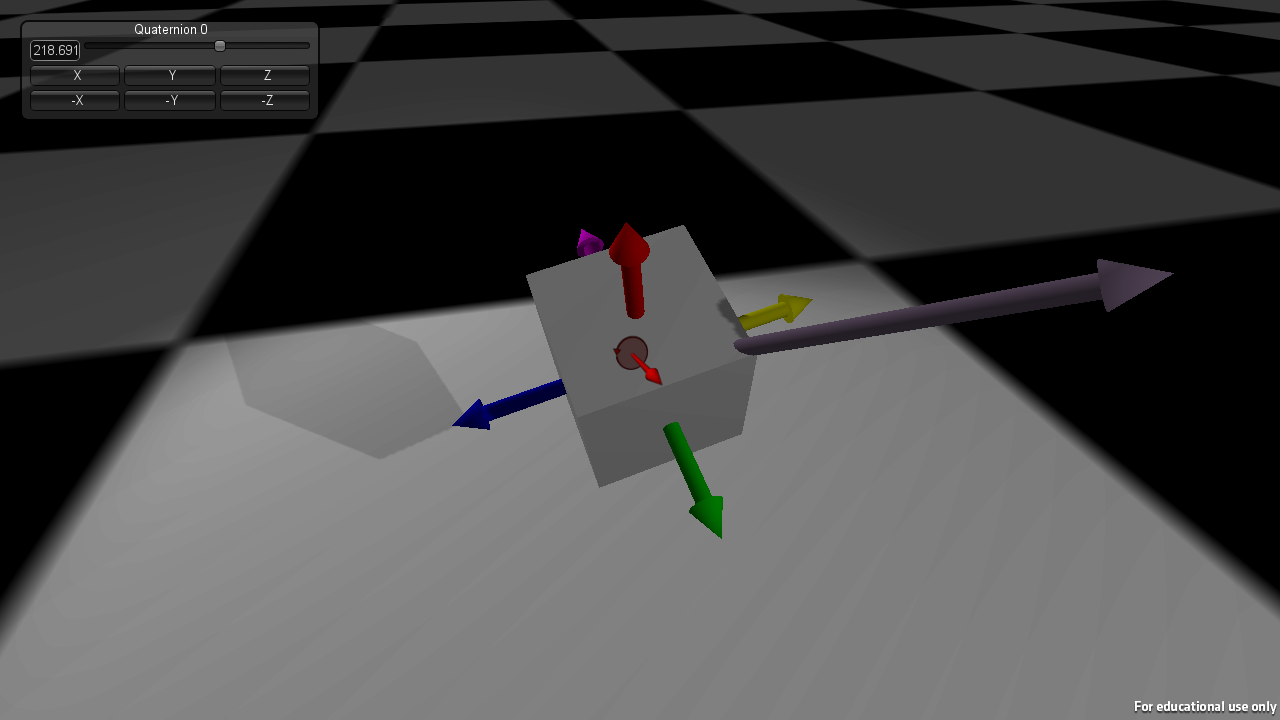
Quaternions are used to represent an orientation in 3D space. This article attempts to demystify the complexities of quaternions.
chrome trench
also, if don't have strong maths background, you can forget about understanding them
dim plover
Oh, alright, got it.
wild ginkgo
it's a bit like understanding vector math I guess, takes some time and practice, but it's nothing too crazy once one gets the hang of it
dim plover
That's good to hear. I'm pretty good at vector math.
regal mulch
Problem with Quats and understanding them is that they don't have an easy to grab concept of the numbers
Rotators you know that Pitch, Roll and Yaw are the rotations around the specific axis
But with quats you can't just say "Oh yeah, that X is this and that rotation."
And yeah I need that for our drone to do full 360 movement
I have this working but the implementation relies on a RotationInputVector
And I want to move it away from that into the Controller, using an FQuat ControlQuat
But I seem to not get how to modify it properly
void AHLPlayerController::AddControlQuat(FVector RotationAxis, float RotationValue)
{
    FQuat AddQuat = FQuat(RotationAxis, RotationValue);
    FQuat NewQuat = AddQuat * ControlQuat;
    ControlQuat = NewQuat;
}
Cause this does nothing haha
wild ginkgo
Because of the last line I assume
cloud cobalt
What's rotationvalue in ? radians ?
regal mulch
@cloud cobalt Yeah
But the whole code only produces 0,0,0,0
So mäh
Obviously doing something stupid
Need a second coffee
wild ginkgo
can assure you I used pretty much the same code like 3 days ago
FQuat AddQuat = FQuat(RotationAxis, RotationAngleRad);
FQuat NewQuat = AddQuat * ControlQuat;
The idea is to have a centralized Rotation Quaternion
That Camera and MovementComponent can use
vital hollow
what doe FQuat do
regal mulch
FQuat is the type
The "F" is something that has a story
Would need to grab that post
This gets asked all the time and I thought I would share the official story, as I remember wondering the same thing.

'U' stands for UObject, 'A' stands for actor, 'T' stands for Template. Everyone gets that. But what does 'F' stand for? It's used almost everywhere else!

The 'F' prefix actually stands for "Float" (as in Floating Point.)

Tim Sweeney wrote the original "FVector" class along with many of the original math classes, and the 'F' prefix was useful to distinguish from math constructs that would support either integers or doubles, even before such classes were written. Much of the engine code dealt with floating point values, so the pattern spread quickly to other new engine classes at the time, then eventually became standard everywhere.

This was in the mid-nineties sometime. Even though most of Unreal Engine has been rewritten a few times over since then, some of the original math classes still resemble their Unreal 1 counterparts, and certain idioms remain part of Epic's coding standard today.

Just a quick and fun story about Unreal's history I thought I'd share.```
Unreal Engine Forums
Discuss GitHub, using source code to modify the engine, and the creation of engine plugins.
regal mulch
I can very much create a sturct without that F
wild ginkgo
let me try that ^^
regal mulch
Only reason I could think of is Reflection not picking it up
regal mulch
It still originates from above's story though
 maiden sundial
Why is the UE c++ so weird ._.
sort(bool &succeed)
Every normal C++ be like;
That's an input!
UE4 be like;
That's some output!
cloud cobalt
It's regular plain C++ here yeah
wild ginkgo
it's actually even more so just a memory ref
wild ginkgo
no
both refs and bools are pod of same size
hence a ref to a bool is larger than a bool only
maiden sundial
A reference to a bool should be bad
cloud cobalt
bool sort (bool success) vsvoid sort (bool& success)
vital hollow
@regal mulch so am i wrong to think that the last line needs a FQuat as well
maiden sundial
You basically point to it which will create a 8byte pointer on a 64bit system
Instead of a pass by value with the 1byte for a boolean
wild ginkgo
true, the ref is even larger
cloud cobalt
It is larger, but it will be compiled as in place
So the reference might never exist
Depending on how the code is used
wild ginkgo
likely the optimizer would catch that anyways so it doesn't really matter
@regal mulch compiler output: "Struct 'test' is missing a valid Unreal prefix, expecting 'Ftest'"
definitely required prefix 😃
regal mulch
Right, freaking UStructs
wild ginkgo
haha yes, couldn't agree more
restive fern
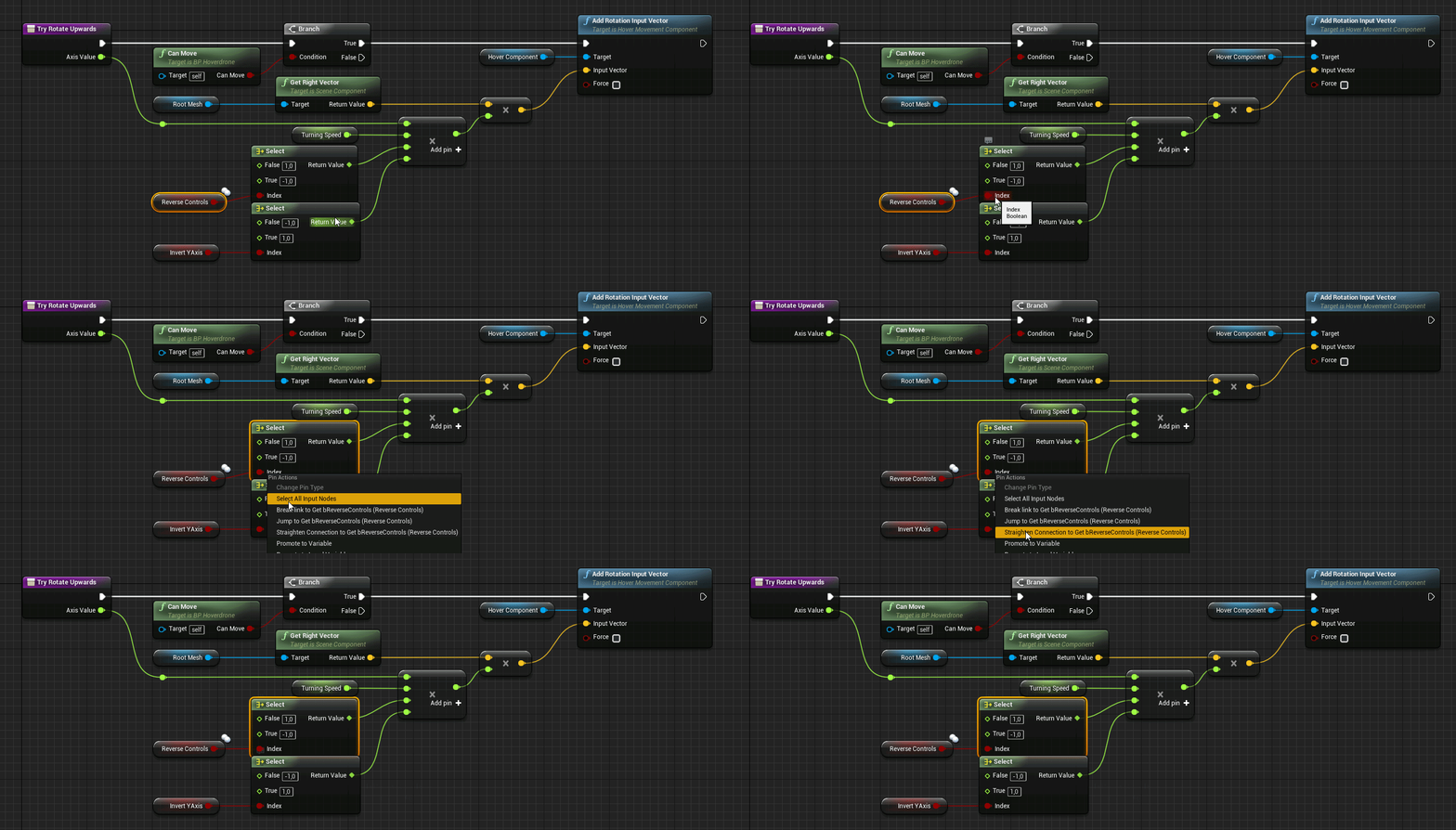
man UEneeds some better alignment options
for bps
i always try to not curve the nodes links more than 45 degree
and it looks good but takes time 😃
 vital hollow
😮 nice
 upper heart
Does anyone know why my project gets stuck at 83% for a long time while starting up and is building textures, meshes, etc. every startup? It only happens on one of my machines and not the other 🤔
regal mulch
Iirc we had that issue on an NVidia machine back in Hamburg
They had the Project or the Engine on a drive that wasn't saving the stuff
upper heart
Why wasn't it savings? I do have two drives. But so does my other machine.
Is this stuff saved in the ddc?
regal mulch
Think so
I think it was because of the drive not allowing to write
So the Engine never saved it and only had it temporarely
proven oxide
FBX files are confusing
upper heart
hmm okay that's what I would assume too. For some reason the DDC folder isn't even under my project director on this machine 😕
proven oxide
Load FBX of a character mesh
It has 5 copies of the mesh with 100+ random bones not linked to the mesh and unable to be linked to the mesh.
(the 5 copies are the Lods)
trying to import into UE just doesnt work
cloud cobalt
Sounds like the character mesh is broken
plush yew
Do lods work with skeletal meshes though? Heard they don't
Oh I'm sorry you can ignre me
vital hollow
I think skeletal meshes have LOD as well
because I think it would be weird if it doesn't
@proven oxide What is the program the FBX is from.
upper heart
Hmm I moved the drive my project was on to the same drive as the engine and it is still doing it and there is still no generated DerivedDataCache folder at my project root.
proven oxide
@vital hollow Gamebryo
on another note, What are the coordinates for Canvas? I can't find anything to show how to use it.
const float HealthPosX = (Canvas->ClipX - HealthBarBg.UL * ScaleUI);
const float HealthPosY = Canvas->ClipY - (Offset + HealthBarBg.VL) * ScaleUI;
puts the health bar bottom right of the window, i want top left
cloud cobalt
Just a warning, Canvas for HUD design is pretty much depreciated
UMG is the modern tool
proven oxide
I know but i am trying to mod, the ShooterGame hud to try and understand the code
cloud cobalt
🤷
abstract relic
To understand depreciated code?
cloud cobalt
Technically it's not depreciated and it's still useful, but just don't do your main UI with it
proven oxide
Ok then point me to a C++ UMG tutorial
cloud cobalt
Look at Slate if you want C++
proven oxide
this is using slate
proven oxide
where is that from - that is how it uses slate by putting the widgets on the Hud canvas
cloud cobalt
No it's not.
proven oxide
so where is canvas from?
cloud cobalt
Okay, so it's using the old-school Canvas class to position Slate widgets on a (completely unrelated) Slate Canvas, I guess ?
proven oxide
but all the widgets use #include "SlateBasics.h"
#include "SlateExtras.h"
If i could code it in UMG it would probably be easier
but i can't find anything about how to do it in C++
cloud cobalt
UMG is Slate + Blueprint
So stick to Slate
And you don't actually need the code above
You should use the proper alignment system provided in Slate
Again, ShooterGame is not and should not be a starter code for your game
It's a 6-years old demo for UE4 that has been kept together with duct tape
UMG was not even announced back then
Even Slate was still a work in progress
proven oxide
so is there a tutorial on how to do a hud with slate
proven oxide
thanks
 mental yarrow
Hello guys, anyone here familiar with vehicles? I have set up a car and for some reason when i get up to a little higher speed my tires starts looking rally wierd, dont really know the reason for this, any help appricated! (ingonere the gif lagging a little bit)
cloud cobalt
It's fine to use Shootergame to learn, just don't copy the code
And look at the official docs for everything
@mental yarrow Motion blur doesn't support wheel movement like that
proven oxide
i was looking but it didnt say what the coordinate system is
proven oxide
so how do i make it appear in a specific location
cloud cobalt
Read the doc
@mental yarrow The easiest fix here is to remove motion blur alltogether
mental yarrow
@cloud cobalt seems like that was the fix thanks mate
cloud cobalt
If you do need motion blur for the vehicle, UE 4.22 supposedly will come with a sample project to set up an advanced motion blur system for wheels
Probably expensive as fuck but 🤷
mental yarrow
@cloud cobalt thanks for the tip, will look in to it
 lusty carbon
How can I migrate the godray bp from Architecture Explorer sample scene?
into my project
cloud cobalt
Migrate tool ?
 solar quarry
I have a system where the character explodes after being spotted by the ai. How do I make a system where the camera zooms on the ai after the character explodes?
proven oxide
i saw a tutorial that detailed how to use death camera
regal mulch
It's relatively easy if you make use of the CameraManager
That's a class you can create a child of
And set it inside of your PlayerController
It its class defaults
It has functions you can override for what to look at etc.
So as long as you have a pawn and that one is not dead, you' use the pawn as viewtarget
And afterwards you could set the viewtarget to the enemy
Or just math out where the camera has to look at
That function would give you a lot of control
solar quarry
Ok
solar quarry
@regal mulch could you explain it a little a more?
 earnest cape
So I'm trying to figure out a bullet hole system similar to rainbow six siege. I found a few ways of doing it but I'm wondering if anyone already has a good tutorial for it.
plush yew
i have a particle system(s) in a blueprint(s) which, after packaging, shows up on my 1050TI laptop, but on my desktop (rx 570) they DO NOT appear... anyone know what's going on? the on hit events still work, you just can not see the particle systems on the AMD card
 hoary charm
Hey guys not sure where to post this but I just created a new third person project to test height maps, and when I move more than say 10ish ft the character is deleted. What's going on here? https://i.gyazo.com/fb6029bef390c11746d2c3b9dad47db5.gif
 regal mulch
How low is that landscape on the Z axis?
 regal mulch
And how low is your character on the Z axis when it gets destroyed?
I would guess you are hitting the z-kill value
hoary charm
One second I will try to find that out
plush yew
so i figured out the particle systems disappear if texture filtering is set past high
hoary charm
@regal mulch When I try to inspect the details of the (Deleted Actor) it's blank
regal mulch
Inspect them before it gets deleted? :D
 slim crystal
hey guys im trying to use Sequencer to export a movie of a camera flying through my scene. My problem is in the final exported movie none of the animations in the scene are playing (Wind moving grass and trees)
hoary charm
-1000 it looks like
slim crystal
I have auto play ticked on but it still does not play when I capture the movie.
 leaden dust
I am trying to learn c++. Could anyone answer some questions:
- When should I use pointers and why?
regal mulch
Did you previously use Blueprints?
leaden dust
yes
regal mulch
You know the Blueish nodes you use to save Actors and such in?
hoary charm
Appears to be no kill-z section in the character inspector
regal mulch
Or the return pin of a GetGamemode node etc?
regal mulch
That's pointers
leaden dust
- If I make a pointer called HitResult , what difference in result does HitResult and *HitResult give
regal mulch
// Pointer to a HitResult in memory. EMPTY if not set with something!
FHitResult* HitPointer;
HitPointer is basically a number, these things are called pointer cause they point to an address in your memory
leaden dust
If I want to get value of pointer: what do I use HitResult or *HitResult
regal mulch
*HitPointer dereferences that pointer, giving you the actual FHitResult that sits in the memory
regal mulch
This can also be done via ->
If you just want to access it
With pointers you do always have to make sure that you actually have something saved in that variable
leaden dust
And if I have not set it it will return nullptr?
regal mulch
Cause if that Pointer point sto something invalid, like nothing (nullptr) or a memory address that doesn't have valid data, then it will return Accessed None
Same happens in BPs by the way
hoary charm
Found it in World Settings
regal mulch
So always:
if(HitPointer)
    HitPointer->HitActor
HitResult should return an integer if I'm not mistaken
At least last time I actively tried that in C
But that I'm not sure in C++ tbh
I think the memory address is just a number
leaden dust
So if I have something stored in a pointer, I should use *HitResult to get it
regal mulch
Yeah or if you just want to modify hit you can do HitPointer->HitActor
But usually you don't really use a pointer for a HitResult
leaden dust
alright thanks a lot
regal mulch
You don't do that in Blueprints either :P
Pointers are mostly used for Actors and Components
As well as Objects
leaden dust
I tried using just FHitResult instead of FHitResult* but it wasnt building
regal mulch
I would double check why it's trying to force you to use a pointer
leaden dust
I was following a example program
regal mulch
There can be reasons to use a pointer
But I wouldn't know why without seeing the code
regal mulch
It can go from "Yeah here it makes sense" :P
leaden dust
for hit result
regal mulch
To "That's bullshit"
A Pointer, specially one to a non- UObject child class, is risky for beginners
Cause pointers, if filled, are filled via a "new FHitResult" call
leaden dust
wild ginkgo
understanding pointers and refs is a bitch in c++, some functs in ue4 return a FHitResult&, others return a HitResult* and if you want to TArray find these you can well end with HitResult**.
regal mulch
TO clean it up
regal mulch
UE4 does that for UObject types
leaden dust
??
wild ginkgo
NONONO
NOOOO
NO NEW
NO NEWWWW!!!
just don't use this shit unless you exacly know what you do
regal mulch
As I said A Pointer, specially one to a non- UObject child class, is risky for beginners
wild ginkgo
the only new in UE4 is a TSharedPtr<type>(new ...)
regal mulch
So you better not use any for structs
 frosty bloom
wild ginkgo
frosty bloom
wild ginkgo
new is almost as evil as maloc
regal mulch
UE4 has a smart pointer library, as Akh pointed out
wild ginkgo
there is never, in real world, not highly profiled and optimized code, the need of plain new in c++
leaden dust
and how do I make a reference
wild ginkgo
not even for google
leaden dust
intead of a pointer
regal mulch
void SomeFunction(FHitResult& HitResultReference) {}
Something like this
Depends on the use-case again
leaden dust
what does the & mean
regal mulch
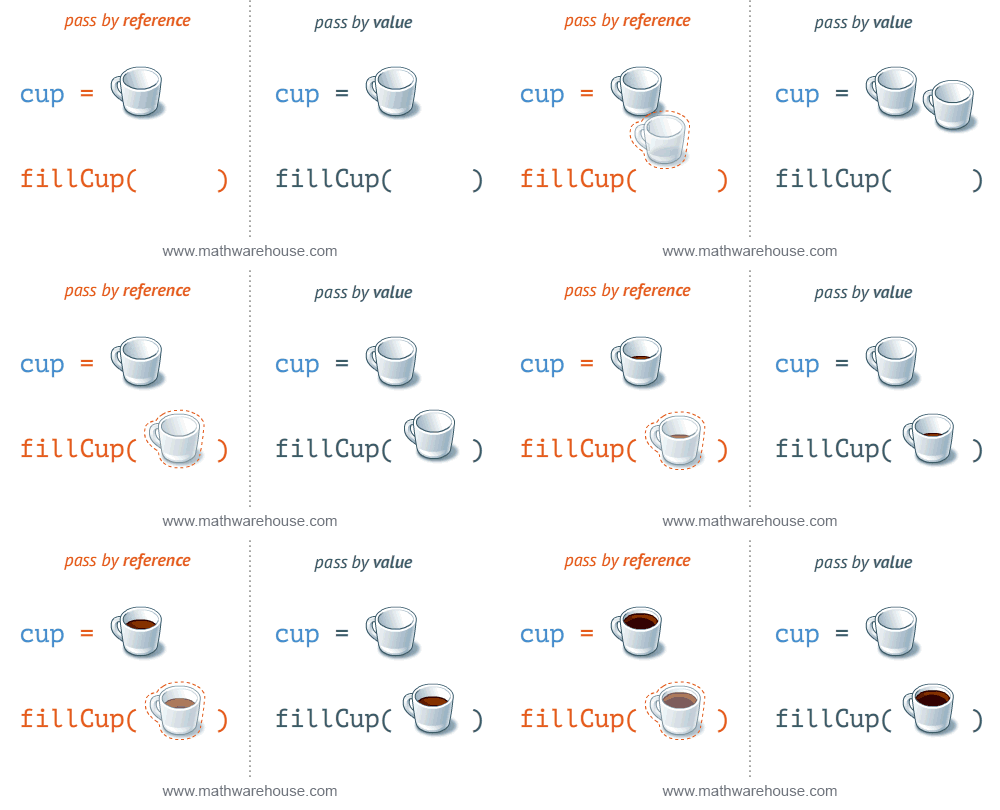
If you pass in a reference and modify it, the original passed variable is modified and used.
If you pass by value it creates a new one
Which is sometimes actually bad
Cause well it duplicates it in memory for the time of the call
So you'll see a lot const Type& Name stuff
leaden dust
ohk
leaden dust
Ok
regal mulch
Performance and optimization shizzle
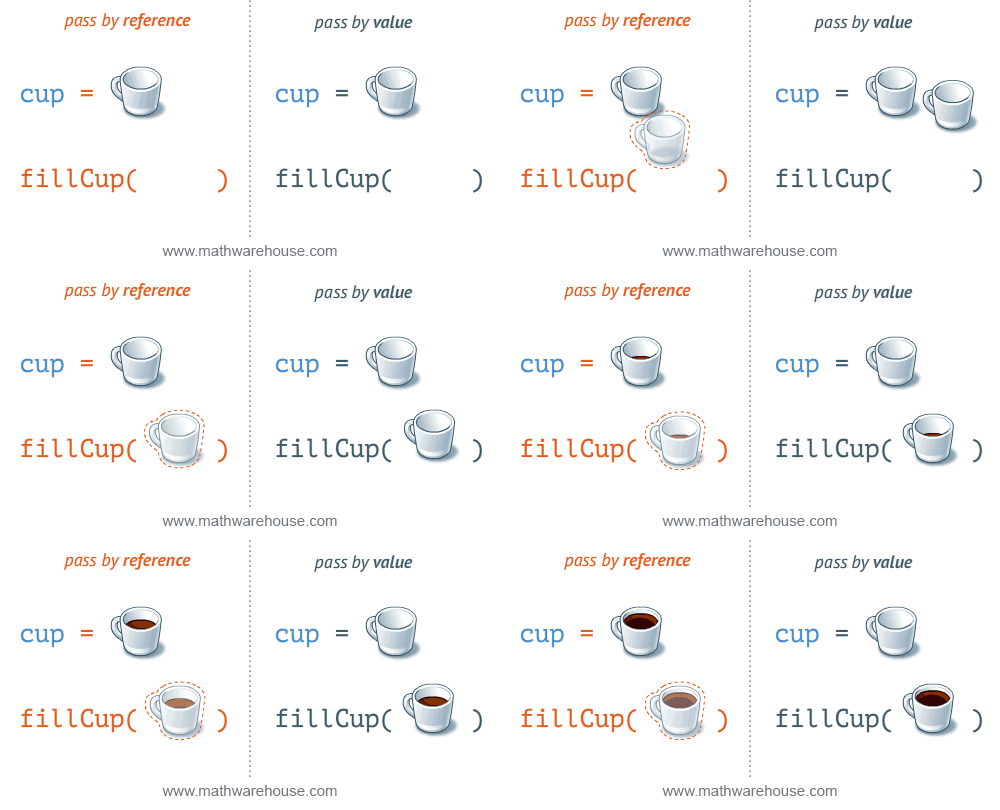
Cup SomeCup;

fillCup(Cup& CupToFill)
That's the left one
While hte right one is without the &
wild ginkgo
I may be old school here, but two things: read a book about c++ basics (focus memory, ptrs and refs). Don't even bother anything more before understanding what an AActor******* const& means. And second, don't understimate complexity here. That's why coding is a well paid job.
regal mulch
It's not oldschool
wild ginkgo
the hating of any "you can do it" is 😃
I got my head chopped appart and smaked in pieces back in the days, trust me
regal mulch
We made our students fill out stuff where they had to say what happens if you do *(ppptr+1)+2with a ppptr*** pointer
regal mulch
Yeah, but it's the same learn process
wild ginkgo
there's plenty of us who never had proper education
restive fern
blend multi node crashes a lot
regal mulch
If you understand how to modify a pointer to a pointer to a pointer
You probably understand them for the rest of your life
I know, but that's the first module at uni
wild ginkgo
that's what I wanted to say 😄
regal mulch
And if you want to be a good programmer, you gotta be able to do that eventually
wild ginkgo
"If you understand how to modify a pointer to a pointer to a pointer
You probably understand them for the rest of your life"
regal mulch
It's also bachelor stuff
wild ginkgo
then again, it's basic c++ knowledge
regal mulch
So really the very first thing you get into your face when going to uni
Yeah that was actually the C course
We tortured with C first
wild ginkgo
right, it's even c
regal mulch
gotta be worth it
wild ginkgo
I wished someone would have taught me 20 years ago
leaden dust
@regal mulch I tried raycasting without pointers but it failed to build
regal mulch
Golden Rule: Use the Output log, not the Error Log
regal mulch
And second, the doesn't work cause of your UE_LOG line
regal mulch
One mean thing in C++ is that you can override what an operator does
leaden dust
what is UE_LOG
leaden dust
ah ok
leaden dust
How can I fix it?
regal mulch
I think "GetName" returns an FName?
leaden dust
Let me see
regal mulch
If it does, it would be *OutHit.Actor()->GetName().ToString()
The * is overriden here and actually converts an FString to a char*
Which the %s needs
THat's a bit more complex. Don't have the time to explain that
leaden dust
ok
 latent moth
how can DefaultSceneRoot be added back in BP?
leaden dust
How do I use ToString()
regal mulch
@latent moth Just add a normal SceneComponent and drag it onto the current root component
leaden dust
Class FString has no member ToString()
latent moth
@regal mulch ah there it is 😃 thank you!
regal mulch
Then drop the .ToString()
You'd figure that "GetName" returns an FName
UE4 at its finest
wild ginkgo
ToString() needs scope, such as FName::ToString()
leaden dust
yes it workied
wild ginkgo
There's no generic ToString method in ue4 or std c++
grim ore
lol that's the best part of C++. "You need to use * but I really don't know why but you do" tends to be the explanation to a few problems 😛
wild ginkgo
it's overloaded in FString
proven oxide
Any way to rotate a UTexture2D in C++?
regal mulch
I don't have the time to explain is not "I don't know why" :D @grim ore
It's an overridden *operator for FString
But I doubt that tells him much
wild ginkgo
+1
@proven oxide Your question doesn't make sense since UTexture2D doesn't relate to "rotation"
grim ore
no no not you guys lol, reading many of the docs or tutorials it ends up that way
plush yew
C++ boys
wild ginkgo
I think the thing you want to rotate is another object than the texture
proven oxide
ok i have a mini map, I want it to rotate based on the rotation of the client
cloud cobalt
Use a material
grim ore
I just noticed when learning C++ most of the stuff regarding pointers, values, references, etc. tend to just go "do it this way and we will explain why later" lol
proven oxide
on a hud?
cloud cobalt
Yes
proven oxide
So i have to somehow load the texture then turn it into a dynamic material
cloud cobalt
Just set a material on thr slate brush
No need for anything more
Your material displays the texture with coord rotation
wild ginkgo
depends on what you want, if you want to rotate a texture on a 3d object, that's differnt than if you want to rotate the object, than if you want to show it in a ui and rotate thtat
but in any case it is never the texture self that is rotated but always the object that uses the texture
proven oxide
ok so that is a little beyond my current knowledge
wild ginkgo
I try to hint you, you need to figure what object you're actually using, then ask how to rotate that object
proven oxide
I have managed to get it to only show the small part of the map i am in and scroll around with it that way
leaden dust
@wild ginkgo You were telling me to read a book for c++, would you recommend any?
proven oxide
the image is 600x600 the map itself 0x0x0 is in the middle so its 300x300 + 1/2 the player position
cloud cobalt
For HUD purposes the easiest way is to rotate the texture in a simple UI material set to your Slate brush
proven oxide
with 100x100 only showing on the hud
wild ginkgo

Stack Overflow
This question attempts to collect the few pearls among the dozens of bad C++ books that are published every year.
Unlike many other programming languages, which are often picked up on the go from
leaden dust
thanks
wild ginkgo
sure yw
dapper idol
hey I wanted to ask if there's a way to copy that 4.22 project into a 4.21 project (like you can do vice versa), I accidentally deleted the 4.21 version of it (which I copied and converted to 4.22)
wild ginkgo
no
 languid shard
nope
dapper idol
ah sht
wild ginkgo
best reply in the world
languid shard
UE projects arent backward compatible
wild ginkgo
nonononono haha
languid shard
only forward
dapper idol
hmm thats not great, well gotta copy the stuff I did there and paste into the new project folder
regal mulch
Assets are also not found backwards compatible
So if you copy 4.22 to 4.21 it won't work
afaik
languid shard
yap
wild ginkgo
we've all been there, why we know 😃
dapper idol
sht
grim ore
you could always restore the 4.21 version from your source control
plush yew
now that 4.22 is out is there any way to convert my 4.20 project to a 4.21? I don't know what I'm doing mostyl so don't want to convert to 4.22 if it has any bugs or flaws at all
regal mulch
4.22 is out?
dapper idol
only the previews
regal mulch
Or was it 4.23?
grim ore
open the 4.21 project in 4.22 and it will ask you to convert
dapper idol
I'm hyped for 4.23
plush yew
now im confused
cloud cobalt
4.22 isn't out yet ?
dapper idol
since the chaos destruction thing
plush yew
4.22 is latest right?
regal mulch
Screw new version. Have to update my marketplace projects again
grim ore
the master branch is the latest technically
cloud cobalt
4.22 soon to release
dapper idol
it's only the previews, no particles and some other stuff is missing as well
plush yew
Ah but here is what I see in my launcher
dapper idol
plush yew
since I guess 4.22 is the latest 'new thing' maybe the 4.21 install is gone?
wild ginkgo
it's experimental if you want to anticipate future tech, but not stable
plush yew
yeah but how to install it when all I see is 4.22
grim ore


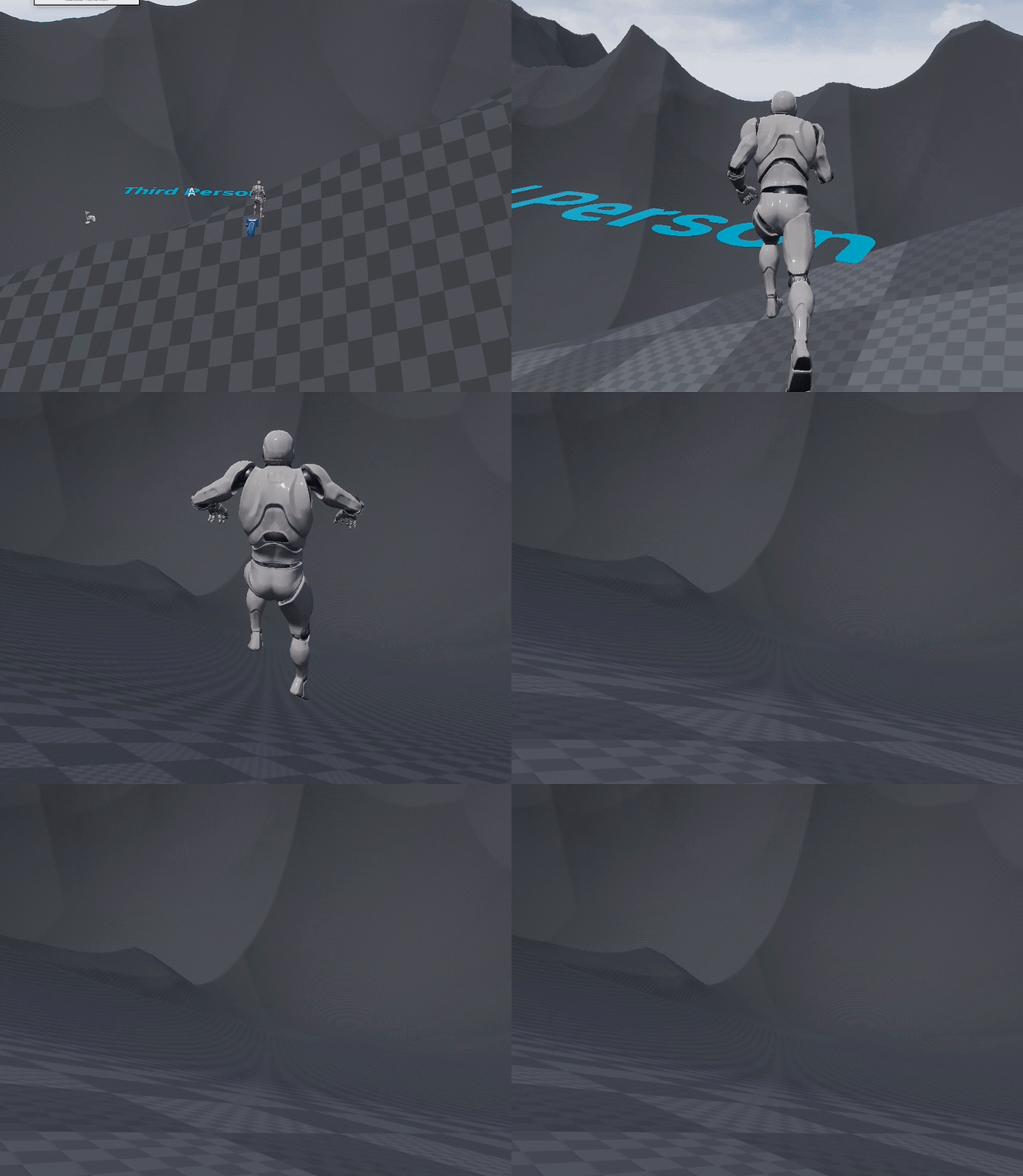

 dapper idol
okey I got another question, to plugins
wild ginkgo
there's countless known issues to any unreal version
dapper idol
how do I install this?
plush yew
ah I clicked the plus
dapper idol
wait I think i got it
wild ginkgo
@plush yew install 4.21?
plush yew
ember phoenix
If I created a new character myself (blueprint) how can I use that as a spawn location? In the default FP map there's a PlayerStart component in the map but it's not where you start (You start at the default camera instead). Even after I delete it it's all good. How can I make my new pawn a start location? (if I place a player start it collides with the camera and says "bad size")
dapper idol
no I didn't got it, how do I install plugins?
plush yew
woops too late trigger happy finger
regal mulch
You make a Plugins folder in your Project
dapper idol
ah yeah I see
regal mulch
And then paste the Plugin into that
regal mulch
Plugins/PluginName/...
grim ore
man 3 plugin questions over the last 2 days.... maybe it's time for a plugin video lol
dapper idol
xD
regal mulch
Plugins/ShaderBits-GDC-Pack/
And into that the files
So basically in your screenshot
Go one folder back
And copy that ShaderBits folder into the Plugins folder
regal mulch
The person who installed the engine
dapper idol
so that dolder into the plugin folder?