#ue4-general
1 messages · Page 405 of 1
 maiden swift
🤔
 livid haven
No. There isn't.
You're confusing files being able to be opened by a piece of software with actually being the software.
 plush yew
Nu uhhhh
livid haven
A TXT file is not text software. It's a file. That can be opened by text related software.
And I'm also at that point where I'm pretty convinced you're just a troll.
 polar hawk
For your own benefit you should concede that UE4 ships with accounting software
livid haven
Hard to tell sometimes, so I lean towards giving the benefit of the doubt because they are some really young people on here who can be very naive and stubborn.
plush yew
Not if it makes you download shit randomly just to open what you want. Doesn't really make sense
polar hawk
well, .exe's could
 honest rune
heh
plush yew
Orly
honest rune
yea rly
plush yew
Ntrly
livid haven
My guess is Windows Marketplace or whatever it's called?
 next badger
@polar hawk i believe .com were also binary executable files, no?
livid haven
Windows 10 likely looks at the filetype, says you don't have software, and decides "Hey, we have an app on our store that says it can open this, can we upsell you on it?!"
 pallid compass
The Windows Installer has the capability of advertising functionality and to make installation-on-demand of application features or entire products possible. ```.com used to be like
livid haven
Ah, that looks relevant actually, yeah.
honest rune
sorry pfist, just seen your post above.
honest rune
I was late to the party 😦
pallid compass
Well i don't seam to have it installed my self, perhaps? Did a quick search cant find anything on my pc.
maiden swift
I just get the usual "Look for an app in the store or choose an app to open this file" modal dialog.
 worn granite
I think its a thing for installing a program that supports it
pallid compass
Ah
polar hawk
guys
livid haven
@maiden swift What version of Windows, out of curiosity?
maiden swift
Windows 10.
polar hawk
UE4 ships with home design and accounting software
maiden swift
Latest.
pallid compass
omg
livid haven
Huh. Fair enough. Maybe we've both disabled some bloatware bullshit and it's just not working for us?
maiden swift
@polar hawk You solved the mystery. Tim Sweeney is coming to silence you.
honest rune
lol
polar hawk
Good
worn granite
like you might have dopus, but not 7zip. So if dopus ever needs to run its 7zip it asks you to install it.
polar hawk
He can have my copy of Hannah Montana Linux
next badger
@polar hawk sorry, it's just what wiki says...i remember when people used emails to send .com files in attachments, and used links like microsoft.com in them
honest rune
dibs
worn granite
Its not something you'd ever see if you don't install something that supports it, but not a full install
maiden swift
@livid haven That's possible. I run a somewhat minimal Windows 10 config.
polar hawk
add it with vigor
livid haven
I hamstrung and murdered a bunch of MS stuff in Windows 10 upon installation. I also use a local account and none of this MS account BS.
pallid compass
be me
should be sorting portfolio out and doing research on internal engine stuff
too interested in Hannah Montana Linux conversation
maiden swift
@livid haven Ah, yeah. I use a local account too.
next badger
gpedit not even shipped with W10 Home
plush yew
Does anyone know any websites or places to learn C++
polar hawk
well then sucks to be home
worn granite
@pallid compass its not a conversation http://hannahmontana.sourceforge.net/
its a lifestyle
pallid compass
wtf Lmfao
plush yew
k
honest rune
https://support.microsoft.com/en-ca/help/4028161/windows-10-change-default-programs
its some setting related to this. I just dont remember where you kill it. if its in registry or settings
Use Settings in Windows 10 to change default apps and programs.
pallid compass
HannahMontana Slackers theme pls Pfist
 pallid compass
have a vote on it pls
polar hawk
lets 👏 delete 👏 #ue4-general 👏
maiden swift
Anyways, this was one hell of a rabbit hole to go down thanks to @plush yew being confused about a data cache file. What a wild ride.
pallid compass
Allar did you not once say you have everything muted but cpp?
honest rune
dont mute me, I'm lovable
polar hawk
you are currently not muted
worn granite
I don't need to worry about that.
honest rune
You're
worn granite
just filled with block
pallid compass
The only people i have blocked only ever seam to be in lounge.
honest rune
lol
pallid compass
Thanks AlmostFamous, my English is bad 0 education.
maiden swift
Did you guys see Epic put out a handy site with their GDC schedule? https://unrealenginegdc2019.splashthat.com/

Join us as we celebrate the game development community at GDC 2019! Learn about the latest features coming to UE4, connect with Epic and other developers, and play plenty of awesome games!
 dark depot
fancy
pallid compass
GDC looks so good, i would love to go to GCD but my god its so far from the uk.
maiden swift
Kind of a janky site, but it's nice to see their agenda for each day in one place.
pallid compass
It does when the flight is like £650.
 pure stratus
@polar hawk Why waste your space? 😉
[class="messageGroupBlocked"],
[class^="messageGroupBlocked "],
[class^="messageGroupBlocked-"],
[class$=" messageGroupBlocked"],
[class$="-messageGroupBlocked"],
[class*=" messageGroupBlocked-"],
[class*="-messageGroupBlocked "],
[class*="-messageGroupBlocked-"]{
    display: none;
}
where do I shove that
pallid compass
Wth, is that what i think it is?
maiden swift
Nowhere. It's against the ToS.
polar hawk
okay where do I illegally shove it
worn granite
[redacted suggestion to google this]
pure stratus
Manually in your browser, of course. What did you think? 😉
polar hawk
oh, browser, pssh
pallid compass
Oh that sucks there is no epic talk at GDC for the stuff i am super in too the most, Slate, Custom Editor UI, etc.
Learning to Make Games with UE4 and Action RPG At least that might be the GAS system?
livid haven
where do I illegally shove it
... no comment.
polar hawk
pretty sure thats a comment buddy
worn granite
In some states...
maiden swift
The great thing about Epic's presence at GDC is all the free talks they give at their booth.
Always fun and informative, and they repeat throughout the day.
 steady owl
skeletal mesh LODs seem to be working in 4.22! incredible
autogenerated in editor that is
maiden swift
Sounds pretty slick!
pallid compass
I really love the idea of going to GDC and things like that to mingle with experienced people, i am at the point now where its pretty much Engine diving to learn, with the exception of a few things i am still filling out, but luckily i do have a good closed friends group of engineers that help me out.
maiden swift
I should get more time to play with 4.22 preview soon. Gonna make some more editor utility widgets.
polar hawk
good to have closed friends
steady owl
I can't wait for the non preview release to drop
they seem to be speeding through previews though
So it should be soon
 dry moon
oh damn 4.22 has generate skeletal LODs?
steady owl
yes!
maiden swift
Anyone else going to GDC btw? Hoping to meet more folks from the community this year. 😄
steady owl
I didn't see it in the patch notes
pallid compass
There both total losers, but extremely helpful
*cough @livid haven cough @worn granite *
worn granite
@maiden swift I wanted to go for a lil while, rain check for next year?
steady owl
YEah as soon as it's stable I'm jumping in
maiden swift
@worn granite I guess soooo. 😦
polar hawk
I'm going to be so inebriated I might as well say I'm not going
maiden swift
 pure stratus
@pallid compass is also pretty helpful cough
pallid compass
Immut if i am not good to go by next year too, you can run me over with a car.
 coarse wigeon
We’ve made a large number of optimizations to UnrealBuildTool and UnrealHeaderTool to improve C++ iteration times.
Improvements from Unreal Engine 4.21 to Unreal Engine 4.22
Full build (UE4Editor Win64 Development)
- Total Build Time: 10% faster.
- Generating Hea...
Labels
Tools
C++ Build time improvements!
worn granite
@pallid compass any preference?
pallid compass
Did you just call me helpful? wat
steady owl
@coarse wigeon oooooooooo
worn granite
otherwise it'll be a blue 2001 taurus that totally isn't mine.
pallid compass
You let me drive the car and run you over and take your place at GCD
worn granite
Oh I see, like I get one free revenge manslaughter?
pallid compass
You ever seen the Halloween episode of south park where they take Stan around on a IPAD?
coarse wigeon
This is big news for Plugin makers and people using the source build of UE
maiden swift
4.22 is definitely shaping up to be a big deal.
pallid compass
Total Build Time: 10% faster. gg
steady owl
490% on UBT
maiden swift
I'm so into editor widgets. ❤
coarse wigeon
4.22 is amazing
steady owl
The free reduction in draw calls is crazy
coarse wigeon
still buggy
steady owl
I know someone said not to upgrade until the next version due to the render changes but MAN I'm so tempted to
pallid compass
wow pfist trying to kill me, so distracted about GCD forgot about meds
maiden swift
You're in control man.
pallid compass
Also wth, this convo has gone in for 45 mins
Time fly's when your nearly getting infractions and a bash on the head
steady owl
In theory with the path tracer, in the future will we be able to work in realtime and then basically hit render at much higher sample rates?
Or will we always be capped to lower realtime rates?
maiden swift
The cheapest - Expo pass - is like $150 I think?
worn granite
Just casually forgets to not die
pallid compass
Not literally
worn granite
Sounds like Rei.
polar hawk
yeah
pallid compass
wait no now i sound like a crack head
worn granite

pallid compass
No swear to god there is some sense behind what i am saying
and i am not going full !potato
worn granite

pallid compass
wow leave me to perish on the stage immut
Allar whats your blog called again?
Oh never mind found it
next badger
cheapest are $249
pallid compass
How much is a meal in san francisco?
Yeah got it, was just seeing if anything new was posted, been a very long time since i opened it.
 pallid compass
Honestly i would not be suprised
maiden swift
In all seriousness, it's very expensive.
honest rune
lol
pallid compass
6$ for a meal here
honest rune
gdc in san fran this year?
pallid compass
Mc Donald's
worn granite
ye
maiden swift
It's in San Fran every year.
honest rune
I thought gdc travels
maiden swift
Nope.
There used to be several GDCs around the world, but most of them have been shut down.
pallid compass
Oh i found a price list for mc donalds in SF
worn granite
dang rei
honest rune
I've never been so I wouldn't know
worn granite
gonna blow your entire budget on going to GDC?
pallid compass
Just live off 1$ cheese burgers
Your implying i have a budget to blow
Was just curious that's all
Living costs in the US are crazy high compared to the uk
next badger
really? i was thinking UK is kinda expensive country to live
worn granite
You're not basing that off me, are you?
honest rune
unless you live in the bush in some 3rd world country, its all too expensive these days
next badger
@honest rune I do...
pallid compass
No i am not, just in general from most things i have seen, but i only really speak to you and sion in regards to real life examples.
honest rune
ah crap, thought we were in lounge damnit
pallid compass
reported
honest rune
reported for reporting
pallid compass
wow did i just get outplayed?
pallid compass
pulls out g maul
fite me
But seriously
What makes you think the uk is expensive?
When i compare things for like GCD and such its like ugh
The price difference in general seams quite large
coarse wigeon
TimeSynth is a new audio clip based synth component focused on providing designers with sample-accurate start, stop, and concatenation sound playback. TimeSynth allows users to set an event quantization clock, enabling precise and synchronous event audio event queuing which i...
Labels
Audio
coarse wigeon
GDC
pallid compass
GDC*
maiden swift
@coarse wigeon That TimeSynth has me excited. 😄
maiden swift
Quantization and sample-accurate audio clip management. Double mmmmmmmmm.
I'm basically going to have to build a DAW in UE4.
coarse wigeon
😮
maiden swift
I'm already building a synth though, so that would be way overboard.
coarse wigeon
- You can now instantly toggle the level preview and editor tool viewports between Shader Model 5 (SM5) and the Preview Feature level of your choice using the new Preview Mode button.
- Instantly toggle between SM5 and the preview feature level of your choice with the Preview...
Labels
Mobile
I am very excited for this
maiden swift
As someone who doesn't do any mobile dev, why?
coarse wigeon
Mostly because of the Quest
maiden swift
I haven't done anything with VR in some time.
pallid compass
I have a vive, and have never touched VR in the editor.
coarse wigeon
Level sequence actors that are set to replicate now synchronize their playback time between server and client. Look for the “Replicate Playback” checkbox on Level Sequence Actors.
Labels
Sequencer
That makes me really excited
 dusky hound
Hey all. When packing texture maps, is this normal protocol?
Albedo
Normal
Roughness/Metalness/AmbientOcclusion
Height
coarse wigeon
Makes me wonder if we would be able to record across the network?
Similar to SFM
🤔
Acutally I think we can
There is the Sequencer recorder
and we would just need to network an object across the network
then record it using that

QuadSpinner creates the industry's most loved terrain design tools for games, films, and virtual experiences.
I dunno if I linked this here
maiden swift
I don't know, but a few others have. It's getting attention for sure.
Looks like a promising app.
@dusky hound I'm not sure actually, but I recommend asking in #graphics! 🙂
 grim ore
4:00 PM] MathewW: woof. After this morning and the issues with @Skyrip anyone who continues down this rabbit hole is asking for a headache
and you can eat cheapish in san fran, there is a Carl's JR just down the street from Moscone and they even have security to keep the homeless out. Burger King is a bit down the road but no security dude.
or I guess hang out in the beer booths and liquid lunch it the entire time lol
 craggy kraken
Does anyone know of a good tutorial to create a basic zombie gamemode?
polar hawk
spawn a bunch of dumb ai
when any ai takes damage play a big ass explosion particle effect and destroy them
boom, zombies
craggy kraken
xD that is certainly a basic tutorial haha
 slow mesa
Hi there, i'm really new to unreal engine, i just started figuring out things because the Atlas game put the DevKit what is the unreal engine of their, i have an Asset opened .. how i can take a 3D model of an item and render it as PNG without any background like a render-image ?
 dawn vessel
@coarse wigeon what does the sequence replication do ?
plush yew
I have a map design question
if I want to design a map for unreal engine, but I want to design the assets in blender, should I also design things like houses and rooms in blender?
basically "should I do map design in blender or ue4?"
dawn vessel
Nice
 lilac ether
Hello! I have a little question - How can i enlarge object interaction radius? Because precise picking up every coin is hard
First thought - create collision, but it's not working
Second - create invisible sphere or something
Any suggestions?
 earnest cape
plush yew
earnest cape
plush yew
Hey @lilac ether attach an invisible invisible collision component with overlap not hit you can make it as big as you like
lilac ether
I guess it might something to do with SM collision?
Because i have collision sphere, but it's not interacting with it
It's only works when trace is pointing directly on Static Mesh of coin
plush yew
Don't use traces too much work
Can you give some screenshots
Make sure you have 'generate overlap events' set on your sphere I assume it's s touch overlap pickup thing right?
lilac ether
@plush yew I searched for interaction and everyone uses traces (even Unreal tuts)
Gimme sec
No, it's - I see i take
Like Skyrim
plush yew
Oh
Well fire a trace in direction of camera
I guess
On channels set collision component to overlap trace
plush yew
Show your blueprint
lilac ether
plush yew
Also you can get the line trace to show in game just in case it's going in the wrong direction to what you think
lilac ether
Yeah, i use that for now
plush yew
My phone screen is small I'll need s few screenshots of BP or can't read
Zoom in and a bit at a time
lilac ether
Ok
plush yew
Definitely make the line trace easily visible so you can check it's going in right direction
plush yew
I think local rotation for get camera rotation
lilac ether
Nope
It's something with collision interaction
Because it all works wonderful but with Static Mesh
plush yew
You need hit object to generate hit events
So block trace I guess
Actually you don't but it needs to block I don't think hit result returns true if it's an overlap
plush yew
What are you hitting?
lilac ether
Ground or Coin
plush yew
So you hit the I collision component first
So it may be you need to use 'hit component' from hit result
Access owning actor, then cast
plush yew
Access any owning actors don't assume there is one also do some print strings
You can use tags to check hit
lilac ether
Oh,, i found my mistake . But i can't use Cast To Sphere Collision Component from hit Component
plush yew
Well don't get the parent
lilac ether
Parent is Scene Component, but it's not accessible either 😦
plush yew
It's still an actor right? Get owning actor or something like that
Or get parent actor
lilac ether
I tried to Get Owner from Hit Component, then Cast to BP_Item. Still works as alway
Gimme sec i found somethibg
Wow
Somehow it's work
I set Collision to Block All
It's strange because i before did it and it wasn't work
plush yew
Idk then lol
lilac ether
Lol, that was dumb
 mental shale
quick question: is there a way to make an object affect other physics objects while not being affected by them?
lilac ether
@plush yew Thank you for the help
plush yew
Np
mental shale
like I want my pawn to be able to push around physics objects without being slowed down by them at all
like it can affect anything
but nothing can affect it
found it
on the physics object
 copper flicker
howdy slackers.
today's question.... 😄
when you kill actors or load/reload levels....
there's a chance some loops don't close or something like that..
and you get an error about things that are PENDING KILL
that's a pretty common catastrophic game crashing thing...
how do I properly exit or despawn or delete actors and close all their loops?
is there some check I can do to avoid this error?
in the past I just used delays.. like even a delay of 0 can fix the thing...
but then I have loops WITH delays in them, as timers
and I worry about things I don't understand, that can be pending..
and 99.99999999999999999999999% of the time they don't error
but there's that very rare crash....
O o
help
thx
 keen sun
I was wondering how networking is done in unreal by default?
Like you use LAN or hamachi?
Or its on internet?
Is there like a CCU limit?
 amber dune
im trying to use world displacement in 4.21.1 but by default the displacement is only occurring within a radius around the camera
any idea why?
 sick escarp
@copper flicker I've read a long time ago that for loops are low key unstable for some reason, I don't remember exactly how but I can see if I can find the post. Although I'm guessing you are using some for each loop?
 keen flicker
anyone knows about a tutorial for steam matchmaking?
not like one hosts the game and other player finds the game and jok it manually
sick escarp
@copper flicker https://forums.unrealengine.com/development-discussion/blueprint-visual-scripting/77093-forloop-is-non-blocking-learn-it-the-hard-way
Unreal Engine Forums
Build powerful visual scripts without code.
keen flicker
something like what happens in CSGO
 edgy lodge
Excuse me, can anyone explain to me how do I setup and use chunking for assets? I have been looking for information about it and can't find anything, and the documentation certainly doesn't help in any way. Chunking is way too confusing to me, I really need an in-depth tutorial regarding it, since I need to use chunking in order to elaborate separate pak files.
 surreal viper
any idea why would a streaming level load endlessly on map startup in packaged build?
it only happens with a random level, and only if it is not visible by default 🤔
it's definitely in the packaged build so that can't be the problem
 tawdry sierra
Hi guys need quick help. How can i make my flipbook actor to start at the first frame ib the beggining of the sequencer?
 azure flame
Can anyone recommend a good tutorial "How to make a projectile?"
I want to learn how to make projectiles that will break against the wall. I need this to practice in VFX.
I have already tried to do this, but there were a lot of problems.
 lost ember
Is it possible to downgrade a small project from 4.21 to 4.19?
 tall pendant
probably not.
lost ember
CLion is broken in 4.21 bluh
 fierce tulip
@azure flame quite a few projectile tuts on youtube 😃
plush yew
@zenith flower Hello I write you in DM because I have questions about your screnenshots that you sent me and sorry for the tag
edgy lodge
Excuse me, can anyone explain to me how do I setup and use chunking for assets? I have been looking for information about it and can't find anything, and the documentation certainly doesn't help in any way. Chunking is way too confusing to me, I really need an in-depth tutorial regarding it, since I need to use chunking in order to elaborate separate pak files.
tawdry sierra
How can i make my flipbook actor to start at the first frame ib the beggining of the sequencer?
 sullen wraith
everytime I compile something, my game stops responding, when I restart it, it had saved :\
fierce tulip
@twilit hill if you break it down, its one part particles (which can be broken down to textures, materials, meshes, setting up cascade, etc) and one part replication.
if you learn both seperately, you can apply that knowledge and get what you want.
 twilit hill
The thing is that for automatic fire you almost have to group up replication because would be too slow otherwise
 ebon ridge
Howdy, quick question, I've never really encountered this... However, does anybody have any idea about setting up scene capture components for each client? I'm fine with replication and all just this has caused a road block >.< Cheers.
I'm also assuming this is the wrong section to ask questions. (I've not really used this Discord; sorry)
 grim rock
anyone having issues with Zbrush 4R8 snapping to another part of the model when you click.
 vale silo
is anyone with level streaming experience on Android around ?
sullen wraith
is there a way to freeze an actor?
grim ore
define freeze? don't tell it to move seems like the obvious choice. If it's moving due to physics then tell it to not use physics and don't move it. If it's already moving then disable physics, stop it, and then don't move it.
plush yew
Hi all, I have a question that has been boggling my mind a little, I would really appreciate some insight!
grim ore
yes, you should turn on the PC before trying to use it.
plush yew
I'm trying to set up my landscape in such a way that when I paint on it, the asset blending picks up those painted changes
Sorry if it's hard to see but there's a gap where I want my moss to continue to get picked up as it blends with my tree stump, I'm sure this must be possible but I'm missing something
Anyone have any ideas?
this is my material set up
grim ore
there is a large thread on https://forums.unrealengine.com/community/work-in-progress/104455-terrain-blending-tool-based-on-star-wars-battlefront about terrain blending
Unreal Engine Forums
Building something cool? Tell us about it!
plush yew
Thank you!
sick escarp
How can I check if a collision box is fully within another?
grim ore
you can get the bounds of the collision boxes and check against eachother
 glacial pecan
huh, my VR controller haptics suddenly stopped working
I've made no change to my project
sick escarp
Check if all values are smaller than the bigger one? Like the location values
Or how do you mean?
vale silo
@grim ore that necro thread you linked doesn't have readily available solution (unless I am blind today) 😦
@wicked tiger @elfin jacinth @gleaming narwhal could you please poke someone from mobile team to answer this question https://forums.unrealengine.com/development-discussion/android-development/1589383-streaming-levels-on-android-what-settings-do-you-use-for-smooth-streaming-in-the-background ? Thanks beforehand
Unreal Engine Forums
I used to have settings that allowed okay'ish level streaming on Android, but it's not quite smooth and creates hiccups / stutter for player when a level is
 gleaming narwhal
@vale silo Does it happen in another project as well? Streaming performance has been very different for me depending on the content...
I'll see if I can find someone who might know though!
vale silo
yeah, the project doesn't matter. It's non-issue on PC, but on Android it's seems to be an issue (especially on Gear VR / Go).
thanks @gleaming narwhal
gleaming narwhal
On VR headsets I've always had to fade out -> stream in level -> fade in. PC and android.
Tried to dig up some more recent discussions on the topic, but it seems like most "solutions" are to load a splash screen or fade
vale silo
@gleaming narwhal well, player is already on initially loaded level (or level that was already loaded in the beginning). There is no need to have splash screen if another level is loading behind closed doors (player can't see that until level is loaded).
so imagine you are just in a limited area where you can "walk" around, read something, etc. while bigger chunk is being streamed until it's fully loaded.. Then you would go on and explore the rest.
livid haven
@gleaming narwhal Ahahaha I just connected who you are here and on Slack. GG me.
grim ore
@sick escarp sorry about the delay, was not near a machine. You can use C++ FBox.Isinside to compare one bounds to another or if not using C++ there are some posts out there with some manual checks you can do using math. The alternative is the IsOverlapping check but that won't check if it's completely inside.
 frank escarp
@livid haven we tried Live++ in pubg
livid haven
Word?
frank escarp
took us like 10 minutes to get running
livid haven
How'd that go?
frank escarp
it works
compiles are a bit slow becouse we are using unity build
but still
holy fuck
livid haven
I mean, yes. 😛
frank escarp
all the devs were like WHAAAAAAAAAAAAAAAT
livid haven
But satisfied?
frank escarp
email got sent to korea for permission to buy it
livid haven
Woo!
frank escarp
its crazy shit, ill probably buy a license for myself
in my random engine projects or godot tinkering, it could be super useful
livid haven
I haven't made a huge amount of use out of it yet, but I've been mostly in BP land of late.
Or... touching Slate. Which isn't even worth trying to change on the run.
sick escarp
@grim ore I've figured it out through some brutforce
 dim plover
Do you have to be careful with using stuff like Live++? As in, isn't it possible that there are unforseable problems?
grim ore
yeah in BP only you have to brute force it 😦
It's super weird how like none of the Box Math functions are exposed to BP 😦
 tranquil bone
Can mixamo still be used for animations or not?
tall pendant
Why don't you check their website and see for yourself...? 🤔
tranquil bone
Because i was told before that mixamo cut support for unreal and i cant find anything so i came here as a final resort (I was told around 6 months ago and was wondering if it changed it wasnt recently)
 wraith lark
@tranquil bone you can use Mixamo, but I'll only recommend it, for prototyping only...
tawdry sierra
Got a problem. The quality of sequencer movie capture is really reaalllly terrible. I dont mean the resolution. It just freezes. Good PC and low poly scene. Whats the problem?
 fiery ivy
anyone in here got experience with making a low latency mixed reality setup?
We've been working to improve the UE4 plugin code (rewritten the majority) and tested mainly with the logitec webcams. Now that we test with proper cameras we see a lot of latency that got introduced by the USB capture box. I was wondering if anyone in here could recommend an (internal) capture card that works with similar latency as the webcams suggested here: https://docs.unrealengine.com/en-us/Platforms/MR/MRSupportedVideoDevices
 azure shore
guys does anyone know why for some reason everything in my map is shiny
all the materials have a roughness of 1
yet they shine
grim ore
specular?
azure shore
do I have to assign a value to it?
grim ore
i believe if you want none yes, all values have a default and I think specular is 0.5 or 0.2
vale silo
has anyone tried converting 4.21.2 project into 4.22p3 and had issues with lightmaps ? (I got none when playing project on Android; everything is fine in PIE)
grim ore
yep When you're editing a non-metallic surface material, there are times when you'll want to adjust its ability to reflect light, specifically, its Specular property. To update a Material's Specular, input a scalar value between 0 (non-reflective) and 1 (fully-reflective). Note that a Material's Specular default value is 0.5.
 hard minnow
Um... my location-moving arrows have stopped following rotation... (no matter how you rotate the actor, they point in the same direction). How do I fix it?...
Is this even a bug or a feature?
mental shale
Are they ever going to make an official way to make objects render in front of everything else?
 flat idol
it's a property of the material actually, and i think you can either turn off depth testing, or enable depth write and pull it closer
both should work
mental shale
without being transparent?
Im pretty sure that way requires the object to be kind of unshaded, or you can see the faces of the object overlap with itself
kind of like flipped faces if I remember 🤔
flat idol
for opaque you can pull it closer, that's a bit tricky but passing in a negative depth value should make it on top of everything else. not sure about the culling tho
mental shale
like, physically closer to the camera?
plush yew
im looking for this thing called default but i cant find it under my tabs, i got this from a youtube video and have no idea how he got this default tab
(this is what im seeing)
flat idol
no i mean set the depth offset in material and negating the depth here basically
mental shale
oh
flat idol
in theory it should work, dont remember doing it ever tho :)
mental shale
@plush yew which one's a screenshot of the one you want?
flat idol
here just pass in a -depth value maybe
mental shale
so, go into the blueprint editor
plush yew
ok im ther
mental shale
add a variable, and press the eye on the right to make it appear in the "default" menu
@flat idol Ill try that out rn
mental shale
yw 😃
😐 @flat idol what? why did that work?
Ive been trying to do this for like 2 years
how is it that simple
flat idol
** its magic **
mental shale
there has to be a catch
no way this is working
hm
well
thank you very much
oh well
it still works
polar hawk
anyone know when was pixel depth offset added
mental shale
prolly more efficient than any other method I tried
polar hawk
apparently it dates back to 2017
mental shale
I feel like it's older than that
@flat idol so with the pixel offset method
making it negative didnt work
I dont think
flat idol
it may gets near clipped, just push it farther a bit, like 10 or 15, whatever the near clip for the viewport is set
 grave nebula
@polar hawk Around 4.7-4.8 ~~2015
polar hawk
@grave nebula ayyyyye
azure shore
if I were to try and make a doom style game, you know, 2d but 3d with sprites and stuff, is it possible to make a little ray tracing render thingey in ue4 or should I just go for faking the appearance?
by faking I mean it's normal 3d but you know, it's meant to look like it's an older game
 abstract relic
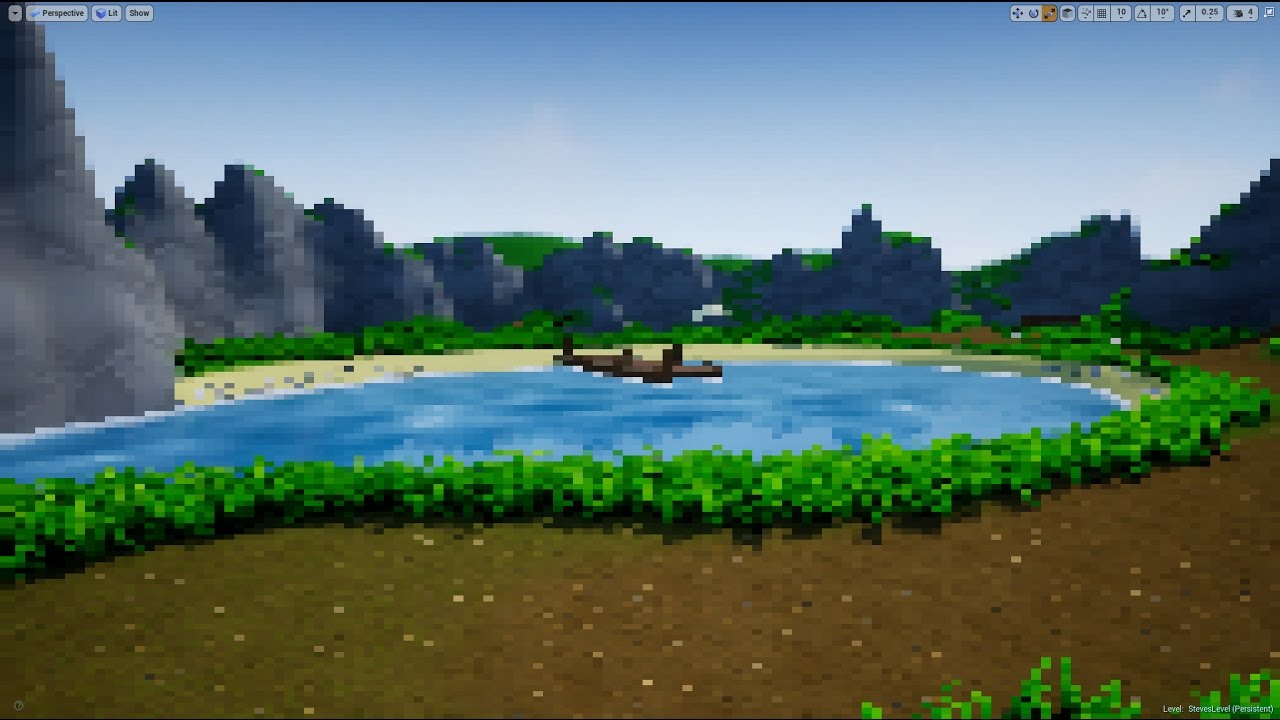
 glad eagle
Hey guys if anyone can please give me a hand with world machine that would be amazing https://www.reddit.com/r/unrealengine/comments/avedl5/having_trouble_with_world_machine_and_ue4/

reddit
1 vote and 1 comment so far on Reddit
vale silo
is it just me or 4.22p3 lacks ES3.1 preview option in the Editor?
 kind robin
Hello everyone, i'm not sure where to post this here but i'm having a issue where Unreal is taking a lot of space on my SSD.
The projects themselves are stored on a hard drive but the engine is installed on a SSD, it has grown to about 40GB and I haven't even downloaded anything from my vault.
35GB of this is inside the path "C:\Program Files\Epic Games\UE_4.21\Engine" and the folders "Binaries" "Intermediate" "Plugins" and "Source", is this a normal thing for the engine to grow in size?
 hidden aurora
There should be a chat room for ai
abstract relic
 oblique fern
anyone else get the 'sound of fan noise' when the editor/scene is active?
 willow turtle
You mean the fans on my pc?
oblique fern
i dont know where the noise is coming from
hidden aurora
Maybe the temp raises and the pc raises the rpm of the fans
willow turtle
sry me niether I just started getting serious with ue4 3 days ago
oblique fern
i alt-tab from UE editor to another program, the noise stops. i could probably have about 10 pc's and play 'music' hitting alt-tab. it's that fast, dont think it's overheating
hidden aurora
check the cpu temp
oblique fern
alt-tab back to ue and noise returns. i click a button, and the editor is slowww. noise stops when the skymap in the default scene starts moving the clouds again, the noise resumes
how do i check the temp, what s hould it be
hidden aurora
What cpu do you have
oblique fern
i7 86-something
hidden aurora
8700k?
oblique fern
maybe, got it at sams club
about 2 -3 years old, has 16Gb+8Gb whatever that means. can play BF4 with no problems
or bf1
 lament saddle
when the main editor tab is focused on my screen, my GPU usage goes up
hidden aurora
Thats strange though if you have that rig
lament saddle
so yeah, the fans kick in, etc.
hidden aurora
Thats are my stats on empty map
dusky hound
Anyone know what I need to add to this to get my heighmap out of this packed texture and into the heightmap input
hidden aurora
mask?
dusky hound
I tried, it no likey :/
glad eagle
Does anyone how how to use a rgb height map for determining where materials are applied instead of a grey scale height map for each type
For landscape material
 solid cypress
If someone were to put 2 playable characters in the project how would i switch the player start to start with a different one
 maiden sundial
I'm not sure if i'm going the right way.
The interaction system in my game will mainly be done with a giant object1 cast try -> cast fail -> object2 cast try........... object42 cast succses system inside of my player class. I know already that it would try to cast the first thing even when i'm far away from that static object in the world.
But how could i make it better ?
plush yew
Does anyone here create their rigs in blender AND use the IK system in UE4?
 sudden agate
@dusky hound Right Click on the Texture Sample -> Convert to TextureObject
azure shore
@abstract relic thanks, idk why I couldn't find that when I looked
 worthy spindle
Hi I'm working on an architect project.
I have the models of buildings and environment. What I need is the following:
I need is some kind of interactivity to enable the customer to navigate through the area.
- using a character or a car or a drone or a boat
- take photos and transition from exterior View to interior view
- navigation menu and add sound effects
is there anything in the marketplace that help me
do you suggest any tutorials on YouTube
what is the easiest achievable workflow thanks for your help.
Something like this but more options
https://youtu.be/goqBky8EBIA
 dim arch
is there any way to find keyboard events in blueprint
using "find in blueprints" but typing Key/Keyboard "Key" doesnt work
dim arch
yep
azure shore
I just put a comment box by every keyboard event with the key on it so I can zoom out and see it
dim arch
I had a keyboard event in a levelBP which I was using for debug purposes, but now Ihave to load up each level to find it
sounds like a good idea
 trim quail
Anyone here works on VR professionally?
I need an approximate cost estimate for a VR medical examination simulation.. just Development. 😁😁😁
In Unreal Engine.. 😋😋😋
 wary wave
...how long is a piece of string?
 languid shard
@wary wave how long is a floating int ? 🤔
abstract relic
You're going to be hard press to find sources that disclose their budget. Perhaps this is worth a look over.

There's been a lot of talk recently about the financial costs and risks of developing a VR game, but no one has yet broken down how much it costs, or how much could be lost. This is a breakdown of development costs for a self-funded HTC Vive launch title.

Siege Sloth Games
Siege Sloth Games is the Canberra based development studio behind Pocket Bonsai and Evergreen.
plush yew
https://i.imgur.com/Q8HqTf7.png
This is how I'
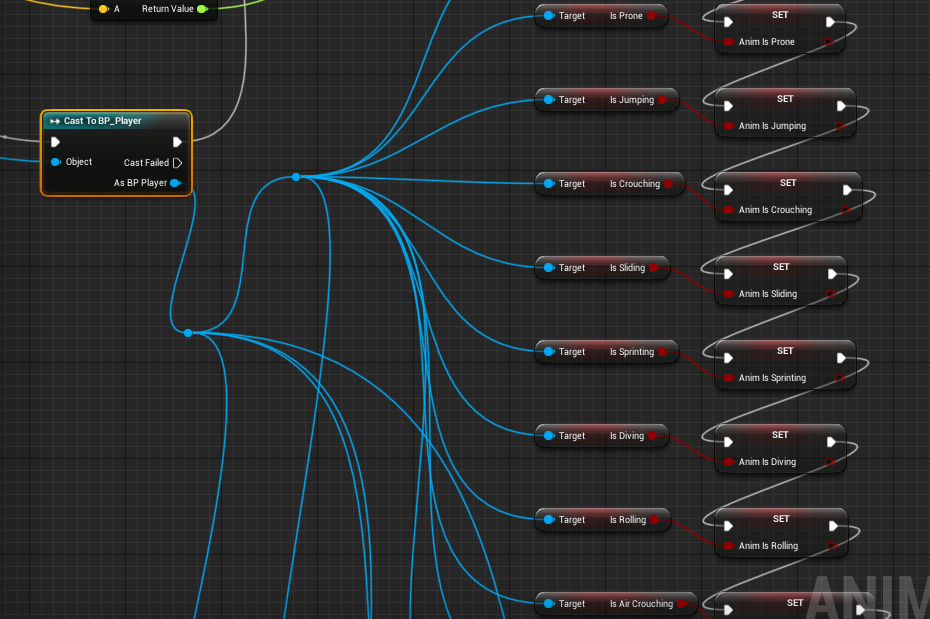
ve handled my anim graph setup but I think it might be incorrect. Now that I'm adding AI I'm going to have to redo every single one of these nodes with the context of Cast To BP_AI. Even though the variables are exactly the same
abstract relic
Good lord, use enum or something man 😜
plush yew
Alright, so this is not the right way to do this? Because, uh, I always had a feeling it wasn't this is just how I was taught. Do you know any good guides or videos? Because now that I'm doing AI I don't want to keep using this setup
abstract relic
Well, you can make a parent bp for the pawns that holds such universal variables and cast to that instead.
plush yew
Oh jeez looks like I have more learning to do.
plush yew
Oh wow thanks I was just going to ask if you had a link to somewhere I should start! Yeah, I actually find learning in UE4 to be really fun especially because it typically makes my life easier. MathewW taught me about anim notifies a few days ago and my world was changed. I'd just finished all of my basic locomotion goals like sprinting, crouching, rolling, jumping, prone, etc. and was planning on moving to AI but it looks like I'll actually be learning about how to properly structure my BPs. Not as exciting but probably more valuable, thanks for the link!
 bronze cedar
how to do , like when ball hit the left paddle it go to left side and if right paddle than it goes to right side, i got three part of my paddle, that is left middle and right
 spiral island
I suggest learning C++ too, because many things are much easier in C++ than in blueprint
(to TheSinkingMan)
plush yew
All of my dev friends tell me to do that and I probably will once I get deeper in but I honestly wouldn't have done any of the work I've done over the past few months if I'd had to learn a new programming language. I've taken a handful of classes and I've just never enjoyed non-visual programming
abstract relic
I’d love to see an anibp done entirely in cpp
plush yew
Yeah, I'll probably push that learning off for as long as I can. I know you can learn to like things but even when I've had a grasp on some languages I just couldnt get myself to enjoy it.
Is the unreal site down for anyone else? I can't access the docs.unrealengine site or any of the other ones
sudden agate
Event Dispatchers can help sending Data from one BP to another
My Pawn sets Swimming to true -> Fire EventDispatcher -> Anim automatically updates
abstract relic
Slow but it’s loading
plush yew
Sick, I'll open up a tab about that and put it in my notes. Earlier today I needed to get the movement state of the thing the player was targeting and I realized that I only knew how to cast to other players.
abstract relic
Anibp fires every tick (or frame? Can’t remember). What are you talking about?
plush yew
me?
abstract relic
Raid
 paper kernel
AnimBP is actually faster than tick
polar hawk
👌
plush yew
So if I still want my setup to have the anim graph update based on my player variables is there a better way to set it up?
If my questions are super basic its because I'm not familiar with this at all. At least with anim graphs and AI and movement states I vaguely understood what was going on but this is all completely new to me
abstract relic
My cpu is actually a time machine that uses reverse tick for twice the tick every other tick
Use enum Sinking, it’ll cause less spaghetting. You have other variables that I’m not sure why you have bools directly from cast. Like jump and sprinting. You can get velocity from pawn owner, various built in movement state like Is Falling for your jump
plush yew
I've got a relatively complex locomotion system so I've got a bunch of variables that might seem redundant but actually do different things. I'll try to set up Enums asap I'm just trying to figure out how to move assets up in the content browser. I used to have it bookmarked but I lost it. I can only send things deeper into new folders, I can't remember how to bring them up a layer, or even just back to the content folder
abstract relic
On the browser, hit Filter. It’ll show your directory
 slate basin
Hey anyone know how I can copy a hierarchy from one blueprint to another?
I want to copy over some scene components its children
abstract relic
Now good luck getting the redirectors to behave 😉
slate basin
And its children*
plush yew
Oh yeah I've heard about that. @High. Could I just duplicate the asset once it's been moved, delete the original, and rename the duplicate? I imagine that'd fix it unless the duplicates keep the redirects
abstract relic
Quite honestly, I just push the problem to another day. They sort themselves out eventually 😜
 keen ridge
Hi guys, does anyone know why when I turn there is this sort of banding coming from the blade? https://gyazo.com/e57cb46c77ef067ec19c141d5a1120de

I have no clue since I am brand new to unreal
plush yew
There some kind of macro to test performance in ue4 with network testing?
Is there like a specific node I should be looking into? Because enum pulls up a lot of options. I watched a wadstein video on enums and I read about them in the documentation but I'm still not sure how to implement it for my needs. If I could just get like the specific node name I could probably figure it out from there
 fast hound
Hey guys i wonder if someone can help me out to figure out if i'm hitting a bug.
if you can: create empty content scene in UE4.21/ 4.22
create a box over the floor to see shadows from the directional light.
rotate or change the direct light type..
my shaddows are breaking up after i do that.. I have re installed both versions and the thing keeps happening.
4.19 dont give me this kind of behavior.
i submitted it as a bug, but it would be nice if someone can check out? thank you in advance
simple scene with shadow
this happen if i rotate the light... very weird, no shadow anymore, and if i add any light to the scene, the scale parameters of the light are ruined... just in case someone is curious
thank you in advance!
im using windows 10, in a razerblade with nvidia 1070
plush yew
I'm real basic so this answer might be way beneath what you're asking @fast hound but have you built your lighting? I noticed that for some reason the lighting on my maps wasn't appearing at all as soon as I added anything but if I built the level again it would all be back
sudden agate
make sure your Project/Editor settings have "Preview Shadow Indicator" on
otherwise you wont have any shadows until you bake lighting
or change to dynamic lighting
 vague walrus
Is there a Find random point in bounding box but that gets radius as input? I want to find a random point in a sphere around target
fast hound
@sudden agate and @plush yew thank you, but the light im using is dynamic, it should showing without building it. The shadow is there but totally out of scale.. just wonder if someone can reproduce the issue.
sudden agate
your Light is not dynamic, it is stationary
fast hound
yes... in the screenshot it is.. but the problem appears when changing light to any mode.... including dynamic
and never works again after that
even new lights with dynamic lighting
 solar quarry
My friend is trying to make an endless runner, but it crashes after around 2000 steps due to an out of bounds error. How would he get around the world limit?
vague walrus
@solar quarry instead of moving actor in world, move world around actor
fast hound
here you can see same problem with movable light... and the objects are movable.. question is, someone experiencing this? in any other version of UE4 used to work propperly (i started from 4.6)
just to illustrate, im a long term user
of ue4... i recon this is a bug. Thanks for your help!! (im copying some thing done with ue4 to show im not starting to use the soft) https://www.instagram.com/p/Bt38kodFfoA/?utm_source=ig_web_copy_link

Instagram
78 Likes, 3 Comments - Alex Dogrush (@dogrush) on Instagram: “1 piece a day: 5 (work in progress) Parts of VR super trip for Recent Futures. #ue4 #unrealengine…”
keen sun
@solar quarry I think you can move the world origin but i am absolute beginner, i don't know anything else about it
@solar quarry
World->SetNewWorldOrigin(PlayersPos);
Maybe you could call this function whan player coordinate gets too big
But what do i know, im new to ue4
fast hound
@vague walrus the code is pretty simple for what you want. You should be able to replicate using blueprints very quiclky if you have basic knowladge on how it works
function randomSpherePoint(x0,y0,z0,radius){
var u = Math.random();
var v = Math.random();
var theta = 2 * Math.PI * u;
var phi = Math.acos(2 * v - 1);
var x = x0 + (radius * Math.sin(phi) * Math.cos(theta));
var y = y0 + (radius * Math.sin(phi) * Math.sin(theta));
var z = z0 + (radius * Math.cos(phi));
return [x,y,z];
in the case of blueprint, you can perform the operation and finally add the location of the target object to the resultin vector... hope you can get around it
vague walrus
@fast hound right now I'm trying to use the random vector in a cone, but it doesn't allow me to set origin point, so I'm trying to find a way of transformations..
 dusty citrus
Just curious, how long have some of you been writing C++ before you started getting into games?
fast hound
i only program in blueprints
vague walrus
@fast hound hmm, just thinking
if i get a random unit vector in a cone
and multiply my my forward vector of a bullet by it
i'll get my fire-spread, rite? ;)
no need to get some silly transformations of origin points and stuff
fast hound
seems i dont understand what you are trying to do finally XD
vague walrus
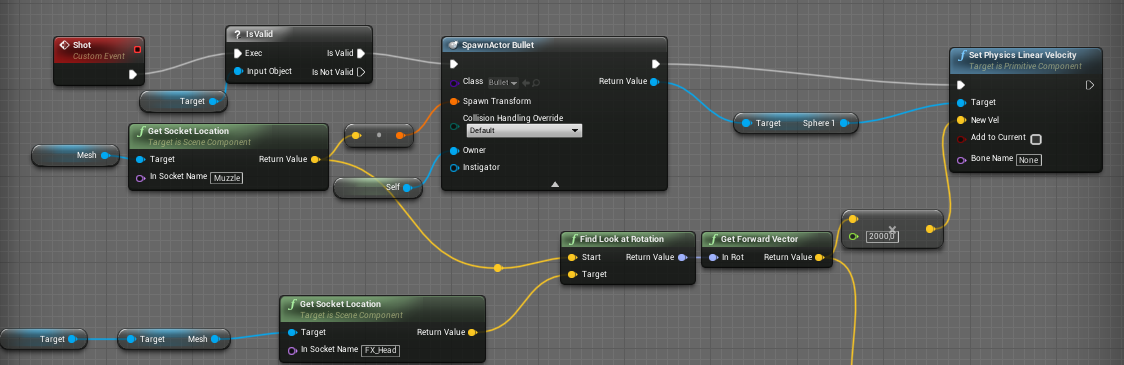
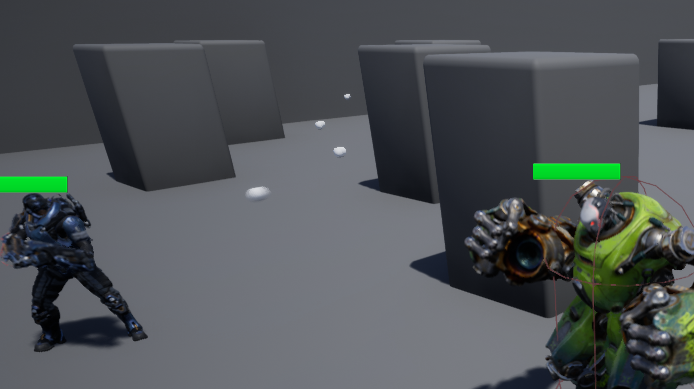
this shots directly at da head: https://i.imgur.com/ZHTr4nK.png
this shots in the head too, but it can have a maximum spread of 30 degrees: https://i.imgur.com/0LUvd4E.png
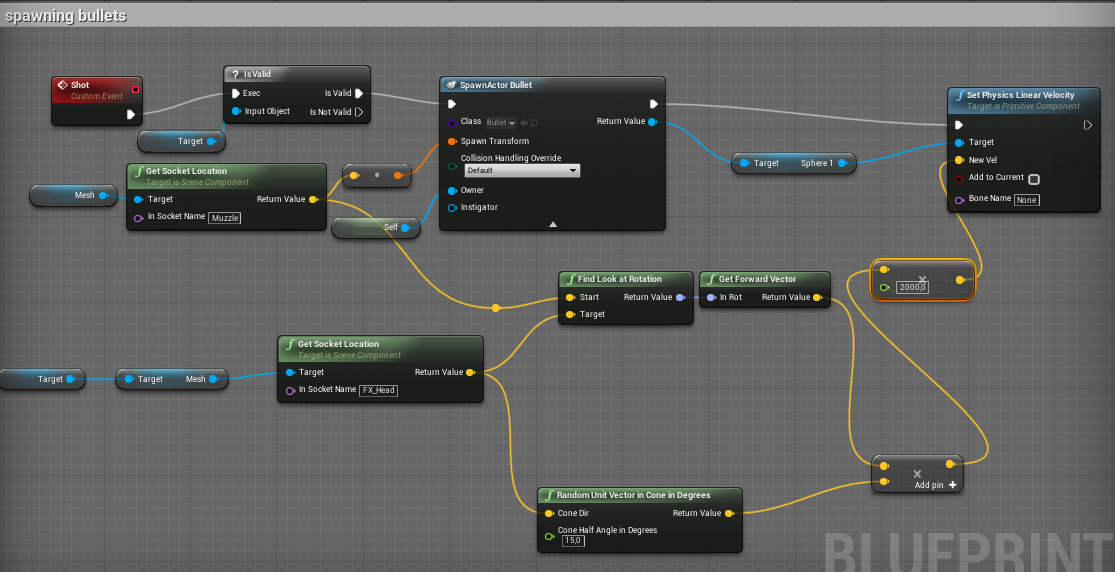
I'm thinking right?
apperently not xd https://i.imgur.com/K2I95a3.png
 fast hound
why dont you have a dummy object thats invisible and that's what you use for colliding with the shoot?
vague walrus
Don't understand.
fast hound
you need a bigger area for the collision than the head?
vague walrus
My collision blueprints are working, I have him shooting at me properly at the head with proper damage.
I just want to add fire spread
So he's not always hitting head, but sometimes misses
A cone is perfect, because within the distance the error is bigger
fast hound
you want to add randomness to the direction of the shooting?
vague walrus
Yep
Randomness based on distance
So - instead of a line, I want to get a cone with a random point on it's end
fast hound
if you vay the angle of the shooting in a cone, it will be less accurate when its far away anyway
what i mean, if you add a random angle, it will have a small deviation if its near, and the deviation will be bigger as its further away
you dont need to increase it with distance, the angle difference does it automatically
vague walrus
That's what the cone does basicly
I just need to get the angle applied in a right way
Right now it's getting based on the 0x0x0 point :V
plush yew
https://answers.unrealengine.com/questions/325103/on-pawn-death-keep-camera-view.html
I wonder how i can do this, in order to prevent this from happening in the video:
i'm still finding unreal engine 4 rather complicated to use
and yes, this is for an assignment
what i want to happen is that if player 1 dies, the camera stays still and doesn't rotate unlike what's shown in the video
I've used set view target with blend though with the shared camera
with the target being an array of player controllers
 old zealot
Does anyone know if there is a way to view how long you've spent on a project? I'd like to gain an idea of the total hours I've put in
pallid compass
No there is not
 placid arrow
do you use version control @old zealot ?
vague walrus
that aim offset is driving me nuts :(
sullen wraith
how can I pass info to another level? so it changes map, but i want it to spawn 10 men, determined of a value from map before
fierce tulip
back in UT days, a map would store how long you actively worked on it
fierce tulip
there might still be hidden data hidden in map files, but no clue how you'd find or see it
old zealot
I'll do some digging, thanks for the info @fierce tulip
sullen wraith
has anyone here used community ocean project before?
 spare steeple
has anyone had an issue where running a packaged exe (win64 development) results in nothing happening at all
no logs no task manager
not sure what would be causing it since ive packaged and launched this project tons of times
deleted intermetdiate/etc folders
rebuilt engine
according to visual studio debugging, the crash is related to the EnterCriticalSection function in ntdll.dll and happens as soon as the exe launches
so im assuming before it runs any of my game's code or mounts any plugins
spare steeple
looks like it actually was a plugin causing the issue
 celest bronze
Hello, I'm a beginner programmer in Unreal and I have a basic question. I want to take an actor when I press a spacebar if I overlap with him. What is the best practice for that use C++ only blueprint only or both? If it is both what use for what feature? thanks for your answer.
vague walrus
Do AI MoveTo require Tick event to fire to parent?
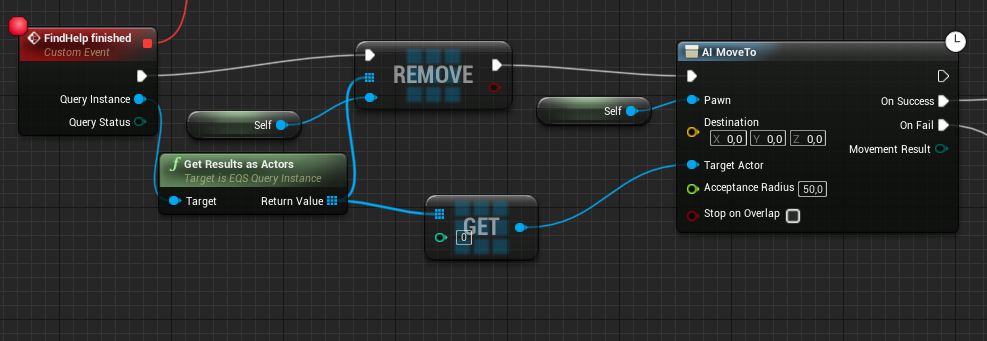
I have something like this and it does not make this little piece of garbage run https://i.imgur.com/J4wrbXg.png
 young vale
@vague walrus I don't think it needs to be call on tick. Are you using a navmesh?
@celest bronze you can do something simple like that with blueprints no problem.
Does anyone know if you can use an orthographic viewport (top, left, etc.) from current camera position instead of from infinity?
vague walrus
@young vale yes, the pawn is following and attacking me correctly
just when i damage him down he starts this tree
i remove himself from the actor list (although he never seems to be on it anyway), and i tell him to move to the closest actor
and the movement result is success even though he does not move a centimeter :/
celest bronze
Thamks ! @young vale
vague walrus
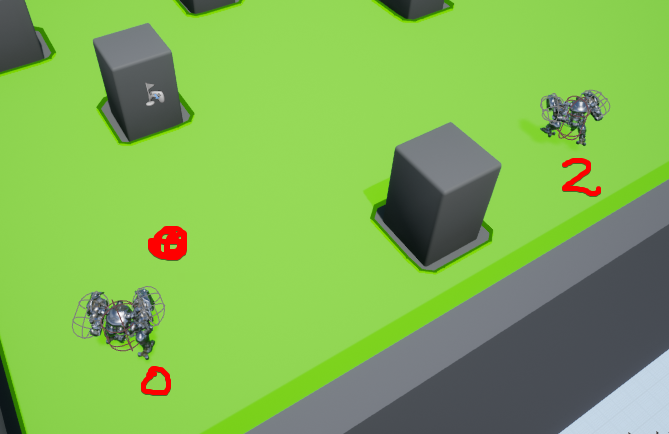
on debugging i see that the picked actor is "2"
https://i.imgur.com/A1HEEsj.png i'm standing and attacking him on the red point, he picks 2 to go to, but he does not move and fires 'success' on moveto
 grim ore
what is the movement result enum showing?
grim ore
to eliminate the actor being the issue put in a location like 0,0,100 or something that is not near you instead of the actor and see if the node is the issue or the input.
vague walrus
on 0,0,100 he runs somewhere and fires success
so it's working
tbh it's a bit strange as of he can't reach 0,0,100, he only gets to the closest point which is like 20k away from it and fires success :D
he should get as close as possible and fire failed
grim ore
ah I assumed 0,0,100 would be the center of your map
but that just means your actor input is your issue. are you sure it's trying to go to the correct actor and not itself?
vague walrus
https://i.imgur.com/7P1PCTc.png center is on the left, i'm on the circle
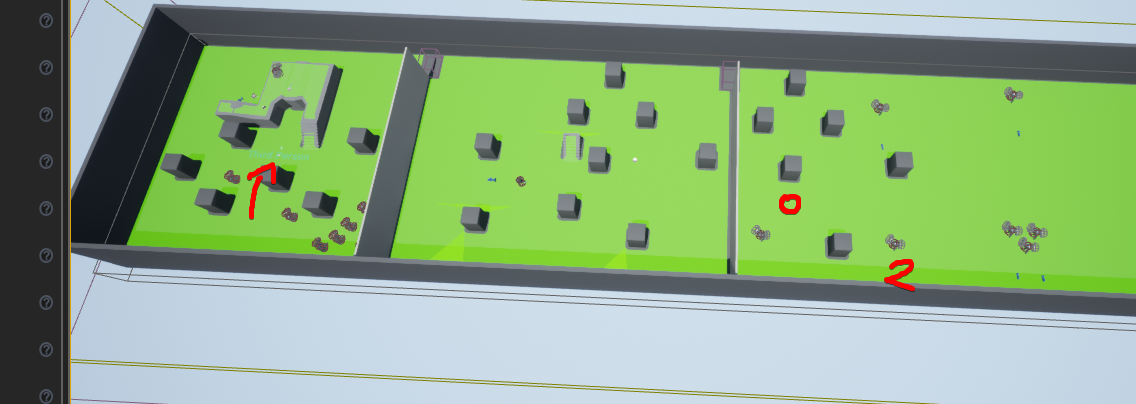
Yes
His ID is 0, the actor he wants to get to is 2
grim ore
ah gotcha you have the center blocked off from the nav mesh, makes sense
vague walrus
@grim ore yes, that's why it's strange he fires success and not fail
grim ore
well it won't fail if it has a valid input it is trying to get to
even if the location is not reachable he can still try and get there and stop
vague walrus
https://i.imgur.com/R7JFyoF.png the big arrow is where he stops and says success
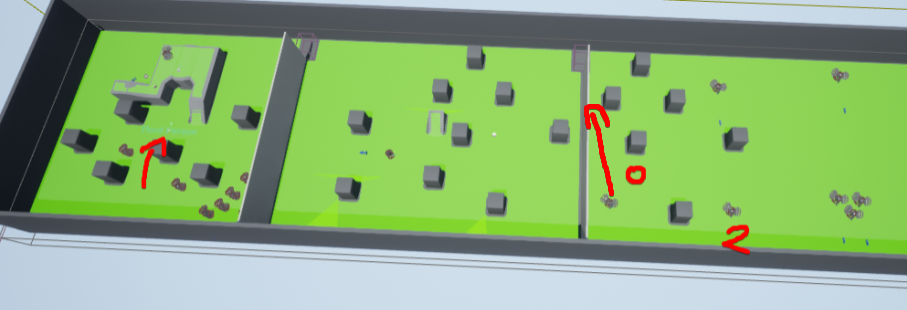
anyways that's not a problem
grim ore
how are you verifying the correct actor for your target?
 grim ore
well if you know the location works, grab the actor location instead of the actor itself and plug that in as the move to destination and see if it still fails
0 what?
vague walrus
i've tried that
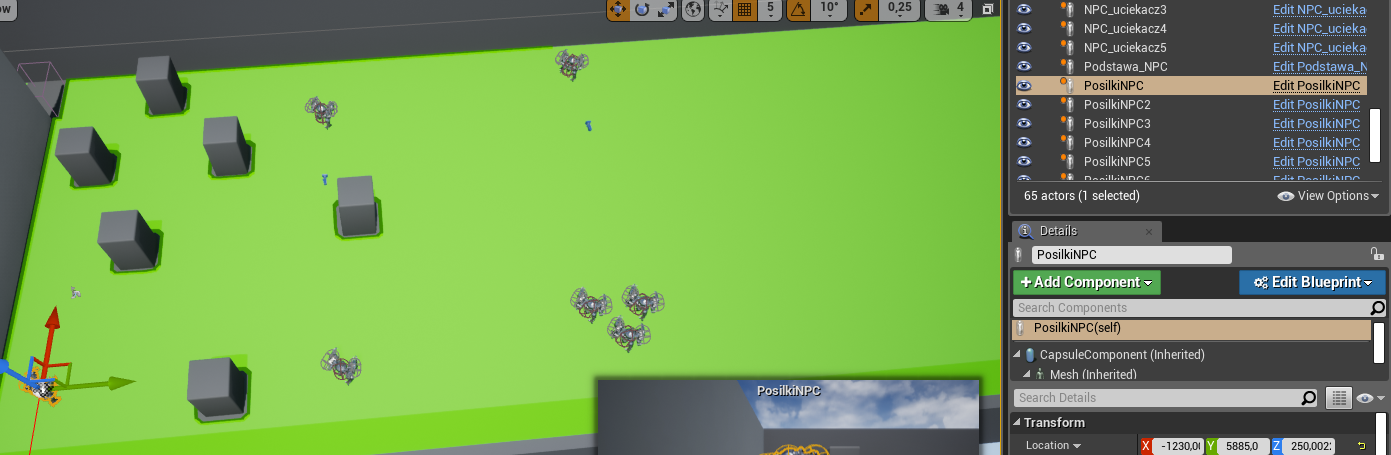
on the right you have actors, he's the first one placed, so he has no number
grim ore
you are getting the results out of the array and getting the first item, did you put the actors in the array by hand so they are in order?
grim ore
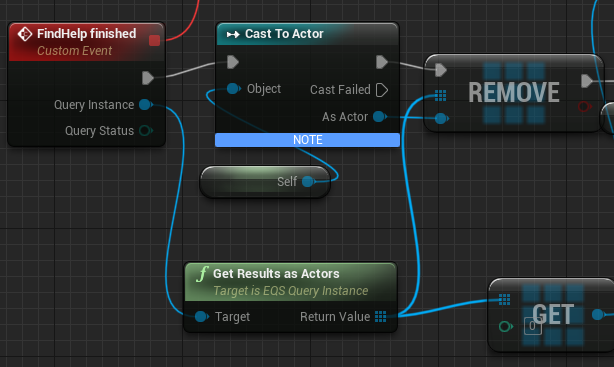
get results as actors is putting them in order?
vague walrus
eqs is putting them in order
scoring, filtering
2 is the closest one with a reachable patch
grim ore
that says it's the actor with the name ending in _2
grim ore
NPC2 or NPC_2 ?
vague walrus
oh
OH
i just assumed numbers at the end are the names
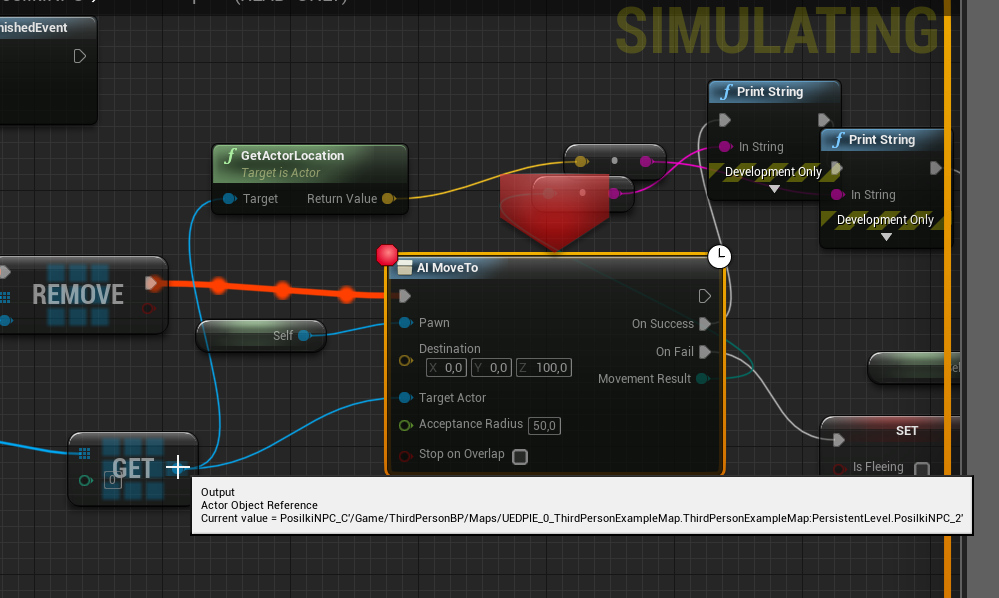
https://i.imgur.com/astRovX.png okay, now it's correct, he's moving to himself

but the node before that removes him from the array :V
grim ore
the names are the names you see in the world outliner, they are not the actual object names when they are in the world
grim ore
why not remove himself as a valid target in the EQS query itself?
vague walrus
with what test?
I'm generating the list as All actors of class in range around him
I thought there will be 'ignore self' or 'actors to ignore' but there's no such thing there
grim ore
ah then maybe the best choice would be to make the player not the same type of actor as the enemies?
vague walrus
It's not :P
grim ore
then why is the all actors of class getting him in the list?
vague walrus
I have 10 npc which on <40% hp run to nearest same-type npc and call for help
grim ore
ah gotcha
 grim ore
which actor is this node being ran on?
grim ore
no I mean what class type, if you debug self what is the output pin result
vague walrus
He's PosilkiNPC which is a child of AtakujacyNPC which is a child of Podstawa_NPC which is a child of CrunchPlayerCharacter which is a child of Unit
Player himself is Gracz which is a child of CrunchPlayerCharacter
Player is not on the array, which is correct
I'm debugging the one NPC that I am attacking, the one which is supposed to run for help
The Remove node is supposed to remove himself from the array, apparently it's not
grim ore
so what does the self node return as the output?
oh and yeah that is not going to work lol, I can see why
vague walrus
https://i.imgur.com/fiHsytE.png they do match names https://i.imgur.com/t3HBxAg.png

 grim ore
It's the difference between a pure and a callable node
vague walrus
it's like the ai move to gets value before item is remove from array
like it's getting a copy
pass by value not reference
grim ore
so your pure nodes are the nodes that are without the white execute wires. They guarantee fresh results every time they are called.
so you are getting the list from your eqs results twice
get your list, save to an array locally, remove yourself from that list, then get the result you want from that saved result and feed it in
vague walrus
so the remove node does work on the local value
Okay, so it's passed as value and that's causing problem
Strange, thought it should pass by reference
grim ore
its not that, its literally 2 copies of the results
each output wire off that pure node is returning it's own set of results for you
vague walrus
That's what i'm saying :D
the first one gets removed, but the second one is used in moveto
grim ore
yes
grim ore
so yeah saying the same stuff but different ways, yep they are being returned by value
vague walrus
who would want that as a value xd
grim ore
it's not silly because it's a pure node, a const return basically
grim ore
yep it's something that catches alot of people lol
grim ore
white execute wire nodes will cache the return results until the function ends. pure nodes without wires guarantee a fresh result every time they are called
well you can see it if you understand it of course 😛
this is just one of those "oh... so that is what that word means when I use it" when programming lol
vague walrus
:D
grim ore
you will noticed I didn't even noticed it at first.. or second.. or until we figured out what was happening lol
vale silo
has anyone had issues with lightmaps not showing up on Android devices with 4.22p3 ? (looks fine in PIE, looks pitch black on the device)
glacial pecan
hurr... why can't I see where I assign a mesh as the collider in a staticmesh?
I swear I've seen it before...
I can't believe embedding the collision in the FBX file by naming it UCX_blabla is the only way!? (that's the only thing that comes in up google right now for me)
 manic pawn
you can't assign a random mesh as a collider
visible meshes and their collision need to go through completely different processing steps so that makes sense
glacial pecan
but you can if you just name them UCX_randommesh on import?
vague walrus
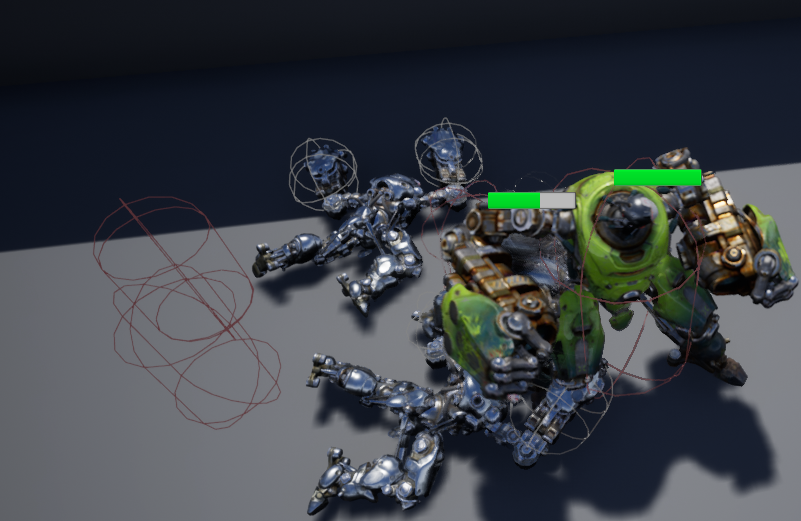
https://i.imgur.com/GLlUogN.png my pawns affect movement after death even though I've stopped ai logic, un possessed, set collision to none and set avoidance to disabled. Any idea what else?
 manic pawn
collision needs to be in the same fbx as the visible mesh
vague walrus
is there anything else I should disable, @grim ore ?
grim ore
is your nav mesh set to dynamic so it will recalculate it when you change them to no longer block?
 knotty storm
guys, the unreal engine tutorial website is down
grim ore
also what does that same screen above look like with navigation debugging on so we can see the nav mesh
vague walrus
Yep, it's dynamic
grim ore
but another thing to consider is if you set collision to none why are they not falling thru the ground lol
knotty storm
vague walrus
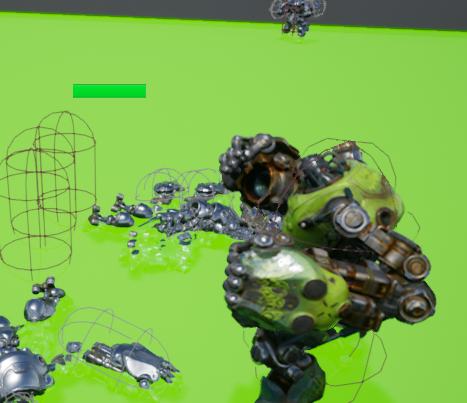
mesh possibly, i'm setting collision to none for capsule
but they are strugging on the capsules
grim ore
@knotty storm maybe you got to an older link, https://docs.unrealengine.com/en-us/Engine/UMG/QuickStart
yeah that is weird if its all green they shouldn't be getting stuck in terms of navigating thru it (they arent blocking navigation atleast) but that could still mean its treating it like a physical object for some reason
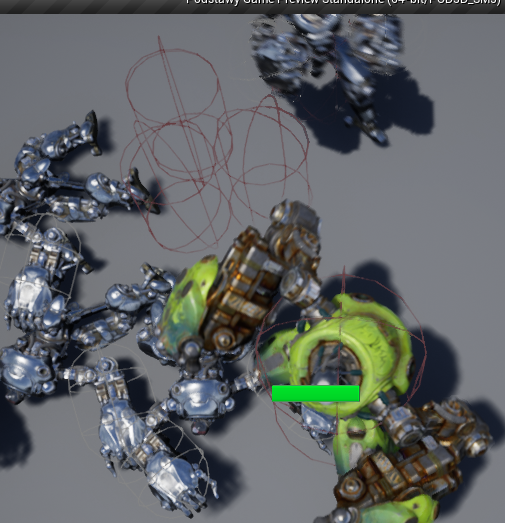 grim ore
so how is it affecting movement exactly
vague walrus
they still can't move through capsules
I can however
as a player
if I couldn't move through their bodies that would make any sense
but I move as they are not there
vale silo
a bug worth reporting ?
 void drum
https://www.youtube.com/watch?v=aJRO-MAWx0s
Could I say the motion capture system in this video is "real-time"?

Faceware Live is now integrated with Unreal Engine 4, bringing the capability to easily use real-time markerless facial motion capture to developers everywhe...
Because I really don't know what is "real-time". I don't know the proper way to google or start with...
Any suggestions?
grim ore
real time is when you do A and A happens right then
and that system is real time according to the video and description "Faceware Live is now integrated with Unreal Engine 4, bringing the capability to easily use real-time markerless facial motion capture to developers everywhere."
vague walrus
@grim ore so don't have any other ideas? xp
grim ore
I can't fire up UE4 right now but I was going to see if you can just deactivate the capsule component completely
plush yew
It's not that the cinematic is in realtime, just them producing it. It's a weird zig zag way to advertise things. It's inaccurate though. Which is stoopud
grim ore
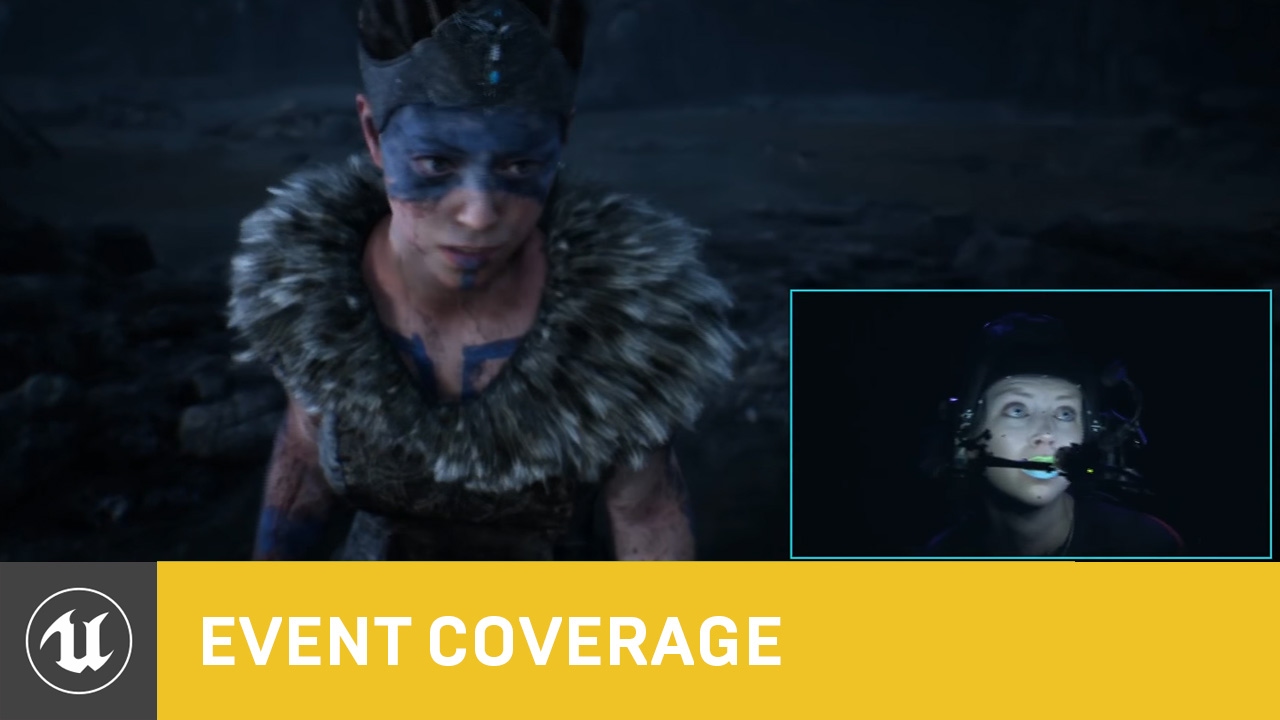
Epic Games Founder & CEO Tim Sweeney and CTO Kim Libreri introduce Ninja Theory Chief Creative Director Tameem Antoniades for a historic live performance and...
vague walrus
@grim ore deactivating capsule didn't help
grim ore
if the capsule is off then it should in no way affect movement so it might be something else
grim ore
so what does the AI do that it's not supposed to? get stuck trying to go around or something odd
vague walrus
it's trying to walk through that capsule but can't, it's like the unit is still alive for the ai
as a player i can walk
it's not getting super-stuck though, i'm using detour crowd ai
grim ore
by cant it like pushes against it like a wall?
vague walrus
so it's walking slowly near it and going around
but if I switch to normal AI controller i bet it will just hit it like a wall and stay in place
and after killing them as a player I can walk through them normally
grim ore
welp yeah set active does nothing for the capsule so that is fun
how are you changing collision? I just did Set Collision Profile Name to NoCollision on the Capsule in MY AI and my AI could go thru them after that
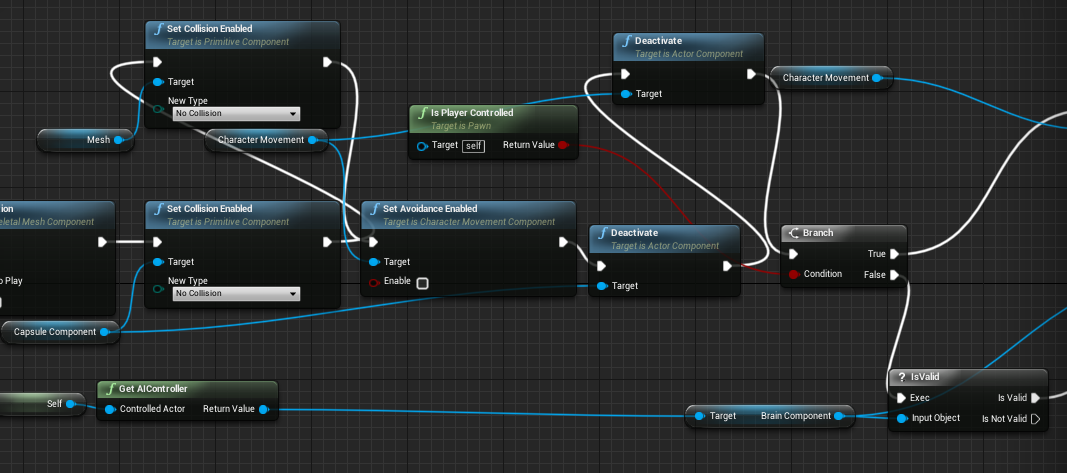


 grim ore
collision enabled is not the same as setting a collision profile
void drum
I watched the video and your explanation , thank you very much!
vague walrus
@grim ore setting profile name to 'none' or 'NoCollision' didn't do anything
grim ore
yeah none wouldnt work, NoCollision should. At this point It might not be the collision. I just tried it and my AI could go thru eachother no issue once I changed it to NoCollision profile
vague walrus
setting it to 'No Collision' made it unpassable even for me
grim ore
woof that is weird
vague walrus
but NoCollision does nothing
grim ore
yep super weird, it turns on the No Collision profile which has Ignore set to every channel by default
grim ore
the only other thing I can think of is you have some weird collision channels or something
vague walrus
but that will make problems when they are alive
grim ore
ok then it might not be collision but something in your AI code
vague walrus
DetourCrowdAIController makes that
grim ore
I have an EQS setup that tries to avoid the player and hide and the AI all bump into eachother when hiding. If I set some of them to no collision they can pass thru eachother as if they did not exist.
vague walrus
So now can I fix that or do I have to change AI controller after their death?
grim ore
I don't really know how to fix it for your setup
vague walrus
Can you try using DetourCrowdAIController?
maybe it will light a bulb
interesting
i've set it up that on death it changes ai controller to default one
but crowd controller still tries to walk over them
around
*
grim ore
maybe the AI somehow register their locations with the crowd controller and never remove it from there on death
vague walrus
@grim ore got it! :)
after Un posses I've added 'detach from Controller pending destroy'
plush yew
Hello guys I want to ask you
I installed the latest version of noun but before I worked on 4.18.3 and my project is on it my question is how do I start the project on which I work on the latest version and will break something if it is released on the latest version?
vague walrus
@plush yew download 4.18
from my experience updating to newer versions is breaking stuff. Lots of stuff.
grim ore
@vague walrus interesting, so detaching from the AI controller on the pawn fixes it?
vague walrus
@grim ore indeed
 ancient otter
vague walrus
ancient otter
vague walrus
back off from blender!
grim ore
@vague walrus well awesome that you got it working. I barely work with the crowd controller so good to know 😃
ancient otter
When blender 2.8 comes out I will give it another chance
vague walrus
@grim ore yeah I wouldn't use it if not the problem with npc colliding with each other
@ancient otter the new interface in 2.8 is ugly, complicated and even worse than 2.7
ancient otter
Lol
vague walrus
:C
ancient otter
Can someone help me with a animation problem on bp btw?
I haven’t been able to solve it and it’s uggghhh
Unreal Engine Forums
Hi,
I have an actor bp with this structure:
e9130efb1290f2f407bf0ec409d57f66png.jpg
I have placed this actor blueprint on my sequencer and added a track called
Here I explain it
vague walrus
@grim ore the dynamic meshes and capsules affecting navigation mesh was not really working, troubles with creating paths, i've switched to detour crowd ai + RVO avoidance and it kinda works
grim ore
yeah AI in crowds is really a sore subject out of the box from what I have heard. I think most people who need it create their own systems to handle it
ancient otter
Oh and also how can i get a cartony effect on unreal engine?
vague walrus
it's hard for me to call it a crowd when I have 2 npcs that just have to walk around each other
ancient otter
I really love that style
vague walrus
and with default AI it's terrible, or worse, it's null. Just not working.
I love this every time I see it
fierce tulip
^
plush yew
I work now with 4.18.3 and I have installed the 4.21.3 okay I will continue with the 4.18.3
 mossy thorn
hey guy anyone have that plugin and can help me the documentation not really helpfull
https://www.unrealengine.com/marketplace/en-US/voxel-plugin
 silver crown
👀
vague walrus
wacha lookin at
 cobalt scaffold
competition
plush yew
Procedural generation?
Hello again sorry for the tag but I created player state and then to make blueprints but on event begin play or to make function? @regal mulch
I found it is it this?
 regal mulch
I already told you what you have to do. You gotta put some brain power into finding out the rest.
Also please refrain from pinging me. I will assist users here if I want to, not if you want me to.
plush yew
@waxen oyster I don't know a lot, but pretty sure you can procedurally make anything? 🤔
polar hawk
@regal mulch whats up
regal mulch
@polar hawk --
polar hawk
saaaame
fierce tulip
XD
regal mulch
That's not true. I told you about the existing PlayerName in the PlayerState, as well as the ChangeName function that exists on the GameMode.
I also told you to use a TextBox in UMG and use the Text it provides for the name by converting it into a string.
I won't give you a step by step tutorial for this.
plush yew
a okay
Now I understood
thank you for the wasted time because of me ❤ @regal mulch
I saved the picture what I must to do
xD
plush yew
?
 lost hemlock
I apologize in advance if I'm at all in the wrong place to ask this - We have a few computer labs that have Unreal engine installed. We install the Epic Games Launcher to our Windows Image, apply it to the labs, then manually run the launcher and install the latest engine using an Admin Account. Our students open up the launcher on their own roaming profiles and log in with account or skip logging in. At this point the launcher shows no installed engines. If they log out and log back in, without closing the launcher, the installed engine appears and is usable. This happens once per Windows login session. We experienced this on the pre-EpicStore launcher and it has carried over into the current one. I'm guessing there is a file somewhere that we are wiping out every time a student logs out but I haven't had luck figuring out where that is.
plush yew
and I will make it in gamemode because I know it better than player state-this isn't problem is it?
regal mulch
The PlayerStates is mainly holding teh Name
plush yew
I made the new variable in the gamemode
regal mulch
If you ever need it you need to get a reference to the PlayerState via the Pawn/Character or PlayerController and call "GetPlayerName".
regal mulch
You don't have to create a PlayerName variable
As already explained the PlayerState already has one
Calling the red circled function will change it
So your task is to create a UMG Widget, add a TextBox to it and use the "OnTextCommited" (or whatever the event is called of the TextBox) to then call the ChangeName function.
Passing the text from the TextBox into the "NewName" input of the ChangeName function.
plush yew
so what's the problem if I created my variable? and I also want to be on a button and by pressing the button to show me a boxing box and there the person to change his or her and have two buttons to confirm and deny
regal mulch
Then create that
You simply don't need the variable you underlined
:P I won't repeat myself
sudden agate
the new Skeletal Reduction is superb