#ue4-general
1 messages · Page 404 of 1
 glacial pecan
@regal mulch oh, I misread what I need to update the location of... I thought you meant my attach point (which is just parented for me)... you meant the physics handle's location? but that doesn't have one... it's not a scene component it tells me
urrr... wait... its starting to fall in place now... but wow... why is it so different to a physics constraint?
 regal mulch
Well Physics Constrains is something else
PhysicsConstrains is something you can use to make a physics door
But you would grab and pull the door open via the Handle
The Handle is actually really simple. Wonder where the problem comes from.
You grab something at LocationX.
And then you set the TargetLocation to move it.
 plush yew
Hello?
regal mulch
Jo
plush yew
I was searching for someone to help me withMy Project
 unkempt delta
okay so i asked this question yesterday
but could anyone like
show me how to do this via blueprint
plush yew
......
glacial pecan
@regal mulch ok, wait, wait, wait... "and then you set the targetlocation to move it"... target location being the physics handle, you mean?
plush yew
.... I just searching for someone with a Faster PC Gaming
 weary basalt
@plush yew You already posted a job listing in #looking-for-talent you dont need to continue asking around, just wait for someone to reply.
plush yew
Well
 abstract relic
That’s quite a hefty order for an unpaid position, no detail, and no portfolio
regal mulch
Well, there seem to be always people who actually say yes to such offers.
Not that this ever results in an actual project but well.
glacial pecan
@regal mulch ok, so now I replaced the physics constraint with the physics handle... super illogical, but works... although I haven't figured out how to actually get it to line up with the bloody location and rotation I'm feeding it
I mean, sure, it attaches at that point, but it keeps the grabbed objects relative transform at grab time
which I guess perhaps you'd normally want (but I don't... I had a nice snapping thing going on... which wasn't physics driven, unfortunately)
regal mulch
Alright let me shed some light on it.
plush yew
Hi guys any idea why I am getting this blackness on the sides of my screen? Unless I'm going mad it's been since I've messed around with widgets:
 grim ore
@plush yew You can use something that is around all the time in your level like GameMode. It hangs out in the level and you can get it from pretty much anywhere and have it control the music.
plush yew
Ahh.
Now my question is...
Is this literally all it takes for a Sound Cue to play random background music in a loop?
i.e pick a song at random, wait till it finishes, then pick another one
weary basalt
Pretty much
plush yew
Assuming the wave players should NOT be looping though? lol
regal mulch
@glacial pecan The PhysicsHandle uses actual PhysicX under the hood.
When you call "GrabComponent" it takes a Location. Whatever you pass in becomes the TargetLocation and the TargetRotation will be constructed from the passed Component, which both you can later update.
As far as I understand, these are used to create a Physics Joint. They basically construct a RigidBody and all kinds of PhysicX stuff from that Component and put a joint on it.
When you call "SetTargetLocationAndRotation", you update the location and rotation of that joint.
This will effectively move the RigidBody (which is the component your grabbed), while making sure it has some sort of physics applied to it.
You can visualize this in the real world as having a small wooden block in front of you.
When you grab it, you put a nail into the location where you grab it and when you update the location you move the nail around.
Which will move the block. You can then imagine what happens if you just hold the nail at it's head (the wooden block will swing around)
glacial pecan
so I basically need to calculate the rotation difference between where I want it to snap and where it is at the point of grab?
regal mulch
Just that you could technically specify a location in UE4 that is not close to the block.
In the real world you kinda have to have physical contact with the object to stuck the nail in.
I'm pretty sure you can move the grabbed Actor into your hand
Rotate it as you wish
And then grab it
So if you image an imaginary point right in the middle of you hand palm
That could be a mesh in your game
And the point is a socket or a scene component
You can set the location and rotation of the actor you wish to grab to the one of that point
Effectively moving it into your hand
THEN you grab the actor by that point
Or rather the root component of that actor
plush yew
@weary basalt What would I do in the sound cue to make the engine choose another song once the current one finishes?
regal mulch
And when updating the target location and rotation you specific the same location and rotation of that imaginary point
Cause you want to make sure it moves with it
glacial pecan
right, so in essence, keep the non-physical snap animation, and THEN activate the handle?
 glacial pecan
@regal mulch can I go further, and not even activate the physics handle unless I detect a hit on that component?
because I notice it lags behind my motion controller
weary basalt
@plush yew Typically i make a component on the PlayerController which is like a small music player. It will shuffle the songs and then play them one at a time until the last one and then reshuffles and starts again.
glacial pecan
(and it didn't before with a straight up attach)
regal mulch
The Lagging Behind is because of the late update iirc
glacial pecan
ok... so wonder how flaky it is to enable and disable the handle on hit events... 😃
I'll try tomorrow!
weary basalt
@plush yew Assuming its for background ambient music.
glacial pecan
@regal mulch thank you for all your help and information! it was really great!
regal mulch
The lagging behind should be fixable. Doubt it has something to do with the actual handle
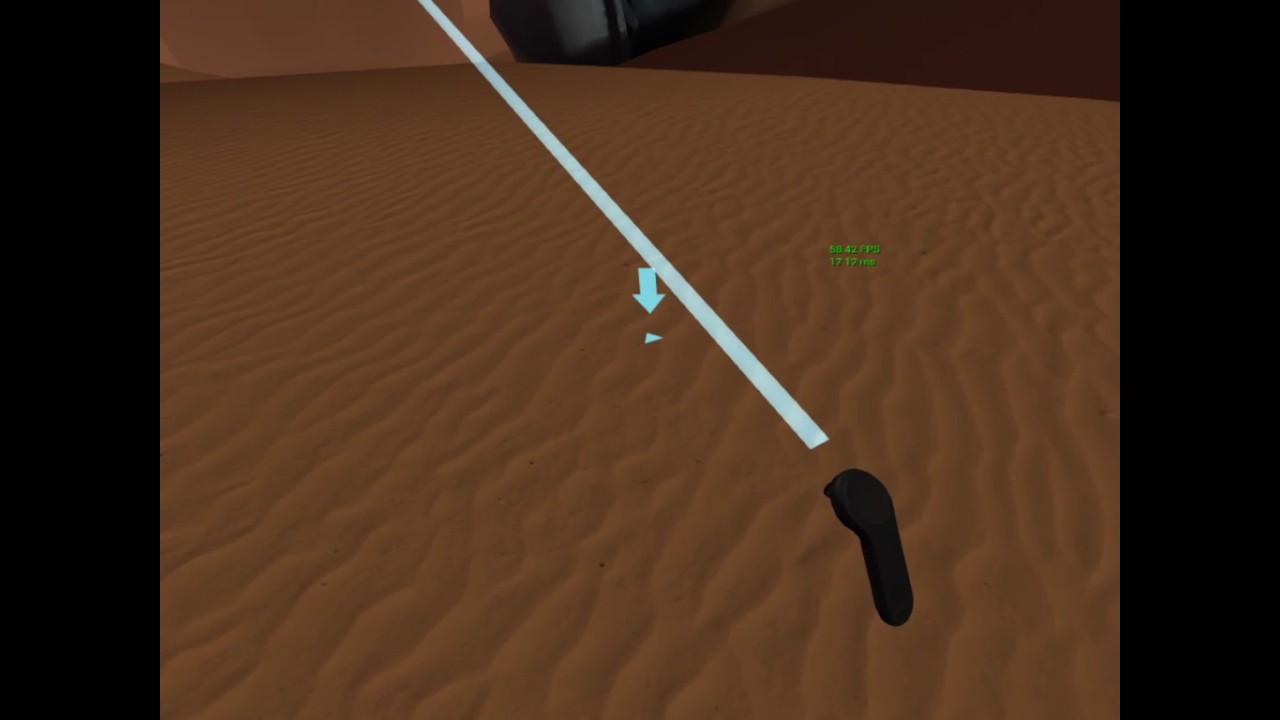
You mean this sort of "lagging"?
(the beam)
glacial pecan
@regal mulch either way, when I'm not hitting something, it's a bit unnecessary to calculate physics, correct?
plush yew
@weary basalt Well the music that plays DOES depend on where in the UI the player is, and what the game's current state is. Like, I may want to use a different track list depending on what in-game country the player's in. I may also want to fade into some action tracks if the player is being hacked, in a government alert, is hacking, etc
regal mulch
@glacial pecan Well the main idea of using the Physics handle is to simulate physics properly
If you have the hammer grabbed
And you hit the table
It will probably NOT go through the table
glacial pecan
@regal mulch that sort of lagging I have at work, but not in my project at home 😄 the lag here is much smoother, so it feels as if it's a physics thing
weary basalt
@plush yew I guess it just means your music component will have to be more complex. Having event driven sound mixing like what your after will take time to get right. You could get your menus to feed their track list to the component and it can fade in/out as it receives new track lists or something.
regal mulch
You can fix that lag by turning of late update. Don't ask me where to turn it off, my VR Headsets are all uninstalled in the closet :P @glacial pecan
glacial pecan
@regal mulch @regal mulch hehe... I was thinking something like this (really quick and dirty thrown togehter)
regal mulch
You aren't specifying any Component though :D
plush yew
I am trying to position some tooltips, I could get the first in the right position by adding an offset but it does not generalise. I have created a general 'tooltip' widget with variables I can edit from outside, these variables are the text that fills the widget and a vector 2d structure for location. The text thing is working fine (I just input a string - to text) but I am not sure how to do the location thing, I am using this node because it looked promising but it doesn't seem to do anything.
regal mulch
UMG should have a ToolTip for you already
Each Widget has a ToolTip parameter
Which you can bind to to create your own tooltip.
plush yew
I know but its too small and I would like to personalise
regal mulch
You technically don't need to position it
Just bind to it
That should let you create your own widget
plush yew
do you mean the 'tooltiptext' bind or the 'tooltipwidget' bind?
regal mulch
I'm have sure there was a way to create your own
Ah
You see the Advance Arrow below that section?
There is the "Tool Tip Widget"
Hidden
plush yew
Yeah I know
regal mulch
If you bind to that you can return a widget
regal mulch
It should set the location by itself o.o
 plush yew
yeah I have probably fiddled with some anchor or offset and I dont understand widgets well
regal mulch
:P
glacial pecan
@regal mulch something like this then, but yes, I need to check if I'm actually holding something, etc as well, but just as an illustration
and of course I probably need to juggle attach/detach and enable/disable physics etc. etc.
anyway, late for bed now, time to sleep! thanks again for all the info! 😃
plush yew
This "Adjust Volume" node isn't working
I want the track to fade in over 2 seconds
but it is just staying at volume 0.01
just barely loud enough for my Bluetooth headset (at full blast) to recognize there's even audio being played AT ALL
I'm sure if I got a Discord notification right about now it'd blow my ear drums out lol
 graceful sky
i might be mistaken, but must you not adjust the multiplier aswell?
1 * 0,01 is still barely audible..
plush yew
then....how am I supposed to----wait
 wary wave
@regal mulch , @plush yew - might be running afoul of the DPI scaling bug if it's not working properly, in which case it will only work full screen
 fierce tulip
one project I worked on set up their sounds and music wrong, it was so loud.. well.. bleeding ears.
but it was at the end of production, yet nobody noticed it for some reason. so coder just multiplied all the volume by 0.001-ish XD
graceful sky
maybe they'd all mute it at start of production, and never bothered unmuting? 😛
pretty amazing tho ! 😂
plush yew
Does anyone know what settings I need to flip so that I can freely move my camera without affecting the rotation of my third person character? I can uncheck all the inherit settings bon the camera boom but that has the opposite affect as it moves the character but not the camera.
unkempt delta
@regal mulch Hey, I need help, sorta.
I'm trying to achieve a sort of gameplay where when the character turns around the enviornment changes
Could you show me how to do it via blueprint?
fierce tulip
quite the question hehe
grim ore
@plush yew the default TPP template has the character set up like that, it should be Nothing checked on Pawn (rotation X) for the 3 settings on the root. it should be all 4 checked under Camera Settings on the Camera Boom (spring arm), and it should be use pawn control rotation unchecked on the Camera itself under Camera Options. The Character Movemement under Rotation Settings should have "orient rotation to movement" checked.
 bitter iris
Hey, any programmers here? 😛 I'm looking on something that Squad has, in their mod kit, they have an actor which screen shots the map perfectly, I'm looking for something similar and looking on ways to go about getting similar results. Would appreciate any help thank you.
 hidden aurora
lmao
unkempt delta
wtf
hidden aurora
ue goes boom
weary basalt
@bitter iris Squads Map uses a SceneCaptureComponent2D which they then render to texture and you have your Map.
They may use multiple passes to get higher resolution, which they then stitch together
 smoky osprey
Can someone help me on blueprint?
plush yew
"Decompiling Shaders" lol
 toxic hatch
Is there a setting for making your shadows softer? I am just using a directional light, skylight in a simple scene at the moment with default lightmass.
weary basalt
👍
plush yew
It lets you play any Sound Wave, Sound Cue, etc, through a blueprint function library. When you tell it to play a track, it does a 2-second crossfade between the new track and what it's currently playing, then it destroys the old track to save precious RAM
the only issue is if you switch tracks too quickly, the game gets a little confused and doesn't fade out the previous track
I need to introduce some sort of buffer or delay of some sort so the game waits until a current crossfade is done before it tries another one
weary basalt
Is your game just an OS?
plush yew
yes
weary basalt
What makes it a game?
plush yew
it's a hacking game
plush yew
Hacking game with a stealth element to it.
 worn granite
me: You can't make an OS in BP

Alkaline: Hold my beer```Is that done in Slate or UMG?
plush yew
No, but if you hack someone's system and you're not careful, the other person can see you as a hacker and you end up having a wanted level
@worn granite be careful what ya say there buddy
the UI is done in BP
but a lot of the backend stuff is C++
worn granite
aw man
plush yew
the Terminal is rendered using C++, I wouldn't even dare to do that in Blueprint lol
worn granite
I could have sworn you didn't use any C++ at all
weary basalt
Id be surprised if he didnt lol
plush yew
Back in July that was the case
worn granite
oh I still have my nick on
plush yew
but as soon as I did the terminal I started moving a lot of the core stuff to C++ just because it was actually easier
weary basalt
Whats the performance like?
plush yew
my terminal? I haven't done any benchmarking but it seems to run at 60 FPS to my eyes
in the game's splash screen, it uses the same terminal rendering code to display some linux kernel spam as the game starts up, writing a line to the terminal every 10 ms and it doesn't seem to lag
It used to struggle a lot with large amounts of text in the display buffer but ever since I stopped rendering text that wouldn't be visible a few months ago, it's never had any issues
worn granite
How are you actually storing text, jw?
plush yew
right now it's just an FString
worn granite
I tend to just have a text widget for any given line or paragraph and when that's not visible its not visible.
plush yew
then another one for the input buffer/stdin
plush yew
back when I was doing this game in MonoGame we actually gad a full blown master/slave pseudoterminal system set up like you'd find in real Linux but I would have no clue how to do that in C++
and the current terminal I wrote works well enough
The way I achieve multicolor is pretty neat too
the game will look for an & in the output buffer, then look at the next character after it. If the next character is a hex digit then it's a color code and it treats it the same way as the Windows COLOR command
if it sees a *, that means bold
_ means italic
- is both
and r is regular
if it sees a ! then the text blinks, haven't implemented that yet
worn granite
Interesting.
plush yew
and if it sees two &s in a row, it sees that as "literally render an &"
I also use latent actions for getting user input from the terminal
Which makes writing terminal commands in c++ a total pain in the male genital area but....
I'm not even sure how I would accomplish the same sort of api in C++ without going into multithreading hell
weary basalt
Do it, multithread it, just do it 😛
worn granite
you could capture this in a lambda and go about writing the other half of the function in that lambda - it'd be called when the thing is complete.
Benefit: All your code is in one spot
Detriment: You use a lambda
plush yew
at least....it's not....an immutable lambda
worn granite

plush yew
okay that was a lame joke
but I had the opportunity and I took it
anyway, I'm extremely grateful to Avery Alexander
 marsh garnet
Hey is there a way to code in C# with Unreal?
plush yew
Their music is so awersome
@marsh garnet Doubt it. But there's Blueprint, and Unreal's C++ isn't too far off C# once you get into it
marsh garnet
Ok
plush yew
(trust me, I used to be a MonoGame user last year)
worn granite
If you're really wanting to use C# you can find a plugin that's unsupported
marsh garnet
What do you mean by Blueprint? Some C++ is involved, right. I can code it though. I'm intermediate C++
worn granite
Blueprint is the visual node scripting system
plush yew
@marsh garnet Most of your gameplay logic is going to be Blueprint, trust me. Your UI will definitely be in BP
marsh garnet
What about Player Movement
plush yew
that, you can do with either BP or C++, it's really up to you
worn granite
I'd recommend VS with VisualAssist
plush yew
I personally use VSCode but I wouldn't recommend it unless you don't mind not having autocompletion all the time
marsh garnet
Ok
plush yew
VS+Visual Assist would be a good idea though I've never tried it because I usually just use the UE4 API documentation to figure my way around
 earnest cape
Is there a way to edit controller deadzone in blueprint?
 sullen wraith
to the right i've got several actors in a folder, is there a way for me to access them inside a character blueprint?
to move to
 reef mist
All the tutorials I find seem to be very contradictory or very outdated
my game is super simple - basically a MUD. my goal right now is to to just have a simple UMG widget that shows the names of players that are connected and allow them to chat
smoky osprey
I have a problem with sequencer
I have a bp but when i play anim it only plays the anim on 1 mesh
all of them have the same skeleton
reef mist
@smoky osprey you probably need a track for each mesh
reef mist
@smoky osprey can you post screen of sequencer?
smoky osprey
yeah... give me a sec
i need it so 1 anim plays in 3 meshes
I used to do it 1 mesh 1 track but its time consuming
reef mist
is there a reason you can't just have each mesh have their own track in sequencer to play the anim?
yeah
 reef mist
can't tell much from that. would need to see bp and larger view of sequenceer
smoky osprey

this is how i have my bp https://i.gyazo.com/thumb/1200/e9130efb1290f2f407bf0ec409d57f66-png.jpg
 reef mist
sorry ,trying to understand what it is you're trying to do but having trouble
smoky osprey
Ok so...
I have 3 meshes
The 3 meshes have the same skeleton
I want that when i put 1 anim on the bp it affects all 3 meshes
not only 1'
reef mist
when you say put an 'animation on the bp' do you mean use an 'Play Animation' node?
sullen wraith
from an ai controller, how can i get a refrence to the ai it controls?
 mental shale
Anyone got pointers on what to do to enter a battle mode for an RPG style game?
or just switching to different types of modes in general?
plush yew
@grim ore Fresh TPP seems to have what I'm looking for when stationary but while moving I can turn my character by moving the mouse, I'm trying to add a keybind so that I can freely move the camera around the character while moving. If you're familiar with WoW I'm essentially trying to replicate what happens when you hold LMB while inputting movement. I've uploaded this video to show what I'm trying to achieve: https://www.youtube.com/watch?v=h25JwkrpYxs&feature=youtu.be
Also, all of the rolling done in the video is thanks to you! Those anim notifies are lifechanging and I can do so much more with my system now that I know how to use them, so thank you again!

In my game there are certain instances where I don't want the camera to be influencing the movement of the player. For example, if you're rolling and look be...
I have a feeling that this situation is going to be more complex than just toggling some options in the menu, I think I might have to set the camera up to move completely independently from the player other than inheriting its location for starters
plush yew
I think I've got a way to figure all this out, I don't want to spam the discord with updates but if anyone has any questions or tips just @ me
 abstract marsh
Hey guys
As far as Simplygon goes, what happens if you have a mesh that contains morphs but need to reduce it?
 warped marlin
recommend using paragon characters? or are they very heavy?
abstract marsh
I hope someone helps me with my simplygon concerns. DM me if you have more info,
 steep thistle
Is anyone having editor performance issues lately on 4.21.2?
Idk if it's my graphics card or something else
marsh garnet
Compiling game modules for hot reload
Using Visual Studio 2017 14.16.27023 toolchain (C:\Program Files (x86)\Microsoft Visual Studio\2017\Community\VC\Tools\MSVC\14.16.27023) and Windows 10.0.17763.0 SDK (C:\Program Files (x86)\Windows Kits\10).
C:\Users\mathc\Documents\Unreal Projects\MyProject\Plugins\discordrpc\Source\DiscordRpc\DiscordRpc.Build.cs: warning: Modules must specify an explicit precompiled header (eg. PrivatePCHHeaderFile = "Private/DiscordRpcPrivatePCH.h") from UE 4.21 onwards.
C:\Users\mathc\Documents\Unreal Projects\MyProject\Plugins\discordrpc\Source\DiscordRpc\DiscordRpc.Build.cs: warning: Referenced directory 'C:\Program Files (x86)\Unreal Engine\UE_4.21\Engine\Source\DiscordRpc\Public' does not exist.
Parsing headers for MyProjectEditor
  Running UnrealHeaderTool "C:\Users\mathc\Documents\Unreal Projects\MyProject\MyProject.uproject" "C:\Users\mathc\Documents\Unreal Projects\MyProject\Intermediate\Build\Win64\MyProjectEditor\Development\MyProjectEditor.uhtmanifest" -LogCmds="loginit warning, logexit warning, logdatabase error" -Unattended -WarningsAsErrors -installed -FailIfGeneratedCodeChanges
ERROR: 'C:/Users/mathc/Documents/Unreal Projects/MyProject/Intermediate/Build/Win64/UE4Editor/Inc/MyProject/Discord.generated.h': Changes to generated code are not allowed - conflicts written to 'C:/Users/mathc/Documents/Unreal Projects/MyProject/Intermediate/Build/Win64/UE4Editor/Inc/MyProject/Discord.generated.h.conflict'
Error: UnrealHeaderTool failed for target 'MyProjectEditor' (platform: Win64, module info: C:\Users\mathc\Documents\Unreal Projects\MyProject\Intermediate\Build\Win64\MyProjectEditor\Development\MyProjectEditor.uhtmanifest, exit code: OtherCompilationError (5)).
 midnight sonnet
dude i am so close to finishing setting up my mosin
marsh garnet
Compiling game modules for hot reload
Using Visual Studio 2017 14.16.27023 toolchain (C:\Program Files (x86)\Microsoft Visual Studio\2017\Community\VC\Tools\MSVC\14.16.27023) and Windows 10.0.17763.0 SDK (C:\Program Files (x86)\Windows Kits\10).
C:\Users\mathc\Documents\Unreal Projects\MyProject\Plugins\discordrpc\Source\DiscordRpc\DiscordRpc.Build.cs: warning: Modules must specify an explicit precompiled header (eg. PrivatePCHHeaderFile = "Private/DiscordRpcPrivatePCH.h") from UE 4.21 onwards.
C:\Users\mathc\Documents\Unreal Projects\MyProject\Plugins\discordrpc\Source\DiscordRpc\DiscordRpc.Build.cs: warning: Referenced directory 'C:\Program Files (x86)\Unreal Engine\UE_4.21\Engine\Source\DiscordRpc\Public' does not exist.
Parsing headers for MyProjectEditor
  Running UnrealHeaderTool "C:\Users\mathc\Documents\Unreal Projects\MyProject\MyProject.uproject" "C:\Users\mathc\Documents\Unreal Projects\MyProject\Intermediate\Build\Win64\MyProjectEditor\Development\MyProjectEditor.uhtmanifest" -LogCmds="loginit warning, logexit warning, logdatabase error" -Unattended -WarningsAsErrors -installed -FailIfGeneratedCodeChanges
ERROR: 'C:/Users/mathc/Documents/Unreal Projects/MyProject/Intermediate/Build/Win64/UE4Editor/Inc/MyProject/Discord.generated.h': Changes to generated code are not allowed - conflicts written to 'C:/Users/mathc/Documents/Unreal Projects/MyProject/Intermediate/Build/Win64/UE4Editor/Inc/MyProject/Discord.generated.h.conflict'
Error: UnrealHeaderTool failed for target 'MyProjectEditor' (platform: Win64, module info: C:\Users\mathc\Documents\Unreal Projects\MyProject\Intermediate\Build\Win64\MyProjectEditor\Development\MyProjectEditor.uhtmanifest, exit code: OtherCompilationError (5)).
@marsh garnet can anyone help me? And ping me please, I’ll be in bed
weary basalt
@midnight sonnet Looks a bit to polished, also #work-in-progress
sullen wraith
I'm a little confused, my while loop keeps saying infinite loop detected
sullen wraith
when I change the condition of it?
midnight sonnet
so many channels lol
wary wave
delay inside a while loop 🤢
and obviously it's an infinite loop because 'Battle' is always true
 silver crown
Looping delay ftw
worn granite
you'd be better off using a branch in place of that while loop, then just exploiting that you can "physically" loop the exec wire back.
sullen wraith
so whats the best way to have a delay with a loop?
worn granite
Also, modifying the variable outside the loop body doesn't count.
sullen wraith
ill give that a go immutable 😃
wary wave
Component End Overlap literally never happens
because you never, ever break out of that loop
worn granite
You lose the chance to alter the variable before getting an infinite loop by entering the delay node, but even then, you don't modify the variable in the loop body.
sullen wraith
that worked Immutable 😃
worn granite
Really, you want to use a timer.
wary wave
^
sullen wraith
@wary wave it does fire
worn granite
When the condition becomes true, you want to start a recurring action. When it is no longer true, you want to stop the recurring action.
This is the use case of a timer.
sullen wraith
nah timer doesn't fit the need for it
worn granite
There's a good reason the node isn't called "DoOnceEveryInterval"
sullen wraith
the branch trick has worked 😃
essentially what this blueprint is for
is two ships
when they reach eachother they fight
and kill eachother
when one is killed, it destroys it
thus ending the overlap
its working now 😃
worn granite
this is the recurring bit.
You're obviously doing this every 1s
perfect use case for a timer.
Textbook use case, even.
sullen wraith
ill take a look into it 😃 it's working with the delay currently so I wont muck around pass this point for now 😃
one more quick question
is there a way to duplicate the "item"?
nevermin
got it
 zenith flower
@wary wave yes, i'm aware of their need for marketing stuff. Unfortunately the website I sent them to is garbage to be honest. When I have time, I will make a few videos and do a nice write up and re-do the website, and re-submit.
wary wave
sounds about right
abstract marsh
As far as Simplygon goes, what happens if you have a mesh that contains morphs but need to reduce it? Can anyone help that has used it?
sullen wraith
for some reason my actors are visible in viewpoer
ingame they arent
hidden ingame isnt enabled
could it be the ai perception?
all my ai are invisible :3
abstract relic
sounds like a feature
sullen wraith
the hell :3
sullen wraith
Ive got some actors highlighted on the right
is there a way for me to list these positions?
so i can access them in a blueprint?
link it to these objects?
abstract relic
Use level blueprint
graceful sky
Or expose variables of the same object reference in a new bp, and hardpoint them in-editor.
Level bp is imo not a great way to do it
sullen wraith
how can I get a vector value saves as a blackboard key
inside a task?
get value as vector>?
 red kindle
Guys I needed help
When I export the textures from unreal the occlusion map export as .T3D and I can't convert it to PNG or TGA
 paper kernel
so, here's a math question: I want to add instanced static meshes along the spline at exact intervals, how do I correct the interval based on spline curvature?
 frozen oak
Use the get spline length node and then divide the result by how many objects you wanna spawn
red kindle
any answer for my qustion
frozen oak
Ok, get spline length and divide the redult by your offset to see how many units you should spawn?
sullen wraith
is there a way to make it so ai dont take the most direct path?
ie go in a single line?
frozen oak
Sorry mahmoud, I have no idea what that filetype is :/
frozen oak
I know I saw a trick ones where someone added a texture to a decal and was able to export it like that. But thats a while ago and I cant find it atm
paper kernel
the equation has to take turn radius into account
because inner side has less distance by a factor of offset
frozen oak
Huh, if you get spline length and divide that up evenly all distances should be the same
paper kernel
it's not after you apply offset from the spline
like car differential
inner side always turns less
frozen oak
So you want to offset the meshes off the spline ?
frozen oak
How are you doing the offset?
paper kernel
multiplying right vector with float
frozen oak
So the distance between the meshes gets bigger when you move it?
Screenshots would be really helpfull tbh
@red kindle probably
Animation data is just animation data
 novel spire
So on GitHub, commit messages are often broken apart, like so:
"GameManager now do this, this, and th...
...at. It's better."
How do you guys deal with this? It looks ugly.
 tawdry sierra
Hi guys. How can use flipbooks in a sequencer?
fierce tulip
flipbook material node, controlled by a variable, and feed that variable in the sequence?
 royal lance
hey im having a really strange issue with lighting, right now my game takes place in a pretty dark area so im using a low sky lighting and point lights to light up my scene, but the issue is that when you move through the level the lighting keeps getting lighter and darker , and then it lights back up. is there any way to make it more consistent?
 dim plover
Maybe auto exposure?
 cobalt scaffold
@paper kernel i had the same problem, did you solve it yet ?
 light lark
Is there a good tutorial to make your very first game? Including the basics and also making a game then
 ancient otter
Hi, I’m having a problem on unreal.
This is the post I made, if anyone can help pls tell me.
Unreal Engine Forums
Hi,
I have an actor bp with this structure:
e9130efb1290f2f407bf0ec409d57f66png.jpg
I have placed this actor blueprint on my sequencer and added a track called
I would say my problem but it’s actually hard to explain
This is something I have lots of time trying to find, someone, pls respond or send it to someone that may now the answer. Thanks 😄
 velvet kindle
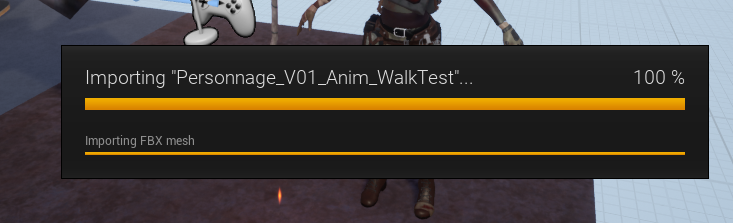
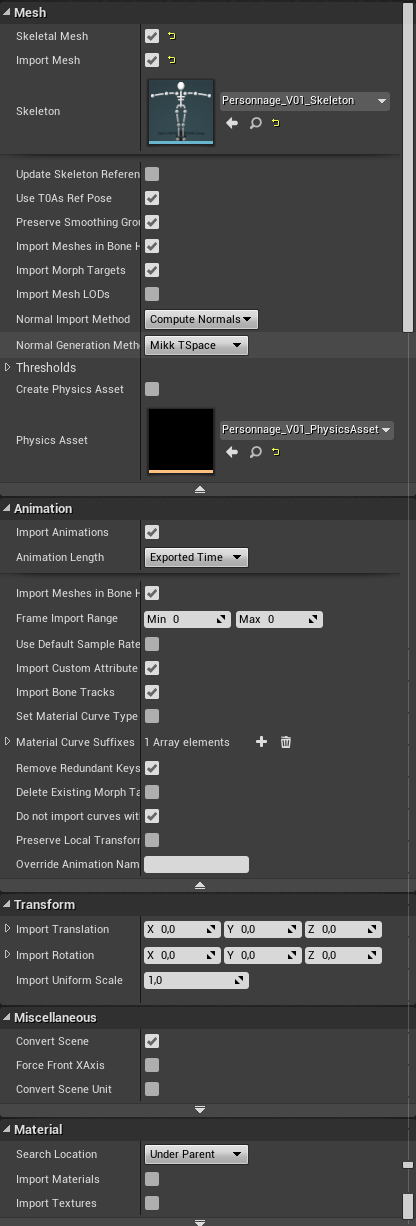
oy ! i'm having an issue. I have a character, I already imported its mesh with blendshapes, skeleton, materials and textures via FBX.
Now I'm trying to import an animation from a separated FBX file, and I always get frozen here :
https://i.imgur.com/sZyDsTm.png
using these options : https://i.imgur.com/aE0oekq.png
 lunar bobcat
requested help in #gameplay-ai
plush yew
can we use same camera in 2 level sequences?
 hard minnow
Is there a quick way to disable all debug stuff (printed messages, debug shapes and lines etc)?
 vale silo
what are the best settings for streaming levels on Android (so that there are no hiccups in gameplay while level is streaming on the background) ?
 next badger
@placid arrow T3D is Unreal 3d Object format
it's kind of text desriptive format
was there since ue1
but Epic dropped it after 4.12, since it caused a lot of crashes
 placid arrow
ah, i thought it was torque
plush yew
Do any games have Vray or just Cinematics? Can't find anything in Google other than just for Cinematics.
okay thank you man so to create a text and these mechanincs that I msut to do there will be in the playerstate or? @regal mulch
if you forgot I am talking about it is this:
 quasi horizon
Do anyone know If unreal can be used to make editor applications like for example a simple CAD program or and movie editor that handles files?
plush yew
nope I think
 dry moon
Yeah it definitely can, you'll just need to rework things a lot differently and remove what you dont need in terms of what you're doing
plush yew
ok
sorry
Hello guys I want to ask you what to do when I don't know how to do something but I want to create it? For example I want to create map like LastDayOnEarth but idk how to do it so what to do?
@plush yew make it?
but I don't know how to do
when I want to create something
 rich nymph
first you'd need to know what 'does' that thing you don't know how to make have
then, knowing those parts you may find you do know how to make some of them
"divide et vinces", divide and conquer. make small parts, then assemble them to the actual thing
plush yew
Hello again I want to ask you my classmate he had a prblem with the texture of the model (stick) he unwraped the model again but when we put the textures the result is this:
 lament saddle
maybe check if the material IDs are set correctly
plush yew
how to check it?
lament saddle
in the modeling software
plush yew
@lament saddle
okay I understand you on theory but I don't know how to make this map with different locations, I don't know how to make when you step on the green map in the game to transfer you to the map(maybe this is make with collusions?)
and a lot of things more @rich nymph
okay and I hav one more question I installed yesterday the latest version of ue 4 but I have one mor eversions
It's several maps
When you enter a different map it loads that map
yes
but I will send you screenshot
which version will load the project? I want to load with the latest
hmm
Any increase in performance with UE 4.22?
dry moon
Decreases?
grim ore
Sure, random bugs that decrease performance
dry moon
Maybe it'll be fixed when full release, I hope
plush yew
So it's on par with 4.21 performance wise though?
royal lance
does anyone have a good tutorial for a level transition? for example id go to the end of the level and collide with a flag , and then id spawn in the next level. any pointers?
grim ore
@plush yew there is a major performance increase for certain meshes in 4.22 if you use them
plush yew
@grim ore you mean like static meshes, character meshes, What?
grim ore
I was trying to be lazy but noooo you made me have to go find it. https://forums.unrealengine.com/unreal-engine/announcements-and-releases/1583659-unreal-engine-4-22-preview?p=1584646#post1584646 Instancing of Meshes by default now
Unreal Engine Forums
PREVIEW!
Preview 1 of the upcoming 4.22 release is available now on the Launcher and GitHub. We are making this Preview available so that our developer community
it's technically this line from the preview notes Refactor adds auto-instancing at runtime and more efficient renderthread mesh drawing
grim ore
the link I linked had more information. basically the engine can go from "you want to draw 100 meshes that are the same, here is 100 meshes drawn one at a time" to "you want to draw 100 meshes that are the same or similar, here is 4 draw calls for all of them"
it's almost like instanced static meshes but for regular meshes lol
grim ore
probably
plush yew
It sounds decent but who devs games on a temporary version
Can it be used for movable objects that have collision?
grim ore
i think its just a drawing improvement
 honest vale
collision has nothing to do with rendering, so yea
next badger
there are no polycount or complexity limitations for instanced meshes...
but there are many others
like no lightmap baking, every asset should have same textures/shaders, lod groups are locked
 lethal breach
Good afternoon everyone! I’m running some tests on my project with a demo map. The map has ~700-1000 actors including enemies, trees, etc. with low-poly models. I’m running an above average PC build but am running into performance issues when enemies chase the player. This is a top-down Diablo style game so when there are say, 50 enemies chasing the player the FPS drops to about 25 from ~110 FPS with no enemies. I’m wondering if my issue can be alleviated with culling as I have none setup so every actor is constantly being populated for the PC (from my understanding of culling.) I’m debating what type of culling I should use for this style of game, I am leaning toward Camera Frustum. Thoughts on if Culling might be fix my performance issues, or any likely causes you can think of?
next badger
You may run the performance logger an look on your time cycles
lethal breach
Performance logger you say? Time to go look into that! Thanks for the tool recommendation.
grim ore
@lethal breach you can guess at the issues or you can profile it and see the exact costs for everything in a frame. If you do the later you can find out the direct issue and then work towards fixing it, it might not be an issue that culling would improve.
lethal breach
How do I go about profiling it?
next badger
@lethal breach it's called "Session Frontend"
lethal breach
I am fairly new to UE4, I have a basic understanding but am still learning regularly - I view your tutorials almost daily for example. The latest was your tutorial on Lerp Nodes, which I have to say - Thanks for your awesome tutorials!
Thanks, I’ll look into that!
grim ore
😃 glad to hear they are helpful. There are a few different ways to profile so that page is a good start. Just getting a simple cpu profile is a good start to go "damn I didn't know my BP tick logic was taking up 200ms" type stuff lol
next badger
I wish ue4 used Session Frontend profiler as default tool
it's way more useful than on screen logs
grim ore
agree, it's just not a simple thing to make work out of the box compared to bam something pretty is on the screen with big red lines lol
lethal breach
I’m hoping it isn’t my BP logic as my entire game is BP, I have no ticks running and the game is single player only. But hopefully the Session Frontend logger and the profiling will help point me in the direction.
grim ore
well you have AI running and that might be using ticks
hey preview 3 of 4.22 is out, yay
lethal breach
Ah, that’s true. And I’ve wondered if my Behavior trees are the issue. If as I mentioned I have 50 enemies, each running a behavior free... That could become costly.
grim ore
yep that's why my first thought was profiling 😃
dim plover
Also, I think, performance in PIE is significantly lower than standalone.
lethal breach
That’s what I’ve been told. But the lag I’m experiencing is while running the game in a stand-alone game viewport.
next badger
@dim plover PIE as new window or directly in the editor?
lethal breach
Question, does a culled actor run it’s Behavior tree? Or does culling just affect the visual draw?
dim plover
I think I meant PIE directly in editor, but I'm not sure PIE with standalone also suffers. Though, 25 FPS regardless would not translate well anyway.
 olive schooner
I finally set up our team git but when I cloned the repos on my computer and launched the editor, I can see it updated a bunch of files in Content/StarterContent... How and why this happened? 😖
plush yew
@honest vale the mesh moves 👀 doesn't that make more draw calls
honest vale
why would it
plush yew
Because it's moving it......?
next badger
@olive schooner what files exactly?
honest vale
the engine does a draw call every single frame for every single mesh
plush yew
The draws would be calculating it in a new location
honest vale
it is done always per frame
plush yew
Huhm
honest vale
regardless of whether something moves or not
 sudden agate
A Drawcall is just a fetch from the GPU so it knows what needs to be drawn.
Instanced Meshes means the Data for a single mesh is already on the GPU and you just feed transform (which may already be on the GPU) data to it.
the Drawcall is therefore reduced because you dont have any mesh data sent to the GPU
sudden agate
Moving meshes do not change anything, because the Transform is just updated
not the mesh itself
super dooper simplified
sudden agate
Rendering a Mesh is just a mathetmatical concatenation of matrices
grim ore
I have 100 meshes. I send 100 meshes to the GPU. the GPU draws 100 meshes. regardless of the position that frame or whatever it's going to draw 100 meshes. with instancing it pushes 1 mesh that matches your others to the GPU, then tells it where that 1 mesh should be drawn. the GPU can handle this super fast rather than having to take in all that info from the computer.
plush yew
Then aren't meshes already instanced
grim ore
meshes are instanced only if you make them instanced basically. Only if you do the work ahead of time to make it so. yes there is more calculations but compared to pushing out all that data to the GPU it's minor
everything has a cost. instancing meshes can have a lower cost than just drawing them all individually 😃
grim ore
nope
honest vale
each draw call requires some CPU work
that CPU work for a thousand (simple) meshes is greater than the time it takes to just render all of them in a combined mesh
honest vale
it's not a matter of your opinion dude 😄
grim ore
say you had a picture in real life. every stroke of paint or ink is a draw call. when you are done you have the finished product which is 1 draw call then if you ever wanted to reproduce it. figuring out all the stuff for making that picture ahead of time and just doing it all at once can be cheaper than drawing a line,then getting another line to draw, drawing that line, etc.
plush yew
But that's what loading a game does...?
grim ore
loading a game != drawing a frame
grim ore
you don't, and cannot, have the entire game in memory
honest vale
you're being told by a couple of persons that you are mistaken
and you insist still?
plush yew
Yes?
honest vale
 plush yew
Kind of irrelevant. My point stands.
honest vale
no, it does not
plush yew
Yes it Does?
plush yew
....
How about respond to what I said instead of giving me irrelevant info
You load up a game, you play it, everything is there in the game, because your computer knows it Is,
Because it's remembering it via ram
Hence it's all there and that's what I just said
dim plover
Is it okay to create children of UStructs?
grim ore
a small question about that RAM, how much ram does a 4K texture use up that has a few mip levels?
assume its RGBA 32bit
 digital anchor
@dim plover yes
olive schooner
@next badger It changed a bunch of files actually. Took a screenshot from the source control commit window.
dim plover
@digital anchor , Alright thanks... unfortunately that means I made a little mistake. 😦
sudden agate
@grim ore atleast one byte
grim ore
@sudden agate bah 😛
sudden agate
21 MB if I remember. probably more though
grim ore
yeah it depends on compression as well. was trying to explain how it doesn't all fit in memory but I think we lost that fight.
sudden agate
no that was 2k
next badger
@olive schooner you are using ue4 git plugin?
sudden agate
4k is 121 MB or so
@grim ore just dont answer when he needs help because his game lags :P
plush yew
Instancing is probably good for a scene with 120mil polys
grim ore
Instancing is "free" performance so it's good for anything that could use it.
grim ore
the original link I gave you had real numbers and example
plush yew
<didn't read
Lol but it's still not final version
Even still I'd consider it the same as it without because it doesn't really make sense
To me at least
grim ore
yeah it's probably no more than 3% at best
plush yew
I mean the meshes are there right, and the GPU still needs to remember they're there...
So it's basically the same calls?
olive schooner
@next badger yup using the git plugin
 latent moth
sometimes my widget doesn’t appear, the event beginplay is not called at all after launching a level. does someone know if there might be an issue with how elements are displayed?
next badger
@olive schooner you should verify the location of the git root with some proper tool, also, UASSETS generally excluded by gitignore
 sage blaze
anyone know what to do here The project could not be compiled. Would you like to open it in Visual Studio?
Running C:/Program Files/Epic Games/UE_4.21/Engine/Binaries/DotNET/UnrealBuildTool.exe Development Win64 -Project="C:/Users/regus/Documents/Unreal Projects/BatteryCollector/BatteryCollector.uproject" -TargetType=Editor -Progress -NoHotReloadFromIDE
Creating makefile for BatteryCollectorEditor (no existing makefile)
Performing full C++ include scan (no include cache file)
Using Visual Studio 2017 14.14.26428 toolchain (C:\Program Files (x86)\Microsoft Visual Studio\2017\Community\VC\Tools\MSVC\14.14.26428) and Windows 10.0.17134.0 SDK (C:\Program Files (x86)\Windows Kits\10).
@progress push 5%
Parsing headers for BatteryCollectorEditor
Running UnrealHeaderTool "C:\Users\regus\Documents\Unreal Projects\BatteryCollector\BatteryCollector.uproject" "C:\Users\regus\Documents\Unreal Projects\BatteryCollector\Intermediate\Build\Win64\BatteryCollectorEditor\Development\BatteryCollectorEditor.uhtmanifest" -LogCmds="loginit warning, logexit warning, logdatabase error" -Unattended -WarningsAsErrors -installed
Reflection code generated for BatteryCollectorEditor in 11.4935176 seconds
@progress pop
Building 10 actions with 8 processes...
@progress 'Compiling C++ source code...' 0%
@progress 'Compiling C++ source code...' 10%
[1/10] PCLaunch.rc
@progress 'Compiling C++ source code...' 20%
[2/10] SharedPCH.Engine.cpp
c:\program files\epic games\ue_4.21\engine\source\runtime\core\public\Windows/WindowsPlatformCompilerSetup.h(22): error C2338: Visual Studio 2017 versions 15.7 and 15.8 are known to have code generation bugs that affect UE4. Please update to version 15.9.
ERROR: UBT ERROR: Failed to produce item: C:\Users\regus\Documents\Unreal Projects\BatteryCollector\Binaries\Win64\UE4Editor-BatteryCollector.dll
(see ../Programs/UnrealBuildTool/Log.txt for full exception trace)
Total build time: 74.92 seconds (Parallel executor: 0.00 seconds)
plush yew
To elaborate, I still don't get how saying it uses less calls actively makes it use less calls. You have your same meshes, because it knows all calls of one mesh, it knows all calls of the others? But in order for the game to know That, it has to be loaded, to see and interact with it the GPU needs to call it anyway?
As well that's just saying that x mesh draws = y mesh calls, and labels all meshes as x. But all the same meshes are already x, so wouldn't the GPU already know all meshes are x?
sudden agate
@plush yew eh. no.
The GPU doesnt know anything.
you are sending Mesh Data per frame
plush yew
It's like it's saying draw mesh x in different locations, but it still has to know all the meshes.
🤷
lethal breach
Ok, had a chance to sit down now that the kiddo went down for his nap. @grim ore this is profiling when I enter the map, without any enemies chasing me.
And this is with ~40. If I'm not mistaken, the cause of my lag is the Behavior Tree ticks. Would you agree?
Other than the behavior trees, I have absolutely no ticks running.
plush yew
@sudden agate mesh... data... per... frame?
marsh garnet
Hey, I'm making a class based on the DiscordRpc object and I get this Creating makefile for hot reloading MyProjectEditor (.uproject file is newer) Compiling game modules for hot reload Using Visual Studio 2017 14.16.27023 toolchain (C:\Program Files (x86)\Microsoft Visual Studio\2017\Community\VC\Tools\MSVC\14.16.27023) and Windows 10.0.17763.0 SDK (C:\Program Files (x86)\Windows Kits\10). C:\Users\mathc\Documents\Unreal Projects\MyProject\Plugins\discordrpc\Source\DiscordRpc\DiscordRpc.Build.cs: warning: Modules must specify an explicit precompiled header (eg. PrivatePCHHeaderFile = "Private/DiscordRpcPrivatePCH.h") from UE 4.21 onwards. C:\Users\mathc\Documents\Unreal Projects\MyProject\Plugins\discordrpc\Source\DiscordRpc\DiscordRpc.Build.cs: warning: Referenced directory 'C:\Program Files (x86)\Unreal Engine\UE_4.21\Engine\Source\DiscordRpc\Public' does not exist. Parsing headers for MyProjectEditor Running UnrealHeaderTool "C:\Users\mathc\Documents\Unreal Projects\MyProject\MyProject.uproject" "C:\Users\mathc\Documents\Unreal Projects\MyProject\Intermediate\Build\Win64\MyProjectEditor\Development\MyProjectEditor.uhtmanifest" -LogCmds="loginit warning, logexit warning, logdatabase error" -Unattended -WarningsAsErrors -installed -FailIfGeneratedCodeCha nges ERROR: 'C:/Users/mathc/Documents/Unreal Projects/MyProject/Intermediate/Build/Win64/UE4Editor/Inc/MyProject/Discord.generated.h': Changes to generated code are not allowed - conflicts written to 'C:/Users/mathc/Documents/Unreal Projects/MyProject/Intermediate/Build/Win64/UE4Editor/Inc/MyProject/Discord.generated.h.conflict' Error: UnrealHeaderTool failed for target 'MyProjectEditor' (platform: Win64, module info: C:\Users\mathc\Documents\Unreal Projects\MyProject\Intermediate\Build\Win64\MyProjectEditor\Development\MyProjectEditor.uhtmanifest, exit code:
 livid haven
@plush yew Is this a matter of not understanding instancing?
I'm late to the thread.
marsh garnet
@livid haven Any idea on my error?
livid haven
I read two lines of it, saw this:
Compiling game modules for hot reload
Don't.
Period.
Hot reload.
Ever.
marsh garnet
I just made a C++ class....
livid haven
Which is 100% a thing that will not work with hot reload even if it was perfectly functional.
marsh garnet
So how do I turn off hot reload?
livid haven
You don't. You just... don't use it. Don't hit "Compile" inside of UE4.
And don't try to build from within VS while the editor is running.
marsh garnet
I made a C++ class, and it says compiling. VS is closed
olive schooner
@next badger
What do you mean by verify the location of the git root with some proper tool ?
My .gitignore only filters out builtdata .uassets
My .gitattributes correctly tracks .uassets with
Content/** filter=lfs diff=lfs merge=lfs -text
I restored the branch to it's original state, opened the Editor and it added the same files so I think it "updates" my Content folder with the EngineContent from my editor installation, which somehow is different... I'm so lost 😄 I'm gonna just commit my "new" files and hope it forgets about everything... Otherwise I'll .gitignore StarterContent and move everything I want to another folder. My environment artist doesn't understand that stuff and she pokes around starter content changing stuff...
livid haven
You mean to say you created a C++ class using the wizard in the UE4 editor? That tries to hot reload.
Don't do that.
 upper heart
Hot reload == 💣
marsh garnet
Ok
grim ore
I use Hot Reload all the time 😛 I just make sure I don't use it if I ever much with the .h files
marsh garnet
One last question, if I am integrating DiscordRPC into my project, where do I put the file? In my Source or Public folder.
livid haven
Hot reload is at best of limited use if you know exactly how it works and thus know what it can or can't do without issues.
(Someone asking about Source vs Public is definitely not ready for that)
dim plover
There's an option to turn off hot reload when you add a class.
vale silo
I see more people came back so I am going to try again - what are the best settings for streaming levels on Android (so that there are no hiccups in gameplay while level is streaming on the background) ?
marsh garnet
Just answer
livid haven
I was responding to MathewW, not answering you. Patience.
It wasn't a dig at you, it was a fair assessment of whether you should feel confident knowing what hot reload will or won't do. Nothing wrong with not knowing.
marsh garnet
"(Someone asking about Source vs Public is definitely not ready for that)"
 azure shore
lol everyones always getting annoyed with each other in here
grim ore
I love everyone in here, no time for getting annoyed 😃
livid haven
I know what I said, and that was in response to MathewW commenting about hot reload being usable. It may be to him, but it probably will be more of a hassle for you without that depth of knowledge.
Public and Private folders exist to separate files that should be accessible to other modules.
marsh garnet
So where do I put my class?
livid haven
It's a convention, not a strict rule.
I wouldn't just shove stuff under Source. I'd follow the convention.
marsh garnet
Ok?
livid haven
Private should contain files that only the module should access.
Public should contain files that other modules also need access to.
grim ore
put all your files in the root directory if you are lost on where to put it, worst that can happen is you can't find it later lol
livid haven
Generally, *.cpp should be in private, because there's practically never a reason you need to access a CPP file from another module.
livid haven
Now, not all header files should be in Public, but what is in Public is typically, exclusively header files. *.h
grim ore
just don't hit the Compile button in the editor (hot reload), or build the project with the editor open (hot reload)
upper heart
I think you should start with a single module mindset if you aren't working on a plugin type project.
livid haven
You can start by putting everything in Private until you know for a fact you need to include one of those headers inside of another module. Then, you move it to Public.
marsh garnet
So I have to close the IDE over and over? @upper heart
livid haven
The IDE? Absolutely not.
upper heart
The editor
livid haven
The editor, yes.
marsh garnet
So I have to close the editor over and over?
livid haven
Yup.
marsh garnet
...
livid haven
The editor is running your code. You change your code, you restart the editor (that needs to run your edited code).
marsh garnet
Isn't there a way I can turn it off? Like in settings?
upper heart
It's pretty standard to not edit a program's code while it is running
livid haven
Turn what off? Hot reload? Not really, but that wouldn't change closing the editor.
marsh garnet
Is this what you always do?
abstract relic
We are very spoiled devs though 😉
livid haven
Every day of the last 12 years I've been programming, yes.
Or 10 professionally. Or 7 with UE4.
marsh garnet
Isn't Epic going to fix this soon?
livid haven
No. This is not something you "fix".
marsh garnet
 So you're saying this is how Fortnite was made?
grim ore
eventually if you work with UE4 and C++ enough you can learn when you should have the editor open and when it should be closed when working in C++
livid haven
Yes. I am. As someone who has been on the Fortnite dev team for 5 years.
marsh garnet
Ok
vale silo
oook, so, anyone with level streaming experience on Android ?
livid haven
Hot reload has several issues, but the biggest ones aren't a matter of bugs with hot reload, they're fundamental limitations of what it means to swap code in a running program.
dim plover
I wish Hot Reload was completely taken out, though. As an option or something. Sometimes I accidentally build with the editor open.
livid haven
Live++ is pretty awesome and somewhat better.
grim ore
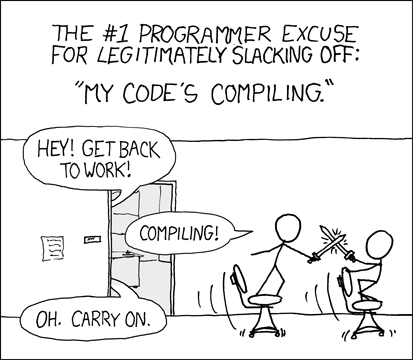
Programming is not always roses and puppy farts, sometimes it sucks hence https://imgs.xkcd.com/comics/compiling.png
 marsh garnet
livid haven
Hot reload is somewhere between trying to replace a car engine, while it's running and doing that trick where you pull a tablecloth without moving all the tableware on it - except you then proceed to try to put another tablecloth in there at the same time.
grim ore
ffs I literally just forgot what the grey input pin is that adapts to the input type
livid haven
Wildcard?
grim ore
yes.. thank god
livid haven
👍
grim ore
I literally could not remember it
livid haven
But, I've been appreciating Live++.
The difference with Live++ is that it doesn't need to try to swap DLLs like hot reload sort of does.
 frank escarp
does hot reload work in fortnite?
livid haven
Instead it patches in the live code to call into its own DLL, if I understand correctly.
As far as I know, no one attempts to use hot reload in Fortnite.
frank escarp
on PUBG we busted hot reload loooong ago
livid haven
But we do use Live++ now.
frank escarp
so eventually got disabled
uhmmm
i need more info about that
becouse im on the edge of throwing myself out of the window every time i need to tweak code
pubg project size is like 500 gb, so editor opening takes about 4-5 minutes
livid haven
Hot-reload/live code C and C++ applications.
And I believe we have plugin support for Live++.
marsh garnet
#include "Discord.h"

Discord::Discord()
{
    static void fizzlepop() {

    }
}

Discord::~Discord()
{
}
a block-scope function may only have extern storage class
marsh garnet
Simple question, but?
livid haven
I think the plugin is either 4.21 or 4.22?
frank escarp
on productivity
livid haven
@marsh garnet That code doesn't make any sense.
livid haven
You're declaring a static function inside of a constructor.
livid haven
What does it even mean to be a static function inside of a function's scope?
worn granite
Clearly its just advanced super dupez C++ hackerscript
livid haven
You're not calling anything. You're defining a function inside of a function. I don't know why you're trying to do that.
marsh garnet
Because, if I define it outside of the function, my DiscordRichPresence object is undefined.
 pallid compass
what VBlanco said
frank escarp
its extremelly clear you have no clue wtf you doing
livid haven
^this^
frank escarp
you will only lose our time. Go learn C++
if you want to do ue4 stuff, use blueprints
pallid compass
Yeah dont do what i tried to do, your gonna have a very bad time
marsh garnet
You can do DiscordRPC with blueprints?
livid haven
You're not getting an error about your DiscordRPC because the compiler has given up by then with trying to make sense of your static function declaration/definition inside of a function definition.
livid haven
Yep, that's my understanding.
frank escarp
can the demo version work in unreal?
pallid compass
madness
vale silo
so, I am guessing no one streams levels on Android :/
frank escarp
holy shit
livid haven
I don't know. I just saw an internal e-mail that said do X Y and Z and then you'll have Live++.
frank escarp
every programmer in the office wastes at least half of the dev time on restarts
pallid compass
wow
livid haven
Yep. And that's what it'll do.
pallid compass
That sounds really nice
frank escarp
then ill have to tell the office about it
everyone is sad that hotreload died in the project
livid haven
Hot reload is just too difficult to maintain, IMO.
And as a feature that total noobs use? Even worse.
Because people don't know what it can't do and it's not feasible to have it detect the things it can't represent.
frank escarp
it fails quite hard at modifying headers
wich makes total sense
the fact that it even works at all is an absolute miracle
i remember when hotreload didnt work on headers
livid haven
Yep. Which Live++ won't really fix since it's just hotpatching functions.
frank escarp
thats fine
most of the time what i want to iterate is 1 function
or add/remove visual logs
does it work multiplayer?
and in-game
livid haven
Actually, I wonder how it explodes if you change a struct and have any of that struct, by value, in your source file?
I mean, presumably the Live++ created DLL will have the different memory footprint for that struct and the hotpatched function will now be trying to pass the old struct memory layout/footprint to the Live++ version that has a new memory layout/footprint.
vale silo
one thing I learned today is not to ask any non-C++ questions when there is C++ talk in the chat 🙄
livid haven
Seems as likely to explode.
Sorry.
Can take it to CPP. Just inadvertantly became a whole subject.
No, no idea about streaming on Android.
pallid compass
lounge is the new cpp
vale silo
so, back to my silly question about level streaming on Android...
abstract relic
abstract relic
Gross, it is a twitch stream channel
 south tide
We've been using Live++ and it's magic! Definitely recommend checking the trial.
plush yew
I made the largest landscape possible in UE 4.21 with thirdpersoncontroller template, stuck a mat on the landscape and built lighting and it freezes at 100% 💤
 wheat fulcrum
does MoveTo not work if Physics is enabled? 🤔
next badger
@plush yew Milkshape 3D
 stable coral
hello! in unreal engine is possible to make a bluetooth chat? between 2 devices, creating a bluetooth server and bluetooth client
next badger
well, there's a BT plugin on marketplace...i have no clue what it does
grim ore
stock bluetooth chat? nope. with C++, sure!
grim ore
I don't have any ideas as well, you just asked if it was possible
plush yew
What would something like this do:
Float multiplydamage = (totaldamage > 1.0f) ? 1.0f / totaldamage : 1.0f
well that's a yucky UI bug right there
the .bash_history file name isn't being properly wrapped to fit in the bounds of the file icon D:
Wouldn't that just mean totaldamage/1?
stable coral
@grim ore what about LAN multiplayer?
grim ore
that is built into the engine
grim ore
it should yep, its basically ip networking over a normal network connection
so internet or local as long as its an ip connection
 cloud cobalt
Though mobile LAN is not exactly mainstream
 coarse wigeon

QuadSpinner creates the industry's most loved terrain design tools for games, films, and virtual experiences.
Just thought I would share
 maiden swift
^Nice looking tool. I'm probably going to check out the free version at some point.
 tribal frost
@plush yew actor x importer, its a free plugin for 3ds max that can import psa and psk files
plush yew
Why is there just some random 3d house building architecture software in the UE files? Lol
Called like dreamscape or dream house or something
 finite slate
What?
plush yew
Go to your program files in Epic Games
version
Then (I'm not at my comp and can't remember) but there's a separate folder
Inside that folder is a compressed file
Open it and it is a 3d building architure software
Called like dreamscape or something. When you open it it's like 500mb
grim ore
must be unique to your install, nothing like that here
perhaps you downloaded some software and chose that directory to save it in.
plush yew
Nope
grim ore
share a screenshot when you can
plush yew
Will do
I'll be home at like 11pm est
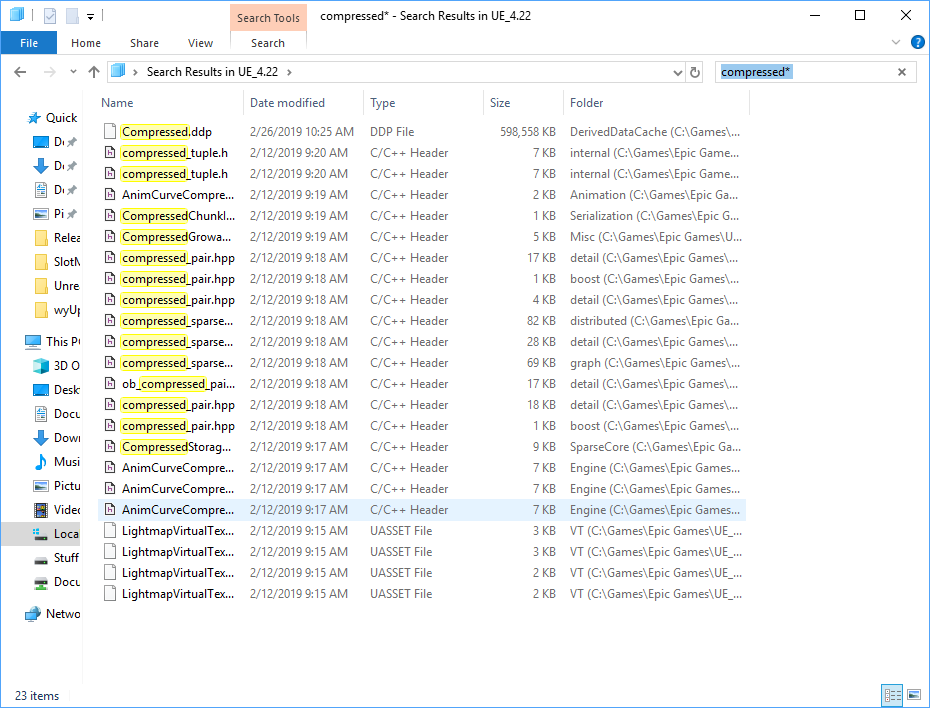
No it's actually called Compressed
Search compressed
lethal breach
Hey there everyone, so as some of you know I've been working on trying to improve my performance, I have the profiler tool up and running, but can't find a good reference online for how to fix what it's showing me. Anyone have a reference photo or video that walks you through using the profiler tool?
plush yew
I found it in 4.19 not sure if it'll be in 4.22
 grim ore
thats a cache
plush yew
Copy paste to your desktop and double click it
grim ore
It's a cache of all the stuff you are using in UE4, it might have architecture meshes in it from the arch viz template as well as the starter content
plush yew
No. It's an actual 3d architect software
grim ore
welp I don't have a program that can open it so my trail ends here
plush yew
All you have to do is double click on it lol
grim ore
yep and again, I don't have a program that can open it.
plush yew
You don't need one
grim ore
that's not how windows works
pallid compass
Skyrip you seam to be very confused my dude
plush yew
Uh no...?
pallid compass
Just because something on your pc will open a thing with a software does not mean derived data cache is architecture software
plush yew
Uh yes it is lol
plush yew
I don't have architecture building software on my pc lol. Even if I did I would recognize the difference ESP since it says the name of the program
pallid compass
Then how do you know its architecture building software if you cant open it
plush yew
I said I opened it...
livid haven
Mate
pallid compass
I think you might be having a stroke right now my dude,
livid haven
The DDC is Derived Data Cache
pallid compass
Because you are losing your marbles
livid haven
And it is binary data generated from processing assets.
It is not a piece of software.
pallid compass
What program did you use to open it? what did it look like?
plush yew
Riiight is this some lame inside joke
livid haven
And it can not properly be opened by any software other than UE4.
livid haven
If you are opening these files, it's because the file extension happens to be shared with some other file.
And Windows 10 at least does ship with some 3D software. @grim ore
pallid compass
Yup i said that before
plush yew
I'm leaving in 5 mins I'll be back in like 4 hours
livid haven
For what that's worth.
worn granite
5 mins too long to share a screen?
plush yew
Kinda sorta
grim ore
woof. After this morning and the issues with @plush yew anyone who continues down this rabbit hole is asking for a headache
livid haven
This thing.
plush yew
@livid haven nope
livid haven
I would not be surprised if it ends up opening up some random file extension as if it were a 3d model.
pallid compass
screen shot pls
plush yew
It's a legit 3d arch building software called dream something
pallid compass
screen shot p l s
worn granite
Lol I'm trying one of them in VS, taking bets how bad this crashes
pallid compass
plush yew
Yes
pallid compass
Prob just shares the same extension
and some how u have it installed
and tried to open the binary data
skyrip
u got rekt m8
plush yew
Erm
pallid compass
i just lied
plush yew
?
pallid compass
this software is not called dream
the save name of the loaded project is called "DreamPlan"
pallid compass
This is not called dream anything
worn granite
0/8 bad b8 m8
pallid compass
when u think u are baiting and get b8'd
worn granite
I dunno, but UE4 ships with this weird thing called VisualStudio too
plush yew
Huh
worn granite
It is.
maiden swift
 pallid compass
and he said that was it
all i did was post a piece of software with a project open called Dream
next badger
@worn granite was it sarcasm about VS?
pallid compass
So it looks like it was called dream
pallid compass
FAM
worn granite
notice the lower left
maiden swift
The app in your screenshots is DreamPlan Home Design Software.
Rei, chill the fuck out.
worn granite
😬
pallid compass
Immutable throwing my life upside down
worn granite
when you tryna troll but end up playin yourself in lounge
 polar hawk
this is literally the worst thing in my life





 worn granite
oof
polar hawk
try, I dare you
maiden swift
Anyway, what is actually happening here? @plush yew what is it you're trying to figure out or say here?
abstract relic
This isn’t lounge though
worn granite
shh bby is k
plush yew
@maiden swift read above
next badger
pallid compass
Oh yeah sorry pfist me and immut always screaming at each other, forgot i am not in DM's
polar hawk
lolololol the fuck is that
pallid compass
Dare accepted Allar, give me 48 hours then you can roast me.
polar hawk
Don't work too hard I literally won't get it
pallid compass
After Immutable and and Sion get at me first.
oh yeah dam, your just passing it off rip.
worn granite
You auto-forward it to the company? @polar hawk ?
polar hawk
I'mma leave this mystery unsolved
worn granite
Fair enough
maiden swift
Hey guys, guess what?
pallid compass
btw @plush yew fair enough dude, i actually thought you had lost your marbles.
I take back what i said 10/10
maiden swift
This isn't #lounge.
Get back on topic or leave it alone please.
OK good. Now we can move on.
pallid compass
Is derived data cache not on topic in here?
polar hawk
Is the topic of "I hate all general purpose channels related to UE4" on topic
pallid compass
That is not a troll question, i guess its context to consider.
plush yew
Tf does it make you download that for anyway
polar hawk
Hear me out guys
pallid compass
Looks like a component of some sort for some software?
polar hawk
lets remove #ue4-general and #lounge
pallid compass
pls no
livid haven
@maiden swift Skyrip is on about UE4 including some kind of architecture software inside of the DDC folder.
worn granite
I'd actually get work done, wtf is that suggestion
pallid compass
livid haven
We're trying to convince him he's mistaken and UE4 doesn't ship with any such software.
pallid compass
He aint joking Sion
livid haven
That's where all of this thread is about.
pallid compass
I just had to eat my words.
polar hawk
I highly suggest not boarding @plush yew's train
pallid compass
Oh yeah it does not ship, but he did open it.
maiden swift
@livid haven Yeah, I think I'm up to speed now. Pretty sure it's just a misunderstanding of course.
livid haven
I told you it was probably just a common extension that was shared. Windows has a bunch of weird additional software like that these days.
Didn't know you had to install it afterwards though.
pallid compass
Does obj not share the same extension are c++ compiled down before linking?
its object right?
extension as*
maiden swift
Indeed. Seems like a weird coincidence. Not uncommon on Windows.
livid haven
OBJ is both a 3d model format and also a compiled source file's format.
And probably a bajillion other things too.
polar hawk
its also an obscure engine entity format
pallid compass
Cant 100% recall the extension for object type files generated c++ before linking.
Ah so it is, gotcha.
lmao
polar hawk
extensions are not sacred
livid haven
Extensions are kind of antiquated shit.
pallid compass
Yeah i have seen a few extensions used in different formats.
livid haven
Like, what if multiple pieces of software support an extension? Do you... install another piece of software that opens the file and then figures out which of the other pieces of software probably really opens it? Gross.
polar hawk
when starting a new ue4 project you should always change the config's .uasset extension to '.fuck'
pallid compass
omg
worn granite
.thisshitagain
plush yew
Lul
worn granite
I might even ship a ue4 project?
plush yew
Good marketing scheme
next badger
i think extensions are still used since header indexing is expensive
worn granite
Gee, wow, thanks.
pallid compass
If you ship a thing, il stop making CPU's in factorio and wasting my time.
Good deal?
gets to factorio forever
pallid compass
No that is cheating.
Also this adds another thing to my list of things to learn
Learning to parse files and such properly from scratch.
worn granite
Kindly define ship in this context
plush yew
You can't learn anything from this @pallid compass
livid haven
So, when you think two characters in a show are cute...
worn granite
livid haven
... you 'ship them.
pallid compass
🤦