#ue4-general
1 messages · Page 402 of 1
 dark depot
 plush yew
Actually it's about 23meters before fps returns to max
 flat idol
drawcalls and the compelx shaders has the real impact on the fps counter, but you can also run out of pcie bandwidth with 4k textures easily
plush yew
@polar hawk maybe...?
 polar hawk
I'd bet on it
plush yew
Try it and let me know...
polar hawk
just...
dark depot
he doesnt need to ..
polar hawk
move the camera
plush yew
I actually don't know lol
plush yew
Idk man I experimented with my 1070 with 2.4-2.5mil poly meshes and going out to 23-24 meters increased my fps ...
To like max or so
polar hawk
how much is max
plush yew
🤷
dark depot
are you looking at stats or profiling tools at all? its not as simple at this mesh has X amount of polys
polar hawk
@dark depot first we need to find out what max fps is
polar hawk
That is definitely a way to count triangles
dark depot
like stat fps or can i use any fps counter i find on the internet
polar hawk
oh no, wrong direction
plush yew
Anything that is reasonably accurate
plush yew
Pretty reasonable
polar hawk
what would be unreasonable?
 grim sinew
Negative numbers in the FPS counter would be a concern, for sure.
plush yew
🤷 one that doesn't work? Lol
dark depot
wait i have a question im not sure if it was answered... are we doing this in unreal
plush yew
@polar hawk no lol
polar hawk
I think we could say any fps counter would work then, they're all pretty reasonable?
plush yew
Unless you had to pay for it?
polar hawk
an fps counter you had to pay for, would the counter be unreasonable or just the fact that you paid for it?
plush yew
👀
plush yew
Free ones are just as good. Ones that don't work, not good. Ones you pay for, pointless unless watermarked
polar hawk
I need to pay for a watermark?
plush yew
Does that clarify
polar hawk
well
but they all work though, except for the ones that don't work
but we agree there aren't any that don't work
plush yew
Not true
polar hawk
so really all fps counters will work and do the job
 sullen wraith
i keep getting an error, doesanyone know what it is
simplemovetolocation_deprecated
plush yew
I just can't remember exactly, but I vaguely recall one being screwy
polar hawk
your function is deprecated
it moved
there is probably a function you should be calling
it is actually probably telling you what function you're supposed to call
call that one
 latent granite
How do i submit something to #looking-for-talent ?
grim sinew
Read the pinned message @latent granite
polar hawk
Talk to UnrealBot
latent granite
Ok
polar hawk
@plush yew okay so besides the one being screwy
all other fps counters should work, even the paid ones, although it sucks that you'd pay for it
plush yew
@polar hawk I guess. What does this have to do with UE?
polar hawk
I'm trying to establish that you should then be able to establish a max fps
plush yew
Ah right...
dark depot
i was trying to learn if you were even talking about ue4 haha
plush yew
But I didn't need to know it at the time
polar hawk
So how do you know it was max?
plush yew
Was just aiming for the 120 the engine had as max
polar hawk
Maybe it could even be higher?
ah
but thats not really max though is it
thats a limit you can change
you have the power
flat idol
:)
dark depot
for yourself i guess
polar hawk
I agree with your point, that moving farther from your object could increase fps
dark depot
^
plush yew
It does
polar hawk
it would moving close
plush yew
Because who plays that way
polar hawk
or it means nothing
dark depot
and what is that
plush yew
It means something
plush yew
Because you're not going to have an object 1m In front of you all the time while playing
polar hawk
but you also aren't going to be really far either
plush yew
Lol that blocks your view
polar hawk
and you aren't going to be always in the middle
plush yew
Not true
dark depot
what
polar hawk
Either way, we're not talking about player experience
plush yew
And 23+meters isn't that far
polar hawk
we're talking about raw fps count
And that distance can be really close or really far to generate higher fps
plush yew
Isn't that the point of testing FPS?
dark depot
are you just testing fps
plush yew
No
polar hawk
So everything about comparing the raw power of triangle counts with gpus
that was actually irrelevant?
plush yew
Anything that has to do with performance
polar hawk
is irrelevant?
dark depot
and how are you doing that
plush yew
Where did I say that?
polar hawk
I'm not saying you said
I'm asking
I Don't know if your statement was again countering mine
or in addition to mine
plush yew
No. It's not irrelevant.
polar hawk
But now you're saying the point is player experience
and we're not interested in gpu benchmarks
polar hawk
right
because we were talking about benchmarks I thought
but if this whole time you were asking about good values for player experience
I understand that now
in that case
plush yew
Well... I mean, no one said anything extremely specific lol
dark depot
10k polys max allar
dark depot
took to long its now 5k
dark depot
anyways my whole point was vert count is little in the end we need to add everything else that affects draw time
dark depot
mix it all together and balance per scene
you can have over 3million poly scenes that look great
and still be good
plush yew
I really just wanted that list of max poly count for GPUs before the tipping point lol
polar hawk
WAIT A MINUTE
dark depot
there isnt
polar hawk
Would you say
dark depot
because it all depends
polar hawk
You're looking for a benchmark of max triangles on different graphics cards?
Is that your mission?
plush yew
Max triangles before fps decreases in UE
dark depot
ps2 could render a more then a million if i remember to who knows
plush yew
With 10 and 20 series yeah
dark depot
so no shadows
no lighting
what do you mean
because the max is going to change man
polar hawk
1 million
it can render 1 million
before it decreases
it might decrease a tiny bit
but
guaranteed
it'll always decrease at 1 million
dark depot
1million easy
plush yew
Uhhh?
polar hawk
if your max is 60
you might be at 58
if your max is at 200
you might be at 199
either way
1 million is a guaranteed decrease from max fps
plush yew
Doesnt matter how GPU get better, the overhead for rendering graphics has also increased.
At some point, devs will have to find a way to work around this issue.
dark depot
my main scene is running at 120 fps at 3million tris on my 1060
plush yew
But if your GPU tries to go past max doesn't that decrease to the -2 fps after?
plush yew
I wouldn't know I suppose.
polar hawk
From experience I can safely say, at least for me, its really hard to exceed the maximum
plush yew
Well I mean, especially if it's programmed in the processor
polar hawk
especially
plush yew
But it doesn't mean it can't make that attempt
polar hawk
Aye, it can try as hard as it can to go as fast as it can
but max is really hard to overcome
plush yew
That's tech for ya
polar hawk
We just need to go quantum, thats all
flat idol
unless youre looking at it from the perspective beyond maximum, from where it looks all just lagging behind
plush yew
Or...
dark depot
well get on that allar
polar hawk
@flat idol this is not the time for time dilation
plush yew
UE could simulate graphics 🤔
flat idol
agreed
polar hawk
we're just trying to figure out max
dark depot
go into unlit and start adding things
polar hawk
but if you could go unlit and add more
wouldn't the max just get higher
and become the new max
dark depot
if we can go over was it ever max
dark depot
well sky better figure it out for us
flat idol
just push it harder, you can go beyond max that way
dark depot
this is the most on topic i have ever been
polar hawk
Yeah, that is what they say alright
like my momma always used to say
can't burn a possum twice
I got nothing to do, we can continue this in voice
dark depot
ohhh i so wish i wasnt working haha
plush yew
Anyway It's too much effort to find screen size for 23meters out for a mesh though..
polar hawk
do you have a ruler
plush yew
Nope.
polar hawk
yeah, thats tough
plush yew
I'm lazy, so I'd just ask you how to do it :P
polar hawk
first you're gonna need a ruler
you could print one out
make sure to scale it up so it fits the entire page
plush yew
Could just use an overlay? But go on...
dark depot
to broke for a ruler. use your shoe they sometimes come in inches and feet and stuff
polar hawk
yeah I wear a size 10
you have to convert it though if you're american because we use the imperial system
 abstract relic
Or just use the paper.
polar hawk
I think 10 is around 10.5 inches
paper doesn't have markings, you can't read a paper
find a picture of a ruler
scale it to fit the page
print it and cut it out
insta free ruler
then align your mesh on the screen and just measure it
make sure you do it from left to right, not up or down or diagonal to diagonal
the camera fov distorts it a bit
and you have your screen space.
polar hawk
if you want a percentage
you take the size you measure and divide it by the size displayed on your amazon order for your monitor
hope you got a reciept
or a bigger ruler
plush yew
X by y then find screen size, divide and walla
polar hawk
ah yes
dividing x by y ought to give you a number
hell I just printed out a 6 inch and a 12 inch ruler on a piece of paper
can always use a good ruler
abstract relic
On a 8.5 x 11 printing paper? 😜
polar hawk
you gotta hit scale to fit
otherwise it won't fit
but other than that
free ruler
nice sharp edge
abstract relic
That’s a pretty funny troll 😜
flat idol
can you get a 6 inch rules if you shrink a 12 ruler?
flat idol
so essentially you can scale with cutting
plush yew
Why are you all spamming lol
polar hawk
iunno, they seem interested in this ruler
abstract relic
I’m just fascinated by this 12 in ruler on a 11 in paper
polar hawk
its free
plush yew
Angle?
dark depot
i forgot you print the ruler not print spam
polar hawk
they are working on being able to print spam
the lab grown meat printers are a little buggy tho
abstract relic
Cut down the cost by cutting down the inches!
polar hawk
yeah
all the cost of the ruler goes into casting the material
to make the ruler thicker
you don't need a thick ruler, thats the wrong axis
you measure the long side
if both sides were long it wouldn't be a ruler it'd be a square
thats where the tool T-Square gets its name from
abstract relic
But which axis is up? 😜
dark depot
this is a unreal discord there is only one right answer
polar hawk
well
you probably want to use the printed side
unless your printer prints on both sides
some printers do that
dark depot
exactly
polar hawk
but if you have enough light the printed side will show through the other side
so iunno man
¯_(ツ)_/¯
im not like a ruler expert
dark depot
all i know is the short side isnt the side you use
plush yew
Yeah well explain mesh size and polygons
dark depot
and then we cant help sky learn how to measure things
dark depot
but for real skyrip i have no idea what you are asking still
like you want to know how close your verts are?
plush yew
Lol the reason I got confused because I was thinking of calculating the 3d space
polar hawk
hes trying to figure out the optimal screen space for a mesh at 23 meters
polar hawk
yeah first step is to measure the screen space
he doesn't have a ruler
so he has to print one
dark depot
i have to admit i cheat because i dont have paper and use top view but i dont use middle mouse i just align things to the side ruler thing
polar hawk
ah the side ruler will get ya
dark depot
yeah that is my way of saying my scale is always off
but yeha @plush yew are you just using one mesh because if a piece of another is showing you now need to take that into account in all this math we are making up here
sullen wraith
legnddddd
thankyou
am I able to lock an object in the world? so i can click it on editor
dark depot
not sure what you mean
grim sinew
Btw you didn't "close terrain" you just closed the window that would have let you close terrain.
So... that's what happened there.
 latent moth
All, something I do not understand. I have landscape foliage in my map (plants, stones, etc) that get generated every time I open a map. So I see plants gradually popping up. How can this foliage be saved?
https://gyazo.com/3c39f12b0deece8f9d9478b53e0a0126
sullen wraith
@dark depot i know that
plush yew
@dark depot well the other mesh would need LOD as well
sullen wraith
i want to make it so it doenst select
so if i ctrl select over things
it wont select a "locked" object
dark depot
oh that isnt a thing that i know of
sullen wraith
dammit
in the grid, is there a way for a object to stop moving when its hitting another??
plush yew
Hi guys how do I properly save to memory stick? I am copy pasting problem is when I update my project I want to override the current data in the memory stick not create another copy of the stuff.
Oh there was an option to replace
 dire sentinel
does anyone know why my blender caps my material color picker? http://prntscr.com/mp0l56 I can't make the color more saturated than this?
I can't even color pick, I color picked her dress and it just picks a color no where close to it
http://prntscr.com/mp0ksi
Adjusting the brightness of the purple also just desaturates it to white instantly
http://prntscr.com/mp0ljd


does anyone know why my blender caps my material color picker? I can't make the color more saturated than this?
I can't even color pick, I color picked her dress and it just picks a color no where close to it
Adjusting the brightness of the purple also just desaturates it to white instantly
grim sinew
1: Not really unreal chat. 2: It's not capping anything, you're just bad at color pickers. Right now, R, G, and B are all only at 32-35% intensity, you need to increase that by dragging the white dot around to the color you want.
3: You also need to know if it's picking linear or SRGB colors, those are two different things and will get you completely different results.
Oh and 4: If you're viewing anything in lit mode, which presumably you are, that will influence the output of the color as well
plush yew
Hello guys, need a small help. Suppose I have a scene where I place 2 cameras on opposite sides. How do i hide 1 camera from other camera's viewport?
grim sinew
By doing absolutely nothing, cameras don't render, they're just points in space. The blue camera model you see is just a preview for your sake.
dire sentinel
i cant
http://prntscr.com/mp0mzf http://prntscr.com/mp0n3c it just starts curving up to the blue
and gets capped at .838
http://prntscr.com/mp0nde and if i try to adjust the hue http://prntscr.com/mp0nh7 it just instantly changes the saturation to white


cant drag the dot
it gets capped
and wont move
past certain saturations
when moving only hue it instatnle gets reset to white
grim sinew
Of course it won't. You can't move something past 100%.
plush yew
@grim sinew how do i hide that blue camera
grim sinew
@plush yew You don't. You ignore it. Read what I literally just said. It's a preview. It will not render ingame.
dire sentinel
its not at 100
plush yew
ah i get it, thanks
dire sentinel
it's at 0.610
grim sinew
@dire sentinel 1=100%
dire sentinel
 grim sinew
Also jesus christ, calm down on the images, I don't want to scroll up for 10 seconds to find what you typed
dire sentinel
0.8, 0.5, 0.8 = 100?
grim sinew
Right. So you have H for hue, S for saturation, and V for value. 0.523 S = 52.3% saturation.
When you have it at a saturation of 1, aka 100%, that is literally the most saturated it can be. Ever.
grim sinew
Then that's a REALLY EASY thing for you to fix isn't it
Move it to 1, aka 100%, yourself.
dire sentinel
cant
grim sinew
Why not
You just showed me you changed it like 5 times in the last 20 seconds. Why can't you change it yourself.
dire sentinel
try moving S closer to 1, it just does this http://prntscr.com/mp0qc9


and then this
mind getting on a call so i can screenshare this?
hard to show without recording it
i didnt move the hue, just the saturation
grim sinew
No, I am not calling you. Period.
dire sentinel
or the value and it changed as well
grim sinew
So you're telling me that you can't manually drag that white dot around, and you can't manually type numbers in to the HSV values?
What are you doing, blindly using the color picker icon to hope you get the color you want?
dire sentinel
yep
grim sinew
Stop using the eye dropper and just type values in.
That's idiotic
You'll never get what you want that way
There are literally thousands of values that eye dropper can decide to pick for you, you'll be here all year.

 grim sinew
Click off the eye dropper tool so it stops picking random stuff you don't want.


 lament saddle
🍿
grim sinew
STOP USING THE EYE DROPPER
dire sentinel
eye dropper?

 grim sinew
Yes. That's telling it to pick whatever you click on, every single time you click.
grim sinew
Alright, this is now someone else's problem.
dire sentinel
 grim sinew
@tall pendant Passing it to you.
dire sentinel
this is what it looks like when its on

eye dropping the color from the texture also doesnt work
these colors are no where similar

cant even eye drop the viewport
 tall pendant
Unfortunately, I have to refuse this lovely offer. Zero. 😄
grim sinew
Nope. This is your problem now. I'm out.
tall pendant

 dim merlin
Hi, anyone has some advise on best way to draw a grid on top the entire level? (for navigation)?
dire sentinel
hang on i'll upload it to youtube
yea just make the viewport grid huge
@grim sinew @tall pendant https://www.youtube.com/watch?v=yODr51F2xgo&feature=youtu.be
 grim sinew
And blocked.
dire sentinel
why are game dev communities always so toxic?
grim sinew
I told you I was done, and then you pinged me anyway. I'm well within my rights to let someone else handle it.
dire sentinel
broken link?
you tell me i'm doing something, i show you screenshots that i'm not doing it, then you insult me
aight
 grave stone
what is the best way for make a loading screen?
dire sentinel
how can you tell?
i thought it was off
since when i click on it the icon changes
 pallid compass
I just clicked the button u potato
It's not on or off state
What do you expect to happen
U*
dire sentinel
wait which button
 regal mulch
Yo, be nice to each other.
regal mulch
Also @dire sentinel Move this to a Blender Discord.
pallid compass
I just read up
regal mulch
This is the wrong Server for this.
pallid compass
Can't tell if he's trolling or not
dire sentinel
same
pallid compass
Pro tip, Google what an eye dropper is
If u can open blender u can Google that
I'll give up a hint
It samples colours and appends them to your target
Aka
 digital anchor
people...
pallid compass
It make my Color thing the same as that I put it in
regal mulch
Can you just let him move it to the Blender Discord?
pallid compass
Sure
pallid compass
Just pushing him in the right direction
digital anchor
and even then, everyone is wrong
regal mulch
@grave stone The best way, if you are really out for the best way, would be using the MovePlayer in C++.
digital anchor
if you look at the video at 14 seconds, thats his problem, and i dont know how its happening
he cant move the saturation
without changing the color
regal mulch
Do I have to lock the channel or so?
regal mulch
It's the same as asking UE4 questions on a Blender Server.
dire sentinel
which they politely answer in there, without insulting me
regal mulch
Yeah the insulting part is bad, but I'm simply telling you to move it to a Server suited for the topic
@grave stone You'll probably need to use Slate for it.
There is also a Plugin that exposed part of the Loading Screen stuff
dire sentinel
i did, no one there knows, told me to ask elsewhere
regal mulch
But not sure how up to date and working that is
dire sentinel
i thought that since everyone was kind enough here to give me opinions on my blender art, i thought they'd also be kind enough to help me with a blender problem
regal mulch
Not everyone is in a good mood every day. I'm just here to make sure the channel isn't spammed with 50 blender color picker images.
There are kind and not so kind people on every server.
If you have a problem with someone, avoid them or report them.
dire sentinel
that is why i only posted one video since i was told to stop. which no one looked and insulted me for not doint something. that the video shows me doing
0r rather, for doing something that the video shows me not doing
regal mulch
Two people did that. Of over 20k members. Just avoid them in the future.
dire sentinel
you mean 2 people of the 3 that interacted with me
regal mulch
It is after all a UE4 Discord. So the amount of Blender Answers is most likely relatively low (also keep Timezones into account).
And the 2 people got warned off, it's not like we tolerate this behavior.
sullen wraith
can unreal handle a lot of objects?
game currently has 4000 actors over a medium area
all small hexagonal units
 cobalt scaffold
depends on the complexity of the actor
 graceful kraken
Guys I am a noob what to start with lol
btw I have some experience with vfx
uh better don't help me .. ..
digital anchor
what
 lusty vigil
watch tutorials on youtube?
graceful kraken
ok ... oof
 frozen oak
Hey guys, does somebody else also have problems with ejecting from your player character in the latest engine version? the button doesn't even appear on the toolbar and the hotkeys don't work 🤔
-I'm using a 4.21.2 C++ project
 rich nymph
@frozen oak 4.21.1 doesn't have that bug. Did you isolate it in a fresh project? If so, you might as well report the bug to Epic
frozen oak
I did not but I can most certainly do that
rich nymph
Try to replicate it in a fresh project. Just to discard anything on your side may cause it
plush yew
like this
its a custom event
that only runs if the player is falling
but this variable is always set to true
even whent he player is on the ground??
it should only be set if the custom event is fired which is when the player falls
rich nymph
The variable will always be the last value you set
In that case, the trace set your boolean to true, but it seems you're not setting it to false anywhere
rich nymph
I mean, when your player isn't falling anymore
plush yew
i think it should be ok now
rich nymph
That should be OK
plush yew
thank you for your help :D
let me test it in game
YAYYY ITS WORKING @rich nymph thank you alot
rich nymph
Glad to be of help
@frozen oak are you using a custom engine build, or just your project is C++-based?
frozen oak
Launcher created empty c++ project
rich nymph
Does the bug exist in the empty project? If so, you should file a ticket to Epic guys
 maiden sundial
Is there a way to use the same controll in blender which i have in the unreal engine 4 world ?
maiden sundial
Hmm, there is probably no easy way to import such settings, or ?
abstract relic
No
maiden sundial

abstract relic
Match unreal controls for blender’s instead 😜
maiden sundial
Would work for 1h until i'd 

 lost ember
Is 4.21 stable?
rich nymph
@lost ember I've been using it (4.21.1) for about two months and I haven't had any issues until know. I do suspect on a possible bug with derived AnimBPs using interfaces, but nothing more besides that
 lament saddle
It seems stable to me as well. I really want to know if 4.22 is going to be stable, heh
big, big changes in that one
plush yew
Hello guys I have a problem with my materials and textures
I made my materials and put them into the model
but why they are not detailed?
 fierce tulip
error, not enough information.
plush yew
fierce tulip
"how to unwrap my meshes"
plush yew
?
what?
how to do this?
do you use blender
yes
My classmate made the model
and give me the textures from the internet
go into edit mode, select the mesh, press u and click 'smart UV unwrap'
feels weird but it gives it a UV map thing
then there is some export/import option (export UVs probably called)
then you can add textures to the meshes in unreal
or if you add the texture in blender it will import into ue4 but you need to add the texture to the uv map in blender
sullen wraith
anyone think this looks like the UK/parts of france?
trying to figure out if the map I'm making looks realistic sofar
plush yew
where is this that I wrote?
sullen wraith
fierce tulip
france? thats the dent from the netherlands
 vernal scarab
Hi, I was working on a project, closed the editor, tried to open it again and it won't load the editor is stuck in 71%. I am not so sure what to do when this happens... Any help?
fierce tulip
best case, itll just take some time.
Worst case, iunno :/
vernal scarab
I don't think it's time. It;s something that UE can't load but I don't know what
vernal scarab
Thanks
plush yew
Hello guys again I have another problem
I lost my model when I move my mouse
how to find it?
fierce tulip
or that
plush yew
guys what are some ways to improve fps? I have a large scene with a lot of asteroids whose physics I update every tick. THis is kind of essential since the level is about dodging asteroids moving under gravity. But my fps goes to 11 (its actually still playable but on computers slower than mine would not be)
The asteroids are the main cause of the fps drop
fierce tulip
only enable collision when they are within playing field
plush yew
yeah i can try that
You mean attach something to the pawn so that only near asteroids have physics enabled? I'm pretty sure you can't have physics without collision
 grim ore
the asteroids are the main cause of the FPS drop, but what part of the asteroids? is it a physical issue with meshes and draw calls or is it logic
lament saddle
You gotta profile and see what's causing the drain. Could be the draw calls. Could be the physics/sim. Could be GPU.
I swear there's a profiling tutorial involving an asteroid field, lol
lament saddle
is every asteroid an actor?
lament saddle
Off the top of my head, it'd be more efficient to manage all the asteroids in one blueprint (or otherwise actor) as a bunch of hierarchical instanced static meshes. It might be most efficient to do the asteroids as a mesh particle emitter. I've never made an asteroid field before so I can't really say which approach is best with total certainty, but having thousands of individual actors all ticking is def. a performance killer.
Maybe someone else has a better idea.
fierce tulip
you could give the asteroids collision in cascade and make it output to blueprint on collision
 royal lance
hey! im having a pretty big problem, if im in the wrong place for help just say so but if anyone has any pointers id apretiate it. right now ive made a game environment but the character has started spawning in strange spots, sometimes he'll spawn below the stage and others above (depending on how high you place the character) , sometimes he just spawns in the upper corner of the room. does anyone know why this could be ??
lament saddle
Is the character colliding with the environment on spawn?
royal lance
nope, ive put him in mid air
sullen wraith
hey guys
royal lance
royal lance
looks like britain
sullen wraith
glad 😃 spend hours making this ingame, i wanted to make sure people know what it is
so its clearly clear enough
royal lance
looks really good
sullen wraith
thanks man, took away to long
plush yew
this is what I get when I run my game. Note the fps is not actually that low this is because I am only 1 second into my level, its more like 14. I am a little confused as to how these numbers all relate to each other. I see my draw time is fine. My GPU is high so I could do something like level of detail for far objects. Or also I could reduce field of vision but I am not sure how to do that. Also could the skybox influence things?
actually all these numbers are about 5 times what they are in game its just because i did the screenshot on level load
@sullen wraith build lighting in top panel above editor screen
sullen wraith
not seeing it :3
sullen wraith
oh legend thank you 😃
plush yew
Build
sullen wraith
does game get less laggy when you build it?
plush yew
Not that I'm aware of
lament saddle
@plush yew "Draw" is mostly draw calls from what I understand. "Game" is the simulation ("game thread"), which has to do with actors, scripting, general complexity. To profile the gpu, type ProfileGPU into the console.
UE4 has a good automatic LOD-making tool for meshes so you should look into that for those asteroids.
plush yew
hello guys I want to aks you I have a problem with my other project
so the problem is that before I set the character movement to 600 or around and when I press left shift to spirnt but I realised that for my project I don't need to have this so I want to return my speed again to the default but I don't know how-how to do it?
abstract relic
In the character bp, click the movement component, you’ll see the option to set max walk speed in the details panel
plush yew
I deleted the sprint system
but the character is again slow
I want to run with the speed that he runs when you start new project
abstract relic
Default is 600 I believe
plush yew
a okay
it is 600 and he again is slowly walking
😦
If he's walking slowly after the adjustment maybe your char is too small for the map
abstract relic
Could be collisions. Could be brute forced setting speed upon event begin play or construction script. Your input scalar values may be off too
plush yew
yes
 plucky reef
i'm messing with the materials and I saw a texture that looks like a flip book (i'm messing with the unreal engine tappy chicken)
plucky reef
I saw that it uses the same material, the background,objects and everything
abstract relic
Delete array item2
plush yew
which is that and where?
abstract relic
You tell me, it’s your project 😜
plush yew
the array in the wooditem or?
plucky reef
example this one, this is the texture of 2 material, alpha and opaque, both use by "Fence","mountain 1","mountain2" etc etc, how can I assign them individual material using only 1 texture? is there a displacement or what ever you call that?
yes
plush yew
guys, i have small doubt. I have a particle emitter which always triggers at start of the clip even though i deactivated it in keyframes and enabled it later in the clip

any help is appreciated
 pallid yacht
Hi guys and girls !
I would like to know precisely what are Max influence please ?
As i heard it have an heavy impact on performance, how to optimize it please ?
https://images-ext-1.discordapp.net/external/crd6CJA_a3vIcfwQ2oij6-7W_Nd32TrdTFXxT-kUWh4/%3Fwidth%3D1016%26height%3D910/https/media.discordapp.net/attachments/432593963581440001/548933536011386880/unknown.png

 wraith acorn
creepy
 stoic cobalt
hi i have a question, how can i make a light inside a blueprint which changes intensity from for example 0 to 100 with a 0,5 sec delay
i somehow need to tell the function to switch between 0 and 100 intensity value
or smth
ok nvm got it
plush yew
how do i check if im really running at dx12?
i want to test ray tracing, but idk if is a special material, or i just need to enable it
plush yew
Hi does 'random float in range' use uniform distribution?
plz, if you know how to run ray tracing ( i already tried -dx12 and etc), dm me, i need some help 😛
 sudden agate
@plush yew there is a RayTracing setting in your Project's Rendering Settings
plush yew
@sudden agate I did that, the skin cache too
Even going to output log and Ray tracing reflections 1
sudden agate
Next step would be buying a RTX card :)
sudden agate
Do you have the newest Windows Update?
sudden agate
Try deactivating SM4 and SM5 in the Windows Target Platform
plush yew
Hmm, idk how to do that, I’m using the 4.22.0 preview 2
I’m using using the dev branch from GitHub
Oh, I see what are you talking about
The project settings directs 11 and 10 SM5 SM4?
Well, I didn’t work
Nvm, turned off SLI and seems to be fixed
 vague walrus
I've set 'pawn' and 'overlaponlypawn' camera trace to ignore/overlap and my camera is still moving towards center of my character when other pawn comes close (and worse when stats attacking..), what do i do for camera to ignore pawn collision?
I think it's ignoring pawn correctly but the Mesh compontent is set to CharacterMesh preset, but I don't see this preset in project settings
 dry shuttle
Hello all I am looking for some help and im not sure if this is the right room for what im looking for if this isnt the right room just let me know and im sorry in advance.
First i know this is for unreal help and thats what im kinda looking for but its for the atlas devkit, I am trying to get a mod that i am making to read the ini file and make adjustments in game to one of the characters
i have asked in the atlas discord and there was no help there
 surreal sable
are there websites for outsourcing game development for profit sharing of the completed project?
 finite slate
I just need a quick bit of help that doesn't really need a different channel
My custom gamestate blueprint messed something up, and now the game won't start.
Well it starts
I can hear it start
but the HUD doesn't appear
finite slate
wtf
I moved my map
and now it is dong this
Oh my god this engine is buggy
I moved stuff around
it is supposed to automatically change it so that nothing is affected
 dry moon
Just move the map back
dry moon
You might need to edit it in hex, it'll have the directory in string
dry moon
and just change it from there
plush yew
ok so you know how the default blueprint for the projectiles that fire make it bounce? what do i delete/add to make it not bounce and dissapear on collision
finite slate
All I did was reorganize
and my entire game is broken
When I hit host game
it goes to a black screen
Ok it is failing to cast to the game instance
that is an issue
I'm just gonna restart my editor and hope that fixes it
What the hell
Why
This engine is so broken
It says it is there but it's not
Whyyyyyy
 wary wave
uh, you didn't just move it in Windows Explorer?
finite slate
I just tried to delete the MainMenu.uasset that was still in the folder that I am trying to move it to, but only after getting that message
I still got it
wary wave
never delete things, rename things, or move things in Windows Explorer
finite slate
This was all happening before I did
wary wave
the kinds of errors you're getting are the kind associated with messing around with redirectors
finite slate
Well I didn't do anything in windows explorer
wary wave
for example, you can't rename that asset, because a redirector asset with that name already exists
finite slate
I deleted 2 ghost assets that were in windows explorer but not the editor because of the issues and the issue stopped
But I still can't get anything else to work again
wary wave
bingo
finite slate
I was simply moving stuff back to where it was before I started moving stuff around (in the editor)
wary wave
you deleted the redirectors
finite slate
No not bingo
That wasn't the issue
I literally just deleted them AFTER the issues
and then the issues stopped
wary wave
those things aren't "ghost assets", they're small files left behind that point outdated references to the new location of the moved asset
there's a filter in the content browser that lets you see them
there is also a tool that can be used to clear them out
wary wave
I couldn't say, I don't know what you've been doing, but the errors absolutely looks like redirectors are missing or pointing to the wrong things
 sonic tinsel
Guys I'm so happy rn, just set up my first anim bp that I can swap blendspaces with and it works awesome 😃
I know it's really fucking simple but it took me literally days to figure out lmao
finite slate
They are pointing to the wrong thing because this engine is so fucking glitchy
All I did was move stuff around IN THE EDITOR
wary wave
if there was an issue with redirectors, I get the impression it would be pretty widely complained about tbh
finite slate
Is there a way to fix it?
wary wave
You're probably going to now need to manually fix up broken references yourself, I think
 midnight sonnet
How do I enable simulate physics for an actor? (ThirdPersonCharacter_C_0.CollisionCylinder (bone:spine_02) has to have 'Simulate Physics' enabled if you'd like to AddForceAtLocation. )
plush yew
In editor there are some physics options one of which is 'simulate physics'
midnight sonnet
@plush yew Got it fixed, just set it up in the construction script. Unfortunately, trying to apply force to bone yet nothing is happening
plush yew
what do i remove to remove the bounce from the projectile?
i want it to be destroyed on impact
sonic tinsel
how do I turn my camera's pitch into a float value?
 weary basalt
What do you mean? It should already be a float
sonic tinsel
I'm pulling it from an input axis so I can reference it in an animbp
but it doesn't work
either that or I'm blending the animations wrong
weary basalt
That is not the pitch value
sonic tinsel
oh
weary basalt
That value will most likely be only a number between -1 and 1 indicating the axis value
abstract relic
It can work on input value
weary basalt
You can get the ControlRotation which will have the Controller pitch value you might want
weary basalt
Either, you can get it from the Pawn
sonic tinsel
ok
abstract relic
Character is easier to be honest
sonic tinsel
It has a rotator value, not a float
weary basalt
Break the rotator mate
abstract relic
Break rotator and use one of the axis
abstract relic
Can’t you split pins?
abstract relic
You’re not lacking in options 😜
sonic tinsel
Ok got it
Is there something I need to do to make sure that runs, or can I just use the get control rotation into the set float and be done with it?
weary basalt
If it has no execution pin the value will be queried directly.
AddControllerPitchInput affects the ControlRotation
sonic tinsel
abstract relic
Gotta include it in your state machine, transition rule, blah blah blah
sonic tinsel
Would this work for blending the two spaces together?
abstract relic
Yep
sonic tinsel
Ok it doesn't tho lol
abstract relic
Set the bone hierarchy yes?
sonic tinsel
I'm not sure, so probably no
abstract relic
The parent bone you want to blend is set?
abstract relic
#animation so we don't scare off the potato cult
sonic tinsel
ok
plush yew
Hello guys I have a question to make game with connection (to need to have an internet) do I need to have server?
 cloud cobalt
Okay, what exactly do you want to achieve ?
plush yew
I ask this because I want to make survival game like LastDayOnEarth but computer version with conections and lately with multiplayer
cloud cobalt
There's a lot to unpack here but generally yeah, you need a server to have online games
plush yew
and would help me the eXi - Cedric Neukirchen tutorial for multiplayer?
a lot to unpack? smis?
cloud cobalt
How exactly you use online features in your game will determine how exactly you set it up
Basically you have three different kind of online features : getting news, the state of a shared world, etc : multiplayer ; and matchmaking / authentication
plush yew
if you want to play the game you will want the internet to have a mobile or wifi and if you can not, you will not be able to play it - will your development also be on the server or on the device where you play?
cloud cobalt
Is "not being able to play without Internet" your game's feature ?
plush yew
the firts two I couldn't understand them-can you send me a link to read about them?
yes @cloud cobalt
cloud cobalt
How's that a feature ?
plush yew
idk
cloud cobalt
So it's not a feature
plush yew
okay
I don't know
I want to learn it
and I have one more question is there a way to do this that I describe you with bp only or?
cloud cobalt
The first step before learning is knowing what you want to learn, so you need to think a bit about that
plush yew
okay?
cloud cobalt
Right now I have no idea what you actually want to make
cloud cobalt
No, I don't do DM.
plush yew
why?
cloud cobalt
You've decribed quite a few different types of online features
 wintry crescent
Anybody wanna play fortnite with me?
plush yew
xD
wintry crescent
I’m tier 100
plush yew
lol
cloud cobalt
The problem is, you need to define how your game works, high level
Before you can start learning about the tech
plush yew
okay
wintry crescent
Hey
plush yew
I have one more question is there a way to do this that I describe you with bp only or?
hey @wintry crescent
cloud cobalt
You can't do all of it with Unreal
wintry crescent
Do u guys play fortnite
plush yew
I will read this that you sent me
cloud cobalt
@wintry crescent Not the channel for that
plush yew
yes
wintry crescent
Which channel should I use
tall pendant
You might want to learn the ropes before diving into anything bigger.
wintry crescent
ok I’m good
tall pendant
Lounge isn't for Fortnite shit either tbh
plush yew
yes
wintry crescent
Ok I mean I got it
abstract relic
Putting him in lounge is like throwing him to the wolves
plush yew
what mean "third-party server"
cloud cobalt
Anyway @plush yew, games like LDOE would typically require your own server (not done with UE4 - rent a server, learn something like PHP and set up a web server that your UE4 client connects to to get news etc)
You will need C++ in UE4 for the client part of that
Actual multiplayer is another topic, it's more complicated but also better documented
plush yew
okay
cloud cobalt
It's generally never a good idea to do your first UE4 game with any online feature
It makes your game immensely more complex
plush yew
I made my fisrt game alreayd @cloud cobalt it is simillar to Subway surfes
so I need this:
NM_DedicatedServer A dedicated server has no local players and can run more efficiently by discarding sound, graphics, user input, and other player-oriented features. This server type is used for multiplayer games hosted on a trusted server, such as competitive MOBA titles, MMO games, or online shooters where high-performing, reliable servers are needed.
from that you send me to read
cloud cobalt
No, that's for multiplayer
cloud cobalt
Okay, then look at the docs for that, get the engine source, look into dedicated server etc
Just be warned, multiplayer results in 5x more work
cloud cobalt
Good luck
plush yew
thank you
sullen wraith
im building my lighting and it's stuck on %0
anyone know a fix?
tall pendant
fix what exactly? we can't hack time like hackerman can.
abstract relic
Patience, better hardware, cleaner project, and a time machine called napping
vague walrus
any idea why my pawn stopped firing Pawn Sense event?
I've added breakpoint, never fires
oh nvm, got it, somehow ai controller died
vague walrus
https://i.imgur.com/s836XKE.png pawn stops on "ai moveto" and does nothing. :(
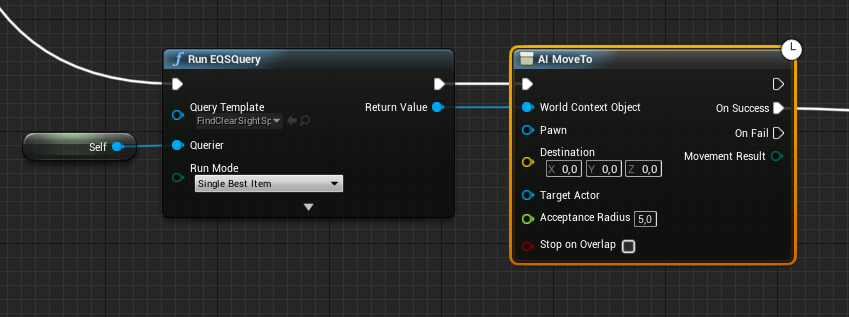




 whole quarry
do you have a navigation mesh?
sullen wraith
what's the best way to store a lot of data for a country? ie i want to make two countries, england and france
i want to store their gold, army size etc
needs to be able to be changed ingame
 kind mulch
Anyone knows a good updated-ish YT series on UE4 for C++?
plush yew
Can make a blueprint class 'country' with those variables set to editable
@sullen wraith
plush yew
Hello guys I have a question about the project that I want to create so the quetion is that how to make when the person develop his base and his level resources how to make to save their develop on the device that he plays?
tall pendant
game state?
plush yew
idk? @tall pendant
tall pendant
gamestate is were you usually save/store that data...iirc 😄
plush yew
okay
can you send me link to read more about it? @tall pendant
and I have question what is the difference between alpha and beta version?
sullen wraith
the hell.. my game spent 2 hours updating lighting
it finished
then crashed
then when i reopened it
plush yew
only this info for it? @tall pendant
sullen wraith
all lighting is undone..
anyone else get an issue with ai? it's all green saying it can move somewhere
but when it gets to certain spot it stops
as if hitting a wall
nevermind fixed
plush yew
xD
sullen wraith
no one knows about the crash with build lighting?
 bitter iris
I'm having an issue with the fps in game, if I look one way I'm at 144fps, if i look the opposite way I get around 70. But as soon as I pass a certain point it goes back to 144. I will try get something to show so you get what it is I mean
whole quarry
Link doesnt work