#ue4-general
1 messages · Page 400 of 1
 glad stone
 glacial pecan
there's an "Add Collision Convex Mesh", but no "Get Collision Convex Mesh"?
glad stone
this channel really needs a help page xD
 grim sinew
https://docs.unrealengine.com/en-us/Engine/Landscape/Materials#landscapelayercoordsnode This is the one you should be using for landscape most of the time.
And there is a help page. The documentation. 😛
glad stone
ah cmon thats just harsh
😂
ah so it seems I cannot have all kinds of custom parameters on landscape materials like I have with VertexBlend material ?
grim sinew
Wat
glad stone
grim sinew
Yeah.... you can do that... why wouldn't you be able to
glad stone
this is 1 layer for my material used on objects
oh you can ? ok sweet
so i can basically re-use my vertex blend material for landscape ?
just switch the type of blend to landscapeblend
grim sinew
Well you're not going to be vertex painting anything on a landscape...
But there's no reason why it wouldn't work, it's just possibly a bad idea depending on how you did your UVs, how complex the layers are, and how many you have
 proven oxide
Any idea how to find the location under content of a level file?
glad stone
im just confused why this example I see uses absoluteworldposition for UV tiling
instead of TexCoor
proven oxide
it says the name in the viewport but i can't find the level in the content browser
grim sinew
Okay. You're not listening. https://docs.unrealengine.com/en-us/Engine/Landscape/Materials#landscapelayercoordsnode This is what you use instead of TexCoords on a landscape material. EITHER this, or the more expensive world position if you're doing some fancy triplanar projection
I'm not saying it a third time, RTFM 😛 I'm even linking it for you
 pallid compass
Zero he's been doing this for like a week I think
Kept telling him u don't vertex paint landscapes
proven oxide
o/ rei, I am also a girl who likes anime. whats your fave series? mine is CLaymore
grim sinew
@proven oxide Either use filters to find it or just remember where you save them with good folder naming
proven oxide
its the fpdemo i have no idea where the level file is
grim sinew
Then go ahead and use the filter to find it.
 languid shard
@proven oxide careful, you might be trapped by rei
proven oxide
why would i be trapped I have hundreds of anime and still more to rip from DVD
 pallid compass

languid shard
indeed
pallid compass
I'm a real engineering girl ok
languid shard
yes you are rei 😉
proven oxide
I have 209 series on my plex
glad stone
@grim sinew ah oke thanks , I overlooked this
just confused as im new to shaders, thanks again
pallid compass
Polygreen go watch basic landscape tutorial
languid shard
I think @proven oxide mind hasnt ticked yet
grim sinew
Basic tutorial that Epic made, if you can find one.
languid shard
ah well
proven oxide
I am also an engineer, Amateur radio operator and Computer programmer
grim sinew
Trust Epic over randos on Youtube
pallid compass
Tick rate set to 5 mins
languid shard
slowpoketime
pallid compass
That's me
proven oxide
I am only giving this channel 1/100th of my mind at the moment as I am at work and watching youtube as well as coding C++
and working on my UE4 project
The beauty of 2 screens on a desktop + 2 laptops
 dim plover
Did you fix the problem with UE not building? If so, what was the solution?
proven oxide
not yet, I won't be on that machine until next week now
dim plover
Hmm. Alright, well, if you figure it out, I'd be interested in knowing what was wrong.
proven oxide
so would i, It would be good if there was a way to run the build manually by command line so i can see if its the UnrealHeaderTool or UnrealBuild.exe failing rather than any specific compile issue
languid shard
@proven oxide do you even screen
proven oxide
it could also be that its running 64 bit and not 32 bit
pallid compass
You can literally just read the output log for ubt
proven oxide
ubt?
pallid compass
For uht generation uht it's self will tell u
proven oxide
i am using VS2017
the output log is saying literally starting build ... Object not set to instance of object
nothing more
 upper iris
Is it possible to add variation to a tile texture so everytime it tiles it randomizes the texture
pallid compass
There's an example of macro veriation in the landscape content example
languid shard
actually in the starter pack there's materials with macro variation too
pallid compass
Oh really?
languid shard
yeah
 bronze cedar
why my launcher is messed up like this, from past 10 days or more 😦
unreal engine screen is normal , but other pages like stores or marketplaces or such are messed up like this
grim sinew
Looks cool
 dapper idol
lol did you try reinstalling?
dapper idol
hmm is there a support website? Maybe you could ask there
bronze cedar
but not re installed, i afraid if i lose all those engines , UE4 than I have to download lots and lots of data which is kinda hard for me with slow speed net
dapper idol
hmm yeah that could be
bronze cedar
yeah i want to ask if anyone faced that problem now or before
dapper idol
is there a support website?
bronze cedar
support for such issues
guys is it possible to add more components or plugins in UE4, i was wondering 😃
dapper idol
idk just ask here, that wouldn't fit 100% but just try. If it's wrong a mod will move your question for sure
dim plover
Are you on Windows 7?
dim plover
Oh, well, I used to have a similar issue for clients, never fixed it, though.
bronze cedar
haha , than i think i have to be like this until it gets fixed by itself, maybe in up coming updates haha
dapper idol
rip
bronze cedar
i want to ask , i am making a Paddle and Ball game, like how to do when ball hit right side of the paddle it goes to right direction and same for the left, if it hit in middle of the paddle it go straight
dapper idol
ping pong?
bronze cedar
Breakout type
dapper idol
ah
bronze cedar
like Paddle , Ball and Bricks
bronze cedar
what i was thinking is to put three collision box, and when the ball hit those box it goes to that direction , but i don't know how to make it in BP, because i am not good at it
you forgot basic BPs, haha it's ok
brb
 lusty carbon
Hey everyone. Question: Substance Source materials in the UE4 project via the plugin. too taxing on GPU for VR projects?
or does it make sense to use in vr?
grim sinew
They're just normal textures, they have no secret sauce.
It will have no more demand on your computer than regular imported textures
lusty carbon
is it?
good to know
I am wondering why my shader complexity is super red all over the scene though.
grim sinew
Going to need a lot more info than "It's red" to figure it out
 plush yew
hi guys what are some ways to back up my project
grim sinew
External drive
plush yew
whats a drive

 gleaming creek
Print out the code on paper
For binary files, print out the hex code for the data
languid shard
Isn't the shader debug kinda bugged in forward ?
languid shard
Ah yes
proven oxide
😦 Why does nothing ever work as expected, I run up PIE 2 players with the FPdemo, i get 2 screens but neither are linked
grim sinew
Sounds like everything but your code is working as expected
proven oxide
This is the FirstPersonShooter demo
grim sinew
Yeah. And?
proven oxide
the tutorials say it supports networking
grim sinew
For movement. And nothing else.
proven oxide
and everyone says - use it
grim sinew
We told you this the other day, I remember distinctly people saying that you'll need to add multiplayer support yourself.
grim sinew
Well, go make it support multiplayer then if you need it. Either that or you did something wrong. I don't know which the case is, but the end result is the same, right? It's not like it was going to handle -all- multiplayer for you anyway, you still had to do it no matter what.
proven oxide
I am trying to learn how to do that
grim sinew
Glad to hear it
proven oxide
but there are no clear tutorials
grim sinew
You are not the first person to try and get multiplayer in the engine. Somewhere, there must be a tutorial for it.
proven oxide
(if and when i understand it i may create a blog post to give it)
grim sinew
Epic probably has a dedicated training stream for it, wouldn't surprise me
grim sinew
That's called the manual, not tutorials
proven oxide
Unreal Engine Forums
For gameplay programmers writing C++ code.
They are Epic made tutorials but written for blueprints.

from what i already understand, GameMode details the rules, gamestate is the client side for the state of the world
grim sinew
So wait, you're saying you didn't manage to find a single UE4 C++ multiplayer tutorial?
Not a single one, right?
grim sinew
Are you seriously asking me to link a youtube search for you
Enjoy the videos and music you love, upload original content, and share it all with friends, family, and the world on YouTube.
If you insist.
Try the Tom Looman one, he knows what he's doing.
proven oxide
@grim sinew if i search for something you also search the same thing, we will both get different results
grim sinew
Not different enough where you would be coming up with nothing.
grim sinew
Well that's a mistake, with how often the engine updates, books are outdated by the time they get published.
proven oxide
any idea what castello govender is like?
grim sinew
Is there a reason you're asking?
proven oxide
he has a complete tutorial set showing on my linnk so i was wondering if it was worth me using his
grim sinew
Figure it out.
 whole quarry

grim sinew
Turns out, I don't know every tutorial by every person for Unreal ever made. If you want to see if something's good, find out for yourself.
 fierce tulip
lol remco
proven oxide
@whole quarry its a bit small but he looks a little bit like curiosity cats
grim sinew
Shouldn't need to hold your hand to even find a tutorial, come on now. You're going to need to be able to look this stuff up on your own or you'll be hitting roadblocks every 10 minutes in game dev.
whole quarry
Its our PFX god, Luos
@fierce tulip an idea for your jprg: A boss called Luos that has ridiculous amount of spell attacks, just to throw in pfx as much as possible
fierce tulip
obviously
proven oxide
@grim sinew Well UE4 is new for me, i regularly do gamejams with LibGDX myself
grim sinew
Everything is new for someone. You will literally always be running into things you don't know how to do. You need to have the skills to find out how to get the information you need.
fierce tulip
though, my brother only once made an rpg maker game, only thing he ever did gamedev-ey wise, and you had a small town, you could enter the bar. one big guy standing there telling you not to bother him.
after talking to him 3 times he gets angry and you fight him. some level 1000 ultra-boss kicking your ass.
so want that as an easter egg
whole quarry
would be a nice wtf 😄
fierce tulip
my bro would love me forever
lusty carbon
Is there a way to quickly check for non-static lights in your scene without going over each one of em?
grim sinew
Highlight them all at once, if any aren't static then no options will be selected
lusty carbon
thanks
grim sinew
Same goes for anything in the engine. If you select multiple of the same type, if the variables are different in the selection it'll leave it blank
And if you change it, it'll apply to all
 trim trail
is it possible to clean up derived data cache from selected projects?
grim sinew
All or nothing
 lusty vigil
anyone knows if there is an minimum a DOF can manage?
this should be in focus since im using a autofocus
 left ridge
I'm trying to figure out if a physics component is spinning clockwise or anti clockwise and trying to adjust the rotation of another component accordingly.....but not having any luck .....I'm trying the Get Angular Velocity node but the results seem all over the map
 true leaf
Howdy! Quick question. I have a multiplayer dedicated server game. I want servers to be able to change a little text file to specify their name, global IP address, port, game mode, map, etc... What's the best way to pull that off? Perhaps a 'SaveGame' ??? I realized that using DefaultEngine.ini is NOT a good way
 abstract relic
Didn’t you just pick up unreal a month ago? Good lord man 😜
true leaf
Almost 3 !
😂
My Linux server works I loaded into it from my client
🤤
I'm just trying to figure out the 'canonical way' to allow a dedicated Linux server to configure text files. There's some sparse documentation but honestly pretty poor. I guess I can buy this marketplace plugin ConfigBP but even it's documentation is not 100 % 😗
I'll try that I guess
I'm coming from web development where documentation is a bit better 😅
No offense
true leaf
Maybe I'll write some blogs with how I do it when I'm done
 timid grotto
Where would be the best place for feature requests? I'm looking at the answerhub feature request page and there is very little staff activity. Is the forums or any other place better? It's a pretty small request.
 wary wave
the forum has a feedback section
but tbh I would not expect any requests to go anywhere
 idle garden
LogRHI: Error: GetAndOrCreateGraphicsPipelineState RenderTarget check failed with: 232 !
How I resolve this?
timid grotto
All right, thank you.
idle garden
I'm working on the level and that error is showing up in some levels
that, after some time, crashes
wary wave
it's referring to a render target, but without more information there's not much anyone can say tbh
wary wave
there might be more information in the log
in any case, the problem is a render target, which narrows things down a lot
 deep basin
hey, is there some kind of a "roadmap to learn ue4"? I am currently doing the udemy course, but am quite sure I am not ready to go into making my own stuff after it. are the official unreal tuts a good next step? or is it more worth to get into their sample projects?
my goal is to get the knowledge of building a 3d topdown action adventure. inspired by games like zelda a link between worlds
... as my first bigger project
 sharp crest
||Light theme||
||Tabs vs spaces||
||Javascript sucks||
||PHP sucks||
||Java sucks||
||HTML is a programming language||
||Arrays start at 1||
||I was bored, so what a more entertaining thing to do than triggering people  ||
||
abstract relic
There isn’t a right way of learning no
sharp crest
@deep basin I suggest just think about a small game you want to do and google everything you don't know along the way
abstract relic
I’d suggest making a simple arcade game as a starter. Breakout, spacewars, etc
 grim ore
10 Make Something. 20 GOTO 10.
grim ore
Looking for functions/variables that are not exposed to blueprints right now that would be "nice to have". If anyone has any examples feel free to offer them up 😃
 coral shoal
the .ini read/write stuff
grim ore
Is it new stuff that needs to be written or are those functions in C++ and just not exposed to BP?
true leaf
Game version
For some reason it's not a blueprint..
I wrote a c++ class for it and it builds but still doesn't show up in BPs for me lol but I'll figure it out ?
 sonic pagoda
@grim ore idk about functions or variables that ive ever needed but the fact you need a source version of the engine in order to enable certain post process features in split screen is an issue a couple of people still have.. but idk if thats what you were asking about though, you are looking for things to make a tutorial about?
coral shoal
Those are things that are in C++ and aren't exposed @grim ore. It's more like the variables aren't accessable easily https://wiki.unrealengine.com/Config_Files,_Read_%26_Write_to_Config_Files
grim ore
@sonic pagoda yeah, tutorial. Mainly on introducing C++ gently to a Blueprinters life by exposing stuff they might need.
@coral shoal yeah looking at the config stuff now 😃
@true leaf so like the project version? if so that's a good one 😃
and if it's not showing up are you doing it in it's own class or in a blueprint function library?
sonic pagoda
@grim ore idk if this exists already, but i think a great tutorial for blueprinters would be like... this is how you cast in c++, this is how you set a variable, this is how you get a variable.. etc.. it would be basic enough and yet super useful, at least for me
coral shoal
there are some tutorials for converting bps to c++ that will contain that kind of info
grim ore
@sonic pagoda I might do something like that at some point but that, besides the casting, is pretty basic C++ stuff which I don't know if I want to do. My main goal will be to try and show people that C++ is not inherently evil and even if you have a BP only project you might still have uses for some C++
idle garden
@wary wave when I delete Skylight the error doenst show up
when I put it again I have the error
can be everything, no?
sonic pagoda
in my case, i had to use c++ to expose a splitscreen function that was c++ only to blueprints, i think that would be useful to a lot of people
coral shoal
c++ifying all your heavy ticks seems to be a good idea generally
grim ore
@sonic pagoda yep stuff like that is what I want to show how to do. Not a "hey lets learn c++" but a "here is why we might use C++ and a few examples on how easy it is" type stuff. maybe get the user interested in C++ at a base level by seeing how they might use it and encourage them to learn more.
so far splitscreen, config, and project version are ones to add to my list 😃
grim ore
doing "heavy" stuff in C++ is something I want to avoid in general to try and avoid the "BP is slow, C++ is faster" stuff that seems to pop up.
 paper kernel
you can do heavy stuff in BP too if you're not in a hurry, splitting loop content over several frames is probably easier in BP
idle garden
Nope, doenst work
lusty vigil
if i want this Blueprint to Add A widget to my HUd. how thee FKKKK do i do this? i tried cast to player character and then cast to hud, left out the player character...
it always says that its not inherited by everything
dang wrong channel
coral shoal
"ctzn_no7Today at 10:49 AM
you can do heavy stuff in BP too if you're not in a hurry, splitting loop content over several frames is probably easier in BP" There an example of how to do this in bp?
grim ore
I have an example on my channel but its a really crappy example lol. Basically if you need to say move 200 things you would loop thru them, after X items break the loop and store the X number. then on the next frame you continue the loop from where you left off (X) and do it again for X items or until done and repeat if needed.
adjusting the value iterated over each frame during the loop lets you adjust how much of an impact that loop has over time
my example used spawning items in the world over multiple frames rather than one to keep the machine from hitching
pallid compass
You can also use ASync tasks, and do them over a period of time, to stop lockup
doing things is parallel is also very handy
grim ore
can you do that in pure BP?
pallid compass
Yup BP has Async tasks afaik
Dont have engine open so cant 100% confirm, but 99% sure
glad stone
cant upload images ehre ?
grim ore
you can keep trying stuff at random?
idle garden
I dont know what to do
grim ore
the other 232 errors point to the lighting not being built but you did that so weird
idle garden
and its in all levels
grim ore
could be a driver issue or PC issue as well if it just happened. if it did just happen can you roll back to a previous version before you made the changes that crashes it?
wary wave
I'm going to suspect that lighting has actually not been built?
grim ore
switch all the lights to realtime and see if it still happens lol
wary wave
are you sure it has been built?
pallid compass
praying its engineering error
idle garden
give me a minute
sonic pagoda
Disable on screen error messages 😁
 opaque salmon
was the procedural foliage spawner removed? 🤔
pallid compass
Have i not fixed this for you before?
idle garden
No
pallid compass
/AppData/Local/UnrealEngine
Delete everything (back it up incase)
then delete your intermediate and binaries folder in your project
That should fix the first 3 errors
idle garden
ok, one moment
 craggy flax
So I know the answer to this is complex, but is there a reason I wouldn’t want to program my game as opposed to use blueprints?
I imagine it depends on complexity of game?
grim sinew
Using C++ instead of blueprints doesn't stop you from using blueprints. You can expose all your C++ stuff to BP pretty easily and then designers can then go and iterate using blueprints just fine while all your actual code is still C++
pallid compass
Right tool for the right place, 95% of the time you can do it all in BP.
grim sinew
That's the whole original point of blueprint actually, not to make entire games but to shorten the iteration process for designers
Blueprint being able to make whole games is a happy accident
 finite slate
because pointers
deep basin
mhhh I think epic made a pretty good job to not needng to be a malloc genius when using pointers in ue4. feels safer than in other frameworks
pallid compass
GC ftw
deep basin
^this so true
pallid compass
no worries
 mint umbra
Bought an asset pack. Can anyone explain me how to apply these materials properly?:

There's one material for a multitude of different assets, i.e stone, wall and plaster, but it's one material, not an instance. How would I change one wall to be for example, just wood?
pallid compass
Master material with paramaters id say
You direct the textures in the instances of the master material
fierce tulip
- jebus 3 drawcalls for a tiny wall.
- replace them with a mask in a material.
- edit the texture in e.g. photoshop
mint umbra
There is no instance, the texture contains all the textures in one. Never seen anything like it, I'm used to parenting and instances haha. There's multiple meshes which has these textures applied differently, but it's the same material.
finite slate
I have no idea what to add to my game
finite slate
sup
 waxen apex
Not much. UE is making me rip my hair out.
finite slate
why?
 digital anchor
@mint umbra different UV layouts
mint umbra
Oh okay, so I can't change it in-engine? @digital anchor
waxen apex
right well. I'm trying to create a gear transmission system.
finite slate
I thought that was built into the Advanced Vehicle Example Map
waxen apex
I know there's a template that has something similar already but I'm forced to make one from scratch. I've found this screen shot of one someone else took but...it doesn't fully explain everything.
finite slate
What do you have so far?
waxen apex
So I've managed to figure out most of it but there's one thing I just...don't know what it is.
digital anchor
@mint umbra yep need to open on a 3d editor
finite slate
Post your progress so far in #blueprint
mint umbra
Ahh... sounds strange to me to use that method, takes more work for a customer than using material instances - thanks for the quick response, guys 💯
plush yew
Is someone good on creating multiplayer system. Login, server hosting and basic multiplayer stuff like that?
 maiden swift
@plush yew I recommend asking about that stuff in #multiplayer.
grim ore
OooOOOoooh... pointers and referencing oh my.... OooooOOOOhh.... * & !
idle garden
@pallid compass that 3 errors show up again .. but now I can working more time than before
pallid compass
No idea whats causing it tbh
 charred cloak
reddit
31 votes and 43 comments so far on Reddit
I think GameSparks doesn't care anymore
 static light
how to import point clouds in unreal?
pallid compass
What is a point cloud?

Point Cloud Plugin
IMPORT, VISUALIZE AND INTERACT WITH YOUR POINT CLOUDS USING FULL POWER OF UNREAL ENGINE 4 TECHNOLOGY!
appears to be 1 plugin
and thats it
Cant say how legit that is as its not off market place
So be careful
static light
thanks!
 split wedge
quick question if i were to use i experience table from a different game as is would i have toi check with them or would that be ok
 pine grove
What's an experience table?
Regardless of the type of asset, if you didn't make it and if the creators didn't give you explicit permission to reuse it, then it's best to ask them.
Unrelated, but does anyone here use BLUI or Unreal.js?
pallid compass
@split wedge Make your own Krak, much easier than playing with fire.
split wedge
its just like a level up guide like lvl 1-100 set experience
pallid compass
yeah im aware of what they are, still would not copy something from another game, lines get blurry
pine grove
I was going to use BLUI to make HTML+CSS+JS HUDs, but then I found that its only form of inter-process messaging to Unreal is through primitive types (string, boolean, integer, and double) :v
It also has no capability of subclassing/extending the built-in classes
Then I found Unreal.js which has everything I need... almost
It seems to have no UI capability, which is the primary focus
 magic kiln
probably been asked a ton, but do any games use ue4 that have tons of enemies on screen ticking at once? (like rome total war or something?) and if so, do they all ahve movement components for nav or are they programmed differently? movement components seem expensive
fierce tulip
first one that comes to mind is KH3, which has a few high density enemy encounters
though, heavy use of lod-ing, and replacing skelmeshes with vert animated mesh ones in the distance.
magic kiln
thanks, will look into it as a case study. have been building a shmup, but have been having issues keeping framerate at 60fps on console
might have to drop to 30fps cap, but really don't want to for this genre
fierce tulip
keep as many of the enemies vert animated meshes instead of skelmeshes
combine groups of enemies that are always in the same pattern together, vert collapse ones tht get hit
and no, you dont want 30fps for a shmup hehe
magic kiln
ya, for clusters i've considered grouping which is good, but wasn't aware of vert animated meshes. will study up on this. thanks!!!
fierce tulip
also, anything that can reduce drawcalls and overdraw are important.
try to prevent use of dynamic lights, sometimes a modulated sprite can give the same effect as a glow
magic kiln
well, that's the catch in this project. the game board is procedural, so dynamic lighting is in use, but only a couple things cast shadows
fierce tulip
https://www.youtube.com/watch?v=G1NT5Z-SwfU might help as well
Quick demonstration video for the Ambient/Bounce lighting pack releasing on the Unreal Marketplace. This pack provides designers/artists a lighting system bu...
(worked on a shmup once, so yea.. framerate and controls are most important hehe)
magic kiln
that ambient lighting looks promising. i had to disable SSAO which took away a lot from visuals but drastically improved frame rate, so maybe this alternative light system might work
fierce tulip
also, get a coder who can rip out/disable as much unneeded fluff as possible from the engine.
sorry for spamming advice, stockholm shmup syndrome :p
magic kiln
i've done that for the most part, but profiling says movement components are still high on the list. will try out the vertex animations, and all good re: lots of advice. the more the better, and this shmup has been a fun and challenging technical study
thanks again man
fierce tulip
oh, last bit. get a vfx artist that knows his optimization :p
magic kiln
yeah, keeping shader calcs cheap for particles
static light
Has anyone done some pixel streaming custom UI project? I'm looking for some sample project to learn...
pallid compass
pixel streaming custom UI?
static light
I'm new to the unreal world, just want to add some buttons to switch between different levels for now
pallid compass
Oh right that okay, yeah no idea
static light
😂
pallid compass
Not sure why you want a pixel streaming player system to switch levels?
static light
just to display different scenes, point clouds, photogrammetry is huge dataset, we want to view it from a web browser
so we don't need beefy computers to view those heavy assets
pallid compass
Ah okay, well that custom player is still experimental
static light
i know, but that's something my boss want .. can't find much info on the internet
pallid compass
well my dude i hope your a good engineer if not you need to hire one
grim ore
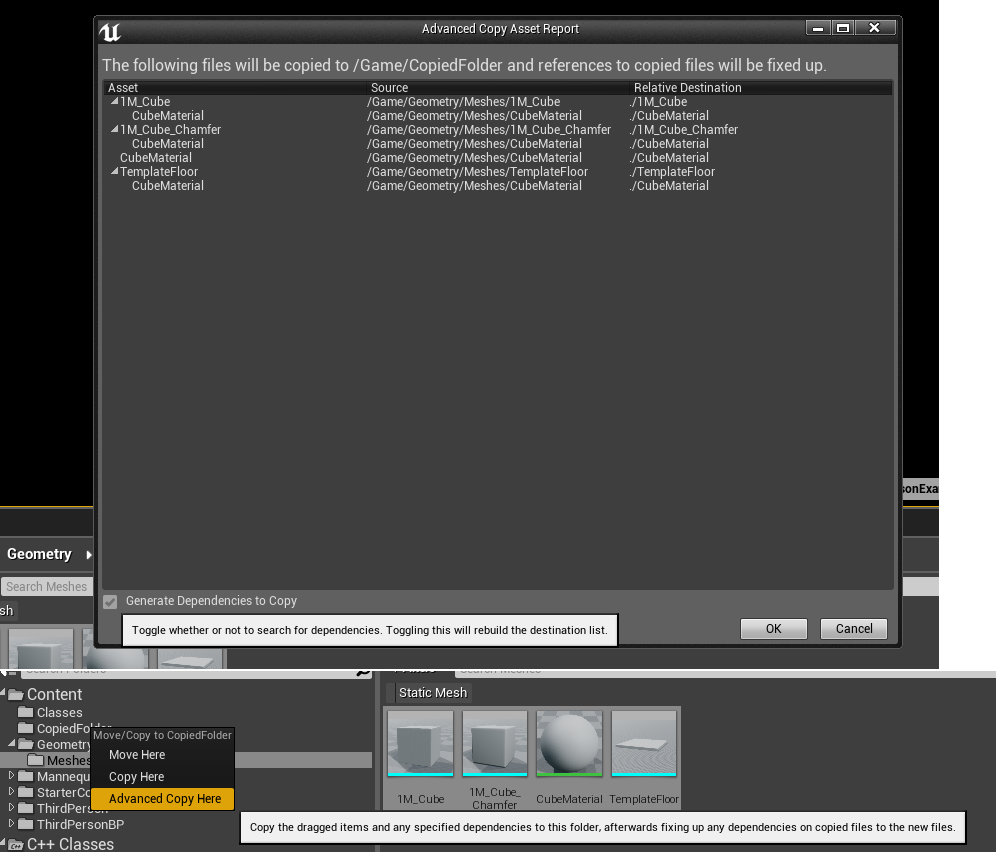
so this is new in 4.22? https://i.imgur.com/CIbhstW.png
 glacial pecan
great, so I replaced my defaultsceneroot... then figured I need it back, created a new scene component and made it root, renamed it to "defaultsceneroot", and Unreal 4.21 crashed
yay Unreal!
you go girl
 merry gazelle
Any idea what might be causing this issue with my widget. I can't click / hover over any buttons. It looks like there's a transparent black layer but I don't see anything in the widget layers
The widget also works fine (+not dark) if I switch from world to screen view
grim ore
are you using a widget interaction component?
merry gazelle
yup, using the default settings
grim ore
weird. if just swapping the widget from world to screen space fixes it then it shouldnt be anything on the widget itself =/
merry gazelle
yeah I even tried creating a new widget, I'll try making a duplicate and removing various components
 graceful sky
are you manually spawning the widget?
you might even be using widget interaction component? if so then im clueless 😛
grim ore
for the interaction widget, what is the interaction widget on?
I bring that up because unless the item you have the widget interaction on is the player or something else then the World settings for Interaction Source is not going to work
merry gazelle
hmm Discord won't let me share the screenshot. Basically it's just a generic BP with widget and widget interaction as children of a scene root
grim ore
yep so you are telling the widget that it can be interacted with by itself as the interactor
the world settings on the interaction source, mouse over it, it tells you that the item this widget interaction component on is the source of the trace to see if it finds a widget to interact with
change it to mouse if you want mouse to be the trace origin
also on the Widget itself under interaction make sure receive hardware input is on if you want the button to handle itself naturally without having to force input yourself in your player
the darkness can be explained as a side effect of the item simply being in the world now and the lighting hitting it
merry gazelle
ok cool I just need to create a new character and add widget interaction to it then. I was using the default archviz characters with point (i guess it doesn't have interaction)
grim ore
you can keep it on the blueprint that is holding the widget component if you are just using the mouse for clicks
merry gazelle
ok thanks it's working now 😃
grim ore
yay
 next badger
@static light https://www.youtube.com/watch?v=jnCXgFnjIbM

Pixel Streaming was added in Early Access in 4.21 and allows us to stream our project to viewers and interact with them. This quick example shows how to add ...
files in description
 lethal breach
Good evening everyone, I have a question. My game has over 200 active skills, currently I have it set so that the damage calculations occur when you deal damage to an enemy (as each skill has different damage calculations) but I'm wondering if I can eliminate potential lag from large fights by updating these damage values when a piece of equipment is changed. My concern is that this would cause a spike of lag when you swap a piece of equipment as all of these damage calculations would be occurring at once. What are your thoughts on how to handle when to apply these damage calculations?
pine grove
200 active skills meaning 200 that the player could switch to at any given time?
I don't know anything about your workflow but I would store the damage values in a precomputed table
lethal breach
That is correct, 200 active skills that the player can swap to at any point, assuming they have allocated at least one skill point in it to unlock the skill.
A precomputed table does what exactly? Has the calculations memorized, takes in an input (such as raw player damage stat), performs the calculation and outputs the finalized skill value?
pine grove
Yes, it has the calculations memorized beforehand
How you would go about doing this is dependent on how many factors go into the final damage calculation
lethal breach
Ok. Any tutorials that you're aware of that show how to setup a precalculated table? When I do a search for it I'm getting things resulting in visual changes as opposed to mathematical calculations. Each calculation has at least 5 variables being taken into account, the more complicated skill calculations have around 15 variables.
pine grove
I haven't encountered any tutorials; I've only worked them in practice on my own. I hadn't expected this many variables to influence the final amount, so I think its best not to go down the table route as the table gets very large very quickly.
A function would suit your needs better
lethal breach
Ok, that's what I'm currently doing, a function that does the calculations immediately before dealing damage. Perhaps I could have the calculation take place when it is placed on the action bar, then when a piece of equipment is changed, it updates only the skills on the action bar. This calculation could also take place when moused over (to display the damage via tooltip). I'm thinking this would be a good middle ground.
pine grove
If the function still might take a long time to return and stalls the game, you may want to look into making another thread to compute it
lethal breach
Ok, sounds good. Thanks for the input! Going to look into threading in the event more variables get added later.
pine grove
you're welcome 👍
 cerulean harness
Beginner here, Should I head straight into my dream game or make a few projects first?
 lament saddle
The latter is the usual advice. Without some experience, one tends to underestimate the total complexity of their "dream game".
pallid compass
@cerulean harness The first is not so good, hit that dream game up in 3-4 years.
 oak temple
anyone know if the HBAO, or whatever Nvidia is calling their new lighting thats in metro, is coming to unreal? I know rtx is in 4.22 wondering about that lighting though

 primal parcel
some one know about a tutorial or documentation about modular characters with "Copy pose from mesh" ?? i posted a issue on #animation if some one can help :p
cerulean harness
Thanks guys
I really want to learn the engine a bit more moving away from Unity and I also need to improve with C++ aswell with 3D Modeling in general
 bold wyvern
I have version 4.21.2 installed on a new computer. When I brought in a game that I made in the same engine from a different computer, the engine keeps crashing at random. In the past 30 minutes, it has crashed three different times, and the crash log displays no errors.
grim ore
the crash reporter?
if it is not showing anything make sure you have the debug symbols downloaded in the launcher for that version
oak temple
@digital anchor thanks m8 looks pretty cool
 novel ember
what's the best way to add / remove / modify etc submix effects during gameplay via BP?
just tried something simple by getting the effect chain and adding but it doesn't appear to be working - or rather, it does get added to the array, but doesn't affect the audio
finite slate
I'm having a silly issue here
I was messing around with respawns
trying to make a respawn option
and when it is disabled
you get put into flying, no collision, invisible mode
That part worked
But for some reason my character won't move
it just spazzes out
wait I might have fixed it
of course
it was spamming the respawn function i'm stupid nvm
grim ore
heh
 wary ferry
So I´ve seen @pseudo sinew question about the maya apex workflow and since I went through the same process I figured why not drop my solution into some sort of primer for others to find and maybe learn from in the future. Its not a full documentation but it should help anyone who is willing to follow the basic tutorials that are already existing. Its also a little outdated since this is meant for Unreal 4.15
plush yew
hello, ue4 noob here
i have a question
i have been stuck for a couple of hours on water
im seeing all of these water tutorials and they can see the "water ceiling" from underwater
and i cant see anything
lemme add a pic
i know im doing something wrong but i cant tell what, i should be able to see the top of the water
grim ore
have you looked at the water examples in the learn tab? also is your material set to 2 sides?
plush yew
i just searched it up, 2 sided materials should be under details>materials? because its not there
grim ore
it should be part of your material itself
grim ore
yay 😊
lusty vigil
anyone got an idea how i can make a translucent material darker?
i see a red door and i want to paint it black... sing
eh a white ball
grim sinew
Willing to bet it's your emissive.
plush yew
@grim ore omg i just found your youtube channel just digging around for tutorials XDDD
grim sinew
Darken your emissive. Pretty straightforward.
lusty vigil
like multiply with 0,001?
 thorny cipher
whats that linter plugin called
allar made
"Linter is dead. The announcement at Discord said "For reasons I can't say at this point, Linter is going to be discontinued. This is for some very cool reasons. If you recently bought it and would like a refund because of this, please email Epic's marketplace support team and they'll refund you as soon as possible.""
aw
i thought he got a dev grant for linter? 🤔
lusty vigil
whats linter?
thorny cipher
basically a plugin which makes sure you're naming your assets correctly and i believe it had bulk renaming functionality which i was after
lusty vigil
maybe he got employed by epic
or they bought this to include it in future releases of ue4
from the 44 second video i found
that would be a smart move
😄
thorny cipher
nah hes working for someone else
lusty vigil
strange
 eager anvil
are there any tips for making background building assets for a scene with open windows?
lusty vigil
is there a smart way to check if a player has >10 floatvalue, >20 floatvalue, >30 floatvalue etc
i thought i could just get a switch on int and set the values on that switch but it only allows me to go for 10,11,12 etc
dont want to put like 10 branches in a row ://
 manic pawn
divide it by 10 first?
eager anvil
Cool
plush yew
What is most affected by the following setting? CPU or GPU or both?
[/Script/Engine.RendererSettings]
r.ViewDistanceScale=0.4
--
Trust me you dont want to try 0.4 lmao...
deep basin
btw, how does unreal handle ingame cutscenes and gameplay transitions? so for simple things like you enter a room in an action adventure and the camera moves away from your character to a locked door for examples. or a boss spawns and he has some sort of intro cutscene. I remember that stuff like that was quite troublesome in unity with default tools, since you had to freeze all objects and basically pause the code and disable all inputs while a cutscene was running. does unreal have a simpler solution here?
manic pawn
of course. didn't you see design requirement A27462.2.b: "dynamic lighting must be broken"?
plush yew
@deep basin you can definitely do stuff like that with cinematics
I don't understand it much though :p
 keen flicker
does anyone knows when epic will release there own networking and in app purchase functions?
i read that they will do it soon in an article by epic games but i dont know when
keen flicker
well i cant wait that long so i will have to go with steam networking
epic also said they will make save the world free by the end of 2018 but they never did so
is there a way we can do steam in app purchase or a DLC check in UE4 with blueprints
deep basin
there must be some interfaces to connect third party stores. there are several mobile games made in ue4, using an itemshop to gain income
keen flicker
moblile games use google or iso services
provided by apple and google
i want to know that can i do inapp purchase by using blueprints?
glad stone
can I make a parameter from the landscapeCoordinate node ?
i want to change tiling relative of each other
plush yew
log on this morning and everything in my level is duplicated twice?
glad stone
sounds like a bug, try to reload older file or try file on older version
 sudden agate
@glad stone multiply it with a 2D Vector
plush yew
Not just meshes, everything, lightmass volume, navigation etc
 remote roost
tfw switching over to unity
sudden agate
accidentally duplicated everything and saved?
plush yew
some weirdness with making lightmass bigger... then it said scene too large... then everytime i tried to type in google i got a wall of code... then i had to force restart
plush yew
Out of curiosity, I tried to get UT Pre-Alpha to run at the same frame rate as DOOM 2016 does with Vulkan API at max settings on my toaster PC. Not pretty 🤦 . I still have no idea why UE4 is as demanding as it is. Could there be some incompatibility issues with older CPUs (ex: Intel i7 970, 6 cores, 3.2Ghz).
https://youtu.be/L1BMRt9ZNMU

My hardware runs DOOM 2016 at Max Settings at 120-140fps. Other games like Witcher 3, Star Wars Battlefront, etc. run similarly. However, all games that run ...
grim sinew
"Could there be some incompatibility issues with older CPUs (ex: Intel i7 970, 6 cores, 3.2Ghz)." As people on here have told you in the past, yes. Your CPU is likely causing a bottleneck in the UE4.
The answer has not changed just because you're asking again a week or two later 😛
plush yew
Potentially sure. But i think it's really weird that it only affects UE4 games.
grim sinew
Different engines put strain on different parts of the computer. It happens.
bronze cedar
i do got a old pc, like 9 years old, but i can run UE4 normally , i mean no issue until now,
bronze cedar
just learning ue4 so that can be , because no heavy scene have to be loaded
plush yew
I don't think my CPU would actually be a problem.
In August 2005, Mark Rein, the vice-president of Epic Games, revealed that Unreal Engine 4 had been in development since 2003.[58] Until 2008, development was "basically" done by Sweeney.[59] The engine targets the eighth generation of consoles, PCs, and Tegra K1-based devices running Android announced in January 2014 at CES.
Core i7-970 - July 2010
lul almost 10 years old now
😂
🤦
manic pawn
and? target specs change over time
plush yew
Well, if the new CPUs are literally twice as powerful as my old one. It would put the r.ViewDistanceScale in a decent range to get a decent gaming experience.
So, my CPU is probably not as powerful as I thought it still is
bronze cedar
I got Core i7 W3520 2.66 GHz, i bought this pc in Year 2009
4 GB Ram is upgraded to 16 GB ram
and got new graphics card some years ago , that Nvidia 750 ti
i know my pc is kinda old haha
but it's running good and nice haha so it's ok for now haha
plush yew
Im just amazed to see that I can run pretty much any game on my hardware at high-max settings.
And the difference with UE4 games is quite dramatic in terms of drop in FPS and quality to just run the game oky.
I was expecting that a new engine would actually be more optimal.
Like maybe go from 110fps to 60fps to get better graphics. But no, it's to get the lowest graphics that look like crap
that's a whole other thing
bronze cedar
yeah
plush yew
Oky, so turns out it's really just all about the ViewScaleDistance.
I maxed out the rest and the game looks pretty good for approx 90fps steady
oky not steady.. it drops down to 70 fps... but still
bronze cedar
so you mean to say running the game using UE4 is slower than running a game exe
plush yew
I just dont understand then why... changing all other settings isnt doing much. Byt the viewscaledistance has a huge impact here
I just mean that running a fully meshed map in UE4 is surprisingly demanding.
bronze cedar
😃 😄 haha
plush yew
I got a lot of feedback about it today, artists felt it looked like straight out from the 90s
XD
bronze cedar
haha yeah it's simple but good haha , i like the information you got on your site
plush yew
Hopefully, I'll have time to add more
plush yew
It was gun, because I had the opportunity to see what people actually expect ''modern website'' to look like
glad stone
@sudden agate thanks this works !
question.. I want to be able to set UV's tile per landscape layer.. BUT also want a "master UV tile"
however.. the switch parameter only allows 1 output
im looking for a Do this OR that
sudden agate
put something into the false
sudden agate
eh? there is literally 2 inputs
plush yew
To clarify something I said above... turns out that the
r.ViewDistanceScale
Is really what has a massive impact on frame rate in UE4 games, at least on my PC. By changing it I go from 120fps (0.4) to 60fps (1.0) and with Epic settings it drops to 40 fps.
sudden agate
True and False
glad stone
yes.. but if its False I want to set L1 UV tile AND L2 UV tile
i need something with multiple conditions
and multiple outputs
sudden agate
what are you even trying to achieve?
L1 and L2 go to two different things, dont they?
glad stone
I want to be able to UV tile ALL my landscape textures together
OR being able to tile them seperately per layer
sudden agate
you need to use the switch before every UV input of the layers
why dont you just multiplay both Tile values though? why so complicated?
bronze cedar
guys i need a guidance , making a Paddle, Ball and Brick game, what i want to do is to make when ball hit right side it go to the right, for left side it go to left and when hit middle of the paddle it go straight top, any suggestions
what i am thinking is , i got 3 static mesh in paddle that's LEFT , RIGHT and MIDDLE, now I don't know how to make that when the ball hit those different meshes it goes how it should
glad stone
@thehorsemand007 maybe post your blueprints @programming section /
 hybrid mica
Man this is getting me CRAZY:
I have in blander this bones structure
BUT onece imported in UE4 the bones reposition like this:
DOes anyone know about this issue?
Why is that the root bone gets collapsed like this?
fierce tulip
what are you trying to do with that saw?
sudden agate
ironing
fierce tulip
ahh, so thats how we get those fashionable pants with damage and scratches
pallid compass
@hybrid mica not a blender user
but is that a constraint i see
constraints wont come in
needs to be a full bone chain
lusty carbon
Any blender users here who know about Rigging to UE4? I have trouble importing my skeletal mesh correctly
hybrid mica
Hey guys not a constraint, just an armature with some bones
@lusty carbon check this video for example: https://youtu.be/KDP7GHFtAtE?t=2535

Announce Post: https://forums.unrealengine.com/showthread.php?145938 DOWNLOAD BLENDER ASSET HERE: https://s3.amazonaws.com/contentplugins/BlendMann.blend Tom...
so anyone had my prblem with bones from Blender to ue4?
@pallid compass a constraint? no I didn't use any constraints in my rig
lusty carbon
Basically I import my mesh and everything is fine but in Anim tab it just disappears
fierce tulip
maybe its at a weird location?
pallid compass
@hybrid mica What is that black line from bone to bone then?
lusty carbon
@fierce tulip Nope it just doesnt exist
hybrid mica
black dashed lines indicates parenting
digital anchor
In blender you can have disconnected bones, but ue4 nor fbx support it, so it will import as connected bones
but it will work fine
theres no problem in that
and animations from the pivot of the disconnected bone will also work fine
so you can animate like that and it will import correctly
hybrid mica
hey! good to know unreal doesn't support disconnected bones, but some hours ago I had that rig with no disconnected bones and had same problem
I don't know why my parent bone in the chain (the red one in unreal) gets collapsed
pallid compass
Not a blender user but looking at it with that dc bone, that is just a no for fbx
Show bone hierarchy in ue4 and blender please
fierce tulip
@hybrid mica was wondering why a saw needs a bone unless you want it to wiggle
hybrid mica
I want it to wiggle certainly 😄
pallid compass
Material would be easier imo
hybrid mica
and I need to practice how to use in VR actors with skeletal meshes and physiscs
pallid compass
Ah okay
lusty carbon
I have a grip here with a master bone (the one in the middle) that when moved down, all 3 teeth close
with constraints
whether I bake the animation keys or not, It does not appear in UE4 once I import it
it works fine in unity
any ideas?
 hybrid mica
@lusty carbon sorry I can't help you I'm to busy with my fu**ng saw 😄
lusty carbon
np man.
I've always had trouble importing blender animations into UE4 while in unity it is so fucking easy. it's killing me
^ Solution! yay.
hybrid mica
yes at my office we work with Unity and it blends perfectly with Blender, much better than more famous 3D packages
but Unreal is not so Blender friendly...

I've captured a video about the RED BONE 😄
my original armature in Blender just have three bones, but once in unreal it has a red root bone
aaghh being a noob in this makes me angry
lusty carbon
Also my shading is weird in the skeletal mesh. same mesh imported without skeleton is just fine
ideas?
grim sinew
It's weird, almost looks like the normal map for the skeletal mesh got flipped somehow
paper kernel
aint AO if you see triangles
hybrid mica
@lusty carbon check the beggining of the video I've post some messeges ago: it talks about exactly this smoothing issue. it has something about exporting tangents
the begginning of this video: https://youtu.be/KDP7GHFtAtE?t=2535
Announce Post: https://forums.unrealengine.com/showthread.php?145938 DOWNLOAD BLENDER ASSET HERE: https://s3.amazonaws.com/contentplugins/BlendMann.blend Tom...
pallid compass
looks like self shadowing i think
 dire sentinel
Hey, can someone help me with the thing i posted on teh marketpace channel?
 sonic tinsel
My dad's fists when he gets home from a night of drinking
digital anchor
LMAO
pallid compass
 vale silo
I wonder if 4.22 will have LOD tools for skeletal meshes
 sullen wraith
what's the name of the thing similiar to branch, but instead it goes down a list of orders to do?
im trying to remember
pallid compass
sequence
sullen wraith
thank you 😃
vale silo
@next badger why did Epic create their own decimator for static meshes? To not depend on 3rd party solutions. And I don't want to depend on those either if engine can offer something comparable. Nor I have the budget for those tools.
wary wave
they created their own decimator because Microsoft bought the previous third party one
¯_(ツ)_/¯
vale silo
that's my point @wary wave
hmm.. This is hard to believe https://www.simplygon.com/
Site Description Here
"FREE" or really free ?
"Content data used by Microsoft to improve the products" duh
 kind mural
Hey guys, does anyone have any tips on how to detect the collision between two blueprint classes? I want to use this collision to spawn another object i.e If object A and B collide, spawn C.
 lilac ether
Hello guys! I have simple question. I have material with adjustable Rust/Oxidizing effect. I want different items have different amount of effect, so i need to make material instances for every separate item or i can somehow change this effect without creating additional instances?
next badger
 sullen wraith
does anyone know a tutorial where if hold down mouse right, you rotate camera?
next badger
Unreal Engine Forums
General discussion about the game industry and the Unreal Engine community.
 maiden sundial
Guys, please tell me i can select all sides of a geometry object with 1 click.
I'm going to using here like ~100 geometry-cylinder with 7 sides and if i imagine to make at least 7 clicks just to set 1 material for this kind of object 😨
lament saddle
@lilac ether You could potentially achieve that with vertex painting, or with blueprint scripting (w/ "material instance dynamic")
so I'd google both of those and see which fits what you're trying to do
 misty creek
@lilac ether That depends, are they static meshes or are they blueprints? If they are static meshes I think that you will have to have an instance for each one, but with blueprints you can use Set Scalar Parameter Value http://api.unrealengine.com/INT/BlueprintAPI/Rendering/Material/SetScalarParameterValue/
Set Scalar Parameter Value
sullen wraith
does anyone know a tutorial where if hold down mouse right, you rotate camera?
misty creek
@maiden sundial I can't remember off the top of my head, but I'm pretty sure that you can by either holding B and clicking or holding shift B and clicking
maiden sundial
Ow god, thank you verry much 😃
misty creek
What you mean rotate the camera? Making to rotate around the player or what?
No problem. 😃 I hope one of those works
lilac ether
@lament saddle @misty creek Yeah, i know about dynamic materials. I just wanted to easily adjust parameters like "Choose sword, change effect for it, choose shield and change effect for it too and now they are looking differently but with same material instance"
sullen wraith
@misty creek yes, like holding down mouse, being able to rotate around player
lilac ether
That would be great to have something like this in editor
Like when you change light options (color, intensity e.t.c)
misty creek
@sullen wraith Would something like this be helpful to you? https://answers.unrealengine.com/questions/595129/how-to-rotate-camera-around-character.html
lilac ether
But i guess that's blueprint part
sullen wraith
@misty creek ill take a look, thank you 😃
misty creek
No problem. I hope that is what you were looking for. 😃
vale silo
@next badger I understand it's free, but tomorrow wind will change and I'll be stuck with the same issue I have now - no solution for LODing. Having a built-in tool beats having to use Simplygon.
btw, that's exactly what happened with InstaLOD, in case you forgot
ohh, so it's severely limited free version.. pfff
on top of that I am using custom UE4 build and I wouldn't be able to use Simplygon's UE4 integration
 hoary silo
quick question, how did 2K get there guns in Borderlands to look like they're on a seperate redner pass?
wary wave
they had a seperate render pass
fierce tulip
lol
hoary silo
oh, I know it's made with Unreal, and how did thay get it on a seperate render pass?
how do you do that is my question
hoary silo
true
wary wave
they basically just copied the way UT3 handles weapons
it's a completely different renderer
hoary silo
oh
wary wave
the engine Borderlands uses is pretty different to what we have now
there's some 11-12 years difference between them
hoary silo
yeah, that makes sense
it's too bad epic could'nt somehow implament that feature in ue4
wary wave
annoyingly they don't tend to implement features they don't use themselves
hoary silo
exactly the problem
wary wave
UT4 has it's own technique though, I presume based on panini projection
hoary silo
yeah
vale silo
well, Skeletal mesh LOD tool is in, confirmed https://twitter.com/TimHobsonUE4/status/1098599410265661441

@JKashaar @UnrealEngine @HighlySpammable @Victor1erp @Sam_Deiter You can find the Reduction settings in the Skeletal Mesh Editor under each LOD, just like the Static Mesh Editor.
 Twitter
glad stone
Twitter
glad stone
anyone knows why this happens to my landscape when adding a 4th layer ?
wary wave
why is your camera sideways for starters?
grim ore
the darkness? Might need to turn on shared wrap for the material since there is a hard limit by default
glad stone
I tried doing that
wary wave
it's also kinda blurry?
glad stone
on my textures but nothing changed
@wary wave lol you cant see anything atm 😛
its very strange
 swift elm
Hello all I have a problem i've been wrestling with, is anyone available to help?
 dense mountain
Any way to do per instance vertex animations for hierarchical instanced static meshes?
wary wave
@swift elm - just ask the question
@dense mountain - there is a per instance random variable you can use
how much you can get out of that is another question
 elder temple
Hi! Does anyone know any techniques to retroactively disable LODs/force meshes to use their highest LOD during runtime? Thanks!
dense mountain
@wary wave yeah, but its not random, seems to be bugged and the same for each instance (at least when i tried to mobe 100k instances with time, the perinstancerand and world position offset. I think i can see whats wrong and I'll make a PR if i can fix it) also thinking more about vertrex animations from external tools like alembic, i know you can do it for static meshes, but not sure how well i'd enable it per instance or if it even works with ISMs...
wary wave
definitely works with ISMs because I've used it
can't recall what the range is
might be 0-1
 iron wadi
Hey, If I set IgnoreMovement on PlayerController to true while hoolding Axis, it doesn't reset the axis to 0 unless I move the axis again. Is that intended?
I let go of movement stick while the movement is ignored, but it still fires as if I'm holding the stick
wary wave
docs say "The output value will be a whole number between 0 and RAND_MAX for the target platform."
not totally helpful xD
@iron wadi - doesn't sound unexpected tbh
it's stopped receiving input so it gets no delta from the sticks
iron wadi
shouldnt it only affect the movement, not sticks themselves?
sullen wraith
hey all, I'm trying to make it so when I hold down right mouse button, my camera rotates following mouse movements, Ie. similiar to battle royales when you're falling and you can freelook
im looking at tutorials and cant seem to find anythingh
can you guys find any?
iron wadi
@wary wave ok I think I know the issue
I am using virtual cursor which uses Input Preprocessor and it will eat the delta when I let go of sticks
so it doesn't have anything to do with ignore move input
wary wave
that would make some sense
swift elm
Ok so my issue is i'm trying to change a string variable which is exposed inside of an actor blueprint from a widget...
Someone enters text into the widget and then it's supposed to, on commit, change the string variable, casting isn't working well, i tried binding the event, any other suggestions? i'm probably just doing it wrong.
 dim merlin
Hi, any one knows what technique is used to create water buoyancy?
swift elm
I don't know how to answer that
It's not accepting the object wildcard
no matter what i put it as
@dim merlin https://www.youtube.com/watch?v=kkxJeyG2whw

Here is a tutorial explaining how to make objects float in UE4. This tutorial show what to do once you can read wave height at any point in your world. The h...
dim merlin
@swift elm that's its having a ocean manager class missing, this seems to be the oceanplugin..
But I'd like to know how more about the technique
 abstract marsh
Check out allright rig. NOWWWW!

Allright Rig is a plugin for automatic creation of character rigs and working with character animation in Unreal Engine 4.
grim sinew
Eh, I guess it's alright...
lament saddle
@swift elm Check what type of object the cast-to node's input pin is expecting. (Hover your mouse over it.)
grim sinew

 flat scroll
Is there any addons for UE4 engine that allow me to use mouse to set scale of position similar to how you can do with rotation? Kinda like Unity lets you do that
swift elm
@lament saddle object wildcard or what are you asking?
lament saddle
I don't know what's on your screen, but it sounds like you're unable to plug a thing into a thing?
(Or are you getting a compile error?)
swift elm
I get a compile error if i cast from the actor to the widget to retrieve the value, OR from the widget to the actor to set the value.
abstract relic
Use blueprint interface. Casting is bad form for widgets
 knotty storm
Hello. I'm a new UE4 user and I would like to learn how to use unreal from a beginner stand point. Is there any resources you guys have I can use to learn?
swift elm
@abstract relic I'll try this, thanks.
grim ore
https://docs.unrealengine.com/en-us/GettingStarted / https://academy.unrealengine.com/ / https://www.youtube.com/user/UnrealDevelopmentKit/playlists?shelf_id=17&view=50&sort=dd

YouTube
Welcome to the official Unreal Engine channel! Unreal Engine 4 is a complete suite of real-time 3D tools made by developers, for developers. Create and take ...
next badger
Why are you even casting UWidget in to AActor? they are not related
@grim ore I'd rather recommend your MVP series
academy has no starter guide afaik
grim ore
it has the editor basics class , BP Essentials, and the projects and file structures stuff. No real A-Z I guess but it does have some newbie stuff
knotty storm
cool, thank you @grim ore
i was looking and i found this video: https://www.youtube.com/watch?v=a0qNO6_xPx0. do you recommend this vid too or no?
In this free Unreal Engine 4 for beginners tutorial video you will learn all of the basics of creating an environment in UE4. This includes setting UE4 up pr...
swift elm
@next badger if you had been reading then you would have known.
 stone fjord
I'm not sure why there isn't a 3d channel (or if there is I can't find it), but I'm new to Unreal (converting from Unity), and I can't quite figure out how to center 3d models that were imported from elsewhere. I see the pivot point as being extremely far away, and I could move it with W but then the pivot point is still far away and the model isn't any closer to it
on import my model is here:
vs pivot point
For whatever reason it isn't importing anywhere close to where it should be - I'm sure it's something I'm overlooking but does anyone have any thoughts?
Overview:
And I can't seemingly pick up the mesh and drag it, or if I can I don't see where
digital anchor
you cant move the pivot permanently on unreal, use your 3d application
merry gazelle
maybe try importing in a different format just to see if it does the same thing
stone fjord
Good idea, thank you
grim ore
@stone fjord by "centered in the application" do you mean the pivot point is centered or the mesh is at the 0,0,0 origin in your DCC program? UE4 uses the 0,0,0 point as the pivot when importing Unless you change it during import/reimport
next badger
^ what he said, UE4 uses fbx 0 as pivot point
 gleaming lotus
Anybody know a way to change the player collision colours in the editor? I've been doing my collisions for a couple days now and my eyes are hurting lol
next badger
@gleaming lotus i believe those are hard coded
merry gazelle
@wraith acorn You'll prob have a better chance finding what you need in the marketplace or one of those sites with free models. (Unless you've got a budget to hire a 3D artist)
stone fjord
Yes at 0,0,0 in the program it ends up way off to the side, but I think I've got it - thanks guys
 wraith acorn
@merry gazelle Erm, 0 dollars ?
merry gazelle
yeah there's some cool sites out there with free models, they won't be perfect but they'll be better than any freebie creations
merry gazelle
@wraith acorn https://free3d.com/
Free 3D Models, TF3DM is the go to place where you can share your free 3d assets and download instantly any you like. TF3DM hosts 15.000+ 3d models, in various formats for BLENDER, OBJ, 3DS, C4D, MAX, MAYA, which you can download absolutely for free.
merry gazelle
I want to make this child actor a variable (in construction scipt) so that I can swap it out in UMG. It's greyed out however, I'm running out of ideas for how to replace target actor since it's greyed out.
grim ore
you want to make the child actor component swappable or the child actor in the component swappable?
merry gazelle
https://www.youtube.com/watch?v=PMGwXEzfCI8
I'm watching this and 20:00 mins in they just starting talking about what I'm trying to do lol

Announce Post: https://forums.unrealengine.com/showthread.php?131344 Zak Parrish is back on the stream to talk about the exciting new feature released in 4.1...
child actor component swappable
ok the guy in the vid just said I'll need to use communcation
grim ore
I think I am confused on what you are trying to do
the CAC is the item that holds a child actor, the component would not be swapped out unless you somehow have pre built CAC's
wraith acorn
any other pages, couldnt find what i need @merry gazelle
merry gazelle
So the "add child actor component" is currently a BP_PlantA. I want to be able to swap the component for BP_PlantB or BP_PlantC
grim ore
ok so the Child Actor Component itself is not a BPXXX
it's a child actor component and its child class is BPXXX
you would add the child actor component without anything set up, it would be blank. then you would set the child actor class to your BP you want
then set the variables on it using communication
merry gazelle
ok makes sense 😃
wraith acorn
ANSWER ME
merry gazelle
@wraith acorn I just used Google lol, I don't know of many sites
grim ore
the Target you are trying to set is an input of Actor so it would be the actor you are adding this child actor component to which is why you can't set it like you wanted to
wraith acorn
Lol ok
grim ore
https://opengameart.org/ has art that is free, other than that you need to be specific other than 3d models
OpenGameArt.org
the thingy with the stuff about VR and spectators is live if anyone wants to watch it 😃 https://www.twitch.tv/unrealengine

 dire moon
thanks to @trim steeple for helping me like a god!
 trim steeple
My pleasure 😄
 dense vine
Oh boy
dire moon
 dense vine
Finally found a server for UE4
grim ore
oh no.. I would run if I was you, it gets weird in here
dense vine
Is this the right channel for beginner questions?
@grim ore I mean.. how weird are we talking
grim ore
Every channel is right for questions, it just depends on how much you want to get laughed and yelled at for asking in the wrong one 😛
dense vine
😦
grim ore
this one is generally good for general chat about UE4 tho unless something else fits it better
dense vine
OK w/e, not like I would be discouraged.
grim ore
It's more "hey how do I make art" in the #gameplay-ai channel that might get you laughed at lol
dense vine
Ah
Background : I know C++ and C#, and Solidworks/Inventor for CAD work. Migrated from Unity to UE4 cuz vehicle behaviour there weird and not in line with what I want. I'm working on a grad project to create utilities that simulate realistic vehicle model behaviour, objective being that we can see telemetry and how it's affected by tweaking car parameters. I've tried out the vehicle templates, tried importing a rudimentary car from Blender with no success, and am now getting into 3DS Max.
Has anyone here worked with vehicles? If so, did you try a realistic simulation, or settle for arcade driving? Since I have yet to delve in the background of UE4 (Blueprints and C++ classes) how did you go about accessing car parameters?
graceful sky
Is it possible to find a key axis value via bp?
vale silo
@dense vine I am guessing you switch for a wrong reason, since UE4's vehicles aren't great 😛
grim ore
you can get the key axis value easily if it's set to an input
graceful sky
Assume its not
I guess i gotta dive into c++ for that
Trying to extend my keybinding component
dense vine
I mean, from what I've seen on UE4, vehicles behave a lot better than in Unity. Wheelcollider source in Unity isn't available either, and we have to resort to doing it ourselves, with unsatisfactory results. I am on a tight schedule here, so I ditched it.
graceful sky
but its tricky to bind analog sticks..
dense vine
Also most parameters required for simulating vehicle behavior are readily available in the vehicle BP, I just wanna go one step further and access them via code.
grim ore
if it's available in BP you can get it in C++ for sure. BP is just C++ on the backend exposed to a pretty UI
so you can create your entire system in C++ just like you could in BP and do whatever you wanted with it
graceful sky
yeah no, i cant find it in bps,
there's no such lookup possibility
i could probably hard set them all
but that'd be weird
Nvm turns out i've missed an update!
gleaming lotus
anyone know whats going on with this bit of terrain? it's sort of caved over itself
 silent cloak
Could any1 give me a quick teory about polys on player char and map size etc ?
gleaming lotus
kinda hard to see in the image, not sure how to explain it
maiden sundial
Any advice to avoid/fix this kind of problem ?
grim ore
@silent cloak there is no answer. It is based on your target platform and goals.
maiden sundial
@gleaming lotus Fairly sure you have to build the light again to fix this
grim ore
@maiden sundial what is the actual problem? the material not tiling well?
maiden sundial
Yes
grim ore
does your material actually tile properly? if not then you need to fix it or stretch the material so it doesn't tile.
it's possible the material tiles properly but your mesh has bad UV layout so it's not tiling correctly.
maiden sundial
Maybe i should also add more informations.
This are 2 Geometry objects. Both have the same scale value
grim ore
yeah I think we would need more info or to see more of the picture. first off tho is the Texture a tiling texture? does it tile seamlessly edge to edge
grim ore
ok so is that seam between 2 different meshes?
maiden sundial
Yeah, one is using a box while the other one is a linear stair
grim ore
if it is you either needs to adjust the UV's to fix alignment, change it to 1 mesh if you want it to line up, or change your material to be something that uses world coordinates to align it's uv's to seam correctly.
for that instance you can always drop the stair down 1 level and move the top floor as the top step
you can see how the top of the "stairs" is the top floor when constructing stairs. http://constructionstudiesq1.weebly.com/uploads/1/6/4/9/16490624/1364411250.jpg
 maiden sundial
adjust the UV's to fix alignment
Never heard of the term 😅
change it to 1 mesh if you want it to line up
I'm working atm at 1 biig building which i wanna create into 1 static mesh, so this solution wouldn't be really good for me.
Ahh, that could work
 gritty root
i didnt see that ill delete this and post it there! thanks!
stone fjord
Anyone know why it doesn't allow me to choose the animation I need?
https://gyazo.com/3fd2655d553b425ccc1734e2b8ac03eb
 grim ore
from the looks of it your animation is not set to use the same skeleton as the mannequin so they are not compatible
stone fjord
Damn, Mixamo doesn't wanna play nice I guess, in Unity generally it will detect a standard rig and make it work - is there any capability like this in unreal?
abstract relic
Retargeting
grim ore
the issue is Mixamo can export out to unity rig, they removed the UE4 rig at some point so you have to manually retarget 😦
maiden swift
Trello roadmap has been updated. 😄 https://trello.com/b/TTAVI7Ny/ue4-roadmap
Organize anything, together. Trello is a collaboration tool that organizes your projects into boards. In one glance, know what's being worked on, who's working on what, and where something is in a process.
They added a Done In 4.22 list now, so you can get an idea of what's going to be ready when it releases.
abstract relic
I wish we’re allowed to publicly display their wall.
maiden swift
What do you mean?
 regal mulch



 maiden swift
Indeed. I think a lot of people will appreciate that.
plush yew
guys can someone help me in ue4, its really quick
abstract relic
In HQ they have a wall filled with projects goals. It’s a truly impressive roadmap
plush yew
how woudl i set the location of the player here.
this is a different blueprint (actor)
maiden swift
@ebon ridge Please don't ping Epic staff for trivial matters.
 ebon ridge
Won't happen again.
maiden swift
Thanks. We love having them here, so just be respectful of their time. 🙂
ebon ridge
😄 Will do!
plush yew
ebon ridge
Cast to your player bp
maiden swift
@plush yew Is this an actor that the player is overlapping?
plush yew
basically when the player character presses a button, i do a line trace and at the location this actor is spawned
ebon ridge
oh
ebon ridge
Oh
plush yew
i put a box collision and when the box collision overlaps
i want the player locatino to be set
but how would i modigy the players location from here
ebon ridge
you don't need a separate actor to spawn a particle.
maiden swift
Hold on. Why do you need to set the player's location after spawning this particle?
abstract relic
Drag from Other Actor pin >>> search Cast To [char bp], then use that as target for world position
plush yew
@abstract relic i want it to be for all actors, my game has more than 1 character
@maiden swift do you know the show, "The Flash"?
plush yew
oh
abstract relic
Then make an array
plush yew
basically il explain more simply
the character spawns a particle at a location when he left clicks, and when he clicks again at a different point, the location of that point is stored
when the player walks over the first point, i want him to telpoert to the second point
ive made all the logic