#ue4-general
1 messages · Page 399 of 1
 proven oxide
 fierce tulip
whats your ah account @proven oxide i can take a look
proven oxide
I just rechecked , my latest question has just been authorised
i am trying to compile the engine from source and some of the tools are failing with an object is not set to a reference to an object, but no other notification
almost as if one of the tools that compiled is erroring but not reporting (or maybe UAC restrictions are stopping it being called) - I do have VS running as Administrator
but there are some strange rule sets on the domain policy
fierce tulip
i meant, i can try and take a look at why your account's posts are being flagged
proven oxide
this is my first accepted question apparently i am still under moderation as a new user
 kindred knoll
The automatic title formatting in the "Looking for talent" bot is gonna kill me
fierce tulip
again, whats your username
fierce tulip
nothing there that should keep em at bay, so should be fine in a bit
 wary wave
it's not unusual for a new user to take around a day to get through moderation the first time
proven oxide
but for how long? I joined the forum back in Jan
wary wave
join date is irrelevant, it's about how many times you've posted
also the forum is not the answerhub they are two different systems
proven oxide
the problem is answerhub is about getting answers but your questions are filtered
fierce tulip
its because we've had bombardments of spambots, so they keep tightening it
worst was about 100 or so spams every minute
wary wave
I never liked the answerhub anyway, it's not fit for purpose
 sudden agate
how to learn spanish:
Take english word, put "e" before the word, "o" after the word.
 whole quarry
"Eio espeako espanisho!"
 worn granite
*spanglish
fierce tulip
@plush yew check #looking-for-talent and read its pinned message.
sudden agate
@whole quarry see? perfect spanish
 plush yew
thanks
 leaden dust
is compiling single threaded or multithreaded?
 grim ore
@proven oxide your log looks like you are trying to rebuild ALL instead of just the editor?
@leaden dust compiling in visual studio is multithreaded, compiling shaders is multi threaded.
leaden dust
therefore all compiling is multithreaded?
grim ore
I dont think blueprint compiling is, and I am not sure about lightmass but I think it is but I guess technically lightmass is building not compiling so shrug
grim ore
you don't have to rebuild all, rebuilding all rebuilds all and I assume you are not using 3 different versions of maya
you rebuild just the UE4 project
then maybe lightmass if you need it
https://docs.unrealengine.com/en-us/Programming/Development/BuildingUnrealEngine , https://docs.unrealengine.com/portals/0/images/Programming/Development/BuildingUnrealEngine/BuildUE4.png
 grim ore
you should have different errors then in your log, the log you posted complained about all the other programs
proven oxide
I HAVE NOTHING
that machine is inside a proxy that prevents epic launcher from even starting
grim ore
the launcher is not required for the engine/editor to run so that should not be an issue
did the setup.bat download ~8gb of files?
grim ore
and since you are using 4.21 you dont need the -2017 on the generateprojectfiles, it should just run (and it looks like it did or the solution would not be there)
so the next logical step is the error log containing an error on compiling
proven oxide
no sign of any log file
grim ore
that or you just might need to build on another machine and copy it over manually
proven oxide
where would that be
wary wave
the output log is always the first place to look for issues
proven oxide
thats what i put in the post
grim ore
yes but that post is from building the solution, not just the UE4 project.
proven oxide
the same issue on the UE4 project
grim ore
at this point I think you are stuck, you can't give people what they need to help you debug because they need this stuff to debug because this is how they debug the issues for the people who can debug the issues 😦
proven oxide
thats what annoys me
grim ore
shrug all we are doing is repeating the process we would do if this issue was in front of us. without the info we can't do anything useful besides "have you tried turning it off and on again"
 fleet cedar
What is this and how did I accidentally enable it? it's showing me the complete outline of my nav mesh
never had that happen before
nevermind i was in the edit bsp mode
proven oxide
@grim ore Its hard to try anything, as that machine I am only there 2 days a week, and when i am there as well as other sites Discord is blocked at the firewall
 zenith flower
Sounds like you need to find an employer with a better IT department, and less paranoia
plush yew
Hello guys I have a problem with my buttons I put texture for normal and other for hovered but when I click on the button it becomes like the normal button when you put it in your UI Widget and don't show me the hovered texture-how to fix this problem?
grim ore
Did you change the pressed state? Or is it a problem once you press it hover doesn't work anymore?
grim ore
What is your .1%?
 charred cloak
Dependencies
 hollow parcel
Can anyone help?
Unreal Literally crashes almost everytime i do something
last crash was opening the Anim Blueprint
i use the ikinema plugin
also massive data loss
almost everything gets deleted
with
being saved
wary wave
unless we know what the crash is (i.e provide info), I'm not sure what help you're expecting?
hollow parcel
Stop the crashes?
kinda
or make it rarer
because almost every 20 minutes it crashes
worn granite
if (GoingToCrash) Dont();
hollow parcel
what do i exactly need to send
zenith flower
@grim ore
I abuse asset manager as dynamic dlc content type system
So I don't have to create a data table or array of "weapons" a player can use. I just put it ina folder
wary wave
the log file would be useful, pastebin it or something
zenith flower
wary wave
crash call stack also helpful
zenith flower
"Get class from asset data" is my 0.1% c+
hollow parcel
this one?
zenith flower
If we had a "funny" room, i'd send you there
oh wait, we do, go to lounge with that
grim ore
@zenith flower gotcha, they do that in the action rpg as well which seems like a good idea. I plan on looking into that for the same reason as you for stuff like alternate art for the same items
zenith flower
I just wish they would build in the class node array into the get assets node
it was like a few lines of code
grim ore
I wish the asset manager stuff required less C++ in general lol
zenith flower
what is beautiful is asset manager works in standalone/dedicated
grim ore
yep It's on my list of stuff to learn but with it requiring C++ it was on the "todooooooooo" list lol
zenith flower
I have it on github on rama's pull request
its been stable without code changes since I made it in 4.17

GitHub
/**
Get UClass from assets found with AssetManager (Purple Class node)
Use this to get Assets by Path, Class Type ect.
Use GET ASSET REGISTRY node -> GET ASSETS node -> as your input to this...
grim ore
ah. yeah when asked about it on the live stream they said it would require C++ for the foreseeable future 😦
hollow parcel
 zenith flower
They are full of shit, it took me 10 lines or so
They push half baked features and then run to the next
grim ore
I know it's not difficult but it's one of those things where they just leave it as is because... why not
wary wave
okay, I can't see any crashes in there, just a few warnings or errors
what does it actually say when it crashes?
plush yew
it works the button but the texture doesn't appear
it must shows this texture:
@grim ore
hollow parcel
@wary wave nothing
grim ore
when you hover that works right? but it doesnt show it when you click?
wary wave
what do you mean nothing?
hollow parcel
just the epicuserid and the unreal version
plush yew
nope
grim ore
regardless of that, what do you have for the pressed state?
plush yew
it work when I click on it but when I hove on it must to show me the texture that I send you in the screenshot
zenith flower
when you take an image and draw as box, it becomes a distorted box
plush yew
draw as image for every texture for normal and hovered?
wary wave
right, maybe take a screenshot of the crash window
grim ore
ah so yes what he said, I thought it was working when you hovered but you are saying it is not
wary wave
there will be something in there
plush yew
and this problem is in the menu and for the pause menu
zenith flower
Only if you use a "normal"image
hollow parcel
ok
plush yew
zenith flower
draw as box, is a specially designed image, that only contains boarders
plush yew
for these buttons the same?
grim ore
https://docs.unrealengine.com/en-US/Engine/UMG/UserGuide/Styling , the image states section describes what he is talking about.
zenith flower
plush yew
I changed it all to draw as image but the problem is the same
zenith flower
Show us what it looks like
plush yew
I can't I must to show you video
zenith flower
download ShareX
everyone here uses it
then all you have to do, is hover over the button, and press ctrl+printscreen
and then you can select what part you want to screen shot
grim ore
did you change the hover draw as to image as well?
zenith flower
Show me the ENTIRE hover settings
grim ore
you could mouse over the item when it is "not working right" and then screenshot it and share?
plush yew
 vague walrus
How to make pathfinding include other pawns on the way so my pawn doesn't try to walk through them (which is impossible and he's getting stuck)?
plush yew
I can't because it happen quickly
grim ore
when you hover it does weird stuff?
I think we are missing something somewhere in this conversation lol
zenith flower
This issue is, his button appears to work, so its not that its being blocked.....
Can you try moving the button in a place where you KNOW its not being overlapped by another UI/widget?
plush yew
offff when I start the game I have a menu this menu has buttons with one texture that I put on them for normal but when I press it should become orange when holding over the button but not the other problem is when I press on the button for 1 second or half I can not to become a star becomes a gray button when you pull it out of the palette and I want these two problems to solve-do you understand?
grim ore
are you pressing the button AND expecting it to be the hovered image?
plush yew
it's not covered with anything else but the button is it- I'll send you a screenshot to see
no this is the other problem man
@grim ore
zenith flower
Show us your PRESSED settings
zenith flower
so you want hover AND pressed to look the same?
plush yew
yes
I missed the pressed
I am idiot
😂
omg I realised this after 1 week oh my god
grim ore
well I did mention that earlier 😛
zenith flower
Its okay, i did the same shit when I first started
@grim ore Yea, but "pressed" button vs "Pressed" settings can fly over your head when you are new
grim ore
8:54 AM] MathewW: Did you change the pressed state? Or is it a problem once you press it hover doesn't work anymore?
plush yew
really? @grim ore
I didn't see it sorry
I will change it to see the result what will be
zenith flower
@grim ore Should we ban him? @plush yew
grim ore
lol
zenith flower
Just kidding
 novel ember
hey guys, question
Assertion failed: AmbisonicsMixer.IsValid() [File:D:\Build++UE4\Sync\Engine\Source\Runtime\AudioMixer\Private\AudioMixerSubmix.cpp]
why would I be getting an invalid assertion when trying to simulate or play in-editor / selected viewport, but not in standalone game?
plush yew
okay
zenith flower
@plush yew so how did it go?
grim ore
which version of the engine is this in @novel ember ? and are you using the new audio system or the old one
novel ember
using the new audio system
this has happened in 4.20, 4.21 and both 4.22 previews
for what it's worth, that assertion is saying the engine is in D:, but the engine is actually in E:\
but i'm not sure how i would correct a redirect in that sense
grim ore
for that error if you are using the launcher version the location is just when it was built out
plush yew
yes
itr works
thank you guys
but when I hover on the buttons and don't clik on them it doesn't show them orange also?
novel ember
so you're saying the D:\ distinction is irrelevant in this case
grim ore
yep
zenith flower
@plush yew try clearing all the HOVERED settings back to defaul
and then setting them again
novel ember
packaging the game also works fine, it's specifically in-editor and selected viewport where it crashes
zenith flower
Reset to default
Compile and save
Set Hovered settings
Compile and save
proven oxide
I am getting an error with every new project i create using the launcher, does that mean i should uninstall and reinstall the engine
plush yew
okay @zenith flower I will try andf then tell you what happen
grim ore
my guess would be the mixer is not valid with your settings in the editor which is odd, there are a few checks that would cause that assert but unless you actually tested it with a source version no way of knowing why it was happening for you. It's probably specific to your setup as I doubt it would go into the release version if you couldn't simulate or PIE with it. @novel ember . Is there any way to easily reproduce your issue?
novel ember
I don't doubt it's a my setup-specific issue
proven oxide
zenith flower
skydome1 is a copy of the original
proven oxide
That is a new project just created
novel ember
let me see if the same thing happens in a new project
proven oxide
every project i create has that issue
zenith flower
just open BP_Sky_Sphere and fix the bad reference to the original
wary wave
dodgy install, by the looks of it
zenith flower
You probably made a change to it directly
wary wave
^ but yeah, should be easy enough to fix
plush yew
again it doesn't react when I move with my mouse over the buttons @zenith flower 😭
zenith flower
grim ore
yep no issue here with a clean FPP C++ Template so.... fix it or reinstall, flip a coin 😃
proven oxide
Its with every project i create at all
grim ore
yes you changed the engine content
proven oxide
how?its the installed from the launcher
zenith flower
Look, either follow my screen shots, or waste your time by reinstalling the engine
NEXT!
proven oxide
i understand on a project, but this is the launcher installed engine, how would i have altered it?
plush yew
what to do with my problem? @zenith flower
proven oxide
has he set up the hover image?
plush yew
novel ember
new blank project does not crash it seems
proven oxide
see the hovered on the top right there
novel ember
likewise, old audio engine doesn't crash it
more specifically i think my issue might be tied to submixes or listener delegates for audio envelopes
grim ore
@proven oxide you are missing the basics of how the editor/engine works which is why you are having problems. The Engine itself has settings and content. You can, and have, altered some of the content that comes with the engine/editor. Things such as basic meshes, materials for the UI, and pre built items such as the sky sphere are all part of the basic engine when it is installed and can be modified by the end user.
vague walrus
Anyone with my problem in pathfinding?
novel ember
even not firing my envelope listeners crashes it though
grim ore
@novel ember https://github.com/EpicGames/UnrealEngine/blob/release/Engine/Source/Runtime/AudioMixer/Private/AudioMixerSubmix.cpp is the code itself and there are good half dozen assert checks in there. no real way of knowing your exact issue without testing it on a source build or guessing based on the code what is causing it 😦
proven oxide
Ok i managed to fix the one in my project, but how does the engine default get changed?
grim ore
you or someone else changed it
someone went into the blueprint in the editor and changed it
 mint umbra
Is it possible to block a BP which affects globally from certain areas? For example a global wind BP which produces sound, which I want to block from underground caves
Specifically talking about the Ambient Wind system from MP if anyone is familiar with it
grim ore
if you change something in the engine content, it changes it in the engine content. if you are using that same engine for multiple projects than that change will be in all projects using that engine.
proven oxide
so how do you change it for one project only?
grim ore
the sky sphere is an example of something that is part of the engine content so if you changed it in the engine content (instead of copying it and using a local copy), then anything using that item and that engine will have that changed item.
@mint umbra maybe make a trigger volume so when you enter/exit the cave entrances it would disable/enable the wind bp?
mint umbra
@grim ore Good idea, that sounds great. Thanks :)
proven oxide
Just trying to understand
Levels? if I want a menu do i just do UMG stuff or do I create a MainMenu Level?
grim ore
yes
zenith flower
@grim ore So his issue was not having the correct input mode setup
grim ore
do you want your main menu to be over your level? put it in your level. do you want it on it's own screen before the game loads? put it in it's own level.
@zenith flower ah...
proven oxide
ok
that makes sense now, how about levels that have no networking and others that need to connect to a network?
grim ore
your server has a level that people connect to, it could be a lobby where matchmaking takes place or a game level where you play.
your clients connect to that server and it loads the local copy of that level for them to join in
proven oxide
I understand how to use the loadlevel call to load up the game level, but not sure how to do the session stuff between levels
novel ember
Don't know if this helps any, but I have another issue that appears to be specific to this project
Assertion failed: ViewState->HZBOcclusionTests.IsValidFrame(ViewState->OcclusionFrameCounter) [File:D:\Build++UE4\Sync\Engine\Source\Runtime\Renderer\Private\DeferredShadingRenderer.cpp]
setting r.HZBOcclusion 0 and then trying to set r.HZBOcclusion 1 crashes it as well, although that's in both PIE and standalone game
grim ore
yeah that seems unrelated but just bad luck
novel ember
let me see how far back this goes because I think 4.19 was unaffected by this
 fleet token
Hi everyone, I'm new here o/
Long time modder, and I'm making my first game right now.
(New as in I am literally installing the Unreal Engine as we speak  )
)
I have made 3d models for a long time, but never made any organics, let alone humans.
I was thinking, that there has to be some sort of plugin or thing for Unreal Engine that people use to make a basic Human model that has sliders and what not like a character creator in a game, but it's for quickly making new characters by devs, instead of sculpting the face in 3Ds, Maya, or Blender.
Is there something like this out there?
If so, can someone point me towards it?
I'm making a game that's from the top down perspective, so character models don't need to be as detailed as a first or third person game
Thanks to anyone for any help, and I am excited to be part of the community now 😃
grim ore
Fuse, character creator, Make Human can create basic models that you can bring into the engine. Mixamo has access to pre built models you can use.
you can make your own character creator in engine using morph targets but you still need a good base model to work from. I believe there is a character creator marketplace asset.
fleet token
@grim ore Thank you!
I'll go take a look at those two softwares(plugins?)
So, would I need morph targets if I am going to be needing a character creator for the player to use.
I was more wanting it for myself, just to make it a much faster process to make different looking characters, that still look pretty good, as in not freakish human monstrosities
I'm checking out the marketplace right now
grim ore
yeah if you dont need to modify it in the engine then using the other programs would be fine to get them in the engine
if you do it in engine your models need morph targets so you can adjust the parts at runtime
fleet token
Are morph targets are like vertex groups?
grim ore
yep? A Morph Target is a snapshot of vertex locations for a specific mesh that have been deformed in some way. For instance, you can take a character model, reshape their face to create a facial expression, and then save that edited version as a Morph Target. In Unreal, you can blend the Morph Target to cause the character's face to make that expression.
Not an artist but that sounds about right what you said lol
fleet token
Yup, pretty much sounds like vertex groups, and then the morph target algorithm determines how to move the vertex
Makes sense
grim ore
yep you use a blend shape to determine how far between the source and target and bam character creator or emotion lol
or in the case of the example project a dude in a trenchcoat with a long ass nose lol
fleet token
So, I just booted up Unreal Engine for the first time.
Let's say I wanted to make a game where you build stuff, like an RTS or a city builder, that kind of thing, where there is no "player" the player is just a floating camera.... Which of these templates should I use? I will be using the C++ one, not blueprints. My best guess is either Basic Code, or Top-Down.
Although, Top-Down has a character the player moves around.... So, I don't know
wary wave
honestly, none of them
wary wave
if you've not used Unreal before you should probably try to do something much smaller first
I would build from scratch out of a blank project
 dark depot
^ but i would also recommend looking at them at some point and also checking out the learn tab
wary wave
the templates aren't useful if you're just going to spend the first few days throwing literally the whole thing away
fleet token
Well, I'm not gonna try and do something smaller. I want to do this, even if it's difficult. I am used to trying to accomplish things where I have to learn a lot of new things. It doesn't scare me
I was hoping that asking questions here for advice would be alright.
wary wave
it is, but the advice is usually 'start small'
dark depot
download the learning content. start small. as in make things that you can reuse if you are working on something bigger
wary wave
RTS / City Builder games tend to rely on a lot of more complex engineering, the ins and outs of which won't be remotely apparent to anyone who hasn't touched the engine before hehe
fleet token
@wary wave
By this "I would build from scratch out of a blank project"
Do you mean, a Basic Code template?
Because I don't see a blank project option.
wary wave
is it not called 'blank'? it might be called basic
grim ore
download the Strategy example from the learn tab and go to town on it 😛 It's C++ and has the word Strategy in it, can't be all that hard.
wary wave
either way it's an empty template
I'm not sure the strategy example is very useful, but it does have a top down camera, I guess
 lilac lantern
Does anybody know how to do this? https://gyazo.com/b5ee2c9a10206d1f5ec304518a813d22 (like an Interact thing in the screen)
 dark depot
a widget
wary wave
^
fleet token
@wary wave I figured as much going in to it. But I am a determined individual, for better or worse. I appreciate the advice, and I know you mean well :)
But I am committed to doing this, so I would appreciate any advice, but I will try to to ask so much advice that I become annoying
lilac lantern
What widget?
grim ore
I would think you hit the E key and it should work? seems easy enough
wary wave
also if you have weird characters in your name people can;t tag you
lilac lantern
how do you make a popup like that
wary wave
and that's just a widget
 gleaming creek
You use a UMG widget
 maiden swift
A widget is only part of the functionality.
gleaming creek
You need to make your own widget, and trigger it to appear/disappear when needed
dark depot
you have an event to create a widget that you make when you want it made
gleaming creek
Also for the love of whatever deity you worship, make them optional!
maiden swift
You need to create an interaction component to do the heavy lifting of figuring out "There's an interactive thing in front of me", then design a UMG widget and pop it up when that detection occurs.
lilac lantern
What is a UMG Widget? (I am sooo new)
wary wave
lilac lantern
and just experimenting
wary wave
:p
wary wave
lol
grim ore
that popup is not centered around an object tho, it's in a fixed position on the UI relative to the player
wary wave
lilac lantern
Should I go to #design-chat ?
maiden swift
No.
First start with the official documentation. There are resources there explaining what UMG is and even some quick tutorials to learn the basics.
lilac lantern
I did.
wary wave
once someone has pointed you in the direction of the thing you need (UMG widgets), it's time to read about them
gleaming creek
#design-chat is for the theory of game design, not gamedev questions
maiden swift
Well apparently 14 hours wasn't enough @lilac lantern. 😄
lilac lantern
RIP
maiden swift
But again, UMG is only part of the equation here.
A small part, in fact.
To actually do what you want to do, you need to learn about detecting interactive objects in front of the player.
lilac lantern
What is the name of that shaded box??? I read the basics but am still retarded
maiden swift
What shaded box?
lilac lantern
The one behind the text.
wary wave
it's probably just a texture / material
maiden swift
You can make it a number of ways, really. There's no single "tooltip" or "popup" widget.
grim ore
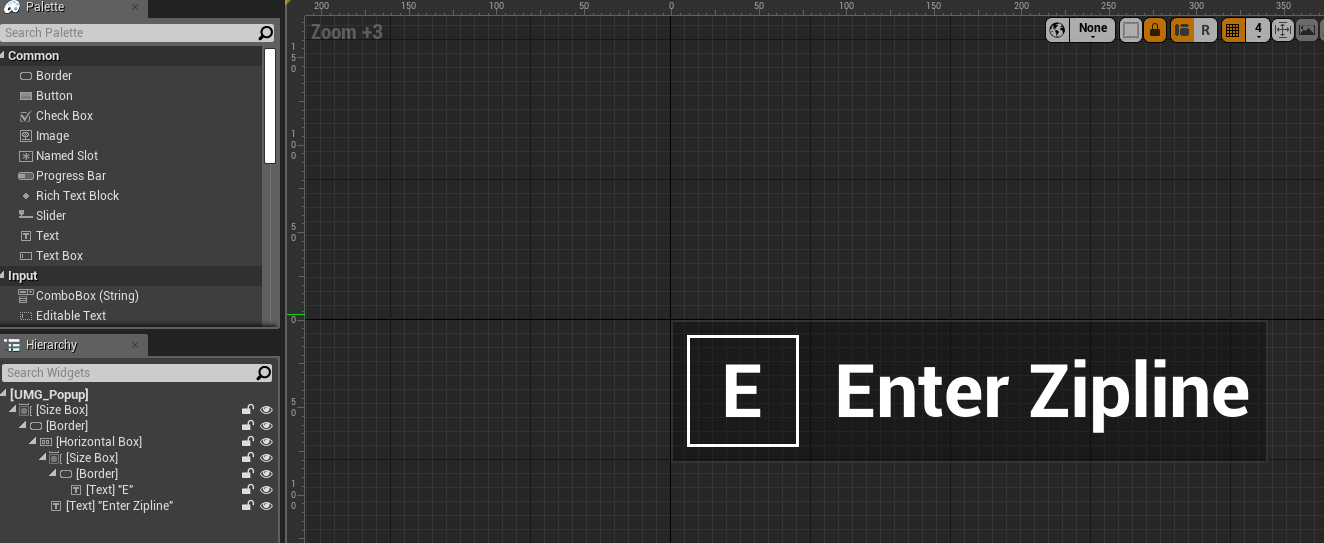
the widget is literally a border widget with an image and text widget and more text and probably a horizontal panel to keep them organized as well in the border
so yeah widgets
maiden swift
Right. What you see in that gif is a collection of widgets arranged to make a modal dialog.
vague walrus
that's a perfect font color for the white background. Geeez.
grim ore
https://i.imgur.com/DdVKPX3.png @lilac lantern done in about 3 minutes in UMG sooo theres that part
 wary wave
lol
maiden swift
Damn it, Mathew. They'll never learn to do it on their own if you keep being so helpful. 😄
 copper flicker
also... I was wondering why an almost empty scene would stress the GPU to 17 ms
maiden swift
Of course, you only did the visual part. That's not even half the battle.
plush yew
no @maiden swift it is good to help the people and to say the steps @maiden swift
grim ore
lol @maiden swift this is just the end result, the actual settings on the widgets are the hard part for this
maiden swift
@grim ore It's true! You basically made a teaser.
The thing that every tutorial should begin with.
novel ember
@grim ore slight update on the ambisonics crash: it appears to not be failing the check until it tries to play a sound, rather than it instantly killing it trying to start up
maiden swift
@plush yew It depends on what you want to learn.
grim ore
@novel ember 😦
vague walrus
@grim ore is there any trick/method of encapsuling meshes? At least for height? Or do everyone just enter the viewport and move the mesh by hand and when they 'think' it's ok they leave it?
Some way of snapping the bottommost bone or mesh fragment to the capsule? :v
plush yew
yes @maiden swift
maiden swift
I prefer to teach concepts personally.
And then have people build things to exercise and illustrate those concepts.
wary wave
also the UMG Quick Start guide exists entirely for this purpose
...which is one of the first, if not the first things that comes up in google
grim ore
@vague walrus that's pretty much it unless you know the exact size then you can adjust it manually
oooh.. pictures https://www.humblebundle.com/software/fantasy-game-dev-bundle
 wary wave
here come the clones 😄
grim ore
damn I think those are all unity asset store items tho, ok no some are unreal as well
vague walrus
@grim ore thanks
 prime nymph
@copper flicker u mean enable stats in a built game as in the functionality for stats?
wary wave
they're textures, so it doesn't really matter
grim ore
@vague walrus yeah since you can determine the half height of the capsule (96 by default) if your mesh inside has their pivot at the bottom of it you can just offset it by that amount negative and it should match up to the bottom of the mesh
fierce tulip
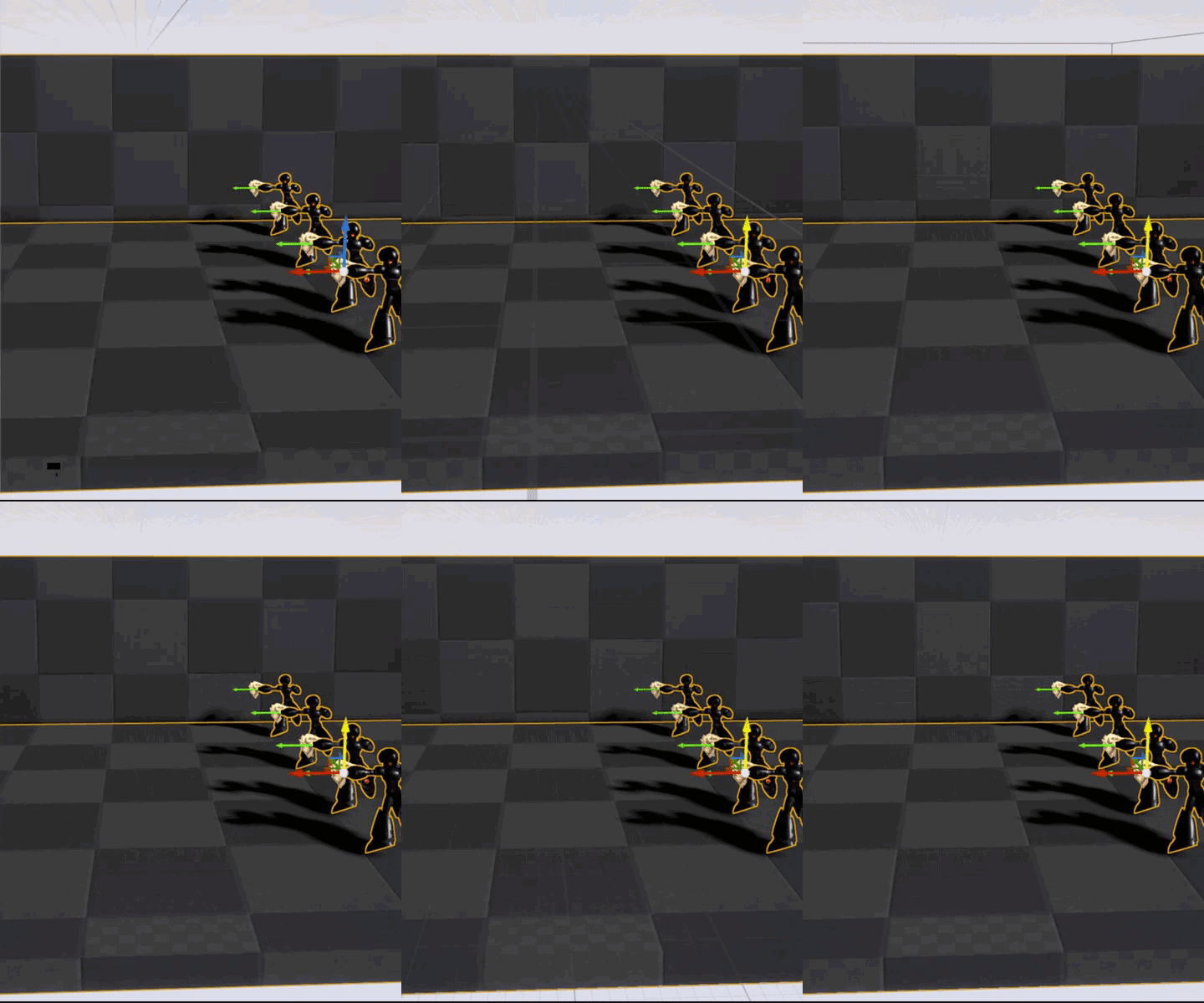
when you modified the default material to be world aligned, forget and your brain cant comprehend moving a mesh using it.
https://i.gyazo.com/911eedc4403b1f6cb730dd91bed1762d.gif
 grim ore
lol world aligned meshes are the best when blocking stuff out then getting lost when you try and move things around
fierce tulip
hehe ikr
 steady owl
Can users share .sav files across the internet and give other users the unlockables they have earned?
 digital anchor
yes
 regal mulch
Pretty sure, as they are just local savegames
fierce tulip
when you assign the wrong material to a mesh, and you suddenly have a spirit flower generator
https://i.gyazo.com/15d2d4b6fcfbe3275493a8fb0bd773d6.gif
 vague walrus
hmm, there's till no option to remove unused assets? I Like I add some paragon char and i want only to use default skin, so all other skins are purged?
 manic pawn
guess it's not production ready on 4.21
 teal tulip
well it says is enabled by default on 4.22
manic pawn
it seems to have a race condition with generating mixer source buffers
(whatever those are)
because it only crashes in there sometimes
grim ore
I saw an update to remove the new audio engine as enabled by default in the master branch so maybe they are putting it back to off until 4.23 or a further .22 preview

 copper flicker
@prime nymph no, I mean I wasn't able to see profiling. I was building for Shipping instead of Debug
now I can see my stats : D
teal tulip
now I feel bad as was the only feature I see off from preview, seems like the 22 then is a complete preview
prime nymph
nicee
vague walrus
hmm, have you heard of anyoen talking about Paragon Crunch animation problems?
He walks silly if you walk just a milimeter
not mentioning the walk animation does not work when walking with aI :/
Okay this is just strange. When I control pawn - animation of walking is working. When AI is moving pawn - it does not.
novel ember
what does "bandwidth" refer to in the context of the EQ submix presets?
I mean I get it's for the range that particular band coveres but I don't know what the 0-20 parameter represents
copper flicker
Has anyone handled large numbers of sprites? is there a way to group dynamically at render time? cuz about 1000 sprites [let's say] are enough to slow down Unreal quite a lot. even if they're not rendered in camera sometimes, not sure about this.. 1000 shot projectiles left on the ground for example are a massive performance problem. this is silly, they're just sprites. any advice?
 pallid compass
nope because paper2d is scrambled
You need to rewrite the render for it
or create a custom batching system
 finite slate
As someone with a $0 budget, how could I get my game on steam?
Or
another option
How could I get multiplayer in my game without using the steam id 480
I feel like I could get in legal trouble for using 480
 rustic fjord
use gamejolt
gleaming creek
Steam only costs $100 and you get it back if you sell a bit?
rustic fjord
$100 per game though
gleaming creek
Having multiple completed games, first world problems /o\
rustic fjord
publishing on gamejolt is free
can anyone set aside some time to private tutor me with UE4?
vague walrus
Any idea why he has problems? Everything shots good, the stop logic works.
fierce tulip
unless someone goes "sure", you might wanna try #looking-for-talent @rustic fjord
finite slate
Can I get in trouble for using the testing steam id?
pallid compass
@rustic fjord sure if u want to pay
vague walrus
well, then your parents can pay ;)
pallid compass
Dw fam, i can beat unreal engineering in to you real good
vague walrus
Guys, can I play an animation once and go back to animation blueprint?
I mean, I have a blueprint with running, jumping
I'd like mobs to react for getting kicked in the guts, as a simple play animation, but after that it stops doing anything
rustic fjord
i can do it @pallid compass if you dont mind me not paying
i still have other things to do like chores and pet care and school so i think i can work it in
pallid compass
same but iv got food to buy and medication to pay for, so rip u, well not so much rip you, but you need to understand most people who have something to offer wont do it for free, because life and such.
vague walrus
the fact that everyone does hit (someone) animation tutorials but not get hit by someone is driving me nuts
guess i will stay with no hit reaction animation x_x
fierce tulip
if you apply the knowledge you learned from the hit someone animation, to a getting hit animation, while looking at boxing matches or whatever good reference you need, you can make it yourself
vague walrus
@fierce tulip in the simple blueprint for older animations which I did with a tutorial, yes, it would be possible
 tranquil hull
hello, is there a channel to post an ad or plutor a recruitment offer?
vague walrus
but I'm using a paragon character with it's animation blueprint. I did manage to fix the issue of walking in-place bug but adding a receive hit animation there... I don't even know where to look
fierce tulip
@tranquil hull read the pinned message in #looking-for-talent
vague walrus
It's messed up af
tranquil hull
Thank @fierce tulip
my letter is already made, or publish it? I am French, I am obliged to translate
fierce tulip
just follow the description in that pinned message, (in english) and you'll be fine.
 dry moon
Try at #looking-for-talent
tranquil hull
I do not understand English !
vague walrus
So you want someone to help you developing a game, you are asking in english, but you do not understand english
fierce tulip
@tranquil hull there is a frech speaking subforum on the ue4 forums, you might have better luck there if english is not your forte
vague walrus
i hate when someone deletes a message, it looks like you are talking to a ghost
fierce tulip
i did that
tranquil hull
It's a forum but is there a discord FR?
fierce tulip
i dont know, you could ask on that forum
vague walrus
@fierce tulip so maybe in other way, is it possible to play an Additive Animation once? In the animation blueprint "Apply Additive" keeps playing it in a loop.
fierce tulip
i dont know, try #animation though it tends to be a bit calm there
gleaming creek
I just discovered that there's a variable type you can use in Blueprints called "Collision Profile Name", which you can, well, the name of a configured collision profile, like "BlockAll"
... but you cannot actually get the value back out of the variable
wary wave
whut
gleaming creek
At least, not in Blueprints
It claims it's a structure
but you can't break it
It has no functions you can call, you can't cast it
wary wave
ah, it sounds like it's not been exposed
gleaming creek
And the function for setting the collision profile on a component takes a string, not a Collision Profile Name
wary wave
I've encountered a few things like that in BP
gleaming creek
That's a bit awkward. Could probably expose it through C++, but I want it for a Marketplace product that is Blueprint-based...
Could report the bug, but it's probably not something they'd care about, and even if they did, minimum UE4 version for my product would go up
gleaming creek
Kind of seems like something people would want, I wonder all the various systems on the Marketplace for creating meshes do it
Surely they'd also want to make the collision type of the created objects be choosable?
manic pawn
why do we not get sources for UE4PrereqSetup_x64.exe
it's installing outdated redist but I can't fix it
worn granite
sounds to me like the CollisionProfileName is really only useful for details panels, and it being BlueprintType at all is a mistake.
gleaming creek
Why? You can use it in a details panel to configure a construction script... I mean, you could, if it worked
grim ore
the 4.7 notes when they added it noted it's use but I think it's more for being exposed when spawning, you can still get the info out of it in C++
 sharp badger
I have a fixed camera in my level to be used by possessed pawns, but when a player controller possesses a pawn their view is from the pawn, no longer the fixed camera... The player controller has their camera set to the fixed camera in the level blueprint with SetViewTargetWithBlend, but possessing a pawn after that changes their camera. How can I make sure all player controllers keep using the fixed camera?
grim ore
maybe it's just one of those, hey we did something but never thought anyone would care to use it in blueprints so... our bad I guess we should expose GetSelectedName at some point lol
which is cool because this is a good learning example that I was trying to find 😃 Now to figure out how to expose that info without editing the base class
gleaming creek
At some point I should probably get familiar enough with the engine code base that I can submit my own fixes... Though I suspect that they'd get rejected
novel ember
waitwaitwait
the Bandwidth parameter for the EQ source effect preset is a range measured in octaves?
why
by that logic let us assign the band start in semitones or something
grim ore
@gleaming creek I know it doesn't help you but thanks for the problem 😃 Got a good problem->solution reason for extending a BP only project to C++ and it was super easy to add a new node to a function library in C++ to fill a need
like it is literally returning back an inputted profile name and getting the .Name from it.. it's already there it's just not exposed by default and for whatever reason the struct can't be split to expose data lol
gleaming creek
Yup, sounds like an easy utility function to write
grim ore
I had no idea how to do it and it took me 5 minutes so... yep lol
gleaming creek
I did something similar for some other thing which wasn't really blueprint-accessible
trace types IIRC
grim ore
I think it's a simple change if you want to try and submit a request anyways lol. The Name Property is set to EditAnywhere without BlueprintReadWrite which just adding that should fix it... really weird that it is not
man this is why I hang around with you crazy people, I run out of material and poof I find something fun in here
decided BlueprintReadOnly was probably smarter, guess we will see if it works in 30 minutes once the engine finished compiling lol
worn granite
if you get bit by the change-bug I can feed you tweak ideas =D
grim ore
lol. using these as learning examples right now. Already got my engine contributor badge for the stupidest thing so no hurry to get requests into the main branch right now lol
maybe if I can get hired on by epic as the "god damnit why is this not exposed to blueprints" fixer guy we can make stuff happen 😉
worn granite
my contributor badge was from a PR so stupid they basically rewrote it.
Y'kno I attempted to be hired on as that guy.
Didn't quite go down that way
grim ore
when they made some changes to the color picker that would push it off the screen if you opened it on the side or bottom I just found out it was due to the size being wrong now that they added stuff and my request was changing 2 ints to the new values lol
grim ore
that was the original idea but they hard coded it for a reason and I said screw it and just fixed the numbers.
I really really don't understand slate and how it works in the back end but if a dev hard coded it in the first place shrug
I did try and get it to auto size heh
grim ore
lol
vague walrus
@grim ore maybe you know a quick, simple way of playing an additive animation once (on a trigger)? If not i'm just giving up .-.
grim ore
I have 1% animation experience so I cannot be of any help. no luck in #animation ?
vague walrus
no :c
 cerulean nova
but the models could be "downscaled"
the UE4 Standard "placeholder" model has ~90k
finite slate
i only have one face
 grim sinew
UE4 has a different mannequin model for mobile if you choose that as your target platform when making the project
It's nowhere near 90k on that one
You can't get anywhere close to a 90k poly character model on mobile
finite slate
sure you can
But it won't be a game
It will be a slideshow about why you shouldn't use 90k on mobile
manic pawn
the entire game is just looking at the character
fleet token
I read that Unreal Engine doesn't have a run-time terrain manipulation/editing capability built-in, but I also read that there are work arounds?
Does anyone know how this is done, or can anyone at least point me towards some documentation, or any information on how this can be done?
I would much rather use Unreal than Unity, but I really want, maybe even need, run-time terrain manipulation for the player to be able to dig holes, build mountains, smooth and flatten terrain.
Any helps will be greatly appreciated
vague walrus
Any way to deactiate a widget which is a part of a pawn? After death i don't want to display health bar. Remove from parent does nothing. :/
finite slate
@fleet token The best way to approach this would be to make your own terrain
The built in landscape/terrain is meant to be static
fleet token
I mean I could build my own terrain, but I'd like the player to be able to edit it in game
fleet token
I'm new to Unreal btw, should mention that
finite slate
that shape is your landscape
fleet token
Got that much figured out. height maps and peralin noise or jsut by hand, doesn't matter
I just want the end product to be editable in game
grim sinew
The workaround for no built in runtime terrain manipulation is to code your own terrain system and not use the engine's built in one
That's what those people are doing
finite slate
That's what I'm saying
fleet token
I see
grim sinew
Yeah, but he didn't understand until I said it 😛
finite slate
shut up chunky
fleet token
lol
finite slate
lmao
fleet token
Have you tried this before @grim sinew ?
grim sinew
Never had a need
fleet token
The lack of a plugin someone made for this kind of thing, makes me think it is quite difficult to do, and do right, without bugs, and good performance...
grim sinew
The reason for it is simple, Epic doesn't want people to be able to use a packaged Unreal game to make their own games and circumvent the editor. At the end of the day, the UE4 editor is just a really fancy UI for the engine itself, the only reason certain things are restricted is because it's how the EULA works, where you're not allowed to redistribute the editor
And there are plugins for it, someone on here even made a voxel terrain system that they sell for it
grim sinew
These things exist, it's just not a simple matter to make from scratch
grim sinew
worn granite
voxel plugin =D
grim sinew
You suck at google
fleet token
I guess I didn't accosiate voxel with terrain manipulation in the same way.... I feel shame
 fleet token
Indeed! :)
Thanks ZeroNight
grim sinew
You and your lambdaness >.>
finite slate
Are you kidding me
worn granite
What can I say, I'm immutable.
grim sinew
But yeah, Phyro is pretty active here
finite slate
that existed?
worn granite
Yes.
grim sinew
Of course it did. Someone on here even made it
finite slate
A while back I wanted to make a minecraft fan game to test my limits
worn granite
That's been a thing and he's shared WIP of it in the past
fleet token
Yes! This look like exactlly what I was looking for!
finite slate
and the terrain thing was stopping me
fleet token
Thank god I don't have to go use Unity!
grim sinew
@silver crown Hey! People here want to know about your plugin.
fleet token
@grim sinew You get a backseat gaming award for sharing that link! 
worn granite
Wow, harsh
fleet token
Backseat award is a good thing
worn granite
backseat gaming can be frowned on, too
fleet token
@worn granite Ya this is true. I am part of a twitch community where backseating isn't frowned upon, but is made into a fun thing. Sometimes I forget this isn't the norm.
grim sinew
I imagine he's not getting many sales, so that's the only way he can justify the cost of maintaining it
grim sinew
But I say that just from complete ignorance, I might be wrong
Not many UE4 games with voxel terrain
finite slate
I am gonna start studying the C++ of some templates soon
which one should I start with
worn granite
if it were extreme low volume I'd expect it to be a smidge higher
fleet token
Well, if there are no competing plugins that can do what it does, he/she can get away with that price
grim sinew
Same as the virtual texturing plugin I use for Unreal. Yeah, it's $450 per year, but they're the only guys in town right now and it's pretty low volume
finite slate
I legit just accidentally locked my computer instead of typing
How did I manage to do that
worn granite
@finite slate what you wanna get into?
Instead of shift you hit Win key, then hit L
you were trying to make a capital L
worn granite
well then IDK
finite slate
I was trying to type an R
worn granite
Wow then you'd be really lost?
grim sinew
Plot twist, Nobody had a minor stroke just now
finite slate
It happens sometimes
worn granite
at least you're nonchalant about it
finite slate
I have typed words backwards without noticing before
They are just incredibly strong brain farts
the most potent ones possible
fleet token
Maybe u got dyslexia, like me
vague walrus
after all he's just a @finite slate
finite slate
The type that would clear a room
fleet token
It affects more than reading
vague walrus
👌
finite slate
m'I ton cixelsyd!
vague walrus
🍆
Heyyyy, I've fixed my problem with the hit animation!
Now, when I hit something, there's big explosion, so nobody sees they don't react by animations!
vague walrus
finite slate
Seems about right
vague walrus
@finite slate if you want to sell something you will have to pay tax, you can't pay tax as an underage
I don't even think that would be possible with underage ID
hmm
Or maybe.
finite slate
I'll just have my mom paypal me the money I make once I finally publish it
vague walrus
At least in my country, you can get an ID and a status of an adult if your parents agree. So as an adult by law it should be possible to pay tax.
grim sinew
Selling a game is more than just getting paid, it's also a ton of legal responsibility for stuff like copyright law and such
So you will need someone that's of age to handle it
finite slate
I tried to publish a mobile game to the Google Play Store last year but didn't because I was scared of copyright
It was gonna be free too
Not even any ads
grim sinew
Free or not doesn't matter when it comes to copyright 😛
Don't know why people keep thinking it does
finite slate
True
I'm not gonna get away with giving away pirated movies any more than I would get away with selling them
grim sinew
Just get your parents to help you out, I'm sure they will
vague walrus
I'm getting sick since last week started
vague walrus
Day by day, just a little bit more
worn granite
 everybody knows the only free projects exempt from copyright law are the fan projects!!!
finite slate
I tried to make a fnaf fan game in Scratch when I was like 9
grim sinew
At this point, someone might believe you if you say that
finite slate
I hate myself
Here's my version of "studying"
Just adding comments that tell me what everything does
I can read all of this just fine
but it will be a while before I can write it on my own
fleet token
When I was 13 I was playing Morrowind and failing at talking to girls at school.
Wasn't even giving a thought to developing any useful skills for a career, or finding any hobbies.
You're on the right track kid 👍
finite slate
Yeah, until I forget a ton of stuff because I found a new game to get addicted to
I just went through the FirstPersonCharacter code
This seems kinda easy
Like
To get this stuff into muscle memory will be hard
but
I actually understand what's happening here
Blueprints are pretty much just, well, blueprints for the code
Visualizations
grim ore
without all the crashy crashy shit is on fire errors that C++ gives you 😛
finite slate
lol
grim ore
"Oh the engine knows what an Actor is but your code doesnt have the Actor.h file included? how about an error pointing to another file just to screw with you"
finite slate
I was just about to say something
About that
Brand new actor
well
kinda about that
worn granite
hey you said something about forgetting this kind of thing... you might forget the specifics but you won't forget everything.
grim ore
Blueprints are like "hey you know what, I like you. How about you just make some stuff happen and I will handle all the stupid stuff. You just go make a game and not worry about dereferencing pointers because really who wants to do that"
finite slate
I still don't quite understand pointers
I just don't get why
Why reference the location in the computer when you could just reference the variable itself
worn granite
because referencing the "variable itself" is just another way of referencing the location in the computer.
grim ore
"Hey you want to access something that is a pointer? well don't forget to use the -> because . is for accessing something that is not a pointer. Oh well yeah we know the difference and could just help you out but how about no"
worn granite
under the "hood" so to speak, its nothing more than an offset or an addr.
grim ore
http://www.cplusplus.com/doc/tutorial/pointers/ has a nice little set of pictures that helps
finite slate
Totally lost
worn granite
But you reference the location because you can then change the "location in the computer".
So you're able to change which thing you reference.
finite slate
So pointers are more for bigger games that need better CPU management?
excuse my stupidity
grim ore
"hey I am this 50000000000 megabyte image, how about we just copy this image all over the place in memory"
or.....
"hey how about we set up a pointer to where that image is and people can just use that one version"
worn granite
Well yeah size can be another reason to use a ptr
grim ore
yeah it's not like totally accurate but a reasonable explanation lol
worn granite
The thing about pointers is that you store the location and can "reach through" or "dereference" them to set a specific value.
grim ore
it's a ton faster as well if I recall
worn granite
So you can change the underlying value or you can change the location you're 'pointing to'
(*MyPtr) = Value; edits the value, while MyPtr = &SomeOtherVariable; edits the location
grim ore
Ignore pointers, use Blueprints. Save your sanity!
grim ore
man still trying to get my engine to compile to test this stupid collisionprofilename fix lol. stupid master had bad code in it
finite slate
later on in life
grim ore
you won't always have to use C++ either, go c#
grim ore
C# is soooo much easier than C++
grim ore
well yeah they decided that making a language that sucked to use would be no fun so they made C#
finite slate
more of an ignorant amateur
worn granite
void Func()
{
    int Foo = 0;

    int Bar = 0;

    int* Ptr = &Foo; // Ptr->Foo
    *Ptr = 42; // Ptr->Foo, Foo = 42
    Ptr = &Bar; // Ptr->Bar
    *Ptr = 23; // Ptr->Bar, Bar = 23
    Ptr = nullptr;

    if (Ptr) // is false
    {
        *Ptr = 341413; // never runs
    }
}```here's some code to look at.
finite slate
Ok I remember this stuff from the Microsoft tutorials I watched like 4 months ago
grim ore
ahhh.... scary code... run away
worn granite
btw
plush yew
lol void MyActor
worn granite
nothing is meant for beginners
C#? Professional langauge.
Python? Professional language.
etc, etc.
finite slate
Scratch? Professional language.
worn granite
Why not?
finite slate
This is why not
worn granite
If you can find a way to use it to achieve the things you require
finite slate
grim ore
there we go lol. Adding BlueprintReadOnly let's you split the Name out of the CollisionProfileName struct. someone should really add in a pull request for it
worn granite
Anyway I just about called out scratch as an exception but that's beside the point.
worn granite
pointers seem scary but they're not.
grim ore
I use C# at work all day for work stuff so yeah C# is good to go
finite slate
I don't have that kind of mental capacity
grim ore
then people use C# for stuff like Hearthstone in Unity so yeah C# is good to go
worn granite
the scarier thing is that C++ uses * and & for different things and its a big pain
and that . and -> are different too
worn granite
Actual pointer semantics aren't that difficult
grim ore
no..... no way... calling *VariableName on an FString is different than having the * on the variable type... no way
/rude C++
worn granite
Ah, yes, overloading.
finite slate
If anyone wants to dm me what they used to learn pointers that'd be great because I want as much material as possible so I can get this out of the way tomorrow
but I am going to bed
grim ore
the child actor should still be an actor, you should be able to breakpoint inside the actor you are spawning
finite slate
A new episode of Family Guy just dropped
worn granite
bad news, there's no one place
grim ore
don't let the weirdness of C++ stop you just realize it's got some quirks and use a ton of documentation until you figure it out lol
worn granite
you just practice it
finite slate
I just wanna know what you guys mainly used when starting off
worn granite
bucky/thenewboston
grim ore
for C++? I never learned it properly so there is that lol
finite slate
Some day I wanna be scrolling through StackOverflow like the big boys
worn granite
I did a lot of practice though, and googling
grim ore
I just gave up on C and went back to Basic lol
worn granite
Oh, and reading through stuff like cppreference
grim ore
reading, learning, practice... that sounds like a weird way to learn
vague walrus
Hmm. I can't make the dynamic navmesh obstacles to work. My pawns keep walking on me and other pawns, and they can't walk through each other so they just 'hit the wall' and do not move. I've changed the navmesh to be dynamic and it didn't help
grim ore
Asset '../../../../../Projects/UE4/tppmaster/Content/NewBlueprint.uasset' cannot be saved as it has only been partially loaded what the ....
vague walrus
Shouldn't the area around them be red?
vague walrus
Yes
grim ore
how the hell did I partially load a blueprint
finite slate
your computer was just too fast bro
worn granite
editor open?
fleet token
I've been programming for a while, self-taught, even interviewed at Google twice for SE positions. Now I am getting a second Bachelors of Science, this time in Comp Sci.
I know Python really well, it's an amazing language, it's what AGI engineers are trying to make an AGI in, it's what Bio-Informatics uses.
There is no "beginners" language, like someone said, if you can do something useful with it, then it's good.
grim ore
yeah all I did was open the editor, make a new bp, and i cant save it lol
worn granite
that's a bigboi error
fleet token
I know Java and C#, but I am new to C++
worn granite
preview?
finite slate
i just wanna be rich
fleet token
And ya, even for someone like me who dreams in code, pointers give me a headache sometimes
finite slate
whatever language makes me the most money is the way I am going lol
grim ore
oh I know what it is lol, I was using the master branch of source then downgraded to 4.21 and now the project is confused lol
worn granite
learn pointers early, use pointers often @fleet token
fleet token
yup
pointers and garbage collection are the things I always messed up on
Still so used to garbage being taken out for me
I forget
worn granite
What if I told you, C# has indirection everywhere ?
grim ore
so yeah lesson learned, don't just randomly change engine versions and use the same project lol
worn granite
/xfiles_theme
worn granite
well its tru™
grim ore
... I forgot how to make a pull request... off to the interwebs!
vague walrus
It's driving me nuts ;_;
worn granite
actually I might not be able to get mine for very much longer :/
grim ore
uh.. gold star?
vague walrus
they keep hitting each other trying to walk through
finite slate
Alright I'm actually going to bed now
grim ore
oh.. a gold one huh
worn granite
innit?
 abstract relic
There’s a sticker when you’re a good boy? 😜
worn granite
Yup
fleet token
So are there any really good procedural terrain generators for Unreal?
What do you use or know of that's good for terrain generation?
I mean I could use an open source perlin noise generator library and make my own, but then I have to build the rest of the stuff I'll need to parameters and materials at heights, which I mean, ya I can do, but I also don't want to reinvent the wheel if someone else already made it...
Just started with Unreal today, long time modder, but only ever had to use Unity when modding in the past, and to a limited extent, lots of new concepts I'm learning today
finite slate
This chat is just too good to leave lol
vague walrus
@grim ore any idea about this navmesh? :v
grim ore
uhm just have the spotlight, game jam finalist, and engine contributor ones but they are all like silver?
grim ore
ah ha, ok so... got to win like 2 more game jams. gotcha, no problem.
fleet token
Game jam. Always sounded like a delicious jam for biscuits or toast
With a wacky label on the jar
and a crazy commercial that's over the top, like from the 90s
grim ore
@vague walrus I know there is an AI crowd controller but besides that I don't think other pawns are automatically flagged as obstacles. most avoidance seems to be custom built
worn granite
I need to get 1 more contribution approved and then I'll have my goldy
grim ore
well you aren't too far off @fleet token https://forums.unrealengine.com/attachment.php?attachmentid=36214&stc=1
 fleet token
finite slate
Yummy
fleet token
I knew it!
vague walrus
I've changed parent of ai controller to be crowd control ai but nothing changed
grim ore
I know it's a stupid question but do they have valid collision?
like is the collision set on the nav mesh to treat them as obstacles
finite slate
Is gamejolt a good place to get my game more exposure?
vague walrus
You have to be more specific
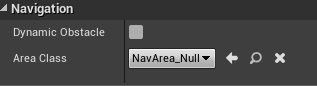
I've tried with this in many combinations https://i.imgur.com/w1DGlZH.png
 grim ore
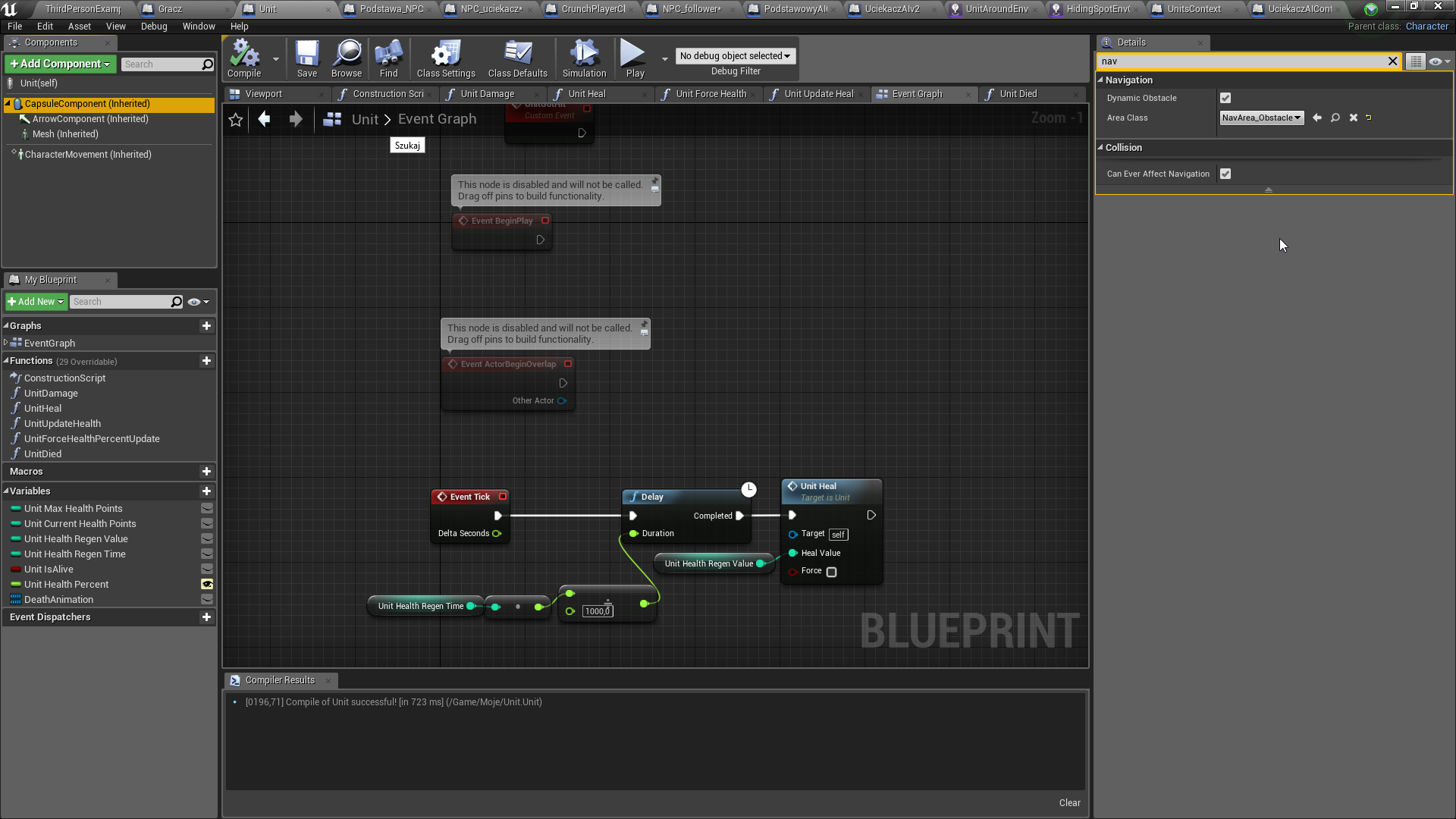
ok I just checked and there is another checkbox as well, can affect navigation generation, that needs to be checked on the character itself. My navigation are the defaults of Dynamic Obstacle and NavArea_Obstacle
and when I run my ai have the red area under them and when they move they add obstacles under them (not very well but it is doing it lol)
vague walrus
Yeah i've tried with that too
It's not updated on runtime
Also, the "Can affect navmesh" is available in multiple points in one blueprint. On "self", on "capsule container", on "charactermovement"....
All independent.
grim ore
on the self, the main component
vague walrus
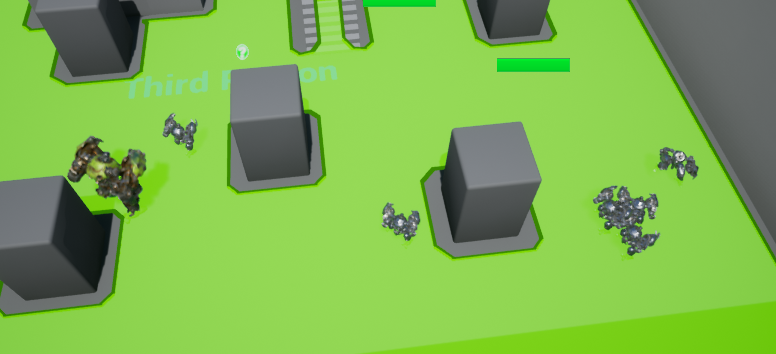
Nothing https://i.imgur.com/cvYISda.png
 grim ore
are the AI in the world at design time, before running?
vague walrus
Yes
grim ore
so do you see the red obstacle markers under them at design time or is it not showing it then?
vague walrus
No, it's all green
grim ore
like this is what I see, https://i.imgur.com/b86k7xW.png
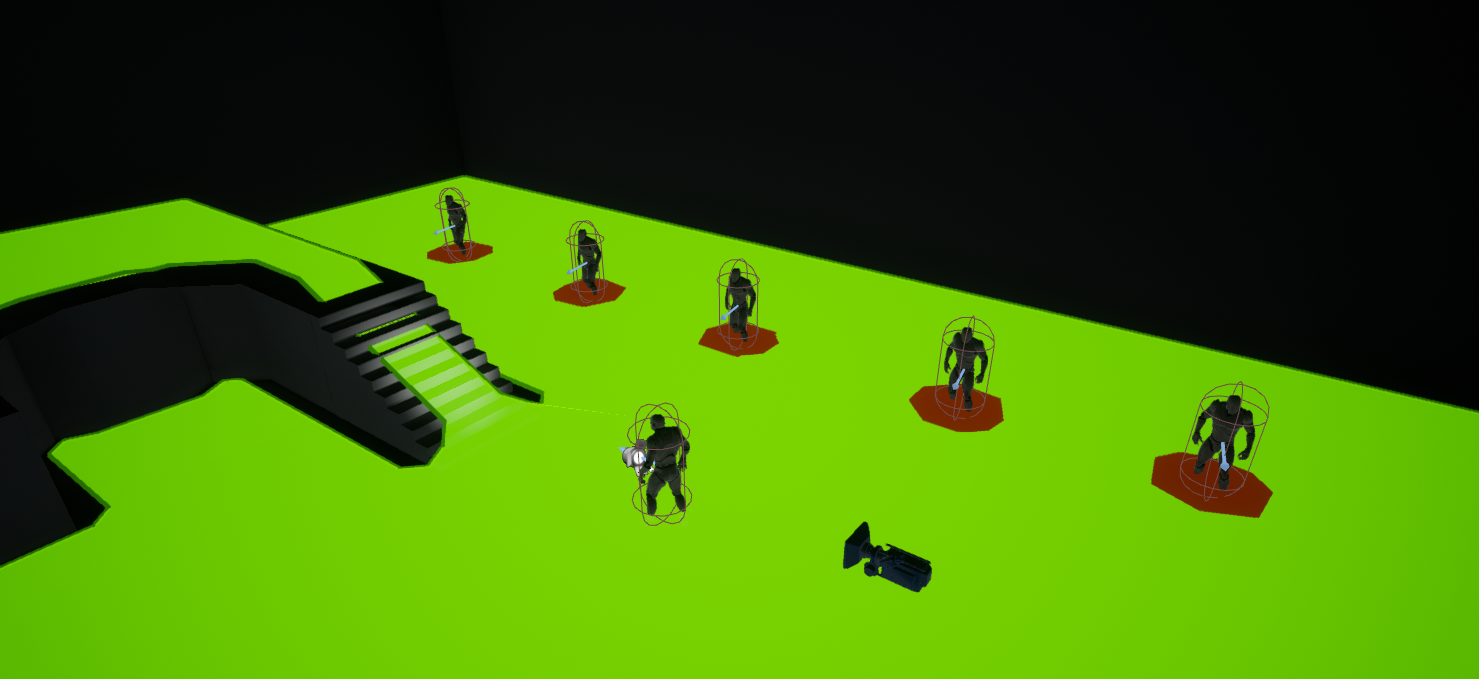 vague walrus
Absolutely no :(
grim ore
if you don't see that then yeah it's not even going to work at runtime then
vague walrus
The only time when stuff is red is when I move my character by hand and it's updating whole chunks
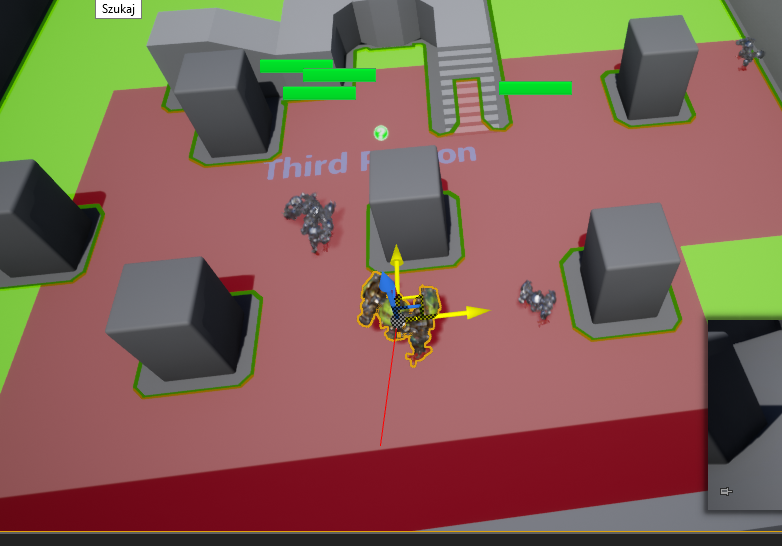 grim ore
yep it will update chunks. So... if I dont have can ever affect navigation enabled on my AI on the (self) it will not show up as an obstacle
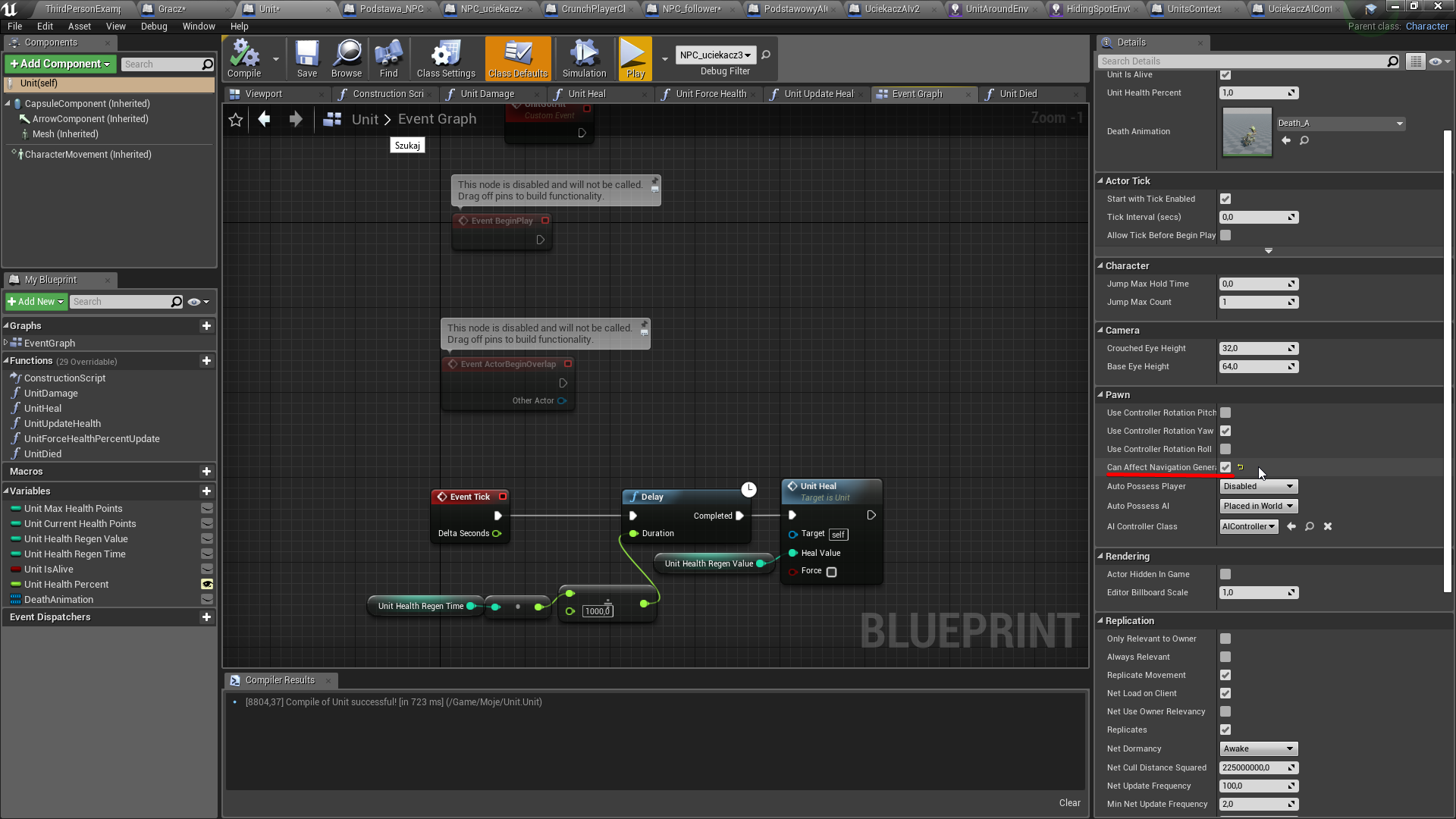 vague walrus
@magic ice Level of Detail?
grim ore
I take it back, the navigation checkbox on the capsule is what is doing it lol. https://i.imgur.com/JsaVPwP.png , this is with a default character nothing else changed
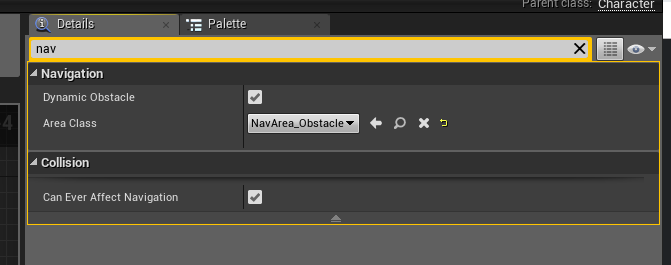
and I get them showing the obstacle indicator under them in the viewport
 magic ice
@vague walrus i don't think it's a LOD issue
grim ore
my only thought at this point is the collision capsule for the AI is not set up right
vague walrus
Do every single stuff have to get a friggin capsule?!
AI is... i mean, virtual!
it's only supposed to compute, and use mesh capsule in consideration ;_;
oh, good, AI does not have a capsule
grim ore
if you drop that unit right into the world on the ground does it block navigation?
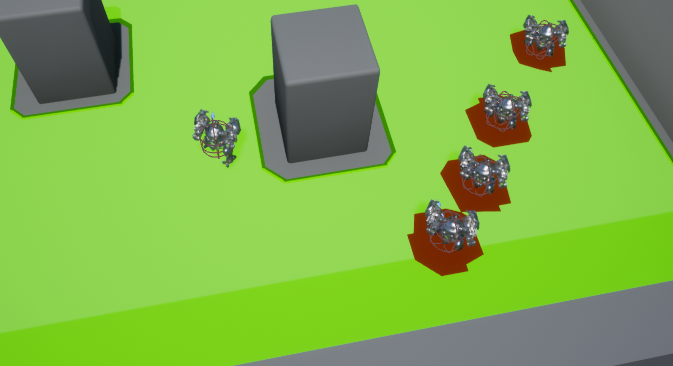 grim ore
welp that's a start
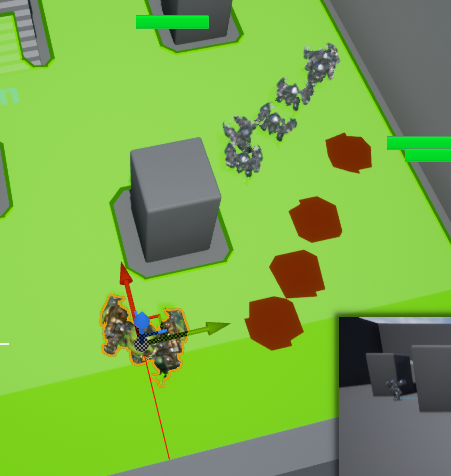 grim ore
yep now make sure they are set up as the dynamic obstacle and the dynamic nav mesh generation is enabled in the project settings
grim ore
ok yeah that is why the self one has to be checked, it wont be dynamic if its not checked for affecting navigation on the (self) root
so capsule component having affect navigation seems to affect the default navigation creation. having the (self) one checked affects the dynamic generation.
now actually making it work right from there is your best guess lol
grim ore
yeah but if you are using dynamic you can ignore the capsule checkbox as it will do it once you start the game and it remakes the mesh
but hey both checked doesnt seem to hurt lol
vague walrus
Strange that previus mobs didn't get updated
deleted them from map and readding manually
grim ore
yeah super weird
vague walrus
Newly added ones are working correctly
At least before i hit play, let's test..
Yeah, they are still trying to run through each other
Well. They have some issues. Serious issues.
@grim ore https://streamable.com/std0x
 vague walrus
It's red most of the time
turned off obstacle https://i.imgur.com/Gup8Rix.png
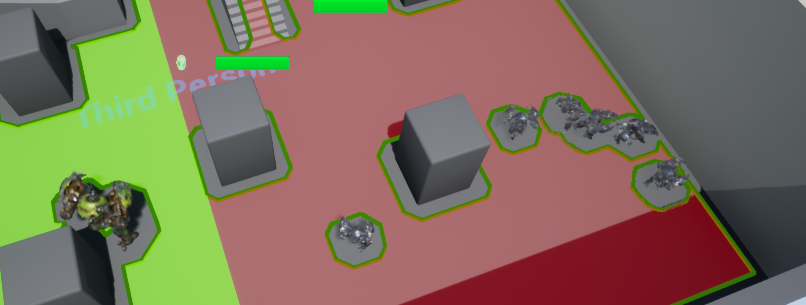
way better updating but it's kinda blocking their closest pathfinding that's why they are shaking
grim ore
yeah I have a feeling at this point it's a ton of tweaking. Sizes of the characters, nav mesh settings ,etc. I also have a feeling that most of the real AI crowd solutions use built in stuff and not the nav mesh avoidance stuff
vague walrus
It's a crowd ai blueprint child
the fact that there are 3 places in one blueprint where you can turn on/off the 'can affect navigation' thing that work separately is nuts
grim ore
yeah the brain typed it wrong, I meant systems that the devs built out for this like using line traces and stuff like that
grim ore
there is the crowd manager settings in the project settings as well for more options if you have not found them yet
vague walrus
like this it's updating very nicely: https://i.imgur.com/5IMTJPG.png
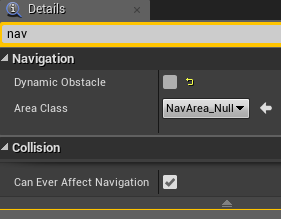
everything else is default/off
only the problem with pathfinding, they remove 'ground' from under themselves which causes their path to be impossible to start
 sonic pagoda
the ue4 c++ tutorials are seriously deprecated
they are still trying to teach without the IWYU methods which results in errors in 4.21 as well as using FString instead of FText which also results in compile errors
its just tough to learn anything at all when half the time spent is figuring out stuff has been deprecated and learning the new correct usage without the tutorial's help ... so why even use the tutorial
can ayone help me figure out how to write this function with the correct FText usage? void ACountdown::UpdateTimerDisplay() { CountdownText->SetText(FString::FromInt(FMath::Max(CountdownTime, 0))); }
 dim plover
Can't you just do FText::FromString()?
Though, you could probably just do some conversion from Int to FText.
proven oxide
any idea which 16 bit PCM encoding is supported by UE4?
I can't use s16be with wav so what is the normal?
ok found it, le
s16le
😃
 hot drum
how would I get custom collisions from blender to unreal?
I tried renaming the stuff with the prefix UCX_"name"
and UCX _ SM _"name"
but nothing is working
Help is appreciated
plush yew
Quick question, If I’ve package my game to a exe file, Can I update the game with new feature and guns example like Unity, Or not?
regal mulch
Yeah, there are some guides you can find via Google that should talk about updating your game
plush yew
Thanks alot❤️❤️
regal mulch
Anyone here recently done some Input Remapping stuff?
I'm wondering, given the way the Inputs are returned via the InputSettings object, if it should be:
"MoveForward" with "W | 1.0" and "S | -1.0" (That's how it's done in most the documentation videos)
OR
"MoveForward" with "W | 1.0" and "MoveBackward" with "S | -1.0"
So basically splitting them.
Otherwise I feel like it gets pretty annoying to handle the keybindings in the UI
Also I still wonder why they do this:
void UInputSettings::SaveKeyMappings()
{
    ActionMappings.Sort();
    AxisMappings.Sort();
    SaveConfig();
}
If you setup keys to be Main and Alternative Key Bindings.
And your main one sits on index 0, while the alternative one sits on index 1
Sorting these arrays when saving completely kills that logic
E and G for main and alternative.
If you change G to A, it will sort it to A and E instead of E and A
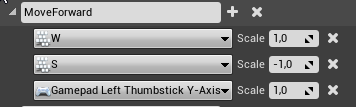





That stuff would most likely need to become 3 bindings then
sigh
pallid compass
I believe I made custom structure and framework to wrap the system like two years ago to deal with these issues
Pretty sure I used t map or made a mirror list