#ue4-general
1 messages · Page 371 of 1
 prisma ridge
 crude jasper
 fierce tulip
try three
 coarse prawn
In the tutorial for level streaming, there is this step and when I click on my Level Streaming Volume the plus is grayed out along with no "Initially Loaded" and "initially visible" checkboxes, anyone know why? World composition is enabled and I've tried placing the volume in the persistent level, and tried instead in the sublevels themselves but both don't work
 boreal shadow
guys, is there any way of using 16bit alpha brush textures?
 whole quarry
what are those?
 static viper
you can make a screenshot
 light bobcat
it
whole quarry
ctrl-z ?
 plush yew
have to right it in console
 merry gazelle
Can collisions collide with other?
 next badger
@merry gazelle "colliders"...sure, that's their purpose
merry gazelle
This is why I ask, there's no mentions of just colliding with other collision spheres (unless I'm missing something)
next badger
@merry gazelle collision events are triggered based on the type of movement, they could be static, dynamic or physics simulated
@merry gazelle also make sure you've set those for the colliders
https://docs.unrealengine.com/en-US/Engine/Physics/Collision/Overview
the list on the screenshot is just a presets
actual collision settings are the checkboxes
also we have #legacy-physics for that sort of questions
merry gazelle
my bad, maybe I used inccorect terminology. I basically mean't can they communicate via overlapping spheres rather than colliding as physics actors. I might use a different setup now though
 fading raptor
hey
next badger
@merry gazelle yep, you need to enable the "generate overlap events"
 ancient otter
How can i add high quality anti-aliasing
Like a really good one
idc about optimization
merry gazelle
Blueprint is really bad for OCD / designers lol
I can't help myself perfecting every node
ancient otter
My antialisaing is really bad
 junior solstice
http://prntscr.com/m6b7dq - http://prntscr.com/m6b65s the legs of the animation in the first picture the body of the animation in the second image can I merge in one animation


 dry merlin
So, I am having some troubles with materials. I have a base material specular or metallic, then I have detail materials like cracks, rust, snow I want to overlay on the base. To avoid having to make colored textures, I use the grayscale of the base texture then multiply it by the color. So, question is, if I have a grayscale of the detail texture, how do I show the cracks and not the whole texture while overlaying it on the base texture? I have tried a opacity mask, just turns the whole texture transparent even the base with exception of the details.
light bobcat
how to get perfect grass
fierce tulip
by making it perfect 😃
 cold prawn
Looking for cool blueprint guy to make a cool VR shooting game about Chechen war (Russian vietnam lmao). I make 3d models. Oculus rift for tests.
 grim sinew
cold prawn
grim sinew
cold prawn
@grim sinew have no access to this board unfortunately
grim sinew
Read the pinned message for instructions.
cold prawn
thx
fierce tulip


A combination of @Gendoughnut's work and the hype around #AGDQ2019 got me all excited to make another Samus speed booster animation. This was animated in Maya, then put together and rendered out of UE4. It's also a study of Smash Ultimate's effect style! https://t.co/uqvXP...
 Twitter
 bitter iris
I'm not sure if to believe what my shader complexity and quad overdraw looks like
grim sinew
Sure why not
Quad overdraw in deferred rendering isn't really a thing, it's mostly there for forward rendering profiling
bitter iris
Considering all my trees where green and red, with 1 ticked box it all went away
 tired cove
Hello, I need help. Could someone help me please ?
 abstract relic
An answer cannot be given to an unasked question
tired cove
Ok, I'm French and I would need help to know how to play my game with my friend. But on the EU forums I can not find
How to work with two on a project more clearly
abstract relic
#multiplayer va ici
tired cove
Merci
 bronze cedar
hello guys
i have been watching Breakout tutorial and following it
any one who can help me
when it hits the corner of the paddle it slow down , plz help guys 😦
fierce tulip
grass tutorial
http://bfy.tw/LlCZ

LMGTFY
 mental shale
Are they ever going to make lighting in orthographic view work again?
abstract relic
It’s probably low priority
fierce tulip
there might be some workarounds, but id personally would fake it with a really flat fov camera
mental shale
man
the only thing is- it would be a huge pain to work with in the editor
especially with composition and stuff
or maybe not?
im not too sure
Ill see how it works out
oof, yeah. even with an fov of 2, somethings arent lining up 🤷🏼
fierce tulip
https://i.gyazo.com/5079e22e9ae288cf776c83e263010995.png
might want to rotate it a bit more to your liking, along with adjusting depth/distance a bit perhaps
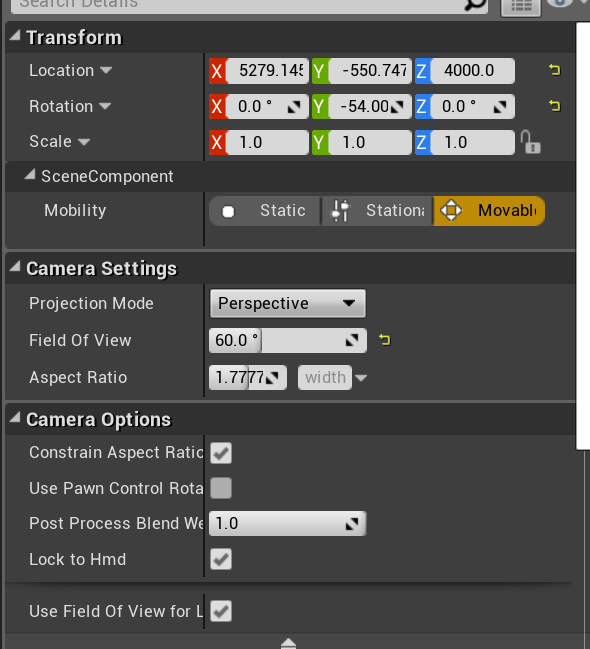
but this worked for me
mental shale
wonder why it broke between .14 and .15
fierce tulip
¯_(ツ)_/¯
mental shale
should I ask graphics or visual-fx?
fierce tulip
graphics prolly
mental shale
aight
 true siren
how i could add rigidbody to actor? like i do this in Unity Engine?
i need actor have weight and physics
fierce tulip
sometimes something in bp does break when updating, but generally easily fixed
id backup just in case though
plush yew
I know this is a basic question, but I've been told like 5 different things in the past 24 hours. Is UE4 open source to the point that I could rework parts of the engine to fit my needs (assuming I don't release it for my own benefit)?
I've been told:
It's not open source
It is open source
You can edit it for personal use only
You can edit it and use the engine for a large company if you want
You can't do either because it's against TOU (Terms of Use)
It just goes on and on and confuses me like crazy. A for sure answer would be appreciated ^^
 grave nebula
@plush yew UE4 is not open source.
mental shale
but youll still have to pay Epic that 5% royalty, even if you edit the engine
fierce tulip
you can edit it however
plush yew
ok, so the code is simply there for a learning tool but you can't copy the code if you're making your own engine, but you can edit it however you please, and since it's still their engine if you edit it you still owe them the 5% royalty if I understand right
fierce tulip
yup
mental shale
that's what Ive always thought
fierce tulip
5% afaik is only when you make games, videos/movies etc are mostly excluded from it
mental shale
ye
 heady bridge
I generated a BP of my C++ class and put a collision box on it in the BP, is it better to just create one in C++? because can't seem to call it in my C++ code
 topaz quest
Is something like this possible in Unreal? Or is there a way to achieve the same result?
Unreal Engine Forums
Talk about Level Design, Static Meshes, Physics, and more.
 sudden agate
LogPlayLevel: Error: ERROR: System.IO.DirectoryNotFoundException: Ein Teil des Pfades "[...]\Unreal Projects\ARPG\Content\FMOD" konnte nicht gefunden werden.
Friggin hate cooking assets :)
plush yew
Do you guys recommend using World Creator or world machine for importing large-scale landscapes into UE4. I am working on an open world project with a high res landscape
 tame ocean
I've had great results with World Creator
mental shale
what's it mean when something's "backlogged" on here? https://issues.unrealengine.com/issue/UE-40089
 weary basalt
They dont have the resources to commit to addressing it at that time. Its on the "Todo" list .
sudden agate
backlogged actually means "never gonna fix"
 meager hemlock
Hey I need some help can I ask here or is there a specific channel I need to use
weary basalt
@meager hemlock Choose a channel that best encompasses your issue.
Check the #more-resources and #old-rules channels as well thanks.
plush yew
i cant seem to click on unreal in the epic games launcher
meager hemlock
@weary basalt well idk I'm new to this
weary basalt
Read the descriptions of the channels, choose one that is relevant to your question, or ask it here.
meager hemlock
Well theres this guy who moved some assets from a game that uses frostbite engine to ue4 and he explained how but I still don't get it I was wondering if anyone else had done something similar so I could get some help
weary basalt
Ripping assets from other games is illegal and frowned upon here.
 high stone
Yeah, this isn't Steam.
 fleet needle
whats good place to get free audio files?
meager hemlock
Well it wasn't for another game or something he just used it to make wallpapers and I think animations @weary basalt
I just wanted to figure out how to do it because as far as I know they use two different engines so it confused me
high stone
@fleet needle I think they still sell a royalty free sound effects disc on Amazon? Worth every penny.
Yep, it's still up there.
high stone
Don't scroll down too far. Lol they got some questionable sounds on there.
$9-$20 is the range.
abstract relic
freesound.org if you're looking for foley
 gleaming creek
That means selling a licence to use the asset without paying further royalties on it
 dry moon
Yeah I know
high stone
@dry moon This is Amazon we're talking about.
gleaming creek
Also, can confirm that freesound is great
dry moon
Just seems funny to sell music and expect royalties too. Should be one or the other
 gleaming lotus
Hey all! I'm looking for game testers for a small project I've made. Just looking for some feedback 😃 Please DM me and I'll send you a link to the download.
Apologies if this is the wrong section.
fleet needle
what kind of game is it @gleaming lotus :)?
gleaming lotus
Its a small pirate prototype game, you raid sea forts by sea and land.
Got quite a few people testing right now and found a lot of bugs
 fringe crest
I have a question about level streaming. Let's say a player moves a physics object in one sublevel, and then moves along, and that sublevel gets unloaded. If the player returns, will the object still be in the place they moved it to in the sublevel?
If so, how is that information stored in memory? Do I have to be concerned about GC after a certain amount of time? If these changes aren't GC'd, how can I manage memory correctly so that many changes in many sublevels don't take up too much memory? Would I need to use a save file and load level states when sublevels are streamed in?
 ember hull
guys, does anyone knows why my model have holes in ue4
and dont have holes in blender
is the problem because I merged vertices ?
dry moon
Might not be triangulating properly?
ember hull
im new in modeling, what do you mean by not triangulated properly, or is the problem from the normals ?
grim sinew
There is a long list of what -could- be wrong, but I notice your horn's normals are backwards
So you might want to check into that
dry moon
Yeah check that
 short radish
Hi
ember hull
yea, thanks, the problem was from the normals
plush yew
suk my pp u gay fags die of aids and ligma
high stone
A UV trick I use is mapping the best angles, X, Y, Z perspective. Then sew in the sections. Use a grid, checker board pattern to see the results. There's also a lot of modern auto UV mapping software.
mental shale
how do you create a binding for an image in UMG/Widgets?
 jolly nest
Ok, i have an issue
im getting "undeclared identifier"
for a private float value in the .h file
and it is not recognized in the cpp file
BUT
all the other values in the same private space is recognized, but not this one
even the other float values are recognized
nvm
 wintry crescent
Anybody wanna play fortnite with me?
weary basalt
@wintry crescent This is an Unreal Engine 4 Discord, we discuss the Engine specifically. If you have offtopic discussion topics please use #lounge
 wheat sphinx
Hey, i think i found an odd engine bug but im not exactly sure. Basically the nav mesh shows up in the editor but when you play in the editor its gone . I have a streaming level setup with the nav bounds volume in the master and meshes in sub levels separated by grids
playing in the editor no nav mesh even though i ran the console command show navigation
https://cdn.discordapp.com/attachments/479799428073521154/533915608455053313/unknown.png
and in the editor viewport, you can see the nav mesh is infact generated
https://cdn.discordapp.com/attachments/479799428073521154/533915763820724234/unknown.png
Levels setup
https://cdn.discordapp.com/attachments/479799428073521154/533915877800935424/unknown.png
Oddly enough it works randomly sometimes, and runing the console command "rebuildnavigation" in the console after trying to play fixes it always
 upper sluice
Hey everyone quick question: How do I move the camera up/down in a first person game?
whole quarry
By rotating it?
upper sluice
umm i dont have a camera in my world outliner 😛
whole quarry
its in the player character bp
static viper
plater character bp
whole quarry
we're talking to each other again? 😛
upper sluice
thank you sir 
plush yew
Here is what I did for vertical rotation:
FPSCamera->AddLocalRotation(FRotator(MovementComponent->DesiredCameraRotation.Pitch, 0, 0));```and for horizontal rotation, i rotate the character itself so it would automatically calculate for movement that are dependent on the forward vector.
AddActorLocalRotation(FRotator(0,MovementComponent->DesiredCameraRotation.Yaw,0));
I use my own custom made character movement component so I'm not sure if this would work with the already existing character class shipped with UE4.
true siren
iam creating simple box, after creating box collision on it and making physics on i recive warning massege after hit play: Invalid Simulate Options: Body (NewBlueprint1_2.Box) is set to simulate physics but Collision Enabled is incompatible
what iam doing wrong?
oh i setting up physics on collider....not on object...so whats why was error, thanks for help all of u
 left flame
Hey dudes, I'm here to share something (to those of you who don't know) I just read on Wired Magazine of may of last year about this 14 years old kid who broke into Epic's servers and made millions of dollars pirating Gears of war 3 pre-release. Take a look:
They hackers gang even hacked into pentagon trough zombie studios server tunnels, because they had contracts for the making of an apache simulator
Imagine urself with 14yo with millions of dollars by forcing a worldwide company to ur knees xD
 broken pawn
anyone know how to delete an object and all its children?
plush yew
Hope in mankind restored.
broken pawn
i tried a loop to get its children and delete each but that didnt work
left flame
It didnt end well for them tho
plush yew
@broken pawn Garbage Collection should take care of them if they remain unused. just make sure there are no references to those objects by setting the pointers to null.
left flame
@broken pawn #blueprint
broken pawn
why do i need to do GC when I know what the children are?
GC wouldnt work in this case since the children are other blueprints
also yes i just tried it anyway
left flame
Hey noob here is for chatting :(
plush yew
using DELETE wouldn't work as well to free up memory, cause there are other references to it.
maybe look into GC see if it has any functions for manually deleting objects.
 novel schooner
hey folks, do you know some GDC/conference talks about making open world game via ue4?
i am highly interested to find out more details about tools/LOD system and general optimization tricks someone one while developer open world game
light bobcat
I need help Im trying to add material and I cant place M_ground_grass2 to this
nvm
I find a way
fading raptor
where do 3d model questions go?
 teal tulip
fading raptor
teal tulip
fading raptor
what kind of 3d model does UE4 support
 graceful sky
Anyone know how i can add already installed engines to the epic launcher?
I had to reinstall the launcher and now it wont detect my engine versions nor projects..
auto detect would be great...
#umg , isnt it?
seems like renaming folders, intializing new install, pausing, replacing newly created folder with old already installed folder solves it
slow, but it works
static viper
using a different skeleton for armor pieces is very bad nonono
thats just wrong
you apply the same skeleton to each armor piece
or use static meshes which will look dumb...
there is a reason ue2 was wrong XD and isnt available anymore
oh god its you...
🤦
you are still asking weird simple questions
what advantage would that have
static viper
if you need 6 animbp for 3 races, then they must look hell alot different
why not have a master skeleton with all bones
you can just exclude the ones not needed
did anyone tell you gamedev is hard?
XD
riggers get alot of money
did you plan this ahead?
okok..
what succesful mmo did you made
i am curious now
ofc you cant
bc you didnt made it
XD
there is issue posting a simple name tht i can google
 dark depot
Look up the fortnite Dev days talk on animation and how they handle so many characters
Also might get more detailed answers in #animation
 grave agate
Is there a place where I can post for collaboration in UnrealSlackers?
 marsh swallow
so i have a guy who just did his initial sync with perforce and compiled the game on his side, he is unable to open any BPs or Maps, his UE crashes
he has resynced, reinstalled UE4.20, created a new BP and tried to open it, etc
still nothing
plush yew
anyone trying to develop a game from scratch alone? should i try to or ill be wasting time?
merry gazelle
I'm doing it and very happy with my progress
I'm making something complex and I'm a designer (no prior game dev experience)
 light thunder
@plush yew it has to become more fulfilling to you beyond your other hobbies for sure , and you need to treat it like a hobby and discount any possibility of money
 grim ore
google solo game dev?
light thunder
You have to love doing it so much and learning that it creates a self-sustaining passion, when you are that passionate about it, you will live, eat, and breathe game dev, and as you do that, you will gain in skill
@grim ore That pin never gets executed....what am I missing here? I am pretty sure this matches
 vale silo
Googling solo game dev is dangerous @grim ore
A lot of horror stories come back in search results
😝
plush yew
i have some skills in 2d\3d art but no idea about blueprints and programming, they seen to be hard af
light thunder
What one person can do, another can do
whole quarry
its easy
grim ore
can I solo game dev without any other info is a really broad topic tho so yes you will get back every possible answer
can i solo game dev.... and make a living? can i solo game dev... and finish a game? can i solo game dev... and not kill myself before releasing a game? etc..
whole quarry
time management is more daunting tbh
grim ore
well it's no more daunting that anything else in life so shrug
like if you asked my dad how hard it is to strip and put together a race car he would be like "no problem" but I can't even fucking change my oil correctly lol
light thunder
Honestly I'd take a course first Haluy
grim ore
https://academy.unrealengine.com/ : https://docs.unrealengine.com/en-US/GettingStarted : https://www.youtube.com/user/UnrealDevelopmentKit

YouTube
Welcome to the official Unreal Engine channel! Unreal Engine 4 is a complete suite of real-time 3D tools made by developers, for developers. Create and take ...
light thunder
They hold your hand and walk you through the basics
whole quarry
pick a small old game with simple gameplay and try to remake it :d
 still bay
@plush yew virtus learning hub and tom looman for c++
light thunder
Udemy has some good ones, just pick one with good reviews - you need to decided between forgoing C++ (no coding) or if you have a coding background, take that
vale silo
I think it's a good idea to learn how to code in Quick Basic first. Just to understand how to plan code structure and make basic algorithms
whole quarry
Just watch all UE4 videos here and you know all BP nodes:
https://www.youtube.com/channel/UCOVfF7PfLbRdVEm0hONTrNQ

YouTube
This channel is dedicated to exploring Unreal Engine 4 and the Blueprint programming language that it uses. You can think of it as a companion to the API doc...
light thunder
I go back and forth on it @vale silo - Logic and Syntax are both hard to learn at the same time, which is why they typically say the first language is the hardest
light thunder
but blueprint, even though it has its own syntax perse, is a lot more forgiving and helps teach you the logic, and being able to follow the flow of the nodes helps a newcomer process and understand the logic easier, than a wall of text, even with something like SublimeText
vale silo
I did some programming before and I didn't even have to watch too many BP tutorials to get going
grim ore
lol my channel is overkill for trying to learn from beyond the intro MVP series. I would hate to send a newbie into that minefield.
plush yew
xD
merry gazelle
I would be stuck trying to turn on lights without mathews channel
vale silo
But sometimes people who don't know anything about programming make bizarre BP code
plush yew
ill check. thx ppl
grim ore
there is no bizarre BP code, there is just happy little code that got lost on the way to optimization!
light thunder
That's beautiful
Nobody is an idiot, they just have so many wonderful opportunities for intellectual growth
static viper
oh boi
light thunder
Also, WTF is going on here with an execution pin that doesn't fire -
grim ore
I was looking at that but my first question is where is the default out execute?
static viper
yee it looks bizarre
light thunder
um, not using it
static viper
this is not usual
grim ore
I don't think you can not use it can you?... off to the editor!
static viper
you need to ask him which engine version first...
grim ore
whoah you can shut it off, that seems dangerous
light thunder
It's been working for me, this particular use case is pretty narrow, but I need to display something as strings, like with fractions, before converting it to floats (and from floats to strings agian)
so it fails silently if I don't I guess
grim ore
so does the code just simply stop then when you feed in the 1 1/4" ?
light thunder
yeah but now it goes to default
I checked both switches (the one in the widget designer) and the one pictured and I can't seem to find any leading spaces or anything
maybe printing char length between all of them will help?
grim ore
the first thing I would try is maybe re arrange it so it's in the correct order?
I mean it's stupid but that would atleast make it look right and eliminate any weird issues with default actually being an issue
light thunder
I feel like sometimes I try to "teach" the engine to behave normal by not catering to its nonsensical behavior. They are not in the same order on the designer tab but that shouldn't make a difference. Probably not a good idea on my part
grim ore
other than that test it the hardcoded way. Unhook the selection, copy the value you have in the 1 1/4" slot on the details panel, paste it in the selection input box and run it
this way you are technically forcing it to go to that 1 1/4" out wire because you are literally using the same exact string reference
if it works then yeah your input is bad, if it fails then.... restart the editor lol
light thunder
When will Unreal get it's version of Clippy, "It looks like I am inexplicably fouled beyond repair. Would you like to restart Unreal? "
static viper
you should print before switch
grim ore
that is cool tho, I never knew you didn't have to have a default in a switch in cpp/bp
it always seemed bad not to have a failsafe lol
"OH CRAP YOU GOT TO THE DARK PART OF THE CODE, ABORT ABORT!"
light thunder
@static viper I did but it read the same thing
I'm convinced it's either an editor needs restart but, or a hidden space somehwere
grim ore
well even if it's a hidden space, if you ctrl-a (select all) in the spot in the details to copy out your exact item you are checking against and put that in the input string then it should go thru
static viper
you should really just print out what you feed into the switch
light thunder
I did but the leading space wasn't visible
static viper
leading space?
light thunder
sorry, trailing space
static viper
trailing space??
light thunder
we see this "I do not know how to work with strings."
but it sees ""I do not know how to work with strings" "
static viper
show me how you create the string
light thunder
I figured it out
 dim plover
On another note, do you need to switch on string?
light thunder
Yes, this is rather unique use case, regarding fire hose diameter that are practically always displayed as fractions
usually 1 1/4, 1 1/2, 1 3'4
grim ore
sweetch on enum?
light thunder
it needs to be a float to calculate though
dim plover
Alright, sounds reasonable.
light thunder
I did make the mistake of not planning well enough and should have had an enum originally
light thunder
instead i started with the float values because I was building the calculation functions
this was a mistake I needed to learn though
dim plover
I don't think you need to, but it wouldn't be that hard to add the enums.
You just map the strings to enums before whatever handling stuff.
light thunder
At some point though I had to do a switch on string, because some of the string values will not process to floats
dim plover
Oh, yeah, true...
light thunder
trying to convert this will give you1, not 1.25
dim plover
You could also map the enums to floats.
light thunder
that would have been a better option, true
grim ore
enums were invented because trying to remember if the thing was called "AwesomeFireballOfDooom" or "AwesomeFireballOfDoom" was always messing up the interns!
light thunder
So for a combo box, instead of having the preset options, just loop through an enum to add them?
that additional level of complexity between the cosmetic data and the actual data also threw me off some
bitter iris
guys any ideas why this is happening
 honest vale
looks like DFAO
 gloomy fox
UE complete newb is looking for some help with spines by anyone who is bored enough. Just DM me since I'm pretty sure I'm missing some very basic step but I can't figure out what I'm doin wrong..
 gloomy apex
Hey Folks, I plan on making a level for Killing Floor 2, which is still on UDK, any of you know good discord communities for UDK, similar to how this is for UE4
 gleaming narwhal
@gloomy fox It's better to post the question, if someone knows the answer they'll respond :)
fierce tulip
welcome vic!
gleaming narwhal
Hey Luos!
fierce tulip
i saw that
static viper
🙄
gloomy fox
even if it's a stupid question? Just wondering sorry, I just joined :p Actually I don't even have a question, it's like my SM gets insanely deformed instead of just creating a route
static viper
🦉
 livid haven
It's generally preferred to ask openly, because other people might learn from the troubleshooting/problem solving process.
 versed pawn
Hey guys! I've encountered a really weird problem which I've never seen before. I'm trying to render a movie out of a scene using sequencer, but some of my materials are getting some weird black stuff over them. And the weird thing is, this also occurs in PIE, but only if I make the editor window fullscreen. The issue looks like this: https://streamable.com/51dqw Can anyone help me please?
The issue disappears when the editor window is not maximised... Any idea what causes this? I tried disabling post processing, increasing mesh bounds and many other things but nothing helped so far...
 versed pawn
oh sorry. Thanks
static viper
no worries it would just get too big as we need to see alot details
 violet portal
Hey people. Anyone from around London, or Uk who can recommend some good dev events in London or nearby?
light thunder
when I made this map off an enum, it wouldn't let me order it the same way, it kept saying I couldn't add a key while the default value exists.....why do I have to do it that way? this through off my entire order
 rapid geode
does attaching to components detach from a previously attached component?
sudden agate
@light thunder because a Map (and Set aswell) cannot contain duplicate values by definition.
Adding a new Value means it is set to default, hence not possible if a Key with the default value already exists
light thunder
Then how can you actually add anything? I understand why, but why not have it not set it to default when you are adding to a map?
Why not just set the next value to the next enum of the map?
rapid geode
yeah but does attaching to components detach from a previously attached component?
light thunder
But look, when I started this, the first line of my enum (not it's default, there's no option to set or not set a default"
So I wanted to add 1", then add another one for 1 1/4" and so on
but rather than choose the next enum as the next key (because there were no duplicates of it) it gives me this lazy, "meh, make it backwards if you want this to work"
 pallid compass
Yeah that's how maps work fam why would it add next enumeration
light thunder
How how do you add anything?
if you have an enum of 1- 10 and you want to make a map of 10 static meshes
 worn granite
Yeah maps kinda suck for this
Just add the others in order, except the first one (which you end up having last)
Then you can copy the entire map, move the last to the first, and then paste it back.
That's the beauty of properties being copied to plaintext.
merry gazelle
Jesus this blueprint
Can a BP like this still be efficient in a game? It's one of the popular character packs from the marketplace
abstract relic
That is a beautiful spaghetti
 manic pawn
someone doesn't know what functions are
abstract relic
Yes, they can be. If you want to squeeze every drop from your computer though, use cpp
merry gazelle
that's just for the "cloth" of the characters
 lone yoke
collapsed graphs, functions, macros, function libs, macro libs. it's not like the tools aren't there. It may still be efficient in terms of performance, but if another dev wants to make changes, it can get really messy.
merry gazelle
FYI this is the pack, I mean the assets do look great
https://www.unrealengine.com/marketplace/personnel
Currently I'm compiling 6000+ shaders after clicking on the BP

High-quality models of personnel for scientific laboratory, hospital or office
lone yoke
It's an art pack, in many cases bought by people with coding/BP experience. Not sure if this should contain Blueprints at all or if they make it more complicated than it should be.
abstract relic
Usually they’re not very efficient
merry gazelle
maybe I can just use it for cut scenes
 crisp fable
why does unreal take literally 4 hours to delete ~20k assets?
graceful sky
Alot faster to do it manually
I guess ue gotta check them first?
For references etc
 rare stratus
hey guys
How do i get the bottom and left menus back
i got rid of them and i need them back
Please someone respond
Im new to unreal
graceful sky
Dont spam :) your missing stuff can be found under the Window tab up in the left corner
Content browser is one of them
rapid geode
@rare stratus its called Modes
 silent lotus
Sup
rapid geode
if i'm doing procedural generation where i have to spawn around 20,000 of an actor that requires interaction (albiet simple interaction) what would be the best way to do that?
I am using Spawn Actor and it isn't horrible, but i feel like there's a better way
i want to use hierarchal instanced static meshes but i have no idea how to get the closest instance and remove it
bcuz im doing stuff involving the destruction of said instance/actor
rare stratus
@rapid geode thanks
rapid geode
np
graceful sky
Closest actor being clicked or closest to player?
rapid geode
its VR so closest to player
graceful sky
With ism or hism you can get a specific index by clicking it
Closest to the player could be done with a collision sphere i guess
Or calculations based on location
rapid geode
yea but wont it just return "x_BP" instead of the specific instance
graceful sky
You can get the combo. X_bp at index AB
rapid geode
i mean when doing an overlap
graceful sky
You might be right, i didmt myself venture there yet
I use click events ;p
Which can be replaced by trace events
graceful sky
Thought VR was all about linetraces ;p
rapid geode
i might just stick with Spawn actor
nope
not at all actually
all about Overlaps 😛
literally every single thing i've done has been with overlaps
rapid geode
@graceful sky i just realized that since i have to apply damage to each one (its a tree being chopped down) i wouldnt want it to damage all of them on each one so im kinda forced to use individual actors
graceful sky
If theres 20k of them , id consider making it with ism ,
And replace them as the player interacts with them
rapid geode
but would that be any better than spawning them
graceful sky
Spawning 20k actors can be pretty heavy on the gpu
rapid geode
at the moment you don't usually see more than 10-20 at a time
yeah ik
i use line traces to spawn them
graceful sky
Well if you got logic that handles it i supoose its ok :p
rapid geode
handles what?
graceful sky
That handles the spawning of said actors without it being a problem ^^
rapid geode
i didnt say it wasnt a problem but when you look at a lot at a time it can lag
graceful sky
Youll know if you struggle with the fps or not ;p might kot be an issue at all with the proper logic
graceful sky
With ISM youd handle it all with a few drawcalls etc etc ^^
rapid geode
and with VR's low resolution atm can i use LODs to lower detail at a closer distance
graceful sky
Instead of 1 call per actor
rapid geode
yeah i guess
what if i spawned an actor without a mesh at each ISM
would that still need a drawcall
graceful sky
Im not sure tbh. Dont know the specirics around it :p
Ive just been told 1 ism actor component is 1 drawcall ^^
An actor with no visual dont count as a drawcall I think, but dont quote me on it
rapid geode
ok
plush yew
Hey very sorry, but don't know if this is a #graphics question or not but does anyone know how to increase the amount of nVidia FleX particles in a static mesh?
merry gazelle
how do I hide this warning?
 misty creek
@merry gazelle Open the console, using this key `, and enter DisableAllScreenMessages.
merry gazelle
thanks🙃
misty creek
No problem. 😃
misty creek
Could you just divide it by 100000?
plush yew
Does anyone here have any experience with the Procedural Landscape Ecosystem package from the marketplace?
 vast shadow
How well does UE4 handle sounds, more specifically, how well does it handle sound travelling through walls and other physical objects and the effects that has on what the player hears? So if I have some music playing and I walk behind a wall, is UE4 capable of producing the effects on the music being behind the wall would have in reality?
 grim juniper

Announce Post and Videos: https://forums.unrealengine.com/showthread.php?135678 Watch live at https://www.twitch.tv/unrealengine With a brand new version of ...
plush yew
@vast shadow yes. It's just setting up the sound so it can be heard at a distance.
 wary ruin
Hey all, not sure if this is the right place to ask but im looking for resources on making movement based blueprints like jump, sprint, climb, etc. but all I can find is the really basic stuff; im looking for motion with acceleration or gravity manipulation and was hoping there might be a specific forum or site dedicated to movement tutorials in unreal4
 velvet finch
Does anyone know
where these weird black lines in the middle come from?
nvm figured it out
needed to edit vertex normals
 scarlet owl
velvet finch
scarlet owl
velvet finch
having another issue now though
there is this one modular asset of all of this in the scene that i exported
for some reason the low poly version of the one above is super tiny
everything else is normal size for some reason o.o
decided to just specially 100x and freeze the low poly one in maya
and send it over
so strange though i used the same setting as everything and even the high poly soft edge version is derived from the low poly one
yet the high poly one goes in just fine
okay i fixed it too
turns out a setting in fbx needs to be set to centimeters
i don't get it though everything i do is in meters
but when i set it to centimeters it tallys
any harm adding collision to all my static meshes?
i heard it might be unoptimized
in comparison to using collision volumes but as it stands the player would be able to interact with all the currently known modular assets around
except for a few which i've left collision out of
 grand knot
Anyway need any help for a small fee $$$
@velvet finch should be fine just don't use complex collisions
velvet finch
alrighty
i'm not using complex collisions haha
just the box ones
does LOD systems automatically or offer the ability to remove the loading of collisions associated with a static mesh
if we are far enough?
if so i could disable all collisions beyond a 50 meter radius of the player although i wonder if that will complicate static enemies who are already spawned in rooms
velvet finch
gotcha!
plush yew
Does anyone here have any experience with Unreal Engine 3?
Or modding in UDK in general?
 sterile stream
what tutorial would you suggest for a new and aspiring game developer
ive watched some modeling tutorials and some unreal ones, but i was wondering if theres one or someone who has a youtube dedicated to developing full playable games from start to finish to learn every process
 astral rain
I think the closest you'll get to that is dev vlogs or something.
plush yew
my buddy is telling me its better to use unreal engines third person blue print instead of creating my own "which is too late cuz it took me a whole day to get animations etc in" is that true?
astral rain
As long as you're only running what you need to and are getting the results that you want, it's fine.
The template is just a good place to get a quick start or if you are new.
abstract relic
Really it just allows you to skip initial input and camera setup
plush yew
How can i make a introduction?
whole quarry
plush yew
Wow...
Oh no you understand. A introduction in a game (Racoon studio)
Or video mp4 importing
plush yew
Thanks
gloomy fox
Hey everyone, I'm trying to get the hang of splines functionment but it feels like I'm doing something wrong. Basically I want to build a tunnel in which my character can run (some sort of endless runner). I followed a couple tutorials on youtube but my SM shape_tube gets deformed every time. When adding a new spline point it seems to create another piece of my tube on the side of the previous one instead of placing it in front of the previously placed one.
 shrewd gorge
Hi, I'm a newb making an asteroids clone.
Just a few questions I wasn't able to find googling:
- Do you need collisions setup for hit events on actors (asteroids)?
- Is SetActorLocation ok for floating movement, does that method work well with collisions?
I need a projectile to hit asteroids, and asteroids to bump into the player ship, destroying it.
 left citrus
whole quarry
left citrus
whole quarry
@shrewd gorge
- Yes, else you wont be able to hit it.
- SetActorLocation sets the actor location , the collision is part of the mesh, which is inside the actor.
shrewd gorge
- Thank you.
- Got it. Should SetActorLocation allow collisions to overlap?
whole quarry
I found Overlap being the 'easiest' way for shooting stuff, but Block should be good enough too. Don't forget to enable Simulate Hit Event in the collision settings
shrewd gorge
Thank you very much.
 coral talon
lol, why there is no "Create Destractable mesh" button in 4.21 ?
 cloud cobalt
It's in a plugin now, IIRC
coral talon
AH CMON
cloud cobalt
Since it's a shitty unmaintained Nvidia feature from 2006
We previously used it, removed it from the game with 4.19 or something when it was moved to a plugin and broke Linux support
IIRC there's a modern replacement for it too
cloud cobalt
Looks like the legacy destructible meshes yeah
coral talon
the plugins for ue4, that are they? are they safe or like mods for skyrim?
had a bad exp with Fmod one
cloud cobalt
They're just optional components
 keen flicker
i have a question i am making a survival coop game but i wonder should it be sci fi or simple military?
 languid shard
some are good, some are bugged, some are experimental, some have been left aside and forgotten for eons
cloud cobalt
@keen flicker That's kind of up to you 😛
keen flicker
kind of wanted some views
cloud cobalt
Ask people who play games what they want
cloud cobalt
I don't know, anything but asking here - people here work professionally in game development, their tastes are not the same as the general public
keen flicker
oh wish i had friends who played video games
cloud cobalt
My opinion is going to be that shooters are boring, though shooters are a big market that people who play games like 😉
Do what you like
You're going to be in it for years
keen flicker
its like sort of warframe
whole quarry
I would like to see a reversed survival game, It would be more of a suicide game but everything in the world tries to keep you alive 😛
keen flicker
lol i am indie
cloud cobalt
Warframe has 200 devs, so don't even attempt anything like it
keen flicker
i am not making totally warframe
i mean coop like warframe
4 ppl play to complete 1 objective
coral talon
are u making it alone?
plush yew
Hey, how size changing works in crouching? Does it call some function to change size? I have capsule root component, so it has it's own size changing methods. How about others?
keen flicker
i needed irafting and saving system for muliplayer
sudden agate
@cloud cobalt speaking of apex. is there an alternative in UE for Destructibles?
thanks Discord for not scrolling again <3
cloud cobalt
Yeah there's one IIRC, but I couldn't care less about destructibles tbh so I just dropped that from our game 😃
I'm a "no plugin" guy now
The experience of maintaining a game over many years makes me very suspicious of anything that's not a core feature everywhere
 wary wave
rather than be 'no plugin', I prefer to stick with a single engine version and just work with it
if the plugin works, it works
there's Nvidia Blast now, but I'm not sure that's integrated into the current version of the editor?
plush yew
How can i make a enemie the can only move when i look away.
https://www.youtube.com/watch?v=vEyEF2-TNHg give a message to this guy he will send you information on it
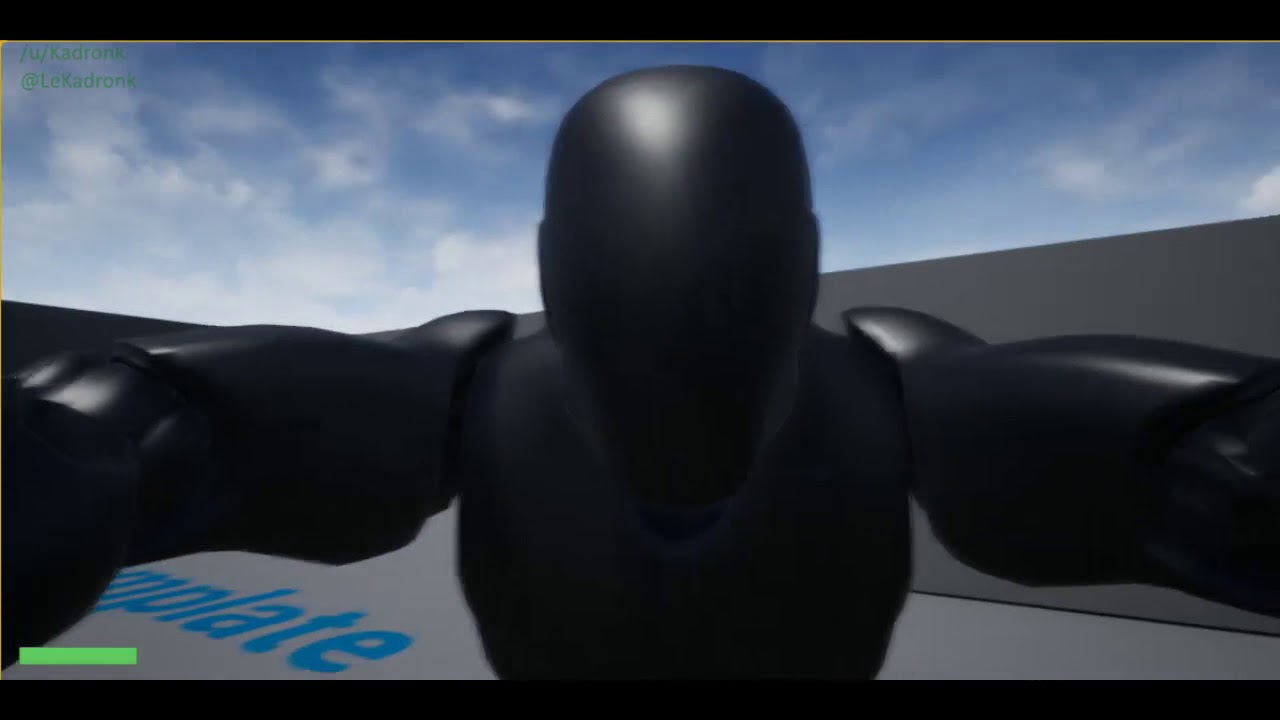
@plush yew i doit allready
Cast to firstperson character
keen flicker
does anuone know about any gud sci-fi weapon pack with tones of weapon
not too much sci-fi just simple sci-fi
 ruby robin
Guys, where is no Reference Viewer in last couple of versions. How Do I open it to check references?
Has it been removed from the engine?
keen flicker
@ruby robin i used refrence viewer in 4.20
ruby robin
@keen flicker Where is it now? I don't see it in context menu
keen flicker
i dont rember now
maybe right click the asset and u get options it was one of them
@ruby robin
ruby robin
Nope, nothing there
sudden agate
Speaking of Localization 
How would I make my Gameflow dependent on the locale?
Some Languages have longer dialogues and need some more textboxes.
How would I manage this?
In japanese, I may need only one Textbox,
for european languages, I may need two textboxes.
cloud cobalt
Just like you get free cars and free computers, steal it
plush yew
Hehe
cloud cobalt
Seriously though : do it yourself, or buy resources
plush yew
Its hard
languid shard
nothing is easy
 cloud cobalt
Game development is hard 🤷
fierce tulip
hard is an understatement :p its walking to mordor
pre-transit era
and no gandalf
or a sam
cloud cobalt
Here's my tip : if you can't afford something, financially or because of lacking skills, do something else
Don't attempt doing something that's not going to be good enough in the end and will just drain you
Start with the smallest possible game, and move up until it's too hard
cloud cobalt
So don't have characters
 cloud cobalt
I'm dead serious right now, character design in games is usually 6 months - a year of work per dev.
plush yew

cloud cobalt
If your game requires human characters, then your game project might not be doable for you as an indie
Planning your game well is all about what you can actually do
cloud cobalt
Like I said, plan a project you could be able to pull off alone. If you're not a great character artist already, or aren't paying one, you might want to drop characters & weapons from your concept
There is a reason you don't see many games by single developers
plush yew
Its a idea
plush yew
But i need scps, otherwise it is not a scp game
cloud cobalt
If you're Naughty Dog or Bungie or Rockstar, you can afford to basically do anything you want. As a single dev, any idea that can't be done alone in a few months just sucks
Just because you want to do it doesn't mean you can
It's important to be realistic about that
sudden agate
Just because you can't, doesnt mean you shouldn't :P
plush yew
Yea
 digital anchor
as i said to someone else, u cant make a scp game in unreal, it uses a copyleft license, so you cant sell it
plush yew
@digital anchor i got a permission from a developer
digital anchor
doesnt matter, against ue4 EULA
plush yew
Yea?
cloud cobalt
Depends on the actual license of code you reuse from another project
Some copyleft licenses are perfectly fine with UE4
All of our game code is under BSD, which doesn't put any viral licensing on the engine, and thus is fine
plush yew
Oh common
digital anchor
scp is CC BY SA 3.0 which requires you make the game same license
digital anchor
i dont understand much about licenses so i will concede
cloud cobalt
Anyway, I don't know what's your skill set but if you're not an artist, don't want to work with one, or can't pay for assets - I'd recommend thinking twice about making that kind of game
fierce tulip
start out with simple tutorials, try to make a map for ut4 or whatever
fierce tulip

What do you think constitues good map design in a multiplayer Fps game? I hear the term “this is a good map” but very few people go in depth as to what that actually means. That’s…
plush yew
And now i need weapons
fierce tulip
try the free ue4 content
plush yew
Theere are free weapons?
fierce tulip
not sure if they are around atm, but there is free ue4 marketplace and learning tab content
ruby robin
Guys, is it possible to start the game in console without render? There is -log to show console, but no -norender or something like this to disable window spawning
fierce tulip
<_< when you are recording tutorials and your dog starts barking like a madman because reasons
hehe
silly doggo
 normal burrow
anyone know if player controllers can exist without pawns? (realistically)
 unreal spoke
Is there an easy way to stream a real website(not owned by me) to a texture in ue4?
cloud cobalt
unreal spoke
@cloud cobalt Great, thanks
normal burrow
i'm just wondering stranger because for the thing i'm prototyping having a pawn would be kind of just a layer of hacking, might make more sense to just have the hacks in a custom pc or seomthing
@cloud cobalt the player controller isn't set up like AInfo right? like it is expected it has a scene component root and world transform and all that?
cloud cobalt
PC is just a regular actor that happens to own a camera, and most of the time, a Pawn
The game mode class will spawn a default pawn for it, but that pawn can be destroyed, or never spawned in the first place
cloud cobalt
The basic design is that PC should handle non-pawn related stuff, like the HUD, UI, etc
fierce tulip
s-pawn
wary wave
heh
cloud cobalt
Pawns handle stuff like movement
My current design has a single PC own three pawns over short times, for example
plush yew
@cloud cobalt what is when i say that that a fan game is?
cloud cobalt
What ?
plush yew
Okay Öhm...
What is wehn is say that the scp game a fan game from contaiment breatch is?
cloud cobalt
No idea what you're saying here. It's a fan game ? I guess ?
normal burrow
yea that makes sense stranger, i don't have any movement for the test game i'm throwing together. its a rhythm game, and its multiple things relying on the input that wouldn't really fit into pawn or ai
 leaden dust
Could you guys recommend me some game development news and tutorial website. Thing is, I can't seem to stick with a single part of game dev and am switching again and again. So I am in need of some inspirations from all the fields so I can choose one. Its just so terribly hard choosing a category of development. Programming, 3d artist, vfx, design, etc. just so many alluring choices.
whole quarry
@leaden dust if your indie or new, learn a bit of them all
leaden dust
@whole quarry alright thanks
but please check out my original request
because I am having a hard time with that
Any sort of blogs will also do
leaden dust
No sorry not that
The very first sentence
about tutorial, blog, news and etc. websites
whole quarry
Other then news being posted here, i dont follow any sites nor read any blogs so I dont know any :>
cloud cobalt
People don't really have "tutorial websites"
leaden dust
Alright
whole quarry
Google is the best tutorial site though
 keen frigate
Hey everyone. 😃
 steady owl
@cloud cobalt regarding the PC and UI, I’ve being doing all my UI creation in the PC ignoring the HUD class which seems almost like a legacy class, is it fine to continue doing all UI stuff in the PC and just have the default blank HUD class specified in the GM?
cloud cobalt
HUD class is where I do all menu management, but you can disregard it if you like
I don't like having mega-5000-lines objects
steady owl
So it’s like a way to tidy all UI stuff away?
I don’t really have more than say 10 separate widgets to spawn
So it’s pretty clean in the PC
But functionality wise it’s the same as doing it in the PC in the HUD?
cloud cobalt
Yeah
Except it's a bit cleaner
PC runs on the server for example
So anything UI related shouldn't be there
sudden agate
how do Blueprints behave when I have a Class Reference? will it load the Blueprint of that class when the Object with the class reference is loaded?
In #blueprint someone uses Class Variables in a DataTable. I wonder how it behaves tbh.
steady owl
So you know how Fortnite takes 373636373 years to start up initially? Other than the server checks I would imagine the game is also loading in assets so once you’re in the game, levels load quickly
Is there an easy way to preload assets? Or maybe I should just include many of the main ones in the main menu map?
sudden agate
With C++ you can preload assets
vale silo
I have this issue with projectiles being spawned inside player's collision capsule and stopped if I have Pawn stopping Projectiles (happens in VR, since controller can end up inside player's capsule). The problem is that if I overlap Pawn and Projectile, then I can't easily apply damage since damage is applied on projectile stopping. I could have another custom collision channel for AI (so that Pawn and Projectile overlap, but new custom channel stops Projectile), but if I have another collision channel for AI, then AI won't be able to use same projectiles player uses - they would pass through player. Any idea how to resolve this peculiar situation ?
steady owl
@vale silo can’t you ignore the owning pawn of the projectile to prevent self overlapping?
vale silo
how?
I figured I might have to check who shot it and if player did, then I'd have to switch response to overlap for a moment and then switch it back to block
steady owl
vale silo
but I wonder if there is some simple built-in way
steady owl
Either that or offset the projectile spawn location out of the capsule before firing
vale silo
that post is for melee stuff.. If I ignore actor when projectile is moving, then projectiles shot by AI will still ignore player
(Player and AI use the same projectiles)
since it's for VR, I can't offset projectile spawn location - looks so bad in VR 😃
steady owl
Is there no way you can pass in only the owning character (the one that is doing the shooting)?
Then the AI would hit the player since he isn’t the owning shooter
vale silo
well, I wonder how would I do that in BP
steady owl
I imagine it would be as trivial as passing the shooting character ref to the projectile via the weapon bp
steady owl
Np!
fierce tulip
@gleaming narwhal when was the first time you went "omg, lerp is a thing, people will be making lerp jokes.."
gleaming narwhal
@fierce tulip Who's saying I didn't make the joke? 😉
fierce tulip
on a 0-1 scale, how bad are the jokes?
gleaming narwhal
It just so happens that I tend to enjoy the company of people who make the connection
fierce tulip
thats a good point hehe
vale silo
@steady owl actually, that won't work (at least I don't see how). Collisions are handled automatically. There is no option to set owner not to collide with projectiles.
steady owl
It seems there absolutely must be a way since this would probably be an issue even in robo recall? Worst case you could spawn the real projectile outside of the capsule but spawn a dummy non colliding visual one at the intended place then blend to the real location
vale silo
the only thing that comes to mind is that I spawn projectile with collision response set to overlap between Pawn and Projectile, then somehow check when projectile stops overlapping owner's capsule and once it stops, then set collision response to block.
steady owl
Yeah you’d have to check on each update if the overlapped actor is the owner and if so keep collision off
That would work fine I think
vale silo
aye, thanks
bronze cedar
guys anyone who can help with UE4 physics, i am working on BreakOut or Arkonoid or Bricks Breaker game, i want to ask some questions about it
wary wave
the first question is probably "why are you using physics"?
grand knot
exactly lol
simple get rotation and locaiton on overlap would do fine @bronze cedar
 bronze cedar
because i saw one tutorial and follwoing that
wary wave
yup, from there you can basically get the angle of reflection and change velocity as appropriate
which tutorial?
grand knot
exactly right
u could run it with physics
but it would be a waste of processing power
when u can get better results with simple math

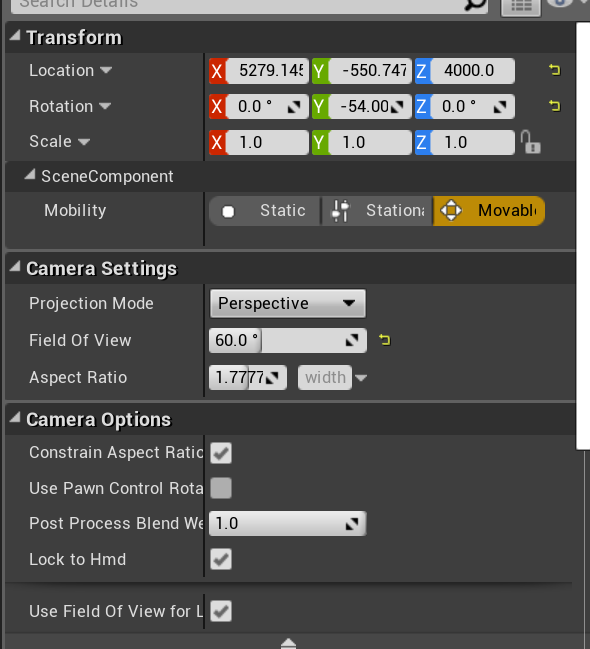


 wary wave
physics can also be quite unpredictable
bronze cedar
the only tutorial about breakout game in UE4
bronze cedar
i am new in UE4 that's why i don't know much about UE4, before i was using a 2D game engine and now I am in UE4
grand knot
yep hes using impulse
bronze cedar
the thing i am stuck in is , when i hit ball with paddle corner it's speed increased, yes physics is kinda unpredictable
wary wave
so it is using physics?
bronze cedar
yes physics material
wary wave
aha, yeah, I see it now
bronze cedar
with i mean, so i think it's physics
grand knot
yep
wary wave
it's probably not a great example to follow tbh
bronze cedar
yes but it's the only tutorial in UE4 😦
grand knot
its actually not bad sisnce hes running it in a 3d enviroment
but yeh i still wouldnt go down that road
wary wave
it'll work, but I wouldn't do it, haha
bronze cedar
i can't find anything else, i was thinking if i can even get a website or PDF file tutorial it will be good
yeah i want to do it as a 3D environment because there is lots and lots of things to do that's why
grand knot
have it run on overlap events on each object
wary wave
Unreal Engine Forums
This is the place to show, share, and link to your stuff!
grand knot
so your character object and the bricks themselves
wary wave
very outdated now, but still
grand knot
then get current rotaiton along with the forwards vector and have it change on overlap
bronze cedar
yes thx for the help
grand knot
wish u the best of luck bud 😃
wary wave
tbh, this kind of game if you take it step-by-step, you shouldn't need a tutorial
bronze cedar
there is a game on android called ancient bricks, i really like that game, and that's why i want to make that kind of game, i mean with physics and kinda 3D
wary wave
just try a quick google when you get stuck on something instead
bronze cedar
yep i always google before asking haha , but i don't know why i don't get
bronze cedar
one more thing, how to make ball run on a constant speed, i mean so that it don't slow down or get too fast incidentally
wary wave
if you're using physics, you'll have difficulty controlling speed
bronze cedar
so should i go with non physics , i am really very new to UE4 haha , i wonder how i will do that
grand knot
well since u are new
bronze cedar
with 3D environment i can use lights and other things
grand knot
just follow that tutorial
the way he does it is similar he just runs physics with it
like i said get rotation, then flip it and reverse it on overlap
"yes i was singing as i typed that"
wary wave
yeah, when making this kind of game I would disable all the physics engine stuff
and I would manually calculate how far the paddle / ball should move each tick
bronze cedar
ok i will try that than
wary wave
this is quite simple to do
bronze cedar
so ball can move with projectile i think
wary wave
location + (delta seconds * movement speed * direction vector) essentially
bronze cedar
on x and y axis
wary wave
that will give you fairly fine control
then you will want to manually control bounces on event hit
bronze cedar
i am a blueprint guy haha and for me they are also new
wary wave
i.e change velocity based on input velocity and surface normals
grand knot
honestly i was just have it tick on a constant movement
wary wave
if you don't use the built in movement stuff you can add the more advanced controls a bit more easily
for example tweaking the direction of bounce based on paddle movement (yes, the original game did that)
bronze cedar
1 axis means just up
bronze cedar
so when ball hit we have to set the rotation of the ball
grand knot
correct
bronze cedar
oh ok
i will try that
i just made my paddle and ball what UE4 has, that's cube and sphere is that ok or not
just for testing purpose, the guy in the tutorial made them in Blender 3D and imported in UE4
unreal spoke
I'm using the webbrowser widget. It works but the rendered content is too big, like if the web browser screen were like 256x256 pixels. Any way to make the rendered content smaller?
plush yew
Is there a plugin or anything to measure network bandwidth for developing a multiplayer game?
wary wave
^ - also you could start looking at the replication graph tools
 maiden sundial
Uhm, i'm having a small problem.
It's about the brightness. When i start it i have the brightness which i wanna have. But the brightness get's for like ~5 seconds always higher until it reaches the max brightness
wary wave
this is pretty much the most asked question ever
I've seen it three times this week already :/
maiden sundial
Oof, sorry for that then xD
plush yew
@sudden agate @wary wave thanks guys.
wary wave
Epic REALLY needs to disable that eye adaptation by default
vale silo
why do Mobile Preview and SM5 Preview look different (even with the same simple materials and all the post process effects disabled) ? Mobile looks washed out and SM5 look high-contrast with vibrant colors ? How can I make both look the same?
wary wave
they're different renderers, so they will look different
it can be quite difficult to get them to look the same
tends to come down to hand tweakign
grim ore
also depends on which mobile renderer as well so... good luck!
vale silo
renderers don't look different on their own
without any PP and color grading, with simplest materials and baked lighting, ES2 should look almost identical to SM5
fierce tulip
it doesnt
fierce tulip
tonemapper also has some influence, and I cant speak for other engines :/
vale silo
I recall there was a conversation about tonemapper changes that made Sm5 look totally different than mobile
fierce tulip
it does, i had the hardest time trying to get sm5 look the same as high end mobile for a project hehe
vale silo
or maybe it has to do with AutoExposure too ?
just saw something about setting it to Basic should help making preview in SM5 look similar to preview for Android
wary wave
renderers on different hardware actually do look different on their own
fierce tulip
i cant remember the name, but it has to do something with whatever the renderer does.. but cooking so brain going meh. i need food
wary wave
it's not so bad these days, but PC GPUs used to produce noticeably different results
(the same renderer, that is)
different renderers are much more likely to produce noticeably different results
fierce tulip
@wary wave I had a gpu that refused to render semi-solids in the UT days
wary wave
I had two 8800GTs a while back that produced noticeably different results, hehe
fierce tulip
helped a lot during ctf-face
wary wave
same 'card', different manufacturer
fierce tulip
gt 8800, that brings back memories
violet portal
Hey guys, is there anyone here with some experience uploading to steam works? I've got a problem with steam DRM, I've wraped the game exec with their tool, but now the game fails to launch when trying to test it...
vale silo
@fierce tulip maybe this https://answers.unrealengine.com/questions/251077/how-to-turn-off-automatic-exposure-in-ue4-editor.html ?
wary wave
I don't think that option even exists any more
vale silo
🤦
My guess is that something in the Editor is disabled for Mobile preview and I need to disable that for SM5 preview too
wary wave
that is a possibility
maiden sundial
Are there some disadvantage if i use for all static meshes the Use Complex Collision As Simple setting for the collision ?
static viper
the general 2 ones
performance
and the other is interaction
as you can easily get stuck on complex geometry
you should know what you do if using complex
maiden sundial
Alright
bronze cedar
@grand knot and @wary wave thanks for the help, i am still wondering how i can do that, but yes i will find my way, haha, now the mission is to make it without physics 😄 😃
 crisp arrow
I'm moving a project from one version of the engine to another - I've gotten most of the work done - however there's one big task ahead of me. I have a bunch of levels, each with a lot of objects that have variables set per instance. Due to a compatibility issue, all of the values for these variables were wiped out when importing to the new engine. Is there a reasonable way that I could export the values from the old version, and, via some script, import them into the new one? I looked at the umap format, and it's not human-readable, so that makes my initial idea of parsing the files and updating the new ones impossible. Any ideas?
static viper
show the values
like with screenshots is ok
engine settings can be export as well as project settings
but data inside level cant without extra help
how big was the engine jump?
crisp arrow
it was 4.17.2 to 4.20.1
static viper
now show
crisp arrow
the values are simply the constraint values for a lot of mesh instances
https://i.gyazo.com/6ab68f572c57a868496ee33afc1bcfd5.png
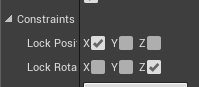
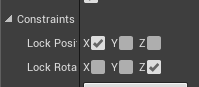
but I have to move them to new, custom variables, since the original constraint values can no longer be changed per instance due to how the project is set up.
static viper
yes its likely those changed
crisp arrow
https://i.gyazo.com/b749abfc216e80a5f013e1a7d948eb63.png
these are the new custom variables I exposed to blueprints, and use with a C++ script
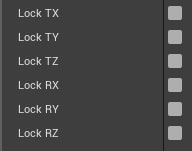
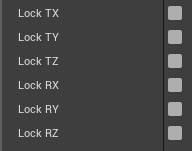 static viper
your jump was pretty large
crisp arrow
like I said, this all works
I'm just looking for the smartest way to automate the conversion
i.e. if the umap files were easy to parse, I'd write a simple command line program to copy the values from the old maps to the new maps
crisp arrow
(I'm assuming the values were wiped out in the new version when I imported them)
static viper
so you upgraded the entire project at once
crisp arrow
yes
static viper
as one would love too
well
close editor
gra map files from 17
put into 20
that way a serialized editor can look at it
where everything is loaded
that way it should be able to ready the values
its a bit weird yes
crisp arrow
like I said though, these values can no longer be set per-instance in the new version
crisp arrow
so I need to move them to my new, custom variables
static viper
well then it cant be helped
crisp arrow
which can be set per instance
static viper
i mean you could create 2 plugins
one reads the data and exports it
one creates custom variables
XD