#ue4-general
1 messages · Page 370 of 1
 grim ore
do you have the games checkbox in settings checked? or uh.. unchecked I guess would be the right one you want lol
 marble kayak

Raising funds for the completion of concept art for the Escape from Mill Station game project.
grim ore
anyways you have to go to the store, then scroll AAAAAAALL the way down to the mod editors section
 plush yew
Is this in the settings menu?
grim ore
in setings you have "hide game library"
if that is checked it hides the store which now has the mod editors
if its not checked you should have STORE as a menu option and you have to scroll thru all the store to the bottom
plush yew
Oh so the modding section is in the store page
grim ore
yep or you can find it in the library if you ever used them
grim ore
the launcher is a terrible design choice? You don't say 😉
 fierce tulip
lol
i do hope they give the launcher (along with the mp) a massive overhaul this year
grim ore
you know you would think we could get the store page to run at a smooth 60fps so when I scroll there was no tearing
plush yew
Wish I could just click the Unreal Engine button and anything not related to UE development (i.e the store) could just go away
A developer mode of sorts
grim ore
I wouldn't be surprised if we got some more launcher changes this year seeing as how the new launcher is in beta.
fierce tulip
thats on everyone and their mother's wishlist :p
grim ore
well you can if you hide the game library but it hides the mod editors as well which I never understood
I even had to point that out in the intro to the launcher video as it's super backwards
so I take back what I said... I don't think the new launcher is in beta anymore, I can't seem to opt out 😦
 modern sinew
Can someone help me get Visual Studio to work?
The tutorial has inconsistencies with what happens on my end
grim ore
did it explode? exploding is bad.
modern sinew
The tutorial showed code when he opened the UProject in Visual Studio yet none is showing up when I do so
grim ore
well he might have had the solution file opened before which would return the last open file
when you open it in VS it should show your project on the right and all the code files in there
grim ore
I can't DM but we can try and help in here if stuff is still not working right.
 fleet needle
How can I get a key interaction to work in a BP other than the player character BP, if I add a BP for inputaction -> print string in PC it works, but if I put it anywhere else it won't register, guessing I need to reference the PC somehow?
grim ore
nope
you can tell the blueprint to accept input automatically, or you can tell the node to take input
or I guess you could pass the input from the player controller to that actor sure
modern sinew
I’m trying to get Visual Studio to work tho
 vernal surge
i could use some help with physx vehicles and a header file issue
fleet needle
yooooo @grim ore it worked, thanks heaps 😃
grim ore
yay
fleet needle
sometimes just need to know the right thing to google haha
grim ore
"how to make MMO" always returns the best results.
vernal surge
it tells me I need to include a .generated.h file to my header, which is inconsistent with a tutorial on changing wheels at runtime
grim ore
when you open the project in VS file @modern sinew does it not open your solution file and load the files?
modern sinew
@grim ore No code shows up
grim ore
screenshot what is showing up?
oh yeah and how are you opening it up I guess would be a good question
modern sinew
By double-clicking on the .sln file
And I’ll get a screenshot when my dad gets off the computer
In like 2 days I’m going back to college and don’t have to deal with sharing a computer
grim ore
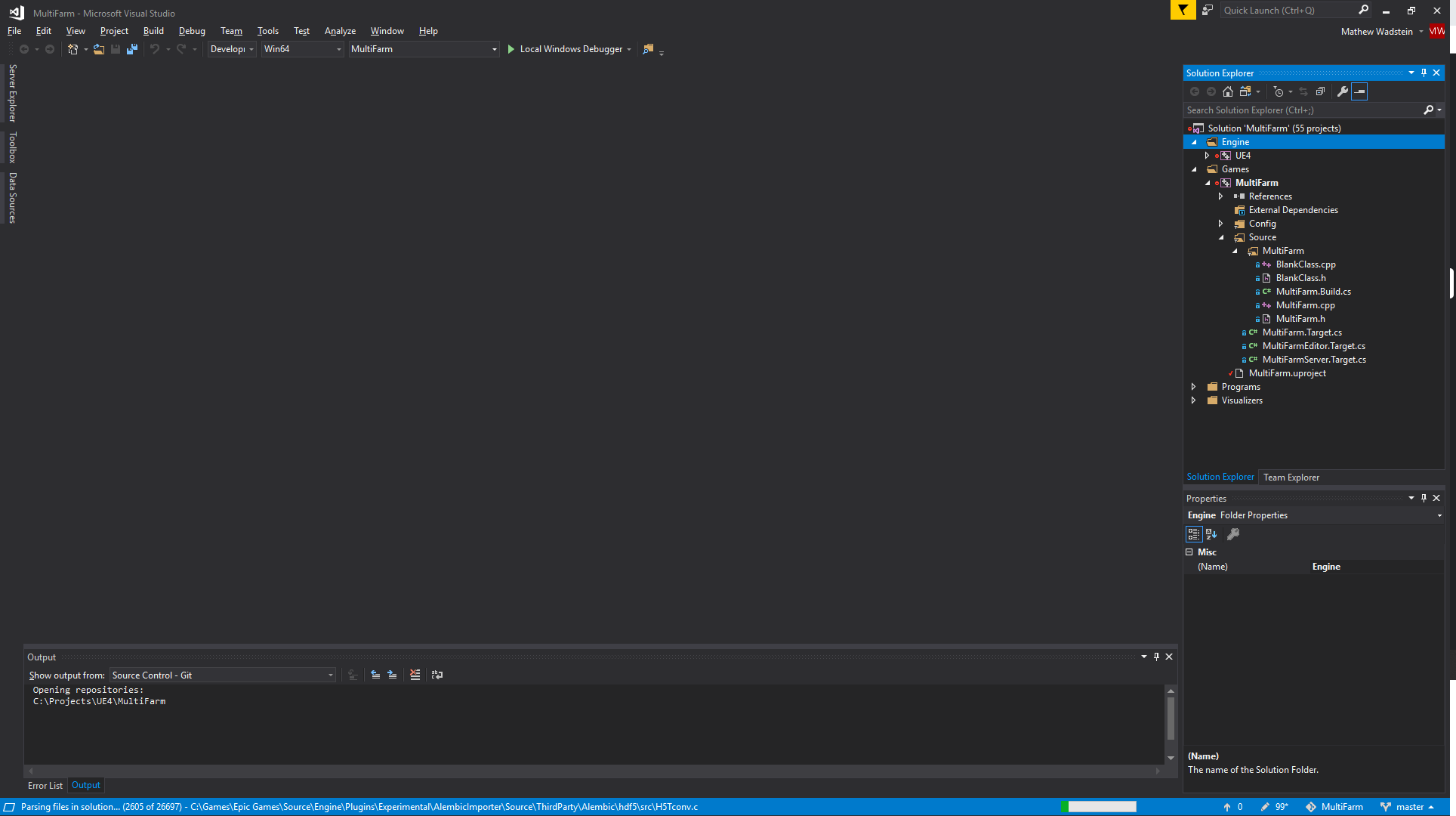
yeah weird it should show up something like this https://i.imgur.com/4e7YH8N.png , you can see i expanded the project (MultiFarm) to show my code files
 modern sinew
That’s what’s showing up. No code tho
grim ore
yeah you would have to open one of the code files (.h/.cpp) to show the code.
this is the problem with following some tutorials where they prepare in advance, the viewer can get out of sync with the presenter.
modern sinew
how do I open one
grim ore
learning C++ raw without any experience with another language is a paaaaaaaaaaaain
modern sinew
I know Java
grim ore
just double click on it, so like on the right I would double click to open one
doesn't eclipse or the other IDE's use a similar approach tho? folder view for the project and each file in that list
grim ore
oof, is it just not on your list?
grim ore
which 2? I see the FPSProjectile.cpp file open
modern sinew
there's 2 names at the top tho, right below that?
modern sinew
ohhh
ok I opened it, but it shows different stuff
wait nvm
it's just different colors
thanks
grim ore
yeah he might have something like Visual Assist or another theme
modern sinew
he does
but it said it was a limited-time free trial
I don't want to get used to something just for it to be taken away
modern sinew
like what?
grim ore
intellisense, the thingy that tells you the signatures for functions and comments and help for them, tends to just not work at all in the UE4 codebase
so you end up with auto complete not working at all which just sucks when working in code
 dry wraith
anyone here use arch linux that could help me?
fleet needle
How can I smoothly rotate an object? SetRelativeRotation does it in one movement 😃
 sonic pagoda
@fleet needle you can use a timeline
fleet needle
cheers mate, let me look into it 😃
sonic pagoda
right click, Add timeline
then make a float track
you can also use the timeline to drive a RInterpTo
i have a vector array that stores locations that the ai pawn can hit the player from, and im trying to compare that array with the ai pawn location so that he will move to the one closest to him
how would 1 approach this ?
never mind
i kinda figured i could just add the distance when i am running the line trace (to find spots to fire at the player from) to a separate array and use the same index
and use that
fleet needle
cheers @sonic pagoda I managed to get something working 😄
sonic pagoda
awesome man!
 upper wasp
I got this issue where when I pause my game, and unpause it. The UI I have disappears
 foggy spear
hey everyone, uhm, is there a particular channel i need to post for troubleshooting help or can i just send it in here?
 mental shale
for some reason, the camera in my scene keeps changing based on where it is in the viewport before I press play
even though I have the camera attached with a spring arm to my pawn
as you can see here, the viewport changes the in-game camera
anyone know why?
do cameras behave weird with pawns vs characters or something?
foggy spear
right, so, i recently downloaded WaveWorks branch of the NvPhysX fork of Unreal Engine i followed all the steps, extracted it, ran setup.bat, then ran GenerateProjectFiles.bat then opened UE4.sln in visual studio, built UE4 and then built ShaderCompileWorker, once done i tried debugging it or opening the editor manually from within the downloaded files but it just opens the default project selector that i get when i open ue4 from the epic games launcher, i can't see any example/sample projects and when i make a new project there's no sign of waveworks in there at all, i don't know if anyone is familiar with this kind of issue but any help would be very appreciated, i'll probably post this question on the forum too in a bit...
please @me if anyone can help
fleet needle
hey all, whats the best way to go about attaching a text overlay to an object to say for example "Use E to interact"
 calm portal
@fleet needle Add a text component in the blueprint, set it to say "Use E to interact", Hide it by default and make it visible when player overlaps a larger collision box
fleet needle
wicked thanks, keep finding HUD still on google 😃
Is it easy to make the text rotate to wherever the player is? I'll have a go now
calm portal
No worries, that method will make text floating above the object but if you want it to come up flat in the HUD I havent done it before
Ah yeah, shouldnt be too hard. Maybe get the look at rotation from the text to the player and use that to set the position. Might be inefficient to do it every tick but if you set it when the player initially overlaps that should make it clear to the player
fleet needle
Alright cheers mate, I'll let you know how I get on 😃
calm portal
Alright cool! 😃
Posted this to level design but not entirely sure it's the right place: I am struggling to figure out the best way to set up precomputed lighting scenarios and level streaming in my game. I have 3 maps that are switched between often at runtime. They all share the same basic house walls, floor, roof etc. but with different prebuilt lighting scenarios and some differences in smaller meshes. It needs to be playable, atm I have the core house as one level and load additional elements on top but this is restrictive with baked lighting. Does anyone have any ideas? Thanks!
upper wasp
I have a problem when pausing and unpausing my menu, my UI disappears
fleet needle
@calm portal ayye, this works well for the rotation, need to make a few changes so only does event tick when nearby etc but works well great start cheers mate
 velvet finch
when it comes to job prospects regarding developing on UE4
is there a market for someone just adept in BPs?
calm portal
Awesome! glad it's working
velvet finch
or is it expected for anyone seeking work to know C+
calm portal
@velvet finch I think it would depend on the job
I got into unreal engine as someone working at a visual effects studio for movies. The emphasis there is on movies and visual experiences so Blueprints was more than enough to do cool prototypes and pitches. Being able to quickly iterate on cool looking stuff to show creative leads was more valuable than complicated coding. And if a concept was approved they would just hire on other coders.
But I imagine if you want to be a programmer at a mid to large studio then C++ is probably a much more important thing
velvet finch
ah i see that's good to know!
i'm looking to learn how to develop realistic weather systems in UE4
calm portal
Oh, awesome, that sounds cool! Check this out if you haven't seen it already, kinda related; https://www.unrealengine.com/en-US/spotlights/floods-and-fires-how-the-weather-channel-uses-unreal-engine-to-keep-you-safe

Unreal Engine
The Weather Channel continues to break new ground with immersive mixed-reality segments on storm surge and wildfires. Find out how TWC aims to keep you safe, with help from Unreal Engine.
velvet finch
oh i've seen that one
calm portal
Thats more visually impressive than simulation focussed
I think they would have used houdini for the cool looking stuff
Are you interested in something that looks cool or something that is more of a simulation?
velvet finch
more of a simulation at least for now
calm portal
Like a set simulation or one that you can change variables at runtime?
velvet finch
houdini seems like a whole new monster to learn haha
i'd say the variables change at runtime
but not directly controlled by the player
just a natural moving weather system
with day and night cycle
calm portal
Yeah learning houdini is hard for most people but it is so powerful. Sounds like it's not necessary for what you want but you can check out the unreal integration. Off the top of my head it could possibly help create dynamic cloud meshes etc.
Have you seen that unreal livestream where they show off fortnites day night system?
velvet finch
nope
calm portal
check this out maybe it could be helpful

Have questions about setting up lighting in your environment? This is the stream for you! Anton and Jordan will cover different lighting techniques, includin...
velvet finch
alrighty thx for the share dubbs
calm portal
the premise from memory is them creating nice looking waypoints with the variables and then blending between them
No worries, good luck with it!
velvet finch
yups
think for now houdini does offer a lot of options for me but the learning curve is pretty steep
i can handle most of my needs with maya for this period of time but
i might have to look into other options if i'm going to do extreme weather conditions like hurricanes i reckon
mental shale
yo, anyone know why I cant change these settings inside PP Volume?
(sorry for interrupting btw)
calm portal
Yeah for sure man, getting that stuff looking AAA is so hard. I worked on this trailer last year: https://youtu.be/oZzhVx1DNBI There were at least 6 artists at just my studio working for months on all the hurricane, shit flying around, fire stuff. Even the dust and muzzle flashes took me weeks to do. Good effects take a lot of time. Check out Niagra though, it looks to be a similar premise to houdini but inside unreal. Really powerful looking stuff

Pre-order the Gold Edition of Just Cause 4 NOW! http://justcause.com/buy-now Just Cause 4 introduces a new adrenaline-fuelled chapter for rogue agent Rico Ro...
velvet finch
nice! amazing stuff!
calm portal
Just for the trailer, the assets we used were too high poly etc. for the game
 calm portal
@mental shale Thats real weird man. You aren't simulating or something silly? Looks like its being overriden somewhere. Maybe try adjusting those settings on the actual camera if there is one. I've only changed that kind of stuff on cinecameras using sequencer
 bitter iris
How would I measure in meters? I want to make a quick gun range to test guns
10m, 20m, 50m, 100m etc
calm portal
@bitter iris one unreal unit is once centimeter
plush yew
hmm alrighty
they should just use a bsp system like sabrecsg (its a free unity asset)
and just leave that as there bsp editor
cause the current one is garbage
 sinful mesa

Unreal Engine
Epic Games and Improbable would like to jointly reaffirm our commitment to giving game developers the best combination of engine and other technology backed by interoperable standards that work for everyone, while respecting developers’ ability to choose partners and softwa...
Heh
 coarse wigeon
They really are
plush yew
ay squarepeg
coarse wigeon
ayyy @plush yew
plush yew
didnt know u were on this server
coarse wigeon
I am everywhere 😄
plush yew
i guess you are 😂
 next badger
https://docs.unrealengine.com/en-us/Gameplay/Localization/Setup - is this link locked?
 thick herald
Hi there folks! I'm a new around here. waves
 abstract relic
@next badger it’s empty. You’re not crazy 😜
next badger
@abstract relic it's not empty
abstract relic
There’s not much to see
 manic pawn
does indeed seem to be locked

 safe rose
In other news

IGN
Epic Games has received an “F” rating from the Better Business Bureau for unanswered customer complaints.
Epic Games = F

 next badger
@safe rose F for Fortnite
thick herald
Hey folks, not sure if this is the right place to ask for some advice?
next badger
@thick herald if it's ue4 related and don't fit any other channel - sure
thick herald
To be honest am not sure what the problem is (with my ue project) I can describe what I'm expecting happen and what actually is happening. But I'm at a loss as to why.
I was following a tutorial on setting up localised fog. All was going well, I even managed to improve on it a bit. Then I did something. I have no idea, but I must have. Because now, even though I've restarted from scratch twice now it's not doing what I expect.
I'm using a particle emitter cylinder and an exponential height fog. I should be seeing a nice stable round blob of fog. What I'm getting is a mess
next badger
@thick herald i believe you would need to provide screenshots at least, also visual effects - #visual-fx
next badger
video is better
thick herald
Made a request there, as you suggested 😃
mental shale
does anyone happen to recognize this error by chance?
wait
I think I may have found it
it was a custom Icon I was using for the game
modern sinew
So I get this error when trying to run code from Visual studio, what's going on?
next badger
@modern sinew What it says?
modern sinew
But how do I fix it I mean
next badger
@modern sinew i'm not even sure why it referencing this file...it shouldn't exist
modern sinew
I didn't touch any settings tho, and I don't know how ti fix it
I'm just following along with a tutorial, and they didn't run into this problem
next badger
@modern sinew you're using vanilla ue4 from the launcher?
next badger
no, i mean, what ue4 engine do you use
modern sinew
4.21?
next badger
you asking me?
next badger
you've generated the c++ project with it?
modern sinew
yep
next badger
which one?
modern sinew
wym "Which one"
modern sinew
When? Where?
next badger
@modern sinew i'm not sure what tutorial you following but probably it is misleading
modern sinew

Learn to make games in Unreal Engine 4 C++ today with Tom Looman in this step-by-step video! In this intro to C++ tutorial I will quickly take you through th...
@next badger
next badger
@modern sinew oh, you're using downloaded project?
modern sinew
yea
next badger
you've generated the c++ project with it? then answer should be - NO
next badger
@modern sinew yeah, but the project you've downloaded is for 4.20
you need to switch its version and you may face some other issues
modern sinew
But this tutorial has only been out since September >_<
next badger
it uses Tom Looman's project
modern sinew
and?
modern sinew
So how do I fix it?
modern sinew
got the same error
next badger
you've rebuilt the project?
modern sinew
yep
next badger
@modern sinew show the output log
modern sinew
the output panel?
next badger
yes, the VS output log
well, i have to go...you may ask on #cpp since it's c++ related question
modern sinew
ok
plush yew
I had same error, but fixed it. You need to upgrade your VS
then rebuild project files
 crisp fable
anyone know how i'd include third party assemblies for use in my Build.cs file/s?
 sleek hearth
how can I light the room inside with the light from outside? the light doesn't seem to enter through the window
 whole quarry
Build lighting, add skylight
whole quarry
Boost the sky light
calm portal
@sleek hearth Not sure your knowledge level so forgive me if this is basic. Unreal uses static or Dynamic lighting. If you want light to bounce around that room with a natural look you will need to build your lighting. To improve the quality you can place light portals over the windows which will focus the computation on those areas.
If the image above is with built lighting go to world settings and increase Num Skylight Bounces.
 languid shard
may I redirect you to https://docs.unrealengine.com/en-us/Engine/Rendering/LightingAndShadows then @sleek hearth
sleek hearth
I increased the Num Skylight Bounces, but it doesn't seem to change anything
alright, I'm gonna take a look
thanks ! @languid shard
 sudden agate
@sleek hearth If your environment is dark (i.e. your interior) there is not much light to bounce around.
If you want to increase the amount of light bouncing off of surfaces, your need to increase the Diffuse Boost of your Material, in your Static Meshes or in the Lightmass World Settings
 soft crescent
huh so apparently you can use the unfinished mesh editor in the live ue4 releases
just in the console type MeshEditor.Enable and it's there
Are they still working on it? Or is it dead?
 queen path
it's listed under future releases on their trello roadmap so they're probably still working on it
 dim arch
so uh, I tried cooking my content and it gave me an error
saying that my .ini configuration was borked
I had to rename [/Script/Engine.RecastNavMesh] to [/Script/NavigationSystem.RecastNavMesh]
it cooked, but now the navmesh wont generate
deleted the ini and it fixed it ;/
 prisma ridge
Hi so I'm trying to make an interactive product demo. Using the product viewer template. Very simple interactions like you press the R key and a railing opens and closes. What I did for this is made the opening/closing animation in a level sequence and bound that to the r key in the level bp. I'm wondering if there's a better way to do this. Because right now what it does is it plays the whole animation from start to finish with one click. What I'd like to do is press r once to open and then r again to close. Or even better click on the railing to open if it closed and close if its open.
Any help is appreciated thanks.
The railing is just an example there's a bunch of components that id like to make interactive that do a specific thing when you click on them
Like what nodes should i look up stuff to get me started
 unreal spoke
Got 3 material functions, I want to use them based on a texture (I'm using black for the first, grey for the second and white for the third). What's the best approach? I'm trying to use material attributes with the material functions, so I can work easily in each material function but I'm not sure how to blend all together. Ideas?
dim arch
@prisma ridge you can make the railing into its own blueprint
when its clicked play a timeline which controls the animation
fierce tulip
wake up, read the epic games & improbable thing..
hehe
 sweet finch
Don't forget Crytek getting in there too! haha
 earnest cape
So I can't seem to find a way to save arrays. They just access none.
 boreal shadow
guys, what is the proper way of importing alpha brushes? im using a heightmap that ive made in world machine, but when i select it in ue4, it switches back to the default alpha texture
earnest cape
That's my save bp
This is how I'm saving
The other variables work fine
actually I just found a tutorial https://www.youtube.com/watch?v=MLqypbTyZG8

This is quite a specific tutorial but the applications really are endless. Wanting to save the location of multiple objects within a world? Look no further. ...
hopefully it works
prisma ridge
@dim arch thanks lol coincidentally i juuust found out about timelines so I'll look into that
 left citrus
Does importing Skeletal alembics into unreal take ages on all versions or is it just 4.19 and 4.20 that it's so slow on?
 light lark
@flint oxide hello 👺
 grand knot
So I have heard, and anoyying price
 graceful sky
Got the old G501 from Asus
love it,
but the fans are killing it...
constant fan noise
grand knot
I got the GS63VR with the 6gb 1060
But I just hate MSI quality
So after wanting a Razer all my life I think it's the right time
graceful sky
Didnt know Razer = =Quality 😛
grand knot
Well the build itself is quality
The way they execute it
...
Could be better
So far my old work XPS 15 has been the best quality laptop I have owned
Very solid machine
languid shard
that razer laptop from earlier, its the new blade ?
languid shard
2080Qmax ?
languid shard
QMAX != 2080 though
grand knot
Yeh
grand knot
Yeh as long as thermals are nice
graceful sky
like 80% of the perf, isnt it ?
languid shard
somewhere along these values yeah
grand knot
Still amazing for a laptop
languid shard
still more powerful than a 1080
languid shard
but damn its powerful
grand knot
Lol
languid shard
120hz 1440p screen
grand knot
Yeh so you're also thinking of going down the Razer road ?
languid shard
nah
languid shard
first models
grand knot
I mean 1440 120mhz would be perfect
languid shard
next will surely have 1440p
grand knot
Nah the next models are the same
graceful sky
But on a laptop ?
grand knot
They have been announced
languid shard
on a 17" its alright
grand knot
The next model is coming late March
languid shard
lower size though, questionable
grand knot
It's a 240mhz 1080p display
languid shard
hz*
grand knot
And a 4k oldest
graceful sky
I feel thats abit excessive for UE4 work 😛
grand knot
Sorry autocorrects
graceful sky
240Hz monitor
graceful sky
1080p sucks to work on after getting used to 3440x1440
grand knot
Dunno why there isn't a 2080 4k pannel option 🤷
And I'm not waiting for oled due to it going to cost a kidney more and burn in
graceful sky
its the cheap one if you get away with just paying 1 kidney lol
graceful sky
Quality over Quanity
plush yew
I need a idea for a jumpscare
grand knot
Once U go down full 100 RGB with a high brightness nit screen it's actually really good even at 1080
I need that 4k model because it just looks more quality lol
Can't stand the plastic bazeps on the 1080p model
Need that glass
languid shard
I'm using a triple 1080p screen setup at work
plush yew
Me too
languid shard
lemme tell you, I'd trade that for a single 1440p 120+hz any day
grand knot
Same haha
languid shard
I'm much more comfortable at home on my 27"
graceful sky
I had 3x 1440 screens at work
grand knot
Would you trade it in for a 4k 60hz screen?
languid shard
if its bigger than 27" yeah probably
had my eyes on a IIYAMA 4k screen a few years ago
grand knot
Nice
languid shard
TV sized
grand knot
So U guys think it's a better idea for me to go for a 4k 2070 Razer rather than the 2080 1080p 144hz model?
languid shard
shits too big to go on the screen supports I have at home though
4k is too big on a 15" laptop
languid shard
even for UE4 dev
graceful sky
4k for the price of 2k suggest that quality drops
grand knot
The 4k model is the same price as the model with the 2080
languid shard
I'd rather get a lower res screen and a beefier GPU
grand knot
Yeh I guess you're right
languid shard
you can plug a 4k screen later if you want
graceful sky
a separate screen will almost always be better, won't it ?
languid shard
- laptop screens arent really good for art
grand knot
Though if the 2080 isn't more than 20 percent faster than the 2070 I'll go 4k
languid shard
yeah
languid shard
not the QMAX
grand knot
Ewww Asus
graceful sky
I'll admit they've dropped in quality
grand knot
Compared to that nice glass
graceful sky
ah screen is plastic yes
grand knot
graceful sky
everything feels like butter/plastic tho. its just so thin.
Is that actual glass?
i can only imagine that breaking..
unreal spoke
Using "move to Location" is there a way to add acceleration and deceleration?
grand knot
Okay what about this
U guys rekon the 9th gen CPUs will be any good or just to pull the trigger on the 8th gen model
9th gen won't have hyperthresding
But will have 8 cores
languid shard
¯_(ツ)_/¯
graceful sky
knowing intel, there will be like a 5% improvement per generation
grand knot
Wasn't the junp 30% from 7th to 8th Feb
Gen*
And the 9th gen is going to run on a 10mm architecture
So idk 🤷
grand knot
We where more discussing on what would be better for running ue4
plush yew
This chat is unreal
 merry gazelle
Any idea what's causing my Hierarchical instanced meshes to pop in/out (flicker)? I'm pretty sure it''s related to culling but all the meshes are set to start culling at 999999
The BP works fine unless it's spawned in game
 light thunder
This should always be WORLD location right?
 wary wave
yes
light thunder
What am I doing wrong here? I'm simply trying to linetrace and set the location of an actor to a 2D location (like moving pictures on a wall) Since line trace component returns a hit locatoin, shouldn't I be able to move the item on that? but contstrain the movement on one or more axis?
@wary wave Do I need to subract some of the hit location? Weird, glicthy things are happening and the valve is disappearing but when check location it's not at 0,0,0 or anything
actually it is at zero zero
it partially works, but as I move down the panel, it disappears into it or comes out to much...even though I am constraining that movement access....obviously I have to find a way to normalize that angle ...any ideas how?
plush yew
Any way of checking whats the node that crashes?
light thunder
next badger
@plush yew yes, it's called debug, you set the breakpoint and then using step to get to crash
light thunder
@plush yew check your crash log or just put in breaks and work backwards until it doesn't crash
plush yew
great game that
light thunder
How would I take the current location of an actor in the world and make sure that something is perpendicular to it? In the screen shot above, those valves are being moved for customization along the 2D axis...but I haven't set up some control to allow for the difference in world angle of the panel, so as you approach the end of it, the valve disappears or comes out to far
 tired island
hey, small question, has anyone tried Xenko? if so it is worth the trial of making a game with it?
seems tempting but dunno if it an horrible software or it is decent
 static viper
watch youtube videos aboutt it
thick herald
Seems some people like it. Give it a go if it has what you need.
light thunder
@plush marsh but how would impact normal work for angles?
light thunder
In terms of making so the actor I am moving stays perpendicular?
light thunder
That and a function that makes a valve perpendicular ,something to do with getting right vector?
 plush marsh
well, i would get a forward vector
ok, i don't know how you are doing it but there is a function to look at in c++ UKismetMathLibrary::FindLookAtRotation(Origin, Target)
maybe it is in blueprint too
so, basically your perpendicularity is a look at
as i understand
without this function , you can do trace, dot ( forwardVector,impact normal), get angle and add it to rotation of what you want to be perpendicular
light thunder
Hmm, that sounds like it would work
But here's what I don't get ,if I am getting the location, and only moving the actor along only two axis, then why is it moving out of alignment, unless the valve wasn't completely perpendicular when it started? I used a placeholder asset to spawn it but I guess the rotation could be off ,even half a degree would affect things very quickly
 ruby robin
Guys, how do I speed up shader compiling? It was pretty fast before couple of updates, but now each change make me to wait like 20 seconds. Now I've made small change to some material and it compiles 2k shaders Oo
plush yew
RAINBOW SIX SIEG
ruby robin
It is one material, removed all textures and make simple color. 2k shaders, wtf..
 stoic cobalt
yo is there any way to make certain meshes not clip trough other meshes? like the viewmodel in csgo, if u get really close to the wall the weapon doesnt go into the wall
grim ore
It's possible you re recompiling for other platform support, opengl es 3.1 or SM4 or metal for example and that is the issue.
or you are changing a master material and it has to recompile the children
ruby robin
@grim ore No children, just one simple material with 3 textures
Even if I remove unused nodes, it compiles 50 shaders -_-
It was much faster before 4.21
And almost instant like 5 or 6 versions ago
grim ore
is it possible it's trying to compile for other platforms at the same time?
My experience so far with 4.21 and before has been no change 😦
ruby robin
Maybe, but how do I disable it?
grim ore
well did you ever enable other platforms? if not that should not be it.
other alternatives is the cache might not be working correctly so it has to recompile every time. alternately your material usage section might be borked and resetting it might fix it (but if you are doing this on a new material and just saving/compiling causes this then it's probably not that)
I would say nuking your DDC folder and letting UE4 rebuild it might be a good start
ruby robin
Yes, I did enable other platforms, and switched to rendering model
grim ore
that would probably cause it then. The engine has to compile all permutations of the material

Medium
Reducing shader permutations to make testing and iteration faster!
ruby robin
Thx
stoic cobalt
so does anyone know is there any way to make certain meshes not clip trough other meshes? like the viewmodel in csgo, if u get really close to the wall the weapon doesnt go into the wall, i tried googling and stuff but couldnt find a proper solution
grand knot
Ik skeleton set up maybe ?
Or just use a complex physics set up
Someone please remove that guys video
@wary wave sorry to bother but can you please remove that guys video
 upper heart
👀
static viper
i missed it :c
upper heart

whole quarry
what happend? :E
graceful sky
I almost expected s3x ads like any other server
Some streamers got no limits on how they get viewers
wary wave
ta!
light thunder
@graceful sky lol, just make a bunch of actors and widgets in unreal that show the links and ask to describe, then ask unreal related questions, "How can I scale this actor using blah blah blah" ....it's brilliant and undetectable
graceful sky
Haha. Dodges the mods 😂
light thunder
They suspect nothing...
graceful sky
Did you get the curve working btw?
light thunder
lol, hey guys, I have a 3D widget named "Win FREE IPAD @Ipadscam.com", but it keeps returning none, what am I doing wrong? (then never responds)
yes and no
I was overthinking fluid hydraulics
So, the way fire nozzles actually work is they function like a relief valve
So it is literally an engineer relief value designed to "release/relieve" a certain GPM of water given a range of pressure
so you can actually think of the friction loss as static, given that, because the nozzle is rated for that pressure
once I realized that, I could use the curves more reliably since I'm not using any iterations on it, just a single one
 flint oxide
@light lark AAAAAAAAA
light lark
bbbbbbbbbbbb
grand knot
And put the video under a adfly link
sleek hearth
If I'd like to develop games for android, do I have acces to the play store api using ue4?
or is there any special way to put ads in your application
?
upper heart
Does anyone know how to make the splash screen stay until the game has finished initializing? Mine only pops up for a second and then disappears and I get the black screen for a bit while it loads.
static viper
the first splash screen is engine initialize
the content is only loaded after that
but i think it is changeable in c++
its sorta epics decision todo it that way
the first thing it usually does is applying settings
like screen res
and fullscreen
and then it opens the level
plush marsh
@stoic cobalt try spring. I saw something similar yesterday in wip, but it is gone
plush marsh
well, first of all no-clipping = proper collision. But i assume you want to move hand with the gun away from wall when you are close. This could be done with spring-arm
component
 maiden sundial
Uhm, i need some help 😅
In the editor i puted the game view out and i accidentally closed it.
How can i get it back ?
maiden sundial
Thx 😃
plush marsh
then you need to have proper collision
stoic cobalt
so a collision will prevent my mesh from clipping through wall?
plush marsh
yes
 jolly nest
Hello, i cant seem to get unreal to recognize Visual Studio 2019
these are the only ones that show
 cloud cobalt
Does UE4 support it yet ?
light thunder
well crap, that didn't work
plush marsh
@stoic cobalt https://docs.unrealengine.com/en-us/Engine/Physics/Collision Start with overview
jolly nest
oh, so they dont support it yet
i guess i could try launching it from the snl instead
next badger
Visual Studio 2019 is not even released
jolly nest
no, but its in preview
cloud cobalt
Expect a few months for UE4 to support it
light thunder
Okay, I'm setting up a customizable panel where you can place the valves exactly where you want them....- I just wanted to make sure that this is the right way to do this?
I have an interface call when you linetrace and hit an actor, then that sets an event tick to true that allows you to set the movement ....initially I was probably overthinking it, trying to constrain one of the axis so you could only move it in two directions of the panel, not realize that if I was hitting the panel itself, the linetrace would constrain the impact point axis itself -
This DOES work but I'm just making sure this is the best way to do it and any other good practices - (like a good performant way to not let it overlap other valves, maybe a linetrace first to see if you are colliding with the box collision of another valve actor and then not doing the next line trace (the one pictured here)
plush marsh
@stoic cobalt weapons have their own collision models. So weapons have DynamicBlock and wall has DynamicBlock - result they will block each other
@stoic cobalt from link that i gave you - By setting both of their collision settings to block each other, you get a collision.
 digital anchor
csgo uses forward renderer, it can just render the guns in front of everything else
fierce tulip
@stoic cobalt y u no download UT4 and see how they did it in there?
digital anchor
ue4 is a deferred renderer, it cant do that
stoic cobalt
oh
wait
they did that in ut4
this is what i meant @digital anchor
well sad
cuz ye
if u unlock the camera in first person in csgo
digital anchor
then you have to find alternatives, such as pulling the gun out when colliding with the wall
stoic cobalt
if u go behind some wall u can see the gun
stoic cobalt
yea thats what i did exactly
digital anchor
so whats the problem?
fierce tulip
or faking it with extremely small gun really close to camera, since only player sees that instance of the weapon
stoic cobalt
well
id prefer if the gun would be still if u go close to the wall
instead of animating it
u can download ut4 uproject or what
@fierce tulip
cuz i dont remember exactly
 regal mulch
Yeah can download and play the game
As well as teh editor
Not sure how much of the Blueprints are available but the c++ source code is
stoic cobalt
oh ye
hope its a blueprint or something
cause i dont know shit about coding
ok thanks anyway 😁
i think battalion 1944 also has this
so that when u get close to the wall it doesnt clip the weapon
light thunder
I have a static mesh component added after runtime but I cannot set the material in blueprint for an event?
Can't seem to get the mesh to come up as a component
 rough crest
Why the client is not spawning with the correct pawn? I will send some images here.
1
2
3
Someone can help? Pls
Left: Client (Problem)
 torn wind
Hey guys, I'm doing a directory cleanup and wondering how other developers organize their content folders. Mostly curious about organization of in-game assets. Current Legacy structure looks something like this...
Environments
- Decor - Assets that have no gameplay function (such as trees, rocks, clutter, etc.)
- Props - Assets that have some gameplay function (such as destructibles, chests, doors, etc)
- Skybox - Assets that aren't part of the playable space, but add visual impact (clouds, mountains)
- Terrain - Assets that form the structural core of the level (walls, floors, cliffs, etc.)
Would love to hear what others do.
 pure stratus
@cloud cobalt if the trends continue, we can expect VS 2019 support in 4.22 in about month or so. Otherwise, in 4.23 in about 4 months.
#   Q1|Q2 2019   VS 2019
-   07.11.2018   UE 4.21
-   16.07.2018   UE 4.20
-   14.03.2018   UE 4.19
-   23.10.2017   UE 4.18
-   07.08.2017   UE 4.17
-   24.05.2017   UE 4.16
#   07.03.2017   VS 2017
+   15.02.2017   UE 4.15: Support VS 2017
-   15.11.2016   UE 4.14
-   01.09.2016   UE 4.13
-   01.06.2016   UE 4.12
-   31.03.2016   UE 4.11
+   11.11.2015   UE 4.10: Support VS 2015
-   31.08.2015   UE 4.9
#   20.07.2015   VS 2015
-   08.06.2015   UE 4.8
-   24.02.2015   UE 4.7
I'd like to get std::source_location so much.
light thunder
Need a trick here - I need to ignore a line trace on a Panel (like a wall) because I'm using the impact point to drive movement of objects I'm placing on the wall (and the Panel stops the linetrace from going through)....but I'm trying to change the items that are hit that are on the panel, and the panel itself is blocking them like it's in front of them...any ideas?
 stuck sky
Is there a hotkey to give focus to the main PIE window so that I don't have to click on it which will trigger my breakpoint in VS? 😅
grim ore
make the panel's collision ignore visibility for the channel if you never intend on using a line trace against the panel itself. If that won't work make the item you are moving when you are moving it temporarily ignore collision so it doesn't stop the trace. alternately make a new collision preset for the panel so it will ignore the trace when you trace against the wall to move it.
 mint jolt
Hello everyone, I have an issue concerning foliage distance view and I wanted to see if anyone could help me with this. My foliage is disappearing when I'm in a certain distance, I want it to be visible from far away because I'm working on a large landscape. Any clues ?
video.mov
881.59 KB
grim ore
Unreal Engine Forums
For discussions about Materials, Textures, Lighting, Particle Systems, and Post Process Effects.
light thunder
@grim ore That helps! Now I can't see to change the materials of the primitive components - the line trace is built into the motion controller and I'd prefer not take it apart, is there a way to get all the static meshes from the primitive component, save their materials and then change them?
 glacial pecan
https://cast-soft.com/wysiwyg-lighting-design/ Anyone done anything like this in Unreal? I wonder how to program light patterns on several dozens of lights in a sane way...

CAST Software
light thunder
@glacial pecan You're just toggling states, so if you could find a relationship of how the lights are relative to eachother, you can use that pattern and then have anything else drive it, like audio
glacial pecan
@light thunder hmm... I actually want moving patterns, so I wonder if I could move around invisible trigger actors which toggle states when they collide with the lights....
light thunder
@glacial pecan You could do that, or spawn them and just destroy them on impact, then you just toggle the event that fires the spawn
if you have Two main events that spawn 5 actors each, and you alternate around those 10 total actors, so 5 would be in unison
glacial pecan
I’m going to have about 50/100 imported static meshes with emissive materials... so ideally, I’d make a blueprint actor that flew around the stage looking for proximity to that material and if so, increasing the emissive strength....
light thunder
Why not just loop through an array of them? Is the user supposed to see a flying object?
or is it like dancing christmas lights?
glacial pecan
yes, at some point I want to attach that blueprint actor to a car that’s going to trigger lights as it races past
light thunder
Just use an interface
On the car's actor, add an OnOverlapEvent, drag off hit actor or whatever, and fire the interface
then on the lights themself, call an event of the interface
You can control the proximity by just having an overlap box/sphere on the car and changing it's size on the Car BP
glacial pecan
Can I use a beginplay event that searches the entire level for actors with a certain material and then attaches that interface to them so I won’t have to add anything manually?
light thunder
No, you should only have two actors to worry about, the car and the box
so make an Actor for the Boxlight
add that interface, compile
You can pass in material object references if you want to, or just toggle them on the BP
glacial pecan
As I said, I will have perhaps 100 emissive meshes that the car can pass and light up
light thunder
no, you have 1 Emissive Actor, and 100 instances of it
So if that function exists on the Emissive box actor, it will fire on all of them, but ONLY when the box overlap triggers that specific instance
glacial pecan
The entire arrangement of lights will be imported from 3D studio Max. I don’t want to do anything manually to that import as it might change drastically. The only identifiable unique thing will be the material.
light thunder
Ohhh
I'd have to see that model but while it's not the best way performance wise, this could work for you, something like it
the trick part is it is actual one single actor
You'd have to either make a collision bod for each light
or find a way to equate their relationship on the actor to their material element, because 3dsmax may have no pattern
glacial pecan
Can I make that collision bod a blueprint component (or actor component, I’m uncertain of the correct type here) and in that loop attach it to the static mesh actor with the specific emissive material in beginplay?
light thunder
yes but you need location data
 dry moon
Yee first tweet to 50 likes thanks to unreal 😄
light thunder
can you screenshot a picture
You can make a placeholder collision box that is the exact size and overlay your first material box, then make a loop that spawns a certain one, but it takes the location data of the previous and adds the distance to the next one....think like a type writer
glacial pecan
But certainly there must be a node that gets a list of all staticmesh actors in a level, and from that list, I can check the material of each one, and for the ones with the correct material, get the location and transform data from them?
light thunder
oh yeah
glacial pecan
The collision body can be the same size for them all, as it will probably be significantly larger than the actual light
light thunder
get all actors of class
glacial pecan
In order to light up from the proximity of my triggering actor
light thunder
then select static mesh, then run a loop on that array and get material , then = to start your branch...as long as you only fire it on begin play
wait, you said this import was a single actor
light thunder
screenshot me your window in 3dsmax
glacial pecan
So that sounds great
Thank you
I’m at home now so that will have to wait until Monday 😃
But this was a great informative and fruitful conversation, thank you for all the tips!
I’ve screenshotted it and mailed it to myself 😃
 dark depot
they are now under the store so open the launcher click store and scroll to the bottom
 floral basalt
guys, this is an awesome vault:
Public UE4 Curated Training Resources and Reference, Open for the public to add/modify https://www.reddit.com/r/unrealengine/comments/af0h1v/public_ue4_curated_training_resources_and
Let's upvote it

reddit
2 votes and 0 comments so far on Reddit
floral basalt
check the other sheets
regal mulch
Maybe it's set in the next frame?
light thunder
it never gets set, i'm checking the designer part to make sure but I cna't see why it wouldn't be set unless default is being a jackass?
It's obvious the SetSelected option never actually works and I have no clue as to why
thick herald
evening folks.
upper heart
Does anyone know if it is possible to get the splash screen to stay until the level has finished loading? Right now when I start my game the splash screen shows for a second and then I just get a black screen for a while until the main menu level has loaded. I want to display a video right away (instead of a black screen), but I need to be able to play music at that same time. I can't have the music inside the actual video because I want the music to continue playing at the main menu (after the movie has stopped) and I want this transition to be seamless.
@safe shoal Sorry for the ping but I ran into your tutorial on loading screens and I'm wondering if you have had to do anything like this. https://wiki.unrealengine.com/Loading_Screen
 safe shoal
I haven't done that to be honest, in my case the splash screen fires up then there's a brief period where the starting movies are loaded
To get around the load times we load into a completely blank level until the startup movies complete, then load the actual main menu
means there's a loading screen, but I'm cool with that
upper heart
a loading screen after the startup movie completes?
safe shoal
yeah
that's what i did for sat com
otherwise the startup movies just juddered anyway
 gleaming creek
Are you taking about a loading screen when your game starts, or when you load a level?
upper heart
When my game starts
I want to play a video and a separate music track right when my game starts up. The music track needs to be separate because I want to continue playing it at the main menu (after the startup movie).
safe shoal
For the music I guess you'll have to manage that in the game instance or something, create an FActiveSound directly
gleaming creek
So, like Oblivion does for example, it starts playing a little video while loading but the music continues into the main menu
upper heart
yes exactly
the music is a loop that will play through the startup movie and main menu
gleaming creek
Would the short video then stop once the level is loaded?
upper heart
The video should play until the player presses a button or it ends
It shouldn't stop when the level is loaded tho
 broken stream
good day, i have this black shadows on my bulding that i make to mesh, any one know way ? thanks
gleaming creek
I don't really have any advice for you on the technical side of this, because I've never tried this kind of thing myself
But could you not load a blank level, play the video, and then use the dynamic loading systems to load in the rest of the menu level?
e.g. the same mechanism that gets used for streaming parts of levels
upper heart
That is an interesting thought, that might be worth looking into
gleaming creek
Also, a completely different angle: do you really need a video there?
In most cases, people are going to watch it the first time, and then skip it the rest of the time
safe shoal
Yeah Start-up movies are pretty one-dimensional. Using the media framework might be a better shout
gleaming creek
So why not just have it only play on the first run (or so), and then have a button on the menu to replay it if you want to?
upper heart
Yeah I need it to play the video. Either way I still need the video to play and the music to seamlessly continue on to the main menu
ah so startup movies play while the engine loads up.
But using an empty level for the 1st level should help mitigate that and I could play the video and music from there.
But then I need to either stream in the rest of the main menu or load the main menu level and use bIgnoreForFlushing on the sound.
stoic cobalt
well i looked into ut4 firstperson models and the technique for the clipping looks the same

looks like gun is rendered ontop of everything somehow
upper heart
@stoic cobalt It's at the material level
upper heart
It's more complicated than other engines, so they have to do it at the mat level
stoic cobalt
yea cuz of the deferred rendering right
 marsh swallow
is there a console cmd to hide all static meshes while playing?
 placid arrow
kind of on topic, ish: lets say i release my game and i put it on the epic store, steam, itch.io, gog, and a whole load of other places. they all take a different percentage cut, and out of whats left, for some stores i owe epic games 5% of what remains if ive earned over a threshold, and for others i dont. do i have to manually monitor all those sites and/or build something myself to aggregate all that marketing data together and work out how well my games selling as a whole, or is there some affordable programs that can manage my listings on all these sites and monitor my sales, tell me what total figure i need to put away for when epic send me an invoice?
i need to make sure im putting aside the correctly calculated percentage for epic, basically, right? this is why i ask.
upper heart
Are there any ways to preload a level without level streaming?
dry moon
Why would you need to preload, just to load faster?
upper heart
yes, to load faster to make a transition shorter
upper heart
It's a menu level. But yeah not a travel or anything network related
dry moon
The way I do it is make the initial load when you boot the game into the main menu level but putting often used assets in there so they load there
and then when I transition to the other level, it'll load in between faster
other than that, you'd need level streaming
 high stone
Is there a big difference in UE performance between 16gb and 32gb ram?
dry moon
Not really no, just means you can load up more with more ram
but if you are loading 16GB into memory, you got other issues
high stone
More so I was wondering if it affects the final compile?
cloud cobalt
Not unless you have gigantic textures
dry moon
It'll be the same, final compile mostly uses CPU
high stone
Glad I got that 8700k.
gleaming creek
I haven't seen UE use that much memory, but I have managed to eat up most of my 16GB by running UE4 + other related programs at the same time
grim ore
Kite Demo, Infiltrator demo, getting bored and running 2 editors at once 😛 it can nom nom that memory fast
but hey just opening chrome on top of UE4 will probably eat the other 16GB memory anyways
high stone
That's why you should use Firefox.
I think someone said Brave is even better? But I'm not brave enough to try it.
plush yew
 atlas best game
 peak vigil
Hi, I just failed to cook a project
What is the possible cause for this?

MediaFire
This is my log
 silver crown
@peak vigil Step 1: use pastebin to post your log
grim ore
make your own font, like from scratch, or make your own font by importing a ttf file?
grim ore
oof. You might need something like shoebox or something else to convert that into a bitmap font file but even then 😦 bitmap font
high stone
Bitmaps in 2018?!
 timid panther
Hello
 hard willow
Giant hugs to Unreal for their awesome reaction to the Unity-Improbable thing going on.
high stone
What's up with that? I haven't followed the news. Is Unity doing something dastardly?
mental shale
well, to be fair, they are supposed to look aliased
grim ore
https://forums.unrealengine.com/development-discussion/content-creation/1757-custom-bitmap-fonts is an older post on the basic process
Unreal Engine Forums
Talk about Level Design, Static Meshes, Physics, and more.
hard willow
Idk if this is informative enough buut: https://youtu.be/0b9eGSJBfDs

So the Unity vs Improbable Spatial OS saga continues... in a hilarious way. Epic Games pilled on, by announcing a $25 million fund in partnership with Improb...
silver crown
high stone
This why you honor grandfather clauses. Anyone know if @elfin jacinth is on tonight?
silver crown
Why?
high stone
Grandfather clause means whatever was signed originally, stays in effect for said person(s).
hard willow
It's actually important to my gaming experience because I play "Worlds Adrift" heavily, which uses SpatialOS. However, it helps my Game Dev Club decision making, because I used to put Unity and Unreal on "the same level". It's now going to be Godot vs. Unreal xD
silver crown
Why?
hard willow
I used to be biased against Unity for guesstimated assumption reasons(they just "seemed" to be this way), now I know.
 elfin jacinth
I am on, whats up?
high stone
I sent you a question, dm?
peak vigil

So, I just failed to cook a file.
I mean project
Here's part of my error log, what's going wrong?
plush yew
Is there a place for me to ask for a mentor by chance? I know it's a long shot but doesn't hurt to ask 😉
 cursive dirge
probably a long shot 😄
we have #looking-for-talent I suppose, I dunno if it covers things like these
people on groups like these tend to help you mainly on specific issues you may come across
which is usually fine
as one on one support would just take too much time from individuals
plush yew
I supposed that's true
it's just that I've never used UE4 with C++ before, so I was wanting help with knowing where to code what
cursive dirge
I'd suggest going through the docs intro to ue4 c++ part first, then maybe seek some individual tutorial up or if you feel like exploring already, start implementing something and try to solve issues you face one by one
you can ask help for individual tasks here, for c++ you'd just use #cpp
plush yew
Yeah I just found it as you posted it ^^
cursive dirge
hmmmm, that intro is for 4.9 😄
that's old
there might be small api changes since
its not fundamentally different now tho
plush yew
kk
cursive dirge
briefly scrolled it through, seems fine at first glance to me
most things are still very relevant
plush yew
In all honesty, I thought the only documentation was for visual scripting (aka blueprints) so I was thinking this would be a lot harder than it will be
Well, time to grind through documentation and then start working on an action combat system 😄
cursive dirge
there are docs and some c++ tutorials from epic to get you going
it's actually going to get harder only afterwards when you try to figure out undocumented c++ api side
ue4 wiki also has lots of small code snippets but you need to be more cautious with them as they are community generated content (and many can be really old or just funky in some other ways)
still great resource
plush yew
no idea how many APIs I'll have to deal with in the future
thing is, I've never dealt with a single API before so I could see it causing some issues for me. when it comes to learning them to start with
make atlas 2
oh shit wrong server my b
 heady bridge
I tried doing C++, but basically gave up, I'm not a fan of blueprints, I prefer coding, but gotta do what I gotta do I suppose
plush yew
Well, thing is, my game is going to be large to the point that the code vs. blueprints performance will matter
heady bridge
Yeah I understand that, I wanted to do C++ for performance reasons too, as well as not being able to figure some stuff out in BP's that I know I could do in code lol
plush yew
well, not just that but
I've never done C++, so while it might sound dumb, I might as well learn it while doing UE4 since it'll pose a challenge for me which will keep me entertained, so I'll always want to keep going (learning through conventional means bores me and makes me quit the learning process as a whole)
heady bridge
I learned C++ through making console command games, and then basic rendering engines
cursive dirge
I'd suggest doing some c++ primer first
plush yew
and I plan to then use that C++ knowledge down the road to go for a job or some sort
cursive dirge
it'll save you from a lot of trouble later on
plush yew
what's C++ primer?
plush yew
I went over one a long time ago, but I'll go through it again to remind myself
It was like 2 years ago I think
heady bridge
I'm proficient in C++, but UE's C++ is on another level lol
cursive dirge
well, you can then always refresh the topics when ever you face things that you don't fully understand, that's fine
also ue4's c++ isn't all that hard, you just have to learn how certain macros work and when to use them
plush yew
Definitely not the best site, but I used sololearn just to go through the topics
cursive dirge
if anything, best advice I can give at this point is to always read the error message from visual studios output window
heady bridge
I just have issues with the UE syntax, and when I search up things on the site, there is next to no explanation on what it should look like, I understand what they do, just unsure how it should be written out because I'm always missing something
cursive dirge
don't try to look at error window
heady bridge
Yeah I agree
cursive dirge
as error window doesn't have unreals own error reporting
plush yew
https://gyazo.com/ec3bc2ef6cf39d11daf288ed48297ca1 I also have some reference code for the stuff I previously struggled with ^^
 cursive dirge
like stuff that unreals build tools can generate for you
heady bridge
I use the output to read errors when I was building my little rendering engines and what not lol
plush yew
SO I guess I'll be fine as long as I learn from the documentation and refer to sites when I don't understand something like say... pointers or something
heady bridge
I like pointers 😃 they are a lot easier than a lot of people online say
I'll try and keep working at the C++ then, try and get used to the macros and everything
plush yew
https://gyazo.com/862d513dd61e61095d32582f59a9deb1 yeah I don't think pointers will be an issue


or wait a second...
That's not a pointer...
 misty creek
If people are looking/get better at c++ I would suggest that you google The Cherno Project.
plush yew
wait, those are pointers in C++
plush yew
I'm so used to -> being pointers in other things
heady bridge
Do you guys know any good places to use as reference to get used to the UE4 macros and syntax? I don't tend to have much luck when searching the C++ api reference tag
plush yew
that sounds like me navigating the UE4 documentation. I can barely ever find what I need
cursive dirge
you learn best by doing and looking at what UE4 codebase and templates do
misty creek
This is a link to there coding standards: https://docs.unrealengine.com/en-us/Programming/Development/CodingStandard That should be somewhat helpful
cursive dirge
I think those official intro to c++ docs cover the basics
basically you'd want to read all those docs from that section really
there aren't that much there
heady bridge
Okay thanks, I'll refer to the coding standard and the introduction
cursive dirge
oh
and if you ever see that some compilation error (05)
it probably always means that you have some macro issue
you'll see that a lot in the beginning 😄
@heady bridge @plush yew
I can't remember the exact wording but it's with the code five
heady bridge
Okay thanks for the heads up, and I'm pretty sure I've seen it before lol
cursive dirge
@heady bridge that drew me crazy in the beginnig as I didn't connect it to macros, just hated to get some generic warning without any pointers where the error was
heady bridge
I'm glad the movement is easy to implement lol, so I can at least have a quick start into it, but my second step is picking up an object, and that is what I was having issues with all day lol
I have an issue with the player when it stands ontop of a physics actor, the player moves erratically, I tried toggling CCD on and off, it didn't do anything
cursive dirge
character controllers physics interactions can be pretty funky
CMC (character movement component) which drives chars is actually code based, not physics driven
it uses physics engine for queries but movement is done by it's own code
heady bridge
Yeah, I figured the reason would be because the player isn't physics based
cursive dirge
there's physics pushing capability of some sorts (on CMC), if you don't need it, you probably want to turn it off (I have no idea how it's setup by default, I've barely used ue4's chars)
heady bridge
Do you create your own character setup?
cursive dirge
sure
but if you do multiplayer, you don't usually want to do that
as all the fancy netcode for char movement is in CMC
heady bridge
I just thought it could be cool to knock over guns leaning against objects, but maybe it doesn't matter?
I definitely need the guns to be physics objects because I want to drop them and have physics, but can they ignore the player collider while a physics object?
In the collision properties I didn't see anything like "Ignore character" or something like that
cursive dirge
just setup them in different group and use the collision filtering to ignore chars for them
this is all in collision setup
heady bridge
I'm just creating a new C++ project with a template this time lol, I'll take a look at the collision in a min so I can understand better
cursive dirge
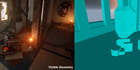
Unreal Engine
Choosing what collides is obviously very important, but it can be tricky, and it’s a problem that we have spent quite a while discussing while developing UE4. The system we have can seem a little complex at first, but it is very powerful and consistent, so I wanted to give ...
heady bridge
I understand that
sonic pagoda
how do you get the distance between 2 vectors?
nevermind, just saw you can subtract 1 vector by another and then plug that into vector length
to get a float distance
i also came across this
free stuff
Get Distance node
 warped hornet
is there a way to designate the center of a sphere mesh, as the source of gravity? i want to be able to walk around a sphere mesh like a planet, any help appreciated 
plush yew
i imported a landscape into ue4 via l3dt with tiled landscapes, and i find my z value to be too high up, i want to lower it, yet it is locked, therefore i cannot. is there a possible to transform this landscape as a whole a few units down so i can add mountain terrain?
 grim juniper
If you know exactly how much it needs lowered you could probably redo it and lower it in the landscape creation panel
 cosmic tinsel
How do I remove this sphere?
After creating a new blank bp project. All i did was add a geometric box and camera. I changed the dimension of the box, the location and rotation of the camera and set the camera to Player 0. Every time from the second time i click play. This sphere will be on or behind the camera and can be controlled by the w,a,s,d,space and ctrl key. It also casts shadow and I cant find it(not even from world outliner) when I am not playing.
 light bobcat
hello
I need some help
with my game
I keep getting error on my own mainmenu it is saying character error something like that
I can show you the pichturce of it
saying error
nvm haft to start from the start
abstract relic
Starting from the start is indeed a good place to start
light bobcat
how to fixs it
@abstract relic
I will fixs it later becuase I haft to go boxing
brb
but dm how to fixs it
@snow crown
 grim sinew
light bobcat
grim sinew
light bobcat
thanks
grim sinew
Always google the error before asking people. You'll find most problems, you'll be able to work out on your own that way.
light bobcat
Im pretty new to this XD but thx
grim sinew
All the more reason why google is your friend. Every single question you will ever have when you're just starting out, at least 200 people have probably already had and posted about online.
light bobcat
Im gonna do it later because It is like 20 m left that I haft to go to workout
 strong shoal
hey does anyone know the official website where you can download unreal powerpoints
 tall pendant
@strong shoal https://www.unrealengine.com/en-US/resources
strong shoal
thanks
prisma ridge
hi so im trying to make this door open and im using a timeline and its not behaving properly. any advice?
this is the original door state
this is what happens as soon as i press d. the mesh just rotates 180 on the z axis
and this is the end of the timeline. the animation is correct but the orientation is messing up the whole thing