#ue4-general
1 messages · Page 369 of 1
 whole quarry
 plush yew
Wow
 left citrus
am I being a stinky idiot?
plush yew
Yes
left citrus
blast
left citrus
._.
I'm having an existential crisis over an edit mode button now.
I have been unable to locate this, evidently secretive, button.


 glacial pecan
what happens when you install an older unreal engine and try to open a source controlled newer project in it?
 bronze tree
hey.
anyone know how to use bullet trails in my weapon when i'm using a gun made by line tracing?
 paper kernel
particles
bronze tree
how can i add particles at the path?
paper kernel
ribbon particles
you can determine start and end position for those
Question: what kind of settings I need for spotlights when there's lots of them?
even at static I'm losing like 8ms of gpu time
(in context of streetlights)
 lilac ether
How to make Water in world Composition?
Make it on every level?
And i still can't place PlayerStart in world =\ (PATHS NOT DEFINED or NO PLAYERSTART with positive rating)
bronze tree
@ctzn_no7 ok
 copper fable
Why can i not have a recursive struct array?
 wary wave
recursive?
wary wave
I mean, isn't it obvious?
copper fable
no?
wary wave
I don't think a struct can ever contain itself, array or otherwise
otherwise you run the risk of endlessly allocating memory
copper fable
it makes sense for it not to contain itself not in an array
wary wave
FAttack creating an FAttack, which creates an FAttack
copper fable
yeah but arrays are empty at default
wary wave
the array might be empty, but the default template for it probably isn't
wary wave
depends on what you're trying to do?
copper fable
basically making combo attacks
so each attack can have an array of other attacks you can do after
if it is empty
then that is the end of the combo
wary wave
I suspect you want the combos to be external to the attack itself
although in this case it sounds more like chaining, than necessarily combos
how many different attacks and combo / chain sequences are there?
copper fable
i dont know yet
just trying to make a flexible structure to it
some chains might have 3 attacks some might have 7
wary wave
cool - well evaluating chains or combos as separate objects probably makes more sense
as you might have a combo or chain that involves the same move in succession
it's not uncommon for a chain to have something like: (A) light attack1 , (A) light attack 2, (A) light attack 1, (B) unique heavy attack
what you'll want is a system that can effectively parse your chains / combos and evaluate them a the player is inputting them
that'll be the tricky bit
copper fable
i think i have that bit down fine
 atomic rose
does anyone know of a good steam multiplayer tutorial?
 cloud cobalt
@atomic rose Look up the advanced sessions plugin, it's pretty straightforward to use
atomic rose
@cloud cobalt will do thanx
 inner mountain
Hey guys! Is there anyone who's using UDN? Is it working for you right now? For me it's not, getting an error after login...
inner mountain
ah, okay, it's a premium-ish support
 fierce tulip
yea, generally you only get access if you purchase the engine, pay a fee, and i think there are seperate sections for consoles you have (official) devkits for.
wary wave
yup ^
 sudden agate
how many people are working for the Bug Submission?
All my emails are answered by a guy named "Jeremy" 🤔
And I have lots of submissions
wary wave
I've had an 'Alex' and a 'Daniel' in the past xD


 unreal spoke
I'm "spawning an actor from class" and "attaching it to component". It works, it is there and when I move actor the spawned one goes with it. However I don't know how to access it from blueprint. I'm trying "get components of class childactor" and also of the class used in the spawning, but nothing works(I don't get results in the output array). What's the way to reach these spawned and attached actors?
 next badger
they should make single account, call it BOB (Bug Omitting Bot)
@unreal spoke spawn actor method returns a reference to the actor instance being spawned
Attach Actor To Component is deprecated afaik
Attach to Component are 2 new nodes (one is for actor, one is for scene component)
unreal spoke
@next badger Thanks
 coarse wigeon
 lilac ether
World composition - how to add ocean? Add planes to all levels?
 crisp arrow
I'm working on another person's project, it's having a problem where a navmesh is building and updating just fine when I run the level in the editor directly, but when the level loads from the main menu, it fails to do anything. Generally speaking, where should I look to solve this problem?
 upper sluice
Is there a ue4 channel that doesn't have outdated videos from 2 or 3 years ago and actually knows what is doing?
Most of them are really old
 ancient otter
@grim sinew @livid haven thanks 😄
I will probably try and make some experiments too see what I can do that with it
 grim ore
Old doesn't mean out dated, a lot of systems have not changed in years.
@crisp arrow is it an issue with the nav mesh or the ai not working?
crisp arrow
@grim ore The nav mesh - or at least it seems that way. It doesn't show up when I hit "P" in the editor. I don't know any other ways to debug it.
grim ore
Ah damn. My only thought is to make sure you build it and see if that helps.
crisp arrow
wouldn't that be irrelevant if it works when I launch from the editor? (not being sassy lol, just trying to improve my debugging skills)
grim ore
well it might be building it in the editor when you run it, I've seen weirder things happen. It's a thing to try that won't take long and you can atleast eliminate it
crisp arrow
fair enough!
grim ore
but if you are using AI you might want to make sure they are atleast running as well, I assume you are doing something with them and need the mesh else is it for the player?
crisp arrow
To be clear, it should be a dynamic nav mesh, since objects move
Yeah they are running, in fact it's was a "DoesPathExist" node failing that tipped me off to the navmesh failing to be generated
 willow stump
Hey guys! Any idea how to make the looking glass which is in Prey? Rendering one thing at one side(for example a skybox) and it is completely different at the other?
grim ore
ok well that's atleast something to eliminate. no nav mesh is weird for sure if it works when you launch from that map but not when you load the map from another
unless you are streaming the level in?
crisp arrow
I'd have to check - like I said this isn't entirely my project, I'm modifying it for someone else
it's not streaming in in the "open world" sense if that's what you mean
grim ore
well i mean you have the level streaming system built into UE4 where you can use sub levels. nav meshes in sub levels seem to act weird as they want to be in the main level
crisp arrow
is that something that moving from 4.17.2 to 4.20.1 might affect?
(I'm sorry I'm a bit of a novice with unreal - but I'm fairly strong with C++ and programming generally. I'm still finding my way around unreal's feature set)
grim ore
the engine update might affect it but I don't remember any real changes to the nav system in those versions. At the worst you could see about deleting the nav mesh and recreating it. To check to see if you have any sub levels and such when it's running and not working you can use the Windows -> Levels menu option an d make sure it just shows the 1 persistent level and not any sub levels
crisp arrow
Ah I do believe there is one persistent level
grim ore
the other issue is maybe since you are using dynamic the mesh is not created quick enough for your AI to use?
yeah 1 persistent level is normal, that's what you are hoping for
there is a ton of stuff that could be wrong especially with dynamic. Maybe try forcing the nav mesh to refresh as well when the level loads as an option. I would personally look into deleting and replacing the nav mesh volume as first step just to see if the engine upgrade broke something on it
crisp arrow
yeah I confirmed - one persistent level and no sub levels visible in that menu. As to maybe since you are using dynamic the mesh is not created quick enough for your AI to use? I don't think it's that, since, as I said, the mesh isn't visible at all when I enable it in the "show" menu.
I'll try the things you said though!
grim ore
Yeah that's super weird since it's only when loading it from another map tho. That tends to be an issue with streaming sublevels only.
 lapis bone
Has anyone successfully used unity's UMA in unreal 4 and also I looked at the EUL and it seems like u can use the assets in UE4 but I'm not 100℅
 cinder iron
is there someone over here that uses PopcornFX in UE4 at a production level?
crisp arrow
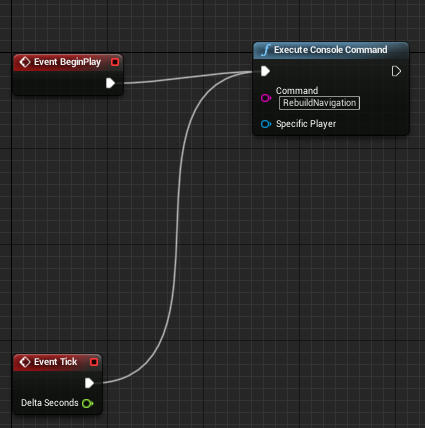
@grim ore Forgive my @ and feel free to ignore me for any reason at all. but I've added these nodes
https://i.gyazo.com/354d485a31527b52f5a1e771c14db988.png
just for testing purposes. (if there's a better way to force rebuild please let me know haha)
Still the same problems. Works fine when launched from the editor, and doesn't work at all when I make it their through the menu. I know you probably don't have any additional thoughts, but I'd just like to know if you'd have expected this to work. (I have confirmed that the node is firing. At first I had it only connected to BeginPlay, but when that failed, I decided to see what would happen with event tick, just to remove any sort of sequence-of-events related bugs)
 grim ore
yeah I wouldn't rebuilt it on tick for sure but I don't know if I have any more ideas. Opening just this map in the editor and hitting Play works but opening the main menu map and navigating to this map from that in the editor fails?
crisp arrow
yeah if this "worked" I would've changed it. I just wanted to see if the most brute force solution I could come up with still failed, and it did.
Yes that's exactly what happens
 swift cypress
There's a setting for it.
crisp arrow
when I launch from the editor the nav mesh is visible when I eject and hold "P", when I launch from the level select and hold "P" it is no longer there
I'm assuming you mean the Dynamic rebuilding option right? I have that enabled. It's just failing to generate a navmesh under certain circumstances
swift cypress
Have you tried deleting your nav mesh volume and placing a new one and if that doesn't work setting nav mesh settings to default?
I believe I ran into the same problem and fixed it by doing this, UE4 has some bugs when it comes to nav mesh.
I imagine rebuilding on tick would also stop the nav mesh from building.
crisp arrow
I already did that, but I haven't disabled my rebuild-every-tick thing since then. However, it does still work when I launch the level directly
 static viper
is the navmesh there when you just open the level in editor?
does it ever dissapear in editor
crisp arrow
the navmesh is there every time I launch the map from within the editor directly. It is never there when I load the level through code.
swift cypress
Are you using a persistent level?
static viper
oh good one
crisp arrow
I'm on 4.20.1. I'm upgrading a project from 4.17.2.
crisp arrow
No - it is from the upgrade
I was wrong earlier - I am using a persistent level and it is a sublevel
static viper
then the navmesh question is irrelevant
static viper
did your editor settings reset on upgrade?
swift cypress
Is your nav mesh part of the persistent level?
crisp arrow
yes
static viper
like they usually do.
ok good
then your navmesh settings are reset
bc by default navmesh doesnt regen
crisp arrow
yeah, and I changed them back to the way they were in 4.17
crisp arrow
(dynamic, especially)
static viper
if they are in a sublevel
are you loading that as main?
like
that as first
is that where the player is?
crisp arrow
I'm sorry this is where my knowledge of the project falls off a bit. It's not my own project but I'm working on it on someone else's behalf
static viper
thats ok
open the code for level loading
between 4.17 and 4.20 is a large world
one of death and hate
crisp arrow
generally speaking , what am I looking for here (as in what's really relevant for the navmesh issue)
static viper
well
if you really load the level with the navmesh
and i ask myself if your navmesh is special
did you modify it in 4.17?
maybe the agent question is useful
crisp arrow
I didn't touch it in 4.17
crisp arrow
you mean the volume? yes
static viper
thats good then
then removing it wont do anything really
you can try but i think it will do nothing
mh
crisp arrow
I did remove it and it stopped working (is that what you mean?)
I would have expected it to do that lol
crisp arrow
launching the level from within the editor
static viper
is this vr?
crisp arrow
It was at one point but is no longer
static viper
god that sounds so familiar
crisp arrow
when I say it isn't working, I mean that it isn't showing up in the editor when I eject and hit P
static viper
ok good job testing that.
crisp arrow
yeah, that's what made me come here haha
crisp arrow
this seems much easier lol
static viper
f7 i hope.
so
i am thinking
in what kind of sublevel does the navmesh lie?
yee
thats a good one
does it lie in one?
or are you using persistent for that?
bc
nav mesh doesnt work crosswise in 4.20
you cannot have a navmesh in one sublevel and the actuall room in another
the navmesh will not react.
crisp arrow
I'm afraid you're gonna have to elaborate haha. There's a persistent level, then below that in the hierarchy, there is the level I want to use
swift cypress
Nav mesh in the persistent level works.
static viper
and is the navmesh IN the level?
they must have fixed that or so
it didnt worked for us
i mean this is obvious
if you dont load the level where the navmesh is... you dont get one
crisp arrow
when you say nav mesh, do you mean the volume?
crisp arrow
yes the nav mesh is in the level
crisp arrow
and if this is relevant - there's only one in the world outliner
swift cypress
I'd recommend try having a volume in the persistent level.
crisp arrow
It works when I launch the level directly, but when I launch from the startup level, go through the menu, and load up the level, it fails
crisp arrow
that would be unusually merciful - it'll be a minute
static viper
except if the code.......................... is buggy
we made some good progress with persistent levels in the last version
so i highly assume its a coding error
but its not my cup of tea.
crisp arrow
that absolutely could be - I wouldn't know though since this isn't my code. All I know is that it worked fine in 4.17.2. I'm not familiar enough with unreal to be able to make any inferences from that fact though
crisp arrow
I am - it's just taking its time
static viper
as long as it doesnt have
15K warnings
and 6600 crit errors
that can not happen can it??
rite??
😩
crisp arrow
😛
static viper
 crisp arrow
rip ❤
static viper
he hasnt replied since tho
crisp arrow
still building lol
static viper
what game
please show
maybe its the content
ah
yes thats norrmal then
you should ignore them
dont answer them
get your likes and subs
and move on to next project
 light thunder
any engineers want to take a crack at something that's been stopping me for several hours? less about unreal more about execution order and looping
lilac ether
World composition - how to add ocean? Add planes to all levels?
lilac ether
@static viper Yes
static viper
then i would have it in one level
tho
you could add water in every level
i mean the difference is visually
crisp arrow
No luck 😦
crisp arrow
when I run it outside of the editor it behaves the same 😦
crisp arrow
not an option, unfortunately
crisp arrow
it's just my job now - they're at a different company
static viper
Then open up the code for me to look
crisp arrow
I appreciate that. I don't think I can share anything though. I can try to figure out if I can but at this point I think I should just keep stabbing away at it
static viper
Then i cannot help.
crisp arrow
I understand completely
static viper
And to be fair
If you dont know code, then you should not fix this
They should get a coder
crisp arrow
I do know code - very well - just don't have a lot of experience with unreal
static viper
Its not your response
crisp arrow
but I'm figuring it out
grim ore
you did say it was using a sub level setup tho so chances are that is the issue as that seems to be a common issue
static viper
If its a 4.20 issue then the response is another update.
crisp arrow
Yes - I'm going to try to find resources relevant to that set of issues and debug it that way
grim ore
you could always just roll back the code as well and keep it on 4.17 😃 or maybe step it one engine version at a time and see what happens
crisp arrow
and to be clear I'm used to writing engine code - physics/collision, rendering, etc.. so it wasn't wrong of them to trust me with this. I just need to do some reverse engineering of what's going on here
Yeah unfortunately we need to do 4.20.1
it breaks as early as 4.18
from what I know
light thunder
Okay, here's my issue, I am working on friction loss calculations - normally firefighters calculate a pressure based on a desired flow rate (gpm) and we calculate how much friction we need to overcome a hoseline to have that at the nozzle itself, example, (not realistic friction loss but for ease of explanation) if a nozzle is rated for 150 gpm at 75 PSI, and the friction loss in a hoseline is 25, we would pump the truck at 100 psi, so that the nozzle would have that pressure (and not more, be cause that is energy to fight with with nozzle reaction)
In reality, the gpm's actually going through the line will affect pressure.....but I first have to calculate the friction loss based on oncoming gpms (so it would be zero the first tic through)....but I need help looping through this because now it is jumping back and forth
static viper
Decided*
crisp arrow
4.20 at the earliest
it's for target platform reasons
that I can't discuss very liberally
static viper
If 4.20 is broken then your target platform reason are worthlesd
static viper
I dont want you to get into this situation where you are responsible for something you cannot control
Like bugs
grim ore
true but you can go 17->18 and see if it breaks, repeat till broke. break out the github source or the release notes and hopefully win
crisp arrow
it does break at 18
crisp arrow
I haven't gone quite that incrementally. It takes hours to build from source
grim ore
eep. so it's either a migration issue on upgrading or an actual engine change lol
crisp arrow
yeah, and that's what I'm trying to find out
static viper
Build from source means custom engine?
crisp arrow
not quite
we just have some dependencies I can't talk about, and we are required to build from source
but the core of unreal is unaffected
crisp arrow
I've made a lot of progress in other areas. I do expect to be able to solve this
I mean hell, I have the knowledge to re-implement anything that's broken
static viper
God cant help you
grim ore
the funny part is the only real note for 4.18 for nav mesh is "fixing" a bug relating to the debug draw not working on streaming levels
crisp arrow
haha, I appreciate the check
static viper
Your options are set
crisp arrow
There is one other small issue that maybe you guys will have info on
gonna grab some screenshots in a sec
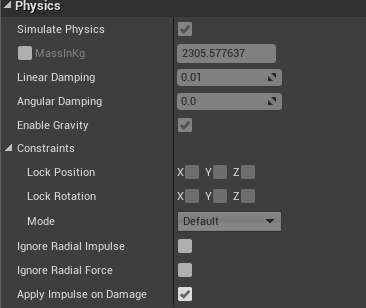
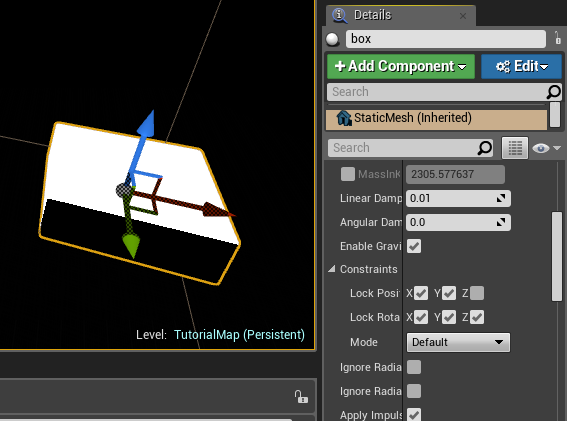
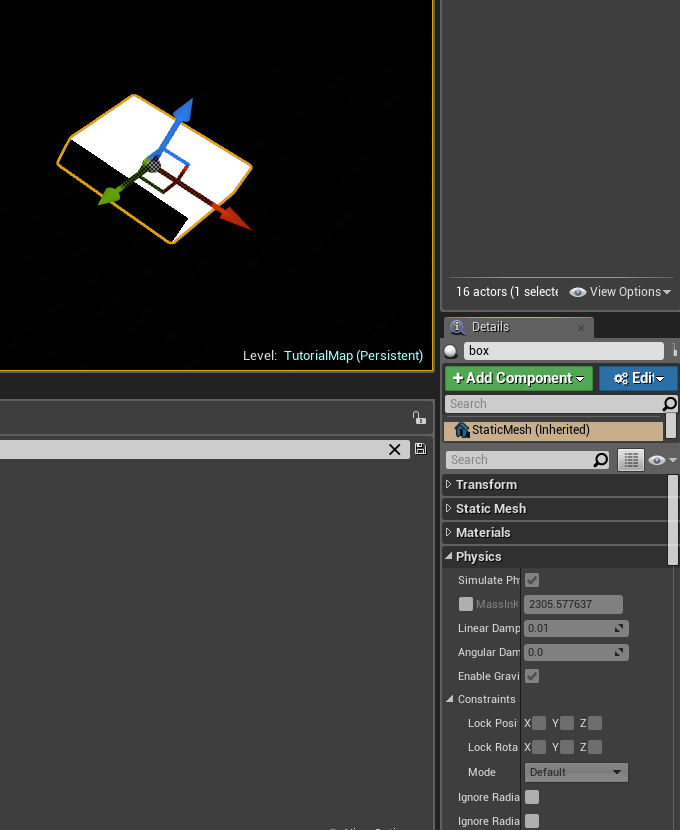
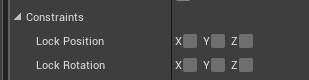
but I can't edit rotation/translation constraints per instance of an object in 4.20.1, but I can in 4.17.2
they're grayed out

these guys are grayed out, but they weren't before
static viper
per instance?
crisp arrow
yeah - maybe that's not the normal unreal lingo lol. I'm placing the object in the world and I can't edit these parameters by selecting it from within the world
static viper
is it important that you do it via instancing?
crisp arrow
aaaactually I think the way selection works is just different - give me a sec
grim ore
yeah you should be able to if the item lets you, testing on just a static mesh in the engine in the world right now in 4.21 works as expected
crisp arrow
no nevermind - I was wrong about what I thought.
It is acting as I said. And yes it's important that I can do it per instance in the editor
4.17:
https://i.gyazo.com/413057b64979258486407e9c44badbbb.png
4.20:
https://i.gyazo.com/8684c35260fbc9d5fd883b7542541aac.png

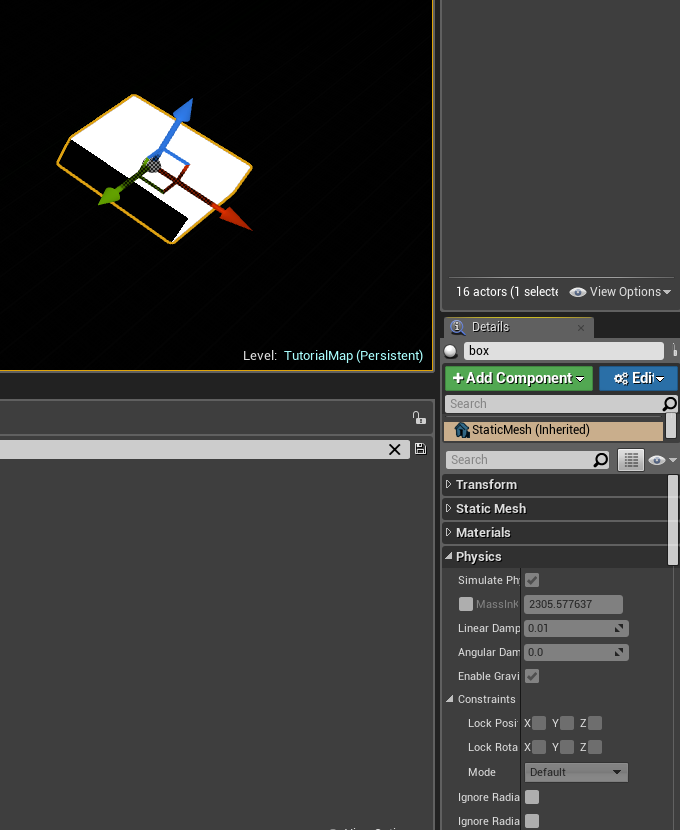 crisp arrow
sorry there's some jargon here - I didn't double click, I'm not sure what you mean by "custom". It has a blueprint on it if that's what you mean
and it is an actor
static viper
well
ok
that box
is that a child of the actor then?
the only thing in the actor?
is the box actor root?
crisp arrow
https://i.gyazo.com/1e0ff07450c2cbfea012ac3c2f44447d.png
I don't want to accidentally tell you the wrong thing

the root here is a derived from the actor class
grim ore
ok so this is an easy fix
crisp arrow
good, that means 50% of my problems are easy lol
grim ore
actually it's not an easy fix wtf... sec lol
static viper
actually i havent figured it out yet
crisp arrow
(I should mention that it replaced the values that were there in 4.17, but I've accepted that I'll have to manually reset them)
grim ore
I mean I know why it's not working but not why it's not fixing itself lol
static viper
i have a different thing going
i am still onto that box
tell me more about that box
is that ue4 default box?
did someone made it?
i never saw it reacting so fast tho
crisp arrow
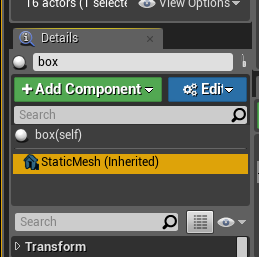
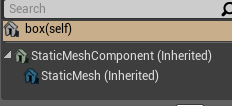
So I'm comparing it to the default box. The default has a "StaticMesh" vs a "StaticMeshComponent"
the "StaticMeshComponent" does NOT have those options grayed out.
they're both Static Mesh Components it seems - but I thought the naming was remarkable
crisp arrow
as is your right lol, you don't owe me anything haha
does it matter that the little house to the left of "StaticMesh" is blue?
grim ore
it shouldnt, it means its a C++ or a BP item
 grim ore
but it might in this case
crisp arrow
I wish this whole project was C++ lol. I'd have a much nicer time with it
unfortunately it's 100% bp's
grim ore
so uh.. I dunno why it's broke but there is a fix but man that's weird that you can't change it if the parent is an actor
crisp arrow
there IS a fix?
grim ore
so the only difference I could find behind a working static mesh actor in the scene and the one you have is the parent. Static Mesh Actor as a parent seems to work fine for contraints and editability in the world. Actor as a parent seems to break/restrict this
and I really don't know why or understand why 😦 but you can change the parent class the "actor" blueprint that is broken is using to a "staticmeshactor" and then replace the mesh in the new one with what you had and it seems to work as expected
light thunder
So, friction loss determines how many gallons per minute will come through a line but the problem is, GPM determines friction loss....and the problem is reality doesn't seem to have an execution order and all of my data keeps flip flopping....any ideas?
crisp arrow
Ok - I'm very sorry for being so inexperienced, but where is the most-correct place to change the parent class?
grim ore
in the blueprint when you open up the editor, click on class settings at the top, and then in the details panel you have the parent class which I am assuming is Actor
light thunder
previous function leads to this one -
grim ore
If you change that to static mesh actor you will find it adds in the staticmesh component automatically from the parent so you will need to delete the old Static Mesh that was in there and then set up the inherited one to what it should be
light thunder
that gets the request, which then checks a ratio of total outgoing over total supplied (incoming) ...(can't put out more water than you have coming in)
crisp arrow
Thank you - I'm messing around with it right now. It seems to cause some issues when I do that but I'll let you know
grim ore
well having it as the static mesh actor compared to the plain actor "should" be good enough as it just forces the static mesh as being a component but again.... doing it how you had it should have been fine before =/
crisp arrow
yeah. The problem right now is that it seems to offset all of the instances of that object by some amount in the X
grim ore
and every answer out there is about collision missing for the simulate physics options and nothing to do with constraints lol
crisp arrow
but I'm reloading everything to make sure that it wasn't something silly I've done on the way to this solution
grim ore
yep makes no real sense as your older blueprint didn't have anything but a static mesh component so there shouldn't have been any offset lol
about all I could think is the scale was changed for the original bp
lilac ether
@static viper You said "i would have it in one level", but how?
lilac ether
Yeah, i always read about persistent level
But how do you do it? Giant plane?
Or thousand little?
grim ore
@crisp arrow ok I figured out what is going on... wtf.... If you have a static mesh assigned to the blueprint then it's going to use the physics settings you have set up in the blueprint. If you have no static mesh assigned in the blueprint, so a blank in there, then you can assign the static mesh in the editor (your instance) and adjust those physics settings as well.
so basically any mesh assigned to the static mesh component in the bp if it's an actor blueprint will override your per instance settings
crisp arrow
and I'm assuming there's no way to avoid that behavior? haha
grim ore
well you just don't assign a mesh in the BP itself but assign them and set them up in the world or you can use that static mesh actor as the parent
I guess they assume if you are setting up your mesh in the BP you want those settings to be uniform across the instances
crisp arrow
(yeah it's moving all of my meshes to the right for some reason lol. This is my luck on this project.)
lilac ether
@static viper I have big map in World Composition. Making Fantasy ARPG game. Thinking about underwater cities in ocean (concept). But i definitely want to make sea travels
I just need somehow to make water, spawn point and skysphere for day\night cycle
It's main trouble since i know nothing about how game developers make these
grim ore
@crisp arrow well we atleast know a work around if you want to swap them back to just actors or roll that change back. You just have to re set them up individually in the scene. It is weird it would move it tho as a static mesh itself as a root has no way to adjust it's position in the world just scale
crisp arrow
I noticed it's setting the "StaticMesh" that was on there as a child of the new "StaticMeshComponent" that it adds. I'm wondering if it's like... doubling the existing offset in that process.
grim ore
oh yeah lol, you should remove the old static mesh
and just use the inherited one
that is the one you can adjust in the editor
grim ore
that would definitely be able to be offset
so now you just have the iherited static mesh component?
crisp arrow
(I expected it to make it a sibling, rather than a grandchild lol)
yeah, I did
but I reverted to try other things
grim ore
oh. well if you just have the root static mesh component (inherited) and it's set to the correct mesh.... =/
grim ore
all I could think of is the wrong mesh is being used, or a scale is bad or a pivot is off for some reason but if it's the same mesh there should have been no way to offset it in the first place on the old bp
crisp arrow
it looks fine in the editor, until I run it, at which point they move. When I go back to the editor they're in the right place. But when I change levels and go back to the level I was on, THEN they move in the editor
grim ore
I doubt there is anything in the construction script for that BP is there?
crisp arrow
oh there is - one moment
smart - you're smart. I think this might be it. I'm not fluent in BP yet so it's taking me a second to parse this but there's some amount of manipulation going on here
yes! That did it
grim ore
yeah it's possible since you changed the original blueprint any weird references it used to have are gone/broke/changed
crisp arrow
It's not the first time I've forgotten about construction scripts
grim ore
well you didnt make it so no fault of yours
 merry gazelle
I've created 3 functions acting as (weapon modes). In these functions I've got the line trace, particle and sound nodes.
I want to be able to press space to switch between each weapon modes (function). Any ideas? I've been trying using multigate, sequencer, branches, etc.
The main issue is that switching modes will switch but also fire weapons. I just want one function active at a time
crisp arrow
I should've remembered to look there though!
grim ore
well it only triggers when it starts so its out of sight out of mind lol
crisp arrow
I think I've confused myself at some point. I can't remove the "StaticMesh" once I change the parent because it's "inherited". What am I doing wrong?
grim ore
if your parent is still the static mesh actor then that static mesh is a required item so you won't be able to remove it
crisp arrow
I mean the original one
grim ore
if you want to remove it or change it back to how you had it before you have to swap it back to Actor
well if it only shows the one (inherited) then that is the one that came with it
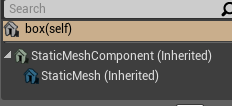 grim ore
oh well you can't, you would have to just set up the inherited one how the old one was
crisp arrow
oh so I have to leave that one there?
grim ore
or swap it back to the Actor as the parent
if you have the static mesh actor as the parent class then you would want to remove the one you added (static mesh with the blue icon) and use the inherited one instead
crisp arrow
Yeah - that's what I'm trying to do. I could've sworn I managed to do it before
light thunder
Where can I find more information about using formulas that depend on what another, it's probably a general programming thing but maybe there's an Unreal equivalent since it's in blueprint
grim ore
shouldnt have been able to, you cant change the inherited ones. Maybe you did that with the Actor as the parent
crisp arrow
it doesn't let me delete the blue one even when the parent is actor
plush yew
lately I get some random crashes in editor? Is it my fault?
grim ore
well did you compile it first before trying to remove?
oh wait lol both of those are inherited
crisp arrow
yeah
grim ore
are you sure this is not a child of another one?
crisp arrow
(no I didn't compile)
merry gazelle
just a suggestion for I think you guys could private message lol
crisp arrow
see that's what I'm saying - when I change the parent to staticmeshactor, instead of adding the green "static mesh component" as a sibling of the blue one, it adds it as a parent of the blue one
grim ore
which it should as a static mesh actor consists of a static mesh component as it's root object, so that is expected. But the older blue one should have been made optional at that point and not inherited
I just scrolled up and noticed your earlier screenshots showed the original mesh as inherited as well which is... odd
no wait nevermind that is fine if it's the instance version of it... damned UE4
I think the issue is you are tring to remove the blue static mesh (inherited) from the instance and not from the blueprint itself
crisp arrow
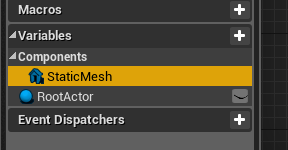
Trying to remove it from here
https://i.gyazo.com/d2f8ead7073ae0975bfe127fc44ec242.png
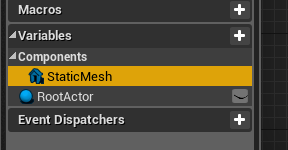 grim ore
yeah it would have to be at the top in the components list, not the variable itself
crisp arrow
yuck. Sorry that's right. I can remove it fine there. I know I'm a noob and I feel like I must be dumb for saying this, but there sure seem to be a lot of confusing design decisions in Unreal
light thunder
Where can I learn more about Iterative Calculations, where two formulas are driven by the variables held in each one?
grim ore
The choices seem ok once you realize they have to make all the normal code stuff visible in one easy screen. No headers, no declarations at the top of the code file, etc.
it has to be pretty and accessible for us nooblets who don't want to use text code 😃
crisp arrow
haha, I want text code so badly. This gaudy ui and vague verbiage is making me want to cry
grim ore
@merry gazelle so we can see your switching code but what does the actual code do that you call on your target? you said it switches and also fires but why is it firing?
 wooden thistle
Hey guys few questions about re skinning a paragon character please.
Why are the skeleton bone rotations not 0'd out when importing into Maya from UE4?
wooden thistle
yess
crisp arrow
I have a different approach to my issue - is there a way that I could expose the constraint variables that I want to change per-instance via a blueprint instead of having to reparent things?
merry gazelle
@grim ore It's just a linetrace that sends hit results to particle / sound
(trace start) is just another particle and sound node
wooden thistle
basically i want to reskin a character using the existing skeleton but wouldnt it be better reskinning to a 0d out mesh
grim ore
ok so it seems like your calling your fire code every time you swap then?
wooden thistle
oops lol
merry gazelle
yes basically
grim ore
just with different effects and such? If that's all that is different just call another function that sets those variables on the item itself and then use those variables when you call fire
wooden thistle
So the skeletal mesh was originally in a T pose but it seems its been saved as an A pose
merry gazelle
Ill take a look
static viper
thats likely what happen
you cannot get back an original skeleton body once imported into ue4
it will adjust alot
so you will always get a decleaned version
a pose could be an animation
a track
or external track
anyways
for a reskin you will need to freeze shit out
grim ore
create those 4 variables in the drone shooter, make a new function like "set weapon variables" that takes in those 4 from your weapon swap event that you pasted and sets those variables on the drone shooter. then whenever you call your fire event you just use the local versions of the variables. the issue might come from when you have different types of firing (if you do) in that case you could just set up different firing functions in the drone and then set a single variable that determines which firing type and set that variable in your weapon switch event
wooden thistle
ah i see go to bind pose does nothing, would it be best creating a new skeleton with the same naming conventions ? and use the retargeting method ?
static viper
you want to recreate all that?
wooden thistle
Not really tbh lol
static viper
it would be easier to hack this thing
copy the skeleton
get it into a new file
clean the shit out of it
and get it back in the main scene
retarget in ue4 terms?
wooden thistle
yep
static viper
bc i think if the naming is identical it will just lay itself upon an existing
except...
if you add a bone
wooden thistle
Just dont want the animations to go all funky
static viper
then it will ask questions
then clean it
and you can reskin it later
test the animation first
then skin properly
wooden thistle
in cleaning it you mean 0 out rotations, and re orientate the axis's ?
and good idea!
duno why i never thought of that lol
static viper
but be careful when doing this
at this level of bone quality
maya will be a bitch
and i think either the transforms or rotations will not 0
cant remember which one
i think rotations are locally fixed bc of parenting
lilac ether
@static viper So.....Water is good. Spawn is good. How about skySphere? Is it okay to be very large? Still don't know if all world can fit in it
wooden thistle
ahhh i seee...... thanks man really appreciate it some good advice there
static viper
remember about history also
you should unbind the skeleton before copying
bc if you copy a binded skeleton... it will not bind again
and you cant unbind it without the body
made that mistake a few times too much
wooden thistle
ahhh man thanks for the tip!
crisp arrow
I'm trying to override this https://i.gyazo.com/a8e6acf2045b7a15f1c86daade036ca1.png in blueprints. So far I've found the "Set Constraint Node" but it uses a very limited enum. Is there a way to get more fine grained control from within BP's?
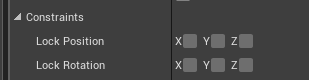 static viper
No
crisp arrow
In the Set Constraint Node there is a "Custom Plane" option but I have no idea how to define that custom plane once I set it
static viper
The enum is default
You can only expose via c++
Constraints have alot of these trappings
crisp arrow
I was kind of assuming that maybe the "Custom Plane" option was maybe expecting a bitfield to be tossed in or something?
but I figured that might be wishful thinking
static viper
Its an enum
crisp arrow
Yeah I see that
static viper
And you cant set it else
 pale obsidian
Hey
I have a question
I work with my project
And I'll need a bit help from unreal creators
static viper
Ask
crisp arrow
well it is capable of taking in that enum as an argument. I've seen it before where some API only tested one byte of the enum, and the rest was used as a bitfield in case the last byte was set to "Other" or whatever
pale obsidian
So I need someone to solve question about placing game at store
crisp arrow
so I was hoping that maybe there would be something like that going on here, despite it being ugly as heck
pale obsidian
And getting server for my game
static viper
it would be extremly unexpected and mind breaking if you find a way in bp...
pale obsidian
So I need someone who have connection with unreal engine creators
Cause I work with UE4
static viper
we can only answer specific questions
static viper
they can also only answer specific questions
that by the way was a very specific question
pale obsidian
)
static viper
more please
pale obsidian
Huh
 dry moon
If its business related, you're better of hitting up their business support email
pale obsidian
Can you give it to me?
Hodd
Cause I wrote one time
But from their was silent (
static viper
what did you ask them
crisp arrow
do you have a completed or nearly completed game for which this is a pressing issue?
pale obsidian
Nearly completed
crisp arrow
ask the question you want them to answer
pale obsidian
I and my team need to get server to place our online game or some help from Epic Games at the beginning
Something like that
Cause we are indie company
And don't have a lot budget
:D
So, we are working with UE4
static viper
did you not thought about this before?
pale obsidian
I thought
crisp arrow
this likely doesn't involve epic in any way
grim ore
spin up a free AWS server, server problem solved
static viper
and how many players do you need to fit?
pale obsidian
At the beginning nearly 50-250 to start
static viper
well what mathew says ofc
grim ore
how many have you tested it with so far on local hardware?
pale obsidian
Are played at test server at once or about how many at team?
static viper
did you test it with alot of people?
pale obsidian
static viper
if you want to release in 2 months then surely you have some material to show?
static viper
no it will not XD
 tall pendant
alpha or nearly completed? thats a massive difference.
pale obsidian
It will)
static viper
you are 4 people making an online game for 50 tp 250 people
pale obsidian
Hm
pale obsidian
So, need some money to get more developers, something like this
crisp arrow
don't we all
static viper
you need something else
pale obsidian
I'm little developer)
grim ore
so ignoring the technical aspect and how far along it is, assuming you have a dedicated test server binary you are using you can get a free AWS ec2 server and remote into it and set it up on there for remote testing.
crisp arrow
^
static viper
mathew is much more good then me XD
grim ore
beyond that you are in the same situation every other dev is and addressing epic directly is not going to help. They do have a dev grant page you can apply on but beyond that it's up to you to make your game and test it.
pale obsidian
OK, ty
After kitstarter
Will try again
If it will get enough money at the beginning
pale obsidian
Yes
grim ore
a multiplayer game is not cheap to start let alone develop and test... like... not cheap unless you are smart and make it not multiplayer 😛
static viper
can you show?
i am not angry or triggered XD
just a bit more chat before bed
fate is sealed here anyways
pale obsidian
@static viper Mb a bit later, when I'll show it to much more another people)
Or at the end of january
Cause we have some bags)
static viper
and when is the kitstarter?
pale obsidian
Middle of February - end of February
grim ore
well if it's a multiplayer game I hope you have bags or else you can't hold anything 😦
pale obsidian
We need to solve some problems, to get showed some elements of gameplay
@grim ore I understand, but at the beginning, we need some money to fix it
static viper
i hope you have someone with better english skills then. Its not advisable
pale obsidian
To get another people at team
static viper
if you need money to fix it, bc its already broken on kitstarter...
pale obsidian
@static viper Mb, I'm level designer, not manager
@static viper Why are you so triggered?
dry moon
LMFAO
fierce tulip
<< working on a bp (one of the first) more "complex" blueprints ive made, and the location variables wherent updating.
Had to ask someone else to find out its a bug if you change local to world space on an actor <<
had to place a fresh version.
at least it wasnt my poor blueprint skills for once
 fleet needle
in unreal, what's it called to make a 'useable thing' say a treasure chest which has default sounds/animations attached
grim ore
well it sounds like a blueprint
fleet needle
ahk, so you'd do everything in your BP, then drag that blueprint into the editor?
grim ore
yes. Blueprint Actor, Static mesh/skeletal mesh for the chest, sound wave variable to play the sound file. The animation could be an animation on the skeletal mesh or it could just be rotating the chest open if needed. etc..
 loud wren
?
copper fable
what is the correct way to declare enums below the includes in a header file?
like you would have "class Foo"
is it "enum Foo"
or "enum class Foo"
 weary basalt
UENUM()
enum class EFoo : uint8
{
    EF_Option1
};
@weary basalt sorry I didn't mean declare, i meant include it into another headerfile without including the whole file?
if that makes any sense
i am explaining it pretty badly 😄
weary basalt
Yeah just enum EFoo;
weary basalt
I usually put them under the #includes
copper fable
i get this error
Error C3431 'EWeaponTypes': a scoped enumeration cannot be redeclared as an unscoped enumeration
 west quarry
hey, does any one know where game character stencil is controlled by a mouse, I think there was such mechanic but can remember game name
merry gazelle
In BP, if I duplicate say 100 instanced mesh components is it expensive? I know the best approach is to use math in the event / component graph however I need more control over each mesh
Also in this case, is there a difference between using a standard instanced mesh vs Hierarchical
 spice scarab
Anyone know what this issue is all about?
No matter if I play in selected viewport or new editor window ... Fullscreen looks like that. And happened today. Haven't made any big changes.
merry gazelle
Perhaps look into any cameras in the scene / characters
 carmine wind
does someone know wich button is the touchpad of the ps4 controller? because i want to make if you press it than is gona change camera
because ive been lookign and cant find the button
 mental shale
anyone know a good guide on how to start with a blank project
and setup all the gameModes, playerController, etc
 brave heath
Hello, anyone knows why my paiting is so pixelated ?
I'm looking for a solution since yesterday
I've increase map resolution etc, nothing works
or yes, I scale meshes from 1 to 50 but my map becomes very tiny then
mental shale
the way painting works on landscapes isnt based on pixels in an image like you're thinking of
for landscape painting, the "resolution" is determined by the polycount of whatever you are painting on
it uses vertices instead of pixels
however, I think if you want to make each stroke look a little bit sharper, you might want to turn down the falloff?
I maybe wrong
dry moon
Nah its something to do with how you set up your landscape material, the layering system
mental shale
oh yeah, that too
 mental shale
Hodd*
dry moon
^ I'm no todd
brave heath
I know, I was kidding
mental shale
👀
brave heath
Thanks guys, I'm gonna check my landscapes settings
light thunder
My data isn't calculating normally since I started working with it in structs....I probably didn't connect something right but is there something I should know about execution order and structures? I have some variables that need to loop back because they are depending on another and there is a period of back and forth until things equal out but right now it's just flip flopping
(there is a set node above there)
It seems to break around here :
 steady owl
Is there any way to bind an event dispatcher without custom events?
 worn granite
Create event node, you can use any function or event so long as it matches
Its got a dumb name
steady owl
@worn granite I mean does it have to be from a custom event? I can't bind within a function?
Also if I create a new binding does that just replace any old bindings, or do I have to manually remove any old ones?
Thanks!
steady owl
@worn granite Thank you!
So for example if I bind a UI update from a pawn, and that pawn is still in the world in a dead state, then I respawn and bind again from the new pawn, there's a potential the dead pawn could still write incorrect values through his old bind?
So basically multiple actors can use the same bind
and I should unbind all when the death event occurs?
worn granite
Possible but it'd be your bug
steady owl
So unbinding is best practice?
worn granite
If you think there's a chance you have buggy code.
steady owl
I just want only one bind at a time possible
So the UI can only possibly be linked to one thing
I guess if the previous character is destroyed, it automatically unbinds?
worn granite
Then unbind just before binding.
light thunder
Can someoen explain to me the difference in terms of execution order of curve assets versus math expression? I'm having some trouble with my curves in dependent variables
 void palm
hello
anybody here that can help me out with interstitial ads?
i can't get them to work
i always get the error that there is no interstitial ad available even when putting it through a loop so it has time to load
also, should they be in a UMG element or can they just be anywhere?
 polar hawk
free blueprint help in voice chat
 modern sinew
Help needed geting Visual Studio working right with UE4
 still bay
@modern sinew if you're experiencing build errors, windows 8.1 SDK might not be installed on you VS 2017 workloads.
modern sinew
it is
Just, the tutorial expects code to show up when you pull up the included UProject, and nothing is
@still bay
still bay
from what I understood, you're trying to open the solution generated by unreal engine but no code is showing up?
plush yew
hey so for HTML5 im getting some weird errors which prevents the game from loading
 glossy ibex
Hey, I have a main menu map and an actual game map. What's the best way to make it so when I start the game from the menu it opens my game map without loading? Like how could I pre load the map while I'm in the menu?
modern sinew
@still bay Yes
upper sluice
I heard that the use of brushes aint recommended at all mainly because of fps issues. Is it good if i use them for smalls bits? They are easier and more convenient to use when it comes to applying different textures to wall sides or creating holes for doors windows etc
paper kernel
I'm setting Camera view with 1 sec blend, but it only seems to work when blending in, not out
 dim plover
Is there a setting so that opening up animations open up in a new tab instead of an existing one? It's really annoying being only able to have one animation open at a time.
unreal spoke
Any easy way to render a website (from a random url, not my own html file) into a texture?
wary wave
I mean, the Window is casting shadows, so....
still bay
@modern sinew it could be your cpp file is not selected. if so, go look for it under the solutions explorer on the left side panels in VS.
 sleek hearth
well, it goes through the window now, but that's not exactly what I'm expecting. Is there a way to light the room with the light that goes through the window?
plush yew
@grand knot Can I ask you something in DMS but can you unblock me first xD I promise no more pings afterwards
paper kernel
I need dynamic shadows for static lights but can't use stationary due to overlaps, any ideas?
paper kernel
for mobile only
paper kernel
yes Stationary lights are having overlaps because of the spotlight angle
and attenuation range
so I can either use Static or Movable
paper kernel
Too expensive
paper kernel
best solution so far is have trigger volume to enable shadow casting, but rest of the scene looks bit dumb without static shadows
 gleaming narwhal
@upper sluice You can block your scene out with brush volumes if you like that workflow, and convert them to static meshes if you want to optimize. But if you make hundreds of them you will end up with hundreds of individual meshes, so it's not really scalable.
 steel shuttle
UE4 support multiple online subsystem?
static viper
it should
well not yet
but with the launcher support
i think they will create some kind of system for us
steel shuttle
i'm trying to create google play login and game center login in one widget
can ios and android combine?
static viper
what question is that
cloud cobalt
@steel shuttle You'll use the appropriate OSS on each platform
On PC it'd be Steam, on Android the Play system, etc
steel shuttle
so that's mean i cannot use online subsytem google play on ios platform?
steel shuttle
oh okay i understand
cloud cobalt
Online services are competing, provide different features, and the UE4 OSS has different levels of support for each of them
What UE4 does is support a subset of each of them with a common interface
unreal spoke
How to move a character with a character movement component without using a BB/AI stuff?
unreal spoke
blackboard or ai
unreal spoke
so I need an ai controller to just move forward the character
cloud cobalt
@unreal spoke Pawns should generally have a controller
At least that's what the gameplay framework expects
unreal spoke
@static viper , @cloud cobalt Thanks, I'll add the ai controller
static viper
i am so confused
unreal spoke
: ) Never mind
hmm... or maybe I need help... Probably I'm focusing this wrong. I just want an actor to always go "forward" on the floor no matter where it's looking at. Basically I'm trying to replicate a Roomba 😃 Maybe I shoudln't use a character for this... but then I don't know how to, easily, make the actor to adjust to the floor
light thunder
Can you create a binding (from a widget) to an instance of a variable? I have an array of actors with different values, could the bind take in the index as part of the reference?
 stray smelt
I have a blueprint which has some functions (snapping) in construction script. I'm successfully adding it to another blueprint as a child, but then it loses the code that was in the child's construction script (because now it's in a new one). Is it possible to make it carry that construction script over even though it's a child of the new (master) blueprint?
grim ore
traditionally you would call the SUPER function on the child to call that same function on the parent, right click the construction node on the child and see if it has the add parent or add super or whatever they call it (i forget lol). I know you can do it for all the other functions in the event graph but I never tried it on a construction graph
plush yew
A German boy is in the voice!!!!#
tall pendant
who cares
 vale silo
Hi @elfin jacinth ! Do you know of any plans for UE4 Roadmap on Trello either being killed for good or actually updated and kept up with ?
light thunder
@grim ore Is there a way to have a math expression as a data asset, like a float curve?
Apparently I'm taking a derivative on a point on the curve that is not continuous
And that breaks reality
grim ore
as far as I know there is not. About all I could think of is to have something like a blueprint library that holds the math functions you want and so you can access them from anywhere to get your results.
it sounds like a lot of crummy real world math which 😦
light thunder
That's basically what I'll end up doing probably, although I find it annoying that there's no way to step through the calculations to view the values if it is in a BP library function
(or any function i guess)
grim ore
well you should be able to step into a function when debugging and watch the results manually
assuming you are using a new version of the engine
light thunder
It always says out of scope, and I'm on 4.19, maybe that's the issue
god this thing is better at curves than I am
 regal mulch
@steel shuttle @cloud cobalt As far as my understanding goes
You can use more than one
You just have to grab them by name
Online::Get(FName("GooglePlay"))
Or whatever the function was
light thunder
Oh cedric, check multiplayer at your convenience, there's a guy who's read your compendium that just needs a little confirmation about where to setup his multiplayer data (gamemode/gs, etc)
grim ore
damn I think 4.19 would be fine, it should have the step into option. damn 😦
regal mulch
Sure, when I have some time later
light thunder
@grim ore I can step in just fine but the values are all out of scope
grim ore
yeah that is weird
light thunder
Also, the system is not reading my mind and doing what I want...I checked and I have techno music playing and low level neon lighting throughout my workspace
not sure what it could be
unreal spoke
To get a movement similar to a drone, should I base it on the ue4 Flying demo?
wary wave
I seem to recall there's actually a drone controller setup in one of the UE4 samples
possibly the landscape demo
static viper
Ufo cow demo
wary wave
not the UFO cow demo
grim ore
the ufo is in the input examples in the learn tab
and a drone is in the boy and kite demo
unreal spoke
@wary wave , @static viper @grim ore Thank guys
wary wave
ah, Boy and Kite has it, you are correct!
grim ore
I could never fly that drone and it's super primitive, I fail at flying
wary wave
I find drone controls baffling, but each to their own xD
I want it to go forwards when I push the stick forwards, damn it
unreal spoke
👍
light thunder
This is most real-world data I can get regarding GPM output following a PSI input for a Nozzle - however, you can see they conveniently left off falloff (critical velocity ,where the velocity of the water becomes too turbulent to actually move, so output falls) my question is my curve I'm building, should I just manually build that falloff into it so excessive pressures are input? what happens in Unreal if you provide an X value outside the Y value range of a math expression curve?
wary wave
there is no outside the range
if you zoom out, you can see it extrapolates based on previous data
light thunder
does it just return Nan thing?
in which case it would be infinite
that's what I needed to confirm, thank you, I'll just make some falloff stuff up and no one will be the wiser
wary wave
it's worth checking
but I guess it's possible to provide an X value for which the Y value will overflow
when using curves I tend to clamp to sanity check anyway
light thunder
this is still the effective "first pass" I agree with you in concept however real world application, if you pump a line with that much pressure, you will be sending the guy on the end on a magic nozzle ride, and no one will be checking the flow rate
grim ore
I've got a drone in real life that has the forward = forward option or relational option and I still can't fly it. the drone and the trees are one at my house.
 elfin jacinth
@vale silo I don't know on that, but I can see what I can find.
@wary wave I love my drone. I have a DJI Mavic Pro and it is the best
grim ore
my friend has one of those fancy ones with the gps and auto levelling and it so nice. it seems with drones you go big or you go big lol
wary wave
@light thunder - flow rate will still be limited by the power of the pump though, there's a minimum (presumably zero) and maximum!
elfin jacinth
That is what mine is, MathewW. It connects to ~25 GPS signals and can land on an ants butt (if the ant is big enough to prevent landing though, it won't)
light thunder
@wary wave Is there a way I can just make the curve continue past a certain point you get the same amount?
wary wave
I mean, that's literally just clamping the output?
light thunder
like pressure increases and flow increases to a point, then the flow actually falls a little but stays the same no matter how much pressure you push
grim ore
@elfin jacinth sooooo nice 😃
light thunder
Yeah but I need to clamp it given a certain point inside the graph almost
because there's two sides to the slope
err, it has two slopes
wary wave
at your end point X = Y, if you were to put an additional X+1 = Y point, it should extrapolate flat, I think?
light thunder
not sure if curve editor will allow that?
wary wave
I think it does
light thunder

MyCurveFit
An online curve-fitting solution making it easy to quickly perform a curve fit using various fit methods, make predictions, export results to Excel/PDF/Word/PowerPoint, perform a custom fit through a user defined equation and share results online.
sounds like a women's fitness thing
light thunder
not mine, here
fierce tulip
are we talking about curves, or curves?
light thunder
it did before I put the negative slope at the apex
@fierce tulip I'm generating math expressions for nozzle flow rates given a certain pressure
wary wave
but you're using the curve editor, right?
light thunder
yes but it won't let me type in x to the actual inputs below
Can anyone advise which type of math expression Unreal seems to play nice with? Or does it not matter other than ease of inputting the values when setting up the expression - https://cdn.discordapp.com/attachments/225448446956404738/532958359033217024/unknown.png
 fierce tulip


Messing about with the hidden geo tools in #UE4 (console command: MeshEditor.Enable). They're not ready for prime time, but it is nice to be able to make tweaks to static meshes #gamedev https://t.co/1NiYQQTE71
 Twitter
 tall pendant
it's been in ue4 for quite a while now
sudden agate
Mesh Plugin is more usable than this thing
light thunder
Where can I find more information for parsing complex (quintic regression) math expressions into unreal? the documentation is....not helpful in this case
 manic pawn
what do you mean? unreal doesn't have such a feature
 frank escarp
regal mulch
frank escarp
regal mulch
Afaik it just builds a read only graph from what you wrote
If the parsing fails, the whole thing breaks
 coral shoal
if one of your inputs is say, DT and you later make a DT variable elsewhere in the bp it will break the expression input pins
Kind of bad
worn granite
I'd make the case that if your equation breaks the math node, 'tis time to go to C++ anyway. Normally.
 grave nebula
@light thunder Why don't you do it outside of UE4 instead? If I understand correctly, you want to fit formula to data set regarding those nozzles. Why not generate needed data yourself instead ?
light thunder
@grave nebula show me how, I never use CPP , I can read it but setting it up I'd need help
grim ore
live stream on https://www.twitch.tv/unrealengine right now for UE4 about the culling and frustrum stuff and all that rendering voodoo
 lilac ether
Is there a way to rotate texture for painting landcapes?
 gleaming lotus
Hey everyone- I'm not sure if I'm being an idiot but I cant find the animation timeline in my widget blueprint. I cant find where to open the window for it
grim ore
Window menu at the top?
gleaming lotus
Youd think that, its not in there
wait
I'm being an idiot
I was looking for it in the graph and not the designer
Cheers for the help 😛
grim ore
that was my next guess heh
 marble storm
I have small question, can paper2d be used to create ddr like game where objects spawn based on timer?
Or it's better to use other kind of blueprints
grim ore
you can create sprites in paper2D and blueprints can use or spawn sprites so sure
paper2d is just a way to display sprites
marble storm
Need to read terminology
Pretty hard to understand in foreign lang
And unreal documentation is so poor(on blueprint functions)
 eternal ledge
So i posted a while ago and got some pretty great help back then, and things have certainly progressed quite a bit with my project, but iv reached another point where the frame rate is still too low for what id like when playing yet when paused its not as bad.... just really in need of some optimization help and where to start to really look deep into working out where things are too costly.... also not really sure which subsection this kinda question needs to go into haha coz there isnt an "optimization help" section
grim ore
https://docs.unrealengine.com/en-us/Engine/Performance along with the gdc and livestreams on the subject is a good start. you need a snapshot of when you have issues so you can see what is the issue then work towards fixing it
based on the statement "fps is low but not as bad paused" it sounds like its more processing bound that gpu bound so determining what is actually running each frame/tick would be a good start.
grim ore
yeah woof, look at the tick time. stuff is going nuts doing stuff every frame
eternal ledge
ah right
i didnt do the blueprinting so cant really tell much about them, ill mention it to the one that did
light thunder
How would unreal handle getting values from curves with sharp changes in slope, apparently that's impossible in mathematics https://www.youtube.com/watch?v=6LkSfBWHwpY

 thorn kayak
https://www.youtube.com/watch?v=m6uNvrd_N1w
Trying to replicate the lighting of the great Koola lol





 pale sierra
Can someone help me out please? Put my issue in arch-viz if anyone can, need a quick fix since I have a deadline coming up :p
 abstract relic
If you’re crunched for time. Make the material 2 sided. This is not a long term solution mind you
pale sierra
I've tried that and unfortunately when I bake the lighting the object just goes black
I have a couple days to get it sorted, would just rather get it done now :p
I'll try and use two sided lighting to see if that helps in any way
Yeah that didn't work
dry moon
3,660 draw calls might be a lot
plush yew
Where can I find the modding section in the new launcher?