#ue4-general
1 messages · Page 364 of 1
 normal burrow
if you didn't have the specialization for the <T,true> the constexpr operator on the FSomeStruct would be ignored and lost
 manic pawn
oh I see now
but this perfectly supports my point doesn't it, this would not be required if you didn't need to manually put constexpr on all the things
normal burrow
basically i'm just saying like its a problem, the keyword but its a problem overall too for the compiler, if it tried to figure out the stuff it would need the same elaborate checks
The vast majority of stuff though, is going to be dealing with memory addresses and stuff that cannot be figured out by the compiler. Like keeping in mind sqrt isnt a constexpr, you can make a constexpr sqrt but the thing is that when the compiler runs a constexpr sqrt it has to iterate and solve over and over at compile time in a way that oblitherates all kinds of possible optimizations that can be run with sqrt. So sometimes you want the compiler to treat things dumbly because its not ideal
Same reason why you might want a naked or a noinline function
its not perfect though i agree, that demonstation of the stuff i had i was trying to show the problems with the keyword too, like you essentially can't support constexpr generically
 ashen cairn
i need some help with unreal engine can i ask you guys for some help or bad time ?
manic pawn
it's just as dumb as having to make both a const and non-const accessor
ashen cairn
its a really stupid problem
normal burrow
it wouldn't be a bad idea to just mark everyhting constexpr and parse compile logs programatically and remove it haha but that also probably wont result in a game of performance
well, the thing is with uht zeblote much of the benefits to constexpr are lost on the restrictions of not being able to template types and having to expose/define enum constants without assignment or assignment of values that aren't immediately after
manic pawn
maybe you can in UE5
normal burrow
man i hope so
i love ue4 though, its just uht is a pain haha
i whine a lot
@ashen cairn go for it sorry
ashen cairn
all good
when i package my game it and run it the game is a free cam or noclip view of my level
but when i play in editor it works just fine
im sure its some stupid setting that i have missed but do you have any idea?>
normal burrow
hm i'm not familiar with runtime problems outside of editor, but the first place i would look is the output log if there is one
zeblote?
ashen cairn
its not an error i dont think
manic pawn
free cam sounds like how the default pawn behaves
ashen cairn
because there is no output to log of errors
normal burrow
i would guess darkscissors your pawn isn't spawning, but the log may inform you better
manic pawn
it's the default one
ashen cairn
ill look for that
manic pawn
make sure everything is set up correctly in maps and modes
ashen cairn
you know what i think that might have fixed it for me
i looked and it seems that it didnt use my gamemode class
normal burrow
sounds like that could be it
ashen cairn
so i think that fixed it
whats weird is in editor is used my gamemode class but the level is not using it by default
thanks though
manic pawn
that does seem strange
manic pawn
does it actually work now though
ashen cairn
still packaging it so im yet to find out
yea it worked
!
thanks @manic pawn @normal burrow
normal burrow
but yea, its not pretty zeblote constexpr everywhere and i think it could be handled better too some how. like on some things it would make sense if you could constexpr: like you can with public: private: protected:
 plush yew
hello
normal burrow
hello
plush yew
Hello guys
I want to fix this problem
I want these buttons "on" and "Off" to be the right part of the horisontal box but I don't know how to do it-can you help me?
 whole quarry
Spacer @plush yew
Horizontal box
- Button Left Alignment
- Spacer Full Auto
- Button Right Alignment
plush yew
thank you I will test this
 dire storm
Hey guys. I'm slowing trying to deconstruct a hex grid generator. Can someone help me understand what the set static mesh node is doing here after the add array
I guess I'm not fully seeing how the SM tile gets added to the SM instance array. The add instanced static mesh component target is self
Is it the Target of Set Static Mesh feeds back into Add instanced Return Value?
whole quarry
the ISCMC is like an empty box, it doesnt know what the Static Mesh is, so it needs to be set
dire storm
@whole quarry Thanks. I guess I'm not understanding why the target is self. Really just trying to understand the flow of this BP
whole quarry
because it adds the ISMC to the BP its running
its a component
a BP is an actor, which holds the components
dire storm
So in this example the Set static mesh targets the AISMC which updates the array with the SM Tile. Thats how I'm reading it
whole quarry
Somewhere the SMTiles[] is being populated, then for each entry in the array, it adds a ISMC to the BP actor, then it takes a reference from that newly created ISMC to the SMInstances array and then sets the Static Mesh
 sudden agate
You prolly want to create only ONE ISM Component. and add several Instances to it.
Currently the code above creates many Components, but you want only one component.
dire storm
What I'm trying to achieve is to feed in 7 different tile types and have them instanced over a large area hex map. I have the reference code that works, I'm just trying to break it down bit by bit so I can learn wtf I'm doing
sudden agate
Ah I see
dire storm
that way I can mold it to do what I want and really just using it as a learning tool... because I get confused quickly and spend hours/days reading docs and not getting anywhere.
@whole quarry Thanks that makes more sense to me now
normal burrow
@junior solstice what is the intended result?
whole quarry
I guess he wants normal FPS style
 junior solstice
@whole quarry ı wan normal fps tyle
normal burrow
so you want the gun to move up with the head?
whole quarry
So why do u use a headless ue4 mannequin?
junior solstice
 normal burrow
whole quarry
normal burrow
whole quarry
Yea so imagine if the upper body would be unnatrually bend so it could aim straight up
normal burrow
@junior solstice you'll want to start learning the animation nodes for animation blueprints
unless
 keen birch
So worldspace textboxes are apparently broken in packaged projects
Which is great
So there goes my fancy worldspace UI
normal burrow
unless you want to learn animation (which i highly recommend doing at any rate) you'll want to adjust the ik_hand_gun bone
plush yew
but the spacer to be child of the button or ? @whole quarry
normal burrow
when you use modify bone for it, and position it so its pointing the correct direction, you can then use either the leg ik anim node or the two bone ik anim node to have the hands inverse kinematics make them bend to the targets (ik_hand_l, ik_hand_r)
the two ik bones are child of the ik_hand_gun bone, so you just move the ik_hand_gun bone (first) with modify bone node, then one of the two other nodes to have the hands (hand_l,hand_r) meet and bend to ik targets (ik_hand_l,ik_hand_r)
@junior solstice do you know what the camera is parented to right now?
 latent moth
All, I'm trying to scale a texture according to object X scale. It's a rope. All works well on a instance, but if used in a spline it does not, as the scale of the spline component is always 1,1,1.
This is how I align the material:
https://gyazo.com/7f2f25aa9e2890c41420397701ac0f10

and this how I create the spline:
https://gyazo.com/da42813e351d9491839b4c2eaada522c

Any ideas on what I could try?
normal burrow
@latent moth could you show what it looks like currently?
latent moth
yes
Intended result is to keep the cable looking this way:
https://gyazo.com/902ea7eaec7e80242cec7094d23aed84
 normal burrow
how does it look i mean on the spline?
i'm trying to get an idea of the problem i mean
latent moth
coming up
Above, it's a single mesh that scales correctly, below, the spline
https://gyazo.com/4b3f02ef10d7174ab54a9a8f905688ef
 normal burrow
ok
latent moth
Basically the issue is that object scale is always 1,1,1 in a spline
so the texture does not scale
normal burrow
so the spline basically has a uv that goes 0...1 through its entire length?
latent moth
yes in the spline the added mesh has always SCALE 1,1,1
since I'm basing my material on object scale, it doesn't scale and ends up stretching (on the spline)
normal burrow
So i haven't worked with splines very much but i'm guessing you will have to make another version of the material for splines since you can't base if off object scale
Have you looked into the SplineThicken node?
latent moth
ok, but even if so: every spline component is going to have different scale
no i haven't, first time I hear about it
normal burrow
yea i'm looking around in material nodes
whole quarry
there was something to scale it world based
normal burrow
yea if you double click SplineThicken there is lots of interesting stuff 👀
i'm wondering if texcoord[1] or something maybe is packed with the world distance
latent moth
Found an alternative but it still doesn't work with spline (does, with mesh)
https://gyazo.com/05a49bd29c79646fa1285bbb77fe9a28
 normal burrow
is there any options on the spline to adjust the uvs?
latent moth
hum
normal burrow
i'm like completely unfamiliar with splines haha
latent moth
ha
normal burrow
like tiling or whatever
trying to digest this math in SplineThicken at the top right
you on 4.21 @latent moth
?
latent moth
yes
normal burrow
sorry @latent moth i get how it works now
latent moth
good 😃
 merry gazelle
Guys I get actor / component tags, but what's a "gameplay tag"? Does it just include all tags generated in gameplay or something?
normal burrow
So roberto, its kind of complicated when it comes to segments you could make more segments at the correct repeating rate, or you could some how conceal the length of the spline mesh into the scale of it like you did before with the static mesh component
one sec i'm having a hard time putting it in words haha
@latent moth
everything needs to be scaled down, then offset and scaled up
latent moth
woah
does this work?
(interesting approach BTW!)
I was going a similar route 😄 https://gyazo.com/cdda2d48e9be618cd108e9c29fd137bc
 normal burrow
i'm really unfamiliar with all of this so you might need the extra step of
sorry i'm like a turtle, but i'm learning this with you haha
I don't know where the 'origin' of the mesh component lays, so we may have to adjust for that
i think it has to scale XYZ uniformly to look the right way but i'm not sure at all @latent moth
latent moth
yeah
on top of that, unfortunately there's another issue
the rounding precision makes the spline not exactly be where it is supposed to be
and you can't really rotate it
(tangents)
oh f%$k it
was interesting though 😄
latent moth
it's probably better to do something in the material
it is off... the longest the segment, the worst
hey thanks for the help 😃
I'm going to see if I can do something with WorldAlignedTexture
normal burrow
np, but yea you could set the start and end to be relative to the start, its probably not a rounding issue as much as just the relative location i have there is incorrect.
Yea i mean the ideal thing you could do is just change a parameter on the material to do all this for us haha
latent moth
eheh
normal burrow
but i don't know enough about instancing materials to recommend it
latent moth
well
that is not a bad idea either
I know that the texture works for a length of 6cm
so I could divide by that
normal burrow
Yea, like this is how you would set the parameter up
I haven't looked into the proper way to supply it to the material from the SplineMeshComponent though @latent moth
latent moth
That's how I can define the V scaling:
https://gyazo.com/3a2d7cd4eaf89b565d33ffb7d74c7283
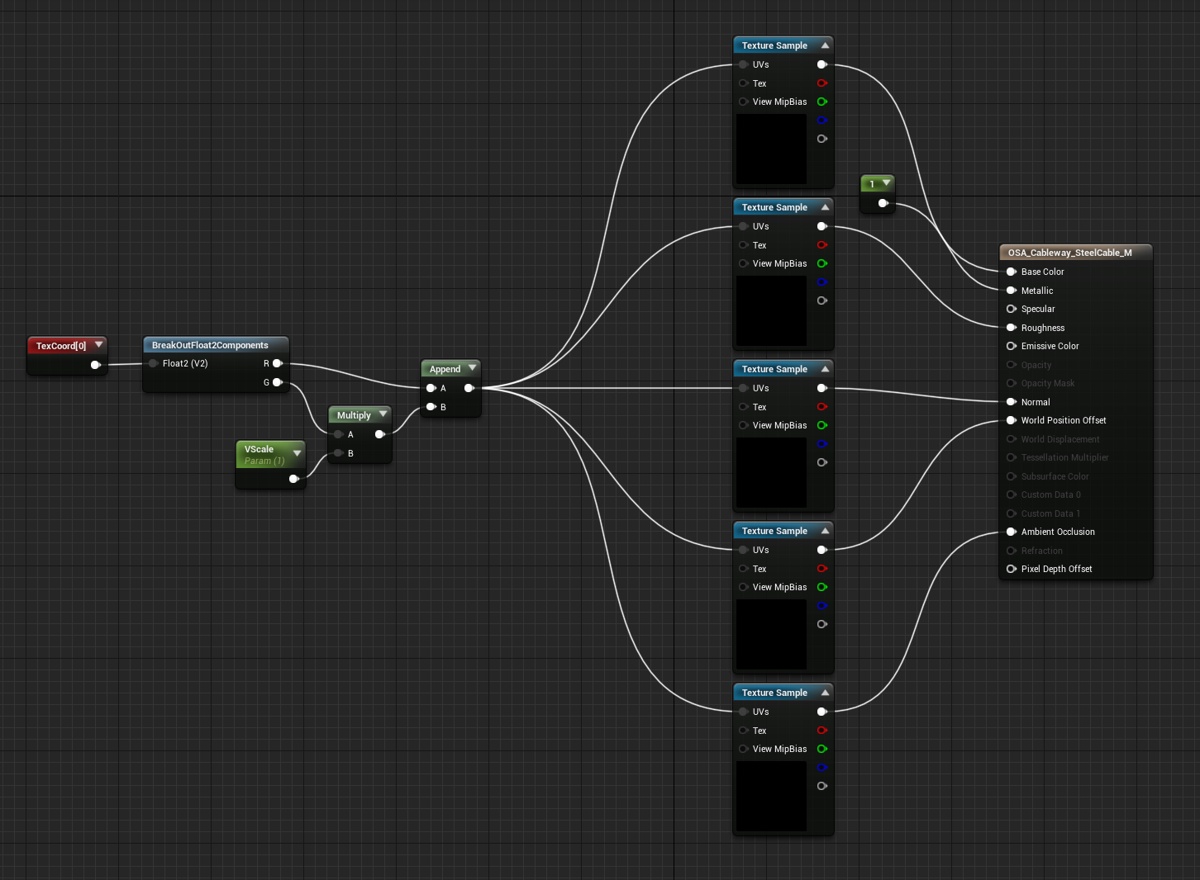
then I just need to create a dynamic instance
normal burrow
yep we did the same thing pretty much lol
latent moth
@normal burrow so here's how it finally works:
https://gyazo.com/46d83224c73b1763256b09f4b5351147


6 is the length of the mesh 😃
I don't know though the cost of material instances in terms of performance
normal burrow
hmm
so
you might want to
theres a Create Dynamic Material Instance node that takes the mesh component as Target
latent moth
yes
normal burrow
i mean it might optimize if you use that version
the one in the screenshot isn't that version
normal burrow
ok cool cool
it works out ok?
ah you know what
it'd work better if you passed two floats to the material and used Get Distance Along Spline at Point instead of the vector length you have there.
then use lerp instead of mul against the v
the vector length of end-start wont account for bending, and at every point it will start the v at zero. so doing those changes would make more seamless changes @latent moth
latent moth
right!
latent moth
@normal burrow done 😃
...one thing though... any idea why my mesh doesn't follow the tangents...? https://gyazo.com/65815f37ea458cba1b187a432c0dc940
 normal burrow
is the mesh just a quad?
normal burrow
i don't know the stuff well enough 😄 but perhaps you need more vertices? I don't know that it will bend the mesh though
normal burrow
is it supoosed to deform it?
latent moth
right, but indeed... how? 😃
normal burrow
well
plush yew
Why is there "Preview" written on the objects in testing?
looks like it's just in the shadows and just the floor mesh which has a png texture on it
normal burrow
how is the explosion stuff going remco?
whole quarry
Havent done anything the past week
 copper fable
hey guys, is the movment replication client to server?
whole quarry
I think i will continue building a playable prototype of my game tomorrow
And later continue with vfx
No time today either, still at work, then groceries and then going to new year party
plush yew
Any idea why my crystal material has no color in the editor but in the blueprint preview?
Blend Mode is Translucent and Lighting Mode is Surface TranslucencyVolume
sudden agate
@plush yew put a reflection Capture into the scene. Metallic Materials rely on Reflections
normal burrow
i'm not sure jager 😦
plush yew
@sudden agate There is one, maybe it's not configure correctly?
normal burrow
@merry gazelle just asked too, maybe he figured it out?
sudden agate
@plush yew make sure the reflection capture covers your crystals
it also helps to use a Sky Sphere with a Sky Light
normal burrow
you might have to press the build reflection captures button too?
(don't know if its automatic)
plush yew
@sudden agate Alright it shows up now, still needs some tweaking, thank you!
Looks like the Sky Light makes it show up
but it has to be combined with the sky sphere
Weird though, I wonder why it's needed
normal burrow
i think any kind of light above and around the rocks would benefit the reflections from the gems
when its in the viewport i think it uses a predefined reflection capture/cubemap
viewport of the blueprint i mean
the capture without more light is probably just black in the places the gems want to reflect? i don't know though
plush yew
Im not really sure, it seems to be caused by the metallic though. But I wonder how one would use metallic materials indoors then without any Sky Light or Sky Sphere?
@sudden agate Maybe any sources to learn more?
 grim ore
well the material can still be metallic but without any light to show the reflection it wouldn't look like you expect.
and you would use something like a reflection capture actor to get the reflection indoors
plush yew
thanks 👌
 drowsy mesa
how can I use gameplay tag
grim ore
and as far as I know you have to use C++ to actually assign them but that may have changed at some point
 worn granite
nah you can assign in details and I'm pretty sure you can add through BP
 shy silo
So with the FP template imported and shooting a line trace, is there a way to use an event for when a specific object is hit by it?
@shy silo
plush yew
so guys i don't know how to post a vid that i took of my problems for procedural generation
shy silo
Post to discord?
plush yew
yes
shy silo
Do you know where on your computer pter it’s saved?
shy silo
Did you click the paper clip in the message typing bar on discord?
plush yew
there is no paper clip for me
shy silo
It might be on the right?
plush yew
@plush yew If it's less than 8 mb you can just drag it into the chat
yooooo i just lost all my blueprints
th
tf
grim ore
ask them nicely to come back or use your source control to reverse the issue.
plush yew
no i opened up my game and they were just gone
grim ore
eek, check your source control to see what happened
or restart the computer and try again? maybe they just haven't loaded yet? or you tried to load it with an older version of the engine? or uhm.. check your files on the drive itself to see if they are there or missing
shy silo
Sounds like both your problems are with memory
plush yew
or paste it in paint
 dawn gull
So, I'm making a game with the side scroller template. Wondering If there Was A Way To Disable Gravity without your character floating up into the abyss if you jump?
 glass imp
Hi, I'm confused about the difference between "Gameplay Tags" which you can set in the project settings, and "component tags" or "actor tags" which you can find in the details panel of an actor or component. Are those 2 the same? how do you associate a "gameplay tag" to an actor in BP?
merry gazelle
I noticed something weird (possibly a bug). Basically all actor transforms disappeared as I wasn't able to move them around. Something was also messing with my VR teleporting and it turned out my Navmesh wasn't working (no green either) for some reason. I tried placing a second navmesh and now the original works and tranform handles are back
grim ore
@glass imp they are all different. Gameplay Tags are a set of tags you can use queries on to get results like "is magic" but "not magic.fire" type stuff and require a bit of setup to work. Component Tags can be setup on the component in the engine and are directly queried against exact matching. Actor tags are like component tags but on the entire actor itself.
https://docs.unrealengine.com/en-us/Gameplay/Tags Gameplay Tags require a bit of setup to work and you can read that here.
@dawn gull if you don't use the physics system or character movement code to control jumping then you can disable gravity and have no issues. The issue is without gravity and using a gravity/physics based system to jump your gonna need it (or you can just force the character down over time manually if you want)
dawn gull
@grim ore So, Basically, I Just change jumping to teleporting up, and also disable gravity?
(and also add a down control button)
grim ore
well I guess what is your goal with removing gravity?
or are you just trying to make it go up and down and not really jump
dawn gull
trying to make it like you are swimming
glass imp
@grim ore thank! any idea how to read the comnponetnt/actors tags?
grim ore
get actor tag or get component tag
@dawn gull ah, you can just use a special physics volume to simulate water then if you want
but otherwise maybe just moving the character up and down using the transform might give a better effect rather than using the character component to add movement like normal
dawn gull
Ok. Thanks!
I'll Try To Find You again When i'm Done To Show You The Finished Product.
 dawn gull
ok, How Do You add Onto The Values Of The GetActorLocation Node? (For Instance, Add More For The y Value?)(So, If The Char Location Is 0,0,0, You Would Make It 0,10,0.)
 mental shale
ey, anyone know where the "PlayerState" fits into this chart?
manic pawn
each player controller owns a player state, the game state keeps track of all active player states
 quiet rampart
Hey everyone! :)
I would like to get some clarification about the engine, but i do not want to mix conversation here, so if someone would be kind to chat in private, i would have some question :)
Thanks!
grim ore
use the AddActorLocalOffset node if you want to just add to the existing location of an actor, else you can SetActorLocation if you want to get an existing value, add to it, then set it to the new value.
glass imp
@wraith bridge got it working, need to use "Component has tag" for components, anything else fails, If you try to loop on "tags" variable it will come out empty
maybe because those are the gameplay tags, not sure.
different things called the same (tag) seems a bad idea to me.
grim ore
in theory except each one is referencing something else. It's like saying the player and the enemy both can't have health because that would be confusing
glass imp
you can search tags or components tags on the same object
and the same name is confusing
at least call the others "gametags" and having accessor functions named the same
grim ore
eh, it's the way programming works. Encapsulation and such.
glass imp
this is not encapsulation, its pears and apples called both apples
grim ore
so the tags variable on the component and the tags variable on an actor is confusing because the variable name "tags" is the same?
glass imp
with two accessors: "get apples" and "get component apples"
dawn gull
@grim ore With The SetActorLocation Node, What Pin Do I Input The Current Position Of The Character Into? All Of The Input Pins Are target, new location, sweep, and teleport. The output pins are sweep hit result, and return value.
grim ore
if you are using SetActorLocation it's taking in the new location. If you are using that you would get the current location, add whatever you want, then that new value is what you would put in for the new location. If you are just trying to "add" a set amount to something already then the AddActorLocalOffset might be easier as it takes in the thingy to move and how much you want to move it relative to where it is now.
mental shale
(sorry for interrupting) but should this part be re-worded?
dawn gull
@mental shale Nope. Seems Fine.
mental shale
are they saying that we don't need to know about the transient data? Or the transient data that people should know about should not be in the GameMode?
grim ore
the game mode is server only soooooooo if you have data in there it's gonna be a bad time for clients
mental shale
ooh, so it's my latter one?
the stuff they should know should not be in the GameMode
grim ore
yep that's why it says it definitely should not have data that the clients need to know about
mental shale
shouldn't "that" be a "which"?
grim ore
maybe, reading it as it appears to be fine to me.
mental shale
hm
grim ore
data that the clients need to know about should not be in the game mode. data which the clients need to know about should not be in the game mode.
grammar wise I am sure one is correct but reading them to me is the same end result
dawn gull
Is This Correct, Or do i need to change stuff? also, what do i do with the Sweep hit results??
grim ore
when that runs it would add 5 to the existing Y value, sweep and teleport are used for physics stuff to check for collisions so chances are you are fine leaving them blank unless you expect them to move into something else (use sweep then). you will have to hook it up of course so it runs.
Sweep checks for collisions when it moves from start to the new location and lets you know if you hit something (the results). teleport says screw the collision and just moves it no matter what even if it would collide.
mental shale
Wait, is GameMode AND GameState only on the server, or just GameMode?
dawn gull
So I would connect the arrow on the left to the up key or jump key, and when I press it, the code gets player location, adds 5 in the y value, and teleports the character there?
grim ore
from the networking guide "The class AGameState is probably the most important class for shared information between Server and Clients. The GameState is used to keep track of the current State of the Game. This includes, for Multiplayer important, a List of connected Players (APlayerState). The GameState is replicated to all Clients. So everyone can access it. This makes the GameState to one of the most centered classes for Multiplayer Games. " so it's client and server.
@dawn gull that seems correct, yes
dawn gull
Ok! Thanks! 😀
mental shale
found a mistake in the documentation!
grim ore
nope looks fine
mental shale
huh?
grim ore
so it should be the gamestate exists on the server and all clients can replicate freely ?
mental shale
yeah
grim ore
so the clients can replicate freely or the gamestate?
mental shale
wait
grim ore
now it might be better with some commas like The GameState, which exists on the server and client, can replicate freely
grim ore
it's weird to read but it's got the correct # of ands heh
the docs are a weird thing tho for sure. There is a lot of older stuff which is weird and there is missing stuff but they are slowly trying 😃
mental shale
I think I'm seeing this kinda stuff since I'm physically taking notes to better understand everything
manic pawn
you should also read the compendium if you haven't already
 mental shale
but for a first-time reader of some of these, it might get a little confusing for them
the OG docs*
so a gameState would do something like replicate every player's position in a map for every other player?
grim ore
nope. The players positions replicating would be handled automatically by the character component if you are using one (recommended) or by a replicated variable or component that the server would handle
 high stone
When is the Unreal live stream for New Year's Eve? 10pm est?
 wary wave
... there's a stream?
dawn gull
so, i coded this, and set world global gravity z to -500, but when i press up, or jump, it does nothing. and, when i spawn the player in the air, they still fall!
grim ore
well for that issue there, it doesn't look like you have anything in the delta so that makes sense
also it might be better to get the player character not the pawn assuming you are using a player character.
dawn gull
like this?
grim ore
that should add 20 to the Z yep
keep in mind it only triggers once so you are basically moving it from the existing spot to the next spot when you hit Jump and only once
dawn gull
how do i make it so that it can do it infinitely?
ill record a video of the thing failing.
grim ore
as for the second thing your gravity is correct, -500 is pulling down 500. set it to 0
-980 is the default which is earth gravity
if you want it to move when you hold it down you want to look into timers or something else to let you repeat an action over time. Even a delay then repeating back might work.
there are alot of ways to do it, right and wrong, sooooooooo
dawn gull
gah. file too big.
 wintry willow
When I press play in the engine, it eventually freezes when walking a 2k terrain/ 256 components, it does respond to escape the preview though. This is only if I import a height map, if it's perfectly flat I can get to the edge. Any ideas what's going on?
dawn gull
OK! when i set gravity to 0, it floats,and does not drop. but, when i press jump, it still does nothing.
@wintry willow maybe it's the cpu powering out. open task manager while playing and watch the cpu.
wintry willow
CPU was at 25% RAM stayed at 3700MB
dawn gull
ok. well, maybe the program itself cant handle it. watch and see if there is a spike for just the app while playing. write down the before and after data.
grim ore
If it;s floating then 20 should be fine on the Z if using a character, if it's not floating then you might need more than 20 to get it up due to it using a character. Adjust your Z to a higher value to see if it works.
dawn gull
Thank You! Thats Perfect. 50 worked for my needs. 😃
wintry willow
hmm, restarted editor. no fix. now it's doing it only a few steps in to the other direction. It looks like the player actor gets Deleted. so confused, ot
it's just a basic first person template with terrain
grim ore
does the terrain go down? if so maybe your Kill Z is getting hit
wintry willow
ahh ok thanks let me look maybe I didn't remove that yet
 spring blade
Hello, does anyone know how i can have an object with collision set to NoCollision but still have hit events?
grim ore
so it has a collider but you don't want to use the collider? I guess the question would be what are you trying to do?
mental shale
how do you make groups for variables like in this image?
oh wait
I found out how
you enter in the category name right here, and it will make a new one. (or you can pick a pre-existing one)
grim ore
yes and you can use the | seperator to make sub categories
mental shale
so a "|" after whatever you name the first category?
grim ore
Character | Stuff | More Stuff , for example
mental shale
ah
grim ore
probably without the spaces I dunno lol I always include them
 odd panther
mental shale
odd panther
mental shale
Another question: would you want to store a variable like a name, or current Level in an RPG in the PlayerController, PlayerState, or GameState?
ye
(or none of the above?)
grim ore
single or multiplayer, and name of what?
grim ore
probably with the character then
mental shale
(or the player?)
grim ore
I would assume it would be like the characters stats, stuff that is unique to it, and should go in the same place. Normally it would be on the character but you could technically put it on the controller if it's not unique to what is being controlled. Alternately you can put it wherever the heck you want as most of this stuff is just "there for you" if you need it
mental shale
also, can the playerController ever change?
grim ore
uhm... damn I knew this one lol, I don't think you can beyond a level or game mode change.
mental shale
ah
so for example, if you were controlling a character(pawn) that walks around, then that character gets into a vehicle with a different control scheme, the playerController would remain the same -the new pawn just changes the way it handles the input from playerController? right?
grim ore
if you want to design it that way yep, and if that's your goal then that is a good way to do it. You don't "need" input on the player controller (nodes that say if X key do Y) as you can just have the character/pawn handle the input events passed in from the controller naturally
mental shale
oh
grim ore
if you look at some of the templates, like the FPS character, you will see all input is handled on the character itself
but you might keep some of the more general/shared stuff like menu handling on the controller
like ESC -> Main Menu can be on the controller since that would be universal
grim ore
yep yep
wintry willow
@grim ore thanks it was the world killz, would have drove me nuts.. really appreciate it 😃
grim ore
@atomic forge That is the preview mesh, it's the \ Key (above ENTER normally) to toggle it off and on. Sometimes it gets stuck, restarting will fix this.
 atomic forge
@grim ore Thanks!
 wet berry
Personally, I like to have all input handled on the controller and have the pawn(s) use event listeners to handle their own movement/actions
But that's an organizational/extensibility preference
If you only have one (or a small number) of possible pawns/control schemes it doesn't matter too much
Unless you start looking at allowing the player to remap controls and stuff like that
mental shale
when you have a menu you want to go away, do you hide the widget, or distroy it?
sudden agate
I usually destroy it, it ensures that nothing happens unexpectedly (like clicking on a hidden button or so)
manic pawn
is there some way to stop config files from becoming  like this?
what is the point of removing those 2 default entries, only to then add back the exact same ones ..?
glass imp
anyone has an idea how this example is creating a 3d view on top of the current world? https://youtu.be/JeHJYbgkPG8?t=32

Here is my lock components with lockpicking minigames. It will be available soon on Marketplace.
like a separate 3d scene on top of current world
dawn gull
@grim ore @everyone Where Would I Add A Delay In This Code So That I Can Press And Hold?
 short onyx
Happy new years from a french guy 😊
 hazy scaffold
Can anyone help me make a post process that shows just lines? Like, I've seen a ton of cel shading ones, but I meant just black and white. Complete beginner here in making post processes, in case you couldn't tell
grim ore
@glass imp you can use a separate camera that is pointing at that area (the lock) that then renders out to a render texture use scene capture 2d. you can put that into a widget image and then display it on the screen when you want. That would be my best guess at what you are seeing there with the feathered edges and all
glass imp
@grim ore I'm trying now different options, the rendertexture seems ok, but it has the big issue of not being able to interact
at the moment I've setup the scenecapture2d and I see the scene properly in the widget, but I cannot detect clicks on the items inside the widget
I mean I have a ball which should move
grim ore
i dont see any interaction there. The rotation is just the keys being pressed and then that item no matter where it is taking in the input and rotating
glass imp
and the player clicks on it
 fringe pecan
hello
glass imp
my example is not exactly like that, I need to make all sort of minigames for crafting
and some will require interaction
grim ore
yeah if you need direct input then you will have to figure out another way. you can overlay buttons on the widget and use those but I guess it depends on what you are trying to do
glass imp
I'm trying now a different approach, so to stop the character, enable mouse, move his camera to the minigame location (far away from everything in the world space)
this way he can click the ball
grim ore
that would work as well
glass imp
I'm testing in standalone atm
but I will then have a multiplayer setup
not sure what will happen there, as the server should not care about this ball position
as it may be different for every player
but the ball is an actor (still just an example), and so replicated by default
what I need is to create a minigame client side used for example when crafting
I cannot have server side like 10000 copies of the same minigame to take into account all possible players 😃
so my idea is to have only one client side
fringe pecan
may i ask a question, is it hard to make a squad set up?
 unreal shore
Somebody can help me.. ? Anybody's computer is hot while using UE4 ?
grim ore
you can have it client side but you should validate the input on the server, or validate whatever they are doing is valid in the end if not you can just have them hack the mini game on the client and return back something you don't want I would assume
@unreal shore yes computers can get hot when using UE4, it is graphically and CPU intensive when working on heavier scenes. It's 100% dependent on your project and PC tho.
glass imp
@grim ore yes, that's a potential problem of client side only.
glass imp
@unreal shore it will get as hot as when you play a 3d game.
unreal shore
Well first time when my cpu had 90% usage i was litlle bit worried if mine computer works fine
grim ore
if you are opening a project for the first time, or the editor, you should expect 100% CPU use while it is creating the cache. This is normal. If your PC gets hot from that then shrug your PC gets hot from that.
in terms of performance that is near the lower/middle end for using the engine so you should expect it to be running at full capacity when working on a project
@fringe pecan you might want to give a bit more detail on what a "Squad Setup" is to you
 barren delta
@unreal shore limit editor fps
25-50 fps makes your pc not so hot
Than default 100
unreal shore
where i can find it ? 😁
barren delta
Google it... It can be set in config for sure. Epics probably exposed it to editor as well
fringe pecan
squad set up with a total of 6 characters (player included) running around together in a medieval setting, warrior types will only run off so far from player ....... better version of dragon age?
grim ore
I would say pretty hard for a new developer
Anything touching on AI is immediately going to be a challenge if you want it to work well in most situations
fringe pecan
could a ....... leash? system be set up? characters will only move X far from player
grim ore
yep, that would be part of the AI. in UE4 you could add a task or decorator that would check every X amount of time for distance to player and have them return/go to them
fringe pecan
would that be an easy method?
grim ore
something as simple as that yes. Making sure it can see the player, making sure it can get to them when something is in the way, making it decide on going to the player or fighting, etc.. those are all parts of a larger hard problem
grim ore
in the end it's not a horrible amount of work but it is alot of work making it work well
fringe pecan
right, i have a little experience modding games, messed somethings up big time and made some cool things work too so I can understand that part at least.
I would just like to be able to make a prototype for a game i have been designing
grim ore
welp that should be doable, getting the "basics" up and running is not a ton of work just a good bit
fringe pecan
I do have the drive, the interest and the stubbornness ^_^
 steady owl
Are packaged games future proof for at least the next few years?
Thinking that I should regularly package to save stable snapshots of my game
As new UE4 versions may break things in the project
manic pawn
what do you mean by future proof?
an old packaged version of your game is useless
you should be using source control and fix the issues when an update breaks something
steady owl
@manic pawn future proof as in I can play the game exactly as it was at that point in time
manic pawn
I suppose it would work for that
steady owl
Cool that’s what I want
Even backing up the entire project folder might not be consistent in the future unless the same exact build of the engine is installed which could be a custom one
But it would seem builds would
 abstract relic
why would you package a project instead of using source control?
steady owl
Because in my experience there are so many things that can go wrong with source control unless you really know what you are doing
 void kraken
Is there any free version control service available to share work between you and your team?
steady owl
But backing the whole thing up is foolproof
And works perfectly
By the way I just mean back up the entire project for backup purposes but package just for playable backup purposes
So you can package a build when X mechanic and Y item was functioning and play it exactly as it was without setting up loads of custom stuff
grim ore
@void kraken yes there is visual studio teams, github, and bitbucket that I can think of off the top of my head.
fringe pecan
new question, would it be hard to have a mage character switch from spell/ranged attack to melee attack if an enemy got too close?
abstract relic
Depends on what framework you want Nav: git, svn, mercurial, etc
grim ore
@fringe pecan depends on how your system is set up but not hard, checking for distance is very simple and then the rest is up to your code
fringe pecan
my thinking is that if an enemy got X close to a mage, mage should be able to smack said attacker up side the head with his magic staff, treating it like a bo staff
kind of like Gandalf did in the Hobbet when he fought the ...... goblin king?
mental shale
so Im using a dialogue plugin
and inside a widget class, this node is called somehow
but I cant tell from where
is there a way to find what calls this?
Ive already done a search
 dry moon
Destroy Actor
mental shale
but it only leads back to the same node
mental shale
yeah
dry moon
Remove from Parent
mental shale
oh wait
I just now saw that parent class
🤔
maybe it will be in there?
uh oh
it's c++
dry moon
Calling
mental shale
dry moon
Remove from Parent will call Destruct
fringe pecan
If I needed help with setting up some things for a prototype, would it be ok to ask for help in here?
grim ore
it should be okay to ask for general helping here but there are channels for other more specific help if you need specific help. just don't always expect for someone to answer because the right person with the right answer May simply not be on to help
fringe pecan
right, honestly I would prefer to do 99.9% of the work myself, but I am mostly going in blind here and most tutorials i have found suffer from motor mouth over explanations.
is there a better channel to ask the questions?
i mean what would be a better channel
void kraken
Is there any tutorials, content or course available that you know of which helps with learning about matchmaking system, where you don't have to select team but it automatically assigns you to the team
mental shale
where should I ask about packaging failures?
oh well, I'll just post this here
and see if any of these error messages look familiar to anybody
manic pawn
update your vs
mental shale
oh, thanks!
manic pawn
mental shale
what gave it away?
oh
hm
does ue4 automatically install vs ?
I remember installing VS awhile after UE
grim ore
it does not automatically install it, just run the visual studio installer again and update it
mental shale
was Vs always a prerequisite for ue4?
manic pawn
yes? how else are you going to compile c++?
 cerulean nova
a Landscape can be realy demanding in resources right?
 weary basalt
Thats hard to answer. There are alot of factors that determine if something is expensive or not.
manic pawn
it can be
dry moon
If you don't want it demanding, avoid using a lot of layers , avoid using any tessellation, make the terrain LOD more aggressive and bring down the landscape component size
you'll be fine at that point
cerulean nova
i think i have to overthink alot since my pc is realy outdated :/
dry moon
Yeah if its outdated, I would suggest learn your computer's limits and work with that
honestly I feel like its better to develop in an underpowered PC because it forces you to optimize your game
to make it run really well on your PC
as I see a lot of indie devs working on high end specs, say their game runs fine on their beast but on anyone else's it looks bad and runs bad
plush yew
That's been a problem with a few UE fps' I play
Insurgency sandstorm and Rising storm 2 run terribly on my admittedly low-end PC, but Titanfall 2 runs fine
manic pawn
just get a super high end monitor to go with that, and obsess about getting it to run at 1440p 144hz on that hardware
then it will work out for normal hardware too
dry moon
If the person has a low end PC, you can assume money is the problem with that
manic pawn
nah, I mean when developing on high end hardware but not setting the standards high enough so it'll still be fast
dry moon
yeah I get that
but I think most people don't see problems until you end up in that situation
manic pawn
it's also not fun to use the editor on not high end hardware
dry moon
so its best to have a lower end PC to test your game on in general, because running things at higher rates doesn't really use them the same. 1440p you might still have a CPU issue you wouldn't really see
grim ore
lol I ran into something related to that earlier today. This work machine was HDD bound when compiling due to it being a mechanical. I just swapped in an SSD and now the machine is CPU bound when compiling... can't win =/
man what is even considered low end anymore? like a 730 series fake gpu or is a 1050/750/960 low end now?
and are talking like dual core no HT i3 or something like an x4 amd
dry moon
I mean that would be like graveyard tier, there is SOME standard
grim ore
would we consider Xbox one/ps4 low end? or high end? or uh... middle?
manic pawn
a 730 is literal garbage, a 950 would be low end
grim ore
I know a 730 is literal garbage but I can run WoW on it
manic pawn
when your pc hardware becomes worse than a console it's time to replace it
dry moon
I still test my game on a radeon hd 6000 series
whidch I would say is terrible
well working on Xbox One, its definitely lower end
which is what kinda helped me optimize my game in general
just by how terrible it is, you basically NEED to make sure it runs well
or if you don't care, release garbage
manic pawn
ark still runs like garbage on top end hardware
dry moon
and that makes me feel proud, I've done some dense forests tests and still managed to rock 900P 30FPS at a 85% min dynamic res
along with AI tests in the forests
manic pawn
I just refunded that game right away since it was unplayable
dry moon
I find it funny how in atlas for some reason (I think, didn't do much research into if it was 100% correct)
but that your client lags based on server lag?
like what why
dry moon
Well definitely had a rocky launch, and the performance is not so great. Hopefully they don't follow Ark's mistakes and they honestly try to push fixes
because I know ark took a long time to get functional
grim ore
Atlas is just Ark reskinned
they even launched it with the ark expansions in the "hidden" menu
manic pawn
dry moon
Its not unheard of to reuse code, but they basically reused everything which I think no one should defend
The only thing they added was really connecting islands, ocean mechanics and boats?
grim ore
There are server types for the expansions for Ark, in the menu for the expansions that was just set to hidden visibility it showed the ark expansions and Atlas as an ocean expansion 😦
dry moon
I don't know too much about it to really judge it, just what I've really seen and heard
but definitely could have used another year to work on
grim ore
like the original Ark when it launched
I dunno I'm just bitter as I supported it as one of the first UE4 commercial releases and I couldn't get it to run well on my machine and that made me sad 😦
manic pawn
I don't think it runs well on any pc
grim ore
you've got stuff like "The Park" which launched as a UE4 game and ran fantastic so it wasn't the engine sucking at the time
wary wave
Atlas is literally just Ark
grim ore
Ark still made a ton of money and despite it being "a crap optimized game" still obviously makes enough to keep them going
manic pawn
which is sad
grim ore
people can hate on fortnite all they want but being able to go from 30 -> 60fps on consoles and handhelds as Epic optimizes it has been an awesome thing to watch
wary wave
Ark was kinda fun when it first came out in Early Access
it had a lot of promise
but rather than take the complete game they had and polish it
they farted endless meaningless content into it and never fixed a single issue 😦
grim ore
but you can ride dinosaurs, what else do you need in a game but being able to ride dinosaurs
and yes I realize I am shitting on a released game without having anything myself of that caliber but damnit I think alot of us in here can atleast see the issues and know they could have been improved on.
wary wave
the core game was genuinely fun
they just kept adding content and "end-game" grind
ah well
I'd love to see a similar game, but actually polished and refined
grim ore
like the entire concept or just the core survival part?
I know rust seems to always get good a recommendation but I think it's pure survival
wary wave
both; the core concept is great, and the basic mechanics / survival game work well enough
but their level based tech system means that once you reach a certain point survival becomes redundant and the game goes RTS
which is fine on private servers, but on public servers is a nightmarish experience for anyone not there since day one
grim ore
ah ha
wary wave
played competitively between multiple groups of 4-8 people, Ark is probably one of the finest RTS games out there, for those that have the patience to set up such a server and manage it
but that'll never happen in a public server of course
cerulean nova
@grim ore When i say my Hardware is outdated its because its a AMD FX 8350 + Readon HD 7850 but yeah .. System is ~7 years old at this point <<
grim ore
see I dunno man
like my kid has my older hand me down and It's like a Q9660 with a GTX 760 and while it's like super slow compared to mine he can still game on it
so yeah it's old but stuff like overwatch runs well enough, and he can play far cry and Just cause on it
 viral herald
how guys, how would i set up the material for this slime
i dont know what the material should be
grim ore
now trying to dev on it would be a bummer but I suffered thru it for years so shrug lol. I would consider stuff like a celeron or anything integrated being the suck but even then I did it lol
viral herald
i cant figure out how to incorporate the opacity
grim ore
your Blend Mode is Opaque, Opaque is solid.
Change it from Opaque to something with transparency
viral herald
im trying, cant figure out which one does it
 last moss
Happy new year :p
 icy ridge
Happy new years!

 dry moon
That is a lot of texture samplers
try to merge them in photoshop using the RGBA channels
grim ore
yeah if its black you might have hit the sampler limit but you could try just the base color and the transparency texture inputs but I think it might be something else
abstract relic
here's an example. The metal, roughness, AO was put into each channel
then used for the respective input
viral herald
waht im trying to accomplish is to get all the active materials like you have there, while also having the opacity
and i think i can get the RGBA done
mental shale
what filetype do I need for a cubemap?
I cant just put in a png
I just want a pure white cubemap
found it, it's a ".HDR" file
 honest rune
Is ARTv2 development halted at the moment?
 plush thicket
happy new-years everyone!
 lilac cobalt
anyone here is good in blendeR?
 neon current
anyone got a game i can try?
 crisp fable
wouldn't it be cool if there was more granular level streaming
so things came in piece by piece
according to some user set priority
 split wedge
im trying to resize shinbi's weapon so that its 0,0,0 but when i save it just reverts it back to normal size, how do i remove it completely?
 quick beacon
idk the context im new
http://www.fiddlydiddly.com/sashimicity.html but big patch energy!
just updated my android games C&C welcome!
sudden agate
@viral herald i would recommend not using Translucent for something different than Glass or Water (Flat Planes).
You can fake Translucency by Sampling a Cubemap Texture of the environment and blending it into the BaseColor.
you could put a CubeMap Scene Capture with a low res in/above your Slime in Blueprints and feed it's RT into the Materiall.
normal burrow
@honest rune http://jeremyernst.com/ has a blog that was updated back in September, i don't see any messages about it being hautled
honest rune
Ah nice. Thank you. Just taking years to get it stable I guess lol
normal burrow
not sure 😃 but yea wish i new maya to use it haha. it seems like a nice tool
dawn gull
Where Would I Add A Delay In This Code So That I Can Press And Hold?
(The Dump Just Makes The Character Fall. The One Above Jumps. It Rhymes.)
dawn gull
No, When I Use It Now, you Have To Press It Over And Over. I Want It So You Can Hold, And Do The Same thing, But Not S t a g g e r y.
normal burrow
ah
dawn gull
I Think I Need To Have A Timer.
normal burrow
just to make sure, you want it so when you hold the button the character flys until the button is released?
flys up i mean
normal burrow
You will want to add a bool variable, and set it to true when the jump is pressed then false when the jump is released.
Then in the tick function you branch against that bool and you call the function you have there to offset, but you multiply the vector parameter there (0,0,50) by the 'DeltaTime' pin
if you head over to #blueprint i'll show you what that looks like after i get my ue4 to be not frozen 😄
dawn gull
Ok. Im A Noob So I Was Confused For Like, A Quarter Of Those Words. 😁
normal burrow
Yea I was just gonna ask here too, if anyone's UE4 seems to get stuck on crash reporting today? i wonder if its a dos or something
dawn gull
I Don't Think That Someone Can DDOS Epic Games, And It Effects Yours. UE4 Doesn't Use Internet.
Sometimes When I Have It Minimized For A While It Lags When I Maximize It.
normal burrow
It does actually though
dawn gull
Really? Hmm.
normal burrow
Right now my editor is frozen and when i break in debugger it forever in a loop trying to send a crash report to epic
dawn gull
Ugh. I Hate It When It Crashes.
normal burrow
happened to me three times
Yea, but its worse because it freezes
I don't know if its a fatal crash or not, but it loops forever trying to wait for upload to epic
dawn gull
Maybe Ram Is Maxing Out.
normal burrow
Maybe, i have 64gb though atm
but i'm more concerned with the freeze from the crash reporter, just curious if its happening to other people. but i almost got it restarted now
dawn gull
Try Restarting Computer.
normal burrow
anyone who was curious, turns out it was waiting to write the crash report to disk because there was no space available, not a dos
 lunar depot
hh
 odd briar
hello people
dry moon
What would be the best way to move AI on different frame rates?
since UE4 doesn't really have a substepping for ticks non-physics
glass imp
I have a SceneCapture2D and as soon as I enable physics on an object captured by the scene, the object disappears from the scenecapture. If I look at the object through normal camera it works properly. Seems ScenCapture2D cannot work with physics obejcts?
 static viper
its true that ai moves faster with more fps
but i dont know why you wanted to stop that
you could attach the system to delta...
dry moon
well for one, AI on xbox is going to be twice as slow than most PC players
static viper
the player speed is also driven by the same system...
you are not faster
or slower
the default system is consistent there
 lavish marlin
can anyone help me?
we painted loads of trees to see what it would look like and it selects as all 1 so if i make them into a bp would i have to place them in 1 at a time
dry moon
I'm not using the same type of AI
Because my AI are flying, so I cannot use the nav mesh system
which means typical AI will not work
static viper
that would mean that you have to code your own speed system
so looking at the velocity math for the player
and cloning this for acceleration
shouldnt be an issue really
lavish marlin
can i paint interactable foliage guys?
 chrome summit
am making a 2d game and i want to make the camera move only x Axis
can someone help me
grim ore
well, how is the camera moving now?
chrome summit
every axis
grim ore
but how is it moving, it doesnt move on it own. Is it attached to something else? is it using code to move on the tick? are the arrows moving it?
chrome summit
am moving it with the arrows
sr
not the arrows
With WASD
there is a camera boom too
grim ore
are you moving the camera with the arrows or the character and the camera is attached to the character?
chrome summit
camera is attached to the character
grim ore
ok so you are either going to have to force the camera to a fixed vertical position every frame if you don't want it to move, move it off the armsmove it off the character to it's own blueprint and have it follow the player on just the horizontal and that's about it I think. The 2nd is probably the best as if its attached to the player like it is now it's really going to want to move with it.
chrome summit
so whats the blueprint to follow only horizontal?
grim ore
so this is like a really stupid way of doing it since your fighting with the sprint arm but https://i.imgur.com/epmvY56.png
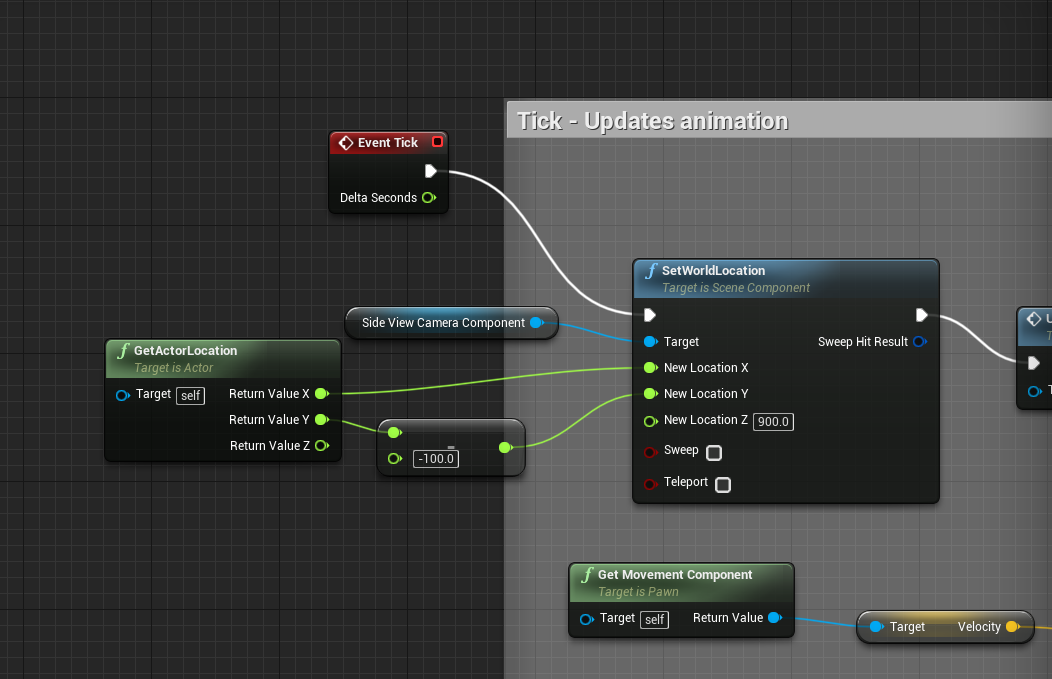
is the basics, you get the player location, we get a value back a bit from it on the Y so the camera can see the player, we set the location of the camera in the world to this new location based on the player but the Z is locked to the up/down value we want.
you honestly want to just get it's current location, update the X based on the player left/right, and set it again but again this is just a bad example that works
if you had a separate camera blueprint it would work basically the same, track the player and lock the Z
the 2nd one (dedicated bp) is less prone to issues as the first one without a camera boom will "flip" to the other side and you won't be able to see anything when the player turns lol
this would be more like your traditional follow camera in a separate blueprint, https://i.imgur.com/5CL5dJl.png
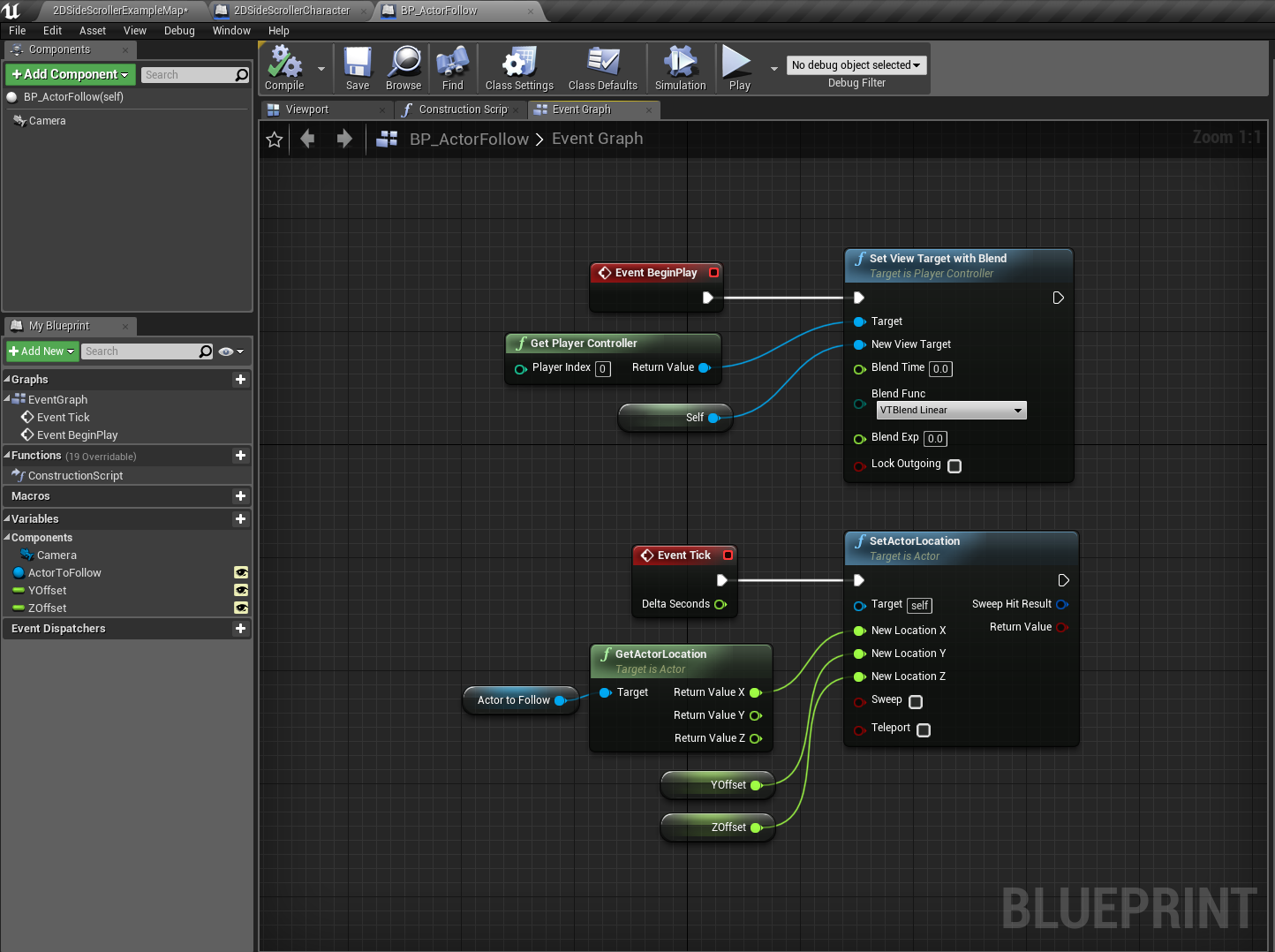
it's self contained, it uses variables to track your target that you can set in the editor. The offsets are adjustable and it just uses all that info to track it on every tick and move the camera. This is also flexible because you could add in things like dead zones for movement and camera lag if you wanted but the key here is it locks the Z (up/down) to a fixed value ignoring the players value
dawn gull
Could someone give me a screenshot of the code for a randomly generated landscape mesh? (Just the shape.)
Like, randomly generated hills and mountains.
 gleaming creek
One of the moderators should probably post this in #unreal-news https://www.unrealengine.com/en-US/blog/featured-free-marketplace-content---january-2019

Unreal Engine
New free content is now available on the Unreal Engine Marketplace! Get the latest bundles of audio, environment, and UI assets.
plush yew
heey everyone! 😃 i have a question about a animation i am trying to get to play on left mouse click but it wont play 😦

thats how i set it up
i bet i am doing something wrong i am still kind of a noob
glass imp
check what inputactionfire is bound to
copper fable
I have just started learning the networking in UE4 and it seems that my events that are replicated to send only to server are not being called
and also my replicated variables are not being updated
plush yew
it is left mouse button @glass imp
o also

thats how i have setup the skeletal mesh anim settings cuz i only want 1 animation anyways
thats why i havent made a animbp
glass imp
try to set it as looping and see if it does play
plush yew
it does
plush yew
but not when i press the button XD
as soon as i press it it stops actually
which is quite weird
i am so lost
couldnt find anything specific on google
plush yew
yup
i forgot to mention i got the asset fps game starter kit
maybe something there is conlicting L.
:/ *
nvm
disabled that whole function from that asset still doesnt play the animation
i was hoping one of the thousands of people here could help XD
glass imp
im doing animations very differently, so cant help much
I use state machines and set variables to switch between one state and the other
each state has associated animation
plush yew
hmm i might know now but i dont know how to fix it @glass imp
shy silo
If I get stuff free for the month in marketplace is it mine in perpetuity?
plush yew
the skeletal mesh is inside the inherited mesh which isnt the skeletal mesh itself
https://gyazo.com/e90b8421653115cf2839c9482e6171b3 if that makes sense @glass imp 😛
 grim ore
@shy silo yes the items are permanently free for you if you get them during the month
abstract relic
Don’t run animations in a character bp. Animation montage will be the exception
plush yew
also tried a montage it still didnt play @abstract relic ...
abstract relic
You need to cache the pose in the animation bp
plush yew
you can tell me what to do but if it doesnt work it just doesnt work 😛
i dont use a anim bp for this specific skeletal mesh cuz i only need 1 animation anyways
no need for a bp
abstract relic
And that’s why it won’t work 😉
plush yew
and i know this worked for me back in the days but for whatever reason it doesnt work right now
hmm
then why did it work back in the days and i litteraly just found a tutorial on how someone did it this way?
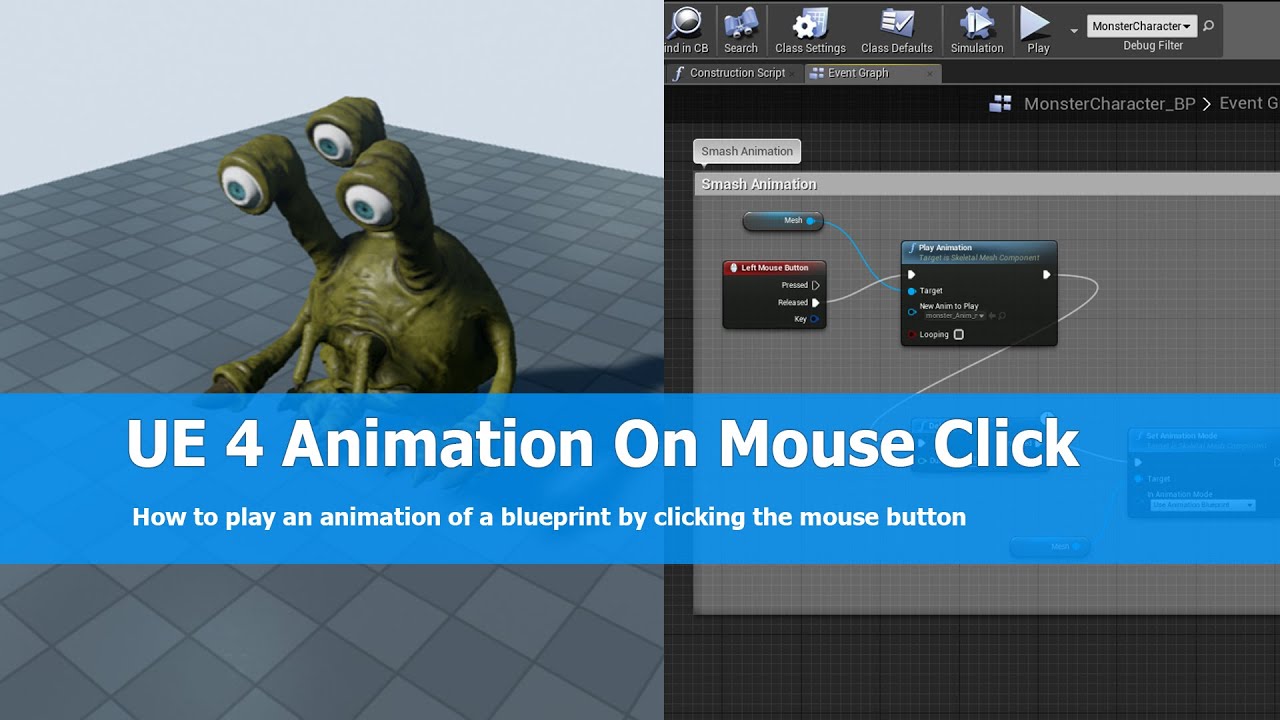
In this UE4 (unreal engine 4) tutorial I show how to play an animation of a character on left mouse click using the Unreal engine 4 blueprint system. I just ...
^^
did it change over the years?
abstract relic
Things change. As they do 😜
plush yew
aaah
that makes sense
let me try to make a bp its just a very long time ago i used ue XD
so i am a noob again
https://gyazo.com/bb3dbef14e18c43f63dcdab36f8eca07 so what should i do from here @abstract relic ? ;p

new state maching right?
if i remember correctly
abstract relic
Before you do anything
plush yew
uhu
abstract relic
Try to set the animation type in the skeleton to ref by animation
grim ore
@copper fable #multiplayer might be able to help better but we can try if you link any blueprint screenshots. Networking in black magic until you figure out the flow but it is weird if replicated variables are not updating.
plush yew
o i also tried that aswell @abstract relic 😛
you mean the specific sequence right?
didnt work either 😦
even tho i feel like it should have
but... when i put it on looping it works until i press left mouse button
abstract relic
lets move this to #animation
plush yew
allright
 paper kernel
Question: Does UV trace hit work with instanced static meshes?
grim ore
If you mean collision UV, it seems to work on the entire ISM component and not the individual meshes, if you mean something else then shrug
chrome summit
So i started making a character and i just noticed there is not a crouch walk animation
any help?
there is a crouch idle
grim ore
the Animation Starter Pack has some crouches but I want to say they are all holding a weapon
grim ore
well the animation starter pack is an epic starter pack for the default mannequin sooooooo
dawn gull
Any Way To Get Randomly Generated Hills And Mountains For The Landscape?
chrome summit
am using a character from mixamo
abstract relic
mixamo will be your best friend
dawn gull
@everyone
paper kernel
👏
abstract relic
You blacklisted yourself mate
 tall pendant
thanks satan the at everyone option doesnt work on this server
dawn gull
im asking for help
abstract relic
Pinging and spamming will only get you ignored
dawn gull
i didnt know it could hurt the server.
 livid haven
So, I have a 0.5 TB SSD and a 1 TB HDD available for these purposes. I need at least 2 workspaces on the regular, but I can't fit it all on the SSD.
I'm considering just having things live on the HDD and then sym linking some things to the SSD instead.
Thing is... what should I really be putting on the SSD? Content and source files I suppose?
I worry that might be too much for the SSD, even still. Blegh.
 dawn linden
C++ project?
livid haven
Fortnite, so yes. 😃
manic pawn
binaries so the editor can load its 1000 dlls faster
 silver crown
I suppose the engine install is on another SSD?
livid haven
Eh, I don't think that's going to give me the most bang for my buck.
Engine is side-by-side.
dawn linden
I've often symlinked intermediates folders to ssd, by far the most important for build times.
livid haven
Fortnite has to load an absolutely absurd amount of stuff on boot, asset-wise.
Alas, content is also the biggest volume of data... :/
Going to do a WinDirStat scan and get a sense of the totals.
dawn linden
Hmm, yeah okay for me generally compile times are the killer, but I do very little in editor work.
livid haven
So I'm looking at about 160 GB in content alone.
Source comes out to like 40 MB. XD
So, yeah, source is going on the SSD to improve compile times, for sure.
Hmmm. I'm missing something here. There's got to be something else taking so much space, cause it's not the binaries either.
dawn linden
Pdbs in the intermediates usually.
livid haven
Orly?
silver crown
There's also SpaceSniffer
 dawn linden
I've had no trouble just symlinking the intermediates folder. Though it can end up being a very significant chunk of the total space, might be more than you want.
livid haven
Yeah, will see. All a matter of whether I can have two workspaces on that SSD.
Thanks
 spare herald
Is there a specific channel about where i can ask for help, or can i ask it here aswell?
Anywho,
I got a wee problem with the shaders compiling. Been waiting for 15 minutes already and it still hasn't loaded yet, am i'm sure it hasn't anything to do with me hardware. :/
Other shaders loaded in mere seconds and the complexity between them is next to none.
shy silo
quick question, I snagged the free rodent AI thing for the month, and Im not sure how to add it to my project, since it only says Create Project
tall pendant
migrate content should work?
shy silo
sorry, Im really new, how do I do that?
shy silo
ok
livid haven
@dry moon Flying AI in what sense?
If you want it to navigate in 3D, no, you're going to have to engineer your own solution for that.
dry moon
Not sure why its absent in UE4
livid haven
The nav mesh stuff is very much oriented towards moving along surfaces.
dry moon
ue3 works fine
dry moon
I'm saying its worked before fine
livid haven
Still unclear what you're calling flying AI.
livid haven
That's unfortunate? Being able to communicate problems is really critical to getting help and collaborating with others.
dry moon
an AI that functions by calling a location from the navmesh without needing it to be grounded
livid haven
What do you need a nav mesh for if you're just moving towards a point in 3D space?
silver crown
3D Pathfinding?
dry moon
No not 3D path finding
livid haven
In which case, no, that wasn't a thing in UE3 either.


 livid haven
What am I looking at?
livid haven
Is it using a CMC?
dry moon
and yeah it did work in UE3, you could call a location and it'd go to it, you'd just need to make sure you add some height to the location you are traveling
livid haven
But that's not "flying AI". That's just... walking with a Z offset.
livid haven
Have you debugged why its failing?
Because there are a LOT of potential points of failure.
dry moon
AI seems to require you to be grounded or something
livid haven
No. No "or something".
You need to actually trouble shoot this. Why isn't it finding a path?
Can you debug the path finding?
Check logs, maybe increase verbosity.
dry moon
In code they don't really spit out any more data besides "failed to move"
livid haven
Right, I mean step into it and see what the point of failure is.
There are pretty rare few resources for AI, alas.
I've never messed with having something use the Flying physics state but path follow.
It seems somewhat trivial, depending on exactly the behavior you want. Like you may want the path it follows to actually be a consistent Z offset from the ground, or maybe you want it to B-line between the starting point and destination?
I don't know what would even be a sane "default" implementation.
Maybe there isn't one and that's why it doesn't work - maybe you need to use path finding as-is, but actually implement your own path following for flying?
dry moon
Well I've went down that route, but ticks are going to function different at 30fps and 120fps. So movement for the AI was slow like that, but normal at 120
livid haven
If I created the system, that is likely what I would end up doing.
dry moon
well I don't want to do that, you are going basically be pushing into two different path finding systems
livid haven
Making it fail to do anything for "flying" because it's just wrong to assume anything when things are ambiguous and force the user to explicitly do what they want to do, but give them the tools to do so.
dry moon
not very optimal
livid haven
No
There's path finding and there's path following.
You can use the same nav mesh to path find.
But you can path follow differently.
I'm saying worst case scenario you path find as usual, but implement path following of your own to get the desired behavior - some Z offset off the ground at all times.
So you'd sample the path that was found and follow towards a point that is at the appropriate Z offset at that XY coordinate. Make sense?
spare herald
Hey Sion, could you help me with something in a bit?
livid haven
Maybe? I don't want to commit to personal help. Just ask and I'll help if I can, as can anyone else.
spare herald
Pretty simple. I got a couple of shaders but they load very slow.
Normally it doesn't take this long, only a couple of seconds even.
And they're not even complex.
livid haven
Shaders or materials?