#ue4-general
1 messages · Page 363 of 1
 dry moon
 cursive dirge
it doesn't compile those if you hit build again?
you can always manually build the missing modules if you know what they are
dry moon
When I launch the game
I compiled through VS, it launched
and then when I just open the editor through the desktop shortcut
it askes to recompile
Alright fixed it
what a stupid issue
and doesn't tell you at all what the problem is
 dire storm
Hey team. I'm looking for advice on how to implement the following system. I have hex meshes. I want the player to be able to adjust the height of the mesh. For example the player can adjust the entire height of the hex face up 1 level OR he can select a corner of the hex and just adjust the height of that one corner. Could anyone point me in the right direction? I'm currently reading over Runtime Mesh Components and Procedural Meshes. Thanks in advance 😃
 icy bone
@plush yew if u mean in multiplayer then yes
@plush yew if u mean to render with different visibility for different render targets then i dont know how, but should be possible
hm thats kinda tricky
i think it require tweaking the render pipeline to do this, u gotta render separately for the planar reflections/reflections with the full body
and then u somehow turn that to texture, and then project again onto those planar when u render again without the full body
i know its possible but the procedure to get there i have no clue atm
if its not crucial to the game mechanic then solve it the easiest way 😄
but u will need it if u make a kind of a ghost game, or a game where u look at urself u see someone else than compared to mirrors
that would make a damn col psychological horror effect
like if u play as Anakin but u keep seing darth vader in mirror, or his shadows
😄
lol
then researching for this effect would be cool
but its quite unique
not many game has it
😄
its especially good for plot twists
😄
but for planar mirrors its actually possible with render target textures
its like how Portal was done
its harder if u want all reflections to obey the same rule
even non planar ones
thats when it become significantly harder
i see
u releasing on steam?
can i see screenshots ?
are u doing the VIrtus gamejam thing? 😄
sure thing
u dont do early PR?
 elfin lily
 tawdry narwhal
I vaguely remember there being a game written in ue4 where they had to tackle very high units counts... does anyone happen to have its name?
 vast pine
anyone know if ue4 has support for overwolf?
 upper heart
@vast pine I just did an integration with Overwolf. They supplied a plugin.
vast pine
@upper heart its not on the marketplace eh?
upper heart
@vast pine No and I had to fix it up a bunch
vast pine
woof
 unreal token
ill try that out ive been trying to work around this all day
making a college project lol idk why i chose vr smh
 cerulean nova
set Visibility vs toggle Visibility is there any diffrence? ^^ just wondering ^^
 abstract relic
Toggle swaps current state. Set... sets to whatever parameter you define
unreal token
not sure what you guys mean
😦
im using this to shoot a projectile from the front of my muzzle
dire storm
Would morph animations be what I need to learn to edit the shape of a mesh during runtime? Like if I wanted the player to be able to shrink the size of a box or hex grid height?
abstract relic
No, you can just adjust the scale of the object
dire storm
okay so how would I handle the allowing the player to adjust just one edge of a hex grid for example. Like if I wanted to allow them the ability to lower one side of a hex to create a ramp up to a second level. Thank you very much for your response.
 manic pawn
you can either replace the mesh with a ramp shaped one, or you're getting into procedural stuff there
dire storm
basically what I'm doing is making a hex map. I want the player to be able to spend resources to edit the hex map by adjusting height levels (say ground, cliff, higher cliff) of the hex by either raising the whole hex up a level or being able to select an edge and shift that edge up or down 1 level.
and have the player action interp bewteen the two states.
I'm digging through the content examples trying to find something. I did see one video in my tutorials that used a morph target animation on a pinball bumper that made me think maybe that was the way
 chrome crypt
dammit
does anyone know how to stop a character from travelling up?
after an action?
unreal token
should this work? not sure if it works and i just have it in the wrong place, i put it in my weapon blue print but since it has controls should it be in the motion controller pawn blueprint?
abstract relic
@unreal token I assume you’re going for something like this

Welcome to another tutorial of Unreal Engine 4 . On this tutorial we will learn how to add and shoot projectiles with your virtual reality (VR) headset and m...
cerulean nova
Should i be worried ? 😅
unreal token
do all controls to fire ect.. have to come from main player or can controlls be in gun mesh blueprints themselves
 dim arch
has been saved with empty engine version. The asset will be loaded but may be incompatible.
is there some way to update these assets and save them in the current engine
guess I should ask in pakaging
dim arch
ya self reflection p dope
 static viper
ue4 dont works that way
its a HighSpec orientated engine
not like unity which is orientated on mobile
you will not only loose alot of engine feature but always have a hard time in editor
i really dont advise low specs... at all
 chilly sigil
Hey everyone, i don't know where to ask so i'll just ask here.
Let's say a friend of mine created this dank Widget BP with all the animation data and code in it, which has no external images.
Is it possible for him to send me the BP so that i can just plug it in my project? or does he have to send me the project which i have to then copy. If not, is there anyway to at least send the animation data?
static viper
yes
migrating
and it needs to the same engine version
get the code to a blank project
and he can send you that
 plush yew
@cloud cobalt you could always change controls in preferences in blender, including making left click to select things, Maya nav controls etc
 gray pier
does unreal install java 8 development kit?
im considering removing it cuz i dont code in java but idk
 regal mulch
Anyone had an issue with Textures (maybe other Assets) only opening a blank window?
As well as bulk editing them?
(4.20)
 dim merlin
hey guys
anyone has a good idea for a good plugin for time of day?
like sun rotation etc
perhaps i should ask it elsewhere ;D
regal mulch
UE4 ships with that by now or?
regal mulch
None of my texture editors are showing anything
fml
Cleared Save, Intermediate.
Verified Engine.
-_-
static viper
only this project?
regal mulch
Checking that right now (2nd project is loading)
static viper
i have seen this before
bu not with textures
i cant remember what caused it right now
static viper
very baddo
well i guess you have to use unity from now on
¯_(ツ)_/¯
@plush yew you should head to #umg
 harsh tiger
my project was running at a smooth 90-120 fps in the editor last night and now today its going 20-120 and is really unstable. any idea why this is?
regal mulch
@static viper Fixed.
Deleted "%APPDATA%/Local/UnrealEngine/4.20".
static viper
how did you found that out???
regal mulch
static viper
phew
regal mulch
Just a casual 1 1/2 year old post
static viper
no magician afterall
harsh tiger
anyone got any ideas how to fix my issue?
 unreal siren
Start from the bottom up, anything messing with your PCs performance outside of UE4?
@harsh tiger
static viper
so
it was wrong to even tocuh kite demo XD
you can easily remove anything by manually removing it in the folder structure
like windows explorer
harsh tiger
@unreal siren nope, i was playing CS:GO with 500 fps a hour before opening ue4. i've even tried closing and reopening my project
static viper
kite demo is no packet
the whole thing can either be removed in ue4 editor
or manually
click folder
press delete
done
then do it manually
as i said
.
and?
its compiling the assets to get references
and kite demo is large cancer
so ofc it takes time
good
now proceed
harsh tiger
i had netflix open xD that seems to have fixed it haha
 quaint gazelle
Why is this is giving me?
https://cdn.discordapp.com/attachments/479799428073521154/528578608667557891/unknown.png
I have Pixel Shader and Vertex Shader 4.1
and directx 11
harsh tiger
i think its when you post a picture on discord and then right click and copy the image link
 grim ore
it looks like it's explanatory, what video card do you have?
grim ore
then yes that is no longer supported, they stopped supporting SM4 a few years back
it looks like 4.17 is the last version you can use for that card
 graceful crane
I'm completely new to unreal engine and I'm trying to make a deployable floating disk and have no idea how to start
basically a hoverboard
grim ore
https://docs.unrealengine.com/en-US/GettingStarted https://academy.unrealengine.com/ https://www.youtube.com/channel/UCBobmJyzsJ6Ll7UbfhI4iwQ

YouTube
Welcome to the official Unreal Engine channel! Unreal Engine 4 is a complete suite of real-time 3D tools made by developers, for developers. Create and take ...
 drowsy mesa
Anim montage/state machine what can I use for hit reacts animations??
I've managed to use state machine but animation freezed while transitions
I used bool for this process
What should I do?
 obsidian ore
is there some way to reset the view in the editor? by zooming out in some weird way i somehow managed to turn the camera upside down and i'm unable to get it back to normal
the solution says to "lock the camera to an object"
what does that mean, and how do i do it?
 paper kernel
select object and press F in viewport
drowsy mesa
Guess I've gotta use montage for hit reacts
state machine is Hierarchy based system so
I dont have to make a structure for single hit reacts
obsidian ore
thanks
 inner yacht
Can anyone help me get better performance with a small city that i have street lights in. How can I set to use low quality lights?
The Shadow Quality cant be turned to medium or extreme lag happens
 icy gale
If I want to create a text that will appear on collision with items such as pickup items etc, where would and how would you implement it?
 gleaming creek
Do you want the text to appear on-screen (e.g. a HUD), or 3D in the world?
 robust void
i need help. is it possible to make a mp4 file from an exportable cutscene you make in unreal
gleaming creek
Record it using a program like OBS or Shadowplay?
icy gale
@gleaming creek Well, I want it as a HUD text, I kinda don't want it to be static tho. I tried setting it as TextRender in the ThirdPerson class, when I attach it to the character and set the head as parent it looks awesome, but it doesn't being translated when I look up/down, so its kinda not good enough I think.
If I try to attach it to the camera I just see it anywhere I look which is good, but its completely static, which is not exactly what I want.
plush yew
gleaming creek
@icy gale If you want it as HUD text, you would set up a HUD using UMG and tell that to display your text
 oak temple
@inner yacht try switching from static lighting to dynamic, you might be overloading your vram with the baked lightmaps. Lighting runs pretty heavy in general though.
 grave nebula
@dim hemlock It literally states that you need to switch decal material blendmode to translucent.
 chrome summit
 little whale
guys, where i can ask about an issue related to the engine and my monitor?
basically everytime the cursor gets on the generic browser or anything related like trying to go to options, etc, the monitor turns off/on like if switched to another channel, only happens to UE4 tho.
regal mulch
Does that happen in all Engine Versions?
Have you tried verifying the engine you are using=?
little whale
regal mulch
Does that happen on every project, also on fresh ones?
little whale
Just found this topic
regal mulch
Welp
little whale
but i have been forced to switch my screen to HDR which the colors arent great in windows desktop
icy gale
If I want to see something only when the player is looking at it, how to do it? Or what should I google for? Cause I couldn't really find it..
 dusk vault
My new video from UE4
https://youtu.be/RuwPtjVW3lc

 earnest cape
Is there a way to split a spline? Like fork it in multiple directions?
paper kernel
technically you don't have to, just start new splines
since you would need a way to separate the splines in code anyway, might as well make a new ones
 stray smelt
anyone else having issues when you are attempting to check out multiple assets at once? (svn in unreal)
like +20
icy bone
I am surprised how well the Mixamo stuff works for the basic needs
great for testing 😄
I can just model something and just get instant animation
so cool
stray smelt
yeah mixamo is great
 sonic pagoda
attempting to save
Fatal error: [File:D:\Build++UE4\Sync\Engine\Source\Runtime\CoreUObject\Private\UObject\UObjectGlobals.cpp] [Line: 305] Illegal call to StaticFindObject() while serializing object data!
does anyone have a clue what it could be.. i just put in a new earth BP into my map
and tried to save the map
drowsy mesa
my animation wont turn back to start
sonic pagoda
and i just tried it on another map as well.. still crashes.. what the heck
nevermind
not the asset
just a recent upgrade to 4.21
upgrading to put new incompatible assets in is fun
but i really need this one this time
drowsy mesa
yeah
sonic pagoda
whats the details pane show
drowsy mesa
I dont want loop
I checked out
I dont want loop and I want animation starts from the 0 frame
it continues if I start the animations again
I want the animations start over and over for every single plays
not continue from the previous status
grim ore
I can't tell which type of node that light hit to head is but does it have a start position pin you can add?
 storm venture
anyone know of a way to display a material in a widget without making a separate version with the UI Domain enabled?
I heard something about using SceneCaptures but I need to display about 9 materials on the widget at once and I imagine a scene capture would be quite performance heavy?
storm venture
is there any way i can access these icons?
 grim sinew
No. They’re generated by the engine and stored in a way you cant get to.
icy bone
u can but its complicated...
storm venture
Darn, thanks
grim ore
you haved #cpp and the docs https://docs.unrealengine.com/en-us/Programming/UnrealBuildSystem/IWYUReferenceGuide , it was introduced in 4.15
dim arch
hey I am downloading the dependencies for the engine source via setup.bat but the problem is the connection is pretty unstable
when it disconnects the downloader stalls
nvm, it does resume. it just froze for a while ;x
 tough fractal
Hello to all. i need a talent for a freelance job. where can i write my request?
 tall pendant
#looking-for-talent perhaps? 🤔 I'm not sure tho...
 crisp fable
any sql guys here?
static viper
i think they are all stored away :c
crisp fable
hah
well my question is can you "reserve" a block of id's
so im not constantly hammering the db to see what the next one is
 shrewd gorge
I'm panicking.. xD My viewport mouse controls all of the sudden are all messed up.
Up goes right... right rotates the view, down goes left...
Sounds familiar?
Resolved: I rotated my view too much and went out of whack
 latent moth
all, is compass data (heading) from mobile phones included in some VR toolkit of ue4 that i can use, or do i need to code myself for android / ios?
 spare sun
don't really see the connection between VR and android
latent moth
sorry i meant AR
the connection is how to access mobile sensors such as gyro, heading and gps
 mystic fjord
https://youtu.be/1oPS3CCqKxs multiplayer game me and my team members are working
just trying to remove this jitter
 ashen brook
So um... this is awkward, but... how do I change my forum signature on the UE4 forums? 😄
static viper
isnt that an option anymore?
ashen brook
I don't see it anywhere
@plush yew you can just add the package, and then delete the stuff you don't need
or add the package to a separate project and migrate only the stuff you need to yours
static viper
dont add the kite demo.
ashen brook
ah, found the signature field
the field to edit my forum signature on the UE4 forums
forum sigs.
a forum signature
it's a bit of text or images that gets added to the bottom of your posts
anyway, it was hiding here:
in settings -> account
it's exactly what I said
ashen brook
it's not for you
it's just for my problem
because I asked for help with a problem, then found the solution myself, so I'm posting the solution for others who might have the same problem
as one does 😉
abstract relic
Good man 👍🏼
ashen brook
told you already - migrate only the assets you want, or import all and delete the ones you don't want
 wheat hare
This is my first day with ue
I installed it last night
I'm going to use it to make a cool map in 3d.
Are there games for this that are open source that I can drop in just to goof around in my map?
abstract relic
There are mod kits
wheat hare
Lit
Otherwise I could import to unity and put it in VRChat
grim ore
if you really really really want them gone go into your file explorer with the project closed and delete them from the disk. you might end up with issues that you need to fix with redirectors but if you never really used the pack you should be fine.
abstract relic
Delete. In file explorer
grim ore
or wait. wait as long as the engine takes to process your request. IT will eventually start working again, it has to check references for all the files you want to delete
or start a new project?
static viper
its your problem if you dont want to really :/
we cant help with attitude or language barriers
well we could... if you told use where you came from
but even then its unclear
ashen brook
sometimes you just have to stare at a progress bar for an hour
it sucks, but that's the state of things
static viper
yee thats ue4
blender interprets this a bit different XD
there might be an issue with export
ask in #animation
better results ^^
 zealous cloak
can someone help me with importing some fbx to unreal?
static viper
whats the issue
zealous cloak
i recorded around 160 gestures with a software called brekel open VR Recorder
the software created fbx with a HMD and both oculus controllers. For presentation i wanted to add all interesting gesture into a map, that i could present
but when importing the fbx nothing works
static viper
error message?
zealous cloak
grim ore
it looks like they came in, there is nothing in the folders?
zealous cloak
all elements are stuck at the same place
the animation plays but relativeley wacky
static viper
did you import all 160 at once?
zealous cloak
nop just 1 to see if it works
zealous cloak
in blender the animations plays normal
zealous cloak
give a second
maybe theres is sth wrong with the exported fbx in blender?
thats how the fbx looks like in blender
zealous cloak
better
i hope you see sth 😄 the important thing is, that the animation plays correct
static viper
this is weird
is this one rootbone connected to multiple objects?
what kind of animation is this?
static viper
are there bones in the animation?
static viper
so
you did 160 gestures
but you did not test this process to comletion before?
you never successfully did this?
but you created 160 gestures
zealous cloak
it was automatically done by the brekel software
static viper
ue4 needs bones
it cant handle vertex animation
your animations all need bones
every single one
they need the same skeleton
and 160 bone key tracks
zealous cloak
so i need bones to know in which position all obects are to each other
zealous cloak
but i can create a root skeletton for my objects in blender?
just adding 3 bones one for each element and thats all?
static viper
try
 copper fable
hey guys, is there a way to deactivate my niagara system without destryoijgn the present part icles?
 shy silo
So I’ve done a smidge of unity and remember it being able to enable gravity on an object. In UE4 is there an easy way to give something gravity and weight?
oak temple
shy silo
thanks for the help in gravity, but im not able to figure out how to ake something kickable. IK in unity you add a mesh collider and I believe set a weight, how would I go about that here? sorry IK this is probably really basic
grim ore
What do you mean by kickable?
spare sun
think he means physics
 bronze cedar
hi guys, i want to know is it possible i can transfer my UE4 from desktop to laptop without downloading it again from the net
grim ore
yes, you can just copy all the files from your hard drive to the new drive and run the editor from the directory for the engine you want to use. You might need to install the pre requisites file again on the new machine. If you want the launcher to know about the new version that's gonna need a bit more work
bronze cedar
@grim ore thanks for the help, can you tell me the work i have to do, because of limited bandwidth i can do that haha
grim ore
you probably have to start the download, pause it, shut down the launcher, move the files over so the engine now has all the files in that folder that you downloaded form before, then tell it to verify. I have never tested this. As far as I know you can't install an engine version in an existing folder so you have to work around that
I am actually testing it now so who knows
bronze cedar
now mean you are testing it , or just telling me to test haha
that's nice thanks for the help, i will do that and will try that , and will let know 😄
grim ore
testing it now, making a copy of my 4.20 engine install incase I bork something up lol
bronze cedar
oh ok haha that's nice, so you was doing this before or doing when i just said it
grim ore
when you said. I've never had to do it before so it's a good thing to test
bronze cedar
omg you are @grim ore , the one who got a youtube channel, wow, i don't know that i am chatting with you, hello Sir, i am your very big fan
zealous cloak
@static viper so imported it with the right positions, but now i have thr problem, that all my animation sequence is split in 5000 elements
grim ore
😃
bronze cedar
it's my luck and honor to chat with you , thanks for the help
zealous cloak
some mistake with importing?
static viper
yes
bronze cedar
i am looking forward to make a shoot em up game, there is just one tutorial series, 😦 i need more, i want to make a free game for android any help guys
static viper
does a backflip
i am getting better
import settings - combine meshes
does a tripleflip
bronze cedar
yes that's right and 100% true @zealous cloak
static viper
quadroflip
bronze cedar
haha i wonder how others know so much, haha yep they work hard and learn that all things
zealous cloak
where can i find the option combine meshes?
static viper
you need the impo
tripleflip
ort window
its a dropdown menu there
a bool for combine meshes
zealous cloak
static viper
no it says combine meshes
for some odd reason that isnt the error tho
mh
funny
what did you do....
show blender mesh again
zealous cloak
zealous cloak
they are connected
zealous cloak
not 5000
static viper
why are there 5000
zealous cloak
500, but maybe 200 just wanted to say alot 😉
zealous cloak
nood?
zealous cloak
its adding again, reimportiong it
grim ore
@bronze cedar welp the good news is the launcher works fine if you are copying over installs. I deleted my 4.20 install from the launcher, told it to add a new one, made sure my files for my 4.20 install where in the correct place in the folder and where the 4.20 install was going, and once I told it to install it basically checked all the files and only downloaded about 150MB and was done. So yeah moving the entire folder where you have the launcher and engines installed should work fine
bronze cedar
@grim ore Sir that's a big help, thanks Sir for the help 😄
zealous cloak
one object in blender?
bronze cedar
just a request from you haha , can you do some shoot em up tutorials, like on space ship shooter game haha
i want to make some small games for android
grim ore
someone made one on youtube that I just saw using the content examples ship. It looked fairly decent.
or else you can just look at the content examples input examples map and it has a ship you can control with effects
bronze cedar
yeah i am watching that , i got so much from that, but it's so fast and kinda like higher level for me,
yes i will , maybe in future haha you can do some like 4 or 5 videos very small, but i will be trying hard to make this game
grim ore
ah gotcha
bronze cedar
thanks for the help Sir, you are awesome @grim ore 😄
bronze cedar
@grim ore i want to stick with you , like want to chat so much on UE4 and game making, but that will make you disturb haha, i know you got some work to do, so will meet later Sir, thanks for the help 😄 😃
static viper
@zealous cloak take this to #animation
this is a blender issue
export issue
i cannot help since i dont know blender
grim ore
yep yep glad to help
abstract relic
Adorable. How often do you get gushing fans Matt? 😜
abstract relic
noob savior/10
wheat hare
Wow there's VR tools you can actually use in VR
Any recommendations on tutorials for that?
I'd like to do all my dev with my Oculus Rift, as much as I can
abstract relic
This weirdo is pretty good

YouTube
This channel is dedicated to exploring Unreal Engine 4 and the Blueprint programming language that it uses. You can think of it as a companion to the API doc...
Jokes aside, do the live training on the topic

Announce Post: https://forums.unrealengine.com/showthread.php?142899 Zak Parrish is back on the livestream with even more info on getting started with you UE...
grim ore
@abstract relic lol, not very often. It's weird when people recognize me in real life tho at GDC
shy silo
Matthew, saw that you tried to answer my question, when I said kickable, I want to be able to push an o next by running into it
grim ore
all you should have to do is enable physics on the object and it "should just work", I dropped a sphere into the world and did that and I could push it as expected.
shy silo
Alright thanks for the help. Is there a way to change weight?
grim ore
It's all in the physics section on the mesh, should be like right under the "Simulate Physics" checkbox
shy silo
Ok. Thank you so much.
grim ore
There are a few live training sessions for the VR editor as well as one that was done at a live event
shy silo
Sorry to bother you again, is the enable physics in a blueprint class I’ve made (followed a video tutorial) or is it somewhere else?
Wait I think I’ve found it
grim ore
the physics option should be on any object that can simulate physics, like a static mesh or skeletal mesh, under the physics tab. If you search for Physics in the search bar you should be able to find it. https://i.imgur.com/lXLbJe6.png
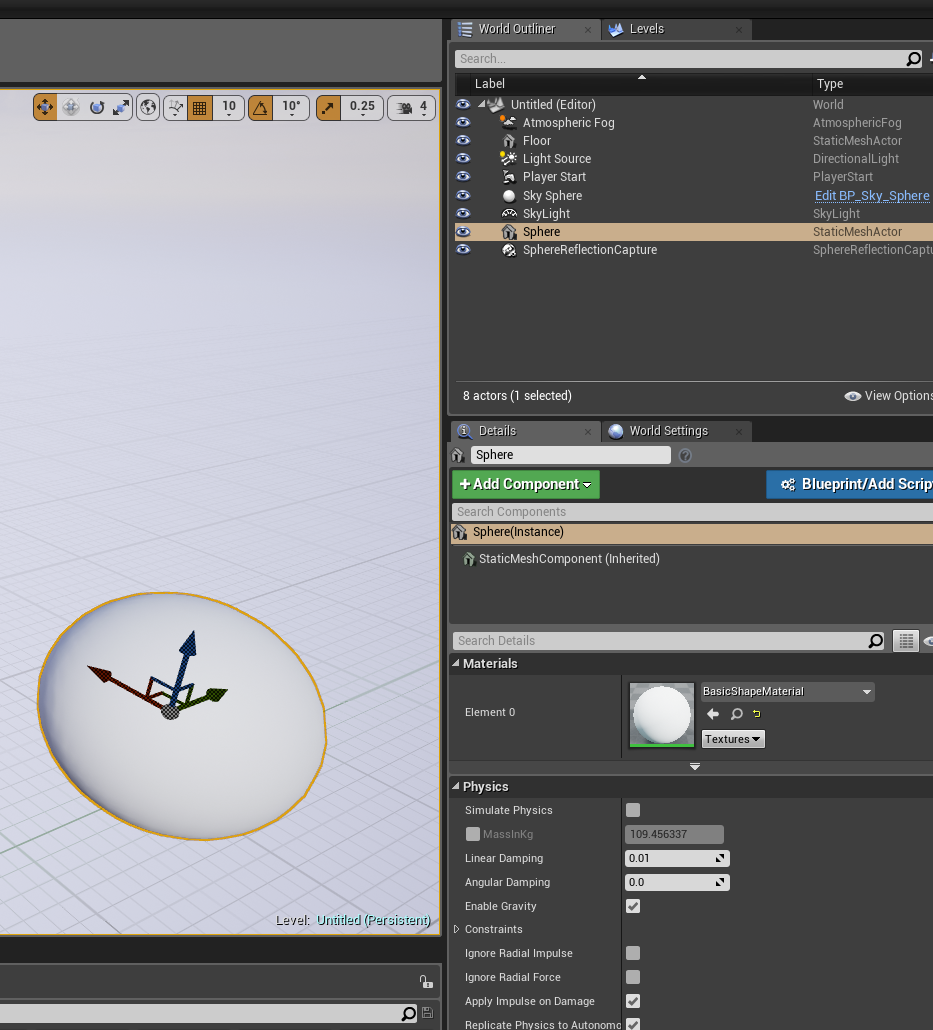
so for a blueprint it wouldnt be on the blueprint itself but on a component part of it that can simulate physics such as a collider or static mesh
shy silo
Yep, found it thanks
grim ore
no average, it depends on your project
a new TPP project might take 800mb at start while the shooter game example might be 1.3gb and that will rise and fall based on what you do.
wheat hare
Do you guys who make games stick with one tool or do you need to use a bunch of different tools to get what you want done?
I'm starting from 0 and ultimately I want to make 3d buildings and print them, and make a vr environment that's the downtown of my city
I'm finding that there's loads and loads and loads of forms for that to take and paths to achieve that goal
abstract relic
There isn’t really a one stop shop tool
wheat hare
Seems like I'm downloading a bunch of different apps just so I can use this or that feature
Which I'm not against
I'm just figuring it out for myself and other people's experiences help at this stage
For example I can put it in medium and use the cameras and animation tools in that to make subversive propaganda videos
In the old days when these kinds of apps used to come out you had to get married to one or the other and there was always some janky process to convert if it were even possible. Doesn't look like that's true anymore with most tools reading multiple formats and converting formats being trivial as long as you stick with what's popular
shy silo
next question, I'm trying to get my sphere trigger to play an audio clip when a sphere rolls into it, and I have made it so that it plays when a table hits it or whne I do, but it wont play when the sphere hits it...
abstract relic
Make sure you have the audio cue in the components and have your collision enabled
 glacial pecan
simple question: how do I disable a blueprint in the world outliner? I guess there's a button I'm just not seeing?
 high stone
Just a reminder for all game devs. When you fresh install GPU drivers. It can set reset your power management. Make sure you have it set on maximum performance. This also includes TN panels with dynamic range, set to full. Windows updates can have the same affect on rare occasions with power management.
glacial pecan
I want to keep it, just temporarily not use it when I press Play.
In Unity, it
's just a checkbox.
But I can't seem to find something similar in UE...
 weary basalt
There isnt anything similar in UE4.
The best you can do is disable its ability to Tick.
glacial pecan
@weary basalt ok, thank you for the information
 merry gazelle
Anyone have an idea if it’s possible to display a users desktop in game (e.g virtual desktop)? I assume not since even the experimental browser sucks
glacial pecan
guess I need to disable event beginPlay in my case
merry gazelle
Recently I’ve had a breakthrough when it comes to making stuff in UE4, in VR I’ve made a boxing dummy, fishing, shooting gallery and crafting system in a couple days. 😄
glacial pecan
I'm still waiting for my breakthrough
 ember hull
Guys how can I move top down actors when I add them on top of a static mesh ? In ground floor they move when I command them, but top of the a static mesh that is above the floor they stand still, I dont think ai are afraid of heights ^
 lost shoal
Edit>Development Mode>Frame Actor>Navmesh Actor>Add Parameter
weary basalt
Did your NavMesh generate on the staticmesh?
ember hull
@lost shoal couldnt find development mode
lost shoal
Under edit bro
ember hull
@weary basalt if you mean that the mesh is in the nave, then its
lost shoal
Oh do you mean in Verox 13.0?
weary basalt
Press P to show navigation mesh.
lost shoal
It's by the paint brush
weary basalt
Well theres your issue
ember hull
how to generate the NavMesh ?
lost shoal
Try CTRL+F5
ember hull
okay thx harley, will try
lost shoal
For the navmesh commendation
weary basalt
Build Navigation is under the Build button
weary basalt
lost shoal
Try CTRL+Scroll lock
Try CTRL+Scroll lock
That should initiate the Verox build navmesh
In developent mode
ember hull
@weary basalt it worked thanks
@lost shoal where do I click it, in the when I selecting the mesh ?
lost shoal
I'm fucking with you I have no idea what you're talking about
I'm fucking with you I have no idea what you're talking about
I'm fucking with you I have no idea what you're talking about
weary basalt
@lost shoal Read the #old-rules mate, no trolling, read rule #1. Be constructive.
lost shoal
ember hull
@weary basalt is there any other way than build path in all levels ?
lost shoal
Wow
ember hull
and thanks alot for your help @weary basalt
ember hull
ignore the dog, and he will stop barking
weary basalt
@ember hull Your NavMesh should be updating when you add objects to your Level.
When you Build your Level with the Build button it will also build paths.
 cloud plover
Does anyone know if its possible to edit the download speed on the Epic launcher? It takes forever to download games and my internet is wired and pretty fast.
grim ore
The launcher should download at top speed for the CDN closest to you, I know I max out with max speed without any changes
spare sun
🤔
glacial pecan
I don
't understand why I've never been able to get the "migrate" function to work in Unreal
grim ore
how are you using it?
glacial pecan
well, tried to migrate both the advanced vehicle blueprint just now, and the entire project
neither worked
grim ore
so you clicked on the advanced vehicle blueprint, right clicked and did migrate, pointed to the Content folder in another project, and hit ok?
glacial pecan
pointed to a subfolder in another project
grim ore
The content subfolder?
glacial pecan
content/vehiclemigratefolder
I don't want to clutter my top level with things from a different project
grim ore
there is a good chance that is why it did not work, it asks you to migrate to another content folder
grim ore
then you rename one on the source or you don't do that in the first place?
nothing is stopping you from renaming it as well in the source before you migrate
manic pawn
paths aren't relative, you must migrate to a root folder
grim ore
also nothing stopping you from renaming after
and if you just want to import the vehicle template you can import the vehicle template feature pack into an existing project without migrating
glacial pecan
ok, so I thought the whole point of the migrate command was that it dealt with that
if it doesnj't, how is it different from copy?
glacial pecan
@grim ore oh, I can import it? interesting, I didn't know that
ah
I'll put in a feature request that it should also update paths then
manic pawn
no point in doing that lol
grim ore
I wonder if this is why epic doesn't do the training stuff anymore, no one actually reads the docs or watches the videos so I guess no point =/
glacial pecan
they should just design better features, so you don't have to 😛
grim ore
well they aren't exactly hiding them, people just expect things to be handed to them in abc fashion without any real effort on their part
 boreal yarrow
yo, i dont really know where to ask this but
what do you guys do for weather systems?
 hot ledge
if anyone can help i have server dropping clients when i use server travel console command

This is an issue I have currently in Unreal Engine I will update this if I get a solution
spare sun
the docs are usually kind of last resort, but watching the training vids is always a thing imo
manic pawn
videos are mostly worthless as documentation since you can't search them
glacial pecan
@grim ore it's just that coming from Unity, I never had to care about paths... it's just alien to me that some basic things doesn't seem to work in Unreal
 barren delta
some video just contains tons of useful tips that you won't even search for
glacial pecan
training vids also gloss over huge things sometimes... like in the Unity to Unreal videos which don't explain that fbx hierarchies aren't retained until you direct import to a level
manic pawn
yeah but you're not going to watch some 1 hr video just because it might contain related info
barren delta
like this one: https://www.youtube.com/watch?v=zg_VstBxDi8

Engine Programmer Michael Noland walks us through a project designed to show how to add custom functionality to the editor.
that s exactly what i did and it was quite useful:)
this video doesn't even show how to implement most of things... it just tells you what things are possible to do in the engine
glacial pecan
huh, so I added the advanced vehicle template to my project now, but I can¨t control the car on the default map... guess it has something to do with input settings not getting imported
grim ore
Unity had the Editor Path , It wasnt all fun and games
glacial pecan
hmm... even if I import input.ini from a project created by the advanced vehicle template from scratch, I can't get the car to move in my new project
anyway, at least some progress!
barren delta
eobet you have to set actions for your project like wasd
glacial pecan
models are in place, and it seems that I can move the added files to subfolders at least
barren delta
they aren't part of migration of assets
but you may copy paste ini file that contains them
glacial pecan
@barren delta right, but that's why I tried to import the input.ini from a advanced template project I just made
wohoo, editor crash
guess I shouldn't put even an imported template in a subfolder then
barren delta
migrate to content and then put it in the subfolder in editor
or do it vice a versa: put to subfolder in editor and then migrate
oh and you have to save everything after putting anything to subfolders
grim ore
if you really want the input settings from the other project you can always export them out then import them in the new one
glacial pecan
@grim ore that's what I tried to say that I did
grim ore
you exported or just tried to import the input.ini from the old one?
glacial pecan
import from the scratch created one... and now it works, because I just added the vehicle template without moving it to a subfolder
I'm going to have to try to digest what @barren delta tried to tell me
I shouldn't move it, but migrate it to a subfolder?
barren delta
you can't migrate to subfolder
but you may to try move stuff before or after migration
glacial pecan
the productviewer template from datasmith seems to handle being placed in a subfolder just fine, though
but that's newer than the advanced vehicle template...
perhaps built more flexible
barren delta
actually i'd even try to migrate by unreal and move stuff in just browser outside of editor
and expect that that might work
shy silo
another newbie question, when I press play on my first person thing, my camera is really short, can I make me taller somehow?
barren delta
migration is the process you can't remove because it shall replace all references. But inside of the project i expect that ue doesn't care about folders
grim ore
@shy silo are you using the first person template?
shy silo
I think I used blank
grim ore
welp how did you create your first person thing or are you using the default pawn that can fly around?
shy silo
the default pawn that can fly
grim ore
ah then yeah you can't really do anything with that. the Default Pawn is not really a usable character it's just meant to be something if you have nothing or even to spectate
glacial pecan
ok, well thank you both for explaining to me what I did wrong
I got the template working in my new project now
grim ore
you can import the first person character template if you want a real character with a camera, collision, and movement or you can look into making your own character that has a camera where you want it
shy silo
ah alright thanks for clearing that up. how do I go about importing the FP char?
glacial pecan
(I'm fascinated that I didn't even have to setup any collisions on my imported geometry. The car just worked!)
...or, it worked on some things, like the track, but passed through other things, like the barriers
I'll try to figure that one out tomorrow too
grim ore
At the top is the green add new, then go to the top to import a feature pack, then find the first person blueprint feature pack
shy silo
alright thank you so much. very helpful
ok I added it, do I have to drag something in or compile a BP>
?
grim ore
in order to use the first person character?
shy silo
yeah
grim ore
nope, you should be able to use the character to replace your existing or use the game mode to have it use that. In projects settings -> Maps and Modes -> default Game Mode you can change it to the FirstPersonGameMode to use that character
shy silo
last question of the day, how can I make an item so I can see it but also walk through it? (A plane)
barren delta
remove collision from it or set its reaction to pawn channel to overlap or ignore
shy silo
ok thanks.
dry moon

Made an AI tick LOD system
will help in distances to allow more AI in general in view
though I should change it to screen size so zooming in on it will make it tick full
but ya system runs great
shy silo
alright, I have to aska one more question. does the first person template shoot a bullet or does it work more like an air gun? Is there an event I can use, so it happens when shot?
grim ore
the first person template fires a projectile yes but if you import the feature pack it comes without that "feature" lol. there is code in there since you can hear the sound and see the animation fire where you can fire a projectile or fire a line trace to simulate a bullet
by default it's firing off a line trace and adding an impulse to the hit target if you use the feature pack
shy silo
just going to @shy silo myself so I can find this again. good to know.
grim ore
yeah it's weird and I don't know why it's like that but some of the feature packs are slightly different than if you started with the actual template =/
 normal burrow
Anyone else use the delete and replace references on skeletons to batch assign skeleton for animations and meshes finding it broken on 4.21?
wont let me save the redirector, just curious if its a one off or common.. tried twice
crisp fable
i dont believe i've tried in 4.21
dumb question, but are you sure you don't have two instances of the project open?
manic pawn
there really should be a check against that :v
normal burrow
not a dumb question, but yes i'm sure the same project wasn't open two times
but
i did migrate it from another project which was open, i could have closed it.
crisp fable
just to confirm you're deleting skeleton A and reassigning the broken reference to skeleton B right?
in order to reassign
unreal token
Is there a way to duplicate and transfer animations to new characters without over writing or stripping previous charchater animations?
normal burrow
yea to be clear i'm talking pp-801 from the marketplace, which is delivered in a uproject. I open up the uproject in 4.21 from mp, then i migrate it to my 4.21 (github) project and then i take the skeleton those use press delete and at the delete popup i choose to replace references with the mannequin skeleton i use with all my characters. Everyhting is fine up to wher it wants to save. it says it cannot save the redirector and it never succeeds to after retrying.
By the time the project is reopened the skeleton returns but the meshes are pointing to nothing, the redirector is gone but the meshes are saved to use no skeleton. its really weird
i've done this many times with other characters and there aren't any conflicts in the hierarchy with naming
but not on 4.21
but yea george i had the pp-801 project open while my own github 4.21 project was open but thats no different than i usually do i think
normal burrow
no its not
crisp fable
hmm
normal burrow
its QuangPhan
Theres no bone overlaps and using regular assign skeleton doesn't request any changes / adds to the mannequin skeleton (which already has tons of bones from other quangphan female characters)
I am thinking about just sending a bug report to epic, maybe somethings wrong with the replace refences or something
crisp fable
yeah without seeing the actual project i cant really debug
normal burrow
i don't think there is any other way to reassign skeleton on animations
yea sall good
thanks for any reply though, i appreciate it.
left is mannequin skeleton (which is used on all characters, and i changed the default preview mesh) right is the pp801 i don't spot any reason for it to fail
plush yew
Can anyone pls dm me and teach me about procedural Generation because i'm brand knew and working on a game
manic pawn
sounds like unworthy hardware
 dawn linden
@dim arch If you're building on an HDD without a heap of memory, the PCH file I/O will completely kill the build.
If that's the case an no option, disabling PCH files in the build configuration can help a lot.
dim arch
I am using a samsung pro 850SSD
however I built UBT before building the engine, does that effect it?
also, the engine can only build on one thread or what? I have 4core/8thread CPU but its building only on one
manic pawn
ubt uses all cores unless it detects not having enough memory
dim arch
well it has plenty of memory free
manic pawn
that's strange then
dim arch
I have incredibuild installed and it hasnt been registered, maybe that's why
manic pawn
ah
dim arch
afaik incredibuild limits it to one machine, not one core, when unlicensed
manic pawn
gotta get rid of that if you don't have a license
ubt is better than incredibuild at non-distributed
dim arch
well, I am building the engine from the VS project
manic pawn
it's a global setting in BuildConfiguration.xml
manic pawn
appdata
dim arch
thats all I have
manic pawn
surely there are some google results on what to put here to disable incredibuild with ubt
dim arch
yeah
no worries
Ill look into it, I am going out for new years so it should be done by the time I'm backl
normal burrow
any luck with that bsod?
dawn linden
They used to have a template version of the xml file showing all the options. Removed it a few versions back for no reason...
dim arch
but will need to fix it for when I build the server version
dawn linden
Maybe you can dig it up online somewhere though.
dim arch
@normal burrow I installed the LTSC version
it BSOD'd while compiling shaders in the launcher version of the engine
but it hasnt crashed while building the engine, and was stable overnight
so fuk knows 😦
normal burrow
hm interesting 😃 progress though
manic pawn
they really should port back that shader compiling optimization to 4.21...
manic pawn
making it 3 times faster by routing allocs made by some 3rd party library through FMemory
normal burrow
ah,what was the reason for removing it?
manic pawn
they made the optimization after 4.21
manic pawn
it's interesting how this is even a thing
how come system allocator is so 🚮, that they can make the whole program 3 times faster by replacing it with a custom wrapper?
normal burrow
well
that kind of stuff, its easy to assume your just working with real hardware registers and stuff and theres no reason for it.
manic pawn
and does this mean there is a lot of software out there which can potentially be made 3x faster by copy-pasting FMallocBinned2?
normal burrow
like theres a whole organization of the addresses and stuff programs deal with and its seperate from the actual hardware, everytime you do stuff its running through a table
the os has full control, and yea asking it to do anything ensures a performance penalty
if you think of like the way the os has to keep track of the memory in use by each program running and then be able to make sure programs don't just read into memory of others, i dunno thats where i start to understand why there is a lot to be had in those kinds of optimizations
like if you store a memory address to regedit it means nothing to anything else, so you make stuff faster by just living in the dreamworld the os presents you
manic pawn
but how come it doesn't do the kind of binning unreal does manually, by default?
normal burrow
because when a programs memory stuff is optimized to work within memory i knows it claimed then it can make assumptions the os cannot
not to say the os isnt already doing the same kind of optimizations already, but they have to balance everything
manic pawn
or they could add a std::non_garbage_allocator
normal burrow
with a huge std::map of process id haha
but i mean yea, i'm not trying to make excuses its just, the os has a lot to do all the time
manic pawn
the code is 10 times longer than unreal, involves at least 37 variadic templates, is written in ancient runes
but it works
normal burrow
haha
i haven't looked at it but yea standard library stuff is crazy
like you can think of some guy growing up and putting his life into understanding of mathematics and optimizing logic and all that stuff then writing something for the standard library
like its nuts how standard library in c++ rarely ever encapsulates anything that can't be explicitly overridden, and it makes a huge effort to optimize stuff it just has a small understanding of what it is.
not always the easiest thing to incorporate though
problems come in when each platform has to hack at it their own way to benefit their own platform but yea, its gotten a lot better since the 2000s
manic pawn
imagine if they stopped adding pointless libraries and instead set those wizards to work on optimizing the 50 years outdated include stuff
normal burrow
thats what they've been doing though recently
like the functional std stuff is straight up removed in c++17
as more features get added to c++ to make old stuff no longer relevant they remove and change/add to everything
manic pawn
it's probably good for my sanity that I don't know what that is
normal burrow
haha well
std::threading is like one of those things
it should have been in there forever ago
like i mean, its good you don't have to learn winapi threading and unix pthreads and then make something cross platform with each
manic pawn
but imagine if they completely started over with the compiler, removed this stupid compile/link split, and replaced the obviously fail copy-pasting method of handling includes
we could have a 100x faster engine build
normal burrow
eh yea like
objective c is kind of what your talking about
its effectively still c++ but it puts the smartness into it
But someone could write a compiler that works completely seperate from how stuff does too, like no object files and all that.
but i would be surprised if that had any affect on compile times
manic pawn
the fact that building the engine generates 50GB of intermediate garbage is pretty 
normal burrow
unless your dealing with io bottlenecks 😄
Yea, though the engine is no small thing haha
manic pawn
every cpp becomes half a million lines long after the idiotic copy pasting of includes
so we are building 1 billion lines of code for no reason
normal burrow
there is waste though, not saying there isn't but if there were a way to have all that in memory and not have to chunk stuff out to obj files of course that would have its benefits.
well, i dunno if you should think of it like that
like parsing isn't what the compiler spends most of its time on
manic pawn
it probably spends 99% of the time doing work it has already done but not cached
normal burrow
it does spend some time for sure, but like its actually a good thing that you can instruct the compiler that you want it to not cache stuff or lump stuff together too.
manic pawn
how is that a good thing?
normal burrow
if your someone who isn't using lots of forceinline or inline definitions in h, theres not much waste or uncached stuff going on.
well if you think about caching a function that takes an argument int, and it starts off with if == 0 return;
if the compiler cached that result off then the code would just call that function everytime
manic pawn
I wonder how long it takes to compile a cpp that includes some engine headers and otherwise does nothing
normal burrow
if you mark it forceinline the compiler has to treat the body of that function as the callers so it can better optimize.
You could find out, but you'd have to have like the module define and all that, then all the generated bodies etc
you could have no u-types, but you'd still need the game module macro i think for it to compile
its really stupid though, mvc
like on any other compiler
clang, gcc
you can request a report on what its spending its time on
not cl.exe no way
manic pawn
clang is 50% slower than msvc so even more 🚮
normal burrow
it entirely depends on the work load
manic pawn
it is for unreal things
normal burrow
but either way, what i mean is clang tells you what its spending its time on
manic pawn
hm
normal burrow
my old project, i got it compiling on clang and mvc took literally 45 minutes to compile it
on clang it was something like 40 seconds.
manic pawn
that doesn't sound right at all
normal burrow
there was obviously something wrong with mvc, but the frustrating thing was that there is no way to tell what its spending its time on.
it was tons of templates and i was generating the code from t4 templates which is like a code writing code thing
i believe that most stuff could be faster in mvc and it sounds like they've fixed a lot in mvc since, but yea i mean i was just saying i had no idea to see what it was spending all that time on lol
using one thread for 45 minutes
manic pawn
it's even worse if you try to enable ltcg for shipping build
msvc sits for 5 minutes at generating code, clang sits for 20
🚮
normal burrow
yea i belive it haha
i mean
the whole reason i got clang running was so i could get an idea of whats taking so long in mvc
but when it took like 40 seconds yea i dunno haha
doesn't help me at all haha
manic pawn
though I wonder if this 300% extra time clang is spending is because it is creating higher quality code
normal burrow
the way clang works is actually really cool, but yea i don't know about quality levels haha
like emscripten and all that
clang can compile out to llvm assembly that emscripten uses to generate js from
but its interesting too because llvm can be parsed to generate code better than uht does
manic pawn
that sounds cool but completely useless for unreal
normal burrow
well, llvm instead of just reading header files like humans and not being able to template or macro define uproperties and all stuff i dunno
source uses i t for their new physics engine too, its wild
manic pawn
new physics engine?
normal burrow
well its not new anymore haha
manic pawn
source 2 actually exists?
normal burrow
but the one that replaced havok
manic pawn
sure they announced that years ago but still haven't seen any of it lol
normal burrow

In this 2014 lecture, Valve's Sergiy Migdalskiy shows how to implement an advanced visual debugger and serializer for physics and game development using Clan...
i don't think its source 2, but they took havok out and put in their own replacement for it, i think around the time left for dead 2 came out.
that guy talks about it thought is actually really interesting.
i'm sure they still use mvc to actually compile the code, but compiling out to llvm for code generation intermediately is a really cool idea
manic pawn
uht could be faster too
why is it taking 20 seconds to figured out what I changed in my 50 line header
is it re-parsing all or what
normal burrow
i dunno, like i would let it be slower if it i didnt have to interact with it like plain text
like the biggest problem with it to me is that its not smart enough to do anything
i mean
some things haha, but like
manic pawn
? what is it missing
normal burrow
not being able to put enum values out of place, not being able to have 256 entries in a uint8 enum, no effort to even like ignore templates, instead it just says ERROR i'm not touching that, no understand
like it doesn't parse c++ better than my eyes do
manic pawn
it doesn't need to for most use cases 
normal burrow
the problem is that it forces you to program in a way that is like painfully slow and with enums specifically its very prone to errors because you have to compromise much of the time
manic pawn
it could solve a lot of problems with parsing default values by just copy pasting the code between = and , to the generated cpp
normal burrow
but it still doesn't haha
your not wrong though it could be a lot better, even without llvm but its not and it forces you to do everything the way you have to do it. i'm just not a fan of the way it works
manic pawn
do you really have a bp exposed enum with 256 values though 🤔
normal burrow
i did yes
manic pawn
that would be hell to use in bp lol
normal burrow
its not only that bad though
like
when you have an enum of 256 values
your using macros to define each entry
manic pawn
lmao imagine what a switch on enum or select node would look like
normal burrow
but not with uht you arent.
manic pawn
just a giant skyscraper
normal burrow
yea lol
because you have to, put each name comma
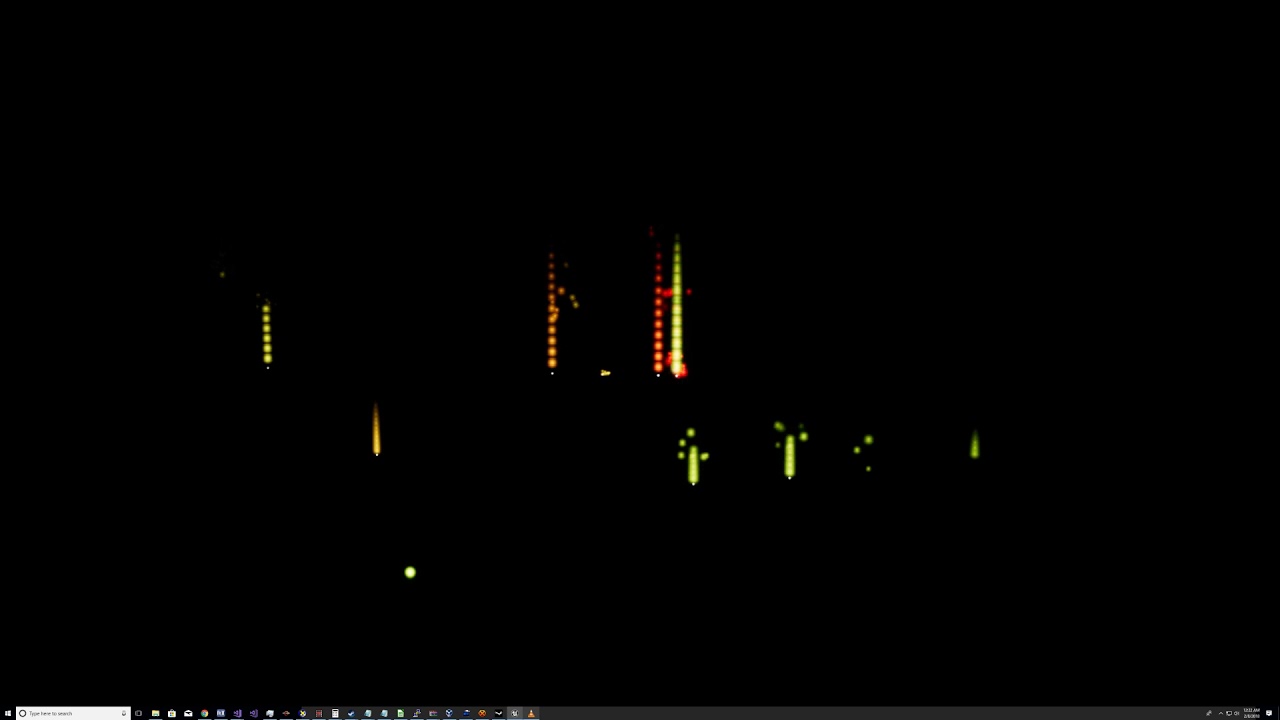
the thing with 256 entries was various components form the XM module playing there,
like the panning commands there are 256 and its easier to see the enum values rather than know that full left is 0 and full right is 255
 opal totem
So I'm making my first game in ue4 and I'm just doing a basic 3d platformer where you make it to one end of the map. I keep getting distracted with perfecting every piece. Should I just let some imperfections go or make it perfect
normal burrow
cap n hook, just go at your own pace unless time constraints.
manic pawn
it kinda has to figure out the name and value for each tho, so it makes sense that it can't parse macros
normal burrow
it shoudl expand macros period haha
manic pawn
try adding it to uht and you see why it doesn't do it
opal totem
I'm really just wanting to make my first game to have an idea if I like it all. I'm not looking to put it out into the world. But I just don't know how critical I should be in order to finish the whole game.


 manic pawn
what's this
normal burrow
around 916 and on is more my point like
its stuff for my walking implementation,the UTrot class is a blueprint library
but its really just the word ufunction(BlueprintPure,Category="Trot"..... over and over hah
manic pawn
I am seeing many 3 letter abbreviations that mean nothing to me
normal burrow
just focus on the uht stuff
theres a method to the madness, but i'm literally catering to uht the whole time
i dunno its just a lot of meta stuff where at least the bulk of it could be expanded from macros
manic pawn
hmm
normal burrow
like so much easier if i could just put ufunctions on ustructs or some way of not having to heap all functionality to libraries
i literally have to just sit down and cave.
manic pawn
that is indeed extremely annoying
normal burrow
like i would just FORCEINLINE all the functions in the library, but guess what nope i cant hah
normal burrow
to get it to force inline i cant use that keyword, because uht doesn't recognize more than one keyword and that in this case is 'static'
manic pawn
check how they do it then
normal burrow
they do it exactly the same way i do
well not exactly they use a different forceinline specifier but, if you put FORCEINLINE and static on the same line then uht says no way
manic pawn
normal burrow
so they too, in the class UFUNCTION(...) static void ....() everywhere then after the class, thats when you can say forceinline
its not because it tricks the compiler to do it any different that way its becase uht don't like it.
manic pawn
what if you put forceinline on a separate line above ufunction?
normal burrow
then it complains about not having a ; if i recall.
just like if you have
namespace Something {}
USTRUCT() struct FBla {};
it will say what the hell is going on here
manic pawn
there has to be some trick
manic pawn
I vaguely remember someone posting a trick on the forum that did not involve separating the implementation or a crazy macro like that
manic pawn
you wrote 1600 lines in 1 hour?
normal burrow
yea but its mostly copy and paste
because uht makes me
thats the worst part i mean theres not a lot going on in that header at all
manic pawn
this makes me wonder, why do you write constexpr on all the things
like why is that a thing
can't it figure out whether that is possible by itself
normal burrow
i write short hand like that because i figure, even if the string of some function is held in memory only once, when i have to make a damn function every time to do any thing and a uclass ublueprint type for every ground of things to support include what you use etc its just nosiating
manic pawn
without you having to put it 1000 times
normal burrow
so like FTrotWatt for example
it is legal c++ to do this
enum class EWatts { TwoHundred = (int)FTrotWatt(5,40)(), };
constexpr indicates that the compiler can treat calls to those functions, and the entire type as if it were as basic as int is.
so your telling the compiler hey, you can figure this out and this is how it works. go on with what you will here.
manic pawn
why does it not just assume constexpr by default?
it seems stupid to have to write that on all the methods
normal burrow
because that same line i posted with the enum
you wouldn't know if it would compile or not without checking if the type's constructor is constexpr and the () operator is constexpr
its dumb though i agree
because it is incresingly difficult to handle constexpr like in a way where you don't always lose it.
manic pawn
I mean you could just compile and find out if it works
normal burrow
the way it works now to be clear
if you mark something constexpr and it cannot possibly be a constexpr the compiler tells you why
its a little better than just hey this with that wont work
but not much
manic pawn
so it could start by assuming everything = constexpr and print this error if you try to use something that requires constexpr and it doesn't work
this seems just as stupid as noexcept keyword to me
soon you have to write 10 things on every function
normal burrow
It could but thats not how c++ works like, it doesn't try things to do it right or wrong. it trusts the programmer to let it know of its constraints. but i agree in that the way you mark constexpr is repeatative for sure.
i'm not disagreeing with you but the reality of just hoping stuff can be compiled by the compiler for example would make the problem with constexpr that is already there larger
like right now with defining constexpr everywhere and trying to generically keep constexpr over templates or something, trying to support both. the problem is that theres no way for the programmer to ensure something is constexpr without being extra verbose about it.
like if i had
template<typename T> struct TIsConstExprInvoke{static constexpr bool bSupport=false;}

template<> struct TIsConstExprInvoke<FSomeStruct>{static constexpr bool bSupport=true;}

template<typename T,bool bIsConstExpr=TIsConstExprInvoke<T>::bSupport> struct InvokeOperator;

template<typename T> struct InvokeOperator<T,false>{ static FORCEINLINE decltype(auto) Invoke(T&&value){return value();}

template<typename T> struct InvokeOperator<T,true>{ static FORCEINLINE CONSTEXPR decltype(auto) Invoke(T&&value){return value();}```all that is required just to generically support the constexpr of any given type, because the requirement of the constexpr keyword..
InvokeOperator<FSomeStruct>::Invoke(value) is constexpr.
InvokeOperator<FVector>::Invoke(value) is not constexpr.
manic pawn
I am confused what the purpose of this template is
normal burrow
like the keyword is a problem here but removing the keyword it makes it increasingly difficult to rest on the compiler to determine when somethings a constexpr or not a constexpr to where it could take forever to compile something lol
well you see bSupport?
the first TIsConstExprInvoke is the default value, any type passed to that bSupport will be false.
the second is a specialization saying that FSomeStruct has a constexpr () operator cause it defines to true
manic pawn
I mean I can see what it does but I'm not understanding the purpose
normal burrow
i'm trying to demonstrate how difficult it is to retain the constexpr with non constexpr types in the first place if it makes sense like
the partial substitution there in InvokeOperator
rests on bSupport,
so all that above is required just to add the CONSTEXPR keyword to the Invoke
of <T,true>
manic pawn
what do you mean by retain constexpr with non constexpr types?