#ue4-general
1 messages · Page 362 of 1
 icy gale
No idea whats that, but I'll figure, thanks :]
 dry moon
It doesn't get stuck no
 static viper
that is great news
fantastic news
then you can assume that ue4 default capsules wont fail
also the box test
and that speedtree is doing weird stuff
you shouldnt fiddle with collission physics values at this state
its just a tree
dry moon
I mean even with engine default caopsules do the same issue
static viper
you tested with box?
static viper
sad isnt it
the leaves dance in the wind... as i slowly drop to the floor
why
i cry out
why god
isnt capsules working
as it begins to rain
😢
@dry moon
show me the settings for the capsule.
collission
dry moon
Its blockall

 static viper
shit
dry moon
like I said
static viper
well
then it must be the obvious
have you fiddled with walkable slope angle yet?
its on 0
ECB seems to be replaced by this
even tho its a bool
this must be 4.21
dry moon
I actually get this when I get stuck
FirstPersonCharacter_C_0 is stuck and failed to move! Velocity: X=75.44 Y=-35.59 Z=0.00 Location: X=32658.26 Y=-386654.63 Z=-164770.80 Normal: X=-0.83 Y=0.51 Z=-0.21 PenetrationDepth:0.015 Actor:SkinnyTree_Cluster1_2 Component:StaticMeshComponent0 BoneName:None (0 other events since notify)
 grim ore
so it's a long shot but what is the "Can Character Step Up On" set to on that tree?
dry moon
You can't set that in foliage
grim ore
well that's silly 😦
static viper
thats a bizare issue
bone name likely means auto bone
static mesh component 0
that sounds interesting
wouldnt it ask for collision capsule
instead its saying static mesh
foliage is actor
 next badger
@dry moon you may try #legacy-physics
 copper fable
does anyone here know how i can create a new object from a class reference in c++?
i want to create a new object with the type that is selected in the "attachedAttack" property

 hard minnow
I'm quite new to this part of the process. So I have a simple skeletal mesh. It's basically a leg with 4 separate parts. A created a skeleton in maya by just parenting each mesh to a corresponding bone (as it's shown on the first screenshot). And it seems it's all good, but in the Physics Asset... I don't know, I couldn't find any info on it for these cases... In the PhysicsAsset it created separate bones for each object that go from the object to the origin of the scene and it all looks strange... (as it is shown on the second screenshot) Is it supposed to be like that?..
hard minnow
Or should I address to #animation ?...
next badger
@hard minnow meshes should not be a part of skeleton hierarchy
hard minnow
meaning I should merge and skin them?...
next badger
@hard minnow not necessary, but if they are skinned you could put them in a separate group
they will merge any way on export
since each SK mesh is only a single mesh
*on import
hard minnow
So there is a way to make them seem like a one mesh?..
without actually merging them to one mesh?
next badger
@hard minnow when you export fbx and import it in ue4, meshes bound to single skeleton may be merged in to single skeleton mesh (there's a checkbox on import iirc)
oh, nope, SK meshes have no this option, so they will be merged
@hard minnow but you have to store mesh and skeleton joints separately in maya
hard minnow
ah
hard minnow
should it be like this in maya?
or like this
?
The second one seemed to work... Thank you~
next badger
@hard minnow you don't have to nest meshes, they are skinned right?
hard minnow
no they are not
I exported it like on the second screenshot and it seems like it's working
next badger
oh...why making a skeleton then?
hard minnow
To move it...
next badger
you know you could just attach a static mesh to a skeleton joint?
hard minnow
it's supposed to look like this?
Ah....
right...
but I wondered if that's the right approach for this...
next badger
the proper way is to skin them
hard minnow
So it's still wrong?
next badger
well...i can't say it's wrong, but it's definitely not the industry standard
next badger
np
hard minnow
You got me out of the abyss of despair~
 light thunder
Can someone point me towards learning more about working with containers OF containers - I need to basically have a String Array, and each element has it's own String array - and each element of that has its own Structure
I know how to work with structures but I've never gone beyond that in terms of complexity
 lavish marlin
can someone help with texture tiling?
my textures tile and its blatantly obvious lol
one dev was saying they dont all tile its just people uploading tiled textures so i was wondering are there some that are already merged well?
next badger
@lavish marlin no...in general all textures produce visible repetition pattern
grim ore
well you could always stretch the single texture across the area so it never tiles.... it just might uh, look bad lol
to deal with tiling you hide the tile edges, or you use macro and micro texturing to break up the tiling
There is a really good UDK article on it if I can find it
 gleaming creek
You can use a few methods to avoid obviously repeating textures
For example, if you have a long corridor
You can make the corridor out of multiple segments, each with different textures
so if you mix them up enough, you won't use the same segment twice in a row
which will make the repeats much less obvious
Another trick is to break up the surface with detail
A repeating texture is much less obvious if it's broken up by other detail, such as columns
A third trick is to make a material which supports vertex painting to add detail
then vertex paint different details along the length of the surface, so each one is unique
lavish marlin
awesome guys thanks
to explain what im doing .. im painting this on a landscape
but i dont know how to paint on a material rather i paint with textures and i was checking all over and people was creating materials
ill check the link
gleaming creek
Oh, terrain... well, add rocks and trees!
light thunder
I wrote a question regarding save game objects - but I am not sure how to work with an array of an array of structs..... how do I begin to 'build" that...
lavish marlin
@gleaming creek but its very obvious i used all sorts of moving grass meshes and u can see without staring at the ground
grim ore
you make a struct, you put stuff in the struct you want (even if its more structs), then repeat till you have what you want and use it?
next badger
there are some fancy texturing algorithms tho, like texture bombing, and Wang Tiles
light thunder
an example would be a PlayerName (a string array) - each playername has an array of "garages"....and each garage has it's structure (array of cars, names, etc)
grim ore
also you can use sets or maps instead of arrays if needed
make a map <string,garagestruct>
or actually thats uhm just a list of garages so I guess map <string, garagearray or garageset>
light thunder
That's what I was looking for, thank you.... (wasn't letting me use text as a map ,and that was throwing me off)
grim ore
and then each of the items in that array or set would be a struct
oh yeah text isnt really a type is why
or uh.. data type? I forget the actual wordage lol
its a code thing, I forgot how to code when I started using blueprints
light thunder
Okay, so trying to translate this into actual concept - I have an incident command for firefighters - 23 different scenarios, each scenario has 6 Text benchmarks, so I want to save ALL of that - but higher up, every department (an array of strings) might have their own custom benchmarks - so how would I contain that?
hard minnow
@grim ore wait, are you the guy from youtube?... with HTW and WTF videos?
next badger
I forgot how to code when I started using blueprints
https://giphy.com/gifs/what-surprised-shock-ZHkVpDiI3vIiY
 light thunder
and I need to be able to have a String out of an Array of Dept names, be the key I guess to that?
 gentle moth
Isn't UE4 overkill for 2D game like undertale?
 worn granite
@gentle moth actually not even just overkill, but in the way oftentimes
 plush yew
Hey guys I have created blueprint that has features like pickup on collision. that bp is called item
should I create now children of this bp called for example wooden sword etc? i want its children to have models or shapes
gentle moth
@worn granite Performance also would be terriblez right?
So it's not good choice in any case
worn granite
@gentle moth .... sure...
lavish marlin
trying to use a tutorial but stil cant find any of these to use on my texture to stop tile repeating lol
grim ore
@hard minnow I am yep
hard minnow
@grim ore Thank you... You saved me so many times :' )
grim ore
yay 😃
@plush yew that sounds about right, sounds like a parent -> child relationship. A parent item with the variables that all children can use then children that fill in those variables uniquely with like meshes and names and stuff. Depending on the goal of the project you can make X items and actually have them each be unique in your game as unique blueprints or you could use something like a data table and then just create the items as needed from the parent Item and fill in the uniqueness when you create it from the data in the Data Table
next badger
yep, generic class would be "pickable" or something like that
i've even seen some tutorial about that ages ago...i think it's deprecated now
grim ore
I think the UMG UI inventory one might have worked like that?
plush yew
i give up on blender
dry moon
Imm a little drunk but why does contentexample collision capsules work and mine doesnt
worn granite
because alcohol thins your collision
dry moon
I GOTTA CHECK THE SETTINGS
of the controllers right
Or project settings
Ya ill compare the projecys
Hhaha
worn granite
Maybe I'm just way too functional, but you're typing like me when I'm gooooone.
 oak temple
lol been prototyping a tornado material I feel you
lavish marlin
here we go
lavish marlin
so im happy with my basic landscape material but i want to paint over this . .. is that even possible
lmao
lavish marlin
sorry im tired
yeah correct man
would i have to go inside the material and add a texture?
and paste them dank repeating tiles lol
oak temple
Is it an epic/store asset?
lavish marlin
nope this one was from the interwebs i think lol
tbh cant remember eitherway its free and pretty cool for starting
oak temple
It depends how they set it up but usually you can just use the paint tool in unreal if its setup correctly
lavish marlin
but mountains are not usually always green so i would like to paint over them with a rocky texture
oak temple
Do you know of splatmaps?
lavish marlin
its not setup to paint each texture it has none ready to paint
i dont think so man whats that
lavish marlin
its great but
oak temple
They probably didn't set it up that way then, but splatmaps are used as a way to lay down textures based on a map, so usually you bring your heightmap as a greyscale image then a splatmap as an rgb image that allows you to layout your textures based on the splatmap
oak temple
My workflow for terrain is heightmap creation, layer creation and export through splatmap, then I also open up the material to allow painting
oak temple
there are tutorials that cover the individual portions but I havent found one that did it all
lavish marlin
trying my own textures and they are all tiled so i just want to try and keep this if possible
oak temple
it took me like 3 months to get an idea of how heightmaps worked when i first started
lavish marlin
i bet lol
lavish marlin
ah yeah its laters i want
oak temple
I'll be honest the best documentation for it is epic's I think I have a project with it all set up I can send you later when I get home too
lavish marlin
are you serious?
oak temple
I have lots of projects lieing around I accidentally purged a bunch a week ago though
lavish marlin
lol
oak temple
they just accumulate after a certain point lol
but I should have at least one and if not it wouldn't be hard to setup a base of one for the painting, explaining how to use splatmaps well and such would take a bit though
lavish marlin
thats true
i dont want to waste ur time tho but any info or help is rly going to help me continue as im fully stuck here
oak temple
no worries i like doing things I know in between slamming my head against a wall trying to get things I dont understand working
lavish marlin
so this is my map its quite cool i like it the empty rivers im using as roads ad i bought a road spline tool pack and its working really well
yeah exactly that
oak temple
I mean for creating the height map
lavish marlin
i imported this premade... i dont like messing with the free things but this was cool
it was free..
oak temple
cool you don't need splatmaps yet then I'll just send you a painting one later
next badger
messing with the free things ue4 got offended
lavish marlin
lmao
oak temple
eventually you may want to look at using something like houdini or world machine though if you want to expand on heightmaps, I use houdini personally
lavish marlin
but i work from march to November and currently out of work aha
so buying things i want costing alot is a no atm
oak temple
I only buy things I plan to learn from tbh
lavish marlin
ok i will remember that as i have heard
yeah i understand
if i was ever able to paint a map that did not tile all the frick'n time id be well happy and continue and leave everyone alone lol!
these guys would never be bugged by goose again 😢
oak temple
there are some learning curves like if you want to use more than (17? I cant remember) material you have to set your textures to shared wrap
lots of little things that messed with me when I was starting
otherwise you'll get a black tile
lavish marlin
if you was able to make an awesome map that didnt take all ur day lol id scrap what i have and id use it since u went through the bother but tbh i think what i got ist bad but.. there is big mountains horribly placed in the very middle very awkwardly
oof id never rly use that many tbh
i could just smooth them down easy tbh who knows i might do that
 mint umbra
The limit goes for 17 texture samplers on the landscape, each layer normally has AO, diffuse, normals, height info samplers, meaning you hit the limit very fast.
lavish marlin
oooh yeah thats true!
i was thinking as a whole but ouch ok
@oak temple sent you a friendy so i dont spam up this and u can find me as i dont rly get notified for groups i have many X D
 boreal shadow
guys, is anyone experienced in world machine? need a little help
light thunder
Do I always have to have duplicate copies of structs that I will be saving into savegame objects? why can't I just set the struct directly to the save game object?
 light thicket
I am not a pro at this but I believe you can update the bones location and rotation to match that of the component using a tick
 ancient otter

 kind robin
Hello, I've been having a problem where my editor keeps crashing after clicking play, I narrowed it down to "CreateDefaultSubobject", commenting out the line allows me to play
light thunder
Can someone tell me if I have a save game object with a Map of an array of structures, do I actually need the structures themselves as variables on the savegame object?
It's probably the way I'm trying to make a map and i'm overwriting the index instead of inserting / adding unique into it
 bitter iris
Hey guys, how would I get a render of the map with the clients location on it so i can put it on a map you could pick up in game?
 icy bone
Hi guys, i have a weird issue. I Have declared a TSubclassOf in my C++, when i change it in the editor it does not get saved. It's reset to default None when i close and open the editor again
anyone got any idea?
 fleet cedar
The instructor guides that they published are amazing for a quick crash course
I wanted to find out more about VR best practices with UE4 and the VR Cookbook lectures are so well made for just quickly getting an overview
 unreal token
Does anyone know how to toggle buttons on vr
For grab for instance press trigger to grab press trigger again to release
Can’t find a tutorial anywhere
fleet cedar
so you'd want it to be like this: player presses trigger -> pickup item -> let go off trigger -> still hold onto item -> press trigger again -> let go of item @unreal token ?
fleet cedar
you could probably do that using a boolean and a branch statement
if you need more explanation than that lmk
unreal token
Yes bro please I’m working on using melee weapons would be a pain to hold a button the whole time
Would this apply to hand mesh or weapon or neither lol
fleet cedar
sure can you send me a screenshot of the first part of the implementation after you press the trigger
bitter iris
Is simlygon free? no catches etc?
unreal token
?
fleet cedar
Here's a quick solution i thought of
I think that'll work, ISF = isfirstinteract, didn't feel like writing it out all the way
i think there's probably a better way to implement it but that should work for testing
unreal token
i tried it i actually couldnt let go of it and it doesnt keep the animation like its grabbing it
any way i could implement this same technique in the motion controller bp instead of the weapon itself?
lavish marlin
weird question but can i stretch a texture somehow?
as one i have is super hd its quite rare that it looks like its tiling but a good stretch wont do it no harm as grass is goin over the top any advice?
fleet cedar
you can implement it there but that will make everything in your game have that effect
also to fix the not letting go, in the release after the false branch set isf to true
unreal token
how would i do it on the controller if theres is a pressed and released node i have to make 2 branches?
fleet cedar
put first branch into pressed second into released
unreal token
, in the release after the false branch set isf to true
sorry cant figure out how to do this one lol
unreal token
has anyone else figured this out
 harsh pier
I want to make an animation, should I do it inside Maya or Unreal good at it?
 abstract relic
Maya
lavish marlin
so i took like forever making my texture non tiled was rly pleased with theresult
after just finding out it makes landscape bigger to revert it to normal size X D whut
harsh pier
Can I load Maya animation inside Unreal? For Example I create an environment in Unreal and animation in Maya...
lavish marlin
also whats the point in making an awesome blended texture when it seems i can only paint a single texture : (
 warm bluff
Ey guys what's more performance efficient, combine meshes or instance them? say I combine 20 meshes into a big one, would it be better than instancing 20 instances of that mesh? 😮
lavish marlin
most people say combined
as it reads 1 texture rather than rendering multiple bits its only rendering 1
could be wrong still
mesh not texture..
lavish marlin
thats what i got to do it seems too bro
a big ass industrial plant with like 50-100 bits for 1 building and like 10 buildings lol rip
warm bluff
fuks everything up hard lol xD
do you by any chance know if overlapping a lot of meshes can cause performance issues? earlier i had a wall made out of parts and to get them to look nice i had to overlap em, then i just made one whole mesh of wall instead of parts (not by combining, just a new mesh) fps jumped from 40 to 120+ lol I was also playing with some light stuff at the time so idk what cauased the jump 😦
lavish marlin
i dont rly know tbh dude
whatever you think will be high demanding ..
will probably most likely be high demanding lol
lavish marlin
however i have learned by clicking that button top of ur screen set it to 10 and i can slot it together real good
also alt clicking and dragging a mesh will copy if thats any info real basic but yh helped me X D
u anygood at texture painting?
im trying to scale the texture bigger but instead makes the landscape bigger XD UE4 oh you!...
tiles for miles mate
 normal ore
Good afternoon sirs and madams. 😀
harsh pier
Good day kind sir.
unreal token
Does anyone know how to toggle buttons on vr
For grab for instance press trigger to grab press trigger again to release
Can’t find a tutorial anywhere
 past sun
Guys,
do I need to configure my router for dedicated server to work?
Adding inbound and outbound rules doesn't helps
 whole quarry
Using steam?
past sun
yeah
 plush thicket
how can I freeze a cable's position?
Everytime I start the game, the cables are swinging like CRAZY
i just need a way to freeze them so that they are static, and don't move at all
plush yew
@past sun does mom let you have your pc on at night
harsh pier
🙄
plush thicket
just straight up cables
hanging from point a to point b
just drag in a CableActor into Unreal
and attack it t something
notice, how when you hit play, it'll start flexing like crazy
how do I stop that
also, yes, I know I can use splines, but in this case, I'd like to learn how to freeze cables for when I do need to use them in the future
static viper
its prolly easier to create them yourself
the cable plugin isnt exactly... stable
it has physics depression
past sun
@plush yew yes
static viper
there are cable plugs on the mp
 cloud cobalt
@plush thicket Yeah I meant that I'm not familiar with a cable system in UE4
So just wondering what you used, I didn't know there was a plugin for that
Do they look okay in editor ?
You could just disable ticking and they won't move ingame
static viper
you can edit their looks very well. but they are coded unfair
you cannot have hanging cabls without physics
and they will randomly bug out in editor
breaking them ingame
cloud cobalt
Cable physics don't need actual physics if they're fixed and unmoveable
static viper
yee but this plugin isnt doing that
cloud cobalt
Anyway, @plush thicket if they do use physics, you should test a bit the limits. Make sure a cable alone in the world with no nearby objects works fine first, for example
If they do use physics, the cable attachments should not collide with them, for example
 wary wave
the cable physics in UE4 spazz out when the game starts because the system hasn't yet found a resting state
so for a second or two it'll just go bananas
plush thicket
they need to fix that shit
"set default position" setting or something
once you let it rest
static viper
they didnt touch that thing in decades possibly
XD
you are better of asking MP for this
harsh pier
What is better: Unity or Unreal?
Or there something even better that these ones?
like Cry engine?
static viper
they are equal
plush thicket
they aren't equal
Playdead, the team who worked on this game called "INSIDE"
Arnt Jensen said in a GDC talk that he wished they had developed the game on Unreal, because 2 years of development went towards optimization
optimization that Unreal already has in place
static viper
dont do this...
plush thicket
Arnt Jensen's words, not mine
static viper
starting this useless discussion again that had been talked out 1000 times before
let him watch videos
thats better
harsh pier
Ok, I pick Unreal. Seems better. But one guy taht I trust said that Cryengine is the best, but is the hardest to learn.
plush yew
Ue>unity>cry @harsh pier
 tall pendant
The choice of tech should always depend on your projects needs tbh.
It makes no sense to choose one tech "just because"
plush yew
guys is having one model for each item legit idea
or i need more
one for being on ground and in inventory, and second for being connected to human model
for armor
or can this be achieved with one model
harsh pier
I have an idea of creating a short animation movie...
 cursive dirge
I wouldn't trust single person on telling what engine is best
because everyone has their own use cases and preferred workflows
what works great for some, may not work for others
I for example can't stand Blender but I would still recommend new users to try it out
 sudden agate
BUT UNREAL IS BEST ENGINE.
cursive dirge
there's also a lot of of "this used to be crap when I tried it in 2010 so it has to be crap in 2019"
people often refuse to adapt and accept things change, which is kind bad thing if you work in this industry
as things move at really fast pace
plush yew
Like someone once said at forums "if u r asking this question then unity is 4 u"
cursive dirge
sure, go ask that question on Unity group, they'll say Unity is best
also ask in Cryengine discord, they say CE
there's a lot of bias on engine specific groups
I'd just suggest you look at what the engines offer, consider what you need, try the ones yourself that you could consider
locking up your options early on can hurt
plush yew
unity has deprecated networking
harsh pier
Why you don't like Blender? I am maya user and thing about to switch to blender, but you said it's bad...
cursive dirge
but.. if you want to do short animation, don't bother with CE
they miss a lot of proper tooling that helps there
plush yew
cause maya expensive? @harsh pier
cursive dirge
I didn't say Blender is bad
harsh pier
@plush yew I use student version.
cursive dirge
I just said I can't stand it myself
it's personal preference
Blender is amazing actually
I just can't work like that
harsh pier
What software do you prefer?
plush yew
Just take a look at what each engine offers by default.
Unity doesn't have visual scripting in stable releases yet, and offers little in terms of demo projects and mechanics available compared to unreal. If u r new or don't want to code everything u will most likely have to spend some money on paid assets from their store.
cursive dirge
I use Modo Indie atm for my modeling needs, I dig the modo's tooling there
plush yew
but coding in unity is easy
static viper
i am still waiting for blender to activate its maya interface...
they didnt added it on release
cursive dirge
but mesh stuff is just one part, there's like 5 apps I use for 3D models
sudden agate
I find Unity more flexible in regards of rendering and scriptng.
Blueprints is cool and all, but coding is faster but C++ Compile times are a neck break for me
plush yew
idk man, theres so many buttons in blender, and with tutorials its easy to make some good looking models
but its sstill struggle
sudden agate
Blenders Controls are garbage.
Maybe I'm just too used to the common controls every other Modelling tool uses.
harsh pier
I know a man that switched from Modo to Blender. He said he did it becuase Modo developers started to collide software developement.
plush yew
I tried Maya and didn't like that u have to either click on arrows to move stuff or use click on mouse scroll and without hotkeys to lock the movement on certain axis
cursive dirge
probably many did
I still haven't seen as easy to use selection tools on Blender
and that's what you do all the time when you do 3d models
harsh pier
You use 3ds max? I heard a lot of bad thing about it, and I am not happy tto use it at work.
cursive dirge
max as well as full maya got one huge issue for indies: they are not affordable unless you got a decent budget
and you can't use edu versions for commercial purposes
it's against the license
static viper
the indie version is only 35 aa month :/
cursive dirge
for maya yeah, but I'm talking about "full maya" now
static viper
the bad maya you mean
the one that has 90% stuff you dont need
you mean
the maya that is more unstable then 4.21 unreal version
XD
cmon
cursive dirge
Modo indie is like 9 bucks/mo with longer sub periods
but I got perpetual version a long time ago (they don't sell perpetual anymore)
harsh pier
Why should I pick maya instead of blender? If they both were free I mean. I use maya student version, and I don't really like it.
cursive dirge
Houdini is cool too, just totally weird on the workflow
well, student version is still limited to edu use
but if you prefer blender, definitely go with blender
plush yew
Maya can offer great compatibility with ue4 and some cool stuff like live link etc
cursive dirge
I doubt blenders animation tools are as fancy
people usually pick Maya when they do animations
plush yew
Also Maya is recommended by epic to use with ue4
static viper
if blender manages to get their ui fixed... the maya wont be so popular
fbx is the only issue
harsh pier
What with the .fbx from Blender?
cursive dirge
pretty sure they didn't let him go because he picked that tool
static viper
there seems to be an issue with fbx
harsh pier
AND what about UI? I want to switch to blender mostly because it's UI not so archaic and tangled as mayas, that stucked in 2000.
cursive dirge
blender can't use official fbx sdk due to licensing issues
static viper
bc autodesk owns it.
static viper
and ue4 works really well with fbx
harsh pier
This is bad for autodesk.
cursive dirge
doesn't ue4 support that new format now?
cursive dirge
glTF
static viper
fuck
look
i dont want this change...
the switch will be very bad
autodesk will not jump on this train
and all the tools will become useless
it will be bad
cursive dirge
I hope glTF will become the new norm
we've had decades of crap from fbx doing things we don't want
and the licensing issues
 frank escarp
they started support
and then stopped
so they added a very WIP support and then went to fortnite or some shit
cursive dirge
I still hate the naming convention on glTF
I still don't remember if that's an i or l
oh wait
is that gl like opengl?
harsh pier
Autodesk made industry use their proprietary file format, what bad people...
plush yew
Looking at their website it seems that blender and both unity and ue4 support gltf
cursive dirge

The Khronos Group
glTF™ (GL Transmission Format) is a royalty-free specification for the efficient transmission and loading of 3D scenes and models by applications. glTF minimizes both the size of 3D assets, and the runtime processing needed to unpack and…
plush yew
Newest free format 4 ur models
harsh pier
Will it replace autodesk's .fbx? Is it better or just open source?
harsh pier
Why can't?
harsh pier
I hope autodesk will suffer popularity o their software.
plush yew
Anything specific that is wrong with blender controls?
cursive dirge
either official from tool or from khronos
harsh pier
WHAT is wrong with Blender controls?
plush yew
Pretty much everything is configurable in the preferences, and starting from 2.8 left click is now the default one for selecting
Alongside other changes to the hotkeys
harsh pier
I didn't think that autodesk this bad...
frank escarp
glTF is a fully open source format
that is also faster to load than FBX
and vastly simplerA
AND, it has a extension system
so in theory, ue4 could add some extensions to GLTF for collision/blueprint support
to customize the format a bit
harsh pier
Rate my choice: zbrush + blender + substance suit + marvelous designer + unreal engine. What do I miss?
plush yew
if I was to be picky then xnormal
what u need zbrush SS and MD for
to sculpt, texture and prototype clothes I assume
harsh pier
Zbrush for sculpting and MD for cloth... I guess.
I saw that a lot of pros use it, especially zbrush. Like the most popular software in 3d industry.
next badger
@harsh pier only if you focus on characters/assets, if you need landscapes you may need something like houdini or world machine
but MD+ZB+SP are pretty standard for characters pipeline
harsh pier
😐 I don't know what I want. I see a lot of overwhelming works at artstation and most of them uses Zbrush... I am useless...
cloud cobalt
@static viper Next Blender release has support for classic control schemes
As an alternate option, IIRC
Including left click to select, etc.
It only took 20 years
plush yew
time to BLENDEMAX
next badger
@harsh pier cause arstation has bias for it
go realtimevfx.com ...almost no one uses zbrush there
harsh pier
What is the site for? I always wanted to create vfx also...
next badger
for...Realtime VFX?
tall pendant
you should focus on one area of work..if you want to work in the industry that is.
harsh pier
What is the best area? I am not total newfag, I know how to create good props and I worked a bit as low paid environment artist...
cloud cobalt
Anyway, use the tool you're comfortable with and matches the skillset you want to have. If you want to create characters, make sure to check out Maya, ZB, Marvelous and Substance. If you're into environment art, anything you like is a valid choice.
harsh pier
Why maya for chars?
tall pendant
depends on what you like the most. there is no best area imho
just your subjective best one
cloud cobalt
Maya is the traditional tool for animated characters, it's a very safe choice
next badger
@harsh pier cause maya is best known for animation/rigging tools
MotionBuilder is better but it's not for indies
tall pendant
this also comes down to choose one specific area of work and get goood at it.
you won't be able to learn multiple tools at once and be decent at them. esp. when they're totally different beasts
harsh pier
Thank you for the info, I have to think...
next badger
staring at ZB UI...
tall pendant
for Characters: Maya, Zbrush and Substance Painter is a good start..tho already a lot to learn and get good at
harsh pier
But I wanted to fully create level with a char and an animation = full short movie made by me...
static viper
@cloud cobalt i hope ...
harsh pier
And there have to be vfx and destructions...
 steel shuttle
tall pendant
steel shuttle
tall pendant
you can try but: doing every single aspect of a full game is too much to chew
many fail at it while trying...there are many areas of work for specialists for a reason 😛
next badger
I've recently discovered app that beat Zbrush UI to the ground...finally, not the worst!
http://www.quelsolaar.com/ministry_of_flat/

Fully automatic UV unwrapping that works.
cursive dirge
you don't need zbrush or MD if you stick to low poly models tho :p
also, ZB UI has never been worst
Blenders has :p
next badger
@cursive dirge you can change Blender ui to match 3ds max one, so
cursive dirge
you can customize zbrush ui too
tall pendant
in a nutshell: if you want to finish and perhaps release a game.... take small steps. Everything else will probably just kill your motivation.
cursive dirge
so
next badger
@cursive dirge no you can't...
tall pendant
like. do a game where you dont need animated chars and or fully fledged vfx for example
 fierce rampart
As a beginner to Zbrush I wouldn't say it has the worst UI.
cursive dirge
if you don't, you're wasting tons of time
tall pendant
step one on any package: get custom menus etc 😄
next badger
@cursive dirge make new shelve then
cursive dirge
you can do custom popups, custom dialogs
next badger
@cursive dirge or edit Tool layout
fierce rampart
The defaults could definitely be better but at least it's tweakable I guess.
cursive dirge
if you are brave you can even script whatever you want there
 drowsy mesa
Hello
cursive dirge
but the thing most do is make a custom layout where buttons and sliders they use most are grouped in same place
fierce rampart
Trying to relearn Blender after the 2.8 changes has been pretty hard though.
Nice to meet you too Jager.
drowsy mesa
Is there any plans for changing render pipeline?
next badger
@cursive dirge i've been asking Pixologic how to make new brush since the day0...not possible
drowsy mesa
Deferred renderer is what we get in ue4
fierce rampart
There's a Forward renderer but it doesn't have as many features as the deferred one.
cursive dirge
@next badger I mean this kind of stuff https://www.youtube.com/watch?v=ZYLy8vK4Np4
 fierce rampart
Haven't personally used the forward renderer myself but it's definitely targeted more towards VR stuff.
drowsy mesa
Yeah deferred renderer got some limitations
cursive dirge
main thing you lose on forward is SSR
drowsy mesa
Issues
cursive dirge
when using UE4 that is
next badger
@cursive dirge and we were talking about customizing the UI (not making new floating windows, but changing the existing ones)
drowsy mesa
Personally I dont think deffered is ideal for render
cursive dirge
that's UI customization tho, you make custom dialogs
group things you need the way you want
you can't use zbrush efficiently using the default groups
next badger
@cursive dirge ok...you have right to believe what you believe in to...
cursive dirge
you have right to argue about whatever I guess 😄
fierce rampart
Eh the renderer you want depends on what you want to do.
Deferred is magic for a lot of lights.
cursive dirge
@drowsy mesa Unity's HDRP has feature parity on forward and deferred, meaning you get SSR etc on forward too
next badger
@cursive dirge you may show me a screenshot of ZB ui fully customized, than i'll change my opinion
cursive dirge
on UE4, forward is kinda second class citizen
they made it mainly for Robo Recall then forgot about it
cursive dirge
you can't even swap between forward and deferred runtime
cursive dirge
like if you want to use deferred on desktop mode and forward in VR
you can't
also afaik, they never fixed the shadow artifacts on ue4's forward
drowsy mesa
I personally prefer forward lighting
cursive dirge
yeah, me too
cursive dirge
for me, it's more about MSAA, I really don't like PP AA's
and less overhead for other things
fierce rampart
Deferred rendering generally allows for more lights to be rendered without massive framedrops.
tall pendant
every technique has its pros and cons
drowsy mesa
Yeah
cursive dirge
in the old fashioned approach
drowsy mesa
Thats one of advantages of deferred
cursive dirge
but that's not really true anymore with tiled and clustered rendering
tall pendant
isn't ue4 forward already tiled or clustered tho?🤔
fierce rampart
Yeah Clustered Forward is generally the way to go in a lot of cases these days.
drowsy mesa
Btw I love ue4 shader
cursive dirge
so I never cared for that
next badger
One major benefit of Forward over Deferred is that shaders may use light vectors.
drowsy mesa
Its the most powerful shader in realtime industry I think
Yeah
somehow it doesnt feel physically correct
I mean lighting
 buoyant echo
Hey guys, what channel would be a correct channel to ask for testers for an app?
cloud cobalt
Lighting looking correct is up to you
drowsy mesa
Yeah
cloud cobalt
Deferred vs Forward is mostly about what your game is, what's your performance budget and art style
Pick the one that works best
If you're going to do Mirror's Edge in VR, well, Forward will obviously be a better choice
If you're going to do Destiny, probably deferred
Profile it, compare it
next badger
@buoyant echo #work-in-progress #looking-for-talent #lounge
fierce rampart
My only major problem with UE4's rendering pipelines is how the shaders are sorta hardcoded into the engine.
drowsy mesa
Is there any differences of quality between the forward and deferred?
next badger
@buoyant echo also forums and here
plush thicket
@fierce rampart yeah that's true, but it's way easier to work backwords than to work forwards
cloud cobalt
@drowsy mesa Not really
plush thicket
atleast with what I'm doing, low complexity, high fidelity
fierce rampart
With most of my projects in UE4 I've been doing a lot of dumb stuff with unlit shaders because I'm too scared to crack open the engine source and write HLSL stuff.
cloud cobalt
@drowsy mesa Deferred has SSR and TAA, so it has these features, but if you want MSAA for your racing game, that's also a feature forward has and deferred doesn't
Other than that it's pretty similar
buoyant echo
@next badger so looking for talent was a correct choice! Thank you Alexey! I didn't know where I could ask for testers without bothering!
fierce rampart
I kinda wish there was an easier way of adding custom HLSL shaders that didn't involve a complete engine recompile.
next badger
@buoyant echo don't forget to add a link to a project showreel
drowsy mesa
@cloud cobalt theres no quality changes of lighting?
fierce rampart
Mostly for NPR stuff.
drowsy mesa
I know both rendering pipelines are similar
cloud cobalt
No major difference as far as I know
drowsy mesa
But yeah
fierce rampart
Yeah most of the time the lighting quality difference between forward and deferred is indistinguishable.
buoyant echo
I will! Right now it's still in the final prototype stages so there's just concrete gameplay but no animations or pretty level design 😅
 crystal arrow
guys my ue4 keeps crashing when i tried to view any blueprint class .fix plz
drowsy mesa
Ok thanks for the info
plush thicket
does anyone here know the setting to make volumetric light more prominent?
from the light-source NOT from the fog itself
cursive dirge
@cloud cobalt @drowsy mesa to add a bit, you can run TAA on forward too, it just makes less sense if you picked forward to be able to use MSAA...
cloud cobalt
Ooh, that's great
cursive dirge
for example Unreal's SSAO now runs on forward
but it'll look like crap without TAA
SSR is still deferred only
there's no real reason why SSR couldn't run on forward but it would require extra work + they rely on TAA on that too
cloud cobalt
I love TAA anyway
cursive dirge
Nvidias TXAA works on forward and deferred both on UE4 integrations too
it's just closed source + windows only
cloud cobalt
Sigh
cursive dirge
the closed source thing bugs me the most on that
win only isn't really an issue as you can just use something else on other platforms
cloud cobalt
Yeah, closed source nvidia stuff is a nothanks from me
cursive dirge
well, UE4's TAA could beat it on AA quality anyway, but that would require more extensive testing
on my brief ghosting tests, TAA was clear winner over noisy background
cloud cobalt
You mean TXAA ?
Or is TAA still better at lower ghosting ?
That would be bad for TXAA
drowsy mesa
I dont have problems with taa
cloud cobalt
TAA is amazing for artifact removal, outclassing anything else, but it produces ghosting
r.tonemappersharpen 1 makes it much better looking, but some kind of games won't be able to use it
Like racing games
drowsy mesa
I always thought that what causes lighting/specular incorrections
cloud cobalt
No, TAA produces ghosting on moving objects
drowsy mesa
They are meant to be consistent in any situations
Ah
Sorry I dont mean anti aliasing
I was talking lighting and shaders
cloud cobalt
Okay
drowsy mesa
I saw real references vs ue4
And I found that lights of direction was inconsistent
Maybe ray tracing can improve that
cloud cobalt
Game lighting doesn't looks like real life, news at 11
drowsy mesa
News at 11?
drowsy mesa
Yeah
cloud cobalt
Making games look great with limited tools is basically our job
The hardware is always going to be less than we'd like
drowsy mesa
This one used for my comparisons
I think shader is one of powerful features in ue4
cloud cobalt
that's pretty amazing work
drowsy mesa
Yeah thats hellblade reference
cloud cobalt
I know
cloud cobalt
No shit
Lighting is basically 100% of rendering
Wait a decade or two and it will look better
drowsy mesa
Yeah
 dim merlin
Hi, i recently moved to 4.21. suddenly, it seems that procedural added components are not visible anymore in world outliner.. anyone knows why?
plush thicket
don't worry about trying to make it SUPER real-life
not even triple-a game studios are able to make SUPER realistic looking people
even games like Death Stranding
still looks a little off
you're fine
the eyes are a bit big
imo
plush thicket
oh
cloud cobalt
Just an example he shared
drowsy mesa
I examined two references for more differences
Detailed differences
If you zoom the pictures of that ref images
cloud cobalt
Getting to the left ingame result is an amazing performance already if you ask me, so try to match that first
 gray pier
Hey guys I have urgent issue with productivity
cloud cobalt
Look at Paragon characters too
gray pier
no matter what i cant force myself to learn
even if it result in lookin at wall, youtube, and discords instead
drowsy mesa
But I always eagered for realistic renders
gray pier
what could be your fix
cloud cobalt
If you're passionate but can't bring yourself to work, just do some small projects to keep learning
plush thicket
are you good at using tools?
drowsy mesa
I tried some blend forward vs deferred rendering by using shaders
Yeah it looks correct finally because I brought atmosphere nodes to find more accurate lightings
plush thicket
what can I do to make this light more realistic?
don't worry about the objects being lit
I'm just fucking around with prototypes that'll later make up a larger project
 drowsy mesa
Yeah
cursive dirge
I mean, it's easy to make isolated lighting setups where things look great
mint umbra
The character looks out of place
drowsy mesa
^
 scenic delta
Where can i ask/post problem about lighting,is it visual-fx,graphics?
scenic delta
Hello
hard minnow
Does anyone know about this new CCD IK feature? It says that it can dynamically solve IK with constraints, but the only "constraints" I can see there is just rotation limit per join, I mean I want to setup it the way like one joint can bend only on one axis and only in one direction... Anyone?..
There is a video on youtube where the guy seems like set it up with actual constraints... So it is possible, I just can't find where too look for those... https://www.youtube.com/watch?v=nSo_YLdsGks
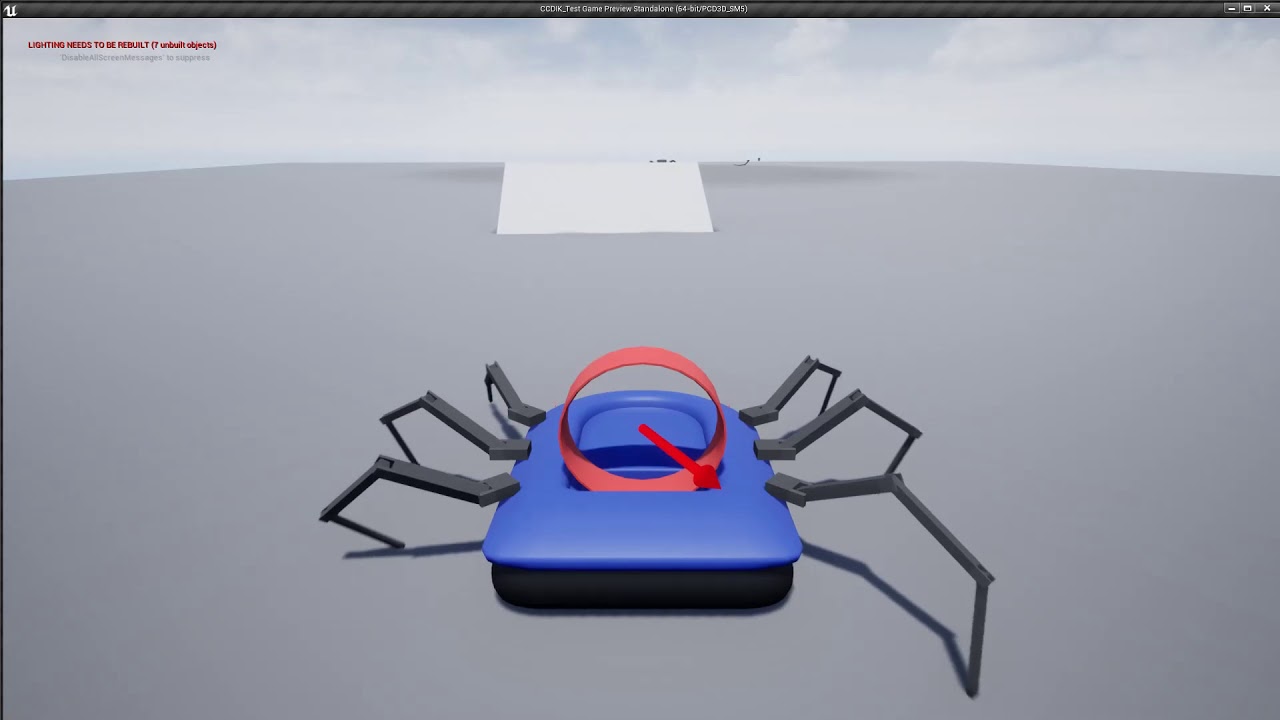
Added the spider legs to a hovercraft pawn to test them out in a realistic player locomotion situation. Extreeeeemly happy with the result.
 limpid sandal
I called it at summer I'll repost now (pics are legal, can't see the eyes of kids -- at least legal in my country ) .. this vr thing makes lots of money it's working 14 + hours a day and 5€ per person per ride , this is at a cinema in a mall @ Athens, Greece
frank escarp
mobile based vr__
lmao what a piece of trash
i still dont get why getting mobile vr is even worth it, with the battery usage and the fact you need the phone
buying oculus, wmr, or vive ends up cheaper upfront
 uncut pebble
does someone know why im press F1 on UE4 or when i click on link for help, the browser open à 404 doc page :
 ember path
As far as I know the pages have been moved/updated - but the links in the engine are not updated yet.
Same happens to me aswell
 novel spire
Is it possible to import only a part of an asset pack downloaded from Market Place?
 manic pawn
import it to a blank project then migrate the things you want to the real one
novel spire
Good idea, thanks!
lavish marlin
can someone help me with my survival inventory system as im struggling to get this to work
even watching the tutorial of defuse studios on the survival game kit i still cant impliment the survival inventory into the project
i followed the guy 100% everything was working up until the point where i tried to add a master character bp it just flickers every time i try clicking it
any help will be appreciated
static viper
what flickers
lavish marlin
it just does nothing
static viper
what
lavish marlin
i explained fully if you read up
lavish marlin
u see the master character on the right
static viper
i see a cut picture of a character bp
lavish marlin
the right hand side on the pull down menu i try clicking master character bp and nothing happens
static viper
i have no idea what i see there
lavish marlin

Available Now https://www.unrealengine.com/marketplace/survival-game-kit A tutorial on how to migrate and integrate Survival Game Kit to another project.
i set it to play at the part i am stuck at
uncut pebble
@ember path ook thk
 teal tulip
 lavish marlin
im trying to find stuff now to help me : )
the showcase map is like this also .. very weird
i imported it through unreal engine store i did not edit anything
 wispy pasture
If I'm importing a static mesh with a multi-material to UE4, can I export it with three UV maps (one for each submaterial + one for lightmass) or am I going about this the wrong way?
grim ore
It looks like you can have up to 8 UV maps and I know in the static mesh itself you can assign which one is for lightmass. You might just need to specify in the material which UV that material is using for that slot
wispy pasture
I know how to do that in a max material, is there a way to set the channel for a UE4 created material?
(Also thanks, that answered my question)
grim ore
yes the texture coordinate node is fed into the texture and you can use it to specify the UV index, https://docs.unrealengine.com/en-us/Engine/Rendering/Materials/ExpressionReference/Coordinates#texturecoordinate
so your material that would go in that slot on your mesh for the other items would be set up like normal using a texture node but you feed in a texture coord node before that with the UV you want to use other than 0
wispy pasture
Awesome, thank you!
grim ore
that is an awesome question, maybe the nerds in #cpp might know the answer? I would be curious for sure
novel spire
Sure, let me move the question there.
gleaming creek
Bah, why do I bother reporting bugs?
Software development is the same all over, people will just try to avoid fixing anything by claiming that the obvious bugs are "working as designed"
 keen birch
Guys
I'm using Find on an array of PlayerStates
I'm 100% certain that the array contains all my playerstates, and that the thing I'm plugging into the Find is also the right playerState
But somehow, the thing keeps returning 0 as index
When I'm absolutely certain it should be returning 1 half the time
Is there something I'm missing here?
 fossil ore
Is there a way to bind a button to automatically select , specificed actor ?
grim ore
any reason it should not be returning 0? and when it returns 0 is it not the correct item?
fossil ore
Like, select actor press CTRL + 1 = actor will be selected when you press 1
?
lavish marlin
@keen birch .. there shall only be one goose
keen birch
It shouldn't be returning 0 because I'm sure I'm inputting the second entry from the array in this case
@lavish marlin What's your last name?
lavish marlin
gooseymc gooserton
grim ore
welp hit F9 to set a breakpoint on the node after the player state and then mouse over the return on the player state to see what it holds.
keen birch
There's this
That print is returning JoustingPlayerState once and JoustingPlayerState1 once
But then for some absurd reason the Find still outputs 0
@barely\
@lavish marlin You're barely a goose anyway
Don't offend the real goose :3
drowsy mesa
 shrewd gorge
Hi guys. I'm trying to create a basic asteroids clone - 3D direct top down.
I've setup camera to look straight down at an image (space background), but for some reason the lighting starts increasing upon game start.
Not sure what to check.
drowsy mesa
Im trying to get realistc lighthing, simulates real world lighting
Wow that looks awesome
shrewd gorge
Just an image from google 😃
drowsy mesa
Eow
next badger
@shrewd gorge https://www.youtube.com/watch?v=K2kIre_BHgA
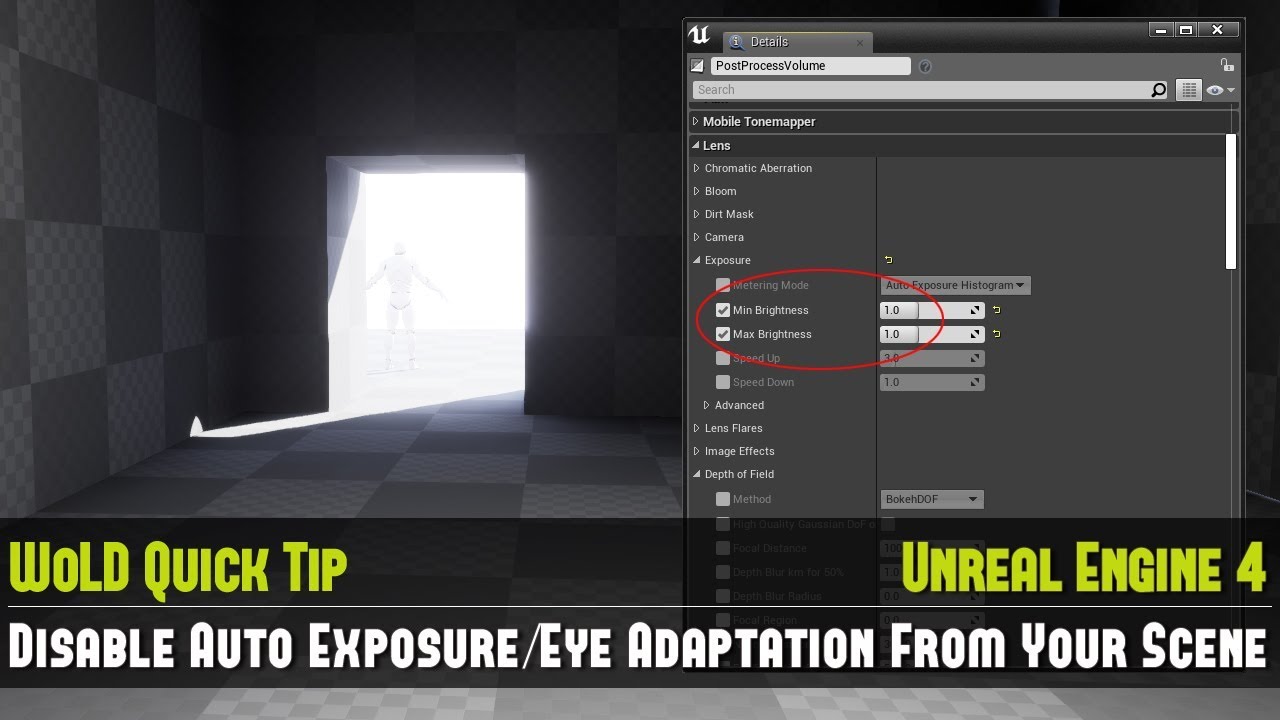
Learn how to quickly disable auto exposure, also known as eye adaptation from your scene. This is especially important to do when you are working on creating...
shrewd gorge
Thank you!
wary wave
they really (really) need to get rid of that auto exposure post process 😐
it's like the new white viewports question
 ruby folio
I personally don't see why its such a big problem. Nor why a video is needed to explain it.
However I do find it odd that a lost of post processing effects are on by default.
wary wave
it'd be less of a problem if you had to manually go in and enable it
so many people are just confused as to why their (entirely black) scenes suddenly fade to white for no obvious reason
the problem with it, is that it doesn't really work
 spare sun
honestly yea, I'd prefer manually enabling such things instead of having them on by default
ruby folio
Agreed
light thunder
When working with Variable maps across save game objects, I seem to be overwriting the entire map itself, even though I am using add....so do I need to have additional struct variables as placeholders?
or do I need to load the map first before saving it?
I'm wondering if it is that second part...if I don't load it and set it to a new struct map variable, i will just overwrite it
 junior solstice
The actors I get in spawn in the game do not appear by other characters
for example bullets
how to solve this
light thunder
Do you mean multiplayer they don't appear or they aren't spawning BY the other characters?
junior solstice
this video
junior solstice
Is available in video
light thunder
The good news is, you have caught this early in your development so you can build replication in as you go
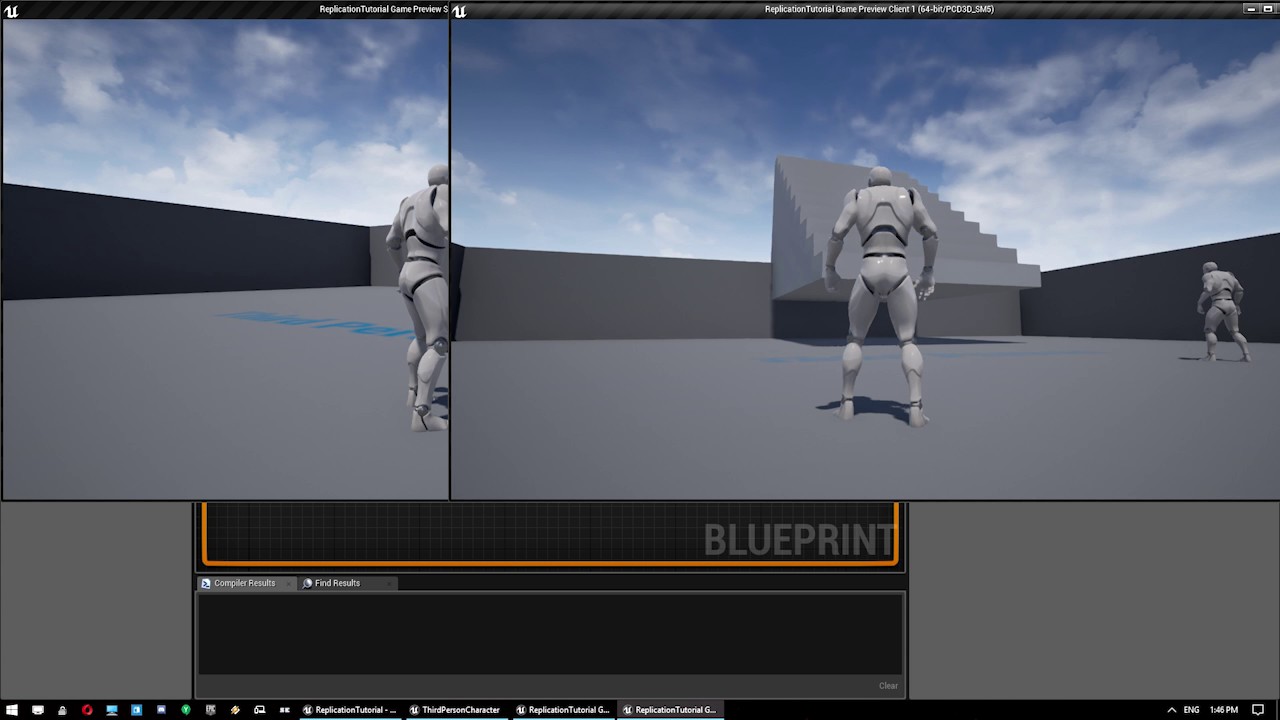
A quick tutorial to get you started on understanding the very basics of event replication within Unreal Engine 4's blueprint scripting system. Please note th...
junior solstice
ty
drowsy mesa
Thanks for the info it'll help my mmo projects
grim ore
replication is the best part of a networking project, it's so much fun
"I want to fire a bullet" ok? Who fires it, from where does it get fired, who knows it was fired. Who is in charge of what you fire and who should know about that. What happens when what you hit does something and who knows about it? Does the effect play on the client only because it's just cosmetic or does everyone else need to see the exact same simulation on the server? "But I just want to fire a bullet..."
shrewd gorge
Does anyone know how to change camera after in game? It always resets to an awkward position.
In game:
After.
Always this exact angle, trying to understand why that angle specifically.
(sorry for newb questions, going through that udemy course at the same time)
grim ore
well , is the first picture from the editor or when playing? and when does the 2nd one show up
 thorn vector
hi do anyone make a tutorial or video explaining relication
i watched the ue4 one and it wasted my time
shrewd gorge
First picture is when playing.
Second one is after game.
 lavish sparrow
Would someone be able to help me out? Not sure where would be a good place to ask a question involving NavMeshBoundsVolume?
next badger
@lavish sparrow #gameplay-ai or here
 random holly


 delicate needle
Has anyone here configured the STUN server for external access (over the internet) to a unreal pixel stream?
random holly

 delicate needle
I'm very close to getting this working, I am just stuck with this last bit I think.
random holly
Could anyone tell me why these are giving me a bad time while trying to migrate into my project
junior solstice
I'm doing ragdoll death, but my character doesn't respond http://prntscr.com/m0pu32

 spare steeple
@random holly try refreshing the nodes
junior solstice
Mixamo ? @plush yew
 shy silo
What video series should I start with for learning ue? There’s just so much
icy bone
@shy silo follow tutorial by Virtus on youtube where he teach u to make a temple run kinda game
it will give u a good idea of many tools in the editor and how to make stuff with blueprints
going deeper require C++, and there u need Udemy to ur rescue, havent found many good ones on youtube, they are all fragmented
shy silo
Ok. I’ll give it a look thanks
icy bone
good luck :
junior solstice
http://prntscr.com/m0qp4v how do we want to dye this meshi substance
 gray pier
@terse skiff yea
there nothing can be done
u can try installing unity
right @frank escarp
next badger
dry moon
Hey I'm currently getting a crash with PhysX to where I can't even launch the editor. The follow line is where it crashes PxU16 PMaterialCount = PShape->getNbMaterials(); in FPhysicsInterface_PhysX
Anyone got any ideas?
 terse skiff
yeah
Problem fixed! Right-click on your Epic Games launcher desktop shortcut Select “Properties” In the line labeled “Target,” add the following to the very end (after the quotation mark): -SkipBuildPatchPrereq It should look something like this: “C:\Program Files\Epic Games\Launcher\Portal\Binaries\Win64\EpicGamesLauncher.exe” -SkipBuildPatchPrereq Click “Apply” Double click the shortcut to run the launcher and try again and make sure to add the space between the quotation and dash
cursive dirge
anyone remember how to use the default ue4 console key from european/non-us keyboard?
I faintly remember Allar telling what it was on some stream and I was baffled it worked as I've always reassigned that on my projects due to it not working on the key everyone expects it to work on my keyboard
@polar hawk you still remember it?
or do I remember wrong that you would have told this on some game jam stream....
@dry moon if you get crash there, make sure your PShape isn't null to begin with
dry moon
I have 0 custom code that involves pshape
Its from engine boot
it just started randomly doing this
cursive dirge
oh
this is 4.21 I presume
did you compile that ue4 yourself or is it from launcher?
dry moon
Recompiled, deleted Intermediate, cleared cache, downloaded UE4.21.1 from github and recompiled in that
still same issue
icy bone
anyone tried red orrange?
it taste so niice
never use the latest ue4 version for production
cursive dirge
you have latest VS2017 for that?
cursive dirge
ah, asking because VS2015 has some really funky ghostly issues with it
huh
that's one version newer than mine
I wasn't aware there were newer version
my VS2017 is 15.9.3
dry moon
Are you using community?
cursive dirge
yeah
cursive dirge
well, there is update now that I checked
dry moon
but yeah other projects launch fine, its only my main project that causes this
It has something to do with physX stuff