#ue4-general
1 messages · Page 341 of 1
 spring blade
- The listen cant see the clients animations
- the client cant see materials that i changed in blueprint
- I cannot set up a proper hud system
meanwhile, i also have to make sure it works with split screen
If somebody could answer any one of these, that would be greatly appreciated 😀
 iron hinge
Hey guys, I'm really new to this whole thing and I have what probably seems like a dumb question but:
I'm watching a tutorial on YouTube for beginners and when he makes a new level he has a grid that seems to stretch into infinity which I think shows where "sea level" is. When I make a new level it's just completely blank
How do I make it so that grid shows up, it would make keeping larger things level much better if I have a baseline of what zero is
 plush yew
create a terrian
 manic pawn
make sure the viewport is in lit mode, and that show>grid is on
plush yew
Anybody know why i don't have the parameters and options on this 2D blendspace like the guy on the right has?
 vivid girder
@plush yew Pretty sure they've moved some of that stuff
Also IIRC you need to have one of your nodes selected in the graph
vivid girder
Drag one of your animations into the blendspace
then click on it
Then for the rest of the stuff it's under Asset Details -> Axis Settings now
plush yew
you're the best, thank you so much
vivid girder
@plush yew Also, Snipping tool is the one-stop shop for all your screenshot needs
I'd recommend pinning it in your taskbar
 alpine token
You do not have sufficient permission to save the following content to disk. Any changes you make to this content will only apply during the current editor session.
Someone knows why this happen and how to solve please ?
 weary basalt
Make sure you dont have 2 editors open at the same time.
alpine token
Yes I do, but still the same
plush yew
How good is Udemy? Is it worth spending money on to learn about UE? As right now they have a sale everything $10.
 digital anchor
Those sales are "permanent", everything is on sale everytime
that said i really liked the multiplayer ue4 course
so id say its worth
plush yew
Thinking about buying that one
 cloud cobalt
Udemy in general is borderline scam, due to their sale practices
Some content on Udemy is great, however
 graceful sky
sale practices? Like how everything is always on 90% sale? 😛
cloud cobalt
Like pretending the price isn't the sale price, to get some people to shell out 10x as much as the course really is worth
This is actually illegal in most countries
plush yew
yeah I thought about that and found it strange. I know some other site that does this with liek textbook courses
plush yew
@cloud cobalt i got sucked in by that
the massive deal shit
can't wait to get ssd to load unreal engine on and get to 32 gb of ram
 tardy sapphire
Is it possible to make an object in the editor unselectable? I wanna lock the sky sphere so I don't click it by accident while I'm moving around
 sudden agate
rightclick on it, transform, lock
plush yew
Hello guys I have a problem with my project mobile game form the Virtus tutorial series
he delete the gamepad input and mouse inpout then compile and save and he can't move-okay but I did this and I can move and the circles disappeared-hmm
https://www.youtube.com/watch?v=IP-dNUEiMBM&list=PLL0cLF8gjBpoTwM62rvhgmsk_Xp1_G1Vn&index=2 this is the video

Here we take a look at how we can create the project for our mobile Endless Runner game along with how we can setup the camera view to make it similar to oth...
hmmm
plush yew
hmmm
 simple gust
Hello everyone. I'm new on UE4 and programming in general.
I'm trying to do a "city builder" on a sphere (a planet to be specific, assuming you could go on other planet to make some buildings).
What I think could be nice would be to create a geodesic sphere -so I simulate a grid around the planet- and then clamp the building to the center of the grid case.
The fact is my knowledge is very limited in this domain and I don't even know where and how to start to make this possible. Could somebody help me with this subject ?
plush yew
hrj
 cinder pasture
Hey
 icy bone
@simple gust if ure new i suggest make simple games first. Also take computer science classes, or learn programming
 elfin jacinth
Happy Monday super troopers!
tardy sapphire
Happy Monday 😃
cinder pasture
Well, Monday Sucks:/
elfin jacinth
It is indeed! There is snow on the ground.
We had to drive 10 hours north to get it, but #worth
 static viper
hello
cinder pasture
Nice
 polar hawk
monmonmonmonmonmonmonday
cinder pasture
Monday Morning Blues
 fierce tulip
fierce tulip
fierce tulip
fricking tiny pin next to delete button
tardy sapphire
Guys, is there any way to view the quads, subsections and components of a landscape that was already imported?
I wanna check the Kite demo tiles
 regal mulch
Anyone ever had a Pawn totaly being frozen?
It's spawned during a custom matchstate with RestartPlayer for a Lineup.
It's spawned the same way at post match, but there the pawn doesn't seem frozen (so same code used).
The MatchState is before "InProgress", however the Pawn doesn't seem frozen during WaitingToStart, where the player can join a warmup.
Frozen = No Particles Play, No SkeletalMeshAnims Play, EndPlay isn't called.
The pawn prints a correct Player/AiController.
Either it's something stupid I do and I can't find what, or it's some setting I'm missing
 thorny cipher
is there a way to detect when a player controller possesses a pawn from inside the player controller?
regal mulch
OnRep_Pawn I would say
thorny cipher
?
regal mulch
Not in Blueprints, if your question aims for that.
regal mulch
Welcome to Blueprints
thorny cipher
Time to expose i guess
 paper kernel
well technically you can use OnRep for the purpose
thorny cipher
why isnt there an event in the player controller
regal mulch
There is also "OnNewPawn"
It's a delegate
But that's not really for usage inside of the controller
SetPawn is also virtual. Could override that and react to the change after the Super call
OnRep would be nice to have in BPs, so you can react properly in clientside too >.>
regal mulch
Doubt they changed the process of possessing a pawn
 regal mulch
I really don't get why my Pawn is "stuck" in Animation/Particles etc. when in PlayerIntro MatchState and CountdownToBegin.
But not when respawned during WaitingToStart, InProgress and PostMatch
Despite the fact that the later ones are build in states
thorny cipher
{
    // Detect when pawn changes, so we can NULL out the controller on the old pawn
    if ( OldPawn != NULL && Pawn != OldPawn.Get() && OldPawn->Controller == this )
    {
        // Set the old controller to NULL, since we are no longer the owner, and can't rely on it replicating to us anymore
        OldPawn->Controller = NULL;
    }

    OldPawn = Pawn;

    SetPawn(Pawn);
}```When spawned in PostMatch, they continue working in MapVote matchstate -.-
thorny cipher
thorny cipher
regal mulch
Yeah, then you can expose it to BPs through your own PlayerController
regal mulch
// HEADER
UFUNCTION()
virtual void OnRep_Pawn() override;

UFUNCTION(BlueprintImplementableEvent, meta = (DisplayName = "OnRep_Pawn"), Category = "Pawn")
    void K2_OnRepPawn(APawn* NewPawn);

// CPP FILE
void AYourPlayerController::OnRep_Pawn()
{
    Super::OnRep_Pawn();

    K2_OnRepPawn(Pawn);
}
you're a god ty
regal mulch
You should then be able to find the OnRep_Pawn event (be aware that I used a DisplayName!) in your BP child of your own PlayerController
You need to create a C++ PlayerController for that of course
Don't edit the source code :P
thorny cipher
Yeah I have one
regal mulch
Also I could have a typo in that
thorny cipher
Should pawn be passed as an arg in the onreppawn
regal mulch
If you override, you need to use the same signature
The OnRep_Pawn isn't passing the pawn, so your override shouldn't either
thorny cipher
does override use the existing function + my added code?
regal mulch
override really overrides the original existing function.
That's why you call the Super part
That calls the original parent code
thorny cipher
Oh true
regal mulch
The K2 function passing the pawn is just me making it "easier" to use the event.
You could also pass nothing here and do "GetControlledPawn" in the Blueprint
Ah man, I hate bugs that I have 0 idea where to start fixing them
plush yew
how do you give an aetherial flow to progress hp bars?
regal mulch
(╯°□°)╯︵ ┻━┻
plush yew
can you import gifs?
thorny cipher
┬─┬ ノ( ゜-゜ノ)
regal mulch
@plush yew What is an aetherial flow?
Whatever it is, you most likely do this via Materials
 steep pawn
hey guys, im not too sure where to put this so just gonna put it here for now. Getting a crash in editor when loading a map after updating to 4.21. I've confirmed its working in 4.20 and crashes after updating to 4.21
anyone have any ideas where I should start to find the issue?
[2018.11.19-13.58.44:734][656]LogWindows: Error: === Critical error: ===
[2018.11.19-13.58.44:734][656]LogWindows: Error:
[2018.11.19-13.58.44:734][656]LogWindows: Error: Fatal error: [File:D:\Build\++UE4\Sync\Engine\Source\Runtime\RenderCore\Private\RenderingThread.cpp] [Line: 826]
[2018.11.19-13.58.44:734][656]LogWindows: Error: Rendering thread exception:
[2018.11.19-13.58.44:734][656]LogWindows: Error: Fatal error!
[2018.11.19-13.58.44:734][656]LogWindows: Error:
[2018.11.19-13.58.44:734][656]LogWindows: Error: Unhandled Exception: EXCEPTION_ACCESS_VIOLATION reading address 0xffffffff
Hmm i put that stuff in and can't seem to find the function
Would I need to build the editor?
plush yew
you see a flow on an hp bar like a sort of animation?
regal mulch
You just need to compile your code for DevEditor again
thorny cipher
Gotcha
regal mulch
@plush yew Yeah still via Material I assume
@steep pawn It does say "Access Violation"
Which sounds like a null pointer exception
Something is accessing something it shouldn't
regal mulch
Do you ahve a custom engine?
thorny cipher
Yes
regal mulch
Oh lord, did you click build on the engine?
steep pawn
hm, im not too sure what could cause it, atm the map is just a bunch of static mesh's and particles cause its still early in dev, would going through mesh's 1 by 1 be a start I guess? see if somethings corrupted
regal mulch
Strange, it shouldn't rebuild your engine if your VS startup is the game
thorny cipher
regal mulch
I usually just hit F5 xD
@steep pawn It's the renderthread that causes it
And I doubt you modified that
So I would assume something that renders is broken
thorny cipher
do you use vsc?
regal mulch
If it doesn't crash on other maps, then it's def part of that map
thorny cipher
or vs
regal mulch
@thorny cipher c?
thorny cipher
code
steep pawn
time to go through the mesh's then 
thorny cipher
visual studio code
regal mulch
The normal one
thorny cipher
ah normal vs
yeah visual studio code is a bitch
always needs rebuilt
and the intellisense is borked as
guess ill just wait for it to build
rip
i have a i7 8700k waiting to be put into my new build
can't wait for those build times
steep pawn
so the issue was i had a material on a skeletal mesh that wasn't ticked to work with skeletal mesh's which worked fine in 4.20 but apparently 4.21 hates it 
thorny cipher
really
steep pawn
yup
steep pawn
i ticked it, everything works fine
steep pawn
i decided i'd work through all the warnings in my log to cross possibilites off
thorny cipher
like "material used on splines"
steep pawn
and low and behold that was it
steep pawn
but it clearly needs to be a full on error
thorny cipher
i would check but my editor is rebuilding LUL
maybe some optimisations they added to mats
steep pawn
i keep forgetting how UE4 works, tons of errors = probably just 1 error and any warning = pc will explode if this runs
thorny cipher
i remember when i first started with ue4 had 20k warnings on build
fierce tulip
 sudden agate
^ I guess he doesnt know how UVs work :D
 wary wave
0_o
fierce tulip
or he knows, but wants to use it to manipulate chin chapes?
or.. just resize the uv for a chin?
fierce tulip
lol
fierce tulip
chins
 lean yacht
any ideas as far as far lighting
wary wave
eh?
lean yacht
like really long distance lighting doesn't work right?
wary wave
define doesn't work right?
lean yacht
I want to have a sun say 1000km from a planet.
fierce tulip
only 1000km? man thats gonna be hot
lean yacht
I mean I am the lead so I can't really describe the issue our programmer was facing.
wary wave
I assume that's a point light?
lean yacht
All I know is there was some issues with shadows and light scattering
wary wave
I don't think UE4 really supports these kinds of scales
lean yacht
so
just use a raytrace
and spawn a point light much closer?
and then just have a sun texture further away
?
fierce tulip
@wary wave you can actually make planets real-size and distance them from playfield with actual distances and it should take it.
wary wave
why not using a directional light?
@Luos - I'm not so sure
I would have thought things like shadows would collapse under the those circumstances
fierce tulip
Hour did that with solus afaik
but didnt do shadows I think
looks @prisma phoenix
@lean yacht could do that, or just use the global light thingy
hungry and no ue4 open else id use proper names :p
lean yacht
true
wary wave
if this is a space sim, you have much bigger fish to fry
wary wave
no part of the engine is built for this kind of thing
fierce tulip

 wary wave
I wouldn't even start worrying about stuff like voxels....
fierce tulip
good luck though 😃
lean yacht
well we already have voxel stuff taken care of
we are working on biomes and player ships rn
once we do that we (almost) have a playable game
tardy sapphire
Why is my landscape material rightly previewed but turns the whole thing black? :/ I don't think its a lighting issue
regal mulch
@tacit hatch Worth depends on what you can spend :P
 vale silo
any ETA on 4.21.1 ?
regal mulch
@tacit hatch I never actively used it with a small or big game, only implemented it for clients
If you know what a full server of yours needs in terms of resources, then you could calculate the costs
Each Server costs x cents per minute or hour or so.
If the tier of server you've chosen can run 10 full DedicatedServers, then you can calculate how many servers at the same time you expect to be running
manic pawn
launcher lets you update to some kind of beta without telling you what it's about?
genius
 dim merlin
[Edited]
Hi guys, ive just edited my old question to a new one..
getting this error on launch
any idea?
manic pawn
what'd you do to cause it
dim merlin
not totally sure.. I dont know what data is corrupt 😃 but i might disable some plugins and test again
manic pawn
could put a breakpoint at where this message is spawned and see what it was trying to load further up the callstack
dim merlin
btw, this is the alert i get right after the first
@manic pawn i fixed it by disabling mac and other platforms for the supported platforms
thanks anyhow
regal mulch
Nope, not really despite just testing
regal mulch
But it's kinda technical nature. UE4 (given you use the GameMode and GameState, not Base) calls "NotifyBeginPlay" on the World in the GameMode (For the Server) and in the GameState (For the Clients).
That happens in "WaitingToStart" if it's not ready to start, as well as in "HandleMatchHasStarted".
In my Editor Case, I do entry the state "WaitingToStart", but it's already "valid" to start in the same frame
So it doesn't execute NotifyBeginPlay.
Usually that doesn't matter cause it goes from WaitingToStart to InProgress
So the HandleMatchHasStarted would catch it
But I don't go into InProgress, but into a custom State called "HandleCountdownToEndWarmup"
And that never calls BeginPlay on the world
static viper
yee that you figured out with c++ XD
regal mulch
So nothing ticks. Not even particles in the world.
regal mulch
Or rather nothing "beginsplay"
I now do this
// In case we went into this so fast that the world isn't playing yet, notify it!
    if (!GetWorld()->bBegunPlay)
    {
        GetWorldSettings()->NotifyBeginPlay();
    }
In my Countdown state
It's probably an editor only bug for me anyway, as people will usually always end up in WaitingToStart for more than one frame
regal mulch
This will never happen in a packaged game
Might even wrap it into #if WITH_EDITOR
Anyway, DINNER TIME
plush yew
while packaging my project the packaging failed and then showed me this
ERROR: F:\ue4 android\android-ndk-r12b/ndk-build.cmd failed with args APP_ABI="armeabi-v7a " NDK_DEBUG=1
 grim ore
my twitter was getting notifications so I check and there's a twitter thread going on about the new spyro release not having subtitles and people where like "they should have added them in, the engine supports it" and linked by video on how to use the system lol.
 exotic jackal
guys, i have a question: after packaging the game to have the exe of the game that i created, and there are other files..can i continue to, lets say, to add a character in engine, and after to update the package(the game) and if i open that .exe to show what i added?
 trim tusk

grim ore
When you package the game it puts all the stuff you need into the correct place or the .pak file and creates the .exe to run it. Any changes you make to the game will then only be for the project until you re package it then it will take those changes and remake the files and now your files are updated.
the engine doesn't "patch" it just replaces and remakes everything into new files when you package and cook. This is a simplified version but your basically deleting the old and making all the stuff again with your project.
exotic jackal
Well, ok, I got it
So basically I need to replace it every time I make a change
In engine
trim tusk
yeah
grim ore
basically yes if you aren't doing anything special your entire project will be remade when you package and cook it out
plush yew
how can i change clouds texture on the sky
grim ore
You need a paint brush and a 747, oh and I guess some paint might help.
If you mean the default sky sphere, you can go to the Sky Sphere. Then in the details panel the material is on the Sky Sphere Mesh, then you can open up the instance in element 0 and edit the material. From there you can change out the cloud texture.
If you just want to change the colors those options can be changed in the sky sphere BP itself but not a texture override
 latent moth
did the unreal sale start? marketplace has many discounts and website is kinda not working 😃
fierce tulip
working for me?
latent moth
images are not loading... oh well
no prob
apparently back
but did the sale start?
grim ore
the twitter said it did?
fierce tulip
yea it did
grim ore
https://www.unrealengine.com/en-US/blog/save-big-with-the-unreal-engine-marketplace-fall-sale "You can start shopping at 12:00pm EST today by heading right here." so yeah 3 hours ago

Unreal Engine
Take advantage of our largest sale ever with over 3,100 items discounted up to 90% off!
 wary ferry
i am looking for the place to ask about why unreal has a 10GB data storage on my main drive, when i install every version on my secondary one?
C:\Users\mispa\AppData\Local\UnrealEngine
fierce tulip
it stores cached shaders and what not in that directory
you can occasionally empty it, only annoyance is that itll need to recompile your shaders
wary ferry
oh ok thats fine. i have very much optimized my shaders so i am working mostly with instances anyway 😄
good to know thanks a lot for telling me
fierce tulip
those are also part of it ofcourse hehe
wary ferry
lets delete this and see whats happening xD
fierce tulip
error loading win10, cannot reboot, error :p
wary ferry
xD
compiling 130 shaders done in 15 seconds 😄
and now its only 1 instead of 10 GB yay
 ancient tulip
hey, why does UE 4.21.0 feel like it takes longer to compile c++ code
 errant burrow
the first time I play a particle effect, it has a tiny delay at the start and after that it always plays smoothly--any ideas for how to fix?
I'm using the blueprint spawn emitter
I assume it's because it has to load the emitter into cache, but how can I do this ahead of time?
plush yew
how would you guys approach playing an animation during yaw input change??
thought it would be simple, but i can't even get close
grim ore
put that input into your animation BP and then drive your animation state based on the input?
grim ore
😃
 tawdry raptor
anyone here use a quest system for their game?
 pallid compass
about tree fiddy i would say
fierce tulip
^
 true swallow
im trying to fit around 150 players per server
pallid compass
10,000 byte * 150 players
add 10% offset
How big is the world?
say around x4 entities?
true swallow
right now im trying to balance my attention to gameplay
 worn granite
when you wanna do a meme answer, give it a way, and then fumble your own bamboozle
true swallow
so i dont have a lot of the game world completed
just rough sketches of how i want it to look
pallid compass
((Floor((10k * 150) + 10%) *4)) / (100 / CarryTheNoodle)
so i think ur looking about around errr
true swallow
its a tight first person shooter where you can go to different points of interest with friends and part take in devils daggers like gameplay
pallid compass
three fiddy
worn granite
/r/overdonememes
true swallow
it be like that sometimes
true swallow
i see
pallid compass
35gb*
true swallow
of ram?
pallid compass
yes
worn granite
yes
pallid compass
u gotta pump them rookie rams up then
true swallow
i tried twiddling the FDD drive and decoupling the hypertime mod unit and i cant seem to fit the players still
worn granite
its all about the turbocombobulator.
 high stone
DDR5 has been announced for the consumer market! In... 2020... /:
worn granite
You need to have enough silicon flux
In all seriousness.....
Team size, budget, length of time you have for the project all factor into it.
I can just give you a generic answer, but it wouldn't be super useful
true swallow
me by myself in my room unemployed as a hobby project
i have some of the gameplay done
high stone
@true swallow true indie dev.
worn granite
Do you expect to finish it, or is it merely a tinker project?
true swallow
both
its just something i know i want to finish no matter how long it takes
i started it about 2 months ago when i got diagnosed with aspergers and i needed to cope with that.
worn granite
first proj?
true swallow
not really
i went to id tech camps when i was 12 and dabbled with unity and modding when i was 14-15
worn granite
Oh, okay cool. What metric were you curious about? World size? Content density?
time to "endgame"?
true swallow
but im like 19 now moved out on my own and im doing independent music production full time and trying to intergrate my music with video games
pallid compass
You ever shipped a game before?
true swallow
no but ive released an album
pallid compass
Oh well im sure it wont be a concern at all then
fierce tulip
just keep practicing and moving forward
true swallow
I’m gonna be working on this for the rest of college
pallid compass
How much metal do you think i would need too build a plane?
ops
wrong chat
meant for lounge
 frozen crater
Hey guys, Im stuck trying to compile 4.20 from source with VS2017, i get the error "mscoree.lib cant be opened" when trying to build SwarmInterface, all I found was this 2 year old comment on it:
"finally got master branch built and running with VS 2017.... what trouble... the latest was SwarmInterface not compiling, looking for metahost.h, etc.., not having the include path C:\Program Files (x86)\Windows Kits\NETFXSDK\4.6.1\Include\um. so i had to move some .h and mscoree.lib files around.. grrr.."
Any idea what he means/where I should move the mscoree.lib file to?
true swallow
make sure that when you pull its all going to one directory
are you pulling it from the github?
why are you compiling from source in the first place? spatialOS?
frozen crater
yes, i did a fresh install of vs17 with .net dev, c++ dev, desktop dev and game dev with unreal engine installer, then downloaded the 4.20 zip, unpacked it, ran setup, and then ran generateprojectfiles
I need to compile for a windows server, and I think it only works with engines build from source
true swallow
make sure you click setup first
frozen crater
yes, I did that first, waited till its finished and then generated the files
true swallow
ah okay
idk i didnt have any problems
so im just shooting in the dark\
have you tried spatialOS instead?
for multiplayer?
its a cluster computing solution as a service
frozen crater
no, I will look into that aswell! thanks a lot for you help
true swallow
its much more convenient, im building a whole mmo by myself using it
its very prototypey and alpha
but it works really well
and for small prototypes (like my game) its free
plush yew
woohoo, excited for the fall sale!
 dawn vessel
Same here 😃 Literally just on time for when I was going to be looking to buy assets. 😃
plush yew
what causes the outline around everything with the glow? i really need it to not show up
yes i know the glow causes it but i need other objects to not read it
plush yew
@plush yew you can try anti aliasing. if that doesn't work perhaps something else will.
@plush yew yeah i tried that, this is coming from the decal only
 swift spindle
hey all!
got a brain teaser for you!
Why would my FPS be low and my GPU not be used properly (no framerate cap enabled) But I can get more gpu useage with a simple change to the bloom type (showing my GPU speed is not limited)
whoever answers this soon and leads to a fix will win some kind of nice prize!
 spare sun
If that means that your fps skyrockets together with ur gpu usage, I'd say load not big enough for gpu to count it as such?
spare sun
vr?
iron hinge
Is there a quick way to snap water to the size I want? I have a river running through the map and I just watched a tutorial on making water and he did it all in a pool and just used geometry to make boxes
Do I have to make each shape in geometry the entire length of the river matching all the bends and curves?
swift spindle
there are a few diff ways to make it
depending on your water and how it is
you could use planes... or you could do it in a 3D app... or you could generate it via splines
some terrain apps can create it also
iron hinge
He used a few different layers to make the water physics work
Virtus learning, basically I have a river running down from one corner to the other and to fill it with water by shaping an object would take a ridiculous amount of time lol
 steep crystal
@rugged fable Got any more details? What kind of changes are you making, did it work before in that project or at all, etc
weary basalt
@rugged fable Dont make the same post across multiple channels. Read the #old-rules thanks.
 languid shard
hey lads ! Say, is it normal to have a high frametime (20ms) for the BasePass Dynamic on a scene with only static meshes ? 🤔
using forward shading
I have a lot of tris in my scene in somes places, it might be the problem
languid shard
overclocked GTX1080
6 core xeon
80M+ tris
with LODs one the most expensive objects T_T
languid shard
😬
cloud cobalt
I mean I'm sure some rigs can eat up upwards of 10M now
cloud cobalt
That it only takes 20ms is actually surprising
cloud cobalt
Means a 8M tri scene would run in 2ms in forward, which is amazing performance
For the bass pass in forward
languid shard
well there's a lot of instances in here
all these platforms are composed of instances
cloud cobalt
This isn't a game, right ?
cloud cobalt
Thought so
But well, yeah, cut down on this tris hard
These paltforms should be 50 tris in lowest LOD
If only so that it doesn't alias like hell
languid shard
I have to wait for Dell to update their workstations before ordering one with RTX Quadro cards
well to give you an idea
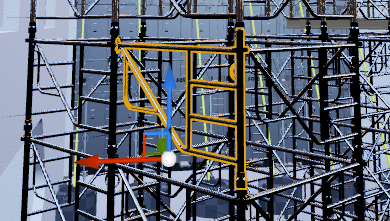
this small highlighted bit here
47k tris

even at lod3 it looks exactly the same as lod0...
why the fuck do they make these as detailed as that
cloud cobalt
Time to use the LOD tool
This shit can have 200 tris and not look any way different
Except better, because not aliasing like a christmas tree
languid shard
welp, at least I'm glad the Revit plugin gave us mesh instancing
only 1898 items to lod properly, could have been 5x that amount with the max workflow that wasnt instancing
cloud cobalt
I wonder if Simplygon has bulk processing
cloud cobalt
Well if it does bulk and I have 1898 assets to LOD, I'm going to be using it quick
languid shard
I have a confcall tomorrow with the Studio dev team
I will ask if they intend to at least do an import LOD interface
I've been told there's a bunch of QOL stuff coming with 4.22 regarding datasmith
 oak pumice
Hi all, is the Fall sale the same as black Friday sales on market place?
languid shard
@cloud cobalt getting there, doing some agressive triangle reduction (down to 10%, at least the geo is good enough to not be crushed)
 ruby folio
No ladies here?
static viper
owls tho
plush yew
When you're thinking to make a website with the username you choose 10 years ago
and you see someone made a crypto currency with the same name 🤦
 left ridge
Hi, I want to have the camera of my 3D menu to have kinda random movements...side to side while still looking at menu, zooming slightly, then going back out...what's the quickest way to achieve this?
plush yew
are there any good in depth animated materials guide?
languid shard
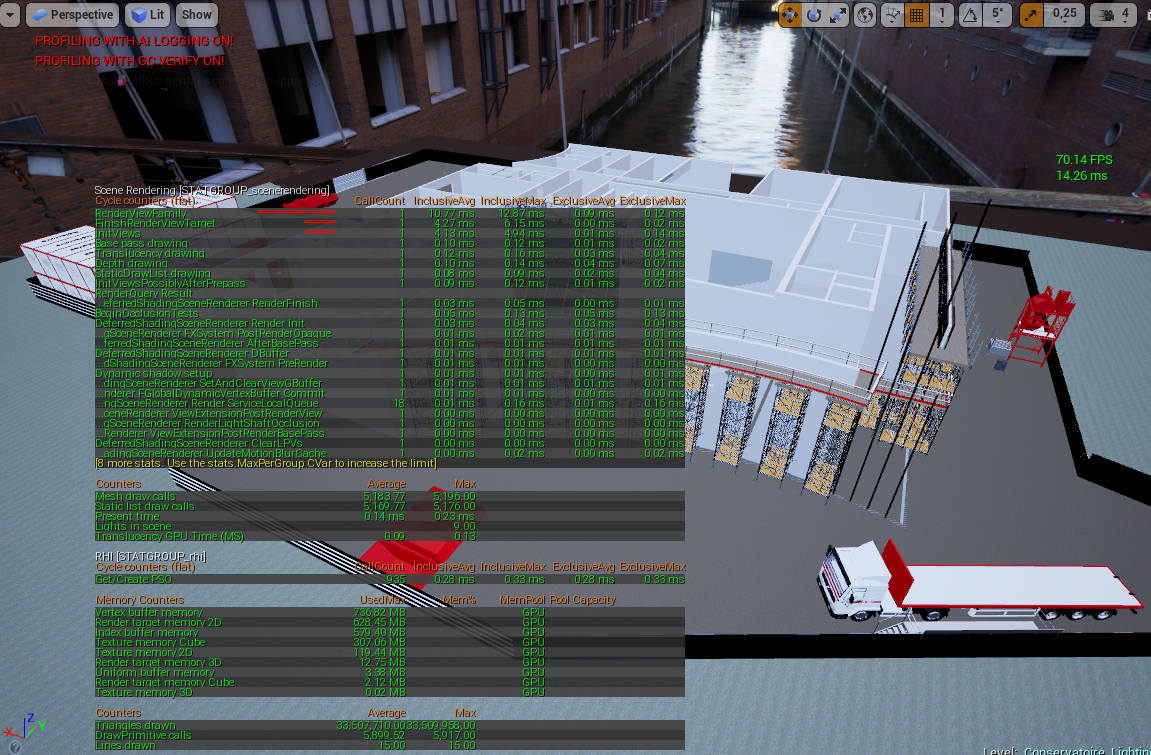
@cloud cobalt https://i.imgur.com/MgnP5iJ.png tadaa
 fierce tulip
@plush yew depends on what you want/expect
plush yew
I want to add UI animations
languid shard
still a lot of tris, but now I have the framerate necessary for reatime 😄
plush yew
to be able to do that
cloud cobalt
@languid shard Nice job. Still way too high tbh 😄
fierce tulip
"ue4 umg animation" should give you quite a few recourses
languid shard
need to have a look at some other high poly meshes in the scene
good thing is, refreshed datasmith file keeps the mesh properties for LOD and stuff
fierce tulip
unless you want shader animations, thats mainly just math and textures combined
languid shard
@cloud cobalt 10k, give or take 😄
 weary knoll
regal mulch
Is it possible to have "EditorStartupLevel" different per user, without having locally different DefaultEditor configs?
Is there some "Per Dev" setting?
static viper
you could trick p4 maybe
write a thing that changes the config
yee it must be driven by a project config ini
for maps n modes
 pseudo iron
Morning everybody... or evening. Just wanted to drop a friendly hello.
 rare axle
Anybody here help a nooblet? Just starting out Blueprint, trying to access a variable from my UI widget from an actor class. Can't seem to figure out how to cast to it or access that variable. Basically setting up a variable in my UI, button turns it on or off, the actor needs to change colour according to that variable.
regal mulch
For that you need to know what classes you can easily access everywhere
For UI that's usually the PlayerController.
So if you create your UI Widget in the PlayerController and save the return value of the "CreateWidget" node properly to a variable, then you can easily access the Widget via "GetPlayerController".
@rare axle
 marsh swallow
So i am getting not so great performance on lower end systems in the game after my first map build. Is this because many of the things i am using only has 1 LOD and lighting / Materials are not baked?
when it comes to Level building and optimization i am not so great. lol. Blueprinting and Mechanics are more my thing. haha. But on my system i have no issues on lower systems its bad. lol like 10-15FPS bad
 molten tusk
optimizing views tend to be my solution.
plush yew
help
i installed visual studio and nothing happened
 brittle gulch
Hello here, I want to move a mesh that is representing a character. But I would like, in the end, move a thousand of them. Is it better to use AddWorldOffset or is it better to create a Pawn class with a floating movement component and use AddMovementInput?
I'm talking about performance.
grim ore
You can ignore installing the nsight when installing the android stuff as it is not "needed" and causes problems like this
latent moth
do you guys know if there's a way to have an overlapping event with add spline mesh component?
latent moth
but i can't seem to define the event
 signal compass
The spline mesh likely isn't triggering overlap.
signal compass
let me launch UE4 so I can remember the exact BP node you need.
latent moth
can I just add an actorbeginoverlap event into a spline
oh thank you
this is what i do in the construction script of my spline basically https://gyazo.com/dc28cb2d131cce2c5ee40b754ccf9cc7
 signal compass
alright make a new node
"Set generate overlap events"
and check it to true
that should fix it
obviously pulling off of the return value of your spline mesh
Like this.
If you're still having problems, employ a combination of these nodes.
Some combination of those three nodes should fix any problems you might have.
It just depends on what you're using and what you're trying to do with it.
 edgy totem
I converted my pawn that i was doing some stuff with in C++ to a blueprint, is it possible to access my c++ code again?
wary wave
define 'convert'
vale silo
@grim ore one BP tutorial I'd love to see is about how to implement proper actor pool manager (for projectiles, etc.) I don't think there are any good ones on youtube.
wary wave
something like that is probably not going to be on Youtube, but I do think there are both actor and component pooling articles out there
vale silo
well, I don't know about that.. I had to make my own from scratch
worn granite
I'm sure virtus will eventually do a take on it, thus defeating the entire point
grim ore
lol. I can look into it but honestly it's a simple concept that is covered in most game engines already a few dozen times, unity especially.
and by simple I mean covered to death 😛 But I tossed it on my list
 supple totem
anyone else ever had trouble with foliage tool leaking memory?
I run it, and I'm sitting at 11gb used memory after
icy bone
i love u guya
guys
@supple totem well u know cus plants grow and spread, like in nature
plush yew
Aight uhm
You know how when you edit a static mesh, theres a collision tab and if you click on it theres Simple or Complex Collision....
How can I actually set it to be that complex collision?
(Ive tried using Convex Decomposition but it doesnt turn out good.)
 cerulean coral
hello all
plush yew
how I can access custom depth buffer in custom node?
plush yew
probably sounds like a dumb question, but for implementing weapons, do i need to create entirely new player animations for every gun?
spare sun
if you want your character movement to be entirely different with each gun, yeah
plush yew
i don't, i'm just not familiar with meddling around with animations inside of ue4. i only know how to create an animation and just stick it in there. is there a way to just change the animation of the arms?
i have a whole character, all animated by me, blendspaces, blueprints. Just not sure where to go from here with adding weapons. every tutorial i see is someone slapping the ue4 gun on the ue4 manakin. which is not what i want lmaooo
does anyone know a free city builder for unreal? cause i dont wanna hand place all my buildings 😦
icy bone
@plush yew no dont make anim for each gun, use attachment for that
@plush yew not built in, not sure about marketplace
plush yew
@icy bone i can't seem to find a tutorial on the subject 😦 any chance you you know of a good one??
if i have a different sized gun am i able to move the arms and hands to match within ue4? i mean it looks like i can, but how does that affect the animation?
i don't know why i can't find any tutorials of anyone doing this. do people only use built in stuff and assets from the marketplace?? i don't want to do that lmao
i'd even buy tutorials if i could find somebody that does it.
grim ore
There is an example for animations in the Content Examples that might help? It shows how to do the targeting with IK so you can have your arms and hands match up to the correct positions for example. You can also do this a bit easier with the new CCDIK system in 4.21 where you can assign points on your weapons and then have your arms solve itself in the anim BP for that target.
plush yew
@grim ore incredible! thank you i'm gonna check it out. -also relieved to hear about the CCDIK system
 neon current
anybody here know how to use photoshop?
plush yew
i can use GIMP really well lmao
 tardy scarab
do you guys know if there is a plugin for UE4 that allows 2 people to work on a game simultaneously?
instead of like one person working on it and then uploading and then the other person downloading and updating and uploading etc
weary basalt
Probably, but i doubt they work very well.
tardy scarab
there is one that is coming soon but you have to be a studio to use it
and I'm just a thicc boi who wants to make a game with a friend
weary basalt
If you dont already use Source Control you probably should, Source Control helps teams build a project together.
tardy scarab
I've never really collaborated on ue4, only on unity
weary basalt
Use Source Control.
 vast pine
Anyone ever accidentaly close out unreal with Use custom depth mask on so everytime poject loads it sows it
 rustic hollow
hey guys can anyone help me with paragon animation retargets 😃
vast pine
and entering highres screen shot fixes it till you exit, even with it on it tickets back on only way to keep it off is to not be in cinematic mode
oh found it finally show->use defaults
gg
rustic hollow
um...where can i find help with anim retargetting? @weary basalt
weary basalt
rustic hollow
ok already posted there i just thought i did it in the wrong p[lace xd
weary basalt
Wait for someone to reply. Dont post the same message across multiple channels.
Please read the #old-rules
Thanks.
 misty sparrow
hi every one i am new and nice to see you all
so i have some of project want to import it to unreal so i hope some one help me i will be thankful
need help how to export a scene from maya to unreal engine 4 i did the unreal export in maya and what i get is fbx file and include all my files in a single fbx file the problem is when i import it to unreal it take to long to finish maybe more then 15 hours so any way to import my scene to unreal in
size of the scene 1.3 gb
faces 10 mil i guess
the reason way i need to import it all to gather because i don t need to reassembly in unreal i don t want to waste time so i think this is a fast way to import all the scene and drop mats in unreal and add any other stuff
cloud cobalt
@misty sparrow There is no silver bullet for a 18M tri scene, it's going to be really slow
You shouldn't work like this
misty sparrow
so how can i import the scene it most be a way
cloud cobalt
Don't import a single scene at once
weary basalt
Try breaking it up into more modular components and importing them separately and assembling them together in the Editor.
You have alot of obviously repeating structures that could easily be made modular.
misty sparrow
dame that what thought
cloud cobalt
Basically if your FBX file takes more than a few seconds to import, you're doing it wrong
Not to mention the overall polycount is too high if this is for a game
misty sparrow
ok but how can i assembling them together in the Editor it will not be perfect as the scene i did in maya i will face some problems and there is way to snap mesh s
in ue4
because i facing problem in the axis
plush yew
am i the only one who can't delete a state without it crashing? lmao
how would i make ai peds walk along sidewalk like gta?
where they can also like talk
cloud cobalt
@misty sparrow I mean, I don't know anything about Maya, but you don't import an entire scene in a game engine. You'll need to split it into objects and put them at the correct locations
static viper
even maya cannot magic
 hot drum
Man, unreal is a REAL pain in the ass
sudden agate
Speaking of Modularity in scenes;
Is there a way to have instanced meshes in an FBX Scene and import them as Static Meshes with the same Mesh in UE?
hot drum
ok
soooo
I have a game
You can click on this door, for the player to go to it
once he reaches the door (hits the trigger box
It plays a fov animation where it slowly zooms in
when you go back, it stops the animation correctly
There's another thing you can do at the door
close it
and when you spam the door button and go back while doing it
I've set many measures for stopping the timeline event that I have for it, and setting it back to the original FOV
B u u t
unreal being the unrealy thing it is
decides nah, I aint gonna listen
and It just continues playing the animation, even at the center of the room
I've made it so when you leave the trigger box it stops the timeline and sets it back to normal
I've made it so when the "Back" event fires it does the same thing
same with reaching the center of the room
Yet it still has NO effect when spamming the door
I have no clue why this happens
this happens with the other door as well
static viper
your text is very long too
can you make video instead?
right now i have no idea what you are trying todo
something with doors, i see the bad trigger volumes and sequences clamps
static viper
i can not read it XD
ok
tell me in one sentence what you are trying todo
bc this looks like its many things at once
and i will prolly tell you to start smaller
hot drum
Ok ok
sooo
basically, when I overlap the trigger box on the door
It will start an fov animation
and I can close the door
and open it freely
go back
and it will be fine
however
If I open and close the door
really fast
and then go back
The animation will keep playing, despite the three measures I put to stop it
I'll record a quick vid

@static viper
Like I said, I'm still basically a beginner
hot drum
Huh?
GASP
I SEE
a hint.
It's the trigger volume
basically when you overlap it
it allows you to door
and if you close the door right as you go "back"
It will play the animation
triggering and stopping the fov animation at the exact same time
I think
I might create a bool
for when you can close the door or not
and it triggers when the go to door matinee is finished
rather than a trigger volume
and when you hit back
it will set the bool to false
eUrIkA
I'm a growing newbie
This would require a complete recoding of the system though
shet
oooh boy
Hey on the bright side it could fix some flashlight glitches I've been having as well
so... Hurray?
Hey It also gives me a chance to re-organize my blueprints
OH NEVER MIND HAHA
e n d m e
This triggers when the animation is done playing forward, AND BACKWARDS
ugh
You know what, fine. I'll just create another matinee for going back
I copied the matinee, how do I reverse it quickly?
 gleaming crane
Does anyone know the max amount of polys and scene set up needed to achieve 90fps in a VR game?
regal mulch
@hot drum Do yourself and us a favor: If you have an issue involving code that is not just 3 nodes, clean up your blueprints.
You can rightclick pins and choose to straighten wires.
No one here wants to spend extra time trying to read through that spaghetti mess
@gleaming crane Pretty sure no one can answer that. It depends on your game. Code it, put stuff in and then check the FPS.
If they aren't stable 90FPS, start optimizing
gleaming crane
@regal mulch yeah I've done that created a full profiling game just wondered if i anyone had any docs or anything
gleaming crane
@hot drum What did you do to break it?
hot drum
eeeeeeeeeeeeeeeehhhhhhh
I tried to recode something and for some reason it completely broke the flow of everything I've done
and I have no idea what I'm doing
uhm
I'm really tired
gleaming crane
"Ctrl + Z"
worse thing to do is code when your tired and mad come back too it in an hour and you'll figure it out much better
hot drum
Nah I've gone too far into the matrix
oh ok
I have to go back and figure this out again
Oh haha ok I only broke the right door
nice
regal mulch
Do you use Source Control?
hot drum
?
regal mulch
Do you or not?
hot drum
what is that
regal mulch
Then you don't. Do yourself a favor and save your current project. Close it, and learn about Source Control.
It's a software solution aimed at storing revisions of your code files, making sure that if something breaks, you can go back to a previois healthy state.
#source-control might help you here in case of questions
 lavish cosmos
has anyone done any rendering to EXR passes with Unreal? I am running into a problem where it starts defaulting to PNG files despite me using -CaptureFramesInHDR and -MovieFormat=CustomRenderPasses 😕
latent moth
does anyone know anything on how to set up VOIPTalker with Steam, I mean an explanation on what needs to be done to make that component actually work
from what needs to be set in .ini (pushToTalk?) to how exactly it is supposed to work
regal mulch
Afaik the VOIP Talker is just an addition to the default VOIP
latent moth
right, except that I cannot understand how to use it
This is probably the closest thing I've seen https://forums.unrealengine.com/development-discussion/audio/1437038-ue-4-19-native-spatialization-how-to-use?p=1493743#post1493743
Unreal Engine Forums
Hi, we are trying to use the new UVoipTalker (available since UE 4.19) in order to have users' voices spatialized.
We've already modified some previous versions of
I just want to be able to add an EQ to simulate walkie talkie effects on voice
 earnest cape
Why are normals disabled on transparent materials in 4.21?
fierce tulip
only if its unlit afaik
and need to set the lighting mode to one of the directional ones.
 vernal sage
I may be too tired as I happen to see you guys talking about this and was wondering the same thing recently. I got the normal to hook but I cant actually see any normal no matter which of the lighting modes I select. I might be missing something super obvious.
earnest cape
I did surface forward shading
vernal sage
Omg haha "every one except the last that I thought I had tested but you know didn't" XD many thanks I can finally see the normal again too, yay. 🙌
earnest cape
Yeah I thought I was losing my mind when I updated and all the glass in my project was blank
vernal sage
Oooo I noticed on a tester material and had made a note to figure out what was wrong later had not even looked at the glass yet as I only just updated in fact this was a problem in 4.20 because I only just updated to 4.20 a few days ago so at least i'll know what is wrong when I dig in to the other stuff / if it somehow breaks between 2.20 and 21. 😄
earnest cape
Engine please stop, it's already dead
static viper
ITS TRYING HARD C19
earnest cape
So I had a second viewport opened and when I applied settings to a material instance, that second viewport just completely closed itself
Idk what's going on
*restarts editor
cinder pasture
Is Unreal Engine 4.21 stable?
cloud cobalt
Not any more or less stable than any UE version tbh
All of them have different kinds of crashes
Depends on what you need.
4.20 crashes when I change the preview mesh on a material, and 4.19 can't build game mods
🤷
static viper
can you build mods on 20ß?
cloud cobalt
Yeah, 4.20 works for mods
cinder pasture
Shit:/
I'm installing it. Let's see if it works
cloud cobalt
You shouldn't really worry about engine versions not working well, imho. Pick the latest when you start, work with it, and if you have issues, try a newer version, until you settle on something
The version model in UE4 means no version is ever bug-free
cinder pasture
Indeed^^
cloud cobalt
Just on top of my head, I think 4.18 had rare random crashes in our packaged game, 4.19 doesn't support mods and crashed on some weird driver versions, 4.20 fixed both but we haven't deployed it yet so we might learn more, and 4.20 has the preview material crash
4.21 I think wouldn't package our game, so we didn't test it in depth
I wish we had more long-term support on releases
cinder pasture
Yeahh
cinder pasture
4.18 was the most crash-free version I guess
 leaden garnet
^
static viper
4.21 a whole year
cloud cobalt
4.18 was broken for us, for example
4.19 is the one we stayed the longest on, we'd still be there if not for modding support
languid shard
only complain I had since 4.19 is the lag of the plugin makers
other than that the new engines have been quite stable
fierce tulip
4.19 messes up cascade so much it hurts
cloud cobalt
The preview mesh crash in 4.20 breaks my mind, like how could it go through testing
static viper
i think on the long run
its really easy to fall through
it might have worked a few versions of bug fixes earlier
so they didnt tested that in the end anymore
bc it was fixed
this is sadly how it works :c
cloud cobalt
@languid shard Engine crashes 50% of the time when I change the preview mesh on a material
cloud cobalt
It's literally half the time here, and 4.21 was already out when I tried 4.20, so it's never getting fixed
Fortunately the game is done so
languid shard
😬
seeing how cases of bugreports are being handled by the Studio team is quite funny 😄
new case handler/owner ever 6Hours or so
wary wave
@cloud cobalt - monitor DPI scaling has been broken ever since high resolution "support" was added as a feature
¯_(ツ)_/¯
cloud cobalt
As someone who's ported a project over from 4.1 to literally every later release - it's getting slowly worse, imho
languid shard
UE's Editor isnt working with Gsync either
cloud cobalt
We never had any breaking issue before the "tonemapper" release (4.8 IIRC), but half of every subsequent release have been broken
wary wave
I have a project on 4.19 that I can't currently do anything with until it's fixed because no screen space UI elements can be used (can't even do math manually, the actual conversion under the hood is wrong)
 opal ocean
My player pawn is controlled with a behaviour tree, but I'd like to have the camera pawn attached to the player pawn... whats the best way to attach?
Use an attachto? or set actor location ontick?
Hmm, AttachToActor rotates the camera,
wary wave
player pawn / camera pawn?
opal ocean
My main player pawn (the visible character) is controlled with a behaviour tree, so it has its own AI controller
plush yew
UE when in-game needs extremly big ram, storage etc compared to unity. true or false?
opal ocean
the main camera pawn is just a camera, and I had it set up to be able to move around freely, RTS camera ish
but now I think it'd be better if the camera was attached to the main visible pawn
wary wave
in that case I would stop using the camera pawn entirely
opal ocean
I cant seem to get it to use a behavior tree in the player controller tho
cinder pasture
That's true @plush yew
wary wave
it still needs to be possessed by an AI controller
cinder pasture
But UE4 is far better than Unity afterall
wary wave
I mean a lot of this setup is going to depend on exactly what you're trying to achieve
plush yew
@cinder pasture apple users also say that they are better than anything else 
cinder pasture
You in favor of UE4 or Unity?
plush yew
... like appleers like apple?
cinder pasture
I hated GameDev only because of Unity, but soon I discovered UE4 ^^
Naa man xD
I m myself an android user and love it xD
plush yew
.
opal ocean
I want my camera to follow my AI character, from an overhead view. Trying to activate the camera I put on the AI character, but its not working
plush yew
@cinder pasture wanna make curve fever in 3rd person view with me? 😄
opal ocean
I have: HeroCharacter - The visible pawn, which is possessed by HeroController - which runs the behaviour tree. MainPawn - just has a camera and a floating movement for moving around. MainController - all the actual control logic, tells the HeroCharacter what to do via setting blackboard variables
cinder pasture
Will see, @plush yew. Please Dm me regarding this;)
opal ocean
Right now, I move the camera around seperately from the Hero Character. I want the camera to stay focused on the HeroChar, but not rotate
ah, I think I've got it. Just a SetViewTarget blend node
cloud cobalt
@plush yew The requirements of both engines are pretty debatable tbh
UE4 has a higher default requirement
But arguably it also scales better to hardware
You might get Unity to run on a shittier machine than UE4, but I found most Unity games to perform badly on super high end hardware
 tall pendant
tho the question might be is it actually Unity's fault or is it the fault of the common Unity user?
in regards to horrible perf
wary wave
both
grim ore
everything that works badly is the fault of the dev, it's always the devs fault even if it's not 😛
cloud cobalt
Well, the dev picked the engine in the first place
So no matter what, it is definitely the dev's fault
grim ore
yep even the smart people will recognize that the engine is at fault, like the recent Fallout 76 issues, but then still blame the dev for using it lol
static viper
but i am not blaming the engine...
they totally revamped the creation engine for f76
its clearly the devs faults...
 rose bison
well, in bethesdas cases they make the game and the engine, so you gotta blame em
wary wave
"totally revamped"
(introduced network code)
everything else is more or less the same as before, looking at it
fierce tulip
some new lines of code to stuff
wary wave
yes
static viper
they definitly had all the chances to make it right
supple totem
beth is just a small studio guys go easy on them
they dont have billions of dollars of revenue or anything
static viper
a small 200 head studio with 8 more companies linked to them 😄
supple totem
they arnt like guaranteed a huge return on their investment
they took a risk with multiplayer fallout
we gotta respect that
static viper
they are huge
supple totem
it is a shame what happened to fo76
beth has the resources to make something incredible
it seems they went for kind of easy cash grab
supple totem
they peaked with Morrowind, and I would say FO3 was another peak
down hill from there IMO
rose bison
morrowind was a high point
supple totem
so good
supple totem
i beat fo1, I'm very dumb and like my games first person
and honestly fo3 had some decent writing and world building
rose bison
I actually preferred new vegas, but it wasn't a bethesda game
supple totem
yeah Id love obsidian to make another first person game
i think theyve been sticking to isometric
 livid lantern
!help
plush yew
@livid lantern, Sent you a DM with information.
 stray smelt
is there a hotkey for expanding all collapsed nodes when you are in details view of a blueprint or datatable?
instead of clicking that TINY > button
spare sun
is there a guide or something like a bunch of tips on publishing anywhere?
Like stuff to watch out for before doing so, etc?
misty sparrow
have issue how to export texture from painter to unreal i did some stuff but did not work any help pls
i export it to unreal and i did some mat in unreal trying to get what i want but something wrong in the texture maps not show any metal so i don t know.... is this right i am new to unreal i just know maya modeling and other stuff i am happy to get to unreal
grim ore
I would say we need to see what your material in UE4 looks like
plus how it looks in Substance will not be the same in UE4 due to how your lighting is set up in UE4
stray smelt
@spare sun i suggest just googling for that question with reddit gamedev or gamasutra. there should be loads of info on that
leaden garnet
is there a way to download an asset from the marketplace without having to say "Add to Project"?
stray smelt
i think everything is saved under some folder in %appdata% but not sure if you can get it from there
 keen stream
hey, i'm getting this out of nowhere. i can't save the map, therefore i am not able to do my work. i haven't changed anything and i was able to save it a few days ago. any quick fixes? i can't seem to find anything useful on the internet
grim ore
make sure it's not open in your source program and make sure you only have one copy of the engine open
keen stream
i only have once instance open and the git client is closed. that error is still showing up
 forest orchid


 true scaffold
anyone using 4.21 - are autosaves working for you?
Used it all day yesterday and just noticed my autosave dir is empty, even though it should be saving every 10 min\
fierce tulip
hugs Spoondog
 crude totem
Does anyone have any recommendations for learning resources on a grenade that you can cook? I found some resources for a grenade that just spawns at a point with a projectile component that launches it. But I need mine to be attached to the mesh while they are cooking it then release it with a forward velocity at the end of the animation. I'm having trouble with the projectile component, it seems to remember the initial rotation when the grenade is spawned and goes in that direction once activated, and it is a multiplayer game, so I'm also having trouble with collisions with the grenade and the TPP mesh and FPP mesh and the weapon meshes.
 hot ledge
hey @everyone im trying to use the advanced steam session plugin but i get an error when i compile anyone can help Could not find a part of the path 'C:\Program Files\Epic Games\UE_4.21\Engine\Plugins\AdvancedSessions\AdvancedSessions\Intermediate\Build\Win64\UE4\Development\AdvancedSessions\AdvancedSessions.precompiled
 hushed monolith
@hot ledge I'm guessing you didn't compile. If you're on a bp only project that would make sense
hot ledge
do i have to open the source and compile it there or
hushed monolith
you shouldn't be able to open the project without compiling
this is a bp only project then?
hushed monolith
this is a blueprint only project then? no code?
hot ledge
sure but why do i get this error when i try to build my project to windows
hushed monolith
did you put it in your project /Plugins folder?
or the system plugins folder? (C:\Program Files\Epic Games\UE_4.21\Engine\Plugins)
hushed monolith
is that file there? or do you just have code?
meaning AdvancedSessions.precompiled
 modern root

The fund will offer seed investment for new game studios, or venture capital for those companies with a more "mature business strategy."
 south ridge
Chill unreal engine, you don't need to open up every single asset completely to remove them 😄
This is slightly bizzare and not very well thought out
Removing objects loads them first
Conceptually sounds OK, but textures and models start building themselves and take up ages
plush yew
Hello
 zealous cloak
is there a easy way to convert a menu, that made for pointers to ove throught it with a analog stick and button press?