#ue4-general
1 messages · Page 334 of 1
 languid shard
so what are you streaming here ?
 static viper
pls just make a screenshot
languid shard
all I see is a bunch of be right back intros
 wintry glade
both feeds are terrible. I have 2 x 1080p feeds, one for the cam one for the screen
no. go to 9+ min
static viper
i will not use twitches terrible media system XD
languid shard
hmm
wintry glade
blurry and smudgy and weird. I don't get it.
languid shard
you mean for your cam ?
wintry glade
everything you see on that scene is UE4
languid shard
that's the only part I see smuging
wintry glade
the whole background is rendered on a box
wintry glade
yes but it's not pleasant to my eyes lol
wintry glade
it should be crisp, like the source
wintry glade
i could but I am planning in making a whole interactive environment for the chat. like a video game
this is just a test to figure out if i can get the results that i need
wintry glade
haha i tried lots of things, i wasn't happy with the results. I am using twitchworks to connect twitch's API into UE4 and make it interesting.
languid shard
nah I see what you mean now
hmm
if you can give me a quick rundown of how to stream from OBS to unreal I can give it a whirl
ah wiat
twitchworks
uh nvm, not gonna install new plugins 😅
you've got a great idea there though
wintry glade
nah you don't need obs for that. I have an elgato 4K capture card that captures my gaming pc
languid shard
twitch plays fortnite doggo
@limpid star had that bug on 4.21 yesterday
check in your cooked builds
static viper
oh i never had that with 4.20
wintry glade
thanks 😃 It's my little big project I am working on for a while. So I am using the Capture feeds directly from the sources into UE4. 1 for the cam and 1 for the gaming pc. Then, I package the project and display the result in obs
static viper
i would flip
have you tried a different build mode for test?
is it already shipping?
mh
thats crazy
but if you didnt get errors or warnings
then there could still be a message in the log
unusual build patterns
very common in c++...
mh
you cannot show log?
your
clean log 😄
succesfll log
i am making it worse arent i
well
any plugins?
anything special?
platform configurations?
dis helps prolly
very casual
c++
HA
ima gonna tell you to fix your vs 😛
and you are gonna tell me its fixed!
😏
maybe its not
languid shard
aaaaaaah ffs
what now java
you worked with 4.20 and now you dont want to compile with 4.21
dammit
 harsh tiger
has anyone here ever built html 5 for newgrounds website?
 unreal spoke
I'm trying to "Bake Out Material" from a static mesh asset but the result has some pink areas. How to solve it? It's using this pink/purple color that generally used in rendering to show an issue with texturing or a material.
languid shard
on the letters and logo yeah
are you sure that isn't coming from your elgato capture device ?
wintry glade
yup. It's perfect.
as soon as i put it on the texture, it becomes weird. And the proportions are correct
i don't know if it's the camera, the material, or the mediaplayer js itself
languid shard
whats your material/media texture configuration ?
wintry glade
oh haha ok will do that
languid shard
and whats the rendertexture settings ?
wintry glade
wait is this the same as engine scalability settings? I have that on cinematic 100%
material quality level high
wintry glade
holly crap. Wait the problem might be the compression settings
languid shard
eyup
wintry glade
nah i tried all different compression settings. Same. I have a media player, a media texture, and the material. No render target
languid shard
all compression are the same ?
wintry glade
it's not the material, because i see the same blurriness on the media texture preview
yes the weirdness doesn't go away. Can i skip the compression overall? lol
languid shard
well isnt there a raw option or something
I'm updating the engine right now so I dont want to fiddle around with my other install
wintry glade
nope 😦 no raw
oh hold on the display is worse than the preview. The texture preview is better now. Check this..
just turned on my other computer and saw the huge difference
languid shard
aye banana
wintry glade
yeah haha it makes life easier
languid shard
your render scale is 100% right ?
yeah I love banana
still getting confused by how to cable properly my synths with it though
wintry glade
it's a pain .. since i made it work I didn't touch the connections haha
yes it should be 100%
languid shard
hmm maybe its using a lower mip
wintry glade
well i don't get it. 😦
languid shard
I'll have a look in a few minutes if you want
@torpid gulch wtf are you talking about
🤔
does it even have a link to unreal
thats some stretchy planets though
 cloud cobalt
Yeah, sounds like that moderating force is needed here
static viper
just be quiet XD
cloud cobalt
Drugs ¯_(ツ)_/¯
languid shard
strong medecine
unreal spoke
How to use "Bake Out Materials"?
languid shard
that's a mute
static viper
fixed.
 upper heart
Bye bye
wintry glade
so, pc1 HDMI -> pc2 elgato. pc2 runs UE4
UE4 has Media Player -> Media Texture -> unlit Material
now media texture preview seems better but the final result is pretty bad
languid shard
what source is your texture running from ?
I mean what kind of stream do you fill in its properties
wintry glade
Media -> Media player. and then i have on blueprint level this:
wintry glade
hmmm any webcam ??
 plush yew
Dont know where exactly to place this but
im working on a Graduation Project, based on UE4 and VR
Im using the VRPawn Template, im tryna implement locomotion controls and a method to allow my pawn avoid depending on meshes to go anywhere
(without meshes on objects, and volume thing, PAWN cant get anywhere, quite annoying to have to implement that for literally everything when level designing)
anyone here already dealt with the issues before?
unreal spoke
I have an asset (static mesh) with some sections/materials. I want to bake the whole thing to it's just one mesh with just one material. Does unreal have a way to do this? I tried "Bake out Materials" but it's creating simpler versions of the materials, but not putting them together.
 lofty solstice
Is there any programmers in here that could confirm something for me regarding Targa file format? I'm curious how long in development time it takes for devs of software like Photoshop to have created the read/write support for TGA file format. From what I understand it's a simple format to support and im curious about a guestimate at how long you guys think it would take for a dev to do that ?
strange question I know
but Affinity photo doesn't support TGA and someone said it would take a long time and I'm sat here like "I'm pretty sure something like that would take a day at best" but im an amature programmer at best
so im just curious 😛
cloud cobalt
TGA is a pretty straightforward format
I've only implemented a subset of it for reading, but it couldn't have taken more than 50 lines of code
This is a valid TGA exporter : https://github.com/madebr/libtga/blob/master/src/tgawrite.c

GitHub
Fork of http://tgalib.sourceforge.net/. Contribute to madebr/libtga development by creating an account on GitHub.
The full library is only a few hundred lines long
plush yew
+1 I would suggest finding a lib to do that
not sure what the point of supporting it would be though
cloud cobalt
TGA is great
 golden magnet
hey, does anyone know the dimensions of the default character in ue4?
 steep crystal
@lofty solstice while the format is not hard or obscure, implementing proper support for a new file format takes quite some time if done right, with testing, sanity checks, etc
static viper
his default dimension is 96cm height and 48 width
golden magnet
96? lol wtf
static viper
you can stack 2 boxes
wich are 2m exactly
he will not fit into by default.
half height is 48
golden magnet
i want a reference box inside 3ds max of the character so i was just curious, but ty
 sturdy star
does anyone know how we specify an NMETA file in the unreal project?
golden magnet
i thought he would be like 1.8 but alright i'll do that, thanks again
static viper
always think of a bit more
 scenic aspen
Hi all, I'm trying to get the latest update on 4.21 from the launcher but for some reason it is not showing up for me
Is there a thing I need to check in order to see it?
lofty solstice
thanks @steep crystal and @cloud cobalt 😄
@plush yew TGA is still very widely used in game development and on the affinity photo forums they keep suggesting TIFF instead, which isnt supported by unreal 😛
cloud cobalt
TGA is the most common sense format for UE4
imho
PNG is great, but PNG can have issues with alpha depending on the tool used
 tall pendant
afaik .png tech. doesn't supports alpha channel but transparency channel instead.
my guess is many of the issues people have comes from there
plush yew
png supports alpha channel
while TGA is probably still used I don't think it's necessarily a good thing, IMHO
it's just uncompressed pixel data, not anything special
tall pendant
uncompressed might be the reason why to choose tga tho to avoid double compression
imho you can end up getting artifacts once the textures getting compressed into dds
cloud cobalt
PNG supports alpha
Photoshop PNG don't
And TGA is way faster to save, so as an intermediary format between your PSD or Substance & UE, it's better imho
static viper
meh
 livid haven
Beats PNG at those things.
static viper
still meh
 hard surge
hello, i have a question, how would one import a 60 fps camera? importing in sequencer and setting 60 fps in the scene doesn't work
cloud cobalt
TGA is meant to be meh
That's the point
It's a no-bullshit uncompressed format for textures that's supported everywhere
static viper
oh no
Dont you use my arguments!
interjections
support words
its bmps deformed brother hidden in the basement o.o
has extra channel
while png is making money
and jpg is cleaning the house
cloud cobalt
PNG & JPG make zero sense for game textures
static viper
or compressing
cloud cobalt
JPG is unusable obviously (no alpha, compression)
static viper
Now you say that!
cloud cobalt
PNG is usable but Photoshop doesn't handle its alpha correctly, and it's compressed, which is useless
cloud cobalt
Still compressed which is a pure loss of time
plush yew
I prefer to save on HDD space, but anyways it's basically personal pref at this point
static viper
i only use png
plush yew
save on network bandwidth too
plush yew
TGA + RLE compression is probably not bad
static viper
you have to be careful with alpha bleeding
cloud cobalt
A 1TB disk is what, $50 now ?
static viper
even if
you can keep space small with optimization
my projects rarely rise above 1 gb...
and that only raw files
not backups
plush yew
and source control, which is ideally over the network somewhere else, nice to reduce time waiting for things to transfer
static viper
ofc
cloud cobalt
Though it's source control's job to do binary diffs
PNG is just zlib
It's frankly basic compression
plush yew
that is not factual.
cloud cobalt
What isn't factual ?
plush yew
it's not just zlib nor is it basic compression
anyways it's not about png, just lossless compression is something I prefer for source assets
personal preference
that's it
👋
cloud cobalt
Lossless is obviously a requirement, no arguing there
Just saying i'd rather have 100X larger files if they're 10x faster to load
livid haven
Personal preference isn't how you make business decisions. 🤔
If you choose not to use a format because you can't afford the bandwidth or extra time or whatever? Those are the reasons. That's not personal preference. That's a logistics/workflow decision.
plush yew
k
cloud cobalt
@plush yew FWIW, just zipping a TGA file will get you within PNG orders of size
PNG isn't any great at compression
static viper
the files are easy to handle and you can forsee how big they will be
cloud cobalt
I've tried 7z'ing a TGA file and I get exactly the same size as a PNG
Hence my point : source control can have the same upload time for PNG & TGA
If it's competent at compressing
livid haven
Honestly, glancing through some of the art source for Fortnite UI, I'm seeing TGA, PNG, and even some JPG. 🤷
More PNG than anything else though, it seems.
Lossless compression or no compression are a must, either way.
As is alpha support.
That pretty much means TGA or PNG.
cloud cobalt
Webp would be another one if it had any support
livid haven
That seems like an exceedingly strange choice.
cloud cobalt
Miles better than PNG at its own niche
static viper
suddenly png is fine again
cloud cobalt
Webp is basically jpg size with lossless & alpha
livid haven
I'd prefer TGA over PNG, myself.
livid haven
Crazy thought: We're having a reasonable discussion with shifting views based on evidence. 😃
Rather than staunchly holding narrow views that might be based on inaccurate information.
livid haven
But, frankly, I never said PNG was not "fine". Just that I prefer TGA.
static viper
Today in the ring!!!!
plush yew
compute cost of compress/decompress vs the bandwidth cost of reading/writing out uncompressed
cloud cobalt
The decision on PNG vs TGA is mostly about disk space use vs VCS compression performance vs CPU time
livid haven
Yep.
And for most devs (that ever managed to ship anything at all), disk space is hardly a concern.
For hobbyists working off a potato and can't afford a 2 digit sum for a hard drive... 🤷 That's not exactly the basis for an industry standard or convention.
cloud cobalt
Perforce does optional compression for syncing, so TGA & PNG would perform the same
Well, 0 to 50% worse
Depending on the compression quality
cloud cobalt
Probably, but still
livid haven
Perforce: "What if we just... I don't know... invasively modified your text file's line endings?"
 polar hawk
to be fair that is a server setting
cloud cobalt
Git defaults to exactly that ^
polar hawk
and git is no better
livid haven
Motherfucker, what? I asked you to track versions here, not change my gods damned version.
cloud cobalt
By the way, Steam's compression is slightly better than UE4's package compression, for example, despite not having any knowledge of the internal data structure.
That's pretty wild
polar hawk
almost everything in perforce is a server setting
 ember patio
just have a dropbox shared with everyone, that'll keep you all in sync 👀
cloud cobalt
😱
cloud cobalt
Git is incredible and pretty much unparalled for code, still catastrophically bad for assets
lofty solstice
Oh wow I didn't expect to start a lengthy debate
As a vfx artist tga is awesome because you can store information in the alpha channel which is not so great in png
lofty solstice
Also png has an issue with bleeding to white around the edges of your textures like leaves
plush yew
thanks photoshop
lofty solstice
Yea
If Photoshop allowed png to utilize the alpha channel and didn't remove the information on transparent pixels it might be ideal but, tga works fine in that regard
Although admittedly, EXR could replace tga
Not sure why unreal doesn't support tiff (last time I checked)
But out of the 4 studios I've worked, 3 used tga for textures
 turbid plover
all i really want from 4.21
is 4.20 to not crash every 30 minutes
that and built in nvidia blast plugin would be nice, since they dont support apex and apex doesnt work 😦
mostly just a working and stable version of 4.20 though 😃
 vale silo
pffff, who needs Photoshop when there is GIMP 2.10.x 😒 /s
ember patio
Who needs a Gimp, when you got paint? 👀
vale silo
true
plush yew
what about Krita?
 cerulean coral

Affinity
Affinity Designer - the fastest, smoothest, most precise professional graphic design software for desktop and iPad.
plush yew
hey
cerulean coral
Hi
 grim ore
the game builds out and you can run the .exe or it runs fine in the editor?
 paper kernel
I believe it's a build failure
engine outputting non-working exes would be a huge issue
plush yew
ah
paper kernel
answer is in the log files, where the red text starts
paper kernel
kinda, tho usually not critical
plush yew
think i found a error
i can only paste abit
UATHelper: Packaging (Windows (64-bit)): CookResults: Error: Couldn't save package, filename is too long: C:/Users/Tristan/Documents/Unreal Projects/Character Interaction V3/Saved/Cooked/WindowsNoEditor/CharacterInteraction/Content/Interaction/Maps/ZombieCity/Meshes/DecoExterior_01/StaticMesh/SM_NYC_Deco_Exterior01_FireHydrant01_High.uasset
PackagingResults: Error: Couldn't save package, filename is too long: C:/Users/Tristan/Documents/Unreal Projects/Character Interaction V3/Saved/Cooked/WindowsNoEditor/CharacterInteraction/Content/Interaction/Maps/ZombieCity/Meshes/DecoExterior_01/StaticMesh/SM_NYC_Deco_Exterior01_FireHydrant01_High.uasset
UATHelper: Packaging (Windows (64-bit)): LogCook: Error: Couldn't save package, filename is too long :C:/Users/Tristan/Documents/Unreal Projects/Character Interaction V3/Saved/Cooked/WindowsNoEditor/CharacterInteraction/Content/Interaction/Maps/ZombieCity/Meshes/DecoExterior_01/StaticMesh/SM_NYC_Deco_Exterior01_FireHydrant01_High.uasset
UATHelper: Packaging (Windows (64-bit)): CookResults: Error: Couldn't save package, filename is too long: C:/Users/Tristan/Documents/Unreal Projects/Character Interaction V3/Saved/Cooked/WindowsNoEditor/CharacterInteraction/Content/Interaction/Maps/ZombieCity/Meshes/DecoExterior_01/Materials/M_NYC_Deco_Exterior_FireHydrant_01.uasset
PackagingResults: Error: Couldn't save package, filename is too long :C:/Users/Tristan/Documents/Unreal Projects/Character Interaction V3/Saved/Cooked/WindowsNoEditor/CharacterInteraction/Content/Interaction/Maps/ZombieCity/Meshes/DecoExterior_01/StaticMesh/SM_NYC_Deco_Exterior01_FireHydrant01_High.uasset
UATHelper: Packaging (Windows (64-bit)): LogCook: Error: Couldn't save package, filename is too
paper kernel
filename is too long
plush yew
rip
paper kernel
engine has limit on path name, you need to move it closer to drive root
 dark depot
^ always nice to save it right at C:/ or are close as you can
paper kernel
and those are really long file names
dark depot
also that haha
paper kernel
like ZombieCity could be ZC
plush yew
ah ok
i will fix that ty tho
cause i buyed this kit from the market and wanted to edit it and start off cause im new to unreal
dark depot
i like to keep a Projects folder in the root folder
dark depot
like C:/Projects/CurrentProject
dark depot
lot shorter path then Users/documents/blahblahblah
paper kernel
C:/Users/Tristan/Documents/Unreal Projects/ could be just C:/UProjects/
saves you plenty in path length
plush yew
yes
paper kernel
it's a real silly non-issue, but gotta live with it
plush yew
do i skip
dark depot
do you have a second copy of your project open
plush yew
nope
paper kernel
is it open while you're trying to move it?
paper kernel
hm
plush yew
yes will do
anyone wanna see my intro for the game i dunno if its good i just made a test
paper kernel
#work-in-progress for showing off stuff
plush yew
okay ty
 wicked igloo
Is there a hotkey or setting to turn on/off tooltips while hovering over a blueprint?
plush yew
with article 13 are fan games illegal or still in the grey area?
I cant find anything on it
by fan games I mean "fan" games
ember patio
Click and drag blades to match desired airspeed 👀
 inner socket
Hi! How can I remove a widget on screen from the Event begin play in a Level blueprint?
plush yew
@ember patio sadly my fan game looks more like this 😭
 devout sun
195 imported, all useless
inner socket
Hi! How can I remove a widget on screen from the Event begin play in a Level blueprint? pls I need help
plush yew
Thats what happens with every engine
 young dagger
i can't even sign in to unreal engine so yes i think it's perfectly normal
plush yew
You learn what to do correctly and do it
some things are easier or more frustrating in other engines
devout sun
is there a way to not end up with 195 useless models?
young dagger
is anyone having a problem that when they sign in they get redirected to the sign up page and when they sign up they get redirected to sign in
plush yew
Reinstaill
devout sun
Ugh, Blender is annoying as heck to start modelling and building ambients, Unreal is so easier
plush yew
ah
young dagger
Wait unreal engine is in the epic game launcher gizmo right?
plush yew
yea
plush yew
But yea, it took me days of frustration to learn how to import blender assets into UE4 successfully . There are so many things like texture painting and skeletons dont add up
google long enough and the answers are there
Not everyone has a fast pc to just brute force trial and error
young dagger
ill just use a different engine until the thing works i guess
devout sun
I importe FBX, the only format UE4 reads
plush yew
Yea, you need gently sing a ryhme to blender and then cuddle it neatly into a cozy bed to make it work
what are you trying to export?
devout sun
Imported a full scene, this one https://free3d.com/3d-model/house-43064.html
Free Download, 3d House model available in 3ds, obj, blend, fbx, mtl, stl and made with Blender 2.72b.
At least I learned how to import textures now
devout sun
Imports, but gives a lot of errors and small items
plush yew
Alright
devout sun
degenerate polygons
dark depot
turn off bloom if you dont like it
devout sun
I downloaded the model on the site
plush yew
alright, go in
devout sun
I'm trying a architecture project
plush yew
its a pretty unoptimized model to begin with
gimme a sec
trying if it works
cause your importing all these things sepertate
if you dont have a great PC, no wonder it crashes
devout sun
All at teh same time
plush yew
Now gimme a sec
devout sun
It didn't crash, just gave the degenerate polygon error
plush yew
and ill tell you how to fix the errors
young dagger
dark depot
looks like its a terrible model and its saying it has degenerate polygons open it in blender and do a weld to combine them. or import and there is a setting to remove degenerates
devout sun
It seems to be a full scene
dark depot
looks like it. you can uncheck the merge mesh button on import and selecting the transform vertex to absolute that will make them import as single models depending on how this person set it up and it will give them an ok pivot
but you most likly are going to need to open blender/whatever yuo use if you don't want the whole scene to fix issues this model has and do things like give them a material slot/uv which this looks like it doessnt have
and none of this is an engine thing its a crappy model thing
plush yew
Object mode, ctrl a , ctrl j .Then edit mode ctrl + a , u and then smart unwrap
plush yew
I myself dont seem to be able to get it working
devout sun
Another thing, how do I disable Bloom?(even though I disabled it in options)
dark depot
in project settings or in a post process volume
devout sun
The thing is that, I don't know too much of Blender
dark depot
then use something else
plush yew
You would still need to texture it all and all in Blender
plush yew
render it in 3DS
if 3ds doesnt have a great render, texture the model and then cycles render it in blender
devout sun
Unreal is more precise in case of measurements
dark depot
i use both 3dsMax and blender. they both can measure fine haha just use whatever
devout sun
plush yew
invert normals on the bottom part of the couch?
devout sun
I didn't put the legs
plush yew
that looks to me like broken shading on the couch?
devout sun
I started learning the engine last week
plush yew
Go to 3ds max
select those broken shaded places
and "in the modifiers panel select Normal, then in the parameters roll out, make sure Flip Normals box is ticked."
dark depot
those are not inverted normals
devout sun
The model itself was broken
dark depot
its just a crappy uv and no smoothing
devout sun
I downloaded from the same site
dark depot
maybe dont use that site haha
plush yew
Its a minor issue to fix
devout sun
Would be a lot easier if I could have access to DAZ
plush yew
in blender import it. click from object mode to edit, ctrl+a , u , click on unwrap
or smart unwrap
Daz and importing shit is a bitch from my expiernce
might have changed
but assembling a scene, then lighting , it hurts
devout sun
Oh yay, Hexagon is free for Daz users
plush yew
Hexagon was pretty cool, but blender and the others have all the fancy addons
devout sun
One thing that made me get UE4 for rendering is Ansel
plush yew
Why?
plush yew
instead of fancy rendering in 3dsmax or blender allowing for extremely realistic images easy
um

You need at least one camera in your scene to use the Panorama Exporter. Choose Rendering Panorama Exporter. If you use Enhanced menus, choose Rendering Tools (Rendering Set) Panorama Exporter. On the Utilities panel Panorama Exporter rollout, click Render. On the Render Setu...
blender is slightly more tricky
devout sun
Blender is a lot trickier
plush yew

In this special tutorial, I will show you how to create 360° video easily in Blender using any scene. As far as I know this is the only tutorial posted in fu...
video on 360* video in 360* video
4 minutes of setting stuff
and if you know 3dsmax use 3dsmax
plush yew
use 3dsmax?
devout sun
It's much better, even though I don't have it available now
i'll see what I can do, thanks
 dusk mulch
hi
i just posted a problem that i have in support
can someone try to help me?
thanks
devout sun
60hz?
 rustic panther
apparently they were saying 30Hz after 4.2 but it didn't get there?
 south ridge
Are you picking out a tickrate for your project?
rustic panther
nah, I was just curious
south ridge
Ah. I dunno what's the value then. But both 30-ish and 60-ish are super common tickrates
rustic panther
I can't seem to find any info about it since 4.2
plush yew
what is 4.20 then
 manic pawn
18 versions newer than 4.2
plush yew
never noticed the difference
plush yew
Is UT's AI really "legendary" like the install page claims?
 grim sinew
Well back in the day they had some of the better AI, mostly because of a lot of hard work manually pathing them
But not sure how it holds up today really, especially when compared to games that focus on strong AI like stealth games
 rapid prism
So I'm trying to link my UE account to Github but it isn't inviting me to the org.
o.o
any ideas?
I get emails for linking/unlinking but no invites
and I've checked spam and tried multiple browsers etc
I've dabbled a bit in game design with unity
and I did a class on ue a loooong time ago
but decided to come here because from what I understand graphics are hella better
and from what I remember
and from what i see lol
 midnight spoke
is there some way to edit settings outside of an unreal game?
midnight spoke
why is nobody talking :<
plush yew
good server name
 onyx lily
Hey everyone Im new here.
I was hoping someone could help me find a solution to my problem. I'm making some materials in Substance Painter and bringing them into my scene for a project that im doing.
My question is if there is a way to control the color of my material that i made in painter but change it to what i want in Unreal?
Btw im sorry if i posted my question in the wrong place
ember patio
there's always a way......... I don't know it tho 👀
 frank wolf
Hai everyone 😃
 warm tree
@onyx lily Have you activated the Substance Plugin in UE?
 uncut whale
@onyx lily you should be able to control the colour of substance materials if you use the substance plugin and import the substance file. Depends on the material though.
If you're importing textures made in sp and creating a material with them then you'd need another approach. I have used alpha masking to control the colour of specific parts of a texture
 wary wave
morning folks - anyone know if the actor sequence editor has advanced since 4.16?
 latent moth
Good morning 😃 I'm trying to make a clickable 3D map. I set the input mode to Game and UI, however I cannot click on the buttons of this 3D widget: https://gyazo.com/e3fc7d6802f8451c75b785b615a19b2f
anyone know what I am missing?
plush yew
Anyone can answer if epic has released the anim bp files for their paragon assets? 🤐
I seem to have lost the files when i recreated the anim systems.. darn
wary wave
@languid kindle - I might assume you have another UI of some description (e.g. your HUD or similar) already blocking
latent moth
I made it work with a widget interaction component
is that needed for this use case?
wary wave
it's the correct widget type to use, but if you have any other UI on the screen (e.g. a HUD), then it will block input to those components
latent moth
i see, can zorder be used to solve this?
wary wave
I'm not sure - I think z-order only works for a given widget, but I may be wrong
generally speaking when I've done these kinds of things, I've avoided using full screen widgets
I've seen answers for this problem on Answerhub though, I believe
latent moth
So.. this works but looks a little weird...
https://gyazo.com/660aff0ff2128cd957e3da59b06cab14
wary wave
so you might find something with some digging
yeah, that definitely makes me think something is blocking
latent moth
hum
wary wave
I couldn't say for sure though, it's your game, hehe
latent moth
yes I do have HUDs 😃
they are invisible and get activated when needed so you hit a spot 😃
wary wave
do some googling around HUD blocking interactable widget, you should find something
latent moth
ok! thank you
wary wave
no problem
plush yew
Anyone knows something about my question 🤔
latent moth
@wary wave unfortunately none of the solutions work. Tried: ZOrder & setting DISABLE DEPTH TEST on material
if you have anything else on top of your mind is welcome
sorry @plush yew don't know
wary wave
when I use world space widgets, my HUD doesn't overlap the entire screen, I just use individual placed widgets
you may need to rethink your HUD - or otherwise remove / readd it when you're using the map
plush yew
@latent moth it's fine, i was hoping someone will say something who knows wether epic released it. But it seems they only released additional characters instead of the anim nodes and the complete anim blueprints
latent moth
thank you ambershee
 open merlin
explorer.exe
cloud cobalt
?
languid shard
Stranger.exe
 silver crown
Antoine.exe
paper kernel
you gotta add yeet somewhere in there
 broken stream
good day guys, i have been looking all over the web about this weapon clipping at walls and there is nothing, only telling to make the capsule bigger for collision but then you can not walk true any doors. any one can help me ?
languid shard
through ?
broken stream
yes sorry through'
languid shard
environment aware FPS models, or overlaying viewmodels
static viper
where the weapon is in a seperate channel
and crysis 2 uses the proper method where the hero just turns the gun away the close he gets to the wall
obviously version 2 is best
bc why would you go into contact with a wall and shoot
like
right inside it...
that is very weird
wary wave
use panini projection
broken stream
so how will i make somthing like that seperat channel
wary wave
it's a vertex shader technique that can be used on a small mesh to ensure it lines up with camera settings (not the post process technique of the same name)
there is a tutorial / example somewhere on the forums, easily googleable
broken stream
lol
hmm..well it was a loot of information but realy still stuck
so the best way is wat `?
static viper
did you google panini thing yet?
broken stream
yes i did also the seperat cahnnel
so the panini is the best way
let me see more about it
static viper
i would say no.
broken stream
yes
static viper
that is the best method
crysis 2
but that will have you make animations etc
and code
broken stream
i did make a box collition on my weapon bp
broken stream
i know nothing is hapening
static viper
do a distance trace
and then clamp that
and convert into a lerp
and that lerp is attached to your switch
broken stream
switch as the weapon
static viper
how ever you want todo it
i prefer the method where the player just drops the weapon
and it reappears when the blockage is solved
broken stream
do you have any picture of a BP you can show me ?
static viper
i have but that would go to far XD
it isnt an easy system
but also not hard
its like, if you know what traces do and how you got to change the weapon
then you can do it
 frank plume
Can somebody tell me that when is the next jam
grim ore
yes I am sure someone can
Unreal Engine Forums
TW_EpicMegaJam_Promo_181026.jpg
The 2018 Epic MegaJam, our biggest #ue4jam of the year, is coming right up! This is a fantastic opportunity for you to have some
frank plume
Can anyone help me in the game jam
plush yew
no
grim ore

Join or form a team for 2018 Epic MegaJam on CrowdForge
broken stream

so i got this almost to work
but when i change it to FP it wont let me play the animation that i have set up
 oak tulip
Is rtx available in ue4?
tall pendant
public = 4.22
 safe rose
rtx and dxr is different
well
Depends on what he wants
If it's RTX, then he has to wait for Nvidia plugin
If it's DXR, then yeah, it'll be in 4.22
Unless they plan on just merging both. Which could happen. But last I heard, Nvidia was doing something different.
 fossil ore
What is DXR.?
tall pendant
DirectX Raytracing
fossil ore
Ok
 icy bone
DXR will prolly be supported by RTX anyway
unreal spoke
Which channel to ask about the exporting of an skeletal mesh with LODs from maya and the importing in UE4? I've already checked the docs but something is not working...
static viper
animation
unreal spoke
Thanks
 karmic sleet
Hello there! I'm new to UE4, looking to create a procedural infinite map generation targeted for Android with Multiplayer capabilities. As a cs student we've only used Java at my university so far, I'd like to know if it is possible to create such thing within the UE4 engine. This is more of a hobby project after all, learning C++ is also something I'm looking for.
tall pendant
rtx builds on top of dxr. basically like a extension to dxr
plush yew
anything is possible 😃
but @karmic sleet that is a lot of project scope
How big is the unreal tournament source build? I had 57gb/120gb of my ssd clear but it wasn't enough
UE4 engine source is 61GB for me and I'm sure I excluded a bunch of stuff that is normally in there
Oof
I'll have to get an HDD for raid
thanks
plush yew
need some help again rip
i got these asset packs i put it in my project and they just have mpty folders and it wont import
wary wave
I'm going to guess said asset pack wasn't obtained legitimately, judging by that file path
plush yew
every asset is just not there but in the files it is
well i got it form my friend
dunno if he paid for it
wary wave
so in other words, no
 sonic pagoda
does anyone have any Garbage Collection tips for mobile? or can point me in the right direction
 frank escarp
@sonic pagoda its the same every time
avoid uobjects
and specially pool actors
pool everything you possible can that is created/destroyed commonly
frank escarp
definitely
but enemies are hard to pool
you need to reset them to factory defaults and all that crap
sonic pagoda
lifts up hand from back of classroom, i can do it
frank escarp
for example, in DWVR i pool bullets and fx, but i dont pool enemies
too much effort
sonic pagoda
whats DWVR?
yea im pooling the bullets already, not the fx though, im not quite sure how to do that
and what about sound for that matter?
frank escarp
no issue
sonic pagoda
oh i just saw your game on steam
congrats!
i dont have a VR headset tho
is it playable non-vr?
frank escarp
no
sonic pagoda
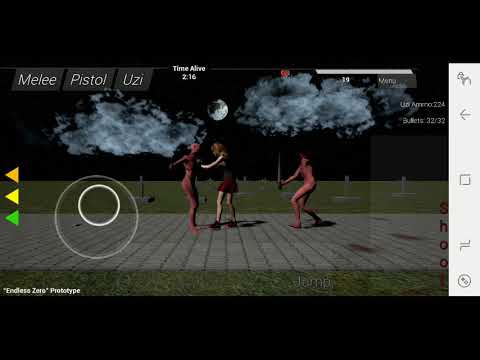
man ive never had any of these issues on pc/mac... but its getting to the point in the game where everything looks like its running fine but collision just fails to happen, and im guessing its because dead enemies are taking up memory or something
safe rose
Mobile Dev is hard 😉
Working on prototypes for Oculus Go and Vive Focus as I type this while waiting for a Perforce branch to download
frank escarp
the worst of mobile dev
is the fucking tools
wich are garbage
on the ps4 you get god tier debuggers
on the pc you get all your debuggers too, tho not as good
on mobile you get...
safe rose
What debuggers are bad?
Haven't run into any issues really
Although I think Renderdoc could use some love for Go
frank escarp
also hard to grab the logs
and low remote control stuff
in ps4 you can remote control it, but you cant on mobiles
sonic pagoda
im using unreal frontend to just look at bottle necks, console command startfile, stopfile...
frank escarp
holy spikes
btw make sure to upgrade to latest unreal
tons of fortnite improvements for mobile lately
safe rose
95% of the time, your bottleneck on mobile is just drawcalls 😃
sonic pagoda
im on 4.20
safe rose
Other than that, poorly written code
frank escarp
in mobile vr, also fill rate
but still, fukin drawcalls
vr being a instant x2 and vr being first person, wich means free lookk
cant go isometric on that XD
safe rose
Well, I have my drawcalls on a pretty big screen down to 62, can run 72FPS on Go
sonic pagoda
my game has no issues, it runs fine, looks great, but after some time like 15 seconds for example, after killing a couple of enemies, collisions will just fail
so im assuming GC
safe rose
But I was looking at Unity's Batch thing
sonic pagoda
with the spikes happening at around those times
safe rose
They have a better way to batch drawcalls
frank escarp
the unity bathcing is that they merge meshes at runtime
safe rose
Well, batch stuff in general
safe rose
Yeah, but it's better because they will properly atlas
frank escarp
bake down with actor merger
sonic pagoda
so if minimum gc cluster size is set by default to 5
its only going to release that actor's memory back once i have 5 objects to destroy?
just trying to see if theres anything here that will help me on mobile
theres not much documentation on this subject unfortunately
frank escarp
woah no
do NOT TOUCH THAT
thats dangerous and complicated settings
btw, gc cluster size is becouse it can merge uobjects that are "togther" into one cluster
for example, think all the ubojects of all the components and stuff all from the same parent actor
sonic pagoda
ah okay
i am going to touch those settings
cause im an outlaw
im gonna try unckechking allow parallel, idk maybe on a mobile processor it might do something
if i tell you it improved performance would you believe me, there was an initial hitch when firing the uzi, and now its gone after unchecking that
or not, now i need to uncheck it to see if it was something else 😂
im just desperate at this point. the game runs at 60fps on mobile, and all of a sudden, collisions just stop working... but the game remains at 60fps.. and then after a while, they come back
its like a major WTF
guess who isnt releasing a halloween game on halloween
 lunar palm
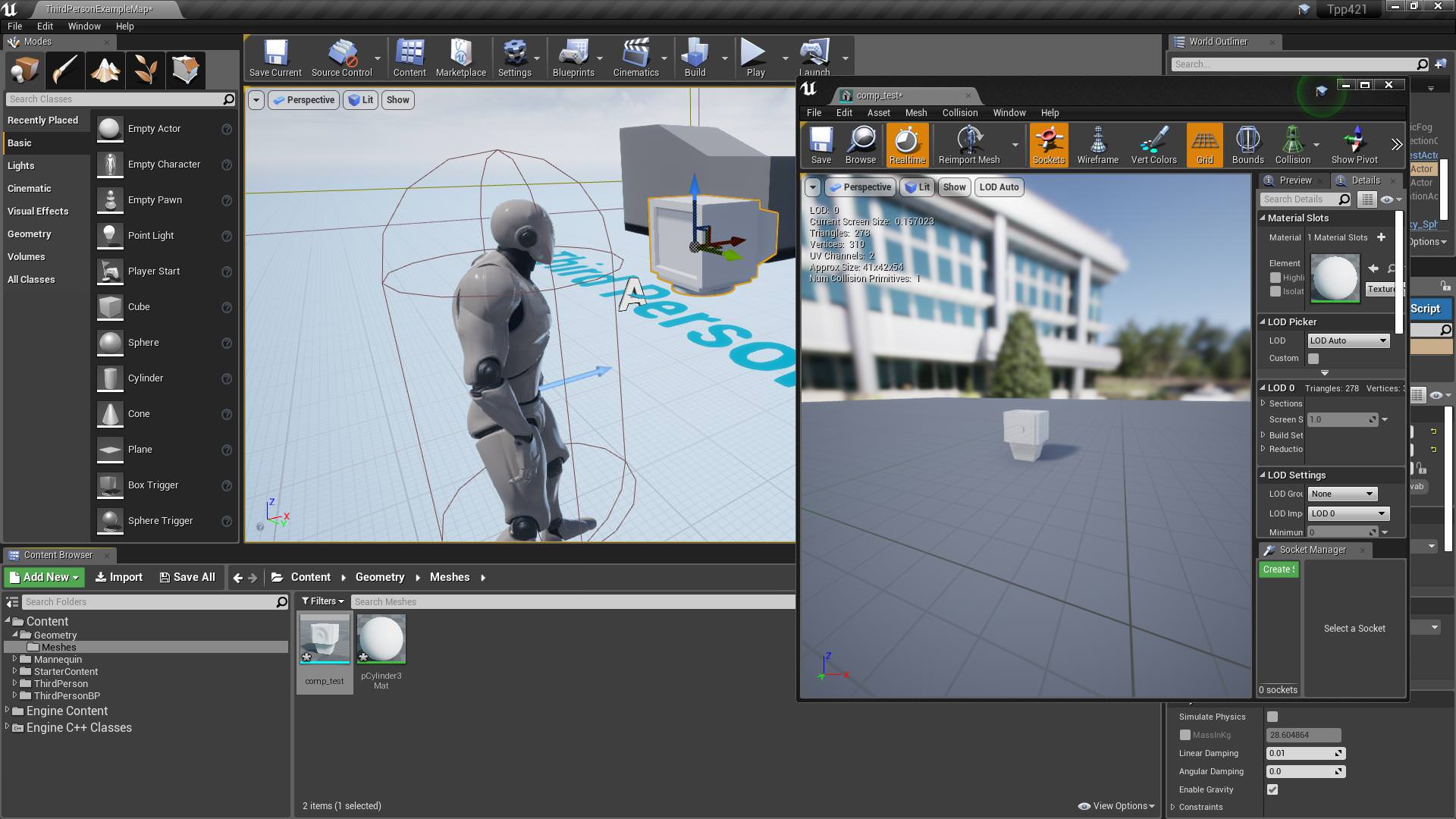
UE4 keeps crashing for some reason everytime I import any mesh and double click on it after importing. This shows up everytime - anyone know what the issue is?
 cinder basin
what kind of mesh/where are you importing from
lunar palm
From my desktop, here's the obj if you want to take a look
Maybe the mesh is too large or something?
sonic pagoda
 lunar palm
@cinder basin UE4 even crashes when I delete it and re-open it without importing the mesh it seems
grim ore
The file opens fine here in 4.21p4, paint3d, and unity.
lunar palm
That's so frustrating haha
Could you try opening the mesh in UE4?
See if it crashes? @grim ore
 lunar palm
That is very weird lol
grim ore
it might be one of your import settings
lunar palm
Maybe, but the thing is
I just deleted the mesh in my UE4 project
re-opened it, tried to open a whole other material
and the entire thing just crashed on me
grim ore
yeah it must be your project or PC. imported it into 4.20.3 and no issues, even used the reset to default button on the importer
grim ore
Is that the default model for that example or one you imported and are using?
my guess would be missing or extra bones in the skeleton
plush yew
well i dunno i looked at this video

In this video we take a look at how we can share animations between two Skeletal Meshes that are using different Skeleton assets. We go through the setup and retargeting process and pass an animation between two different Skeleton assets.
it works but my model now is funny
grim ore
You have to know if that is the model for that example or not
it sounds like your retarget did not target the correct bones then
grim ore
I am not an artist so I wouldn't be able to help very well that's why I am just guessing from the looks
plush yew
ok ok well this what is ment to look like
grim ore
#graphics or #animation might be able to help more with this issue
lunar palm
@grim ore So it's just my project then. It's weird though because it's a completely new third person project, not sure what I did wrong - anyway, thanks! I have one more concern though - when you import my obj do you have the auto generated UVs option checked on? And if so, could you change the lightmap coordinate index(s) to 1 and see if the lighting fixes? My light bleeds for my mesh and I can't fix it even if I change the coordinate index to 1, it keeps the same UVs I have when I import my mesh rather than switching to the ones UE generated for me.
grim ore
sure let me test that, and mine is a fresh tpp as well
the Generate Lightmap UV's option?
ok using the lightmap in UV0 it definitely does not have good self lighting, the back of the monitor is funky
having UE4 generate the lightmap uv as well does not seem to make them any better, it might be the source model
https://i.imgur.com/YfnkjQ1.jpg , the ones on the left are your imported ones the one on the right is the engines auto generated
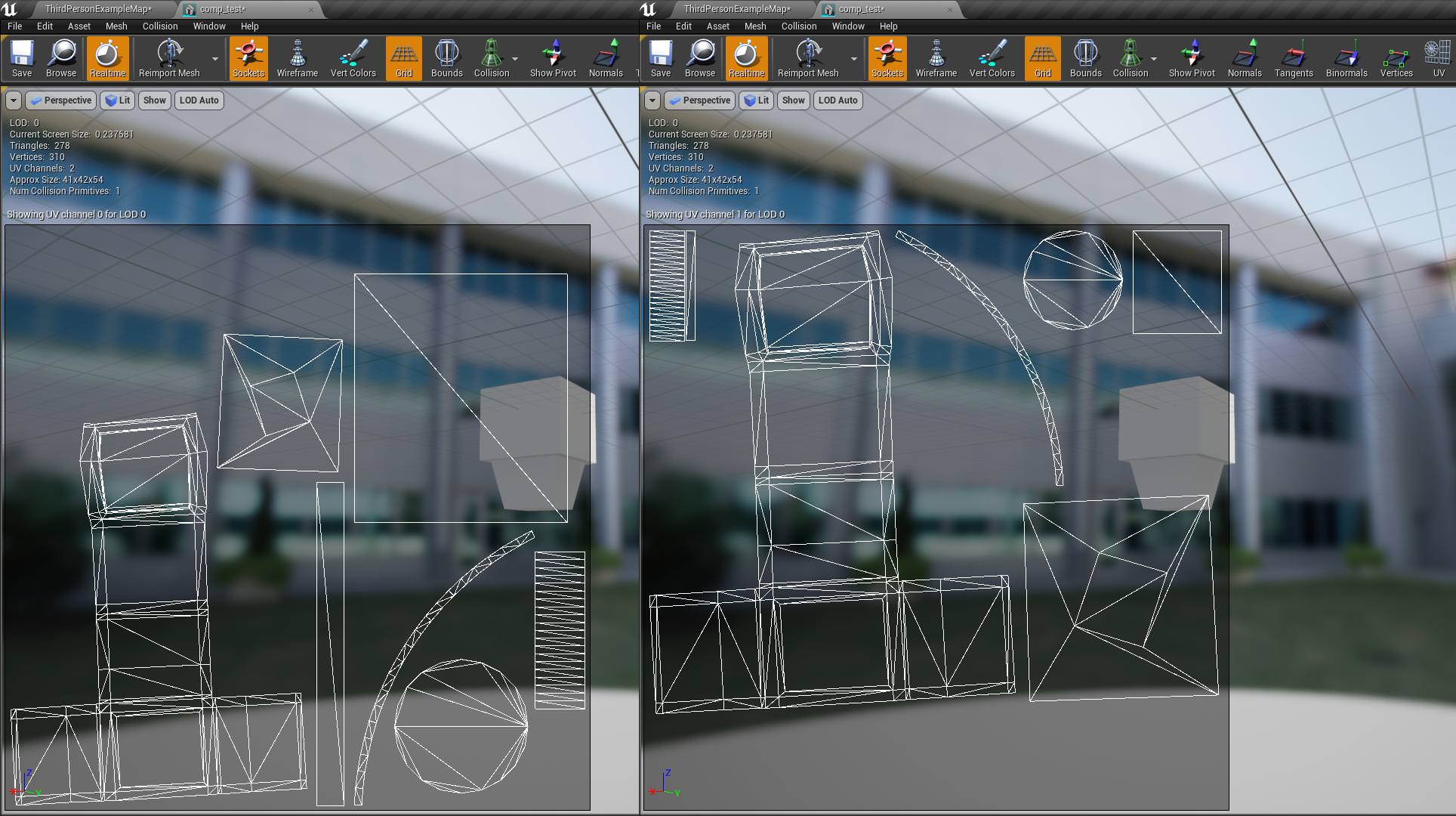
you can see it's not very different, I think the source mesh needs help
lunar palm
I'll try planar projecting some of the faces in Maya
By source mesh, do you mean the mesh itself or just the UVs in whatever program I modeled it in? @grim ore
grim ore
the mesh itself, the UV's are being generated with alot of hard lines along the faces that don't seem like they need to be there
I mean I could be wrong but the sides seem like they should be 1 flat surface but your UV makes them seem like they have multiple edges/faces
lunar palm
I'm guessing edges like these are causing the issue? Though when I get rid of them, it seems to have the same light bleed issues @grim ore
plush yew
why unrael go so slow when im copying blueprints in to otehr skelteons? it just gos under 10 fps for awhile
lunar palm
Apologies for tagging you so much haha
grim ore
yeah the left sides seem like they are not a single face like you would expect due to the cutting you did for the front
you might get some better help in #graphics since people are way better at art than me in there
lunar palm
Okay, will do. Thank you!
onyx lily
@warm tree yes i do but i think i set it up wrong bc I had already textured my assets first then brought them into UE4.
@uncut whale i think thats what im looking for an alpha mask to control the color of the material i just couldnt remember the name of it. Id rather just make the roughness/metallic/and normal in painter then choose the color in Ue4
 wispy comet
grim ore
wispy comet
grim ore
not a large chance they are in here right now, might need to use the normal methods from the website
plush yew
i made a get in car blueprint lmfao and it dont work https://gyazo.com/a1e566e3056fdbdd18856db9223872d7
grim ore
It appears you did not make a get in car blueprint if it does not work
plush yew
ye
well i made it but
i think i put it on wrong player model lmfao
Does anyone know where I should start looking for information about developing a "fog of war" system, similar to "Dota ?"
 formal niche
Hi!
Quick question:
Wait, lemme figure out how to phrase this
Do I have to use UE4's set editor or whatever to make the actual environment for my game, or could I use a 3D modelling program (ex. Blender) to model the environment, and then import that in?
safe rose
@formal niche Yes, you can use a DCC like Blender to make your environment and it's highly preferred way
plush yew
hey @safe rose do u know anthing about unreal not showing my project files in content
anyone have any idea how they would of pulled this off?

In this 2017 GDC talk, Giant Squid Studios' Matt Nava offers insight into the unique art style of Abzu, and the processes that he and the team at Giant Squid...
safe rose
@plush yew Aren't you the one with the pirated Marketplace assets?
plush yew
well i got it from friend so does it count
safe rose
🤔
plush yew
i dunno cause i found this bug
safe rose
Did he pirate them?
plush yew
i take them out the folder it works
i put the hole folder in the project
nothin showsi n the folders
but when they get taken out they work
its like unreal wont let me use folders form it
i have not asked him
grim ore
If you import them in the correct version of UE4 using the marketplace vault they should work fine, if you can't do that then you will have to get support from where you got them from.
plush yew
@plush yew doesnt count as piracy aslong as they arent using the asset themselves and you have his receipt for proof other than that you can get in a bit of trouble for it
oh okay
well @grim ore
its weird u know why
when the folder is in the project it shows no assets but when i move the assets adn take them out that folder it works
and shows my buidlings and all
had ot do this
it would not show in the main folder it made
 slender veldt
Hi folks, I have a c++ project which I created a bunch of base classes in and then used those to create BPs. I found out I need to change my project name and I'm having a problem where the BPs are broken saying they can't find the old class name (/script/MyOldGameName). I tried adding class redirect in the INI, but it doesn't seem to help.
I read I could just go re-parent them, but when I look at the parent class list in the BP, all my C++ dont show up there. If I create a new BP, or open another regular BP, the C++ class show up in the parent list....
What am I doing wrong?
silver crown
Welcome to BP hell
 fringe pivot
Trying to figure the process to create an NPC, I worked a bit with Unity, there I just added a script to the model, here is different I think.
Should I create a C++ Actor class, and then I add the FBX as component of that class, does that make sense?
fringe pivot
great, thank you
grim ore
Have you checked out the ue4 for unity users series on the learn site ? I doubt it covers c++ but might help on some of the similarities
 still ridge
what's up
fringe pivot
@grim ore yes, actually they create an actor the way I mentioned using some primitive shape.
Still, sometimes docs show you how to do something the easier/faster way, and not the one you would choose when you take it more seriously.
That's why I asked
plush yew
If I wanted some generic health system for players and NPCs would it make sense to create a health actorcomponent?
 shell kettle
Hi there. So I'm 3D modeling my first object, and was wondering if I should add detail in the geometry, or use bump maps (or some other method?). I'm inexperienced in this and would love to know which method affects the gameplay less in terms of performance. Any suggestions?
plush yew
Here's something real scary for this halloween
 worn granite
I gotchu beat with the banner to https://blueprintsfromhell.tumblr.com/ =D

blueprintsfromhell
plush yew
do people who make these ever get hired? 🤔 Assuming the BPs work.
dark depot
i would imagine if they do they dont show those ones
 finite sleet
Every programmer, designer, and artist has a lot of shit. It is the good stuff that we show to people.
 dim arch
anyone know if the impostor baker works with 4.20/4.21?
 fickle topaz
Anyone on
unreal spoke
How to export lods from blender to ue4?
 sudden agate
You can Export the LODs separately. UE provides functionality to import different LODs in the StaticMesh Editor
unreal spoke
sorry, I forgot to say that I'm talking about skeletal meshes LODs
 scarlet echo


Wow this is AWESOME NEWS!!! I look forward to seeing the positive ripple effect this could have for #Australia / #NewZealand #GameDev’s using UE4 #UE4 @EpicGames https://t.co/YEKVGnbDoW
 Twitter
wary wave
Twitter
wary wave
I wouldn't count on much of a ripple effect; Epic has offices in numerous locations, but they've had little impact on the industry in those locations as a whole
also, the office might just be Fortnite support kinda stuff
seems to be the case if the founder isn't someone with a recent development background
 grim flower
Hi everyone!
My studio have developed several different types of blueprint systems/templates to base our project on and I was wondering if anyone know how to create custom Starter Content packs? Thinking it would be very beneficial to just add a pack with for instance our VR template finished set up instead of migrating it from a different project. Anyone know how to do this, or if it's even possible?
 lime cobalt
Also, would anyone know if it's possible to generate unreal assets via scripting ?
scarlet echo
@wary wave Honestly even if that were the case, having more boots on the ground at local conventions, etc is always good for my wallet as going to GDC, E3, etc is pretty hard on GameDevs coming from Australia
lime cobalt
also yeah, GDC is expensive af
scarlet echo
Especially if they add a small UE4 support team to said studio location
lime cobalt
turns out there are clues about how to create assets https://forums.unrealengine.com/unreal-engine/unreal-studio/1524041-creating-blueprint-assets-hierarchies-with-python
Unreal Engine Forums
Hey there,
is it possible to create a blueprint/actor in the content browser with python, like you do normally with right-click, create blueprint class, actor?
 fierce tulip
fookin hell, ue4 decides to move the import menu off-screen, as in, not on any of my 4 monitors so I cant grab it, nor does cascading windows works
its so 1998 that there isnt an option to make sure it opens on a specific monitor
lime cobalt
also when I'm looking at the python official integration, a lot of the c++ code is grayed out by a #if WITH_PYTHON precompiler conditional
in python.build.cs it seems that this conditional is set to true if the python plugin is correctly installed or something
but a lot of the cpp code in the plugin is still grayed out, so i'm not too sure if everything is set correctly or what to do if not
but typing commands in the console works, so the plugin is compiled, guess the WITH_PYTHON graying out the code isn't an issue
plush yew
It's grayed out
bc it's not defined
the precompiler will parse and set that flag when compiled
So your IDE basically has no idea about it
until compilation time
lime cobalt
indeed yup @plush yew
lime cobalt
thanks to you I can confirm it's normal UE4 behavior right there
plush yew
@cinder iron huh?? i never mentioned anything about animating
 cinder iron
Abzu conference is about vertex animations and so on
Any specific aspect over it?
I saw you timeframed it
Ill have to check out at home, my phone wont help
cinder iron
Oh, yeah I might remember that part of the talk. They didnt go much in depth. I'll have to rewatch it at home if I get a time!
rapid prism
so I've been trying to link my account to github but I never get the invite message... I'm posting on the forums but for now could someone clone the Pavlov repo for me?
tall pendant
I think you might be able to do similar stuff with HEngine
by sending the selected meshes to houdini and let it use those for heightfield generation
rapid prism
that's a no then? lol
 snow sandal
is there a place i get get like arena assets? I'm working on a fighting game and need to make an arena
tall pendant
The UE4 marketplace comes to mind.
snow sandal
I have no budget
static viper
as it is
you can only pitch your project and maybe you get someone to help for free
or you do the assets your self
in hope your game is good enough to be funded.
snow sandal
do you know of anyone that could do some modeling or to put together an arena if i pitch the game to them?
plush yew
im using "Find Look at Rotation" to have enemy AI face the player as they are running toward him. But i also am spawning enemies that run away from the player. i have the running away part working, but how do i make it so the enemy faces away from the player?
is there are a way to manipulate the value from "Find look at rotation" to flip it the other way?
plush yew
oh
ill try that
@static viper is there a way to get the rotation based on forward vector? i've only been able to figure out the forward vector based on rotation, not the other way around
static viper
you can always draw a line