
#ue4-general
1 messages · Page 322 of 1


 plush yew
Did you try to save as and see if it's just a visual bug?
plush yew
But that one seems to have anims
 static viper
do you realize that you are fiddling with an inherit?
 wary wave
and assigned to the Character 'mesh'
 languid shard
yeah was looking at that
wary wave
and yes, it's the default character mesh
languid shard
its inherited
static viper
dont apply things to character mesh...
plush yew
If it didnt have anims, it wouldnt be in that pose
static viper
thats bad habits
wary wave
err, you HAVE to apply things to the character mesh
wary wave
it has no mesh by default
wary wave
and UE4's character skeleton is rotated 90 degrees
wary wave
even Epic rotate their character meshes
plush yew
Yeah, it's a bit dumb that they didn't add a 3D character to the FP Template by default
static viper
we are all a bit drunk today...
plush yew
And I didnt check, but I dont think the FP template currently features a panini view for FP_arms and weapons
a separate view
wary wave
I'm not sure it does anything with projection, but that would be neat
plush yew
I know Unreal Tournament Pre-Alpha now has it.
wary wave
yeah, there's no panini projection in here
plush yew
But if you want convincing parkour moves or melee, a 3rd person model viewed from First Person perspective might be better
static viper
i never heard of that
static viper
i dont believe you.
plush yew
lol
 plush yew
Gimme a sec, I'll show you what I meant. I'm debugging a Tic-Tac-Toe game in Android Studio (java) lmao...
plush yew
But basically what it means is that the First person camera renders the First Person Arms and weapons separately from the rest of the scene. So the FP arms and weapons can have their own FOV
Unlike let's say... Chivalry
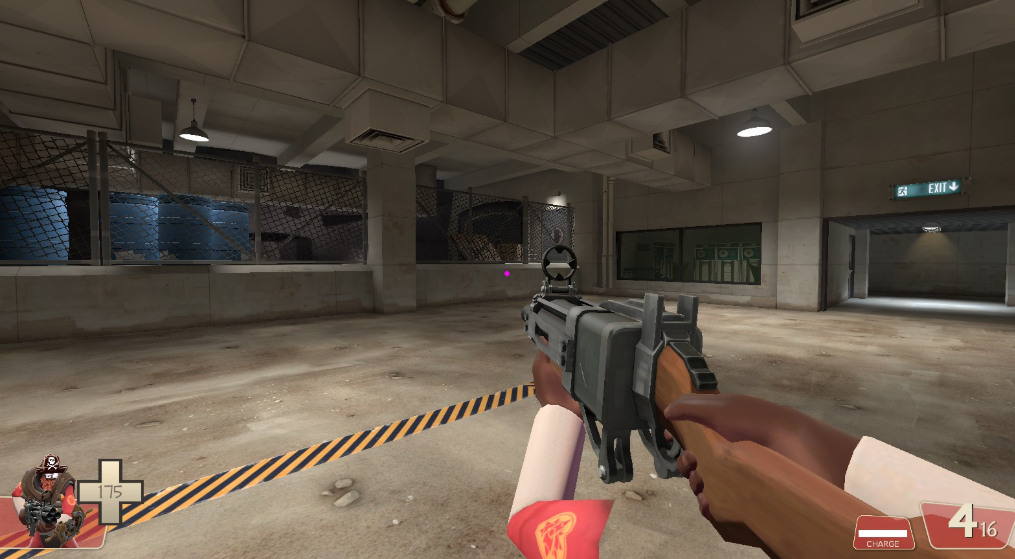 plush yew
yeah I dont know how they are handling it
languid shard
I knew once
but its been so much time since I've tinkered with source
I don't remember
languid shard
yeah the FP template has it
plush yew
plush yew
languid shard
yeah its nice to change the FOV without having your viewmodel stretched
(although it kinda does it in source games)
plush yew
Yeah, there are pros and cons to both methods
I think DOOM 2016 somewhat gets around it by quickly changing the FOV when climbing of obstacles or doing Glory kills
I'm not 100% sure of how Id Software handled it
languid shard
there was an animation talk
when they showed it
how they did these transitions
should be in the GDC vault
plush yew
Yeah, I also saw another video where the guy shows all the Glory kills in 3rd person
plush yew
Doom (2016) First Person vs Third Person Glory Kills Comparison
https://youtu.be/BWepwS_p5lg
 sturdy star
@rough pivot @plush yew cheers. we're close but not quite
 broken shadow
Maybe it's just that my standards have been lowered for the wrong reasons, but the biggest surprise to me is that Doom's 3rd person glory kill animations are even remotely synchronized in a multiplayer environment
plush yew
yeah, I was wondering about that
broken shadow
Even newly released games that emphasized looking good still seem to struggle with cooperative animations
plush yew
I don't personally am a big fan of that method. But that's just me
I like glory kills -like animations when you block an dthen counter an attack, but not as a default way of doing hand to hand combat in a FPS game
broken shadow
(Or maybe I've just been playing the wrong games)
languid shard
first person hand to hand is hard af
I defy you to give us a compelling FPS with good hand to hand combat 😄
plush yew
Chronicles of Riddick: Escape from Butcher Bay and Chivalry already did that
broken shadow
Just do it the way AVP 2010 did glory kills
Have the animation play out over like, 10-15 seconds (possibly not exaggerating here), completely prevent any input, and leave you as vulnerable as you would think that does.
plush yew
I had an opportunity to do some QA on Deadliest Warrior: Battlegrounds (chivalry expansion on XBLA , Xbox 360). And I was quite impressed by their combat system.
broken shadow
How does it do it?
plush yew
The only thing i didnt like is the fact that players can move their mouse as they please.
Chivalry works with 3rd person characters. So it's First Person, but in reality it's 3rd person
What you see is real
So your strike works the way you see them
They hit where they hit
You block where it blocks
What you see is what you get
The downside is...
- you can't go crazy with your FOV otherwise the game looks like crap.
- Since players can also move their mouse really fast, including during attacks, they can use that as a gameplay mechanic to continue to hit their opponents during their swing.
So let's say I swing at you, as soon as I hit, I turn my camera really fast so I can hit you a second time just by rotating my character
So I can hit you with the beginning of my swing, turn 180 and hit you with the end of it
Weird stuff like that
i've seen something like this in Gears of War 1 lmao on Xbox 360. moments where I would use walls to wall bounce (get into cover to ''dash'', then cancel) to get behind opponents. But becuase of how the camera and character animation worked, I could shoot during some animations and basically shotgun people behind me if the shotgun was pointing there
@broken shadow I'm sure you could find tutorials on how to perform advanced attacks in Chivalry.
I've seen a few.
plush yew
anybody has a tutorial on randomized room system ?
 astral marsh
Hey guys i made a pickup ad drop and inventory system in the player bp and i get this problem everytime
lemme just send pics
https://cdn.discordapp.com/attachments/462303837382770689/498222264463130654/unknown.png the event tick

https://cdn.discordapp.com/attachments/462303837382770689/498222334910660610/unknown.png First part of pickup and iventory

https://cdn.discordapp.com/attachments/462303837382770689/498222552502501406/unknown.png second part of inventory and pickup

https://cdn.discordapp.com/attachments/462303837382770689/498222603048058881/unknown.png last part of inventory and pickup.


inventory slot and stuff
and i get this problem.
 astral marsh
if i switch to second item
the first item should not be visible
im sure i did everything right
plush yew
How can you tell with all that spaghetti? 😏
static viper
you really need to clean up
astral marsh
how
wary wave
it's hard to read because you have lines all over the place
wary wave
at first glance the for loop in the first image makes no sense
why would you do an array find there?
static viper

Tips and Tricks on using Functions, Macros, Reroute nodes, and other things to try and keep a Blueprint Organized Source Files: https://github.com/MWadstein/...
also watch dis when you got time
if it would be cleaner you could see the error faster
and also everyone else
astral marsh
uhh
wary wave
also, nowhere in that spaghetti do you ever set the previously held item to not be visible
wary wave
right after you play the anim to put it away, I imagine
wary wave
it's your code, I don't know
but you'll want a reference to it somewhere, and you'll want to set it to not be visible
astral marsh
well this happens lol
 solemn sand
Hey does anyone know whether you can modify global time dilation to be more than 20?
I cant seem to increase it above that amount
 winged crypt
Any plans to remove built-in overhead calculations in the shader complexity view mode when using the forward renderer? Unable to see accurate shader complexity.
 vast eagle
hey man
 viscid canyon
Welcome :)
 gleaming lotus
hey friends. I've got a problem here - when the day / night cycle turns night time, my bright clouds stay bright and the lighting does not effect them. Any idea how to solve this?
plush yew
@viscid canyon thanks
 supple totem
so I'm playing with toggledebugcamera
which has a neat freeze rendering feature
but when my rendering is frozen, objects still get culled as I fly around
so... its not really frozen? or am i missing something?
languid shard
@supple totem probably a bug in the editor
try to restart it, it should freeze culling too
supple totem
ok will try restarting, thanks
languid shard
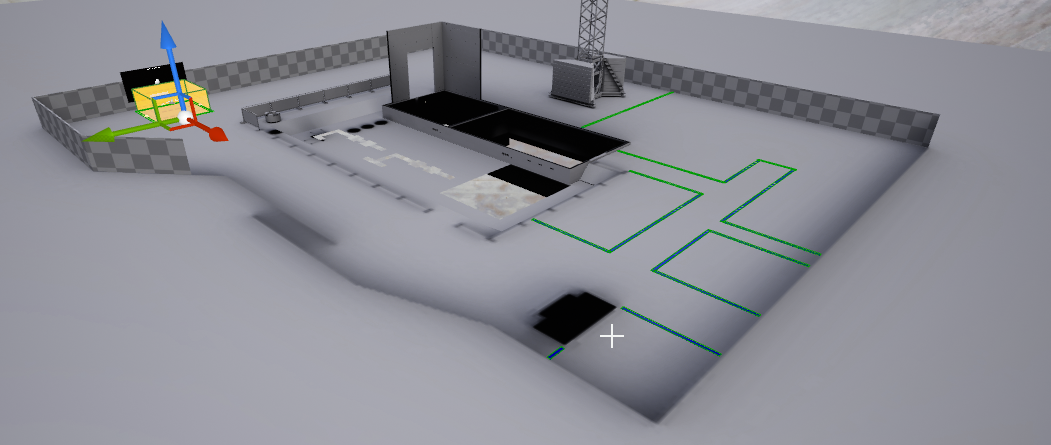
camera is in the orange block, aiming towards the crane we see in the BG
that's with freezerendering activated
supple totem
restarting appears to have helped, thanks!
culling is interesting stuff
foliage culling is a bit more difficult, seems they only support distance culling not occlusion
languid shard
yeah culling is nice
shame sometimes it takes a lot of CPU ressource to cull a complex scene
also, overdraw problems with translucent and masked stuff
 vale silo
I'd pay good money for AI + animation course (BP only, no C++)
 regal mulch
@vale silo #looking-for-talent
vale silo
nah, it's a training course, not "I'd pay someone to make me AI". Trying to get Epic motivated to make such course 😉 Similar to what they did with AnimBP for Paragon character. In fact they could refer to that course and just tell us what needs to be adjusted in animBP specifically for AI.
static viper
So you would pay me for that mh? 😛
regal mulch
He would buy your course
Is that he's saying
He wouldn't pay a single person for a personal tutoring session
vale silo
right on @regal mulch
 tawdry raptor
so after 1 day of building my lighting in my game, my game runs at 3 fps
but before I built the lighting it was fine
 proper valley
So- Just a quick question, I was working with some terrain in world composition and when moving the camera around I accidently spat my Camera into a black void of which I cannot escape. (Don't even show up on the composition map) There a way I can reset the Viewport Cam location?
 exotic lion
Hello guys ! I want to make a landscape with Heightmap. It is possible ?
 grim ore
@proper valley I would assume you can select something in your world outliner and hit "F" to focus on it to bring the camera to it from anywhere
proper valley
World composition is pretty rad, I've just been playing around with it myself!
And thanks for the Reply Mathew. I just have nothing to.. select, I somehow got out of it when clicking about to get myself back- buuuut then I kinda.. Right-click 'Go here' Off the Existing map edge and ended up back in the void again.
Woop, got out of it again from hitting 'Play from here' on a white orb in the Void. I mean what works, works I guess!
supple totem
scroll down to the import custom heightmaps section
world composition is if the world is HUGE and you need to split it up into peices
needs to be .png I think though
exotic lion
Thx
supple totem
np
feel free to msg me with any more qs, I've been obsessing over landscape imports lately
 smoky stream
use the profiler
supple totem
console command profilegpu
also you can use the "show" button in the viewport to hide different asset types
 sacred pagoda

any obvious ways to avoid this problem?
There is only 1 instance of the editor running
no version control is being used
 ruby folio
Quick question. What do you all use for keeping track of tasks, status, bugs and whatnot?
@sacred pagoda What does the output log say?
sacred pagoda
Asset '../../../../../../Users/Vastrix/Desktop/Level Editing/1/Blocks/Content/FirstPersonBP/Maps/FirstPersonExampleMap_BuiltData.uasset' cannot be saved as it has only been partially loaded
grim ore
I use notepad to keep track of stuff lol
 olive yew
I'm searching for someone who can make 3d models, houses and more for my game
Send me message if youre intressted
It's an battle royale game
grim ore
From a learning perspective if you were learning about the "random XXX" nodes in UE4 would you prefer for example to learn about "Random Rotator" and "Random Rotator from Stream" at the same time in the same video/documents or separately in 2 separate videos/documents?
supple totem
anyone know if I can convert a bunch of instance meshes I've placed to static meshes?
ok I can literally just right click it....
nevermine
 manic pawn
change password and enable 2fa
 fossil ore
UE4.20 broke volumetric lighting for me
smoky stream
yeah someones probably got into your account/ sold it to someone else
 stiff marlin
I remember when this wasn't an issue before the fortnite integration
stiff marlin
It's not
stiff marlin
I meant my password isn't crap
 spare sun
yea, before enabling f2a I had like 2-3 failed attempts every day lol. All from random countries
smoky stream
pesky russians
supple totem
da
 silver crown
OAuth ftw
 zealous cloak
Does someone have installed the Robo Recall modkit and could check sth for me?
olive yew
Is there any good tutorial for making landscape material?
tawdry raptor
I checked my profiler and i am only using less then 5 MS a frame I should still have headroom but my game still lags anyone know why?
 honest vale
tawdry raptor
honest vale
tawdry raptor
how dO I bring up stat unit
grim ore
usually ~ (tilde) for the dev console when playing then "stat unit" to bring up the unit stats
tawdry raptor
its not bringing it up
I press the ~key
I have a weird issue, my game lags in with 4 FPS in simulate mode,but plays normal in VR
and I cant get the console up I keep pressing ~ and it doesnt come up
 bitter iris
any ideas what is causing this, it happened randomly after i reopened the project
 potent pine
Quick question: Can I make my game open source if I only open source my own code (what would be in the game directory) and require people to download the unreal editor from Epic?
grim ore
You can do whatever you want with items you create so yes if you do what you say you should be fine. I had issues including the mannequin in my code for example for other people and had to remove it but all the .uassets and .c/.h I created with the engine were free to give out.
potent pine
Cool
grim ore
with that said if you ever need to share epic stuff that is free, like the mannequin or other starter content that requires an epic login to get (free stuff from the marketplace, learn tab, stuff like that) there are ways of forking the existing engine and making your project from that so they would be required to login to github and are then authorized to use epic stuff directly
sacred pagoda
I figured out what my issue was. The buildData was corrupted at some point in a previous session. realised I was getting Post Tag is not valid. File might be corrupted. errors from the buildData files in log when loading the map. not sure how that happened. I deleted the corrupted files and reloaded the project, builds and saves fine now.
@bitter iris Tried upping the Lightmap Resolution on effected meshes?
 broken stream
Good day guys, where can I get weapons that is animated and ready to add to UE4 ?
 weary basalt
The Marketplace?
broken stream
Well yes that is on place but I was thinking about more like a website that sell UE4 stuff
grim ore
the website for the marketplace?
other than that you might find someone on Gumroad for private sale and there are a few generic FBX selling websites out there but no guarantee they would be UE4 compatible
bitter iris
anyone know why my lightmap res isnt updating at all, just gives me a crap shadow
tried changing it to 64, 128, 256 nothing seems to work
tawdry raptor
how can I clear the console from the screen?
I dont want to see it anymore
I did the state engine
and its got all this text
tawdry raptor
its got all this text how do I clear
grim ore
type the same thing again to disable it normally
smoky stream
not sure why it runs slowly
tawdry raptor
this is how it really runs
oh it did do it
thats it its in the red in the hundreds
bitter iris
objs, 75000?
grim ore
well that errors seems like it's due to your AI?
tawdry raptor
so your saying the AI is lagging everything?
grim ore
no I am saying that the error seems like it's due to your AI? I have never used the EQS system so I am just relaying what it says lol
tawdry raptor
yes it does seem like its from the AI code of random movement
grim ore
if you disable all of your AI or whatever causes the AI to work does it fix it? if so then yes I am saying it's the AI
grim ore
well when you built lighting you also built navigation probably?
tawdry raptor
I put the box and the floor is green, and the AI walks on the green floor
grim ore
just passing along an option that might have caused it. If you did a full build not just build lighting then your navigation got built and it might be related to that not "building the lighting"
tawdry raptor
i picked the built lighting only
grim ore
time to debug. Disable all the AI or whatever spawns in your AI objects. See if it works. If it works then start debugging your AI object and any EQS that might be running on them
it gives you the function that seems to be causing the issue so it should be an easy check
tawdry raptor
i think the AI was bugging my game im going to try to see if an another version has the issue
bitter iris
go back to an auto save? see if thatll work
tawdry raptor
I want to pay someone to make me a custom nav mesh where the AI can crawl on anything
no I have other version on hard drive
if I didnt back up every single project and keep it my game would never get done
bitter iris
an are you using dynamic nav or normal
also does your ai have an invoker on if you are using dynamic
bitter iris
how bigs your world
tawdry raptor
not big Im doing level streaming
bitter iris
use dynamic nav mesh with an invoker component on your ai bp
bitter iris
i dont get what you mean by custom
tawdry raptor
my AI needs to crawl from the vents and ceilings
bitter iris
make your nav mesh taller?
tawdry raptor
the floor nav mesh makes them running dummy AI if they have no guns
 high stone
You probably want Resident Evil Outbreak AI from the Hospital level.
tawdry raptor
the nav mesh only works on the floor
bitter iris
nope
high stone
I has crawling and a monster that goes through vents.
tawdry raptor
it wont work on ceilings or walls
does your AI follow a set path to the vent, or does it treat the nav mesh as one @high stone '
high stone
It's Capcom's AI. You would have to check their code. It's well made.
tawdry raptor
yeah buit the aliens in aliens colonial marines climbed walls and that was unreal 3
high stone
I think you could email or tweet at Capcom Unity. They answer questions like that if they have the coders who worked on it.
Capcom has kept a lot of that AI for their modern titles.
I'm pretty sure Resident Evil 6 has a modified version.
Nuts! It's MT Frame work. Could have sworn they used Unreal.
tawdry raptor
I could never get this to work https://www.unrealengine.com/marketplace/spider-navigation

A custom navigation system suitable for spiders
It just has the spider following you
damn it was the AI that is lagging my game, what a nightmare, I wonder why it didnt lag the game before the building of the lighting
high stone
AI uses a lot of resources. For mine I had it only do 1-2 things. It had a limited distance, and operation time. With a set loop or stop pattern when not needed. Treat it more like a car shifting gears.
tawdry raptor
but after 2 days of buillding lighting, my original problem remains after building lighting, that is my decals glow in the dark, someone says its because I had it connected to the emmisive channel but when I remove it, the blood looks less red and then when I dont select the decal, it wont show the blood anymore
so with emmisive it looks like it should but it shows in the dark
smoky stream
just dont put it in the dark then
smoky stream
just mask the red channe to the alpha one and clamp it to 255 or somthing like that then
then it wouldnt be transparent
tawdry raptor
i dont know how to connect the dots to do it
smoky stream
well thats on you
 astral rain
What's like... The best material base for having something slowly fade out or in? I'm getting it, but it's kinda twitchy. I almost wanna say translucent sort priority is weirding out.
smoky stream
tick based lerp?
on the transparency
not sure how you would do that in material nodes tho
plush yew
hello I am seeking information abount th eunreal engine
what is better to use, Unreal or Unity?
we want a game that is 30v30 and 300 NPC AI on screen. each player and AI will be shooting, moving, having physics applied. every game object will be playing particle effects. there will be lots of enumeration and background scripts running as well manipulating and monitering each gameobject
 south ridge
@plush yew well which one do you like better?
Unity and Unreal are two big serious engines
south ridge
Then I'm gonna answer Unreal, cause that's what I like
smoky stream
fork the engine and delete everything you dont need
hue
but either would be good for that tbh
unitys ECS system looks like the ideal thing for that
@plush yew
plush yew
rain effect, explosions, snow, lots of weather and particle effects
while a giant team death match happens
shooty, boom boom, orgasmic SFX. seamless networking
350 different actors
unity or unreal?
south ridge
They both can support that
I would suggest Unreal
Your constraints are not restrictive enough to make a decision between UE and Unity
plush yew
Unity only for the ECS 😏
south ridge
Both engines satisfy the constraints given etc
plush yew
ah okay
both engines.. well..
However one engine can offer more control, statistics and debugging features for such scene than others
Also better to consider how the other members of the team going to work with the engine and what u will be able to do 4 them inside it
Feel like u can't go wrong with unreal 4 ur game
Hah u can say ue 4 4 ur game
 worn granite
i'd agree so long as you're not using ue4.4 for your game =D
 dim arch
is there any way to minimize the motionblur effect on translucent materials? I have tried changing the AA method in the project settings but it doesnt seem to help
I can see the AA is being applied/disabled but its still blurring pretty badly
ok. fixed it. need to disable motion blur in project settings
stiff marlin
How does one post on the job channels? Seems like a bot doing it. Nvm, got it.
 late olive
I got an Unreal joke for you
Why doesn’t God hear your screams of agony?
He has no pawnsensing component
 toxic wagon
so, when I imported a mesh into UE4, and it somehow screwed up my skeleton, which in turn, screwed up all my animations
is there a way to rollback?
 icy bone
@toxic wagon sadly no
@late olive What about the Perception Component
@late olive Why can nobody see GOD? Because he has no derived UPrimitiveComponents
 frail sail
why this didnt work changes 
frail sail
wot
exotic lion
Hey guys, it is possible to get material in material graph?
south ridge
Explain "get material"
And don't PM me without asking please (unless we talked before, in which case that's fine)
exotic lion
Ok
I don't want recreate grass, i aldery make one in another mat, it is possible to get in this graph?
south ridge
Yes, look up "Material Functions"
exotic lion
What i do in here? I never used mat functions
exotic lion
Is hard?
static viper
depends on your motivation
exotic lion
I just want add on it a exesting mat
static viper
youll have to recreate it here
static viper
its the only
exotic lion
Yea but i asked a solution to get basic mat and not receate
static viper
your question was answered
plush yew
Just copy and paste into the material function. It's really not that hard
regal mulch
The way to get one Material into another is by using MaterialFunctions
plush yew
Well then you can use your magic powers to do it
regal mulch
If you don't want to do that then you can't add materials to materials
regal mulch
Apparently you do
static viper
well
you could have create your grass first place in mf...
that is just an experience issue XD
regal mulch
Also what's the problem with copy pasting and then replacing the original code with the function
...
It takes like what, a minute?
static viper
yee
creating the inputs etc
that could work
no idea what he got tho...
thinking of highly advanced pom grass XDDDD
200 instructions
exotic lion
I have plenty of material.
static viper
200 aint much...
but it can look much
mostly when you work with me...
and materials got thousands of nodes...
but only does one thing
😄
exotic lion
Euh, why is doesnt working?
exotic lion
The material is black, its no needed be black?
static viper
its a half baked material
languid shard
'cause it only works on terrain ?
static viper
what do you expect
languid shard
you just made a landscape material, try it on a landscape
static viper
and it is better to fill all empty out
theres alot of videos about this
you should watch them first
this is very easy stuff
 surreal viper
is there a way to report issues for docs.unrealengine.com?
exotic lion
Ok
surreal viper
threat? 🤔
 teal tulip
@surreal viper feedback and a sub branch of docs
surreal viper
?
surreal viper
thanks
exotic lion
The result
static viper
chaotic XD
exotic lion
X)
 austere hinge
Hii..
Iam trying to do a cinematic.. The scene has full of grass and trees..
When I render it as video.. All the grass and trees are gone in the first frame and slowly they are popping.. How to fix this? 🤔
static viper
you need to give the renderer a bit time
maybe 5 seconds of nothingess
then start cinematic
austere hinge
@static viper yaa I tried it and worked.. But again I have to put them in editing software and trim the first few seconds..
Is there any different way to achieve this?
winged crypt
Anyone know what might cause this kind of artifact?
I exported the model on the left, made some minor modifications (not in the area of interest)
Re-importing it has a few areas of the model affected in this way.
As if crushed inward
(The modification I made: deleted a few polygons that composed the windows. The UVs were not affected)
manic pawn
looks like borked vertex normals
it imported it thinking it was supposed to use smooth shading there
vale silo
hola
teal tulip
hola
 static viper
i understand it very well
there is no data in that material
you even left pins empty on the layer blend
that is rough
 static viper
i just told you that you left all pins empty
and are you looking on an actual landscape?
or only in viewport
look
there are alot tutorials on this stuff
you should watch em
this is easy

 static viper
just a bunch of math nodes
olive yew

UE4 version 4.17 black lamdscape probleme solved instead of LandscapeLayerBlend i used Lerp
will this help me?
olive yew
can you just tell me
i already watched tutorials
i know the basics
you tell me it easy, then why dont you just tell me how? 🙂
static viper
you dont know the basucs if you cant fix this.
and you showed proof you dont
So
back to youtube it is
static viper

Unreal Engine 4 Beginner Tutorial Series - #17 Terrain Materials This is episode 17 of my unreal engine 4 beginner tutorial series, in today's episode create...
here this
😃
just rebuild dis
olive yew
okey nice
will this learn me how to fix the problem after i watched it
will i be able to know the problem?
static viper
you will be able to see why your landscape is black
olive yew
okey thanks alot really appreciate it! 😃
i want auto landscape material
i dont want to paint everything
static viper
you need to work for that
so start with basics like everyone else.
and there is alos tutorials on auto
So
grab em
and get going
we wont do it for you.
olive yew
can i see how u build your landscape material
static viper
i am not doing landscape at the moment
 chrome summit
Guys i need help
am trying to launch my unrela project but it say Visual Studio 2015 must be installed in order to build this target.
i have visual studio installed
2015 version
grim ore
have you tried turning it back off and on again?
plush yew
The animations for 1 Character of my project make 350MB already and there will be 8 Characters, also all of the NPCs will get them and from what I've read when you retarget animations they'll get duplicated, how will I be able to manage the file size of the Game with probably more than 50 GB?
grim ore
Your computer, it's possible the environment variables are not set up properly if you just installed it.
 delicate needle
Hello, I'm back working on my project, and yet again I am stuck on a rather "simple" issue. I want to approach this right.
Simply, its blueprint communication. I have a user interface, that has left and right arrows, used to scroll through various appliances options. So under the "refrigerator" menu, pressing right and or left will hide, and reveal the next static mesh refrigerator.
What I would like to do is probably have all the refrigerators place into an globally accessible array. Have the interface make its way through the array, and tell that object to either hide or reveal.
Where I am stuck, is how best to do this. I get stuck every which way, so maybe some pointers would be helpful, with some follow up questions.
grim ore
@plush yew are you including the base mesh with each animation set or just the animations themselves?
plush yew
For the 350Mb? It's all of the Animation Assets themselves, I went into the explorer and checked the Animation Folder size
Well they are the .uasset files, already imported and assigned animations
chrome summit
can you help me fix it?
grim ore
ah ah that point it might be best to ask in #animation then for any pointers. 50GB for a project is not unheard of if you plan on having all of that unique animation. Are you sure you need unique skeletons and animations for each npc and character?
plush yew
Yeah probably since they vary in bone size
grim ore
yeah #animation might be the best bet
plush yew
Alright, thank you so far
grim ore
@delicate needle it sounds like you have the right idea. If your UI is controlling everything then having your array in the UI might be ok especially if it's a static scene basically.
delicate needle
@grim ore , okay cool - I'll keep it all in the UI. How do I best manually place BP_SM_Fridges into a array.
delicate needle
Yeah, it has me stuck, going back and watching so many videos on BP communication, etc. With no clear answer.
grim ore
ok well lets break down the issue, UMG itself does not exist in the world so you can't tell it to interact beforehand with anything in the scene that already exists
delicate needle
Well, my current experiment is to use a "BP_PropDossier" that would have a bunch of arrays in it, Fridge's, beds, sinks. That would be my main resource.
Okay, right, its a run time thingy.
grim ore
that is a definite idea that could work, a master BP controlling stuff basically that you can work with for sure.
you said your goal was to basically swap items right? like 10 fridges in the same spot just difference models? repeating with different items?
delicate needle
Exactly.
grim ore
so it sounds like making a master "fridge" object that controls itself might be a good start
delicate needle
Would this mater fridge object then contain all SM_Fridge_X's options?
Like, an actor with multiple static meshes*.
grim ore
yep it could be an actor that just has a static mesh component and an array of static meshes
then a function that you can call from anywhere that advances the mesh to the next one
or even a reset option, etc..
delicate needle
Cool, Cool. I like that approach.
grim ore
if you use blueprint interfaces you could make generic interface functions like "Next Mesh" or "Reset to Defaults" and then just use that interface on your actors
then your umg could talk to each item and send it the function you want to call and it would handle it internally
then you make X amount of these actors, set them up for each item type you want and put them in the scene
and the last part would be getting the link to the UMG widget
for that you could just have the widget once it constructs find the correct actor and store a reference to it so you can talk to it later or you could have some master object somewhere that handles it. The first option "to me" seems easiest as you aren't making the interface too dynamic and hard coding a few things is super easy and quick
in the "ultimate badass combo" way of doing it you could take advantage of the fact you are using interfaces, grab all the items with the interface, and then make your UI dynamically based on what is interactive in the scene
delicate needle
Ideally, where I would like to end up with, is that the SM would have the name, and price, etc, of the item in its meta data, that would then be displayed on the UI. So, press right arrow, and the fridge swaps out,and "Kenmore Ultra Freeze Box - $1299" Shows up. And ultimately a running tally of the total cost of all prop options.
grim ore
I know they added metadata support but I can't remember how accessible it is to the engine
delicate needle
Yeah, I was going to look into that after I got baby step one working.
grim ore
you could still fake that by making each "item" a blueprint with that data in it and then just spawning in the items when you swap them in the scene and reading the data
so like "Master fridge Actor" contains an array of "Fridge Actors" which are setup Blueprints with the mesh and a few variables like price and name and such" and when you tell the master fridge to show the next one it destroys the current, increments the current index, and spawns in the next one, then grabs the info it needs from it for your display
interfaces work well for that as well as you can pass back data if needed from the event so "hey spawn this item and I expect back the name and price"
delicate needle
That sounds like the approach I would like to do the most.
grim ore
yeah if you can keep it all self contained it makes it better in the end. lots of smaller parts that are fit together and easy to replace/upgrade/slot in new stuff
delicate needle
Exactly, given the nature of this type of work, as soon as you show this to a client (or my boss), they want to throw in their ideas, add stuff etc. So I try my best to make every step modular, make my entire approach easy to iterate.
That makes the whole thing take forever to build, but once its built, making changes should happen very fast.
"ideally"
grim ore
yep if you get it set up right you could in theory make a new item type, like chair or counter, and then drop it into the scene with it set up with its children and your ui could find it and know how to handle it
it's more advanced but super doable
delicate needle
Just like my 9 month old, who loves to crawl, but hasn't got to walking, I need to learn to stand first!
 next sierra
hey guys, getting the following error when compiling materials in 4.19.2 on mac OS 10.13:
[SM5] /tmp/2112_2388117944.metal(0): Metal Shared PCH generation failed - cannot find metal_stdlib header relative to /Applications/Xcode.app/Contents/Developer/Toolchains/XcodeDefault.xctoolchain/usr/bin locally.
xcode is latest version
can't find anything about it on google :/
supple totem
hey call, I see in the static mesh tool you can delete all LODs besides LOD0
how might I delete 0?
grim ore
LOD0 is the base LOD, I don't think you can as that would be deleting the mesh I beleive
The top section is labeled LOD0. LOD is a zero-based system, so LOD0 will be the first entry, LOD1 would be the second, and so on. LOD0 is the base LOD of the mesh and will be the only one that is used if the mesh only has 1 LOD
supple totem
Hm, what if I wanted LOD1 to be the base?
like, I never plan on using the LOD0
thanks for the info btw!
grim ore
Set the scaling part so that lod0 never shows I would think
https://docs.unrealengine.com/en-us/Engine/Content/Types/StaticMeshes/HowTo/LODs so maybe the screen size option for LOD0 to 1.1 and setting LOD1 to 1.0? I've rarely messed with LOD's beyond automatic
but if you plan on using LOD1 as the base it seems to make sense to just redo the model so the lower settings are the base that you want
or uhm import your LOD1 as your base mesh?
supple totem
thanks, yeah ive set LOD0 to a huge screen size so I don't see it
I'm sure there is still some memory impact though, like the LOD0 is cached even if never used
these are trees from marketplace, and I bet exporting then reimporting them would break the materials
only one way to find out I suppose
grim ore
I want to say you can export out LOD's themselves but no idea what would happen to something that might have vertex weighting for example
grim ore
😃
 spring pendant
isnt ue4 amazing when it starts doing what you want
supple totem
❤ ue4
 frank escarp

GitHub
Hovercraft game example in UE4. . Contribute to vblanco20-1/HoverGame development by creating an account on GitHub.
enjoy
Little hovercraft game i published on github. Written to be extensible, in a very high quality C++/BP hybrid style. Also has deep explanation of how everything works
supple totem
chaotic, a skylight is good for that
chrome summit
@supple totem i tried but it doesnt light the place
and another question
my bot [AI] is setted to move the enemy but it doesnt moves!!! only standing and shooting me
can someone help me with that
tawdry raptor
how do I get this multiply up
 mossy mauve
OMG! its happening UE 4.21 preview 1
vale silo
where?!
plush yew
Why is it taking years for Epic Games to support Vulkan on high end PCs?
how much time does it take to pull this off?
Plus, can't Vulkan help performance on other platforms too? Ex: nintendo Switch, Xbox One, PS4
Why wouldn't it be a super high priority?
mossy mauve
@vale silo check the epic launcher
 grim sinew
@plush yew Because If Epic doesn’t need a feature for a project they don’t work on it.
mossy mauve
yep, they only work on stuff if Fortnite profits
plush yew
Precisely, wouldn't it tremendously help them to run Fortnite with Vulkan on all platforms?
They poobably assume they don't need it. Since they are making so much money out of it.
Then I'm glad Id Software saw the value in giving us Vulkan. XD
regal mulch
Fortnite is running pretty well without Vulkan. On all Devices.
plush yew
My PC says otherwise. And it's more powerful than Xbox One and PS4.
regal mulch
Their 100 Player Network Bandwidth was the only thing they had to optimize
frank escarp
and their CPU code
 sudden agate
4.21 Preview is there
vale silo
@mossy mauve if it's not on the forums, it's not out 😛
mossy mauve
@vale silo
regal mulch
Can't they bundle these a bit more
I would be fine with one version every 3-4 months
vale silo
I wait for previews so I can read about news features on the forums 😄
mossy mauve
@regal mulch yes its a bit of a mess
 oblique trench
Great news!
supple totem
anything exciting in 4.21?
hmm, bookmarks for blueprint editor
VR occlusion improvements
some animation stuff I'm too dumb to understand
sudden agate
UPROPERTY is a Macro that stands infront of a field to make it working with Unreals Reference system
i.e. you can expose it to Blueprints or is automatically Garbage Collected
astral marsh
raildex
worn granite
actually, that last bit is wrong
astral marsh
i actually have a small prob
worn granite
its the other way around
oblique trench
It provides for Unreal Reflection System not Unreals Reference system
worn granite
ALL UObject derived objects are automatically "candidates" for garbage collection, and by referencing that object with a properly reflected field you can notify the GC that the object is still being referenced.
oblique trench
Also native C++ has no reflection mechanism. A reflection system can be provided using macro tricks
worn granite
you could do the annotation bit with comments also =D
but UE4 chooses to do it with macros
oblique trench
Reflection using comments? Oh. Didn't know that. @worn granite
worn granite
you have to use a macro for insertion
but because you're basically parsing the text file in your own preprocessor you can take the annotations in any format
if C++ were more like jai (alledgely will be), you wouldn't need macros for it at all
 livid haven
Yeah, the macros were a stylistic choice for most of the U macros.
The macros compile down to nothing.
They just define a simple syntax for parsing by UHT.
delicate needle
Am I doing this right? It's working, so far, but I want to make sure I am following "bestish practices"
I'm populating an array with SM's, refrigerators.
grim ore
that works but you can't guarantee an order if that matters
livid haven
Get All <Anything> is always a bad practice.
If you want all of a set of thing, you should have all things of that type register themselves, upon creation, with some kind of central registry/manager.
grim ore
What if they are all inside the scene on creation?
vale silo
@frank escarp I guess 4.21 post is not coming today
livid haven
It's very brute force and inefficient.
delicate needle
I don't want to do it this way then.
livid haven
It's ultimately some level of really, really broad iterating.
For a quick prototype or something, sure, it's whatever.
delicate needle
Can someone hold my hand then, how to manually place static mesh actors into an array?
livid haven
But ideally, you put something in, say, the game state? Game mode? Maybe even game instance.
All depends what you need.
I mean, if we want to talk about best practice and not just "get it done".
delicate needle
Well, my boss sure would like to see results, that dosn't boad well for best practices, I would like to do Best Prac.
So,.... he can wait...
Ultimately, I want to have an array, that I will use an UI menu to scroll through. An array of microwaves, fridges, etc.
livid haven
We talking just blueprints?
worn granite
why do you need it to be best practice, though?
delicate needle
Do you mean, do I want to C++ as well?
livid haven
Aye
delicate needle
Best practices, I would assume, would allow me to easier add more SM options down the road.
livid haven
Make a subclass of game state.
Add an array of actors to it.
In the blueprint for your fridges and microwaves and all that, in BeginPlay, get the game state, cast it to your gamestate blueprint subclass, and add self to the array.
in EndPlay, remove self from the array.
And make sure that you set that gamestate blueprint subclass as the one to be used by your map/gamemode/project default/whatever.
I forget what specifies the game state. I want to say game mode does. And the map decides the game mode. But the project can specify a default game mode.
delicate needle
@livid haven - Thanks, I'm going to review your instruction/notes later, got to bust out of work now. Will you by chance be on later tonight?
livid haven
Can't promise I will be.
Got a meeting shortly, working out after that, then who knows - maybe off to a movie, maybe see about setting up a date. 🤷
Simply put, game state is accessible from anywhere.
delicate needle
Well, I should still be working on this tomorrow at work, 8.30 am - 5 pm EST USA.
livid haven
So you can subclass gamestate, add an array there, and be able to add, remove, and access that array from anywhere.
delicate needle
Thanks, i'll likely be googling most of your instructions, ha.
livid haven
Which means you can subclass your static mesh actor or whatever and use BeginPlay/EndPlay to add/remove themselves to that globally accessible array in the game state.
delicate needle
Yeah, sub-class gamtestate is something I never heard of, I think, maybe. I'll look it up.
livid haven
And wherever it is you need to access that array, same thing.
Gameplay framework stuff
delicate needle
Adios. Thank you again @livid haven and @grim ore
livid haven
👍
oblique trench
Unreal Engine Forums
PREVIEW!
Preview 1 of the upcoming 4.21 release is available now on the Launcher and GitHub. We are making this Preview available so that our developer community
vale silo
looks like a bugfix release, which is a good thing
oblique trench
Added new vertical splitscreen mode for 3 and 4 players that give each player full height and divides the screen horizontally.
also
We have been reworking the physics interface to support an increased ownership of physics objects at the high level. As a consequence much of the physics related c++ code an API has changed.
frank escarp
CCDIK Skeletal Control Node. CCDIK Skeletal Control Node is now available within the AnimGraph of Animation Blueprints
whats this
grim ore
native virtual texturing support in the future...
oblique trench
Yeah also Virtual Texturing.
vale silo
one thing that stands out to me is how little of AI stuff going on in UE4 and yet AI "team" never has time for training streams and suggested improvement of AI system 😦
VT sounds good.. Hopefully it works on mobile too.
 pallid compass
@grim sinew u hear that virtual texturing incoming confirmed :p
grim ore
There is a good chance VT might work on mobile due to switch and mobile ports of fornite
Is (PlatformWithFortnite) Feature = True;
it's only funny because this is in the notes as well Additional mobile improvements and optimizations we’ve made for Fortnite on iOS and Android.
 ancient obsidian
So, uh, guys, did anyone manage after all these years to do a UMG widget that displays a model (mesh) and doesn't kill performance (running SceneCapture2D every frame as a second renderer)? Or, at least disable the main renderer (camera) without disabling UMG widget? Searched AnswerHub and Forums far and wide, everyone wants to do it, but still no proper solution. "Mesh viewer viewport" is pretty much a basic feature even older engine usually have and a lot of games require.
 paper python
So in UE4 when i go in game i have a hard time turning my character, How can i fix this
 fallen gust
@paper python If you're referring to how fast the character turns, try adjusting the Base Turn Rate property.
grim sinew
“Virtual texturing and support for lightmaps” So not only lightmaps
I’m looking at the engine now, doesn’t appear it’s functional yet. However a few VT lightmaps do ship with the engine now
No commits to the code either. It seems to be more of a statement of intent.
south ridge
It might be on a non-public branch or something
 crisp forge
Does anyone have an idea what the maximum number of instructions a shader should have to run efficiently?
south ridge
What platform
The most complex material out in the wild I've seen was the 2000 instruction raytraced cloud system 😄
crisp forge
i guess xbox one would be a good base
pallid compass
Because there looking for work?
smoky stream
nice deleted message
 old sonnet
grim sinew
old sonnet
grim sinew
Cool. A tessellated ball with megascans applied. You going somewhere with this?
worn granite
he was asking voice, but didn't use #vc-unreal-hangout
grim sinew
Ah
supple totem
in general, do packaged builds perform better than play in editor?
supple totem
yeah my thoughts
curious as to what extent
I do love player in editor, I'm sure it is industry standard now but I'm also sure it wasn't always that way
smoky stream
its been like that for about 10 ish years now
its about a 25-35% boost from my experience
on my potato laptop at least
its 45 fps in editor and 60 fps packaged
 sudden flax
Does anyone want to partake in the development of a game I've been kinda planning?
Here's the rough summary.
Basically, say if we could get max 12 people and say 46 player slots, free roam, shootem lootem, and in that server your squad can choose to dominate points of interest like a castle or a prison, and people will earn exp or credits by overthrowing them, or picking them off with snipers, But say, we can add competitive motives, like say capture this landmark and be rewarded 1.5x credits for every kill, And say you can go for supply drops, that can contain fight aiding items, like shields, mines, laser designators for like airborne payloads like a warthog
Dm me if you're Interested, I need to expand my development crew
smoky stream
@sudden flax #looking-for-talent use the bot
@plush yew
read the pinned message in #looking-for-talent
supple totem
thanks for info malloc
 crude totem
How do I use these import settings? Changing the rotation doesn't appear to do anything.
south ridge
@crude totem change them and reimport the mesh?
 umbral tartan
@crude totem It's best to fix the scale/rotation in Blender/Max/Maya. Import settings (in UE4) are flaky in my exp.
 snow crown
plush yew
snow crown
plush yew
What does that even mean
umbral tartan
@crude totem But, as BlackFox just said, set the import settings on the AK, save, right-click the ak in the content browser and click Reimport, and it should change the rotation (even if the actual fbx data didnt change since it was initially imported).
I just tested it on a real simple low-poly gun and worked fine.
south ridge
@plush yew virtual texturing = tiled textures sorta
You can make a 16384x16384 texture out of 4096x4096 tiles
There are certain approaches and features that make tiled textures work efficiently and well
high stone
I've never gone beyond 8k textures. Is it even worth it? Versus just finding a blend, repeating pattern?
grim sinew
@snow crown doesn’t do anything yet. More of a statement of intent that they’re working on it.
smoky stream
if you have really really big models then it may help @high stone
so if you go mad and decide an entire building should only use one texture
high stone
I prefer the version where you load smaller textures, use layers, effects. It uses less system resources.
smoky stream
like i said, go mad
high stone
I thought 8k was crazy enough. /:
south ridge
@high stone this system loads only the data it needs
Only the tiles that are seen on screen will be really used and will be in GPU memory
So it's a way to have large textures for less resources too
high stone
I have yet to see a game that uses such resolution for the title screen. Usually you can see some pixelization on a 4k monitor.
south ridge
We have a wall in our game that is very long and has to have a unique texture
This would make that sorta stuff easier 😄
high stone
I proposed a method for using 3d models to create flat, 2d words. To overcome the resolution problem. Albeit it create a new set of issues with polygon limitation. It does work better.
south ridge
It's an effectively something like 131072 x 2048 wall
high stone
The UI in my game is entirely 3d. We flat shade it to solid colors. So far the issue is camera placement. Sometimes it clips through pillars. I'll have to make it some kind of overlay.
3d text does not read well.
Not with shadows. Must be flat.
grim sinew
@south ridge Your texture resolution makes me sad if you're using basic Unreal texture streaming.
south ridge
@grim sinew we talked about that wall I think, right now we're just using normal textures
😄
 grim sinew
I will stop using that response as soon as people stop making me say it
south ridge
@grim sinew it's just a very long wall covered in unique marble
That has patterns that don't really repeat or have any rhyme or reason to them
It'll probably stay as a bunch of normal textures blended together to try and replicate the result, roughly
grim sinew
I really hope you at least have that broken up into multiple meshes so it can be mipped properly.
south ridge
Of course, with that approach it's split into a large number of chunks with their own vertex colors and stuff
To control blending
The wall is split between several distinct objects, but also split up into different mesh sections within each object
@grim sinew maybe the missing piece of context - it's a real wall, not an art choice 😄
We wouldn't have a wall like that in a game, but it's an IRL place and someone thought it'd be cool
grim sinew
I get that, I know what you're working on, but... still
south ridge
It's only a secondary task too
It looks okay with blending and low number of textures that are same as on any other surface
If would be cool to have it done 1:1 with virtual textures, but that's just something cool to do, not a goal 😄
 plucky reef
is there a way to convert BP to C++?
grim sinew
Google blueprint nativization
 hot ledge
willing to pay someone to help me with a small c++ problem
hot ledge
i cant figure out how to pass my line trace info to another function everytime i mention FHitResult it says not defined
@smoky stream
smoky stream
can i see the code you're having problems with?
chances are you're letting something go out of scope somewhere
@hot ledge
can i also see the error generated?
hot ledge
UGameplayStatics::SpawnDecalAttached(SelectedDecal, DecalSize, Hit.GetComponent(), NAME_None, DecalLocation, DecalRotation, EAttachLocation::KeepWorldPosition, DecalLifeTime);
its compiling will give you error real quick

@smoky stream
smoky stream
hang on, is that runtime or compile time?
hot ledge
whats that mean
south ridge
Compile time
smoky stream
does that break when you test the game, or when you press the compile button?
hot ledge
it wont let me compile it so
smoky stream
#include "Engine/Camera/CameraShake.h"
``` will probably fix some of thatand ```cpp
#include "Engine.h"
it'll ding you compile times, but it will fix the undefined stuff
also you cant convert from FVector to FRotator
so uh
hot ledge
camera shake isn't the problem its the Hit result i want to get
i want to spawn a decal by selecting the material hit
smoky stream
you have to fix all compiler errors for it to work at all
so include that engine header
hot ledge
the sound and particle effects work as intended but not the decal
smoky stream
include the header and recompile
hot ledge
i included that camera shake header
 smoky stream
can you put the code in a hastebin and pm it to me or something?
chances are stuff is going out of scope
hang on
thats just kinda wrong code then
why are you trying to convert an EName to a USceneComponent*
 tacit chasm
anyone have link to what's new in 4.21. preview1?
derp nm foudn it https://forums.unrealengine.com/unreal-engine/announcements-and-releases/1537691-unreal-engine-4-21-preview
Unreal Engine Forums
PREVIEW!
Preview 1 of the upcoming 4.21 release is available now on the Launcher and GitHub. We are making this Preview available so that our developer community
grim sinew
It's 1 higher.

 unborn zodiac

In this video I try to showcase a comparison between C++ performance, regular Blueprints and Nativized BPs. Read Description below for more details & Downloa...
 whole quarry
@unborn zodiac thanks for that share
winged crypt
any vehicle gurus around
static viper
i dont think there exists even one
static viper
Ask away
winged crypt
1 sec let me run a quick test just to make sure
okay so my only issue really is that when I use the limited slip front drive differential, I can't turn the car whilst braking after a certain speed. I can turn it if not braking at that same speed though and I can turn it whilst braking at lower speeds.
4WD doesn't have this issue.
 sleek solar
I have a bit of weird question... when actor has been placed on the level, and no more changes to the level has been be done. Would GetObjectName of that actor be always the same?
or it will change based on the session and game restart?
whole quarry
Not sure, I wouldnt make it an assumption when it has potential to create bugs/glitches
 paper kernel


 sleek solar
I'm trying to mark actor with some sort of unique ID automatically which would be persistent in standalone game.
whole quarry
use tags
 grizzled panther
Hey guys, i'm new to the server and have just installed unreal studio. I'm a computer science graduate so I am slightly familiar with C++ (although haven't used it in a year or two) and have also done 3D modelling work in the past. Is there a specific channel for people who are just getting familiar with the software? I don't want to bug people and ask annoying questions in a channel where everyone is pretty familiar with the software?
sleek solar
the issue is to make it unique automatically 😦
whole quarry
how is that a ussue?
sleek solar
I'm not sure how would I do that
 fallow forge
Hi all, i'm new to editing within Unreal Engine. I've downloaded it and would like to create my own maps for Unreal Tournament. How do I do this? Can anyone point me in the right direction?
whole quarry
just make a prefix with an incremental suffix
NPC_01, NPC_02 etc
@fallow forge Welcome, try to start with some UE4 tutorials to get familiar with the game engine
languid shard
anyone with 4.21pre1 and Studio who could help me fix their MultiUser template ? 😃
static viper
remco you have to tell him that he is wrong here XD
whole quarry
only partially no?
static viper
fully
whole quarry
UT uses UE4... custom build afaik though
whole quarry
why not? level creation isnt that much difference
when he learns how the engine works, he can easily switch over to the modding stuff of UT
¯_(ツ)_/¯
static viper
yes but he has to learn from them as there are guidelines
the ut editor is different
dis
whole quarry
@fallow forge ^
zealous cloak
hi ii have a strange phenomenon. pic incoming
whole quarry
we're are thrilled to see it
zealous cloak
ok image to huge
i have a black line coming from my hmd , similat to a widget interaction
what is that black line
whole quarry
is it there when you play in editor?
whole quarry
do you see it when you open the player actor?
next sierra
Anyone else suddenly getting this error on Mac? [SM5] /tmp/2112_2388117944.metal(0): Metal Shared PCH generation failed - cannot find metal_stdlib header relative to /Applications/Xcode.app/Contents/Developer/Toolchains/XcodeDefault.xctoolchain/usr/bin locally.