#ue4-general
1 messages · Page 320 of 1
 grim flower
 wary wave
age is irrelevant, what's the actual hardware spec
 grim ore
try nuking your derived data cache it might have gotten corrupted. Alternately just wait a day and see if it get's past it to confirm it's an issue and not building the DDC
and do you have any activity on your task system? IE: shader compiler running
grim flower
working on a client mac, looks like it was storage space that was the issue
full disk
thanks though!
grim ore
that makes sense when trying to make the DDC
 candid cypress
Still getting this weird lightmap line. LM uv's are laid out fine, it's a 400x400 box, Edges aren't soften. Even bumped LM up to 128 res. And built on high settings. None of the boxes are over-lapping
Any idea what could be causing this?
 honest vale
you should detach the hard edges and add padding
candid cypress
Tried that, still no help.
So I deleted the edge faces, yet takes away the modular style needed for it, Seems to have fixed some of the issues.
could it just be an issue UE4 has when two edges are place next to each other ?
grim ore
if the UV map has a hard edge it's going to treat it as a hard edge for light mapping I would assume
my first idea would be does it do that with moveable lighting, lighting not using lightmass? If it doesnt then the UV Map would be the prime suspect
candid cypress
well when the edges are separated off to their own space of the 01 space, still gets that weird light map issue.
 sudden agate
make sure you have enough padding
 tawdry raptor
I have created a locker out of a geometry box, but I cant get the collision and pyshics controls to come up, how can I get it to come up so I can open the door
or am I doing it wrong
 light thunder
Trying to package when I see about 400 of these errors in log - LogStaticMesh: Error: Failed to build static mesh. See previous line(s) for details. LogMeshUtilities: Error: Raw mesh is corrupt for LOD0.
Damn you HLOD's....
What exactly do I do about that?
 plush yew
What am I missing?
light thunder
LogMeshUtilities: Error: Raw mesh is corrupt for LOD0.
ProcessResult.StdOut: LogInit: Display: LogStaticMesh: Error: Failed to build static mesh. See previous line(s) for details
768 errors when building...wtf HLOD system Unreal
crap wrong section
I'll still ask this in General, as it was recommended as a solution but I'm not sure how to do it Check through your static meshes until you find one with 0 vertices and delete it
how do I sort by vertices???
 smoky stream
theres python scripting now, so you could probably iterate over all assets and check the vertex count
light thunder
I found this...but the next step...normally I redirect the blueprints and replace references - but these are HLOD's....
I don't want to replace it with something that is going to get swapped out like a tree into a building
smoky stream
force delete then fix whatever that causes?
light thunder
No one knows anything about HLOD's ....or why these errors happen, I swear it's one of the most robust features but there seems to be zero troubleshooting about it
 zealous cloak
did someone worked with the robo recall modkit? when i test it my motion pawn has no laser pointer when i opening a menu 😦
 sonic pagoda
is anyone successfully using ue4.20 and deploying to an android device?
 icy bone
@sonic pagoda yes me
@sonic pagoda one of my issues included to switch to the forward renderer and also use opengl es 2.0 only
also u may wanna nativize ur blueprints if u used them intensively
sonic pagoda
im getting that apk needs .so error
and now its workin in 4.19
so its defintely a 4.20 thing
icy bone
hmm so u can run on phone but cant make the apk?
sonic pagoda
i have no errors on 4.19... but on 4.20 i cant deploy to device
my current fix is just use 4.19
i seen a couple of people put in a bug report
icy bone
4.20.3 works for me hmm..
sonic pagoda
about this .so thing
icy bone
whats the exact error
sonic pagoda
this is the error message
LogPlayLevel: ERROR: Can't make an APK without the compiled .so
icy bone
oh i dont know, i havent tried bp project
since i always do c++ as base for my projects
hope it gets fixed
icy bone
ye, could help since they get compiled to C++
bur it might be the project setup or other stuff also
smoky stream
maybe adding some kind of "stub" C++ file with no code could also work
sonic pagoda
yes i did read you could actually generate that missing .so from VS if you have a code project, so adding some c++ might do it
but for now, if it compiles in 4.19 ill take it,, im already debugging another project lol
light thunder
Best practice for deleting static meshes with 0 vertices - they are bugged static meshes built from the HLOD system - the problem is don't know what to replace the references with and there are ALOT so it's easy to delete them from content browser, but Force Delete takes absolute AGES
 strange current
My unreal engine crashes sometimes in the middle of playing different games, can i ask for help in this chat?
 weary basalt
What do you mean different games?
Do you have the editor open while playing other games?
strange current
Fortnite and dead by daylight at random times
No just the game client and playing one game at once sorry
I mean its not specific to just one game
It happens across several
weary basalt
Ok hold on. This is not an Fortnite Discord mate. This is an community run Unreal Engine Discord, you would be better off going to a Fortnite Discord and asking directly for support or finding the Fortnite forums and reporting the issue directly.
weary basalt
We talk and discuss the Engine and Developing on it. We are not endorsed by Epic, you are better off talking directly to the games developers
zealous cloak
im really frustrated 😦 can someone test the robo recall modkit and run it from the editor? do you have the laser pointer, when you enter the menu?
would help me 😃
 ruby robin
Guys, how do I destroy level actors? I'm trying to destroy one, but it still there.. It is movable, all the components are movable aswell.
Hmm, but if I turn of dedicated server, everything is okay.. But how do I destroy level actors in multiplayer game? The ones on client, there is no need to remove them on server.
sudden agate
Actors placed in the Editor are owned by the Server. Afaik you can only destroy Actors when you own them.
Therefore you need to destroy it on the Server.
@regal mulch knows more :D
ruby robin
Well, if I destroy them on server, they still visible on client side..
 whole quarry
 iron wadi
can I convert soft obj path to weak object ptr?
plush yew
jes
 mighty python
Hello, I want to add spots on the static mesh ( to guide the user or drive their attention to a certain area ), Any examples, ideas, keywords... etc on how to do this ?
whole quarry
well... you can add a SpotLight
like uhm.. click and drag it
much like any lights
 gaunt raptor
what do i do if my camera in my sequencer is not the one rendering
i have a cinematic camera with animation and such - but it renders the shot and not the camera - and the shot is empty
iron wadi
Is it possible to split UE4 project folder on multiple drives?
My assets folder is too big for my SSD, but I want the code on SSD
 digital anchor
maybe with symbolic links
grim ore
you can probably split it up but do you really really really want to do that and have a more fragile link. Upgrade the SSD if you can or just suck it up and use the bigger drive for now 😦 it sucks but risking your project on a workaround might not be worth the risk of loss
icy bone
anyone got tip to improve mobile render quality, using OpenGL ES2
 unborn mantle
UE4 supports mods for a game
is it possible to create mod for a mod? some mod2 that will require mod1 and will rely on data, provided by mod1
 regal mulch
MOD or DLC?
Cause a Mod is usually a modification of the Original Content
While a DLC adds onto a Previous Version (which could be DLC2 and DLC1)
Might be that you can make a Mod of a Mod, but not sure.
unborn mantle
hmm... thanks, will take a look
 vale silo
@wicked tiger @elfin jacinth do you folks have an ETA for 4.21 preview 1 release by chance ? 😊
 elfin jacinth
vale silo
elfin jacinth
vale silo

grim ore
I can narrow that down to sometime in 2018 if that helps 😛
vale silo
Could be late October or mid-November or by Christmas 😛
grim ore
yep so not too long now!
 teal tulip
why you want the next so hard ?
grim ore
personally I want it because it fixes the decorator class for rich text so I can do the video on the widget
vale silo
There are a bunch of Android and mobile VR improvements in 4.21
grim ore
well the text part works in .20, the image is borked without changes to the class and it's fixed in .21
vale silo
and ARCore goodies
teal tulip
while don't break other things I'm happy so
 dense patio
Does anybody have a good guide to setting up steam controller support?
Looked on google and a few other things (youtube) and got the wrong stuff, not sure if I am not typing the right keywords
steam controller input
 astral rain
How do you see what updates are being made?
Er uh, what changes are going into the next update.
grim ore
the trello with future stuff and the github commits
 rose quartz
With Modular pieces can you use Maya link with unreal to or is it just make 1 and import it to the unreal engine
 crisp fable
Hey how do you decide what recommended specs your game should run on?
Lowest 10% on steam hardware survey or what
crisp fable
Yeah but when you start out you surely have a target spec
plush yew
Yeah. I optimized my last game until it met the target spec
plush yew
google for UE4 specs
theres a docs for the editor
that should be a sufficient starting point
also monitoring memory usage and profiling
 pure swallow
I'm trying to learn about animation blueprints, retargeting etc. Can someone recommend a tutorial (series) which explains animations from scratch and in detail?
plush yew
and sorry i had a beer idk why im chatting here
i used to lurk around
Ninjakeks hmm youtube? Offical epic channel used to have tons of tutorials
pure swallow
I've already seen parts of the epic's channel, but they don't explain it very well in my opinion. They create an animation montage to loop an animation for example, but you then have to manually loop the animation in the animation blueprint anyway.
Makes me wonder what the point of an animation montage then even is, because that could've been also handled in the state machine
 grim sinew
@crisp fable it’s easier to scale down than to scale up. Make the game fun first, then just make sure it runs on the min spec of average AAA games coming out. Don’t get caught up in specs before you even have a prototype, it’ll influence too many design decisions and slow you down.
rose quartz
i know its a Unreal Discord but i have a question normaly you have a square @ the right side in maya to select the view how can i get that back?
crisp fable
Ok thanks
 boreal topaz
Hello! I have a question about the engine but not sure where to ask it:)
plush yew
Ask it here
 winged crypt
Why does bloom intensify when the sun is on the edge of the screen as opposed to directly in the middle?
boreal topaz
Okay! I wanted to know if the UE4 engine can build to the Librem 5, its a linux based phone thats coming out sometime in the future, and I asked on the forums there, but no one was quite sure. Things that were mentioned were ARM, Linux support, and something called xwayland/wayland?
I found patchnotes for UE4 saying something about wayland support but wasn't quite sure what it meant
 cursive dirge
updated my 4.20 GameWorks merges: https://forums.unrealengine.com/community/general-discussion/24447-nvidia-gameworks-integration?p=1535779#post1535779
Unreal Engine Forums
General discussion about the game industry and the Unreal Engine community.
main merge now contains UE 4.20.3 + Blast, FleX, Flow, HairWorks, HBAO+, TXAA and Volumetric Lighting from Nvidia
these are all custom ports, nvidia has only shipped 4.19 versions
plush yew
yes
 tulip pewter
I know very good Blueprint side, but didn't know the corrispondence in c++
ok, perfect, I will give it a try
plush yew
does ue4 source have a doxygen or something similar
tulip pewter
thanks
 bitter iris
If you're looking to code in c++ youll need to make a c++ project i believe
tulip pewter
not anymore, I just can add classes
smoky stream
UE4 does have doxygen, its called the docs
they have an entire website dedicated to it
plush yew
the docs site is bad and often outdated
navigating classes is not as easy
unity's docs are better organized l
smoky stream
well just ctrl+f then
tulip pewter
actually I have seen the docs but I can't find the c++ side of the things I look for
plush yew
same
tulip pewter
something like I want to add a component to a class and can't find out what's the name of the class
...of the component to add
smoky stream
are you using the engine downloaded from the launcher or from source
tulip pewter
downloaded
smoky stream
well precompiled headers and stuff
you cant see the stuff then
because the headers are just binaries
if you get it from source then you'll be able to ctrl+f
smoky stream
the only docs are either on the doc site or in the engine source
tulip pewter
actually I could find out by creating a c++ class from editor and inherith from the class I am looking for and it compiles it by itself
but it's silly I should fo something like this every time to know the name of a class I never used befor
e
ok!
find it out what you meant
ctrl + f on the source code in visual studio
it worked, thanks for the help
 high stone
@rose quartz You mean the viewcube?
bitter iris
is this how to measure how big a map is? when i go to top view it has the 1km, zoomed in so its 1km per square?
high stone
There are measuring tools in Maya, unsure about other apps. What you want is the grid size for the game engine you are using. It's usually different from 3d software. So for example 100x100 scale in Maya is a decent chunk of land in the Unreal engine.
Lol need to reset my router. I'm lagging badly.
bitter iris
Why would I use maya to measure my map?
high stone
Just saying it exists, and other engines may have their own version.
I measure stuff around the main character. To get proper placement.
plush yew
hey what would be a good place to give indie devs ideas / IP's to make into games for those who lack talent but have great ideas?
high stone
Game devs, especially the people who fund them don't look for ideas. They look for execution, demos, prototypes.
 south ridge
If you can make ideas, you don't lack talent
Go pick up a speciality and pursuit it, keeping your idea stuff close by
But you won't recognition of your ideas without showing a full thread from the idea to the execution. An "idea" for a videogame is a 100 page document
high stone
I recommend attending GDC for a good view of the overall industry. You may pick up some interested people, and will get a lot of input. But be forewarned. Ideas are stolen all the time.
Design docs are definitely an ideal start.
 sage hinge
How can I save map at runtime in Blueprints?
south ridge
I personally don't like the approach of design docs, I prefer to define the game with specific documents
high stone
I make everything with design docs. Even my pizza.
south ridge
E.g. we have a general vision document, detailed documentation on various aspects of gameplay, a ton of technical documentation on the game that make it all a single product
I guess it's just cause I came here from engineering and I find it more convenient to keep one document = one logical unit kinda relation
Makes it easier to file and recall documentation from the archive if I can give each document a context-specific ID
high stone
If you want to be really tricky you can copyright the story. Then turn around and sue anyone who steals it.
south ridge
It's only an attitude difference, the information we have in our documents is the same sorta stuff you'd find in a design doc, it just feels ugly to smash it into a single huge file 😄
high stone
My saying is if it works, and people can understand it. Then go for it when it comes to making games.
sage hinge
How can I save map at runtime in Blueprints?
south ridge
Don't get hang up on the format of a design doc (it's also a very limiting format), but the information contained within is what's important
 quartz grotto
When exporting joints from Maya, what's the best way to orient the joints? Just orient them to the world, or orient them with something like Z as primary axis?
high stone
@south ridge I think the person that asked the question left a while ago. ):
south ridge
They are here, but also I was just up for some idle chatter
high stone
It's nice to chat about game design methods.
south ridge
At my previous job, I was the only person who kept structured documentation and maintained it 😐
So I'm up for idle chatter that revolves around documentation, design docs and the such
smoky stream
good code usually seems to be 20% code, 40% docs and 40% unit tests
at least from my experience
usually every function will have a couple tests related to it as well as a couple code snippets on use as well as design philosiphy
south ridge
Yeah
For our current game project, our documentation is less so about the code of the game and more about what's in the game
smoky stream
tests are just boring as hell to write, and so are docs
so thats why no one does it
south ridge
Documentation for all the content in it, drawings, lists of assets, blah blah
Formal documentation for all the game features that will have to be implemented or were already implemented, technical justifications for each thing
smoky stream
this is my unit test file for about 1/5 of my custom string impl
its a pain in the ass
but its caught everything so far
south ridge
Yeah, unit tests are not very applicable to our current project sadly
smoky stream
some stuff just cant be tested in that way sadly
south ridge
The nature of the simulation models we have makes it extremely hard to unit test them, instead I dilligently verify the models themselves (mathematical) and the code
smoky stream
my discord bot doesnt really work with unit tests because of the command wrapper im using, but my standard lib takes to unit tests very well
south ridge
Basically, unit testing these physics models is lets say twice as complicated as making them, verifying and configuring them
 manic pawn
that custom string implementation you made is probably the best case for unit tests
south ridge
There are other aspects which are not fully unit tested just because writing tests is hard, but they should be - mostly the API of the simulation framework itself
That's one thing that begs for unit tests, just to verify that API works and does what it's supposed to, so if I break something in the future, it does not break any of the confirmed reliable behaviors
That is very straightforward to test
smoky stream
my array is a right pain to test
because when it fails it usually just copys memory out of range and non of my printf work
manic pawn
you could just write it correctly the first time 👀
south ridge
Yeah, that's the approach I use, with verification of the code before it's even written and all 😄
It has it's own disadvantages
smoky stream
i wrote my pair class right first time
manic pawn
👍
plush yew
fortunately I've already got most of the document done
high stone
@plush yew If you get a chance. Attend GDC. It's the best place to network.
plush yew
unfortunately my broke butt is too poor for vacations and leaves
high stone
Next best thing is to check out the GDC lectures archive. Tons of guest speakers with great insight.
plush yew
ok
south ridge
@high stone when's the next GDC btw? And it's in SF, right?
high stone
You want the Postmortem section.
south ridge
March 2019, SF!
high stone
Ugh San Fran again? San Mateo was way better.
smoky stream
theres always the stuff on youtube as well if you just want to learn
plush yew
I just want to put the idea out there for those who might want to make their own spiderman ps4. Since my manga's protagonist is very similar to spiderman in abilities.
south ridge
@high stone yeah, Moscone Center it says
high stone
I feel safer walking in NYC at night, with a rolex than I do in San Fran.
plush yew
I can show you some pages if you'd like
high stone
When I was there it was starting to get a crime wave.
smoky stream
just carry a gun on you at all times xd
plush yew
arent the streets also covered in shit and homless people?
high stone
Yep!
high stone
Lots and lot and lots of homeless.
plush yew
people also walk nude in sanfran
south ridge
Nudity is whatever
I don't care about nudity, law enforcement can care about that if they wanna
plush yew
high stone
It's never good looking people that run around naked. ):
plush yew
here's my character I'm offering to let people make games out of.
high stone
If it's a full comic series. That's a pretty good approach.
south ridge
@high stone should get used to the sight of human body 😛
high stone
Seen enough ugly naked people.
plush yew
It's in development right now. I've already got the first issues script don. just waiting on my friend to draw it.
high stone
See if you can make it a web series? People do patreon for stuff like that. If it's good you'll make extra money on the side.
Foamy the Squirrel had a hell of a run on such a basic concept.
plush yew
here's the control scheme so far
Controls:
W,A,S,D: Movement
E: Attack
Left Mouse: Swing
Right Mouse: Dodge
Left + Right Mouse: Counter
F: Grappel Zip
Space: Jump
Space (Midair): Glide
Space (Grappel): Grappel Boost Jump.
plush yew
If this is a 3rd person game similar to Spider-Man PS4, what about...
W,A,S,D: Movement
Left Mouse: Attack
Right Mouse: Swing
Middle-Click : Counter
Left-Shift: Dodge
Left-Ctrl: Grappel Zip
Space: Jump
Space (Midair): Glide
Space (Grappel): Grappel Boost Jump.
However, if you want a Radial Menu to change gadget, then for such action I would recommend to hold down M3.
south ridge
What about making movement ESDF instead of WASD
plush yew
Why would you want to do that?
south ridge
Cause then you can have enter/exit vehicle be A and jump be NUM9, obviously
plush yew
In my suggestion above, I moved his E,F keys around AWSD to Left-Shift and left-Ctrl to make sure movements keys don't enter in conflictwith other actions.
 worn granite
IJKL or riot
 paper python
Is the're a help channel?
south ridge
While I still suggest ESDF, I must say that IJKL is very respectable and you should consider his suggestion 😄
worn granite
the entire server is essentially a help channel @paper python
paper python
Oh because i'm having trouble with UE4 with importing Fbx's
south ridge
I've also had trouble with UE4 importing FBX's
paper python
yeah same
worn granite
same
paper python
We'll some files
south ridge
@paper python what are the symptoms? What happens? Do you have an FBX I could try to import and see what's wrong in it?
paper python
They always come out bad.
south ridge
Describe badness
plush yew
What about the UE4 materials?
paper python
When i try to import models from online it always says no smoothing group or 115 other errors in my message log.
BUT when i import custom models it looks way better.
south ridge
You probably need to change export settings so it splits edges in the result or correctly saves smoothing information, or one of the other smoothing/splitting related options
 coral shoal
Has anyone here successfully used the "hit face index" from an on component hit node out? For me it's always -1 (should be 0 to a positive integer) for some reason and i've been trying several things to get it to give me the face index to no success
south ridge
They are kinda different in different 3D software
@coral shoal OnComponentHit does not determine or set hit face index, since it's generated from collision and not a raytrace
worn granite
@coral shoal You gotta do a new trace which specifically asks for the face index I think
south ridge
It's simply not information that exists at any point in collision handling routine
@worn granite you're right. OnComponentHit uses only a subset of FHitResult struct
worn granite
There's a field on FCollisionQueryParams which seems to cause FHitResult to contain it
south ridge
It manually initializes it, presumably to keep things simple so you don't get 10 different hit struct types
The only contact information that UE4 handles are position, normal, penetration depth & physics materials for two collision participants
Plus it also computes total impulse in the collision. No faceindex
coral shoal
Huh. Thanks i guess, minorly confusing
I guess i need to do some kind of trace at the hit position... but the issue with that, is there might be a delay
worn granite
Its s similar story with physical materials, though I think BP traces do that by default
south ridge
@coral shoal yeah sorry, it's a side effect of using a generic struct. There is no delay, you can trace it
But
coral shoal
Or how best should i extract the face index from a collision?
south ridge
If you were using C++, you can determine which face index you've hit by knowing world position of the hit point
Because you can access the raw mesh data and simply check every triangle (is point on triangle)
That's how I would approach this
coral shoal
Hmm. I can write c++, i typically mix bp and c++ for prototyping purposes
I have the hit location out, how would i got about checking triangles?
never done anything on the individual triangle level before
worn granite
if it were a result of my own trace, I'd simply pass a query param which is set to have the result include the face index
if that didn't work I'd probably do what blackfox suggested.
However, given a trace/sweep has occured already, not sure I'd do another one just for the index
south ridge
I'm lazy to repurpose this for you, here's how you can access triangles
Light.Location = FVector(0);
if (LightsMesh->GetStaticMesh()) { // Get mesh data
    int32 NumVertices = 0;
    const FStaticMeshLODResources& LOD = LightsMesh->GetStaticMesh()->RenderData->LODResources[0];
    for (int32 SectionIndex = 0; SectionIndex < LOD.Sections.Num(); SectionIndex++) {
        const FStaticMeshSection& Section = LOD.Sections[SectionIndex];
        if (Section.MaterialIndex == MaterialIndex) {
            for (uint32 VertexIndex = Section.MinVertexIndex; VertexIndex <= Section.MaxVertexIndex; VertexIndex++) {
                const FVector& VertexPosition = LOD.VertexBuffers.PositionVertexBuffer.VertexPosition(VertexIndex);
                Light.Location += VertexPosition;
                NumVertices++;
            }
        }
    }

    // Compute and store barycenter
    Light.Location /= NumVertices;
}```This tries to determine barycenter of triangles that match a certain material
Should be reasonably obvious how you can obtain the data you need to make the check
coral shoal
Thanks, thats more than enough of a starting point. thanks a lot for the help.
south ridge
I'm parsing only vertices of mesh sections with specific materials
The FStaticMeshLODResources struct will have other data too
coral shoal
uh. Minorly related question, do you know how to access the current LOD level index of a mesh? That was something else i was trying to do awhile ago and i figure you might know :p
south ridge
"Current LOD level index" for which view
The main game view (the main rendering thing)?
coral shoal
Yeah
south ridge
Because mesh may have different LOD indexes in different views (this should hint you that it's probably gonna be annoying already :D)
coral shoal
Specifically i had a view with a few hundred heirarchical instances over a very variant distance and i was trying to vary the update rate of each by their lod level
worn granite
UStaticMeshComponent.PreviousLODLevel looks promising there
coral shoal
yeahhh, i figured it would be annoying, nobody had answered the question anywhere on any of the forums or answer hub
worn granite
but that'll have a 1 frame delay
south ridge
I don't think that variable is real
Because I can only find 1 reference to that variable in the engine
(the definition)
worn granite
Yeah, actually.
south ridge
Unreal engine rules - if nothing uses it, nothing sets it
And if something sets it, it probably was broken in UE 4.4
Or some old version
I'm worried about this ComputeLODForMeshes in SceneManagement.cpp
Cause it looks like it's computing LOD size for the frame without caching it
coral shoal
Ah, damn
coral shoal
well there are many ways to crack an egg, yeah thats what i was thinking
south ridge
float ComputeBoundsScreenRadiusSquared(const FVector4& BoundsOrigin, const float SphereRadius, const FVector4& ViewOrigin, const FMatrix& ProjMatrix)
Hmm
Yeah, it seems like that's literally the only one function you need!
You can get ProjMatrix from the current view, ViewOrigin from player controller
This will give you screen size of the model, which you then compare against the known list of screen sizes vs LOD levels in the static mesh
Which you can obtain from the mesh itself
Once you have the current view (FSceneView), the projection matrix is View->ViewMatrices.GetProjectionMatrix() (I have NO idea how this will behave considering multithreading, but it probably should be fine to poke this on game thread)
coral shoal
well that's one more problem i should be able to solve, thanks.
worn granite
sorry for the false hope
coral shoal
i'd have jumped on that var too and then spent a lot longer figuring out why it wasn't working (good you brought it up now to avoid future confusion)
worn granite
yeah I shoulda ran VA search first
paper python
How tho
worn granite
Actually
south ridge
You will basically need to do LocalPlayer->CalcSceneView yourself
Unless you hook it into one of the callbacks that give you FSceneView conveniently
worn granite
@south ridge turns out, your method is the way it ultimately does it here ComputeStaticMeshLOD
south ridge
@worn granite that's how I found it yes
worn granite
ah
south ridge
I just tracked the LOD calculations until I found the meat of it
worn granite
💯
south ridge
Yeah so lol
To get screen size of something on the game thread without it being inside a rendering callback....
First get one of local players, probably the 0th one
FSceneView* View = LocalPlayer->CalcSceneView(&ViewFamily, ViewLocation, ViewRotation, InViewport, &GameViewDrawer, PassType); then do something like this to get a view for that player
Which gives you projection matrix 😄
Which you can use to calculate screen size consistently with rendering
Maybe there's some better way that I'm missing here
 latent shadow
anyone here used perforce DVCS?
regal mulch
Anyone an idea why UE4 wouldn't load the Input ini properly?
I have a "DELETE" key binding for the console and I can see that in the file, but it doesn't load in the editor.
Also when opening the Input section of the Editor it somestimes refreshes and then suddenly shows the key binding.
After that it works until next restart. But other times I have to effectively add the key binding, even though it's def in the ini file saved.
Using Perforce might be the fault, but the file is checked out and writeable
 small goblet
@regal mulch I have been having the same issue with Perforce lately. The resolution they gave me was to make sure that all of the files are checked in with P4V after I close UE Editor. Since I started doing this, I haven't ran into the issue that you are having.
regal mulch
Still strange that UE4 is ignoring the Config file
And I'm half sure I submitted the file 15 times already
 lilac cobalt
help me
small goblet
Its not "ignoring" it. UE Editor can be fickle on uploading files, especially INIs.
regal mulch
@small goblet Well the point is the file has the proper line for the delete key.
And I'm not modifying it. I can submit it and reopen the editor and it still doesn't load the Delete key for the console keys.
lilac cobalt
System.UnauthorizedAccessException: Access to the path 'c:\epic' is denied.
regal mulch
Well make sure your paths aren't readonly @lilac cobalt
And that the user you start your programs iwth has the rights to access the paths
small goblet
Yeah @pastel blaze I had to force submit the INI change in Perforce whenever I do an edit to the inputs. I know that Perforce is looking into it as it's a new bug they are starting to be notified on.
regal mulch
Hm alright. Lemme test around with that info. Thanks!
small goblet
No problem.
 fervent owl
hey guys need some help im trying to build my game but i keep on getting errors
any help will be apreciated
whole quarry
did you read it?
ProcessResult.StdOut:   LogInit: Display: LogPackageName: Error: DoesPackageExist: DoesPackageExist FAILED: 'Polygon_Small' is not a standard unreal filename or a long path name. Reason: Path should start with a '/'
ProcessResult.StdOut:   LogInit: Display: LogPackageName: Error: DoesPackageExist: DoesPackageExist FAILED: 'TransMap' is not a standard unreal filename or a long path name. Reason: Path should start with a '/'
ProcessResult.StdOut: LogInit: Display: LogPackageName: Error: DoesPackageExist: DoesPackageExist FAILED: 'LobyMap' is not a standard unreal filename or a long path name. Reason: Path should start with a '/'```ProcessResult.StdOut: LogInit: Display: LogCook: Warning: Unable to find package for cooking /Game/BattleRoyaleTemplate/1-Maps/TransMap
ProcessResult.StdOut: LogInit: Display: CookResults: Warning: Unable to find package for cooking Demonstration
ProcessResult.StdOut: LogInit: Display: LogCook: Warning: Unable to find package for cooking Demonstration
ProcessResult.StdOut: LogInit: Display: CookResults: Warning: Unable to find package for cooking Polygon_Small
ProcessResult.StdOut: LogInit: Display: LogCook: Warning: Unable to find package for cooking Polygon_Small
ProcessResult.StdOut: LogInit: Display: CookResults: Warning: Unable to find package for cooking TransMap
ProcessResult.StdOut: LogInit: Display: LogCook: Warning: Unable to find package for cooking TransMap
ProcessResult.StdOut: LogInit: Display: CookResults: Warning: Unable to find package for cooking LobyMap
ProcessResult.StdOut: LogInit: Display: LogCook: Warning: Unable to find package for cooking LobyMap```@fervent owl
fervent owl
hi thanks for pointing that out. can i ask some help what does it mean by Path should start with a '/'
whole quarry
bitter iris
Hey guys, I'm wanting to get Ai in my game and I'm wondering on what to do with Nav mesh. I have a 16 Tile world, do I put the nav mesh on the persistent level or 1 for each of the tiles? (Also I have invoker as using dynamic)
plush yew
For 16 tiles u may not need a nav mesh
U can just create your own movement logic to move from tile to tile
But in case you decide to use a nav mesh anyways for such a small world one should be enough
bitter iris
Map size is 8km x 8km
If I dont need nav mesh how would ai spawn?
(sorry never worked with nav mesh)
whole quarry
spawning the AI isnt the problem, having it to move is without a nav mesh 😛
you could just throw in 1 nav mesh, will take a while before its done though
bitter iris
Ive put a nav mesh in but i was told to press P to visualise the green box that doesnt come up
 deft sparrow
Did you make sure to build your paths? Can find it in the arrow next to Build.
Also, might have more luck if you ask around in the #gameplay-ai channel. I assume people there know more about it.
 desert pelican
hey, would you guys mind looking at this bug and voting for it if you keep having the same issue? It's been a real problem for me in various projects- moving landscapes to new folders can give an unresolvable error meaning its impossible to move. its been in since 4.19 and keeps getting pushed back- it was slated to be worked on for 4.21 but now its been pushed back to 4.22... thank you: https://issues.unrealengine.com/issue/UE-62150
regal mulch
Sooo. I'm going a bit crazy right now.
I have a SpringArmComponent that is not inheriting YAW.
I have an Input Vector for Rotation that I filter for the UpVector (YAW).
I do that for the Pawn as well as the SpringArm.
For once, the SpringArm needs a relative offset of 180 to look into the right direction (Why though, cause Pawn and Spring are use the same world rotation and aren't depending on each other?!)
And then in addition if I get the ForwardVector of that SpringArm, it's totally offset from where I'm actually looking.
I'm literally getting the ForwardVEctor of the ComponentQuat of the SpringArm and it's facing in a different direction :/
bitter iris
Hey guys, am I able to combine skeletal meshes? I have a body and head which aren't attached. Also want to attach clothing.
 brittle gulch
hi guys, I can't change the size of a bilboard component, can someone help me plz?
 languid shard
Try toggling that Boolean over screen size ;)
whole quarry
magic boolean
brittle gulch
I tried but it doesn't work as expected, here's what it does :
 dire zealot
Does the blackbody node only output orange/red fire colors? Is it possible to change the color ?
Cant find any reference on calling it from custom nodes
MaterialExpressionBlackBody() is a function call in those custom nodes, but how does one figure out what it does or what parameters it can take?
grim sinew
It outputs color temperature.
So... it can output color temperature colors.
And that’s it.
plush yew
here's my game design doc. it's still WIP but I'd like to hear feed back.

Google Docs
Gameplay: ______________________________________________________________________________ Controls: ______________________________________________________________________________ Traversal: W,A,S,D: Movement Left Mouse: Swing Space: Jump Space (Midair): Glide Space (Gra...
 supple totem
Am I incorrect in saying foliage can't be occlusion culled?
wow layers of double negative there
 golden sierra
Not sure where to post this, but I had would anyone know why my UE4 can't find my plugins? I had to revert in my source control and now it's telling me that I require x plugin even after I dragged them into the the newly made plugins folder
deft sparrow
I believe you still need to enable them for your project in the project settings.
golden sierra
I can't open my project without them apparenlty
 loud kelp
Not sure where to add this, but i'm having a big issue with this, it gets called every frame in the output log, and im not being able to fix it, can someone please help me.
LogUnrealMath: Error: FMatrix::InverseFast(), trying to invert a NIL matrix, this results in NaNs! Use Inverse() instead.
I've already googled it, but everything I see is something with the map check ( already did and there's no issues)
plush yew
Hello guys I have a problem with my visibility
when I press "I" the inventory disapear but when I press again I it shows again-it must be this but not like before
When it doesn't press is this:
When I press again is this:
what to do to fix it?
worn granite
dont disable it, or renable it
dire zealot
I followed the same tutorial you are following once
just do everything exactly as he does it
Does anyone know if i could switch red and green channels of a float4 without creating a temp variable ?
worn granite
just do the temp var its probably fine
plush yew
what do you say? @worn granite
plush yew
lol
 waxen fjord
Can't be any worse then ark mobile. 😄
worn granite
I... unno. You've not really sold me on it.
worn granite
I'll stop the presses
plush yew
anyone can help me for the problem?
waxen fjord
Mobile can be great for games, the issue is that either the game is made as a slot machine, or it is make with a PC mind set. Mobile has a huge amount of potential.
plush yew
aiming on mobile is even less intuitive than with a controller
worn granite
its probably possible to have a well designed input scheme for mobile
but
its far easier to just put a joystick on screen
plush yew
anyone?
plush yew
and I hae also problem with my update slot icon When I collect the potion it doesn't show me the icon
it shows me this:
but it must show me this:
hmmm
worn granite
ok go ask both there
loud kelp
Hey guys, just boosting this message, still having issues and I can't fix it
Not sure where to add this, but i'm having a big issue with this, it gets called every frame in the output log, and im not being able to fix it, can someone please help me.
LogUnrealMath: Error: FMatrix::InverseFast(), trying to invert a NIL matrix, this results in NaNs! Use Inverse() instead.
I've already googled it, but everything I see is something with the map check ( already did and there's no issues)
smoky stream
im willing to bet theres a line number asocciated with that error
if there is, why not go fix it to use Inverse instead of InverseFast
regal mulch
Random question: Has anyone spawned Level Instances (not streaming levels, but actually load/spawn a level at given transform) at a decent rate and knows if that is for whatever reason heavy on perfomance?
Levels with Simple Geometry I might add
Decent rate = every few seconds
paper python
So i imported the 3rd person character into UE4 in a blank project map, When i place the 3rd person character in the map it doesn't play as that character.
smoky stream
as it should be
paper python
But how do i connect it?
smoky stream
set the controller to possess it on EventBeginPlay
plush yew
Simple question: How would you make a static mesh invisible but still react to Overlap Events?
smoky stream
give it a transparent material
plush yew
Sure just thought of it, ty
paper python
But how.
 livid haven
@smoky stream Why not HiddenInGame???
livid haven
HiddenInGame is on every AActor.
smoky stream
i think its called something different in the editor UI
thats the only time i've used it
livid haven
    /**
     * Allows us to only see this Actor in the Editor, and not in the actual game.
     * @see SetActorHiddenInGame()
     */
    UPROPERTY(Interp, EditAnywhere, Category=Rendering, BlueprintReadOnly, Replicated, meta=(DisplayName="Actor Hidden In Game", SequencerTrackClass="MovieSceneVisibilityTrack"))
uint8 bHidden:1;```Actor Hidden In Game
plush yew
When it's Hidden In Game, Overlap Events still work? What about Collision?
livid haven
Should, yes.
Also, exists at the component level.
USceneComponent::SetHiddenInGame
    /** Whether to hide the primitive in game, if the primitive is Visible. */
    UPROPERTY(EditAnywhere, BlueprintReadOnly, Category=Rendering, meta=(SequencerTrackClass = "MovieSceneVisibilityTrack"))
uint8 bHiddenInGame:1;```fully transparent material is the stupidest idea ever 🤔
smoky stream
it works™
plush yew
Jmd aus Deutschland hier?
smoky stream
nein
 silver crown
@plush yew Only english allowed on this server
plush yew
Oh sorry my bad
smoky stream
nein ist das einzige deutsche Wort, das ich kenne, Entschuldigung
i litteraly just used google translate
silver crown
cmon Apache
smoky stream
lol
plush yew
Oh okay
smoky stream
nein is the only german word i know
aside from the obvious ones
yknow, those words
but yeah i can probably help you
 midnight mantle

Group rules! Read!
By UE4 devs, for UE4 devs!
Group rules: https://www.facebook.com/groups/ue4devs/permalink/699790126886022/
UE4 resources:
For questions and answers to any...
and just in case you guys can't view the post
wary wave
anyone have any experience with widgets and screen space?
I've been trying for a while to get widgets to line up with actors in the world, but it just doesn't seem to be happening

this is a widget component on an actor that has a sphere at the root
it's set to render in screen space, but it's got some weird offset on it that makes it float
I absolutely can't work out what's wrong with it
and there are sweet f-all resources out there that I could find 😦
I've also tried using a full screen widget and manually getting the actor position, projecting to screen coords and drawing widgets there but it has the exact same problem
failing that, can anyone confirm that screen space widgets are actually working in 4.20?
ugh, looks like it works as expected in 4.18

4.18 Left, same actor migrated into 4.20 Right
paper python
So i imported the 3rd person character into UE4 in a blank project map, When i place the 3rd person character in the map it doesn't play as that character. How do i connect the player?
waxen fjord
What? 3d blueprints, please no. Don't make me sign an Internet pertion about this.
paper python
🤦🏿
 tawdry flame
Hey all, quick question. I have a material with 8 texture parameters in it, but when I look at the instance of that material, only one texture parameter is showing. Anyone know how to fix this?
south ridge
@tawdry flame it hides parameters that are irrelevant/were not compiled into the final shader
tawdry flame
any way to turn that off?
south ridge
Those switch parameters are static parameters, they change the shader
@tawdry flame I mean, yes there is, but what's the point?
Showing unused parameters will let you edit them, if that's what you want, but they won't have an effect in the end unless they are part of the graph
If you want to set defaults, then you can poke the menu on top of the details list and it has options to show all parameters
south ridge
Yeah, that's fair, that's like the only reason why you'd need this
tawdry flame
hhmmm, it seems there isn't an option to show all parameters
loud kelp
@smoky stream Hey, how do I use the inverse? I dont find anywhere to do that, any suggestions where to look?
south ridge
Hmm, interesting, @tawdry flame lemme load up the editor
Because I remember using this option before
tawdry flame
I see options to show ONLY stuff, but not to stop hiding things
south ridge
Ah
smoky stream
can you paste the error @loud kelp ?
south ridge
@tawdry flame press "Params" button
loud kelp
@smoky stream LogUnrealMath: Error: FMatrix::InverseFast(), trying to invert a NIL matrix, this results in NaNs! Use Inverse() instead.
smoky stream
does it have a line number?
smoky stream
do you know which function is calling it?
tawdry flame
@south ridge aaahhh, thx. hiding it with the big buttons
smoky stream
you'd have to find whats calling it and go and change the line causing that error
loud kelp
no clue at all
tawdry flame
@south ridge you saved my day 😄
south ridge
No problem
smoky stream
do you have source build or launcher build?
if its source build ctrl+f that error and find all referneces to the function its in
find the offending line and change the function call
if its launcher build then theres not much you can do aside from file a bug report and watch it get marked as will not fix
loud kelp
its in the editor, not really doing a build right now, I did one, and it doesnt affect at all, but every second I get a new error, so my output log gets flooded in 3 seconds and I cant read any other stuff ( i need to scroll up so i can locate any other errors that I want to see)
its like every .1 seconds its updated,
LogOutputDevice: Error: === Handled ensure: ===
LogOutputDevice: Error: Ensure condition failed: false [File:D:\Build++UE4+Release-4.18+Compile\Sync\Engine\Source\Runtime\Core\Private\Math\Matrix.cpp] [Line: 8]
LogOutputDevice: Error: FMatrix::InverseFast(), trying to invert a NIL matrix, this results in NaNs! Use Inverse() instead.
LogOutputDevice: Error: Stack:
LogOutputDevice: Error: [Callstack] 0x000000002C882786 UE4Editor-Core.dll!UnknownFunction []
Ok, i think I found where the error is coming from
Using 4.18 btw
its happening in another computer as well, so I dont think is coming from the engine, but I dont know how to access
https://api.unrealengine.com/INT/API/Runtime/Core/Math/FMatrix/index.html I can see it here, but the thing is that this i dont know how to change it to Inverse()
4x4 matrix of floating point values.
@smoky stream Sorry if im being a little anoying
smoky stream
Go to line 8 of Matrix.cpp and switch from InverseFast to Inverse
Thatll fix it most likely
loud kelp
I should close the editor right?
loud kelp
and edit with notepad or notepad ++
livid haven
Visual Studio
smoky stream
Was gonna say vs
loud kelp
oh kk, yeah way better I guess, thanks for the help then!
smoky stream
No problem
livid haven
You should probably follow a solid introductory tutorial if you weren't aware of using VS before now while trying to work with C++. :X
loud kelp
Yeah I will, I come from a 3D Artist / Animator BG, so I only use the blueprints for the game Im making, the only c++ stuff I have is the dialogue system from the marketplace 😄
 tardy epoch
can anyone help with a lil problem of my ui text not updating?
it doesnt seem to update while using a reference
works fine on a button press tho
winged crypt
Does UE have a way to delete specific LODs yet? I want LOD1 to be the highest LOD, deleting LOD0
south ridge
@winged crypt you can specify lod offset/min lod number
When you cook it/package it, it will remove the LOD's that can never be seen (e.g. LOD0)
winged crypt
Ah so set LOD0 screen size to something it can't reach?
south ridge
No, there should be a different option, but let me double check
Maybe it doesn't actually exist for static meshes
In which case, I don't think there's a way to delete a specific LOD without exporting and re-importing the model
It's this option
plush yew
hi
silver crown
Hello
plush yew
how can i make a rtx supported game?
 tall pendant
wait for an release of UE4 that supports rtx? 🤔
cursive dirge
wonder how they'll handle DLSS
because, that sounded like you need to make contract with nvidia so they can ship drivers that have your games specific DLSS training in them
it does sound bit absurd tbh
I hope it's some optional module
also really weird design
why wouldn't the training data be in the game itself
it would be more logical and bloat less other things
tall pendant
i expect an automated process IF DLSS hits off
tbh i'm not entirely sure about the hitting of part
cursive dirge
but if the training data is bundled with drivers, they'll not accept every indie title for it
tall pendant
the image quality is super blurry
 static viper
soon
tall pendant
at least on frozen frames
static viper
ue4 will support rtx
cursive dirge
I do hope their system is at least smart enough to download the data only for games that you use
tall pendant
could be non noticeable in motion ofc
cursive dirge
well, we all know rtx is planned for 4.22
but that's not set in stone
curious if Unity gets DXR out before UE4
that would be the first
tall pendant
could be. but tbh it won't really matter much who's first with dxr/rtx support
it's not even close to be a massmarket product yet
cursive dirge
of course not, just curious because Unity has been traditionally slow in these kinds of things
and I do see their DXR commits for HDRP 😄
plush yew
Is Answerhub down?
idk what r u talking
but why r there games thatll be rtx supported while engines dont support rtx
tall pendant
because their devs implemented an early support into their engines
i can imagine that with their new renderer they can now be quicker with new tech?
plush yew
how can i get early support?
 vast burrow
sorry for tag just answered my own question
weary basalt
...
vast burrow
sorry dude
 carmine wind
guys is it posible to send it the c++ to a bp folder?
static viper
what?
 marble isle
If I have 2 or more components of the same type attached to an actor, How would I be able to get a reference/pointer to a specific component of that type during runtime?
plush yew
Hello guys I have another problem with my inputs in the spawn actor from class-in the input I must to have input for Index but I haven't got it-what to do?
 pure stratus
@marble isle You can cache them in ctor, or use AActor::GetComponents: https://api.unrealengine.com/INT/API/Runtime/Engine/GameFramework/AActor/GetComponents/1/index.html
Get a direct reference to the Components set rather than a copy with the null pointers removed.
then iterate over them and filter by name or tag, example code (without filtering): https://answers.unrealengine.com/questions/126431/how-to-use-getcomponentbyclass-findcomponentbyclas.html
plush yew
@pure stratus can you help me?
 winter drift
@plush yew I don't fully understand your question, although If it's something specific you need to get from a certain class that you're spawning then you'll need to Cast to that class to get it
pure stratus
Example to get component by just a name: https://trello.com/c/xdBZXtXm/58-how-to-find-a-component-with-a-name.
@plush yew: I'm not experienced enough with the subject of your question, sorry.
marble isle
oi thanks mate
plush yew
I haven't got in the "spawn acor from class" the inpuit for index that is int
and how to spawn it?
 nimble jay
Hi
plush yew
@nimble jay can you help me for my problem?
nimble jay
@plush yew ok
plush yew
I described the problem upper @nimble jay
plush yew
@plush yew I dont see an "Index" pin
waxen fjord
Can you translate the question?
plush yew
yes that is the problem @plush yew how to make it to see it? because I need it
nimble jay
@waxen fjord
static viper
can you not fetch a screenshot
or just post the text in a code block XD
tose images are baaad
i bet we have some russian pro hackers here who can translate this XD but even they will need proper images
or text
static viper
what stops you from installing discord there
XD
you are making your life tougher
and my eye sights worse
looks like windows 10
there you have snipping tool
you could do really nice pictures
plush yew
@static viper can you help me?
nimble jay
I really need help
plush yew
me too
static viper
it was more like a life advise
plush yew
How to fix this problem
this group is for helping
I will ask help
yes
can you help me for the problem?
nimble jay
@static viper are u trolling here?
nimble jay
I already said the question
static viper
well someone else has to solve that. bc i cant get over those images and i dont speak russian.
nimble jay
If u can't, then don't bother here.
plush yew
I said what is the problem
plush yew
What kind of Index Variable actually? @plush yew
winter drift
@plush yew @nimble jay If we don't understand a question then it's hard for us to help you. Would you be able to explain to us what you're trying to accomplish?
@plush yew What do you need the "index" for? Are you wanting it as an input to the "Spawn Actor from Class" node? Or are you trying to get an "index" from that node?
 grave nebula
I always wondered what kind of value an IT-related education has, if it is being taught in a language, other than English.
static viper
i think coding is the same through all languages @grave nebula
i know weird isnt it
plush yew
this is the problem
winter drift
@nimble jay I'm not sure what is this relating to (Context-wise)? Mobile UE4 development? Are you working for a specific platform?
@plush yew Unfortunately that doesn't give us much to go on to help you, please can you explain:
Why do you need this "index" variable?
Do you already have this "index" variable and want to plug it into the "Spawn Actor from Class" node?
What do you hope to achieve with the "index" variable? (What are you wanting the outcome to be?)
grave nebula
@static viper Yeah, but what is the point, if all terminology is in English anyway?
static viper
oh that is called principles i think
plush yew
static viper
for best understanding we needed to agree on one formular
plush yew
for this
regal mulch
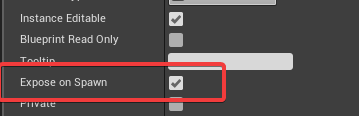
@plush yew SpawnActor Node shows variables of the Class your are spawning if you mark them "Editable" and "ExposeOnSpawn".
So whatever INTEGER variable pin you need there, you need to go into the class you are spawning, and either you already have that variable or you need to create it.
Either way, once you have that variable in the class you spawn, you go to its details and then mark it Editable and ExposeOnSpawn
Then it will show up on the SpawnActor node
winter drift
@plush yew Thanks for the extra screenshot, that helps a lot!
regal mulch
His question is how to get the Index Variable Pin on the SpawnActor node.
That didn't even need an additional image.
winter drift
As @regal mulch says, if you create a "index" variable on the class you're wanting to spawn then set "Expose on Spawn" to true (As per below) then you'll see that pin on the node
 plush yew
I have it
I will show you
okay @winter drift
I wait to load the project to show you for the variable that I mark it
regal mulch
And about that JDK IDE stuff, that doesn't even look like you need help with UE4
@nimble jay
nimble jay
@regal mulch I don't know how to do it
regal mulch
Is that UE4 related or not?
nimble jay
Ue4?
regal mulch
This is an Unreal Engine 4 Discord
Everything else doesn't belong here
If you need general help with your programming classes, you are wrong here
Also whatever paper you have there clearly states that you should insteal the software you use, run the program they show and write down what the program does.
That's all they want
nimble jay
@regal mulch OK thanks
regal mulch
@plush yew Is that inside of the Class your are spawning?
icy bone
is there any ue4 plugins for mobile interactions like dragging and gesturez? or best to make own
regal mulch
@plush yew Alright, now the Varaibel that you use to select the Class (The purple line) what type is that?
Cause the Index variable will only show if that Class Variable is the base class
If it's just AActor, then it won'T show it
Make sure the struct variable has the right type
Your other image takes it from this struct
The "ItemClass" needs to be the Base Class that contains the Index variable
Then the pin should show up

This is highly customizable, easy to use touch components for mobile and PC devices with touch screen. You can easily add tap, swipe, drag to look, drag to move, pinch to zoom, pan and rotate gestures or virtual joysticks with UMG skins to your game.
I guess that?
regal mulch
Why in Plugins? That's for getting help with deving a plugin.
#fab would make more sense or for general he's fine here
plush yew
I have other two problems
I will type for them after I hade a dinner
lol
the problems are with this tutorial: https://www.youtube.com/watch?v=HjatBC6D1jc&list=PLmKKTERcjTPLfDyYlHVSfjwLPsWQewMI-&index=47

Unreal Engine Version: 4.12.5 Template: Top-Down Template Since we created the widget for all of our individual slots in part 5, we can now go ahead and desi...
regal mulch
You can't expect us to watch that tutorial :D
plush yew
yes
regal mulch
If the person in the Tutorial has it working, rewatch it and check for errors in your code.
plush yew
but one person yesterday said me to show what is the tutorial that I have problem with
I checked but
regal mulch
Well based on your images the only thing I can tell you is that you are doing something wrong
Cause I don't know your code
And with that tutorial you have the best way of solving your issue
Cause that version is working. So find the difference
regal mulch
:D If the tutorial is working and yours is not, then you did a step wrong
plush yew
when he puits the bp called "update slot at index" to update it to show the icon I think?
plush yew
I was having other problems with the tutorials but when people help me I fixed it
static viper
code changed alot in the last 20 versions you know
static viper
and the tutorial is for what version?
plush yew
he is on 4.12.5
static viper
that is a problem
 unreal spoke
How was called the node to combine 2 skeletlameshes that are using the same skeleton?
regal mulch
How can you even know that this is or isn't the problem?
static viper
its likely that code works a bit different know.
regal mulch
There is a tutorial that does what you want and works
static viper
widgets changed alot
plush yew
I was having other problems with the tutorials but when people help me I fixed it
regal mulch
And yours doesn't work.
So either you did something wrong or the engine version matters.
Yeah and?
Not every issue is the same
regal mulch
Then rewatch the tutorial
regal mulch
Cause then you should be able to find the difference
It's easy as that
You have the working version in front of you
plush yew
yes but it is big bp that I confused
static viper
you should also look up the parts that arent working
static viper
and see if they changed in engine
you are prolly just not using the correct way in that version
plush yew
static viper
and 12 to 18 is a bit big
plush yew
I have error here
with the visibility
when I press the button to create server it muust shows me this:
static viper
but instead?
plush yew
when I press the button to find all servers it must shows me this:
but it doesn't work
static viper
what doesnt work
grim ore
it! it doesn't work. how hard is that to understand that it is broken... 😛
plush yew
when I press the button to find all servers it must shows me this
but ti doesn't show me
static viper
i am sorry ._.
grim ore
it is always the problem!
static viper
how could i
plush yew
I can't work with the visibility like visible collapsed and these
plush yew
I know what they are mean but I confused-hmm
grim ore
the problem @plush yew is it could mean anything. Can you show the project running and what is happening when you press the button?
static viper
then its gonna be obvious.
grim ore
all the screenshots are from the editor not the project running so it's hard to understand the issue you are seeing because we cannot see it.
plush yew
okay
when I close this it must hide this for the create server and show for find teh servers
okay?
 thorny cipher
Does UE have access to a timezone time
So you can detect something every 24hours or so
plush yew
interesting question
grim ore
ok. so you need to learn to save references when you make things so you can get them later. After your create widget drag off the output pin and promote it to a variable. you can then remove that widget or destroy it later when you are opening the other widget.
plush yew
@grim ore from whete I can find these bots that are in the group to use for my group?
grim ore
if you are using a tutorial it should be showing you this
plush yew

Hello everyone, today we will work on a small and simple server browser. ______________________________________________________________ Plugin: https://forum...
this is the video
grim ore
yes his video is showing you that you need to save your widgets, the find server and create server variables and then when you click the buttons you are swapping the visibilities
its all in that video
grim ore
his should work fine, yours is not the same as his
grim ore
are you using difference widgets for each part?
his main menu has panels for the create and find server parts so he has variables for them, he never creates the widgets. They are part of his main menu all the time.
plush yew
okay
grim ore
all he does is hide and show them as needed. You are creating new widgets for some reason at some point. this is a case of you not following his tutorial.
plush yew
can you talk now and have you got installed team viewer?
plush yew
after I typed create the widget to make for teh visibility or?
I almost fix the problem but When I press create server it shosw me that for the find server and When I press find all server it doesn't work-hmm
regal mulch
It's both doing the exact same
 sharp pine
hello
plush yew
hello
sharp pine
how are you ?
plush yew
but for the problem with the updating icon when I collect item how to fix it?
nothing I fixed my poroblems with my projects
sharp pine
i research a dev for create weapons system i make modelisation et animation for all project https://gyazo.com/effeeb657da2603cefb6ea83d1d2539d
 static viper
err what?
plush yew
cool
 umbral pulsar

 plush yew
@umbral pulsar Much skill!
 astral marsh
sorry if im kinda noobie im new to c++ coding of ue4
smoky stream
can i see the line after that UPROPERTY @astral marsh ?
chances are whatever is after it isnt a USTRUCT or UCLASS
smoky stream
probably missing a #include