#ue4-general
1 messages · Page 307 of 1
 austere lance
exactly. but both sides are set to default and only the middle to kinematic in the first simulation.
 whole quarry
idk why it behaves like that, I would've thought it would hang in the air static as the middle wouldnt move
now one side appears heavier and goes down, lifting the other side up
 fierce tulip
@plush yew not even sure thats allowed to be discussed openly, but there should be documentation about it on udn.
(i think, havent had access in a long time)
austere lance
I just attached the shapes to the bone ends instead to the bones themselves. Now it is even more weird.
https://imgur.com/a/1LbV1iq
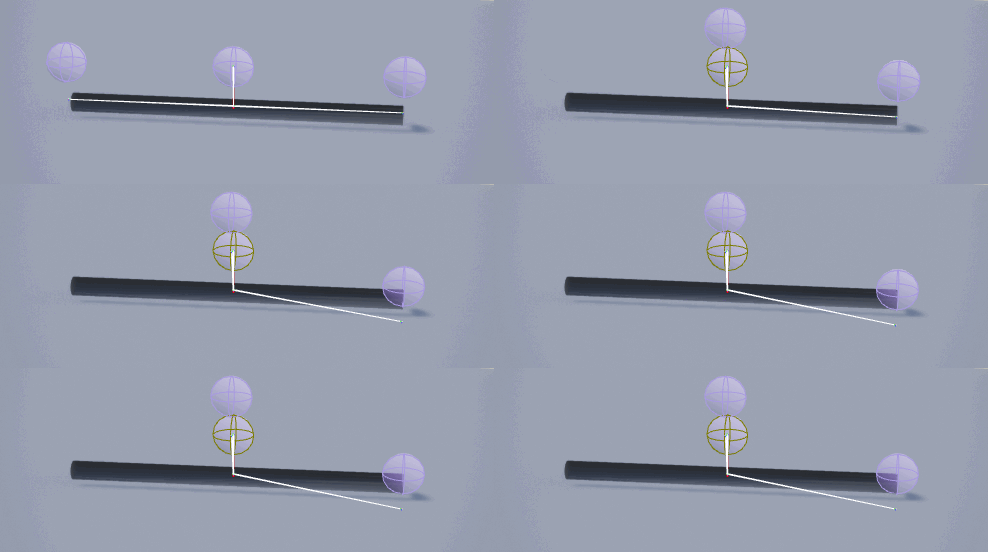
What i dont get is, both sides are symmetric as well as the settings. So physics should work the same way on both sides. At least in my book.
 dawn linden
UE4's book of physics is special.
Not expecting anything at all is a good place to start 😉
 tawdry storm
@fierce tulip @whole quarry so as I have feared if you have a child that's using the complex as simple option you can't simulate physics on the parent
whole quarry
no no
the lowpoly should be the parent/root
then being hidden ingame, the child would be the highpoly/visible mesh
tawdry storm
I still wouldn't be able to move it as a physics object
whole quarry
the lowpoly would do the physics stuff, the highpoly just follows its movement like being chained to it
should work 🤔
root (lowpoly version, hidden ingame) full collision & simulate physics
child: visible mesh (no collision required)
tawdry storm
but using the 'complex as simple' collision blocks you from using 'simulate physics'
whole quarry
o0
fierce tulip
O_o
tawdry storm
try it
if you set a mesh to use 'complex as simple' the simulate physics is greyed out
whole quarry
This means that if a simple query is requested, the engine will query against complex shapes; basically ignoring the simple collision. This allows us to use the trimesh for the physics simulation collision. Note that if you are using UseComplexAsSimple you cannot simulate the object, but you can use it to collide with other simulated (simple) objects.
tawdry storm
it even says on the tooltip that it's a limitation of the feature
whole quarry
This allows us to use the trimesh for the physics simulation collision.
it should work, its meant for it
tawdry storm
yes it can collide
whole quarry
read the full thing remco, dammit
tawdry storm
but itself can't move
rtfm 😛
otherwise I would just run everything through complex collisions
 rose quartz
if i have a Master blueprint with Custom Events and i make a Child bleuprint can i use the same event in the child from the master ?
tawdry storm
you should be able to use it, yes
whole quarry
and SimpleAsComplex? would that do any difference?
tawdry storm
then I'd need a working simple collision
whole quarry
This means that if a complex query is requested, the engine will still query against simple shapes; basically ignoring the trimesh. This helps save memory since we don't need to bake the trimesh and can improve performance if the collision geometry is simpler.
physics is always a headache
tawdry storm
which is the whole reason for this issue 😄
whole quarry
what about Default This will cause simple collision requests to use simple collision, and complex requests to use complex collision; the "default" behavior.
lets just try them all 😄
rose quartz
So the event will becalled from the child and not the master?
tawdry storm
that again requires a simple collision 😄
whole quarry
 tawdry storm
yeah
@rose quartz if I'm not mistaken it should do just that, yes
wait I'll post screenshots of my problem
1 sec
this is the collision made out of 30 individual cubes, resembling the mesh as close as we can without going completely insane. Nothing in there should be non-convex and nonee of the meshes overlap
 vale osprey
@tawdry storm that’s expected behavior
PhysX doesn’t support rigid body simulation on triangles meshes
Only queries
tawdry storm
yeah I figured, but I'd still thought I'd try it the way people suggested it
I just can't get my custom modelled collisions into the engine
vale osprey
It doesn’t import?
tawdry storm
which was the reason for that workaround
one sec
this is what it looks in unreal
some work fine, others go apeshit
vale osprey
They can overlap btw, as they are sub-meshes of the same object
tawdry storm
I tried to follow the instructions of https://docs.unrealengine.com/en-US/Engine/Content/FBX/StaticMeshes#collision as close as I can and they suggest leaving a gap between the collision shapes
tawdry storm
in what way? less shapes?
vale osprey
Less triangles on shapes
tawdry storm
they are mostly cubes
hard to make them simpler
the bend are just multiple individual cubes
vale osprey
For some reason at least one of them glitched
Don’t know why, maybe vertices are not welded
tawdry storm
man this is so weird
so I tried to kick a few
collision
import
now a part is glitched that was fine earlier
oh or maybe not
no I think that was like that before
🤔
but the whole bend on the front is just gone
 next sierra
any way to make a level sequence control the playercharacter blueprint if the character is spawned at start? I mean reference an internal track so changing the binding isn't enough
 bitter iris
Is there a way i can get my map onto an older version of ue4? working with a prerelease of a plugin and need to work in 4.19
fierce tulip
nope
bitter iris
damn
fierce tulip
yea its a bummer
 wild glacier
@tawdry storm Use complex collision
tawdry storm
we already established that it won't work
complex collision disables simulate physics
which is crucial
wild glacier
Ahm
 languid shard
say what
tawdry storm
could it be that custom collision meshes need to have a certain volume?
vale osprey
What are you using to create@model?
tawdry storm
I just made the 'broken' parts a beat chunkier and thes seem to import with less problems
vale osprey
Nah, they need to have adequate scale and be welded
languid shard
"use complex as simple" works pretty well for physics
vale osprey
It doesn’t work for simulated rigid bodies
languid shard
🤔
vale osprey
It works only for collisions against it
languid shard
ah right
tawdry storm
you can collide with it, but the mesh itself can't be moved
languid shard
yeah
vale osprey
This looks fine
tawdry storm
scale is normal tho
vale osprey
What size is this thing?
vale osprey
Yes
vale osprey
That’s fine
So I would double check vertices on that broken part
And normals
Maybe you have some flipped sides or double vertices
tawdry storm
vertex count is 16, so 8 on each side, which should mean there's no duplicate vertecies
tawdry storm
oh wait
there
or is that mesh shape already too complex for a collision shape?
because if unreal is trying to make a box out of this I could see why that shape happend in engine
vale osprey
Nah, it’s not too complex but it might be not perfectly convex
Try pulling top vertices slightly toward each other and next level lower too, but slightly less
Yes, unreal will try to “optimize”
tawdry storm
yeah I'm making it more trapezoid shaped, 1 sec
vale osprey
I’m not exactly sure when it does it. Sometimes you have to make collusion meshes in a different way to avoid “optimization”
tawdry storm
try what?
vale osprey
The new shape you did
tawdry storm
that's the one in the screenshots
vale osprey
Ahh, that’s the one on the left? Lol
dawn linden
@tawdry storm To me that looks way too complex for something that you want to fully simulate. Is there some reason you need that much fine detail on the collision?
tawdry storm
yes, this is to test for very precise collisions
auto generated collisions were too clunky, especially for the more non-convex shapes as nothing could move into the bowl shaped areas
this is not for a game, it's a specialized tool for a client so hitting 90fps in VR is not the highest priority, precision is
that's also part of the problem, I can't screenshot all the parts, because most of them are under NDA, I just picked one that's common enough to be on the safe side 😄
dawn linden
Hmm. Well I don't know exactly what you're doing, but my impression is if you need that much precision, UE4 + PhysX is going to give you endless headaches.
tawdry storm
yeah I tried to make that clear to the client, but
¯_(ツ)_/¯
also I basically have no time at all to build this
dawn linden
Well, is a slightly lower precision result in the short term okay, or it's basically useless? I think as @vale osprey said, you'll find it easier to get it working if you can build it up using boxes in-editor.
Although admittedly the editing interface for doing that is an enormous pain.
dawn linden
Yep.
vale osprey
UE4 won’t optimize the amount of sub-components, only components themselves
tawdry storm
hm okay I'll try to build the shape with boxes and see what happens then
dawn linden
And it's a lot more performant - if you import collision, they end up as convex hulls, even if they were originally boxes in your modelling program. And that's much slower than box primitives.
vale osprey
And replacing boxes with tetrahedra is actually a legit way to do complex collisions
Yeap
By tetrahedra comment I meant that number of sub-objects is not that important for performance. As in it doesn’t matter how many sub-objects you have. What matters is their individual complexity.
tawdry storm
okay if I simplify it to a box it looks like it's the exact shape
so I'll just throw boxes at it until it works, that might take a while tho ^^
thanks for the input @fierce tulip @whole quarry @vale osprey I really appreciate the help, maybe it'll work out after all
oh and kamrann of couse 😄
 sullen wraith
how can you go about moving things from one folder to another within the unreal engine?
I can' t seem to move it back a window
 plush yew
Hello guys with which key combination to show my cursor when I start my game?
tawdry storm
ctrl+F1
fierce tulip
@sullen wraith need to move them trough the content browser, should be quite straightforward
sullen wraith
ive tried dragging them around it doesn't work?
tawdry storm
oh, right, sorry I just press it out of muscle memory so I wasn't 100% sure
whole quarry
in the playercontroller -> Show mouse cursor
sullen wraith
@fierce tulip bit confused, i cant seem to drag it back in the content browser?
fierce tulip
how are you dragging it back? step by step details please 😃
sullen wraith
so im in the unreal engine, in content browser, if i click and drag the folder, it lets me move it into it's sub folders
but i can't move it up
so its currently in content>a01, it wont let me move it into content, but would loet me move it into content>ao1>ao2
tawdry storm
weird
fierce tulip
works for me
whole quarry
never had problems with that either
fierce tulip
(4.16/4.19 though)
whole quarry
tho, content is the root folder, cant go any higher than that, are you sure you're not trying to make "ao2" the root?
sullen wraith
yeah 4.19
tawdry storm
I only had problems with deleting whole folders in older versions
whole quarry
it is possible in all ue4 versions
sullen wraith
yeah so I want to move this folder back to the root
it doesn't let me, only lets me drag it deeper
whole quarry
also, I noticed you use names like "ao1" and "ao2", @sullen wraith : read and use this, https://github.com/Allar/ue4-style-guide - better start early with best practices

GitHub
An attempt to make Unreal Engine 4 projects more consistent - Allar/ue4-style-guide
sullen wraith
it's just an example name 😛
whole quarry
try restart the engine and move the folder again
whole quarry
if that doesnt work, go in Windows explorer, to the project folder, open Content and see if the folder still exists in there
whole quarry
eww
sullen wraith
is that how you do it?
whole quarry
click on that button
 plush yew
Hello guys I followeed again the same video but when I start my game the icon with the potion doesn't sow in my inventory-why?
whole quarry
@plush yew Don't spam the same questions on multiple channels >.>
 warm tree
Do you guys prefer organazing like this
- Materials
      M_Pistol
- Textures
      T_Pistol_D
      T_Pistol_N
      T_Pistol_ORM
- Meshes
      SK_Pistol
or like this?
- Weapons
  - Pistol
      M_Pistol
      T_Pistol_D
      T_Pistol_N
      T_Pistol_ORM
      SK_Pistol
 static viper
the lesser one
 dire fjord
ugh..they really need to fix this whole "... is inaccessible" error going on in the current version. Like every other function I need to call is inaccessible
static viper
they?
whole quarry
did you verify the accessibility though?
static viper
define inaccessible
fierce tulip
my love for you :p
whole quarry
eww, white background
static viper
remco speaks for me.
dire fjord
as someone who is still in the learning phase, autocomplete and intellisense is very helpful when searching for things. But in the current version, they changed something in source and put a bunch of stuff in private, and now it doesn't show up properly even though it will compile and work.
sullen wraith
question, while previewing an animation, if i change its bone rotations, is there a way to save that to the anim?
dire fjord
It's from source.
whole quarry
@sullen wraith ask in #animation
dire fjord
Several of the functions i'm using in this file are inaccessible like this in the engine source, fireimpulse(), Applyradialdamage(), radius, SetVelocityInLocalSpace
 ebon goblet
Does anyone know if there is a performance difference between using an imported model that's in pieces, and one that's already put together outside of unreal?
If that makes sense.
dire fjord
You mean a rigged model vs some assembled staticmeshes?
ebon goblet
that may be what I mean. For example. I have this shield that is a single static mesh, and another one that's comprised of the handle, the shield itself etc.
dire fjord
Ah.. hmm.. I think in that case, a single one would just be simpler to use unless you need to take it apart, currently I'm studying using tank components that are assembled in the engine (body/turret/barrel/tracks) vs a rigged tank that comes as one piece on a skeletal mesh.
I believe a single piece shield should be easy. You don't need to build it in game, which to me means slightly less code.
no sockets to attach things, etc.
ebon goblet
Yeah I was thinking the same. But just how much of a difference could there be?
dire fjord
If it's a single object in your entire game? I would think not that much.
ebon goblet
I'm talking larger scale
let's say. a hundred soldiers on the field at once
all of them have shields
 frosty bloom
@dire fjord I haven't checked so don't take my word for it but usually when you try to access specific components or variables within UE4s classes they have Getters specified, rather than calling it directly
dire fjord
@frosty bloom Hmm..okay. I'm taking a course, and it was written on a slightly older version, so maybe that's something that has significantly changed since then, and especially in 4.20 as I don't think this was an issue in 4.19.
@ebon goblet That's a good question. I wish I could tell you. You could test it, by spawning in a bunch of each, turning on your FPS counter and see if you notice any difference or not.
 astral marsh
https://gyazo.com/22001f4649ef01cbb9cfa2bbb55be01f.gif anyone knows why cast is failing?
 ebon goblet
@dire fjord ill do that, thanks for your time
whole quarry
@astral marsh is there a BP_Key spawned in the level when you call it?
astral marsh
yes
whole quarry
what object are you using to cast to it?
whole quarry
im not at home
whole quarry
so the Hit Actor is connected to the Cast node?
astral marsh
yea object of the cast
whole quarry
is Hit Actor == BP_Key ?
astral marsh
yes
whole quarry
how do you verify that?
astral marsh
whole quarry
so you dont verify that
astral marsh
how do we do that
whole quarry
yes, then in Select Actor find BP_Key
If true -> Cast
If false -> ABORT ABORT ABORT
astral marsh
there is no abort node
whole quarry
oh, leave it empty then
astral marsh
whole quarry
that red pin from the ==, connect it to a Branch
astral marsh
whole quarry
not the one I meant, but that should do it
whole quarry
well, you need to connect the Hit Actor to Object
If HitActor == BP_Key, if true cast to that referenced BP_Key and do stuff
 summer pagoda
hi there
anyone here on a mac ?
i'm kinda at the end of my wits. I have a level to pack for a mac, and I'm on a windows machine
does anyone know if there is a workaroud ? I tried doing a vm with high sierra. but the launcher does not even start 😦
 vale silo
@wicked tiger @elfin jacinth Do you folks happen to have an ETA for 4.20.3 ?
 full atlas
So.. its impossible to report a bug?
 upper heart
what?
full atlas
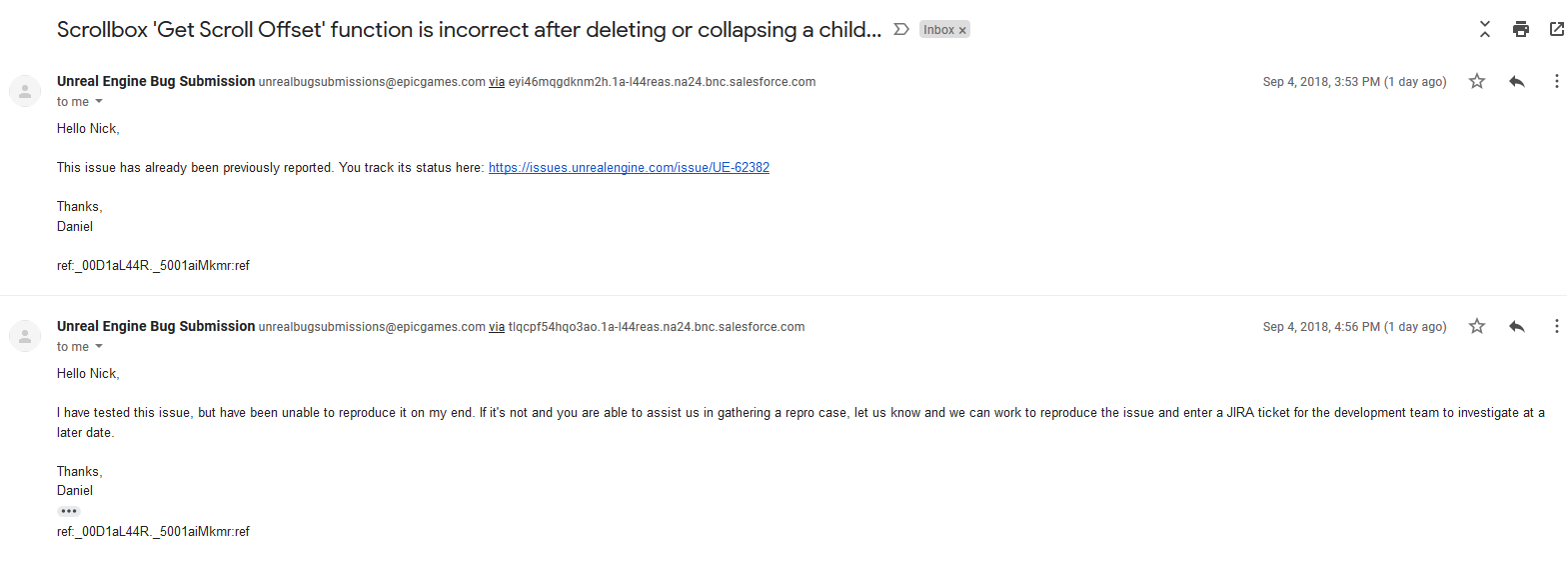
I reported a bug literally 3 times improved post each time.. and all they can say is "unable to reproduce".. when i literally gave them each step perfectly clear. I even gave them a ready project and packaged game.. "Unable to reproduce" And they even said that that issue had already been reported and linked something that was nowhere near LIKE what i reported.
may i tell you the bug here?
its about umg scrollbox
super simple
upper heart
Feel free to share the details. I normally create an empty project and reproduce the bug in there and then share on github
A new clean project is important so Epic doesn't have to sift through anything
full atlas
Here are the steps to reproduce (no need to follow the steps just read to understand)
new project
new WidgetBP --> add a scrollbox --> add children in the scrollbox (images for example) - enough images to make the scrollbox scroll-able -->
add a button in the WidgetBP so that when pressed it deletes (or sets the visibility to collapsed) of the last child of the scrollbox
and here is where the issue is.. If you print the "Get Scroll Offset" function of the Scrollbox (even though you have deleted children.. the function doesn't update automatically)
Play --> scroll the scrollbox with mouse wheel to end or so.. start clicking the button that deletes.. and check the Printed value.. it doesn't update
And this is their response.. https://i.imgur.com/5o3aces.png
 frail sky
My Launcher showing preview version 5 now,someone said that the official version of ue4.20.2 has been released? Why is my preview version?
upper heart
@full atlas You could use SetScrollOffset to update it manually
full atlas
@frail sky i noticed it as well.. try restarting your launcher.. it didn't show "preview 5" to me after i restarted..
@upper heart what do you mean?
upper heart
There is a function called SetScrollOffset. You could call that when the delete button is pressed.
We should move this to #umg tho
full atlas
if only it were that easy to use that function to deal with that issue..
i have tried everything to deal with this issue.. and nothing works
EVEN if there was a way.. does it make ANY sense to you it not updating automatically?
upper heart
They might expect you to handle it yourself
Anyways, ask in #umg. Nick Darnell is the umg expert at Epic and he frequents there.
full atlas
tbh im not certain that i cant deal with the issue .. i thought the bug was something else while i was trying to find a way around the issue.. I will try again but still
frail sky
My launcher still shows the preview5 version, maybe the version of my country has not been updated?
full atlas
i dunno mine got fixed on its own..
doesn't matter, its not a preview you're using
@upper heart i didn't come here to report the bug.. i came here wondering why its impossible to report a bug
what does this: https://issues.unrealengine.com/issue/UE-62382 have todo with what i reported??
upper heart
It's not impossible. And it doesn't have to do with it. They must have misunderstood what you reported.
full atlas
but every time anyone i know has reported something they always say "I have tested this issue, but have been unable to reproduce it on my end"
upper heart
I have logged plenty of bugs. Provide very detailed steps, a clean project, and a good explanation of the problem and they will have a good chance of getting logged.
 cloud cobalt
The important part is "UE4 project that immediately reproduces the issue"
full atlas
ever since the new report bug system was implemented - all they have responded to me was unable to reproduce.. in the old system in Answers.. i had about 5 issues there with success
basically 100% of my reports
now they are just trolling
why would i ever report again?
whatever..
 flat plover
If im making a third person game for mobile, Do u think its ideal to set the character size to be decently realistic like (fortnite), or small stylish midget like (Zelda) (Mario)
 cedar snow
AIController and PathFollowingComponent are character agnostic, right? e.g. they don't require the pawn to be an ACharacter?
 abstract marsh
@wraith canyon have you found anything about the build mode that you were talking about? Could I DM you?
 sudden flax
Hey does anyone know how i would make my menu move with mouse movement

Purchase this game at - https://www.escapefromtarkov.com/ Thanks for watching! [Catch me streaming at twitch.tv/spitfirepls ]
like this
tawdry storm
doesn't look like the menu is moving at all
it's just a very slight camera rotation
static viper
its not
but its moving the background
wich is ultra easy todo
it just a large image wich is moved with translate
sudden flax
@static viper you need to watch it
sudden flax
whenever he moves his cursor
static viper
the menu isnt moving
sudden flax
it moves the screen
static viper
the background
sudden flax
Yes, how?
 tiny pier
How do you mean, screen postion?
The create widget node doesn't have x and y values for position.
 unkempt isle
would you guys buy assets from another place than ue4 marketplace if it is cheaper?
fierce tulip
depends on the content. especially plugins I'd prefer trough the mp
static viper
so thats an disadvantage
unkempt isle
i want to buy from another place
 sage bough
Somebody know why my eventicks doesn t work after packaging ?
static viper
no general issue there
 pallid compass
prob not because it wont pass epic QA
static viper
you prolly done fucked it
unkempt isle
and too expensive
tawdry storm
@sudden flax are you joking? The background moves, so either it's the camera rotating or an image background that's being moved around based on the mouse movement like owl said
pallid compass
Try asking someone to commission you something and compare the price
 elfin jacinth
@vale silo No specific ETA as of yet. We're aiming for the next few weeks, but nothing set in stone.
tawdry storm
Oh okay sorry
pallid compass
God i wish my ISP would fix these DNS issues
 novel ember
I just fixed a really dumb bug I was having but I'm kinda confused as to what the difference is re: the old code and the working code
So like, I have a custom gravity solution, and to keep dashing and jumping not confusing they stay local to player's orientation
So the physics impulses are [vertical or directional impulse] rotated by the local gravity
That itself isn't an issue, but I had a "Z-multiplier" to modify the strength of the verticality of the impulse independently, which can be useful for things like dashing where I just need a slight upward push
Now that I have it working, it appears the correct way to do that is basically:
vector3 (impulse input) -> unrotate with gravity -> vector3 (impulse) * vector3 (1, 1, z-multiplier) -> re-rotate to gravity -> add impulse
and the way I was doing it before that was failing was:
vector3 (1, 1, z-multiplier) -> rotate to gravity -> vector3 (impulse) * vector3 (rotated 1, 1, z-multiplier) -> add impulse
The latter worked fine in standard gravity but the inputs were getting inverted when I entered anything but standard (0, 0, -1) gravity
What was causing that issue?
plush yew
hello everyone
 heavy falcon
Ahoy
plush yew
I'm getting tired of materials :x
heavy falcon
You're right, the world is far too materialistic
heavy falcon
(shocker)
plush yew
when I paint with the 5 materials on a landscape
it gives me this
and do not compile at all
just left with the default
is there a way to fix this 🤔 cuz I don't wanna be limited with only 3 materials
and also can we erase a material ? unlike sculpting there isn't a shift+click to erase that specific texture
heck.. I need help :(( I'm stuck
 obtuse path
Hey all, does anyone have patch notes for 4.20.2?
 grim ore
well shift + left click should erase, it just might be a pain in the ass if your landscape is big. It might be easier to just paint back over it with the default material
plush yew
these are the materials I'm using
grim ore
and you should be able to use more than 3 materials when painting but it depends on your target shader platform and if you have it set to shared for your material
are you sure those materials simply don't have problems?
 normal mauve
Suddenly opening a second editor freezes my macbook pro I used to have no problems. Any tips to debug this or tips to prevent from freezing my whole macbook?
plush yew
well these are the starter content materials
idk how they can have problems
the only one I made on my own is snow
the only thing I did was copy the rock one and past it and replace its texture with a completely white one
grim ore
plush yew
this is just the tip of the iceberg
plush yew
yes
 livid haven
Bugger...
plush yew
well
i'm using layers
for the landscape
3 works perfectly fine
but the moment I paint with a fifth one
boom
FAILED TO COMPILE
static viper
shared wrap
plush yew
shared wrap ?
grim ore
the link i shared...
plush yew
I'm watching it
reading it*
give me a moment
thank you for the link btw
that video he send fits my problem perfectly
sigh time to work on the rest of the iceberg
I hope this fix it
@grim ore shared wrap with every texture sample nod right ?
static viper
yes
plush yew
thank you so much for the help
novel ember
holy fuck, I just got a huge performance boost
I don't know if it's just from cleaning up my code or switching to Flying versus Walking / Falling but before as a standalone game I was getting like 55-65fps at 1080p and 120fov
Now I'm pushing 90
novel ember
I would think if anything given my current setup it might be the same or slower
plush yew
IT WORKS ❤
novel ember
Although I also have a lot of my friction variables zeroed out now because I'm doing them manually so I don't know if it's just ignoring all those checks
plush yew
can I see the game you are making ?
just curious on how it looks like with a 90 fps 1080p
novel ember
yeah I'm recording a clip in a minute anyway
plush yew
eyy I hope it's worth the internet I'm using (got limited internet for now)
1$ = 1 gb :x
already spent 10$ these past 2 days
even if I was not using it a lot
I just discovered why I couldn't erase the textures
it's because this thing was checked
this will help a lot like 100 times
 normal mauve
Any tips for debugging a problem for a particular project that freezes my whole mac and becomes unresponsive?
novel ember
Have you checked to make sure your resolution / scalability settings etc are normal?
The only time I've had system-level issues with UE4 was when I was dealing with memory leaks and I accidentally had a postprocess volume setting the screen resolution to like 400%
normal mauve
Well the project does not even load in the editor anymore. It goes to 100% loading screen of editor goes away and boom mac freezes up. Only for a particular project very annoying also that I want to go further with this project :-(. When I tried to launch the game from Finder it loads.
novel ember
Have you tried removing your default map from the directory and booting it up?
normal mauve
not yet. good point
plush yew
yall got any idea how to make the landscape block directional light from underneath it ?
please
whole quarry
@plush yew set light intensity to 0 when it hits horizon ?
why would it need to cast light when it wont be visible?
plush yew
@whole quarry is there a blueprint for light intensity to be 0 when it hits horizon ?
plush yew
I will
thanks for the help anyways
can I replace the mannequin ? like keep the skeleton and make a different mesh or just edit the one we already have
whole quarry
yes, use google to find guides for that
plush yew
i needdd helppp 😄
i wanna make land mat with world aligned blend and land layer blend
im doing that but i wanna use grass output to spawn grass on the grass texture
 tawdry raptor
when I hit simulate in the UNREAL does it still use my default character?
tawdry raptor
when I hit simulate in unreal and I can float around does the float around have a blueprint?
 elder hatch
Need help please, i want to import only a few assets from a marketplace pack, but i dont see how i can chose without importing everything.
Im running a p4 server so if i import all its gonna be a pain to upload it and i dont wanna go deleting almost everything
plush yew
@elder hatch you can make a temporary uproject, add the project files to the new .uproject, and then migrate your desired content from the temporary uproject to your main game uproject.
astral marsh
https://gyazo.com/2891cbc46169c393969be741e9b29975.gif anyone knows why the cast is failing?

before it like used to work
now idk whats happening
 autumn rapids
Is there a way to prevent a level from loading assets from another level? Doing a course and my "main menu" level is pulling in the ui from the actual play level, along with all the other assets. I have been trying to figure this out for like an hour and came up with nothing
astral marsh
so you saying its with collision?
livid haven
@astral marsh I'm saying the cast is failing because the cast is failing, because casts can fail. They're a test.
dire fjord
anyone know why my AI tanks are shooting themselves in the face? https://youtu.be/sCHM7bU5XCU When I'm on the hill it is fine, when I get on their level it blows up in their face. Previously it was fine, they could shoot me on the same level, I haven't touched aiming or firing at all. I can shoot fine on flat ground at a low target. It's only the AI shell blowing up in their face.

tanks shells tend to explode in front of the AI when I'm on the same level as them.
livid haven
@autumn rapids Levels don't magically load things from other levels - if it's doing that, it's because you set it up to do so, even if unknowingly.
Are you using the same game mode?
Player controller?
Pawn?
autumn rapids
Hmm it does it on a new project as well
livid haven
... how would a new project that doesn't even have your assets be loading those assets?
autumn rapids
I thought it might be player controller, too, but i removed all references in my blueprints and it still shows.
The base assets..
autumn rapids
Playercontroller...
livid haven
Going back, do these maps use the same gamemode?
astral marsh
I have like a pickup system where the player should hit the key through linetrace to grab it but seemingly its not happening
autumn rapids
so removing the player controller fixed the UI issues, but I'm not sure why it is not like that in the course, and I assume they are using the same game mode, I just set the gamemode on project settings
livid haven
You can set gamemode per level.
autumn rapids
Okay ya I just found that
Neat. I guess I'll back track and see what I missed, how weird
Thank you very much,
livid haven
NP.
Sounds like understanding that game mode specifies the player controller was the missing piece of critical knowledge was all.
autumn rapids
lol oops
Found where I went wrong, wasn't supposed to change the game mode
The more you know, thanks for the knowledge
livid haven
👍
astral marsh
https://gyazo.com/b45454223c0fe2dbbf05f6a6b8b9656b.gif even after splitting struct pin still this happens
 livid haven
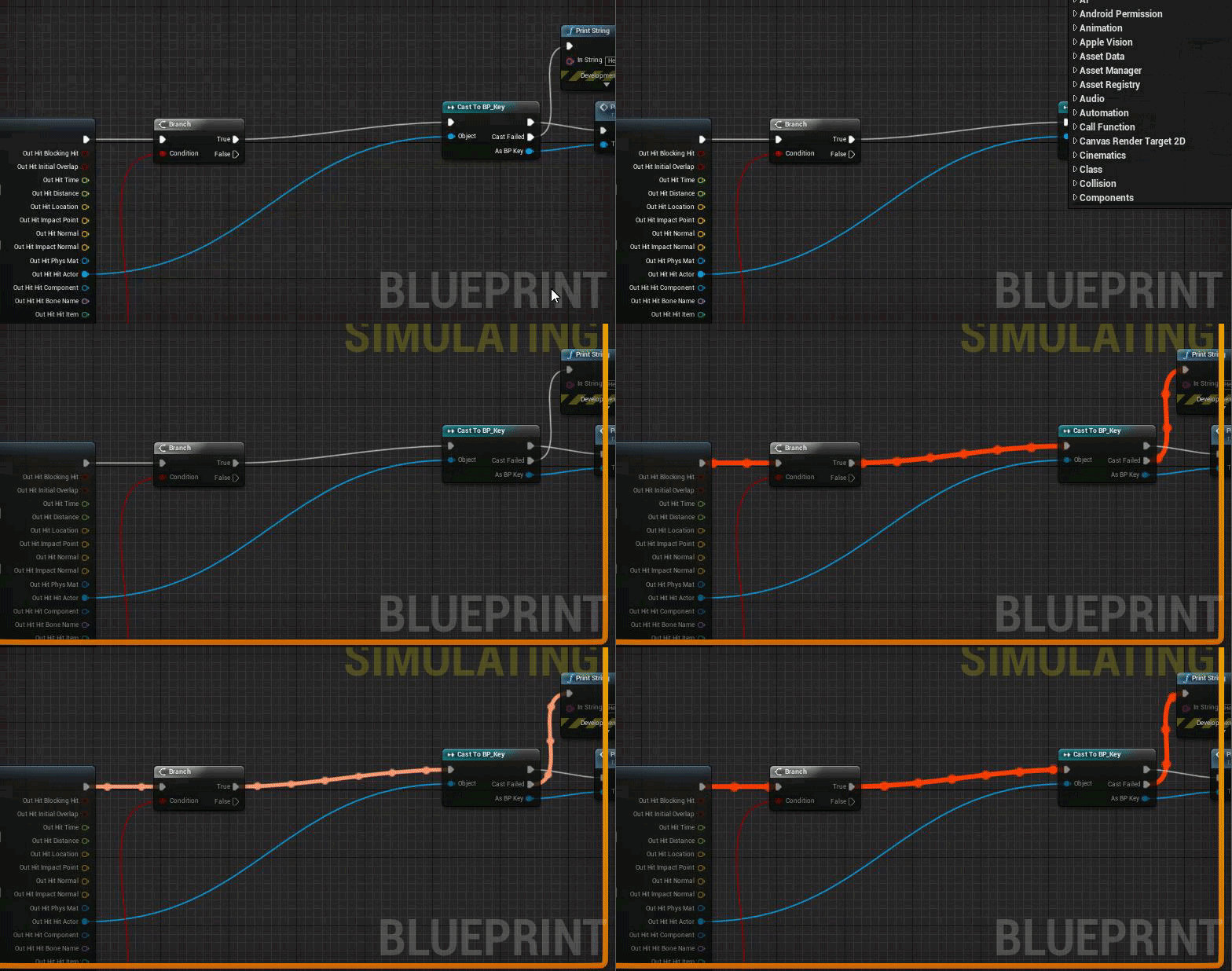
I'm not sure what you're not understanding.
Your cast is failing because, well, it is. You're hung up on the symptom and not the cause.
It's simple cause and effect.
Cast is failing because the object isn't of that type. So... what object isn't of that type?
Hint: Try printing the name of the object.
This isn't some special UE4 knowledge. This is basic problem solving.
dire fjord
Just a note on my tank bug if anyone has any suggestions. the tank shells are only exploding in their face if I'm far away from the AI. if I'm closer to the AI they can shoot me normally
autumn rapids
Im not that far yet so no idea
 worn granite
I've found line trace + printing a hit object's name to be an effective debugging tool for unexpected behavior in the past.
dire fjord
@worn granite thanks. I figured out what was happening the projectile was spawning in front of the barrel while they were moving. It was too close and they were hitting it before it could take off.
worn granite
thank @livid haven for it, I was just saying that technique works.
livid haven
I wasn't remarking to tank person. :X
You should probably make your projectiles ignore collision with the actor that spawned them.
dire fjord
Yes just learning now so that's on the list
worn granite
I swear I'm paying attention...
plush yew
anyone want a modeler/animator that can at least try?
whole quarry
@astral marsh Already given you the solution to this yesterday....:
 kind briar
Hi all, I'm working on a vr game atm, has anyone done a laser pointer for vive that I can have the blueprint for?
whole quarry
@kind briar -> #virtual-reality
kind briar
sure, sorry about that
tawdry storm
@astral marsh if you print out the Hit Actor output, what do you get? if it's not BP_Key or any of it's eventual child blueprints the cast will fail.
 heavy shuttle
Hey guys I have a water material with surface translucency volume but for some reason the plane is now not rendered at all it's transparent and nothing is visible It worked fine I noticed this after switching to stationary skylight it would be really helpful for me if anyone knew how to fix it
Please help😫
Tried switching back but nothing happened☹
whole quarry
sounds like opacity = 1
heavy shuttle
No it all worked fine. I tried making a simple material and plugged it into refraction that material also seem to disappear
The material and it's instances are showing up in material editor and in the mesh editor but not in the game☹
 paper kernel
Here's a crazy idea; do bullet casings with instances static meshes
languid shard
how about mesh particles ?
 balmy cypress
interesting. If you have attach spring arms together in a chain while enabling "Camera Lag" it will begin to create bad transforms after the 10th chain and will crash.
 dim arch
anyone know the name of the outline postprocess material used in the engine for object selection and if it is in the engine content?
 manic pawn
it's implemented as a global shader and uses a special render target to work, you can't reuse it in game
dim arch
hmm ok
plush yew
I cant find the option to migrate the thirdpersonBP to my project, anyone know where to find it?
plush yew
in the project i want it in right?
dim arch
ya
plush yew
ok cheers ill go try that
I dont see this add new option
i only see "import to /game" and when that opens that i go to where the BP is located but the folder just shows empty
tawdry raptor
My radar doesnt spin around when I move in VR, does anyone know what I have to change to make it rotate?
static viper
yee
in vr there is no camera
or if there would be
it would always stare the same angle
you have to use something else
i think the capsule does rotate with
tawdry storm
I'm pretty sure that whatever you see in the hmd is also a camera
rose quartz
Im trying to get all the Childeren of a class that are not in the world like i have a base skill and i created childeren of that now i need from the base skill the childeren how can i call the with what function?
tawdry storm
are they actors?
rose quartz
yes
tawdry storm
get all actors by class?
tawdry storm
define 'in the world'
rose quartz
Spawned?
tawdry storm
you can't get stuff that's not spawned
rose quartz
hmm because they are spells.
normaly you add them to a array manualy but now i have to do like a for loop on childeren 😒
tawdry storm
I'm still confused why you want to get objects that don't exist
tawdry storm
are you building world of warcraft in UE4?
rose quartz
something like that
tawdry storm
okay you have 5 spell blueprints
rose quartz
its only a starting spell
tawdry storm
so what do you want to do now
actually let's move this chat to #blueprint
just explain it there please
frosty bloom
Create an MasterClass for your spells, then create a variable within your player of MasterSpellActor - Class type. Put in your classes and spawn/draw from that array. simple
rose quartz
@frosty bloom i have a masterclass
frosty bloom
then skip step 1
 brazen cairn
guys whats the download size of ue4.20 ?
tawdry storm
that's the installation size, not sure how much the download is, as I assume it's compressed
brazen cairn
ok
tawdry raptor
i added a camera to my radar so hopefully the radar follows the camera how can I get it to connect it?
 spiral anvil
@tawdry raptor is this BP related? if so, try #blueprint
spiral anvil
Thought so, but it could be anything
plush yew
I was experimenting with snow texture and rocks
spiral anvil
are you a level designer?
plush yew
what do you think about this material ?
for some reason it formed a swastika
if you can see it
hmm not bad from close
grim ore
The Mouse X is the Mouse X, it's the X on the Mouse which is the Horizontal Movement.
grim ore
you were correct yep
plush yew
how is your day ?
grim ore
I am a work for the next 12 hours so it's work 😃
plush yew
I've been working a lot as well
since I wake up till I sleep
everyday
ofc I take breaks
food and fresh air
will this work even with many layers ?
the material instance
tawdry raptor
ok my game just crashed and made my unreal project file dissapear
now if I didnt JUST make a back up litteraly 5 minutes before it looks like 500 hours of work would have been gone?
plush yew
my god
How can i combine 2 static meshes... for example ive got a water bottle static mesh and ive got the bottle cap, i wanna make them into one mesh, and i tried editing the mesh and added a socket for the cap saved it and the mesh didnt change when i went out of the editor?
that must be painful
right click on both of the meshes
group them or simply ctrl+click on both
then right click
you will find : convert into static mesh
ok thx ill try that
@plush yew
Done! Thanks man.
no problem
I will always help- If I can
tawdry raptor
since my vr pawn has no camera z rotation what can I tell my radar to use to rotate ?
plush yew
I FINALLY FOUND THE SOLUTION
it would have taken me forever just for the materials if there wasn't starter content to learn from
astral marsh
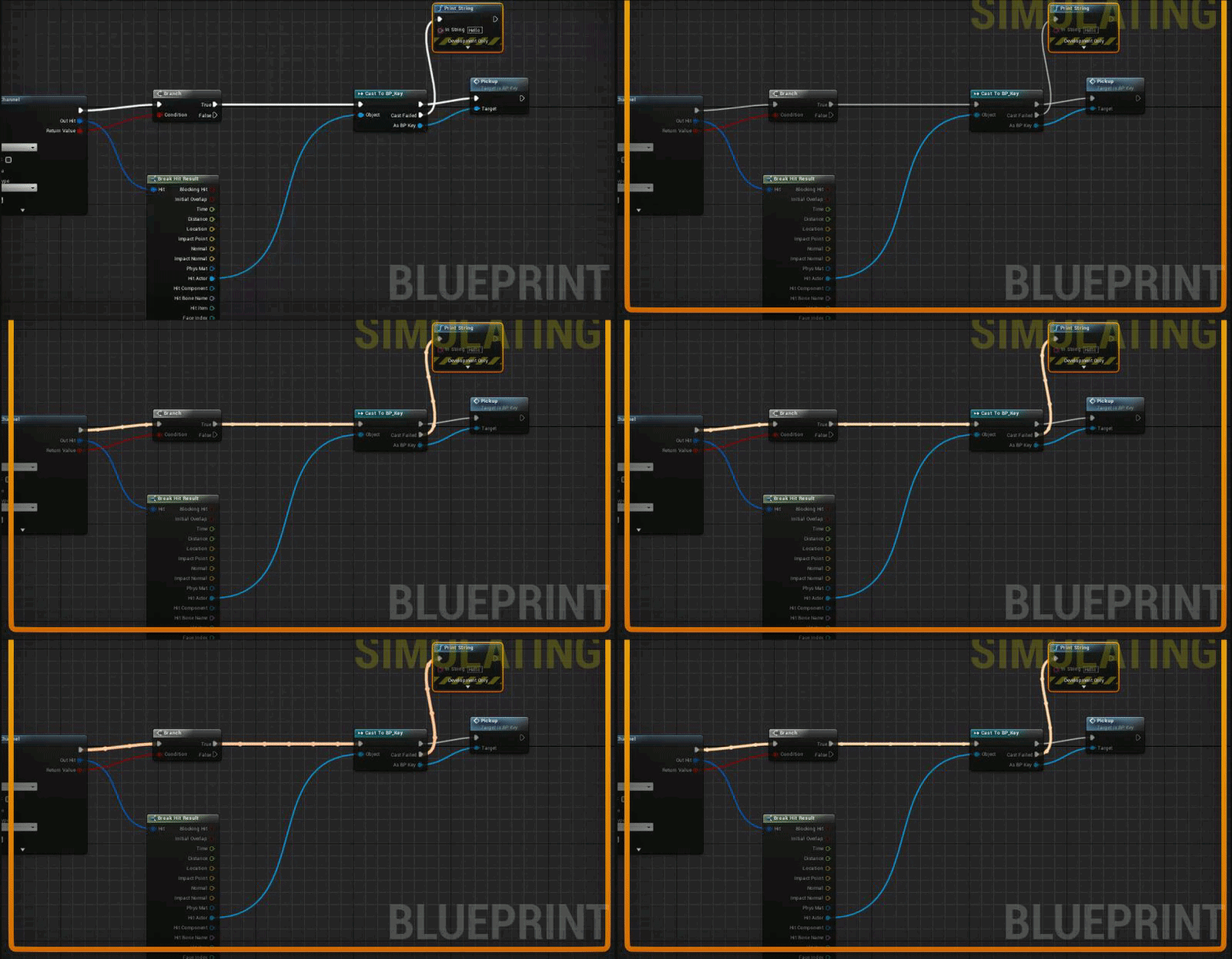
https://gyazo.com/7e0420e4bfd4337fa2e6d3b238e6f94c.gif anybody knows why cast fails
 rigid ginkgo
Hi
 charred dove
my destructable mesh only breaks sometimes when hit by a projectile, any idea why?
 silent drum
Anyone knows if i have a widget over a widget, how a make so u cant click on the widget behind to?
plush yew
how to change flames color ?
like HUE for exemple
I want to turn it blue
anyone ? :x
vale silo
probably in the material of the flames
fierce tulip
plush yew
@fierce tulip I got 200 Mb of internet left..
I already spent 20$ of internet just the past few days
Limited internet stuff
sigh I'm on google now
 grim sinew
It's literally 6 days into the month and you only have 200mb of internet to last the rest of it?
RIP
plush yew
welp if no one can help might as well spend few other bucks
upper heart
@plush yew Initial Color or Color over Life
plush yew
thank you
upper heart
np
plush yew
Hey guys
So I'm implementing a mining system for a singleplayer 3D adventure game
Any ideas on how to split a mesh up in smaller parts with a function?
Should I just replace the mesh with one missing the area I want mined after every successful mining process?
static viper
APEX destructable
plush yew
Or should I have several meshes sticking together and falling from eachother upon mining
static viper
you should not dive into physics that much
it always looks weird...
i like how mmos do it
the mesh just switches over states of content
so from large ore
to small broken one
 tacit chasm
is there any thing like AWS or Docker that allows you to run UE4 to render images?
plush yew
fixed
grim sinew
No, since when you render in realtime anyway it would take longer to upload your project than it would take to render it locally @tacit chasm
tacit chasm
@grim sinew there are lots of non-realtime rendering use cases for UE4 (animated movies, 360 stereoscopic VR etc) we're in that boat as well.
grim sinew
Well, unfortunately there isn't much of a market for it so even if it does exist, it's not as prevalent.
plush yew
the free assets are cool actually
hmmm
with a bit of tweaks for the materials and it will be perfect
pallid compass
I love it when UBT fails to build for launch to mobile, and gives no error's or logs
my fav
 polar hawk
If you can't google I wouldn't waste your internet on uploading images
pallid compass
omg
pallid compass
same
tawdry raptor
i am trying to get story a reference to the hand held blueprint actor. how do I do this?
tawdry raptor
what kind of componet can I add to a blueprint that will let me track its rotation?
 young oyster
Does anyone know a tutorial on how to make an animal simulator?
Or anything related?
young oyster
Like change the third person characters model into an animal or something
novel ember
animal simulators aren't particularly difficult
they're usually just asset packs of cities and stuff with some collectibles thrown in and the movement relies on UE4 / unity's standard movement components
plush yew
is the "create destructible mesh" option gone?
fierce tulip
for a second I thought Omni's question was related to the animal simulator one
plush yew
Nah
Talking about normal static mesh destruction
Haven't been using unreal for a year
can't find the option
 robust cedar
@plush yew not sure what your talking about but you can use blueprints to make something destructible
young oyster
Is there a tutorial on movement animations? Cuz I imported my character as the third person character and when I play as him, he just is in T pose while moving around. Is there a way that when he stops, he is in idle, then when he moves he is in walk animation?
Nvm
plush yew
anyone have any idea where to start to make a tool like this?


I would have slapped myself in the face for saying this 15 years ago: Math rocks. Generating paths with custom script I wrote this morning. #indiegame #indiedev #gamedev #ue4 #UnrealEngine https://t.co/7Ldu6PzF7G
Retweets
236
Likes
1081
 Twitter
tawdry storm
Twitter
tawdry storm
according to that guy the first step seems to be math
the rest is magic
no but seriously, this looks like you could build a very simple version rather quickly with a few loops
manic pawn
can confirm that math was involved
 fallow cliff
manic pawn
fallow cliff
manic pawn
wtf 😂
novel ember
btw, does anyone know a good place to start regarding applying friction to character movement?
I switched over to Flying as opposed to Walking and Falling recently and the actual "slow down until completely stopped" part I have handled, it's more that the character's acceleration makes movement feel sluggish as hell at initial velocities
oh nvm solved it
I've been using so much independent stuff in my movement calcs I totally forgot charactermovement literally has a "Max Acceleration" variable
 mint raptor
How come if I change effects quality, I get the message Reflection Captures need to be rebuilt.
Is that normal?
How do people change their options then or is the message just disabled and ignored?
plush yew
What is "Section Selection" in the Skeletal Mesh Editor good for? I thought you could somehow select the different Meshes that are parented to the Armature with it.
Also: Is there any way to access the different (Sub-)Meshes of a Skeletal Mesh?
@mint raptor Do you use the "Set Visual Effect Quality" Node?
mint raptor
@plush yew yup
plush yew
anal feast
dire fjord
Getting some odd behaviour from a component created in c++, it works just fine in one class, and works slightly odd in another class, ignore the intellisense errors. It compiles fine, it's just VS being stupid. All the headers are the same between both files, and the same declaration is used in the header for both items.
The problem is, inside the engine, the projectile mesh that is created is fully editable, but the one created in tank is blank and I can't edit any properties.
I tried recompiling, and even re-opening the editor.
novel ember
does assigning max acceleration via CharacterMovement zero out your z-velocity?
oh i'm an idiot
maxacceleration itself is affecting it because i'm in Flying mode
plush yew
I need to scale down this static mesh as its WAY too big and i cant seem to find an option to do so, this is the steak of meat i need to scale down in comparism to a full size military crate.
And i know i can scale it down in the world, but i want to actually scale the mesh down.
 south ridge
You can scale down any object unless it's a steak of meat
(also, it's an import option)
(if you already imported the mesh, scroll down below where it lists mesh materials. Or search for "scale" on the bar above property list)
 plucky reef
do anyone here got the quality menu setting pack? can someone here help me to transfer the function to a different widget designs? I badly need to make this one work
for fps?
 queen arch
PackagingResults: Error: Unknown Cook Failure
god damn it
god damn
i don't have the time for this
is it really unkown or do the previous error matter?
plucky reef
it's in the log files check it
plush yew
@mint raptor I just tried to set the effects quality with a little Blueprint Function that gets called when Numpad Keys are pressed whilst overlapping a trigger box. Not getting any "Reflection Captures need to be rebuilt."
queen arch
the log throws me a million errors
queen arch
most were from old BPs.. deleted most of them and most of the errors went away
UnrealBuildTool.GuardedMain: Command line: "C:\Program Files\Epic Games\UE_4.20\Engine\Binaries\DotNET\UnrealBuildTool.exe" Reject Win64 Shipping -Project="C:\Users\Lord Corvinos\Documents\Unreal Projects\Reject\Reject.uproject" -clean "C:\Users\Lord Corvinos\Documents\Unreal Projects\Reject\Reject.uproject" -NoUBTMakefiles -remoteini="C:\Users\Lord Corvinos\Documents\Unreal Projects\Reject" -skipdeploy -nobuilduht -NoHotReload -log="C:\Users\Lord Corvinos\AppData\Roaming\Unreal Engine\AutomationTool\Logs\C+Program+Files+Epic+Games+UE_4.20\UBT-Reject-Win64-Shipping.txt"
GitSourceFileWorkingSet..ctor: Using 'git status' to determine working set for adaptive non-unity build.
This is the last error
and i have no idea what the problem is
or what this says
plucky reef
oh sorry I don't have ideas regarding that too! sorry
queen arch
fuck this, I'm gonna run the game in the editor in front of 2000 people
that's ok
I'm ok with this
not at all wanting to bash my head to a wall
not at all sirs
and who needs to send it over to people to get some playtest data
not this guy
(screams loudly at a pillow)
novel ember
Does CharacterMovement do something special to keep characters firmly planted to surfaces unless the players jump or walk off?
I switched to using Flying instead of Walking / Falling and I have custom friction / gravity stuff implemented independently, but now if I make any quick turns my character lifts up off the ground sometimes
It's more noticeable on uneven surfaces, but even pivoting on totally flat ones will cause me to get off the ground sometimes
south ridge
When you are in walking mode, it keeps you tied to the floor yeah
It raytraces down, finds the floor, then starts calculating your movement relative to that floor
novel ember
Hmm
I mean I guess I could try just zeroing out the player's z-velocity relative to the gravity direction when walking but I don't know if that would dampen external impulses like explosions
Also, is there a way to check if the player is not touching a wall that doesn't involve checking repeatedly?
As in like, I can just use my custom "OnLanding" equivalent and if the hit normal > walkable slope angle, I can register it as being a wall hit, but I don't know how I would go about detecting the end of the contact with that wall
plucky reef
@queen arch yeah, I feel you. lol
plush yew
Hey guys, can anyone help me with ragdoll physics for my ai?
im just having a collision issue
mint raptor
@plush yew perhaps you don't have any reflection captures? Also did you try it with a packaged game?
plush yew
@mint raptor There is a Reflection Capture, but I did not try a packaged game yet.
mint raptor
Also I did from epic to some other setting (aka below epic)
fierce tulip
@worn blade stop asking the same question in every channel please.
read the frickin rules
kind briar
Well I'm getting there :D, managed to generate a ghost version of my cylinder in a blueprint with sockets
Hey guys, would it be a huge performance hit if I kept those ghost logs as objects in memory, and just made the ones visible that I need at the time I want the user to be able to interact with them?
*make
 sand stratus
Fix performance issues when they actually become issues
 hard rivet
Good morning! (from Spain)
Have a question regarding the set up of Steam in Unreal
I've been able to make Steam works playing in Standalone mode but cannot make it work when I package my game for Windows 64
The log it throws me a Steam API disabled.
The thing is
I've updated the Steamworks SDK version from 1.39 to 1.42. And it says that cannot find the 1.39 version... it's weird. I've tried rebuilding my project but no good news...
Could anyone help me, please?
kind briar
ok thanks for the advice waranoi
maybe you need to update a setting in the project somewhere? Maybe something to do with how it builds the package
there's a 64 bit steam_api dll so maybe you need to tell it to build with that
hard rivet
Yeah, I replaced those .dlls
The thing is¡
I have the retail version of the engine (Epic Games Launcher version, not Github)
And
Cannot find the .sln
To rebuild the engine
Maybe it has something to do with that
whole quarry
I've updated the Steamworks SDK version from 1.39 to 1.42.
+
that cannot find the 1.39 version.
go back to 1.39
whole quarry
hard rivet
I've followed that tutorial... maybe I missed something. I will start all over again
Do you know if it's possible to find the .sln?
Mean... where can I find it?
whole quarry
Allar's Blog
May 24, 2017 Update: Epic's 4.16 version of UE4 has had its Steam SDK upgraded to v1.39. This is still one version short of the latest SDK (v1.40) at the time of this writing but its significantly more recent. They even added SteamController fixes. I'm not sure
sln is included when your project is C++
hard rivet
So openning VS of my project I can rebuild the engine
whole quarry
if you're using BP only, then you're stuck with a older version until Epic updates it
yes
whole quarry
if you want to convert your BP project to C++: https://wiki.unrealengine.com/How_to_Convert_a_BP/Content_Project_to_a_C%2B%2B_Project_in_8_Steps
hard rivet
Thank you so much @whole quarry and @kind briar
whole quarry
np 😃
hard rivet
No, it's already C++ based
But thanks
It's already made in PS4 and we are porting to PC
And all this Steam SDK thing is taking me more than expected
xD
whole quarry
it took me a day too to get it working properly :d
hard rivet
Good to know I'm not the only one haha
whole quarry
figuring out how to get it available on steam (with those depots and branches) took me another day xD
hard rivet
So, last question: is a problem if I keep the 1.39 version?
whole quarry
nah its fine
hard rivet
Ok
whole quarry
np ^^
hard rivet
😃
 dim merlin
whole quarry
dim merlin
whole quarry
works fine for me?
hard rivet
Same for me
dim arch
does anyone know how to create an object hilight effect on a surface material (not postprocess)
without using custom depth
the custom depth buffer is being used by another system which conflicts with using it for a mouseover hilight
whole quarry
can't that only be done by pp?
oh, seems can be done in the material too:
https://forums.unrealengine.com/development-discussion/rendering/15989-how-to-outline-actors-without-post-processing-materials
Unreal Engine Forums
For discussions about Materials, Textures, Lighting, Particle Systems, and Post Process Effects.

reddit
20 votes and 7 comments so far on Reddit
dim arch
yeah that is super expensive though
whole quarry
google: ue4 outline without post process
dim arch
I did
dim arch
cloning a mesh is too expensive
it should be possible I think
for example if you clamp a fresnel it gives you the outline
except its not as clean as the PP method
languid shard
@dim arch can't you use a different custom depth id ?
isn't there like 0 to 255 ids ?
 dim arch
well the problem is that I have some meshes which are outlined using that method already
languid shard
and you want another effect on top of it ?
dim arch
but if I want a mouseover hilight it seems like the easiest way it to enable/disable the custom depth on the mesh
languid shard
yeah it is
dim arch
I am using a scenecapture with a postprocess material
it renders out all the outlines of meshes in the custom depth buffer
for a kinda minimap style thing
but then in the main camera, I need to add an outline for a mouseover object
languid shard
ah alright
dim arch
so if the depth buffer is disabled on all objects except the mouseover one, nothing shows in the minimap
so I am just trying to make an outline in the surface mat for the mouseover object as a workaround
not really sure how to get them both working at the same time
polar hawk
Judicious use of custom stencil values
I.e. <200 render only in capture pass
200 only render in live mouseover pass
dim arch
yeah if I use a seperate PP instance for the render2d and player camera I can keep them from rendering ontop of each other
 fossil ore
Can someone help me with compiling a plugin to custom engine?
 tall pendant
custom as in just an stock source build from github/p4 or an actual customized engine?
the first one should be not too complex
dire fjord
is there a setting somewhere to say "always open blueprints in the full editor"? I can't seem to find one.
whole quarry
what do you mean with 'full editor' ?
dire fjord
Sometimes when you open a blueprint, it's not the full editor, just a details panel, and then you have to click a button or link to "open the full editor"
whole quarry
oh, those BP's dont have any data in them
dire fjord
They have data.
whole quarry
data as in graph/nodes
dire fjord
Right
so how can I tell it to always open in that regardless of them having nodes/graph
is there a setting?
whole quarry
not that I know, just throw in some nodes
dire fjord
ah okay. Thanks
fossil ore
@tall pendant As source build from Github
I managed to build one plugin to it (somehow) but I can't do with others.
dire fjord
Anyone know why my tank is rolling like this? https://www.youtube.com/watch?v=FO-R7Rpa3Zk all 4 wheels are identical. they're spaced out and all are at the same height. The ground is smooth it should have that odd rolling pattern to it.


 tall pendant
@fossil ore It should work by just copying the plugin folder from your marketplace folder of a binary engine installation (we sadly still need one installed atm) to a folder with the same name of your own engine version. After that just generate new project files and build your project again. This worked for me so far.
spiral anvil
Is there any good Unreal Documentation that is not the official one? I feel like the official documentation missed out on a lot things like parameter and only describes a function in one sentence
As a beginner, there are also a lot of terms that I don't know yet.
whole quarry
Not that i know, you'll have to do specific google searches
spiral anvil
maybe I'll get a book or something. The C++ unreal tutorial is really bad. It rarely explains the function and have to me to go through the documentation for what it is, but still the documentation doesn't explain anything for a beginner like me
thanks a lot!
 sudden agate
The Documentation exists to explain Unreals API, not to teach C++
spiral anvil
there are c++ documentations, but they are too complicated for me to understand right now
polar hawk
Have you tried learning blueprints first
sudden agate
or C++ for that matter
spiral anvil
yeah i did, but terms like "penetrations" or "primitives" aren't familiar to me.
tawdry storm
is there a way to disable friction for physics objects?
currently when I try to drag one over another it doesn't really slide over it as I would expect
sudden agate
change the Physical Material
tawdry storm
oh boy I never used them before, but I'll look into it, thanks! 😃
 primal prairie
Setting up my 3d models in ue4 but its got so much contrast?
but i checked some of the post processing and nothing is added
static viper
show
tawdry storm
turns out, the whole physics approach to handling my VR objects isn't nearly precise enough and doesn't work... 😢
plush yew
I've looked everywhere on google and youtube
but I can't seem to find anyway to edit an animation or make one
I mean sure there is a way on the editor
but it's a very very slow process of editing each bone while adding a key for every part of it and the moment you make a mistake restart
maybe I'm doing it the wrong way
I feel super ignorant right now
polar hawk
Use Blender or Maya or etc
plush yew
importing the skeleton to blender right ?
polar hawk
look up rigging and animation tutorials for blender if you're using blender
plush yew
I will try
primal prairie
@static viper
primal prairie
Is it possible to stop oculus rift opening when unreal engine opens? i have turned off the plug and such
 desert sandal
does combining static meshes into a blueprint add much additional overhead?
 noble wedge
Calling from BPs and from C++ should be about the same perf
desert sandal
i guess i'm more asking if it's any different from just adding the mesh straight to the level as opposed to adding to a blueprint and then adding that to the level
i mainly want a nice way to organize things, and i don't really like the way groups work
grim ore
there will be some overhead of the blueprint itself but if you disable the tick and anything else like construct/begin play you shouldn't see much. blueprints are intended to be used like that anyways
heck use it as an excuse to make a modular/dynamic building system. make some variants of the item you want in that blueprint and have it pick one at random during construction in the editor so you can just drag and drop in variety
 boreal crown
Anyone know how to fix PIE new editor window positioning? It opens in the center of my screen regardless of what I do.
 inland seal
@primal prairie check the materials
@plush yew generally that's how you edit animations :/ it's gonna be slow as feck
@desert sandal little overhead. Gonna need to do it anyway when you do parents and childs
 crude jasper
hey guys how do i communicate with the level blueprint ?
polar hawk
yo don't
inland seal
You dobt
inland seal
Level BPs are horrible :/
boreal crown
Apparently the PIE window position is a known issue, and a work around is setting Windows scale settings to 100%
crude jasper
ye but then i cant call an actor like that
inland seal
You destroy the component and posses the camera?
frosty bloom
@crude jasper your character may be destroyed or however you do it. But you can still use the player controller to do what you are describing
crude jasper
how do i call a camera actor from the thirdperson character in which i am programming XD
yep i did a big mistake
but i dont know a way to communicate with another actor with out any reference
like owning it
spawning it
or the other ways i communicated
inland seal
You cast to
crude jasper
with get game state and stuff
ye ik
but then what do i put in object ?
you cant leave it blank
frosty bloom
So it's just a camera u've placed in world?
frosty bloom
Then do the Tag thing allar mentioned
grim ore
You could always have the Game Mode create the camera for later use, store a reference to it, then get it that way. its cheesy but works.
grim ore
every way it easier and harder it just depends on what you want to do