#ue4-general
1 messages · Page 288 of 1
 astral marsh
 crude jasper
sets relative location
astral marsh
when space bar
crude jasper
ye
astral marsh
is pressed
crude jasper
you need to communicate between blueprints thats the problem
more or less
wait a sec
this works more or less ?
i guess its more of the Core idea
but if you work with that
maybe it could work
astral marsh
yea
but i need to create
like
duplicate
each and every single
window
for setting the location
and even for coming back
to
crude jasper
if you wanna do it simple
just create for each direction
and that is
4 directions
depending on the window direction
so 4 Box collisions
but that is
if you do it the simple way
i bet if you think about it
you can do it to work with just one
good luck 😃
Guys
anyone know
why this is failing ?
not that
this
This
For some reason
it works when im near to the AII
but i dint do anything to limit do to distance
any tips ?
astral marsh
use on see pawn
are you trying to make him chase you?
no wait
As Third person character
attach it to target actor
crude jasper
ye
crude jasper
Basically when it HEARS me :p
astral marsh
oo
crude jasper
it's supposed to go to my location
my last location
since it only updates once
But
astral marsh

In this part we learn how to get your AI to react to and go to investigate noises.
astral marsh
okay i found out
crude jasper
its just failing for some reason
crude jasper
they dont rly matter but sure
astral marsh
can help
astral marsh
yes
 plush yew
hello guys I want to make register page it will be widget (UI)
maked it but now I must to setting it the bp what to type
 dire storm
Hiya team. I have a few questions about collections of assets. I've been playing around with content examples and some tutorials getting my feet wet. What process do you use (for assets such as static meshes and materials) to quickly try out and build levels with all of the content. Do you migrate all of the assets from the content examples to your new project one at a time or do you have a master asset folder? It seems kinda silly to open every example and dig through to migrate everything one at a time to a new practice project every time.
crude jasper
so you wanna migrate several things ?
If you wanna migrate several things
Create a folder where you have them
In the project you have the thigns you wanna migrate
Copy them and put it in the folder
plush yew
I created two variables one for password an one for username- they are string-right/ an now ow to do to the user enters his username and password in bp?
crude jasper
Migrate the folder
plush yew
okay I will wait for other answers
dire storm
@crude jasper so can I use that folder as like a master folder and shove all the content I want into it from every example I want to collect content from. Basically I'm looking to make easy to access collections of everything I wanna play with. So I open a new project and say "I wanna play with hand painted assets today" and I can include a folder with all the assets that have that kinda stuff
 obtuse dust
Hey guys, I have a problem with skeleton mesh collision, in Pawn class blueprint. Whatever I do, I'm not succeding to activate the collision
does anyone now how can I fix it?
obtuse dust
I'm dealing with skeleton mesh
and, I'm using animations, with all it's blendspaces, blueprints, state machines
plush yew
a
sorry
I can't help with the aniumations and animations bp-and this ust you write in #animation because of the animations-ok?
obtuse dust
ok
 digital anchor
do you have a physics asset
eighter that or a simple collision on your blueprint like a sphere collision
depends on what you want to collide
obtuse dust
yeah, I add collision component, and set it to BlockAll
but is still failing to collide
digital anchor
and whatever its trying to collide with, is it set to block the pawn?
if the pawn blocks all, and the other thing ignores, it will go through
 ancient tulip
hey, I'm having a problem with C++ programming a stamina system if anyone here can help?
ancient tulip
okay thank you
obtuse dust
so? maybe I can share a screen so you can take a closer look?
plush yew
yes
obtuse dust
digital anchor
click on it and show the settings
obtuse dust
maybe, I open the blueprint?
digital anchor
no, they are different
blueprint is the default, on the world they can be modified, send the one in the world
to make sure
digital anchor
xd
digital anchor
gotta click the collision component to show up on the tabs, sorry
though they would show up there
digital anchor
try making the collision the root
and the mesh a child
(just drag drop the collision onto the mesh component)
digital anchor
huuuuuuuuummm
maybe its how are you moving him? if you are just force setting its position it will ignore collisions
obtuse dust
I'll just show the printscreen
this method is really like the Flying template character blueprint
I'm just changing the current speed var, and it is always moving by current speed
 ornate forge
after I updated my FPS project from 4.18 to 4.20, the mouse doesn't get automatically captured when I click Play anymore. does anyone know how to fix this?
I didn't change anything related to input when I was upgrading the engine
digital anchor
its sweeping, so it would account for collisions, well im out of ideas, with both blocking all it should be working...
 dense patio
Anybody else notice that the preview items are all bugged in 4.20?
you cant clear them without clearing all? and when you rename a socket the preview items fall to the bottom of the hierarchy list? Is this just me seeing this? or is it a wider problem?
 peak laurel
i need help - i'm setting up my landscape mat and i have a "fire grass" layer how do i make only THAT layer emmisive?
if i'm using layer blends
 unreal shore
Hey please if someone can.. i need help
digital anchor
just ask
 vale halo
When you figure out what a part of the Engine does by reading a fortnite blog 🤦
(Something called EpicGames.MCP.Analyticsprovider // AnalyticsProviderET; Pretty much one of Epic's databases)
dire storm
Soooo if you delete crap assets that no longer are usable from your vault cache folder does it just repopulate every time from the launcher. So many out of date assets and whatnot I don't wanna comb through 😦
 grim sinew
No, only when you want to use them again does it redownload
dire storm
You can still redownload ones you've paid for though correct? @grim sinew Thanks for the help
grim sinew
Yes, any time you want
vale halo
Assuming you still have access to the account you should indeed be able to 👍
(Same applies for the free ones you've purchased 😉 )
dire storm
when I first downloaded UE4 I put everything in the world that was free in my vault not realizing the pain in the butt it is to get rid of it for out of date stuff (I didn't even know stuff could go out of date back then lol)
grim sinew
Nah you're good, I clean out my vault cache all the time
vale halo
Most assets (other than plugins) tend to update reasonably well, but bummer some don't update
And the joys of when you're new to a tool 😂
dire storm
also it appears you can add out of date stuff to newer versions of the engine... like the starter animation pack works with 4.20 even though it says not compatible
grim sinew
Yeah, you can, just it's not updated so no promises it'll work
For art, usually it does
I've never seen a situation where art won't work on a newer version, only heard one person tell me it happened to him once a while ago
dire storm
I finally finished my summer semester and also got a new computer so I'm dedicating the next 2 weeks to living inside UE4 and getting very comfortable working in the editor. First step for me is getting really good at navigating in and out and around everything
vale halo
Nice 👍
dire storm
apparently I populated my vault from a hidden file from my last HD... so I gotta find where its getting all this outdated crap because there is NOTHING in my new install folder lol
vale halo
You may want to consider joining in on the summer jam if you have the time - game jams are generally great experiences to learn new things and to apply what you've learnt in a small(-ish)/quick(-ish) project
dire storm
Nothing super fancy on the new computer. Ryzen 5 2600x and a budget EVGA 1080 SC
vale halo
< Nothing too fancy
< budget 1080
😂
dire storm
you know I would do that but I really don't feel comfortable yet. I do need some UE4 friends though after I finish my 700 hours of tutorials 😃
vale halo
And a 2600x is pretty nice - though I guess you're less of a programmer, right?
dire storm
the 1080 I got was 400 bucks
dire storm
I'm focusing on programming but I want to understand ue4 on a general level first
vale halo
Hm, I guess a 2600x does have 6 cores 🤔 I somehow had 4 in my head 🤦
And nice 👍 If you're doing c++ UE4 programming I'd say knowing how to do (basic) stuff in BP + knowing non-UE4 c++ is probably benifitial too
dire storm
I wanted too get the 2700x but it was sold out when my computer died... and I asked myself if I really needed it or I could get the Ryzen 5 for 200 bucks on door buster sale
I like the BP system and it mostly makes sense. Obviously lots of practice needed. I've followed along quite a bit on tutorials. There's so many freaking options learning what everything does is a big chore. I wanna focus on C++ mostly however. Its what I'm gearing for in school.
what the hell. Just searched all my drives and I cannot find where the hell my vault is populating from. I guess its getting some from the interwebs
 topaz pebble
where is UE4 editor supposed to be installed? i moved it, and now i get an error when i try to launch. it's LS-0014 if you're wondering, but i'm fairly certain it's because i changed the path of UE4editor
🙏
plush yew
@topaz pebble you usually dont wana change the UE4 engine path unless you are doing a source build
if you installed from the launcher the default path on mac is /Users/Shared/UnrealEngine/version/Engine/Binaries but if you cant access the binary you should just reinstall the engine from launcher
plush yew
ok cool
 hot ledge
theres this funtion of jumping called wasjumping in character.h but i want to customize it like i want to check some stuff before it fires but i dont want to edit the original file can someone help me
 short onyx
What's best way to save Int and Float in a file? (for save option value in a widget)
 cloud cobalt
Json serializer
cloud cobalt
Full BLueprint only gets you so far
Look into the save system
You can do some stuff in BP only
 pallid compass
the pain of weighting low poly models
digital anchor
was using a UObject with some TArray<TSubclassOf> properties, then i changed to a DataAsset with TSoftClassPtr, everything working fine but when i close the PIE i get an Object from PIE level still referenced. error
if it rings a bell to anyone
 high stone
Do the newer versions of Autodesk Maya still crash out when you push beyond 8 million polygons?
File size around 1gb.
plush yew
have you tried importing to max? 😃
 steady hinge
Enumerators are fun.
dire storm
man the assets in the kite demo chokin the crap out of my new computer even. Feelsbadman
 warm bluff
Heyho! So I've been working on this project for welp just a few hours over a week I guess, I would like to ask you guys, what Post Process effects would YOU use for this kind of game to give it a nicer feeling/look? 😄 also critics are much appreacated or suggestions for anything else to improve, still planning to add more stuff (and of course change the obstacles coming at ya lol) I wanna add next a speed up button so u move faster and maybe some turn animations? eh will see.. but I'd say for a week of work only, it turned out pretty well! 😄 So again, would love some post process suggestions for this! Thaaanks! (oh ps: Main idea of the game is that you have to deliver something to destiantion in middle of a hurricane/tornado lelelelel ;D cuz why tf not! Cheers!
https://www.youtube.com/watch?v=sPWMNIy1VcQ 😄 :3

Ey guys! So It's been a week since I started working on this project :) just wanted to share it with ya and see if you guys got any suggestions! basic idea i...
 shell kettle
Why are there no alignment options for nodes in the material editor?
 wispy raven
So, no fix for the ue4.20 visual glitch?
high stone
@plush yew I only have Maya 2008, Maya 6.
plush yew
ah yeah i remember now
@high stone you heard about the datasmith plugin for autodesk right, might help if u are doing imports
high stone
I shall look that up. (:
plush yew
it preserves materials and lighting and stuff
from a maya scene or 3ds max scene
and you dont have to re do the connections in unreal
really high level image of concept
thats the 3ds max pipeline, but i believe they have it for maya too
ah nevermind it looks like it's in a planned update maybe few months 😦
 balmy cypress
Just posting this here so you all know there are fates worse than death, and it looks like this.
plush yew
lol that's like a cat or hairball or something @balmy cypress
high stone
Looks like 6+ million is still the limit. Not going to have a fun time working with 100 billion faces.
dire storm
anyone else have issues with the kite demo assets freezing out UE4 editor? I'm not maxing out the pc. Checked profiler and everything not even going above 25% usage on memory, cpu, gpu. When I try to use the meshes it just locks up.
 lean bloom
!ghelp
 short night
Can someone help me with a Save glitch this is really bugging me
 hidden berry
@dire storm yeah, its meant too run on high end PCs, ive read from people that even have high end PCs that it still takes about 15 minutes too load up
dire storm
@hidden berry ty 😃
hidden berry
np, i tried opening it, and it took 35 minutes lol
it was very underwhelming anyways
dont waste the time
can anyone assist me on linking my hotbar and inventory together? or point me too a resource that shows me how?
 dim arch
hey just noticed a bug in 4.20
if you use 'remove unused variables' from a parent class, but if the child uses them, then it will remove them and break the child class
idk if anyone else has that issue
 sinful umbra
report the bug at https://epicsupport.force.com/unrealengine/s
dire storm
Just got finished ripping assets and tinkering around in Zen Garden. Def going back to get a closer look at the blueprints. I really love that map
shell kettle
Hey guys. Not sure if this is a problem, but it's a potential issue I wanted to run by others with more experience. So I'm using post processing to highlight players behind walls and other objects. I also wanted to add a material that outlines specific players as red or blue (depending on team). The problem is that I'm not sure how I would apply only one of the two effects to an actor
 delicate needle
My cube will not Vinterp correctly. My feeling is there is something wrong with delta time, or whatever... What happens, I press 1, and the cube only moves a little bit, if I keep pressing it, it moves again, and again, until it reaches its destination.
 livid haven
Mate...
... your ticket event isn't even hooked up.
You are in fact only running those blue nodes when 1 is pressed.
 polar hawk

 delicate needle
i get the same result when I do
I thought get world delta seconds acted the same
livid haven
You need to understand the difference between data pins and execution pins/nodes.
It's not something that comes naturally with blueprints for graph-based programming.
Stuff is happening, step by step, node by node, following the execution pins.
delicate needle
polar hawk
ohno.jpg
livid haven
Connecting data pin outputs from executable nodes that aren't in the same flow of execution doesn't make any sense.
delicate needle
okay
livid haven
You don't just start taking executable nodes and grabbing their data pins when they're not even executing.
polar hawk
You gotsta drag the white thingy from the red thingy to the other white thingy cuz your first white thingy is whack
delicate needle
I'm not as retarded as this question makes me look.
livid haven
Not retarded, just lacking some critical fundamental knowledge.
polar hawk
white lines do things
delicate needle
I would have assumed I was dealing with some recursive functiong stuff
livid haven
Not at all
polar hawk
like [metaphor]
livid haven
The problem is you're just dropping nodes in that maybe sound like what you want, but you don't actually understand how things work/happen.
The data pins on a node get set when that node executes.
delicate needle
Thank you for the help, but bull shit, enter voice chat and you can better understand how stupid I am and am not
 weary basalt
Allar is knowledge
plush yew
exec vs variables
i didnt understand exec flow until i made a custom node with exec pins lol. jk
weary basalt
Maybe get him to turn on the Line Arrows will help?
plush yew
i figured that out. i am just glad its node based
polar hawk
line arrows are so ugly
weary basalt
Maybe they think your ugly
dim arch
hey all
I have a BPActor with a camera component
it
its mobillity is set to static for some reason
but there is no way to change its mobility in the component settings
if I make a new camera component its going to break all the references in my graph
any way I can set its mobility?
ok, well now it's crashing the engine. any way I can recover a blueprint graph?
plush yew
@dim arch did you use source control for your uasset for the blueprint
or try to open a project with different unreal version and try to drag in the .uasset into the other version project and open there
dim arch
ok
Ill try opening it in another version, but as it's a BP Graph I am not sure if it will load
plush yew
work?
dim arch
4.18 cant recognize 4.20 blueprint files
plush yew
ahh
plush yew
i thoguth maybe you were using 4.19 and could try in 4.20
you might have to redo graph
dim arch
my camera component randomly set its mobility to static
and now my project wont load
gg
if I load any graph with the actor referenced it crashes the engine
well, looks like I need to setup a svn for this local project
plush yew
yeah
dim arch
I literally just lost 3 days of work and cant even open the BP graphs to reference them
plush yew
dim arch
because some component randomly corrupted itself
plush yew
i use sourcetree
dim arch
yeah I used sourcetree for a unity project, its pretty good
plush yew
if you set the .gitignore properly then you will lower the footprint
as you know
well yeah so u know then lol
dim arch
so will it branch every time I save?
plush yew
i am still confused as to why you can't like remove the offending .uasset from the project?
like why does it crash the engine when you open it
is it tied to the main map? then go into the ini file and change defaults
dim arch
it doesnt crash the engine on load, but when I load a map which references the actor or any BP class
it crashes
plush yew
ah
ok
and yes it just does commits it doesnt auto branch
you have to specify that in the ui to branch out
pic of my sourcetree setup rn 😃
added splash damage to my explosive items
i just write in each change in the commit line as i do them
then once i have like say 5 changes i commit
i dont commit everyday haha, some people do though
i actually had to roll back once
and it worked in sourcetree
i tried to do a rollback in github desktop and something didnt work right when i tried it as a test
but maybe i had the setup wrong
sourcetree rollback worked though
dim arch
hmm ok
plush yew
you should try to write down everything you remember doing as quick as you can so you can re-input it haha
or something
now that it's coded you know generally where the stuff was i am assuming
dim arch
yeah
plush yew
thats never happened to me. i have been lucky so far. i would hate data loss like that
dim arch
I know there is a connect to source control option
dim arch
but I have to setup a local perforce/git server right
plush yew

Pretty please pick up a copy of our game we finished so I can keep doing this stuffs. Its only $2.39 http://store.steampowered.com/app/672910/Hangry_Bunnies_...
dim arch
thanks
plush yew
at that time there it describes it
so you just gotta get the git binary
from the scm site
connect it in unreal
but honestly i dont connect it there
i just get the git binary, use sourcetree and enter into sourcetree what i need to
i have 3 screens so i can do that
dim arch
yeah
dim arch
emm
probably best as this project may be distributed later
to just set up a git repo now
plush yew
you can do a local git repo to save cost
dim arch
yeah
plush yew
once you do collab then you can pay for cloud storage or host your own server
my friend Miscni hosts his own
you can ask him when you get there
i do two tier backups
one with git
and one with physical backups every month
so i completely save on cloud costs
dim arch
alright,t hanks
Ill try that now
pretty crazy that I lost all that data because one component bugged out tho
plush yew
yeah
dim arch
deleted intermediate folder etc but yeah
unless I can modify the .uasset and fix it its gg
plush yew
are you using 4.20?
dim arch
yep
plush yew
maybe try opening it in 4.20.1? 😃
plush yew
ah ok
dim arch
I am using the @productviewer template
but apparently they updated it to 4.20 and removed it from 4.19 😒
its a template with some functionality used for unreal studio
plush yew
i never used that unreal studio thing before
i want to try datasmith though it has some good transition stuff for getting materials from 3ds max to unreal
dim arch
I am just using it for the BP template it ships with, not sure what additional functionality it has
 leaden dust
Why does unreal f up so often
this thing says relative location but it sets world loaction
plush yew
the reference of the GameHUD << what does that mean? what is a reference of a class?
leaden dust
what is this??
grim sinew
Invalid pointer, the object it's trying to reference doesn't exist
leaden dust
@grim sinew here is the node
its referring to
its a coin blueprint
I have a bunch of em put up in the level
the error pops up randomly
grim sinew
It's not randomly.
grim sinew
As I just told you, that error only pops up when the actor it's pointing to does not exist.
leaden dust
Should I try removing the destroy actor node
grim sinew
Go right ahead, it'll probably fix the error
grim sinew
Did you read the message?
Like, actually read it, not just clicking on stuff
It's telling you, in plain english, what's wrong.
It can't find the player sphere.
When it's trying to set the actor location
grim sinew
Oh I see what you might have done wrong. Alright, so try and debug this, look at your execution of your nodes
leaden dust
but the player sphere is not getting destrpyed or anything
grim sinew
Think about how it's actually executing things.
leaden dust
I am not very good but I'll try
grim sinew
Follow the order things are being executed in your head, look at it
Here you go, see anything that might be not working right in the logic?
You're making a closed loop between set actor location and the lerp, and follow the pins. It's reliant on a cast outside of the loop that you didn't save as a variable.
That might be the problem, try promoting the player sphere reference to a variable, that's why it's getting lost in the loop. It only has a temporary reference.
 whole quarry
grabs some popcorn
leaden dust
I tried making it
 languid shard
🍿
leaden dust
A reference
when you told me to check
I am going to test it
I accidentlaly plced another copy
Of the blueprint
grim sinew
On paper, that makes the most sense to me as to what might be going wrong
Let's see if it is, test it
whole quarry
somewhere there should be a check if something ==
leaden dust
yeah fixed it
It fixed it
I forgot to make the reference
I got it as soon as I got to checking it
It seemed to me there were too many player casts as there were too many coins
But whatever
I shouldn't blab
Thank you very much
grim sinew
Also in general, try not to tick casts, I'm told they're pretty expensive to do a lot like that
Doing it once and saving it is preferable if you're going to do it a lot
leaden dust
I am not ticking casts
grim sinew
Your original logic was trying to, that lerp runs on tick
grim sinew
Not what I... nevermind
whole quarry
still no == check though
grim sinew
===================
whole quarry
======================
grim sinew
=-=
whole quarry
want some popcorn too?
grim sinew
Your internal logic was trying to pull the result of a cast every tick. Even if what you did worked, it would have only worked if you were ticking that cast. Thought that might have been what you were going for.
whole quarry
beside the tick, you don't know if the actor that performs the overlap is always the player
leaden dust
It was connected to overlap node how would it tick every frame then?
I mean every tick'
whole quarry
timeline update = tick
leaden dust
Where did you guys see the cast inside the loop?
it was never there
Check out my ifrst image
its inside the loop
I mean outside lol
whole quarry
that will be €30,- for troubleshooting trivial
leaden dust
I don't have icon for euro lol
send me dolla bills
💶 💶 💶 💶 💶 💶 💶 💶 💶 💶
💶 💶 💶 💶 💶 💶 💶 💶 💶 💶
💶 💶 💶 💶 💶 💶 💶 💶 💶 💶
here you go
30 euros
whole quarry
grocery store dont accept that 😦
leaden dust
uhhh
💵 💵 💵 💵 💵 💵 💵 💵 💵 💵
💵 💵 💵 💵 💵 💵 💵 💵 💵 💵
💵 💵 💵 💵 💵 💵 💵 💵 💵 💵
What bout this?
Do you accept 💳
languid shard
how about :paypal:
whole quarry
emoji != money
languid shard
ah man if everyone lived with water and emojis
leaden dust
I dont understand lol
languid shard
tick by default is every frame
whole quarry
no, i said: timeline update = tick
when the timeline is active, the Update runs every tick
leaden dust
The cast isn't in the timeline update is it?
whole quarry
no, but its reference is
leaden dust
How else am I supposed to do it then
Any alternatives/
??
its a blueprint for coin
whole quarry
OnComponentOverlapBegin -> Other Actor == Get PlayerPawn -> Set PlayerReference
whole quarry
🤦
whole quarry
I dont like hardcoding stuff, GetPlayerPawn is better
leaden dust
ohkk
@whole quarry uhhh
there is problem
I am supposed to get position for a component of my player sphere
I can't do that with a pawn reference
whole quarry
GetPlayerPawn -> CastToPlayerSphere ?
leaden dust
ok
whole quarry
oh btw, when the actor is being overlapped during that timeline, it will start that Overlap event again
leaden dust
@whole quarry wut?
plush yew
Blueprint Runtime Error: "Accessed None trying to read property GameHUD". Blueprint: Statue Function: Execute Ubergraph Statue Graph: EventGraph Node: Branch
what is the problem?
grim sinew
It's like I didn't just get through explaining this
"Accessed none trying to..." is an invalid pointer error. The object it's looking for doesn't exist at the time the code runs.
dim arch
you are probably referencing an empy object not the instance in the game
whole quarry
 grim sinew
pff
A mystery I may never solve
This is why I stopped bothering with the forums and answerhub. It's the same 10 questions over and over since the engine came out
And now it's happening here too, because searching for answers here is even harder
whole quarry

Its always a blurry line of how far you can go or say fck it
Some say they want help, but they actually want a step-by-step mentoring guide for free
grim sinew
You can usually tell when that switch ticks in my mind from "I'll help" to "fuck it". It's usually when I just start messing with people.
If it looks like someone just wants free mentoring, that's usually when it happens. That or the rare time I get someone that deliberately does the opposite of everything I suggest and continues to complain.
whole quarry
uff yea, those are the worst
or when you awnser something with full explanation on how it works, and a hour later they drop the exact same question
.>
grim sinew
I've seen someone do that for a month
Like, a whole month. The same question, answered multiple times, without any attempt at doing what they were told would work.
whole quarry
A rule should be introduced "Answer a question before you ask one" 😛
grim sinew
lmao
Nah, I do see the validity of letting new users ask questions, just... check google before you ask or something, for the love of god. We aren't here to be your personal google secretaries.
So many questions can just be answered by googling the problem, word for word
whole quarry
'they' think people here are all knowning and shake the knowledge out of their sleeves
 tall pendant
they're just too lazy to search for answers by themselves.
vale halo
Wait.....you guys aren't all knowing? And you guys really don't shake the knowledge out of your sleeves? 😮
My life is a lie 
 broken shadow
reads the text and eats some jelly... wait.
grim sinew
Jelly stop being a cannibal
whole quarry
I just slap my wife at the back of her head and a ticket prints out of her mouth with the answer 😃
broken shadow
LOL WTF
whole quarry
my wife knows all and is always right, works perfectly ¯_(ツ)_/¯
grim sinew
The worst is when people say "But I DID google it" and I just take a screenshot of the first page of google with 8 results saying the answer

broken shadow
lol
dim arch
@grim sinew it would be nice if you could link your epic account to discord
broken shadow
I'm researching animal/quadruped collision and my repeat google result(s) have been creating my own C++ code for movement and collision.
Although in my case it's pretty niche topic with no other answers, realistically
grim sinew
Oh god no, I wouldn't want that
dim arch
dont you need a certain amount of karma to even post on the answerhub
broken shadow
10,000 lines of code for movement component apparently.
The more I read into animal/quadruped collision, the more I appreciate why basically any game featuring creatures, even those featuring them prominently, just accept the nature of capsule & movement components as is and work around it
Or I'm being overly generous to janky games.
One or the other.
 dawn linden
No doubt that it's difficult, but I think it's lame that there's been so little advancement in that respect. Even triple A studios are apparently happy to have stuff head and tail blatantly clip through geometry.
broken shadow
It's appreciable why it would be let alone - I'm staring down potentially a lot of code for relatively little gain.
The only time it would represent a serious benefit is when you are dealing with animals in tight quarters. Like caves, or inside buildings.
For now, I'll call it a dream for when I'm more experienced. With both C++ and general software development.
vale halo
You'd need to keep performance in mind too
Since you'll have to do a lot more processing every physics tick, so lets say 15-30 or so time sper second. If you have something like 15 animals near you that you want to simulate accurately, I'd say it probably starts adding up
dawn linden
For indie's trying to solve it themselves, yeah most likely not worth it. I just find it bizarre that the industry as a whole (including players) are so obsessed with ever higher fidelity visuals, but don't mind totally immersion breaking stuff like creatures heads stuck inside walls.
broken shadow
Yeah. The lead developer of Ghost of a Tale also pointed out that vegetation interaction is also neglected (and got his own custom solution working for it too, in Unity)
grim sinew
Vegetation interaction peaked with crysis 3 and hasn't budged since
It's just not a focus really
broken shadow
In my case, the only thing I really want is just simply to stop the character from clipping half its body through a wall until it runs into the capsule component
Anything else like more involved IK & so on isn't the primary goal
It's strictly collision
plush yew
@dim arch referencing an empty object, not the instance inthe game
hohw do i find the empty object?
o.o
grim sinew
It's telling you, in the error message.
grim sinew
.....nope, I'm out before I'm gonna say something mean. Wish you luck! XD
dim arch
you are referencing the HUD object which the class creates by default, not the instanced version in the level
broken shadow
Seems like a lot of questions related to horizontal/animal character collision also mix the waters with "quadruped"
Quadruped is a different beast from just simply having collision that works to prevent a horizontal character from going through level geometry & objects.
The stars are pointing me towards nosediving into it, throwing stuff at the wall, and seeing what sticks.
If anything crashes, that means something's happening
cloud cobalt
Do you understand the problem ?
plush yew
no
cloud cobalt
So the error messages tells you the property you're trying to use isn't set to anything
Sounds like you never put anything in that GameHUD thing
 cloud cobalt
There isn't - that's what the log says. This is the fact you need to work from.
I just see a variable here.
Where do you create your Game HUD instance and set this variable to it ?
Components / actors / blueprint etc are not created just because a variable exists
The variable is actually just a pointer to one
plush yew
the object type is GameHhud
plush yew
and there is bp for it
cloud cobalt
A Blueprint is a class - it's not an instance
It's just a schematic for an object
a blueprint
You need to actually create that object at some point
Put one in the level, spawn it from code, etc
plush yew
the tutorial didn't tell me that...
cloud cobalt
I don't write the tutorials
plush yew
so i just need to put the gamehud Bp in the level?
but why does it need a instance?
i set it as HUD
and placaing gamehud in world doesn#t work oO
oh it is native parent HUB
leaden dust
@plush yew may I know your problem?
plush yew
problem: game doesn't work. 
cloud cobalt
@plush yew objects don't exist out of thin air
cloud cobalt
Creating a GameHUD variable just creates a pointer to an instance of a GameHUD
You need yo A) create a GameHUD somehow and B) set your GameHUD variable to it
plush yew
its my own gamehud, not just any
 cloud cobalt
That's not an instance
That's a variable pointing to an instance of it
You still need to create the instance in question
grim sinew
@cloud cobalt You have so much more patience than me, I am glad you're here
cloud cobalt
Spawn method if it's an actor
If it's a component, you can create it from the actor Blueprint
It looks like you have a hard time understanding the difference between a variable, a class, and an instance - you should really look into that
Blueprint is programming, if only visual programming
dim arch
when you start simulating a level the engine creates an instance of those classess
which are specified in project settings
plush yew
a variable is something which contains numbers, text. a class is.. eh.. a blueprint.. (how confusing) a instance is a thing you created via a class
grim sinew
I'm going to guess your BSP construction history might be out of order for that
 vivid girder
Yea, how is that still how it's implemented?
cloud cobalt
@plush yew In this case, the HUD instance is automatically created from the Blueprint class you set in the project settings, like @dim arch said
You just need to get that instance and set it to your variable
vivid girder
BSP is still pretty commonly used
cloud cobalt
BSP sucks big time, haven't used it in a decade
It's been out of favor even since UE3
vivid girder
Still, for level designers, that's a necessity
cloud cobalt
It's not
dim arch
@cloud cobalt what is the best method to get that instance?
cloud cobalt
You can use regular meshes
grim sinew
BSP has construction history, that's just how it works. That's how it always works.
grim sinew
And seriously, yeah just use regular meshes.
cloud cobalt
@dim arch To get the HUD instance, you might do player controller -> get HUD
And cast it to your specific class
vivid girder
The materials will be terrible for everything
dim arch
hmm ok
vivid girder
Stretched LMs and color uvs
dim arch
ye that is another way I guess
cloud cobalt
Materials will be terrible with BSP too
vivid girder
At least not stretched
plush yew
ok. my brain is... steaming.. i prefer to fly a helicopter now ....
vivid girder
And i'm willing to sacrifice vertex painting. Don't use tessellation at all, so no loss there
But without BSP I don't see a good way to create a highly realistic house prototype in a short amount of time
Unless I have a ton of modular pieces
cloud cobalt
Static meshes + auto-scaling materials
plush yew
@cloud cobalt thank you for your endurance
vivid girder
World position based uvs?
vivid girder
I've used them, but thought it'd be better to not have that calculation in all the game materials
vivid girder
What about LMs?
grim sinew
It's one massive mesh
vivid girder
BSPs can cull the whole mesh if it's a workable size
cloud cobalt
The key thing here is whether you're prototyping (doesn't need realism, great lightmaps, or even real materials) or doing production
BSP sucks at both
grim sinew
Why would you ever want BSPs for graphics when they can't even have smooth normals
plush yew
World position based UVs is just a few multiplys so you should be safe to use them in whatever
vivid girder
walls can hide the seams with modular trim/cornice
@plush yew ah, cool
Main reason for bsp is walls that allow us to change door openings and window locations on the fly
And LMs that don't look like shit
Is there a hack for decent LMs without using BSP? But scaling
grim sinew
BSP doesn't even fully support lightmaps, you realize
The stationary distance field shadows, those really nice and sharp ones, don't work with it
At least, last I checked
vivid girder
That just for stationary lights?
grim sinew
Yes. Like your sun probably is.
BSP is antiquated and hasn't had an update in over 10 years. All these new features don't work on it
dim arch
I am testing some ui stuff on different mobile devices
the html width is different on both
vivid girder
Because it was so perfect the first time 👌
grim sinew
In fact it's actively worse, less stable than it was
plush yew
@vivid girder if you want in game prototyping, there's a mp plugin called meshtool but you have to pay, it's a little pricey. you can extrude static meshes in UE with that
grim sinew
Or you can use the mesh tools built into 4.20
vivid girder
yea, bout to say
plush yew
i never use BSPs personally
vivid girder
Didn't .20 have a big update for that?
grim sinew
But... this isn't going anywhere, I'm arguing with someone that's delusional. Have fun with your BSPs
plush yew
command? pls
grim sinew
The ones they showed off at GDC 2017. Works in both desktop and VR mode.
vivid girder
+1
plush yew
all right i ll try to look for the vid
grim sinew
Let me open 4.20 and find it
plush yew
ok
grim sinew
It's not complicated
grim sinew
lmao, did 4.20.1 break it?
It worked in 4.20 and it's crashing for me now too
How did that even happen
The hotfix update added a bug!
grim sinew
99 engine bugs on the wall, 99 engine bugs... take one down, fix it and commit, 103 engine bugs on the wall...
vivid girder
That'll be a great drinking game
grim sinew
But yeah, try in 4.20.2 or something, that's the command.
vivid girder
But this is awesome either way
Supports subtractive meshes?
Or you just scale to fit
grim sinew
It's a standard modeling toolkit.
vivid girder
boolean operations then?
grim sinew
Not sure if it supports booleans yet, I didn't use it much. My thoughts on the matter were simple. "Oh, cool. I'd rather use Maya still."
grim sinew
"My audio guy does level design" Wait, wtf? XD
 sudden agate
definitively
grim sinew
Also Maya already did replace BSP, you're late to the party on that one. There's a reason it's not used anymore in any modern engine and it's getting killed soon in Unreal too.
vivid girder
Any specifics?
plush yew
i tried using meshtool and it's good for rapid prototyping but you're better off using an external modelling toolset like 3ds max or blender or maya and importing fbx levels or environment base plates @vivid girder
sudden agate
as I always say: BSP is perfectly fine for prototyping, but its too buggy even for prototyping
subtractive mesh composing (reversible) is the main argument for me to use BSP
plush yew
that's one of my levels, it would be hard to do the curve spline halls in meshtool or a native toolset. so you need to use blender or an autodesk product of some sort, maybe houdini
vivid girder
@plush yew Modular assets take a few months to get enough different meshes to do everything for us. So BSP is great for walls and simple stuff. That's all we're really looking for. I'm just wondering if that's possible with the unreal meshtool implementation
plush yew
i havent used zeroknights tool he referenced that is native to ue because its new
only uised meshtool
vivid girder
$50 is super cheap
plush yew
also, are you looking for modular assets to random level gen?
because there's another tool for that that i tried
that is not bad, but still didnt end up using because it took too long to refine
vivid girder

Mesh Tool is an mesh editor for Unreal Engine. It allows you to edit mesh assets and prototype props and levels without leaving Unreal Editor.
vivid girder
gonna need to benchmark that with meshtool now it seems
plush yew
@vivid girder do u have any autodesk tools or blender?
vivid girder
Maya and Blender, Max expired a few months ago and we no longer use it
plush yew
if you set the scaling properly in those toolsets it might be most cost effective to use them instead of meshtool actually because i tried mesh tool for about a week and it seemed to be only for basic stuff, but it was helpful and caused no errors
so the plus side is its fairly well coded and has no errors
vivid girder
So everything you import can be extruded?
vivid girder
face extrude you say
plush yew
you can select muitple faces and it extrudes along normals i believe
grim sinew
Normally I don't care about topology in games... but that's impressive even by my standards
plush yew
and creates adjoining faces at the sides
vivid girder
Any angle-based selection?
vivid girder
niccceeee
plush yew
yeah still though it doesnt have spline extrusion which is why i couldnt use it in the end i needed curved hallways
vivid girder
Guessing it's all saved to the instance?
grim sinew
❤
dim arch
anyone know why I cant see event triggers in bpp
even when they are firing
the orange line down the event wire that is
 viral herald
hello
im having some trouble creting a destructable mesh for my fern i made

here is the static mesh of it

and here is waht happens
any ideas of what is going on?
 earnest cape
Is there a way to move everything from one blueprint to another?
earnest cape
but there's so many functions
plush yew
@dim arch @cloud cobalt https://lh3.googleusercontent.com/-IYB1hbfReOA/W2l6jSmQ1bI/AAAAAAAADy0/Y9PoIxbiJ0Y608QkIIbc_n7BWJHiJgwkgCHMYCw/s0/UE4Editor_2018-08-07_12-55-09.png is this what you meana with get hud class?
 cloud cobalt
Yeah
broken shadow
Day 1, took 20 minutes to find CharacterMovementComponent.cpp browsing through Visual Studio
I am 1000% qualified for this
dim arch
yep
actually, I am doing something similar
if you reference your gamehud variable which you set in another graph, make sure to use a delay node because you may not get a reference to it if its on beginplay in another graph
 manic pawn
@broken shadow get visual assist
plush yew
@earnest cape you can also make a child blueprint if you want it to inherit from the parent and change only a few properties, i did that for my child AI pawns from one parent with the main movement code. it will take less time if you make a child blueprint since you wont have to re-write everything
@cloud cobalt i have this get hud since beginniing of earth
cloud cobalt
Do you still have the problem ?
plush yew
why still?XD i didnt change anything
get hud was the whole time there
but i dont have the error message anymore...
dunno why
whole quarry
liar. ue4 didnt even exist at that time.
plush yew
you or someone else said that you use ue4 since a decade
whole quarry
doubt it was me
plush yew
oh no
broken shadow
CapsuleComponent's code definition is pleasantly small compared to CharacterMovement.cpp
whole quarry
been using ue4 for nearly 3 years, no idea how you translate that to a decade ¯_(ツ)_/¯
whole quarry
perhaps they worked with UDK before
broken shadow
@plush yew I'm looking at the code involved for making characters move & interact with the world.
I pretty much don't know what I'm doing other than some basic concepts, but I'm looking under the hood anyway just to see what's in there.
plush yew
eeeh
broken shadow
@manic pawn Go to implementation is truly a blessing
 iron wadi
Hi. Can I ask what's the proper way to handle detecting input device changes?
I need to change mouse cursor and binding button prompts when user switches from controller to mouse and vice versa.
Thanks
digital anchor
for some reason when using a UDataAsset* property inside another UDataAsset, i cant seen to select in the drop down, but works if i Copy paste from another one thats already selected
looks like a bug
digital anchor
4.20.1
digital anchor
ok - i had a DefaultToInstanced on the property's class which wasnt letting me choose
astral marsh
hello i actually have a ai where it can open a single door i want it to open double door but it is not working can anyone guide me how to do it i'll show you my double door bp through screenshare please?
earnest cape
@plush yew Ok I'll have to try that, but what I'm doing is converting this 2D character into a 3D character. I guess I could just add a new mesh and drive the animations in the anim bp
 wary ferry
If we use git for version controll of a project and its files, but the users are sharing different systems (mac windows) can there be a problem with the project files?
i heard there was a problem in earlier version with mac/windows compatibility
astral marsh
hello i actually have a ai where it can open a single door i want it to open double door but it is not working can anyone guide me how to do it i'll show you my double door bp through screenshare please? [bump}
wary ferry
ok so what do i use for version controll then? 😄
 frank escarp
perforce
there is no real other choice
git is just broken with unreal
it works, but it explodes in memory extremelly hard
wary ferry
ok good to know
frank escarp
unless you have a project that is very very code heavy (lots of code) and has very few assets, its going to explode
frank escarp
git stores every version ever of each file
without compression
if you have a 5 gb project, and on average commit each file, lets say, 4 times
then you will have a 20 gb git server
perforce looks at the changes and only stores what actually changed
manic pawn
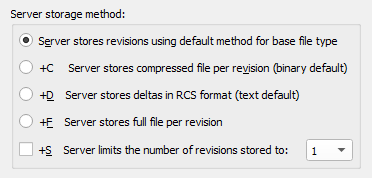
does it really? because this doesn't imply it using any fancy diffing for binaries https://i.imgur.com/cMbDdqI.png
 frank escarp
i think thats the default method it talks about
 pallid compass
wth my mesh is not getting generated simple col by default 😮 wut did they change
plush yew
where can i post for support?
pallid compass
read the channel names
 austere hinge
Iam completely new to particles in unreal..
Which one i should learn..
Naigara or cascade?
I know Niagara is new system but it doesn't have many tutorials to get started with it
plush yew
is it ok if i post a crash report in here?
astral marsh
@pallid compass just open the static mesh go into the details panel the collision will "project default" do it use complex as simple
then it should be good i guess
pallid compass
It wasent that, but thanks anyway, turns out i didnt auto gen for some reason
 cursive dirge
20GB is nothing tho
and since you don't have to transfer all that when you make a fresh clone, it's even less of a problem
cloud cobalt
It's more that files don't usually do 5GB
frank escarp
@cursive dirge until someone inevitably puts a 200 mb texture with whatever format that wasnt being tracked by LFS
cloud cobalt
Even if you iterate 10 times on a PSD for a texture, you're unlikely to have more than a few GB overall
plush yew
does anyone know if this is a problem with the game or my pc?
cursive dirge
@frank escarp then have a nice talk with that someone who can't use VCS 😃
if it's a solo project, this would mean looking into mirror
frank escarp
literally every time i tried to use lfs its been a disaster... except with unity
i used git on an unity project and it worked well
text assets + not really big source files
frank escarp
they are a getter
you get them by dragging from an object/actor pin (blue) and looking at the "get <whatever>" properties
 verbal schooner
Yeah but in this case they should get if I'm pressing a certain button
 trim tapir
verbal schooner
trim tapir
verbal schooner
https://docs.unrealengine.com/en-us/Gameplay/HowTo/CharacterMovement/Blueprints/AnimBlueprint_Walk
I'm using this link but I don't understand how to set up those nodes
dire storm
Goooooood morning UE4
 earnest pawn
hey is it possible to have global pointers to class objects in a header somewhere?
cloud cobalt
Don't do that
If you're going to have global objects because you don't want to bother with more flexible code, at least use singletons
earnest pawn
no i dont mean it like that, I have like 10 different FClassFinders and FObjectFinders in my constructors
dire storm
sometimes I feel like I'm a toddler again, surrounded by other toddlers and there's a few brave souls in here that run around saying "NOOO don't do that" to prevent us from sticking paperclips in the wall outlets 😃
 worn granite
Make a settings object
Either UDeveloperSettings, or manually register a uobject with the settings module in your game startup.
At that point, you even get a class picker.
And it saves to ini
cloud cobalt
If you have 50 identical assets that are shared across 50 different objects, then yeah, you can do one singleton UObject that holds them all
worn granite
earnest pawn
thank you
also in my character class I have a pointer to a default weapon class which is a pistol so when the player spawns in, he will have a weapon
but sometimes it doesn't spawn anything cause in my character blueprint the default weapon gets reset to nothing
pallid compass
Is there a simple method of moving your pawn from A to B?
 upper heart