#ue4-general
1 messages · Page 282 of 1
 cloud cobalt
 left ridge
much easier to do minimum spec than maximum specs....I think maximum specs will change every month....probably Quadro GV100 is top specs
cloud cobalt
Or not, because Quadro stuff isn't generally gaming optimized
 steel shuttle
Yeah
Agreed
Currently i got two 1080ti strix
Wanna build for gaming and render game
left ridge
Perhaps you should google Quadro GV100
steel shuttle
So which one is better i7 extreme or i9?
but i9 keep crashing the unreal engine when rendering
💆
left ridge
Are you sure that the problem with the crashing is the i9.....many factors can be at play here
steel shuttle
Yeah
 obsidian nimbus
do the emulate stereo command, its in there by default
left ridge
I did that but then I get SBS displayed on my screen....I'm not sure how to tell the screen to use it as SBS 3D
 frank escarp
@steel shuttle AMD stuff is also a choice
your choices kind of are Ryzen, I7, Threadripper, i9
in general, go with intel if you want more power per-core
go with amd if you want moar cores, but slower ones
frank escarp
compiling and lightbaking scales well with cores, so moar cores > faster cores
but on gaming, faster cores win
becouse engines dont multithread that well
left ridge
we have unity stuff playing in 3D on the shutter glasses projectors
but I don't know how to get Unreal stuff to do it
frank escarp
also, why 2 GPUs if SLI is broken as hell on basically everything
second gpu is there doing nothing on 99% of games
obsidian nimbus
should be the same
left ridge
I wish it was, but it's not...I don't know unity at all so I don't really have a clue what they did to get that working
obsidian nimbus
mayB it needs to be fullscreen or something
frank escarp
i looked a lot at ryzen vs intel. Eventually chose ryzen
couse i spend most of my cpu time compiling
and compiling on ryzen is faster
obsidian nimbus
play as standalone or something
frank escarp
if you have "fuck you" level money for the rig, as the dual gpus show, then your best bet could be a 32 core threadripper when it launches in a month or 2
that would be the absolute fastest perf at lightbaking and compiling and building
left ridge
I packaged it...is playing standalone
steel shuttle
So the amd is good for lightbaking and compiling
frank escarp
if you havent bought the gpus yet, do NOT buy them. New gen coming in like a month
and 2 gpus is pointless
second gpu will do nothing other than waste energy
obsidian nimbus
and fullscreen?
frank escarp
the only way you can use 2 gpus properly is for GPU rendering (CUDA and similar stuff)
like Cycles or Redshift
barely any games support SLI this days
left ridge
jip, tried fullscreen
obsidian nimbus
can u play other stuff on it in 3d?
steel shuttle
Main purpose to build this rig is for compiling. Second purpose is gaming
left ridge
"if you havent bought the gpus yet, do NOT buy them. New gen coming in like a month
and 2 gpus is pointless" ....like I said, max spec will change every month
frank escarp
a threadripper would perform like a Ryzen at gaming
left ridge
project built in unity works 100%
frank escarp
well yeah, of course it changes every time
but they are about to drop
like 1-2 months
steel shuttle
So threadripper > i9 basically for compiling
frank escarp
yes
as long as you arent bottlenecking on the hard disc
so make sure to get a NVM ultra fast SSD
obsidian nimbus
pretty sure i tossed the project i had it workin on sry
but was something with enable stereo
steel shuttle
Nvme ssd 1tb is enough i think
frank escarp
yeah
btw, one important detail
you can keep your current pc as a dedicated build machine
continuous integration, perforce server, that kind of stuff
steel shuttle
What is the max ram right now?
 whole quarry
16kb
steel shuttle
😂
frank escarp
@steel shuttle dont go past 32 gb yet
get fast 32 gb, with a good motherboard
running past 32 gb is super hard
unless you get threadripper
that one needs 4 ram slots
to run at full strenght
so you would probably run 64 gb (4 x 16 gb each), or 32 (4 x 8 gb each)
cloud cobalt
Purely useless
steel shuttle
Can you explain it?
cloud cobalt
Sure - memory is like disk space, if you're not putting anything in it, it's useless
16GB is realistically enough for mostly anything you'll do with UE4 - 32GB might be okay if you don't care about money
More than that is simply never going to be used ever
Kind of like that second GPU that will only work in upcoming SLI games, which aren't going to be a huge lot
whole quarry
I never exceeded 8gb in UE4
frank escarp
@whole quarry you go past 8 gb in ue4 super easy
try to open 2 ue4 + some 3d program + browser + visual studio and you are out
16 is the good option now
32 is for a bit better future proofing
i dont really go past 20 gb of ram
 plush yew
is there a node for AI "if sound, go there"
whole quarry
why would I open 2x UE4?
and when I open Blender, Browser, some music program etc, its not UE4 that use more RAM 😛
In total, ye, I exceed 8gb easily
plush yew
chrome uses ram 😃
a lot
more than UE
!!
a fucking browser with nothting but text...
no renderings.. no thing...
stil 2gb ram for chrome
cloud cobalt
Browsers actually basically render full 3D scenes with OpenGL
whole quarry
chrome is obsessive with spamming processes
cloud cobalt
Plus an entire programming language
And web developers don't care about performance much
frank escarp
@cloud cobalt they dont
its software rendering
full 3d scenes is what Servo is experimenting with (GPU render, written in rust, mozilla experimental division)
cloud cobalt
Oh, thought they already did.
 wary wave
I've exceeded 8GB just playing UE4 games
I've also exceeded 24GB whilst testing gameplay
cloud cobalt
Though chrome://gpu/ does give me plenty of GPU stuff.
wary wave
in both of those cases I'm talking about a single instance of the game / the editor
frank escarp
13 gb usage
barely nothing more than unreal, oculus (becouse im doing vr dev),VS, and chrome
if i start opening Ps4 debug tools, i go to 20 gb easy
and having 2-3 instances of VS open is very common
it also shoots up 1-2 gb when im doing a build
so you can see how its at the limit for 16 gb
 high wolf
Hey guys
How can I make a Laser Sight for my gun? I tryed creating one with a Spotlight but the laser keeps going through the objects
 naive otter
@high wolf if you check the shooter game example, there is a VFX for making bullet trails you should be able to use that as a base.
high wolf
how can I get this Shooter game?
naive otter
learning tab on the launcher
 harsh tiger
Does anyone know why this build failed? I attached the output log. My project isn't massive, I just wanted to test a build to see if it worked but after 8 minutes of building I got a error message at the end.
cloud cobalt
Game/Motorcycles/Off-Road/Blueprints/Off-Road_Backup.Off-Road_Backup has errors
/Game/BPS/CameraSwitcher.CameraSwitcher too
/Game/BPS/CamChanger.CamChanger
Look at these
harsh tiger
i deleted the motor cycles stuff as i don't use it now more and i just opened the cam switcher bp and they was casting to a ball i had made in another project and that's where i took the bp from. just copy and pasted into this project and the ball doesn't exist in this so that's why it was failing. I never noticed it before haha and its been like this for over a month! thanks
 tawdry raptor
how come my object moves as 2 different objects how can I make them move as 1
my radar screen gets disconnected
 tawdry narwhal
I've made a video on how to set up shop as a solo indie game developer using UE4. I cover the tools, their costs and my character creation pipeline. First YT video, so bear with me. Feedback appreciated!
https://youtu.be/sz2ZnRSp2YE

How to set up shop as a solo indie game developer using the Unreal Engine 4. A list of tools, what they cost and a walkthrough of the character creation pipe...
 raven kayak
man, working an 8 -5 . I can't see how I'd be able to make a game in my spare time.
cloud cobalt
Depends a lot on how long your commute, whether you have kids, and what you enjoy doing on your spare time
It's very doable
raven kayak
just gym, food prep, cats and dogs, and gf
cloud cobalt
I'm typically at home at 6, so 3 hours of work in the evening is very possible. Not every day, but a few times a week. It adds up
tawdry narwhal
it's doable if you start besides your job and later save up to cover a couple of months' worth of living expenses
raven kayak
last time i touched maya was in 2008 at college. i'll need to relearn 3d modelling etc. and start to learn unreal aswell 😮
cloud cobalt
I've been working part-time on game projects for basically 6-7 years now, still have a day job that covers for everything
 limpid sandal
am i late for opengl chit chat xd
cloud cobalt
Though I live in France where work time is generous too
limpid sandal
Stranger is your main job CS-related?
cloud cobalt
Yeah, programming on consoles.
limpid sandal
OS stuff?
cloud cobalt
Nah
limpid sandal
It's ok, still cool to me :)
I'm still at college, some folks that graduated opened a game development company and its right down the corner actually -- and they're doing pretty good for 5 man team
I got invited to a 'We survived greek tax for a year' party
tawdry narwhal
I saw this gdc video where a guy with wife & kids explains how he was able to get by for 10+ years as a solo indie game dev
limpid sandal
That's intresting
tawdry narwhal
so it's definitely possible
limpid sandal
indie or contractor tho
tawdry narwhal
he's / was both
if you watch my video I actually get to the costs - comes out to around €100 / month plus taxes
limpid sandal
Contractor without a super background is super hard to find companies to work for afaik
tawdry narwhal
(I've also included the link to the powerpoint I'd prepared & used in the video)
limpid sandal
Depends on the area too; I dont think you can find many indie devs on lets say, bay area
tawdry narwhal
well it just takes time, like everything else
the more people see your name the more likely you'll get approached for contract roles
limpid sandal
I was doing minecraft mods, then I launched a crappy game on Steam and now with univ im all over the place; android apps, react apps, some backend stuff, still not sure if I want to choose gamedev for a career :/
cloud cobalt
Basically my life dream is to own a nice house in a small town, not depend on a day job, and work on personal projects. I'd rather put the brakes on personal projects now rather than quit the lucrative day job
I figure that's kind of the safe way
 languid shard
sooo, retirement ?
limpid sandal
That's what everything would want to do imho
tawdry narwhal
@cloud cobalt there's actually quite a few opportunities in france for funding / making games. It's one of the better countries out there in this regard.
cloud cobalt
There is, though it's definitely geared toward companies that actually hire people. We set up ours as a side-job thing with no employees, and I think we weren't allowed to much of these
limpid sandal
Reminds me of Notch, he wasnt allowed side projects while working in amazon
side commercial ones at least
languid shard
germany has quite the lot of indie funding aswell
cloud cobalt
More to the point, we really didn't want to quit the day jobs, since we're lucky on that front - side projects allowed, really great pay, really great job.
limpid sandal
Does it keep you up to date with technology and methodologies and engine updates etc?
cloud cobalt
Yeah
limpid sandal
then its amazng
 vale osprey
@raven kayak you can squeeze plenty of time if you set your priorities and can monitor for burn-outs
a weekend can be used to get 10-12 hours of work per day
if you optimize commute, optimize cooking process, get rid of GF and pets, you can get about 3-4 hours a day extra
tawdry narwhal
w/ gf as well. you can even bounce ideas off of gf.
vale osprey
so it becomes 35-44 hours a week
@tawdry narwhal yeap 😄
I'm calculating more of an extreme case, but just saying that if you really want to, you can find time
 tall pendant
@languid shard Not really. We mostly have prototype stage seed funding. In form of conditionally repayable loans which are capped at ~100k Euro for the biggest ones.
tawdry raptor
HOW COME
how come I cant use the materials and textures that came with the gun?
no matter what they come out white
languid shard
eh
 grim ore
depending on how you brought them in they might just be placeholders until you set up the materials
so pop open the materials and set them up. Seeing as how it's a diffuse and a normal it shouldn't be too much work.
tawdry raptor
I did but it wont make it look like it should
I can see the ammo counter its a jpeg texture but it turns red when I try to put it in the materials place
grim ore
the material is your shader, or the thingy that determines how stuff looks on your model. You open up the material and you can assign textures to the different parts of the material. a texture in the diffuse slot, a normal map in the normal slot, etc.
https://docs.unrealengine.com/en-us/Engine/Rendering/Materials with https://docs.unrealengine.com/portals/0/images/Engine/Rendering/Materials/IntroductionToMaterials/WoodFloor.png being a pretty basic example of a basic material setup

 cedar snow
DataTable's can be populated from CSV or JSON (via context menu)
DataAsset's can't
so ... has anybody written a blutility for importing CSV or JSON into a DataAsset?
😄
 hot ledge
does anyone know how i can spawn a wepon in both the first person arms and thirdperson body
grim ore
I would assume spawn in 2 weapons and attach them to the 2 parts?
hot ledge
when i spawn the first weapon in first person arms in spawns correctly but then it shows up on the thirdperson too but it levitates in the air because theres no socket on the thirdperson to attach to
grim ore
You can set an item to show only to self, others, or both and you can also change thevisibility. IF your using 2 models (FP Arms and 3rd person mesh) then you would probably need 2 separate weapons to attach. You can create socket in the skeleton editor.
hot ledge

its working but in the client no so good the weapon is already server role and replicated @grim ore
grim ore
sounds like you just need to find the right settings for server and client so they each spawn and attach them to the correct things
raven kayak
looking at 3d models, where does one decide what should be a bump map vs a seperate piece of model. on a character for example
plush yew
how to duplicate these 3 components on each door frame? https://lh3.googleusercontent.com/-_0jTQ5Tg6uQ/W1oXheYXdFI/AAAAAAAADss/qzDiFJqaimIGD7ofP2fZjb8QYcQ0Z0lAgCHMYCw/s0/UE4Editor_2018-07-26_20-48-31.png https://lh3.googleusercontent.com/-Qh-XPjdBTHU/W1oXraY3r9I/AAAAAAAADsw/kN45csqrumIUQoUtkgWKA4m-O4i6Hw1MgCHMYCw/s0/UE4Editor_2018-07-26_20-49-14.png


ctrl+w doesnt work
door gets huge...
 worn granite
You might try selecting the thing you wanna copy, copying it (via Ctrl C), then selecting its parent and pasting it.
No clue if that works, just a suggestion
plush yew
it works.. manually every item for its own. but not when is elect the group
 trim trail
does anyone have idea, why inside orthogonal projection camera, lights dissapear? because of range, or am i missing something?
im trying to get isometric camera like in old 2d rpg games
with cut walls and so on
cine camera shows lighting properly, but it has no ortographic projection
high wolf
hey again
I have an issue
I'm using raycast to shoot in my First Person project and the weapon is casting two line traces, one for the direction of the camera and another from the weapon , when the camera LineTrace hit an object, the weapon LineTrace ends in the Impact point
but, here is the problem
not always the Weapon LineTrace hits the target
sometimes it go through the target, sometimes it hits
high wolf
How can I fix that?
 naive furnace
I am still entirely new here, but the question crossing my mind is whether the entire linet trace is a damaging component, or just the point at the end of it?
high wolf
the point
naive furnace
So, is the point actually behind the target when it goes through it?
naive furnace
The usual problem I have with actors not spawning has to do with collision settings for that actor.
Maybe this is similar
high wolf
the actors have the exact same collision settings
naive furnace
Again, I am entirely new, but I wanted to throw my thoughts out there for you to ponder on as possible places to look.
naive furnace
My pleasure.
high wolf
anyway, I'm looking for an "substitute" for this system
spawning the actual bullet, I don't know
naive furnace
Is it intended to be a ray type weapon, or a projectile type weapon?
high wolf
projectile
naive furnace
The first person blueprint example has a projectile situation in it. I build off that one.
naive furnace
Ok, how so?
high wolf
the gravity os the projectile is different
I know I can change it later but
that's not the actual ideal
naive furnace
Are you wanting no grav?
high wolf
I want an "Resident Evil 4" type weapon
naive furnace
You'll have to enlighten me, I havent played the series
high wolf
Oh
ok, so
when we shoot the weapon
it doesn't have a projectile
the bullet immediately hits the target
even with a sniper rifle
naive furnace
Ahh
high wolf
aaaaannnnddd
I just noticed that
if I increase the bullet velocity, the collision get all weird
naive furnace
It will do that.
naive furnace
I had that problem as well.
 manic pawn
https://i.imgur.com/T6w1S24.png you would need to make the second line trace longer, to go behind the hit point of the other, else float point inaccuracy might make it think it ended just before the object

or just assume "nothing hit" as "the path is clear"
naive furnace
This screams ye ol' rail gun to me.
 tall basin
hey guys, i'm trying to do a spawn sound attached to the player character, like a relative position near them and have it travel with them. but i'm not hearing it. what should I be doing?
 paper kernel
you need to also set it to play
if you spawn a new sound component
iirc they don't play automatically
 steady hinge
If I am going to be creating a large amount of dialogue, would it be most efficient for me to keep a separate blueprint for each individual conversation.
I have a handful of different widget menus that I will be using, and I am just trying to plan how to best set this up.
grim ore
Is it just the dialogue that is changing or the entire layout and widgets used? if just the dialogue set it all up in a data table then pull it in as needed might be easier
 faint cedar
Hey, anyone here have experience with using graphics programs with the Ryzen 2XXX processors? What about Vega64 cards?
I'm talking Substance Painter, Photoshop, Maya, Zbrush
steady hinge
I am going to be having at least 4 different widgets that I use for dialogue, but 90% of the time it will just be the dialogue changing.
Also, said widget is just going to be cosmetic vitiations of the original widget.
harsh tiger
anyone know of a work around for this nav mesh issue
 flat marlin
@grim ore Okay so i eventually got it working on a project but every time i try to come back to the one i want it has that error even though i have the right things installed. "right things installed"
 candid cypress
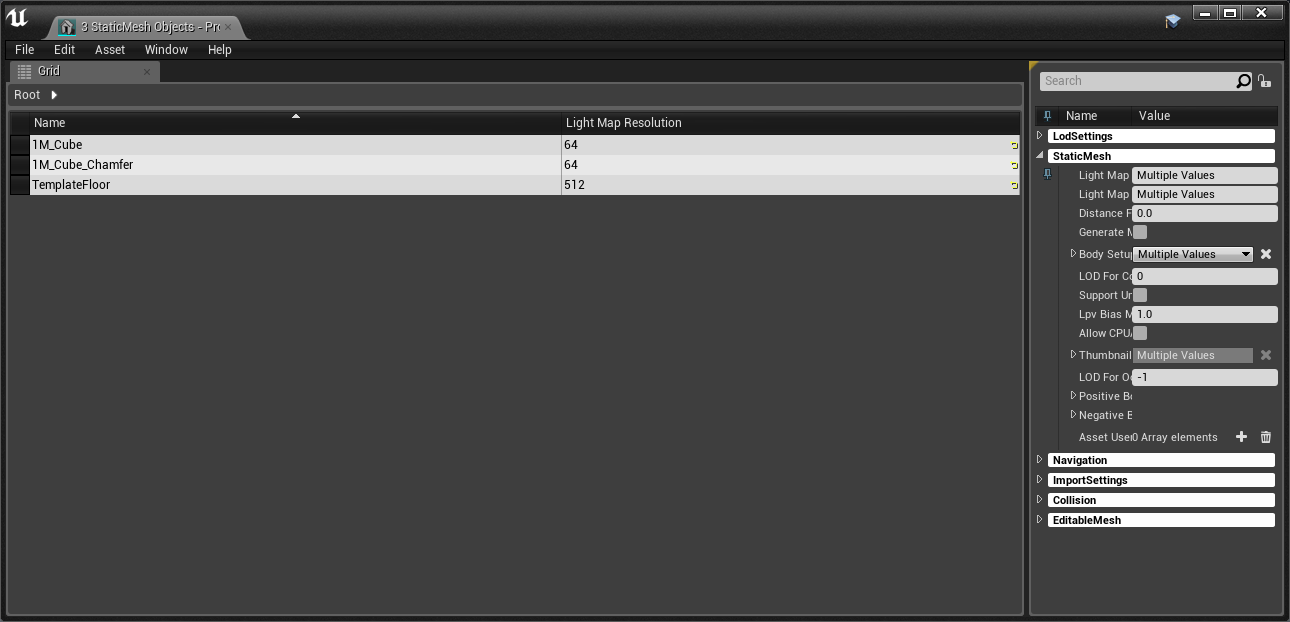
Is there a way to mass see all the light map sizes of individual objects?
grim ore
like this @candid cypress ? https://i.imgur.com/gJXmBtg.png if so you can right click when you have some selected, go to asset actions -> bulk edit with property matrix. then you can pin any of the values on the right to show them in the grid
 candid cypress
yes, Thank you!
flat marlin
any help?
grim ore
No clue here. Delete the project and try it again now that you have other projects working? the project works but I don't have any more guesses on why it doesn't work for you.
flat marlin
is there a certain way i have to unzip the project
i unzip it then put it into unreal projects
grim ore
nope just unzip it anywhere, right click the uproject to generate solution, open it up, hit ok for compiling out of date, profit.
flat marlin
right... probably asked this before. having both sdk 10 and 8.1 doesnt cause any conflict does it? or am i still... missing something
grim ore
nope. I have 2017, C++ desktop, sdk 8.1 and 10 and I can open that project in 4.20 and 4.19
flat marlin
im supposed to make models run on this. im tempted to just let the author fix any compatibility issues and make my job easier because im not dealing with this
one last look over what i have on VS
grim ore
Don't see anything wrong. Its basically what I have with the exception of you having the C++ Game dev stuff which basically overlaps with the desktop stuff
if the error is it still cant find the vs 2015 then something else is weird, maybe a remnant from an older VS install or something similar. It should be detecting 2017 is installed and using it
tall basin
I've got a volume attached to my play blueprint that I want to stay locked to world XY rotation
so when you rotate, this box stays relative to the world instead of rotating with you
is this possible?
flat marlin
maybe this 2015 Vs here? since i can assume it has nothing to do with 2017 in any way
i didnt check after 2017 was uninstalled
 frosty bloom
@flat marlin Wouldn't GameDev WithC++-> Optional -> Unreal Engine Installer possibly affect your situation?
flat marlin
im pretty sure thats just the installer for UE4
why would there be an installer for UE4 in VS
im gonna have to double check that now
yeah that says its basically the installer
 crude jasper
hey guys
got a problem
I just changed from pawn sensing to ai perception
its rly weird
cause when the AI is facing different ways it rotates faster or slower
._.
any tip ?
wait i think i know the problem
im pretty sure that the natural position of the AI Perception is not aligned with the Head of the AI
What can i do to change the position
im using it in different positions tough ._.
anyone ?
 zenith charm
plush yew
zenith charm
plush yew
can someone explain depth-first search to me like I'm 5?
or any other method to "map" a network of interconnected buildings, determine many tiles apart they are, etc?
steady hinge
Ok, I got my data table working.
plush yew
is it normal for UE4 to take an ungodly amount of time to start on linux
at least, the first time 'round
and does it get better
 grim sinew
It's normal for UE4 to take an ungodly amount of time to start on any computer the first time
plush yew
Didn't take this long on windows...
like I started it 10 minutes ago and it's only at 45% init
....THEN it jumps to 72%
god damnit you meddling Epic Games developers
manic pawn
45% is compiling global shaders
manic pawn
the opengl stuff is just way crappier than directx on windows
plush yew
well, you're on windows right?
manic pawn
yeah
plush yew
I'm on linux
manic pawn
why
plush yew
because linux can do something that windows cannot do.
manic pawn
which is
plush yew
something that I've always wanted for a multimonitor setup.
manic pawn
so far I have only experienced linux not being able to do tons of things I can do on windows
manic pawn
? windows 10 can easily handle different dpi per monitor
manic pawn
magnifier?
plush yew
That zooms you in as if all the monitors are one massive monitor
Compiz Enhanced Zoom Desktop doesn't do that.
manic pawn
I'm not really sure what you mean
plush yew
well, I'm visually impaired right?
I need software to let me zoom in to my desktop, pan around etc
manic pawn
oh
plush yew
Windows Magnifier does exactly that
but it doesn't support multiple monitors very well
manic pawn
never heard of such a thing, sounds interesting
plush yew
whereas Compiz handles it extremely well
basically what I can do is, on one monitor I could have an Unreal Engine 4 tutorial video playing in fullscreen
not zoomed in because it's a video
then on the other monitor I can follow along in my own UE4
and I can zoom into it, pan around, etc
without affecting the monitor that's got the tutorial playing
you can't do that on Windows
manic pawn
I mean that kinda sounds like how you'd expect a software doing that to work
there's really nothing that can handle this for windows?
plush yew
well on Windows, instead of doing the zoom per-monitor like I described
it sorta treats the monitors as if they're one big massive desktop
manic pawn
sounds fail
plush yew
plus I can compile and install UE4 with one command
(well, after adding an SSH key to my system to access my github account so I can get on the private ue4 repo)
yay -S unreal-engine
manic pawn
yet you can't install vs and there is nothing even remotely comparable on linux
plush yew
my friend swears by it
he also built the distro of Arch that I used to install normal Arch on my system
manic pawn
working with unreal without visual assist for autocomplete and navigation would be very slow
plush yew
How does Cryengine 5 hold up to UE4?
 leaden garnet
wdym? overall?
Overall UE4 wins by a mile
in terms of the realtime rendering thats special in CryEngine for vegetation and hyper realistic water, Cry wins. @plush yew
plush yew
@leaden garnet And AI wise?
leaden garnet
That I cannot comment on. When it comes to AI, I'm not that good.
plush yew
I want to learn level design, but I can't find many free assets for it...
Anyone got recommendations for free assets?
leaden garnet
Level design? In the Epic Games Launcher under "Marketplace" (under Unreal Engine) find Soul: City and Soul: Cave. Those are free assets. Hell, Paragon Assets under "Epic Showcase" also has a few level assets. @plush yew
leaden garnet
Will take a while for em to update. In the meantime, see if the Infinity Blade assets have been updated.
Never mind that, infinity blade isn't updated either
plush yew
I'll try and see if I can update them myself.....
@leaden garnet Are there any good level design tutorials?
leaden garnet
Hmmm
Out of curiosity, is there any specific type of game that you want to do level design? FPP games? TPP Games? @plush yew
plush yew
I tend to play FPP games more, but TPP game generally have more story, so I'm not sure..... 🤔
at the moment I'm testing the waters on all aspects really
leaden garnet
If it's something general, here's how you typically do level design:
- Prototype Prototype Prototype. Never build a full level, unless you know what to do.
- What experience are you trying to deliver? What are the themes of the game? Is this the level where the story is combat dependent?
- What are some objects/meshes that give clues to the player? Utilize at best.
Testing waters on all aspects? Cool. What FPP games do you tend to play?
I know the whole 1,2,3 points are more for someone working on a commercial project but, I went in another direction there, lol
plush yew
Escape From Tarkov, Arma 3, Insurgency, etc
I like realistic gameplay! 😃
But I have been eyeing The Last of Us for a while now
leaden garnet
Realistic Gameplay? Sounds fun, but keep in mind, developers never know what the final version of anything looks like.
plush yew
@leaden garnet Yeah! 😂
I mean the AI in The Last of Us was completely reworked 5 months before release! 😂
leaden garnet
Exactly....
Either way
Gimme a sec to post some stuff related to level design
Free Assets from Epic Games:
Under Learn Tab:
Find:
- Reflections
- Sun Temple
- Blueprints (HIGHLY SUGGEST)
- Shooter Game
- Vehicle Game
Under Marketplace:
Click the "Free" Tab on the top next to the search bar.
- Paragon: Agora and Monolith Asset Pack.
- Soul: City
- Soul: Cave
- Infinity Blade levels (there are 3 maps in total)
- Scifi Hallway
Tutorials:
Intro to Level Design: https://www.youtube.com/watch?v=XDsJOFyxMnw
REFERENCE PLAYLIST FOR ALL TUTORIALS: https://www.youtube.com/playlist?list=PLZlv_N0_O1ga0aV9jVqJgog0VWz1cLL5f
@plush yew

In this video, senior designer Jim Brown demonstrates how the new UE4 toolset simplifies the level design process at Epic Games. A link to the wiki for furth...

YouTube
Video Tutorial Series Categories: Live Training Stream
plush yew
@leaden garnet Thanks man! 🙂
leaden garnet
Your welcome
plush yew
@leaden garnet What kind of games do you develop or what do you do the most in UE4?
leaden garnet
Mostly First Person Shooters, but I usually play around RPG Games. Right now just gonna chill a bit.
@plush yew
plush yew
I'm mainly working on AI at the moment (level design is a side project). Might be able to give you an AI to use in your shooter someday! :3
plush yew
@leaden garnet
leaden garnet
Oof thanks @plush yew
plush yew
I mean, the AI once nearing completion will need testing, and I don't know of all the issues that can arise since I'm relatively new to UE4
 austere hinge
Event touch begin is only firing when I touch in some parts of the mesh.. Why??
Iam trying to change mesh when I tap..
I have sofa
When I touch on top of the sofa. Mesh is changing..
When I touch on bottom of sofa mesh is not changing
Using 4.20
whole quarry
@austere hinge Use this to debug it: https://api.unrealengine.com/INT/BlueprintAPI/Game/Player/GetHitResultUnderFingerforObject-/index.html
Get Hit Result Under Finger for Objects
cloud cobalt
?
 velvet ravine
Hey Everyone, Quick one here, I was messing with Unreal other day and found a option to turn of in editor UI to take a screen shot. Now i cannot find it for anything can someone jog my memory plz 😉
found it lol
plush yew
lol
velvet ravine
always the way as soon as i ask lol
plush yew
fastest ever correction haha
velvet ravine
as soon as i pressed entere remembered it was under settings Tab lol
Hide Viewport UI
 fierce nacelle
Does anyone have any experience with Unreal 1 and is also willing to lend a hand?
fierce nacelle
The actual Engine itself.
cloud cobalt
Not sure there really was a specific engine at that time
There was the Unreal code, the Unreal Tournament code
wary wave
they licensed it to about ten other people
but even so, I don't think you can get an 'Unreal Engine 1' from anywhere
leaden garnet
why not ue4? is there something really special with the first iteration?
cedar snow
is there a way to walk a nested StaticMeshComponent hierarchy?
GetComponentsByClass on Actor returns them as flat list
fierce nacelle
@leaden garnet because I'm working with a game made in that era
wary wave
that's kinda why I asked which, because they're all based on different versions of the engine
Unreal and UT are the obvious ones
I guess Deus Ex is another
tall pendant
theres also Wheel of Time and Klingon Honor Guard.
fierce nacelle
(note: I've never worked with UE before so I apologize if I'm unclear)
cloud cobalt
The gist of it is that UE1 was kind of sold as a huge batch of source code and buyers would customize it into their own game, so there wasn't like one unified engine like there is now.
Probably less than 1000 people across the world worked on it too
fierce nacelle
That explains why I'm having such a hard time. haha
wary wave
that and it's more or less 'pre-Internet-age'
broadband wasn't widely proliferated in the 90s, and most websites that might have contained information have long since disappeared
best bet would be finding dedicated modding communities for the specific game, if they exist
fierce nacelle
I'm pretty sure they dont
cloud cobalt
Then you're probably just in for reverse engineering the thing
Some people have experience with UE3 on some level, it's closer to UE4 and plenty of the tools in early UE4 were literally from UE3
Anything older than UT3/Gears, you won't find much
fierce nacelle
I'm realizing that now
cloud cobalt
Which game are you trying to mod ?
fierce nacelle
Me and a couple of other guys are trying to optimize a speedrun for XCOM: Enforcer (dont ask why, im not sure either)
we're trying to reverse engineer an event dispatcher and ended up hitting a wall
plush yew
I want a better computer
i cant continue my projects anymore :(
 winged crypt
4.19.1 crashes every time I try to delete a landscape component
is this a known bug?
plush yew
How can I view the value of blueprint nodes while in PIE? (Without breakpoints)
Nevermind, I figured it out
whole quarry
👍
austere hinge
Iam using complex Collison for my mesh.. It's awesome and iam planning to use it for every mesh..
Does it have any effect on my project like fps, etc
austere hinge
How much fps will it decrease? @whole quarry
Just tell me estimation @whole quarry
austere hinge
@obsidian nimbus😂 😂 😂 😂
cloud cobalt
Also, it's definitely not a great idea at all to use this collision type.
You're going to have players blocked in it
whole quarry
I think for environmental stuff, Blocking Volumes are in many cases cheaper to use
im not a level designer tho 😛
cloud cobalt
I actually got UE4 to crash in PhysX this week because of per-poly collision like that
It's a tool in the box but it shouldn't be the default
whole quarry
As I see it, any frame lost is a frame lost too many 😄
obsidian nimbus
yea but he might have super cheap mechanics and cpu is not the bottle 😛
than it wont cost fps 😛
cloud cobalt
You're not going to lose a whole frame for that either just by using that
whole quarry
Isnt it taking more calculations per 'collision face', thus reducing render time?
or am i seeing it wrong?
 sudden agate
speaking of collisions, is there a fast way to create a blocking volume to cover gaps?
cloud cobalt
It takes more calculation, but it's not that high either
IMHO the real issue is how this usually leads to tiny objects blocking the player, or objects getting stuck, etc
obsidian nimbus
i thought collisions were cpu mostly
austere hinge
I used this collision - - - >collision - complex collision
cloud cobalt
Yeah, we figured 😛
It's just not a good idea to use it everywhere
Only use it when you really can't work around it
In your case, modular design is what you need
Unless this is just a decorative mesh you showed
If you intend to walk there, don't make it a single mesh, don't use complex collision
austere hinge
What about making making collisions in maya and importing them
cloud cobalt
Works too.
whole quarry
thats the normal work flow too 😛
austere hinge
Hahaha
whole quarry
There are also some other "pre made" collisions that you can use/enable from the Engine (cheaper then Complex), see:
https://docs.unrealengine.com/en-us/Engine/Content/Types/StaticMeshes/HowTo/SettingCollision
austere hinge
Iam planning like this
I have mesh in maya I'll combine it..
I'll duplicate the mesh and use UCX name and make collision out it it... It's not cpu heavy right
tall pendant
better use more simple geo for collision
cloud cobalt
My take on this is, if your mesh needs anything more than box collision, it's not a good mesh.
Kind of an exaggeration but not that much
whole quarry
@austere hinge There are also some 'rules' for collision, you cant just copy-paste its mesh
tall pendant
yup. you can get away with much much lesser detailed geo for collision
 karmic thistle
Guys, I was working on a EndlessRunning Game with UE4 V.4.16.3, but now I`m working on the 4.20, but my Character Stopped rotating when pressing A or D, Where shouuld I take a look?
austere hinge
Tq guys for ur answers..
And in 4.20 iam not able to see edit mesh option in static mesh editor
whole quarry
the 4.XX.0 are usually having some baby deceases, thats why I always wait for the 4.XX.1 as minimum 😛
 elfin jacinth
Unreal Engine Forums
The 4.20.1 Hotfix is now live! This Hotfix includes important fixes for importing FBXs and crashes with forward shading.
Feel free to discuss this release on
karmic thistle
yeah I`m updating right now
whole quarry
thats quick
plush yew
anyone can help me in #level-design ?
 warm mountain
is it possible for us to set blocking volumes as subtractive/negatives?
so say there is collision on a static mesh but i would like to use a blocking volume to subtract the middle of the mesh's collision
 teal tulip
No
karmic thistle
nope, V. 4.20.1 didnt fixed my problem, I had to go to 4.16.3 again, don`t know why 4.20.0/4.20.1 doesnt allow me to Rotate my character with A or D
🤔 🤔 🤔 🤔
warm mountain
rip
 gentle crypt
whats updated in 4.20.1?
 latent terrace
hey, probably a noob question, I got a sequence in the sequencer, how to I view it? 😄
gentle crypt
double click?
latent terrace
yeah but then I click play and I hear the sounds but I'd like to see stuff too!
gentle crypt
could u do a scereenshot? I cant tell whats going on
latent terrace
gentle crypt
you are using Cinecameraactor2 but in the camera cut it shows CinecameraActor.
you need to put cinecameraactor2 in camera cuts
latent terrace
ok I'll try 😛 thanks
plush yew
ugh ue4 on linux is getting on my nerves rn
[riolu@michael-tower ~]$ /opt/unreal-engine/Engine/Binaries/Linux/UE4Editor
/opt/unreal-engine/Engine/Binaries/Linux/UE4Editor: symbol lookup error: /opt/unreal-engine/Engine/Binaries/Linux/libUE4Editor-Kismet.so: undefined symbol: _ZN26FGraphEditorDragDropAction9ConstructEv
[riolu@michael-tower ~]$
my install keeps breaking
when I load my 4.19 project and try to convert it to 4.20, let it compile my C++ code, etc, it crashes
then that happens.
yet when I create a new project, it's fine
plush yew
well, I REALLY don't want to use Windows.
manic pawn
maybe you could use a larger monitor instead of this magnifier tool?
plush yew
I really don't like large monitors
plus my desk can barely fit my 3 monitors as it is
and I have a 22 inch BenQ GW2270, a 26 inch TV, and a 16 inch TV
there are way more reasons I'm sick of Windows anyway.
cedar snow
16 inch TV?
plush yew
yeah it's old
all the unused tech in my house, instead of going in the trash, if it still works, goes into my development environment
I always find a use for things
anyway...
is there somewhere I can go to get quick support with fixing up my ue4 on arch linux
google is... not very conclusive
I still have my local UE4.20 arch package so I can run pacman -U on it to reinstall but...
that only gets it booting again. Once I load my game's project, it's fucked.
 next badger
Is it possible to find install logs somewhere?
 cursive dirge
 silk torrent
Is there a way I can add extra options to the play dropdown menu?
 bitter iris
you making takeshis castle in a game lol?
 carmine wind
does someone know how can i have a clock that shows the time of were you live in game
tawdry raptor
How come my guy won't show normal
Everything looks like textures show up but why is he liked this
grim sinew
Have you tried importing your normal map first off, also your face's normals are flipped
tawdry raptor
What do you mean normal map? I'm using the vr controller map
That came with the engine
grim sinew
Not what I meant.
tawdry raptor
I just want him to look normal but I don't understand why he don't the texture are connected to the materials
I fixed my gun by connecting the texture to the materials
@grim sinew do you know what I'm doing wrong?
It's driving me mad
 digital anchor
dont use the word normal, it has different meanings :p
start by studying what vertex/face normals and normal maps are
you may fix most of the problems when u understand
then check out the UVs, (if you dont know what those are, google it too)
lastly check if the correct materials are on the correct slots
 latent moth
all, how can i get minX, maxY, minY and maxX of a landscape?
steady hinge
Does anyone know what this 'Dialogue Context' thing is good for?
high wolf
Hey Guys
I have another problem
I created a gun that shoots with line traces
but
This is happening
The front and the right sides of any object receive the hits but, the back and the left sides do not
the collisions of the walls are exactly the same
manic pawn
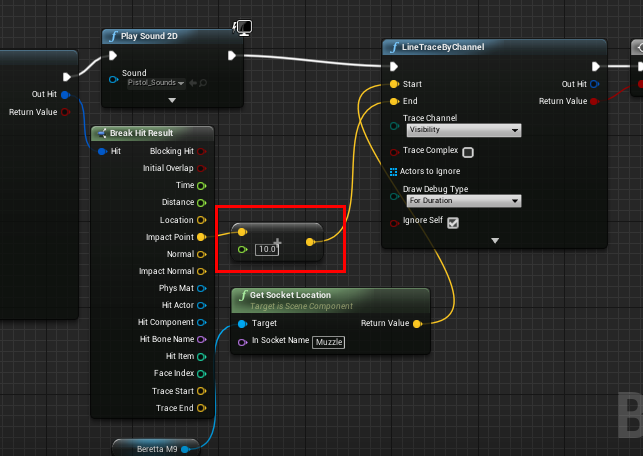
what are you trying to achieve with this? https://i.imgur.com/Oe4X6jr.png
 high wolf
I asked something about this gun with line traces
and the gyu who helped me told me to do that
manic pawn
this will offset the end point diagonally by 10 units, always in the same direction
I don't think that's what you're trying to do
high wolf
because the target wasn't receiving the hit
and he told me that I need to make the line has to be a bit longer than the impact point of the first line trace
 abstract marsh
Hey, is the unreal market page working for anyone?
manic pawn
nop
abstract marsh
I thought it was just me lol
After watching Black Mirror I got scared xD
Okay, that's good.
I found a really cool system on there too...
I'll post it in #fab
digital anchor
wait why are you doing 2 traces
high wolf
the objects doesn't receive any hit
@digital anchor the shot must hit the target immediately
like Resident Evil 4
high wolf
oh
digital anchor
you trace then you trace again
high wolf
the first trace is coming from the center of the camera
and in the impact point of this first trace decides the direction of the trace from where the crosshair is aiming
digital anchor
well, +10 is not doing what you think, +10 is not 10cm longer, but 10 in each axis, which will make it go diagonally
thats why it only works at some places
high wolf
ok, what axis do I have to add 10 units?
digital anchor
the axis of the direction
Normalize(HitLocation - StartLocation) will give the direction, multiply by 10 and add to the EndLocation
high wolf
you mean the Impact point - Trace Start?
digital anchor
ye
high wolf
ok
I'll try
ok, I used Print String to tell the result
butttt
you mean the Gun Trace or the Camera Trace?
high wolf
ok, I'll try
It's everything crazy here
look at this
this one the trace went backwards
 hot drum
high wolf
hot drum
high wolf
the nodes
 digital anchor
you are missing some stuff
high wolf
me or @hot drum ?
digital anchor
Normalize(HitLocation - StartLocation) will give the direction, multiply by 10 and add to the EndLocation
u
after HitLocation - StartLocation, you need to put a node called NORMALIZE
high wolf
oh
digital anchor
then Multiply by 10
then ADD to HitLocation
then plug on EndLocation of the next trace
show me the nodes once u finish
then i will explain again what it does, not enough to just put them there gotta learn
high wolf
this ADD?
high wolf
like this?
digital anchor
yes, but you gotta add the hit location
impact point* i keep mistaking sorry
so it needs to be a Vector + vector, you have a vector + float there
high wolf
like this?
high wolf
sorry, I'm brazilian I don't understand english veeeeeeeeery well
digital anchor
lmao
high wolf
olha só
high wolf
Ok, let's continue in english so anyone can understand us
digital anchor
👍
manic pawn
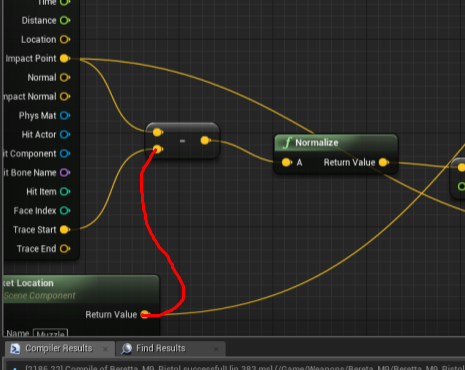
p sure you should have this https://i.imgur.com/iYHn5of.png
 digital anchor
oh yeah, the start of the second trace is from the gun
digital anchor
gotta do what zeblote said, else wont work
digital anchor
👍
did u understand the math there? you first find the distance (HitLocation - TraceStart), then the direction (normalize), scale 10 centimeters in that direction (multiply by 10), then you sum that to the location
digital anchor
there is a couple known bugs with orthogonal
but seems as not many people use it, its not a priority
trim trail
oh damn
i wanted to make a isometric 2d old rpg view
cinema camera doesnt have ortho mode
neither viewport
digital anchor
ive seem people doing it with a 5 fov camera, but no idea if its a good choice
vote, ive heard that if we reach the thousand they will fix :p
trim trail
haha
plush yew
Any ppl here that used to rig up some characters for ut3??
Or have any experience in it
Need some help
harsh tiger
does anyone know why in my game my zombies spawn and come out of the ground fine. but when i make a build the zombies are spawning under the map
harsh tiger
they spawn underground in the exe build but above ground when playing in the editor... any idea why? if so @ me so i see your message!
grim ore
are they supposed to spawn in the ground and move up or above the ground? If above the ground have you tried being really silly and putting them up another 20 or so to see if they fall into the world and work? If so maybe your actual spawning is not in a safe spot
I mean it's weird but maybe your level is spawning in the characters then the level is finishing loading on the build version and in the editor version it is reversed.
 sterile narwhal
I'm trying to run the Turn Based Strategy sample project from the Learn section, but when I run it, it's really dark. Is there a more recent version of it?
grim ore
well the latest version would be on the launcher and it would be for the version you chose when you installed it. Now is it up to date is a good question lol. Maybe the lights got messed up when they changed the defaults
What engine version are you testing it in?
grim ore
I just tried it in 4.20 and it seems fine in terms of light/dark
sterile narwhal
I get this:
grim ore
oh yeah wow I do not get that, did you load up the default map? in the maps folder
sterile narwhal
No. But, now that I did it's the same. 😐
grim ore
hmm.. I installed it right from the learn tab targetting 4.20, Im using 4.20.1, loaded up the defaultMap and it worked first try in terms of lighting .
IF you go forwards towards what looks like a light do you have some lighting?
ooh
ok so if i disable the post process volume that happens for me as well
maybe check to see that yours is enabled and unbound
sterile narwhal
Oh, yeah I think I went through a tutorial that told me to do that. Thanks.
(Although that was in 4.19)
grim ore
yeah ok its the fact there is no light in the level at all and the post process volume is using an ambient cubemap to fake lighting. Without the post process volume that will happen
plush yew
 grim ore
IF you add a directional light or change the one that is there you can work around the issue but then you end up with the eye adaption being a pain and its probably easier to just fix the volume lol
sterile narwhal
I don't know how to turn it back on. The hotkey says P, but it doesn't seem to do anything. Is there a way to restore default settings?
plush yew
Suddenly I have no sound in editor viewport but I do after compiling the game. Windows sound settings seem okay. Anyone have a suggestion?
standalone game is no sound too
leaden garnet
LUL
tawdry raptor
I moved my project from my laptop to pc and get this message The following assets could not be successfully checked out from source control:
/Game/ThirdPersonBP/Maps/ThirdPersonExampleMap
 zenith flower
I assume you have this under github on the laptop?
tawdry raptor
never mind it was another project open
latent terrace
Hey guys, I have a weird problem, moved my project some time ago from 4.17 to 4.19 and some of the blueprints are acting weird
when I change something, I can't compile them
I can keep clicking but it stays the same
 high stone
Anyone know why Maya takes longer to render colors fading into black in Mental Ray?
tawdry raptor
im following a tutorial right now and I downloaded the animation started pack, but the instructors files are fbx and mine are uasset
so now im pulling my hair out because he said we only needed the starter pack animations
what a nightmare
whats a uasset file?
why are his fbx?
 small oar
When I updated the engine my .uproject disappeared. Is there anyway to get it back like through command prompt or something I can’t open my project at all
 gentle ivy
your uproject should never disappear. You will need to recreate a uproject file.
also you can change the version of the project by right click on the uproject and going change UE4 version
or just modifying the uproject directly with the new engine version and regenerating project files. Again by right clicking on the uproject (most of the time.)
plush yew
have a .wavs set to play 2d on event begin play, suddenly while playing in editor the music doesn't play. it DOES play if i reload the level. it also does work on loading a new level, just not the first time starting from play in editor it seems. anyone know what's up? 4.20 happened suddenly was working fine
 weary gale
@latent terrace happened to me as well (4.19)
 grim rock
Anyway i can get access to the "Looking-for-talent" channel
grim ore
yes, read the pinned message
plush yew
when creating a BP should I click on create new BP or click on a SM and click add Blueprint/Add Script (Blue Big Button) ?
grim ore
yes
but the honest answer is whichever comes first lol. If you know you are creating the BP you might as well do it to start with, the other option is for when you go "hey this would be cool if it was a blueprint" and bam blueprint
plush yew
hm ok Mathew thanks
bcs. my room SM is now 2nd from the top and i can't change it's name
cause its t he root 😄
grim ore
You should be able to inside of the blueprint itself
grim ore
You have the name of the BP, that can be changed in the world outliner if it's in the scene. You have the name of the components, those can be changed inside the master BP in the content browser. Ah yeah that is due to it being inherited from another blueprint
If you look in the top right the parent is a static mesh actor, not just a normal actor
so due to that the Static Mesh Component is the default root and cannot be changed
grim ore
technically you might be able to reparent it back to an Actor but I have no idea what that will do. Go to the class defaults tab and changed its parent type to Actor
I've never gone backwards lol
oh and it might be class settings not class defaults, I never get those right....
grim ore
so I was curious and the answer is it works but not what you would want. It replaces the static mesh component which is part of the old parent with a default scene root and blomp no more static mesh in the bp
plush yew
eh i don't understand you
grim ore
well the static mesh component, that 2nd item on the left, is part of the parent. When you change the parent from a static mesh actor, which requires a static mesh component as one of the children, to a normal actor it deletes the static mesh component and replaces it with just a scene root (which is nothing but a transform). It's what I expected but I had hoped it would keep anything existing when it happened.
basically going from a blueprint that has stuff in it to another blueprint that doesn't have that stuff seems to remove that stuff 😦
plush yew
youre overcomplicating everything
asa i said, create a new bp. easy
i am not native english. i doN't understand what you write
 chilly wind
need help. Does anyone know how i can look on this from the top.
grim ore
Change the camera to the top view using the buttons on the top left of the viewport. Alternately navigate using WASD and the mouse buttons like in a FPS
chilly wind
this is what comes up.But iwould like a birds eye view. so i can see everything
@grim ore
grim ore
Change it from Wireframe at the top to lit
 gusty trout
 rose quartz
Im Trying to make a Custom event with a lerp timer attach to the Health bar only the strange part it with i use the Replication on 2 with dedicated and with 1 client it works how is that possible
i have only set those 2 functions to Handle the Regeneration on the server and Lerp on Multi
harsh tiger
@grim ore Your right, I spawn them under the ground and they raise up for about 3 seconds and then start chasing me. I also tried to put the target points higher above ground but they still spawn under the map in the built version. But not when I'm playing in the editor
grim ore
oh
your using target points?
don';t quote me on this but I think target points are editor only and get stripped out on a real build
harsh tiger
wow really haha, whats the purpose of them then?
grim ore
well like I said don't quote me on that, I could be wrong. I could swear I ran into that issue when I used them a while ago. And they could be used just to indicate stuff in the world at design time, you can do that with other items as well.
but from what I can see I think I am wrong, it might have been another node
It's weird tho that your target points are above the map and they still spawn in below it
harsh tiger
i noticed that on the target points but even with it turned off it doesn't work
it looks like they are spawning at 0, 0
grim ore
yeah which means the data being fed in might be bad
harsh tiger
i'll just hard code the values an stripe the target points and see if it works
grim ore
or if they arent being cooked they wouldnt even be hooked up which makes sense but the docs say otherwise lol
yeah was going to suggest that next, just try hard coding a test and see if it fixes it. If it does then you atleast know whats causing it. Can always then just drop another actor in temporarily and use that to test as well, for a replacement target point.
harsh tiger
ohhh so like an invisible cube instead of a target point for example?
grim ore
well hell make it a normal cube just for testing so you can see where it spawns in the build version
just set it's collision to no collision to be safe lol
"arghh, now it spawns but it goes flying into the air for some reason"
harsh tiger
it works!
i just hard coded the values in
i never knew about that with target points
grim ore
well again don't quote me on it but....
so far signs point to WTF is wrong with Target Points lol
I want to say I had the same problem during a game jam which is why I remember
harsh tiger
i think you might be onto something. thats what i had and it was like they was spawning at 0, 0, 0
grim ore
for some reason I want to say that target points are hard coded to compile out in the code itself
but I checked the docs and they don't mention it so I was confused on if it was me or them lol
plush yew
hello guys]
harsh tiger
i've been using ue4 for about a year now so i wouldn't have a clue haha i'm still a noob
plush yew
I have the conan exciles kit dev but what to do with it?
me too
lol
I wanted to see how they are make the systems like inventory crafting, building but I can't
grim ore
You can make mods for the game, like uh new stuff to build or creatures or stuff. Or you can just play the basics of the game for free!
plush yew
yes-I can't play the game basic because when I start the game I am on the level that aven't got anything-hmmm what to do?
I will buy it when it will has discount
grim ore
When I tested it I was able to try it out, I think you need to make sure you spawn in on the character creation level
other than that some of the stuff is exposed to blueprints so you can see how they did it but core C++ code is not included 😦
plush yew
okay n probem for the C++ code I want to see how they are make the bulding systems, inventory systems and these things
which level to load o start the game and play it?
grim ore
I don't have it installed, I Couldn't check. Go thru them all and hope lol
plush yew
omg
is there a way to download free Conan Exciles??
and does Conan Exciles have mutliplayer?
grim ore
The Full game has Multiplayer but it's not free
plush yew
okay
the don't full the game from where to download it? if you know DM me and send me a link
grim ore
I have no idea, I have it on the PS4 from the PSN store.
 narrow crypt
Hi
I wanted to know which is better make a project with elements common in all games like menus and clone it for games i make or just make it individually in every game?
grim ore
making a starting template isn't a horrible idea especially since things such as an intro screen, title screen, menu with options and such can be re used and just the art changed out.
you can even look into creating template or feature packs in the engine so you can just load them up
narrow crypt
ok thanks for the help
grim ore
if I was personally doing it and new to UE4 I would redo the stuff a few times, for learning and to get the muscle memory working, and improve it each time and maybe work on a "starter project" over time with all that learning and eventually you will have a kick ass starter project
plush yew
I won't make mods for Conan Exciles-I donloaded the pack to have they how make different things
 floral wind
Hey guys, i'm trying to use parallax occlusion mapping in my project and already did sucessfully on a previous one, but this time when i plug the POM node, my material becomes invisible, has anyone experienced that before ? (i'm using 4.19 btw)
This is what it looks like when not plugged in
and when plugged in...
latent moth
is there a way to get the next spline point given a distance on the spline?
i mean, given a distance along spline, which is the next spline point
grim ore
I would have to guess get the run a loop thru all of your points, get the distance along spline at spline point for that point, and then when you get a distance that is greater than your check distance that should be the next one
latent moth
yep that's what i'm doing
but i was hoping for something less cumbersome.. this run on every tick
grim ore
well I would assume that is what it would just do in the background as well if it was a custom node. Making a custom node could work as well but it would possibly be something else to optimize like jumping in the middle then working forward or backwards as needed
I wouldn't think this would be very heavy as well unless we are talking it having to sort thru a couple hundred points every tick. even then it's just math
just walking a list and finding an answer 😃
 amber dune
Ok, in all the time ive worked in UE4 I my projects keep breaking in some way. Today i opened a project and lots of my blueprints are gone
what is going on?
warm mountain
Anyone here having issues with destructible meshes?
everytime i try to create it, my editor keeps crashing
using UE 4.20
tried with several meshes but it isn't working out
 safe rose
Everyone having issues with 4.20 should direct their attention to the bug report form:
Thanks for reporting a bug with the Unreal Engine 4. Here you will find information on how to submit a report and what you can expect afterwards.
Thank you for being Beta Testers of 4.20
warm mountain
gotcha
cursive dirge
only if some weirdo would have ported nvidia blast into 4.20 *cough
(https://github.com/0lento/UnrealEngine/tree/4.20-Physics, does require custom engine build tho)
apex destruction was always pretty funky, I expect epic to replace it with blast in some near future
apex destruction (what UE4 uses for destruction atm) is deprecated by nvidia already
flat marlin
@grim ore never used VS2017 before. i managed to open that VS file for it.. don't know how.. i just hit rebuild on it right?
cursive dirge
they actually planned to release it?
I thought it was just a pet project to engage with the community
tall pendant
Its on hold for months now...
plush yew
@cursive dirge Haha, well, I really believe in this project than in Fortnite.

Underland is a Deathmatch level designed for 6 to 8 people. Players fight across a hidden outpost, once lost for a thousand years, that guards the entrance t...
cursive dirge
time for arena shooters pretty much went once quake got old
they don't appeal to masses
plush yew
Quake I don't like, but UT brings me pleasure.
frank escarp
arena shooters as a genre are dead
tall pendant
then again people said the same about adventure games
plush yew
Now battleroyale is actual...
obsidian nimbus
how is BR not an arena shooter?
you have an arena and ppl shoot each other
its all gameplay variations of arena shooters, even quake had CTF
CS was a gameplay mod for halflife, also arena shooter
 final swallow
Okay so I'm free to write I guess
So howdy guys
@plush yew ahhhhh th egood guys
@plush yew good ole days I mean
tawdry raptor
im following a tutorial and the guy is using fbx files as animations but I have the started pack which has uasset for the file extension
do these do the same thing?
obsidian nimbus
once u import it it becomes uasset
tawdry raptor
ohhh ok
where are the options to assign the already imported uasset from the anmation started pack to a skelaton mesh?
since I cant import them I dont see the option
that it gives when the instructor drags and drp[s
 tawdry raptor
how do I change the skelaton of my animations they are all connected to a white plain skelaton I need them connected to my import
I imported a character into unreal and I noticed it doesnt have all the parts of the skeleton like the regular white skeleton guy, does this mean I cant animated him?
 lavish glacier
Can anyone recommend key-binding system or kit? c++ or BP whichever. Something that works in 4.19.x
naive furnace
I need help with .uproject right click not showing generate source files. UE4 4.20.1, Win 10. My old Win7 machine had the context menu options but on the new Win10 machine it does not. Any ideas?
 next ivy
what's the process of getting ue4 materials into maya?
grim sinew
You don't, you need to redo them.
next ivy
that's what I thought
That's kind of a pain
I guess when modeling you can just use textures
 dire storm
hi guys. So I had to be afk for a few months RL stuff. Now that I'm getting back into UE4 I've decided I wanted to look into making a master content folder for all of the assets I buy/play around with that way I can just snag stuff from there instead of having to migrate everything from project to project. I recall there being some concerns about doing this. Any pointers?
next ivy
If youre just learning go ahead
dire storm
If I just copy pasta content folder materials/ tutorial stuff it will break dependencies?
so basically I gotta open every "content example" or project and migrate everything to the one project to rule them all I'm guessing
next ivy
What I do is copy paste their folder into a new folder with the marketplace item's name. Then as I actually need the content I migrate the files I need into my own project folder as needed
dire storm
I'm really sad I had to take so much time off. I forget what I'm doing so quickly. Feel like I lost all my progress
next ivy
If you click drag-> move an item it should migrate the paths naturally
dire storm
okay okay... so I CAN copy pasta the project content folder into a master folder without a ton of hickups?
next ivy
As long as their assets dont use the same name as yours
IE if you have two 'M_Stone' files
dire storm
so I can do this without even opening the editor. Just making a copy of their file in my master library
gotta burn all of these terabytes somehow
Thanks for your assistance. I kept thinking something would break if I did it that way... I was good at breaking stuff before I took some time off
dire storm
Now I should be all set for the back to school summer sale if UE4 does it again this year. Gonna empty the savings on that and a new laptop I guess. I would prefer a desktop but since I'm spending so much time at school laptop probably the more responsible choice. Not really a fan of laptops.
bitter iris
Are there any tutorials on how player inventories work?
grim sinew
Yep, plenty.
bitter iris
Okay ill go have a look around ue4 docs
grim sinew
It's not exactly a rare game mechanic, you can probably find a lot online about it.
bitter iris
Yeah np
Lol the amount of "Player inventory systems" there is, not what im lookin for
latent moth
all, i’ve just experienced something new to me. i just made a duplicate of a character and the animbp in the copy... doesn’t work: the viewport shows the mesh as static. all settings are the same of the original, but in the latter the viewport properly shows the animation. both have realtime enabled. this is also true ingame: the original has the animation, the copy doesn’t. have you ever seen this?
tawdry raptor
if I have the stock skelaton and I have another character without a sekelton can I cooy and paste the stock skelelton and paste it in the character without a skeleton?
digital anchor
yeah but you have to do it on another software then import the second character again
 maiden swift
Does anyone know why an actor would move to the world origin (0,0,0) in packaged builds, but not PIE, Standalone or Launch? This is driving me crazy and I have zero leads.
plush yew
So Blender 2.8 official release near Christmas this year? That is what I heard 😃
 pallid compass


