#ue4-general
1 messages · Page 257 of 1
 teal tulip
"Perma-alpha testing" I'm on that feel @safe rose
 safe rose
Still don't believe we don't have a stability release yet
That just focuses on bugs and PRs
(which from those PRs are surely come more bugs, but w/e)
teal tulip
will never happen
safe rose
4.10 was, and it was supposed to be every 5 releases
4.15 came and that never happened and that promise went away quick
 grave nebula
4.20 is anything, but stable.
 grim sinew
Maybe 4.20.8
safe rose
Well, if all goes bad, we'll see 4.20 have the most previews
I wouldn't mind it seeing 10 previews from now on
 supple horizon
How can i update ue without downloading another 7gb
safe rose
Because it's obvious that .0 release still are buggy
 grim ore
you can't @supple horizon , UE4 does not really do delta updates so it's gonna be a biggin. Plus each primary engine version is installed side by side
oof. Alot more "this shit is broke" posts on the 4.20p1 thread compared to "yay new feature" than normal
 void palm
hello
supple horizon
Can someone tell me how can i make ue4 understand that I'm using an azerty keyboard
It is really annoying
Changing the shortcuts works once
void palm
you need to open it as an administrator to make the files writeable
i think
not sure
 unreal spoke
Is there any way to get an screen capture from a camera/CineCamera? Hopefully from editor
 obsidian nimbus
 plush prairie
blaze it
unreal spoke
Can Ue4 screen capture the editor?
grim ore
you can capture a screenshot of the game using the editor, or just hit print screen on the keyboard if you want your actual screen
obsidian nimbus
there is also this fancy ansel thing
 vale silo
can you folks upvote this one https://issues.unrealengine.com/issue/UE-60065 , please ?
unreal spoke
@grim ore how using the editor? I'm using the PrintScr solution, but it's a pain
grim ore
top left corner of the viewport is a drop down, menu. Near the bottom is high resolution screenshot
it looks like its also f9 for a normal screen capture of the viewport and you can also bind a key to the high resolution screenshot menu in the settings
 versed solar
Would someone here be able to guide me on the right path?
I'm designing a first person, nonlinear apocalypse strategy game. One of the key mechanics is to be able to use electronics such as routers and wifi extenders to create a LAN, as a way to communicate with survivors in your safe area, remote control turrets, and view security camera footage. Would this be possible in the Unreal Engine?
void palm
does anybody know if you can rotate the top view?
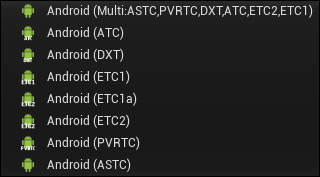
@vale silo how do you know what type to choose for Android?
like
ETC2 or ASTC?
vale silo
?
 vale silo
well, in UE4 it's only ETC2 for Gear VR
vale silo
ASTC requires ES3.1 renderer and it's not quite supported by Gear VR (although it Unity's ES3.1 works fine with GEar VR)
vale silo
use ETC2 and you will be fine for all modern devices
void palm
but you just said ETC2 is for Gear VR
vale silo
or use ASTC and ES3.1 render and you'll be fine on all flagship devices
I mean, Gear VR will only work with ETC2 UE4 builds
you can use ETC2 for any Android device
void palm
what is ES3.1?
vale silo
🤦
void palm
how do you know if you need a different option?
like where is the guide to which one to pick for what device?
void palm
thanks
unreal spoke
@grim ore Awesome, thanks!
Do you know if it can be used with blueprints and a call-in-editor function?
 scarlet jackal
Does anyone here have experience using MonoUE?
grim ore
Looks like you can @unreal spoke https://www.google.com/amp/s/chiaroscorner.wordpress.com/2018/02/20/how-to-take-a-high-res-screenshot-in-play-mode-ue4/amp/
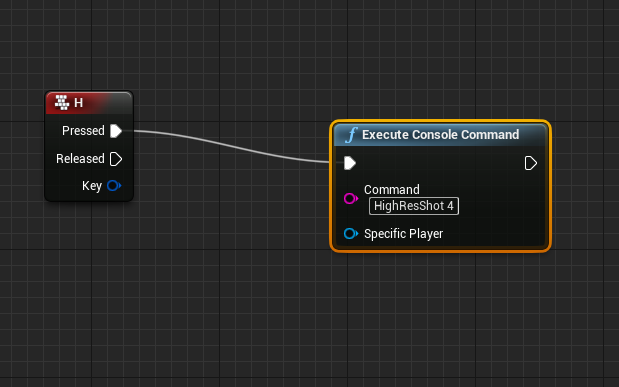
For a long time I didn’t know that taking high resolution screenshots while playing a level in Unreal Engine 4 is as easy as connecting two nodes in a level blueprint. Here’s how you do…
unreal spoke
@grim ore great! Thanks
 narrow pasture
so the 4.20 preview came out
the rectangular lights are in fact, not rectangular
nevermind its deferred rendering only
 fickle moon
Guys I am looking for 2 new game devs to start working with
where can i find them to make my first game
@kindred fable
grim ore
yes you can shut off the bounds check if you want
 kindred fable
😛 Psycho, I would help but I'm already inconsistent enough on my own projects
Also thanks MatthewW
 worn granite
2 new developers?
like just starting out?
I'd lurk in #introductions
maybe ask around, say in #blueprint or #visual-fx, or one of the other relevant channels.
might find some people on the forums
 plush yew
Hey y’all just made my new game Tortnite, it’s an original games where turtles battle each other till there’s one left
 umbral tartan
I've taken UE4's input manager for granted. Unity's is such a mess.
 lean oyster
Whats up, people? Does anybody know why deleting the light build data for a level deletes level itself as well? Never happened to me, I am confused why its happening
plush yew
how do you do collaboration?
lean oyster
perforce

 winged crypt
How expensive would it be to lerp between 2 transforms on tick constantly based on a value fed in from another process 0-1?
 olive mortar
Try it and see!
 kindred mountain
it's a trivial calculation, not worth worrying about
winged crypt
@kindred mountain think it'll make a difference if I have 10-20 actors lerping a single transform in each simultaneously?
I could reduce it down to only calculate on condition
kindred mountain
not a problem with 10-20
the engine will be doing huge numbers of matrix calculations every frame....modern systems eat that sort of stuff for breakfast
basically, don't worry about it unless you have a performance problem and your profiling points you to it
winged crypt
awesome, thank you
 leaden garnet
 cloud cobalt
Yeah, first preview
plush yew
Hello guys I have a p[roblem with my movement- I had a correctly movement but I drecide to add sprint I follow the steps how to create and when I make it I start game and i can't move- then I decide to delete the sprint but again I can't move-can you help me
I will send screenshot of my BP
and these are the screenshots
where is the problem
I can't see any problem and also when I start the game I haven't got any errors-??
Anyone can help me?
 whole quarry
can you show the movement input bp?
whole quarry
here?
plush yew
no where in unreal to see to say you
I want to talk with you to understand each otehr-okay?
whole quarry
didnt you script the MoveForward and MoveRight ?
whole quarry
im at work..
whole quarry
if you press WASD
plush yew
yes
whole quarry
where did you script what the game must do..?
plush yew
I press them but I can't move-why?
in ThirdPerson
But I don't touch the buttons WSDA?
whole quarry
you know what... hold on
whole quarry
walk trough it
whole quarry
very that you've set everything correctly
gamemode, player controler, is input enabled, etc
whole quarry
so you don't need to keep overwriting the gamemode per level
a game can have different gamemodes too
plush yew
I confused completely
😡
I will start from the beggining with new project why we don't help me?
whole quarry
because im at work and have my own projects
plush yew
I undertood the wrong
I remembered a few days ago, I waved there for the motion, watching how a mobile game like Subway Surfes is going forward and that's why I have done it on a different subject
this is normal or not?
 gaunt void
Hey,
I'm encountering a major problem.
Somehow my triggers stop working as soon as i package the project.
In editor everything works fine and as expected. In the packaged version nothing reacts correctly.
First I found that some triggers did not work because the communication to my game instance didnt work correctly.
This was fixed by editing the DefaultEngine.ini (found another thread where somebody figured that out - if you rename or move the gameinstance blueprint the DefaultEngine.ini doesnt get updated)
But now also other triggers stopped working completely.
I need urgent support for this matter and hope somebody can help me.
plush yew
I don't fix the problem again
whole quarry
that looks right
plush yew
BUT I DON'T TOUCH THE MOEVEMNT AND ANIMATION IN THIRD PERSON CHARACTER-WHAT TO DO
I DON'T CREATE AGAIN NEW GAME MODE CONTROLLERS AND ETC
whole quarry
disable caps lock, thats step 1
plush yew
I WANT WITH THE DEFAULT
okay
I raged
already
this problem is from 2 days already I can't do nothing for this problem
please help me
Where was the problem/
in ThirdPersonCharacter Blueprint or anywhere?
whole quarry
Why not try to remake the movement input using the link i gave?
It helps you understanding how it works
cloud cobalt
@plush yew Be sure to save your work often in source control, so that you can alwyas go back and compare what changes
C++ makes this much easier too because you can literally see the changes in a short and readable format
 warm mountain
i'm quite impressed with UE4
i didn't know how well vertex painting translated accross different meshes so nice as a bp
its almost perfect and you can't tell where the seams are in and out of the puddles
 languid shard
@warm mountain it works well, until you use very low poly surfaces
then you can see the edges
warm mountain
this one is quite low poly
9 quads actually
thats why i was pretty impressed
it could get quite a nice result with just 18 tris
 paper island
Which channel should I use if I'm looking for people to partner up with?
 pallid compass
LF talent LF work
obsidian nimbus
you could try join a team for a jam and see how it works 😛
plush yew
how to add pc ads and in game purchases, tag me if you know
 static lake
Hello. I'm new To Unreal Engine and I was wondering if anyone knew a good introduction video to blueprints, and how to use them.
With my current skills. I can really only make a light disappear if you collide with it.
plush yew
@static lake just go look on the unreal engine youtube channel 😃
static lake
Okay, will do that
 tall pendant
also check out: https://www.youtube.com/channel/UCOVfF7PfLbRdVEm0hONTrNQ by @grim ore

YouTube
This channel is dedicated to exploring Unreal Engine 4 and the Blueprint programming language that it uses. You can think of it as a companion to the API doc...
pretty neat learning videos
static lake
okay will also check that out. I like neat stuff
 gloomy sandal
static lake
gloomy sandal
static lake
i will
tall pendant
please check #old-rules
static lake
oh
whole quarry
Else <@&213101288538374145> might take action
whole quarry
you accidently dropped the link? ^^
 obsidian coral
Okay so i just made a new project in UE and the vault items i am trying to add into my project are stuck in queue
tall pendant
just give it some time
whole quarry
how good?
static lake
How good are we talking
tall pendant
tbh i think it could be epics server tho. no matter how your inet is hehe
 gleaming lotus
Anybody know how to turn off the setting for when you duplicate an object in level and it offsets it slightly?
 trim oar
Does anyone know about an online matchmaking system?
Pls suggest something...it would be great if it its free..
safe rose
free
everyone wants free
😃
You could try GameSparks and PlayFab
initial cost is free
small dev teams free up to point
Maybe some marketplace asset
trim oar
Is it a system like fortnite?
 halcyon marlin
-__-
 ashen brook
/me clears throat
safe rose
@trim oar I am sure if you beg enough Epic Staff, someone is bound to give you their source code so you could make a Fortnite Matchmaking
plush yew
not really
cause it was made for the game to work with that game
highly doubt they used some prebuilt matchmaking system
safe rose
I mean
Fornite doesn't do shit really
Literally there's no ranking/elo
It just grabs people based off region and platform
plush yew
just find nearest server with peeps
worn granite
you know, any relevant improvements/streamline stuff that fortnite COULD lend to a generic game.... its already being released into UE4.
everything else would be too specific
safe rose
You'll need a backend
to keep all that up
Which is why I suggested GameSparks/PlayFab
But again, there's a Marketplace asset
you'll just need a server
 sudden agate
Material Editor is broken in 420p1
not broken per se, but it seems to compile materials as soon as you delete inputs and will open a new window with all errors
 meager bridge
where can i find the 4.20 relese notes?
tall pendant
Unreal Engine Forums
PREVIEW!
Preview 1 of the upcoming 4.20 release is available now on the Launcher and GitHub. We are making this Preview available so that our developer community
not a full list ofc because its in preview only
meager bridge
Thxs ❤
languid shard
@vale osprey hey man ! So I'm testing out your suggestion with lower framerates but..
Are you sure of the command "MaxFPS" ?
NVM it was "t.MaxFPS"
what kind of behaviour should I expect regarding physics ? 🤔
 paper kernel
should have no effect
 vale osprey
@languid shard Suspension behaving erratically, vehicle@moving faster or slower than at normal FPS, steering faster or slower than at normal fps
vale osprey
well, I guess you either lucky or hover code is done well there
languid shard
I'm gonna test it out with networking asap, I guess we should see if its solid enough with latency
high speed collisions were not throwing the AG vehicles everywhere
more like bumper cars
 surreal viper
are stats like this normal? any idea why is total so huge but nothing else?
is there something potentially not counted what I should be aware of?
 manic pawn
interesting, total is about 2ms larger than the rest when you add it up... that's not normal
surreal viper
yeah, 8.6 is the sum
 next badger
Ctrl+Shift+,
surreal viper
that does not work without editor or at least I did not manage to make it work
did some profiling with stat startfile/stopfile, at least those numbers add up
 sharp crest
Hey, I havent opened a project for about a month and now whenever I compile a blueprint with childs it takes way longer than it used to
Any way to fix that? @ me please
 ivory gate
Anyone want to help make mobile game please message me.
worn granite
@ivory gate why aren't you going in sequence m8
if you're gonna hit all the channels just go in line
pallid compass
omg
 thin imp
Noob question: Is there a "Go to Declaration" option in the Blueprints editor to quickly find where a node is created? (like VS has)
languid shard
@vale osprey first network test is flawless ! low ping with ADSL host, connection through public IP
now just need to make a real lobby waiting for players 😂
vale osprey
heh, I should grab that plugin then and see what is going on there 😄
next badger
@languid shard https://jagt.github.io/clumsy/
languid shard
oh very interesting tool @next badger !
 silver crown
❤
 pseudo void
Just wanting to confirm. I've been searching on how to remove uninstalled vault content from the ue launcher, but it seems that's not possible. Is that correct?
grim ore
From what I can tell the bottom part of the launcher for the vault content is bound to your account, it's a record of your purchases. You can probably ask Epic to remove something if you really don't want it.
pseudo void
That's alright, not important really, just an aesthetic thing. Thanks
languid shard
@vale osprey actually it went flawlessely for half of our players
one guys in the same country had no problem
another one in another, close country is having sluggish controls while connected to the host, but no problem when offline
now I'm confused 😦
languid shard
sluggish computer is fairly low end though
 cursive dirge
you need a platform that supports that crap
plush yew
is it possible in pc?
worn granite
There used to be flash ad services, not sure if PC itself really has one.
UWP manages it just fine =D
plush yew
microtransaction?
cursive dirge
I was going to say that look what windows store has to offer
as it's full of mobile crap
next badger
i believe there's a plugin for ue4 even...to add ads in the game
worn granite
short answer : yes its possible
longer answer: its possible, but you are probably going to have to do a good portion of the work.
I think those are all for another ad service
most of which are mobile
next badger
@worn granite probably
unreal spoke
Is possible to have a blend between 2 cameras in a Sequence? Not lerping from one camera transform to the other, I mean blending the images of both cameras.
plush yew
ui opacity
unreal spoke
But does UE4 support having 2 cameras rendering at the same time?
cursive dirge
you can't render two views on top of eachother efficiently with ue4
you can make a scenecapture from other tho
and then render it on top, fade it
but full res capture is expensive
plush yew
its free
next badger
scene capture is expensive...also has some issues with PP
plush yew
how can i add in game purchase
next badger
@plush yew well, you could use android or ios integrated platform that ue4 has, or integrate own one...like sdkbox
unreal spoke
@cursive dirge Thanks
next badger
afaik Oculus, HTC have their own sdk for IAP
unreal spoke
How to play a sequence completely ignoring the player input? The Disble Movement Input and Disable Look At Input checkboxes don't seem to work for me :/
next badger
@unreal spoke use http://api.unrealengine.com/INT/BlueprintAPI/Input/DisableInput/
Disable Input
unreal spoke
Thanks
next badger
@unreal spoke but don't forget to add a trigger that will switch it back
unreal spoke
Sure 😃
next badger
Enable Input
@unreal spoke https://www.youtube.com/watch?v=93amgAv5d7c

This UE4 tutorial is an answer to a request how to stop the movement of a character when he is in a particular animation state. See my social profiles here G...
more in depth https://www.youtube.com/watch?v=HguI4RPURYc

What are the Enable / Disable Input Nodes in Unreal Engine 4 Source Files: https://github.com/MWadstein/wtf-hdi-files
plush yew
@next badger can i use that in my pc game?
next badger
@plush yew what that?
plush yew
the android in game purchase
next badger
@plush yew um...probably no, since it uses android SDK for that, and you can't compile a windows version with it
 nocturne girder
Hey guys. Anyone here ever work with the Sponza model in UE4?
 brazen bobcat
hai
so im trying out some lan multiplayer using blueprints
i have a beginplay which tries to cast the player state to my gamemode player state then set it as a variable
however, when i run through it using those breakpoints
playerstate is none
but only for the second player
quite strange
any help would be so so so very much appreciated
plush yew
hello guys
I have a question I was have yeterday third person character that was broken and one person said me that I must to migrate it from new project- I did this but how to choose the new character with it to play?
 lyric mica
Hi @plush yew , In your game mode BP you can set your default player controller class
plush yew
okay I will try it
Omg I have 3Characters
I will delete all and then add one person-okay?
okay 
@plush yew you can set it in the game mode you are using, or in your world settings on the right side details panel.
it is late for already 😃
and keep in mind there are some good MP assets you can try out if you wana get some stuff tested without too much code work to start with.
I delete all the chcracters because I had 3 -omg
well what did you do in your project? you can simply start a new third person project and use "migrate" to migrate assets to that new project.
by right clicking on the asset in the old one and selecting migrate.
I did that with the migrate
and?
you have to migrate all dependent BPs
I will migrate again because i deleted the 3 characters
k
but only the character BP or all the folder?
no i am saying if you make a new third person proj, you can migrate any custom code from the old proj into the new one.
so like any movement code or anything you have in there
you migrate those BPs
and you might have an extra pawn, but you can get that code from the extra pawn and copy paste it into the new third person pawn that works.
I confused already completely- why 😦
can you talk to say me thestpes to fix this because I confused?
I made yesterday new project to migrate the new character BP
if your character is broken, i would recommend making a new third person project. then what you do is you look at your current project that has the extended code you like, and you will take those assets and select them in the content browser and migrate them to the new project (OLD -> NEW).
trying to migrate a working pawn to an existing project can work too, but you just have to make sure to select the right assets when you migrate from NEW -> OLD. if your existing project has a TON of code, that makes sense to do.
the choice is yours.
okay
thank you
I must to migrate the new not bug ThirdPErson BP to start from the beggining with the BP
i migrated it
yup
and now what?
I found new bug- when I start the game from the MenuMap the character doesn't move, when I start the game from the ThirdPersonExampleMap I can move-what?
wow
plush yew
I understood the wrong
when I setting the gamemode and simillar things then I can't move-why?
hello guys- I found in the problem with mu movement character that when I setting the game mode ans simillar I can't move-why?
i understood one more thing- I created new map only for the menu when the game start and there when I click on the button Start Game it
transfer to the other map and there I can't move-why?
but if I stay only the menumap I can move but I must to transfer from one map to other for my game-what to do?
whole quarry
the map... where you cant move
you need to set the GameMode in the World Settings
to the gamemode you want to use
whole quarry
the one you made?
plush yew
okay
MenuGameMode ??
then these or other?
when I choose the menugamemode it appear these-are they right or wrong
whole quarry
its better to make a NEW game mode for your level that ISNT the menu....
whole quarry
these are very basic, you should google it to follow some basic tutorials
plush yew
okay
help me
are they difficult?
to create new gamemode ?
okay but why not to use this menugame mode that I created 30 minutes ago?
whole quarry
because you made the MenuGameMode for your MENU
plush yew
okay
I must to create a gamemode for the menulevel?
I created t only I don't touch setting, to know
whole quarry
its hard to understand your broken english
plush yew
okay
don't worry I understand
I created the gamemode menu and don't setting it
you understand
@whole quarry say hwo to do to work -please
because if I don't fix this problem I can't continue
whole quarry
I told you, you need to make a new game mode for your level
plush yew
okay the smae tyepe but other name??
whole quarry
yes
whole quarry
New BP -> GameMode type -> give it a name that makes sense
plush yew
okay
for the menu level to create new gamemode ??
or for the thirdperson example level
whole quarry
....
whole quarry
I'm not going to repeat myself, good luck 👍
plush yew
okay
thank you
very much ❤
I can't move again
when i Choose the new gamemmode
😡
whole quarry
Read the documentation I send..
whole quarry
Hoping and keep asking here wont do you any good
Reading documentation and following tutorials will do you good
whole quarry
Did you set the Pawn/Character and Player Controller in the GameMode you just made for your level?
And did you set the GameMode in the World Settings at Override GameMode ?
plush yew
maybe
whole quarry
maybe isnt a option, its either yes or no
plush yew
yes
omg
I can't fix it this-why ?? anyone can talk to show him and to fix to stop write for this because I don't want to annoy you
in the new level gamemode I have this
whole quarry
Show me the World Settings
plush yew
okay
whole quarry
main screen of UE4, on the right side, under the level components
whole quarry
so that makes sense it uses MenuGameMode (its the Menu level after all)
whole quarry
that looks right
plush yew
the up map is for when I start the game is on the first level and it appears a menu and you choose start the game and it transfer you to the down map of the screenshot but when it transfer you I can't move
whole quarry
still not? Because I can see you just changed it to the right GameMode
whole quarry
press Start
whole quarry
so you see the Third Person Character?
whole quarry
thats a big win, then we know the GameMode is working
did you try to click in the Viewport to make sure the game has the focus?
plush yew
okay I will do it
whole quarry
after pressing Start, just click somewhere in the viewport and try to move
plush yew
how to reach to the viewport?
whole quarry
its the window that opens after you press Start
if you dont see your mouse, it has the focus
whole quarry
did you change anything in the ThirdPersonCharacter blueprint?
whole quarry
we can brute force it, its a bit hacky, but works 100%
first make a new PlayerController, call it something like LevelPlayerController
then, in your LevelGameMode, set the Player Controller to LevelPlayerController
plush yew
okay
and it then will fix??
where to create this new controller
okay I knew
reay
whole quarry
then open the LevelPlayerController, on the Class Default there should be a Posses on, set it to uhmm... forgot the names
Level and Spawn or something like that
i dont have UE4 on my office... cant check it 😄
whole quarry
yes
can you open the LevelPlayerController and make a screenshot of the Class Defaults (on the right side)?
whole quarry
set this value to Placed in World or Spawn
oh it might be in the Character blueprint instead, my mistake (doing it out of my head 😬 )
or Auto Possess Player on Player 0
one of the 2.. 😄
plush yew
I haven't got Pawn?
whole quarry
its in the Character Blueprint instead, my bad
whole quarry
yes
whole quarry
change Disabled to Player 0
plush yew
I must to setting it to the character 0?
okay
readfy
i compile it and save-now what?
whole quarry
hit Start/Play and try!
plush yew
okay
I hope to fix
yes but no
😦
I can't move
when I start the Game the character doesn't move and it likes that is bug
look
why?
whole quarry
its not a bug, just something not done right
whole quarry
im at work for another 7 hours
whole quarry
10:03 now
I might be able to help tonight if you havent figured it out yet, but cant promise
got a kid too
😄
plush yew
lol
okay
I can talk now and then I am at school to 6:30 pm in your time- you can talk at this time not now then?
now what to do with the character?
whole quarry
Can you verify the input keys at Project Settings?
plush yew
okay I will check and even send screenshot
what category to choose to find the input key?
whole quarry
Iirc, Engine > Input
plush yew
and these are the default that I setting as I watch the link that you send me
what is lirc?
plush yew
yes
it is 😂
I will send you screenshot
this is the input
what to do?
eho
are you here
what to do now
you see the inputs?
@whole quarry
whole quarry
open the Action and Axis inputs
sudden agate
whole quarry
open that too, to see what keys are binded to the actions
whole quarry
the mappings
whole quarry
gamemode is set right, also in the level
player controller is set right
character is been set in gamemode (and spawns on Player Start)
auto possess player is set to 0, which is right
did you add any widgets?
whole quarry
then no, if yes then the Widget might be taking the input instead of the character
plush yew
When i start the game in the Menu Map it appears menu-the user chooses start the game and it transfer tothe level that we setting it- and when it appear in the level
it shows this
this is the hud in the level
whole quarry
thats a widget
whole quarry
alpha versions are usually not 1.0.0 but 0.0.1 😛 (not the problem here tho)
plush yew
I don't know
for first way I make this
but alpha version doesn;t have 1.0.0?
0.0.1 is very very anything I think
whole quarry
in the Character blueprint, add a Event Begin Play and after that add the node Set Input Mode Game Only
plush yew
I have this already
whole quarry
oh
plush yew
lol
sorry
i don't see
i think that I was have
in the befre project
i will make it
whole quarry
be sure to set the target of Set Input Mode Game Only to the node Get Player Controller
whole quarry
no, thats the wrong one
whole quarry
try this
plush yew
now when we setting the player controller and these things I can't move all of the levels on the menumap and on the this level-omg
whole quarry
(with my awesome mspaint.exe skills)
whole quarry
press Play and try
whole quarry
im not sure 🤔
plush yew
omg
why do I do now as I create this project for the second time and still does not become the first run of the buggy project so I started doing it this morning and now it is working again - it actually worked until we put the gamemodes and etc.
If I haven't any gamemode in my new project I can move-is there a way to don't have gamemode and simillar things ain my game with the menu and can move?
whole quarry
are you using UE 4.19 or 4.20p1 ?
 tired oracle
whole quarry
tired oracle
whole quarry
?
warm mountain
looking through one of activision's oldest games, they didn't pack their files so you can look up the assets straight up
learned quite a few things on game design
one of those things is how they managed to optimize character interaction on the communicator with a percieved high detailed (for that time) by using a set of stills
the characters look 3d but in reality they are not
i got a feeling they 3d modelled the chars and took screenshots of the most important keyframes
and swapped out the pictures rapidly to give an idea of the characters talkimh yo uoi
talknig to you*
this seems to be how they handled caustics as well back during the opening of the 2nd millenium
a set of transparent decals that were dynamically swapping tiny 128x128x photos and not actually being affected by lighting
 frank escarp
@warm mountain very, very common technique
games like Diablo also did that for their characters
their characters were sprites, and they had the animation backed into atlasses
to do that animation, they just recorded it from maya
you can do that with blender or any other software this days
its how Dead Cells works

"To make up for the lack of bandwidth and still deliver on quality, we had to find a pipeline that could give us great looking pixel art, without having to hand draw each and every retake," writes Dead Cells artist Thomas Vasseur.
they have 3d models with 3d animations and render them into "pixel art" textures
whole quarry
that site looks like it came out of 1997
frank escarp
becouse it pretty much did
gamasutra is the classic equivalent of 80.lv
it has tons and tons and tons of great equivalents
and its less art focused
tall pendant
on gamasutra you can find proper articles from time to time hehe
frank escarp
a lot of the gamasutra articles are very high quality
a lot of the 80.lv articles are straight up ads
cloud cobalt
80.lv is "look, I made a level" territory most of the time, gamasutra is probably the best source for in-depth game development content
plush yew
4.17.3 с кяе
tall pendant
Yup. Gamasutra is a pretty neat source.
plush yew
4.18.3 I use @whole quarry
warm mountain
Nifty!
And def good to know!
 visual hollow
Guyz my lighting build is taking so much time not getting forward from 0 %
Any suggestion?
whole quarry
add a lightmass importance volume
paper island
Are there any interesting opensource games made in UE4? I'd like to collaborate.
 fierce tulip
jebus, gone for two weeks and https://i.gyazo.com/9f62ebc15926e46666d2bfade9bb5fd6.png
 languid shard
welcome back Luos 😄
fierce tulip
awww hehe
grave nebula
Should have everyoned announcing, that you were leaving, Luos.
fierce tulip
hey @ everyone, im back!
grave nebula
walking on thin ice ><
fierce tulip
apparently since last discord update you'll get a "you really sure you want to @ everyone?"
but not gonna try
the person who told me might be trolling XD
sudden agate
senpai is back \o/
fierce tulip
somewhat, mostly me being lazy and sweating
thanks for asking
how is everything here?
grave nebula
Two weeks, and they aren't afraid of the hammer anymore 😦
fierce tulip
lol
well in that case, you point at people, ill ban em. you get 50 picks
XD
(disclaimer: nope)
whole quarry
@fierce tulip the Discord staff saw your everyone fiasco and implemented that just for you
fierce tulip
lol
anyways, I was just at home mostly but it was soooo warm I just couldnt work, so hang out with friends, bbq-ed a lot and tomorrow celebrating bday by giving a massive bbq party.
had the chance to bbq for a big soccer team their staff, that was insane.
unreal spoke
Is possible to set the angle snapping to 1º?
whole quarry
Massive bbq party, sounds good. Can i bring my kid with me?
fierce tulip
there might be a few more kids hehe, but its mainly drunk people
tall pendant
i hope you got the right meat ready?
fierce tulip
lol
plush yew
@whole quarry do you forget my bug project?
tall pendant
<- looking at his Txogitxu Chuletón Sidrería in the fridge hehe
fierce tulip
hamburgers, chicken wings, 10 kilo of spareribs, and a 3 kilo short rib rack
@unreal spoke noooot sure
whole quarry
@plush yew no i havent but i cant think of any other solution
Hmm,i call shotgun on the wings!
plush yew
omg
what to do as advice
i start this project for second way this morning
when I return from school I will start it from the beggining and i will wreite you when I start the menu-okay?
whole quarry
Dont pin me on it, i need to have time for it
 fierce tulip
oh for sure haha. one woman complained the sausages wherent ready, while they where pre-cooked (thats how I recieved em from the caterer) and another complained the sashimi was too raw O_o
whole quarry
I hope we get some rain, been 27-30 degrees the last few days
tall pendant
raw sashimi.. how dare you 😄


 red orchid
Where can i find Studio or group of game makers interested in or looking for some good ideas
whole quarry
@red orchid #looking-for-talent #looking-for-work
red orchid
yes but most of them or individuals or offers
tall pendant
Studios won't accept ideas from outside anyways
red orchid
yes can try submit
if they interested may take it
will i am aiming to be Creative director
fierce tulip
best way to show off ideas is to make templates, that way people can actually try them. if there is interesting stuff that might turn you into a gameplay designer. but just passing along ideas isnt done much if at all
grave nebula
If you want to share idea, pass it on twitter, tagging every major dev group. If you are intending to turn that into profit... I'm afraid that won't work. World is full of ideas as it is.
It is particular skillset that is of value.
red orchid
yes will try but scared some people might just steal the idea 😓
tall pendant
because its a great idea?
paper kernel
also don't be that guy who uses +5 hashtags on single tweet
fierce tulip
dont, nobody cares, have done it before, and ideas come a plenty.
red orchid
yes instead of showing off i want to offer it as a proper plans
classes weapons, enemies, skills etc etc
plush yew
Like a writer or designer? 🤔
red orchid
writer maybe idk i am new at this
plush yew
I don't know how you even become a writer for games or a gameplay designer
red orchid
recently i was contacted by a studio but i answered and after that didnt get reply
well just trying man if dont work i will learn and makes game myself
plush yew
What position did they contact you for?
whole quarry
go for it anyways, experience is always good
whole quarry
sounds shady and amateur
plush yew
Probably dodged a bullet
red orchid
yup they are small studio made some games as well
not sure what he was looking for anyway
also it is not unreal so i will end the conversation about it
lol
well just like Luos said will try make some template with samples
or examples
fierce tulip
😃
plush yew
need gff
whole quarry
try a dating site, this isnt the place for that 🤔
whole quarry
i would say go for the intel
after reading that 3 times I'm still not sure what you're saying
tall pendant
personal preference
plush yew
8 Core 16 Threads AMD 4.3 GHz (with turbo) AMD Ryzen 7 2700X Socket AM4 4.3GHz
6 Cores 12 Threads Intel 4.7 GHz (with turbo) Intel Core i7 8700K Socket 1151 4.7GHz
warm mountain
this may not be looked well upon but
is there a way to take a game made in ue4
and rip it to see the code and blueprints?
figured i could use that to learn faster
i know there is a way to rip meshes but i don't think the same method applies?
tall pendant
You're not seriously expecting an answer to that question?
@plush yew I'd go with intel. But i'm a long time intel user so my view is probably biased.
warm mountain
Not quite, i understand it isn't exactly right
i used to take apart warcraft scripts to find out how people made custom spells
and mechanics for their mods
i found i just learned best observing and eventually making my own
plush yew
You can reverse engineer into things like C but result is probably not readable
warm mountain
but if it isn't possible i respect that
fair enough
its all good, i can look around as well and see if there are other artist that may have the solution and see if i can get leads from there.
main thing i need right now is a way to create a rain system and the materials are able to react to it and form puddles and dry afterwards
plush yew
There's a bunch of things involved in that
But most of the stuff would be driven from a render target or a parameter in a Material Parameter Collection
 keen frigate
Yo everyone
whole quarry
🖖
warm mountain
understandable tommy
i've seen the video on material parameter collections, i believe i'll need to do something along those lines with the materials reacting to it being the hard part
the weather part is fairly easy as i could start and spawn rain particles based on time
plush yew
Yeah tedious part would be adding the functionality to each material that needs it
warm mountain
indeed
plush yew
Unless you have a good base material which you can instance
warm mountain
i saw a video from youtube of someone pulling it off, he pointed to a substance tutorial
the problem with that tutorial though is that it requires to player to manually control it at runtime
i'm trying to figure out where i could come in and find a way for it to react based on the same time variable that triggers the rain weather
plush yew
You can just make a parameter and accumulate into it when it's raining
Ideally in the 0-1 range to make it easier to do lerp operations in the material
supple horizon
Hello
whole quarry
hi
plush yew
If you need more help with it, can ask over in #graphics or #visual-fx
supple horizon
My actor can walk fine on simsome floors. But it falls under some. Why is that?
warm mountain
ideally what i'm hoping to achieve is similiar to something i did in warcraft
Where after a certain period of time the game will start to open an array and pick a random integer every minute and if the integer hits a certain range it will trigger rain at that particular timing and it doing so the materials change with it
and gotcha
i'll go there if i still keep failling to resolve this haha
supple horizon
Amateur problems vs pro problems
warm mountain
oussama
those floors you fall through
make sure you build collision
if you started modelling them as a plane chances is when you bring it to UE4
it didn't build collision
@supple horizon
supple horizon
How can i build collision? My actor only falls through meshes
warm mountain
the mesh that you keep falling from
double click it
and enter the editor
and build collision
supple horizon
I'm double clicking on it but nothing appears
warm mountain
supple horizon
Is the editor supposed to be a poo up
warm mountain
double click it
and this should appear
then you see convex decompos at the lower right hand corner
click apply
it should work
alternatively
on the top left hand corner
you can click collision
and add a collision type of your choice
warm mountain
can you screenshot the mesh?
add one of these collissions
from this menu
and cover your object with it and save
supple horizon
Sorry but could you only show me where the menu is
whole quarry

 whole quarry
then you've to look at the Collision channel and its settings
warm mountain
look at it on the right
open up that menu i clicked
choose a collision type
and put your mesh inside it
or click Convex Decompos and click apply
there is clearly something with your mesh
not the engine
and most likely the collision wasn't built right
so you have to do it manually
supple horizon
Do i have to do that with every single mesh?
warm mountain
only the ones you fall through
supple horizon
The mesh is just the default box
whole quarry
You could also just use blocking volumes instead
warm mountain
then add a bos collision
box collision*
make sure the collision box covers your box
whole quarry
Just go for blocking volumes, no one will know 😁
warm mountain
^
also if your box is a bp box
whole quarry
Its a lot cheaper too then having i.e. 20 times a plane mesh with individual collision
whole quarry
A volume that blocks objects from going trough
Its invisible on its own in the game
whole quarry
Like invisible walls
supple horizon
Using the sphere collision pushes my character away and it spawns very high
whole quarry
Makes sense
supple horizon
Thanks. Box collision worked. But what about oddly shaped meshes? Can volume boxes that their shapes or something
warm mountain
for odd shape ones
you can use multiple collision types to block it/ blocking volumes
or
this
supple horizon
Like blender?
whole quarry
is that a yes?
supple horizon
So never creates meshes in ue4 again?
supple horizon
Thanks
I thought setting collision for stuff is important for a game engine
Can i at least make collision automatic when creating a mesh?
supple horizon
But mine never does
whole quarry
you can make it automatic by using the Collision complexity setting
BUT
big but there
it's usually more expensive in performance than making proper collision
supple horizon
Performance as in increasing the resources the editor uses or even after compiling
whole quarry
both
supple horizon
Thanks
 dim merlin
hey guys, am investigating splines in unreal , and was asking : does datasmith use unreal splines for rendering mesh at any time?
or is it converting splines to mesh?