#ue4-general
1 messages · Page 254 of 1
 queen arch
 plush yew
i disliked it
idea was good but video wasnt too entertaining
oh nvm im talking about something else, my bad
queen arch
Yeah, I'm talking about the game from 2000
 harsh tiger
does anyone know why in the default level the clouds pick and choose when they want to be visible?
 pallid compass
prob camera depth
harsh tiger
@pallid compass how do you mean?
pallid compass
well i assume u mean they disappear and reappear based on your distance to them?
pallid compass
prob random then
harsh tiger
but now you cant
harsh tiger
i used the default level and it does use the skysphere bp
i've always thought this blueprint is a bit weird though. like i will change the speed and refresh the material but nothing actually happens
harsh tiger
@plush yew i started making this game about a week ago. just focusing on getting gameplay to feel good and see if what i have envisioned will even work haha. then i'll work on graphics and a theme etc
plush yew
oh nice stuff
harsh tiger
https://www.youtube.com/watch?v=9yBN5sitwus i just uploaded that video today to showcase how the camera works for one of my college units

This video is show casing a new game I'm working on. It's a 2D puzzle game that takes place in a 3D. This video was made to show the camera system and how it...
 patent ibex
is anything heard about AGAA?
 topaz quest
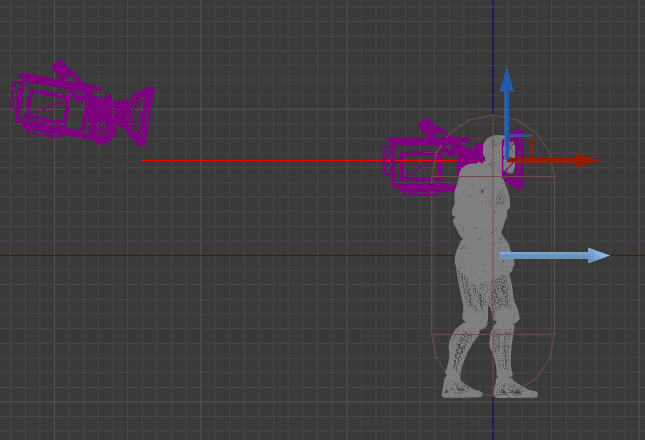
im trying to make a true first person camera just wondering do you guys attach the fpc to the head bone or position it relative to the head?

Also is the camera boom for the third person camera supposed to be straight like that or coming from the camera to the position near the body?
 tall pendant
nvidia had it working in UE4 two years ago. But i didn't followed it since. So idk if there any news on the current state of AGAA and UE4.
 vivid oar
Guys i cant work like this anymore please help me ...
My GPU sucks and because i added alot of objects and materials it asked me to change graphics or resolution automatically.
Now when i zoom out my landscape changes and as well some of my materials are weird.
zoomed in
topaz quest
@vivid oar im not sure if it is related but i know you can setup your materials to display differently depending on the quality settings applied.
perhaps that is a place to start looking for some info?
also perhaps the lods for the landscape work differently also ?
vivid oar
I still have no clue how to fix this
topaz quest
how does the landscape look when you are playing it ?
queen arch
i fucking hate myself and game development right now
 cloud cobalt
You shouldn't
 viral herald
hey guys
viral herald
i got a project in trying to upload into gitlab via kitcraken
vivid oar
resolution sucks
viral herald
how do i upload that folder into the repo?
 mint raptor
Any reason why socket rotation ping pongs from -90 to 90 instead of looping back like in most other cases when rotating in one direction endlessly?
I'm speaking in terms of the bone and using GetSocketRotation
 cyan merlin
@vivid oar looks like your quality settings are on the lowest and you haven't even built the lighting lol
Unreal probably set quality to lowest based on your computer specs
vivid oar
how do i change that back
please tell me
ill build lighting at the end of designing my level.
cloud cobalt
Looks like the editor just reset to low quality
There's a graphics settings menu in the main window
vivid oar
Project Settings?
patent ibex
@tall pendant as far as i understand it wasn't released in any form, right?
tall pendant
@patent ibex afaik thats correct yes.
 warm mountain
seeing ubisoft's laziness in creating texture variation or making realistic debris piles
makes me feel better about myself 😄
topaz quest
@warm mountain ubisoft's laziness in creating texture variation? i could also do with some cheering up got a link to some reference ?
queen arch
anyone here good at umg?
 knotty lagoon
guys, i gotta make performance comparison of unity vs ue4
do you think approach of making 2 "identical" scenes in both makes sense?
 leaden garnet
everytime I see ue4 vs unity I die a little on the inside
knotty lagoon
https://imgur.com/a/KywcS5w this is what i ahve for now
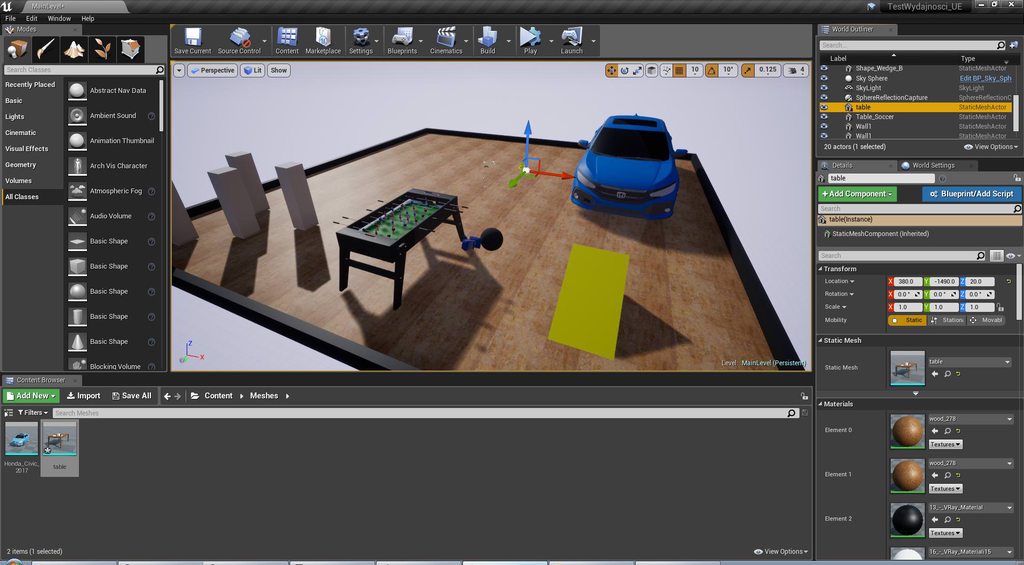
check link
there are 2 pictures
queen arch
Let me save you the trouble, they are almost identical
knotty lagoon
i mean i gonna do not visual but FPS etc. testing and idk if making 2 same games for both makes sense for constructive results
warm mountain
@topaz quest its just running around ghost recon wildlands
its really obvious
the roads repeat so frequently
and when you go inside a house
it can be the same concrete texture on every single wall
and the same decals
they didn't even bother to size their debris right
queen arch
Dydzio check one of the many videos that do performance comparisons
warm mountain
just smacked a photo on it
queen arch
and then check the comment section
There will be lots of people who will talk about what the tester did wrong
warm mountain
and when you shoot chickens they explode
tall pendant
Usually Unity vs UE4 videos are childish bollocks.
knotty lagoon
well basically i am writing graduation thesis about unity & UE 4
but the guy is stubborn about some practical testing shit to compare something with measurable results
as part of the work
so this is the best i could think of
both scenes look like crap imo but im programmer, not 3d modeler / level designer
 silver crown
@knotty lagoon Any kind of performance?
knotty lagoon
ye
for now i will test FPS and think what else i can do with these levels
and put profiler into use and dig in some details
testing specific algorithm implementations etc. is not very constructive in my opinion, so I go for practical product prototypes... pretending they are "equivalent" by making them similar
 remote moss
Hey friends, are there any tools out there to debug unreal .sav file or parse into ascii format? I want to debug my .sav file to check is everything is under control but I couldn't find a tool for that other than doing it manually
plush yew
@agile furnace Hey man how do i go about making a 1000 player MMO using only Blueprints? I'm new to game dev.
 agile furnace
yeah just go to the blueprints channel wes bunns will be with you shortly. he's just checking his notes
plush yew
Appreciate your help!
 graceful grove
We're gonna need a bigger thinking emoji 🤔
plush yew
Copyright!
 kindred viper
@remote moss the .sav file is binary and possible has compression. You need to do exactly the reverse to get it back into ue4 as a save game object so I would look at the source relating to that in the SaveGame Object serialize function
remote moss
@kindred viper Thanks Marc, I'll look into it than. I just thought there were a more rapid way of doing it.
kindred viper
well the easiest way would be to simply load the SaveGame object and read out the values. If you want to do it in editor though you could make a plugin to check it. its not too hard.
topaz quest
is the HUD class required or can i use another blueprint widget as the HUD?
 thick scroll
Hey guys, which channel do I go to if UE is giving me issues?
kindred viper
@topaz quest you dont need the hud class at all. Since UMG its kind of redundant except for some built in functionality for screenspace stuff
remote moss
@kindred viper Yep, doing it manually works for now, because I'm working on a simple mobile game project.
pallid compass
god dam my vs feels slow af today
remote moss
BTW guys my game is a very small game with a few assets but Unreal engine tells me that it uses 2 gb of ram, is that normal?
pallid compass
i see 130k objects
remote moss
all unreal engine stuff added to that number I guess for I have max 15-20 assets
remote moss
its under editor preferences>performance>show frame rate and memory
pallid compass
lemi check mine
dude u sure ur not looking at ue4
with the edtior open
and it counting all the editor stuff
 manic pawn
that widget is part of the editor ui so yeah
remote moss
yes pretty sure 😃 I guess you have less mem usage?
manic pawn
the editor using 2gb ram is totally normal
you'd have to package a shipping build and test there to get any meaningful result
remote moss
alright, so there is nothing to worry about, thanks
 earnest elbow
Hey, Im pretty new to UE4 and playing around with Lighting, why does it look that kinda weird when I rebuild Lighting? http://prntscr.com/jp2g8d

the textures on the wall to the left
remote moss
@earnest elbow it seems you don't have a lightmap UV on those wall assets?
thick scroll
I had the same issue. It might be a texture streaming issue. Should be a couple options to mess around with in the Editor Preferences. If you changed the lighting and then it became that way, then it may very well be a texture streaming issue.
earnest elbow
@remote moss after rebuilding lighting it kinda says somewith with lightmap UV but i dont know what that is xD
 tawdry hedge
Hey, guys. I'm working on a Molotov cocktail and I want the liquid inside to move around. I set up the "liquid" as a jiggle bone. Problem I have is that it distorts the "liquid" when it moves around, like so (On the left:
so as the angle rises, it distorts it
so my question is: I was thinking of linking the scale of the bone to the rotation and have that scale then correct itself to 1/cos(angle), which will compensate for the distortion and you get a shear effect. Is that possible to do in UE4?
remote moss
@earnest elbow you have to have 2 uv map. First channel is for normal surface textures, your standard wall texture and the second uv channel is for lightmaps. You have 2 options, you can let Unreal create it for you upon importing the assets or you can do it in your 3d applicaiton of choice like 3d max or maya
I prefer doing it manually in you 3d app, that would give you the best result
 digital anchor
@earnest elbow if youre not doing something really serious, just set everything to dynamic, then it wont use lightmaps
but will get less performant
graceful grove
@tawdry hedge You can try an approach like this to keep the distortion in check https://simonschreibt.de/gat/left-4-dead-2-puke/
oh wait wrong person WOOPS
 lavish basin
I'm making a fps like those of the old era like the doom and quake but sadly i can see the side of the sprites and it's giving me a headache, can someone help me make sure that i'm always facing the face of the sprites no matter the change in camera position.
kindred viper
billboard takes care of that
graceful grove
what he/she said, make everything a billboard
kindred viper
he but female on the inside 😉
lavish basin
its a flipbook, can i change a flipbook into a bilboard?
kindred viper
I am growing manboobs as I get older though so I dunno anymore
lavish basin
think i intruded in middle of sth
remote moss
@tawdry hedge I wouldn't do that actually, you may prefer doing this animation in your 3d app if you are not after a pure realistic liquid result as it moves with your animation simultaneously. You can just create the liquid part and populate some bones on the surface of your liquid mesh and do some dynamic bone movement and bake that out.
graceful grove
The approach in Left 4 Dead 2 is full dynamic and requires just two bones so I don't think it's a bad idea
Although yeah other titles have done some pretty good looking baked fluid stuff, Vermintide looked nice
remote moss
@graceful grove Actually I made a similar animation for our game Conarium but it was not liquid but baked cloth movement. I works perfectly.
btw you need to have more division on that liquid mesh it seems
with correct weigting you can di what you want
tawdry hedge
Ok, thanks guys.
@remote moss Add more divisions huh? So just basically subdivide the mesh?
Should I just add one near the bottom and then weight paint, how many would you add
remote moss
two or three might do well in your case, bottom one should not affected by the top bone and gradually increase the influence to the top
tawdry hedge
Oh I see, that makes a lot of sense! 😃
remote moss
yes subdivide or edge cut
tawdry hedge
Thank you for your help. Conarium looks beautiful, by the way
lavish basin
is there any way that i can use a paper flipbook as a billboard?
plush yew
@remote moss what assets did you using
plush yew
Trees is looking so good
remote moss
oh above picture is taken from a mobile project just for fun
these are all billboard particles
graceful grove
Nessie, is that you? 
@queen arch Are you making a blueprintable function?
Actually what am I looking at here? Is that a blueprint node that already exists, FormatText?
queen arch
yes
graceful grove
Wait which yes are we talking about, yes to a blueprintable function or yes to an existing blueprint node?
😵
graceful grove
You can create function in CPP that then exist as nodes in BP with customizable input/output pins, default values, etc
Although that's not the problem here evidently
queen arch
the node on the left, is what I see in tutorials.
the node on the right is what UE4 gives me
 river mirage
Hey lovers of Unreal! here is the first release of my Archmaterials, a pack of materials for who likes to do Architectural visualizations, hope you like it!
https://www.artstation.com/artwork/0JKVE

ArtStation
This is the first release of Archmaterials series, the main focus is for Unreal users and the Archviz scenes
Check it out: https://gum.co/qfaMk
graceful grove
Ah ok. Could you link to the tutorial you're following @queen arch ?
queen arch

What is the Format Text Node in Unreal Engine 4 Source Files: https://github.com/MWadstein/wtf-hdi-files
graceful grove
@queen arch Where did you get the screenshot on the right anyway? I don't think it's from this tutorial.
graceful grove
Ok, so you need to plugin a preformatted string to the Format pin of the FormatText node for it to generate the other input pins. e.g. Create a MakeLiteralText node and write in it "{Currency} {CurrencyType} {Ammo} {AmmoType}" , and then attach the value of that to the Format pin.
graceful grove
You can also manually add arguments by right clicking the FormatText node and somewhere there's an Arguments panel where you can make more specifiers
queen arch
I still don't know why unreal doesn't give me the node I want
but the problem is that the new nodes are wildcards, not texts
graceful grove
Interdasting
queen arch
so I just create a text variable with the value I want and connect it to my node
the new pins are wildcards*
graceful grove
Well I guess that means you can plugin anything that can be converted to a string 🤔
queen arch
I still don't get why the pins are wildcards though, when in plenty of tutorials I see that they are text
and you can enter whatever text you want directly on to the node
graceful grove
Probably an improvement to the node so that you can more easily add text input from things that aren't inherently fstrings
manic pawn
using a format text node and then manually typing in values makes no sense so they probably thought this was better
 worn granite
its possible that you can right click the pin to make it act like a literal - that'd be where it would be if its still possible. Doubtful though.
queen arch
Well it was just confusing watching all those old tutorials
worn granite
yeah, I can imagine
 grim ore
@queen arch yep I just checked and it looks like they updated the Format Text node to take in other types at some point lol. It converts the other types internally to text as a convenience. I'll add a note to the video about this so maybe it will help in the future.
I can see how this would be annoying as you can't edit in the actual node itself anymore since they are wildcards =/
ah they changed it in 4.13 To allow you to pass in the numeric/gender values needed for plural/gender form support, all of the FText::Format(...) family of functions now take their values as FFormatArgumentValue rather than FText. This can be implicitly constructed from any numeric type, ETextGender, or FText.
graceful grove
You'd just plug a make literal node into the wildcard and have the same behavior right
grim ore
yep and I pinned his comment on the video and added that reply 😃 hopefully it helps out other people
 dull grotto
Hey everyone, not sure which exact section to ask this in, but I've been having stability issues since the Windows 10 1803 update. TL:DR; crashing while adjusting meshes. My project will generally crash anywhere between 5 minutes to an hour. Normally happening while I'm adjusting meshes. I feel like it might be a GPU issue, but the crash report doesn't give any details. All of my Google searching results in Fortnight issues, and never of those had helped so far. Ryzen 1700 on X370 MB, 16GB RAM, and x2 RX 480. I have issues even if I disable crossfire. I didn't know if anyone else is having this issue and can point me in the right direction.
silver crown
@dull grotto Install engine debug symbols to get a proper call stack
dull grotto
Ok thanks @silver crown I'll do that and see if I can resolve it in my end.
 opal kindle
'Ello
Got a question about performance, namely how can I set the transforms of many components at once (every frame) without tanking the performance?
Profiling reveals that UE4 spends a long time on UpdateChildTransforms/UpdateComponentToWorld: https://media.discordapp.net/attachments/393606229236252683/451870822433554443/unknown.png
For context, we're making a runtime custom level loading/animating system, where each object gets its own RuntimeMeshComponent, and these can be animated. Ideally it should be able to hold up to having around many animated objects.

 cinder iron
are using skeletal components, how is your current setup?
 tranquil bone
https://gyazo.com/6c6a3260661e89949104ace95d4a4821 Finally got some progress on my character done!
 opal kindle
Oh ehehhe, ok looking at the component graph probably reveals why it's so slow...
tranquil bone
Why so many runtime components
opal kindle
Well this level has a few hundred objects
tranquil bone
Ah okay
cinder iron
so you are using scene components because (?)
also thats a great amount of scene components
opal kindle
You can't parent objects to runtime meshes, so each mesh is wrapped in a scene component and stuff parented to that
Currently just waiting on someone else to bake the animations and flatten out the component graph, hopefully that works a lot better
cinder iron
is this done to build an scenario procedurally or similar?
set master pose component might work
if you need multiple bodies following the same animation
because the more scene components you add, the more transforms you will have to update
thing which is not very cheap per say
opal kindle
"is this done to build an scenario procedurally or similar?" - yeah, it pretty much just takes an FBX and loads the entire thing into UE
Also "Set MasterPoseComponent" isn't possible as URuntimeMeshComponent doesn't inherit from USkinnedMeshComponent
cinder iron
I got you wanted to animate something
updating N scene components XD
But yeah, if you don't use skeletons then set masterposecomponent is useless
 slim cairn
Guys, any idea why the editor might become unresponsive few seconds after I type "stat game" console command? I'm on 4.19 binary version, and the freezes are frequent until I manage to turn it off with "stat none". Even with the blank project while the game stopped its freezing every 5-6 seconds. This seems to happen in the editor mode only. Running the "stat game" in packaged debug game works ok. Has anyone had anything similar before and how do I prevent it?
Regular freeze after "stat game"
 storm venture
Anyone know of a way to achieve a sort of 3d scene capture?
silver crown
What do you mean @storm venture
storm venture
Well, I would like to achieve a sort of hologram effect of a given area
Basically duplicate a building and have a miniature version of it on a table
but I can't manually do it, it has to be dynamically done during runtime
silver crown
You could use tricks
Like make a camera render to a plane facing the player camera
And rotating that camera according to the view angle
storm venture
Oh, interesting idea
 unreal spoke
can a lobby for mp be done enterily with bps?
 safe rose
yup
@unreal spoke https://www.youtube.com/watch?v=abmzWUWxy1U

In this video we take a look at the finished project and step through each of the features that will be covered in this series. We show our functional Main M...
Not perfect
But it'll get you there
plush yew
looks perfect to me
unreal spoke
@safe rose Thanks!
 pine parcel
Hmm is one unreal unit really the same as 1 cm in other 3d programs?
kindred viper
1uu is 1cm in the UWorld. Other apps differ sometimes, so conversion can be required
pine parcel
It looks like 1 unreal unit is actually 10 centimeters
storm venture
You may have exported your assets with some incorrect conversion settings then
pine parcel
no nothing wrong with the export... here I'll send you a screenshot
So the smallest one up top is a 1cm plane from maya, the next one is scaled by 10, and the next one is a 1.0, 1.0, 1.0 box brush
 weary basalt
As @kindred viper said the conversion between programs will not be 1:1
1UU = 1CM in real world units. Other programs, such as Maya might be different.
grim ore
When you create the box brush, the scale might be 1 but check the actual size for it in the settings
pine parcel
hmm... didn't realize I could do that, let me see
storm venture
If you go to "Basic" and place a "Cube", it will be a cubic meter
pine parcel
I don't see where you can check the size settings @grim ore -- @storm venture If that's the case, then maya:unreal = 1:10
grim ore
In the Brush Settings in the Detail panel when you have it selected
grim ore
yep its 200x200x200
pine parcel
True, so to unreal a maya centimeter is a millimeter
grim ore
well you can say it's whatever you want to whatever but in unreal 1 unreal unit is 1 centimeter
storm venture
No, I export meshes from Maya in centimeters and UE4 interprets it correctly
grim ore
I know in modo when I export I get to choose the size
storm venture
Like I mentioned earlier, you probably have a conversion setting or something incorrect in Maya
If you go to Windows > Settings/Preferences > Settings, you will see "Working Units"
make sure that's on centimeters
pine parcel
Possibly tyler, but I double checked my units were set to centimeters and made a 1x1 plane.
storm venture
And when you export, use
pine parcel
the big orange one is the 200x200 box brush
Hmm, I think I used that setting... but let me double check that I did for this one
storm venture
Lastly, check this spot as well
During the export process you will see this in the Options on the side of the Export All window
grim ore
That's why I like modo's way of doing it, just pick what you want and you win lol 😃
storm venture
I checked out Modo for a bit once, looked and felt super awesome, but it was just a trial
I don't suppose you know of any student licenses? 😛
grim ore
Modo is super weird to get used to, I fault no one for that
storm venture
Ive watched professionals use it during streams and they used it so nicely
grim ore
they do have a student license that I have seen but the modo *indie on steam is a good alternative as well
pine parcel
So there is this setting for unreal's importer "Convert Scene Unit - Convert FBX Scene Unit to Unreal Unit (cm)" I'll try one without, then one with 😛
storm venture
If you ever feel like, feel free to make a 1cm cube or 1m cube or whatever and export it as fbx and drop it in here
pine parcel
I can do whatever, do you want it in maya or unreal units? 😛
storm venture
Do whichever you think works best, I just wanna double check that the mesh itself is scaled wrong
If I import it and it's scaled wrong, then I'd bet money your Maya just has a weird setting somewhere
pine parcel
A 1cm plane from maya
pine parcel
i don't believe so, let me compare it against a box
Well I'll be damned, it is the correct size. I guess I was making a false assumption that the grid also starts off at 1 cm
storm venture
Ahh, yes that's good 😄
The grid is right here
The '50' means it will snap every 50cm
and so the gridlines will appear every 50cm as well
storm venture
lol yup, I spent way too long back when i used 3dsmax with the wrong units, I would convert between inches and cm constantly, fun times
pine parcel
Fun times with units. We should just erase "degrees" from human history and only teach radians moving forward
 cunning umbra
We should also delete pi and all convert to using Tau.
pine parcel
tau?
pine parcel
Ok, so the ratio of the full circle to it's radius, rather than it's semicircle
cunning umbra
yes
pine parcel
Neither pi nor tau are arbitrary though, and they both represent a meaningful ratio... where degrees on the other hand are just an arbitrary scale of man-made numbers.
cunning umbra
true. I believe degrees come all the way back from babylonian times? The military uses a "mil" system, where the circumference of a circle is 6400 mils. I think it comes down to easy divisibility for humans. I mean, you could also represent the circuference of a circle as a normalized value between [0..1], and coincidentally, that would be the exact same number of taus. 0.5 * tau> = tau/2 => 2pi/2 => pi => 3.1415
pine parcel
XD
cunning umbra
If your steering a ship, it would be pretty cumbersome for the captain to say, "helmsman, turn to 0.15363 taus!"
pine parcel
Yeah the 360 was like a biblical thing or something originally. At least I think I had read that somewhere.
@cunning umbra Hahaha
"Admiral, plot us to 10:00"
cunning umbra
nah, it had nothing to do with the bible. It's just a coincidence that babylonians are mentioned in the bible. Babylonians were world leaders in mathematics and, if I recall correctly, they really like the number "60", so they wanted things to be easily divisible by it? I think they didn't use a base 10 numbering system like we use today.
pine parcel
Considering how engrained base 10 is into our minds is intriguing... makes trying to decipher the meaning of a different base like learning another language.
cunning umbra
yeah, it's actually kind of interesting. A base 6 numbering system would be something that works well if you're counting things on one hand because you have 5 fingers. If you count on two hands, a base 10 system makes sense.
like, if you show 3 fingers on one hand and 5 fingers on the other, to show the value "35" in base six, in base 10 that would be 24. It's a little harder to parse, but you can think of it like "the number of times I counted to 5 on one hand" or something similar
 marsh storm
Is there a .ini setting I can change to get a larger brush size out of the vertex paint tool in UE4? It's nearly impossible to use this feature on large objects with low vertex density, even with the maximum radius.
 brazen bobcat
while building i get this message:
UATHelper: Packaging (Windows (64-bit)): LogSavePackage: Display: No exports found (or all exports are editor-only) for GameState. Package will not be saved.

and it seems to prevent my building
searching up online results results in more of the same syntax but having GameState replaced with the errored class
i have one gamemode using GameStateBase, which is the menu gamemode
some help would be greaty appreciated
(sorry everybody's questions i buried up above)
topaz quest
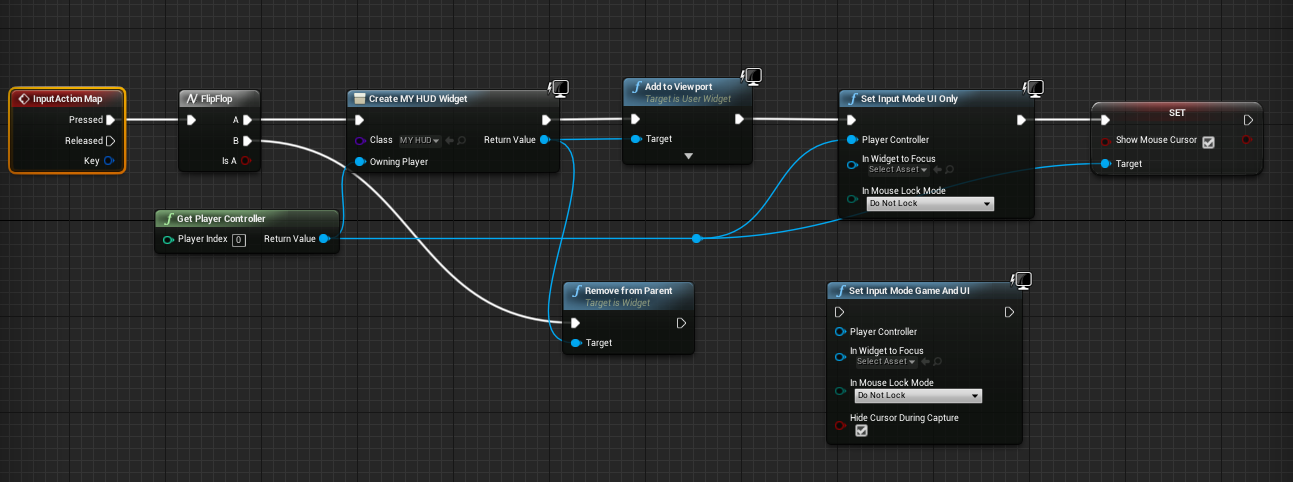
hey all is there any reason why the toggle of my widget doesn't work with this?

it does work if i set it to game mode and ui though
manic pawn
set input mode ui only prevents this from receiving input
also you really should not re-create that widget every time it is opened/hidden :v
topaz quest
how would you do it?
brazen bobcat
make a var
topaz quest
also doesn't setting the input to UI mean that only the ui accepts input ?
im sorry im a noob 😦
manic pawn
yeah, but if only the ui receives input, it never gets passed to this input action
since that is not part of the ui
topaz quest
ok that makes sense
kindred viper
Anyone know which input includes you need to use a slate ComboBox? Seem to be getting lots of input related link errors.
topaz quest
can you elaborate a bit more as to how you might do it @manic pawn if you dont mind ?
manic pawn
I'd use input mode game and ui
topaz quest
ok, and could i stop the character from moving on input?
also, how would i avoid re creating the widget every time?
ty for your patience btw 😃
manic pawn
to avoid recreating it just store it in a variable
and only create once in begin play or something
topaz quest
ok thank you i will do some reading 😃
ok so you guys would create all your widgets at begin play for example and just hide them and then show them as needed?
manic pawn
I create all possible dialogs at the start of the game and then switch them between collapsed/self hit test invisible as needed
except for some rare cases where it makes more sense to spawn it dynamically
this allows you to turn complex ui on/off without framedrops
manic pawn
kinda is
but it's also kinda simple
you'd just replace all of your add to viewport/remove from parent calls with setvisibility ones and keep track of all widgets somewhere
topaz quest
lol you make it sound simple 😃
thank you though that is really good advice. better to learn the correct way instead of the quick and easy way
 narrow pasture
Anyone else know a solution to taking high res screenshots in unreal? both the command line and the interface versions don't work
narrow pasture
for some reason i can't change the directory of the screenshots, so its saving it to a directory that doesn't exist on the computer that im using
even though i went into the settings and changed it
 sinful narwhal
hi
 daring atlas
Is there a recommended maximum size of the name of any asset as seen in the Content Browser? Example: I import a mesh called SM_whateverobjectname01. How long can that name be, potentially?
 vivid girder
Anyone know anything about the BSP error that was recently patched?
 whole quarry
@daring atlas i would say: keep it as short as possible
daring atlas
someone specifically told me 27 was the recommended max
it sounded a little superstitious and oddly specific
plush yew
@daring atlas you want naming conventions for your assets. so that way you can quickly reference them from dropdowns. so you can do things like BP_Pawn for blueprints, and M_Tex_NRM / M_Tex_Base / M_Tex_Spec for textures / materials that type of thing. naming convention is important. sometimes if you have no way of describing something other than to name it in a long way like M_TexturedGravelEarthDaytime_Base then you can do that if there are several of a similar type and you want to differentiate. if you don't want to differentiate them, you really should keep them short as Remco said.
hope that helps
daring atlas
yeah, this limit came up in my teams discussions about naming conventions
plush yew
yep
 grim sinew
Well here's the problem - Operating systems have a file name path size limit, 240 characters total. So if the user installs to some random directory, it's entirely possible the path will be so long that the OS can't access, copy, move, or delete the files.
So that's why you generally want to keep them as short as possible, because you're already going into program files/your company/game name/whatever
Making insanely long names for things is just asking for someone to have some trouble
27 itself is probably a pretty random number they just came up with on the spot, but it's the idea of it. Just don't make it insanely long
cloud cobalt
"Operating systems" meaning pre-10 Windows really
grim sinew
Or Windows 10 before I think the 2017 update, they increased it in that version
daring atlas
isn't that what the cooking filepath length is meant to warn and advise about?
cloud cobalt
It is
grim sinew
And of course, at a certain point it's just harder to read as a developer. "M_Tex_GrassOpenWorld_Diffuse_SRGB_WithKittensInAlpha" is never going to fit in the UI and it'll just trail off into "..." anyway so you won't be able to even read the full name in the editor at any point.
Keep things short and readable
worn granite
still using any kind of shortcut
Material_Texture_GrassOpenWorld_Diffuse_sRedGreenBlue_WithKittensInAlpha__FINAL_last_PSD
daring atlas
ahhh, maybe that's where the 27 came from. Being able to read it in the UI
cloud cobalt
Nah, that depends on scale
grim sinew
"Material_Texture_GrassOpenWorld_Diffuse_sRedGreenBlue_WithKittensInAlpha__FINAL_last_PSD_final2_seriouslyFinalThisTime_FINISHED_done_iGiveUp"
grim sinew
It's so bad. I just gave up on calling anything final and just do things like Wall_02.spp
And just version up in numbers
worn granite
Material_Texture_GrassOpenWorld_Diffuse_sRedGreenBlue_WithKittensInAlpha__FINAL_last_PSD_final2_seriouslyFinalThisTime_FINISHED_done_iGiveUp_DebugFinal
I wonder what the actual longest attempted asset name was
 fluid stag
Tiger_I_712(Early_B_R_SB)_althull_altgun_NOGUARDS_Scaled_RIG_V2Tracks
grim sinew
It would be so stupid to accidentally break Windows 7 and 8 compatibly by just having a stupid filename
fluid stag
I have a folder named M1911
in that folder is V1 - V2
and
THE LAST FUCKING 1911
another folder named
grim sinew
hahahaha
fluid stag
I LIED ANOTHER 1911
 tranquil hare
hey guys, anyone know how to rename multiple assets of same time?
For example change Prefix of multiple Animations
*type
tranquil hare
MP plugin?
cloud cobalt
marketplace
tranquil hare
ahh, i got it thanks
 quasi lake
Can I ask something about animation here?
 sudden agate
quasi lake
sudden agate
quasi lake
Ok
 timid sail
could somebody please help me with getting a real life location into UE4? because if i use L3DT i only get 1 x0y0 .rar file :/
manic pawn
open the rar file and check what's inside?
timid sail
if i want to open it, it says that it is damaged
timid sail
and i tried multiple times and all the same result :/
whole quarry
Sculp it yourself?
vivid girder
Is there a way to get a callback when a section of a montage finishes?
Without manually adding a notify to the ends of each section
 keen frigate
hey everyone 😃
plush yew
Guys anyone know free animated bird character?
 languid shard
anyone has a very simple way to use the windows file explorer to import stuff at runtime ?
and by very simple I mean blueprint based
Everything I've seen so far is C++ based and you have to code your own tree structure and all
I just want the plain old windows explorer to open a file in my build 😦
manic pawn
you'll have to write a bp accessible node in cpp that opens the explorer
languid shard
got no clue when it comes to C++ stuff :/
 obsidian nimbus
@plush yew there is flappy bird in the learn i believe 😃
 wary wave
you'd need to do more than just have an accessible node - I don't think there's any way to import stuff at run time from drag and drop
I don't think you can even get to windows explorer either in game code
I suspect that's all editor side
languid shard
well thats quite the problem 😦
right now I'm using a good ol text path, but it isn't really user friendly
knotty lagoon
any idea why my scene lightning looks like crap?
i mean... the shadows of static objects
whole quarry
Yes,you messed up the light settings
knotty lagoon
i am using default scene light
maybe, just maybe i changed position or somethingby mistake
on the way
whole quarry
The yellow arrows tells me nothinf is default about it
knotty lagoon
yellow arrows.. where?
whole quarry
You changed values in the Directional Light settings
grim sinew
The shadows are off because your lightmap resolution isn't high enough on the floor.
whole quarry
Never had it that ugly even with 64 res
grim sinew
It's a big floor.
Whatever the floor's lightmap resolution is @knotty lagoon , double it
knotty lagoon
where do I set it
grim sinew
Either on the floor itself or on the mesh in the content browser.
knotty lagoon
doubled it.. and now... shadows are still ugly
the pillar shadows should be straight i guess
grim sinew
Double it one more time.
Should be all it needs
It'll never be 100% straight, but it should be close enough
knotty lagoon
i thought.. somethingis wrong with light source
because unbaked shadows look more reasonable - like this:
knotty lagoon
grim sinew
Do not go off of dynamic shadows, they're totally different.
Right, don't care. Doesn't matter.
Dynamic and baked light work with different resolutions entirely.
knotty lagoon
okay, rebuilding... current resolution is 512
grim sinew
What resolution is your floor right now
Okay 512 should be plenty.
On your directional light, what may also help is if you tick on area shadows, it'll blur it a bit with the shadow penumbra.
knotty lagoon
languid shard
keep in mind that the default template floor is a cube
so in action, 512 would be a little bit less than 256 on your top face
grim sinew
Is it the default template floor? I didn't look
languid shard
yeah it is, check in the sm window on the screens :p
grim sinew
Oh. Well step 1 is don't do that.
knotty lagoon
dont do what
knotty lagoon
anyway, i tried area shadows...
and not sure if the blurred out is "better" in the terms of visual experience
if its more realistic or mroe primitive
grim sinew
It's more realistic, you need to adjust the source angle slider it has above that checkbox to change the sharpness
The fewer clouds in the sky, the lower the angle will be.
Since clouds diffuse the light
A perfectly clear day will be like .3 or .4
I usually start at .5 and go from there
The lower the number is though, the more resolution you'll need for it to render properly
knotty lagoon
also, i have static model with apparently ruined lightning uv or something liek this
so i made it "stationary" rather than static
grim sinew
Without even seeing your model, I can almost put money on it being bad lightmap UVs or not high resolution enough.
knotty lagoon
wait i will make it static again and tell you what error appears
its that blue car model
xD
knotty lagoon
possible
grim sinew
https://wiki.unrealengine.com/LightingTroubleshootingGuide here, go commit this to memory
 eager ingot
hey everyone !
grim sinew
No, you need to make a new UV channel manually for lightmaps
eager ingot
I have a question regarding StartupMovies format
grim sinew
That error only pops up when the automated method Unreal has built in fails
eager ingot
what software do you use for video formating
languid shard
@knotty lagoon can you show us the current UV of your car ?
knotty lagoon
its free .fbx file
eager ingot
My video is displaying black, It may be from bad format, or just that the video is too short
languid shard
I'm not asking where you got it 😐
just open the mesh in unreal
and go in the UV channel drop down
and show us all the UVs in here
eager ingot
(ouch)
languid shard
erm
knotty lagoon
should I continue?
languid shard
yeah
by default UV0 is for textures
UV1 for lighting
maybe UE built its own UV1 when you imported (unless you unchecked the option)
knotty lagoon
i used option to import
the lightning uv
(if model has one at all...)
this is uv1:
grim sinew
RIP
languid shard
you should probably export each part separately
knotty lagoon
editor is havingperformance problems
knotty lagoon
thats what i did, exported it into blueprint and then converted to one mesh
knotty lagoon
well i intentionally foudn hat complicated model for performance testing
that*
is it possible to always render lightning with some LOD or?
grim sinew
Well not baking it is going to double the polycount for every light in the scene, so you better bake it 😛
And no, you have to bake it at the LOD0 level. You just need to go in and do a ton of cleanup.
A mesh like that is very possible to make work in Unreal, you just need to put the time in.
knotty lagoon
which i dont have anyway
knotty lagoon
that too
languid shard
unless that model has a well made lightmap UV, you can't really bake it
languid shard
hmm
grim sinew
Probably just a better auto lightmapper.
knotty lagoon
anyway
how about making some fake static lightning rather than baked, is it possible?
so the model will at least not be completely black in UE when static
and it wont eat performance
screw shadows.. at least i dont want model to be black
 tribal pebble
anyone from the EU ? please read
https://saveyourinternet.eu/
grim sinew
Just disable dynamic shadows on the mesh, that'll help it significantly. The real answer though is just better lightmaps
cloud cobalt
@tribal pebble Not the best place to post this
knotty lagoon
disable dynamic shadows.. you mean after making mesh non baked?
knotty lagoon
yeha, but that is for dynamic/movable objects, right?
languid shard
a static object can cast a dynamic shadow 😉
knotty lagoon
I do not notice any much in-editor performance difference though
between static and dynamic car
(but im doing just poor fps testing while playing in viewport
tribal pebble
@cloud cobalt if its not the best place
tell me where it is
it is important for UE4 users in the EU as well
warm mountain
When people talk about localization does that just mean translating all the game text to another language?
or does audio dialogue count too?
 vale osprey
Depends, but normally yes
warm mountain
oh boy
digital anchor
and not only, even assets
vale osprey
Imho Valve’s games is a good example
warm mountain
sometimes thats something i dread with localizing
i think i'll probably limit it to just english and chinese
tall pendant
localization means way more than just translation work
you also have cultural localization and stuff
warm mountain
fair enough yups
i understand somethings that are fine in one culture isn't okay in others
i just did a survey for my game
and found that some of the word choices i made for english were not in good ways
didn't translate from chinese as well as i thought
cloud cobalt
Whether you translate the audio is a choice
English text is a must because well, it's probably what gives you the most reach
cloud cobalt
I think priorities should be english text -> other texts -> other audios
warm mountain
since the area we are setting up in based of guizhou
i'll def translate the text for sure
cloud cobalt
I would still look for english audio at least
warm mountain
just worried over changing the audio to english due to the cost
tall pendant
having an proper test loca (at least) is crucial is some areas tho
warm mountain
i might translate the audio to english for the prompts
tall pendant
Germany, France and Russia are well known to like their own language
warm mountain
like "you can't use that now" "this spell is unavailable"
but dialogue prob not
that i notice too
tall pendant
Portoguese and Spanish are also nice to have,
warm mountain
germany, france and russia seem to have their own localized servers
cloud cobalt
As a French developer, we decided to do everything in English, which was possible because I'm decent in English and check everything - no audio though. We then translated the English texts to French after the fact - which we weren't sure initially we'd do
cloud cobalt
Imho, in Europe, english audio with english subtitles would give you much more reach than chinese audio with english subtitles
warm mountain
gotcha
cloud cobalt
Everyone has some level of familiarity with english, even if just intonations / general vague idea of what people are talking
Chinese is completely obscure to us
warm mountain
i'm planning to get it published on wegame
aiming for more the chinese market
as thats where i am
cloud cobalt
Yeah, you won't get many english users there
warm mountain
but also considering the possibility of doing it on steam
with english localization
cloud cobalt
Usually, not having english is a death sentence but I guess Chinese is a large market too 😃
warm mountain
i'll take note of it, if i have spare funds i'll try for an english audio haha
china is growing quite fast
tencent is our disney
cloud cobalt
Yeah. Too bad you basically have to go through them to ship in China
warm mountain
pretty much
they work with the gov
in a few years though alibaba could be a alternative
not now though
the thing about tencent is that in the future you might need a decent social credit to play there
and the younger chinese dont really like that kind of tracking
alibaba is offerring privacy in entertainment and gaming
and have been building up their platform, they have been trying to acquire this other gaming platform and peiwo
but it has been blocked by the chinese gov for now
expecting it to be lifted soon
cloud cobalt
Yeah, it's annoying that competition is government-controlled, but well, it's your country
 dim merlin
hi guys
 elfin jacinth
Good morning. 😃
cloud cobalt
Good afternoon
 solar eagle
hello
does someone know how to do this? Or what should I search for to get the tutorial?
grim ore
I am sure someone knows how to do that
solar eagle
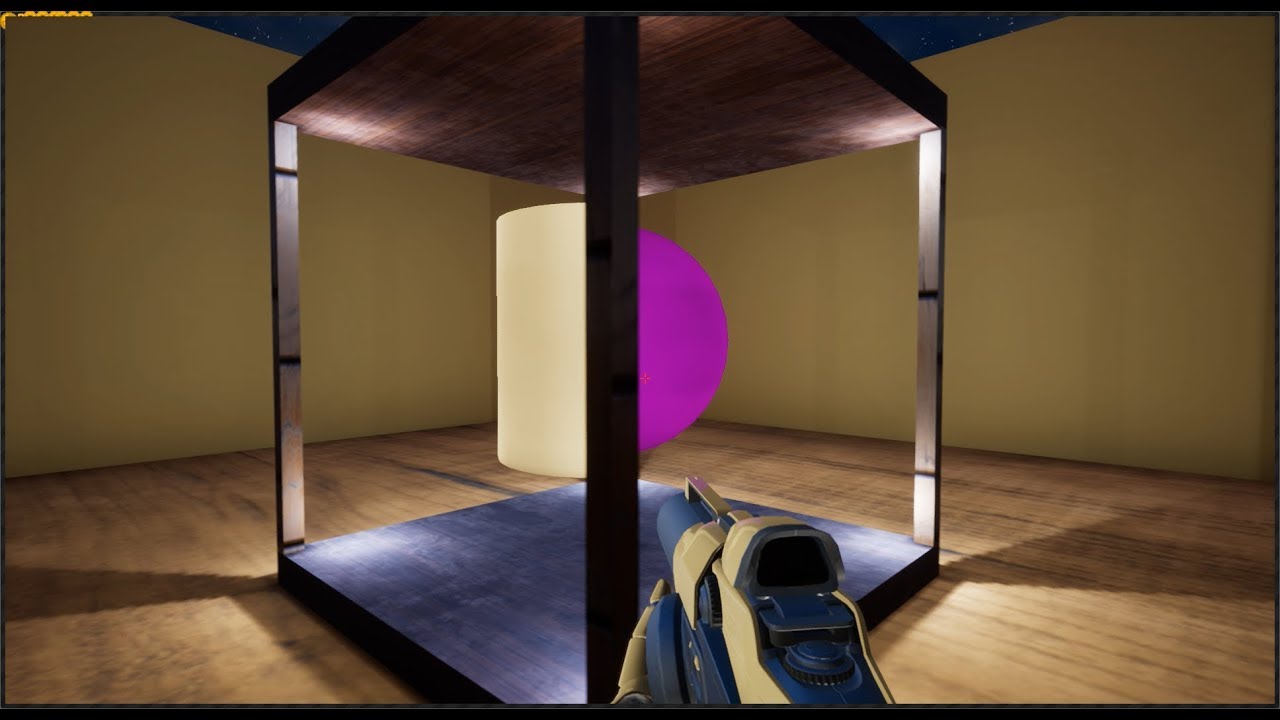
Playing around with Unreal Engine, recreating the antichamber box effect where each side contains a different 3D model. Let me know if you'd be interested in...
this is a short video with 20s
and am like WOW that awesome and I wanted to apply this idea on a school project
grim ore
Look into portals for UE4
solar eagle
portal
grim ore
there are a few tutorials out there for it
even portals for Unity would use the same concept
grim ore
yay. hopefully you get it working 😃
wary wave
they're render targets
languid shard
@wary wave @solar eagle wait is it render targets or stencil buffers ?
in unity you used stencils to do this
wary wave
render targets
 vale jasper
https://gyazo.com/af45a46f850411351a7e193c4aa780f1 does anyone know why my crouch animation isn't happening when I press the c key

the camera moves up and and down
wary wave
UE3 didn't have stencil buffer access for this kind of thing
I don't think UE4 does either
vale jasper
but no animation starts
wary wave
UE2 however did use the stencil buffer
grim ore
Does your animation BP have crouch set up?
vale jasper
nah it doesn't, only in third person character bp and I have a state for it https://gyazo.com/f0a769b9429ac74a56fde30fcbc1f030 https://gyazo.com/bb83d22d001bef926c6c827b3c13251d


 grave nebula
@solar eagle You can achieve this effect by rendering faces of the cube, which are supposed to be see-through, into custom stencil buffer with different values. For object, that is in the center of the cube, in its material you'd sample custom stencil and adjust opacity of the object accordingly. Note that stock UE4 allows you to do that with translucent materials only.
wary wave
translucent materials only would kind of spoil the effect, maybe
grim ore
@vale jasper for the Idle -> Crouch state transition what is your setup? how does it know to go into the crouch animation
The first check would be to go to the anim preview editor on the right there and check your is crouched and crouching bools to test and see if they actually trigger that transistion (assuming that transition is set up)
then you will know which bool is the one that controls the anim, then you need to find out why that bool is not being set
grave nebula
You can check, if the object's pixel is behind a face analytically too.
solar eagle
kek, that was chinese to me ehhehe but I'll try it out
I was thinking of actually creating a "portal" and an invisible wall so that it doens't allow anyone to go through
vale jasper

 plush yew
@agile furnace ^
pallid compass
anyone here know how i would get the world direction from 1 vector to another
agile furnace
@pallid compass find look at rotation (it's a node)
pallid compass
Does that work for world direction? as i cant actually rotate my pawn
agile furnace
yeah
it's simply giving a rotation from one point of view to the other. using 2 vector locations
 golden lotus
@vale jasper can you, on the animation update tick, print the state of the boolean Crouching
Then play and do the same test again. If it stays false, it's not being set in the animation blueprint.
pallid compass
kinda works, bit funky need to test more not sure why its freezing up
golden lotus
What kind of vectors are these? Are they forward vectors of two actors?
agile furnace
if you're talking to me. they're just 2 vectors. doesn't matter what they are. and the find look at node. just mathematically computers the direction in rotation. from point a to point b
you actors don't need to look at it or anything
grim ore
@vale jasper that's good but now what actually sets that Boolean in your anim bp?
Usually in the main anim bp, in the event graph not the anim graph, the variable is normally set somehow. You would probably get it from the character it is controlling or have the character set it when you crouch.
Or both lol
 oblique coyote
Anybody had expierence with steamworks yet and if you got your game on steam is there anything that you need to do with steamworks ? (do you have to include special files in your engine version ?) just asking to make sure.
plush yew
https://i.imgur.com/MENMiVv.png any clue what I need to do to make it work?:(
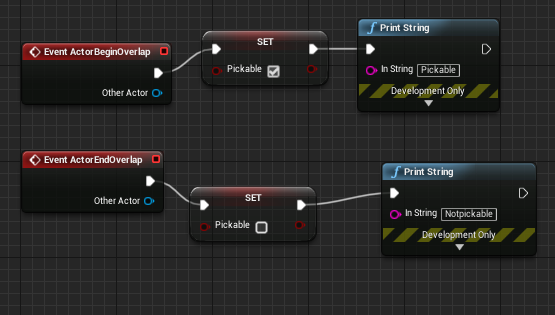
im total noob
safe rose
?
From that, there's nothing we can do
Only thing anyone could venture a guess at, would be that your collision are bad
plush yew
what step i missed?
plush yew
so i need to make "collision sphere" ?
safe rose
You need to read what I just wrote
Why doesn't it work?
Does your Actor have collisions?
plush yew
no
safe rose
Unreal Engine
Choosing what collides is obviously very important, but it can be tricky, and it’s a problem that we have spent quite a while discussing while developing UE4. The system we have can seem a little complex at first, but it is very powerful and consistent, so I wanted to give ...
Less typing, more reading, so you can understand what the problem is
No one else is going to be able to give you a better answer (other than feeding it to you), than Mr. Golding
plush yew
mr golding?
but i need to scale it so its smaller when in inventory https://i.imgur.com/gZBkHsF.png
 safe rose
plush yew
safe rose
plush yew
a lot of reading
golden lotus
When I first started using UE4, I just binge watched tutorials and followed along for weeks
At first I had no clue what I was doing, but eventually things started to stick.
plush yew
im just tryin to pick up item
grim ore
linetrace to the item, push a button, destroy item, add inventory version of item to inventory thingy. profit?
plush yew
lol i made it
pallid compass
grats
plush yew
idk why, but i just added component collision box to my armor model and it worked
but when i added that component inside model editor window
it didnt
plush yew
but it had coliision sphere
pallid compass
prob the settings then
plush yew
im much closer to my game now
pallid compass
U are further away than u think 😂
plush yew
haha i noticed when i take screenshoot of anything with these instant screenshot applications it uploads to image host in 1 sec but if i have game in preview window in small resolution n make screen it will be 2mb size and long upload time
pallid compass
sad times eh
plush yew
now i need to create inventory for items
but i probably need to invent some simple modelling/graphic style so all my items and characters fit each other you know what i mean
so tis not looking like chracter is from movie and items from some other game
pallid compass
yeah prob
 slender mist
I'm trying to use the paragon assets in my project, but every time I try to use a new mesh, it takes like a solid minute
is that normal?
 regal mulch
@slender mist A solid minute of freezing?
Or just compiling shaders?
They are quite complex I think
slender mist
@regal mulch yeah, freezing
but I feel like its getting faster as I add more stuff haha
regal mulch
You PC has up to date hardware?
slender mist
i7 4790k, 16gb ram and gtx 970, not sure if that is good enough
slender mist
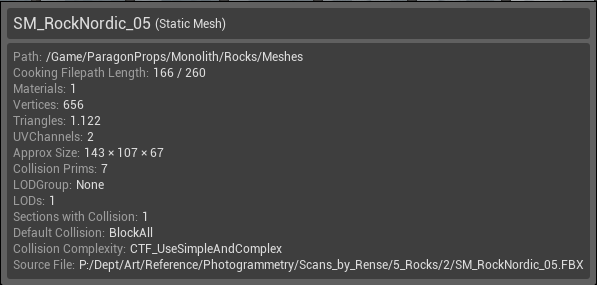 slender mist
One more thing, I added some of the foliages from paragon to the tool and painted like 350 instances but it shows me this:
https://i.imgur.com/C1e1zuq.png
Do I need to configure anything to make it work?

 small oar
Just curious about this missing dll error that comes up sometimes when I open an unreal project
It’s easy to get around usually just by restarting but is it something I should be worried about or can I just ignore it
cyan merlin
What is this? Facebook
 livid haven
(Spam removed, so our comments don't make sense now.)
 next badger
um...there was no unreal stream this thursday???
pallid compass
kids be kids
next badger
OH, Epic added Steam Integration to the launcher
pallid compass
wat
 frank escarp
tall pendant
frank escarp
tall pendant
just what people need for an dev account 😄
wary wave
oh lawd
pallid compass
Does anyone know how u could get ugh Screen X Y on mobile click event? i am totally lost
next badger
@pallid compass http://api.unrealengine.com/INT/BlueprintAPI/Game/Player/GetInputTouchState/index.html
Get Input Touch State
plush yew
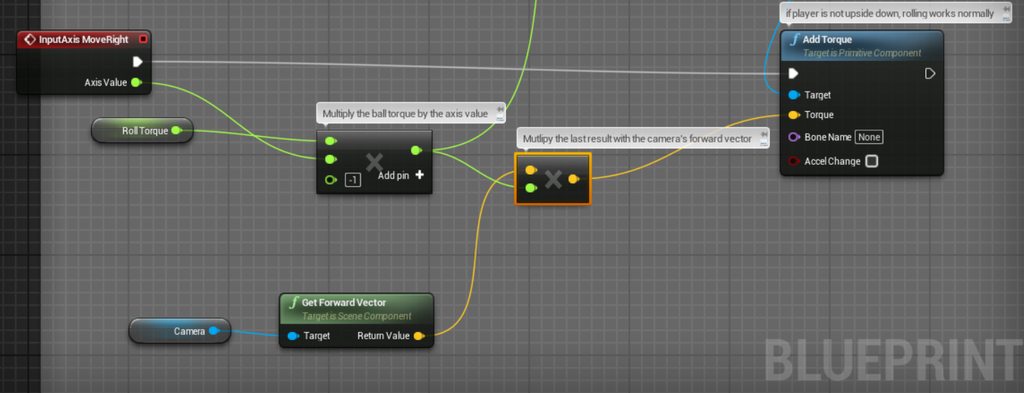
https://imgur.com/a/Y9g7m this damn shit isn't working. ball. rotating cameraa
 pallid compass
seams to work thanks alexey 😃 ❤
 oblique sorrel
I'm having a little bit of trouble choosing a license for my little project, was hoping someone knowledgeable in the arcane arts of copyright law could help me choose one.
- It's a UE4 project in Blueprint
- It has some assets that were free to use with modification, both for commercial and non-commercial purposes
- I want to share it with anyone and everyone, freely
- Under the condition, that whatever changes they make to the project, should also be publicly available
- However I don't need them to disclose the source of their entire game if they use this project, just whatever they changed in the system contained within
Is there a license that handles it, or should I write my own or something?
livid haven
"someone knowledgeable in the arcane arts of copyright law" - Get a lawyer
Can't cost more than 1K.
oblique sorrel
I'm not looking for someone to write me a GDPR-compliant privacy policy. I was hoping for someone to say "Hey, I'm using a license like that, it's CC-XX-YY"
1k is about 1k too much
livid haven
You need to work out how all of the different licenses for everything you've used actually interact and what they mean about how you can distribute that content and license it.
Or you can take advice from people with no expertise on the internet and potentially get C&D'd or sued. 🤷
The answer on legal matters is always, always get a lawyer.
oblique sorrel
I made sure beforehand, that whatever assets I use are CC-0
Also, I don't intend to sell it or anything. I made a cool thing, and I'm hoping it can help other people
livid haven
CC0 seems to imply you can do absolutely whatever the hell you want with it. I guess. I don't know.
 twilit hill
oh boy, wouldnt it be nice to just export a single material, mesh, effect or blueprint into a single packed file with all its dependencies and without completely screwing up pathing .. why is this not a thing in 2018 yet
oh wait, UNITY HAS IT
plush yew
What you mean
slim cairn
unity is abandonware :rip:
next badger
@slim cairn huh?
livid haven
@twilit hill It's technically possible, but it's a direction that was moved away from.
Blueprint assets contain multiple objects.
As do levels.
Having monolithic, atomic assets doesn't sound great.
next badger
@languid patrol just move them inside ue4 and then fix up redirectors
twilit hill
even for the sole reason of exporting and importing specific assets? if you do that with bare files now, you completely break all pathing, which will require you to re-assign materials/texture compositions/etc.
just plain stupid
i think ill write an essential plugin for that
it just bugs me too much
 languid patrol
@next badger so I thought that would be the right way, however moving a folder to another folder should work fine but UE4 editor crashes
next badger
@languid patrol try to fix up redirectors Before moving the folders as well...
@languid patrol i've successfully moved folders in a HUGE project
slim cairn
@next badger I'm just saying the engine course feels like its now all about marketing to the bone with the people behind it these days
livid haven
@twilit hill Are you just shoving files around?
That's absolutely not what you're intended to do.
Never, ever just copy/paste or relocate asset files outside of the editor
twilit hill
no, i am exchanging materials with my mates on a regular base, and it always screws up linked textures to a degree where we decided to exchange small project files in order to migrate them from within the editor
-> plain stupid
languid patrol
@next badger so I might have some redirect issues for some reason and to run that before moving a folder?
livid haven
How do you think the marketplace works?
languid patrol
I actually haven't tried that
next badger
@languid patrol indeed, i've seen some projects on marketplace that has unfixed redirectors in it
twilit hill
the marketplace stuff is being copied within sub directories (which are also defined within the assets), so essentially this requires you to have ALL the requirements in the SAME directory - or you move 10 files into 10 different dirs every single time
again, this is an essential feature
livid haven
No. It requires you to have the same relative paths and names for files.
twilit hill
we even gone so far and just copied requirements to the root dir, and it STILL screwed up linked dependencies half of the time
livid haven
It's really not that hard to not screw it up.
twilit hill
why cant we have an export option into a single packaged file which keeps relative paths and recreates them upon import / or optionally moves them into another dir / or even smarter - checks the project if the same files exist already and automatically re-links them?
copying and exchanging assets is a pain in the butt atm
livid haven
This is a pretty basic file system situation, I don't understand why you think the engine needs to implement special functionality for this purpose.
twilit hill
im a bit hot on that topic, but ill eventually just write a plugin for that
worn granite
it'd still create the dirs that existed in the source project, and you'd still have to migrate out of that into your own structure
twilit hill
i just think its an essential low hanging fruit
livid haven
I don't really have a response to that that isn't patronizing, so... 🤷
worn granite
surely you communicate with the people you wanna send this stuff to - just have a single hierarchy
next badger
@worn granite that's an improper way too...if you want to collaborate - use VCS
worn granite
haha, sure.
livid haven
It sounds like they're not collaborating on one project
Literally just sharing loose assets at eachother.
twilit hill
yeah, thats a workaround, but nothing more
livid haven
There's an entire marketplace that functions without this special feature you deem of such importance.
twilit hill
i cant use that marketplace to exchange assets with my mates, why even mentioning it?
livid haven
Because the marketplace distributes asset packs that people easily drop in without losing references.
safe rose
Note to other developers:
If you change your release date, don't forget to change your Steam Page
Or else you may have this problem: (And people wondering why they can't buy the game yet)
twilit hill
if we could "package" assets and provide them in a friend-list-only marketplace, that would be fine with me 😄
livid haven
You're missing my point - you don't need to go through the whole marketplace, you just need to package up your assets in the same fashion as done for the marketplace.
Trying to find the exact steps on that to link you to.
twilit hill
well, i already gave enough reasons as to why this is very time consuming and way too complicated, seeing as how my assets and requirements spread accross 10 directories at least
so i just migrate them into an empty project, move the files into the same directory, rename that directory and THEN i can send this packed directory
just about 5+ minutes for preparing a ssingle material, every time
 sand leaf
Hi everyone, I was wondering if I can post a project of mine in this chat! Or must it be in another?
twilit hill
and if you dont get that, i cant explain it any better
worn granite
is it an ad @sand leaf
livid haven
Whatever way you're doing it may be taking 5+ minutes, but that means you're not doing it a better way...
livid haven
That's exactly what the migrate tool does.
Find references. Grab all of them. Copy them. Elsewhere.
sand leaf
@worn granite is a link from a project
worn granite
are you trying to sell the project, or will otherwise gain profit from an audience you intend to establish here?
twilit hill
yeah, so we end up with 30 different directories everytime we dont move them into a single dir / we all have our different directory structures
livid haven
@twilit hill So you want a bunch of meatballs of assets, made atomic, intermixed with loose files in a stricter directory structure?
worn granite
I can point to several issues I'd rather UE4 fix rather than implement some sort of auto-project-structure-mapper thing
sand leaf
@worn granite in fact, it's a link to my post on the Indiegogo site, which is to make money to create my game
 frosty bloom
Just send him the textures and print screen the material, if you can't organize your stuff that sounds like a shorter rout
livid haven
Good practices and convention alone are a great reason to not do that.
twilit hill
no, i will just make that plugin for me and my mates
worn granite
For instance, I don't know, how about we improve BPs resistance to corruption again
its much better but I'm sure the time it'd take to do your thing would be better spent there
sand leaf
-_-
worn granite
@sand leaf Well, they don't take too kindly to that sort of thing then.
ask a mod if you can, maybe.
#work-in-progress works for just showcasing what you've done though.
 west quarry
hey, I need some suggestion for effects like if player posses item and when player pass item something like a ball
 drowsy basalt
Anyone know how to fix the wheels being rotated? The mesh looks fine, but i'm clearly missing something.
 dim arch
does anyone know if there is a bp available which will take a pano screenshot and then upload it to facebook ?
plush yew
Is unreal dev grants still continue?
cloud cobalt
Sure
cloud cobalt
Extremely few people get it and they mostly get it after making extremely great stuff
Don't plan on getting one
cloud cobalt
YOu need to do something really cool that gets press coverage basically
Something unique that Epic can use for advertising the engine
Or a great tool for other game devs
Like, the GPU lightmass tool is stuff that could get a dev grant
Look at these : https://www.unrealengine.com/en-US/blog/epic-games-announces-new-round-of-unreal-dev-grants-totaling-over-200-000?sessionInvalidated=true

Unreal Engine
Chosen developers around the globe building independent games, tools and an animated feature film In Unreal Engine 4
 signal field
Hi everyone, I’m looking for a few people to do a few hangout pair-coding sessions on Saturdays working on each other’s projects. Hit me up with a DM
dim merlin
hi, anyone knows its possible to import a 3dsmax scene but set all objects to 0,0,0 ?
pallid compass
no you need to shift them to 0,0,0 your self
dim merlin
ah, right okay
 obsidian fable
Do anyone know how i get off the "preview" text from the light source?
grim sinew
Bake it.
silver crown
There's also a config option
Useful when you have a dynamic terrain and you want to have high quality shadows for your screenshot 😅
 cedar snow
@drowsy basalt are the green/yellow graphs in your screenshot custom-made?
drowsy basalt
@cedar snow nope. Console command showdebug wheel
When using a vehicle movement component
plush yew
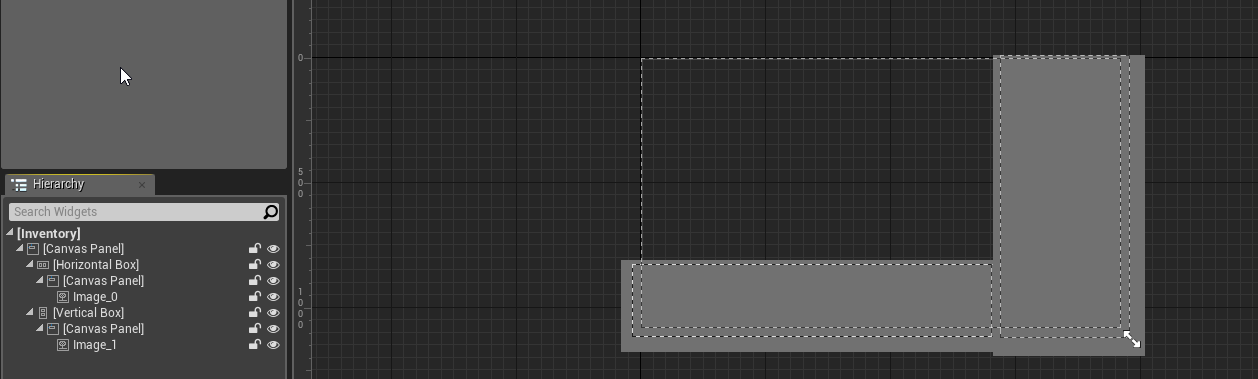
is this hierarchy (look left) good way to set this UI? (chat on the bottom, map, equipment, skills, inventory on the right) https://i.imgur.com/5cBRgoW.png
 frail light
hey guys ^^
pallid compass
need to reimport it with it at the 0,0,0 of ur modelling software
there might be away to shift pivots in the editor
but iv never done it before
generally u dont want to, u want to fix it in modelling software
to avoid further issues
 analog pollen
Do you guys have any game ideas? i need some thing to do
grim sinew
!gameidea
plush yew
Want game ideas? Send me a DM!
 tired island
@analog pollen what type of game ideas?
 robust grove
@drowsy basalt check your axis, for vehicle you MUST have Z=up X=forward
drowsy basalt
On the mesh @robust grove ?
drowsy basalt
gotcha, i'll do some tweeking, for the record, I bought these assets from the marketplace. Cheers for the heads up
robust grove
you can bodge a lot of things, but they'll come back and bite you later
its all ways the same with vehicles, people just never learn
i'll check back later
cedar snow
@drowsy basalt thanks
plush yew
Hi guys. I'm looking for Russian CG in Montreal Canada
 fathom frost
hey guys, I have a question (new to casting), I want to set a variable in BP_Participant, so what is the object in the cast to?
 austere finch
can anyone tell me when Epic Games will release the rest of the Paragon characters? I really need Wraith for my game
cloud cobalt
You don't need another game's character for yours
austere finch
I wish I could say that, but I don't really make characters and their animations. Also, if they are releasing it for us to use, so why not use it
cloud cobalt
@austere finch You could consider making a different art style
Reusing characters is fine for learning but it's not what will make your game better
 native creek
I can't find the 'Blend poses (ECardinalDirection)' in the Blueprint Animation, has anyone woked with it ?
cinder iron
thats just blend by enum
ECardinalDirection is an enum
North West East and Default as south might work for you
silver crown
lol
worn granite
@elfin jacinth weigh in on this?
silver crown
It is
elfin jacinth
What am I doing?
worn granite
Know what?
silver crown
Nothing
silver crown
You didn't
worn granite
right.
elfin jacinth
Ya'll chill
worn granite
Well I have a paid asset - cause it's my own asset that I made.
elfin jacinth
If you're looking for someone to help with a project, I recommend heading to the forums.
worn granite
And you're not gonna just come in and ask about distributing paid assets and then berate me like I've got no stake here.
elfin jacinth
If you're looking for assets, check out the MP.




 silver crown
┬─┬ ノ( ゜-゜ノ)
worn granite
@upper heart
elfin jacinth
We should all get along, no reason to get heated about stuff. Misunderstanding, or miscommunications happen. Lets not let that define communication
worn granite
Yeah DM me rude comments and then block me
it was funny until then, miserable wretch
<@&213101288538374145> I've got an image of @clear dagger using racial slurs in a DM
 upper heart
banned
manic pawn
what is it doing when it sits at 99% for 2 hours?
silver crown
Watching you cry
fathom frost
Can someone please help. What does this object need to be if I am just trying to set a variable on another blue print?
manic pawn
.....the object you want to set it on?
what
you can't just cast the game instance to some unrelated thing
fathom frost
There is no object, I just want to set a variable to use in the blue print
Or is there a better way to set a variable on another blue print?
manic pawn
variables in blueprints only exist as variables on instances of them
 fluid swallow
@fathom frost Every actor is an object. If you want to set a variable you need to get that specific object.
@fathom frost A good example is if you have 10 players in your game. You don't want to set the health on all 10 of them at the same time when only one of them becomes hurt.
@fathom frost You will need to reference the BP_Participant directly that you want to modify. If it's already in your level, you can drag it into your level blueprint to test it out (or use GetAllActorsOfClass - which I wouldn't recommend).