#ue4-general
1 messages · Page 233 of 1
 oak linden
Just look up 'light profiles' on the docs
 grim sinew
@narrow pasture https://forums.unrealengine.com/community/released-projects/1422139-rectangular-area-light-leave-bounce-cards-behind Either use this or wait for 4.20
Unreal Engine Forums
I got tired of using bounce cards or relying on the low sample rate of emissive materials to make up simple rectangular area lights for my scenes. So, instead of
 narrow pasture
Nah Im faking caustics in a trench
grim sinew
4.20 is adding it officially, I made this before that announcement
narrow pasture
Can't do bounce
grim sinew
This isn't bounce cards.
That's the specific reason I made this, to avoid that
If it's still not good enough, wait for 4.20. Currently, bounce cards and that blueprint are the only two ways to do it.
 languid shard
@pallid compass IES :p
grim sinew
Trace colors are solely visual for the debug, but it should just be those
narrow pasture
Well, I can wait for 4.20 then. Wasn't aware it was being added for that
 plush yew
ou, found out, trace hit color is color of the line AFTER hit
 wary wave
yes
 worn ocean
so my 780 ti died and now im using my spare 8 year old 550 ti is it good enough to run UE4? minimum is gtx 470 which is more powerful than a 550 ti
i feel like 💩 for getting downgraded this bad
 pallid compass
would not recommend 550 ti 😂 but u can prob get away with it
 sturdy star
has anyone noticed that Play-In-Editor no longer automatically takes your input, so you need to click-into the game window in order to register inputs? is this a 4.19 thing?
 frosty copper
There's a setting for it.
 cloud cobalt
@worn ocean Anything that has feature level 10 should run, which is basically every GPU these days
Obviously the 550 is a shit GPU, but it should work
sturdy star
oh, we just moved to custom engine, perhaps it got lost in an old ini file, do you perhaps know what the setting is called @frosty copper ?
ah Game Gets Mouse Control, cheers!
 covert kiln
ScorpioZzN'acceptez aucune demande d'ami de ScorpioZz et Intervilles . Ce sont des hackers. Dites à toutes les personnes dans votre liste d'amis de ne pas les ajouter car si quelqu'un sur votre liste ajoute l'un d'eux, ils seront sur votre liste aussi. Ils trouveront l'ID et l'adresse de votre ordinateur personnel, donc copier et coller ce message partout où vous le pouvez afin de réduire les risque
 frosty bloom
^What is going on here?
cloud cobalt
Someone just shared a stupid copypasta
wary wave
lol, twaddle
plush yew
Hey, anyone got 2 seconds to help with a beginner question?
Can't figure out how to get values from character to the UI widget
 round bloom
Yeah You need help?
Cause I just checked my schedule and it appears like the next 2 seconds will be free to help with a beginner question.
nvm i busy now
cloud cobalt
@plush yew Feel free to state your problem here, people willing to help will do if you provide enough details
Just asking for someone to help gets the kind of response above
 warm mountain
hey guys, i've been thinking of paying a programmer a gig to get a few tasks done for me. Some of the tasks involves creating spells and how those spells will play out. I would suppose I would also have to provide the model and animation cycles to the programmer but I'm pretty anxious if they could end up using the model for their own use.
i would need to get them to sign an NDA i suppose and outline that i prohibit use of the model for any purpose outside of the specified gig?
wary wave
something like that
generally speaking though, they don't have the rights to use any content you give them anyway
 paper kernel
^ye, you need licence to use assets you haven't created. always
warm mountain
gotcha thats good to know
maybe i should omit the texture files
since the person won't really need them
they just need the mesh and animation cycles I can re add the textures when they are done
that way even if they run away with it, it will be close to a generic human model with some clothing assets I can bother to lose
wary wave
whilst true, might be better to identify why it's none, hehe
 safe rose
Yeah'
plush yew
Forgot character reference in the cast 😃
 inner yacht
how do you check is valid for a pet because if i would equip the pet he in not valid yet???
frosty copper
probably just use the isValid node before a If.
if(isValid){
    // Do stuff.
}```
^ in Blueprint... or code, whichever works. 🤔ok thanx that was one toughy
lol
I use to rely on print string on the screen what happened lol I can see it in the log though?
sturdy star
small question: does anyone else have regular and constant micro-hangs in UnrealEd?once every 10 seconds my editor hangs for 1 - 2 seconds. Any idea where I could start looking to see what might be causing it?
 grim ore
gpu driver? overlay program like steam or shadowplay or anything else showing FPS?
cloud cobalt
Source control might do that if the hard drive is slow
sturdy star
hmm, no, I already disabled shadowplay stuff because it was killing fps in the editor
ah that's interesting, i will test disabling sourceControl link
thanks
cloud cobalt
Generally speaking the editor is not optimized, because it's a moving target and the game part is where optimization is useful
Getting a bulky CPU and having everything on a SSD is pretty important
sturdy star
yeah, every editor ever tbh
cloud cobalt
Yeah, but UE4 specifically. Like, it's compiled as a development build, featuring plenty of debugging information, asserts...
The UI also runs in the game loop, so the more windows rendered, the slower the entire thing
sturdy star
yeah i noticed havign content browser undocked and large is a real perf killer, probably running without the thumbnails would improve that. would rather just throw hardware at it though, quality of life is important 😃
cloud cobalt
Yeah, my thoughts exactly
 viral herald
anyone know a good tutorial on how to add differnt tabs on a widget?
cloud cobalt
Slate ?
viral herald

Getting started learning to work with widget switchers. Makes things easier! We are always adding royalty free models, textures, scripts, music & sounds, and...
something like this
cloud cobalt
I have exactly that in Slate, obviously it's useless if you're using UMG
cloud cobalt
Well, it's C++ code
https://github.com/arbonagw/HeliumRain/blob/master/Source/HeliumRain/UI/Components/FlareTabView.cpp https://github.com/arbonagw/HeliumRain/blob/master/Source/HeliumRain/UI/Components/FlareTabView.h

GitHub
HeliumRain - HELIUM RAIN - Full sources for Helium Rain, a realistic space opera using Unreal Engine 4
GitHub
HeliumRain - HELIUM RAIN - Full sources for Helium Rain, a realistic space opera using Unreal Engine 4
Basically a SWidgetSwitcher with some buttons
viral herald
im still using blueprints XD
cloud cobalt
Which is why I asked about UMG vs Slate
But I suspect there's a widget switcher in UMG too
cloud cobalt
Tabs are just buttons that toggle visibility of parts of the UI
 karmic igloo
It's almost funny how many of my projects have the word "Test" append to the end of the name. XD
 clear parcel
Hello everyone! I just want to say that I always wanted to start making my own 3D RPG game. I started using Unreal Engine just to see how my models look in the engine. So the question is, is Unreal Engine is good for a beginner or should I use Unity instead? If I do not reply here please DM me please 😃
frosty bloom
You should research all your viable options & then make the decision of which engine to use
 proud pine
If you don't have extensive experience making games or using any sophisticated engines like unity or ue4 - it doesn't matter much
You can choose either by the way its default UI theme looks to you and it would very legit choice
 surreal charm
Hi guys... I can't find the reference viewer anymore. So I can't see where my blueprints are referenced. Why was it removed?
proud pine
To make choice by looking at all the awesome features both offer means actuality have understanding how to use them, which you'll get after you already miles deep in the adventure :)
frosty bloom
He said I always wanted to start making my own 3D RPG game, which means researching which engine is better in the long run is worth it. Now I'm not saying either is better but choosing an engine isn't the same as picking todays dinner
 somber condor
So is it possible to "Collapse all folders" in Content browser's source panel ?! It's messing up my OCD mind everytime I navigate through dozens of folders ...
grim ore
possibly use alt or shift when clicking on the arrow next to the folder?
nope looks like there is no default collapse/show all =/ I take that back, shift shows all but doesnt collapse all lol.. FFS I take that take back back.. shift does both lol. Kinda got to let go of shift when checking if it collapsed all or it opens them all back lol
proud pine
Research is good, but to build a space ship... Agh, I mean 3D RPG you need to know rocket science (general game building) before you start choosing who would be the supplier of your engines, right?
grim ore
nah just start making something and see how it goes
somber condor
@grim ore lol it's exactly how you described it!! epic should add it to it's documentations
awkward UX
grim ore
I know they are planning on it actually 😉
plush yew
Guys what are the possible axis value for mouse wheel scrolling?
 thorny cipher
What's the proper way to destroy a UMG?
plush yew
range -1 to 1, or?
clear parcel
Thank you guys for the advices. 😃
grim ore
most Axis are normally -1 to 1 with 0 being resting in the middle. No guarantees tho 😉
@thorny cipher I would say remove it from the parent or viewport then set any references you have to that widget to null and it should clean it up in the next Garbage Collection
plush yew
Yeah, needed a way to reverse the mouse wheel axis
but since it's -1 to 1 and not 0 to 1 I just multiplied it by -1
grim ore
Multiply the output by -1 or just change it in your input settings
plush yew
😛
grim ore
yep it's the common solution for stuff like vertical mouse look as well
 spare blade
When adding cut sequences to your game what movie format is preferred ?
 night tide
fmv
 floral lion
:/ ke * EventName is not possible for bound events to delegates ?
nvm iam just stupid and wrote the whole time the wrong event name .. forgot an S at the end of the verb ..
 chilly gale
How do I sort this out please
plush yew
@chilly gale i think there's a folder you can delete which will fix that... look for something like that during your google hunt
chilly gale
thanks
 crimson sky
Hey guys, would any of you know how i can fix this?
I made a custom cursor in photshop as PNG transparent
when i put it into UE4 as a new widget, the sides have that ugly square line(s)?
like its not fading, you can tell its in a box, any way to sort this?
chilly gale
@crimson sky do you have an aphla setup in the opacity channel
spare blade
@night tide mentioned fmv was a preferred movie file format for cut sequences. I am currious can UE handle movie files with Alpha channels ? Also I have heard Bink is a good format too ?
 digital anchor
@chilly gale in case you didnt find a solution yet, open the project sln file, search for UnrealLightMass and right click > build
chilly gale
@digital anchor Thanks I'm having issues finding any sln files I watch this video https://www.youtube.com/watch?v=MmZ6KmZ0wL0 but my program folder as non of those files in it, has 4.19 moved everything?

Hey guys and gals, this is Chris Bell from Hex Studios here today to help you fix a common issue with the source code version of the Unreal Engine 4.
digital anchor
im not sure but maybe if you created a blueprint only project there wont be visual studio files
chilly gale
thats probley it then, I install from the launcher, geesss why doesn't epic have the stuff that needed in the install?, I guess I need to make a dummy C++ project to force the download?
digital anchor
oh, hes showing on the engine source files, if you downloaded from the launcher you can find on your projects folder, if its also not in there, you can create a C++ class, and it will generate all needed files
like D:\projects\MyProject
chilly gale
Its doing a verify right now so I guess I'd better make a coffee lol, do it when it done
 rocky kayak
if a pawn shoots a projectile (another actor), is that pawn the owner/parent of the projectile actor? i'm only wondering because i'm not sure if i have to initially set the pawn as the owner or if it's automatically done by the engine.
digital anchor
Spawn actor* has a Instigator input, its the "parent", there is also a Owner input, used for replication and visibility
rocky kayak
ah okay
 livid haven
There are three somewhat related concepts involved there
Outer, Owner, and Instigator.
 kindred shell
hi
livid haven
Instigator is very much a gameplay concept and has to do with who is "responsible" for anything that happens because of this thing - it's intentionally broad. The obvious uses are that a weapon should set the projectile's instigator to be the thing that fired the weapon.
Outer has to do with the Object system and which object contains other objects - it ties their lifetime together.
Owner is specific to Actors, although Components also have an owning actor referred to as the Owner.
I believe ownership is actually used to handle network replication through actor channels? That part I'm a bit less clear on.
For Components, the Outer and Owner are the same.
For Actors, I'm pretty sure the Outer is the world. The Owner can vary.
 worn granite
aka no
plush yew
until it reaches the target value
worn granite
Yeah but you have to check it.
plush yew
Well, wtf am I doing wrong with my zooming xD
Isn't this supposed to keep going until it reaches the designated value? (aka current+200 or 325)?
worn granite
There are several ways you could improve this, but is the component moving at all?
plush yew
Yeah it is moving, but like 20 x values, not 200 like it's supposed to
crimson sky
@chilly gale yep
worn granite
Try using a known starting location to derive the target location - you still do need the current location but not for the target location only the interp
plush yew
I don't get it lol
grim ore
for example you are telling it to go 10% from the current camera location to the new location every time that is called as an example
so instead of 10% each time from the original to the new you are telling it to go 10% form the current to the new
the current is always moving so you will never really go from start to end doing it that way
 sudden agate
@plush yew you have to call this function in Tick for example.
grim ore
plus we can't really see what is calling camera zoom as well so that could be just triggering on a scroll wheel scroll or you could be calling it every tick or in a timer or a timeline
this thread has a couple ways of doing it, one of them might help understand this better https://forums.unrealengine.com/development-discussion/blueprint-visual-scripting/2179-how-to-simple-camera-zoom-w-mouse-wheel
Unreal Engine Forums
Build powerful visual scripts without code.
plush yew
This is all I have currently
Still no "smoothness" like I am trying to achieve
Just static movement on the x axis
worn granite
Well you're stull just using the current location.
Save the location on begin play
use that.
sudden agate
yep, you are setting the Start Camera distance to always the same value before you lerp ()
plush yew
And what is setting it to the same value?
worn granite
float TargetCameraLocation = FMath::Clamp((AxisValue * 50) + StartingLocationAtBeginPlay, -50, 350)
plush yew
which blueprint?
worn granite
rn you are
in the graph
that function
I mean, its not the same value.
But it doesn't actually do what I'm suggesting.
plush yew
I am totally confused idk why lol
This was so much easier with pure code in pure C# without any engines xD
worn granite
basically if you want it to move within a given range from where you started, this will never work.
You're using its current position
So you can only move X distance from its current position
So, it'll interp forward from its current position, but it will continue to move forward until you stop zooming
plush yew
ehm
it's not moving "forward" rn
It just does like 20xAxis movement and then stops
in one move
worn granite
how would it
pallid compass
my BOI
worn granite
plush yew
Dude seriously, in short:
pallid compass
Play nice immutable he is super new
worn granite
my bad for trying to give you some advice that isn't "oh do this here's your gift wrapped solution see you in 40 min"
pallid compass
ImmutableLambda = very knowledable, but also master of sarcasm
omg
Basically he is asking you how you are calling the function
as basic as that sounds
What is calling Camera Zoom.
grim ore
when he scrolls the mouse wheel it is calling it, he linked that a few pictures up
worn granite
Thanks
plush yew
float currentXPosition = camera.GetCurrentXPosition();
float targetXPosition = currentXPosition + targetXPosition;

while (targetXPosition > currentXPosition) {
currentXPosition++;
}
I don't get it why this is supposed to be so hard with blueprints
grim ore
your not using a while loop in your blueprint if you are trying to copy code -> BP 1:1
pallid compass
That is not Lerp in c++
worn granite
Ok, so if you're only calling it once on an event, you should move the call to this function elsewhere.
Set a flag or something - bNeedsToMoveCamera
worn granite
then on tick you call this function.
pallid compass
theres a smooth delay option
built in too it
for scrolling and shit
well its called LAg
also wth, ur stuck on bp but know c++?
 silver crown
It's C#
pallid compass
also that snippet of code only shifts the positon in a hard manor
there is no lerp or smoothing to othat
thAT
silver crown
tbh that snippet is kinda funny
plush yew
one async function and you have it smooth..
I am seriously just tryint to achieve scrolling "over time"
pallid compass
imo taking it to be async seams abit over the top
why dont u just do something like
plush yew
@pallid compass Still easier than those fucking blueprints xD
pallid compass
or maybe its the fact that u have no idea wtf u are doing
plush yew
Well, I don't
pallid compass
Give me a moment
plush yew
I'm trying to understand, but can't
pallid compass
il ship something up and annotate it in bp quickly to give you an idea
silver crown
What are you trying to do again @plush yew?
grim ore
I did post a thread from the forums that has a few different ways of doing camera zoom. One of them is similar to what you are trying to do and shows using Event Tick to control the interp.
plush yew
I just want to understand why this way doesn't work..
grim ore
I would personally just be super duper lazy and use a timeline with a 0-1 float on it to drive the interp so it's fire and forget plus you get a fun curve you can play with to get any effects you want on it (pop in/out, etc.)
plush yew
grim ore
the reason it won't work is because your "code" uses a while loop and your BP does not.
plush yew
This thing runs 0 once then 1 once, right?
grim ore
it will do that correct
plush yew
okay so here
grim ore
then 0 sets your start and end goal for your camera
plush yew
grim ore
then 1 moves it ONE time to your goal X amount based on your interp float
plush yew
- It sets the target to current +- 50
grim ore
your interp only runs ONE time each time it is called. 1. It is called 1 time when you scroll the mouse.
plush yew
- it sets start to current
grim ore
this is the part you keep glossing over
worn granite
I've an idea.
plush yew
wtf is the point of it xD
plush yew
or better, how to make it not be called once
grim ore
an interp is to give you a value between X and Y based on Z
rocky kayak
ack my on hit events aren't triggering half the time. i'm simply shooting a ball at chickens and half the time it runs my apply damage script and others it simply pushes them aside without even calling my "event hit -> print string: hit!". does event hit need to have a minimum velocity? i dont think thats the case even if so.
grim ore
if you change Z over time from 0 to 1 you will end up getting your output value to go from X to Y over time
plush yew
okay, so what I need here is something that repeats the interp
 pallid compass
Obviously u wouldnt do it on tick, u could do it on a Axis input for mouse wheel
That make more sense?
grim ore
lol @worn granite I was going to suggest it but I figured it might be harder to set up than just fixing his BP.
pallid compass
Also tip, go look on Mathew's channel and watch video on Finterp or Vinterp
plush yew
okay, I understand
finally..
jeez
I was 101% sure that the finterp had a repeat function by itself
pallid compass
Dont assume the framework from 1 engine run's the same in another engine
well its not a function, its a pure i guess
Thats prob not even the right word for it
If there is no white in and out pin's then its a math / helper / do something, if there is white then its a IL DO A IMPORTANT THING
plush yew
so, last thing
pallid compass
@worn granite man
actually i dont know how to explain it
u can prob do it lmfao
plush yew
what's the difference between finterp and a float+float and a condition <=>
worn granite
eh
pallid compass
Explain the difference between pure and non pure bp function's
plush yew
since based on the functionality I see here, it's exactly the same 😐
pallid compass
Im not even sure the right word for it
worn granite
There's some calculation inside the node to give you an output based on rate and delta time.
grim ore
pure functions are ones that are under 18 and have not met the right partner in life yet.
worn granite
And in some cases, an ease function.
pallid compass
omg
worn granite
@grim ore is correct
on the wedding night, nodes gain white pins
look into K2_WedNodes::NightOf but do it on your own time
digital anchor
lmao
plush yew
I'm so fucking happy
you have no idea
This is the "hello world didn't crash after you added your first command-in" feeling
Final
Thanks a lot ❤
pallid compass
well
i wouldnt adjust the camera location
id just adjust the length of ur camera boon/arm spring length
plush yew
Tried, but it didn't really work well with my first person perspective when you're rotating the camera and body when looking around
pallid compass
ahh fair enough then, good too see it works
 dense patio
Anybody else notice 20fps hit or so every few seconds in editor?
since new update it does this, every few seconds, 20fps hit then back up to perfect
happening on clean/fresh projects, so not code or shader related
on the newest graphics drivers from nvidia as well
safe rose
@dense patio a lot of folks are
1070ti here
Just keeps getting worse and worse with each new update
dense patio
figured, well its good news its not just me, bad news is them 😛
silver crown
If for some reason shadow play is enabled (even if inactive), disable it
 obsidian nimbus
go back to 4.7 and lets talk again 😛
clear parcel
I need help with a problem I am having. I made plane mesh with texture, and it only show textures on one side and goes invisible when look from the other side. Trying to make something like a plant with leafs card.
silver crown
@clear parcel That's because the material isn't double sided
There's a checkbox in the details
clear parcel
ohhh thank you so much
 zenith flower
So I know about the Kill -Z, is there a Kill +Z? I'm going for a space to planet transition, and if I spawn my character really really high, it will spawn and disappear really quick, like kill -Z kicked in... 😦
silver crown
How high?
 kindred viper
its the absolute of kill-z
zenith flower
so Kill Z goes both ways?
kindred viper
yeah the map is a cube based on the kill z
im not sure if there is an event for the absolute of kill-z but I would guess there is
zenith flower
kindred viper
or it gets handled the same way
you can negate all that with peristent world if its causing you issues. Simply use world composition to extend your playable area. it will really help when you run into floating point issues too
zenith flower
So I set the kill -Z to be way higher than my spawn point in "space" and it still kills my character
silver crown
World composition helps for float issues?
kindred viper
yeah in a space game, when you get so far, you simply rebase world origin
silver crown
But that's not world composition right?
zenith flower
Well, its just the beginning, players start at a drop ship, and drop to "earth"
I won't need rebasing
kindred viper
I would probably look into the method they used in Fortnite to drop down. They had some nice tricks from what I remember.
zenith flower
kindred viper
it was kind of faked but very well done
zenith flower
Google search is of no help for this
 drowsy fox
hey guys i have an issue deploying my project to android, it says last minute that it is missing something
GameCircle Is Not Enabled. Removing GameCircle Files
LogPlayLevel: Copying permission_library directory to staging before build
LogPlayLevel: Directory C:\Program Files\Epic Games\UE_4.18/Engine/Source/ThirdParty/AndroidPermission/permission_library copied to C:\Users\liife\Documents\Unreal Projects\MobileSurvival\Intermediate/Android/APK/JavaLibs/permission_library
LogPlayLevel: ====5/2/2018 9:42:23 PM====UPDATING BUILD CONFIGURATION FILES====================================================
LogPlayLevel: ERROR: System.ComponentModel.Win32Exception (0x80004005): The system cannot find the file specified
silver crown
@zenith flower have you unticked "Enable world bound checks"?
zenith flower
I guess I could do a temp script that unticks it during the "drop" and checks it back when all the players are below the threshold...
Yea it works...
Thanks
 silent narwhal
Hi, does anyone know of a pack of "plug and play" shaders for UE4? Or a good decal layering system maybe. Anyway something to blend several materials. All kinds (displacement, alphas, emissives etc....) I'd like to focus on my environments
zenith flower
Your back slashes looks screwed? @drowsy fox d to C:\Users\liife\Documents\Unreal Projects\MobileSurvival\Intermediate/Android/APK/JavaLibs/permission_library
drowsy fox
i noticed that too, what would cause that?
zenith flower
a hardcoded reference that you typed using the wrong slashes
/Android/APK/JavaLibs/permission_library
should be \
zenith flower
how about /Engine/Source/ThirdParty/AndroidPermission/permission_library
 zenith flower
well, its related to permission_library
grim ore
Unreal Engine Forums
I keep getting this error in my console log when I try to launch my game onto my Sony Xperia XA1. I have launched the same project before, but I have come
 carmine wind
guys does someoen know how can i add the time of were you live in a widget so people can see the time it is in were they live
drowsy fox
i believe theres a location plugin
carmine wind
sorry if you see i have a bad english lol but its nto my official language
drowsy fox
im looking into which version i have @grim ore
the latest isnt good
?
mer how do i get 1r7, i have 1r6 and the dropdown doesnt show 1r7..
ill see if its on the site
thank you
carmine wind
this?
grim ore
I have 1r6 and it works fine here. I was just linking what someone else posted and their fix. It's possible installing it somewhere else fixed it as well and 1r7 was just a placebo fix.
I literally just nuked my android test project or I would check to see my settings 😦
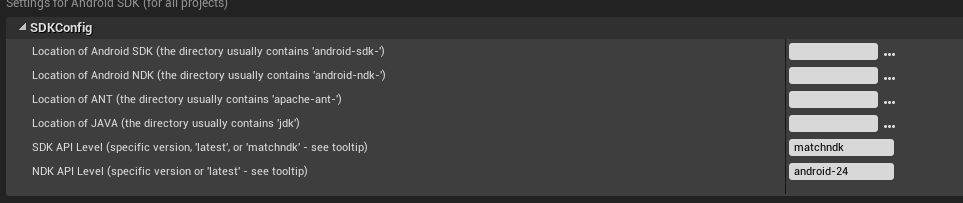
about the only thing I can think of that is different is I have SDK 24 installed and using that and it looks like your using 19
drowsy fox
its alright i appreciate it :\
im actually using 23
localization is used for translation i believe; isnt it?
search in all plugins and type "location" and youll be given a few options
@carmine wind
grim ore
your settings above show your using android-19 for the NDK tho
livid haven
Localization means to make changes to a thing so that it is friendlier for a particular locale. Part of that involves "translation", yes.
carmine wind
o
grim ore
this is what mine has https://i.imgur.com/BLEoyrI.png since I want to force 24 because I have 27 installed as well
 drowsy fox
ill try launching with matchndk
grim ore
@carmine wind if you want you can use the NOW blueprint node to get the current date/time
if you look at the Math -> Date Time section of the blueprint nodes there are ways of working with the date time objects as well as "Now" getting the current local date and time and "UtcNow" getting the UTC version of that
carmine wind
ooo
drowsy fox
ill try 1r7 i guess
grim ore
aww
carmine wind
all make a bow to matheww
grim ore
lol I realized I had not covered the Date Time nodes yet so it's a win for me
 grim ore
yep built out a new android file with 1r6 without issue. I am curious what else might be busted on your side.
grim ore
this is what I get after your crash part UATHelper: Packaging (Android (ASTC)): Copying permission_library directory to staging before build UATHelper: Packaging (Android (ASTC)): Directory C:\Epic Games\UE_4.18/Engine/Source/ThirdParty/AndroidPermission/permission_library copied to C:\Projects\UE4\EditorOverview\Intermediate/Android/APK/JavaLibs/permission_library UATHelper: Packaging (Android (ASTC)): :permission_library:preBuild UP-TO-DATE UATHelper: Packaging (Android (ASTC)): :permission_library:preReleaseBuild UP-TO-DATE UATHelper: Packaging (Android (ASTC)): :permission_library:checkReleaseManifest UATHelper: Packaging (Android (ASTC)): :permission_library:preDebugAndroidTestBuild UP-TO-DATE
drowsy fox
that could be it?
i dont get why yours isnt messed up..
well, more or less why mine is messed up lol
grim ore
I take that back as I had a filter on still lol UATHelper: Packaging (Android (ASTC)): ====5/2/2018 7:21:07 PM====PREPARING NATIVE CODE================================================================= UATHelper: Packaging (Android (ASTC)): On build machine. UATHelper: Packaging (Android (ASTC)): Fixing minSdkVersion; NDK level above 19 requires minSdkVersion of 21 (arch=armv7) UATHelper: Packaging (Android (ASTC)): Copying permission_library directory to staging before build UATHelper: Packaging (Android (ASTC)): Directory C:\Epic Games\UE_4.18/Engine/Source/ThirdParty/AndroidPermission/permission_library copied to C:\Projects\UE4\EditorOverview\Intermediate/Android/APK/JavaLibs/permission_library UATHelper: Packaging (Android (ASTC)): ==== Writing new GameActivity.java file to C:\Projects\UE4\EditorOverview\Intermediate/Android/APK\src\com\epicgames\ue4\GameActivity.java ====
that's the real log
maybe you don't have write permission for some reason to your project?
drowsy fox
impossible lol
im reinstalling nvworks
i installed it at a friends house and had stopped all processes and selected which ones i wanted myself
grim ore
it's weird your next part before the crash is updating build configuration and I never get that in my log at all
drowsy fox
so im letting it do its thing this time as im sure that wasnt good for the process
grim ore
yeah maybe just a bad install
lol I also have another NDK (13) installed and still no issues here. If anything it should have broken it lol
zenith flower
Also, were you installing as admin, or regular user,
are you on windows or linux ?
drowsy fox
windows as an administrator account
zenith flower
well there are two types of "admin"
drowsy fox
im the main and only account on my computer lol
zenith flower
same here but:
drowsy fox
i give it permissions when i run the installer, should i restart it with admin checked?
i never realized that would be vital someday lol
zenith flower
Sometimes, if you install stuff under "super" admin, and run apps without "super" it can't write to the installed folder, because "super" owns it
I would try installing without special admin
drowsy fox
i didnt install with any special privileges :\
zenith flower
So you didn't run it as administrator?
drowsy fox
i didnt run it as administrator
zenith flower
What are you permissions on this folder?
C:\Users\liife\Documents\Unreal Projects\MobileSurvival\Intermediate/Android/APK/JavaLibs/permission_library
drowsy fox
 zenith flower
thats for SYSTEM
 grim ore
keep in mind with the way the UE4 log works you could be chasing a dead end. Just because the error comes after the line (which does say copied btw, not copying) does not mean that line is at fault.
 steady sequoia
Oh no
I just realized

Unreal Engine
Spring is in the air and we’re gearing up for our quarterly #ue4jam. Jump into Unreal Engine, try something new, and compete for sweet prizes from Epic and our sponsors!
Why does the game jam have to overlap with Mother's Day 😦
grim ore
because they want you to have someone to do the jam with
zenith flower
Okay, so lets look at the other guys log, and assume it got stuck there:
UATHelper: Packaging (Android (ASTC)): ==== Writing new GameActivity.java file to C:\Projects\UE4\EditorOverview\Intermediate/Android/APK\src\com\epicgames\ue4\GameActivity.java
steady sequoia
Yeah...I love my mom and all but I don't think she's too great at making games lol
zenith flower
Make sure you have permissions, on the folder and the file in it
Intermediate/Android/APK\src\com\epicgames\ue4\GameActivity.java
 fallen urchin
Hi everyone , wanted to know if its possible to load 3d model in run time
grim ore
"Hey mom how is that art coming along? we got 3 hours till we have the submit!"
drowsy fox
once nvworks finishes up im going to take a solid look at packaging again
:\
@fallen urchin not sure what you mean by that, if you mean what you said then yes... lol
fallen urchin
@drowsy fox I meant I have a server which can send me files, I need to download this 3d model from that server , unpack it and then use it in my game,
I want to know from where I could start
drowsy fox
thought you meant literally visually seeing a 3d model in a game that wasnt visualized two minutes ago lol
not one downloaded at runtime
 grim juniper

 drifting bough
Unreal docs down for anyone else? https://docs.unrealengine.com/
sudden agate
So
When accessing Component of the Owning Actor in Event Blueprint Initialize Animation in an AnimBP, you get an Accessed None, although they shouldn't in my opinion.
Have a guess what the answer from Epic is.
Yes. Accessed None for accessing Components is by Design in a Blueprint that has these Components
wary wave
Initialize Animation is probably done during component initialisation, so there's no guarantee the component you're trying to access is ready
so I would say this is by design
sudden agate
the thing is: Sometimes it works, sometimes it doesnt.
There is no prediction
How should I access a component in Init Anim then?
a delay of 0.2 is already too late
wary wave
you wouldn't, you'd need to work another way
and yeah, sometimes it'll work because the component you want has been initialised already, and sometimes it won't because the opposite
it's literally pot luck
sudden agate
imo it doesn't make sense. The SkeletalMeshComponent should be initialized, that's right, but not the animation. The animation should be initialized after beginplay/component init.
wary wave
it's initialised during mesh component initialisation
grim juniper
The new Depth of Field coming in 4.20 is really good looking
sudden agate
@wary wave it means that you actually cannot initialize the animation.
it works for ACharacter-based pawns because the Components are already initialized via CDO I guess.
For ever other Actor, you cannot initialize the Animation because the every single component is potentially uninitialized
I can access ACharacter Components (Mesh, Capsule, CMC) with no problem. "New" Components cannot be accessed
in reverse it means that the Animation of an empty actor with "new" Components cannot be initialized
which also means we can only initialize animation of ACharacter
lol
 honest vale
@grim juniper what's new about it?
steady sequoia
I'm no expert on this but is the improvement that the new one looks less like pastel crayons and has smoother blur?
grim juniper
Actually, here's some better comparison shots
plush yew
pee pee poo poo
grim juniper
Circle DoF with Quality of 1 (Default)
Circle DoF with Quality of 4 (performance hit)
4.20's new Diaphragm DoF
sudden agate
the new one doesn't have this outline-blur, right? in current DoF Meshes are blurred along their outline (blur doesn'T go further than the Outline)
plush yew
finally starting to look like how cryengine looked for the past 5 years now 😃
sudden agate
neat
steady sequoia
Oh yeah new one definitely looks a lot nicer
grim juniper
It looks a lot better with how the blurred foreground blends with the stuff in focus and in the background
It's supposedly better performance wise too, but I haven't tested that
wary wave
found a bug \o/
you can't find references to variables of type Data Table in all BPs
it doesn't find them
 brittle gulch
Hi! I see that there's a live stream today called Animation BLueprint Setup & Walkthrough Part 2. Where is the Part 1 please?
cloud cobalt
So, wondering about the timeline of Blueprint actors with components. I'm spawning a Blueprint actor from C++ with SpawnActor(MyBlueprintClass), and immediately access its VerySpecialComponent, a component declared in C++ and "filled" with settings in Blueprint. VerySpecialComponent is NULL at that time, though the component does exist.
Is that normal, or should I be looking for a bug in my code here ?
 vale osprey
@cloud cobalt I think this is normal, when working with components in terms of references I always have to do it on BeginPlay of actor
cloud cobalt
Okay. It worked well when the actor was just the default C++ class, no Blueprint involved, so I suspected it was BP related
vale osprey
Yes, BPs have different order of component creation, like their constructor event is not the same as c++ actor constructor
cloud cobalt
Great. I'll move the stuff to BeginPlay then. Thanks !
 dark sparrow
@brittle gulch i believe it is on unreal engines youtube channel. do you have a link for part 2?
@brittle gulch https://www.youtube.com/watch?v=YVC-DL9Ibf0

In this stream, Wes Bunn takes a look at the quickest way to get a humanoid character up and playable from a Skeletal Mesh and a series of animations. We’ll ...
brittle gulch
@dark sparrow I don't yet, the live stream is tonight (at my place)
I searched the same title on their YT channel but I didn't get any result. There are other Animation Live trainings though.
I suppose the one you sent me is the part one? Not sure.
I was wondering if there isn't any other place where live streams are posted? (Like twitch or something)
sturdy star
hello friends, we just tried building custom engine from git, our designer (offsite) has tried downloading the engine but when launching gets this error and a failure to opent he engine: https://imgur.com/a/FU9xyQM
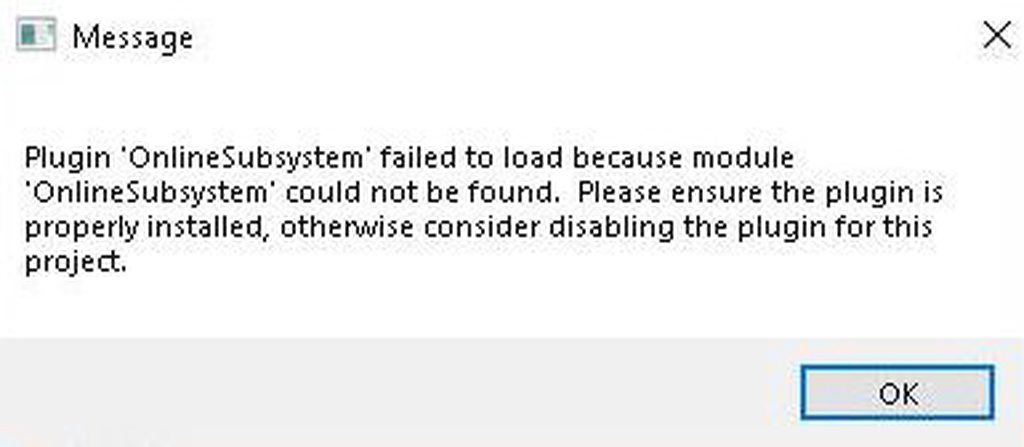
the folders and files exist on disk and in perforce, does anyone has any ideas what could cause this?
 whole quarry
I didnt knew that OnlineSubsystem was a plugin
sturdy star
the message doesn't help much because i can't find it as a plugin at all
paper kernel
are the plugins included on sourcebuild?
languid shard
@wary wave what's your process to find this bug ?
we're using data tables a lot, I don't remember having this kind of situation
sturdy star
@paper kernel yeah the plugins exist
whole quarry
@grim juniper that is a very nice blur!
chilly gale
Has anybody gotten any of the Paragon Characters working with Advanced the Locomotion System asset?
wary wave
@languid shard - in one BP I have a variable of type Data Table
if I do a 'find references' on that variable, it will find it inside that BP
if you search globally, it will only find references inside that original BP
 surreal viper
did anyone experience any serious issues with 4.19? I'm not sure if I should update from 4.18 or wait a bit more for fixes 🤔
cloud cobalt
No serious issue on my side. We've been shipping it for weeks
Only issue was the profiler in 4.19.1 (fixed now)
We actually had a random crash in 4.18.3 that 4.19 fixed so we updated very quickly to it
 ancient obsidian
4.19 had a problem with class-type wires being broken in BP, but it got fixed in 4.19.1
cloud cobalt
There also was an issue with material parameter inside material functions, also fixed in 4.19.2
ancient obsidian
So all looks solid right now, although I haven't been using .2 for long.
surreal viper
cool, thanks for the info
plush yew
hey running into a bit of a conundrum here, I've had our engine programmer look at this and he says its definately unexpected behavour, a simple breakdown of the problem is that inside the animation blueprint, if we try to 'add' to this rotation here, at the end of the rotation animation it always resets to 0
i do not have this problem in a normal blueprint, and I've actually put a ticket on assembla for the engine programmer to dig in and have this behavour changed, but was wondering if there's some bypass or workaround until epic fixes this problem
cloud cobalt
@vale osprey So, my crash earlier on spawn wasn't BP-timings-caused
The Blueprint is actually corrupted - the root component isn't editable in BP (no details panel)
Creating a new Blueprint with the same base class appears to work
vale osprey
Ohh wow
cloud cobalt
Click two BPs, right click, diff.
whole quarry
It shows the differences or smth?
 manic pawn
https://i.imgur.com/kxEn3Xp.png :( was worth a try lol
 cloud cobalt
It compares the component tree and graph I believe
In any case, sounds like my root component is just fucked now, gonna remake the BP
And people ask why I use C++ a lot :3
vale osprey
yeah
I'm still using BPs but now I start with a c++ scafolding class for shared functions and data structures
seams to be helping
cloud cobalt
I suspect hot reload is the culprit
But again, binary assets, what can you do... No clear diff, can't detect spurious unwanted changes
vale osprey
I'm never using hot reload
cloud cobalt
I've used it successfully for literally years without issue, but on this new project I'm doing much more Blueprint stuff too
vale osprey
one of the last funny glitches I've got is a base c++ function override in child classes
if you have inheritance like this: A-->B-->C
where A is a c++ class
then to override some A function properly in C, you have to override it first in B
if you don't do that, don't get surprised with overridden function to be called two times or not called at all 😄
@cloud cobalt last time I've used hot reload with MMT, I got corruption of several BP and had to just throw away the code
luckily using git
 dawn linden
@cloud cobalt That bug came up a lot in older versions, but still shows up once in a while. It's generally caused by making changes to component classes at the C++ level, when you have existing BPs based on the C++ class.
steady sequoia
I think I may have had something similar happen to me too
Because I haven't used hot reload in forever after it
cloud cobalt
@dawn linden Yeah luckily that won't happen much, but still
steady sequoia
Just overall safer to not use hot reload I think
It's become second nature to close down the editor before building for me
sudden agate
@wary wave Regarding the discussion regarding Animation initialization:
Just as I thought: You cannot initialize anything if the Actor is AActor based
All components are null when Event Initialize Animation is called
 worthy fox
What’s the color value for a flat normal map?
languid shard
@worthy fox 128 128 255
worthy fox
Ty ty
 wise heart
hi, is it true that ue4 uses none of the c++ stl? if so, am i able to start using it without knowing c++s stl, just the langauge features?
wary wave
a) Yes.
b) Yes.
wary wave
doing what?
wise heart
getting into it without c++ stl experience, would it be helpful or am i fine? (i come from C)
but i've messed around with the language features before
wary wave
given that UE4 doesn't even use it, I don't think you'll have much trouble
familiarity with generic C++ and object orientated concepts will help a lot however
wise heart
okay great, thanks for your help
wary wave
no problem
manic pawn
the unreal versions of stl things are much nicer than stl too
for example you don't have any of this begin(), end() nonsense you see so often in stl code
cloud cobalt
this ^
manic pawn
better syntax, faster, what more could you ask for :D
languid shard

Dear Friends, We are thrilled to announce we will soon launch FURIOOS 🤗 FURIOOS is our new cloud based real time streaming platform. It will support all you ...
what do you guys think about this kind of webapp ?
manic pawn
sounds like a load of marketing bullshit
the stream will be much lower quality than playing the game locally, not to mention the latency, which makes it completely unusable for games
cloud cobalt
it has "cloud" and uppercase in the video title, what more do you want to know
languid shard
good thing its not meant for gaming 😅
gonna review it in the next days, waiting for an access
manic pawn
not saying it can't work
just won't be pretty
and probably expensive, since you now have to rent hardware capable of running unreal games for each viewer 🤔
vale osprey
@languid shard I've used such service some years ago. It's great for reviewing games and deciding on purchase
cloud cobalt
Why would you even want to run your work applications remotely in the first place, is something I'll never understand. A basic network outage puts you out of business for as long as it lasts, a contract issue or the company going down breaks it entirely, etc. I kind of understand why people want game streaming (even though it's the most expensive way to play games there is), but for work ? Nah
vale osprey
when it comes to actually playing them, quality is like watching youtube and there is input lag, but for quite a few games its not an issue
@cloud cobalt it's like that already in many multinationals
languid shard
it actually fixes a very, very big shortcoming we have with our demos and shipping em to clients
wary wave
game streaming bothers me in that normal wireless gamepad latency is bad enough
languid shard
clients are dumb as bricks
wary wave
let alone input latency from your Internet connection D:
languid shard
most of the time they want to run 3d stuff on crappy laptops
vale osprey
there are thousands of companies using google docs, they are not safe from internet outage either
languid shard
being able to stream content like that on a website as simple as youtube would be awesome
vale osprey
@languid shard for industrial applications this is already used for like last 10 years
languid shard
even if there's latency and compression, which is most likely to not even be noticed
manic pawn
seems like it would work just fine for showing things to someone on crappy hardware yeah
languid shard
what kind of service are you thinking about @vale osprey ?
vale osprey
architecture, marketing materials and etc
languid shard
@manic pawn this is mostly what we do, show stuff to clients :p
manic pawn
then it's probably really good
cloud cobalt
Yeah if you just want to demonstrate something with high-quality and interaction and you can't provide decent hardware, in that case it might be useful, though really you could also set it up yourself with your server
cloud cobalt
Just don't make that your workflow
languid shard
we work with very short deadlines, matter of a couple days sometimes
supplying the client with decent hardware is near impossible here
vale osprey
@languid shard stream results for review of iterations, then ship final in hardware or host somewhere on amazon if you need it remotely accessible as final product
languid shard
the problem is
"couple days"
our clients are total 3d noobs
mostly construction site managers, the clients who bought the building, stuff like this
they just want pretty images
vale osprey
yeap, just host it somewhere then
I think even Vray had this option some time ago
or it was there partners who provided such services
but I wouldn't use specifically that ^ thing, real-time compression of video is pretty terrible
languid shard
welp we'll see how it fares
vale osprey
do a bit of search, there are different companies who provide such services, not necessary UE4/Unity specific
 olive drum
hey guy I have one question
why substance painter textures looks very dark in unreal?
im using 4.18.3
vale osprey
@languid shard btw, I think Nvidia had something for this. It was either Tegra or a predecessor that was showcased for streaming.
languid shard
well they have Geforce now that will soon allow to have your own virtual machine
vale osprey

Allegorithmic
Allegorithmic is the developer of Substance, the killer app when it comes to texturing the next wave of 3D.
olive drum
@vale osprey thnx for the info buddy
for now its to much technical
and im noob
hehe
can someone please explain me in simple words? 😃
cloud cobalt
Basically, Substance and UE4 are not the same thing, so you won't get the same render
vale osprey
and PBR is not a standart
cloud cobalt
For example, in the first comparison on that thread, the left scene has heavy environment lighting, the right scene (UE4) doesn't
 olive drum
its kinda like liner work flow . am i right?
I come from progressive rendering background
vale osprey
yes, it's kind of like that
cloud cobalt
Simply put, the visual look of objects if heavily dependent on the scene. Try adding / removing skylights in a UE4 scene, the result is drastically different because skylights provide smooth ambient lighting that feels super realistic and gives an "outdoor" feel immediately. That's just one thing among dozens.
vale osprey
like different software follows general set of assumptions/practices but specific implementations are not the same
olive drum
Ohhh okok making some sense now
vale osprey
to add to what @cloud cobalt said, the cubemap here is the same HDR but a simple difference in intensity and tonemapping making it look completely different
olive drum
what u guy do with this kinda situation ?
vale osprey
there is an old guide on how to setup environment very similar to Marmoset
cloud cobalt
Well, it's not that I would do anything in particular. If the UE4 scene your material is too dark with looks a lot like the kind of scene you're going to have in your game, then, change your Substance preview settings to match it
if you're doing an open-world game vs a horror game in tunnels or inside a spaceship, you're not going to have the same styles of lighting at all
olive drum
cloud cobalt
What I would do is make sure my UE4 preview & test scene matches what the game looks like
Then if Substance doesn't look like that scene at all, I'd try changing the Substance settings
olive drum
@cloud cobalt yes thats what im doing
this is interesting need to digg more
what is the meaning of tonemapping
?
cloud cobalt
Color grading ?
olive drum
ohh like post process thing?
cloud cobalt
It is a post process, yes, though just one of many
I'd recommend looking up everything you come across with in terms of lighting, and experimenting with all settings
Lighting is very technical
 cursive dirge
looks like ACES all over it
(new tonemapper)
adjust the contrast bit back on post processing settings
it should match the looks more
if you want that
cloud cobalt
That's not what this is about no
whole quarry
My tip is: try all the buttons you can find
whole quarry
Even the big red ones
cloud cobalt
It's not about X or Y being A or B, it's a combination of many factors
No magic bullet, lots of hard work
The important part is understanding the impact of each lighting tool
cursive dirge
well, of course ACES changes a lot more than just contrast
what I said will make it look more alike the painter tho
cloud cobalt
It's not about ACES at all
The Substance scene just has extremely flat lighting to start with
The UE4 scene does not
Substance screenshot has like zero shadowing at all anywhere on the mesh, and barely visible highlights
cursive dirge
why do you deny the affect with ACES? it's enabled, it affects it
I'm fully aware that painter uses image based lighting
and it probably doesn't match his ue4 scene at all
cloud cobalt
Because ACES has tiny effect on this problem. The lighting setup is 99% of the problem.
cursive dirge
that's one thing you can play with too
cloud cobalt
Tweaking post-processing & tonemapping is a thing, but it should be your last resort
Toning contrast way down does not replace proper lighting
cursive dirge
just to make a point, this is what happens when you simply add contrast to that painter screenshot
well, aces overdoes the contrast
this is only reason why I recommend dialing it down
olive drum
damn fast
cloud cobalt
Sigh
cursive dirge
unless you want that effect
cloud cobalt
You can have extremely low contrast scene even with ACES
drowsy fox
Does anyone have experience packaging apks? I’m having trouble wrapping my mind around how the obb data makes its way to my phone from the apk
cursive dirge
I'm not going to keep debating on this, just compare the screenshots and make your own conclusions what has changed
drowsy fox
Does it require the direct launch from the pc until I get it in the App Store to handle the obb?
cloud cobalt
I won't debate this either, because I really couldn't care
vale osprey
I think you are both correct
whole quarry
Both are wrong
cursive dirge
I've never denied his point on lighting, I actually said painters lighting doesn't match ue4's
he just denies ACES being there
cloud cobalt
I don't, ACES is just not what you should start with
vale osprey
the truth is in the middle - your light setup need to be roughly the same, your materials have to be roughly the same and PP needs to be roughly the same as well
cloud cobalt
It's the thing you should end with
cloud cobalt
You don't start your lighting work by the very last final step there is in the renderer, imho. That's all I'm saying.
vale osprey
technically you can, depends on where you start from
cloud cobalt
@olive drum Look at all options & tools, play with it, find what works
cursive dirge
but you don't start fixing it after the tonemapper either, if you know it adds huge amounts of extra contrast
in ideal case, you could bypass the tonemapper first altogether
cloud cobalt
No one's really fighting. People just have different workflows for lighting their scenes.
olive drum
thank you
vale osprey
You can have a reference in raw format and setup tonemapper outside of UE4, then you would want to match your tonemaper first. We worked like this in different engine. But if you already have "sketch" in UE4, then sure.
olive drum
that gave me idea what really happening
vale osprey
don't forget that what you see in the level editor and mesh editor are completely different scenes
cloud cobalt
You can edit the default scene too now, which is great
vale osprey
it's awesome indeed
cursive dirge
btw
I checked Painters PP settings
they disable them by default but they do have optional tonemapper there
no ACES in list tho
plush yew
anyone know how to get something similar to this on mobile?
that time tim sweeney was trying to figure out where to tuck away 10tb of Unreal Engine https://twitter.com/TimSweeneyEpic/status/747888067248295937?ref_src=twsrc^tfw&ref_url=http%3A%2F%2Fenemyhideout.com%2F2016%2F06%2Fwhy-git-is-not-good-for-games%2F

Anyone have experience with Git + Large File Storage extension for a game-scale base of code and content? Does it scale?
 Twitter
 heavy relic
not posting in the help channels because i don't currently have a problem
but I just wrote some custom character prediction
i have no idea how you'd mod anything other than your own compressed flags (you have space for 4) into the prediction state
the thing seems completely hostile to extensibility
it's 10,000 lines of what
and as far as i can tell in all of that there's space for 4 bits extra to be added

 quasi lake
Have a wank
plush yew
@plush yew make my material work4mobile
viral herald
uhh guys
something is acting up with my model
i have a bow with some animations
though when i try to upload it, the animations are empty
one second while i take a gif


here it is before exporting
plush yew
@plush yew I don't really do coding stuff, I do design stuff x'd
design that blueprint material bb

Not that kind of design
Like, the graphical side
and only the graphical side
ur making pets cry
 wah!?
wah!?
the walls containing the material are black on mobile, not reflecting as they are in shader5 shown there. cmon @plush yew yew can dew eeeet
i think it's cause mobile doesnt allow for occlusion
 digital anchor
it means a file/folder cant have a name that match any of the following
viral herald
but there isnt a file know none
plush yew
@plush yew Hmm... I dunno, I don't usually do artistic stuff on Unreal
I do level design and textures yea but, my friends do the rest lol
@plush yew i still believe in u
 wild glacier
@viral herald
I had the same problem time ago (I rigged too a bow on Blender following the Youtube Tutorial)
You have to rename you "Armature" with a different name
And when you export the Model you have to pin the "Leaf Bones"
(Or something like that, now I'm not at Pc and I don't remember the name)
@viral herald
plush yew
@worldly axle MoooooojooooJojO
 empty condor
@viral herald those are reserved names on Windows.
most of them holdovers from CP/M when it became DOS
those are special "device" files that exist inherently everywhere in Windows. in every folder, on every drive. when you copy textfile.txt CON it will copy the contents of textfile.txt to the console, which is the command prompt you're using at that moment.
if you copy textfile.txt LPT1 it will send that text file to the printer. well, it used to, when printers were connected to parallel ports.
etc.
 brisk mountain
How do people feel about netcode C++ vs Blueprints?
(in the case of a programmer who's comfortable using both)
Just getting started with networked code, and it seems like blueprint nodes are more fluent when it comes to replicating variables and functions, and handling events on clients vs the server
(but I'm only just getting started, so it's hard to tell what it's like when you get into a full game's worth)
 worldly axle
I'd imagine C++ if you can do both, you can also convert blueprints to c++ and clean it up after
worn granite
There are things that you can't currently do in BP - such as conditionally replicating a variable - and things that are easier to do in C++ - such as packing data.
BP is certainly more concise when it comes to what both can do
You just check a box or alter a drop down.
ezpz
brisk mountain
That's a nice summary - I'm primarily a C++ developer, was wondering at first if it'd be easier to just expose stuff to BP and handle networking there
worn granite
IF you just wanna build understanding of UE4's network flow BP is probably the better choice at first.
But I'd encourage you to also look at the C++ side - you might end up using both.
brisk mountain
Yeah, that's what it looks like - thanks a lot! 😃 Definitely helped clear things for me
 swift spindle
hey all.. in an emergency!
when I run my packaged game
the screen is all streched out
or looks like it's only part of the overall image
 cyan merlin
Resolutions are different
swift spindle
the UMG interface is all streched out also
we have not changed the resolution in over a year
where would this have been changed ?
grim ore
What has changed since the last time you tested it packaged and now?
 craggy birch
for some reason, the actor destroyed event is called whenever I load the main level from the menu, what's causing this?
In other words, my actor is being destroyed when loading a level. Why is this happening?
grim ore
is it out of the bounds of the level? is something else asking it to get destroyed? does it destroy itself due to some code?
 tame stag
isn't it possible to let the player "look through" / switch to a camera component of a different actor`?
set view target is only for camera actors not for components..
craggy birch
no, checked all of those possibilities. Basically whenever I load the the level via blueprint
 graceful grove
@craggy birch The only things that survive a new level being opened is the GameInstance as far as I know
karmic igloo
Unless you use Level Streaming in which case everything in your persistent level survives.
graceful grove
^ what they said
craggy birch
So I can't load a new level without my character dying?
manic pawn
what do you mean? when you change the map all actors are destroyed
makes perfect sense too
karmic igloo
@craggy birch You can use level streaming. I have a system set up where it fades out the screen, loads the next level, moves the character, and then unloads the previous level.
And it can optionally keep the music playing too.
craggy birch
and how would i do that? im a beginner
If I were to send you project files, could you do it? I GTG at the moment but could send some other time
karmic igloo
You just need to add the individual levels in a parent level and then use Load Stream Level and Unload Stream Level.
karmic igloo
I could show you with a screen share or something sometime.
craggy birch
ok sure
karmic igloo
Just recently did that for creating some postprocess effects for somebody else.
Just DM me whenever you have the time.
craggy birch
k sounds like a good idea
karmic igloo
I should be here all day.
craggy birch
I'll DM tomorrow
karmic igloo
Okay.
craggy birch
👌
wild glacier
Ok
 errant dome
Anyone know if you can set the editor viewport to a set rotation ?
karmic igloo
@errant dome You can use the orthographic views, but that might not be what you're looking for.
errant dome
My game is setup on different axis to make the nav mesh work with my 2d game, every time I debug I have to rotate my camera view and rotate everything I add to the world.
karmic igloo
Well if it's 2d then use the Orthographic viewports. You can look from any axis, positive or negative.
errant dome
how do I do that?
karmic igloo
Click on the thing on the top left of the viewport that says "Perspective".
@errant dome
errant dome
thats already set
and still the editor viewport gets flipped around every time I debug
karmic igloo
It's set to what?
errant dome
"Perspective"
karmic igloo
What's wrong with the grid?
errant dome
and when i place things in the world is half as backwards
plush yew
anyone see a link for the sun temple project?
errant dome
karmic igloo
@plush yew Go to the Learn tab, scroll down.
plush yew
got it thanks. i was looking in marketplace
errant dome
my world after every time I debug 😦
 solar eagle
does someone know how can I turn off a looped animation that I imported from Mixamo?
karmic igloo
Well it automatically sets the camera position if it's in perspective, but I think there's a setting to turn it off.
errant dome
where is this setting i've been looking all over the internet for it
 winged crypt
if I 'remove local content', will it only clear my vault cache or will it affect assets I've already imported into my projects?
the cache dir was on my SSD, I just changed it but need to free up that cache space
karmic igloo
@winged crypt It will just delete the vault cache.
winged crypt
Great, thanks
karmic igloo
You can remove local content and keep all the projects.
karmic igloo
@errant dome Found it. It's under Level Editor - Viewports/Look and Feel. it's called Use Camera Location From Play-In-Viewport.
 keen parcel

Humble Bundle
Get a lineup of awesome games, plus tons of resources to help you make your own!
anyone know if the licensing extends to these assets being used outside of cryengine?
i remember there being a similar deal on a couple of years back where only some of the assets were legally allowed to be used in external engines
 tall pendant
its says for use in CRYENGINE projects. So no you are not allowed to use them in other engines.
keen parcel
shame, digging up the older bundle thread the situation was less black and white: https://forums.unrealengine.com/community/general-discussion/76234-cryengine-humble-bundle
Unreal Engine Forums
General discussion about the game industry and the Unreal Engine community.
thanks for clarifying @tall pendant
 steady cipher
Anyone know were the ps4 release notes are located that are mentioned in this image. https://infusestudio.gyazo.com/07ad93bb8621ad1ab57f3f357c300b17


 plush yew
is unreal viable for indie devs at this point?
plush yew
i'm considering switching from unity
brisk mountain
Might depend on your definition of "indie" though
although even for really small projects it works just fine
safe rose
That's not the question
plush yew
i have no idea where to start learning though
safe rose
If you don't like Unity, try Unreal
If you don't like Unreal, try GameMakerStudio 2
That's the wonderful thing about GameDevelopment. So many tools at your disposal
plush yew
i don't like GM
safe rose
That's not the point
plush yew
i like some parts of unity but unreal seems to have a slightly better toolset
brisk mountain
are you a programmer? or primarily something else?
safe rose
Play around with all the engines available for ya
brisk mountain
haven't used unity myself, but from what I've heard from converted devs, UE4 has a way better toolset
safe rose
hmm
Nah
Unity's got a few legs up on UE4
But not going to turn this into Unity vs UE4 debate
brisk mountain
at the very least, it comes pre-packaged with stuff that you'd normally have to spend a fairly heft amount (for an indie) on
plush yew
either way i've already learned how to use unity and i'd like to see if unreal is a better fit for me
safe rose
It doesn't matter what engine you use, as long as you know how to use it
That's the best way to put it
plush yew
only problem is i don't know C++ and i have no idea where to begin
brisk mountain
well it's free to try it - you can always start with BP example projects and work your way down to the C++ if necessary
plush yew
Lua, C# (to an extent), Dream Maker, and ofc i can use other scripting languages like python which come naturally with the knowledge
safe rose
You could try out UE4's Blueprints then
brisk mountain
You can get a lot done with blueprints, and with a general understanding of programming you'll have no problem using them effectively
plush yew
blueprints seemed really complicated already last time i checked them out
safe rose
Basically, don't waste your time asking questions that no one but you can really answer
plush yew
there's just so many options and i have no idea where to start
safe rose
And don't waste it if you are not enjoying the engine you are developing on
plush yew
ofc
safe rose
Start at the beginning
plush yew
and where is the beginning
safe rose
Google: Engine + Newb
or Engine + Starting Guide
or Engine + Beginner
I don't know, I know if you do that with UE4
You'll get a lot of options
plush yew
but then i have to choose between tutorials 
 maiden swift
@plush yew What's your level of experience? How far did you get with Unity? What did you make?
brisk mountain
Yeah
safe rose
Like, that's the first thing that popped up for UE4 + StartingGuide
brisk mountain
Fortunately, there's a fair amount of official starter content and example projects
safe rose
Yeah, like no one here should be giving you the answer you seek sadly
brisk mountain
if you boot up the engine and go to create a new project, you can find one that's similar to the kind of game you'd like to make
plush yew
@maiden swift i made a prototype or two with unity but the workflow was a little weird to me and i saw what UE had to offer so i figured i'd see if it clicked any better
safe rose
You should find it on your own
maiden swift
@plush yew OK great. What is your primary discipline? Are you more designer, programmer, artist, or a generalist?
safe rose
If you have a lot of experience in Unity, why make the switch?
brisk mountain
and there's a decent chance of finding an accompanying guide or set of youtube tutorials from the official Unreal Engine channel - they're mostly pretty good
safe rose
Like, the grass is not always greener on the other side.
plush yew
sort of generalist but my strong point is just programming really