#ue4-general
1 messages · Page 229 of 1
 regal mulch
 plush yew
Been drawing for 10 years now with WACOM
regal mulch
#ue4-general is for actual UE4 questions
plush yew
got me a WACOM Cintiq Pro 2 so- meh lol
 ancient obsidian
@obsidian coral Crying won't solve anything. Working and getting better will. Code, git gud, write stuff. Jesus, everyone has problems, I won't even start telling what environment I grew up in. Listen to people with experience instead of diving into self-pity.
 obsidian coral
@ancient obsidian I'm not crying right now. I just want to cry
ancient obsidian
@obsidian coral Have you tried less resource-demanding engines? 2D stuff? There is of plenty of frameworks and market for that.
Good, sorry, time to focus on work anyway.
plush yew
2D is both easier to design and less resource demanding'
 pallid compass
i love 2D
its relaxing and ez
Until u start expanding the 2d plugin ur self
and then u want to scratch ur own eyes out
pallid compass
2D IS THE BEST D
obsidian coral
Well gtg now Bye
regal mulch
There is a user on Twitter who does a lot ofr 2D
Always forgetting the exact name
Lemme check

Gameplay/Tools Programmer | Making Educational Content For @UnrealEngine | Formerly Programmer & Technical Director on @RangiGame
Tweets
1283
Followers
2446
 Twitter
 frosty bloom
http://ue4resources.com/2d-templates his website
a lot of worth while templates in there for most genres
regal mulch
Yus!
 shy heath
anyone want to see a state trooper i made i need help texturing him dough im making a game called Polygon Emergency you can be EMS fire fighter PD highway Patrol even a taxi and many more
XD
KK
@light lintel it wi;; be in work in progress
 tall pendant
octopath doesn't use paper2d
frosty bloom
@pallid compass You got this, 3 rules of refactoring will do you just great 😄
I just updated from 4.16 to 4.18, after cleaning up the code I'm now trying to add Ikinema to my project
 worthy fox
How would you guys handle ambient sound like wind and birds etc when walking inside a building in your level? I don’t want the ambient sound to be as loud when walking inside buildings and I’m not really sure how to determine if the player is entering a building or exiting 😎
 karmic igloo
You could try putting a trigger at the entrance that lowers the sound when the player passes through it. Or you could put one around the whole building and whenever the player is inside it it lowers the sound.
 manic vault
how do we find where anim notifys are referenced
 worn granite
what kind of anim notify?
manic vault
notify state
worn granite
You can use the reference viewer like any other asset
plush yew
hey im still having issues with retargetting a maximo skeleton to the default one in unreal engine, on week 1 and i've gotten nowhere fixing it unfortunately
the problem is its all messed up when I follow the tutorial
pallid compass
Dam i forgot mixmo was even a thing
plush yew
for auto rigging its not bad
well i mean for engines that have working retargetting systems at least anyway
pallid compass
never really used it, tend to make stuff from scratch
ue4 retargeting works fine imo
never had issues with it, except first time i used it maybe? but obviously because i did not know what i was doing
u tried renaming mix skeleton so its the mirror of the ue4 naming system
pallid compass
Thats first thing you should do, naming convection is very important
Normally if that does not work off the bat
Then ur source skeleton is trash
plush yew
it works fine in Godot Engine and in Unity
i thought bad skeleton but i can even move him around in unreal
but retargetting doesn't work
so we cant use animations
pallid compass
Not applicable unless u have tried retargeting your source to ue4 mannequin in GoDot engine and unity
plush yew
pallid compass
That looks like a scale issue?
plush yew
he comes in the right scale, and i can move him here, drag him into the world and he is right size
pallid compass
That bone setup
pallid compass
Does not align with the ue4 skeleton
plush yew
it is the same as this documentation, it says the engine is capable of taking care of it, i;'ve followed this at least 30 times already and tried re-exporting as different fbx versions
they even use the maximo skeleton (same as I am using) in this documentation
plush yew
i am ok doing with minor manual cleanups
plush yew
but the broken is too broken its breaks the rendering
pallid compass
which to me is prob the n1 issue
Theres a big red line in front of u
if u cant see that
 latent moth
anyone with good recommendations on UE devs on twitter to follow?
plush yew
ok the documentation says to set root bone to none
pallid compass
i cant read ur text properly
U should always have a 0,0,0 rootbone
it should pick the root bones up automatically so u dont need to set them
I cant read that, do u have 2 or 3 spine bones?
plush yew
yeh i wish maximo export supported that, we cannot add bone in 3dsmax not support
pallid compass
why not
it take 2 seconds to fix it
Go in > add bone to top called root > export done
plush yew
i cannot view hiarchy in 3dsmax, when i was in the industry i delt with it a little, but was always told 3dsmax not good for this we used maya for it
3dsmax is only for environment or modelling initially and rendering
pallid compass
Im not a max user, well i mean its been years
You need to add a bone too the top of the bone chain and call it Root and set it to 0,0,0
pretty sure u have to freeze the skin bind layer
plush yew
yeh we were always told to not use it for this, unfortunatlely i only have max license not maya
plush yew
we don't use hierachy view in max, i don't see it anywhere
pallid compass
Yeah i cant remember how to set it to view
I believe its ugh
Graphs or something
at the top drop down
"Generate Graph"
or some crap
plush yew
yeh, i cant divulge details too many, but i have already mad ethe character and the skin and textures in substance painter and can use maximo to auto-rig 'for now', we will not be hiring rig until later down the project
pallid compass
Then you need to get better rigs from somewhere,
because mixamo rig's are not the best
also why not just
plush yew
it was my descision to use unreal, we should have used our in-house engine or godot and built ontop, more work but we cannot progress much without a controller and we rely on animations for head movement on pc and console
pallid compass
export ue4 skeleton and weight the mesh too it
plush yew
we also need it for vr testing in some instances
pallid compass
pay someone for 2 hours worth of weighting, and get ur mesh weighted to the ue4 skeleton problem solved
2 hours vs a week of faffing u know?
actually if its just for testing, just use the mannequin then if they wont fork out for proper stuff
plush yew
arhg ok we really wanted to use this working, i even asked here before and they said this engine was capable to retarget maximo to native skeleton :/ guess we will just use the unreal robot manaquin
pallid compass
It is, but thats the first time iv ever seen a mixamo skel with no rootbone
Actually curious if you dont know how to use ue4 why would u pick it up over ur in house engine?
plush yew
because the in-house engine is extremely dated now
in ours we had it create a 'granny root bone' for this, much of inhouse stuff is broken but the animation system is wonderful, unfortunately ue4 it is the swap way around so we are between rock and hard place
mainly vr support, blueprint and the ability to port to consoles (easily) and standalone vr prototype system we have easily
pallid compass
Yeah its a good package but if u dont know how to use the tools then its a stupid idea to throw money at it
plush yew
leaving my previous job before this i regret some now 😦 i have more freedom here, but have to use new software and a lot of it seems broken, in 3dsmax 9 (the one i've used most) had all this working wonderfully. in here though in 2019 and 2018 it becomes impossible
plush yew
i've already put the game backend together and have it working on all planned platforms as well as imported environment props and built an entity system
it was like this before
pallid compass

The Hierarchy panel provides access to tools to adjust the hierarchical linkage between objects. Command panel > Hierarchy panel Gyroscope assembled as a hierarchy: The parent is the outer ring with handle. The flywheel is the lowest child. By li...
a quick google can fix that for you.
and thats not in a nasty way, i found it right away
plush yew
i tried yandex dogpile and google and no good results let me try this
plush yew
ok yes this is none-functional sadly, we look ok until we press export and it glitch
ok so i've managed to add a root bone and left it importing, we cannot see in unreal
ah i will come with a creative solution, we can export the animations and apply each frame, then import each frame as an fbx, we will have to tell the people in charge this must be this way engine limitation
pallid compass
i would not set that as ur pipeline, ur asking for trouble in future
temp, sure but not perma pipline
plush yew
yeh it is the only option sadly and yeh in the future we will of course have a dedicated hire with the approrpiate tools and an engine reprogrammer to fix issues with the engine itself
also how do you guys even use google? i mean you search "add root bone 3dsmax" and in the results words are crossed out, we still use yandex and dogpile. maybe language issue?
pallid compass
Thats not what u where looking for, u needed to view the hierarchy first to do it
wouldnt google something as bland as that
plush yew
pallid compass
You might as well google basic bone rigging
plush yew
yandex searches everything, although we hate using it privacy problems
pallid compass
Theres a tool in max to view it in graphs
its at the top
something like graph viewer
or some shit
plush yew
pallid compass
graph editors at the top
plush yew
hmm yes this has changed though we still cannot find bones
before we had everything in scene view
and we could add things in the order correctl,y now there is no way to do this. if this was personal project i would pirate 3dsmax 9 (autodesk doesn't have access to this in any way it only goes to 2015) just to fix this issue up and be done in minutes
pallid compass
Sounds to be like your project manager has bit off more than they can chew with out scoping properly if your struggling so early in
plush yew
i've gotten everything else done
and this works in our Godot engine prototype
i just dont understand why this isn't working if this is an advertised feature of unreal engine and in the documentation, I've done everything asked in it, we cannot add root bone as the software no longer contains this functionallity, our budget is limitted right now so a maya license probably wont happen. i still need to pay rent and this is a project i get a lot of freedom on so otherwise ideal
and i really wanted a character for investors
pallid compass
The feature works fine, your trying to stick a broken car wheel in a car, ofc its not gonna work
if its not setup right it wont go in
plush yew
we should ask epic to remove the documentation then because i've followed it to the letter
and it is incorrect if i have followed to the letter and it is still not work
pallid compass
as out dated as it is
the doc is fine
Uv already broken the rule of import
it tells u on the wiki to have a 0,0,0 rootbone
that does not move
actually i take that back
It tells you about the root being 0,0,0 out regardless of export position
now dont take this the wrong way
Just in general not having a root bone says u have no idea wtf you are doing to some degree
Like the root of your skeletal cant be hips, that makes no sense at all, as hips move and there would be no anchor
Yes i can, its not hard
You just need a little sense of everything, animation, rigging, importing, things being prep'd right and ready to go on
its not super hard, you just need to know a little in each area
plush yew
i do not understand when it says heirachy, this used to mean structure and in google when i ask how it just shows http://www.twcenter.net/forums/showthread.php?475013-3ds-max-(how-to-add-a-root-bone)
Total War Center Forums
even in this answer it says he used 3dsmax 9 lmao
i see no way to activate heirachy to show bones, this was easy, i know how to do it but the function has just bloody gone and vanished and i cannot find answer anywheere on either your google in english or in Finnish
pallid compass
New Schematic View creates a new Schematic View window. You might want to create multiple Schematic view windows filtered in different ways that you recall for quick access to multiple objects. Name the new schematic view using the Schematic View...
pretty sure its
plush yew
its driving me mad, its really frustrating when it should be so simple yet ther is no way to do this, and there has been before and no one knows how to fix it. its such a stupid issue as well, like no easy work arounds or ways around it just BANG hit a wall
pallid compass
Graphs > Schematic > new schematic
pallid compass
yeah
so there should be
a little chain tool
in the top left
use that to link the hips and root
plush yew
got it i have the root bone added now
pallid compass
make sure its at 0,0,0 first
plush yew
it is set to 0, 0, 0 yes
 lament sand
greetings everyone, sorry to inturrupt but is there a section where I can request for help?
pallid compass
also not sure if some mad shit is gonna happen or not with the skin layer
it shouldnt
Yeah everywhere
pick a relative channel
lament sand
ok, thanks what I need help with is camera control still a noob but trying to make a camera for a game like ufc or fight night can anyone help?
lament sand
ok, what do I need to do there?
lament sand
ok thanks
 stiff crow
Continuing from yesterday, I went out and actually bought more ram, bumping my system from 8 to 24 gigs. I also moved unreal to its own ssd (rip my linux dualboot). Overal its more stable now, shader compiling still takes a while but it doesn't crash like it used to.
pallid compass
good to hear
plush yew
we have root bone at 0, 0, 0 - again. for the 80th time i've followed the documentation to the letter, i've given humanoid skeleton to both manaquin skeleton AND mine and quadruple checked all the bones are assigned correctly
and this is it in the sene
like it? thats unreal for you, awesomee engine, totally works, totally worth wasting my weekend on
pallid compass
Its prob an issue with your rig
Its not the engine
send me general pic
of the skeletal mesh
before retarget
plush yew
i could have gone out this weekend spent time with my brother instead i wasted it here on this
ok one second..
pallid compass
Because your trying to do shit when u have no idea what your doing, so u cant really blame it on the engine you know?
understand your frustrated like, i hate wasting time too.
plush yew
plush yew
pallid compass
There is two root bones i think
plush yew
pallid compass
oh no nvm thats just normal direction's
well u know that u wont have any root issues now
and u know that root motion will work
so thats good
1 possible issue solved
plush yew
we wont be using root motion all our animations are in-place but yeh i guess so
pallid compass
can u send me a imagine of ur retarget before u click the "do the retarget button"
worn granite
now just to coerce UE4 to stop distorting so heavily
plush yew
its not solved a single thing though the issue is exactly the same 😢
pallid compass
Not true, when ur shit shattered this time it looked different
So i can only conclude some of w/e this issue is has been removed
plush yew
na it was the same unfortunately i just moved the view
pallid compass
gotcha
plush yew
my rig got a bit broke, but i know how to save envelope, i've reset his xform readded skin loaded rigging just to be sure it is still broken, glad to see that still works in max
pallid compass
I just wann see ur retarget window
plush yew
all of this is industry standard stuff and it should work, or if its messed up it shouldn't be like 10000000000000000000000x the size
plush yew
yeh i just tried doing the ole xform reset
in 3dsmax there's a way to do it with skinned meshes u cant just xform reset but i unbungled the rig (he was getting bingo-wings when moving arm). i can't be totallly inept, in my time in the industry i've helped fix so many issues. if i encountered this while working in a AAA studio and the right people weren't around to fix it i'd immediately say first try xform reset, second double check your scales and rotations and third failing that (and having the same issue) I'd file a ticket with the engines team
there is retarget window
the advanced view
and the lower half of the same view
pallid compass
u are adding a retarget source right?
I think i just found ur problem
one moment
need to confirm
U need to remove the thigh twist bones
and same for the arm
remove all twist bone retargets
u dont have any twist bones
pallid compass
do me favour
show me what bones
are the ones going nuts
because that looks better to me
plush yew
the hands, also its random because its flickering and glitching out really badly
if i zoom in...
pallid compass
need bone names to track down issue
click tops in the bone hi view in top right
till u grab one of the super long fucked up onces
plush yew
the engine actually chrews through all 128gb ram and then crashes if i select all and do total zoom, the scale of that is the size of the planet
its the fingers
pallid compass
did u add a target for the retarget source?
pallid compass
well least we now know its the hands
plush yew
the target doesnt usually look that broken, and he was facing the right way i think that is engine bug, either way there is no change i zoomed in to see if it was just the fingers being wierd, but the mesh is all inside out, broken and glitchy it melts the gpu
pallid compass
open the default
window
for ugh
mannquin
send me a screen shot
i cant open my engine rn
plush yew
plush yew
oh i had that changed about 10 minutes ago
pallid compass
if u look at the select skeletol thing
for retargeting
u can see the feet are right
plush yew
i dont think epic follow their own standards but they say you are supposed to use x for forward so i tried that no fix
pallid compass
but the whole body is twisted
plush yew
i think thats just a gpu glitch, it wasn't like that just now
here are both skeletons
pallid compass
show me retarget view window preview
oh fuck me
i can see ur issue
the rotation on all ur bones on the mixamo
is back to front
look at the normal direction's on the bones
in mannquin vs the mixamo one
every rotation is different
like on a complete different axis
thats gonna shread ur retarget
plush yew
doesn't ue4 compensate for that, and is there a way to fix this?
pallid compass
U cant really compensate for skinned bones rotation
plush yew
oh i see an issue, somehow 3dsmax has my character turnt wrong
pallid compass
There is away to fix it, but honestly i have no idea
plush yew
wasn't like that the other day
pallid compass
ohhh
plush yew
ok fixing it didn't resolve the issue
pallid compass
screen show if mesh's in the retarget preview
the one that shows both at once
that one
plush yew
yeh thats a gpu glitch i need to redo my drivers
tbf the gpu needs replacing it has some issues
i can fix it with a pc restart
pallid compass
alright
plush yew
yeh this isn't going to work right
im gonna put in a request for a different engine, it'll be a pain in the a but at least we'll have something that works by the end of the week
pallid compass
show me that window
out of curiosity
also just a note if ur working in VR i dont think there is anything better than ue4 for it
plush yew
yeh me either but i need results
and i dont have them
the engine doesn't adhere to normal standards, i've spent 6 full days on it now i think its time to pack it in and look at working with another engine, it'll suck as there's a lot great with unreal
i cant even export the ue4 manaquin to rereig
and the 2 download links i've found are both dead :/
tried exporting it the file was just a 3km dead file/bad io, tried on our other workstation here and same result so not a bad ssd
the engine is great but has some still major problems, even unreal engine 3 was better than this (although it was modified) when I worked with it a few years ago. this seems to be a badly designed standard/system that just isn't going to work out
lol those aren't even standard formats used in the industry the only one recognised is from an old indie engine called Toque3D (T3d) i can't work like this lol
worn granite
best of luck, I don't have a better suggestion for you
also where do you see that screen?
plush yew
when i export the manaquin skeleton i was going to have a shot at rerigging it using the ue4 default skeleton
but we can't even do that either
its a toss up here between Godot and Unity, leaning towards godot, its bare bones with some lacking 3d features but it seems to work just as well and doesn't have awful buisness practices 😃
worn granite
See now I could have sworn I've exported the skel to fbx
But I'm not looking to try to get you to stay UE4 - seems like enough of your time has been wasted
plush yew
yeh its just making me really annoyed and now stressed as i have no results
which were promissed
 gentle crypt
i watching this video: https://youtu.be/vef_ZPLhjt8?t=257 why does zack enable ray traced distance field shadows? i thought distance field shadows are already enabled for the project via project seettings.
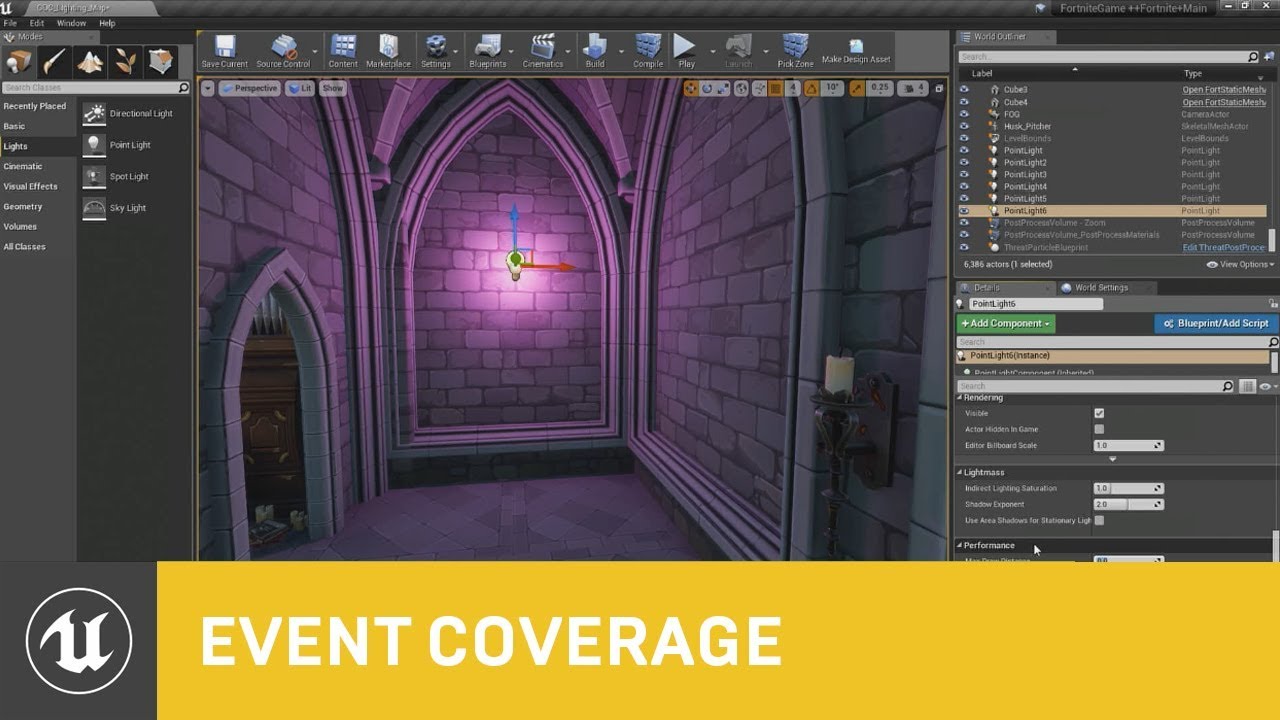
In this session presented by Epic's Zak Parrish, you will learn about some of the dynamic lighting features we use in Fortnite with Unreal Engine 4. We'll ta...
also should i enable ray traced distance field shadows for all lights in my project?
 warm mountain
Hey guys I've been trying to get my character to create water ripples when walking on puddles that are vertex painted on
I suppose since the puddles alone aren't a seperate material, it be better to create a box trigger in the puddle and find a way to track if the foot of the character lands within the box and create the special effect for it?
 safe rose
?
There's an example on Learn Tab
Just use line trace from feet
Well was anyway

Announcement Post: https://forums.unrealengine.com/showthread.php?123164 Sam Dieter is on to talk about a powerful new feature from the 4.13 release, Bluepri...
Maybe it was a stream I remember
¯_(ツ)_/¯
warm mountain
gotcha
safe rose
I think they put it in Content Examples
No clue
Ah yeah, it says it in the first yellow block
warm mountain
nifty i'll check it out!
warm mountain
wow
 frosty copper
😂
 devout gulch
serisouly ?
that's beyond ridiculous :d
oh btw
Geometry Branch is merged to main
 trim plume
@safe rose what happened why the number
trim plume
ah...
 grim sinew
So are we finally going to see the modeling tools added?
 rustic panther
love when editor crashes while scrolling in sequencer -_-
 rugged dome
Hey all, question. Launching a brand new 3rd person template without starter content and then hitting launch, when moving the mouse around to turn the camera, I can see the cursor leaving the game window. Is there a way to lock the mouse inside that window or can someone point me to the correct place to ask?
 coarse wigeon
Thanks for the heads up @devout gulch about the geometry branch
 vale halo
I hpoe this is the right channel to ask this question, but where on the UE4 forums would be the best place to post about engine modifications (that aren't intended to be submitted with a PR)? I've managed to "hack"/bodge support for OpenGL for Mac in 4.16 (working on newer versions too, but I like ran out of disk space 😂), so I could use my older mac to test a few small things. From what I've read when reading up on this issue, other people may be able to benifit from this "fix" too, but since Epic removed support intentionally I can't submit it as a PR 🤔
warm mountain
just curious guys could i use the free assets epic has provided for my own game?
say maybe some rocks some blueprints from paragon and soul city?
warm mountain
gotcha
main thing i would like to take apart are the blueprints
just to get a few iterations and prototypes done
plush yew
Hey, how to call function in widget graph? I create function, but I can call it only if I get it's renurn value
Found. Unckeck "Pure"
 sudden agate
guys, do work Destructible Meshes for you? They don't seem to fracture, but actually are.
I have the collision of the chunks but the Mesh itself is rendered in one piece
 burnt kelp
How can I make my spaceship land like in battlefront 2005?
 honest vale
@burnt kelp you program it
burnt kelp
Wow
burnt kelp
I have tried but I don't find how
honest vale
what have you got so far?
plush yew
I dunno where to post, so post it here: Because of Russian Roskomnadzor I can't log in to EpicLauncher.
 proud pine
@plush yew try using VPN?
Also if you have engine downloaded and already created project just open it locally without launcher
 quasi lake
Anyone knows how can I create this node?
This is a non-blendspace-specified blendspace node
All I can create are something like this
sudden agate
@quasi lake Its a normal Blendspace player node like you created. Just activate the Pin for the Blend Space and plug a variable into ti
quasi lake
How could I create this node
I cant find a node called " Blendspace Player"
By rightclick
 surreal viper
I have a component, which has an array of items for trader
in the level there is an instance, I modified the array of that instance
after a few weeks it magically resets
no idea what causes it, nobody touched related code
we set it up again
few weeks
resets
did anyone experience something like that?
4.18 btw
ancient obsidian
@surreal viper Maybe this is related to underlying types changing? Do you use source control? You could find the exact revision that causes the reset and look through your specific changes to investigate the reason.
surreal viper
yeah i checked source control, base class of the actor changed but it has nothing to do with the component
I had problems with components before (e.g. instanced uobjects totally don't work with them), so I guess this is something similar, can't really have this going on, I'll just move the data to the actor instead of the component
other possiblity: I noticed once before that I changed a BP and all the variables of all the instances in the level got reset, I just discarded the map, reloaded the editor and everything was fine 🤔
something similar could happen but then idk, it's pretty weird that I have to look for these issues, maybe I should move more of my data to config files
 wild glacier
Does anyone have a good tutorial for make a Boomerang weapon? I alteady try this: http://dominicmusgrave.co.uk/blog/a-boomerang-weapon-in-unreal-engine-4/
 rare holly
so now even BMW uses UE4
 paper kernel
@wild glacier homing projectile should work fine as boomerang
I remember doing some testing with homing missiles and it's very easy to hit yourself with one
shy heath
what do yall think
stiff crow
quite authoritative
shy heath
?
 harsh tiger
https://gyazo.com/0f5c95fc3bd4b03d4aad5f4b8bde35f8 does this cast fail because its in the level blueprint?
 karmic igloo
@harsh tiger A cast will fail if either: 1. The object doesn't exist/isn't initialized, or 2. The object is of the wrong type. Is the GameInstance class set to Camera_GI in the project settings?
harsh tiger
hahahahhahahahaha, let's just say it was number 2 xD thanks
 manic pawn
why might a level that has nothing in it but a big floor mesh and sky sphere be 8MB?
and somehow keeps growing every time we save it?
https://i.imgur.com/9402X3i.png this tool isn't helping at all
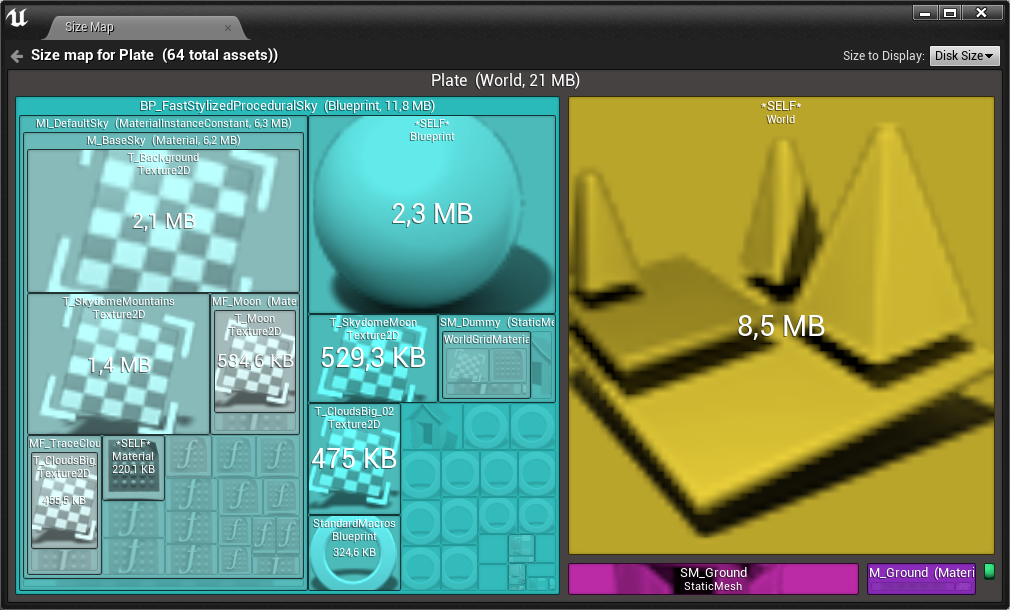
https://i.imgur.com/Kbw1d0A.png world is only a few kb in memory... why is it 8MB on disk?
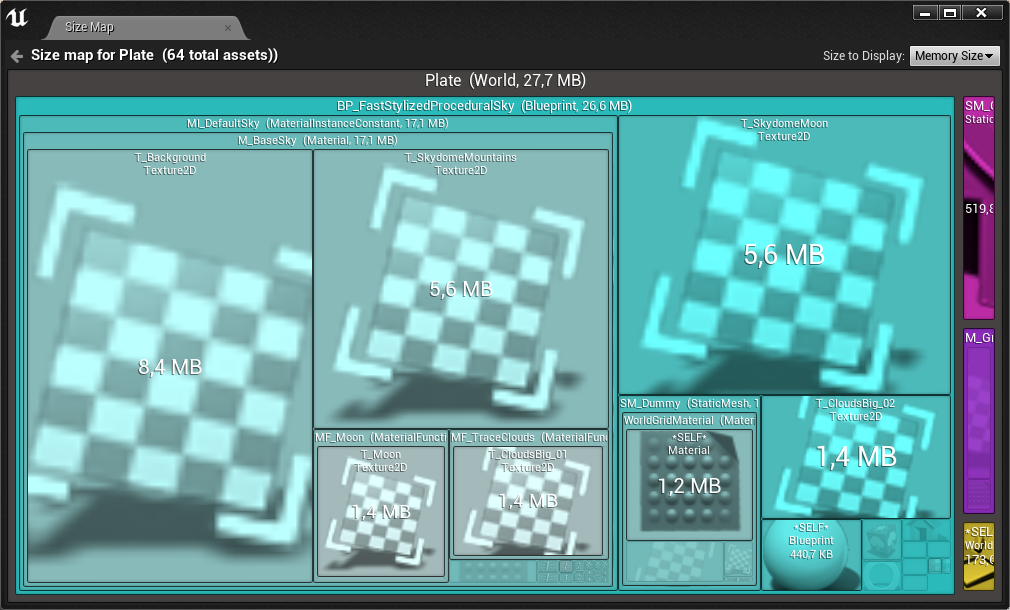
( it was that big before I added the sky asset, so that is unrelated )
https://i.imgur.com/2bmIy4h.png there is nothing in here that would justify the size
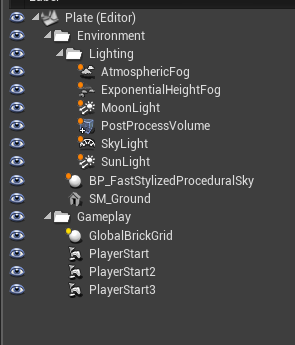
tf
I removed AtmosphericFog
now Plate.umap is 69KB
 rustic pecan
I rotated my pawn 180 degrees, but it doesn't apply when I play my game.
 frank escarp

Researchers from NVIDIA, led by Guilin Liu, introduced a state-of-the-art deep learning method that can edit images or reconstruct a corrupted image, one tha...
WITCHCRAFT
what the hell nvidia thats awesome
manic pawn
wtf
 red laurel
hello, don't really know where to ask this question. We have a big map with many sublevels which are loaded using bps. Some of the sublevels have AI and we spend too much time on USkeletalMesh::Serialize during the load, about 170ms in some places just on this. Is there any way to optimize this ? Have not found other people with similar problem.
 brittle fern
what's with the lighting (I'm new to this)
manic pawn
are those separate mesh pieces?
devout gulch
manic pawn
vxgi 2 ?
tall pendant
well you need an 900 gpu
i dont think its actually that useful for real life production
 dire storm
Heya everyone. So I finally got a new hard drive!!! Yay. Anywho as I was trying to move files off of my old hard drive I ran into a snag. I moved the unreal engine 4.19 version into the new drive under my Epic folder. I'm trying to keep everything unreal engine associated inside that folder. However now the launcher wants to repair the engine and make new folders outside of of the epic folder. I can't seem how to make it not do this.
I'm a little ocd so I wan't everything in its proper place without making random new folders 😦
 silver crown
symlinks
dire storm
everything works. I just ran the .exe for the editor. I just need it to show up on the launcher
dire storm
okay I'm not familiar with symlink. I'll look it up
 zenith flower
Here is how its done:
Move C:/ue4/4.19 to
D:/ue4temp/4.19
Then open launcher
delete 4.19 (This will delete the empty C:/ folder)
START to install 4.19 to
D:/ue4/4.19 (NOT temp)
STOP the install once you see it starts downloading
delete D:/ue4/4.19
Move D:/ue4temp/4.19 to D:/ue4/4.19
restart the launcher
and repair/continue the install
The launcher will then just go verify everything and you are done
Basically you are tricking the launcher into thinking it already downloaded the files, and is just resuming where it left off
@dire storm
dire storm
@zenith flower Thank you very much!
 narrow pasture
I'm having some trouble updating a widget display, is there something i need to do aside from setting the text?
Ive tried switching to a binding but that didn't work either
narrow pasture
Oh yeah, that channel is a thing
zenith flower
Its fine that you spoke here to get attention, but I wont help you for this unless its in #umg
dire storm
@zenith flower You be a life saver. I was getting quite annoyed with my migration. Really didn't want to reinstall everything
dire storm
its quite annoying with only 2 engine versions
zenith flower
dire storm
I just wanted everything on the same drive!.. which I'll have to do again in 6 months when I get a new SSD.
you're quite the snippet bandit 😃
zenith flower
Download ShareX
dire storm
I have it
I don't see the purpose over windows snippet tool though
just as quick and ez
dire storm
I just search snippet
I didn't even know it existed until I was watching a stream
and guy just search bar windows snippet and pulled it up..
and then I was like... if you use it so much why is it not on your task bar... and also THANKS!! didn't even know it existed lul
spent like an hour looking on the internet comparing cut and paste stuff.... didn't even realize there was one built in windows
dire storm
I know this may be a little early.. but I cannot wait for the marketplace sales for the summer and upcomming holidays. All your animation packs will be mine marketplace!!! bwahahahaha.
zenith flower
welcome!
 storm venture
this issue is driving me insane
whenever i sync my project with perforce it does this
to fix it, i just have to click "refresh node"... on every... single... one... 😐
karmic igloo
@storm venture You could try assigning a hotkey to refresh node. That might be possible.
storm venture
That would speed up the manual refreshing for sure, but I would really like to just avoid it all together
Seems like such a silly bug that would probably have a weird but effective workaround
storm venture
That's not too bad actually, it's only affecting six BPs at most so I'll do that for now, thanks @zenith flower
zenith flower
Re-creating Parent Character, may fix your issue. When I say Re-create, I mean it. Do not use the right-click duplicate!
What I do, is make a new blank Parent Character
Copy and paste the Function Names from the old, into new blank functions
Copy and paste the BP nodes in each old function, into each empty new function
Copy and paste the BP nodes from old EventGraph to new EventGraph
Compile
Rightclick on every variable that is now RED, and click "Create variable" (or local variable)
Compile again. Repeat and fix anything else until New Parent Character is compiling without error
THEN: find Old Parent Character in content browser
highlight and press delete
when the reference popup shows up, click the "Replace references with:" selection
and select "New Parent Character"
Make sure to COPY and PASTE the function names and variable names! The editor will change the DISPLAYED name to remove or add spaces and or "_" characters n such.
If you just "edit name", "select all", "copy", "paste"
When you "replace references" the editor will be able to do an amazing job rematching variables even though the variables "GUID" is different
@storm venture
storm venture
This sounds good, hopefully it does the trick! thanks a bunch @zenith flower
 fiery gull
Hey, is there anyone on here that has experience making multiple choice/branching storyline games with UE4, featuring multiple endings? I'm mainly looking for a way to integrate Twine 2, which I'm using to map out the story, and wondered if anyone had successfully added what they made into a UE4 game? I'm no programmer, just an artist with primative UE4 blueprinting knowledge, so no witchcraft explanations please, I'm simple and maths is hard
worthy fox
Is there a way to resize BSP Geometry instead of using the Scale tool or adjusting the box size in the details panel? Have I missed something? Like.. is there a way the select a face of the BSP box and drag it to the size I want?
 weary basalt
rugged dome
weary basalt
rugged dome
Hey all, question. Launching a brand new 3rd person template without starter content and then hitting launch, when moving the mouse around to turn the camera, I can see the cursor leaving the game window. Is there a way to lock the mouse inside that window or can someone point me to the correct place to ask?
warm mountain
Oh... Unreal... sometimes I can never understand you LOL
Was working on this material and it seemed the panner went loose, chased around the whole blueprint for hours only to find out it was the clamp
which makes no sense because if I were to copy the original one including the original clamp value it doesn't give me the error
but yet in order for it to work like the original bp i had to change it, my guess is that maybe the UV's of my mesh caused the difference causing the original clamp to fail and made the panner go loose
 mortal gale
It doesn't appear to be Linux-specific, but 4.19 seems to have just brought alot of problems with it, this looks kinda simple, but I don't 100% understand it.
zenith flower
safe rose
It's pretty nice
Except I wish it did Switches auto
Hmm, actually, doesn't even do Selects IIRC
 drowsy fox
anyone have any experience in mobile? And could possibly give an average scene poly count for a modern device? (iPhone 6s-8)
mortal gale
I did view the full exception trace, it has the same info as the output log. @zenith flower
zenith flower
We can't see it though
zenith flower
Anything interesting at the bottom of the stack trace? (its cut off)
mortal gale
Some mono bullshittery.
Which usually doesn't have to do with the C++ code.
@zenith flower So yeah.
 crisp fable
is there a quick way to get the scene bounding box excluding the sky, or do i need to iterate over everything?
zenith flower
If you can, just make a really big box that fits the scene, and get the bounds from that?
crisp fable
yeah i guess
mortal gale
ProcessResult.StdOut:   LogCook: Display: Cooking /Game/InfinityBladeFireLands/Maps/Overview -> /home/nathaniel/Documents/Unreal_Projects/BP_ParagonAssets/Saved/Cooked/LinuxNoEditor/BP_ParagonAssets/Content/InfinityBladeFireLands/Maps/Overview.umap
ProcessResult.StdOut:   LogCook: Display: Cooking /Game/InfinityBladeFireLands/Maps/Overview -> /home/nathaniel/Documents/Unreal_Projects/BP_ParagonAssets/Saved/Cooked/LinuxNoEditor/BP_ParagonAssets/Content/InfinityBladeFireLands/Maps/Overview.umap
@zenith flower
mortal gale
It does the same thing with multiple projects.
zenith flower
oh
mortal gale
So I knew it wasn't the specific projects.
mortal gale
Uh, no, this isn't NTFS, this is EXT4 filesystem, it doesn't fuck up like that.
zenith flower
zenith flower
There were major improvements to LOD's for landscapes in 4.19
Guess linux wasn't on the testbench
mortal gale
Well obviously them dummies don't check things.
crisp fable
heres a dumb question
where do you submit bugs?
the issues page doesnt have an add button
zenith flower
Thanks for reporting a bug with the Unreal Engine 4. Here you will find information on how to submit a report and what you can expect afterwards.
crisp fable
great thanks
 vivid girder
What's the general method to implement nav mesh areas that the AI would need to crouch through?
Would I need another nav mesh bounds volume set to a shorter height or something?
plush yew
@Utri#9448 Yeah, but I also wanna play FN
crisp fable
(has crouch and jump)
vivid girder
Ah, sweet i'll check it out
was thinking Nav Link Proxies, but we'll see
@crisp fable Just noticed this is from 2014, is this still the best way?
He refers to something called Smart Navigation Links which doesn't sound like anything that still exists in the engine
crisp fable
not sure sorry
 modern kite
Hi I'm experiencing this Error since i have downloaded the latest driver for my graphics card. I only get this error when im trying to open the editor
 cloud cobalt
Sounds like you should reinstall the driver
modern kite
I did it then says i have to restart my pc when i did this all is the same @cloud cobalt
plush yew
@Battle_pictures#9979 Try stock driver from CD
modern kite
@plush yew whats that?
plush yew
PC or laptop?
cloud cobalt
Seriously, get the latest official driver, install it, reboot
plush yew
@modern kite
mortal gale
@modern kite Uninstall Windows. That fixed it.
cloud cobalt
That's great, helpful and professional guys
mortal gale
👍
modern kite
@mortal gale thanks
cloud cobalt
Seriously though, uninstall your current driver
Reinstall it from your GPU manufacturer website
No need to reinstall everything
 stuck acorn
hi , Can someone help me with the UE4 question? (About creating Toolbar) 
modern kite
@cloud cobalt btw im using geforce experience to download the latest driver and when i did that it says i have to restart my system but when i restarted it no changes were made and i can download the latest driver again. so i guess my driver updater is in an loop or something like that right?
 opal coral
hey. made a new C++ class, closed the editor, now I can't compile the project anymore, have tried deleting Binaries and Intermediate folders, re-generating Visual Studio project files and setting the startup project.
getting this error when F5 in VS.
("The system doesn't find the specified file")
EDIT: VS had set the build config to HTML5 for some reason.
cloud cobalt
@modern kite Uninstall the current GPU driver from the device manager in Windows
It's going to fallback to something shitty like 640x480
Then reinstall it cleanly with geforce experience
 copper fable
hey guys when i export a model from blender to ue4
how do i make the root bone the actual root bone
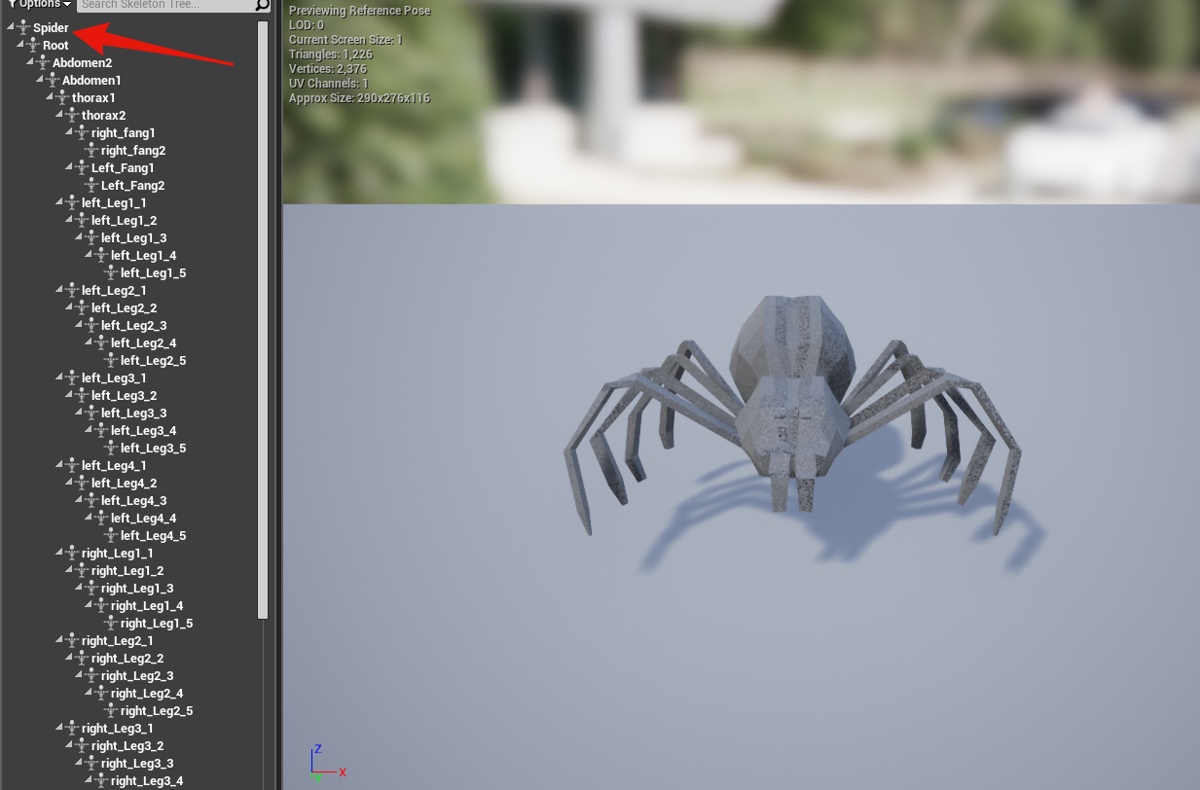


 paper kernel
root in UE4 is the armature object in blender
or, armature origin
so using humanoid as an example, you won't add bone in blender between origin and pelvis
origin->pelvis becomes the root bone when importing to UE
frank escarp
@paper kernel that fails to export
opal coral
isn't there something about naming your armature "Armature" to avoid the extra object in the hierarchy? not sure if just for Rigify, or any blender armature export
frank escarp
blame fbx
yes @opal coral
if you name the armature "Armature", then the unreal exporter will nuke the root bone
paper kernel
then again I haven't done direct import/export in few versions
and they keep changing it in every version
could be hell-of-a-lot easier just add .blend support
frank escarp
@paper kernel cant be done
to load .blend you need blender code
becouse .blend is LITERALLY a copypaste of blender RAM use
its like a "save state" button in an emulator
with a few extra things that allow it to be backwards and forwards compat
but you cant just write a .blend loader
they have to finish gltf
if they finish gltf, it will be fine
after all gltf is like FBX, but better, and open source so blender can have a legit plugin
paper kernel
changing the FBX 4 times a year sure doesn't help anybody
just futile attempt to keep competitors out
frank escarp
@paper kernel ive said it many times
the whole idea of FBX is to keep autodesk as a monopoly
if you try to do a non-official fbx importer, you are so fucked
this is what happens with blender
the rest of software have to implement the autodesk closed source FBX library
and play by autodesk rules
autodesk could go right now, and force Modo to remove FBX support
to cripple it
and modo would need to do so
FBX is created to keep people in the autodesk ecosystem. Its a format that only reallly works well on autodesk software. On the rest it never fully works properly
opal coral
some info on Autodesk and fbx from Ton (the Blender founder)
https://youtu.be/qJEWOTZnFeg?t=2850

Interview with Ton Roosendaal, the man behind the open source 3D software Blender! Chapter Marks: -How Blender got started 2:47 -An early design decision tha...
frank escarp
"every software that uses the fbx library has to give all the user info and user details to autodesk"
opal coral
"they can visit you at home and check what's on your computer" :D
frank escarp
"in the education license (autodesk), your 3d models are not your property"
autodesk could steal your content made with education license and resell it or forbid you to use it
and files are watermarked btw
opal coral
yeah. I got some friends who used Maya in their pilot projects at school, and now they're afraid of putting the games on Steam because technically they're not allowed to, having used educational licenses
frank escarp
lmao, he also says that autodesk spreads anti-blender rumors
cloud cobalt
For what it's worth, UE4 doesn't store FBX files.
opal coral
yeah hahah, visiting companies and spreading rumors
cloud cobalt
But if you're selling stuff, sure, the license for everything needs to be checked. That includes everything you use
Operating system, word processor, art tools, etc.
frank escarp
and people wonder why i use blender
i would need to pay for maya and get the 1600 a year version
and that money is better spent hiring an artist to do stuff for me
cloud cobalt
Blender is great. It's great on its own terms, and being 100% free forever is great too
 dark sparrow
do they really care to check though?
frank escarp
yes
they have actually raided studios
that they found were using pirated max/maya in commercial stuff
cloud cobalt
"they" typically including Microsoft or Adobe
opal coral
I know someone who has given out a Steam game made with an educational Maya license, been out a few years I think
frank escarp
on a real game they cant know
after all when you import the fbx, the metadata is lost
cloud cobalt
The question is whether one of your employees is going to denounce your company on leaving / being fired, basically
frank escarp
that too
cloud cobalt
Checking games themselves is very hard work
frank escarp
btw
the "user data" thing about fbx loader
ue4 uses fbx loader
unreal fbx importer could be snitching on your game
cloud cobalt
Simply put, respect licenses. If you can't afford something, use something else. It's important, especially for content authors. You don't want others to steal your work, so you have to agree to that framework of licensing for others, even if they abuse it.
Which is why UE4, Blender, Git, Visual Studio Community etc are great, they have minimal requirements that are very fair
Autodesk really stands out as a shitty company
frank escarp
in the video, he also says that autodesk 90%+ of money comes from architecture and design
autocad and company
and that maya is 10 times smaller than max
and thats public info from autodesk shareholder report
opal coral
yeah there's really not many people working on Maya is there?
frank escarp
yup
i dont know how big core programming team is
but if you look at what Ton says, about the market share of maya/max compared to autodesk as a whole, its interesting
2.000 million dollas a year
5% from media
100 million dollas
opal coral
Ton says there's 10-20 people working on Maya. and there's actually a really small paying userbase
frank escarp
that means that blender has now a similar amount of people working on it
 grave nebula
I'd gladly see whole industry transition gradually to a unified, open-source content format, rather than FBX.
Sadly, isn't happening.
frank escarp
@grave nebula what do you think glTF is?
its becoming quite popular
autodesk will try to fuck with it tho
they want their fbx monopoly
grave nebula
It is, and I do have hopes for it, like a salvation, but its spread speed is still low
But I see absolutely no correlation between FBX format and autodesk monopoly though. I don't think userbase distribution between various packages would change, even if glTF would be adopted tomorrow.
cloud cobalt
It will be used if it works as another seamless integration like FBX
FBX was a godsend even for me, using Blender, because it replaced 50 different shitty file formats
frank escarp
it would actually work better than fbx
it already works better in fact
right now
in unreal engine
cloud cobalt
Can't really work better for me, tbh
cloud cobalt
It could work better for skel meshes
cloud cobalt
Static meshes in Blender have worked perfectly with FBX for years now, don't see any value on a new format there. Except on licensing, and independence from Autodesk
Skeletal meshes could get some love though
frank escarp
static meshes can still fuck up normals, orientation, and scale
gltf fixes those 100%
plus adds the possibility of setting up the material in blender, and have it imported as-is in unreal
cloud cobalt
I've had hundreds of Blender assets in UE4 without any issue in the past four years, so...
frank escarp
and it will create an equivalent material inside unreal on import
what we need is the animation..
im on it and is such a huge issue
cloud cobalt
Also don't care about importing materials, or textures.
Skeletals & anims is where FBX fails me
There's a random arbitrary scale that works and every other value breaks animation entirely
proud pine
that gltf is quite interesting, I'm not familiar with subject much, just searched for more info on gltf and still puzzled, does this in any case intended to be fbx substitute?
cloud cobalt
Sure
frosty copper
wasn't Alembic for animation? or is that just for baked, constant animations in movies & melarkey?
cloud cobalt
Substitute and high-end alternative really
frank escarp
alembic doesnt support bone animations
its for baked animations
simulations, high end cinematics
it uses a huge amount of cpu power
you cant really have multiple alembic files playing at the same time in unreal without lagging
frank escarp
alembic is designed for movies
not games
to act as a format exchange for sims and animation beetween software
frosty copper
🤔 could it still work for cutscenes~?
frank escarp
thats what its for
cloud cobalt
Not really
proud pine
since I have very superficous knowledge, in my view of the world FBX is somewhat standard maybe due to forces of habits and inertia, but at the same time it is proprietary making very tricky to work with... is this correct?
frank escarp
@proud pine FBX is controlled by autodesk and has a very bad license. Also it only really works well on autodesk software
frank escarp
yeah
autodesk is super important
so when fbx worked in maya/max/motionbuilder/others, it became the standard
proud pine
so my assumptions are somewhat correct, I just have this opensource mentality a bit 😃
frank escarp
but it is an autodesk format, controlled by autodesk, with watermarks and other weird shit
cloud cobalt
It's easy to forget that pre-FBX work with game engines & Blender was hell. FBX sucks, it has a shitty license and is made by a shitty company, but it's still better than nothing
frank escarp
and binary format changing every year to fuck with non-autodesk loaders (like blender)
frosty copper
^ pisses me off. :I
frank escarp
remember udk?
frosty copper
fond memories of it from college. :p
frank escarp
Collada is the last "open format"
but it was so badly designed
it had huuuuuuuuuge issues
and still has
cloud cobalt
it's dead, Jim
proud pine
I just seen Collada on the same gltf presentation page on Khorons website
frosty copper
was that Khronos's first format, though?
frank escarp
its more of an equivalent to fbx, but badly designed and without autodesk being a dictator
yes
gltf fixes basically everything bad in collada
for example
frosty copper
well, they had to learn somewhere. :p
frank escarp
collada lets you define your own scale and orientation units
 vale osprey
but who will enforce gltf?
frank escarp
things can be in degrees, or in radians, in cms, or in inches
gltf meanwhile
says
proud pine
are there need to enforce?
vale osprey
yes
frank escarp
"units are meters", "rotations are in radians", Y is up
and that is law
in the file spec
makes import and export FAR simpler
vale osprey
otherwise it will endup just as Collada, different software supporting different versions
cloud cobalt
Format dictators are great. You really want hard specs with little implementation latitude
frank escarp
thats what gltf does
at the moment it leaves no room for error. It does things 1 way and 1 way only
vale osprey
in a specific version
frank escarp
they also allow extensions
wich i fear might become a shithole
but who knows
becouse if we start extensionizing stuff like mad, it can be a huge issue
vale osprey
what is incentive to update to new gltf version for example? or support multiple versions?
frank escarp
lets say unreal engine has an extension
for their collision
and then unity has another extension
for THEIR collision
now what
XD
in theory, you can extend gltf with random extra data you want
of course some exporters will support extensions, or not
it could be very useful to have a extension for game data, and then load it on your game engine
that way you could use blender or max or whatever to level design
as long as you add the extension code to the exporters
vale osprey
you can do it with any format, but just exporting some data on a side
imho we need to the new format but a middleware layer, kind of what OSVR does for various interface devices:
http://sensics.com/portfolio-posts/osvr-open-source-virtual-reality/

Virtual Reality Advertising : Sensics architects and key contributors of OSVR software. Sensics also designs and development key components of OSVR Razer HDK.
so adding some extra data into each vertex would be just a simple script
and the same scene could be sent into multipe packages at the same time
GlovePIE would be another example
and then you can use any format that fits your needs to get into intermediate format
do you have some axis messed up? - no problem, can add script for that
do you need to re-adjust the bones and re-calcuated tangents? - there is a script for that
because while some format is an open-source and etc. it doesn't change a fact that end use software can interpret it in a different way
frosty copper
Well 🤔 Given UE4's open code, you could just fiddle with it to make it compliant.
the whole point is to have a format that can only be interpreted one way.
kinda like a legal document.
vale osprey
that's not realistic
the way one engine work with collisions and etc. can be very different from another
the interchange format can be the same but then "specifics" have to be handled in engine code
frosty copper
then you'd make it work how it currently does.
Collision is created by objects with a certain name
rather than attempting to fiddle with the format
vale osprey
well, it woudn't work for Unity, UE4 and Houdini at the same time then
frosty copper
Well, no, but then why would it? 🤔
vale osprey
because that's what things like GlovePie do for hardware
frosty copper
Realistically speaking, unless you're a content(marketplace) creator, a studio is gonna be working on one engine/project
vale osprey
studio can be using 20 different software packages in pipeline
I'm not talking about just UE4 or Unity
frosty copper
Yeh, and they send thigns back and forth through them a gazillion times.
frosty copper
Point being, I doubt Houdini gives a rats arse about collision.
vale osprey
it does if you tell it to
frosty copper
well, you'll have to forgive me for not seeing the point of overcomplicating it. 🤔
vale osprey
what is overcomplicated about this?
frosty copper
you mean besides trying to make one thing work with everything?
vale osprey
ok, let me give you an example
I have a level where I used Vector Fields generated by simulation in Houdini
I could make part of the level in Houdini itself, then add some details in UE4, or maybe mesh it with WM landscape in addition
then send level back to Houdini to do sim fluid and bring vector field back
frank escarp
@vale osprey you can use houdini engine for that
you can make your vector field as an HDA, that depends on some base geometry for collision (as imput). that way you can just have it refresh in unreal
without going back and forth
vale osprey
@frank escarp I know, I'm just giving example that not all pipelines are just "Export from Maya / import into UE4"
frank escarp
gltf is best for that kind of pipeline. Export from blender/maya/max, import in unreal
and thats it
for multiple cross-software pipeline, it is a loooooooooot harder
in those kind of things, you have a "central" pipeline software
frosty copper
and I have to question the point of such a pipeline and its efficiency 🤔
frank escarp
usually
that central pipeline software tends to be maya
but houdini is becoming super popular with that lately
vale osprey
@frosty copper efficiency? you do what you have to do to solve a problem
frank escarp
@frosty copper you use the best software for each part
and then merge
you arent going to do texturing in blender
you use substance painter
vale osprey
you don't design your game around using "not compicated" pipeline
frank escarp
and then import the textures into blender
and maybe then export model + textures to ue4 (gltf), or just export model from blender, and then import model(fbx) and textures(tiff) in unreal
for things like what Bored says, of a simulation that depends on terrain and level gen, everything goes so much harder
but you do it becouse Worldmachine is best for terrains (although houdini is getting real good at terrains), and level design in unreal becouse its a game, and then houdini for sims becouse its what houdini is best for
@vale osprey have you tried to import worldmachine stuff into houdini as a middle man?
to run procedural stuff on the terrain like roads
vale osprey
not yet, but it supports bitmaps
frank escarp
ive tinkered a bit with houdini terrain and i was very pleasantly surprised
the biggest strenght is that it "just works" in unreal
no setup
you put your terrain node network as a digital asset, and import it "As is" in unreal
it will setup every layer and the scales correctly
vale osprey
imho it's tools are better than what WM does, but takes a bit more iterations to setup
frank escarp
WM has superior tools for things like erosion
houdini tools are fairly basic noises, and a basic erosion filter
vale osprey
but you can write one
frank escarp
a lot of people build the terrain in worldmachine, and then use houdini terrain tools to do procedural stuff on it
for example, thats exactly what ubisoft did
they did the core "natural" terrain in worldmachine
and then plopped into houdini to carve roads and make planar sections for cities
vale osprey
yeap, watched that
vale osprey
do you remember that they still made an intermediate tool too?
frank escarp
i remember they did tons of crazy shit
becouse the terrain is like a 32k texture
multiple of them for the different maps
vale osprey
cause you still can't "close" pipeline with just interchange formats
frank escarp
yeah, big studios create their own tools
ancient obsidian
Does anyone know how to stop navmesh from being generated on top of specific objects? I remember trying to search for solution before, but found nothing on AnswerHub.
vale osprey
@frank escarp might have to make some simple tool too. I have a world composition based level and for evert chunk there is a number of objects that have to be added and placed. Each asset is specific. Currently I'm finding the whole process is quite laborous
and like a half of the assets are actually depending on each other, so keeping the same version is paramount
frank escarp
do you know good tools to check a hard drive speed?
i suspect one of my drives is being spectacularly slow, and i want to measure each of them
 obsidian nimbus
7zip? 😛
ancient obsidian
@frank escarp Samsung Magician did that, IIRC, even for my external Hitachi drive, so I guess it supports all kinds of drives. Or at least supported a year ago or so.
obsidian nimbus
ok so there is some cool stuff about this blender 2.8 UI.... you can make tabs like browsers
frosty copper
I'm half and half with the new UI changes (then again, I personally hated 2.5 for a month or so)
frank escarp
@obsidian nimbus the tabs are like a replacement to the UI presets in older blender
basically a way improved version of them
i think they can also act as layers and other stuff
obsidian nimbus
yea, but u can add loads for diffrent tasks
frosty copper
'cept they're gonna possibly add some stuff like custom addons per tab too, or some shit like it
proud pine
@frosty copper this magical human property of getting used to things 😃
frank escarp
when i switched to 2.5, i was like "wtf they changed literally everything"
but i adapted very quickly
frosty copper
@proud pine Yeh... xD
frank escarp
it was a bit confusing at the start, but it was clear it was far superior
2.8 is going to be a much bigger jump than 2.5
thats why right now blender 2.8 is basically literallly unusable
frosty copper
But wasn't 2.5 an actual rewrite?
frank escarp
not at all
frosty copper
brain's running at like 60%, so excuse any doopidness. :p
frank escarp
they rewrote the UI stuff
thats why they changed the interface completely
and upgraded to python 3
and a few other things
frosty copper
so, half rewrite? :p
obsidian nimbus
still havent found where i change from evee to cycles 😛
frank escarp
left is SSD, right is HDD
frosty copper
render settings @obsidian nimbus
frank escarp
no wonder my project was compiling slow as balls
frosty copper
🤔
manic pawn
I mean isn't poor as hell random 4k performance expected for a hdd?
frosty copper
it doesn't seem that slow for a single HDD though?
frank escarp
a hundred times slower?
obsidian nimbus
ahh tnx, i did change it around, but didnt see anything change
manic pawn
going from a hdd to a ssd is a ridiculous upgrade for most pcs
manic pawn
much more than going to a faster ssd
manic pawn
my unreal and project folder taking up 100GB atm
frank escarp
DWVR + its engine build is 100 gb
manic pawn
need more of those 1TB m.2 ssds
frank escarp
the thing is that i have many different engine versions
guess ill have to buy a 1tb m2 ssd for projects
Comprar tu Crucial MX300 1TB M.2 Type 2280
al mejor precio nunca había sido tan fácil y barato en una tienda de venta online
con tantas ofertas y descuentos.
frosty copper
nvme* :p
frank escarp
thats nowhere near the price i was expecting
frosty copper
else ya might as well just get a 1TB Sata SSD
frank escarp
nvm is twice as expensive
is it really worth to have half the space at the same price?
frosty copper
You're paying for speed.
manic pawn
oh that's not a nvme one?
manic pawn
you'll have to look for benchmarks I guess
frosty copper
Which, IIRC, is basically just a bit faster than normal SATA SSDs
manic pawn
Preisvergleich, Bewertungen für Samsung SSD 960 EVO 1TB, M.2 (MZ-V6E1T0BW) (Deutschland)
frosty copper
Yeh.
manic pawn
there's a 2tb version for the next generation https://geizhals.de/samsung-ssd-970-evo-2tb-mz-v7e2t0bw-a1809118.html
Preisvergleich für Samsung SSD 970 EVO 2TB, M.2 (MZ-V7E2T0BW) (Deutschland)
but it is very expensive
frosty copper
doesn't have £1k to drop on pc stuff xD