#ue4-general
1 messages · Page 226 of 1
 cloud cobalt
What you place in the scene are static mesh actors
They're objects with many properties, one of which is the static mesh asset
You could simply replace the asset instead of replacing the actor
But i'm guessing UE4 makes the replacement nice and easy 😃
 tame bluff
Yeah I hear you.
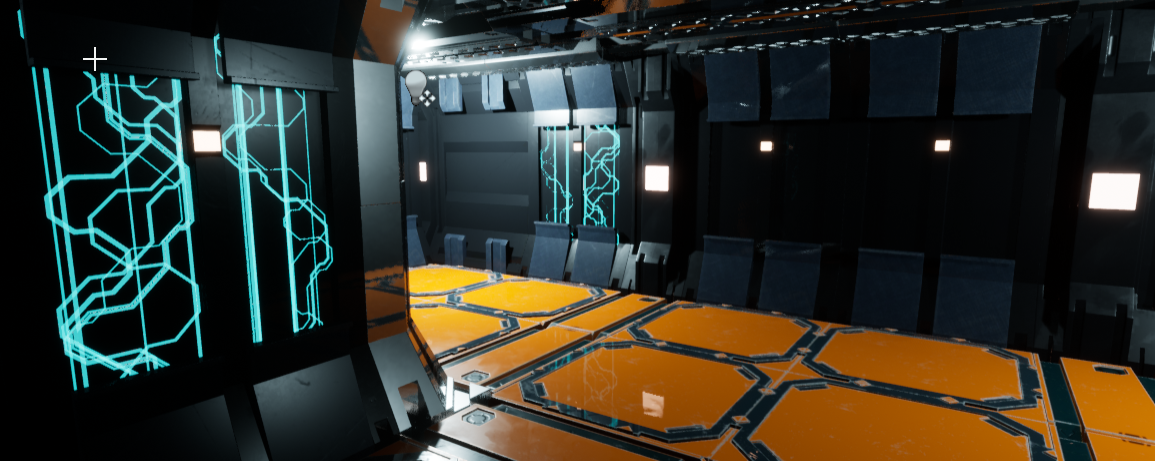
I've been working on this for a while trying to figure out color schemes
and what looks good / doesn't
I hate the pipes
I feel like they should just be chrome or something
Or just gone entirely
cloud cobalt
@thorny cipher So have you looked at all the threads in the profiler output to look what's hitching ?
cloud cobalt
Sure, but have you looked at all the threads to look why it stalls ?
cloud cobalt
So you haven't ?
 thorny cipher
I did roughly check
But it was different every time
There wasn't one thing that caused it
cloud cobalt
I mean, CPU stall generally means "other UE4 thread is using too much CPU and I'm waiting for it"
thorny cipher
or if there was, i couldnt see it
i sent them my profile logs so they could find it if need be
it's definitely an engine issue
 cinder iron
Voted it
cloud cobalt
Look, I'm not saying it's not an engine issue
I'm saying CPU stall specifically means "waiting on other UE4 thread"
So I wonder if you've found which one
That's it
cloud cobalt
Stall isn't directly performance related
It's caused by performance issues in another thread
I don't have UE4 here unfortunately, but if you're looking for a fix you really should take a look
thorny cipher
What should I look for in the profiler?
cloud cobalt
Look at the thread list, your game thread is probably in red with "cpu stall" that has like 99% of the game thread time in "self"
Look at other threads with another high time
I just googled quickly an example : https://answers.unrealengine.com/storage/temp/38929-session_frontend_full.jpg

two first threads here have the same time
So they're very likely blocking eachother
cloud cobalt
Uh, thought you said it was a CPU stall in the game thread
thorny cipher
cloud cobalt
Unless it's on the game thread
thorny cipher
thorny cipher
just happens on random crap
thorny cipher
yeah i know that bit 😄
cloud cobalt
Like, literally ignore everything else
CPU stalls outside the game thread are literally normal
thorny cipher
cloud cobalt
The core thing to realize is that the game thread might wait, or not, on othe rthreads
In your last screenshot, the game thread is the problem, not the buig flashy red things
Game thread at 73ms (!!) with 47ms of mouse movement
thorny cipher
cloud cobalt
High CPU stall -> thread is fine and ignore it
cloud cobalt
Calm down
Look patiently at the threads
Find high timings for stuff that's not a stall
thorny cipher
sleep is the only non-stall
cloud cobalt
Take the last one you sent me with ffiletransferrunnable thing
What's the root time-consuming thing in there ?
cloud cobalt
Thread is fine, move to other thread
(stall is 100% of the time)
Wait, what's that view ?
thorny cipher
ok
cloud cobalt
Look at why this specific thread has 250ms
thorny cipher
there's nothing
cloud cobalt
Can you screenshot the nothingness ?
Hierarchical view of the file transfer runnable thread ?
cloud cobalt
That part was, waiting on the game thread which kis also 125ms
So it's fully expected
thorny cipher
that was taken from the ones below
cloud cobalt
Again, stalls are fine - perfectly normal situation for threads, unless the game thread is the one stalling
Well
There's a way to export this thing as text
I think ?
Let me explain some more. The doc has a great screenshot : https://docs.unrealengine.com/portals/0/images/Engine/Performance/Profiler/EventGraphView.png
 thorny cipher
i know how to use the profiler, this is why this bug is pissing me off because it's just picking random shit and saying it has high time
cloud cobalt
No, I really think you misunderstand how timings are reported
Trying to help here btw
thorny cipher
I know but i dont think we will find what we're looking for
ok here's a fresh hitch
completely different threads are reporting high time
cloud cobalt
Let me guess, you selected a 6.5s long window ?
thorny cipher
one frame
cloud cobalt
Yeah, which lasted for 6.5s ?
cloud cobalt
So let's focus on that selection, don't chnage anything now
Focus on that and let's find what blocks
 manic pawn
if this is anything like those hitches I got in the editor, the profiler will be useless
thorny cipher
^
manic pawn
all threads are gonna be stuck in waiting for a lock
cloud cobalt
Look at every thread one by one and fine one that doesn't have 6500ms of CPU stall
Just do that first
cloud cobalt
the profiler does profile the editor too
On this shot look at all the trees starting from the first one
thorny cipher
thorny cipher
cloud cobalt
Just literally start at the first one ?
So do them all until you find one that's not CPU stall
All the 6500ms
 wary wave
yeah, looks to me like a lot of them are stalls on account of waiting for one thread?
thorny cipher
wait for stats
cloud cobalt
That's what I've been saying for half an hour
wary wave
wait for stats is the problem as indicated by several of the screenshots
cloud cobalt
The key is finding the one that blocks
thorny cipher
ok
well i figured out that the stat system is broken and hitching which i knew all along 😄
i guess this confirms it
cloud cobalt
You just suspected it and screamed about engine bug which has zero credibility without hard facts, which you know have
Is there a stats thread ?
cloud cobalt
What kind of hard drive is the stat report dumped to ?
cloud cobalt
Keep looking at other threads - you might find another one that does time
Game is waiting on stats
Stats are waiting on something
So if you're lucky you'll find something like EvilPerformanceShitterThread
thorny cipher
cloud cobalt
How long is the CPU stall for StatsThread ?
thorny cipher
cloud cobalt
So Stats really is blocked too - it's not causing the problem
thorny cipher
could be that http crap
cloud cobalt
Could be, is that all there is ?
cloud cobalt
Waiting for stats is a stall, too
Well I suspect it is
StatsThread is stalled just like others
So, can you take another lag event and restart the process ?
thorny cipher
so http curl thread could be the issue
cloud cobalt
Just to check if that's confirming this
thorny cipher
ill just load another hitch and see if curl is present
 warm mountain
hey all, i've been trying to weigh my options in texturing my environment at the moment and would like to ask
what are some situations which make vertex painting useful?
manic pawn
if you look at the frame 1 before this one, are there any threads with very high times?
 sudden agate
@warm mountain Every Mesh has Vertex Colours, ie. Vertex Colours aren't additional data
they are easy to setup. The only problem is you cannot instance them
thorny cipher
ok http showed up again
warm mountain
i see
cloud cobalt
@thorny cipher Take a normal frame without hitch, is it there too ?
manic pawn
httpthreadtick is just sleep if no work
thorny cipher
warm mountain
for materials to be vertex painted i understand it would require quite a high polycount?
thorny cipher
this is 1 frame before the hitch
manic pawn
that'll be the real issue
thorny cipher
cpu stall
manic pawn
rip
warm mountain
so if I have a map with a lot of modular walls it could run up the polys pretty high
thorny cipher
@warm mountain utilise instancing or merge them
cloud cobalt
@thorny cipher To confirm, what does http does in a normal frame with no huge time ?
HTTP processes usually keep ticking all time long and it's normal
warm mountain
just creating normal parameters and instance variations without vertex painting? you mean joshua?
cloud cobalt
Just needs to confirm
thorny cipher
cloud cobalt
Eh. Funny that.
cloud cobalt
So you might have found something with this
thorny cipher
¯_(ツ)_/¯
epic engineers will know more
hopefully they wont just look passed it
higher end CPUs dont have an issue
but i have a 4790 which isn't a bad CPU
cloud cobalt
Well they might look into it, but I would stop the investigation here, unless you're cool with waiting a month
thorny cipher
yeah im just going to have to hold off on profiling as it's throwing my actual profiling out
cloud cobalt
Not really
You're just finding game-unrelated issues ¯_(ツ)_/¯
I'd try to reproduce the hitch with Wireshark running myself
See what HTTP activity is happening
Also try with antirivus off if you have any
thorny cipher
fresh OS so no AV
cloud cobalt
Ok
thorny cipher
i reinstalled windows to check if it was that too
lmao
i've already been bent over by this bug
cloud cobalt
I can see that, which is why I'd be curious to see
thorny cipher
i doubt it remotely sends profiles
maybe they're data collecting
someone call zucc
😄
cloud cobalt
Well UE4 does definitely have some data reporting since there's the networked crash reporter
And plugins might call home to check stuff
etc
thorny cipher
sometimes when there's a fatal hitch or error caused by the editor it does send a report i've noticed
shows up in output log
cloud cobalt
If you're familiar with Wireshark or willing to learn, that's a great way to get the info
Not an easy tool but well
cloud cobalt
If you're building from source you could also, like, print the URL to log everytime you send one
thorny cipher
it's with epic now, i trust that they find it promptly
cloud cobalt
lmao, I don't
cloud cobalt
Well you can also keep looking and find that one of your engine plugins uploads your level every now and then
For what it's worth this is very very unlikely to be a slow CPU issue
I wish I had a 4790
I certainly don't
thorny cipher
o.o
yeah 4790 isnt bad
that's why im like ><
surely some UE devs at epic are still on 4790
cloud cobalt
Mostly CPU performance moves at 2 or 3% a year
An i7 CPU from 3 years old ? That's not a CPU perf issue here
thorny cipher
haha
cloud cobalt
No way Epic has anything that's more than 10% faster per core
 quasi lake
Anyone knows why my ai is always shaking around when using AI MoveTo node?
But he follows normally with Move Directly Toward
 zenith flower
bro, lets ban this ignorant and insensitive prick
thorny cipher
😂
zenith flower
just kidding. I read something about multiple moves running at the same time causing it to switch back and forth between the commands
It was a brief read over, but I believe he was using pathing too. Just ideas
quasi lake
A wierd tremble
zenith flower
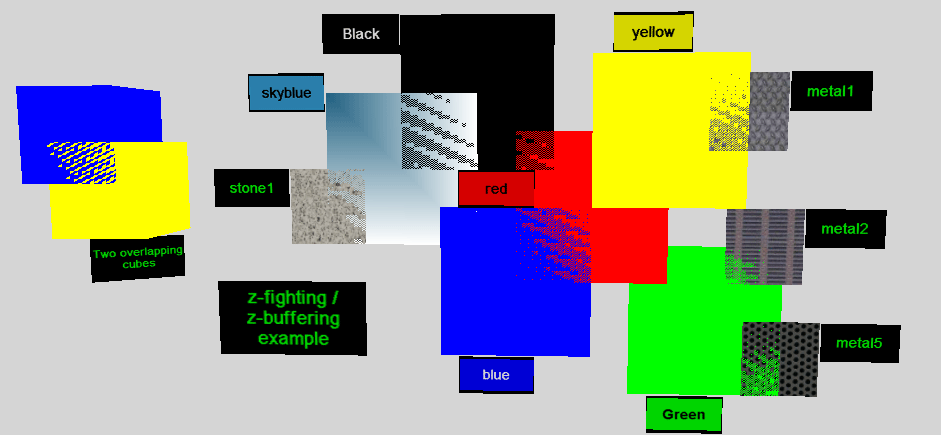
I would assume its akin to z-fighting but with movement
Z - Fighting https://upload.wikimedia.org/wikipedia/commons/5/5f/ZfightingCB.png
These are two images at the exact same depth, the render can decide what blocks what, so it like randomly chooses.
 digital anchor
@karmic igloo thanks :)
 deft sparrow
Hi everyone. Have a simple question about Unreal scaling.
Is it possible to scale a group of objects together and maintain the same offset between all the elements? It always seems to not give me what I wanted when I scale things together.
For example, I have a placeholder spaceship for a blockout. Made it with multiple BSP brushes.
I simply want to be able to have larger and smaller spaceships.
 vivid girder
What platforms do you guys use for project/task management?
 paper rampart
Hack n plan
vivid girder
We've been using Wrike for 1.5 years...but it's a bit formal for tasks
paper rampart
Same reasons as stranger
 tall pendant
hacknplan
vivid girder
Want something smaller...was considering Trello?
tall pendant
its really good. And has gamedev specific stuff.
vivid girder
Which?
tall pendant
http://hacknplan.com/ @vivid girder

Unify game design documentation and project management using the definitive tool for game production.
cloud cobalt
I tried Trello, it's nice for very prototype stage, but a bug tracker is required once you're in alpha. At that point we moved to Redmine and we just use that for tasks, features, on top of bugs
vivid girder
We're a team of 8
vivid girder
Currently trying to redo a SCRUM backlog
vivid girder
Thought it'd be a good time to try other platforms
So, if the chips are in....
Redmine, HacknPlan, Trello, Stranger...
Which is best?
Looks like 2 for HacknPlan, i'll try it out
 fickle eagle
Hurray for democracy
 frank escarp
hack n plan
its just damn great for games
its somwehere in the middle beetween Trello basicness and Jira complexity
vivid girder
Gnatt charts?
frank escarp
you can use it like trello, but it has MANY extra features, and things like integrated GDD wich is awesome to write about the game story or design
vivid girder
Is it mobile-friendly?
frank escarp
wtf wouldnt it be mobile friendly
its a motherfucking task manager
you use it for whatever you want, doesnt even have to be a game
vivid girder
Lol...just realizing i put @cloud cobalt down as a task management software
That looks sweet though, the vertical slice look is very Trello-esque
cloud cobalt
I'm the last project management software you'll ever need
frank escarp
vertical slice is the milestone lol
thats just the trello type view
you can easily comment , check progress, have subtasks, and llink to the game design model for documentation
 fringe cypress
unreal noob checking in. So how do I put displacement or bump maps? from a maya user perspective here
cloud cobalt
Basically try a bunch of tools and check which works best. It's fairly team-dependent. With very technical persons doing a procedural MP game you might want something different than a team of writers and artists doing a 3D visual novel
@fringe cypress Bump maps are not usually used in game development
frank escarp
depends a lot more on the scale of the project
for a 1-2 person team, trello is probably fine
for a bigger team, something more complicated like hack n plan would work better
and every AAA uses Jira, even if its complicated as fuck
cloud cobalt
@fringe cypress Normal mapping is the standard technique in game development, and more advanced techniques use normal and some kind of bump map along with tesselation
frank escarp
what do you think are those UE_54362324 signals in the bug tracker?
thats the task number in jira
vivid girder
That was our issue we started off with Wrike which is built for more complexity than we needed
frank escarp
to have that bug progress tracked
cloud cobalt
@frank escarp Yeah Jira is the big-company option
frank escarp
super expensive
cloud cobalt
It's great in some regards
frank escarp
useless to indies
too much friction
you can have the best software you want, but if its annoying, people just wont use it
ive worked on teams who had Jira and no one used it
cloud cobalt
We felt redmine was a great tool for us, no regrets here
frank escarp
becouse it was annoying as fuck
in my case, i chose hack n plan becouse it has all the categories with multiple stages, and the game design model
where i write stuff
when i have ideas
fringe cypress
@cloud cobalt Ah I see. But im aiming to make some cinematic renders and archviz, not really for a game. I need that displacement because, lets say im using a PBR rock texture. Wat do
frank escarp
i also write about the design of systems
becouse that way i make them clearer for myself when i go code it
 fair violet
@fringe cypress just use normals and displacement for now
cloud cobalt
@fringe cypress You could maybe try using tessellation and use the world offset node with your bump map multiplied by normal
It's not ideal, though
Hopefully you also have a normal map
fair violet
Yeah if you don’t have you you can tessellate heavily in Maya and bake it down to your rock but it’s just extra work
cloud cobalt
(afk, back in some)
 plush yew
MUH PEE BEE ARR
frank escarp
havent used it in years tho
 devout gulch
I probabaly don't touch even fraction of functionality
but from addin tasks/subtasks/git integration it's good
frank escarp
no such CVS integration in hack n plan
nothing preventing you from just linking to the task URL from a commit tho
devout gulch
in JIRA I can add issue ID to commit and it will automatically link commit to jira task
 grand patio
Hey, sorry to pop into the conversation. I've just got a general question about what yall would think of how this project would be in regards to how long it would take and if it's possibly too enthusiastic of a project heh.
I'm wanting to create a 3D model and to bring it into Unreal as a playable character, where you can move them, make them jump, attack, etc.
Would that be managable to do in 4 months by someone who has 10% experience in Unreal Engine?
fringe cypress
Ohh I gotcha. So its tessellation, or to actually baked into the model. First time using a game engine guys, apologies lol
devout gulch
yes
frank escarp
or its free for small projects
devout gulch
it's paid
frank escarp
how much is it?
frank escarp
thats pretty nice
devout gulch
though to be honest I started using it because I wanted to write unreal integration
fringe cypress
@fair violet so youre saying I should convert my displacement map in Maya into a mesh? instead of using displacement maps in Unreal.
devout gulch
so I can place tasks on maps with screenshots
(I mean it's not working yet, but that was the plan)
fair violet
@fringe cypress It’s just the extra detail that is too small to be represented by verts on the mesh to save performance. You can then use this normal in combination with displacement in UE4 to give a good sense of depth. I’m not sure what your situation is, do you have a highpoly rock that was baked to a lowpoly rock or are you running tileable textures over a lowpoly rock in Maya?
If you want the best detail you should use both normals AND displacement in UE4
fair violet
Displacement is good for some things, Pom for others
I wouldn’t recommend Pom for non planar surfaces
If it’s a rock, Pom will generate lots of artefacts
fringe cypress
@fair violet Im just trying to use a simple plane and put a displacement map of a cliff on it. I normally do this in Maya for still renders, saves me a bit of time instead of modelling the whole cliff. The thing is basicly, idk where to put my displacement map in Unreal. I only see diffuse and normals.
plush yew
i would disagree, but this is unreal chat, and unreal's version of pom is trash
so in this case you're right
fair violet
Haha right well yeah just speaking of UE4 specifically here
@fringe cypress have a look at any basic displacement docs or tutorials for UE4, you’ll find the nodes to use
It’s very easy to set up
plush yew
hagrid, i think what youre trying to do is something different than what displacement in engine actually does
you say in maya it works
because maya will displace pixels
not vertices
fringe cypress
@fair violet thanks! ill test some. Will get back to u
@plush yew exactly what im realizing now. I never used a game engine before
plush yew
your game editor doesnt displace pixels, or texels, it displaces verts only, which is what you'd need a ton of tesselation for, which is a bad idea, if you're trying to make a rock wall out of a plane, since the amount of verts you'd need would be trough the roof
if that's what you're trying to do, you'd be better off taking your displacement map, and displacing a tesselated plane in maya, and treat that as a highpoly, then just auto-optimise a basic 'low poly mesh out of it
then you can literally bake a displacement map from your 'highpoly' to your lowpoly, and have just a BIT of tesselation on your game mesh, to displace what you need
baking a new displacement map (assuming a unique asset without tiling maps), will let you displace your lowpoly to 'look like' your highpoly, in a nutshell
also maya is trash
max > maya
fair violet
Lot of trashy software around apparently
fringe cypress
@plush yew thanks!
fair violet
I like max better for modeling but it seems to be not getting the love that Maya is for updates
plush yew
no need to update something that's already fantastic
if it aint broke dont fix it
lots of updates = a ton of shit is shit apparently, and needs fixing
fair violet
Well the uv editor is getting a bit dated in comparison
It’s just much nicer to work with in Maya now
plush yew
it's your right to be wrong
plush yew
though i'll grant you that max needs new UV tools
which is coming
some autodesk stooge told me at promisedland
fair violet
If it didn’t cost like 1 grand monthly I’d consider going back to it
Maya LT is at least semi affordable
plush yew
i got my perpetual licence, so i'm okay with that, i dont need to upgrade past max 2015 anyway lol
fair violet
That’s fair
fringe cypress
Honestly I would use Blender instead. But most studios work with the Maya pipeline so eh
plush yew
GOT MINE!
no they don't hagrid
most studios dont work with maya
only those that want to torture employees
plush yew
blender's better than maya, honestly
 pallid compass
Waiting on that ue4 modelling kit from trello
They both have there ups and down
But in general maya out peforms by a lot oversll imo
fair violet
Yeah I agree
fair violet
Especially if you want to animate after
It’s decent at everything but not exceptional at modeling like max is
plush yew
if i had to switch, it'd be to modo or blender
pallid compass
I pref maya over max for modelling
plush yew
well you're a masochist then
fair violet
Really? They have made massive improvements recently
pallid compass
However i pref max rigging an animation
fair violet
It is a lot faster to work with now
Have you tried any of the recent versions @plush yew
plush yew
of maya? yes im forced to have to fucking deal with that shit every damn day at work
pallid compass
Also i dont like the layer system in max
plush yew
it's complete agony to have to export a damn mesh
pallid compass
I forget its name
fair violet
What makes you dislike it so much? I’m genuinely curious
fair violet
Meshes are usually a one click export for me
plush yew
not on our proproetary exporter tool
fair violet
I much prefer the modifier stack as it’s non destructive in some cases
And easier to move back and forth
plush yew
here's a simple question
fair violet
Sounds like your tool needs work then I guess
fair violet
Extract faces?
plush yew
no because i dont want every island of faces to be its own object
i want to detach... the faces into one new object
fair violet
Well you’d have to recombine after
fair violet
😄
plush yew
¯_(ツ)_/¯
fair violet
I’m not a fan of how dated a lot of the tools are and especially the pricing model, just hope Houdini gets decent modeling tools in the future and I’m gone
For now though it’s the easiest way for me to model and animate quickly for games
Without swapping between different expensive software
fringe cypress
And then C4D + Octane renderer outpeforming everything else in terms of cinematic renders
js
fair violet
Never gonna be able to go to offline renders for anything
UE4 made me not want to wait for anything anymore
fringe cypress
im loving UE4 so far tho
 fierce tulip
same, but then the vfx simulation nation attacked :p
frank escarp
im liking the houdini+blender combo
 unreal spoke
Do skeletal meshes have collision (I'm not talking about physics assets)?
frank escarp
bllender for pure polymodel, houdini for procedural stuff
plush yew
hey if there's anyone who knows animation here can you check the animation channel, i've followed this documentation https://docs.unrealengine.com/en-us/Engine/Animation/RetargetingDifferentSkeletons to the letter multiple times (my rig even uses the maximo skeleton) but my skeleton doesn't show when I retarget animations and if i show incompatible skeletons and retarget anyway the heads all big
fierce tulip
O_O
frank escarp
sadly, blender + houdini workflow is lacking Extremelly terrible for animation
houdini fbx animation is for movies, not games. It generates tons and tons and tons of trash bones
and blender fbx support is just terrible all around
plush yew
the documentation is badly written and//or incorrect, because I've actually gone out of my way to create a new project and download the same assets used in that documentation to follow along and it still ran into the same issue
frank escarp
maya + houdini would be better, but it would lack in the polymodel part
man cant wait till gltf supports anims in unreal
and i can finally use blender to animate properlly
@fierce tulip god of war is cinematic as fuck
been playing for an hour and it hasnt done a single camera cut
not a single one
it goes smoothly from gameplay camera to cinematics every time
fierce tulip
yea cant wait to play it. i'll probably tell my gf to do X attack a million times to analyze it
frank escarp
i got it becouse its combat is very relevant for what im doing
i want to see how the enemy AI and anims work
fierce tulip
I just want to press the X button very tightly and rip things apart
plush yew
see, i have not selection like int he documentation
and if i show incompatible it doesn't work so i just don't get it, I've hit a complete roadblock here, there doesn't appear to be a way around this outside of engine modification to fix afformentioned isues
nothing in the documentation about it
fierce tulip
I dont think you'll get any better answers here then in #animation @plush yew
I understand the frustration but please be patient hehe
plush yew
awww ok I really wanted to get this working today
well I wanted to get it working yesterday but no such luck
fierce tulip
gamedev in a nutshell hehe
fringe cypress
Hoping to create something like this in UE4 https://www.youtube.com/watch?v=oVKcyJpAftY

Unreal Engine 4 - Substance Designer Inspired by the beautiful artworks of Paul Chadeisson I'm working on a game ! : http://hk-devblog.com/ @HKdevblog @Koola...
fierce tulip
you might want to post on answerhub and/or the forums as well
plush yew
yeh every time I've tried that I get no answers, and by the looks of google neither does anyone else :/
 rose bison
I just retargeted some animations from the animation starterpackage to a template mannequin with no issues
just had to uncheck the "show only compatible skeletons"
plush yew
I tried that, and the head was giant and the only thing animating and it was wrong
 obsidian nimbus
hmm i can do animations in blender
plush yew
you know the way they do animations in several Steam games I've played, they import each frame of the animation out as an fbx, then just cycle which ones are visible
thats what im gonna do
obsidian nimbus
looks like ur head aint scaled right
plush yew
it does make the game really big and its not very efficient but our budget doesn't cover the cost of hiring an engine programmer at the moment so we gotta make do with what we're given
the rest of the mesh isn't animating either
obsidian nimbus
there are a lot of docs on retarget, u just need to get the base pose right and use same skel hyrar
you cant see the retarget skel cuz u havent put them both too humanoid rig
plush yew
both?
obsidian nimbus
yea both
plush yew
i thought the other one was by default ok let me try this
fringe cypress
I remember one time i had problems with animating, then i got in contact with the animator of the total war series thru facebook. Sent her my project shit, then she fixed it in like 20 minutes
obsidian nimbus
first u set manny too humanoid no need to rename bones
fringe cypress
little story
obsidian nimbus
than u do the target and select the corresponding bone name
now u can retarget the anims to ur new rig
plush yew
hmm that made it show, thank you. however although the result is different, it is still not correct and appears further broken
yeh that's what I've done
obsidian nimbus
did the pose look similar when u did retarget?
this looks like a scale thing
but could be that u didnt pick the right corresponding bones
rose bison
are you sure you don't have some hidden bone scales in your rig?
plush yew
its the same pose (A pose)
the bones on both meshes are set to a scale of 1
&both skeletons sorry
obsidian nimbus
if u drag em both in the lvl they are about the same size?
plush yew
both even have the same orientation
plush yew
the bones are asigned in both skeletons
yup the results are this
i checked both poses again, i don't get it
obsidian nimbus
you have no pelvis?
plush yew
oh i renamed that to root, it would be called hips tho
i did try renaming it back and reimporting... no change
obsidian nimbus
well i think the problem is here, should have both root and pelvis
plush yew
ok so some investigation, it seems like in the broken animation, if i select the bones its 'extra' bones that are stretched out, namely each finger has an extra bone (which doesn't do anything, at the end numbered 4)
shouldn't the bone parent, i mean i could try just deleting the bone but that seems like a bad idea
obsidian nimbus
well might not need a pelvis , but i think u need a root
plush yew
shouldn't unused bones just remain static relative to their parent, that is standard in the industry and has been for decades
hmm i'll try setting a root, i zoomed in and this is the animation looks like (the "unbroken" parts)
obsidian nimbus
so root was named hips at first and u renamed it?
 cerulean nova

Hey everyone! In this video we're going to create a 3rd person character in Unreal Engine 4 using blueprints. We'll be creating our character using the 3rd p...
quiet easy to follow ^^
plush yew
setting a root however does not make the issue any less broken unfortunately
that video goes over the blueprint set up
pallid compass
U always need a solid root bone my boy, and root should be at 0,0,0 always and not moved in animation
btw
plush yew
yeh pelvis is that bone
pallid compass
have u tried it with ugh
Pelvis should not be root
Pelvis bone moves
Root bone should not
unless under the except for advanced animation with root motion
try with root 0,0,0 bone
and also rename all ur joints to match the ue4 naming convention to root out any more issues
obsidian nimbus
i would retarget manny animations to that rig in 3 min
pallid compass
if not work, we will try some other stuff to debug the retarget issue
shut up owning omg
il do it in 30 seconds
no 3 seconds
obsidian nimbus
ill get the fingers right! 😛

 obsidian nimbus
ill make that rig put up his middle finger 😛
pallid compass
Its so fucking good for a console game
plush yew
lol good luck then
that is so broken at this point i've just closed unreal engine down and gonna head off to the pub
plush yew
the other bones are all fucked up as well
my guess: it can't be fixed and need to look at working with a different engine
obsidian nimbus
root spine spine spine neck head
digital anchor
try unity, i heard they have normal map support!
fierce tulip
lol
plush yew
see the asset itself works fine
it works in Godot engine, it works in Unity engine
i can put animations, but in Unreal Engine broken
yeh I had a quick look, except the animation system unreal engine 4 is great
obsidian nimbus
root none... pelvis root
plush yew
i've set it correctly, the ONLY change I made to the maximo default skeleton was changing the bone named 'Hips' to 'Root', that it is, everything else is default
obsidian nimbus
anyways have a drink, prolly wont hurt
plush yew
that documentation says to set the root bone to none, i will try to create an additional root bone
obsidian nimbus
wasted gamedev is the only way to go
plush yew
its like 30c here right now
its too hot to be getting wound up at this
but thats the bone layout, same as maximo except the rename from 'Hip' to 'Root'
fierce tulip
<_< dont tell me you are dutch
plush yew
na London
fierce tulip
close enough
obsidian nimbus
well, ill be home this evening, if u havent fixed it by then drop me a msg , upload the fbx to drive and ill retarget it for ya
plush yew
massive heatwave, its so bad right now I had to downclock my cpu to 4.5 (i9 7900x) as it was getting hot when baking when i was working in substance painter yesterday
plush yew
that character was a real arse to make, i essentially built it from scratch, well i got an unprocessed scan, then used it as a 'trace' and used the texture (which was FULL of artefacts) only as reference i essentially did it from scratch in photoshop and substance painter
i mean not bad for someone whos mainly technical and environment artist lol,
guess those years in the industry aren't all for nothing :p
obsidian nimbus
ya its dope
plush yew
shame i cant use him for character tho i have all these animations i wasted our budget on
obsidian nimbus
i never really used mixamo tho
plush yew
makes rigging tollerable for someone who doesnt rig
fierce tulip
itll probably end up being something stupendous simple
plush yew
the animations terms state they can only be used in unreal as well, so moving to unity is a big change i'd rather not make (unity has a great animation system, but the rest of the engine ranges from 'just ok' to 'terrible'
obsidian nimbus
you could send me a unmodified rig that has same bone structure i dont care 😛
plush yew
do you work in max?
obsidian nimbus
im not gunna change base pose or fix up fingers or anything tho
no blender, but prolly dont need to use it
plush yew
my pm's don't get delivered on discord (i actually dont like discord i only have it bcus everyone else is on it)
you on skype, since pm's dont work for me
and im not paying premium lol
fierce tulip
thats rather odd though
plush yew
yeh just syas your message could not be delivered. discords not for pms tho its chatroom only really like irq
it does make getting in contact with someone tricky though lol
fierce tulip
i dont agree with that though, use dm's daily with clients
fierce tulip
how big is the file?
plush yew
just under 4 meg
fierce tulip
its also not blocked in the uk hehe.
plush yew
think you have to pay to send pm's anyway, its NEVER worked for me, it always sayd message undelivered and cant send pics or anything
fierce tulip
you make a lot of weird statements man
plush yew
eh well i'll call the isp tomorrow see if their blocking something
plush yew
hmm now it works i just needed to get messaged first
 proud pine
it is usually called Privacy Settings, you have to check this stuff when you start using any communication app
privacy settings have features which oversee how/when/who can message you, universe or whatever
discord does have privacy settings for direct messages, because no one likes to receive obnoxious amount of spam in their messenger
fierce tulip
yay got God of War
noo need to wait for gf
gf whatsapp's me: remember, we have a bday tonight


 dim merlin
hey guys, anyone knows where to ask 3dsmax specific quesitons?
havent found any discord channel for 3dsmax..
fierce tulip
polycount discord comes to mind
 cedar snow
gow4 installing
cedar snow
#sorry
dim merlin
😛
 viral herald
hey guys
something is acting up with my blueprint

its a child of damage type
this is the parent
 unreal spoke
@viral herald A doesn't seem to be connected ot the other A
@ornate surge but that's probably not the issue...
@viral herald
 frosty bloom
@viral herald There is a much more suited Channel for #blueprint hint hint
viral herald
lol ok
dim merlin
anyone knows about cat models to unreal engine, and how far the development is going?
ive read that unreal might support cat models in future
this will be a very awesome thing
 graceful grove
As of late whenever I use the Epic Launcher my first sign in attempt ALWAYS fails with an error related to sending two sign in attempts too fast, anybody else experience this?
fierce tulip
yups
so, people.. if you used 4.19.1, and could still choose to go back to 4.18 would you?
a client wants to move to 4.19.1 from being 4.16 for a while, and im not sure i'd advice him that. any opinions?
 twilit gate
does anyone else have stutters in editor on 4.19? like split second freezes?
tall pendant
@fierce tulip IMHO 4.19.x isn't safe to move a project to. I'd rather stay on 4.16 tbh
fierce tulip
kinda need at least 4.18 for a UI thing, but 4.18 messes up some cascade stuff hehe
fierce tulip
as in, i cant read modules :p
cloud cobalt
We've shipped pretty much every version here. 4.18 is the only one that actually had bugs in shipping
Well, we've worked with every version and shipped every version since 4.15
fierce tulip
hmm
well they arent ready to publish yet, but need a specific feature.
guess they are going to do a 4.18 and 4.19 build and see what sticks
cloud cobalt
Unreal has a fire-and-forget approach to releases, sometimes I wish we had larger updates and a slower pace
UE4's policy is that bugs are fixed in the next release, unless they're a regression and they're told about it quickly enough
That's okay for most people but I wouldn't want to be picking an engine version for long-term work
 cloud cobalt
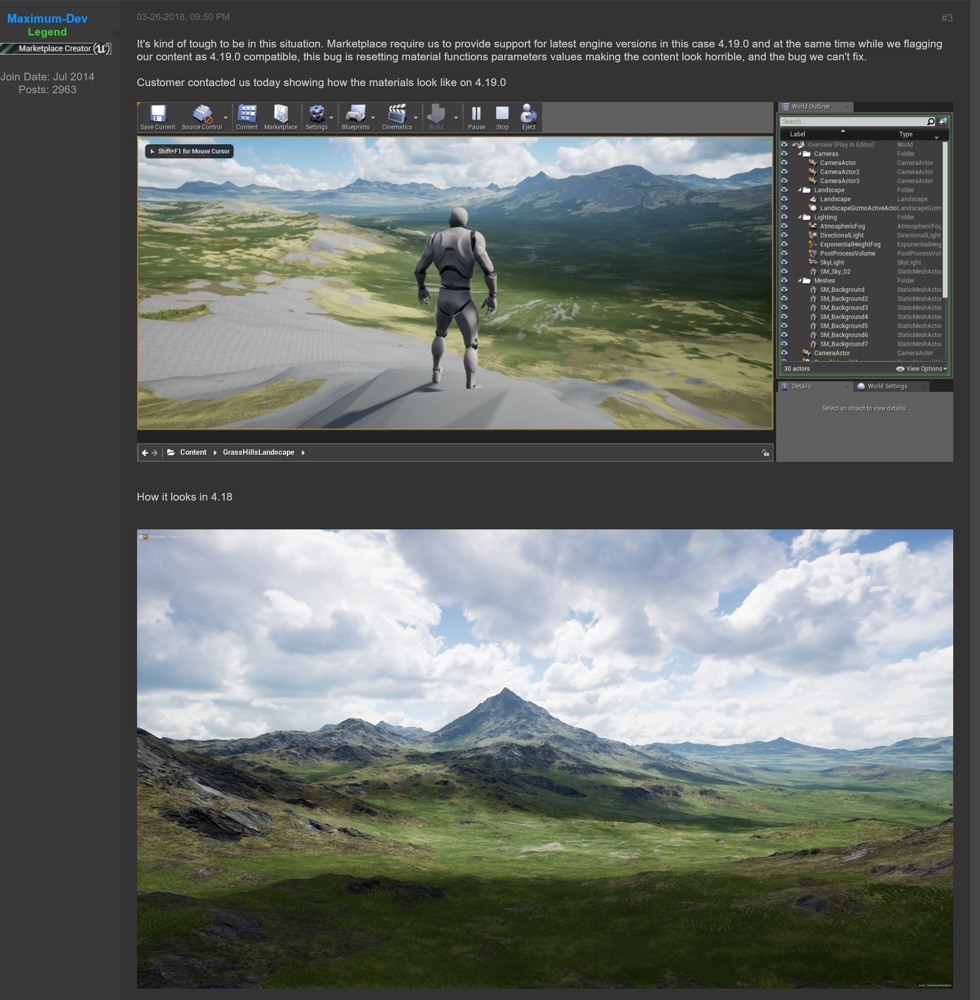
What's changed exactly ?
"Values in instances" ? I use mat functions very heavily, want to know if something changed a lot there...
fierce tulip
lemme grab something and ill dm you
 boreal nexus
Hello. Is it possible to play LAN in packaged copies of game on the same PC ?
i can't find my session, but some people say that should work (DefaultPlatformService=Null)
cloud cobalt
If you're running without Steam, it's supposed to yeah
boreal nexus
@cloud cobalt should i use another copy of game ?
cloud cobalt
No, if you've set online subsystemto null it should work
boreal nexus
@cloud cobalt thank you
warm mountain
hi everyone i'm looking through some of soul city's assets and I noticed some of them have more polys than its needed?
i notice 2 additional edge loops
present on the stairs
while it could have also maintained its geometry without it
apart from vertex painting is there any other reason to have these edge loops to increase poly count?
 copper fable
hey guys
warm mountain
i've seen quite a number of other assets that had this going for them
even without vertex painting
warm mountain
my guess is its supposed to solve some lighting issues that could come from too little polys?
 surreal viper
#cpp but simply use their names if they are public/protected, or getter/setter function if private and they have it
warm mountain
Since i do notice that some of my modular pieces do seem incorrectly lighted as a single face or with hard edges
frank escarp
@warm mountain its becouse polygons are not an issue at that level
its still very low poly
and they are having a consistent polygon resolution, without polygons too long or thin. That way if they do vertex color it works better
 trim trail
@fierce tulip can i ask for that too? i work on enviro/mat functions a lot
tall pendant
Soul was a tech demo for mobile. @crisp fable
 crisp fable
oh
digital anchor
If he has the same problem as me: parameters of material functions inside another material functions get their values lost (and if the parameters are texture parameters, it causes a crash)
this also prevents using Material functions in the new layer system, as they are material function by themselves
 restive cove
Ayy what's up
 paper kernel
Z
cinder iron
^ totally agree
paper kernel
tho I totally ran into issue of how to orient my custom character movement when there's no gravity
paper kernel
I figured ill disable the forced orientation and let the physics engine take over
maybe the player wont hit an edge with too high velocity and tumble until motion sickness kicks in
cinder iron
I would just interp to 000 by defo
 manic vault
my skeletal mesh sockets don't show up
in the editor, when i want to attach a static mesh
any thoughts?
paper kernel
is the static mesh child of the skeletal mesh?
 late girder
I just updated from 4.16 to 4.19
and half my project broke
is this a normal occurrence for you guys too?
 upper heart
That is a pretty big jump, there will be things that need fixing.
 silver crown
Nice one
late girder
and mouseX / Y axis wont update anymore unless I hold a click
No idea at all what happened
manic vault
@paper kernel fixed it. It's because I was attaching it in bp to player index 0 but my game mode wasn't set to set my character to player 0
 hidden heart
yeah youre gonna have problems like that jordy
frosty bloom
If your project isn't humongous I would suggest recreating it in a new project, in whatever version you want. That way you can keep track of everything step by step.
frosty bloom
I've never done that. My way have at most taken a day to transfer
And everything went very smooth. Any problems got taken care of directly
late girder
Yeah it's not even remotely possible to remake 😃 project is massive
and okay, I just wanted to know if its "normal" sometimes to have this before I start debugging, thanks
and its not warnings btw, the project's already running, just chunks of the mechanics broken and stuff
copper fable
was the GetOwener()->GetController() the same as GetOwener()-> GetInstigatorController() ?
 analog pollen
What is wrong with my packagin if Frame is 17ms, game 3ms, Draw: 3ms, and gpu: 17ms?
 grim sinew
Too GPU heavy
analog pollen
But if draw is under 3ms?
grim sinew
Draw is CPU I think
"The actual frame time is limited by one of the three: Game (CPU game thread), Draw (CPU render thread) or GPU (GPU)."
analog pollen
I'll check taht with the Gpu profiler
devout gulch
@late girder next time try to use master or promoted branch
it's not less stable than version release imo
and updates are easier to merge
they are still big, but not as big as versioned releases
manic vault
Hey guys, I used CreateDefaultSuboject and attached it to root compnent
but its transform is offset from the mesh
even though I didn't set it to an offset. How get rid of this offset
 bitter crater
you use xxx->AttachToComponent(RootComponent, FAttachmentTransformRules::SnapToTargetIncludingScale); to attach to root?
and it isnt a static mesh exported with an offset off origin
 honest vale
wtf is going on there https://forums.unrealengine.com/development-discussion/rendering/106829-sharp-temporal-aa/page4
Unreal Engine Forums
For discussions about Materials, Textures, Lighting, Particle Systems, and Post Process Effects.
tame bluff
BR kids can't read
what the hell do you expect
it's the problem with including UE4 on the Fortnite launcher, or rather vice versa.
honest vale
I'm flagging the posts like the world ends tomorrow
tame bluff
Epic doesn't give 2 shits
honest vale
it does help the forum moderators
manic pawn
it's incredibly how the forum is still not working right months after it was changed
manic vault
how come everything on the market place is made with blueprints and not c++
 worn granite
cause BP used to be the only thing supported for non-art
Now you can do code plugins, but fewer people do
There's a whole section though.
have fun bub
manic vault
roll your own
worn granite
Fail to see how that's inb4 worthy
manic vault
idk
worn granite
but you can do that with BP too
manic vault
I was talking about not using their code but reading it to expedite the processing of rolling your own
warm mountain
@frank escarp was asleep but thanks!
Went to play around with vertex painting on those assets and and it turned out pretty well!
manic vault
Do people use animation BP or play anim montages in character bp



 storm venture
is there a way to stop this nonsense
whenever i sync my project with perforce i get that
i can just click "refresh node" but i have to do that for every one
worn granite
are you closing the editor when you sync?
 pallid talon
Does anyone have an issue accessing Unreal Engine's Documentation section?? I'm constantly getting "This page isn't working", err_too_many_redirects". I've tried clearing my cache. No luck.
Ok, apparently if I sign out of unreal's website. I can access the documentation section.
What is the "Dirived Data Cache" and is it important? Does a solo user not a part of a group need/should use it?
worn granite
Not sure you could avoid using it
pallid talon
Well I keep getting a pop-up that I should use the Dirived Data Cache.
worn granite
I've never heard of this popup
But yeah, you should figure out why you aren
aren't already using it
 sinful umbra
before 4.19 DCC was configured the way epic uses it for their projects
they removed that config in 4.19
zenith flower
Anyone else noticed (in 4.19 at least) that the ADD node for "SET" variables, do not have the Boolean output to indicate if it was successful or not? While the tooltip says it does this... lol
worn granite
LUL
its funny cause maps have the same issue
I think that might be all the containers
zenith flower
wtf, the tooltip, does NOT warn you that "FALSE means we went ahead and overrode the value. We don't really care what you do with the bool afterwards.... if we even give that to you" xD
worn granite
on the set?
zenith flower
maps
zenith flower
I love how they got the c++ comment description to blueprint tooltip going on (must be automatic)
I just wish they would include the params and return to the tooltip (press alt or something)
zenith flower
legit, thanks
worn granite
ALSO
you can do the same in BP
@ParamOrReturnValueName CommentToBeOnTooltipForPin
newline in the BP function comment
zenith flower
I'm forcing my savegame objects to cannibalize itself, for the glory of.... well I have to much shit in my Instance class.... when the compile button for a blueprint takes longer than a few seconds its time to make room
Instance begin play -> create savegame object -> call Check/Load within that object, spawn the real savegame object, and set that to my instance variable... then let GC clean up the remains
worn granite
Oh man, wait till you get to 30s + compiles in BP
zenith flower
i'm sitting on 45 second compile for simple shit, like removing an unused variable.
I noticed I have about 10 savegame functions in my instance class... I decided to move them into their respective savegame objects.
If you can split up stuff to individual blueprints and keep to a certain size, the compile times will stay down
If you're BP looks like an ubergraph, you've probably gone to far
What is this? Savegame objects can't get the instance?
I need ue4 to stop telling me what a class can or can't do. Now I have to set a variable. Geeze.
worn granite
LUL
zenith flower
SaveGameToSlot has a "success" bool, if it fails what do you tell the user?
Try again? xD
viral herald
guys, when i made a C++ actor in my project, and it said there was an error and that i need to restart, and now, i cant access my project saying i am missing the .dll
how do i fix this?
worn granite
was that the first time you added a C++ thing @viral herald
viral herald
yup
viral herald
let me see
nope
@worn granite
https://gyazo.com/659fd01707b1a868c548f52778c58ffb tried to generate the VS project files

got that
zenith flower
The very last line is the beginning of your answer
viral herald
lool
i read the first line and ahd no idea what was said there
XD
hopefully that will fix it
thanks @worn granite @zenith flower
warm mountain
think i'm going to have to get some of the mechanics down
before I decide which materials are destructible
i'll settle the on destructible ones in the environment first before the rest
crisp fable
do the paragon charactgers include their animation blueprints?
warm mountain
on the bright side
it seems i don't really need to do much to make something destructible
paper kernel
question: how does one stop collision from getting stuck on surfaces when manually overriding velocity?
zenith flower
Interpolated teleporting with collision disabled and re-enabled on Tick?
paper kernel
boy tick is too slow for this
 silent frost
Morning - In need of some help please (hopefully I'm writing this in the right place). I'm creating an endless runner, after following the UE tutorial on YT and I'm wondering how I would set it so the runner only runs down three "lanes", rather than free will. (an example is a lot of mobile endless runners have this, whereby swipe left or right changes lane). I've been trying to find it online but can't seem to find the solution.#
zenith flower
I wasn't being serious. Just waiting for the Tick police
You would setup the controller with a Current Lane variable, then upon press of <- or -> you would -/+, with a mix/max bounds check
then you figure out how to setup the lanes themselves
You would probably need splines
silent frost
OK . Thanks. Not sure how I do any of that but at least I'm no longer looking for the needle in a haystack. Gives me something to figure out 😄
silent frost
Awesome! Thanks.
viral herald
im trying to work with the widget and making slots (with the uniform grid planel) and everytime i put something in the uniform grid panal, the image stays huge!
and i cant adjust the size

also the visual studios still doesnt work
i downloaded it 2 times and nothing changed
zenith flower
You should hover over things before you drag and drop it into your deal there. Uniform grid does exactly that, it evenly divides the space between all children uniformly.
If you want to do teamviewer I will show you how to fix your VS, as for the widgets, you should lookup "HTF do I ue4 " or "WTF is ue4" channel on youtube
viral herald
ok
in a bit evo, will the offer still be un?
im gonna head out for like 30 min
adn i got that the divider does that, but i cant seem to get the image size right
thats my thing
zenith flower
I'm US based. so I may or may not.
viral herald
and i cant adjust it
zenith flower
I'll show you
viral herald
lol ok we will see when i get back
zenith flower
k
 lofty shoal
you can assign input at the "project settings" like in the example they are called "moveup", "moveright" and many more, but i can't find where the engine uses this input, no blueprint uses this as i can see, i dont understand the logic in this part of the engine
zenith flower
You define the name of the "event" in the project settings:
Then you call them like this:
you can do that in the character BP or the Player Controlle
 worthy fox
When I add Surface Types in Project Settings and creating a Physical Material afterwards the surface type doesn't show up in the dropdown? Why is that?
 autumn quarry
@worthy fox sometimes you gotta close the BP then reopen it for them to show up
 open isle
https://imgur.com/a/cT4YD75 I'm trying to create a c++ project but i have this warning
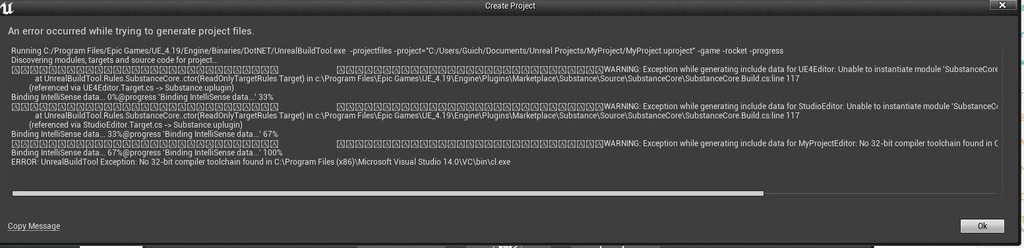
Any idea why? I 've checked my visual studio I have the game development c++ files downloaded
 vale osprey
@worthy fox just restart editor
 native creek
If anyone were to create a complete animation blueprint for a character, where you have starting and stopping animations , turning in place, turning while walking ...... etc etc , I would like to know for the starting and stopping animations , would it be wise to create a blend space for that ? I'm just concerned with starting and stopping animations for now , thanks, I hope you all doing great. =p
proud pine
@native creek watch this for inspiration to get your ideas going
https://archives.nucl.ai/recording/bringing-a-hero-from-paragon-to-life-with-ue4/
native creek
I will ! Many thanks mate. 😃
I am actually playing with the Paragon assets , haven't downloaded them sadly, but I've started =p
plush yew
Anyone around that I can DM a random question? Just trying to get some feedback on our logo
 prisma dagger
hi guys ...
why is blueprint class has a weird lighting ?!!
it is like outside environment lighting
is there anything to control that
 hot ledge
 solar eagle


 prisma dagger
how can I enable camera settings in post process volume ,it is grayed
grim sinew
check the checkboxes.
And, some settings are dependent on other settings. If you mean things like the iso and shutter speed, you need to turn on manual exposure
 verbal wagon
anyone know how to fix this juddering? happens with all dropdowns in any part of the editor
 patent crater
what screen resolution are you using and what UE version? for me everything looks fine
 spring fjord
hum
 tulip vault
how do I get Unreal to stop bugging me about updating
I need to keep one engine version
 fossil ore
Does anyone else have long loading times when you open Paragon maps?
Like, open a Paragon X Character level with assets?
Also massive CPU spike.
 weary basalt
They are AAA quality assets mate, for an extremely graphically intensive art style. What did you expect?
thorny cipher
How would you calculate the x of FOV
E.g 20fov = 20 times
95 fov = 1 x
or would you calculate that based off your default fov, and how much times it zooms
If that makes any sense lol
What would the formula be, if 95 = 1x, then what would 20 =
95 / [newfov]
so 20 fov would be 4.75x
i dont know if thats correct 🤔
or a 2 x would be 47.5 FOV