#ue4-general
1 messages · Page 192 of 1
 urban gyro
well all blendspaces are driven by a value
change the value once and you fire it once
generally if u want something to fire once, use a montage
 paper kernel
yea and they also sync with rest of the animations
 rocky portal
I don't know why the hell Epic doesn't release a library or w/e for simulated 2D TArrays
just treating a 1D TArray as 2D
with maths
urban gyro
you could just make yourself a library for 2d's
 simple pebble
You know how I can left click An actor and depending what actor it will do something? I can't get the left click to get noticed.
urban gyro
even in C++ 2D arrays don't reflect afaik
urban gyro
yup
rocky portal
The typical formula for recalculation of 2D array indices into 1D array index is
index = indexX * arrayWidth + indexY;
Alternatively you can use
index = indexY * arrayHeight + indexX;
urban gyro
you could always simply make a struct with a type and then an array of that type + an array of the struct and fill those
rocky portal
bool UItemContainerComponent::GetIndex2D(const FContainerSubCompartment InSubComp, const int32 InIndex, int32 & OutCol, int32 & OutRow)
{
    OutCol = OutRow = -1;
    if (!InSubComp.ItemSlots.IsValidIndex(InIndex))
        return false;

    OutCol = InIndex % InSubComp.Width;
    OutRow = InIndex / InSubComp.Width;

    return true;
}```of course you can pass in a TArray and a Width
to make it more generic
urban gyro
look at it this way, you make your own library of 5-10 functions once, you never have problems anymore 😄
rocky portal
SubComp here has a TArray, Width, and Height
urban gyro
thats a pretty big inventory lol
rocky portal
I suppose it could be smaller 😃
urban gyro
i think its 16
cuz an 8 is a byte
and 32 is overkill
now that i think about it i don think bp even supports 32 or 64
rocky portal
i think int is same as int32
urban gyro
aight
rocky portal
anyways, no use in worrying about it unless it causes actual problems
and if that is the straw that breaks the camels back, it must be the most optimized project to ever exist
 honest vale
a short would be 16 bits
rocky portal
I'm pretty sure I used int32 because it matched BP property
urban gyro
yeah we talkin bout bp
you can always set an int to max value and add +1 to see if it flips
it was something like 2147xxxyyy
rocky portal
like I don't know if you can UPROPERTY() an int16
urban gyro
dont rmrmber teh number
urban gyro
there you have it, its 32 then 😄
rocky portal
There are things in cpp available that seem basic to me that are not available in BP
like FGeometry::GetLayoutBoundingRect()
honest vale
yeah, BP is kinda restricting
urban gyro
i think bp is great for game logic
at the very least you can always figure out a way to make the game work
 fierce tulip
https://i.gyazo.com/1b53ef223bb0486a5f3e6ff79e395d88.png
I was kind of dissapointed it was a typo 😦
 upper heart
yeah foliage needs a lot of attention
rocky portal
I forget...how do you define a region where you don't need to type the scope on the C++ function call or whatever
        float xOverlap = UKismetMathLibrary::Max(0, UKismetMathLibrary::Min(DraggedRect.Right, OverlapRect.Right) - UKismetMathLibrary::Max(DraggedRect.Left, OverlapRect.Left));
        float yOverlap = UKismetMathLibrary::Max(0, UKismetMathLibrary::Min(DraggedRect.Bottom, OverlapRect.Bottom) - UKismetMathLibrary::Max(DraggedRect.Top, OverlapRect.Top));
so you don't have to type UKismetMathLibrary:: every time
urban gyro
namespace?
rocky portal
that'swhat i thought i just never use them bc I'm a noob
urban gyro
Can anyone who has been digging around UE4 guts tell me whats the difference between an Event (aka custom event) and a Function, other than the fact that functions have outputs? Is there a difference in speed when calling?
upper heart
Events can use delay nodes/timelines. Functions can use local variables. Events can be replicated. Execution flow can flow between multiple events and merge together.
Those are a few of the differences
"Functions are guaranteed to execute and return immediately by limiting what kinds of nodes can be placed in a function (latent actions, timelines, etc… are all prohibited)."
urban gyro
right, tx. So no difference if from performance when doing the same operation? Like X+1 is resolved at the same speed in event and function yes?
reason im asking is cuz im doing some refactoring and im curious if i should swap some events for functions
and vice versa
upper heart
I haven't dug into what events really are under the covers in c++. My assumption is that events have a tiny bit more overhead. Even if that is the case in almost all cases it would be negligible.
upper heart
np
urban gyro
So has anyone ever wondered why commenting on a node doesn't support Shift+Enter, but after committing the comment this behavior is supported?
i mean this is such a small thing that is basically pointless concern, but it's just weird
 grim ore
https://www.twitch.tv/unrealengine , Winter Jam Results ahoy!

 patent wren
Anyone have issues with Unreal crashing after installing the Render Doc plug in?
fierce tulip

 shell jetty
the ironfoot so good
 grave nebula
@fierce tulip You now have a personal hater, Luos. Congratz.
fierce tulip
not the first, not the last
 cinder iron
@fierce tulip how can one hate you.
grave nebula
Forums are harsh. Either you get help.. or you get banned.
cinder iron
like... he is luos, he is so nice with ppl XD
 tall pendant
a match betta goi
fierce tulip
the guy spammed me on all social media, all videos, and a lot of threads asking me for a material function I sometimes use hehe
cinder iron
kinda lame
fierce tulip
I politely asked him not to, and he got banned because of spammage
cinder iron
erfh
grave nebula
 cedar snow
that must be one hell of a material function
cedar snow
you could put it on gumroad and charge for it 😆
fierce tulip
XD im not that big an arse
cedar snow
haha
cinder iron
probably his screen fades black when he tries to see the video
xD
Luos selectivily cracking youtube to do that exclusively on that user end
fierce tulip
BifImadAhmed thendo Fade2Black
cinder iron
XDDDD
 vale osprey
"Luos and his fandom" 😄
urban gyro
distort UVs with a normal map? Why would you do dat?
paper kernel
for satanic rituals ofc
urban gyro
it does seem like an occult thing to do yeah 😄
 latent moth
any recommendations on how to attach blood decals to an animated character? i don’t seem to make it work
paper kernel
oh right, I had issues with attaching decals in my gamejam project too
never solved it
cedar snow
the current retry time for epic (launcher) account sign-in is 60 minutes 😫 😫
 gloomy pollen
"we can make an engine, but we can't make a decent multi-platform launcher"
cedar snow
and play obv
latent moth
@urban gyro decals
or anything really that works. i simply want to add blood to the hitpoint on a character
gloomy pollen
you get decal shifting if u attach it to the skeletal mesh
i minimized it by attaching it to the closest bone on the hit
tom looman has a cool article about how he did it, doesnt spell everything out tho
urban gyro
i don't get what ur askin, u mean blood particles firing off, or blood spatter on the body, or body damage layering like skin/muscle/bone
latent moth

Earlier this week I tweeted about hit-masking characters to show dynamic blood and wounds. Today I’d like to talk a little about the effect and how it came to be. I’ll talk a little bit about the technical details and some alternatives. The effect is a proof of concept to try and find a cheaper …
gloomy pollen
yis
latent moth
looks great but have no idea on how to achieve that
urban gyro
there was a stream on twitch about dynamic materials i think it was
the guy there made some seriously interesting mats that were layerd
and he had 3 damage stats for the bot
latent moth
do you have a link?
urban gyro
skin, electronics and skelleton
fierce tulip
ahh reminds me of camp after eating some harmless mushrooms
https://i.gyazo.com/8b40bf3fe62a53c2e5ba77a20ada1716.gif
 urban gyro
@latent moth here https://www.youtube.com/watch?v=Jz050a2OMXE

All blueprint and material based. Using a render target to accumulate damage from line traces (no 'get UV from hit' here) using an unwrapped position texture...
this is what you want, a hitmask
urban gyro
ruled out for what>?
latent moth
the article i posted above included this example
urban gyro

https://forums.unrealengine.com/showthread.php?143716 Ryan Brucks returns to the livestream and this time he's got brand new content to show off. Ryan built ...
watch this stream
latent moth
thank you
urban gyro
also this

With the ability to script drawing to render targets through Blueprints, content creators can now create and prototype advanced rendering techniques that wou...
 urban gyro
Damn now that I see how many Live Streams I've missed, It will take me 18 hours just to watch them all...didnt expect Epic to have such a speedy output. I'd much prefer modular documentation or some specific examples for generic things.
 devout gulch
is there thread safe version of DrawDebug* functions ?
 shy heath
When i try to play it only moves the edit camera and not hte charecter controller
gloomy pollen
@latent moth if u want it to look good, its going to be difficult like tom's/GDC example, if you just want SOMETHING and dont care how well it looks then just use decal
 carmine lion
@cursive dirge heya can you explain to me how to use the NvSamples projects?
I've followed all of the instructions on your github but can't get any of these projects to generate visual studio files or open with any content inside of them
latent moth
@gloomy pollen i’ll give it a try
shy heath
well lads how do i fix it
gloomy pollen
with small decal, i attached it to closest bone on hit and it worked OK but the decal still slide/shifts around some
without attaching to bone, it slides around a bunch and looked like shit
shy heath
omg how do i fix dis
gloomy pollen
omg how do i ask for help
shy heath
idk
gloomy pollen
nobody is going to have any clue what you are talking about from just this "When i try to play it only moves the edit camera and not hte charecter controller"
urban gyro
its clear that he cant move the character
so ill answer
what you do is
you go into your character
and make him move
gloomy pollen
lol
rocky portal
Any clue why my editor would frequently crash when working remotely?
urban gyro
you teamviewing ur workstation?
 plush yew

rocky portal
AnyDesk
plush yew
✨ quality ✨
rocky portal
lol
carmine lion
guys is there a way to make media textures high quality?
even black and white videos as materials or decals come out blurry
is there a fix for this?
urban gyro
what resolutiion u got them in
i think if its not a power of 2 u gonna have a problem
might be wrong tho
carmine lion
i have HD res
shy heath
omfg i am doing that!
carmine lion
In the docs they use a 1080p video and it seems to play fine
grim ore
is this tested in standalone or in editor only?
urban gyro
@carmine lion Check this out https://youtu.be/ql2zvhzm6s8

In this livestream, Epic's Wes Bunn walks us through some of the changes that are coming to the Media Framework tools in the 4.18 release, which you can star...
carmine lion
thanks!
urban gyro
👍
 bitter edge
Can someone confirm that my message is readable / showing up?
 regal mulch
^
cinder iron
which message?
bitter edge
(ha) 😃
cinder iron
XD
 azure shore
tries to make gun firing
character gets sent flying across floor after firing without aiming
azure shore
lol
so uh gun firing is bloody hard
it fires basic spheres but they collide with the player, so if you shoot slightly down or lower it pushes you forward
 livid haven
You can set which actors or components an actor or component should ignore collision with.
azure shore
yeah there was no node at all that came up that I needed
I typed ignore and there was one thing that I didnt need
ignore actor when moving
its not there
livid haven
Hmmm, just a second.
azure shore
ok
livid haven
    void MoveIgnoreActorAdd(AActor* ActorToIgnore);

    /** Remove an Actor to ignore by Pawn's movement collision */
    void MoveIgnoreActorRemove(AActor* ActorToIgnore);```
exists in Pawn.h, so let me see how they do what they do if( RootPrimitiveComponent )
{
RootPrimitiveComponent->IgnoreActorWhenMoving(ActorToIgnore, true);
}``` * Tells this component whether to ignore collision with all components of a specific Actor when this component is moved.
* Components on the other Actor may also need to be told to do the same when they move.
* Does not affect movement of this component when simulating physics.
*/
UFUNCTION(BlueprintCallable, Category = "Collision", meta=(Keywords="Move MoveIgnore", UnsafeDuringActorConstruction="true"))
void IgnoreActorWhenMoving(AActor* Actor, bool bShouldIgnore);```Yeah, there's definitely an IgnoreActorWhenMoving node on components.
livid haven
?
azure shore
Im in the construction script of the projectile
livid haven
Yes?
azure shore
where do you mean to get it from?
livid haven
On a component. You can tell it to ignore movement against an actor.
livid haven
I don't know what to tell you. It's a function, on primitive components.
You have primitive components.
azure shore
top left?
livid haven
So... call that function on the one that's colliding/moving.
The same as how you call functions on every other object.
Absolutely nothing special about this.
Probably the root component.
azure shore
Im left clicking the component, then right clicking in the construction script area and clicking the call function dropdown
thats my only idea and its not here
*there
livid haven
Okay, sounds like you're newer to blueprints than I'd thought.
Drag the component on to the construction script, so you can add a node that gets said component.
azure shore
I've made respawning, crouching, a whole lot of stuff myself, im not exactly new
yeah I have the sphere component there
and I drag off and type ignore and nothing
livid haven
Weird, should be there. Perhaps not in a construction script?
Try in the normal event graph, for kicks.
livid haven
That looks right to me?
But, construction script is pretty early
I don't know if you'll even have an instigator at that point.
 floral heart
Also, might have to do it for the static mesh, not the actor itself.
azure shore
I can't copy that, since the ignore thingey doesnt come up
livid haven
Copy what?
azure shore
the image
livid haven
I don't know what to tell you. :/
azure shore
like I copy these as closely as possible until it doesnt let me do something
maybe I'll just bloody keep self-shooting in the game, so it'll happen if you look down and shoot
or dont aim
so you can kinda use bullets as an extra long jump
well heck, its original
🤷
urban gyro
Aight does anyone have an idea where I can get a pack of some royalty free SFX? I have loads from the marketplace, but I must use a freely available source. Freesound.org is fine, but it's a major pain searching for every sound, and since I'd like variations of the same sound, going through 10s of pages is a pain, even with advanced search.
Anyone got a site/link for dat?
floral heart
Mix 'em up in audacity.
azure shore
yeah
urban gyro
bleh i hate dealing with soundwaves 😄
id rather pay 20-30 bucks and get good ones
but since its gotta be free, im curious if theres a pack or smthing out there
been googling for it awhile and all i see is redirects to sound databases online.
🤦
Freesound has pack downloads...
yeah nvm
azure shore
god this sucks sometimes
urban gyro
What?
what can suck more than scanning through thousands of sfx files in the hope of finding THE ONE 😄
 opal ocean
doing it with winamp
opal ocean
whats different?
I've been using winamp 2.64 for... yeeaaars
and I do need something better for previewing audio too
opal ocean
yeah loooking at the page now, not seeing a huge difference?
azure shore
I never have a problem with sfx, like it doesnt bother me much
what sucks is me being obsessed with trying to make a "game" in general
urban gyro
sfx are added near the end of the main development cycle, so as to not infuriate you during playtestting.
hear a theme song once and its nice, after 1000 iterations you'll just unhook it anyway
so better do it at the end
depending on the game of course, if u do some audio focused game then obviously sfx is first lol 😄
opal ocean
re: Aimp, I mostly just youtube for music lately.... my mp3 collection hasnt grown in a while
urban gyro
same here
but i do have a well filtered library
and honestly, look at this

how can u not love that skin 😄
opal ocean
heh
urban gyro
predator woulda been better tho
look, give it a shot, i guarantee ull feel right at home
opal ocean
I tried lots of skins for winamp back in the day, but I found them to be distracting and obtrusive
urban gyro
u can always scrap it and go back to the rock
this thing slides into the oblivion tho
instead of docking the player
it just leaves the screen
only appears when you mouse over
knda like that taskbar option
of disappearing
opal ocean
Hmm
urban gyro
im tellin u man, give it a go, u aint gonna regret it
azure shore
uuuuAARGH has anyone (well, I guess almost everyone) made some working gun?
urban gyro
dude what are you having trouble with
opal ocean
not IRL
azure shore
its just - like broken. I can't get the bullets not to collide with the player (so it pushes it back) and they keep messing up position and its frustrating as hell sometimes
urban gyro
you spawning projectiles right?
urban gyro
ur not supposed to copy those man
azure shore
...
urban gyro
specially the ones from 4.8
it just shows you a method of doing something
theres always another way, for better or worse 😄
azure shore
Ive been trying to do most of this stuff myself but for some of it I have no idea in hell where to start
opal ocean
I just do line traces and call it a day 😄
urban gyro
documentation is usually the best place
azure shore
I made crouching and swimming animations working myself
urban gyro
don't do hitscans, interitus is just lazy af 😄
opal ocean
yes
azure shore
I got some kind of line trace
opal ocean
my current project only has a view range of about 20-30meters so, hitscan is fine 😄
urban gyro
Look, if you have trouble with collision, you can always bruteforce it
and add a custom collision channel
and ignore it
oh if ur doing line traces then u rly shouldnt be spawning projectiles
kinda defeats the purpose
unless u want some other functionality
on top of the usual 'damage the thing i just hit'
but that has its own problems, means you have to simulate projectile physics on impact for destructible meshes, or send ragdolls flying etc
like if you had a railgun ud use a hitscan
azure shore
uuuuhh wuut so what should I do for projectiles
If I try and take out the linetrace I'll probably kill it
urban gyro
i dont know ur setup, but my guess is if you set ur projectile collision array to ignore the player, that would be the easiest solution
well, collision matrix or whatever u wana call it
urban gyro
dude
collision as in the collision properties in the details panel
Learn how to set up collision and lifetime for your First Person Shooter projectiles.
honestly you should google stuff first before asking, generally youll find the answer in the docs or some answerhub question already posted
i gots to go, remember, google is your friend and RTFD
urban gyro
i have a tutorial series
azure shore
and nothings ever highlighted and only small areas are shown
urban gyro
just havent uploaded the programing bit
so cant help u with that
and i got 20 hrs of footage to encode, so cant do it now
im also outa time and gotz to bounce
good luck bruh
here one last link u might find useful
c ya
azure shore
ok thanks bye
christ this "game" is gonna SUCK
welp
it slightly works just it only uses z rotation
😤
THANK YOU UGH
shy heath
dose eny one know how ot fix when you click play you spawn where you cliked play yet your charecter is not with you its idle
grim ore
it sounds like your not possessing your character, if this is a character you placed into your level. alternately you could possibly be spawning at your current location which is an option in the play menu on the toolbar.
 spare steeple
when i package my project i get a "game module not found" error
its a bp project but i added c++ classes and changed the engine version to a source built version in attempt to add dedicated servers but ended up reverting that
deleted the newly generated VS files + source and switched the engine back
and deleted saved + intermediate
but the packaged build gives me that error on launch now
anyone know the cause?
grim ore
check your .uproject and see what it shows for modules, you might have it referencing one you no longer have
spare steeple
how can i view those?
grim ore
it's a text file, open it up with notepad. it's in your root directory of your project
spare steeple
grim ore
@shy heath if you don't have a player start and you have just a character sitting in the world, not spawned in and controlled/possessed, then that might happen. You need to possess your player or turn on auto possess on the character.
shy heath
how od i turn on auto posses
grim ore
@spare steeple are you still using those C++ files or did you remove them all? if so you have to clean up the uproject as well to remove those modules. If that's not the case then I'm out of ideas 😦
@shy heath select your character, go to the details panel, search for possess and turn it on
well turn it to player 0
spare steeple
all of the c++ files should be removed from the project
grim ore
then you might want to just remove that entire modules section since you aren't using any C++ anymore
spare steeple
the text file for this uproject looks identical to an older backup
shy heath
@grim ore it sis controlling it it just wont show my arms with the animation
grim ore
that's another issue. I don't know how your character is set up so I can't really help with that. Is this something you created? does it have animations and an anim graph set up for it?
shy heath
yes it does
grim ore
you would have to check out the documentation or tutorials on animations, that is out of my expertise.
spare steeple
@grim ore deleting modules from the uproject file worked
thanks for the help
also thanks for all the youtube tutorials
grim ore
yay glad it worked. I barely work in C++ in UE4 so it was just an educated guess 😃 Glad they help as well!
azure shore
in my hud, none of the binds seem to be working
or anything much at all except for health bar and ammo count for that matter
*health count and ammo count
grim ore
it sounds like your 20% of the way there then!
azure shore
yeah I've had that working for ages
but I just got the ammo done
I wanna make the ammo count invisible when you're not holding a weapon, but binding it won't work
how else can I do it?
grim ore
how do you determine if you have no weapon? like do you always have one or can you put it away?
grim ore
whenever you pull out the weapon you can tell your UI to show that part of the UI. do the reverse when you put it away.
azure shore
?
grim ore
right now does your UI just ask the player every frame, binding, what the status of stuff is and set it?
azure shore
pretty much I guess
grim ore
the basics would be to create an event or function in your UI that toggles your ammo count visibility on and off. Wherever your are equipping and un-equipping your weapon it would talk to your UI, thru a reference, and call that event or function to turn the counter on and off.
you can get a reference to your UI after you create it
grim ore
that would be a binding yes
in theory that might work, does that First Person variable change when you change the weapon ?
azure shore
oh sorry, this is for the crosshair, which I want to be invisible whilst in 3rd person
grim ore
generally bindings are frowned upon for most UI functions as UI rarely needs to update at the same rate as your FPS. Usually you would use a simple form of Blueprint Communication to tell the UI to change when it needs to.
regardless I am testing to see if binding to visibility would even work, I've never actually tried it but I would think it should work
azure shore
ok thanks
grim ore
nope that works fine and it looks like the right code. does that not work?
azure shore
Not for me, nothing happens...
I'll have to check it all through at some point in other areas
I can't think why though
grim ore
then you need to find your First Person boolean on your character and whenever you change it print string out the value so you can be sure it's changing
alternately go to the character, change the default value of the First Person variable to whatever it isn't now and run it to see if the cross hair is hidden or not. then repeat it and it should change. If it doesnt then something else is changing it possibly
You can go to your character, find that variable in your variable list, and right click "find reference" and it will show you all the places you are using it in that blueprint.
azure shore
Thanks
But right now I should get some sleep cus damn there's red in my eye a little
grim ore
yep sleep is good
 weary berry
Is there a way to invert y-axis for in-editor fly cam gamepad controls? I'm looking through the source and as far as I can tell it's stored in the EditorViewportClient's CameraController and nothing sets it. Wanted to make sure I'm not missing anything before manually toggling it in there.
grim ore
There is a toggle for the mouse inversion in settings but I don't think there is one for the gamepad. Maybe it still affects it?
weary berry
yeah - saw that - it doesnt :/
 stiff marlin
Does anyone know what program I can use to open a .mesh file?
stiff marlin
Marmoset
I need to export it to another program, but nope
a .mesh file was apparently made in Medit
and for some reason, it is Marmoset's default mesh
 scarlet echo
mmmmm I wonder what this is https://forums.unrealengine.com/unreal-engine/feedback-for-epic/1436714-unreal-studio
I assume UE4 is going to start moving forward with per-user and multi-user licensing for plugins by the looks of things
devout gulch
probably nothing interesting
though i haven't heard any rumors
my guess it will be just subscription type licensing
for engine
instead of big fee upfront
might be aimed at mid sized studios, which can't afford full license but still need technical support and don't want to pay 5%
 velvet ravine
maybe there gonna do what unity does, Pay upfront for engine no loyities
velvet ravine
yeah gets to something when i get most my advice from other sites lol
 grim sinew
Could also be a new name for Datasmith when it comes out of beta
Pure speculation though. I'm not aware of anything else Epic is up to that would require a new license.
Either way, we'll probably find out at GDC
 floral pagoda
^
Could also be a new launcher they could be working on
Since we got that survey a while back
 weak harness
I love how people always assume the worst.
floral pagoda
Same @grep#1337 😛
weak harness
Honestly it's probably nothing to get too worked up about.
weak harness
I'm always curious what Epic is working on no matter if I agree or disagree with it.
floral pagoda
Yep same here
weak harness
Welp sleep time is in order.
floral pagoda
It is 1 am here so I need to do the same
weak harness
I really don't want to sleep though.
 languid shard
floral pagoda
languid shard
floral pagoda
Ok
weak harness
Unreal Engine
Unreal Datasmith is a workflow toolbox we’re working on to simplify the process of moving data into Unreal Engine for architectural and design visualizations. Initially, it includes a set of extensions and plugins that enable Unreal Engine users to easily import and manipulate data from over 20 CAD/DCC sources, including Autodesk 3ds Max. Other tools will become available as the beta program progresses.
 vivid girder
Been a while since a new engine version made it to preview 5
was thinking we'd get 4.19 like 3 weeks ago
Not complaining, just surprised
weak harness
I'm using it for dev atm. 4.18 was too buggy for me.
I mostly got tired of VS opening extra windows.
vivid girder
Could you verify something for me real quick?
grim sinew
It's better that they did, I wouldn't want a full release where material instances are 100% broken.
weak harness
I can try.
vivid girder
@grim sinew Totally agree, just surprised they hyped it up so long ago
@weak harness Theres this bug in 4.18 that is killing me
floral pagoda
Do you think that they will show off the new geometry toolset at GDC?
vivid girder
Go into any material Add a SetMaterialAttributes node Click the + icon a few times Click on 0 and try to change from "missing" to basecolor or something
grim sinew
I don't think those geo tools are going anywhere. They showed it off last year, then no word of it.
vivid girder
Don't try to open the window twice or anything
grim sinew
Whatever's going on with it, they hit some kind of block in what they wanted to do.
Hopefully the block was them discovering nobody cared about editing 1 polygon at a time in VR to build an entire level.
floral pagoda
Also as a side note - Modo indie 11 is coming out.

I know that @cursive dirge Already commented 😛
weak harness
vivid girder
I do wonder if it crashed for you in 4.18
vivid girder
thnx
weak harness
np
floral pagoda
Night grep
 sudden agate
I love the new Dark Theme of the forum. Everything is easily readable ❤
grim sinew
It resets randomly, get used to hitting that button
floral pagoda
Thanks for the info
 drifting bough
usually, unless you changed it
 lilac cobalt
thanks
latent moth
I am moving a character folder which includes all meshes, textures and materials to another folder. The operation completes, but the origin folder is still there, even though in UE it looks empty. But if I go on file explorer, a lot of files are still there and are not in the destination folder.
So I close the project, reopen it, still I cannot see the files that have not been moved. I fix references, but still nothing.
How can I move those files?
grim sinew
Well, move the folder in windows and see if anything bad happens.
latent moth
Of course 😃 everything breaks.
I get messages asking to reimport, and then there are missing references, ...
grim sinew
Weird, dunno. You broke it!
Maybe some sort of bug, maybe corrupted assets, maybe it doesn't have read/write privileges, hard to say. In any case, it's weird.
latent moth
eheheh 😃 thanks anyway
I'm trying to implement what discussed by Tom here:
When hitting the character, we transform the world position of the hit into the reference pose position (using the BoneName info we get from point damage events) you can do so by first inverse transforming the hit location from the current transform of the bone we hit, and then transforming that location using the reference pose transform of that same bone.
Context is spawning an actor on the hit point of a character, and have the spawned actor remain in the correct position of the hit even when the character moves / animates
 wary wave
sounds like spheremasking
latent moth
indeed 😃
 fiery bane
hi im filip my portfolio can be found on woggydesign and fb pages
latent moth
I am unfortunately not successful in trying to apply the transforms he suggests
if you have any pointers, they'd be highly appreciated...
For instance I can't seem to get the transform of the bone that is hit
I am using "Get Socket Transform" with the bone name
fiery bane

JPG Image
latent moth
did you reset the scale in blender before exporting?
(both of your mesh and your rig?)
spare steeple
anyone know how to get my skeleton created with the model in 3ds max to properly import into ue4?
exporting as fbx
spare steeple
i created the bones but i dont know the next step
spare steeple
i import it into ue4 and the skeleton that comes with the model isnt what i made at all
azure shore
like it all moved fine
um
try options like mesh import and stuff
I'd like a bullet glow
dunno how to do that in material editor
 harsh thistle
I have this problem with my door model..i have imported that door model from blender correctly and also set up uvs correctly...i cannot figure out what i missed.....can anyone help me with it. Also I dont know why that latch component has different shade than the whole model.. think thats why this error is occuring...Help me out guys!! I will add all pics down @here
@here
fierce tulip

クリーチャーズは「ポケットモンスター」シリーズの原作三社の内の一社で、主に「ポケットモンスター」に関わるビデオゲーム、およびカードゲームを制作しています。近年では「名探偵...
azure shore
PEEKER PEEKER CHOOOOO
grim sinew
That seems like overkill for a pikachu material, but whatever works
fierce tulip
i know its super old, but whenever a magazine/website talks about "we want X for pokemon switch" they fail to show that image and speculate its looking 5 generations older than this.
latent moth
All, I am trying to implement what Tom talks about for a wound system. I'm at this point: https://gyazo.com/c76ef368aa326f5544ebfa3d4ea85fd8

Basically I can create Spheres that are properly attached to the hitpoint and follow a character movement and animations: https://gyazo.com/421ccd63df124f1a1d94b4389ce33ea9

Now, my understanding of Sphere Mask is limited, and what I get is that the character should be made of the material that the sphere can influence, is that correct?
Does this mean that my character needs to have a single material?
 frank escarp
@latent moth its not about spawning spheres
the trick is that you have a material wich calculates distances from certain points, and if the distance is less than "whatever", it creates a hole/wound
latent moth
I'm talking about this approach: http://www.tomlooman.com/rendering-wounds-on-characters/
Earlier this week I tweeted about hit-masking characters to show dynamic blood and wounds. Today I’d like to talk a little about the effect and how it came to be. I’ll talk a little bit about the technical details and some alternatives. The effect is a proof of concept to try and find a cheaper …
frank escarp
lets say you have 4 wounds max (need a low max or gets expensive)
ah
as a 3d decal
the other trick is what left 4 dead did
latent moth
he spawns sphere masks on the collision point
so then by increasing the radius, he is able also to "paint" the blood enlarging
frank escarp
the sphere masks arent actually 3d objects
is what i just said
you send 3d locations into the material
latent moth
yes
frank escarp
and then the material checks distances
latent moth
that part I got, I am using a BP
frank escarp
well, now you need to send the location of each sphere to the material somehow
latent moth
that has this computation in the Construction Script
frank escarp
just add 4 vector parameters
latent moth
It's in there
sorry if I'm not clear, learning all this stuff (and thank you for your help)
So: I have a system to compute the position of hit impact and attach an actor so that the animations & char position are followed properly
now, I built a BP that in the construction script sets the location of the material
However, this obviously only impacts one material, but my character is composed of 5 different ones
I basically don't understand how he is able to paint this red on top of the character material
latent moth
So there can only be 1 hit location per material?
frank escarp
you can have a few. But there is a max limit
and you need to deal with that yourself
each hit location has to be a vector parameter
so you have Hit1, Hit2,Hit3,Hit4
and then just do material instance ->set vector parameter value with the sphere location
given they can be vector 4, you use the first X,Y,Z for the location, and the 4th, W, for the radius
then you can do stuff with it
latent moth
oh
frank escarp
there is a material node called sphere mask, wich is what the guy was talking about
basically it looks at the distance to a point in space, and creates a gradient
latent moth
yes that's what i am using
Ok @frank escarp I finally got what you are saying. Thank you for helping me, will report back if I succeed. 😃
harsh thistle
@grim sinew thanks bro
plush yew
hey guys
i just found out more information
unreal engine 4.19 is being delayed
we wont ghet it until aftter
4.18.3, 4.18.4, 4.18.5, and 4.18.6
so its going to be about 2-3 more months
until 4.19
Good news is that it's not cancelled!
 cloud cobalt
That a joke ?
cloud cobalt
4.18.3 has been out for a month or two already
And it's not getting updates
Can you share a link ?
plush yew
just google
cloud cobalt
I did
plush yew
there u go
cloud cobalt
I did not found any source, so I'm considering that a joke
4.18 branch had exactly two commits since 4.18.3
So it's definitely getting a 4.18.4 hotfix, but nothing more
cloud cobalt
4.19 is getting 10 commits a day right now, it's in heavy development, so probably no release next week
I'd guess it will release the week after, right before GDC
The only reason I care is that 4.18.3 has a really strange crash that appears on a few of our clients and never in testing. Per clients who tried, it's gone in 4.19 preview
That never happened before and we don't even know what's crashing, it's pretty infuriating
latent moth
@frank escarp I was able to make it work partially: https://gyazo.com/04415afd15b8d519af7c791cc01caa11

The issue that I have is that if the character moves, the sphere stays put and does not follow character / animation
Do you know how I can solve that? Do I have to keep drawing them on Event Tick?
fierce tulip
hide yo loved ones, hide yo kids, luos is attempting blueprints
plush yew
I have so much blueprint code
lOl
i literally use it because i hate c++ compile times
lel
 delicate terrace
Hide your meemaw
latent moth
This my material... https://cldup.com/YPLEX2p-n4.jpg
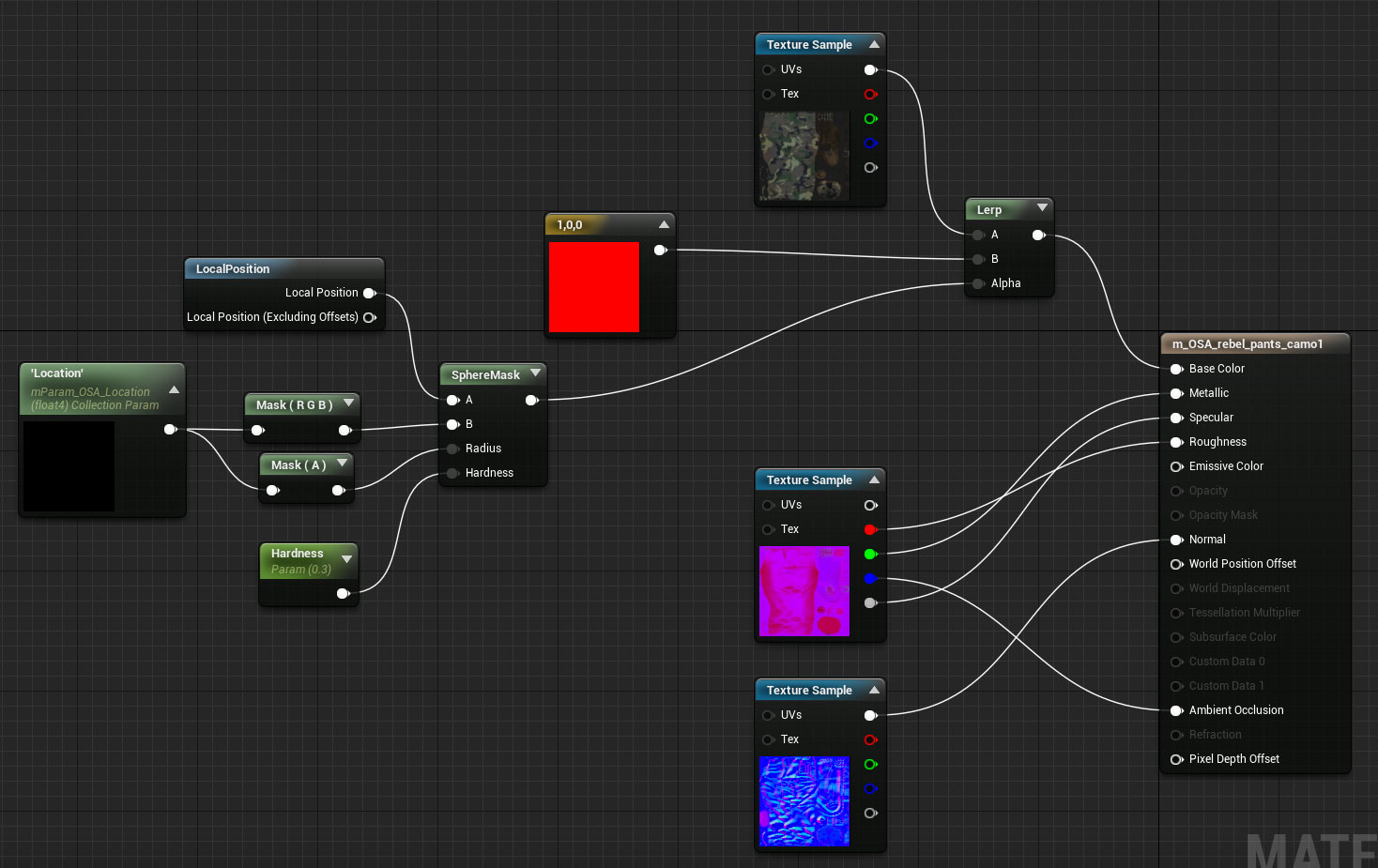
with the local position, nothing appears.
 wary wave
whut
devout gulch
called it
just like Unite for unity
unfrotunetly it means they might not show anything of substance at GDC
keeping it their own conference -;-
paper kernel
I gave an intensive stare at my bank account it said "maybe not" when I was browsing flight tickets
paper kernel
Travel itself wasn't that much, about 160€
wary wave
fair enough
fierce tulip
as someone who never blueprints its so confusing XD
"ooh there is a spawn emitter at location, neat, now I need a spawn actor at loc.. its not there" hehe
azure shore
uh someone please tell me how to remove emitters
fierce tulip
press delete
azure shore
when bullets hit surfaces I added an emitter but I only want it to be there for like 0.2 seconds
so I put the delay but then what
grim ore
It’s part of the emitter itself.
azure shore
lemme see if theres anything else instead of that
grim ore
The particle has a lifetime you can set. Change it in the particle itself.
azure shore
I mean where
fierce tulip
in the lifetime module
azure shore
I double click it, nothing happens
do you literally mean in content browser or something
fierce tulip
lol
please open the emitter by double clicking on it in the content browser
click on the lifetime module, set its max/min lifetime.
azure shore
ok I'll look for it
ah found it
well now what
for lifetime I dont know what it means
this makes no sense for what I want to do
I need the emitter just to be removed
cinder iron
it depends
 hardy ermine
cause I have a real beginner problem right now
cinder iron
if its a #blueprint question then that channel
if its a particle question #visual-fx may help you
or you can just read #more-resources to know where to go
opal ocean
just ask 😃
grim ore
Ask it here and someone will probably get bitchy and tell you where to go lol
hardy ermine
yea kinda thats why I'm hesitant to ask here but here goes
when i drop an object, the grid just disappears
when i go to top view it's there though
grim ore
Yeah that is weird for sure. It’s still checked in the show options ?
azure shore
UUUUUUGH
I JUST WANT THIS TO GET REMOVED AFTER 0.2 SECONDS
please someone uuuuhh 😩
grim ore
If you can’t set it in the particle properties, you can get a reference to the particle after you spawn it, then you use your delay and then you can destroy the particle
azure shore
hrmm ok...
grim ore
But setting it in the particle is the correct way to handle a one off particle.
azure shore
when I open the particle everything in my mind melts
grim ore
But you basically want to adjust some of the settings in required and lifetime
WTF is.. Cascade. A short tutorial/explanation-esque series where I explain Cascade's modules. Even though Cascade might be old news in a few months due to N...
Around the 3:50 mark he covers making it spawn once for a set time as well.
azure shore
my god
nothing's changing, its just doing what it wants now
YES
I did something else
I just plonked the emitter in the bullet and used visibility
plush yew
I want to make notes in the game as objects, and upon clicking them, they open and you can see text
do I literally give the objects a texture?
latent moth
Or create an interface
plush yew
how would I go about that?
I want the notes to open with an animation and go to the player's camera
OR what you said
I'm not sure which to do though
latent moth
if you want a page opened up i'd go with an interface
plush yew
how would I go about it?
the way I want it is I think in the game "a dragon, a (something), and cancer"
latent moth
A guide to using Unreal Motion Graphics to create UI elements.
 faint cedar
Hey guys, quick question - I am building a track spline system and I position my meshes in such a way that they can't stretch (only squash)
the problem is - if my spline is longer than what my mesh can stretch, the mesh's tangents seem to get screwed up for some reason
it's hard to explain so you can see it here: https://i.imgur.com/1aijZf3.mp4
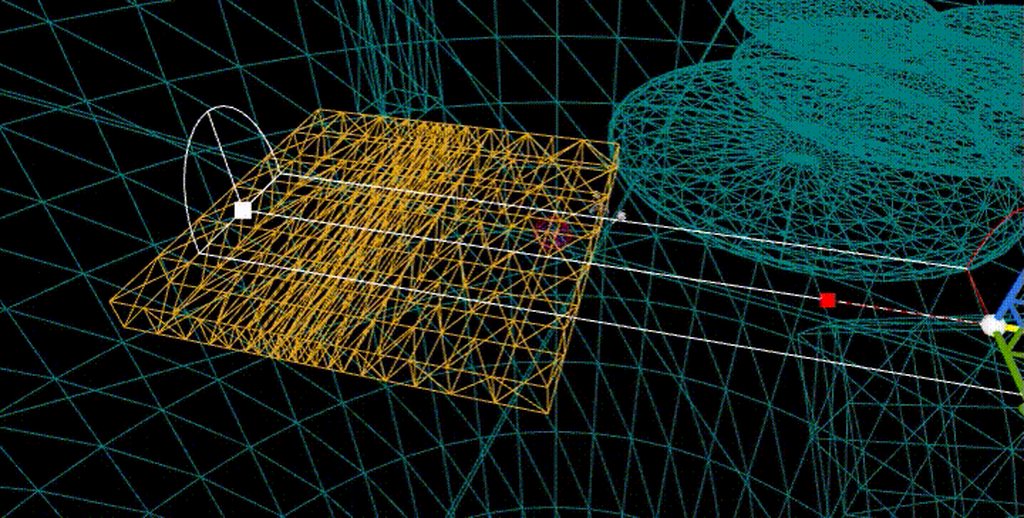
Anyone have any idea why this might be happening and how I could get rid of it?
I just get my tangents with GetTangentAtDistanceAlongSpline
plush yew
no idea
latent moth
sorry DamirH 😦
plush yew
https://youtu.be/5sWTD6vmH_U?t=2209 this is how I want the notes to be
That Dragon, Cancer is a powerful game that tells the true story of Joel. I've been wanting to play this for a while but I had to be in the right mindset to ...
exactly
faint cedar
well that sucks
 vale halo
Does anyone know if there is some set of screenshots/display that shows all of the slate widgets in an easy-to-browse manner? I'm trying to think how I want to build up my UI using existing elements, but really don't have a ton of experience with UI design/the widgets (beyond the super basic ones) available in slate. 😃
I've done some googling but that didn't really yield any results 🤔
latent moth
I'm sorry to get back to this but I've been struggling all afternoon.
I'm trying to specify a Sphere Mask in a material so that it does stay attached to an animated Character when it moves and is animated. The only way I could succeed in doing that is by using Local Position (excluding offsets) in the material itself: https://cldup.com/6L_LWBtgiY.png
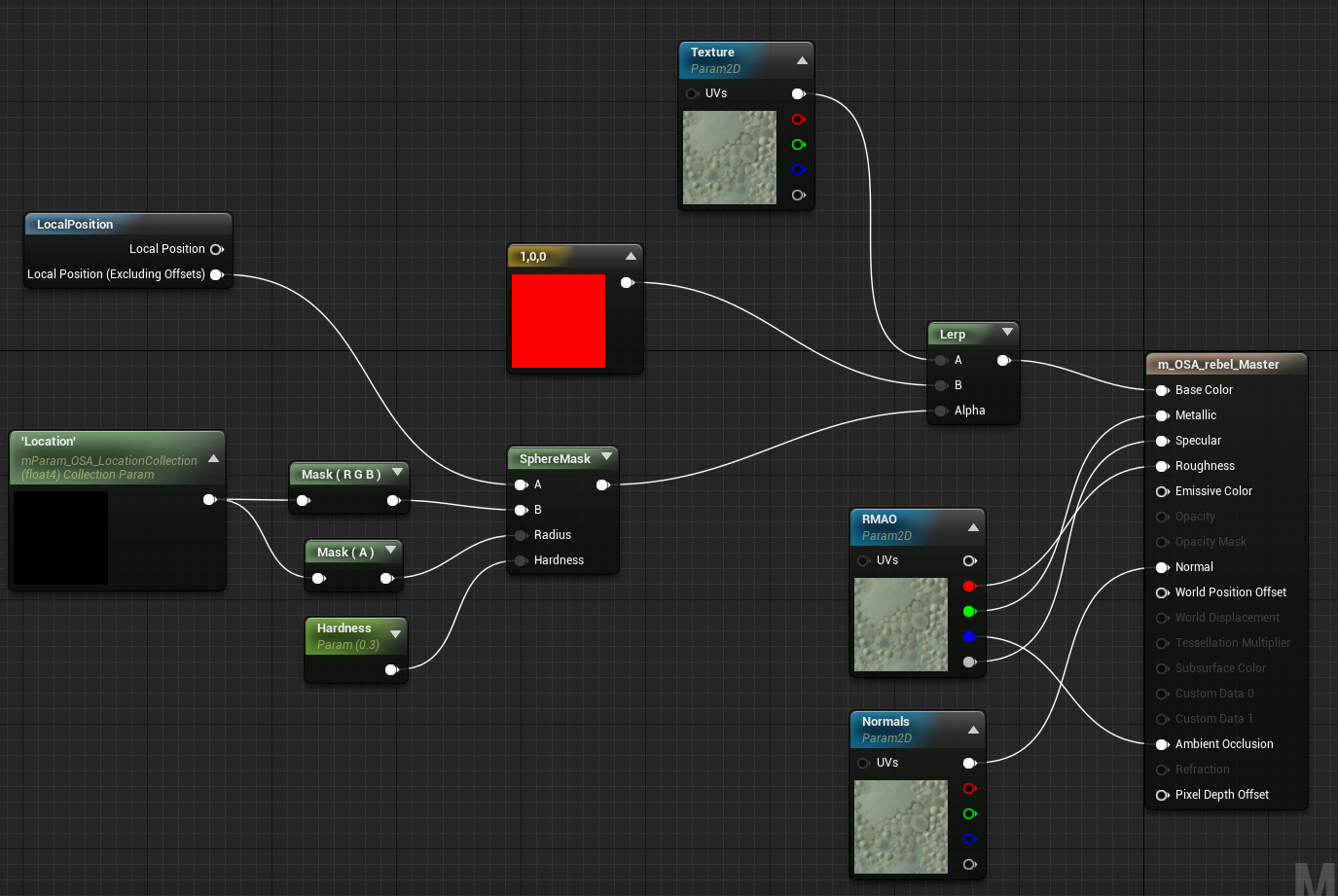
However, by doing so the same effect is applied everywhere the same material is used, and I do not want that. If I use world location, then the sphere will stay put.
What can I do instead?
latent moth
I mean, what I don't understand is how to get different Sphere Masks on a per-character base
right now if one gets hit, ALL of them have the same wound
azure shore
guys I can't be the only one who has this annoying "bug"
Everytime I make a change to anything, it will either kind of enable or disable the first person camera at will, so after editing something in the player its stuck on third person. All I have to do then is click on the character, change one setting at random and it works fine again.
I have no idea why
latent moth
then how can we? 😃
azure shore
same way I do
latent moth
i don't have your bug
azure shore
nah its weird
plush yew
So how do I make my notes the same as in the video?
latent moth
What have you tried?
plush yew
haven't tried anything yet
I sent a video for a reference on how I want to do it
based on that, I would like tips on what to do
 sleek spear
event tick in widgets doesnt work?
sleek spear
right, it works, my bad.
how can i break an event flow by the press of the button?
only with branches?
(and variables)
sleek spear
and how can i stop an audio 2d by the press of a button?
 halcyon shore
How much would you pay for about 50+ lowpoly assets?
grim ore
if you do a simple spawn sound without a return of the sound object then you can't really stop it, that is intended for fire and forget sounds. if you want to stop the sound you need to use a node that returns the sound so you can then save it as a variable and stop it later. Alternately if you have an audio source you are using to play the sound you can just stop that
 south ridge
@halcyon shore I'd pay ten money
halcyon shore
Cool
sleek spear
@grim ore i just want to create a skipable intro movie widget
 vocal blade
Howdy everyone!
grim ore
@sleek spear how are you playing your movie?
sleek spear
@grim ore file media source to media player to media texture to ui material to widget image
regal mulch
Shouldn't UE4 have one for that?
I know it has the build in Loading Screens for levels
No idea if that counts for the movies
But these should also be an extra setting and not require any widgets like that
 past relic
I cant find a way to make libraries of assets
grim ore
you should be able to pause the media player , then you can destroy it if you are done.
past relic
i guess ill create a master project with materials in it and just migrate what i need
sleek spear
@grim ore but i cant play the sound from the media player. i use play sound 2d for the sound only
grim ore
your looking to change the play sound 2D to either using an audio source and controlling that or do something like a spawn sound XXX node where you get back a sound object you can then pause/stop later
if you just swap out the play sound 2d with a spawn sound 2d you will get your return value as the sound itself
save that out to a variable then whenever you need to stop it just call stop on that variable
vale halo
This isn't really relevant to #paper-2d, but there isn't any other channel whic hI'd say is correct for this. Anyway, does anyone know of a simple way to create a "spritesheet" like this? Pretty much a set of images (b/w; no shading) based on a simple symbol like this?
Is it best to create a basic shape like that in blender & then make renders of those 16 (or something like that) "perspectives", rotating it 360/16=22.5 degrees every time? Or is there a better way?
grim ore
https://gamedev.stackexchange.com/questions/74504/how-can-i-generate-isometric-sprite-sheets-from-3d-animations mentions http://www.fragmosoft.com/fragMOTION/ for an app to do it and basically your idea as well in blender

I want to generate sprite-sheets for an isometric projection of various 3d assets purchased from the Unity3D asset store. I'd preferably also render the normal maps. I am a programmer, but new to 3D
there's also a blender script in there that does the "rotate X, render out, repeat" so that might help
vale halo
Cool - I did some searching too, but didn't find that. And that's cool, I'll deffo take a look at that too 😃 Thanks!
grim ore
and I know assetforge can do it but it's just for the models it can make
azure shore
hey how do I get a click and hold instead of just left click
sleek spear
@grim ore alright i will check it out later. thanks man. but i remember media player could play sound in the past in widgets, right?
azure shore
...
urban gyro
Is there anyone here who has animation experience? I need an idea/direction for the best approach for a bow
i can see 2 methods of doing it, just dunno which one has less pitholes
weak harness
@scarlet echo They hid the Unreal Studio thread. @floral pagoda @devout gulch
floral pagoda
Awww
azure shore
what node do I use to reset level? All I can find is open level
azure shore
oh, I typed reset level and nothing appeared!
and opening the same level well how would it work for other maps idk that part
oh never mind, context sensitive thingey
o
regal mulch
There is also the option "restartLevel" iirc
azure shore
target
regal mulch
For the OpenLevel node
 primal breach
hey everyone. I have a question regarding materials / rendering
where would i opst that? :0
post*
primal breach
thanks 😃
regal mulch
ResetLevel might be a GameMode function
cedar snow
according to docs it's not: https://docs.unrealengine.com/latest/INT/API/Runtime/Engine/GameFramework/AGameMode/
GameMode is a subclass of GameModeBase that behaves like a multiplayer match-based game.
 civic seal
it's in AGameModeBase
https://docs.unrealengine.com/latest/INT/API/Runtime/Engine/GameFramework/AGameModeBase/index.html
The GameModeBase defines the game being played.
cinder iron
you can use OpenLevel and open the same one
cinder iron
OpenLevel and pass the current map url
if it's multiplayer you might want to look at servertravel.
If its BP's : https://docs.unrealengine.com/latest/INT/BlueprintAPI/Development/ExecuteConsoleCommand/
Execute Console Command
azure shore
ok thanks
cinder iron
and you pass it the servertravel command and some arguments
azure shore
at least I learned some things playing blood party, and unreal game
so how do I even set open level to current level
civic seal
or try this
azure shore
ah thanks, should work
cinder iron
wasn't that event overridable on the gamestate?
azure shore
it didnt -_-
regal mulch
That only calls OnRest on your actors
You need to properly override that on all your actors
Just do the OpenLevel with the current map name
It's not that hard :P
cinder iron
aye check the event
Open Level
you need to pass the level name
easy peasy lemon squeezy
oh, didn't know you could hover through the properties on this mini window
pretty sweet




 azure shore
yeah but how do I pass the level name???
regal mulch
You write it in the LevelName input?
azure shore
and @regal mulch mate how would I load any other maps???
regal mulch
The same way
azure shore
but this is the thirdperson bp!
regal mulch
And?
regal mulch
It has nothing to do with maps
You call the node
You put the name of the level in there
Either by hand
or with a variable
And that's it
it loads the map
azure shore
lets say I write open TestMap then load another map then how could I change it then
obviously it would still load test map
regal mulch
You can always use a Variable
And change the variable via UI and stuff
But that's stuff you need to kinda try and learn yourself
Same is that you can always have different GameMode classes per map
That allow you do have different CharacterClasses and what not
azure shore
yeah, I just think it would be harder using a variable whilst testing
yeah
like if I just go to open a level without using a menu with variables then the variable would be default still
regal mulch
Well yeah, if you put the plain name in the node or use a variabl which you never change, then it's always the same
You would need to set the variable with a different name then
Via TextBox, Keypress, Dropdown menu, and what else you can think of
azure shore
ugh is there just no variable or something by default that I can connect?
grim ore
technically you can get the current levels name and plug it in yes
regal mulch
Yeah well then he always reloads the map
He said he also wants to laod other maps
:D he just needs to adjust he variable then
which he needs to create
azure shore
yeah that would work fine but only if I use a menu
which would be like the last thing added to the game
or maybe not then, since I have to use one pretty much
I'll just make a crappy one
urban gyro
btw if ur doing this in multiplayer, make sure the its ran on the server, u dont want players restarting levels whenever they feel like it lol
azure shore
yeah, just servertravel
in blood party the host can use server travel whilst in the lobby or in game
I'd love to have multiplayer in this, but wouldnt everything have like a 2 hour delay
urban gyro
i have no idea what blood party is, and it would be 2 hour delay if you replicate everthing under the sun
cinder iron
@fierce tulip this tells you something?
I remember you saying while ago you had the same material throwing at you different numbers
urban gyro
yeah well i dont read the entire chat history every time i pop in
and i mean that ur delay depends on the how much stuff ur replicating over the network
ur lowest speed is ur bottleneck
you send too much stuff over, u gonna get delay
so just dont replicate everything
azure shore
Oh I thought that was recent
oh, so not much luck with multiplayer then
I mean, even in blood party even servers up country are kinda laggy, then I try playing someone from Florida, and, well, it's playable, but only just
like you're all jolty
and there's occasional teleports
I always think if they can't do it, (the devs) I have no chance
like for anything really
but I guess it depends
urban gyro
the only difference between devs is that some know what to google, others don't. And then there's the vets that just run into a wall every once in a year
azure shore
yeah
urban gyro
i dont c why u wouldnt have a chance to make better netcode
azure shore
another thing I would love to have is some kinda of basic level editor, but seeing how buggy theirs is kinda puts me off
really, you think so?
urban gyro
u have the internet, the world's entire combined knowledge at your fingertips
teach urself the stuff you need and then apply it
livid haven
I'm late to whatever this thread is.
There are some kernels of truth being said, but perhaps in a bit too absolutist of a manner...
azure shore
hmm
livid haven
Essay isn't necessary.
But being able to figure out your own problems is critical.
I'd say the difference between a lot of people who need to ask questions all the time and those who ask rarely is that the latter really do exhaust everything they know before they bother asking.
I answer far too many questions people ask by opening up the source code and doing a symbol search with VAX.
urban gyro
well theres always something esoteric you can get stuck on, butt generally answerhub, teh internet has the answer. if not, RTFD, if that fails, figure out , if can't , ask 😄
livid haven
Possibly following some references.
Never be afraid to follow the rabbit hole in to engine code.
People draw this line with going in to engine code, which stops them from ever being able to understand anything that isn't their own code OR already answered somewhere.
urban gyro
dude i openned up the character class once...and no thanks 😄
digging in the engine is needed when you need something seriously exotic
or if wana add some super basic stuff that for some reason are missing
at least for me
like adding a get for a volume float in the game user settings
so that its just ez to get instead of setting it in the engine ini
or whatever else
livid haven
Nope. Do it anyways.
You shouldn't be trying to look at entire class.
And yes, Actor/Pawn/Character and Controller/PC/AIC are guilty of being god class anti-patterns.
But you shouldn't be trying to grok the whole damn thing, just whatever immediately relevant function/property/delegate you're trying to understand.
urban gyro
oh yeah, but generally, the net has an answer to the more general problems
i just useed general twice..
livid haven
🤷 I don't trust anyone on the internet to not be spouting complete and utter bullshit that they don't actually understand about UE4
urban gyro
look, i like C#, C++ is hard to read, UE4 C++ with them macros and tags is just plain eyeball bleeding for me
livid haven
Unless it's one of like 3 or 4 people outside of Epic.
urban gyro
at most, id make a function library or expose smthing to bp
livid haven
2 of which have worked for Epic, off the top of my head.
urban gyro
yeah i spose u have a point
 weary basalt
Damn Sion them words cut deep 😃
urban gyro
😄
cmon, u know im right
55 characters for a class definition, 45 of those are the name 😛
livid haven
I've been neck-deep in UE4 for almost 6 years and in C++ for about 10, so I'm not really intimidated by C++. 🤷
weary basalt
I can understand your reluctance coming from an C# background myself, but its just experience, once you read enough of it, it just makes sense.
livid haven
I'm not saying no one on the internet outside of Epic knows UE4 stuff, just that 99.9% of AnswerHub is some 14 year old doing something dumb and finding a way to get the result they want... but not realizing what other problems they're causing. Or they're Rama.
urban gyro
oh i understand it when i read it, is just overloaded imho
weary basalt
Haha yeah i know was just pulling your leg 😉
azure shore
lol I did notice some people ask kinda open questions
livid haven
Saw someone ask how to make a leaderboard system the other day.