#ue4-general
1 messages · Page 171 of 1
 urban gyro

 half mango
i still got so many problems
the player start bad size thing
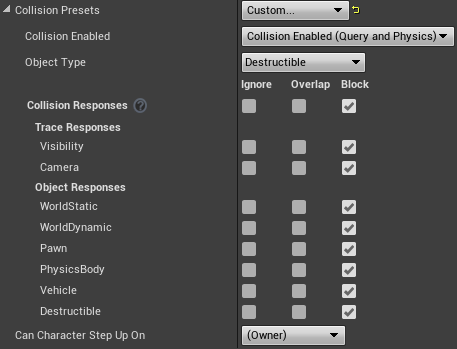
cus collision on mesh
and online solutions arent working

 cloud cobalt
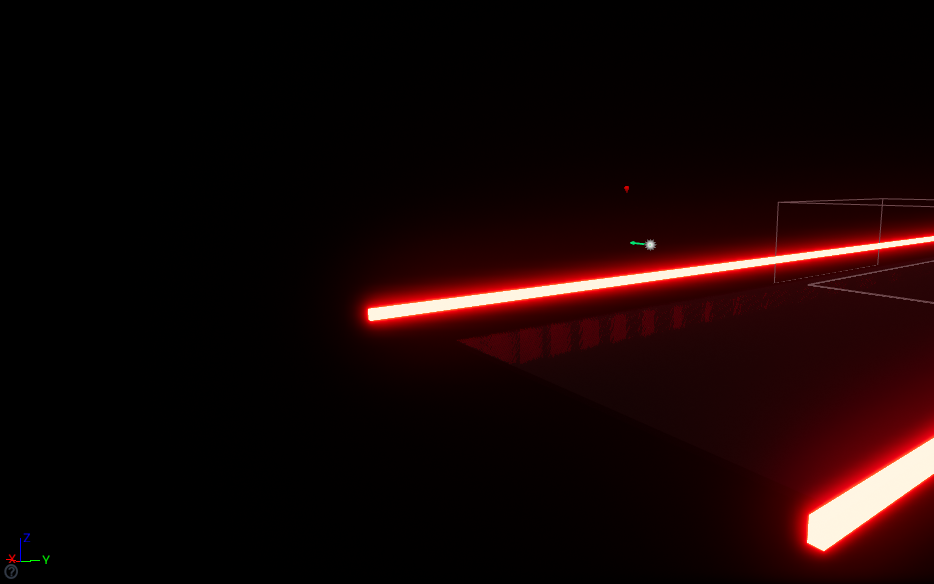
Well, is there DOF ?
 trim trail
is there a way to plug multiple nodes into one reroute node/node with one click?
cloud cobalt
@obtuse sable I mean, it does look like DOF, are you sure the post process in the viewport has it disabled ?
cloud cobalt
How can you tell with only one item that's close to the screen
 obtuse sable
omg it was the DoF xD
cloud cobalt
Well yeah
obtuse sable
Thx xD
 whole sonnet
lol
@obtuse sable can you show the scene again without the DoF? would be nice to see that rifle too 😃
 whole sonnet
@obtuse sable Loving the sci fi theme, fantastic work so far 😃
whole sonnet
PM me some more pics if you are feeling like sharing 😃 I love sci fi games
urban gyro
does anyone have a minute for a PM? I'm supper confused with Pawn Movement Component and how collisions supposed to work with it
nothing can stop it, no walls, no floors, it just goes where it wans, is tracing and setting velocities to 0 the only way>
like things collide with it but OnComponentHit never gets called
urban gyro
the other object moves, things like boxes or whatever, the player object doesn't register the hits at all
both are BlockAll
 plush yew
Huh
 light thunder
If you have two blueprints that consume input, which one "wins"? Is it the one spawned first? I need to override a pawns input events but I don't want to touch the functionality if I can avoid it, if rather make another BP (this is for a tutorial so it disables all keys so they can learn the keys one at a time....)
 plush yew
Lets forget about hits for a sec. If the player moves, they don't collide with objects?
cloud cobalt
Get a larger hard drive ?
urban gyro
@plush yew ill pm u to explain, dont wana spam here
plush yew
Okay
 nocturne onyx
i deleted all the games i have on my computer but it didn't change a thing
 wary wave
empty your recycle bin...
nocturne onyx
i emptied it
wary wave
then you need more disk space
cloud cobalt
Not to mention UE4 is going to require way more disk space than that
Just loading a project will generate a few GB worth of shader cache
 floral heart
Format C:
Install Linux
Realize you have to build engine from Source on Linux
Uninstall Linux
Buy larger hard drive
 elder quiver
@nocturne onyx Clean up disk press windows + r write : cleanmgr.exe
elder quiver
😄
urban gyro
it stands for CoolCleaner 😄
 keen birch
@nocturne onyx How big is your hard drive?
 fierce tulip
search start > diskcleanup > rightclick > run as admin > more options to delete stuff
urban gyro
youd be better off with CCleaner tho
fierce tulip
ccleaner doesnt adress the files you can delete trough admin ran disc cleanup
fierce tulip
cant even remember, been running it for 10 years or so with admin rights I dont even remember which options are available that way hehe
I do agree CCleaner helps as well
then agian, dont install shit on your c:/ drive hehe
urban gyro
i havent used diskcleanup in....eerm, WinXP lol 😄
 paper kernel
orly
urban gyro
just checked the registry a few days ago, and by god you are so correct
paper kernel
I reinstalled on tuesday, now waiting reply on asus support how do I get my battery charging again
 urban gyro
you must have frequent power outages
keen birch
Had some issues ;3
urban gyro
@paper kernel whats wrong with ur battery?
paper kernel
wont charge past 85%
urban gyro
ur better off not chargint it past that
paper kernel
thing is, it wont charge to 100% at all
urban gyro
generally charging from 15-20 to 80-85 doubles batery lifecycle
paper kernel
I need it to 100% so I can recalibrate it
urban gyro
is it new?
paper kernel
10 months old, but only 77 cycles used
urban gyro
maybe asus gave you a used battery or smthin lol
paper kernel
no it was new
urban gyro
but if it's software related ive never see that happen
paper kernel
google suggest it's somewhat common issue among batteries
urban gyro
well, it may be possible that one of the cells is dead
laptop battery blox have 8 cell i think? or was it 12
point is that each cell represents a %tage
so if its screwed maybe thats the case
paper kernel
well, it's still under warranty
urban gyro
my guess would be a busted cell
paper kernel
Im just not feeling like sending my only computer away for up to 3 weeks
urban gyro
does the battery block smell of anything?
paper kernel
nope
urban gyro
well, heres a trick that might work
put your laptop in a cold, dry room
when charging you wanna drop it's temperature as low as possible without introducing moisture
tech is more efficient the colder it is
you might get a better charge
just dont put it in the fridge, its too humid there
paper kernel
I got freezer, and it's -4C outside
urban gyro
yeah, but DRY
paper kernel
there's no moisture in the air anyway
keen birch
@paper kernel Not sure where you live, but in the EU you're legally protected from losing a product for e.g. 3 weeks if it's a major obstruction in your day-to-day life
paper kernel
nope, but in case I need to buy new one its 85€
urban gyro
well itd be ez to troubleshoot if u had any secondary battery
generally even very old batteries should charge to 100%, just can't hold much
unless you have some software that cuts off the charge at 85%
which is what it should do
paper kernel
on stock windows I previously had kept circulating it between 95 and 100
stock, as in what was installed on the factory
urban gyro
u not running windows atm?
urban gyro
unless theres some fancy powermanagement driver
paper kernel
yea I was wondering would linux mint from usb help me out
urban gyro
but since thats the case its almost certainly software related
are you sure the numbers dont lie to you?
paper kernel
there's the powercfg report
urban gyro
stranger is right, kinda spaming here
 opal coral
I'm pretty desperate, having such issues with FPS. if I run windowed mode in the editor, everything grinds to a halt. if I spawn 4 players I'm down to 30 fps or less, everything feels super sluggish. if I spawn all the players locally and in the main viewport, it runs stable 120 FPS.
another example: spawning 1 player in the viewport = 120 fps. spawning one in windowed = 60-70 FPS. had these issues for a long time now
and I need to use separate windows when testing multiplayer, and I can't have 20-40 fps when optimizing for it to run ultra smooth =/
plush yew
so my culling doesnt work for movable objects
how can i do cull them
they have physics on
wary wave
if you spawn a player in windows you now have two windows open
ergo it is slower
if you want to test multiplayer performance you need multiple machines running packaged builds ideally
opal coral
hmm. but that doesn't explain why it's slower to spawn a new editor window when there is only one instance
it seems like a bug, there's stuff like.. everytime an unreal notification/popup is there, the game goes to 5 fps, regardless of windowed/viewport. hovering the mouse over editor UI elements while the game runs has the same effect.
urban gyro
@frozen lantern thats because the engine slows down to 5 frames whenever a window is not in focus

remove the tick from background cpu usage
 digital anchor
anyone know a better way to trace along surfaces than this?
its the only way i though to be able to trace stuff thats higher than the current surface and also below
but seens too complicated
opal coral
@urban gyro hmm that really sounds like it would be some of the cause. this might fix some of the issues I had (such as everything going to hell when alt tabbing or screen freezing for screenshots), so thanks for the tip =)
but yeah, still get low FPS from spawning a single editor window compared to playing in the viewport
urban gyro
So it didnt fix it?
opal coral
I haven't been able to reproduce the lag when hovering over UI or getting popups, so it might have fixed that. but it didn't fix the FPS issues in windowed mode
urban gyro
and ur sure u dont have some crazy code on tick update that only gets executed when playing in windowed?
IIRC There was something that didn't get executed when playing in editor
but there's almost defo a differnce
have you tried packaging the game and checking ur fps then>?
opal coral
the FPS seems fine when packaged, like it is in the viewport. I'm not aware of any c++ or animation stuff that would play out differently in windowed, or only when windowed.
I don't really have the opportunity to test multiplayer between separate machines for a while. perhaps there is a way to run with super simple graphics for just the multiplayer testing though.
opal coral
simulation is 120 fps (with one player spawned) until I move the mouse, then it halves, or so. not any visible chugginess though, but everything is pretty static at that point anyway
urban gyro
i can only think of some kinda construction script, but that should be only executing in editor and be ignored in gameplay
Is there an engine macro to invert ints/floats? Im sick of multiplying by -1
opal coral
yeah, would make sense. no construction script though. but thanks for the help, I feel a little more clear on the issues. I'll maybe post on reddit or something
urban gyro
@opal coral if its not splitscreen MP, maybe you have some problems with replication? I don't know if FPS would drop to sync clients if theres a bunch of replicating vars.
wary wave
network code shouldn't directly affect rendering framerate
opal coral
for the moment I haven't replicated anything, reverted all earlier test MP code
urban gyro
it wouldnt make much sense yeah, but i have no other ideas 😄
how do u have MP when ur not replicating?
is it possible ur running 4 servers and 4 clients then?
opal coral
I haven't technically started implementing MP features, just letting them spawn from the editor 'Number of players' option
urban gyro
so its a listen server yes?
opal coral
yeah. I can test spawning a client with a hidden dedicated server too though
doesn't seem to matter, 70-80 FPS in a single window
urban gyro
well, maybe it really is some weird bug
opal coral
hmm, if I minimize the UE4 editor, I regain 120 fps
opal coral
I'll try to do that. everything is red when profiling in the editor, hopefully that's just an editor side effect
wary wave
the editor adds a huge amount of overhead
and it doesn't run multiplayer clients the same way as a proper client would
urban gyro
this makes little sense tho
why bother adding the functunality in the first place if you'll get better results after building
the idea is to lower iteration time right? A huge overhead is against that philosophy
wary wave
the editor allows you to test functionality, not performance
urban gyro
ic
opal coral
the functionality can still be used to profile other sessions than the one in the editor
urban gyro
btw i havent been able to find a memory allocation setting
so i dunno how much ram the engine can use
wary wave
it'll use as much as it needs / can get
urban gyro
but maybe thats ur bottleneck
opal coral
16 gb ram
urban gyro
maybe cpu then? i dunno if multithreading is enabled by default
cuz you have to enable it for light cooking
i suspect it may be off
plush yew
so i have a question, it's likely a bit more philosophical one than any sort of unreal-specific question:
how acceptable/unacceptable would it be to have a game that mines cryptocurrency as you play it? assuming ideal circumstances, ie: never have performance impact, and completely unnoticable to the user etc. i'm just curious about people's opinions, it could potentially be an alternative to say, 'free to play' monetisation models, no need for microtransactions, since payment is done via mining...
plush yew
i dont think you read that to the end..
opal coral
@urban gyro you mean one of these? https://puu.sh/z4Zfa/96b6de3df0.png
 urban gyro
i did, u wana reproduce TPB's monetization scheme
well yeah, but for the engine 😄 i cant find it but maybe in an .ini
plush yew
well it's nothing about what 'i want', like i said, it's more a philosophical question
urban gyro
u asked for opinion, i gave you mine
plush yew
fair enough
urban gyro
and on that other hand, cryptocurrency is super volatile, it wouldnt be much profit, and once you get found out, cuz there will be someone who notices, itll be bad pr
plush yew
oh, it would be known to users, sorry i forgot to specify that as 'ideal circumstances' just not intrusive to them in any way
urban gyro
oh, yeah if they are aware of it then i dont c how it could be a problem
 flat oxide
HI!
plush yew
hi, anyone knows what can be wrong? like, i migrate my project from UE4 4.18 to UE4 4.17 and everything looks ok in here (Content folder of my project in Windows) https://gyazo.com/b1764eb0309f42e8748300e95fd94f15 but i don't see anything in my project after launching it https://gyazo.com/b95d47390b0993016ae16496831b358a

 cloud cobalt
Use source control to revert to your previous version
 safe rose
Soo...
I just noticed this...but I can't download the update to 4.18.3
Is anyone else having issues?
nvm
 opal ocean
ok, so I have my gamemode/state, controllers, etc for my actual game. But now I want to do a character building, where none of the game mode etc apply.
do I make a new game state? or just put a Characterbuilding boolean or something in the game state?
 grim ore
is this a new level?
opal ocean
definately need a new game mode to have the new controller
Yeah, its in a seperate level, right now. unless I should do it another way?
grim ore
the seperate level sounds fine and nothing wrong with using unique items in each level if needed. You know you need a new mode so it can't hurt to use completely unique items just to play it safe
especially if your using the game state as is in another level and it would contain things that would be useless/harmful in the character creation level
opal ocean
well the game state starts the turn-based game play on BeginPlay
easy enough to change that tho, and have the gameplay start on a command from the menu or something
grim ore
the game state itself tho holds items that are not used in character creation? if so then a new game state would eliminate any potential problems
keep stuff that relates to stuff together if possible, prevent overlap or extra stuff if you can.
opal ocean
Right now gamestate is pretty barebones. two booleans and an array of the enemies on the current map...
Most of the logic is the pawn. probably more than is a good idea.. >_>
 oblique sorrel
I'm seriously considering switching from my game being a 3D sidescroller shooter-puzzler, to a TPS shooter-puzzler. The lack of tutorials and guides regarding sidescrollers is staggering.
opal ocean
TPS?
half mango
Tutorials are just trash in general unless it's something super basic
Learnt almost everything just messing with stuff
 prime orchid
 plush yew
any tips setting up huge amount of physical meshes?
urban gyro
@opal ocean keep gamestate for server-client data syncing. Logic should be in GameInstance for application-wide stuff, like global vars, important things hould be in the GameMode, its only serverside, Don't add contolrs to your pawn if it will be destroyed, better off putting them in PlayerController, PlayerState is for client specific data io.
Read this:
http://cedric-neukirchen.net/Downloads/Compendium/UE4_Network_Compendium_by_Cedric_eXi_Neukirchen.pdf
Holy Bibble of MP.
opal ocean
Oh right, I forgot about game instance. lol. Pawn is unlikely to be destroyed, for the type of game. and no multiplayer 😄
 jade folio
I’m a noob to UE @everyone where is the best place for me to chat haha. Don’t wanna get in the way!
opal ocean
@jade folio Hi 😃 Read #more-resources for descriptions of the channels
jade folio
Thanks @opal ocean
 raw lagoon
@urban gyro Thank you for that link!
urban gyro
Holy Bible 😃
raw lagoon
That it is! Time for my pilgrimage!
 mint raptor
Can you not add points to a spline mesh component?
urban gyro
Follow the good book and your journey will be rewarded with success.
 karmic igloo
@mint raptor No you can not. You can, however, make a Spline Component and then make a construction script that places spline meshes between every spline. It's a little complicated the first time but after that it's pretty easy.
mint raptor
@karmic igloo I do that already but I wanted a dynamic system to hit and bend the spline mesh and now it seems like that hit accuracy can only be as good as the amount of spline mesh components I chain up and worse still, its going to be difficult to propagate that bend across the rest of the chain.
Are their any plugins paid or otherwise to do that?
plush yew
Hi, i renamed my BP class and I cant return to the previous name
why? I see that is redirect and it give my information that this class (with previous name) still exist
 gleaming shore
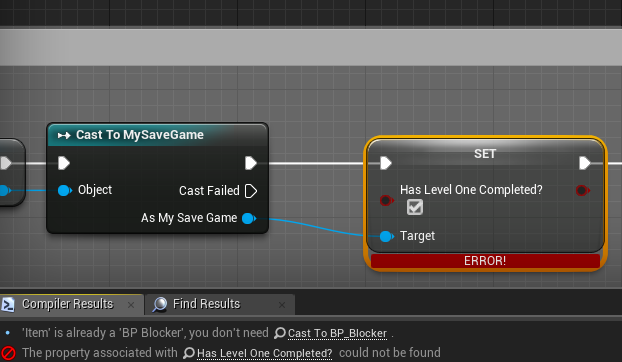
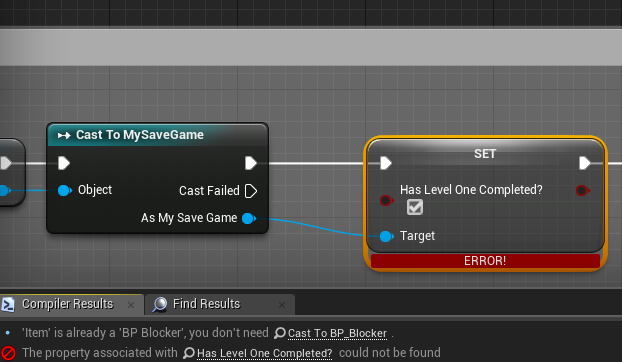
Anyone have any ideas on this? https://i.gyazo.com/866983b760b3a3817e75ede879bdad90.png
 karmic igloo
@gleaming shore You don't have any variable with that name in your save game blueprint?
gleaming shore
Thats the issue im having, there is a variable there
Im an idiot, I added the variable and forgot to compile
 proven star
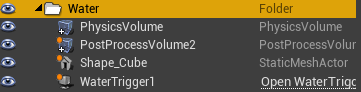
Hi, is there a way to group this into an object so I don't have to copy and paste and edit every value just to add another water location? https://i.gyazo.com/6a9ba97753f29914e3dda7d7edb3706a.png

 rustic panther
is there anyway to sync to perforce without haviong to close Unreal sometimes? like a close all levels/blueprints or anything?
sometimes I'm getting conflict issues because a file is in use, is closing unreal the only way to fix it
 brisk plaza
hey guys
anyone got some advice for newbie, how to start with UE4 and maybe some tips to not make some silly mistakes?
and i'm not even thinking about open world and that large scale projects
 fair violet
@brisk plaza make the silly mistakes and learn from them 😃
You’ll run into plenty along the way
brisk plaza
i know, that's learning path
would you suggest to try to make sample level and learn all about characters and create movement for them and after that is done, start with something else?
because i want to focus on one thing at time
gleaming shore
@brisk plaza On Unreal Engines official youtube channel they have a few tutorial series to make simple games, if you're new to unreal engine you will learn A LOT from them
fair violet
@brisk plaza start learning about whatever you want to make- if you want to make an FPS game, see how they are made up and all the various layers needed to make them work.
If you work through each feature bit by bit, you’ll slowly learn all about the engine and how it works
Also of course the official vids and docs
Lots of good sample content available too, to pick apart
brisk plaza
oh, thank you so much guys, simpel but useful points!
what about marketplace, how to access it from unreal engine? does it have inside or it's on browser?
i know unity have in engine marketplace
 grim sinew
The launcher.
brisk plaza
can you tell me where to look?
brisk plaza
ooooh, epic launcher, i though unreal
stupid me lol
ty so much ❤
DBBK and eoinobroin, thank you guys too! ❤
 unreal harness
Hey, is anyone able to make a lightning beam?
Like, a beam of lightning?
@here I need some help. I want to make a beam of electricity but I don't know how.
gleaming shore
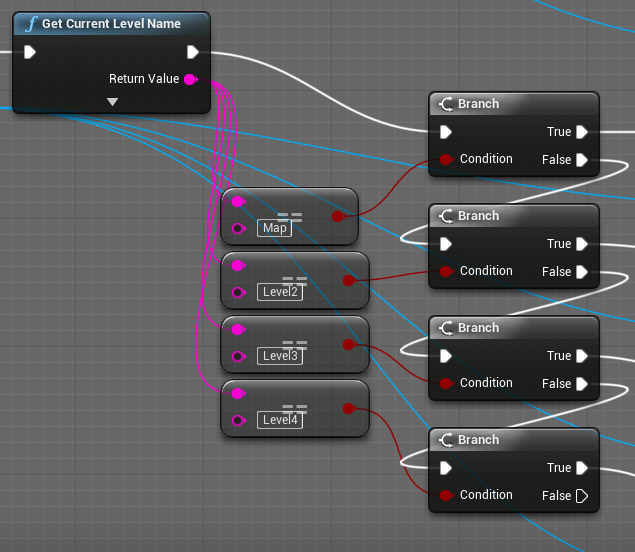
https://i.gyazo.com/7eac9eeaa1cb2750215a2379f223c4af.png anyone know a more effeicient way of doing this?
 gleaming shore
Setting variables based on level name, for example when you complete the end of a level it will set a variable in save game to say you have completed it, but obviously first it needs to know which level you're on
Switch may work, im not sure of its capabilities though, will have to look it up
 surreal viper
@gleaming shore why don't you use a Map with Name as key and whatever your variable is as value?
gleaming shore
For a switch or select?
surreal viper
so you don't have to pick variable based on name
no
what are the variables you try to modify?
gleaming shore
Simple boolean
unreal harness
Once again, I need help with making a weapon fire effect!
gleaming shore
Basically when custom event is triggered it should set a boolean, i just feel going through all the branches is ineffecient
surreal viper
@gleaming shore: you can create a set
you create a Name variable and modify the icon on the right to make it a set, now you have a name set
you can check if it contains a name
so you don't have to select a bool based on the name
you just add the name to the set
you can add it to it, remove it, or check if it is added
creating a boolean for each level is super ineffecient
(not regarding performance but regarding maintainance and developer time)
 weary basalt
@unreal harness We have channels specific to particular topics. As suggested you may find better help in the #graphics channel
Or #visual-fx
unreal harness
Alright.
I thought because this was the UNREAL-chat people might help me with Unreal Tournament stuff.
surreal viper
wow I didn't even know that we have a visual-fx channel, my bad 🤦
weary basalt
Yes but Weapon FX isnt specific to just UT.
Thats why we break them down into specific channels that cover an smaller subset of possible chat topics
So that users can get more targeted results when asking questions.
Most people here would mute the general channels and focus primarily on channels that interest them.
For example im an Programmer. I have all of the Content Creation channels muted because i have little to no ability to properly answer questions there.
 storm venture
Hey I just wanna drop this here, I made a post on /r/unrealengine, maybe someone here would be able to help me out? :D
https://www.reddit.com/r/unrealengine/comments/7rncws/what_variable_type_should_i_use_to_design_my/

reddit
I've been working on making an inventory system but I keep hitting roadblocks and finding major flaws that require an entire system rework. ...
 dusky vault
Hey, could someone please be so kind and give me a hand? My weapon have decided that it doesn't wan't to be on the screen anymore all of the sudden. Everything seems to be set up correctly though
storm venture
@dusky vault Is the return value from the Spawn Actor supposed to be plugged into the Set node?
dusky vault
@storm venture So, the good news is that the weapon actually spawns the weapon..
Here are the bad news
It's really strange, it worked without any issues, then suddenly it is like it no longer recognises anything from the actor "Weapon_Base". Ammuniton seems to be gone as well, while it worked before
 glossy flame
What Tyler asked was spot-on—look at your set node
You set the "Equip Weapon" variable to nothing—null—then try to use it in a function call, when it'll be null
You probably want to set the variable to the output of your spawn actor node, as they noted
(plus, if you're trying to attach the weapon directly to the socket, you probably want "snap to target" attach rules, not "keep relative")
@dusky vault
dusky vault
Thanks a lot! I'm gonna have a look at it rn
dusky vault
So I found the exact issue. That value from spawn actor should be there as it serves as the reference for the weapon. After adding it back firing, ammo and reloading works. However it doesn't spawn the weapon in the correct place and it does not seems to be properly attached
@glossy flame
glossy flame
Okay...that seems like a pretty clear error to me.
It seems that the root component on your weapon class is set to static mobility, when it should be dynamic
unreal harness
Hey, nobody's spoken for a long time in the graphics chat.
Do you think I could get some answers here?
glossy flame
"a long time"? It's been about 2 3 and a half hours :p, math skills on point
If your question relates directly to graphics, it's best to ask your question there; that's the point of separate channels
I, for one, probably won't be able to give you much help, haha.
unreal harness
Fine.
dusky vault
Where can I change the mobility? I don't think I touched that settings. @glossy flame
glossy flame
Look in the details panel of the component. It should be near the transform slot
dusky vault
@unreal harness is this what you were looking for? https://forums.epicgames.com/udk/udk-development/level-design-and-creation/199246-draw-distance-of-static-meshes
unreal harness
Thanks.
So wait, there's no way you can get it to fade out at a certain lifetime?
 summer dove
question for y'all
lootboxes are a pretty touchy subject now
so what if there was a system in an indie game where you could buy a set of like 10 cosmetic boxes for 5 bucks, or simply play a single mission, even if its replayed, that takes like 10 minutes, to get the same 10?
would that be a bad feature?
dusky vault
Is it a free game or would the player have to pay for it?
summer dove
paid game. say, 20 bucks for a solid singleplayer, moderate co-op.
dusky vault
I personally do not like lootboxes in paid games, but it really depends. If they are only cosmetics that won't affect the gameplay I would not have an issue with it in case you can obtain everythig through gameplay and grind.
 livid haven
@summer dove You should be able to answer this yourself by taking a look at what the popular sentiments on lootboxes are - why do people dislike them? When do people not mind them?
There are a lot of examples to look at - TF2, CS:GO, the whole Battefront 2 debacle, Overwatch.
And more broadly, microtransactions in "premium" games (buy to play rather than free to play).
People are generally less welcoming of microtransactions of any sort in a buy-to-play premium game.
summer dove
but, even if itd be a case where you could easily get the same crates in say, 10 minutes worth of your time?
livid haven
Well, from the outset, the positive part of what you proposed is that it's not necessary to spend money - the player can choose to spend money or spend time. Pay or grind. IF the grind is some combination of fun and/or reasonable in duration, that helps.
That said, the RNG factor generally is part of what people don't like.
It's bad enough you have to grind to get something if you don't want to pay, but that grind becomes more painful when you only get a chance at getting the thing you want.
One of the ways to mitigate that is to allow what I know as "directed acquisition" - give players mechanisms to increase the chances of getting the thing they want.
summer dove
in that case, unlike what most games dont have, if you werent able to get duplicates?
and being indie, not like thered be too much youd even have to sift through
really im just trying to see what people think about a system thats a lot more forgiving to the players who dont pay, while still having a system thats more so almost a donation system with a little biti of benefit
livid haven
That was a lot of negatives, hard to parse what you meant. Not being able to get duplicates does help to "direct" "acquisition" of what the players probably want.
summer dove
ah sorry haha, i get a bit crazy with them sometimes
livid haven
If you can't get the same thing twice from the RNG loot system, that guarantees that everyime you don't get what you want, you'll forever have a better chance of getting what you do want.
That, generally, is something players are likely to be alright with.
dusky vault
@glossy flame in the weapon_base blueprint? I went through everything .. Thanks for your help!
gleaming shore
is .wav the only thing unreal takes?
 south ridge
gleaming shore
south ridge
gleaming shore
I thought so too, im getting an error though with .ogg
 maiden swift
Pretty sure you can only import .wav.
OGG is what it's compressed to in builds, though.
dusky vault
@glossy flame fixed, thanks... I should be ashamed of myself 😛
 mint sequoia
Got sent a level, when I move everything from the content folder into a subfolder (from within UE4), the level loses every reference and I just get a grey landscape, need to do it pre-emptively before migrating to the main project
livid haven
@mint sequoia Try migrating first, forcibly saving all the migrated assets again, then relocating them to a subfolder?
I'm about to head out, but my suspicion is some redirector wonkiness is going on.
Resaving the assets should make them not need all the redirectors that make it work post-migration.
Perhaps whatever migration redirectors are responsible for the breakage later on.
mint sequoia
Perforce is gonna be a nightmare here, but I gotta get off for a while anyway so I'll try it
jade folio
Trying to get some ideas for small base map designs anyone have any suggestions where to go, new to UE and trying to learn
 lusty canyon
Sorry if this has been asked before/is a bad question. Unity seems to be more widely used than Unreal? With almost every gaming event I go to and ask, an overwhelming majority of the people use Unity. I'm just wondering why that is. Unreal seems to have way less resources in comparison as well and I'm also wondering if that's ever been an issue with someone when they're debugging or struggling through a problem.
weary basalt
Id say there is alot of factors that go into the answer to that question.
Unity has been more accessable for longer than Unreal 4.
safe rose
You use the engine you think will fit your needs the best. End of story.
mint sequoia
^ --don't need to get into that debate lol
mint sequoia
A lot of hobbyists use unity because it's easier, UE4 tends to have more professionals, thats my take on it
plush yew
I'm doing a small project about a game but I think I'll be mostly in the respective chatrooms for help in different area
wait is there help here or somewhere?
weary basalt
@plush yew Ask your questions in the channel that describes it most appropriately.
plush yew
ok thanks
weary basalt
Please read the #more-resources for further information about each channel.
storm venture
Me: "let's give structs another shot. they always screw me over but maybe it was just bad luck."
moves newly created struct from one folder to another
Unreal Engine 4 has crashed.
🙃
 worn granite
creates a BP struct and uses it in any way
changes the struct in literally any way
is surprised when UE4/BP can't handle it.
 keen birch
Yeah BP structs kinda suck
 grim sinew
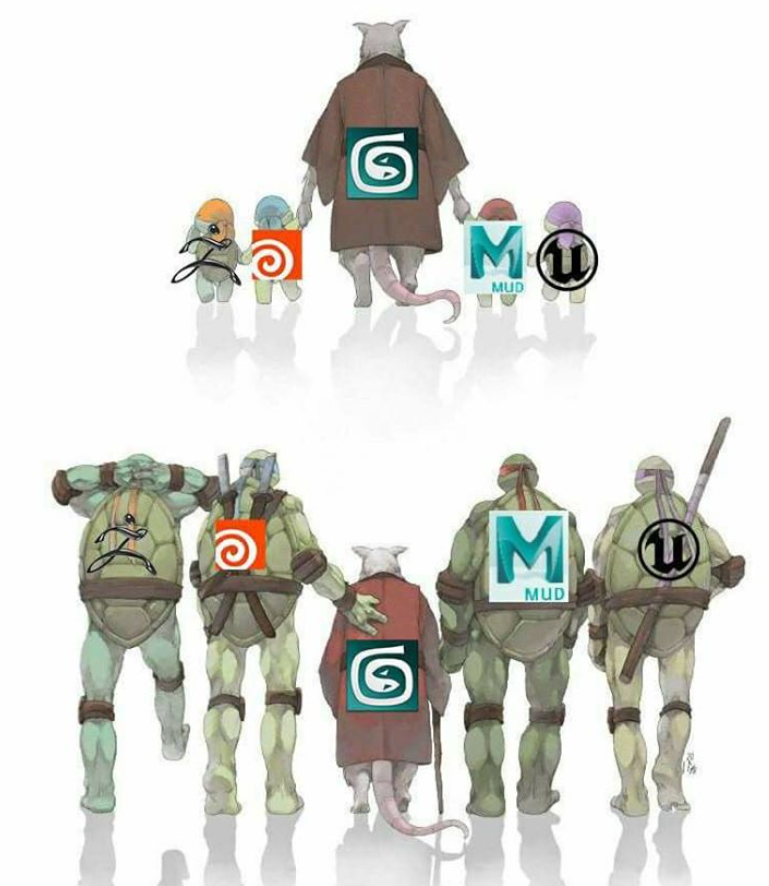
Aww, missed opportunity by not using the old and new logos
 frank escarp
houdini is very old
but lately its becoming hella legit as they have been adding lots of modelling tools
 cinder iron
community! what positions of traces (or sweeps) would you suggest to stabilize our little friend along the surfaces? I was going to try the wheeled approach (4 traces, 2 head 2 feet), but if any of you have any suggestion that could work better would be so sweet, what worries me the most are 90 degrees turns https://gyazo.com/acc3019605f41b91f89a2e065244012e
 paper kernel
any primitive shape - trace should work if you use impact normal
however, initial overlap might not return accurate result
@cinder iron
cinder iron
yeah i know but im looking for positions of the traces
for example a single trace is not enough to determine where the capsule should be following
because as you can see on the gif the kitten flies up as soon as the trace loses contact with the surface because of the 90 degrees angle on the figure
so what i'm looking for is to introduce more traces (doing average and so on)
i did this before but with vehicles and hoover things
butwhen speaking about walls is a bit different because i would like the capsule to snap to the surface no matter in what angle this is
so finding locations to place traces would help
@paper kernel
that or just look for special situations and do manual transitions 🤔
paper kernel
well, in such cases as climbing over edges
a linetrace from hips to ground, offset trace end based on user input
like when facing wall, I assume W is to climb up but also move forward
so you do trace in 45 degree angle that would hit either [a wall] or [a floor]
cinder iron
yeah no but a single one is still not enough
because this isn't just climbing is more like a vine in all the 3D directions
so your character can be facing the ground or the sky
in a curved situation, using a sphere works really well because there aren't rought angle changes
detecting wether the surface is climbable or not is not the problem, the problem is more navigating through it (not exactly, the problem is more location of the traces haha)
paper kernel
angled down linetrace should still work
when I say "down" I mean negative character up vector
cinder iron
hips is like... center of the character right? under my belly button
sorry miss that school class hahaha
paper kernel
hip or head, doesn't really matter, just a place that doesn't hit world geometry
cinder iron
yeah i kinda see your point now i know what hips mean lol
gona try that what you say
https://gyazo.com/7c880fa1b0374a55572f062a6c2fa76c it didn't work very good, i feel like would be better and smoother calculate extreme situations of sloppiness by hand instead on relying in only one trace
 paper kernel
you character rotation logic seems off
cinder iron
is just snap to surface rot, nothing fancy
paper kernel
it should be aligned to surface normal and gravity direction
cinder iron
no i don't want to have the gravity relying on the formula
paper kernel
but you need to have one static direction to fall back to
which usually is gravity direction
unless you do 6dof flying, then such point doesn't exist
try set the character rotation as MakeRotFromXZ, where X is negative of the trace normal, or character forward if no trace hits are present, the Z is 0,0,1
cinder iron
this is the main point of the system https://gyazo.com/f7f48ec13c9f82d31851474753734059
basically you are kinda attached to a moving object in the 3D space
let's say its like a state
that the player can toggle or not
if the player is in this state the physics rules are a bit ignored (let's say that)
if the character go out of this state, it will return to the normal phys works
paper kernel
🤔
cinder iron
okay let's try that what you suggest up there let's see how it looks like currently im only making rot from x
not having the z at all in mind since i want the character to be kind of a bug in the back of a monster
so its like a magnetic thing more than anything
paper kernel
trying to remember, I did do a spider prototype some year ago
cinder iron
this is my first time doing this kind of funky stuff haha
just trying to be out of my shooter's comfort zone lol
paper kernel
it really comes down to what kind of control scheme you want for the climbing really
you could align the character rotation to either based on movement, or climb objects orientation
cinder iron
its really straight forward
basically that cube you saw moving right and ref
left*
represents a moving surface
basically when you press A and D
you move along your local space (based on your right vector)
right and left
same with W and S
you move up and down based on your up vector
at the same time
im equilibrating the angle of the capsule based on the surface the character is lying down
so think of a vine
in a spherical shape
actually, look at this
frank escarp
@cinder iron you going full zelda?
personally i think best would be to bruteforce traces
you wont have any issues even if its 20 traces
i can tell you becouse my flying drones do 20 traces/tick each, of big lenght, and i put up to 5 of them in ps4
wich has no cpu power
do a bunch of traces on the torso, as main traces, for average normal/rotation/etc
paper kernel
why not do 200 traces
frank escarp
and then do a few of them per limb, to snap IK better
paper kernel
i7 wont chug until 300k traces
cinder iron
hahahah indeed
frank escarp
becouse ive benchmarked it
paper kernel
so is the logic to handle 200 traces
cinder iron
yeah blanco full zelda right!!

@frank escarp thanks aswell for the input though, i think thats what i will go for, any suggestions for the locations of the traces? @paper kernel
frank escarp
torso in a grid
you can use max/min lenght, locations, and average angle to select the final rotation
paper kernel
I was thinking something like this as base for the navigation when walking on objects

but if you want to align the character to the object
cinder iron
yeah no i mean spheres are easy
but that looks good though haha i might do that aswell
thank you both ;)
paper kernel
that one is much easier to, since it orients itself based on velocity and surface normal
but orienting to unknown shaped object is rather tricky
cinder iron
yeah went though it before for vehicles
but since gravity is in the formula for them
is kinda of.... easier i would say?
at least for hoverables
paper kernel
now Im thinking old worm game
cinder iron
which one?=
cinder iron
oh hehe yeah for sure look at that snake game, but the principle is quiet different
or err you mean actual continuous snap
paper kernel
mkay how about this
multispheretrace in radius of the character capsule
get all results, average normal hit from each, negate and use that as X for MakeRotFromXZ
then, get Z from result [0] actor/mesh objects up vector
 bitter iris
Can anyone help im getting this
LogSpawn: Warning: UWorld::DestroyActor: World has no context! World: output_x1_y2, Actor: /Game/MapTile/output/output_x1_y2.output_x1_y2:PersistentLevel.REINST_output_x1_y2_C_0
plush yew
hi, is a way to hide all line traces?
cinder iron
If they are all contained on the same class you can toggle them with a variable
plush yew
Maybe I misinterpreted my problem. I often use the LineTraceByChannel function in my game and set DrawDebbugMode to Duration in many places. And now I do not want to see these rays. So I'm looking for a function in the editor, something like disabling colliders.
frank escarp
i wrote this
a ridiculous wall of text about DWVR and how i eventually got to release a game in PSVR with zero help or publishers
 torn bane
I heard a friend say: "Wow, this game is laggy." I responded with: "Yeah, it looks good too, might explain it." He then said: "Then it is clearly not made in unreal engine"
frank escarp
making unity look good and perform well is very hard
as you need to create the shaders yourself, and the effects yourself
keen birch
^
cinder iron
@paper kernel it turns out a multisphere trace doesn't give me a valid impact location (neither location) i could use, (v1 - v2).Size2D returns always 0 =/
keen birch
It's still easy as balls to make UE4 run like shit though
keen birch
And making it look bad x3
 gleaming lotus
Okay so I'm looking for some straight up advice. I've been messing around with my project for the past few days and I think I've been wasting a lot of time trying to bug fix when actually I could just be working around them.
My project is an RPG on a dedicated server. There are skill points and an inventory system. This currently works perfectly without errors. The problem is, the inventory and skill system are in the player character, and not the controller. When I add player death later, the player will keep their inventory items and skills through death.
Is there any way I can keep this all in my character without coming up with some serious problems later on?
gleaming lotus
So the inventory system will drop everything that isnt equipped on the players hotbar.
@light lintel @cinder iron
I've spent two days moving everything over and my entire inventory system is screwed. Its copied over exactly the same, and changed to work for the controller. Everything SHOULD work exactly as it did before, but it doesnt. This is by far the hardest bug I've encountered in the past few months.
cinder iron
if everything is lootable you can create a proxy of the player which will act kinda loot box
gleaming lotus
Yeah, cant I just grab everything that is in the inventory array (which isnt the equipped array), then create an actor with the variable stored inside? And then pass the equipped array through to the fresh spawn?
cinder iron
exactly
basically you can do a chest like actor
and give that actor the skin you like
you can even give that "chest" the looks of the soldier you killed
it depends on how the game is
i wrote not too much ago about persistency and about gameplay situations
one should know what she/he needs in terms of how is the game
gleaming lotus
Yeah, thats kind of why I'm doing controller
But I just dont understand how everything is this broken after the migration.
 amber dune
Hey
any idea why my character isnt moving at all? cant move around with inputs and its not responding to gravity
the only thing i can do is look around with the mouse
 idle stump
If I make a new Struct type in the Content Browser, how do I make an instance of it now (in the content browser)? Like a pre-defined set of values for a character that can be swapped in and out on my pawn
I want to use a struct to store a set of Flipbooks for different characters... Instead of having a bunch of individual Flipbook variables on my pawn I'd like to just set one struct that will hold all the references
surreal viper
I don't think it is possible
you could do that with Data Asset based objects but... you would need to use c++ for that
(to define the class, then you could create instances in the content browser)
grim ore

Livestream
Watch Gnomon's Unreal Engine for VFX: Building & Optimizing Worlds for Real-Time on Livestream.com. Learn directly from the experts at Epic Games at Gnomon School of VFX. Discover the fundamental concepts and workflows that drive real-time performance with two free masterclasses. Covering how to build a better pipeline for Unreal Engine 4, the first masterclass will offer a comprehensive overview of the content pipeline; you will learn everything from working with larger teams, managing meshes, textures and working with materials, to essential skills for performance and optimization. In part two, the masterclasses continue with a look at the rendering pipeline in Unreal Engine, its terminology, and best practices for rendering scenes in real-time. Attendees will also see the all-important guidelines and profiling techniques that improve the debugging process for both CPU and GPU performance improvements. If you’re local to LA, attend for free at 1015 N Cahuenga Blvd, CA 90038. https://www.gnomon.edu/events
bitter iris
What is this error?
UATHelper: Packaging (Windows (64-bit)): LogMeshUtilities: Error: Raw mesh is corrupt for LOD0.
UATHelper: Packaging (Windows (64-bit)): LogStaticMesh: Error: Failed to build static mesh. See previous line(s) for details.
 silver crown
Have you already looked into this @bitter iris ? https://answers.unrealengine.com/questions/719170/hlod-generating-corrupted-meshes-with-0-triangles.html
bitter iris
There is no meshes on the landscape
other than the landscape its self
@silver crown
@silver crown any ideas?
keen birch
Looks like you're generated LODs for the terrain somehow and it's causing issues
bitter iris
@keen birch Any ideas for a fix?
silver crown
Try disabling HLOD on your landscapes
bitter iris
on the landsacpe streaming proxys? and the level bounds?
silver crown
On all 😉
bitter iris
then repackage?
silver crown
I guess
bitter iris
UATHelper: Packaging (Windows (64-bit)): LogInit: Display:
UATHelper: Packaging (Windows (64-bit)): LogInit: Display: Warning/Error Summary (Unique only)
UATHelper: Packaging (Windows (64-bit)): LogInit: Display: -----------------------------------
UATHelper: Packaging (Windows (64-bit)): LogInit: Display: LogMeshUtilities: Error: Raw mesh is corrupt for LOD0.
UATHelper: Packaging (Windows (64-bit)): LogInit: Display: LogStaticMesh: Error: Failed to build static mesh. See previous line(s) for details.
UATHelper: Packaging (Windows (64-bit)): LogInit: Display: LogBlueprint: Warning: [Compiler PersistentLevel.Landscape_4_18] Node Unknown is not referencing a valid level actor
UATHelper: Packaging (Windows (64-bit)): LogInit: Display: LogBlueprint: Warning: [Compiler PersistentLevel.Landscape_4_18] [0020.57] Compile of PersistentLevel.Landscape_4_18 successful, but with 1 Warning(s) [in 1 ms] (/Game/Procedural_Ecosystem/Maps/Landscape_4_18.Landscape_4_18:PersistentLevel.Landscape_4_18)
UATHelper: Packaging (Windows (64-bit)): LogInit: Display: LogMaterial: Warning: F:\PatientX - Survivalist\PXG2\Content\Procedural_Ecosystem\Materials\M_train_rocks.uasset: Failed to compile Material for platform PCD3D_SM4, Default Material will be used in game.
@silver crown didnt work fk
silver crown
Seems so
keen birch
That's fun, isn't it
bitter iris
nope its not
gleaming shore
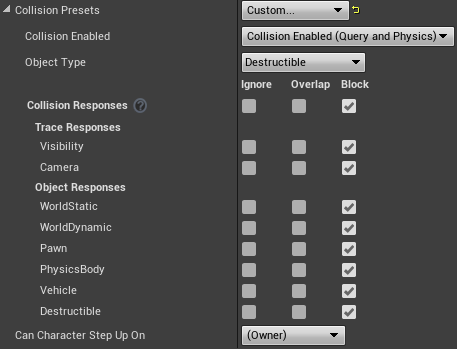
https://i.gyazo.com/8853dcffc8aa1d0dee5d503c6c807e1d.png is there a way i can check ignore player pawn via blueprints?
 floral heart
Yes.
(In that menu, 'Pawn' is all pawns, not only the player pawn.)
cinder iron
i've heard not while ago that was posible to play around on the robo recall editor without VR glasses -- is it still posible?
gleaming shore
What node would I use for that? I cant find anything for ignore pawn, or pawn itsself
cinder iron
just set the pawn to ignore
 noble solstice
Where would you guys suggest someone with no UE4 experience and hasnt touched C++ in over 4-5 years, begin making games in unreal? Right now im looking to buy a udemy course but i wanna know if theres a better alternative
i already have an idea for a 2d game and a 3d game, would it be better practice to start with the 2d?
surreal viper
depends on, a 2d game can be more complicated than a 3d one
also I would not call unreal a 2D friendly engine
but if your 2d idea is way smaller you should go with that first
also I would not pay for the course
if you complete the basic tutorials from epic
you are ready to start to work on your own project and learn as you go imo
also checking on C++ basics might make sense too
you can do it in a fun way, e.g. with https://www.codingame.com/

CodinGame
CodinGame is a challenge-based training platform for programmers where you can improve your coding skills with fun exercises (25+ languages supported)
noble solstice
Yea the 2d game shouldnt be too complex, the hardest part will be like..combining items to make other items, i.e crafting
ill take a look at that and the tutorials, i didnt realise epic had any 😛 thanks 😃
whole sonnet
Downloading 4.19 preview, looks pretty cool looking at the patch notes
interested to try the Temporal AA Upsampling, and to check out this steam audio beta 10
 spare blade
I imported a scene from Maya (houses, streets, lamp posts etc) , the scene was made up of many object, but once imported into UE4 it comes in as one big mesh/object. Is there any way to un-merge this mesh ?
fierce tulip
you can enable import as seperate meshes or whatever its called on import.
though, if you have 100 lamp posts, they'd all be different meshes
not that optimal
spare blade
Is there a way to do it after once the object is on the level, after import? Then maybe I will combine objects into different clusters ?
bitter iris
Has anyone had Raw mesh error LOD0?
If so please tell me how to fix it, or guide me on the right way to fix it
I've been trying for hours on end it still does it
 kindred viper
@bitter iris the typical info I saw when I read about it was to find the problem mesh and see what is wrong with it. Usually corruption of some sort
kindred viper
dunno
 ember cliff
I have this weird problem where when I start unreal engine (version 4.16 -4.17 I haven't tried 4.18 yet) it takes a long time to actually start. It does this regardless of whether I open a project or just start the engine by presssing launch.
As in it takes >5 minutes to start
I haven't been able to find any helpful information online so far
opal ocean
slow HDD? full HDD?
ember cliff
My brother has the same HDD and unreal starts up in less than 45 seconds for him.
bitter iris
All drivers up to date?
ember cliff
Should be. I haven't checked in a year for some of them.
bitter iris
gpu drivers whens the last time you done that
ember cliff
But those shouldn't have updates at this point anyways
Thats pretty much the primary one I always make sure is up to date
And yes that is the same as my brothers as well
bitter iris
is it a big project
bitter iris
hdd dying?
ember cliff
Once it is launched it opens things fine
Unlikely
Because this is the only problem I have that could be an hdd problem
ember cliff
It has happened on every version I've ran so far
ember cliff
I don't think it is the launcher though. :l
Unless the engine always checks with the launcher
bitter iris
worth a try
 cursive dirge
@noble solstice 2D in unreal is really bare bones then
I wouldn't pick Unreal for this purpose myself
there are plenty of better suited options for 2D games
opal ocean
even with the poor 2D support, blueprints are handy for us non-programmers
 brave lark
Anyone here good with swarm? Having trouble getting my coordinator to be seen by my other PC. I think it might be my router, but the ports are open
Ah looks like they have the same dns and or ip for some reason
 marble nest
Is creating a material instance off an already material insance the same as creating one of a master material? or should I always instance off the master?
spare blade
In UE4.17 are there no BSP objects, or are all Basic Objects considered now BSP ?
floral heart
'Geometry' and 'brushes' are BSP.
Static meshes are still static meshes.
 loud phoenix
any1 here
 hoary wadi
Yo
loud phoenix
do you have experience packaging projects ?
hoary wadi
a little bit. The best I could do is probably be a sounding board/help you look up stuff
loud phoenix
hmm, I tried, there doesn't seem to be anything like this as far as I can see
pushing on 26 hours up and can't sleep till I figure it out but
my 'On BeginOverlaps' aren't working in a packaged project
But work perfectly when I play the game through the editor
I set up print strings and nothing prints, not even when I try printing every single object it overlaps
The BeginOverlap node does not work it seems
Collision settings are set up properly (works in editor)
Ever heard of something like this?
hoary wadi
that's super strange
post packaging the project, have you tried turning on collisions and seeing if they are their still?
loud phoenix
like
through a command?
or a node
do you know of any universal setting that might be getting in the way of overlap detection?
hoary wadi
Hm it might mean that they're not being included?
 boreal trout
which part of this discord server can i ask stuff about the material editor?
boreal trout
ty @weary basalt
weary basalt
No worries
hoary wadi
@loud phoenix can you post your build log)
 somber condor
Hey Folks, Everytime I open my Unreal project in another Computer, I loose all my "Folder Colors" and have to set them again ... also my Custom UI for that project won't load. is there a trick to bring these back when running in another PC ?!
loud phoenix
Those are local settings, you can probably carry them over to another PC by copying and pasting the engine settings ini file(s) but I'd double check to see which ones carry that information 😃
somber condor
@loud phoenix Thanks man, it would really help having seamless workflow
I just thought they should be saved inside the Saved folder in the project but seems like they're somewhere else
loud phoenix
Yeah, the ones in the project folder are local to your project, not the engine - the ones in the engine's install are local to the engine on the PC. Unfortunately these don't get carried over a cloud, but looking into source might be useful (I've never used it I'm not sure if it offers the sharing of engine settings, though it seems ideal)
somber condor
exactly, that's what Blender cloud offers and it's a quality of life
loud phoenix
I never got into Blender, I remember when I was much younger I saw a short film with a giant bunny made in Blender - they used it to promote the software heavily
I may have tried to make a FPS in it once
Long ago haha
Ended up with 3ds Max
hoary wadi
@loud phoenix did you try deleting all your temp project files and making a clean build of the project, then repackaging it?
loud phoenix
I'd like to try that, will I risk bricking my project?
I'm literally about to upload the build to Steam
That's why I haven't slept haha
I'll make a copy, which temp project files do I delete exactly?
hoary wadi
okay so in your project folder there's a few files you can delete to create a clean project, it looks like this:
loud phoenix
So without losing all of my content etc.
Which do I delete?
I'm okay with rebuilding all the shaders and settings ofc
I did mess with settings in the .ini earlier
I used a list of suggested ones I found in a 'best practices' for VR article
I doubt they're the problem tho
hoary wadi
Delete everything besides your .uproject file, "Source" folder, "Content" folder, and "Config" folder.
so your folder should look like this:
hoary wadi
any bad references basically
you're probably gonna have to fix some errors after this but it's not a problem
loud phoenix
hmm
hoary wadi
anyway, just double click your project file and it will rebuild everything, then launch the editor
loud phoenix
I know I'd get the errors on compile, would I now see all of them when I try to package?
loud phoenix
okay I'll give this a shot, thank you
hoary wadi
it looks like you just have broken references that make things difficult for when you're trying to build it
After the rebuild you'll want to right-click the content folder of your project and select "Fix Up Redirectors"
loud phoenix
Well,
@hoary wadi Those references don't actually affect gameplay
The warnings, etc.
The problem I have is specific to not being able to detect BeginOverlaps on my main menu (its VR)
I wasn't able to find anything in the logs related to that ;/
hoary wadi
what's the blueprint called that has the BeginOverlap in it?
loud phoenix
it's my pawn, it's called
Menu_Pawn
and it's overlapping with blueprints called UIBP_Story
UIBP_Arcade
If you search UIBP those are generally the ones I'm trying to overlap
hoary wadi
also did you try making a build where you didn't cook your assets?
Sorry, auto-correct
hoary wadi
https://docs.unrealengine.com/latest/INT/Engine/Basics/Projects/Packaging/
According to this you don't want to cook for a steam release
Packaging Unreal game projects for distribution.
loud phoenix
Do you think cooking them might interfere with overlaps?
hoary wadi
dude there's a ton of errors for missing references in the build output file. This one caught my eye.
loud phoenix
Those were for when I had locomotion and the player was able to fall off buildings
I removed the ability to walk around entirely
So those BPs were removed from the levels
Won't cause problems
Just finished making a backup, deleted those folders and will try now
 winter dove
getting this error after upgrading my UE4.16 project to 4.17, and trying to package for android
ERROR: Can't make an APK without an API installed (see "android.bat list targets")
wonder if anyone know how to resolve it, I have the 23 SDK downloaded and installed through android studio , the android SDK/NDK versions are set as "latest" and "android-19"
 grim cargo
anyone can give me some tutorial in youtube for "Check point save" like if do some stuff already then the game automatically save..
loud phoenix
Youtube ' How TF Save Load"
 tender dome
hi, what are the uses of socket and target offsets?
 quasi lake
How to package only one level?
I googled a bit and find one answer is to use unrealfrontend.exe
But after I created a new profile,how can I use it
wary wave
I have a mesh that needs to always cast a shadow, but the shadow is toggling on/off when material opacity goes past 0.5
anyone know how to do this?
as far as I can tell there seems to be no setting that does this D:
wtf, Unreal?
it seems my masked object can either cast no shadows, can cast translucent shadows using the marks, but it cannot just always cast a shadow :/
keen birch
So
"Scene 900 draws 5646455 prims 5568459 verts"
How bad is that
Bit concerned on the primitives and verts, to be honest
keen birch
ctrl-shift-comma, you get a visualizer which tells you crap, so once the window's there just look in the log
silver crown
How many fps?
silver crown
Everything on Epic?
keen birch
I'm confused because I don't know what I did and I usually get better performance in other scenes
Nope
All medium with DFAO enabled manually
silver crown
Ah 😐
silver crown
That's for your foliage thing?
keen birch
Looks awesome 😛
silver crown
Normals are completly glitched though
keen birch
Warned you ;3
silver crown
silver crown
Probably because I'm using the dx/dy thing
silver crown
😉
keen birch
That kind of explains doesn't it then
silver crown
For your verts issue I guess there's no magic solution?
Just have to decrease cull distance + LOD?
keen birch
I'm just confused because afaik I'm rendering nowhere near that amount of tris
silver crown
ah lol
cinder iron
@paper kernel there was a miss calculation on your approach, but totally understandable, very grateful for your input yesterday my dude, check this happy kitty moving around hahaha it's so funny https://gyazo.com/cfebe176f61b561f3acfd3a578e9cb9e
paper kernel
I was under the assumption you wanted to align the character to the objects up vector
ofc align to movement is much easier
cinder iron
well that would lead to another problem on the poles of the object
originally i wanted to align to the object up vector but I found this quiet funnier in a sense that player can choose completely were to climb
keen birch
Now here's my biggest source of confusion @silver crown
cinder iron
:F
silver crown
You're in 4.18?
keen birch
4.17
cinder iron
oh btw this is the poles problem im speaking about if you didn't get it @paper kernel
silver crown
Cull distance yep
paper kernel
yes
silver crown
Had the same issue
keen birch
But I actually see stuff getting culled
keen birch
Guess I'll see if the project opens in 4.18 without problems
silver crown
😐
keen birch
But at least culling gives a peformance boost now 😄
 next robin
What kind of culling would one recommend for large outdoor environments with many instanced foliage actors
keen birch
All kinds of culling are enabled by default
In the past HISMC didn't work well with occlusion culling, pretty sure they fixed that though
next robin
I was watching this very interesting talk which kinda led to my question, as precomputed visibility seems to be something you'd want to use in a small area with many actors
https://livestream.com/gnomon/unreal-engine-for-vfx/videos/168917263

Livestream
Unreal Engine for VFX: Building & Optimizing Worlds for Real-Time by Gnomon on Livestream - Livestream.com
keen birch
Culprit found @silver crown
It set everything to Epic xD
Minor performance gains
Went from 35 to 40
(Both with culling)
Depends
Is your large outdoor environment actually open-world?
next robin
open world, as in completely explorable / playable? That term gets misused quite often, so I'm just wondering.
next robin
Some people percieve open world as very large scale outdoor environments and not just the fact that the level is fully explorable.
keen birch
In that case, yeah, you're not gonna be able to use precomputed very well, I think
So I'm now doing some 1:1 checking on performance compared to the in-engine foliage thing
I've got slightly lower FPS, but I mainly think that's because I can't match densities and that sort of thing exactly
And my stuff is spawned in a square instead of a circle
(Both without culling)
Making me think it's one particular mesh I'm using
Time to check where those LODs are kicking in and whether I can reduce the amount of materials there >.>
This mesh was honestly created by a retard
;-;
spare blade
Can anyone tell me how to place an object to a specific location. Like in maya I can hold the V key to snap the object to a vertice. In UE4 I can get the object onto the map but I want to be able to send it to a location down and into my environment so I can start positioning it. I hope this makes sense ?
plush yew
Hi, Unit tests in Unreal Engine 4. Does it make sense? Has any of you used it? How do you test your games? This is a question for people who work in teams and do not create games alone at home.
silver crown
@plush yew Even if I work alone, in C++ I use check all the time. Might not count as a unit test though.
silver crown
😐
kindred viper
I test my unit regularly.
 honest rune
bitter iris
honest rune
bitter iris
Does anyone here use World machine
keen birch
Plenty of people, myself included
Always better to just ask your question
Us using it does't mean we know an answer, or we could just ignore your "anyone use it"
If you just ask we'll answer if we can 😛
bitter iris
Is there a way to speed the process up. My map is 8km x 8km. 4 tiles, an its taking 3 hours so far
bitter iris
What does WM use more? Ram or cpu
keen birch
Oh and how much ram do you have?
bitter iris
32gb
bitter iris
yeah
keen birch
I did a 8*8 on 16GB and it didn't make it through
bitter iris
lol
keen birch
Though, memory usage varies based on your nodes
keen birch
Wouldn't have a clue, never bothered to look into it
 hoary brook
Anybody know hwo to make something invisible but still keep it's shadow?
spare blade
I am trying to move my object in Local space but I am unable to toggle it out of World space.. Even just clicking on the icon will not toggle the coordinate from world to Local..
Anyone know how to fix this ?
bitter iris
Anyone know what this is LogD3D11RHI: Error: D:\Build++UE4+Release-4.18+Compile\Sync\Engine\Source\Runtime\Windows\D3D11RHI\Private\D3D11Viewport.cpp:(203): BackBuffer->GetResource() has 2 refs, expected 1
kindred viper
seems to be from two sources. 1 is a fullscreen mode error and the other is regarding calling a Clear before Super::DrawHUD()
 coarse cradle
when a sound is played constantly it eventually turns off for a couple of seconds before playing again. how could I fix this bug?
an odd thing I found out too is that when I set the pitch multiplier higher for the "play sound at location" node it fixes it until I increase the speed at which the sound is repeated
 azure shore
I got an idea for swimming. Basically, I would like water as an uncollidable box which when you go inside of it the camera has no rotation limits, the player follows the camera, and you move in whatever direction you are facing on any coordinate, kinda like no clip in source games. The reason I'm telling you this is cuz I wanna ask if this would be simple enough to make. Must be right?
half mango
guys anyone recognize this "player start:bad size" problem?
like my collisions is meshed up inside my room and i cant get the player start to walk in there 😦
and if i had to reimport them with different collision settings that would cause huge problems cause it's lots and lots of different mesh's already had a 40+ light bake on them
if anyone knows any other way around this id really appreciate it
half mango
sry im back at home
i use PC at cousins for free electricity
i've tried it higher, also if i move it above the ceiling
then it works ok
but anywhere inside the room it doesnt work
i also tried "triggers volumes"? and they didn't help me
i can open ue here but dont have same model
for some rtests
 stone cedar
Hi guys, I have a little problem while loading tiled maps.
so before loading the tile position in world composition is correct and looks nice like this
After i press load, then the tiles just pile up in the center of my map. and turn red in World compositon.
Does anyone know what causes this or how to fix it?
they placement was totally fine before i saved and excited the project before
fierce tulip
@half mango means you ffed up the collision of your building, if its one mesh, no way to get in unless you set the collision to "use complex as simple" but its very performance heavy
half mango
i tried that also
i changed lots of the mesh to that setting
mainly the ones surrounding the starting point
do i need to do every single mesh? there's 100+
fierce tulip
I never seen the mesh, but anything the player walks in/trough/under/over probably.
 cedar grove
does anyone have a problem with UE4 crashing the PC after updating to 4.18.3?
 compact compass
No
stone cedar
Noone can´t help with my problem?
compact compass
What is it
stone cedar
just 10 messages above
the 2 picture things
map tiles pile up in teh center of the map after loading them
compact compass
Yes I saw them
stone cedar
cant find anything about it on google how to fix that
It didnt do before i closed the project
compact compass
Try using saving blueprint so that it would save it as a static position
stone cedar
That should have been done before this even happened right ?
loud phoenix
Is it possible that applying a transparent material to an object would interfere with overlap detection?
half mango
@fierce tulip do i need to rebuild the scene for the "use complex as simple" to work?
compact compass
@stone cedar no you can do this now search on google how to make a static mesh
stone cedar
@compact compass Meanign i can´t edit that landscape anymore in any way
compact compass
I don't understand you
stone cedar
If i turn tiled levels into obj then i cant use the landscape tools anymore on it to change the look of the level
compact compass
Yes
stone cedar
But i still need to edit this
compact compass
Then use redo
stone cedar
Well only way to fix this is to reimport the level tiles then.
but i just had it set properly
compact compass
Turn it into a pawn or whatever you are trying to do
gleaming shore
https://i.gyazo.com/95cc95fcb77def250a4dceeca9ae9422.png how an i get this type of lighting in unreal?
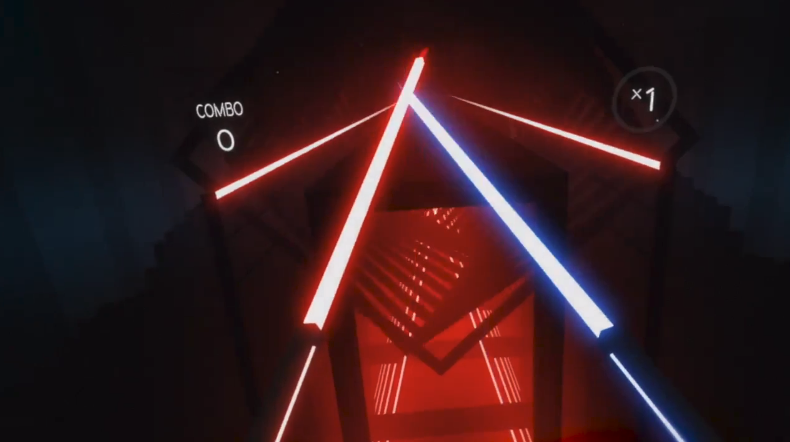
ive give it a go and in unreal you cant light nothingness
gleaming shore
re-read
compact compass
What do you mean you can light nothingness
gleaming shore
In my case anyway, light will only "reflect" of objects not the air so to speak
compact compass
You can create a transparent sphere and then out lighting on it
loud phoenix
@gleaming shore Those are emissive materials with a post-process bloom