#ue4-general
1 messages · Page 170 of 1
 floral pagoda

What a year it has been! Many exciting projects, events, and announcements have happened over the last 12 months; we'll sit down and reflect on a fantastic 2...
It was in that video
 fluid stag
Oh, I'll check it
floral pagoda
Tim mentioned that allot of Large Worlds are being made with UE4
and they plan to improve the engine in that regaurd
fluid stag
This is gooood
foliage performance needs some love, I think the grass layer tool is broked
floral pagoda
I am excited for 4.19 as they are doing allot of network improvements
Thanks to fortnite battle royale 😄
fluid stag
Fortnite has been good news for everyone 😄
floral pagoda
Pretty much
fluid stag
apart from pubg corp ofcourse
floral pagoda
^
 frosty copper
@safe rose is that a giant pumpkin or something? 😂
 safe rose
@frosty copper Zombie head
safe rose
Someone forgot to fix something they broke
frosty copper
SLAP 'EM WITH A FISHIE! >:o
safe rose
And I was trying to test something and I saw these "mountains" everywhere
I was like wtf happened to this map I was just testing a few hours ago
frosty copper
😂 should keep it. 😏 looks ominous and creepy
frosty copper
YUS
I can't tell if that mountain figure in the back is an actual hill, or a zombie arm. xD
(which, btw, really gives that creepy ominous feel. :p )
floral pagoda
@fluid stag https://youtu.be/0xjJ5Chio7o?t=32m3s
What a year it has been! Many exciting projects, events, and announcements have happened over the last 12 months; we'll sit down and reflect on a fantastic 2...
They talk about open world a little bit
 turbid plover
did anyone have a ton of vault items disappear out of their library?
nvm i see tehre are lots of weird connectivity issues with the launcher. i assume its related to that 😃
fluid stag
https://forums.unrealengine.com/unreal-engine/announcements-and-releases/1413780-unreal-engine-4-19-preview speak of the devil @floral pagoda
 grim juniper
I think the engine could benefit greatly from spline decals. It'd probably be great for large worlds since you could make paths and roads directly on landscapes instead of needing a separate mesh.
fluid stag
You'd need decal layers or something for that to work
safe rose
@light lintel why wouldn't you timestamp it?
Anyway, that's a 2015 video
It is now
A Pure
Function
Green
use that

good luck
 haughty flare
o.O I think either the sensor on my mobo is going or UE4 just tried to nuke my cpu 😐
went to rebuild a scene and it spiked my CPU temp to 120c but the cores are like 70-80 max and the rest of the temps are like 30ish...
 honest vale
your CPU has broken cooling system if it goes to 120 C
 obtuse sable
yo
Anyone have any experience exporting files from another game with Umodel?
An unreal game ofc
 cloud cobalt
@obtuse sable Why would you want to do that ?
 chilly gale
I guess alot of UE4 learning is reverse engineeing to find how things are done
Not sure if it's kosha tho
cloud cobalt
On the coding side, sure, but there is a huge volume of free content with the engine
obtuse sable
Im making a pubg cinematic
chilly gale
Is uModel allowed or is it one of those you do with the door shut and curtains closed?
cloud cobalt
Technically, using another game's content in your video is pretty much copyright infringement. Not that PUBG cares, I guess, but if that's the question...
chilly gale
That what I was thinking, so you would not want to do stuff like pull Sparrow or Senua from their games and be see
even for non profit
obtuse sable
Im really stuck on this :/
its basically halted my whole video

in the character tab
those last 4 files
are the ones im thinking is the skeleton?
cloud cobalt
You don't just need the model, you need the model, animations, materials and textures
That's a giant piece of work
obtuse sable
Yeah ik its all here
chilly gale
You'd need the UE4 version number too would you not? if using the assest of thr market place are any hint, wrong version they don't work
obtuse sable
If i export the M4
its a pskx file
and it works fine
Would skeleton be a pskx file as well?
or model
chilly gale
doesn't XNSLara handel them abd export them as OBJ or FBX?
obtuse sable
Whats XNSLara?
Umodel for the M4 at least exports as pskx
and i put that in to blender to make it an OBJ
chilly gale

Here I show you where to download XNALara posing program and how to use it :) DOWNLOAD LINK : http://www.tombraiderforums.com/showthread.php?t=147100
obtuse sable
But i cant export anything else in Character except textures
chilly gale
obtuse sable
This works for unreal games as well?
chilly gale
Sorry don't know it's for pskx as far as I know, the guy has a facbook page and will export char for perople (or use to) for doing art with if asked nicely
obtuse sable
Ah okay cool
problem im having tho is i cant even export anything else
it just doesnt show up in the folders
chilly gale
He has a Daz attitude sort of pic's are ok
are you using the correct UE4 version number
obtuse sable
Yeah
ive tried different ones as well
I can only export wepaons
and textures for the character
but nothing that resembles skeleton or model
chilly gale
maybe Pug does care, and patched stuff
obtuse sable
Yeah maybe
i can get most of everything else tho xD
idk why they would patch only one thing
chilly gale
Whos know with companies,
obtuse sable
Nope whos that?
obtuse sable
Ah yeah true
chilly gale
Not sure I'd want to like him here lol
obtuse sable
What u mean?
chilly gale
did you look up his YouTube?
obtuse sable
Yeah
obtuse sable
Yeah i use it so np

check this guy
he made this with the Redshift renderengine in C4D
chilly gale
To fast for me now days lol
 plush yew
Hello guys i have a problem in blueprints
 fossil ore
@plush yew Tell more?
 tawny veldt
Hi guys, I ran into a weird problem with some of my meshes and am not sure what I messed with to make this happen. Can someone help me pinpoint the issue here?
whoops, thought discord had a video player, use this instead:
https://drive.google.com/open?id=1Gm7jsPTknPnZFG1clUW_Nrmy7MgLLBXN

Google Drive
 fierce tulip
means there are duplicates
that effect is called Z-fighting
happens when two surfaces are perfectly aligned on top of eachother
in other words, you have too many doors
tawny veldt
Weird, I've not touched that door for ages now and it has been working ever since, until just recently when I was looking at some far shadow issues. Tried moving the door 1 unit and it looks like it disappeared, but gonna build lighting to see if it stays fixed 😄
 gloomy egret
Hello everyone. I'm not sure where to post question. I need to make animated background. Any ideas? 😃
 wary wave
use a material
plush yew
xD
good answer again
just found out that you can't pay for stuff in the Marketplace just with the PayPal account
you need to add a card to it
fierce tulip
might wanan post it on the marketplace forum
plush yew
yeah, I think I might do that
 kindred viper
@fierce tulip I get similar things happen like when I want to parent something to a socket, and there are a lot of bones in the list, it starts out of my screen range so I cant quicksearch or select the first bone in the list. I presume this is a 4k issue anyway
fierce tulip
might be
honest vale
does anyone know if Fortnite uses multiplayer world origin rebasing?
 elder quiver
Hi
 wintry schooner
hi
kindred viper
@honest vale is the world big enough to warrant it?
honest vale
probably not since it's 3rd person
but if they add first person it's pretty apparent then
kindred viper
I guess you are talking about the main game and not the BR right?
honest vale
oh, right, I meant BR since it's where people mostly want 1st person view I think
kindred viper
right. it seemed quite small to me.
" Fortnite developers Epic Games had confirmed recently that the battle royale mode had a playable area of 5.5km"
i dont think that warrants the need for WOR
elder quiver
Guys how can use NVIDIA Turf Effects in my project ?
kindred viper
find a Gameworks build with it in?
honest vale
@kindred viper animations start to jitter quite soon as you get further away from world origin
elder quiver
I'cant find in git hub
cloud cobalt
I'd stay away from Nvidia stuff myself, unless you really want to depend on them for engine updates, and get support only for Windows + Nvidia
kindred viper
@honest vale its barely noticable at 5km though. The floating point issues never seemed to be an issue within a levels individual bounds, its more when you start tiling levels and get way out that its really bad.
I guess it depends on the scale of things too
 torn bane
I just created a new level for testing some stuff in my game, and when i place a cube or box and apply a material they are just black, no colour at all.
 kindred viper
I guess my case usage and requirements differed then but I would start seeing jitter outside of a levels max bounds
honest vale
this is 8 km from origin https://www.youtube.com/watch?v=HCZKD-GCFSk&feature=youtu.be

but, fortnite is way smaller than 3 km x 3 km
kindred viper
thats still worse than I had it at 8km but yeah the 2km is noticeble in a first person view. You can get around that by calculating the animation with a higher precision in c++ (essentially becoming double) or WOR obviously. I've done both but using WOR needs to be done from the start and not implemented later (as I found to much debugging)
honest vale
I don't think doing it in C++ matters because it still gets converted to floats in rendering stage
sure it will reduce some accumulation errors
kindred viper
worked for me with SetPrecision(16); which was overkill but I had some 64km splines to build :/
kindred viper
grease on the pole
wary wave
those floating point errors are showing way earlier than I would think they should
3km is not very far
8km is to be expected
 keen birch
^
plush yew
Hi, I have a question. My all project has size 6 GB, but content folder has only 2,07 GB. What takes up so much disk space? I created only one C++ class all others are blueprint class.
 silver crown
@plush yew http://www.uderzo.it/main_products/space_sniffer/ 😉
plush yew
I know e.g. that Saved folder occupy 3 GB, but i don't understand why he is growing so fast.
Is it safe to remove this folder?
plush yew
Probably backups and similar stuff, but i'm not sure 😃
plush yew
OK, but is another folder in UE4 project which can be removed without losing a game content?
Or only Saved folder is folder with unnecessary stuff?
silver crown
You have source control right?
From gitignore: Build Binaries DerivedDataCache Intermediate Saved .vs
silver crown
😉
plush yew
yeah, it's good idea. Maybe, I'll uploud my project on BitBucket. But I add that I'm only person who work on it 😃
plush yew
@silver crown Thx for help 😃
silver crown
Yep @safe rose
safe rose
On mobile... It's like half way
silver crown
Admin drag and drop error maybe
safe rose
Ok. Just wondering WTF was going on <@&213101288538374145> :(
Channels rearranged? Accident or intentional?
 regal mulch
We didn't plan on. I call accident
safe rose
Ah ok
keen birch
xD
regal mulch
Probably happened when adding the packaging channel
fierce tulip
when we click on a channel it sometimes also moves <_<
regal mulch
Thanks for notifying!
gloomy egret
@plush yew Hi. The same. Content 20mb, project 100mb. Other files are libraries.
regal mulch
I got the category closed, so I didn't see the change
safe rose
Oh. So we can blame @fierce tulip and @snow crown
safe rose
;)
gloomy egret
@silver crown hi. how to start to use source control?
silver crown
Can't help unless you're using only C++ 😉
safe rose
@gloomy egret look at pinned msgs in #source-control
Programming languages have very little to do with it
Except like one folder to add
silver crown
I guess you're not gonna use git if you only have binary files?
gloomy egret
I have only blueprints and images
 wicked tiger
safe rose
wicked tiger
safe rose
@wicked tiger bah
so many issues left untouched in 4.18
But oh wells, 4.19 is coming

 shell jetty
mbot(t) the 3D printed Baby Hotfix
 amber dune
can you do a line trace against components instead of actors? For example, i have a custom component (interactable component) but an actor can have multiple interactable components attached to it to do different things, such as multiple switches.
TLDR i want to do a linetrace against only UInteractableComponents on the visibility channe;
 iron belfry
via blueprint i add a box collision variable
however, the begin overlap of it never triggers
has anyone experienced something similar?
safe rose
@iron belfry why add it like that in the first place?
Are the collisions that you want to play with, playing nice to each other?
Do they know to look for each other?
Are they on?
If they are going to get it on
Is it in a public setting?
iron belfry
@safe rose because it shoud not be there from the beggining, instead it should appear only when the previous pieces are in place
yes, collisions are ok, they look for eachother
safe rose
Answer all my questions and I am sure you'll be able to figure it out
But could be a bug. I don't do runtime adds to collision on bodies
 vale osprey
@amber dune it always raytraces against components, which function are you using?
iron belfry
@safe rose will try creating it with the blueprint and changing its properties when it needs to appear, maybe its a bug when created at runtime
safe rose
If you really want to make sure it only hits a particular "component"
vale osprey
@iron belfry attachment is set to manual, do you attach it manually?
iron belfry
yes, it needs to spin when parent spins
iron belfry
safe rose
and you know where it should attach to?
vale osprey
But overlap event is for different component..
iron belfry
yes, it has a specific relative place to spawn, it spawns correct
iron belfry
just in case
iron belfry
lol
iron belfry
that variable needs to be true for overlaps to trigger
vale osprey
Because generate overlap is off by default
safe rose
And seeing if maybe you just are adding way too much all over the place
Is it?
When I add a Box collision
it's on by default
Sooo
(manually, pre-runtime, in actor)
iron belfry
so if its on by default and i set it to on, its reudndancy and should not affect
safe rose
You haven't played around in UE4 much have you?
Anythign you do
Even if you think it's right
Might break some shit
iron belfry
answer is no, but the point was to do it runtime not in the constructor
safe rose
😃
Just keep it simple
First, try to manually attach it
see if the overlaps are working
if not, then you have collision logic issues
if yes, then your runtime logic in runtime is causing issue
iron belfry
will keep looking..
safe rose
...
¯_(ツ)_/¯
I mean, it's simple as that really
You might have to change collision object type
vale osprey
Weld simulated bodies is on too, is your parent component simulates physics?
safe rose
Or other stuff since you are doing it in runtime
iron belfry
@vale osprey yes, parent has simulated physics
vale osprey
Weld will add it to a parent
It won’t be an independent entity anymore
by welding to physics simulating component you change it's mass/collision and etc.
@safe rose hmm, it's "on" indeed
safe rose
Yeah, trust me, I had so many collision issues with VR over the past 3 months
I still think I don't know everything there is to know about them, but I've probably run into almost every problem imaginable
When I first started out in UE4, Collision were "hard" to figure out
Then as I grew in knowledge, I didn't think they were that bad...
Then when you start trying some crazy advanced stuff with them... you realize they aren't as good as you had hoped it would be
iron belfry
did some more tests, now with one created via constructor, same properties. it works
aparently dynamically added collision boxes wont trigger the overlap events
thanks for your opinions/time
 light thunder
is there a way to ensure that a level bp data and all the actors on the level are completely wiped from memory when you unload the tsreaming level? doesn't the unload do that very thing?
 latent terrace
how do I add a png to my project? it gets automatically converted into a texture and I think hardware cursor wants a png 😄
keen birch
So something I've started doing, which I wonder if more people do here
I've started keeping track of all the time I spend programming and the like
Writing it in a document, stating what I set out to do, what I ended up achieving and how long I worked
 grim ore
@latent terrace you would not add it to the project but to the content folder itself on the drive. The popup text gives a good example of where to put it, in a Slate subfolder. The file won't show up in the content browser.
keen birch
For me it's been a serious eye opener towards my "I just wasted so much time" feeling, because it's made me realize I generally don't waste that much time
I just do lots of little things which feel like nothing
It really helps in keeping myself on track, motivated and clear-headed
Do you guys do it? What're your experiences with this sort of thing?
latent terrace
@grim ore oh well, I've thrown it straight to the content folder as I have no Slate one : P
plush yew
Hi, how can I fix it? Should i start a line trace from the center of the screen (camera) or is it other way to fix it? In the future I want to remove "pseudobullets" (line traces) and add true bullets (spawning actors and so on).
keen birch
@plush yew Do a line trace straight forward from the center of the screen instead, then interpolate your bullet from the gun's barrel to the hit location of that trace
plush yew
Thanks 😃 But I was hoping that there might be another solution.
But I think this is quite good 😃
vale osprey
@keen birch it’s a good practice to do, especially when you do freelance
For your own projects it’s nice to know too as you can calculate your investments into it
there is a GDC panalist talk on "failed indies", one of them realized that dispite him selling his games quite well, he still makes way less money at the end than before + all extra stress
not neccessary a bad thing, but in some cases worth consideration
keen birch
Yup
 opal ocean
Hrm. Trying to move my PlayerController controlled Character with SimpleMoveToLocation, but the character stops about 50ish units away
A bunch of posts suggest having the pawn controlled by AIController instead, and the PC tell the AIC what to do. or to reduce the nav agent radius in movement capabilities, but that doesnt work
80% of my logic is on the character so I need to control it directly 😐
How to get it more accurate?
ok setting the actual capsule radius to 1 improves the accuracy... but now its going to be hard for the AI to hit the player!
opal ocean
the node only takes the location and player controller. Theres no way to change the acceptance radius or capsule radius
he doesnt even seem to move around another pawn >_<
vale osprey
I get it, but can't you just add it? When character "arrives" to destination, give him another 50 units away in direction he is facing
not a "proper" solution, just an idea 😄
opal ocean
Not finding a way to know if its done a move
 paper kernel
oh, zak is streaming again tomorrow
opal ocean
ok so I found a way of checking if he's done moving. But why is my navigation not going around another pawn?
paper kernel
iirc there's a "Affect navigation" checkbox somewhere in primitive shapes
try that
not sure is it intended to be used with movable objects tho
opal ocean
My capsule component has a Navigation -> Dynamic Obstacle(true) and Area Class (NavArea_Obstacle)
paper kernel
but if I remember correctly changes to navigation come with delay
opal ocean
Game is turn based, other pawns sit there for a while. Right now the pawn is in his start position
paper kernel
ok so then it shouldn't be an issue, but worth debugging anyway
opal ocean
navmesh is dynamic... not being affected for some reason
hm. not affecting dynamically enough
opal ocean
what do they have it set at? every 30 seconds?
Left shows the nav in the editor, on the right is after I've tried moving to the top right corner of the room, and am aiming to move to bottom right
opal ocean
why the hell is it so hard to get my pawn to go around other pawns?!
Bah. Posted on the forums. Frustrated so I'm going to get off my ass and go get groceries.
 faint cedar
Can anyone remember what the "new" replacement ot Master Pose Component is?
I know Epic updated it at some point earlier but I can't remembe what it was called
 gleaming shore
Hey guys im having a problem im seriously struggling to find an answer to, how do i create an object wildcard in a blueprint (so i can plug it into a cast to)
 flat trail
anyone here can help me build the best possible pc for rendering, use of ue4, render programs basically, modelling and takling high performance scenes in unreal and used for other film high quality stuff?
grim ore
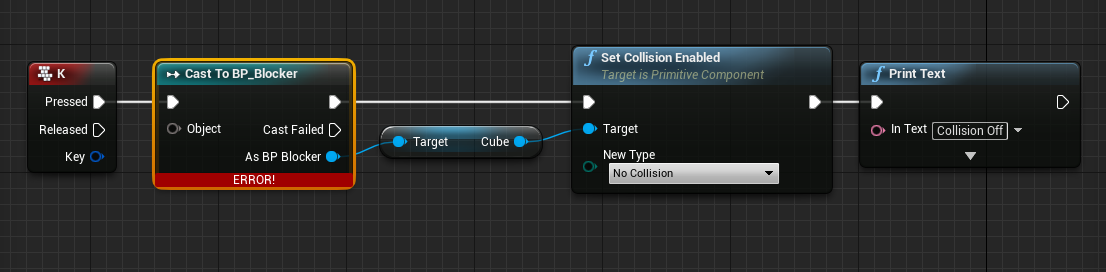
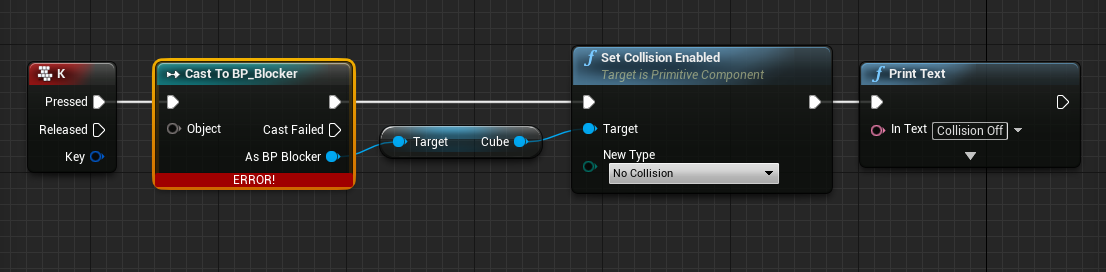
@gleaming shore are you trying to make a wildcard object or just confused because the Cast To XXX nodes take in any object?
 grim ore
Do you know what a Cast To XXX node does?
gleaming shore
Yes it can get "stuff" from that blueprint right?
grim ore
no
it tells the engine that this object that it is taking as an input is of this specific type and not just generic
such as I tell it that this generic actor is actually an actor of class Player for example
flat trail
Is this the right chat to talk about the best hardware for modelling, graphics and ue4?
grim ore
the input in your case would be a reference to your BP_Blocker that you want to talk to
gleaming shore
So to change the collision of the cube (which is in BP_Blocker, im in thirdpersoncharacter) should I still use castto or something else?
grim ore
well what is BP_Blocker?
is this an item in your content browser, is it something in the scene, is it something on a piece of paper somewhere
how does your player, thirdpersoncharacter, know about this item?
gleaming shore
Its something in the map
grim ore
so you want to be able to push a key and it talks to that specific item and does something?
gleaming shore
Yes, I tried to do it in BP_Blocker however it doesnt work because that blueprint isnt always "ticking" ... i think
grim ore
Your player needs a reference to that exact item in your scene (what if you had 3 for example? which is the correct item). You can do this by looking for the item before you talk to it or making a reference at design time
is your third person character in the scene already at design time or does it spawn in from a player start?
gleaming shore
This is where it may get tricky, the BP_Blocker is generated on level load (infinite runner)
grim ore
yep then your going to need to figure out how to let the blocker know about the player or the player know about the blocker.
will you ever have more than 1 of them at any time?
gleaming shore
Yes possibly 30+
grim ore
ok then when you as a player hit the E key which blocker are you expecting to get changed? how do you know
gleaming shore
(thanks for your help btw I really do appreciate it)
grim ore
like the closest one or in front of you or?
gleaming shore
All, if possible
 nocturne onyx
new ninendo tech is cardboard quality
grim ore
the best hardware would be getting the highest performing items for each slot basically. Your budget can pretty much do that with consumer hardware.
gleaming shore
Some more context, BP_blocker kills the player upon hitting it via collision, I would like when a key is pressed collision is turned off and the player can run right through the blocker
nocturne onyx

Get ready to Make, Play and Discover with Nintendo Labo! Nintendo Labo is a new line of interactive build-and-play experiences that combine DIY creations wit...
i mean literally
grim ore
theres a few ways of doing it, all of them involve blueprint communication. There is a great video on it from Zak from Epic Games on their YT channel. Since you want to find all of the items and do it to them all you "could" do a get all actors of class, find all of your blockers, then loop thru them all talking to them. This is not very efficient if you use it often as it has to find them all when you click the button.
alternately if you still want to get them all you can have every blocker that spawns talk to the player and let the player know it exists so the player can keep track of them.
alternately if you want to just get the closest ones you could do a trace near you and just disable the closest ones
flat trail
im thinking i9-7900x processor, dual gtx 1080 tis, asus rog rampage VI APEX motherboard, 64 gb quad channel DDR4-3200, storage is 2tb samsung 960 pro m2 ssd, extra storage 10tb hard drive x2, seasonic prime platinum 1200w, crosair cooler, case enthoo luxe glass
gleaming shore
Well, I have acheived what I wanted actually inside the BP_Blocker blueprint however I can only acheive it on BeginPlay, by input button it just doesnt work
grim ore
yep you need to have your player talk to the blocker, or the blocker talk to the player when you want something to happen
@flat trail besides the Dual GPU's the rest seems fine. UE4 itself doesn't support SLI native and unless you have an app that can use CUDA on both GPU's then your just adding extra heat.
gleaming shore
So in theory, this should work? https://i.gyazo.com/1dcbd476e712959ca7ceea94cd89fc9a.png
 grim ore
in theory that will find the first one out of all of them and do it yes
you dont know which one is the first and it will change every time
fierce tulip
actualy, since 4.15 there is sli support
flat trail
Is there a better gpu then?
fierce tulip
"The engine now supports AFR rendering for Nvidia SLI configurations to provide superior performance when multiple graphics cards are detected. The largest improvement comes from the renderer copying inter-frame dependencies between GPUs as early as possible. Developers will need to work with NVIDIA to test their game and to have it automatically switched over to AFR where appropriate."
gleaming shore
That explains a lot (instead of enabling collision i tried with change material and it was only changing 1 cube), so how would I get all of the cubes?
I assume theres no "get all" node
grim ore
your code was fine just dont get 0, plug the output from the get all actors into a for loop
then that will loop thru them all, the get all actors gets them all.
fierce tulip
need to contact nvidia for it
flat trail
to ask them about it or to accualty make them support it back again?
xD
ddr4-3200 which one should i go for?
what brand
for 64 gb
gleaming shore
@grim ore Thank you so much, that worked perfectly for what I wanted. I appreciate it.
grim ore
yep yep. Just be aware that there are more efficient ways of doing it but doing it that way is fine if its not too often
gleaming shore
Im aware, its not to often I was going to use it for a "power up" for example so it would just be once
grim ore
should be fine then
@flat trail I've got some cheapy Patriot in my machine. You're not going to have too much of a choice for 3200 let alone anything affordable right now so anything should be fine. Lower timings would be great but once it's all said and done in actual use it's barely noticeable spread over time.
find the one with the best warranty and reviews lol
with that said Gskill and Corsair seem to be doing well on Newegg for reviews/rating
flat trail
what about powersupply?
grim ore
use something like pc part picker so you can get a good idea of the estimated wattage
then go from there, no reason to go overkill
I think I have an EVGA that met my specs lol. Decent warrany, gold rated, and 850 watts
wary wave
Corsair are great - lifetime warranty too
grim ore
and to be honest if your thinking about a tempered glass side on a case be sure you don't mind cleaning up a mess
yep corsair seems to be good for components if you want a theme 😃
I've got all corsair externals, just no internals
love my RGB mousepad lol...
flat trail
i think i need around 1200w
grim ore
actually no joke aside it's pretty nice as it has a USB port on the pad itself which works great for the mouse
I dunno, cpu memory and 1xGPU only comes out to under 500w itself
grim ore
yeah about 600w for 1xgpu with the mainboard, memory, m.2, cpu according to pc part picker
grim ore
parts seem fine but I personally don't use watercooling anymore. It's not worth the 1% chance your shit stops working if it breaks
but thats my personal feelings
might also consider an external HDD if it's just for storage. Would make it easier to just move around if wanted
other than that I can't comment on the CPU itself as I have no experience with the newer extremes. 18 core might be overkill depending on your software but I do know UE4 will use them all for lightmapping and shader compiling.
light thunder
So I'm copying over a bunch of static meshes and the like from a persitant to a sublevel and when I try to highlight them, it shows them highlight, but when you zoom in, the selection disappears, like the LOD's are effect it...it is as if I can't penetrate through the editor's LOD visualization to actually select
I've setting the LOD to fixed but I think that's just for landscape
BEHOLD, SELECTED
Now I zoom in
Just kidding bitch, I won't let you select those actors
Signed, - The Unreal Editor
I'm sure this has something to do with the HLOD system or LOD's in general I just need to know HOW DO select these actors (I'm using SHIFT+CTRL+ALT and am drag selecting
 weary basalt
Are they actually not selected in the viewport/worldoutliner or is it just an line coloring bug with the perspective view?
light thunder
No, I'm doing copying and pasting them to another level
and when I hide persistant and check the sublevel
there are these huge chunks missing
so they did NOT make the trip
weary basalt
Mmm very odd. Try and reproduce it in an blank project.
Make an bug report with your findings
light thunder
hmmm
Found it and I think it works -
I get the suspicion that some developers honestly don't want you to learn their engine because then they aren't as special
weary basalt
I would still create an bug report
The changing of LODs shouldnt effect Actor selection in the viewport
light thunder
I found it (again)
It's having me select the LOD Actors from the HLOD
like if I select one at a time, it shows me it is literally called LOD actor
but that isn't listed in the world outliner
if I toggle the visisbility of that HLOD
I can then select the normal actor
sooooo...new question
How do I hide all HLOD's from visibiliy or access them from outliner ?
 floral granite
Hi all, this is going to seem like a strange question, so bear with me 😃 I am studying with an Australian College that is still teaching UE3 & have given me a whitebox level to complete. However I can't get UE3 to work on my Windows 10 PC. Research reveals this is now the case with UE3 on Win10 & is not fixable(?) Is it possible to copy out the whitebox level and into a UE4 project?
light thunder
@weary basalt any idea/ the lod actors are blocking me from selecting underneath them
weary basalt
No idea man. That doesnt seem like an intended feature. Make an bug report lol
@floral granite I doubt it man. You should make an complaint and force the administrative board to modify the course in order to ensure their use of software is up to date and accessable by all students. You may have to use campus equipment instead to complete the task?
floral granite
Hi @weary basalt I am currently trying that, doesn't look hopeful. I am a distance student, so no access to other equipment.
weary basalt
Perhaps talking to your lecturer or course councilor can help you with ideas on ways around the issue.
 grim rock
Is there not a support channel ?
Or would i need to place my question here? I am having a small issue with unreal i think can be easly solved im just not a professional in Unreal.
weary basalt
Generally its best to search the channel list and post your question in the most appropriate channel. If you cant figure out which is most appropriate then ask here in #ue4-general
grim rock
Ok sorry i honestly don't think there is another channel best suited for my question it relates to static mesh issues.
Would it be ok to post a screenshot of the warnings im recieving on this channel?
weary basalt
Posting as much information you have about your issue is advised.
grim rock
Also i did read up about my issue and resolutions for a good bit trying to solve it myself. I read on the unreal website exactly how to fix the error but i guess i just suck because i can still not fix the issue.
This warning can be fixed by first selecting a Static Mesh in the generic browser and then going to the StaticMesh Actor's Property Window->StaticMeshActor Category->StaticMeshComponent->StaticMeshComponent Category to set the 'StaticMesh' Property.
weary basalt
The warnings are telling you that you have StaticMesh Actors in the level that dont have an Mesh assigned to them that they can render.
You have 2 options. Go to each one in the list and assign an StaticMesh or delete all of the Actors that are listed.
grim rock
But it's telling me that the actors that are null are the ones preasent on the screen right now
How can i get around this from extracting it from Autodesk Maya?
when*
weary basalt
Im an programmer so not my area. Asking in #graphics may yield better help. If you made these assets yourself you may not have set them up correctly or imported them properly.
Perhaps try deleting them all and adding them back in
grim rock
Will do and yes i did make them i appreciate the help! 😄
opal ocean
sigh. No response on the forums about my issue with my characters running into each other when using SimpleMoveToLocation
I feel like having your pawn be able to navigate around other pawns should be a pretty integral part of the nav system
grim rock
I figured out my issue
I Copied and pasted 3 of my models and for somereason it created a C/P node for that model. When i deleted the model the node was still there and it was trying to render the extra node that didn't represent any static mesh. So it was just an empty node that was invisible.
After deleting it and rerendering my scene it all went swell! :D
Thanks again @weary basalt !
light thunder
SILLY questions but .... is the level visibility...is that only good in the editor right? the levels still are visible if you stream them via bluepritn?
 obtuse ocean
Hey i need desperate help haha
How am i supposed to know why unreal crashes?
cause it crashes when i click play and it doesnt tell me why
obtuse ocean
It shows no errors
obtuse ocean
Is there a way to install it after UE is installed?
 worn granite
you can modify the install
obtuse ocean
Sorry but i have no idea how to do that lol
 idle stump
I'm finding my prototype projects can get kinda messy and unorganized. Trying to decide how to keep a consistent structure. I guess this is an official Epic recommendation https://wiki.unrealengine.com/Assets_Naming_Convention ...but it still leaves me with some unanswered questions. For example, if you have a character, they may have a blueprint, meshes, textures, sounds, animations,etc ... Does it all go in the /Content/Characters/Player folder or respective /Blueprints, /Sounds, etc folders? I think the page I linked was describing the former but i just found it a bit unclear
obtuse sable
What would be the best method for making cars drive pass a street on a loop?
light thunder
Important - what's the map structure I need to have for streaming? does it matter? i remember hearing something about content/maps but that might have been for replication
 blazing zenith
So I'm learning unreal and have no idea where to start. Could anyone tell me how they at least started and progressed or a tutorial video or something
I'm so lost rn lol
grim ore
go to the Learn tab on the launcher and go to one of the quick start sections
repeat until you need to learn more then scroll down and do the next sections
repeat until you need to learn more, then pick a topic and learn that.
worn granite
I just watched the official tutorials while downloading the editor and just dove right in with trying to make a game, referencing stuff as I went.
 modern root
Is anyone else getting an issue with 4.18 and struct properties in editor windows displaying twice? It is happening for every struct property in the editor
modern root
I always get worried with these kind of things, makes me think that I performed a bad engine merge. Tho I'd figure it would fail to compile not to do something like this. Perhaps an editor plugin I have made is running rampant
obtuse sable
yo i have these cars flying back and forth
that is looping in the animation
For some reason the animation only loops if im actually looking at them really close...
if im even just around the corner of a building it never loops
its so weird
 surreal viper
do they just stop if you are not looking at them?
might be that the animation simply isn't updated when the object is outside of the view
obtuse sable
Im still like looking at the street where they should be
Its just that if im far away they just go by pass ones
then it doesnt loop again
surreal viper
but do you see the car itself when it stops?
if not, then you could check this:
https://answers.unrealengine.com/questions/10942/off-screen-animations.html
obtuse sable
Ahh might be it
ill try it out
hmm
i dont have a blueprint
for this skeleton mesh
Since the animation is coming from C4D
How would i change it then?
Nvm i got it!
surreal viper
was this the problem?
 brisk plaza
hello folks, i'm new here and absolutely have no idea about UE4. so i came here to see what i can find and what i can learn 😃
 left steppe
Hi. I am new to unreal. Trying to build some stuff but whenever I try building lighting I get this error
kindred viper
probably need to rebuild lightmass
opal ocean
Still trying to get my player character to move around other pawns on a SimpleMoveToLocation... looking at EQS now..
obtuse sable
anyone know how to import PSK files in to unreal?
cloud cobalt
Not sure that's supported in UE4
cloud cobalt
Install UDK, import PSK and see if there is an export option ?
Why do you have a PSK file ?
obtuse sable
Ive exported a PUBG model for a cinematic im making in unreal
and it came out as psk
cloud cobalt
You know this isn't going to get any better
obtuse sable
huh?
cloud cobalt
You're going to have issues at every step of this project
obtuse sable
ik others who have done it just fine
plush yew
heyy
is this normal to unreal engine to show reflective materials the reflection smudgy?
paper kernel
reflections are expensive, so probably yes
plush yew
lol
why is the culling volume not working?
i do what they say in tutorial
but nothing happens
obtuse sable
Is it possible to use the default 3rd person walking animation on to a custom skeleton?
Like the default unreal character
 raw lagoon
@obtuse sable https://docs.unrealengine.com/latest/INT/Engine/Animation/RetargetingDifferentSkeletons/
Retargeting animations for use between different skeletons.
Im new to ue4 but I hope that helps
raw lagoon
Np at all, ima spam some help needed too 😛
fierce tulip
why in the world doesnt the "power of two" mode in textures not have a rescale texture mode? only a padding option
shell jetty
@fierce tulip you want marging and padding option for rescale?
fierce tulip
not padding, I want it to just rescale to closest power of 2 without padding
cloud cobalt
Adding unnecessary space around the texture to make it a power of two size
fierce tulip
^
 muted minnow
Hello. Can anyone point me in the right direction on documentation, tutorial, or approach to handling 'jump attacks'. Examples would be Zelda: BOTW jump sword attack, or mario ground pound. I want it so when player is mid air, pressing the melee attack button will cause player to 'dash' down and attack.
opal ocean
Moving my Character on a 100unit grid with SimpleMovetoLocation, but he's stopping 110 units away from the target location...
One suggestion I found was to reduce the size of the capsule component, which works, but makes it nearly impossible for AI enemies to hit if they dont trace to player center
another was to reduce the NavAgent Radius on the movement component, but that doesnt seem to have any effect
110 units is too far to just do a SetLocation.... Any ideas?
 bright stag
do tesselated materials not work on geometry brushes?
plush yew
So how much of a performance boost does BP Nativization get
O>O
anyone done any legitimate profiling
 frank escarp
@plush yew depends too much on project
but its noticeable if you use a lot of blueprints
you should enable it on the whole project
by default
and if some blueprints are problematic, you disable it
the conan team made a PR with a ton of bugfixes for it
its a lot better now
i mean, it is enough to nativize the whole Conan Exiles blueprint mess
that should say something
plush yew
@frank escarp ive been unable to get it to work
unelss i disable "Event Driven Loader"
but yeah it is massively huge difference
i looked some videos up
its "slower" than C++ by 5-10 fps
but faster than BLueprint
by like
100%
lol
 cinder iron
there are several tests done by a chinese youtuber methinks that look very convinient
either way the best way to test performance is just by using the profiler
plush yew
yeah
i just wnat to get it to work
i worry turning off event driven loader
because id k what it actually does
lol
cinder iron
also there are some BP operations that are not supported to nativize
plush yew
is there a list?
cinder iron
IIRC no.
plush yew
damn
ive ytet to get it to work
i really regret using blueprints
will never use it again in the future
outside of UI
cinder iron
just as a recommendation, the slowest in BP's are math heavy operations
like transform interpolation between deltas
if you can't get nativization to work in a reasonable time frame
you can always start to bundle all your mathematical operations on math expresions
or directly on C++
cinder iron
It is faster than doing it directly on BP's.
i don't mean, make just a single operation on BP's
plush yew
Is it? I haven't tested it
cinder iron
but specific general purpose functions
frank escarp
wich of course works better in c++
@plush yew bruh those "tests" are bullshit
but there is a more important detail
if blueprints are nativized
they dont need to go through the "blueprint interpreter"
and they can be optimized by the compiler
this makes them have less overhead in general
plush yew
yeah
@frank escarp however, I've gotten to get it to compile (they made a fix in 4.19 that i copied over to my 4.18.1 version
But im not sure if everytrhing is working
because i had to disable "Event driven loader"
and the tooltip just says
"Enables or disables usage of event driven loader"
so wtf is "Event driven loader"
haha
plush yew
yeah
its very weird though
like they added this option
but no one knows what it does
cinder iron
is it new?
plush yew
all we know is that if u toggle it on and off
stuff works
or doesnt work
i dont know
how old it is
 honest rune
lol
plush yew
yea its strange
iron belfry
is anyone experiencing editor crashes after exiting vr preview=?
cinder iron
@plush yew just wondering, are you using any kind of async loading through BP's?
cinder iron
k then turn that off
cinder iron
okay so...
what i don't know currently if that would have any effect on your C++ code
i don't think so, you can always try and test your game
 night hatch
Hi guys. Is it possible to edit parameters on a terrain material instance in runtime? Looks like it should be possible but i cant get the reference
 old sonnet
!help
plush yew
@old sonnet, Sent you a DM with information.
!help
@plush yew, Sent you a DM with information.
muted minnow
Air Attack, Jump Attack, Ground Pound, etc. - Can anyone point me in the right direction on documentation, tutorial, or approach to handling 'jump attacks'. Examples would be Zelda: BOTW jump sword attack, or mario ground pound. I want it so when player is mid air, pressing the melee attack button will cause player to 'dash' down and attack.
opal ocean
when you click your attack button, Check if the player is jumping, and if he is, initiate the ground attack?
I think you need to do "is flying", tho I see there is a WasJumping get as well.
muted minnow
I know there's a isFalling which is where I can do the check... but I'm hoping for a bit more direction, I'm not sure how set this all up. The check itself seems easy... but the movement, animation, and melee attack itself... maybe I'm just overcomplicating it, just not sure what's right way to do it
cinder iron
the ground attack is as easy as CMC->StopAllMovementInmediately(); put a boolean bWantsToButtAttack to true ,Launch down the character, and as soon as your character executes Landed(), check if the bWantsToButtAttack is true, if so, spawn a sphere trace in an area damaging all the nearby enemies
cinder iron
yep, cmc is character movement component
cinder iron
i have some of those mechanics you asked in my last game
you can apply impulse force or just LaunchCharacter
thats a node
an useful one
muted minnow
Ah, ok.
Yeah, I remember using LaunchCharacter to implement double jump.... before I realized that double jump was built into the CMC
Ok, ok yeah, all of that makes sense... I was somewhat familiar with all the pieces, not sure why I was having trouble putting them together, but that sounds fairly easy to make all work together.
@opal ocean @cinder iron Thank you both for your advice.
cinder iron
yeah, all you have to do is grab a piece of paper and figure out the pieces of your puzzle
:)
no problem hehe
grim rock
Can someone give me a hint as to why my shadows look a little wonky ?
Cealing shadows*
 south ridge
Not enough lightmap resolution
muted minnow
Suggestions on how I can add a 'shadow' directly under my character to help judging jumps accurately? It doesn't need to be a real shadow, I'd be fine with faking it, perhaps with a decal? Trying to make it a bit more obvious where my character is directly above moving platforms and what not.
Moving the sun to being directly overhead does the job nicely... but I don't want to restrict all my level lighting to directly overhead.
grim ore
look into imposter shadows or a blob shadow, its not too hard with a decal
otherwise you can use a material below the character to simulate it as well
muted minnow
Thanks, I'm finding a bunch of google results with those terms.
grim ore
I've done it both ways and it's not too bad. There are definitely a few tutorials out there for it 😃
 lunar scaffold
Hey anyone know how to make hostage System like in Payday 2?
 hoary wadi
That's touching on a lot of different subjects @lunar scaffold Which part specifically are you looking at?
lunar scaffold
@hoary wadi i need evrything:P
i am Making a Heist Game like Payday 2
I could pay if someone want to help me to make the game
i got all Character and items and vault and stuff need to put them together
grim ore
Can always check out the job board on here and the forums then
 karmic igloo
I was wondering, are there any real open world games made in UE4 that have been released?
frank escarp
@karmic igloo Ar,k PUBG conan
keen birch
Those aren't real, they suck
karmic igloo
Okay, I was thinking more singleplayer games.
wary wave
so, Epic are shuttering Paragon it seems
 maiden swift
Where did you hear that?
maiden swift
Ah, I see. People are getting this from an announcement on the subreddit.

reddit
Hey everyone, We know you have a lot of questions about the future of Paragon. We care deeply about this community and we know this is...
wary wave
that sounds somewhat more optimistic than my impression, but yeah
cloud cobalt
It does sound like a pre-announcement to shutter the game
maiden swift
It sounds like their projections are worrying so they're exploring whether to pivot or shut it down.
Fortnite has been a runaway success and is steadily assimilating the studio, it seems.
maiden swift
BR is part of Fortnite, but yeah, most of the success has come from BR.
It was doing alright before BR, but BR blasted it to the top very quickly.
It's definitely surged in popularity since introducing BR mode.
It's amazing how popular that genre has become.
cloud cobalt
Fortnite didn't even get good reviews initially, I remember a scathing one about microtransactions etc
But they turned it around well
I don't see a role model for Paragon though
 river mirage
Hey guys, does anyone know why i'm getting these strange shadows, that don't looks correctly
weary basalt
Looks more like Ambient Occlusion
river mirage
weary basalt
Turn your AO off
 rocky portal
Where would be best to store things like ItemClass and EquipmentClass?
my FInventoryItemInfo struct seems ok for "ItemClass" since that's just literally what thing to spawn when u drop it
but EquipmentClass...not everything can be equipped
I could also just make a separate DataAsset/Table for EquipmentClass and if something doesn't have a record it cant be equipped
 unreal harness
grim rock
unreal harness
grim rock
Anyone here good with Substance Designer?
 coarse cradle
Im trying to learn UE4 rn and I'm starting from learning from the default examples
Im looking at the firstpersonshooter example and I understand a lot of it
but when I spawn in the "firstpersonprojectile" and hit play, the ball launches in the direction of X. I found nothing that could cause that in the details tab or the blueprints, can anybody explain it to me?
weary basalt
@coarse cradle The Projectile has an ProjectileMovementComponent which defines its behavior as an projectile. In the properties of that component will be an parameter that seeds the initial velocity of the projectile when it is spawned. This will most likely have an value greater than zero in the X direction.
honest rune
lol that sense of entitlement from players though... wow. this is why you should spank your kids
😦 wrong channel. my bad guys
oh, was the right channel. was aimed at that subreddit about paragon
coarse cradle
@weary basalt I see it now, thanks
weary basalt
No worries.
 oblique sorrel
So, I just disabled some plugins for my project, enabled Ansel, and now it crashes on startup, so I can't even turn them back how they were
When I pull from repo it says that no merge is necessary too, so, ain;t gonna fix that with a backup from git
Is there a file that stores which plugins are enabled and which are disabled, so I can edit it by hand?
Fixed it
Git is a godsend
haughty flare
Have a question if someone might know about a mat accting odd.
I have a now "dead" char made from Mixamo Fuse 1.3 before Adobe aquired and effectly killed Fuse. I can get the charactor and everything in the engine but since like 4.17 for some reason the alpha for his eyelashes are really messed up. Like one top lash looks right the botom is grey and the other eye you can see the eyelash mesh and its black :\
coarse cradle
Doing some testing again, and im trying to find a way to make it so when I shoot one of the cubes placed in the FirstPersonShooter level, it teleports my character to a worldlocation.
I tried to create a box collision component and when "OnComponentHit" was triggered I wanted the default character to teleport to a certain spot, but I'm not 100% sure how to reference other actors (or in this case the player) and set their world location. How would I do this?
Since I'm still new I'm working with blueprints aswell
coarse cradle
Nevermind, found a solution
 floral heart
I didn't. Closest I've come yet is applying damage and identifying the character as the instigator.
obtuse sable

hey i got this blueprint to play a video
and i want to add another video
But i cant make another Event beginplay
How would i add another one? or whats the workaround
Nvm!
Used a sequnce node
floral heart
You can also link them end to end. It's no different from a sequence node... though sequence nodes are sometimes better for organization. Sometimes.
keen birch
@oblique sorrel For future reference, you can open the .project in a text editor, and then you can change stuff in tge plugin list from there
obtuse sable

how would i make the white text apear only?
Like make the black transparent
Its on a plane atm
I trie dmessing with the alpha in the texture
but doesnt seem to work
Nvm got it again xD
 half mango
guys
anyone know the easiest way to create a walkthrough of my scene?
like not sequencer with dramatic shots, just a recording of walking through with a character
really need it for my interior scene
 urban gyro
use a spline, attach camera to it, record
half mango
a spline?>
i cant even use player start in it
for some reason when i press play it teleports me out of the building
urban gyro
you dont need player start
urban gyro
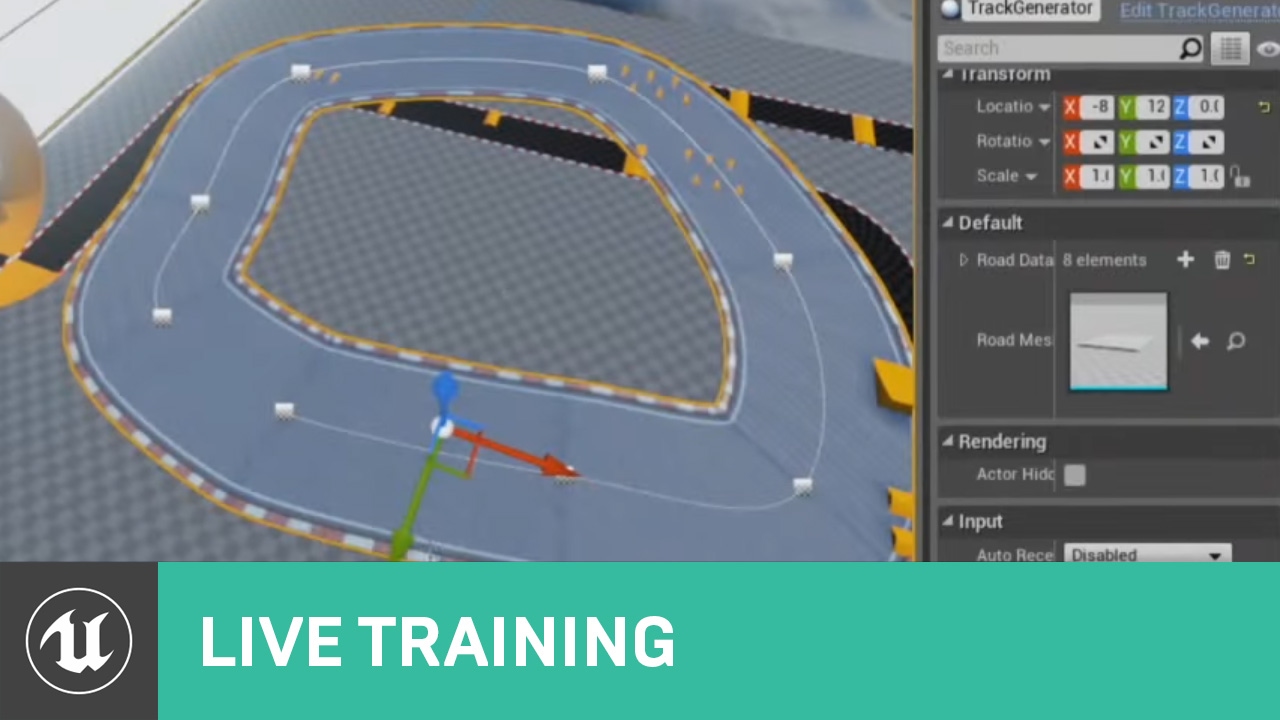
In this Livestream Tutorial we'll show how to use both Spline and Spline Mesh Components to construct an easy-to-use racetrack generator tool in UE4. Viewers will learn about custom structs, functions with local variables, using for loops, and much more!
urban gyro
what? no
half mango
i need to walk through the scene
urban gyro
you said u wanted camera presentation
half mango
no i need to record it walking through the scene
urban gyro
you want to play in your level?
fierce tulip
if you get warped outside of your scene, either the scene is too small, or your collision messed up
urban gyro
you can record from a camera without spawning a char
fierce tulip
^ that as well
urban gyro
drag and drop to scene
half mango
its fairly small doorways
urban gyro
autoposes P0
obtuse sable


I got these rain particles in my scene
But it looks mostly like
its only raining infront of me
The rain should be thicker further away right?
urban gyro
afaik cheapest way to make it rain is just to have a rain emiter on top of characters head
obtuse sable
oh
urban gyro
also i can see rain everwhere
obtuse sable
really?
i cant see any rain like further back
i fi go there with my camera
its there
urban gyro
probably getting culled
fierce tulip
rain should be attached to your player, not everywhere
urban gyro
in cinematic go nuts
fierce tulip
attach it to move along with camera
obtuse sable
that wont really solver the problem tho of not seeing rain futher away?
half mango
i can just drop character in? and walk?
obtuse sable
how do i change the cull?
half mango
i will try it
urban gyro
jesus man
fierce tulip
dude, dont spam
half mango
well just this 2 rooms
they came out at the same time
sry
sent it like 2 mins ago and thought it failed
obtuse sable
Why cant u just use a camera?
urban gyro
^
obtuse sable
Its not very ahrd to make it stay the same level lol
urban gyro
just watch the video
obtuse sable
Is there a setting for the Cull in the particle manager btw?
urban gyro
not sure at the top of my head
fierce tulip
not really, i bet it has more to do with the size of your particles and material setup
obtuse sable
ill google it
urban gyro
you want your rain to be denser the further away from the camera it is yes?
urban gyro

This is a tutorial to make your camera follow a character along a spline path. The project used for this tutorial can be created following this video: Tutori...
srsly
that took me 5 seconds to find..
do what he does here
youll be fine
urban gyro
you control it with the spline
obtuse sable
Why do u need oto control it?
urban gyro
it shows you how to connect a camera to a spline
you dont need to have a player
just keyframe its position
fierce tulip
he wants to use a camera not on a spline, since his collision of the building is prolly ffed up.
half mango
simply need to walk around 1st person like ina ny game
and be able to go back/forth look around each room
at every detail
fierce tulip
google spectatorPawn
urban gyro
oh yeha, theres that as well
obtuse sable
btw for cinematics is there a way or should i like ramp up the gfx settings or anything like that?
When im ready to record ofc
urban gyro
i think u can pre-render in ue4 right?
fierce tulip
scalability settings > cinematic
obtuse sable
pre render?
urban gyro
yeah like beef up the settings
obtuse sable
thats what i want 😄
urban gyro
render, output to video, import video as media
yeah well if u gonna render and not have it realtime afaik you can go nuts
obtuse sable
Yeah u can do that
can render as
frames as well
really nice
even have shit like
depth pass
urban gyro
yeah but like if you have low framerate it will still output 60 fps, just gonna render slower right?
obtuse sable
Yeah
urban gyro
if that is the case, you can go as high as your rig can take
urban gyro
i havent rendered in ue4, i have no clue
if an fps drop is not captured
then you can render at 2 fps and after 24 hrs youll still g et a 60fps cinematic
urban gyro
but if you not so much render as you record, then ur screwed
obtuse sable
thats why im using unreal instead of C4D
urban gyro
most ppl just render in Maya
cloud cobalt
The most important is to have high quality assets in the first place. Render settings only do the final 5% quality
obtuse sable
what u mean?
urban gyro
i diasgree
Lighting is 60% of your final visual fidelity
post process is another 10
obtuse sable
Yeah lighting is huge
cloud cobalt
A shitty model with shitty materials is always going to do a shitty render
Even if ILM does the lighting
fierce tulip
only if your assets are high quality no use superb lighting a few poorly made cubes :p
urban gyro
you can have a cube and make it into a briked wall and a window just by using paralx and some other maps
cloud cobalt
Yeah, that's why I'm saying the model and materials are the most important