#ue4-general
1 messages · Page 168 of 1
 gleaming shore
 plush yew
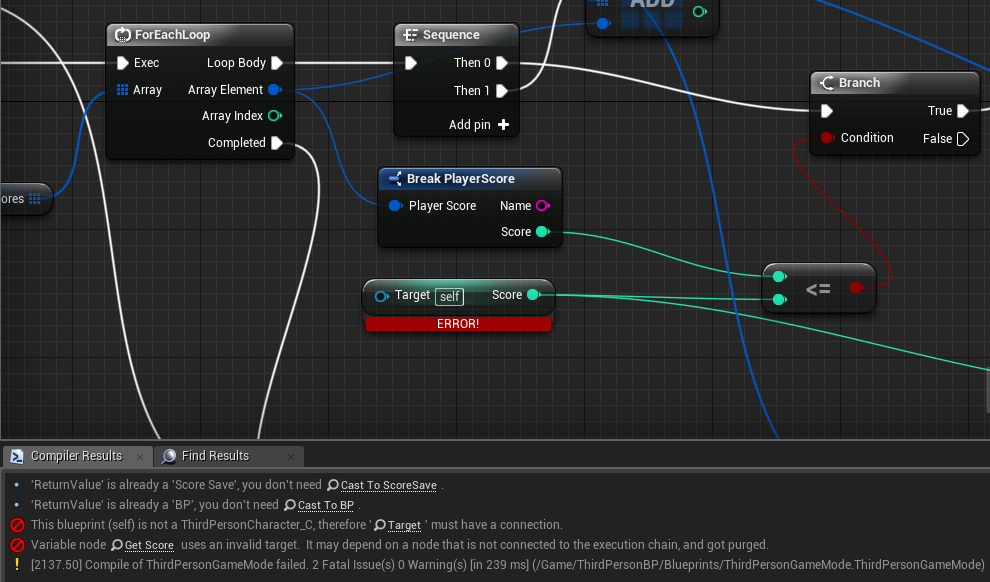
Mouse over it and it should tell you the type
 weary basalt
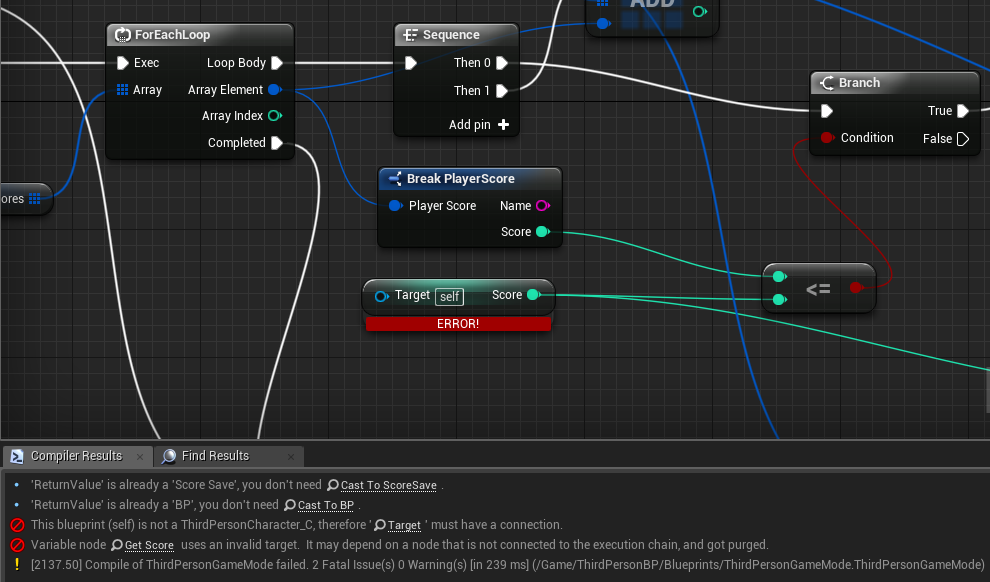
@gleaming shore It wants an ThirdPersonCharacter reference according to the Log
gleaming shore
Is it possible for a trigger to change the material of a cube, context: i have coloured cubes i would like to change colour during the theme music
 karmic igloo
@gleaming shore Could you use dynamic material instances? Just have a vector parameter linked to the basecolor and use the setvectorparameter node in the bp.
gleaming shore
You can do that within a material ?
It's just a simple "when score reaches x change red cube green". What you sent might do the trick
karmic igloo
You make the material and then edit the material parameters in your blueprint.
Create Dynamic Material Instance
karmic igloo
You're welcome!
gleaming shore
Can I somehow do float to integer?
 dusty scroll
@gleaming shore floor float to get int
 cursive dirge
or round or ceil..
 grim cargo
help me please.. i dont want my door like this https://streamable.com/6l42h its spamable and the sound spam too 😦 how can i fix that this is my blue print

 pseudo void
for unreal to have benefit from an ssd when compiling does the editor and the ide being used need to be in your ssd or just the editor and ide can be in hdd?
 feral echo
on in case you check "simulate physics" checkbox in mesh settings
but I suppose you should code bevaior
 tiny fable
My particle system won't start when I start my game. How can I fix this?
feral echo
I suppose you could enable collision for the mesh too, but check for pick ups on the different channel
it will fall throught floor if you mesh dont have collision
tiny fable
uncheck pawn in the collision menu
where you enabled collision it should say default, change that to ignoreonlypawn
ignoreonlypawn
IgnoreOnlyPawn
try custom and make it overlap pawn
yes
 compact compass
make overlap dynamic
 fossil ore
aaaaaaand UE4.18 insta crashes again
compact compass
in the right panel search overlap dynamic
you want to not drop ?
wait a sec im gonna screenshot you
ok
set the collision
you dont have collision thats why
tiny fable
check the floor if that got block all enabled
compact compass
tiny fable
My particle system won't start when I start my game. How can I fix this?
compact compass
1 Go to project settings
2 find collision
and adjust what you want to do from there
ok
 surreal viper
heh in some very special case the animation freezes in a frame, but if I pause the game, open the animation BP and step a single frame it jumps to proper frame and goes on, just wth
lol if I debug in visual studio it also comes back
just wth
 late adder
Anyone know anything about fixing a Vehicles position so that it stays floating at a fixed height just above a spline?
 vale osprey
are you using vehicle component?
late adder
No.
vale osprey
ok, then you can do something like GetPositionAlongTheSpline + (0,0,100), set it as vehicle position and it will float 1 meter above
 worthy steppe
Hey guys, I would love to know how you would get this code to work on a slider that is not in the startup of the level but in a different widget . https://answers.unrealengine.com/storage/temp/40275-level+blueprint.png

Or if people have an easy slider audio tutorial please send it my way XD
late adder
So, Every Tick, get Spline Position, and then set Vehicle Height to Spline Height + 100?
 fair violet
Anyone know if the editor startup time depends more on higher clock CPU speeds or more cores, and if disk speed is a significant factor in the time it takes? Trying to minimize time spent waiting between C++ compiles when launching the editor
 frank escarp
disk speed
fair violet
Looks like an M.2 drive is in order! Thanks!
Another widget!
You can remove them from viewport or use a widget switcher
 gentle crypt
hi how can i make it so that every 36th character it add a new line to a string? https://gyazo.com/7a93e60acfcbff4cca0638956a5813b6

 quasi lake
I just encountered a ridiculous bug of unreal 4
At some moment I noticed in one of my blueprints ,breakpoints are red and menu above is set to enable all breakpoints
But breakpoints never work
And I restart the engine,then the breakpionts suddenly all turned into hollow red point
lmao
 light thunder
Can someone advise, is there a way to check if the editor is still working and just hung up, or is irrevoably stalled?
 rose sequoia
Anyone here using 4.18 find their Material Editor preview window having a background scene?
I managed to turn it off by turning off "Show Environment" and "Show Floor" but now my background is either pure black or bright grey and my materials are being influenced by some pretty heavy directional lighting when looking at it from certain angles.
 rocky portal
why are PacketSimulationSettings not working in 4.18.2
[PacketSimulationSettings]
PktLag=120
PktLagVariance=30
PktLoss=0
PktOrder=0
PktDup=0
in DefaultEngine.ini
 tall summit
I don't really know in what section to put it, so i'll put it here,
The grass sprite is 30 pixels infront of the rock sprite, but for some reason the rock sprite comes out on top. how do i fix this?
tall summit
@fierce tulip where do i find the shader? never worked with it before
 fierce tulip
the material
tall summit
hmm
fierce tulip
probably in the materials folder
tall summit
i imported images as textures
and made sprites from those
never used any materials
fierce tulip
never used sprites, I assume there is a setup somewhere to set it to masked
grim cargo
how make highlight.. when u aim a object then the object will highlight
what should isearch in youtube
plush yew
Hey guys
 safe meadow
hi people, I was wondering, how hard is to track things with oculus?, I mean hacking it somehow to track ir markers in, for example a tablet? And furthermore, how hard would be to make that tablet stream a camera projection of a VR enviroment from that tracking?
 wary wave
you're going to need to be more specific, and also you probably want to be in the VR channel
safe meadow
Do you remember the wiimote hack of that guy that made whiteboards with projectors?
jejeje, not that specific again.
Jhonny Lee https://www.youtube.com/watch?v=Jd3-eiid-Uw

Using the infrared camera in the Wii remote and a head mounted sensor bar (two IR LEDs), you can accurately track the location of your head and render view d...
plush yew
Hello guys
 frosty bloom
So for some reason Destroying an Actor triggers the EndOverlap delegate, anyone have any idea why? I fixed it by creating a OnDestroyed delegate and set a boolean but doesn't strike me as something that would usually be necessary ?
It does work as intended now but I'm kinda curious about it still
safe meadow
what was your approach?
 queen arch
can someone explain "Make Rotator" to me?
the documentation for this doesn't say anything...
 nocturne onyx
hey
got that lecture thing, really excited to get into this

Udemy
Epic Games-Approved: learn the Unreal Editor, master the gameplay framework, and use Blueprint to program without coding
fair violet
@queen arch Rotators are made up of 3 floats (Pitch, Roll, Yaw). You can break a rotator down to those 3 float values and likewise make a rotator from 3 floats. Make sense?
 wild glacier
De wae
 torn bane
Hey, is the BP_SkySphere the only way to create sunlight and background, or is there a way to make your own/import from the internet
weary basalt
You can make your own for sure.
 stone cedar
Idk into which channel to post this one exactly, so I am sorry if it is in the wrong channel, but here it is.
How do i change these units on the location to meters? I believe that they are in centimeters at now due to super large numbers.
And why doesn´t it show centimeters or meters word behind the number? I remember that it used to show these words cm, m or km
weary basalt
I dont think it ever showed distance convertion units before??
1 UU = 1 CM you just have to do it in your head.
stone cedar
yes i know but i want to change the units to meters, instead of centimeters
frank escarp
pro tip, dont
stone cedar
such big numbers dont get annoying on a big 4x4km map ?
torn bane
-4090 Z location? holy fuck, where is that thing
frank escarp
the meter scale doesnt matter
at all
you are going to have issues if you try to go past around 10 kilometers from origin
even if you put the scale to meters, you will still have the same trouble, classic Floats
you only have a limited number of digits
you can recenter world too
stone cedar
oh okay i will keep units in centimeters then.
frank escarp
and you wont be able to fill that size up as an indie
stone cedar
how do i re center the tiled level?
because at now the 0.0.0 location seems to be at one corner
 floral heart
Offset it by half?
stone cedar
The play area will be inside the blue circle. so yeah not a big play area, but Aircraft playarea will be bigger than that.
surreal viper
projectile based so one can dodge the bullets
stone cedar
I just imported the map into UE 4.15 and it has the units symbol behind the numbers, but 4.18 doesn´t as shown above? Also the map tile Loading and importing is like 20x faster in UE4.15 compared to UE4.18. Is there something wrong with my 4.18 that it doesnt show the units symbols and tiled map laoding is so slow?
weary basalt
No id say they just removed it. Unless its an Setting somewhere now.
plush yew
@surreal viper but in real life u cant dodge
if someone shoots u with a submachine gun
ur not gonna magically dodge it
lol
stone cedar
I just timed the tiled map loading. The same 64 tile loading after starting up the game save took 5 seconds in UE4.15 and 4 minutes 30 seconds in UE4.18... jeezh
stone cedar
The speed difference cant be that huge. there has to be some weird bug..
 hard quarry
Hi guys, I am pressing a button which calls a Blueprint function, it is working inside the editor, but not in the shipped Version, any Ideas?
LogScript: Warning: Script call stack:
Function /Game/Widget/Launcher.Launcher_C:BndEvt__Button_391_K2Node_ComponentBoundEvent_36_OnButtonClickedEvent__DelegateSignature
Function /Game/Widget/Launcher.Launcher_C:ExecuteUbergraph_Launcher
LogScript: Warning: Accessed None
gleaming shore
How can I change which character a map uses?
floral heart
If they implemented it properly, a projectile with 0 radius is basically a bunch of line traces anyway.
gleaming shore
https://i.gyazo.com/229c51f6f784cd2ab9d864bda6844e44.png is this because i installed a plugin?
fair violet
@plush yew if multiplayer, trace for almost all guns for sure. Just makes it easier to implement. I like how Fortnite has projectiles for sniper bullets though as they are slow firing and take more skill
plush yew
mhm
weary basalt
I prefer Raytraced “bullets”
weary basalt
Way more responsive and feels better gameplay wise in my opinion. If its an close quarters game i cant imagine what pros Projectiles would have over traced bullets
floral heart
It's also a question of distance. For small games like counterstrike, a projectile traveling at real speed will probably hit in less than a single frame anyway. Ergo, a projectile with 0 radius is a bunch of line traces anyway.
For games with more scale, the physical presence of a weapon becomes more important. Nothing in real life is instantaneous. Though, relativistic rendering probably won't be a commonplace thing while we still have eyes.
fair violet
And network efficiency- good luck replicating hundreds of projectiles on a fast firing machine gun
Ray traced bullets are definitely a good option
floral heart
If they're dumb projectiles, client-side prediction is likely good enough, since you already know where the projectile will be going from the moment you spawn it.
Also, are you really going to have ray traced rockets or missiles?
fair violet
Rockets or missiles are great candidates for projectiles
They won’t be rapidly fired and travel slowly
So they can fit in the budget
An LMG however.. different story
weary basalt
Anything that actually fires an projectile like rockets would not be raytraced
floral heart
Tell it to MW:O. For some reason they implemented missiles that can be fired a hundred at a time, and because they can lock on they aren't dumb and seem to be predicted. The game is stuck at 24 players and can't support any more in a match.
weary basalt
Its not like it cant be done. Its just expensive
fair violet
Yeah it’s just very inefficient
Depends on the game though
If it’s a key mechanic then sure that’s fine
Feels nicer to be as lean as possible though
floral heart
The question of "do you prefer projectile based or line traced" is a strange question. It implies your game is being designed around a single function.
weary basalt
Yeah i would make that decision based on gameplay factors not personal preference
But personally i do like raytraced weapons.
floral heart
Personally I could go for sweep weapons. Flamethrowers, I needz them.
plush yew
What college uses teaches unreal and c++?
I'm at that point of my life to start thinking about it
plush yew
im thinking FullSail but not 100% sure
 worn granite
I'd really think about just going for CS - either way, be prepared to dig around and do stuff on your own
plush yew
@worn granite cs?
and yes i understand that i wont learn everything in collage
from what i know its more to guide you
worn granite
computer science
 coarse cradle
I applied for cs too
I hope theyd use c++
whered you learn ue4 tho @worn granite
worn granite
I learned it myself
worn granite
I mean, partially. More just tried using it. Reading source, seeing how I could access things.
Just practice, really.
It was helped by the fact that I'd already done the same thing with C++
coarse cradle
any good way to understand the api of ue4?
should I just read the wiki or something lol
worn granite
Accept that you won't know everything, jump into areas you like.
worn granite
I mean you could read the wiki - I'd lean towards just referencing stuff though.
cursive dirge
if you know c++ already, just read docs c++ intro stuff
coarse cradle
trying that aswell
its just hard to understand sometimes
read up a tutorial on how to cel shade
but rather than just to copy the tutorial I wanna understand how it works
so I reference the docs/wiki a lot but still get stuck on somethign
*something
cursive dirge
any example?
coarse cradle
I mean
coarse cradle
this is gonna be just one that might sound stupid
cursive dirge
it's poorly documented
coarse cradle
but I dont think I fully understand lerp
cursive dirge
so you search the info while you program
coarse cradle
trying that out
watching a ue4 livestream while searching up the stuff seeing if I can understand it
cursive dirge
lerp = linear interpolation
it doesn't actually have anything to do with time
it's super simple
coarse cradle
on the doc it says when alpha = 0 then (A=100%, B=0) ice versa
so im assuming if lerp was 0.5 (A=50%, B=50%)?
*if Alpha was 0.5
cursive dirge
yup
cursive dirge
ummm no
you interpolate between A and B
you don't change them
if A == B, you get same value
regardless of alpha
cursive dirge

In mathematics, linear interpolation is a method of curve fitting using linear polynomials to construct new data points within the range of a discrete set of known data points.
coarse cradle
think I have a basic understanding of what that is...
i mean its a shitty draawing but bear with me
lets say 10 is a and b is 20
ignore that part at the bottom lol
gleaming shore
how do i make custom events fire, i totally forgot
coarse cradle
anyways depending on the alpha value does LERP select the number on the number line between 10 and 20?
so if lerp was 0.5 it would be 15?
and if lerp was 0.25 it would probably choose 12.5?
 silver crown
Yeah
cursive dirge
yes
cursive dirge
In mathematics, linear interpolation is a method of curve fitting using linear polynomials to construct new data points within the range of a discrete set of known data points.
just look at that code
if you don't know much math, code should be self explanotary
that's all it is
one line of code
whole lerp
coarse cradle
I think I get it now
gleaming shore
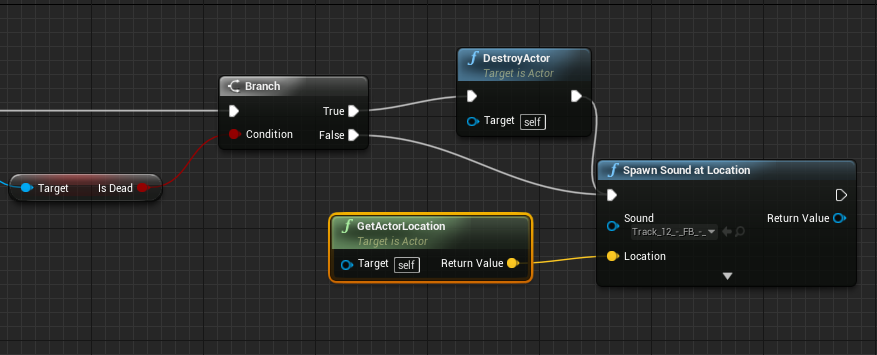
How can I stop play sound at location upon my variable changing?
weary basalt
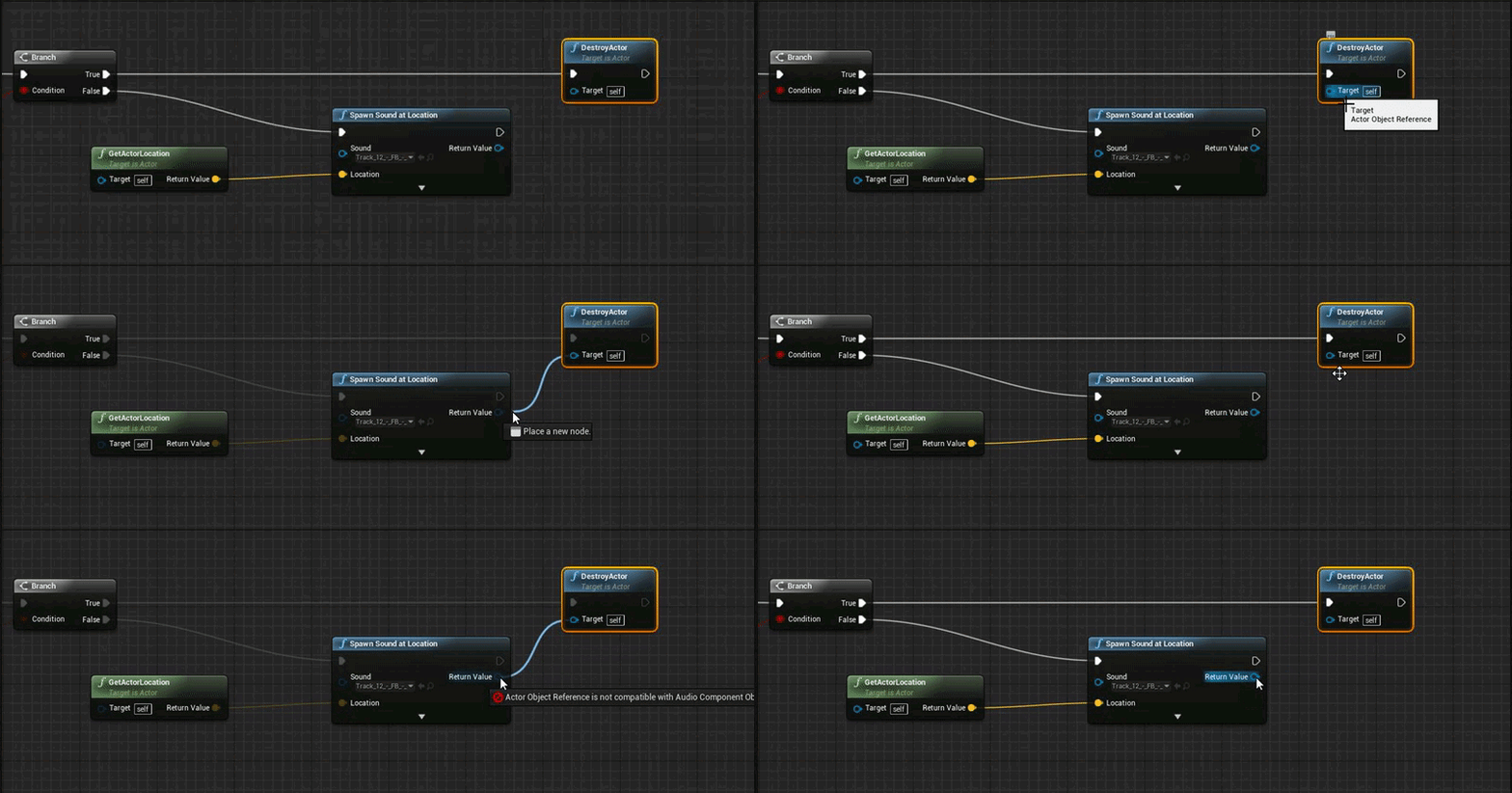
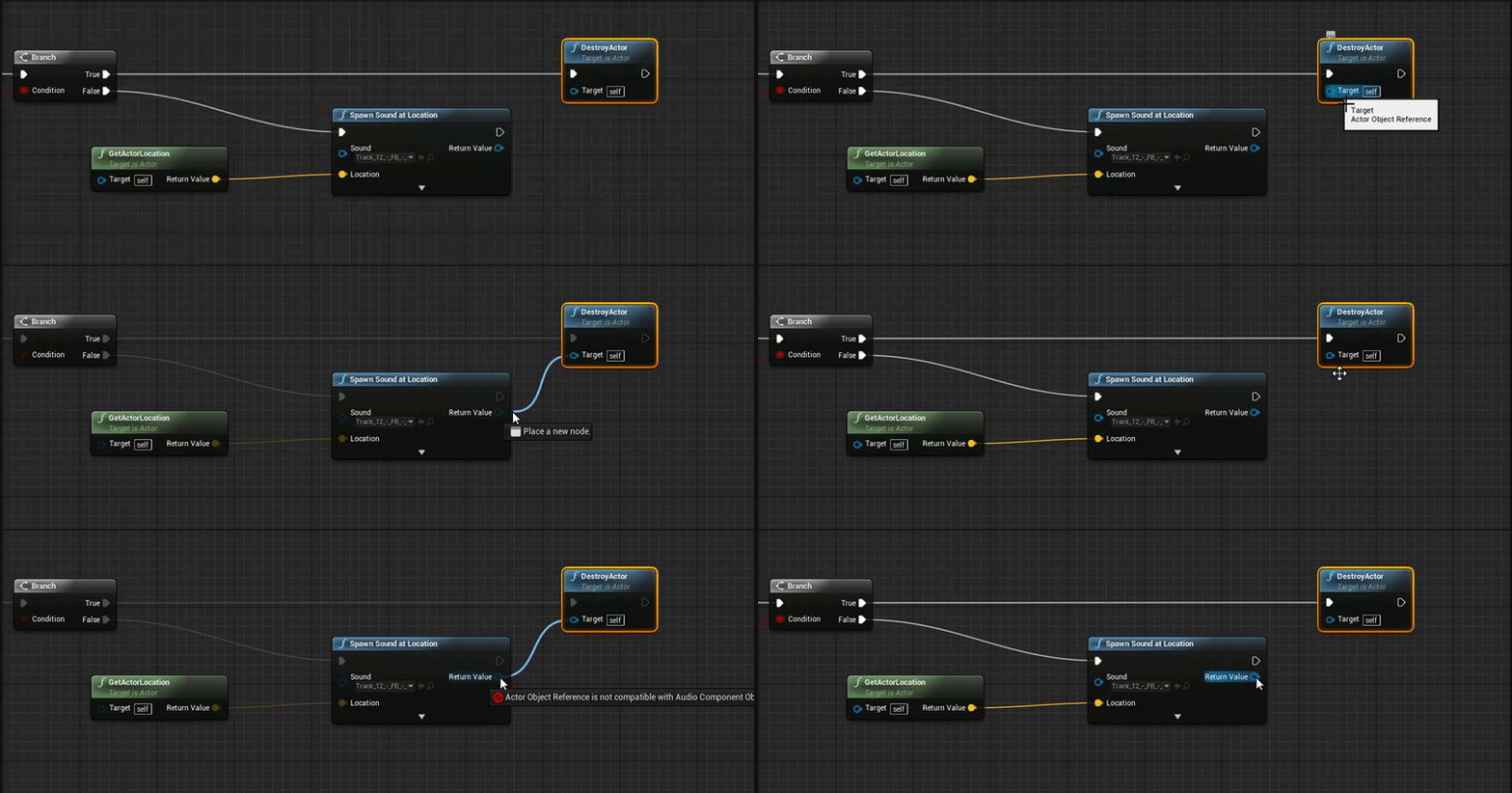
If you Spawn an sound instead of Playing an sound you get an reference to that Sound Object that was Spawned. You can then Play, Stop, Destroy it as you please.
gleaming shore
How would I got about destroying the spawned sound?
Im not sure how to use the reference is what I mean
weary basalt
Call DestroyActor?
gleaming shore
Just tried it, the target pin wont for destory actor wont connect to spawned sound
 weary basalt
gleaming shore
weary basalt
gleaming shore
 weary basalt
Drag from the Sound node and search for Destroy
there will be an DestroyComponent node
But you will need to save that Sound Object as an variable and access it from the Variable. You shouldnt cross execution paths like your attempting to do.
gleaming shore
What could I use to set a variable like "is playing" from the spawn sound?
coarse cradle
Probably a pretty basic question but
How does unreal pull ambient occlusion (red channel) metallic parts (green channel) and the non metallic parts (blue channel) from just that 1 texture sample on the left picture?
floral heart
Are you expecting it could only sample one channel at a time?
coarse cradle
wdym?
floral heart
The channels are already separate. It doesn't need any extra effort to get to them.
That fourth row seems to be a strange combination of them.
coarse cradle
said it was a whole object mask
I think I understand how it works now tho
was looking at the 4 channels (RGB) and I thought it literally meant the color... but it really had no relation and was just uder defined channels
*user
floral heart
It is the color, though. A color is 3 channels, red green and blue, and the 4th channel is alpha, which is a bit of a wildcard.
For humans, anyway. Other animals can see color differently.
coarse cradle
well thats true
but I got confused thinking that the nodes were some how pulling out like red color data from the texture sample
ahhh I get it completely now
floral heart
Are you looking at the material in startercontent?
coarse cradle
yeah
the chair
trynna see if I can undertsand how the material was defined
found a good explanation online tho
kinda still stuck on why lerp is being used tho
I know its function just hard to see why its being used in that case
\
then the alpha is connected to the blue channel which is the non metallic and control of color of non metallic objects
floral heart
In short, there's a base layer and a metal layer.
Wherever there's green, the base layer lerps to the metal layer. Full green = fully metal.
In other words, the green is used as a layer mask.
coarse cradle
alright
but then again, whats happening here?
its trying to define a metallic value
im assuming any green that can be extracted from the texture sample is going to be metalic>
?
when I say green I mean any color on there that has the combination of green aswell
im assuming that depending on the intensity of the mixture of green it also adds the metallic effect to that spot on the mesh?
floral heart
'Metallic' is just an arbitrary value that is later used in lighting calculations to determine what kind of shine the surface has. High metallic means the shine will look more like raw metal, low metallic means the shine will look more like smooth plastic.
The amount of metallicity is one part of what the green is used to mask.
coarse cradle
makes a lot more sense now
so in that pic I posted depending on mixture of green in the specified area it would choose a value between 0 and 1 to make that area of the mesh metallic?
vale osprey
in general yes, you just frase it a bit weird
it doesn't "choose" anything
texture is 4 arrays of numbers, in material you define which array you want to use for something like metalic for example
coarse cradle
mhm
vale osprey
let's say you load just a black and white texture without alpha
its doesn't have color but at the same time it can be any color or metallic or roughtness
because it's nothning more than a set of numbers
in material, when you connect nodes, you are saying "I want this data to flow into this function"
so you can read numbers from green/red/blue/alpha channel and wire them to something that is going to transform them in some way or something will use it as a final result for a color/alpha/metallic and etc
vale osprey
yes, nothing stops you from swapping color channels in material
you can swap Red and Blue completely, or you swap them to an ammount of Green at the same texel
all because, textures are not "paintings" but arrays of numbers, the same with final color or material - it's just a function that takes X and transforms it into Y
vale osprey
@floral heart funnily enough I coudn't find in google a simple explanation with illustration of what texture is 😄
floral heart
I was hoping it didn't need explanation. :x
coarse cradle
oh just 1 more question if youre still here
how would I create a texture mask?
from my understanding I paint everything I want white and export it as R G or B, or a mixture with other images that I painted
vale osprey
correct
in most of the image editing packages like Photoshop, you can edit individual channels - RGBA
so you can place one mask into R another on G and etc. Or you have a texture for material without transparency, then you can use A channel for mask
coarse cradle
I see
but you could also just apply a texture over the uv
why did unreal do this method instead of just applying a texture over the unwrap
is it so they can also customize the metallic and non metallic properties through the use of RGB?
floral heart
Sort of. It goes back to the layers I tried badly to explain.
floral heart
In Unreal's PBR workflow, the appearance of something is typically defined by its albedo(base color), metallicity, specularity, and roughness. A texture is usually only enough to define the basecolor. However, if you use it as a mask, then you have three or four masks that can define different sets of albedo/metallic/specular/roughness, layers. Which works if you don't mind that each layer is a flat color.
 smoky pilot
What is the difference between roughness and specular? Aren't they both the same thing?
Roughness is the new specular, isn't it?
fair violet
Roughness is how shiny or rough a material is, specular in UE4 (in my own words) is almost like a scale for how bright the ambient reflections and overall sheen of a mesh is displayed- more apparent at higher Roughness values. Usually 0.5 which is the default is fine but in many cases, you want to play with it to provide a more natural response in a lighting scenario (often you get assets that have an ugly almost coating of white sheen that doesn’t look realistic in comparison to the same asset using a lower specular value) Basically it isn’t PBR accurate and it is sometimes useful to tweak artistically
vale osprey
One of the differences is that roughness effect diffuse color too, along side the specular
I’m not even sure if there is split between diffuse and specular anymore
Less rough objects will reflect light in a tighter cone and fully rough will reflect in 180 degrees making it look fully diffuse
fair violet
There’s a test I did recently- default spec on the left, 0 spec on the right
It definitely changes the perceived lighting response drastically
 high oriole
Can anyone tell me why when I'm exporting from maya, my mesh imported to unreal shows up way off center?
It's way over there by the yellow highlight
fair violet
Did you export your mesh at the origin in Maya?
high oriole
it has to be centered in maya?
fair violet
Yep that’s where the pivot in UE4 will be
high oriole
I guess that explains it. I thought that.
I'm trying to model some realistic grass lol
fair violet
Gotta get those curves in!
vale osprey
@fair violet you mean spec as specular input? it has some meaning for sss materials, outside of those I don't what exactly it does
fair violet
Yep specular input
That’s what it does as shown in the screenshot- the scale of that “sheen”
Roughness is 1 in both cases
high oriole
the curves will be done via box lattice later on
I haven't set any of the specular up yet. I'm do all the texturing in unreal engine or substance I'm new to texturing
floral heart
I think specular input just scales up and down. Ordinarily you don't mess with it, but it can be used to mute/occlude specular reflections, as you might see on some more organic surfaces.
high oriole
Right now my main focus is just getting it to look right for the most part, I have a pic of some previous made grass in unreal already but there's no normal maps or anything special
high oriole
roughness 0.8 specular 0.2
is the setting
right now it's not setup I just have a lambert on it
I had issues with the scale and size of it so that's what i'm tackling to get the size perfect
fair violet
If you really want to make the grass yourself, might be good to reference some scans to get the right proportions / shapes
fair violet
Nice!!
high oriole
the ones on the far right are handdrawn via tablet but they dont look right in unreal
they get all pixelated
and too skinny
fair violet
You are using this texture on the actual assets or just as a ref sheet?
high oriole
Well, I'm gonna crop the blades out to make a single texture full of the grass blade patterns just to have differentiation between blades but yea
then I apply it to the blades and basically warp it like grass blade then bake the texture to images
throw them on billboards and in to unreal
I thought about just grabbing some grass off the grow and throwing it in my scanner and see how that works out lol
fair violet
Yeah doing that and modeling some highpoly broad normals to bake down into an atlas would work fine
Then you could assemble patches or instead bake highpoly patches down to a billboard atlas
high oriole
thats the plan
once I'm done if I get some really good results I'll put em in the unreal marketplace
high oriole
I'm close, on the right track at least. It looks right I just need to sort the scale in maya abit
fierce tulip
if you want some lolz and giggles this morning
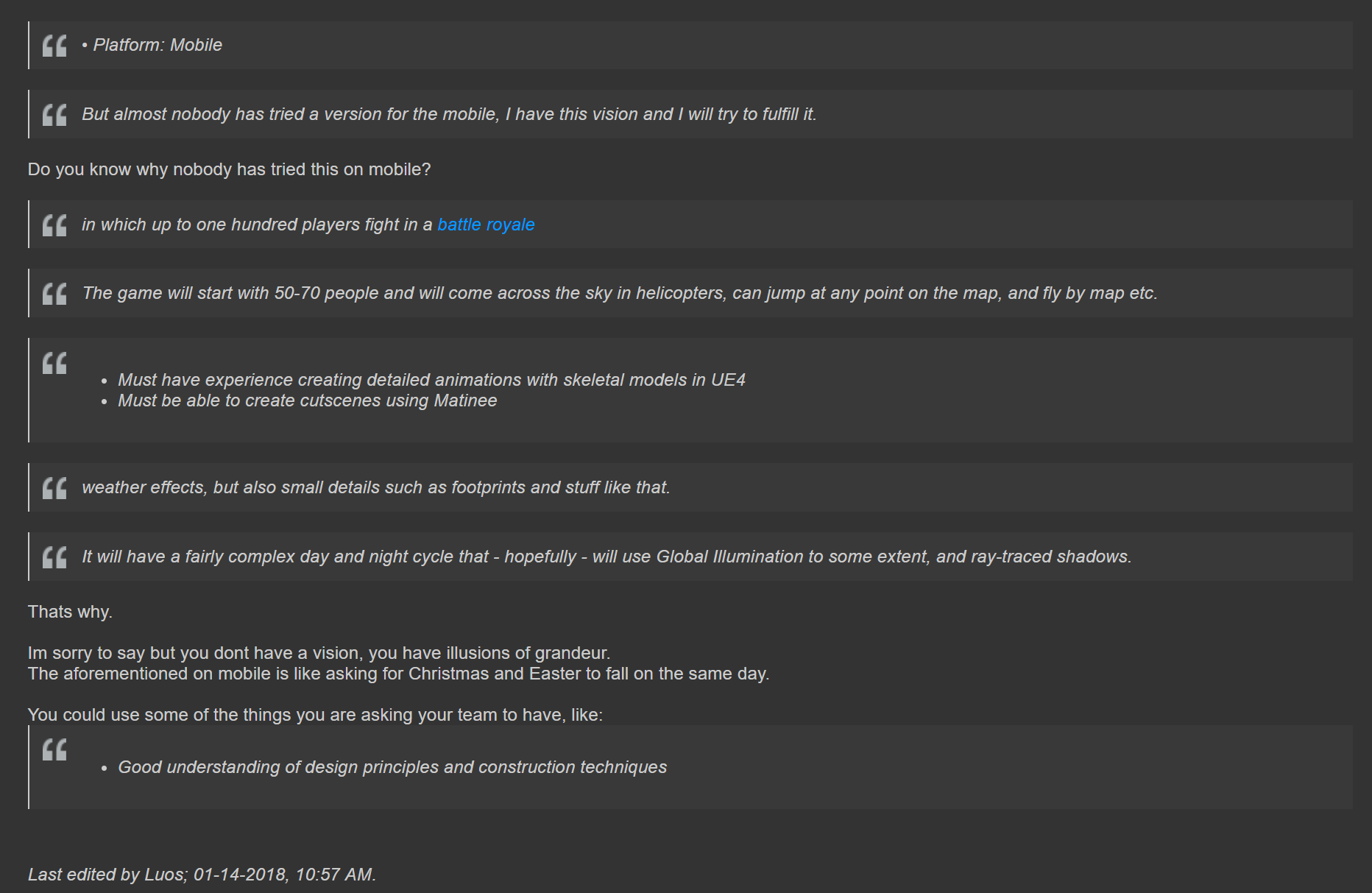
https://forums.unrealengine.com/community/got-skills-looking-for-talent/job-offerings/1412789-one-battle-royale

 keen birch
Lol
smoky pilot
( thanks eoinobroin and BoredEngineer for the specular explanation! )
cursive dirge
@fierce tulip but there are tons of mobile battle royale games?
not with 100 players
but like 20
some look exactly like pubg
direct ripoffs
cursive dirge
like realtime GI on mobile? 😄
keen birch
And Luos just responded to his statement that no-one tried it
So if anything OP should've done some research ;3
Among others ;3
cursive dirge
Luos replied Do you know why nobody has tried this on mobile? and I replied to that
because there are tons of those on mobile
floral heart
Realtime on GI on mobile? Can be done.
It won't look any good, but it can be done.
cursive dirge
sure, but that's beyond the point
keen birch
But yeah, we're debating over nothing here
Either way, I think we can all agree OP is missing some knowledge required for his journey
cursive dirge
it's the typical idea guy post tbh
keen birch
Yup
cursive dirge
we see these every week
high oriole
Lose wired in my headphones, have to keep smacking my ear to get music in the right side, finally got fed up slapped the desk with the headphone, now there is no right head phone. Problem solved
keen birch
Lol
high oriole
the funny part is I can still fix it, but it would be tedious soldering
high oriole
You can use stylish for custom css, otherwise there might be a setting in the forum itself
try userstyles.org
 trim silo
Guys is it possible to setup normal collisions like for regular static mesh but for skeletal mesh?? I have a big dragon head that has opening animation, inside the dragon head there is a path that leads further into the level but the probelm is that there is this huge collision sphere that prevents me from jumping onto the platform etc.
Isn't there just option "Use complex collision as simple" like for regular static meshes?
cursive dirge
ah
fierce tulip
just woke up, shouldve worded it better probably
cursive dirge
Team Size: 2
fierce tulip
you joined him? XD
fierce tulip
oh it said 1 when I was reading
cursive dirge
and then the guy who will do all the work
oh?
heh
well, I hope the person learns something still
fierce tulip
unless references to just waking up comment
fo sho
but with that scope, he'll probably learn how hard stuff is, instead of how fun it can be
cursive dirge
heh
I don't usually look at these parts of the forums
then the first random thread I looked into was this https://forums.unrealengine.com/community/got-skills-looking-for-talent/13334-looking-for-the-best-a-i-programmer-and-will-pay
how does that even show up?
it's ancient thread
oh
these are all closed threads
what's the point of this?
fierce tulip
the whole job-page is quite a mess
keen birch
Luos, how'd you get the dark theme for forums?
fierce tulip
never know where to look or post
keen birch
Setting or extensions or something?
cursive dirge
yeah, this is all messed up
fierce tulip
Stylish plugin for chrome, has a stylish setup for the forums
made by @next badger
i think
cursive dirge
can't they move those out if they've changed the structure?
fierce tulip
iunno
 runic dock
https://discord.gg/jJvPfc hey guys! join this discord server i just created and help grow the UE4 community !
high oriole
When I import from Maya to Unreal, my mesh shows up like 90% transparent, I have nothing but a texture file on it 2d texture
cursive dirge
@runic dock but UE4 community is here
also
did you read the rules?
No soliciting. Advertisements, requests for game testers, Discord server invites and shortened URLs may be deleted by moderators for any reason.
 next badger
@plush yew #game-jam-chat
plush yew
It's related to another server*
next badger
@plush yew "server" ? game jam channel for all game jams, not only Epic Games ones
plush yew
Aight :+1:
 long garnet
guys does anyone know how to allocate memory for pointer pointing to pointer to object?
wait
😄
allocate memory with "new" for pointer will point to pointers pointing to objects
cursive dirge
@long garnet what are you trying to do?
you usually don't allocate memory yourself
also, in UE4's case, if you use uobjects (any unreal gameframework object essentially), you don't even use new
 glossy flame
I didn't know you were using a widget when I said that initially :p
It looks like #umg is the one you want to go to.
cursive dirge
you'll not touch slate with blueprints
so, umb it is
I'm not UMG guy, sorry
just try the umg channel
also
you need to be specific on what you are having issues with
"need help with this" will not get you people doing work for you
 marble belfry
Hey guys!
I've just started learning Unreal a week back and need some help, which channel should I ask questions on?
glossy flame
Well, whichever channel your question pertains to 😃
If it's more just general stuff, here is fine
 molten tusk
complex collision on 1000 polygons = acceptable, bad or super bad ?
 wild kestrel
 flat pilot
does someone know if there is more of those fancy tutorials that are directly in the software ?
 gloomy egret
@flat pilot https://vk.com/uengine
flat pilot
can't read cyrilic sorry
gloomy egret
but you have russian name and flag
 pallid compass
Hmmm how do u think i could give the illusion of a planet? being so far away its circular but then when u dive in u come to flat ground?
flat pilot
@gloomy egret well I don't stumble upon cyrillic a lot after 15 years out of the motherland
fierce tulip
Unreal-Issue-Tracker
A desktop app designed to interact with https://issues.unrealengine.com/
fierce tulip
https://i.gyazo.com/ee2439ab1879838b15eeeda91c89f4b5.png
oh unreal, you so silly
 grim cargo
is there a node that can remove specific widget?
 grim rock
Hey was curious if someone could help me out with something
I'm working on a HUB like online game where players can meet and chat and do other fun activities. One feature im having an issue with is clothing products. So when a player uses in game money to buy cloths from another player who has a job at say a clothing store how can i go about making it where the Shirt, Pants etc... will connect to his Rig and move just like the base model would have done.
 idle mirage
Not sure which sub chat I should put this in, but does anyone know what "Composition PreLighting" relates to when trying to profile using stat GPU?
idle mirage
Found out what my performance hit was... I forgot to delete a Scene Capture Cube that was updating every frame on a high resolution
rose sequoia
Anyone know what could be causing this to happen? With the close-up being as the material is intended to look, but the zoomed out version is all noisy and dissolved https://cdn.discordapp.com/attachments/314073823559548930/402167448318771211/unknown.png

Don't have any LODs setup, tried changing mip-map settings, as well as creating a plain blank new white material and placing it on an oval. Zooming out resulted in basically the same thing https://cdn.discordapp.com/attachments/314073823559548930/402183855722725377/unknown.png (The lighting was built in previous tests so I don't think it's a problem with that)

 thorn cradle
Hey guys
I'm having a problem retargeting
The preview window meshes look different
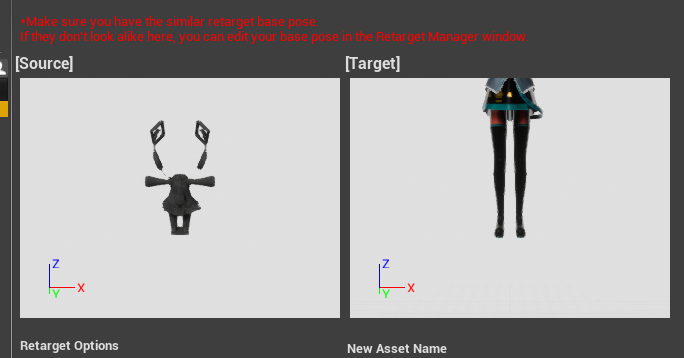
but on the scene
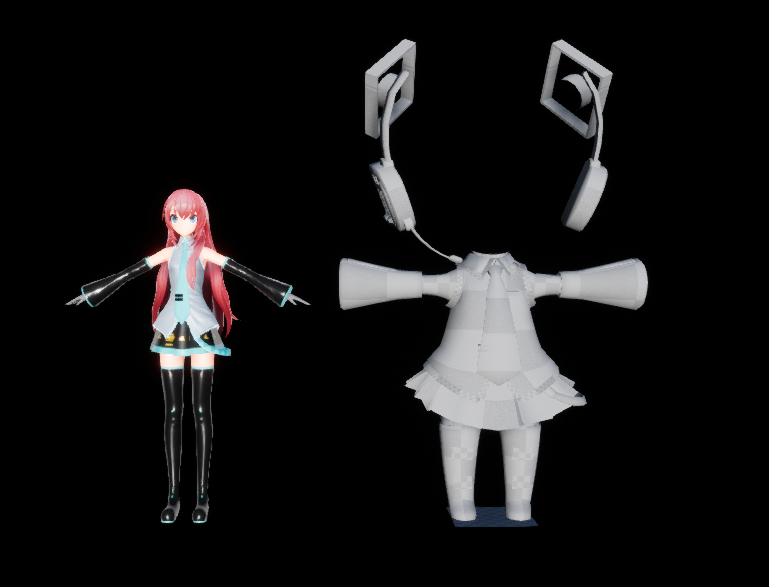
they're the same size
(the scene models don't have custom scaling)
 honest rune
whats with the platform on the feet of the mesh with the weird thinsg around the head?
that is weird though
I'd assume the true scale of the imported mesh is actually that much bigger by the looks of it
thorn cradle
The platform on the feet is just a quad to show the position of the root bone
And, honestly when I imported both models
I had to use custom import scaling for one
so, maybe that's the problem ?
honest rune
most likely
I wouldnt do that if the models shar the same skeleton either
I don't know how it would be have in animations by scaling that way. normally you want your scale (and normals etc) recalculated in the dcc software before exporting
 heady bridge
Hi, when I start my game in Standalone, it opens on the wrong monitor, not the one set as my main, is there any settings in the engine to fix it?
honest rune
either clear your systems saved window positions or while standalone is open, drag the window to the other screen and then close it. system should remember thats where you positioned it last
heady bridge
Dragging it over to the other monitor and closing it there didn't work, I tried with the X and the command quit
honest rune
is it opening on the same screen that the editor is open on? (or that the editor opened on when you first launched the editor)
heady bridge
The editor opens on my right monitor and same with NEw Editor PIE, the only window that automatically goes to the left is the standalone. Even when I play any fullscreen game it opens up on my right, it's just that for some reason
grim cargo
i have a question.. is there a node that triggerbox will gone when i step another triggerbox ?
like when i step Triggerbox1.. the Triggerbox2 will gone
node/bp
 regal mulch
Disable the Collision on that second triggerbox
fierce tulip
how big are the odds that 4.18.0 content copied to a 4.18.2 project isnt working? not showing up in the CB for me at least
grim cargo
ok ill try it now
 honest raven
 safe rose
@random holly Chotomatte
 random holly
read
random holly
Phantasy star online 2 ReCaptcha XD
 humble sun
pm me
 faint cedar
Aren't Japanese captcha just hiragana / katakana? Just copy this: https://i.pinimg.com/originals/31/29/d8/3129d844ff8ae37599f980b316c39d02.gif

and you're good for life
humble sun
yeah thats why i was curious
that i can read
Kanji.. not so much
they also use chinese characters of course.
honest rune
lol
faint cedar
Chinese captcha?
faint cedar
The missing tile?
 bitter iris
faint cedar
bitter iris
faint cedar
yeah now grab the rogue tile and move it
bitter iris
that simple?
faint cedar
Well, you can try doing it with a blindfold
bitter iris
i crapped myself
 whole sonnet
Curious what AA everyone is using in their unreal games? Are you using TAA or did you switch to forward shading so that you can use MSAA?
faint cedar
TAA for that sweet sweet masked temporal dither
whole sonnet
@faint cedar Can you share any examples of the temporal dither you use?
bitter iris
How do I package a game but only package files that have been used
whole sonnet
@faint cedar Woah, i actually said "Woah , interesting" out aloud when i saw that effect in the video lol
looks pretty cool
@faint cedar Woah, i actually said "Woah , interesting" out aloud when i saw that effect in the video lol
looks pretty cool
faint cedar
Thanks
You can do a lot of stuff with Temporal Dither, barely anything I use nowadays has "real" transparency.
whole sonnet
never would have guessed that effect is tied to temporal stuff, but my knowledge is limited on material type stuff like that
bitter iris
anyone?
floral heart
The visualize light propagation volume showflag is always on when I start the editor. I don't even have lpvs turned on anymore. :E
whole sonnet
@faint cedar Your game looks really cool too by the way 😃
faint cedar
Thank you 😄
 azure shore
all that happens is it opens up a window alongside the project window except I can't open the window and it shows it as a black bar
cursive dirge
have you checked the logs?
cursive dirge
sure there are
 lime cobalt
UE4 is building shaders the first time it's installed
azure shore
I double click an asset and nothing opens
It was working fine before!!!
I've been using it a while!
lime cobalt
ok it's all types of assets
whole sonnet
@azure shore Did you try to verify UE4 to make sure its not having any issues missing files or anything?
cursive dirge
bit late but this is also one reason why people use version control, to be able to roll back if things go wrong
azure shore
idk it was working fine earlier today
I was planning on doing that but I've hardly even made much yet
lime cobalt
@azure shore did you update unreal or made construction script blueprints ?
azure shore
no...
lime cobalt
are you on 4.18 ?
lime cobalt
with the source built version of UE4, it'd be possible to see what's hapenning ....
pausing the editor and see what's in the call stack...
@azure shore also, can you re-describe your problem entirely ? once you openned your UE4 project, you cannot open any assets ?
azure shore
I'll send a screenshot in a sec
lime cobalt
^ that's nice to know, the logs
azure shore
where are they then?
cursive dirge
users / <username> /appdata/local/unrealengine/saved/logs I think
azure shore
ok...
cursive dirge
could be more somewhere else, can't remember
plush yew
I can see the assets at windows explorer , but at unreal engine there is no assets.
azure shore
I get this
and if I click it nothing happens
it's not just a 5 hour loading time is it?
honest rune
for an anim frame, no
azure shore
same thing happens with any asset
lime cobalt
@azure shore it's an anim file ? does it happens with every type of file you try to open ?
azure shore
yeah
honest rune
sounds like your pc is struggling
azure shore
maybe
lime cobalt
i'd check the appdata logs indeed
azure shore
but it was fine this morning
lime cobalt
@azure shore how much is your project folder ? 10gb ? 20gb ?
personally, I'd do a backup copy of it
azure shore
the project file is 1kb
lime cobalt
no, the project folder 😄
honest rune
lol
lime cobalt
with all the maps, textures etc
azure shore
it doesnt say... its a folder...
honest rune
rightclikc on folder, select properties
azure shore
I can run the project as normal
I tried other projects including the default project and still the same thing
plush yew
Guys?
azure shore
guy
plush yew
Help ahah
azure shore
well I'm pooped
out of ideas
why does it have to do this to me
seriously
nah
this is hopeless
honest rune
you did try closing and re-opening project yeah?
plush yew
I can see the assets at windows explorer , but at unreal engine there is no assets.
lime cobalt
@azure shore did you check these logs tho ?
azure shore
I can't find them!
honest rune
any luck if reloading the project?
lime cobalt
@azure shore can you locate your "users" folder ?
@azure shore Indeed, reloading the project needs to be tried too
@azure shore because AppData is a hidden folder, so once you're in C:/Users/ (yourName)
check the folder window, you'll see a text bar containing a text line with C:/Users/ (yourName) written on it
add " /AppData/ " to this bar
honest rune
or %AppData% right into explorer
lime cobalt
oh yes, I didn't know this ^, much easier
honest rune
ancient chinese secret :p
lime cobalt
for me, the folder is in AppData/Local/UnrealEngine/4.16
@azure shore can you see how to find these logs ?
using @honest rune awesome method
safe rose
Hmmmmmmmm... so someone messed up a setting somewhere in a project I'm working on, instead of rolling back, I'd like to try to figure out wtf could they have done...https://i.gyazo.com/2362be27e77d8c7a97581f7093008df4.gif

That's on a blank new map
azure shore
and yes like I said I've restarted the project like 50 times, restarted computer, and reinstalled the whole ue
lime cobalt
@safe rose wrong friction/physics settings ?
@azure shore if you search into /Unreal Engine/4.18/ can you see any logs ?
lime cobalt
also, I think you can find additional infos in the Project folder
@safe rose okies then
safe rose
I just looked at teh diff in project settings
lime cobalt
omg noice
safe rose
Someone dun fucked up
lime cobalt
@safe rose what commit system do you use tho ? Github ? SVN ?
safe rose
Perforce
lime cobalt
okies
safe rose
anything else is worthless for UE4
lime cobalt
that's good to know
azure shore
omg
humble sun
SVN works fine
azure shore
UNREAL ENGINE YOU TROLL
azure shore
IT HAD. THE DAMN THINGS OPEN BUT IN A TINY LINE OFF SCREEN
humble sun
lets just say
azure shore
UUUUUHH
If anyone wants to give me a dunce hat rn I will happily go stand in the corner of shame
although you can't blame me, it wasn't even on screen but if I move the cursor to the top it gets the drag arrow thingey
wow
frank escarp
svn works, but svn is a dinosaur...
ive used svn some times for unreal, lack of deltas tends to make the server baloon in size
also slower than perforce
safe rose
Oh, wasn't trying to start a #source-control war on here. That's why we have that channel 😃
Also, not an opinion when it's a fact
¯_(ツ)_/¯
floral heart
"anything else is worthless" is an opinion.
How bad was the diff?
plush yew
Guys.
Please
Elp
Help
I can see the assets at windows explorer , but at unreal engine there is no assets.
coarse cradle
did you select the right folder?
bitter iris
Guys how do I find the log of which i failed to package
 random coral
@plush yew try check the filters maybe
bitter iris
ProcessResult.StdOut: LogMeshUtilities: Error: Raw mesh is corrupt for LOD0.
ProcessResult.StdOut: LogStaticMesh: Error: Failed to build static mesh. See previous line(s) for details.
Anyone know why im getting this
 unkempt spoke
hello
honest rune
it really sucks when an awesome name has been taken by a terrible game lol
 tame bluff
some dude tried to add me on facebook
and this is his top post on there
i have no idea who he is but he must have found me through here lmao

Wait no it's this one
lmao
It's the starter-content that gets me though
 obtuse sable

how do i remove
the hud
i cant remember the keybind
the Lit
show, perspective etc
sry if this is the wrong channel
 elder kestrel
glad to see this is super active Unreal IRC is so dead nowadays finally cam over here 😄
 charred raptor
Had anyone here used TrueSky?
safe rose
@0lento#8809 😉
bitter iris

MediaFire
MediaFire is a simple to use free service that lets you put all your photos, documents, music, and video in a single place so you can access them anywhere and share them everywhere.
can anyone help
one stands out to me
ProcessResult.StdOut: LogMeshUtilities: Error: Raw mesh is corrupt for LOD0.
ProcessResult.StdOut: LogStaticMesh: Error: Failed to build static mesh. See previous line(s) for details.
light thunder
Can a collision component have a different collision than it's root? for some reason my collision is not working even though it is set to block everything
light thunder
geez this place is dead
 gleaming shore
All I want to do is turn off a light from another blueprint, how hard can it be
 worn granite
tsk tsk 
 fluid stag
lol
worn granite
@gleaming shore did you go watch victor's video suggestion?
azure shore
Also sorry if I wasted anyone's time
plush yew
@light thunder You can use Set Updated Component but I think it only works on Pawns or Characters
light thunder
I'm trying to start over a streaming level but not sure how to use reset...can someone advise?
light thunder
about to save a lighting build what's up
@light lintel
standby
what creates both those widgets?
Is it an actor, a player, what is it ?
where are they added to the viewport?
wait
stop
did you watch the bluepritn communications video?
watch it
it will clear up a lot of the fog
seriously just watch it and follow along
yes there is
but you need to watch it
stop not watching, it is literally the developers trying to show you the best way to use their engine
bare mininum you will learn enough vocubulary so you can ask more specific questions
I need to go to bed but watch that video here

Announce Post: https://forums.unrealengine.com/showthread.php?101051 This Training Stream takes a look at Blueprint Communication. We find that Unreal Develo...
check the pin up in the corner of these various channels you'll find the good stuff there that peopel reference a lot
you need to learn more before you can do that
trust me, you can spend an hour or two now and easily gain 10 hours
20-100 hours
they aren't that boring
UMG and Widget is the term you want to use, UI is a more general concept, UMG is specifically unreal
dude you need to go watch the video
worn granite
in the umg ...
 thorny cipher
Anyone know what this is in the profiler?
"As far as I know the profiler includes the time the CPU isn't doing anything. "
All i could find
how can it cost 33ms to do nothing
¯_(ツ)_/¯
plush yew
Guys help me.
I can see the assets at windows explorer , but at unreal engine there is no assets.
safe rose
@plush yew he loves PMs
thorny cipher
dont pm lol
 austere finch
!gameidea
plush yew
Want game ideas? Send me a DM!
so can someone help me with upside down issues?
mainly camera
austere finch
upside-down issues? explain it?
plush yew
I want forexample my 1st person guy to have upsidedown view
i rotate camera in blueprint and aeverywhere and best result i get is that my keyboard is just mirrored but not the view upside down.
I still cant see the assets inside the ue editor
But at Windows explorer i can
 paper kernel
Editor chose to freeze when alt tabbed
great
well, only myself to blame
never use even versions of UE
uneven versions have always worked without issues
 tender dome
is there any tutorial for how to implement attack combos animations
bitter iris
Can anyone help me been ignored for the past few days. ProcessResult.StdOut: LogMeshUtilities: Error: Raw mesh is corrupt for LOD0.
ProcessResult.StdOut: LogStaticMesh: Error: Failed to build static mesh. See previous line(s) for details.
getting this error when packaging
paper kernel
@bitter iris surely it says which mesh is corrupt
bitter iris
Im looking through the log cant find it
paper kernel
welp, then it's gonna be pain to find
glossy flame
If it has the required space, RAM and CPU power (very minimal required), sure
Perforce Public Knowledge Base
fierce tulip
very odd, I got send 4.18.2 ueassets, but they dont appear in the content browser at all
frosty bloom
@fierce tulip Did you migrate or import them into the content browser? Sometimes when assets is copied from folder directly to content folder it requires a restart of the project for them to show up. (I have had cases were I had to delete said assets and re import them too)
plush yew
Does anybody know how to cach images locally in Blueprints. We use Download Image to get the images, but there is no caching option. Any ideas?
wary wave
define 'cache locally'?
fierce tulip
@frosty bloom thats not it, I know how to do that and been doing it for many years.
they just dont appear.
plush yew
ha... well cache the images on the disk, so also can load it when offline
Download Image
silver crown
@fierce tulip Sure it's 4.18 and not custom source build?
fierce tulip
asking now, since I was sent the entire project and still nothing.
though i highly doubt it
oh god rofl, for some reason it starts ue4 with last used filters
never did that before on new projects
silver crown
That was it?
fierce tulip
yes, and it doesnt do that for sure in 4.17 so never realized
fierce tulip
beats me
wary wave
yes
plush yew
nice
 upper heart
@plush yew Amanda said that the preview should be out "the second half of this month" on the forum.
plush yew
is there a component or i need to do it in blueprint somehow?
@upper heart amanda bott?
upper heart
yeah
upper heart
🙄
silver crown
"follow some basic tutorials" <-- You should really do that
plush yew
2 hard
i cant
wtf
I ask help and u say watch tutorials?
jesus
Ive been working with this problem for days and I watched every kind of tutorial about it and checked forums. But I just cant get it to work and you say watch some tutorials. 😃
ahh nevermind
fierce tulip
well, if a question is just a very simple google search away and you are asking a very basic question.. you can kinda expect that.
I'd suggest to google "ue4 blueprint scale actor over period"
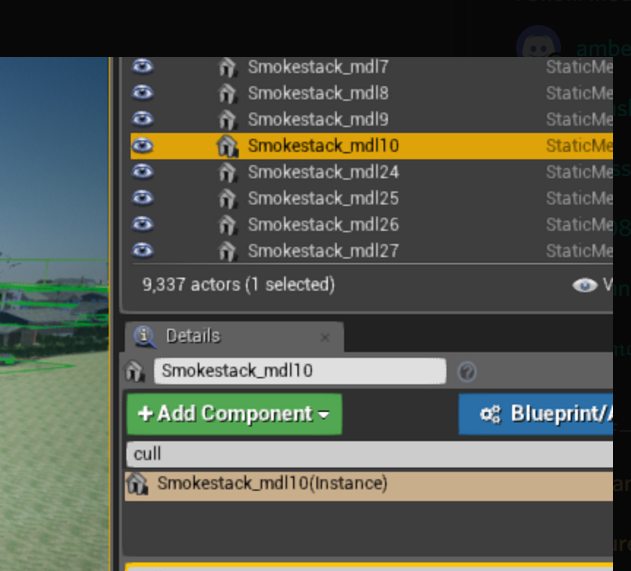
light thunder
Can someone tell me why that stuff isn't culling?
bitter iris
@paper kernel Could I send you the log an maybe you could check
light thunder
bitter iris
@light thunder Are the buildings in BP's?
light thunder
I thought that was my problem and it is for some things, yes,
but when it still does it with static meshes
light thunder
But what is that static mesh actor not culling?
the smokestack example, it's details:
This is baffling
plush yew
so no caching in blueprints?
light thunder
huh?
plush yew
good lord
silver crown
@plush yew Put the UTexture in a save
tender dome
does anyone know any tutorial for importing static mesh as skeletal mesh?
fierce tulip
fierce tulip
"At the moment, we have a ticket in for this with UE-13425, which is currently backlogged. There is a limitation with using instanced static meshes for culling since these get reduced to a single draw call when rendering an object X amount of times. Normally that that X values would be the number of draw calls you would get. Because of this these objects can not be independently culled.
Using the Hierarchical Instanced Static Mesh will be the best route."
light thunder
Lol how long is the backlog? 2 years?
fierce tulip
sometimes things just dont get fixed
light thunder
So wait... I can't cull any static mesh I drop into the level using a volume?
fierce tulip
@light thunder they are instanced static meshes
light thunder
@stray verge Because it hangs and goes unresponsive
@fierce tulip I'm confused....do you mean instance in that they are more than one of a copy of a stiatic mesh?
so, if I only had one smokestack, it would work
but if I have two, it won't






 light thunder
My UE experience is growing but much of my knowledge is fragemented....I know some intermediate things but some of the basics fell through the cracks - how did that BECOME an instance (I am modifying a demo map so I didn't build much of it)
fierce tulip
dunno ¯_(ツ)_/¯
light thunder
so if I highlight them all and "replace" with a static mesh?
How do I fix it, is what I am asking?
fierce tulip
you do know that the cull distance volume doesnt work in editor right?
(unless you press G) but that depends on ue4 version afaik
fierce tulip
probably
light thunder
that one screenshot was during play
fierce tulip
k
if you set cull distance to 9999
only meshes that are about 9999 in size will be culled
fierce tulip
Guide to placing and working with Volumes to augment the behavior and setup of your levels.
light thunder
I thought it was 99999 and BELOW in size?
fierce tulip
closest to
light thunder
Oh.
Strange.
It is as though the knowledge I lack could somehow fill up an object of written language
it's still laughing at me @fierce tulip
how can I get the bounds radius of that smokestack...i want to cull by the exact amount and see what happens
fierce tulip
whats the longest size of that mesh
X Y or Z
add a number close to that in the cull distance volume
light thunder
i would think z
light thunder
fierce tulip
then fill in size 12500 or so, and set cull distance to 500
light thunder
what is that giant line
btw, i'm on a streamed level, however, the cull volume is in the persistant level (and so are the smokestacks)
baffling
plush yew
Anyone know where the manual explains the difference between a memory reference and an asset reference?
Asset reference I assume is just a direct reference between two assets, e.g.: a static mesh referencing a material
What's a memory reference?
 livid haven
Memory reference would be any reference that isn't in an asset but instead is merely in memory right now.
Some object that is not an asset.
For example, while you're Playing in Editor, that's a duplicated copy of the level/world all the objects in it.
Those temporary duplicates for Play In Editor are not assets.
plush yew
Ah, I see - thanks for the explanation!
fierce tulip
memory can also mean its still in undo/redo list
 upper iris
Need a good tutorials for basics to master of the material editor please if anyone knows one ??
silver crown
"for a long time" = 1 day?
upper heart
no, not yet. I ran it for a couple hours and gave up. It's running again now tho
silver crown
😐
upper heart
Running it on my more powerful cpu this time
silver crown
@upper heart It worked?
upper heart
still chugging along
 fallen tundra
does anyone know how to make a character animation play via a data array?
for example, the data array has facial data corresponding to different facial emotions, this is for a chatbot like app I'm making
so if I type out a sentence to the AI, it'll give back an emotional response (e.g. angry, sad, happy) in a array, so how do I let certain animations play accoriding to that data?
keen birch
Alright