#ue4-general
1 messages · Page 149 of 1
 keen birch
All projects do, not just royalty projects
It's just unwarranted for royalty projects 😛
If I'm that skilled I'll be doing paid work
 maiden swift
Royalty projects may as well be unpaid projects. 🔥
 lilac silo
All projects require a certain amount of knowledge of the engine, etc.
keen birch
I spent four years on a royalty project (which was also my first gamedev project), and now, finally, the hard core of the team (including me) has gotten it somewhere
lilac silo
I think they’re good though, because sensible people will take it as a learning curve and a chance of a bit of money is nice
keen birch
And the only reason I did that is because it's a project I'm goddamn passionate about
maiden swift
I honestly find it startling how many projects out there are asking for the world in exchange for a promise that you might get paid someday. Most indie games don't make enough money to retroactively pay several people for years of work.
 cloud cobalt
Royalty projects are definitely "gamble on maybe being paid a bit some day and probably 5% of 50 sales"
I wouldn't say it's a bad idea to work on something like this but you have to be invested in it, be integral to decisions on the game
It has to be your project as well as the other's
lilac silo
Definitely
keen birch
That's also something that annoys me in royalty projects
You've always got "team lead" people
And I'm just like
How the fuck do you expect to have one person in charge if you're not even paying people?
Those people are invested in the project as much as that leader
And they're getting as little (or less) out of it as that leader
So they damn better have the same position on the game-design and development decisions
cloud cobalt
Working for free on something without even the joy of contributing to how it's ending up is definitely something you should basically never do imho
cloud cobalt
Unless you really love working for others
keen birch
I've got this one guy on my team who I do multiple projects with, and in lots of things he doesn't give input
I just rage at him like "DAMMIT GIVE ME INPUT ALREADY" (Rage is a big word)
But he enjoys working with me and doesn't really care
😛
He gives input on a bunch of things he feels are important and leaves it to me besides that
He likes the premise of the project and that's enough
And then you've got people like me who want input on every little thing
cloud cobalt
For what it's worth, we have one "royalty" contributor to our project (music composer). She basically got complete liberty as to her work
The result fits the game very well
cloud cobalt

Build your fleet, trade, explore and conquerHelium Rain is a single-player space simulation that places you at the helm of a spacefaring company. Trade resources, buy ships and stations to fulfill contracts ! Dock at stations to buy and sell you ...
Price
$14.99
That one
 south ridge
Cool name @cloud cobalt
I really wanna see a dithering shader for your game
I think it'd be so cool
 plush yew
Would someone be able to check if their HLSL Code window in material editor is working?
4.18.1
south ridge
It works in my 4.18 after shader compiles fine
cloud cobalt
@south ridge What do you mean with dithering ?
south ridge
@cloud cobalt dithering. Literally. One sec...
plush yew
@south ridge You didn't have to enable any console commands?
south ridge
@plush yew Not really
I want to see the leftmost one
Dithering like this will need scanning of a group of 3x3 pixels
plush yew
Well damn, I dunno what to do now. Thanks for checking
south ridge
So you sample scene color 9 times, run it through two filters to find color #1 and color #2, then output dithering pattern with those two colors
cloud cobalt
@south ridge You mean you'd like to see a dithering post-process to make it look a bit glitchy ?
south ridge
Yes. Not glitchy, but retro
I think it would be really cool with the kind of color style you have
Very bright vivid colors against black BG
cloud cobalt
That could be fun to try
south ridge
I suggested it to you N months ago 😛
cloud cobalt
You did ? Damn
south ridge
I don't think I was very explicit though
I probably said that a retro limited pallete look would be cool
But yeah, I'm pretty sure there are existing dithering HLSL shaders
cloud cobalt
To be honest it's kind of hard to keep track of all feedback, but I love doing shader stuff so that's the kind of stuff I usually remember 😛
keen birch
xD
south ridge
But if you need a custom filter, it involves finding an average brightness level for all pixels, then finding average of two groups (one group where pixels are brighter than average, second where its lower)
Then using average brightness as input to a dithering texture
keen birch
Does anyone have this problem where you more or less five really complicated ideas you all want to work on?
It's something I'm running into
And I just really don't know what to work on
plush yew
Yeah I get that. I end up working on none of them
keen birch
Basically
plush yew
Okay I got the HLSL Code working again. You need to have Live Preview enabled to generate the code...
keen birch
o.O
 unborn mantle
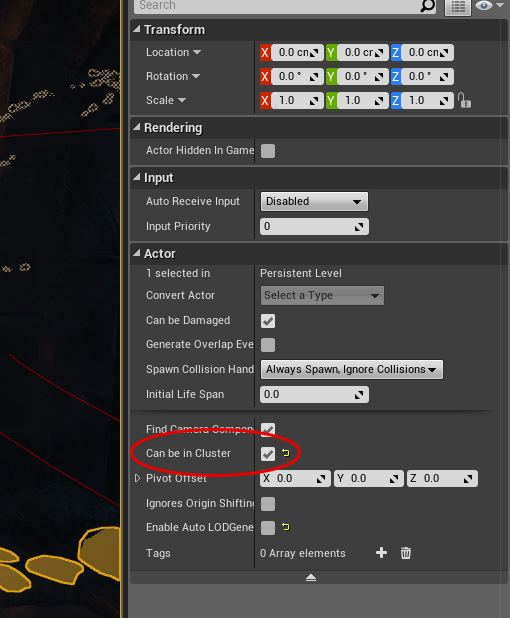
is there any way to setup cluster size for foliage?
keen birch
Cluster size? As in?
unborn mantle
foliage can be in clusters
https://i.imgur.com/fHobwin.jpg
is there any way to control size of those clusters? by objects amount or by area size for example?
 keen birch
Is that the instanced foliage mesh that you can only access by clicking the the thing in viewport?
unborn mantle
yes
keen birch
Yeah I don't think that's a proper thing
This is on a cube
Has it as well
Not a clue what it refers to, though
I think that's an HLOD thing...?
Can't find anything about it :/
unborn mantle
:/
keen birch
I think it means whether it can be included in HLOD clusters, so I wouldn't worry about it
What did you mean by cluster size anyway?
Rendering clusters? Distribution?
unborn mantle
how much foliage items can be in a clusrer or size of the area cluster covers, just to get some control over it
keen birch
So rendering clusters?
Yeah, UE4 doesn't give you any control over those
Can't recall if foliage was based on ISM or HISM, but it uses one of those two as base
Anyone know if you can make stuff in the construction script happen async?
I don't need it all to be calculated instantly, necessarily
unborn mantle
don't think it's possible via BPs
for c++ you can try AsyncTasks: https://wiki.unrealengine.com/Using_AsyncTasks
 fierce tulip
.png?
due to a limitation in either png or ue4 you cant import png with alpha properly
save as tga 32 bit 😃 (with alpha)
 floral heart
I've heard it's just a photoshop thing because it optimizes pngs. Haven't gone out of my way to test it. Not that there are many other png generating programs.
 frank escarp
even if then its masked with alpha or whatever
fierce tulip
so i just recieved my graphic tablet.. which should be delivered halfway december O_o
frank escarp
ive seen it happen the most when you start a new project, start it with the "full transparent" background, and then paint on that
becouse then it doesnt have color data where you havent painted
floral heart
I'm impressed png has support for no color data. Not that it sounds very practical right now...
floral heart
Ah, that's less fun.
fierce tulip
needs alpha chan
floral heart
I have an old version of photoshop. It drives me nuts that you can use the erase tool to create transparency that is unrelated to an alpha channel.
fierce tulip
O_o
cloud cobalt
Photoshop is bipolar when it comes to alpha
floral heart
As if they had transparency already implemented, then they added multiple channel support and no one said "these are the same thing you idiot".
cloud cobalt
Like, Photoshop is incapabale of handling alpha as an independent channel in PNG files
If alpha is zero, it removes color from RGB
Why do you want an alternative ?
You should be able to just save a PNG as a 32b TGA and it whould work ?
Uhh, okay I get it
The problem is Photoshop's handling of PNG
No output format can fix that
The root problem is that Photoshop doesn't handle alpha in PNG, neither at import or export
You should look at batch image converters like imagemagick
And convert to TGA
For the sake of completeness, there are other image formats that are really good, like Webp which is just like PNG except a lossless Webp file has the size of a compressed JPEG
But for gamedev purpose, TGA is the safe option
Not to mention UE4 probably doesn't handle webp files
frank escarp
too bad TGA bloats files really hard
it is uncompressed, no?
70 mb for a 4k texture
and the game doesnt store .tga
they only store the compiled compressed version depending on platform
cloud cobalt
TGA is uncompressed yes
frank escarp
man thats fucking retarded
PNG is lossless and compresses fairly well
we need a better file format for texture stuff
cloud cobalt
Webp is the best general-purpose image format right now
It replaces PNG, JPG and GIF while being better than each at their own strengths
cloud cobalt
It's a Web format so yeah, outside of browsers...
I'm sticking with TGA myself, since PNG is broken with alpha
BTW there is compression in TGA, but it's RLE, which is a 5-year-old's takes on compression
Also not super well supported (on top of being wildly unefficient)
fierce tulip
who in their right minds gives a 1m hdmi kabel with their graphic tablet, the gpu ports are in the back, if id connect that cable from there I'd need to sit behind my desk instead of in front of it
lol
 radiant fable
single monitor boy over here :v it's livable
radiant fable
my 2nd mon is a g15 blue lcd screen
i hated my ultrawide at work, vertical height is important in apps with long rollouts
still too low, 1600 here
 paper kernel
32" 4K doesn't exist, therefor I can't buy one
at least in this part of the world
sprites can have normal maps, yes?
 regal mulch
@fierce tulip Who in there right mind puts the charging slot of the Switch to its bottom
paper kernel
costs 2-3x more than same size TV for some reason
but TV just usually has very laggy panel control
so, if the panel is not that expensive, why the display is?
 hardy spruce
probably because the motherboard and parts need to be able to handle being on 24/7, and that the colors need to be a lot more accurate... but other than a nicer hight adjustable foot I'm as puzzled as you are
paper kernel
not really, TVs are suppose to be as durable as monitors when talking about EU regulations
but the image processing can't be that much more expensive 🤔
hardy spruce
weirdly enough I get plenty of second hand free monitors that still work fine.... and no TVś
paper kernel
there also seems to be weird jumps in price too
28" 4K is ~350€ , 43" is ~580€ but 32" is ~600€ ?
why is it that particular size
hardy spruce
probably because the panels at 138 dpi are harder to make.... or that its the sweet spot at which point people throw money at it because they want better specifications.
marketting!
or because the assembly line isn't made for that line, and they need to throw away a part of the screen to make a 32 inch.
plenty of possible reasons
just buy the darn thing and be done with it, you know you want it. Yes you do.
fierce tulip
@regal mulch nintendo, because nintendo :p
frank escarp
i confirm hot reload being completelly broken in 4.18
add a variable on an actor, and every property of the same category gets reset to 0
like 99% of the time
interestingly enough, child blueprints that modify the default properties do not get reset
but the direct child class of my C++ class does get fully reset, and all variables back to default
 vale osprey
hmm, maybe I'm missing something but I was not expecting from InvertRotator to just multiply values by -1
logically, it's suppose to give you rotation which points to exactly opposite direction
in reality, if you provide (0.0, -179.9, 0.0) you get (0.0, 179.9, 0.0)
which is basically a 360 degree rotation...
 sinful umbra
has anyone ever gotten
Incompatible or missing module: UE4Editor-GameName.dll
when using UAT?
i can't seem to figure out what im doing wrong
keen birch
Is there any way for me to spawn stuff from the construction script?
I've already made a function with SpawnActorFromClass in it, but calling that doesn't seem to do anything
The function runs, a print after the spawnactorfromclass call works in it
So it's definitely running
But it's not spawning anything
If I print the returned object name, again, it prints "None"
For now I'll just work around it, but it'd be far nicer to be able to do it like this
plush yew
heya
vale osprey
@Mr4Goosey#8437 you can spawn components but not other actors afaik
 upbeat trench
child actor component would be the way to go aye?
vale osprey
sort of - it doesn't spawn actor till BeginPlay I think
and I'm not sure if he is asking about c++ or BP as constructors are different in them
like BP constructor happens after c++ constructor, so if you are adding components in c++ constructor you will see them already in BP constructor
but not BP ones
keen birch
Hold on a second, can I even put components on another actor in Construction?
vale osprey
not on other actor, just your own components
vale osprey
BeginPlay is where you can do it
vale osprey
for that you can use Blutility
or build everything around components in a single actor
vale osprey
keen birch
Just enabled them in experimental
vale osprey

Wish you could Blueprint tasks for stuff in the editor? Look no further! Whether you want to create a simple actor replacer or you want to create an A.I to h...
vale osprey
yeap 😄
but it's editor only, so you won't be generating something in-game
for in-game generation you would do it as if you are running a game, in BeginPlay or tick with some logic
 fiery harbor
I just had 0 bytes left on C where I have the engine and my project files
while my game was running in the editor
gave me a lot of errors in the log
keen birch
For in-game I just run the event in Start, I suppose?
fiery harbor
lol, and that absolutely killed my own save files I create
 grim ore
@keen birch begin play if you want to run it when the game is playing yep
keen birch
So can someone explain to me why my "Soft Static Mesh Reference" to object is returning invalid?
But it does work for actually setting the static mesh in an HISMC
So I can't get the name
And the static mesh object ref is invalid
But it does work as input for my HISM
Oh and now it magically works
Alright so why do soft static mesh references not work half the time?
And if I shouldn't be using them, how the heck do I get a proper static mesh reference from my assets folder?
Like, I'd use hard references, but for some reason I'm not allowed to access those from class defaults
keen birch
Probably blueprints, actually
 soft garden
ehm no
vale osprey
is it android based?
 hard slate
yea
 brittle gyro
@hard slate pretty user the kindle fire is essentially android; create a simple app and deploy to android, see if it works on the kindle, profit
(and share with us to let us know)
hard slate
yea i just wanted to be able to do the programming and stuff on the go
brittle gyro
and send Amazon a bag of poop for fragmenting the ecosystem. 😉
vale osprey
taking into account how many platforms Unity covers, check there
hard slate
XD
vale osprey
I mean, UE4 works on android, but there are flavours of androids with their own SDKs
brittle gyro
wait, you want to use UE on the fire or write a game for the fire?
because then no, you can't
hard slate
wait wait wait...like the acuall engine works with android???
keen birch
You can't run UE4 on a kindle device, no
Nor on any kind of mobile device
😛
THings you make in the engine are another thing, sure
vale osprey
no, it can deploy on android, not dev on android
brittle gyro
lol, yeah... I think it's fair to say that 9/10 creative endeavors just don't happen on mobile devices unless you're a photographer, graphic artist, or whatever
hard slate
true
keen birch
No, I doubt you're going to find any kind of programming thing on a mobile device
hard slate
are there any compilers for kindle
keen birch
Heck, I'm struggling on a 15" laptop
brittle gyro
if it's got a keyboard, more likely you'll find "real" pro tools to create content (hell, even MS Notepad is better than typing a novel on your tablet)
keen birch
I don't program or use BP unless I've got two screens or really need to do something
Because it's just horrid
Wouldn't touch any kind of code on a mobil with a ten-foot pole
hard slate
tbh i could use remotr to stream lol
or stream my raspberry pi and use the compiler with VNC
keen birch
As for compilers, again, doubt it
brittle gyro
we're weaving magic man, literally the modern day magic; incantations that are obscure to the uninitiated creating things that simply do not exist in our reality otherwise.
keen birch
Not exactly something lots of people want, so not something that gets developed
brittle gyro
*and interactive at that
hard slate
but yea if i stream my PC i could use unreal engine on kindle technicaly
brittle gyro
@keen birch me?
hard slate
thanks guys 😃
soft garden
in my opinion, programming in android is very boring
brittle gyro
@hard slate to quote chris rock: "you could drive with your feet if you want to, that doesn't make it a good f**king idea!"
hard slate
XD
brittle gyro
😉
most non-programmers have a hard time grasping that the underlying processors for mobiles are not as well supported for compilers, etc.
so hard to find a compiler for android that would perform well enough to do work on
especially if you're beating the crap out of the "build" process in rapid troubleshooting situations
¯_(ツ)_/¯ Just my thoughts on it
hard slate
yea
thats logical 😃
but i think the best thing to do is just stream my UE4 to the kindle fire and use it from there
just for things like setting up objects and level design
brittle gyro
I would almost argue that it would be a great project but a different product (that anyone could make) that functions as a pure level editor (sans code func, BP at best) pulling in the project assets and crating a level file the editor could also consume.
not it
sadly, this is one of those features that is only good to help sell to young people/educators... the average pro dev works at a great desktop/laptop and sees most other interfaces as a gimmick (EG I LOVE the VR editor integration in UE but I don't think that's where I would be to design my levels)
 whole sonnet
When you change material on a mesh and theres a black and grey type checkboard texture appear until your new material has loaded, anyone know what this texture is called? I would like to actually use it in my level
 pallid compass
World grid material
whole sonnet
Damn i would have found it before i asked if i had engine content on, it was turned off on this PC, thanks 😛
vale osprey
GetSocketTransform is kind of broken:
technically it's the same rotation (difference in minus sign in roll)
but green color is what GetSocketTransform() reports
ohh crap
fierce tulip
trying to import a non-retopo zbrush model. max nopes
vale osprey
GetSocketTransform is just a normal transform under the hood, so this bug is really wide spread
@fierce tulip old version would brakes at just few mil poly, how many are you importing?
fierce tulip
8m
vale osprey
could be the issue not with the count btw but very small triangles
fierce tulip
should work, but the model is rather.. odd
i resized it 500 times up, innitially it crashed
aaand crash
vale osprey
hmm
fierce tulip
its ok, was just testing
 wind sand
Can anyone tell me if it is possible to create a particle material that will mask portions of actors in the background that have a specific texture?
wind sand
ty
 ornate hamlet
I have a question, since April 2017, have there been any changes to the ue4 fbx importer?
As far as I can tell there are no mentions about that in the changelist. But all the skeletal meshes are now broken if I reimport them with the latest unreal version 😐
south ridge
@ornate hamlet There have been various changes in FBX importer, but I can't tell you the exact dates
But I believe they rewrote their code since april 2017
ornate hamlet
@south ridge yeah I figured. I kind of have to fix this somehow. I am wondering if I could somehow reimport with different settings to see if that might fix it but I am not sure how I can get the import dialog box to appear again when reimportin an asset
google is not being particularly helpful
south ridge
What's the source editor
ornate hamlet
Blender
south ridge
Blender or something else?
They added some blender specific code
That removes rootmost bone that blender inserts
ornate hamlet
Well, Im not sure if thats the root of the problem. But I can tell you what happens. Upon reimport the asset will be flipped and super itsy bitsy small.
I tried importing a new skeletal mesh asset with the "use T0 as ref pose" option ticked and using the old skeleton
this seems to kind of work but there are some problems. The asset wont be quite at the right spot and wont quite rotate with the bone as it should
So i am thinking to just reimport the main skeleton asset with the "use T0 as ref pose" option. But as far as I can tell there is no way to change this option when reimporting
plush yew
Need help with someothing
i assume its pretty small
but i dont know how to fix
Why does this black patch exist on my terrain?
plush yew
This is everything in my scene
 fluid stag
well if you are baking light, and are gonna use importance volumes, I presume you can't unless you make the landscape dynamic
which means stuff in the in the importance volume won't cast a shadow onto the landscape
maybe someone smarter than me will know a solution 😄
plush yew
How do i build?
fluid stag
big button at the top of the editor
fluid stag
np!
 tough flint
Can someone help me on state machines and blend spaces?
I need to set a shooting animation by pressing a key
Multiple animations activated by multiple key combinations
Asking here because #animation seems to be dead even though this community has 2000 people on lol
Please?
plush yew
Hey what’s a fx artist? And what they do?
 half mango
i just cant get scene perfect
from blender to UE
looks amazing mostly but small shadow bleeds
trigger my perfectionism
and trying to understand why they happen
sends me head west
 weary basalt
@plush yew fx is short for Effects. So an FX Artist builds effects you see ingame.
sfx would be short for Sound Effects.
tough flint
help please?
 worn granite
montages
soft garden
HI, there is a console dev? i have a question 😃
 wary wave
you're unlikely to get console specific questions answered in public channels
 viral kettle
Hi
 dark pike
Greetings.
soft garden
hey, in 4.18 how i overwrite the default Scalability for my project?
plush yew
Hello, i'm new here
i was following the 3rd person project tutorial, i got my controls to work, my character could spawn and move around
but its stuck in a T-pose, would someone take a look at my project and tell me where i went wrong?
 atomic meadow
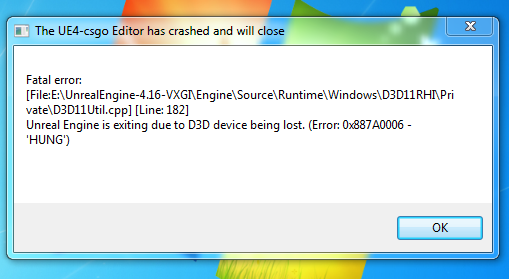
hello, how i can fix this ? https://i.gyazo.com/9787336af4cad4579d4291f22846a65e.png
 whole sonnet
@plush yew Did you set any animations for your character mesh? If there are no animations the character would stay in default pose such as T pose
sent you a PM mayor
plush yew
thank you, its resolved
radiant fable
https://i.imgur.com/wm3wQf3.jpg
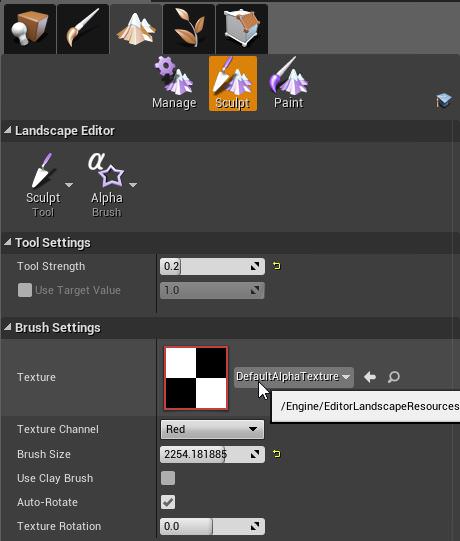
any great people of the internet released a free pack of alpha brushes for landscape shaping that anyone knows of?
 devout gulch

Supplemental video, illustrating the motions with a more detailed character model.
radiant fable
answered my own q if it helps others: http://www.zbrushcentral.com/printthread.php?t=75606&s=85b103fbef0f2108288fe6e634190a78
 sacred crater
 strange tendon
pallid compass
strange tendon
pallid compass
anyone here using simplygon
 smoky pilot
I can't manage to remove the ground and the background in the preview material window 😦 how u do that?
 sleek spear
so i cant export a landscape as object?
 buoyant echo
Is there a way to allow users to edit textures with their own without compiling the game with them? I'd imagine I'd do it with a sync with an outside folder, but I want to ask to make sure.
 quasi lake
Like after 2 seconds I want do do something,without stoping the nodes afterwards
Seems the delay function is already async?
grim ore
if you want to do something 2 seconds later use a timer and call something 2 seconds later
 fair violet
@grim ore would you not use a delay node or is there a downside?
Timers feel a bit messy especially if it’s just for a small one off thing that needs to be delayed
grim ore
well the delay node would stop execution of that path
and I thought he was asking how to do something later without stopping the nodes after
fair violet
Ah gotcha! In the case of a simple bit of logic needing to be delayed, a sequence to split the execution flow would make sense here too right? That’s what I usually do when I need to keep the original path executing but have something delayed called too.
grim ore
I really don't know honestly lol. I rarely use sequences because I have no idea why and I tend to do stuff in it's own functions/events to make it easier on me for changes so yeah I like using timers to fire off stuff later if needed. Whatever works is what matters tho 😃
there's probably a dozen ways to do it and all of them right in the right circumstances 😃
 viral oriole
Anyone here ? An blueprint expert ?

 final dagger
Hello, is there anyone here online that can answer a very simple question on how to open up a window from the unreal incon in the windows task bar
I try right clicking the unreal icon to try to maximize the window and I dont have that option
my window wont open
I am trying to get the window on the right that is white to open up
worn granite
have you tried hovering over the icon, then clicking the desired window?
worn granite
can try closing the window and re-opening.
final dagger
the only thing that works is just clicking the x to close it, the maximize button is not working
worn granite
depending on your version of UE4 slate sometimes does that
final dagger
I tried that
I am using 4.18
If you can help me I would greatly appreciate it
its somghing stupid simple I am sure, but I dont know how
Does anyone here know how?
damn, alt tab is not working for me either to get that to work
it just opens up the editor but I dont see the window
damn, about time I figured it out, control, alt, delete, select the window under the unreal and choose maximize from there, what a pain in the fn ass. Epic needs to fix that shit, a simple user, not going to know that crap. A window shouldnt do that, thats rediculous
whew, thank god I know some things about windows
no other program I know gives you a window you can't maximize and choose from easily.
 exotic turtle
Wow glad you got that figured out 'cause that sounds mega strange.
By the way, any of you guys doing LudemDare 40? I really wanna do one, but want to see who else is interested. I'm a music and sound guy. Just message me or tag me if you're interested. It's a game jam this weekend.
quasi lake
I have some problem with character blueprint
Problem is that:the character has a capsule component on its root,and mesh to be its child,which we can not change the relation.This makes a problem,if I want the character can be gone through between his leg,for example, a giant dragon
The capsule component prevents everything passing through its middle,no matter how you set capsule collision,and you can not turn it off because
You need it to make the character stand on the ground cuz the mesh is right below it
Which is fucked
Anyone knows something about this?
Maybe I have to reconstruct a new character
Unreal's character cannot satisfy my demand
pallid compass
U need a new char
U cant change out enherited components
u may be able to just disable it and add another col on that u can change
quasi lake
No you can not disable it
Because character movement needs it
I checked the source code,event the character movement needs a specific capusule collider to execute its functions.So if I wanna change the character I need to change character movement too,which is almost impossible
pallid compass
im pretty sure iv got it turned off
but i only use flying so
fight be different
might be*
quasi lake
Yeah you can turn it off but you are gonna fall into the ground
My project is a core battle game
OK that's what unreal can do,I can do with that,cant complain much
 rotund summit
@quasi lake You could disable collision overlap response between the dragon capsule and any actors that need to go between their legs, then attach static colliders to his leg bones that block the little actors
or don't even parent to the skeleton, just put two colliders at the bottom of the capsule or no blocking collision at all might be fine
Random question for the channel: Does anyone know if there is a way to mess with the size and/or position of the camera preview window that appears when you select a camera actor in editor? It tends to be in the way, but I would still like to see it, just in a more convenient position
plush yew
WARNING: Warning: Plugin 'NativizedAssets' does not list plugin 'ApexDestruction' as a dependency, but module 'NativizedAssets' depends on 'ApexDestruction'.
anyone got an idea how to fix this? lol
plush yew
im trying to enable nativization
 wild kestrel
the 1st condition mean that NativizedAssets requires Apex plugin
because it needs module from it
plush yew
its the same thing though
wild kestrel
but its not
plush yew
why wounld it also need rama's victory plugin
wild kestrel
no it is not
plush yew
lmao
wild kestrel
plugins are not modules
and modules aren ot plugins
plugins dont look on module depencies
so it is a but in NativizedAssets plugin descriptor
bug*
plugin depencies been added rencently so NativizedAssets been not updated to that new feature
plush yew
nativizedassets
it literally blueprint nativization lol
its not a custom plugin i made or anything
wild kestrel
so it is epic plugin? if it is it's a bug and should be raported
wild kestrel
it came with enigne?
plush yew
and i get that warning
i think so lol
ive never gotten a plugin
with that name
ever
lol
wild kestrel
this is primerly info for devloper of plugin
it is only a warning
so things will work
only thing based on this warning is that you need to enable both Apex and Nativisation plaugin
to avoid any complications
wild kestrel
NativizedAssets plugin
wild kestrel
ah i see
NativizedAssets is generated plugin for nativisation
This warning is still a bug thru
then just make sure you enable Apex
do you use that plugin?
wild kestrel
ok then make sure it is enabled
wild kestrel
so you fine 😃 ignore warning
wild kestrel
NativizedAssets is a plugin which contains module with code generated from blueprints
module it has Apex module depency as oyu use Apex stuff, but plugin don't have it
wild kestrel
probably because nativation code not been uppdated to use plugin depncies
wild kestrel
plugin depencies is to avoid any packageing errors or crashes cause of missing plugins, to inform you that plugin is missing
but oyu not missing plugin so it is ok like that
still it is a bug that this warning appers and nativistion code dont add plugin depncies, so it should be raported
plush yew
hmm
If you look at the last comment on here
Someone said to add it to your .uplugin file?
wild kestrel
ok i will move this to bug raport so somebody from epic will notice 😃
wild kestrel
you can edit that genrated uplugin, but its kind of pointless because it can be overwritten again in next packageing
 upper heart
How are you guys generating your project version numbers? Anyone set this up to use perforce build number or how do you automate it?
 short onyx
Hey, i don't know why but i can't Undo anymore ._.
upper heart
where are you trying to undo from?
short onyx
BP
plush yew
@wild kestrel I think I found out the problem
 vapid cedar
Any other hotkey issues, or just undo?
short onyx
I try all my BP but i can't undo
wild kestrel
@plush yew ??
short onyx
I only use CTRL+Z x)
plush yew
"Description": "",
    "Modules": [
        {
            "Name": "Veritex",
            "Type": "Runtime",
            "LoadingPhase": "Default",
            "AdditionalDependencies": [
@wild kestrel in Additionaldependencies
you have to write every single one of the plugins you are using
in your .uproject file
not just in Build.cs
wild kestrel
that does not matter
plush yew
its weird because it automatically added the basic ones though
wild kestrel
what if you use all of them? :p
plush yew
Engine, Core, CoreUObject..etc
ii mean i added my plugins to that llist
and so far i havent gotten that error
((But its not done packaging yet))
wild kestrel
yes thats normal, thats needed for code build configuaration
based on module depncies UBT configures directory path configuration so compiler can find things
plush yew
ya
wild kestrel
so it needs core etc :p
wild kestrel
yes
plush yew
and now... so far it seems like its packaging with nativization
wild kestrel
wait you added them manually?
wild kestrel
you had any errors?
wild kestrel
i mean it does not do this automaticlly?
plush yew
I mean it doesnt look like it does lol
it adds
these
it adds it to there
but not to AdditionalDependencies
as far as i can tell
plush yew
What do you mean?
wild kestrel
ok what you edited manually?
you been force to edit manually?
forced*
by some error?
plush yew
oh nvm
the message i sent before
is still there lel
the warnign
about apex and such
plush yew
UATHelper: Packaging (Windows (64-bit)):   C:\Users\pbssu\Desktop\Veritex\Source\Veritex/VeritexAIController.h(22): note: see declaration of 'AVeritexAIController::AVeritexAIController'
UATHelper: Packaging (Windows (64-bit)): C:\Users\pbssu\Desktop\Veritex\Source\Veritex/VeritexAIController.h(18): note: see declaration of 'AVeritexAIController'```how am i supposed to fix this? lol
its literally an error in the generated file
wild kestrel
either way it is a bug in this not happens automaticlly
this looksl ike another bug :p
because in blueprints oyu can can bind c++ private functions to nodes, in C++ you can't do this
wild kestrel
oh thats diffrent matter then
plush yew
its a C++ class that BP's inhereit from
lol
but im not sure why it would only cause this error
in Nativized builds
wild kestrel
ok try delting intermidiate forder and package again
if oyu have same error it might be some bug
worn granite
: because in blueprints oyu can can bind c++ private functions to nodes, in C++ you can't do this
Nativized builds
The main goal of Blueprint Nativization is to reduce VM overhead in the runtime version of your project by generating native C++ code from your project's Blueprints.
plush yew
@worn granite i get that
lol
but there must be a work around i can do
oh maybe this is why
my Constructor is private
lele
i can almost guarantee
thats why lol
wild kestrel
VM overhead does not have anything to do with plublic and private, what i was tlaking about is that Blueprint VM can technicly call compiled private functions in C++, which C++ compiler would not allow and if nativation would generate something like this it would create errors
i seen some meta specifier in C++ AllowPrivate, or something like that so i thought it might be related to that
plush yew
@wild kestrel yeah but all my other classes ahave public constructors
and no errors lol
so ima try
and jsut see what happens
worn granite
@wild kestrel clearly I meant generating native C++ code and not reduce VM overhead
wild kestrel
ok but we know what nativisation is :p
worn granite
then why is he confused access errors only apply to nativized builds?
wild kestrel
he never worked in C++ probably
plush yew
I would say about 70-75% of my code is in C++
worn granite
anyway was a joke
plush yew
then the rest in BPs lol
hard to give an exact estimate
every BP class inhereits from a C++ class
Lol
wild kestrel
so deleting intermidate fixed? ;p
plush yew
repackaging now
will be able to say in like 10+ minutes
lol
i really hope so though
i would like to be able to use Nativization
lol
short onyx
Why my undo don't work? wtf >.<
wild kestrel
I kind of expect that nativsation has same issues as hot reload, that UE4 is so complex that those 2 features simply have problem with some unexpected cases of use
plush yew
@wild kestrel It looks like the warning is still there but i dont have the AVeritexAIController error so far lol
after making the constructor public
final dagger
where do you download the apex plugin from? I noticed in 4.18 destructible meshes are not working like I had before.
grim ore
you dont need to download it, its just a plugin now in the plugins menu and disabled by default.
final dagger
ah
okay
I see
I got it enabled now, thank you, and yeah I see it works.
thank you
plush yew
@wild kestrel lol doesnt work
Unhandled exception at 0x00007FFC50233FB8 (KERNELBASE.dll) in UE4Minidump.dmp: 0x00000001: Incorrect function.
i packaged it correctly but
i get those errors
wind sand
Can anyone help me with this blueprint issue? https://forums.unrealengine.com/development-discussion/blueprint-visual-scripting/1394400-4-19-unable-to-get-actor-tags-in-blueprint
I'm seemingly unable to get actor tags from an actor, even through I can set (and print) them in the beginPlay node and also via the actor class details plane. The attempt continually comes up as empty.
grim ore
ok so starting from the first screenshot on that post, what is the array of tags? Is this a variable on your actor?
The 2nd screenshot does not really help as you dont get to see Where you are getting your actor then getting your tags from.
I just test it with a simple actor in a level with some tags on it and I was able to both get the actor and then get the tags or just get all actors with tags.
so my guess would be your actors you are looking for the tags on are incorrect or the tags are not set
wind sand
crap that may be it
apparently from within my class, it isn't setting the class unless I use a self reference?
grim ore
if your pulling from self it will know the class but if your trying to get it from somewhere else you might have to specify the class but for tags I am not really sure.
wind sand
it doesn't seem to respect the class within the detail pane though. Is that where you were specifying it?
grim ore
the only place I specified a class was when I did get all actors of class for my test actor then searched for the tags in those
how are you getting your actors?
wind sand
I'm doing a get all actors, then looking at each actor to see if any tags contain a level name (level0,level1 etc)
grim ore
Which get all actors node?
assuming Class I had no issues here. I put in my test actor class, it found the 3 I had, and read in the tags on each of them that I set in the details panel
wind sand
get all actors of class 'actor'
I think I have it working at the moment. The first level sets the tags, so as long as I don't have a preset tag, it seems to work and filter against subsequent levels
grim ore
Get all Actors of Class "Actor" does not work for me, it errors out since Actor is not a valid class to search for
wind sand
hmm, it is working for me
grim ore
nope worked fine for me
so your stuff might not have tags?
so the tags are not set on the objects at design time but at run time?
wind sand
The preset actor tags don't seem to work as expected or are at least not triggering the regex like the BP set tags
grim ore
ah weird Im using preset tags here and it's finding them
wind sand
4.18?
grim ore
but not doing anything against them just printing out the values. yep 4.18.1
grim ore
the first works for me, I get 2 objects printing out the 3 tags I have on them and the other 2 objects printing nothing
so the next question might be are you clearing the tags at all anywhere?
yep even with defaults my object that is not set in the details panel prints the default tag and the other objects print what I set
so how are you getting the Tags variable in the first screenshot? just right click Get Tags under the Variables -> Actor category
maybe as a test make a new actor, add in just the top 4 nodes connected to your begin play, add 1 or 2 tags to that actor, and then drop that all into a new blank level and see what happens
 unreal shore
Hello im new at this engine
Someone can send me a link to good tutorials ?
please ; )
wind sand
i'm not clearing the tags
but in any case, I wish they just had a property such as levelThatSpawnedThis
grim ore
@unreal shore check out the unreal engine YouTube.
unreal shore
👌
wind sand
I may have found an issue. maps don't allow duplicate keys do they?
upper heart
TMap doesn't. That would be a TMultiMap
wind sand
I wish we had but that's not in BP?
wind sand
Is there a way to create a macro like branch (a different version of it) and have it available in any blueprint?
weary basalt
@plush yew Please read the #more-resources channel, it has an desription of how to use the Bot to post Job listings
upper heart
@wind sand BlueprintFunctionLibrary
wind sand
but function takes the exec out of the BP, don't standard macros keep it within the BP?
weary basalt
I think he meant, MacroLibrary?
MacroLibrarys need an base type to be set, if your not sure what to base it on just use Object.
 restive eagle
When i package my game in shipping it gets a lot darker, you can bearly see anything. Everything is fine in development package though. Any ideas?
 urban meadow
i'm going to double post because i' mnot sure if anyone is reading graphics channel. can anyone else confirm that point lights are broken in 4.18? Point lights will always cast a dynamic shadow unless shadows are disabled completley on the light. if i uncheck dynamic, and the light is static, it continues to cast dynamic shadows
hrm, seems to be the same behaviour in 4.15, perhaps i'm wrong baout a bug, is there a way to disable dynamic shadows on point lights?
floral heart
If the light isn't properly baked, lights usually resort to dynamic for preview lighting. I am not sure that's your issue.
wind sand
Thanks @weary basalt
plush yew
I've created a custom collision channel 6 times now, made sure DefaultEngine.ini is checked out and "save all". But every time I restart the project, the channel is gone
quasi lake
@rotund summit Are you still here bro?
@rotund summit That worked,thanks so much
This helps me understand more about the collision,thanks again
btw I play mgs too,awesome game.
wind sand
Does anyone get this bug, where when you click in the left-hand BP pane to add a variable, a blank tab is created with no content?
@tough flint I don't see any questions asked by you?
tough flint
been a few days ago, hello
just need helping setting attack animations by pressing a specific combination of keys
my character is Samus from Metroid and she attacks in three directions: front, diagonal, and up
I want my char to enter the front attack animation by pressing Z+right, diagonal with Z+right+up, and up with Z+up
quasi lake
I may help you about this
tough flint
I will greatly appreciate help
dunno if I should use state machines or blend spaces or both
or animation montages, but I honestly have no clue where to start or how to use them
quasi lake
Is it a 2D game?
tough flint
3d side scroller
quasi lake
This better use statemachine I suppose
tough flint
she's also supposed to not be able to move while shooting, staying in place
tough flint
okay
yeah but idk how to set a combination of keys
I can only specify one key and another one being a modifier (shit, alt, etc)
wind sand
I would set keys that toggle bools on press/release, and put the condition in the main tick to look for the 3 x bool
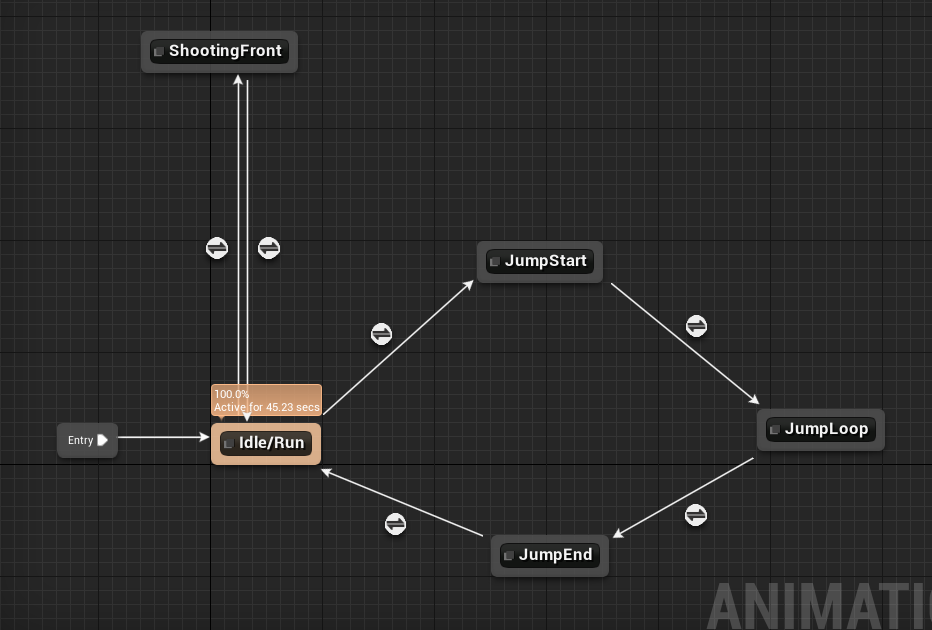 quasi lake
No
tough flint
it's BP based
quasi lake
In animation blueprint you just get it
tough flint
you mean event graph, right
quasi lake
Yeah
tough flint
which component do I get?
tough flint
is this the one called IsShootingFront or IsPressingZ
quasi lake
Yeah
tough flint
and that one is the Z key
quasi lake
I know
tough flint
oh
 quasi lake
Ok then show me your Left/Right/Up/Down input event
tough flint
 quasi lake
Cool
Then you make this node
Branch your Z bool
After your direction input event
When it's true it means you are inputing both Z and direction
It should look like this
 quasi lake
Cool
tough flint
manual locking is PressingZ in this case?
quasi lake
yeah
tough flint
and the left one is?
quasi lake
Left one is your direction input
quasi lake
Didnt you just say you dont want your character move when you are pressing Z?
quasi lake
You dont need that addmovementinput
tough flint
oh
I see, so this one has to be an extra set of bp different from character movement
ok one min
quasi lake
Your character should move when you are not pressing Z right?
Thats what should be connected when the branch's result is false
tough flint
 tough flint
yeah, she should move when you are not pressing Z
okay
oh
wait so this one is in the same BP as Character movement, I just add a false node of movement input right
quasi lake
Yeah
tough flint

like this?
I think I understand how it works
let me test the movement real quick
quasi lake
YES
tough flint
okay, so I'm pressing Z but this time she moves slower; or rather than slow, it stops moving when I press it but once I release it she can move
oh, she cannot move when I'm holding it
ok nice
tough flint
(one sec I'm restarting the engine because ram)
yeah she's supposed to stop for a while after shooting, the shooting animation is 0.625 seconds long, so she should not move for that amount of time
unless I press it again, since you can shoot multiple at once and therefore restart the shooting animation
otherwise she just stops moving for a milisecond
quasi lake
I think shooting should be another button
Z+direction just inputs the shooting direction
tough flint
so the direction button should be replaced with something else?
quasi lake
I played metroid in 3ds
Z+Right+shoot
This simulates the fps in 2D game
Z is LT,direction is mouse move,shoot is mouse left button
It should be this
tough flint
ahhh
you mean I should add an extra key to act as a "Stance/Prepare for Shooting" input?
or
tough flint
so by example
quasi lake
Since you dont want your character to move
Oh wait a minute
Maybe I misunderstood your demand
tough flint
Z = stance = stop moving and engage the first frame of shooting animation
Z + movement = direction where you're shooting
Z + movement + X = shoot in the direction specified
Z + X = shoot front
(thinking of using X to shoot, and must hold Z to engage in stance)
like this?
quasi lake
yeah
tough flint
yeah that sounds cool and easier
quasi lake
This is the samus return system
You can even modify the shoot direction into specific degree
With joystick
That's what makes metroid different from other 2D games I think
Well you are not limited to this though
I misunderstood your demand
tough flint
ah
quasi lake
Your original thought should be only walk and shoot
tough flint
actually my original demand was going ti make it troublesome, since the first shooting animation would always be front and then you have to switch to up or diagonal fast before the animation ends
adding a stance action before shooting will make it easier
lemme just rename the input and replace, one min
quasi lake
yeah
True
Thre is some problem without a stance
While you dont want it to move when shooting
tough flint
okay I fixed it

additionally there's another issue
she can shoot without a stance
so I should cancel the shooting (X) when she's not in stance (Z)
lemme fetch my shooting input
I forgot to mention, my Samus can charge beam too, so I have this:
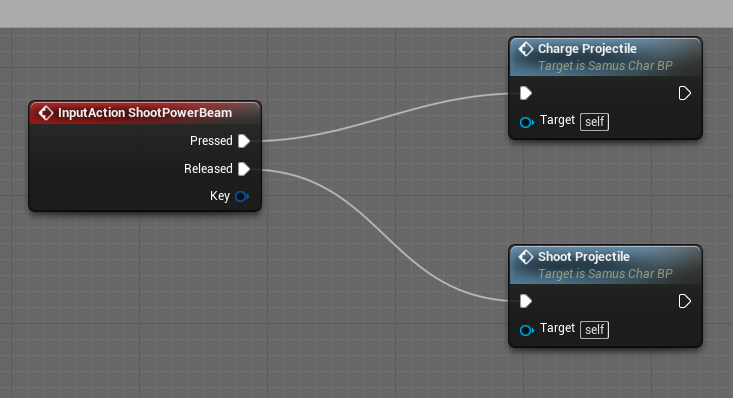
(got the charge beam from a megaman buster tutorial)
how should I cancel her shooting if not in stance?
tough flint
yeah, she's not supposed to shoot if not in a stance
otherwise she will just shoot while in Idle animation
basically she cannot shoot while idle, running, jump, etc
only when holding Z (stance)
quasi lake
Dont you have a
tough flint
yeah
wait
I got this
lemme try to figure it out
how to cancel her shooting if preparing to shoot is false
one min
okay, i tried to imrprovise it, didn't work:
https://i.imgur.com/yQcEJnd.png




i'm doing something wrong here
🤔
@quasi lake sorry I can't figure it out : (
quasi lake
Let me see
You want to stop the shooting immediatly after you release your Z?
That seems wierd
At least you should let the animation finish
quasi lake
Oh I see
tough flint
more like, at any given moment when I'm not pressing Z/Stance, I should not be able to X/Shoot
when I'm in Stance, I stop moving and that's when I can activate the X input
then when I release Z, I get out of stance and therefore cannot shoot
I could also let the animation finish, but that can be solved by blending the animations
tough flint
oh yeah
that's right, I had that
so how do I call it?
I have a variable for IsShooting? but idk if I should use that?
quasi lake
You just use the isPreparingtoshoot bool in a wrong way
What is this
You should place your shoot function at the red arrow position ,not here
Nonono
You need to make the branch
tough flint
one min, on phone
quasi lake
in this shoot event
Dont name your inputZ bool "isPreparingShoot"
You just misunderstood it
quasi lake
Naming is important