#ue4-general
1 messages · Page 108 of 1
 plush yew
 keen cape
yay
plush yew
Please welcome @bright creek to the community! :beers:
plush yew
Please welcome @plush yew to the community! :beers:
Please welcome @plush yew to the community! :beers:
haha Thx a lt bot 😄
 sudden agate
What is the best way to create reusable code/bluepritns for UE Projects?
Plugins?
 gloomy horizon

Anyone have ideas?
I'm not sure what to do to stop it from spazzing out when it's on the ground 😛
sudden agate
Maybe you should check if the Dagger is in the air by tracing downwards to the floor
gloomy horizon
I can do that?
That sounds like a good idea actually.
Why does it go fucky in my hand though?
sudden agate
I don't know
To me it looks like the dagger bounces off the floor (with low velocity up), tries to turn downwards, touches the floor again and bounces off again.
an infinite loop basically 😄
you may also just use a threshold of the velocity to turn the dagger downwards
if velocity < some value then don't turn downwards
gloomy horizon
I was trying that
However it resulted in the dagger going crazy
if it reached a steep peak in the sky
sometimes resulting in it boomeranging
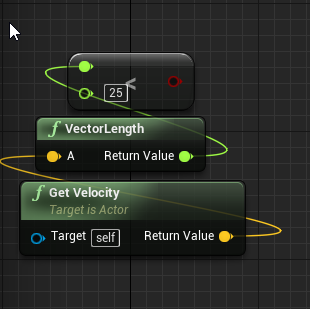
I was using variatioins of the 25 in this BP
sudden agate
ah yes. that makes sense, since the Velocity will be 0 if you throw it straight upwards and it comes down again
gloomy horizon
indeed
sudden agate
Maybe you can use some boolean to determine if it is thrown?
As soon as it collides with something, it deactivates this bool and the dagger doesn't rotate towards the velocity anymore?
gloomy horizon
I'm not sure how to check if it's thrown, I'm still kinda new to UE4 and bp scripting
I probably should have went with C++ since that's what I know
haha
But BP seemed so inviting
sudden agate
it indeed is
sudden agate
Well, you probably have a logic for your throwing, don't you?
sudden agate
yeah probably the release event is the thing where you want to activate the boolean in your dagger
gloomy horizon
Alright that makes sense
sudden agate
Show me where you Release some object
gloomy horizon
 wide sorrel
Hello everyone :)
I woke up this morning to the fact that the project I'm working on - and which was working fine yesterday evening - keeps disconnecting nodes in the blueprints, even if I reconnect them and save the project. I reconnected some of them (where it generates errors) but I'm sure there are some places I missed as the game starts with a blank map. I'm using 4.13.2.
Is this a known problem and if so is there a fix? Or my only option is to go back to my previous version?
gloomy horizon
All my interactable objects are a child of this
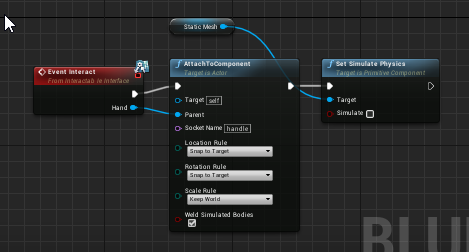
(So i have interact / release event already scripted in yes, I'm just dumb and didn't know to use them)
I honestly forgot it was a child
of another class
._.
sudden agate
Where does Static Mesh come from?
sudden agate
Ah I see
sudden agate
Simply add a boolean to your Dagger, activate it when releasing, deactivate it when colliding or Interacting 😉
simply check this boolean when rotating your dagger
gloomy horizon
just curious
How do I check if it has collided
I have physics enabled
I don't know the trigger from when physics simulations result in a collision though
sudden agate
The basic Collision Events also fire when simulating phyiscs. However, you need Simulating Physics to fire these events. There's a checkbox within the Static Mesh Component
The basic collision Events are
Event Hit
Event OnComponentBeginOverlap + EndOverlap
Event OnActorBeginOverlap + EndOverlap
gloomy horizon
sudden agate
Correct
sudden agate
depending what the boolean states.
I assumed it would be "IsThrown". So you would deactivate the Bool when colliding 😛
gloomy horizon
I named it collided
checked if it has collided
default is false
of course
and I was gonna set to true when it hit something
I can't seem to activate OnComponentBeginOverlap
@sudden agate Just curious, why do I need ActorEndOverlap?
I seemed to found it by turning off context sensitive search btw
Component overlap remains to be found
sudden agate
you may be fine with Event Hit.
gloomy horizon
@sudden agate https://i.imgur.com/fQSUw3T.png

It seems to print true when it actually has collided so that's working fine
 ionic sedge
@toxic wagon You could make a pose asset from an animation with all of the 1 frame animations, then Create Asset - Current Pose. You'll have to do that 150 times though. 😛
ionic sedge
@storm venture Sequencer is kind of broken for rendering, but the lighting shouldn't change if you're doing that in the level instead of adding lights in Sequencer.
gloomy horizon
Is there a way to add an "event handler" for my interact event
that's already defined in another blueprint
or do I need to modify the parent
and it will pass the changes off to all child varients?
ionic sedge
You can use an event dispatcher and bind the event everywhere you like.
Or anywhere you like. 😛
What do you want to do? Maybe it's overkill.
gloomy horizon
@ionic sedge if I make a child bp from a base
and update the base with new functions / vars
does the child update too?
So far it doesnt seem to inherit new vars 😦
ionic sedge
Probably yes, didn't really use it though.
gloomy horizon
it seems I can call them manually
but they don't appear on the side bar
interesting I guess
maybe that is just local vars
only
I'll just take these functionalities
and head back to the base and make them toggleable via a boolean
Probably easier anyways
gloomy horizon

You all know that old movie Wanted?
Where they could curve bullets?
Well I can curve daggers I throw.
plush yew
Please welcome @wind steeple to the community! :beers:
 final owl
whats the best way to find similarly interested people in the vicinity?
irl i dont know anyone whos interested
or even knows what unreal is lol
sometimes it would be nice to talk to people face to face and discuss ideas
should be an app for this, perhaps there is?
i have a dream of likeminded game designer friends
but alas so far tis nothing but a will o the wisp
 elfin plaza

 crimson sky
Guys quick question, can you unpack a ue4 exe back to its project form? BAsically i made a project before i had to rebuild my pc, and i only have the exe of it, i dont have the uproject anymore, so i wanted to know if its possible to unpack/unwrap an exe?? Cheer
 next badger
Have I posted it already? New tags look (optional):
crimson sky
??
ionic sedge
@crimson sky I don't believe you can do that.
crimson sky
Dang 😦 I had some stuff in there I wanted to retrieve
plush yew
Please welcome @clear mist to the community! :beers:
Please welcome @autumn hound to the community! :beers:
Please welcome @echo locust to the community! :beers:
 echo locust
Hi guys, I'm not sure which of the channels I should be putting tesselation related conversation but perhaps someone can point me in the right direction
 regal mulch
@final owl You can find people via Meetups around your town/region. Also please don't use the n word here.
next badger
@crimson sky You can't extract the code, only the assets, but even for assets it will be tough.
crimson sky
@next badger dang :/
echo locust
@next badger I've posted it in graphics for now, have a look if you might be able to help, it would be appreciated, very new to ue4.
plush yew
Please welcome @swift bridge to the community! :beers:
 swift bridge
Hello Everyone 😃
 wind steeple
@final owl Have you tried this yet? I think someone else already suggested meetups... https://www.meetup.com/topics/gamedev/
 full falcon
Isn't the planetrism guy floating around here, that's looking great.
Based on what I see on Twitter.
plush yew
Please welcome @amber tendon to the community! :beers:
crimson sky
Guys how do you arrange stuff?
Like those grey boxes overlap the white one i want them to go behind it
regal mulch
Where is that grey coming from?
plush yew
Please welcome @signal silo to the community! :beers:
crimson sky
@regal mulch its just a grey bar, thing is there isnt any z order for me to fiddle with
next badger
regal mulch
Works for me
plush yew
Please welcome @plush yew to the community! :beers:
 livid haven
You problem is that you have errors?
You've clearly got yellow pins connected to blue pins.
Those aren't compatible types.
crimson sky
Yeha basically i opened a project from 4.16 into 4..17 and this is showing as an error. Im learning Ue4 so to me its off
livid haven
Yeah. Whatever it was was valid in 4.16 but not in 4.17.
crimson sky
I thought so, again not a pro at ue4 :/ but what should i do to counter it?
livid haven
Break those connections and figure out what types it wants (the blue) instead
And make one of those.
It's probably some struct type that contains that type of connection as well.
livid haven
You don't change pin colors.
Make PostProcessSettings has several pins
Some of those pins have changed type between 4.16 and 4.17, it seems.
Which means you need to put your data in to the types it wants.
Drag off of the blue pins, I think they're struct pins.
And do a "make <whatever type it gives you as an option>"
That "Make <whatever>" node will probably have pins that are compatible with the old types. Probably.
livid haven
It would seem that is the type it wants, a 4D vector.
I'm not sure what that weird icon next to the pins are.
ionic sedge
They blue ones are probably Linear Color or something.
livid haven
It would seem so, but I don't understand the data.
ionic sedge
RGBA
livid haven
Yeah, that could make sense, but I don't have familiarity with post processing settings, so I don't understand how gamma or gain were scalars before and 4d vectors now.
livid haven
Go ahead and try that. If it's busted, maybe set the Ws ("A") to 1.0
crimson sky
Okay so it didnt work. I put it back to this
ionic sedge
What exactly are you trying to change?
crimson sky
ionic sedge
The Gamma and stuff in the tonemapper will be colors instead of floats.
crimson sky
Those pins are for my settings for bloom gain and gamma
Right now the green link works
but gain and gamma dont work so
ionic sedge
You can use the alpha value for the gain/gamma brightness.
You can right click the blue structs and just change the last value and leave the rest at 1.
plush yew
Please welcome @unkempt axle to the community! :beers:
 safe rose
@unkempt axle Price?
Also, is this a plugin? Or an extension of VS?
Or just a separate app
Running around your website now, think it's the latter
 unkempt axle
We're working on a plugin that will be released later this year for Unreal
safe rose
But price unavail
I would definitely use this
I'm sure many other devs here would also
unkempt axle
Also- our pricing page isn't up yet - but that will happen very soon.
Right now - we have a few different tiers depending on your usage
safe rose
I guess, you are currently lacking information on what you are intending to do with the Unreal Engine app itself
So, I would highly suggest a preview page for that
Even if it's just detailing the differences
@unkempt axle Can you pubicly state the Tier Prices?
livid haven
Is Blueprint some 3rd party debugging tool I don't know of?
unkempt axle
Yeah- we're hoping that the survey will help us pinpoint what to put on our page for Unreal 😃
safe rose
^ lol what
livid haven
The survey isn't UE4 specific, so I assume it's not referring to UE4's BP debugging tools.
safe rose
Oh, I haven't even looked at the survey yet
 cinder iron
Just in case you guys didnt notice, today is UE4 Livestream about Blender usage in Unreal! https://www.twitch.tv/unrealengine
 unkempt axle
For the tier prices: We announced out Free tier today for Open Source projects, so I know I can say that for sure
safe rose
Hmmm
What
Okay, well now @livid haven has me curious about the survey
so I'm going to take a look
livid haven
@unkempt axle Worth being extra clear about what constitutes "Open Source" as people mistakenly think UE4 is open source.
Just feedback, to help avoid some friction with less knowledgable users.
plush yew
Please welcome @mint wave to the community! :beers:
livid haven
People mistakenly think "I can access the source code and its free, therefore its open source".
I'm still unclear if "Blueprint" in the list of answers for "What tools do you use to debug crashes?" is referring to UE4 blueprints. I can't find any 3rd party tool named Blueprint, but that may just be Google tailoring its result to me and opting to find UE4 related results.
safe rose
I'm currently googling if there's such a thing as a "Blueprint debug"
non-UE specific
I see this thing: https://apiblueprint.org/tools.html
¯_(ツ)_/¯
crimson sky
@unkempt axle id be happy to do the survey and email but would the gift card be in £?
Im in the Uk
unkempt axle
I'll send you the giftcard digitally!
crimson sky
Righto, for what company? Amazon,ebay paypal?
unkempt axle
Also- I'm pulling in a memeber of my team that will be able to answer pricing questions a little better
Really, it will come down to your expected crash volume
unkempt axle
Yup!
livid haven
Would assume USD.
unkempt axle
That being said, if anyone would prefer a company besides amazon, I can be flexible
crimson sky
Ah i cant use $ im in the UK so £ is only useful :/
livid haven
@crimson sky https://forums.digitalpoint.com/threads/can-i-use-amazon-com-gift-certificate-card-to-buy-at-amazon-uk.2216462/

Digital Point
I have earn $600 from Amazon.com associate program and I choose payment method Amazon.com gift certificate/card. My question is can I use it to buy...
crimson sky
exactly. I know i can use .com but shipping is expensive
unkempt axle
AH- I can send you a giftcard in a different Currency 😃
It'll just be a digital giftcard
unkempt axle
For the Blueprint issue - I'd assume that meant to be asking about UE4 blueprints
crimson sky
yep
livid haven
Ah well, I didn't check Blueprint.
While I have the context of UE4 from you posting this here, the survery and URL don't mention anything UE4 specific, so I assumed otherwise.
Also, a little odd to think of Blueprints as a debugging tool.
crimson sky
so do i recieve an email to continue this or ?
unkempt axle
Thank you so much!
Re Pricing: Our pricing is based on usage. We haven’t published anything yet as we’re still refining it, but if you contact us, we can get you more info after we learn more about your projects.
As I said, this is a preliminary survey so that we can make sure that our product integrates with Unreal and meets developer needs when we release it later this year.
I've got to run to a meeting- but I'll check back in and answer questions in a bit 😃
 heavy bramble
safe rose
heavy bramble
safe rose
Hmm
Not saying that other things don't capture some of your project's data
But, this thing beats them all to the punch
 upper heart
has anyone worked with overlaps and foliage? I am trying to detect when my character overlaps foliage and it is hitting OnActorBeginOverlap/OnActorEndOverlap 10 times when I enter the foliage's collision volume and I'm not even exiting it but it is hitting OnActorEndOverlap still :/
I tried OnComponentBeginOverlap/OnComponentEndOverlap as well but same behavior
it works fine when I place the mesh as a normal static mesh
but not when it is foliage
I'm only placing one instance of it via foliage for this test
plush yew
Please welcome @fossil phoenix to the community! :beers:
 storm venture
@pallid compass Oh so i should just know about the sequencer being inherently broken and waste my time learning how to fix things that shouldnt even be a problem? cool, dude
storm venture
a response to something last night he said but never @'d me so i didnt see till now
lol
livid haven
Well, reading back, it sounded like you were super whiny about something because it didn't work perfectly immediately and decided to vent about it and call it shit.
Generally, not a cool thing to do.
storm venture
well considering matinee never gave that problem, yeah
it shouldnt be easier to use a free screenrecording software to so such a simple job
livid haven
Most of the time, when people do that, PEBKAC.
When something seems like it should be working better than it is, the first theory should be PEBKAC.
Until proven otherwise.
If you come online and post "I'm experiencing this issue, not sure why. Anyone else run in to it?", you might get help.
storm venture
i did
that died a while ago though, it usually only gets answered by victor trying to be an ass or something
 wispy wraith
hey guys i have a question
safe rose
ROFL
livid haven
It's about 5 minutes between "This thing isn't working" and "This thing is a worthless piece of fucking shit that needs to die in a fire"
wispy wraith
i have a question guys
storm venture
lmao yeah
livid haven
Don't announce that you have a question, just ask.
wispy wraith
so i have a HUD and it has action bar in it right, which is another widget, which is full of action slot widgets
storm venture
not that aggressive but yeah
safe rose
lol
wispy wraith
and every time i start up the game the action bar widget just turns into a white squre on the hud
safe rose
Crossfire
wispy wraith
and i have to replace it by just dragging it back in
safe rose
@wispy wraith white square = button usually
wispy wraith
idk why this is happening it's just slightly annoying
safe rose
Unless it's truly white
I guess, since button is actually grayish by default
Image might be blank
safe rose
@wispy wraith well they are definitely white boxes
storm venture
id like to point out that the last message of my screenshot was me giving the sequencer some slack and mentioning its probably great if i spend hours learning it
which i dont have time to do
final owl
interesting
storm venture
but im sure its fantastic.
livid haven
And @storm venture, regardless, just saying, 5 minutes between "I need help" and "fuck this shit" isn't a constructive attitude.
storm venture
well, are you familiar with the issue? all quality just turns to low after a couple seconds in the capture
livid haven
Nope. I am not familiar with sequencer. I don't have a solution for your sequencer problem, just seriously, not rhetorically, suggesting you approach people while looking for help differently.
And saying that you don't have time to learn to use a tool properly is basically a no-go.
storm venture
i used to be polite, really, but certain people in this community have annoyed me a bit too much
ionic sedge
Sequencer is broken though, for real. For rendering. Tiny errors but still. 😛
livid haven
I mean, what is anyone supposed to do with that? You don't want to learn how to use a tool but you want to use it well? 🤷 I mean, no one else can do anything about that. Get someone else to do it for you then, I guess?
storm venture
i want to do a simple thing with it
something that should be out-of-the-box
i want to capture the recording
ionic sedge
The quality turning low seems like a bug.
storm venture
^
ionic sedge
But that issue doesn't happen for me.
storm venture
it's not like im trying to dynamically edit lighting and materials and whatnot during a sequence
livid haven
File a bug report then.
safe rose
lol
livid haven
I'm sorry it's giving you trouble, but the only constructive or productive thing to do is file a bug report and try to communicate with others dealing with the issue to find a workaround.
safe rose
@storm venture Man, while not everything in UE4 works perfectly, I got to admit, I prefer this engine over any others I have touched before
storm venture
for sure, especially vs unity
wispy wraith
so much more efficient
storm venture
i despise unity tbh
wispy wraith
can get way more shit done with respect to time
safe rose
But, like sion was saying, whining about it doesn't really help the situation
wispy wraith
ay victor ur cute my dude 😉
safe rose
Even though, I do shit on it in my head quite a few times a day
Yeah, I am one sexy dude
storm venture
i prefer to say venting
for real though, im not even doing anything fancy, it's just an archviz project and i just wanted to record what it looked like
static lighting only, nothing happening during runtime
if i was changing stuff with the lighting during the sequence or maybe even having runtime events then i would assume its my own fault but i'm not, i cant imagine what else it would be
maybe i'm using the cine camera incorrectly, who knows, ill start from scratch tonight and hopefully it works
livid haven
Totally possible there's a bug.
Speaking of bitching/venting/whining... I'm eternally reminded how I hate blueprints.
Time to find all references to a function and fix them up manually since I'm changing the underlying code. -_-
Meanwhile, earlier today I used regular expressions to fix up over 100 lines of code in about 2 minutes.
Fix up blueprints? I'm still waiting for the search to complete, so I can then open up every result and manually fix it up with a dozen or more clicks and key presses each.
Ah yes, and let's not forget the Find in Blueprints window disappearing if you click away from the blueprint whose Find in Blueprints tab/window you opened. -_-
storm venture
glad to see im not the only one in pain
ionic sedge
Doesn't Refresh All Nodes fix things?
storm venture
though you definitely have me beat
livid haven
@ionic sedge I'm replacing a small subset of uses of an enum with another enum.
Changing that subset of places in code was a few minutes.
Changing it in blueprints is going to take me the better part of an hour.
ionic sedge
Change 3595327 by Phillip.Kavan
#jira UE-16485 - Add an option to host global Blueprint searches in a dockable tab that's not tied to any Blueprint editor context.
At least you got that. 😛
livid haven
Yep. Phil's up here in Chicago too. We both worked at Phosphor Games, contracting for Epic.
I may or may not have directly harassed the blueprint dev team about how frustrated I was with this workflow.
ionic sedge
haha
livid haven
I will say that the comments on that JIRA are amusing. 😃
next badger
HTTP ERROR 503```And I have half a mind to directly merge that CL over to my local workspace...
ionic sedge
@next badger Getting that too.
safe rose
@storm venture archvis is crazy, I have only done one ArchVis project and it was a pain to work in
Due to lighting
But, once you see the magic under the hood, it's pretty lackluster
storm venture
yeah it was hard to get the lighting right for me, i just started learning to use lightmass portals as well and getting more indepth with post processing
which is why seeing it all go down the drain during capture makes me sad
 mint wave
Hey guys, Im really new to ue4 so if this is a stupid question or the wrong area please let me know. What would be the best way to have parts of a large open worlds landscape / terrian be dynamic. Think an huge glacier with parts of it breaking off and floating away, or a huge earthquake splitting parts of the world and opening a huge crack shifting the surrounding areas. Is there anyway to do this with traditional landscapes? Is there a way to have landscapes break and turn into actors? Or turn into 3D lanscapes and shift? I assume making a large world out of actors alone would really bog down the game. Thanks!
 tropic pilot
where can i ask about materials?
plush yew
Please welcome @midnight fox to the community! :beers:
Please welcome @near grotto to the community! :beers:
upper heart
@tropic pilot #graphics
Does anyone know why this is happening with foliage overlapping?
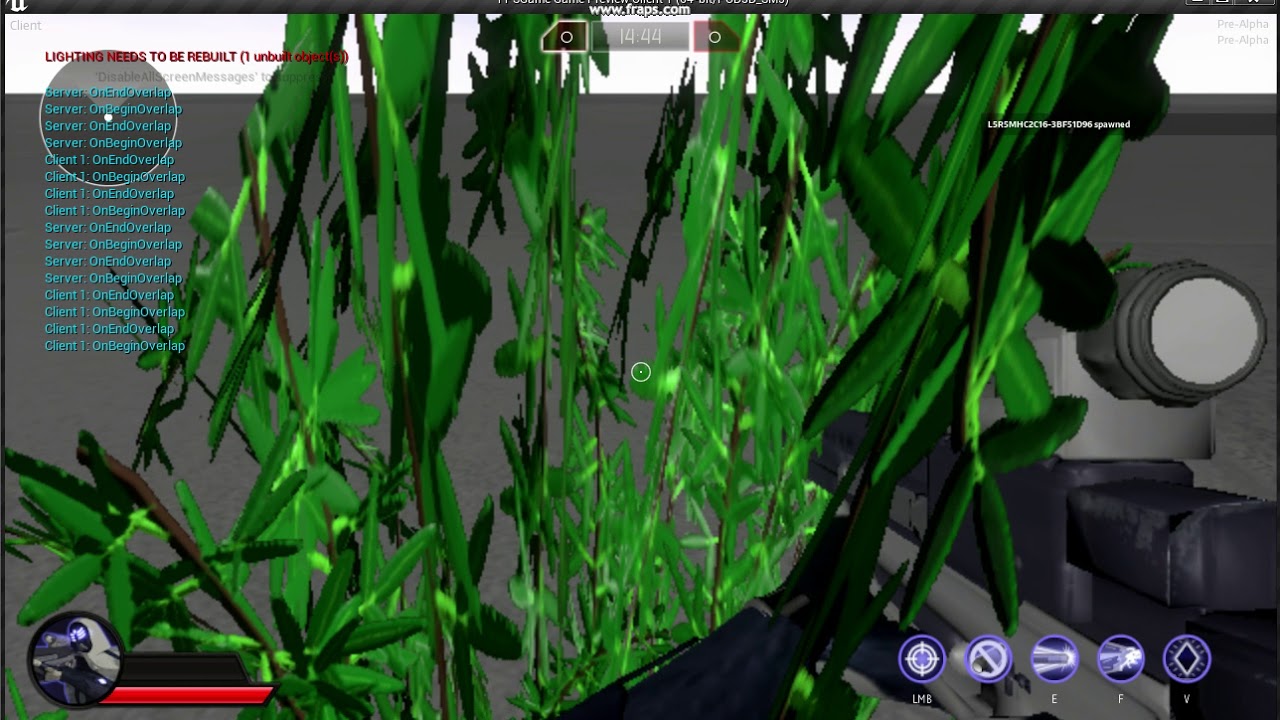
the bush has a box around it for it's collision mesh and it's set to OverlapOnlyPawn
I'm just walking into the box and it sets of 10 begin overlap and end overlaps. which makes zero sense
livid haven
Do your self a favor and print out the overlapped component, the other actor, the other comp, and "self".
upper heart
yeah I did that and the other component is always the bush
livid haven
Print out all of those. Humor me.
upper heart
it shouldn't even be hitting an end overlap because i'm only entering the box
okay will do. I did test this when not placed as foliage and it worked fine.
what I would expect
Overlapped Component, Other Actor, Other Comp, Self is the order of the print
seems like a bug 😦
feck
plush yew
Please welcome @tranquil sigil to the community! :beers:
 vast pine
Anyone have example documents for collaboration agreements. Such as submitted work is your work belongs to you but agree that any work submitted can be used freely for the project and project promotion? 😃
livid haven
I do have UDN access, I'm an external contractor working with Epic.
upper heart
any chance I could get the contents of this? https://udn.unrealengine.com/questions/276567/foliage-overlap-events-fire-every-frame.html
livid haven
I would have to assume that I am not legally able to expose that information directly.
But I can see what I can surmise from it that's of use to you.
Not very useful to you, alas.
TL;DR: Happened in 4.10.2. Staff member was going to check if it happens in 4.11. No further discussion happened - as of February 5th 2016
livid haven
Nothing else happened in that thread.
upper heart
okay, thank you
livid haven
I can try pinging the relevant parties about it
I think the staff member involved is in a different timezone, however, so...
upper heart
That would be awesome
upper heart
ahh damn
livid haven
:/
I guess re-report the bug.
I don't even know who I'd forward it to for visibility.
upper heart
okay, yeah I'll open an answerhub thread
 tulip vault
Is there any way of unlinking viewports from one another
upper heart
 broken plume
hello guys i want to learn more things about game development(i am currently a beginner) do you have any book(s) that you could suggest me ?
safe rose
@broken plume https://becausegamesmatter.com/


Daily news, interviews, features, and developer blogs about the Art & Business of Making Games.

Let's make a list of the best books that every game developer should read.
Each answer should have a single book (by title and optionally author), a link to buy the book, and a short synopsis of w...
Game Development Books, eBooks and videos available from Packt. eBook topics include Android, iPhone (iOS), Windows, Unity and HTML5.
and Google

LMGTFY
broken plume
ty @safe rose
plush yew
Please welcome @proper copper to the community! :beers:
 hasty stratus
ah decided to go the low poly route given my current abilities and bandwidth
'...those arent placeholder assets'
 ruby chasm
Any tips on reducing FPS drop when using a movable light? I'm using it as my flashlight and my FPS drops from 90 to 45 when the flashlight is pointed at anything (the ground, etc.)
I need to maintain around 90 FPS
plush yew
Please welcome @lament breach to the community! :beers:
 warped silo
There any way to copy an instance of an actor using blueprints? I'm trying to spawn a new actor that is completely identical to an existing actor in the level. Seems like something that should be pretty straightforward. Any ideas?
regal mulch
You are trying to achieve a copy contructor?
Since you would need to code that in cpp too, what keeps you from writing a function that spawns the class and fills in your vars?
 inner elk
when scaling a shape, like a box is there a way to just scale it in one direction?
I want a box I have thicker but I don't want to have to reposition it after scaling it up
 weary basalt
@inner elk No, only the BSP tools support that type of extruding
inner elk
OH
sorry I was just playing with that, didn't think of it..sorry i'm a noobs..
😃
I get stuck solving a problem sometimes and forget the obvious...
wispy wraith
Anyone know how to play audio on a dedicated server?
I read somewhere that audio is excluded from the dedi server files
livid haven
It should be assumed that a dedicated server is neither going to play audio nor render things.
It may run animations for the sake of simulating the transforms for some purpose, like collision.
wispy wraith
Okay so how would I go about playing a sound on the dedicated server..
Like in my game
How would I go about playing a sound
livid haven
You wouldn't. Because what you're asking doesn't make any sense.
wispy wraith
All I'm asking is how to play a sound if I'm running a dedicated server
wispy wraith
So if I have a dedicated server game then NOBODY has audio?
wispy wraith
Read my question
livid haven
Clients get audio.
wispy wraith
That's what I just asked dude
wispy wraith
All I'm asking is how to play a sound if I'm running a dedicated server
All I'm asking is how to play a sound if I'm running a dedicated serverAll I'm asking is how to play a sound if I'm running a dedicated server
All I'm asking is how to play a sound if I'm running a dedicated server
livid haven
... you really want to play that game?
'cause being a dick about it won't get my help.
wispy wraith
GJ I corrected myself
That's what I just asked dude
That's what I just asked dude
That's what I just asked dude
That's what I just asked dude
That's what I just asked dude
That's what I *just asked dude
livid haven
Good luck. 👍
 worn granite
no multiplayer game in ue4 has sound man, stop trolling with these impossible questions
safe rose
Well, there's no sound in space, so yeah.
 wild kestrel
CME just hit us from X9.3 solar flare most porful flare of this cycle , models shows that auroras will be visible in whole canada :>
 heady bridge
Hello, I'm trying to figure out how to make a good weapon system in my game, there will be TONS of weapons, and there will be possibly hundred or more blueprint actors for them, so I was looking into Data tables, and string table, I was wondering if there are any tutorials or examples on using those for a weapons system, IF going that route is better? I tried looking for that, but came up with nothing, only basic info on what they are and what they do.
wispy wraith
@heady bridge got time to chat?
i can go over it for you in the voice chat
dont want to text it all
heady bridge
I did see a couple tutorials, on setting up the lists, but didn't see any to apply mesh, particle, damage, etc etc
wispy wraith
im in lounge 1
heady bridge
@wispy wraith I don't have a mic
wispy wraith
thats fine
warped silo
@regal mulch The only thing keeping me is that 1) trying to stick to BP and 2) I want to preserve every variable on the actor as well as all components, which can turn into BP spaghetti pretty quickly
@wispy wraith You don't play audio on a dedicated server; you use Remote Procedure Calls (RPCs) from the server to tell clients that they need to play whatever sounds you want played. This is typically done through replicated events. See: https://docs.unrealengine.com/latest/INT/Resources/ContentExamples/Networking/1_5/
An overview of the Network Features example level, example 1.5: Function Replication (Remote Procedure Call).
 fiery harbor
why is there actually the option to include the crash reporter in packaged games? is it possible to make it send crash reports to some server that I own? I see no reason in shipping with the crash reporter if only Epic gets all the crash reports from my game then
safe rose
@fiery harbor the option is there for Dev builds
Since the devs testing will most likely have UE4 with symbols on
Shipping builds to outside world of gamers... no idea the real necessity
But yes, you can include your own reporter
And have it sent to some DB you own
fiery harbor
how?
safe rose
That sadly, I don't know personally, I just know it is being done due to some client projects.
fiery harbor
ah
safe rose
Someone a bit more snazzy hooked it up
fiery harbor
well I guess its possible to rewrite some stuff in the source of the crash report client so that it does the same just with another server
but I was wondering if theres an "official" way to do it
safe rose
safe rose
whoever did that wiki...
@fiery harbor Also
That funny thing today
BAcktrace
Traceback
w/e
Is probably something that you could hook up
fiery harbor
?
safe rose

Backtrace
The advanced cross-platform crash management solution for applications running in any environment.
@fiery harbor You could also do something like this, obviously he did it for mobile, but it's on gitjhub" https://forums.unrealengine.com/community/community-content-tools-and-tutorials/97820-free-crashlytics-automatic-crash-reporting-solution
another way
fiery harbor
interesting, thanks
@safe rose actually it seems to be possible to use the UE4 crash reporter with a custom server : https://answers.unrealengine.com/questions/224517/game-crash-report.html
safe rose
Hmm
plush yew
Please welcome @unreal walrus to the community! :beers:
plush yew
Please welcome @winter summit to the community! :beers:
plush yew
Please welcome @wispy fern to the community! :beers:
 quick heath
guys, pretty dumb question, so i was following the step by step ios quickstart guide on the unrealengine page, but i think its pretty outdated. Do i need a developers membership to get ios certificates?
 wary wave
I believe so
however I do not believe you need to certify on a mac any more
someone else may be able to clarify
 pallid compass
Yeah they removed it its on the trello
gloomy horizon
Any ideas on why this wont work? https://imgur.com/8lkPg2E
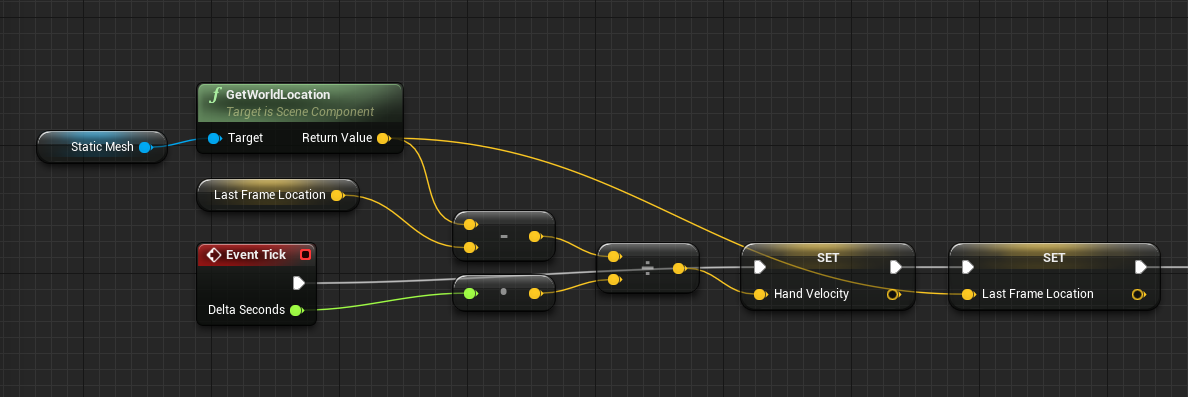 gloomy horizon
Well the issue is
for one object
it will get the location fine
but for another it just doesnt update
even though the roots are both static meshes
and with same settings
both are child of same parent
 hybrid scroll
are you referencing the same statci mesh in both?
gloomy horizon
It's a scene component
brb gotta restart
UE4 / Steam VR wont detect my stupid controllers
Oh, you debug a specific INSTANCE of an object.
When you have the parent selected
I didn't think of that. Huh.
that was easy
solution in-case anyone needs it
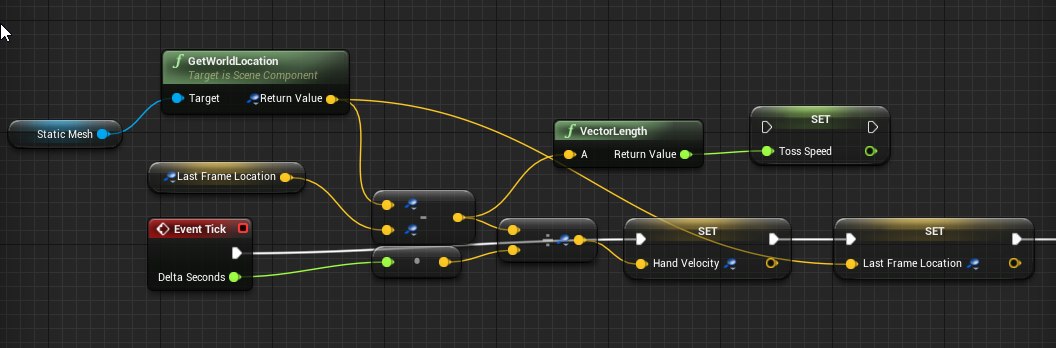 ionic sedge
Isn't that the same thing you did above?
Except you've got a Toss Speed variable that's not plugged in. 😛
gloomy horizon
well that's setting it
and it is used elsewhere in code
😛
@ionic sedge https://i.imgur.com/SZrwZ6W.png
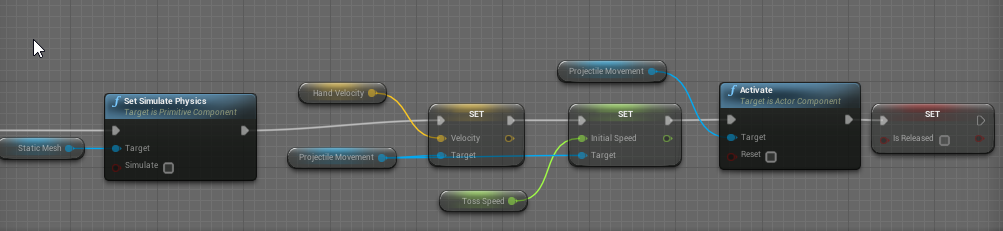
if you wanted the logic that is activated
Idk how to screencap a bp that is so long it goes across two screens sorry 😛
Here's a demo
 plush yew
Please welcome @balmy schooner to the community! :beers:
Please welcome @autumn quarry to the community! :beers:
Please welcome @vale remnant to the community! :beers:
Please welcome @sweet kettle to the community! :beers:
 patent bane
can i (or how can i) run the standalone game in debug mode without cooking everything? i.e. like if i start the editor and run standalone but with the debugger attached
 thorny iron
Hey guys - sort of exhaustedly looking for help from someone who has worked with Flow maps before...
inner elk
Where is another good source for free actors/assets? I am trying to prototype my game but keep running into problems where I don't have an actor that would fit. I got a lot of stuff from marketplace but I'm on a super low budget till I get the prototype done. Thanks.
 toxic wagon
is the default mannequin not good enough?
sudden agate
Did Epic change the Branding Logo?
There was a "Powered by Unreal Engine" Logo Movie, but now there's only a black/white "Unreal Engine" one
ruby chasm
Guys, if I'm fading to white and then fading in from white, is it possible to eliminate the black frame in-between these two when the level switches?
Without level streaming
 rare kraken
Any idea why Character mesh disappears everytime I reopen my project
plush yew
Please welcome @unique ocean to the community! :beers:
Please welcome @tired aspen to the community! :beers:
crimson sky
Is there a place where I can look for help for my project? like to get someone on board to finish one part of my project whilst i work on another, rn my game consists of me as the only dev, would be great to get some help for one part, willing to give full credit in game and youll be a playable Character!
 glossy flame
#career-chat would be the place currently, it encompasses both paid positions and more collaboration
crimson sky
Oh sweet thanks!
plush yew
Please welcome @plush yew to the community! :beers:
 wild talon
Does anyone know if you can Migrate entire levels (umap) backwards in Unreal versions without any issues?
plush yew
Please welcome @left yew to the community! :beers:
heady bridge
I just have a quick question about Data tables, I have a bunch of variables for each item, but for making blueprint, to make a weapon shoot or make the data usable, do I make all the different blueprints within 1 class with the data table, such as linking the damage from data table node to a row of nodes to make damage work, or would I make all sorts of different blueprints and just link them in the data table?
plush yew
Please welcome @fervent bridge to the community! :beers:

this isnt a bug evidently
according to epic
 somber condor
I'm trying to Render to Movie my sequencer and it keeps crashing (4.17) when I render 1920x1080 all the time. but it's fine with 1280x720. I got 16 GB Ram and GTX 1070. Is this memory related ?! I searched answershub but there were no clear workaround .
heady bridge
@plush yew wouldn't that just mean the cubes have no collision? rather than it being a bug?
heady bridge
I tried it, and the mesh does disappear, even with collision added, but the collision still works
heady bridge
if unreal says its not a bug, then there must be some different options or something, I'll investigate
plush yew
Please welcome @tribal trail to the community! :beers:
heady bridge
I dunno, tried different things, can't seem to get it to show during show collision, but it's not like it's going to not show up in game
 tribal trail
What is the difference between a mesh and an actor?
Is a mesh an instance of an actor?
heady bridge
mesh is just the 3d object, actor is a class
tribal trail
Ok. Thanks.
heady bridge
you would apply the mesh to the actor and apply code to make something operational
tribal trail
There is a great tutorial in the engine, I am trying to teach myself blueprints, but the window that the tutorial appears in actually blocks the stuff you need to click on. It doesn't appear there is a way to easily move that window. Have you or anyone seen this and is there a way to move that window?
heady bridge
I've personally never tried to move it around, not sure if you can, but I think those tutorials would be on the unreal engine websites documentation possibly
tribal trail
Ok. I will look. Thanks again.
heady bridge
no problem, good luck
heady bridge
The "Get Started with UE4" section in the documentation or Unreal engine 4 tutorial series on "Getting started with UE4" I think would be the best place to start for absolute beginners, maybe more the youtube, so you can see things as they happen
final owl
ok thx
heady bridge
No problem 😃 and Good luck
 wintry raven
Static geometry which can be cached in video memory and rendered by the graphics card.
tribal trail
Thanks Jeffrey.
Is there a terminology page somewhere that covers all the terms of UE4? Like what is the actual term for the widgets on the "field" inside a blueprint?
heady bridge
Covers the most commonly used terms when working with Unreal Engine 4.
This should help explain each thing in the engine 😃
tribal trail
Separate question, is there a way to know what kind of "widget" something is? Sometimes I click on a widget, go to details, and there is nothing there. For example, a greater than less than widget... there is nothing in the details to tell me what kind of widget this is. I right click and there is no "properties" telling me the kind of widget it is.
Thanks Pingu!!
Actually, that is kinda it. I guess I need to buy a book or something. I just want a dictionary of Unreal Terms.
heady bridge
if you create a widget, and hover over it, it says what it does
same with each socket on the widget
tribal trail
Nice. Look at that. Okay, but how would I "make" a new one? I am trying to dissect someone else's work. I kinda understand it but I don't know how to make certain widgets.
Are they called widgets?
heady bridge
I assumed you were talking about the nodes in blueprint?
like Integer > integer in blueprint graph is a node, for example
heady bridge
yeah, so hovering over each node tells you what they do, and each socket will tell you what needs to be connected
 digital anchor
but how would I "make" a new one? you can create a new function, adding inputs and outputs, and inside you put what you want that node to do
if thats what you meant
tribal trail
So that is an "integer node". There is no way for me to know that by clicking on one in the field. I just have to know that from somewhere else.
heady bridge
well, if you need an integer, just right click and type integer
right click to add nodes into the graph
tribal trail
digital anchor
did you just take a picture
heady bridge
lol
tribal trail
No where in that picture does it say "integer node". If I am dissecting someone's code, I just need to know every kind of node.
Sorry, is that not allowed?
heady bridge
no it's cool
tribal trail
Ok
digital anchor
no thats just funny, hover over the balls
heady bridge
hover over the green sockets
digital anchor
the inputs and outputs
heady bridge
green sockets will tell you its integer, and red for bool
tribal trail
Ah. Ok.
glossy flame
Pins, if you're looking for exact terminology
heady bridge
well that type of green is int, there is a more green, green that is float
tribal trail
Y'all are saints.
heady bridge
lol
tribal trail
Thank you.
heady bridge
I forgot they were called pins XD
digital anchor
nme too xd
heady bridge
sockets are close enough 😛 haha
@tribal trail anything you need help with, don't worry, we gotchu
tribal trail
How did you learn? Did you read a book, watch videos, go through the official documentation?
heady bridge
I started with video tutorials, then focused on documentation
tribal trail
Ok.
heady bridge
I still use videos for help on certain things just to get that visual aid, it helps to follow along, then redo by yourself to get used to it
BTW any of you guys good with data tables? just have a super quick question
digital anchor
Can my employee use something i bought on marketplace? if yes, how can he download something that i own?
digital anchor
oki
heady bridge
BTW Unreal engine just uploaded a live training on youtube for Blender TO unreal engine 4, in case anyone is interested (like myself 😃 )
glossy flame
And yeah, the colors will help you out with quick identification of types; white is exec, light blue is UObject, dark blue is struct, dark green is enum, light green is float, blueish-green is int, red is bool, yellow is vector, orange is transform, light yellow/whiteish yellow is interface reference, purple is class, etc. @tribal trail
I probably missed a few there ¯_(ツ)_/¯
digital anchor
wish they did when i started, so many problems with physics objects
heady bridge
lol
A good way I kept reminding myself what colors meant what, was when I was in graph editor, I would create a a variable that doesn't do anything, just to see what color meant what, if that makes sense
like I create a variable, named it like 1 or something, and on the right, clicked the variable type, to familiarize myself
and use it just for reference
@digital anchor there was a blender to unreal engine 4 live training uploaded 3 months ago too
ionic sedge
You might want to check out UE4Tools instead of the rigify rig, a lot less hassle for basically the same thing.
digital anchor
started like 6 months ago xd
final owl
xd
gloomy horizon
I imported a mesh with a plane and the plane disappears when I adjust the material
any ideas?
I can see the plane when I highlight the object but it's otherwise transparent
should look like that in UE4
looks like that though
😦
tribal trail
Where should someone with zero scripting background start before trying blueprints?
 south ridge
@gloomy horizon In blender, enable back face culling
gloomy horizon
Mind if I ask where that is?
tribal trail
Thanks for the color references @lethalclips. I am in over my head.
south ridge
What happens is that you've made your polygon one-sided, but blender by default show everything as two-sided
gloomy horizon
Ahhhh
south ridge
You might wanna make it two-sided or flip normals
south ridge
You can enable "two-sided" in material options in UE4
gloomy horizon
two sided foliage?
Doesn't seem to have worked.
derp
underneath it says two sided
south ridge
south ridge
If your polygon is supposed to be a piece of clothing or such, then it's fine
But if that's an actual solid bit, you probably don't want a two-sided polygon in the first place etc
gloomy horizon
it's clothing
testing out the new cloth mechanics
😄
Blackfox, how do I do collision calculations
when I import the dagger as a skeletal mesh
My regular daggers have some relatively accurate collision
of course I don't think this is an option with skeletal meshes, right?
I guess there's no reason why I can't just import the plane on its own
and child it to the dagger in a scene
south ridge
It is an option
You create a physics actor for your mesh
I think it's dumb and doesn't actually let you specify convex mesh, one sec
No, it does
You can specify a convex hull for your dagger (which is a skeletal mesh) in the physics actor
Another option is to shadow your visual dagger model with a static model (that doesn't render) of a static mesh dagger
Sometimes that's a better option
gloomy horizon
What do you mean by shadow?
You mean, like in the scene component
add hidden in-game?
or whatevs
south ridge
Yes
A static mesh that has visible set to false, so it doesn't render
Still takes play in physics etc
gloomy horizon
Ah, cool stuff.
I'll definitely try that out.
I might just export the ribbon on its own though
because just attaching that sounds super easy
in comparison to these work arounds
Wouldn't it be?
south ridge
Yes
gloomy horizon
Just learned there's a reimport button
Decent.
I don't like overriding every old version just in-case however it makes certain things faster
final owl
awesome
gloomy horizon
@south ridge Sorry for the bothe again, for some reason after enabling the clothing thing in expiermental and restarting I don't have the clothing tab next to asset details. Any ideas?
south ridge
I don't know, didn't work with clothes yet
heady bridge
For data table and struct, would I make a blueprint for each specfic variable, such as weapon damage, or would I create 1 blueprint where the data table handles everything in it's data?
I feel like I'm getting really close to understanding how it works, but just unsure about the blueprint setup
gloomy horizon
When I import my asset it says the bones are "Too Small" to create a physics asset
meanwhile my FBX doesn't even have a bone and I'm importing it as a skeletal mesh with no bones and UE4 applies its own bone
😐
buddies imports fine
on this tutorial I'm watching
south ridge
Cause you have one bone (that UE4 added) and it's too small
heady bridge
it adds a root bone doesn't it?
gloomy horizon
Do you have any suggestions on a work around?
Wouldn't the root bone be... like... an acceptable size if UE4 adds it? 😛
heady bridge
I would have thought so
 ionic tangle
Hey guys & gals. I'm using a CineCamera in my scene and it seems to be culling my Volumetric ExponentialHeightFog when it faces far enough away from the sun. This doesn't happen with the normal camera.
Here are some specs:
Real-time lighting (Movable Directional Light)
Exponential Height Fog (With volumetric fog on)
If anyone has experienced this before I would love to try and figure it out 😄
ionic sedge
@gloomy horizon "Too small" error means the scene settings aren't right.
gloomy horizon
@ionic sedge check my dimensions. I'm only exporting mesh components (Plane and Modified Cube)
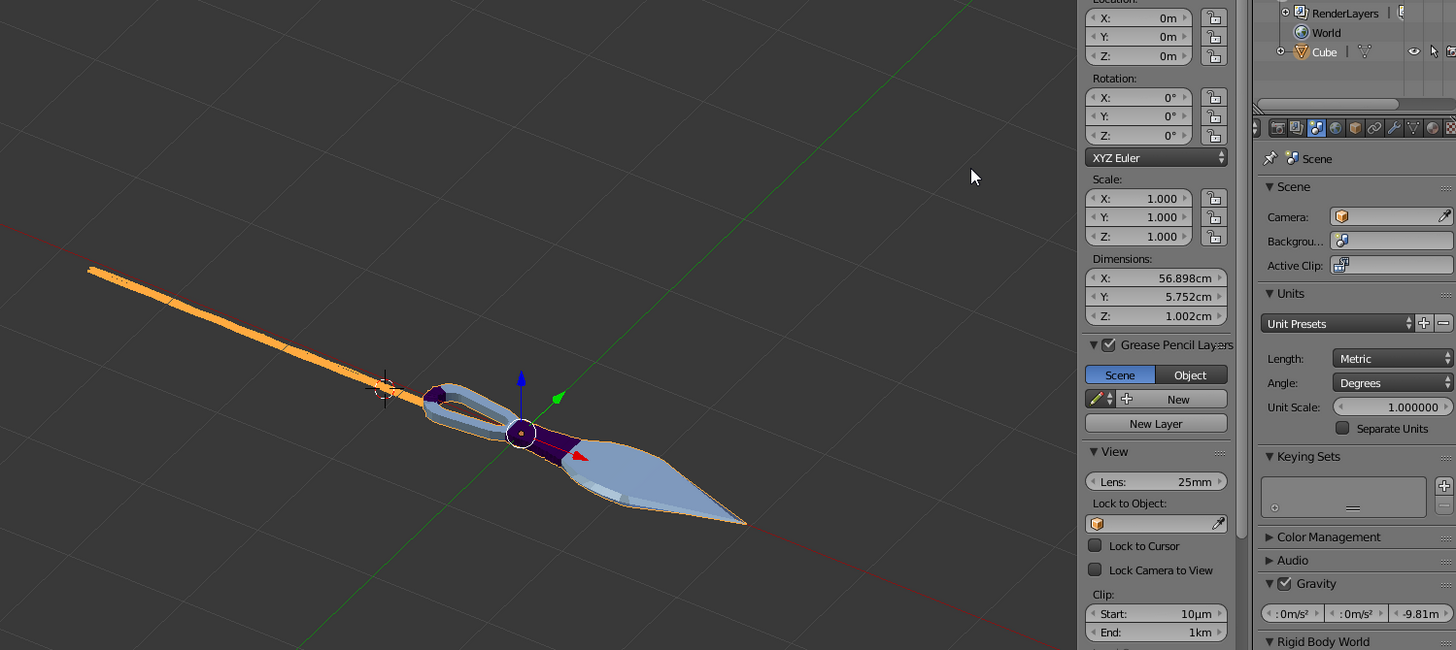
I've set scale to .01
applied transforms
resized
they import as meshes great
ionic sedge
It's 1 there.
gloomy horizon
I've been exporting my anims with 1 though
and they work great
O_o
you are the one who told me in fact haha
ionic sedge
You're talking about different things.
Scene unit scale should be 0.01 metric. Scale should be 1/1/1.
Animations will work fine if you have an extra root bone, the scaling bug only shows if you have a real root bone in your rig.
gloomy horizon
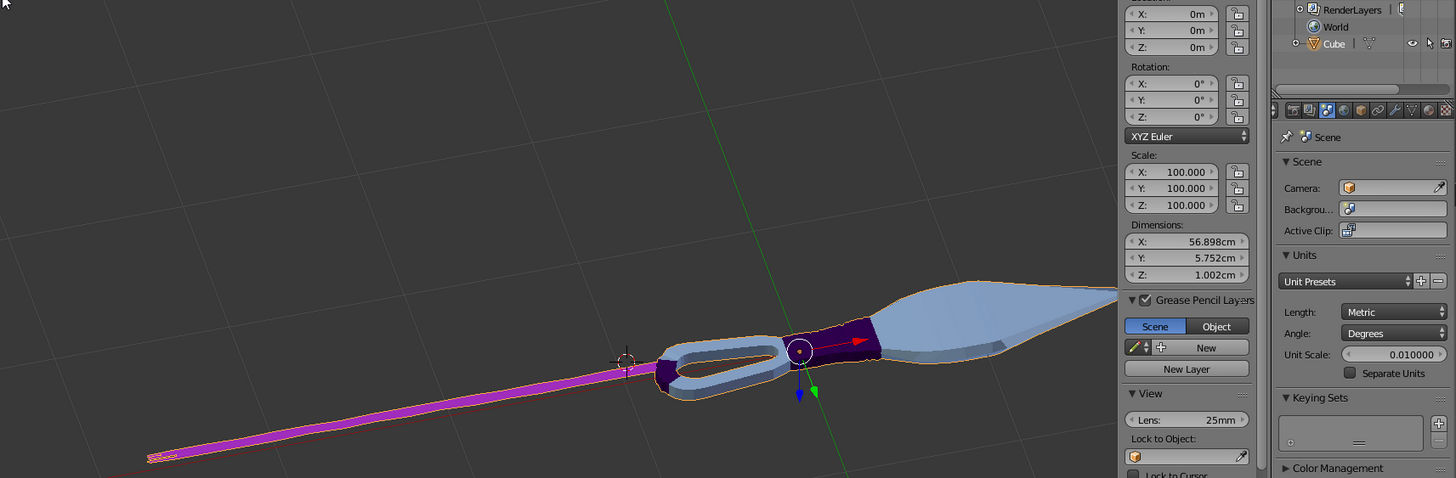 ionic sedge
But you can't have root motion with an extra root bone.
gloomy horizon
It wont let me apply object transform
ionic sedge
Yes it will. 😛
gloomy horizon
the plane and the mesh are joined if that makes a difference
do I need to be in edit mode?
gloomy horizon
 ionic sedge
Tick Scale in the lower left.
ionic sedge
😛
gloomy horizon
So @ionic sedge basically when doing animations I export at 1.0 and when not doing anims I export at .01
ionic sedge
No, you export at 0.01 always. 😛
gloomy horizon
oh okay
ionic sedge
Static meshes will be fine because only the rig part gets messed up with 1 unit scale. And 0.01 is there to fix rig issues.
ionic sedge
0.01 makes Blender FBX act like Maya. Ideally it should work at 1 too but Epic only uses 0.01 so they didn't notice FBX scaling is messed up.
pallid compass
Just curious does anyone know how games handle flying projectiles thay wouldnt be aactors
Ie like orises fusion drive
Too much projectiles too actually spawn
Many*
gloomy horizon
@ionic sedge Thanks again, imported without a hitch.
You'd think I'd keep it congested after the second time
😐
ionic sedge
😛
gloomy horizon
I think I have a better understanding now though
I didn't realize that the .01 was passed with the fbx
ionic sedge
A good idea would be to make a new scene, change the unit scale to 0.01 there, then do Save Startup File.
gloomy horizon
I thought .01 was only relative in blender
as a unit scale IN blender
not an actual passed value
yeah I'm definitely going to do that
plush yew
Please welcome @molten nymph to the community! :beers:
tropic pilot
i dont know where to ask this so i'll ask here, on a pointlight what is the option name where the light fades in (and for some reason fades out and then in again) when i look into the void?
glossy flame
It could be the eye adaptation
tropic pilot
there is no such thing in the point light "Details" panel
glossy flame
In which case, it wouldn't be a setting on the light itself, but a project/post processing setting
 oblique sorrel
Say, I have an array of 2D vectors: (1,1; 1,2; 1,5; 2,2; 2,5; 3,2; 3,3; 3,4; 3,5; etc). I want to generate either a texture or a UMG widget based on that, one that'd look kinda like the attached picture. Any idea how to do that?
Except without the numbers, and in range of anywhere between -20,20 in both axes
The only thing I came up with is spawning planes somewhere under the level and capturing them to a texture with an ortographic camera
glossy flame
I doubt you'll be able to draw directly to a texture in BP, so I would rule that way out
You might be able to make a widget that takes in that array and affects its own internal state with its own widgets, but that might be a little overkill of a solution
oblique sorrel
I was thinking of dynamically adding Image components to a widget, in a grid or something, but I don't know how feasible is that
glossy flame
I'd say it's definitely possible, though I'm not sure how much I can comment on the efficiency of it
 floral heart
You can draw directly to a render texture. You can also add objects to UMG. Though you're talking a grid of up to 1600 squares.
oblique sorrel
I'd need to create it only once per level load
glossy flame
You can draw to a texture in BP? @floral heart
Hmm, I might stand corrected there, I assumed you couldn't
floral heart
A render texture is procedurally generated. There are some blueprint nodes to draw a material onto one.
 molten nymph
hey there, new to unreal so idk how id fix this, the lighting in editor differs from the lighting in standalone, the forums say this is due to auto exposure settings, ive tried messing with that, but cant find a solution
plush yew
Please welcome @stark linden to the community! :beers:
 tiny prawn
trueSky does not want my money O_O
safe rose
@oblique sorrel You could also just "cheat", have a uniform grid (not sure how big they can be), with the max number of entities you want. Hide them initially, then make them visible again when you want according to the specific vector.
Since that uses columns and rows
oblique sorrel
I was thinking of the same, doing it in UMB.
I'd need at the very least 1600 cells, though. In a 40x40 grid
safe rose
Aye, I mean, I havent' done it. But that's probably something I would have done. or at least tried first.
Yeah, not sure how big it can do it
And if you want it in world, just 3dwidget the beast
oblique sorrel
Nah, it's supposed to serve as a minimap
oblique sorrel
I don't like the camera->texture->material solution
Not super tiny, but yeah, relatively small
safe rose
@oblique sorrel Let me know the results, I would be very interested
oblique sorrel
Will do!
gloomy horizon
how would you guys get the location of the player pawn (hmd) for homing targets?
In an external actor, I mean.
 random shale
How to change player pawn on game mode? for only one level?
I used world override
but now its not work
it change game mode class
plush yew
Please welcome @dire fjord to the community! :beers:
 dire fjord
I'm having a collision issue, which doesn't make any sense. I'm just learning here, and I wondered if anyone could give it a quick look
 dire fjord
Anyway, if anyone can help me with the projectile blocking issue, it's in the blueprint channel, thanks 😃
plush yew
Hey
Is $100,000 for 15% of your products royalties and 10% of company stake worth it
Curious what you guys think
😄
gloomy horizon
@plush yew What's your projected profits without investment and can you continue without this investment?
We really can't answer unless you're already making money.
Is this projected income based on current earnings and growth?
plush yew
Please welcome @keen summit to the community! :beers:
livid haven
Yeah, this is really something you should talk over with qualified professionals.
gloomy horizon
^
livid haven
Fiduciary, financial advisor, accountant.
gloomy horizon
I graduated business school so I don't really mind answering some small stuff but realistically I would advise you to consult with a lawyer and or financial advisor.
plush yew
No it's not real. It's simply theoretical just curious what others would think. I'm talking specifically about what you would do if you are a startup company and NEED that money for marketing.
You have a product already.
I'm just not sure if that would be worth it in the long run.
gloomy horizon
Real world doesn't work like that
If you need money you take it to continue your ventures
also 100k for 15% is extremely unrealistic
Unless the product is doing amazing
plush yew
true
gloomy horizon
and you don't sell percentage of product sales and percentage of company
you just sell percentage of company
Most profits will go back into the company anyways
plush yew
yea
gloomy horizon
an angel investor doesn't want to take money out of the company
Unless it's going under, but that's not the scenario.
gloomy horizon
Realistically no one will just offer you 100k for a startup with a product already on the market at 15% ownership
Unless you're making insane profits
like I mean millions
But you wouldn't even know, because it's a startup, and your projected incomes are hypothetical instead of historical.
Huge difference.
Anyone here able to help me determine if my weapon mesh is overlapping anonther Actor?
dire fjord
I told stream vr not to open when an application is opened and that seemed to work for a day but now steam vr is launching every time i start ue4 or load a project/level. How can i make it stop?
gloomy horizon
it's in the settings for UE4
make sure it's a project default if it's in that section
each project needs it set manually iirc
dire fjord
Ok I'll check that thanks.
plush yew
ya
south ridge
I remember when we tried to get an investor
plush yew
wat about it
south ridge
And the offer was something stupid like 30% for $20,000
plush yew
lol
south ridge
Which was OK when it was related to only our side project
plush yew
they wanted 30% of the whole company?
south ridge
No, only in that one project
plush yew
I could make $20,000 in literally... a few months
south ridge
So it was fine. But then the investor wanted to have it cover the entire project
The big project, not just the side project
plush yew
yeah?
south ridge
The side project was small, it was a VR-only subset of our main project
@plush yew Ultimately it proceeded from my own money, slowly but steadily 😛
safe rose
One of you should change your avatars
plush yew
Lmao
safe rose
I thought you were talking to yourself
south ridge
I will change my avatar
safe rose
(thought you were the same person, I was like wtf is this)
 south ridge
Scary
plush yew
@safe rose this might make u giggle https://www.youtube.com/watch?v=ja1kc9c24Fo
south ridge
Who makes bug reports as videos that are more than 20 seconds long
south ridge
Make it 20 sec long next time 😛
safe rose
hmm
I dont like your video
It doesn't tell me the bug in teh very beginning
I had to watch that whole thing 😦
south ridge
I gave up 10 seconds in and scrolled through it
molten nymph
hey there, ive got a small problem, the lighting in editor differs from the lighting in standalone, seems brighter in standalone, the forums say this is due to auto exposure settings, ive tried messing with that, but cant find a solution
molten nymph
u sure? question doesnt really match the channel guideline
molten nymph
lol okay, ill try there, although im not sure if thats also the right place
plush yew
i really dont like
how i literally have to sit here
with a broken game
until 4.17.2
lmao
gloomy horizon
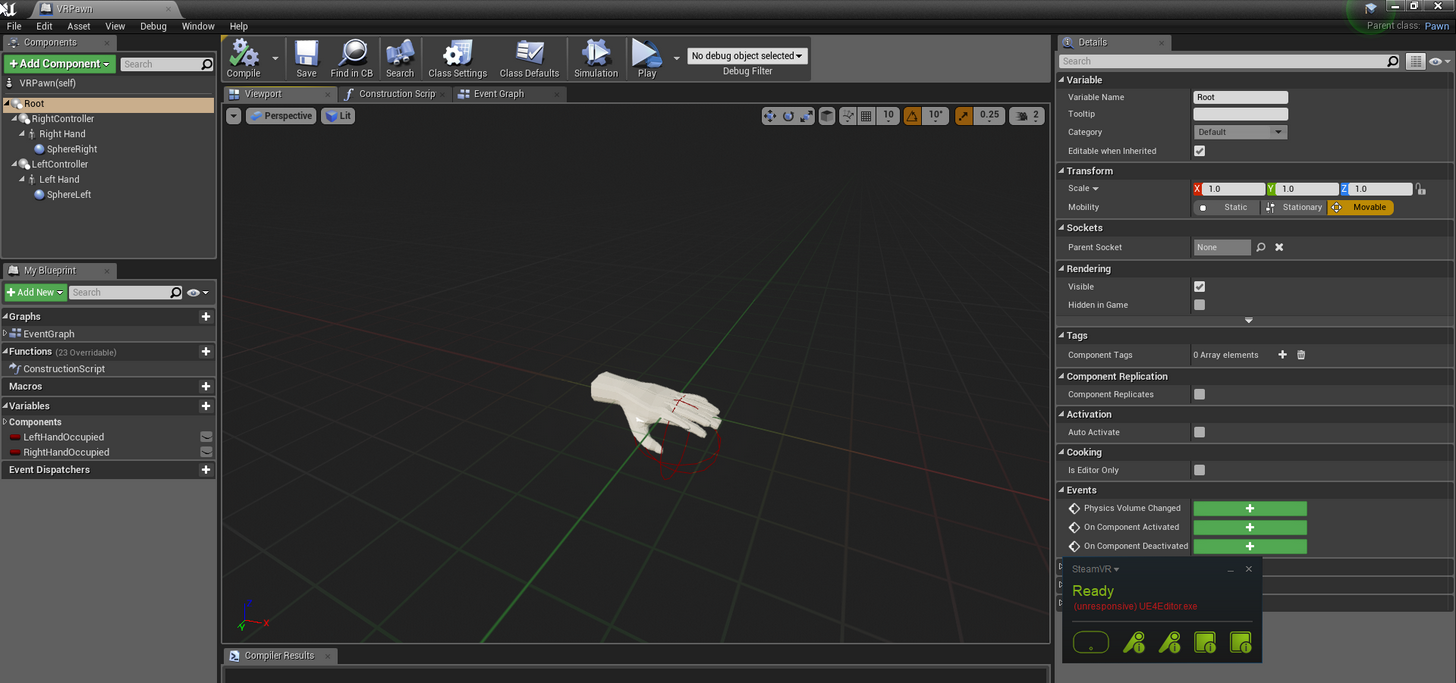


Any ideas on how to home a projectile to the HMD location
and not the scene root's 0,0,0?
for the VR pawn
dire fjord
Okay I'm still having issues disabling steamvr launching when I open UE4. When I first open the epic launcher it's fine. But if I launch any installed engine (in this case 4.11.2) before I open a project, steam VR launches. How can I disable this? I checked my plugins, there are no plugins at all for this engine. And I can't find any other options for it to turn off SteamVR.
I have unchecked the box in steamvr that tells it to open when applications open.
plush yew
Please welcome @hard silo to the community! :beers:
 hard silo
Hello, uhm. Do I ask questions about blueprints here or do I go to the #blueprint channel?