#ue4-general
1 messages · Page 99 of 1
 blissful reef
if you're in a pos to mod the engine C++, i can point you at the code where it does this logic and you can try to find the bug 😃
yeah bp function
i think it's called set hardware cursor
or load hardware cursor?
something like that
but it's still going to map them to a specific cursor mode
like Hand/Beam/Normal
so you'd just remap Normal/Custom
and set your widget to show whatever is set to Custom/Normal
I wouldn't use custom hardware cursors, i don't like it when games do it ^_^
not really
maybe in the 90s
it's fine 😃
Anyway - the project settings are just if you don't need to remap them actively, like making the Normal State change depending on what you're hovering over
for that, you'd remap using the BP/C++ function to remap at runtime what normal is
but, i would recommend using the Custom mapping at runtime
that way you don't mess up the defeault arrow when not over the special 'viewport' widget where you'd be hovering over units or something game related, rather than just normal UI
it's on the UWidgetBlueprintLibrary if i recall
 plush yew
Please welcome @verbal laurel to the community! :beers:
 verbal laurel
Hello all!
I'm going to show you some models I'll be working with in the appropriate room.
I'll go to #lounge
plush yew
Please welcome @pearl lotus to the community! :beers:
 devout gulch
does anyone know what depedencies does unreal server have on linux ?
which libx are must have to run ?
plush yew
I've asked this in the programming section but it's also kindof a general thing... so I hope it's alright that I'm asking this here too: Question about Ark Dev Kit (modding Ark Survival Evolved): I just wanted some general advice from a coding perspective. The Ark Dev Kit doesn't facilitate access to the game source code as I understand it. I want to change the swatches of color that dinos spawn with to some kind of hidden wheel that colorizes an alpha based on randomly selected pixel... so dinos can be just about any hue/shade/saturation rather than a handful of pre-set garrish colors for their mutations. How hard could it be to make this sort of change to the code? Sorry to not be specific, I'm a noob, still at the dreaming stage of my projects.
Please welcome @raven oxide to the community! :beers:
 celest lion
anyone having camera movement issues with 4.17 when ejecting from pawn in TopDown template (C++, but probably Blueprint has same problems)?
mouse look (right-click + drag) does not work quite as expected after ejecting from pawn (when playing), can someone check it quickly to confirm?
verbal laurel
Hey new peeps
plush yew
Please welcome @stiff olive to the community! :beers:
Please welcome @muted jasper to the community! :beers:
 grim ore
@celest lion 4.17 tpp template, ejecting seems to give me a weird issue where the camera feels like it is locked to certain degrees of freedom
like the mouse is locked to the viewport still preventing movement outside that range
grim ore
it's only in the default map tho, new map doesnt do it. so it has something to do with the setup
ok yeah it was happening when I had the input mode set to allow input from the ui
celest lion
hm
grim ore
yep. Game only -> Fine , UI only -> borked, Game and UI -> Borked
so when it ejects with the input mode to ui its not letting the cursor go when ejected
plush yew
Please welcome @humble mountain to the community! :beers:
celest lion
I'll check 4.16 tomorrow whether that is a regression, time for bed here 😉 thank you very much @grim ore
grim ore
i just checked in 4.15.3 and no issue, was testing 4.16 right now lol
celest lion
hehe 😄
grim ore
i dont remember it ever doing this before tho
plush yew
Please welcome @queen storm to the community! :beers:
celest lion
I eject quite often to "debug" things, so it struck me instantly
grim ore
it does it in 4.16.3
plush yew
Please welcome @woeful falcon to the community! :beers:
celest lion
does it in 4.16 means its weird after ejecting?
(sorry to bother, but I'm on my day-job Ubuntu and would have to build 4.16 from sources or boot to windows)
grim ore
man thats weird it does it in 4.15.3 as well in the TPP project
I've never seen this before lol
celest lion
hehe 😃
grim ore
it did not do it in the FPS project
 muted jasper
Can you offset static meshes?
celest lion
maybe the setup with camera boom and not inheriting controller rotation
grim ore
ok I take back what I said before, it has to do with the mouse cursor being shown as well... man good luck getting this one
ui mode on with mouse cursor on causes it for me, ui mode on without mouse cursor on was fine...
celest lion
I'll try to work around that anyway as I'll need separate camera actor (not camera component in Character), so I hope it won't be an issue 😃
hehehe
plush yew
Please welcome @plush yew to the community! :beers:
grim ore
well hopefully that helps you track it down, its the show mouse cursor for me that is doing it
I assumed it was the input mode but I always do the mouse cursor when I do the UI mode so it was conflicting it, just the set show mouse cursor turned to on causes it for me
grim ore
super weird but fun to figure out nonetheless 😃
celest lion
cya
grim ore
cya
 random shale
grim ore
random shale
grim ore
anything should probably work, AWS seems to be pretty standard.
 polar hawk
those are the good ones
plush yew
Please welcome @glass pond to the community! :beers:
 glass pond
Hi
plush yew
Please welcome @glad wagon to the community! :beers:
 livid haven
Someone in #ue4-general was pinging about getting blood on characters?

Earlier this week I tweeted about hit-masking characters to show dynamic blood and wounds. Today I’d like to talk a little about the effect and how it came to be. I’ll talk a little bit about the technical details and some alternatives. The effect is a proof of concept to try and find a cheaper …
plush yew
Please welcome @rugged temple to the community! :beers:
grim ore
Epic has another humanoid mesh they use for the tutorials, https://docs.unrealengine.com/latest/attachments/Programming/Tutorials/FirstPersonShooter/2/6/GenericMale.zip , I wonder if this one is governed by the same license as the rest of their learning content and we can use it instead of the default manny.
 sullen swift
is there a hotkey for rotating actors 90degrees? or rotating actors a set amount in general?
sullen swift
that i understand, im trying to avoid having to use the rotation widget for every 90 degree rotation i have to do. was common in other editors of old.. oh well.
 fallow garden
Can anyone help me on a project i am working on i need tio be able to change a texture at runtime of game the texture is used in making a material and a umg element as well
plush yew
Please welcome @cyan gazelle to the community! :beers:
 cyan gazelle
hi i have an integer array in a structure i was planning on using for saving individual player stats, but i cant rename any of the array elements in the structure?
 glossy flame
Array elements aren't really made to be used like that, you can't assign names or anything, you simply plug in an index and get a value
If you want to map a certain string to a certain value, use a map
cyan gazelle
should i just make a variable for each stat in the structure then?
i figured i could just group them all in one
glossy flame
Yes, that sounds like a fine way to do it
Arrays are really meant to group data together that aren't inherently different from one another—they're all just part of the array
cyan gazelle
yea like in coding
glossy flame
(the only independent variable possible being the index)
cyan gazelle
alright thats all i needed thanks
for now lol im new to the UE4 just scrapped like 4 projects learning more and more every time
how hard do you think it would be to have a multiplayer game on a dedicated server and the way saves work is unless you copy your character code before you quit youll lose your guy
and when you want to play again you just paste your code in the menu and it opens your guy
browser based all of this
just a small 1 mapper type game with progression
 grave bough
hey all, having an issue were i cannot import my editor preferences. seems to be greyed out. Anyone know how to solve this?
 dry shore
guyz how can i solve this issue??😩
 vale halo
Is there a way to get a class' height? I'm trying to create a spawning mechanism, so I cast to the floor from where I'm supposed to respawn, but then I need to avoid my character clipping when being spawned 🤔
(or is my only bet creating a variable/datatable and hard-coding it)
 weary basalt
@vale halo If you already have an reference to an actual Actor then just use the Bounds, if its an class reference then you may have to use an variable you set manually
vale halo
Ah awesome, thanks 😃
 teal egret
@grave bough the import greys out/in depending upon which settings you are on, if you go to allsettings or a different one, it should ungrey
vale halo
@weary basalt Sorry to bug you again, but would GetPlayerCharacter->[GET]Mesh->Get Component Bounds be valid too? (trying to find a way to do this without casting
weary basalt
Probably, but an single mesh may not be the entire bounds of the Actor.
vale halo
Oh wait, now I've enabled context sensitive (no clue why I disabled it) I see GetActorBounds 🤦
weary basalt
Bounds may also be zero filled until the object is actually created so give it a go
vale halo
Yep, what's the worst that can happen? I need to hard-code it anyway? It's worth giving a shot 😃
weary basalt
Oh so you are working with an actual actor reference or an class reference?
vale halo
Well, I'm doing the moving in my controller, so the reference should be valid (I've used get player pawn -> SetActorRotation for a while now)
grave bough
thanks @teal egret, it appears the only 2 that aren't greyed out on mine.; keyboard shortcuts & souce code 😦 I wish Epic wouldn't tease us with exporting options when we cannot import them. 😢
weary basalt
If your working with an Actor Object that exists in the world then use GetActorBounds
You said class so i assumed you were trying to infer the bounds of the Actor that would be spawned by that class.
vale halo
Yep, sorry about that 🤔
I'd ideally want class, but I think this approach should work too
Hm the box extent seems off, >1k for the third person character?
weary basalt
You can visualize actor bounds extents in the viewport with the visualization tools to give you an idea of how it works.
Its not actually what you might think
vale halo
I did that (debug spheres/capsules/lines) 🤔
Anyway, dong some more playing around I've found Character->Capsule Component -> Get Scaled Capsule Size to work quite well
(as the half height is exactly the offset I need to the character to properly spawn 😃 )
 ruby chasm
Why do people avoid event ticks so much? Is there a performance hit?
 paper kernel
technically yes
weary basalt
Depends on how you use them.
paper kernel
iirc the issue is that tick must be processed for the gamethread to continue
weary basalt
Generally people are told to avoid them because they dont fully understand the consequences of using it fully.
For example an novice may for reasons that make sense to them, attempt to GetAllActorsOfClass on Tick.
ruby chasm
Ah fair enough
weary basalt
This is obviously bad
ruby chasm
I have a set-up that I thought may need an event tick but I tried doing it without one anyways and it isn't working, can you take a look?
weary basalt
Until they understand otherwise it makes sense to ensure that they avoid it as often as they can.
Sure.
ruby chasm
I have a cylinder attached to my player's hand (this is for VR)
And this set-up to check whether it is overlapping an object in my scene:
If it is, on begin overlap, it'll set its bool to true
Then:
Depending on whether the bool is true and whether the right input is being pressed, it should send me to the level I set at the end
In theory, I feel like this should work
But I tried running prints and they always come up as fail at the end of that last screenshot (instead of open level)
^ The line I mentioned. It does overlap.
Here are the menu buttons (in-game)
When I try to click them, I can't. It clicks through them
I have to find them in the world outliner
Maybe that has something to do with it?
Collision presets are default on the text (which is an image on a plane with transparency)
The cylinder collisions are BlockAllDynamic
ruby chasm
It's an image/mat on a plane, which itself is a BP that I am referencing in my pawn (for overlap)
weary basalt
Are you 100% sure your Overlap Events are being called?
weary basalt
Then your collision settings are most likely not correct.
ruby chasm
Should I try BlockAll or OverlapAll
weary basalt
BlockAll just to make sure its working
ruby chasm
Still nothing
weary basalt
Actually sorry it will need to be Overlap as an Block wont trigger an overlap event
ruby chasm
Ah okay 1 sec
Overlapping it but still nothing
Neither print, true or false = both inactive completely.
weary basalt
Then make sure its the right ClassIsChildOf
ruby chasm
Wym the right ClassIsChildOf? like the right Parent class reference? It is correct
weary basalt
Are those Text things Blueprints?
ruby chasm
Yes
weary basalt
Honestly id use an Interface
ruby chasm
Any idea why I can't even click on the BPs in the scene, though?
I click on the text but it goes through it and clicks behind it
weary basalt
No idea, i wouldnt use an Plane, id use an BoxCollision
Make the Plane with the text on it ignore all input and have an BoxCollision you use to detect overlaps
ruby chasm
Ahh fair enough
I'll do that now
One thing I'm unsure on is
How would I reference, inside of my pawn, specifically that collision box rather than the BP itself?
So in my pawn, I have the cylinder
And this is its overlap:
So the other actor then must be specifically the collision box within another BP (the text plane)
Oh I can make a variable, I guess
weary basalt
OtherComp would be the component overlapped IE the box
Why are you trying to avoid casts?
ruby chasm
I'm not sure how I would use it here, would it be Begin Overlap > Cast to (the text BP)
Then continue on from there or
weary basalt
This seems like an really inefficient method
What happens if you want like 10 more buttons?
You need to add 10 more bools to both overlap events
ruby chasm
There won't be any more buttons (for sure)
But normally yes, that would be inefficient
weary basalt
Still you should be using an more efficient means even if you dont intend to add more buttons now.
This is how you build on your understanding of best practices
ruby chasm
Based on my limited knowledge of UE4 so far, this is what I could come up with without digging too deep
What would you recommend?
weary basalt
Ah ok
Fair enough
In that case.
You have an couple of more ideal choices
Assume that an button will be something you use often
You already have an button actor correct?
ruby chasm
Yes, it's already a BP
weary basalt
Then you have an base class for which all types of buttons will use the same functionality.
ruby chasm
Well normally I imagine in standard games, you would press a button and it would be done but in this case, because it's VR, overlaps come into play, extending the process and it's where I'm confused
weary basalt
You could create an variable inside your button called bIsFocused or bIsOverlapped
ruby chasm
Ah okay, go on
weary basalt
This would be set when you overlap it in your Pawn
You simple cast to your Button Actor and set its bIsOverlapped variable
ruby chasm
Ohhhhh
That does make a lot of sense, I only recently learned about casting and it allows you to access variables, etc. within a different BP so this is perfect
And much easier
I'll work it out right now and see how it goes, hoping for no collision problems
weary basalt
This way the Button knows when its currently being focused by your pointer or whatever
Alternatively and this is probably the easiest way.
plush yew
Please welcome @fluid viper to the community! :beers:
ruby chasm
@weary basalt Would I use an event tick to constantly check for the overlap in order to set that bool to true?
weary basalt
Create an Actor variable on your Pawn that holds the currently overlapped Actor, when you go to press your trigger, ask that Actor what type it is and then do whats necessary for your types.
No
ruby chasm
On begin overlap on the collision box?
weary basalt
You shouldnt need tick at all as the Overlap events are called exactly when they are overlapped.
ruby chasm
Once I cast to my pawn,
How do I reference the Cylinder I created
For the 'Other Comp' input?
weary basalt
Give me an moment
ruby chasm
Okay
weary basalt
This is literally all you should need
You have your 2 overlap events in your Pawn that "detect" when your Cyclinder has just started pointing at an Button.
You cast the OtherActor to your Button blueprint and store it in an Variable.
On your Button blueprint you create an function called OnPressed
This function is used to describe what should happen when an Button is pressed as the name would imply.
ruby chasm
What kind of variable is the button?
weary basalt
When your Pawn presses the Right Trigger you use that variable to call the OnPressed function
It is an MyButton Actor Reference but it would be different for you.
Essentially its your button actor type.
This way you could create all different types of Buttons and have them do all different types of things when they are pressed.
Ideally though you would also make use of an Interface to further reduce the amount of derived classes you need but thats probably best left out for the moment.... 😃
ruby chasm
Okay got a little confused
"When your Pawn presses the Right Trigger you use that variable to call the OnPressed function"
So I have the function set up inside of the button
And setting the button on begin overlap, end overlap
Oh wait
ahh
Okay, inside the pawn I need to determine that the button has been set, right
weary basalt
I left out all your other code for the pressing of the Trigger
ruby chasm
How do I do that?
weary basalt
You dont need to determine if its been set
ruby chasm
Oh so overlap > press = open level
weary basalt
You assume it has and just make sure that its an valid object before you call an function on it. Like so
weary basalt
No worries
weary basalt
How so?
Did you remember that you need to create Child classes for each different button
That variable is meant to be the base class
And in your Child classes you override that OnPressed function to create the functionality you need for each type of button
ruby chasm
Oh my bad, I had deleted the collision box accidentally
plush yew
Hey guy does anyone know some good places to look for website designs for starting a stuido website??
 worthy ether
i think its basically a meme for some people, but have you tried wix?
plush yew
Please welcome @patent current to the community! :beers:
 patent current
Hello!
worthy ether
hello luck! 😃
 remote beacon
greetings 🤖
patent current
hey
I'm very new in using Unreal, just found out this community on a Medium post
@remote beacon i'm no bot sir
plush yew
Please welcome @daring bronze to the community! :beers:
patent current
@daring bronze hey
 daring bronze
ey luck
remote beacon
@remote beacon haha sorry i wansn't calling you a bot
plush yew
someone maybe able to explain
how the hell can i force the ue4 website
out from japanese language?

whatever i do i get redirected to the japanese site
and what happened to the forum?

search and many other functions seems to be gone?
plush yew
are you using a VPN?
 fierce tulip
thats the mobile version. can change that on the bottom.
some websites for some reason link to the mobile version and it locks your pc browser into the mobile one.
plush yew
Please welcome @median thistle to the community! :beers:
somewebsites? Thought it was a vBulletin issue.
anyways after clearing cookies fixed the issue
and even if i could change anything i still couldn1t find it since everything was japanese lol
fierce tulip
i mean, some websites(or their users) who link to mobile version of vbulletin.
@sacred crater tends to accidentally forward to the mobile website as well :p
happened twice with her links when I clicked on em
plush yew
Please welcome @analog flint to the community! :beers:
 analog flint
Hi!
I am looking for people who want to assist me on my game project, please PM me for details! I am looking for experienced UE4 users, modellers/animators etc. so please contact me!
fierce tulip
@analog flint try the #career-chat channel instead.
analog flint
Oh okay thanks!
daring bronze
what would be an appropriate channel for 3D Model feedback, potentially to put in Unreal?
I just have it in Sketchfab at the moment
plush yew
I'd put my money on #graphics @daring bronze
if you check the text channel descriptions you can get a pretty good idea of what they're for
(although there are quite a few channels to look through)
 tall pendant
I'd say #work-in-progress
tall pendant
"Share your works in progress and get feedback/critique from others in the community"
sometimes its not very clear on this discord what goes where i guess
plush yew
mhm
plush yew
Please welcome @plush skiff to the community! :beers:
Please welcome @neat galleon to the community! :beers:
 neat galleon
thx m8
 sterile cairn
Who's bright idea was it to go through and change the usernames of all of the old UnrealAnswers posts to Answers.Archive and mark it all as Staff? I can't tell what is official satements from staff and what isn't now on some of these.
fierce tulip
it happens when an account gets deleted I think
 wary wave
those old posts are from a different Answerhub
it's from before the current user account system
sterile cairn
Oh. Its just really annoying when I'm trying to read a post about things being depricated and can't tell who is who.
wary wave
if you're reading posts that old, you probably don't want to be
they'll be at least three years old and way out of date
sterile cairn
It was a year and two months ago: https://answers.unrealengine.com/questions/437818/pawn-sensing-vs-ai-perception.html
wary wave
unusual - must be a deleted account like Luos suggested
two deleted accounts, in fact 0_o
plush yew
Please welcome @plush yew to the community! :beers:
Please welcome @hexed wigeon to the community! :beers:
Please welcome @plush yew to the community! :beers:
Hey I'm having problems getting ue4 to compile, I think it might be an issue with AMD's Ryzen cpu's not being compatible with something, I'm getting this... I've tried installing net framework 4.5 and the developer packs but its nogo
grim ore
did you install the .net 4.5 framework or the .net 4.5 SDK?
you can easily check in the VS 2017 installer by going to the install extra stuff/advanced section and scroll down to the SDK section to see if it's checked
plush yew
I installed both just to be sure
Boss has made some pretty heavy modifications to the engine, I've gotten away with the binary build for quite a time now but now I can't work unless I get this built. we're not on a strict time schedual thankfuly right now but I do need to get this fixed.
grim ore
well It shouldnt be a Ryzen issue, that just sounds like VS can't find it in the correct place
plush yew
I'm the lead environment & technical artist working on Dead Matter for fyi. so if I can't get this working I will have to create a 2nd 'sandbox' project and copy assets over which as I understand can get very messy very quickly
cyan gazelle
where would be the proper place to put character skills to be used by that character, in the player controller or the gameplay controller?
and by extension wtf do i put in player controller and game controller in general?
anything that has to do with the player goes in player controller, and anything that has to do with gameplay goes in gameplay controller i assume but, wtf counts as game, the AI monsters?
do i put the skills in the characters blueprint and call them from PC to use skill 1-4?
plush yew
ok I've re-installed it, but it still shows this
grim ore
@plush yew If the VS installer is showing something like this I would say maybe uncheck it to uninstall, reboot, and then reinstall just to eliminate a bad install?
 plush skiff
gameplay controller? player controller is a good place to handle things like input, camera, etc. i use it on multiplayer for a few client based things as the server holds all player controllers. if you have player abilities, depends on how you want to work with them id suggest a component or class that the character owns or at least has reference to
plush yew
I tried this before I camehere
I keep asking boss to put the binary of the custom engine on the svn, but he insists that we should compile it ourselves
i dont have the time or patience to deal with this every time there's an update lol
cyan gazelle
@plush skiff im gonna have 4 classes with 4 skills per class, should i just make 4 custom skill events in each character and then call that event from the player controller input action? or should i learn how to use components
plush yew
Please welcome @plush yew to the community! :beers:
Hello
sorry to just jump in with a question, but ive been trying to render out a panoramic video and its crashed a couple times on me.. i really only need one "eye" to render out. does anyone know how this is possible?
it seems like something relatively simple but havent found out how to make it work
i just need one eye cuz im just putting it on youtube...
plush skiff
id use a class hierarchy, a skill class which has children, each skill child is a different skill, ditto with the character classes
plush yew
I don't mind compiling every time there's an update, but if I have to sit here and spend several hours poking about installing and uninstalling workarounds i don't have patience. I'll pester boss to put binary on svn
cyan gazelle
how do i create a class hierarchy, is it a structure?
plush skiff
are you using just blueprints or c++?
cyan gazelle
blueprints
plush yew
Hey ive gotten that error a couple times when compiling engine... @tropic oracle thats happened to me because i have VS installed in a different hard drive than where i have my unreal engine build saved
plush skiff
create a blueprint called BP_Skill, anything thats shared logic between all skillls will go there, and create sub-classes of that (right click on BP_Skill i believe) and all logic for those will go in there. for example if you want a function called "UseSkill", make it in BP_Skill, and it will exist in all sub-classes, so you can perform different uses in each child class
plush yew
or you can play with environment variables
im sorry to be annoying but does anyone have any suggestions for my question? how to render out one "eye" in panoramic view instead of both "eyes"
cyan gazelle
@plush skiff ok ill try it out, do i put EVERYTHING to do with the skills in there because i made the key mappings for each skill in the project settings
plush yew
@plush yew Hey ive gotten that error a couple times when compiling engine... thats happened to me because i have VS installed in a different hard drive than where i have my unreal engine build saved
hit my dms if you want me to walk you through it
its been super annoying but ive gotten my builds to work
plush skiff
send the mapping to the characters, the character should have 4 Skill sub-classes, you can hook the events into those
jawn for a 360 video?
plush yew
yessir
cyan gazelle
which blueprint layout do i use
plush yew
should i not even be using panoramic camera and just render with a camera with a 2:1 aspect ratio in sequencer?
plush skiff
uh let me check, we might have only done a 360 screenshot
plush yew
im using the SP.PanoramicMovie command
plush skiff
you using the Stereo Panoramic Movie Capture plugin?
plush yew
yup
im doing like 10k frames. i did it once, but i needed to re do it and it crashed this time. i dont midn running it again but would rather it render out 10k frames than 20k frames
plush skiff
there looks to be some code to combine into a single image here: https://www.unrealengine.com/en-US/blog/capturing-stereoscopic-360-screenshots-videos-movies-unreal-engine-4 unfortunately i wasnt the one to do the 360 video, it was a team member of mine whos likely asleep at the moment, all i can tell you is its using sequencer with standard looking settings

Here I'll walk you through Ninja Theory's particular settings and workflow for capturing 360 stereoscopic movies like the one we just launched today for Hellblade: Senua's Sacrifice. Read on to learn more about using the "Stereo Panoramic Movie Capture" feature which works out of the box in UE4.
plush skiff
aspect ratio looked default on the camera too
plush yew
hmm
plush skiff
hope it can be of some help
plush yew
yup thanks if i find a good answer ill share it here just in case anyone ever looks back
cyan gazelle
@plush skiff how do i link the whole skill blueprint to my characters in game? so i can test to see if theyre even firing, because none of the skills are made yet just a print string
like somehow import the skill blueprint tree into the gamemode or player controller?
plush skiff
each skill blueprint you have can be a variable of the character
its been a good few years since ive worked off purely blueprints, i usually init my variables through c++
cyan gazelle
ohh thats cool so the main blueprint is all the skills and functions and inputs and each character will just have their skill in their child blueprint and thats what i link to each character and it inherits from the master blueprint
plush skiff
im pretty sure you dont need to construct them in blueprints
i mean... that sounds like a thing
you might have confused me, its 4am 😛
plush skiff
yeah man its cool - sounds like you have it down though
cyan gazelle
i usually have logic trouble most of the timer
like in the player controller i have the keymap linked to the custom event in the skill tree, but the target has to be of an "all class skills" type and i cant put owning player character in there so im stuck
then after it turns out i put it in the wrong bp and what not
plush skiff
not really sure what you mean, but could be what you are looking for is Casting
cyan gazelle
yea thats what i was gonna try but inside the character bp instead of player controller bp this time
ill send a pic
wait
plush yew
Please welcome @regal grove to the community! :beers:
plush skiff
you mean player controller?
plush skiff
in the character you wont need to get characters, you can just use the variables in that class
cyan gazelle
theres no variables in that class so i need to just use a self reference?
plush skiff
your trying to cast a character into a skill, which is probably like a uobject? actor?
 worn granite
still won't fix that you're trying to convert unrelated types
Seems like maybe you meant to make a component or something
cyan gazelle
the blueprint for allclassskills is an actor blueprint is that wrong
worn granite
I'd say so
plush skiff
actor is usually something you want to place in the world
worn granite
You can make it work, but you're going about things the wrong way
cyan gazelle
o boy
plush skiff
it probably only needs to be a struct
plush skiff
for the sake of simplicity just use UObject
worn granite
Unless you really feel like making a function lib
cyan gazelle
so remake it all as object bps?
worn granite
I'd try it as a component
cyan gazelle
actor component?
 regal grove
Any news on Switch SDK?
cyan gazelle
ok one min im gonna transfer it all over
worn granite
and I'm afk
cyan gazelle
ok ill go there
plush yew
Please welcome @flint nymph to the community! :beers:
 heady wedge
I just moved my project from my Windows PC to my MacBook Pro and all the references and stuff failed to load.
:*(
cyan gazelle
@plush skiff i did it man
plush skiff
Nice dude, good stuff
cyan gazelle
whats breaking a structure and making a structure in widgets, im assuming making the structure is how you would go about saving the info from client into the structure and breaking the structure is used to ??
break to get the info make to set the info am i right?
i ask questions way too quick cause i get to messing around and answer them
plush yew
Please welcome @uncut crypt to the community! :beers:
celest lion
anyone aware of Riot's Thunderdome?
analog flint
Could anybody help me with my project? I'm in the voice chat
 dawn ore
I had a Widget BP in 3D Space, a card, and it just kind of vanished when I resized, now I have no idea how to get it back.
The block is there just to make sure if it was widget specific
It had the image appear the first time so I dunno
The widget does show up in the bp viewport
Any idea how to fix?
plush yew
Please welcome @stable valve to the community! :beers:
analog flint
Anyone doing some mentoring? I don't understand anything of this and youtube videos aren't helping
remote beacon
Hey Jevise, what are you having trouble with? You will probably have to start off with some beginner videos on youtube if you;re new to unreal.
 sudden agate
Anyone else cannot click anything after you click "Skip Restore" after a Crash?
regal grove
I created an hamster in 3DS and now I imported it to UE with material but how do I add fur?
Should fur be on model or via material?
 spice urchin
depends on how realistic you want hamster to be. i'm leaning towards your hamster needing fur primarily done via material
with a few tufts done with model mesh alpha planes
i'm having a good day today so i will go overboard on this hamster problem for you
 spice urchin
lol
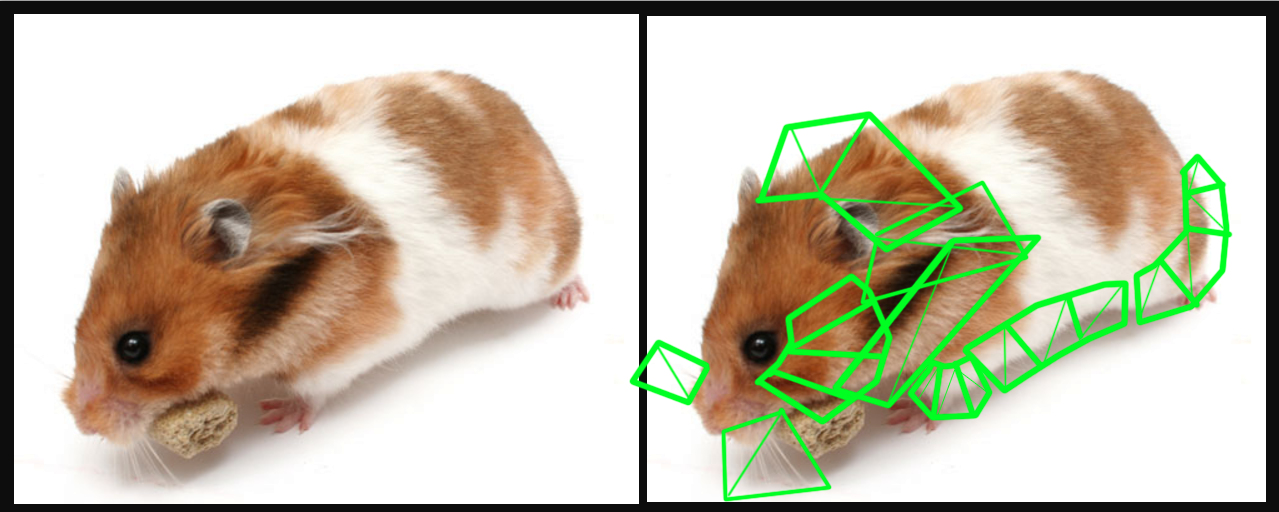
@regal grove here this is how you go "ultra detail" on Hamster. https://i.gyazo.com/84b844d00f51c5f7649d46b73ca0f643.png

green bits represent alpha planes
you could use all of those planes, or none, or some, or just whiskers
it's up to you how you do it based on how good you are with alpha, how long you want fur to appear, how big hamster is on-screen, how much work you want to do
 frank escarp
for its fur, Shadow of the collosus just rendered a bunch of alpha planes
i think 16 layers
or was it 4 ?
dont remember
spice urchin
my project actually uses Neofur, but that's no longer available
frank escarp
no longer availible?
spice urchin
yeah the company is in some weird transition state https://www.neoglyphic.com/neofur
we bought the full big version and it's AWESOME
it uses POM (parallax occlusion mapping) tech
but it does so with bounce-jiggle and gravity
POM is pretty awesome for fur but if you don't have bounce and gravity it's kinda expensive and you can't go very long with the fur that way
you can't really go long with fur with Neofur without it getting crazy expensive too, but you can definitely go somewhat long. we're using it for mammoths in Stone Rage
as well as all the other animals
fur
it does really neat stuff to the specular that it hard to replicate with materials
plush yew
Please welcome @surreal sandal to the community! :beers:
hmm epic messed up the stable build of 4.16, i cannot compile it always gives these errors.
Please welcome @mellow sable to the community! :beers:
plush yew
Please welcome @zenith lily to the community! :beers:
Please welcome @plush yew to the community! :beers:
plush yew
Please welcome @long comet to the community! :beers:
 sacred crater
SOWWY
I just accidentally moved general under ai channel >.> Placed it back, but for anyone who noticed, don't worry we're not gonna change channels today :)
weary basalt
Aww but i just made popcorn
 tropic oracle
@sacred crater would be a quick way to get more people aware of AI programming quick though!
plush yew
Please welcome @obtuse orchid to the community! :beers:
hi i use unity and is this the right place 😉
polar hawk
My name is Allar and I'm a Unityholic
plush yew
hi my name is Allar and i'm a game maker studio -holic
did anyone actually pick up the unity/unreal book pack on humble bundle?
just curious
cyan gazelle
wheres all my blueprint helpers
plush yew
they sleepin or busy homie
 obtuse orchid
plush yew
obtuse orchid
plush yew
nah it's gone like a week or so ago
along with the game maker studio pack for like $25
grim ore
I've got a few of the books, but didn't get the bundle.
plush yew
Please welcome @vast nexus to the community! :beers:
cyan gazelle
can i get someone to look through my blueprints and see wtf i need to do to get this stuff to work
i can stream the screen and give link
im all hecked up
oh this is general
plush yew
Please welcome @plush yew to the community! :beers:
plush yew
Please welcome @half ermine to the community! :beers:
plush yew
Please welcome @median bronze to the community! :beers:
 median bronze
anyone know who is charnge of these 'overview videos" id like to personally send them a message. i posted this on their page a few years back and yet apparently whoever is in chrage of it still does it. https://www.youtube.com/watch?v=UwVoYfgP6ZY&t=1s an HOUR LONG video about 4.17 without SHOWING OFF the engine at all....with 4.17 is USELESS!

4.17 is about to be released and our lovely Technical Director, Mike Fricker, once again joined the livestream to give us an in-depth overview of what featur...
i downloaded the thing hopefylly to figure out how to bloody hell add keyframes in sequencer now they "changed it to make it simpleir" which of course its not. and yup. just an hour of talking heads.
sad considering the other videos are actually useful
weary basalt
@median bronze Message @solid gazelle or PM him on the forums if you dislike how they present information through their community posts.
median bronze
good. i mean for the most part those videos are good. just i would think a major feature update would warrent a in engine walk through lol..........oh and on the other note..how the hell do you add keyframes in sequencer now? the buttons have changed and before i just used the keyframe all mode where if you move any thing it adds a keyframe now it seems nothing i do does 😦
weary basalt
No idea, perhaps ask in #graphics maybe, im not an Artist or Animator so i dont use it.
median bronze
neither am i but i do use it for making cool cinmatics ;-p
k ill try. love it when a program keeps changing its base features for a lowly newbie tryin to learn it
lol
weary basalt
You arent really 'required' to update, most of my projects are still on 4.15 or earlier.
Sometimes its even worse to update straight away.
 cursive dirge
@median bronze you are missing the reason why preview streams are about, they do show footage from the feats if they have it, but the main purpose of these streams is to inform people what the next version can do
if you've used the engine for a while, you appreaciate these more
median bronze
well still
cursive dirge
they are nto targeted at people who are starting with the engine
median bronze
back to 4.16 i guess. sighs
cursive dirge
I personally love those preview streams
while there's a lot I don't like in UE4, Mike is my idol, he's always so excited about the engine, always nice to see people who love their jobs
also, those streams are usually super informative on what is going on
median bronze
i guess just didnt help me at all for the one thing i was looking for ok. i give up back to 4.16 for now. lol can always migrate later
cursive dirge
ah, preview streams have never meant to be any kind of tutorials
there will usually be separate streams later on when the feats are released officially
that do the tutorial parts that is
regal grove
@spice urchin there will be two models, one will be for cinematic which will be in high detail and other will be for gameplay which will be lowpoly and small-medium size
plush yew
Please welcome @fierce trail to the community! :beers:
 fierce trail
Hey guys. New here. Looking forward to talkong with all you guys :)
 cloud cobalt
Hey, still no way in UE4 to apply a specific FOV to an object ?
 brisk osprey
Will there be VXGI for 14.7 ?
 grim sinew
Probably at some point, Nvidia's been good about keeping it up to date
plush yew
Please welcome @marble portal to the community! :beers:
Please welcome @lime pecan to the community! :beers:
 keen birch
plush yew
keen birch
plush yew
Please welcome @floral jay to the community! :beers:
cursive dirge
@brisk osprey https://github.com/NvPhysX/UnrealEngine/tree/VXGI-4.17
 safe crown
Hi guys
I have a quick question for something weird thats happenning when I open the unreal editor
basically when I open it with all my content it just stops at 71% and won't continue
but when I move a UI BP out of the content folder it will load correctly
and after it loads correctly I only need to put the asset back where it was and it all works correctly
I'm not sure why that is hapenning
plush yew
anyone know what song this video used? https://www.youtube.com/watch?v=3AUGO2C4w5M

http://CoronaLabs.com Corona SDK is a cross platform development tool that makes it easy to create native applications for iOS, Android, Kindle, Nook, Window...
worthy ether
@safe crown maybe that Blueprint is corrupted and is causing issues when being loaded?
or could be some weird dependancy issue
 chrome prism
Hey people. So i'm currently trying to prototype a small base building game where I want to store information in a JSON to upload and store online. The game is simple , it has predefined plots that can either be empty or contain a building. Plus the player profile should contain his resources and progress. So my question is , how would you go in storing all this data? I was thinking of having each plot generate a JSON with it's contents plus another big JSON that stores all the other player variables?
would this be the correct approach here?
I have around 50 plots so storing everything in one JSON can get a bit crazy I think
worthy ether
thats definitely how I would do it
altough id stick all those 50 plots into another json called basedata
safe crown
I don't think it's corrupted since it works has expected
 fluid tide
When bored lol http://sendvid.com/6hgm6jgq

Sendvid
 surreal viper
is there any difference between spawning an actor dynamically vs placing them in the level? they work fine if I place them, but the movement component is kinda mad if I spawn them ingame
by default character movement mode is none and it is just floating in the air, if I set it to walk it stays there too 😮
same character placed in the level works fine
 vapid karma
tall pendant
vapid karma
tall pendant
depends
plush yew
Please welcome @plucky reef to the community! :beers:
 plucky reef
Hi Guys I just want to ask something
 regal mulch
plucky reef
regal mulch
plucky reef
I packaged my sample game but when I ran it I can't resize it or windowed mode it, anyone here know how to resize it without packaging it again?
surreal viper
open the console and change the resolution with command
you can also change between windowed/fullscreen mode
plucky reef
@surreal viper I need to open again the UE Editor? or the Actual Game?
plucky reef
I can see it when I inputed that r.SetRes nothing happen
surreal viper
what did you type exactly?
surreal viper
np
plucky reef
you answer all of my follow-up question with that link lol
plush yew
Please welcome @red peak to the community! :beers:
plucky reef
btw, what do "r." Mean?
plush yew
Please welcome @tranquil bone to the community! :beers:
plucky reef
I see, you're genius
there are so many console variables I guess I need to study all of it
yeah, I should
 floral lion
wish there was batch editing for MaterialInstances 😦
or is there a faster way to assign PhysMats to different materialinstances 😄 ? (maybe iam missing something?)
cursive dirge
do you really need to assign them to material instances?
like, can't you just put them to collider/mesh setup?
floral lion
@cursive dirge mmh yeah not really need to but i like to keep it one way :/
cursive dirge
it's more logical to put those to where the actual physics objects get defined IMO
 peak rivet
Hi people. I've downloaded source, switched to 4.16.3-release tag and built everything on linux. Now I'm trying to build a server for my game with RunUAT.command, but getting error about missing AutomationTool.exe (which is really missing). I wonder how I can obtain this file.
 lunar palm
https://www.udemy.com/master-blueprints-in-unreal-engine-4-endless-runner/ Did anyone ever follow this tutorial and end up knowing blueprints a lot better?

Udemy
Learn how to develop Blueprints to quickly create your own awesome next generation games using the brilliant UE4
Or shoudl I just follow the free Unreal Team on YouTube
chrome prism
To be honest most of the courses on udemy are not very good
stick to free stuff
that's what I did
and that one specifically looks atrocious
worn granite
That one really seems like a rehash of https://docs.unrealengine.com/latest/INT/Videos/PLZlv_N0_O1gbY4FN8pZuEPVC9PzQThNn1/

Video Tutorial Series
Introduction to HUD Blueprints, drawing textures and hitboxes
y tho
Creating Pickup Blueprints and then later Building Blueprints for Random Pickup Generation
Using Functions within a Blueprint is pretty close to last
Sure its 5 hours of walkthrough
But you can get it better elsewhere I'd be willing to bet
floral lion
@0lento#8809 do you (or someone else) know the order - it is probably MI PhysMat > Mesh PhysMat ? But one does not override each other?
worn granite
Oh, this is based on an older unreal
That explains the HUD blueprint thing
if those are not connected, the glue that holds unreal together won't be set properly (talking about setting the gamemode default classes)
plush yew
Please welcome @drowsy sage to the community! :beers:
 drowsy sage
Hey guys!!!
plush yew
Please welcome @severe nacelle to the community! :beers:
regal grove
Hey guys a question, what is your workflow? I'm stuck at 3D modeling for many days and haven't touch the engine.
Should I make game play first/code/graphics or what??
 wild kestrel
@regal grove have oyu seen splatton prototype? ;p http://nintendoeverything.com/iwata-asks-splatoon-summary-and-a-look-at-some-prototype-designs/

The latest Iwata Asks focusing on Splatoon has all sorts of interesting details about the game’s development. Additionally, the team even shared a few prototype designs from the project. You can find those images below, plus plenty of tidbits about how Splatoon came together. Did you know that it was only 10 percent complete at E3 2014? Part 1 –...
regal grove
Nah
regal grove
No, I meant I'm the only person who does game dev.
I need some 3D artist, as I could find none, I thought to learn on my own.
And as it would take time to do everything on my own, how should I proceed?
plush yew
Please welcome @plush yew to the community! :beers:
cloud cobalt
So, anyone has experience with updating input mappings post-release ? I added lots of new actions and bindings, they work in editor, but not when updating a client.
frank escarp
sony, do NOT tangle, with the kind of people who install LINUX on their PLAYSTATION
fucking lol
damn, that thing is old lol. On the "free games"
now you have fucktons of F2P games
cloud cobalt
Anyone ever tried adding actions to DefaultInput and have them updated on a client ?
Or clearing a config file ?
cloud cobalt
@pallid compass Can you share how you do it ? I only do C++
Right now it seems the DefaultInput.ini isn't reloaded as a base to the Input.ini in the saved folder
Is there a way to merge them ?
cloud cobalt
"Most people seem to be under the impression that the semicolon denotes comments in configuration files, but they are not (FConfigFile::ProcessInputFileContents does not actually treat them, or any other string, as a comment delimiter). This behavior is intentional. Technically any character can represent a different key-value pair. Typically, a semicolon is placed at the beginning of a new line. It works like a comment, but it is not actually."
This is so wrong on so many levels
 south ridge
@cloud cobalt Did you add them to the engine ini files?
cloud cobalt
No, I never touch the engine. They're in DefaultInput.ini
south ridge
Mmm
cloud cobalt
Basically I think the axis configs are there (since they're not in Input.ini anyway) - but the mapping themselves are not added to Input.ini
south ridge
You could either add them into another ini, or modify the engine
cloud cobalt
@south ridge Well, I did it by writing the C++ equivalent of the missing DefaultInput data
south ridge
That works too
cloud cobalt
its-something.gif
 quartz patrol
Is it possible to make game still running on minimized?
plush yew
Anybody know any details about the pricing of IKinema (i mean studio/team license prices) ?
Please welcome @graceful falcon to the community! :beers:
 pallid compass
@cloud cobalt u here
cloud cobalt
I am.
pallid compass
There u go
Its a cut out from an old plugin
victory plugin i think it was called
it just carried too much weight
to use just the plugin for such a small thing
it had like 600+ functions lmao
example of how it works too @cloud cobalt
ps it also saves it too config
and works in real time
cloud cobalt
Yeah, there is definitely a much easier way to do this
But anyway, I didn't need to reset
pallid compass
u dont have to reset
its an example of how u use it
to overide binds
add extra ones
remove binds
etc
its all in there
just not in that example
cloud cobalt
I had a very specific issue with shipped clients not being updated automatically with latest changes from DefaultInput.ini
cloud cobalt
With Input.ini in appdata not getting the new values
cloud cobalt
Yeah I know how to do it, that's what I ended up doing (though in pure C++)
sacred crater
That moment when you set life span on the wrong item and you start to wonder why all pieces you shoot dissapear after a few seconds
pallid compass
GO STORAGE DRIVES GO
plush yew
I wanna make a game so bad
plush yew
And if I don't do it right now I won't be able to start my company
pallid compass
If you just want to make a game
its like
Not that simple
ALOT goes in too this type of stuff
worn granite
nobody here
pallid compass
omg
worn granite
has, no
plush yew
lmao
worn granite
Halcyon has come pretty close
worn granite
he's got good stories
plush yew
what kind of game
plush yew
Ruined millionaire dreams#
pallid compass
not even joking place my whole engine is broken right now due to cyclic dependency lmfao
worn granite
how
pallid compass
I DONT EVEN KNOW MAN
worn granite
that's quite impressive
pallid compass
one of epic's engineers got back to me
and was like
"HOW"
i caused cyclic dependency in blueprints
LOL
plush yew
Epic is a brilliant company
worn granite
why
south ridge
Are you building engine from source?
pallid compass
I dont even know how
plush yew
your computer must be trash
pallid compass
Yeah haha
plush yew
or you destroyed the compiler completely
worn granite
hahaha
south ridge
You can safely remove the bit of code that cycles. It will break the functionality, but you can re-save the blueprint most likely
pallid compass
dw one of epic's engineers is gonna go through it tonight with me
pallid compass
dude idk how i did it
worn granite
AAAAAAAHHHHAHAHAHA
pallid compass
they dont even know how i did it lmao
plush yew
one stupid mistake and the whole thing goes boom
pallid compass
i thought if i ever broke the engine it would be c++ or GPA
cyan gazelle
teehee
pallid compass
mfw i do it with blueprints
plush yew
You gotta be perfect
worn granite
Yeah if you're getting a cyclic dependency you'll end up having to remove code so you can open the BP and fix it
cyan gazelle
im about to admit defeat here in a minute ive done all i can as a noob and everything looks right to me but it just doesnt work
worn granite
Just curious how you managed to fuck the engine itself doing that
worn granite
Just stops loading, right?
pallid compass
when we find what it is il let u know
worn granite
What pct?
pallid compass
pct?
worn granite
percent
worn granite
Like when you open the editor it loads
worn granite
shows you a percent
pallid compass
oh u where asking him
cyan gazelle
but i wasnt doing anything important
pallid compass
oops
cyan gazelle
no hes asking you
i just have the same prob
i moved my bps from the broken project to a working one and when i try to open any bp it crashes
but im not worried about it nothing lost all practice
my bps look nice and neat this time around, they still dont work though
worn granite
At least you can read them, even if you don't understand them
cyan gazelle
im hoping to get someone who has some free time to help me get going in the right direction at least, cause at this point im at a standstill its been 4 hours today and 6 hours yesterday trying to fix it lol
ill screenshare or stream or whatever so the person can see what i got going on
it all looks like it should work and i get no errors from it
just @ me if you need me i gotta take a break from this before work
 obsidian nimbus
can allways drop a screenshot, perhaps it sorta obvious 😃
plush yew
Please welcome @lyric fossil to the community! :beers:
Please welcome @past island to the community! :beers:
 past island
😃 happy to be jumping into doing some UE4 Dev, a departure from my normal node/react dev
grim ore
mix UE4 with Node and make some multiplayer stuffs 😃 your halfway there!
 umbral frigate
Is there a way to always see the transform gizmo?
Example, I have an object selected (yellow) and I want to move it to align it with a reference object (teal) but the gizmo is on the other side of the object.
http://i.imgur.com/6TKM0w2.png
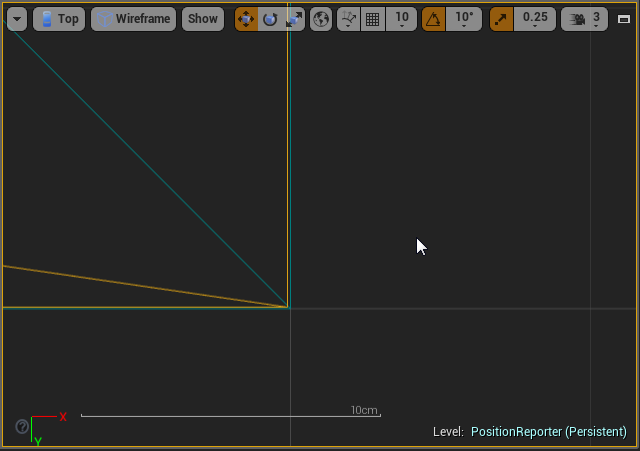
Is there a way to set up a temporary pivot and also snap to points?
south ridge
Copy an extra object, select your object and then other object
Bam, the pivot is now with the other object
But you're moving both of them at once
umbral frigate
works, but ewww... eheh 😃
glossy flame
You'll very rarely see someone using UE3/UDK, UE2 might be a little bit of a stretch :p
plush yew
So no one works with UE2
Well tell me this
How come when I import my model to UE it's half see through
plush yew
the whole model it's weird
south ridge
Sounds like you might be using translucent materials and the depth sorting is messing up cause translucent faces aren't set up correctly. Or maybe there is some other reason
plush yew
and i can't texture it
umbral frigate

ShareX
ShareX is an open source program that lets you take screenshots or screencasts of any selected area with a single key, save them in your clipboard, hard disk or instantly upload them to over 80 different file hosting services.
plush yew
You know you can just use the snipping tool right?
Ok
My republic commando is loading
The editor for it
glossy flame
Snipping tool doesn't automatically upload to imgur :p
south ridge
How does this model look like in some 3D editor?
 plush yew
ok
worn granite
Whereas I can just hit Win+1 and then bandbox and then paste
worn granite
Nah, just so long as they aren't taking a literal picture I don't tend to say much
plush yew
Im trying to play fallout 4 whil trying to fix these models xD
polar hawk
I use obs to film a video then vlc to take a frame dump then upload it to an ftp then open it on my smart tv and take a picture of it with my smartphone and then upload it here
worn granite
(╯°□°)╯︵ ┻━┻
plush yew
Also
UE rigs are 65 bones correct?
Please welcome @wispy lotus to the community! :beers:
??
livid haven
Rigs are rigs. There are no set number of bones for all rigs.
cyan gazelle
whats a rig
livid haven
I mean, if you're going to be like that... I can just not answer you for being a prick about it. 🤷
umbral frigate
@plush yew
You know you can just use the snipping tool right?
Of course, it's just that shareX is better.
south ridge
Which rig
livid haven
Neither do I. Win win. 😄
south ridge
Do you want the UE4 humanoid rig? With IK bones or without? With finger bones or without?
umbral frigate
If
you
type
a
word
per
line
you
win!
south ridge
There's a number of variations on the 'default' rig used in all examples, but you can also have an arbitrary custom rig (which is what some people do)
And because of animation retargeting stuff, you can have very vividly different rigs and transfer animations between them
plush yew
Well im not familar with UE4
becuase ive been remastering republic commando
Which runs on UE2
which the main rigs have 65 bones
so
Is a humanoid rig 65 bones
polar hawk
yes
livid haven
@polar hawk I need to absorb your ability to give less fucks.
polar hawk
lmao
livid haven
So, you're just accidentally being a huge prick. This is not an improvement.
plush yew
I mean im not being a prick
If i wanted to be a prick
I can be a prick
But why would i do that
polar hawk

polar hawk
no
plush yew
So i can't just bind the humanoid rig to the mesh
polar hawk
yes
polar hawk
no
cyan gazelle
can someone build my game for me and then just send me the files
polar hawk
yes
worn granite
Buy Generic Shooter
cyan gazelle
ok cool u pick a name for it too
polar hawk
"yes"
plush yew
?
livid haven
ShooterGame.exe, works for ARK, fuck it, ship it.
 wispy lotus
lol
polar hawk
yes
cyan gazelle
mjust make sure in the credits you put my name as lead dev
polar hawk
yes
cyan gazelle
this fortnite game is pretty complex i just tried it out
polar hawk
yes
plush yew
@south ridge
grim ore
Does Allar need to play more UE4 Jam games in VR
polar hawk
no
grim ore
Best part of the UE4 James hands down
south ridge
What @plush yew
plush yew
@south ridge Is it possible in UE4 to export rigs
south ridge
yes
plush yew
Could you export a humanoid rig for me
So i can bind it and test it on my model
And see if i can import it to Republic Commando
plush yew
ok
polar hawk
cyan gazelle
@regal mulch moderator now huh
umbral frigate
Is there a way to select multiple assets and assign a material to them?
grim ore
If they share the same details then you can multi select them in the world outliner or in the viewport and drag that material into the material slot
umbral frigate
well, yeah, if they have the same material already I can just select them and search for a new material to replace.
But if they have different ones... nope
grim ore
you cant select them in the world outliner? in the top right.
then drag from your content browser into the Material slot?
umbral frigate
got them selected, yes: http://i.imgur.com/1bkjmy1.png
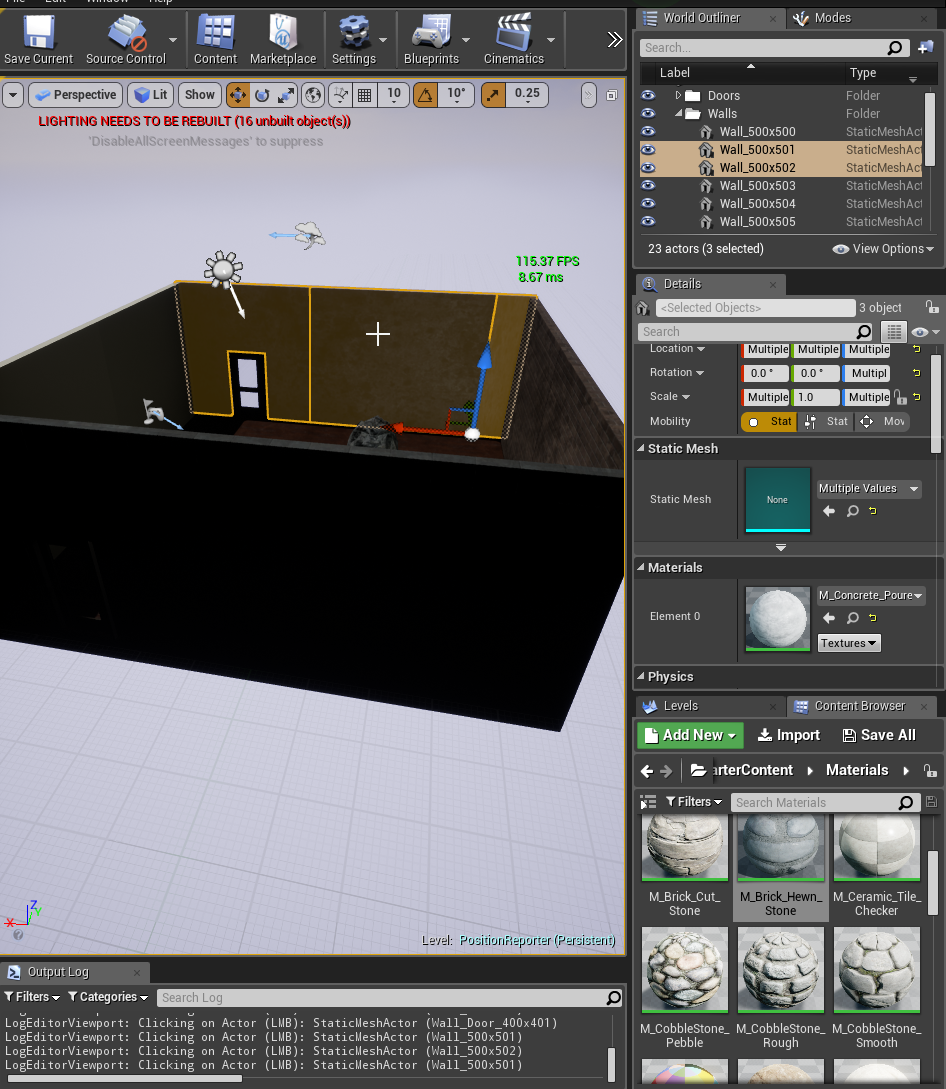 grim ore
or are we talking items in the browser
and drag from the content browser into the material slot?
umbral frigate
@grim ore
If they have different materials I need to drag 3 times. https://streamable.com/yspl4

I was looking for applying the same material to all at once.
Something like: Right-Click on the material and "Apply to selected".
livid haven
Not sure, but can you open up the material and, while having those actors selected, click the apply button? I think there's a button to apply the current material to the selection?
Awkward flow, but it might be possible.
umbral frigate
http://i.imgur.com/cXowdIq.png I guess you don't mean here right?
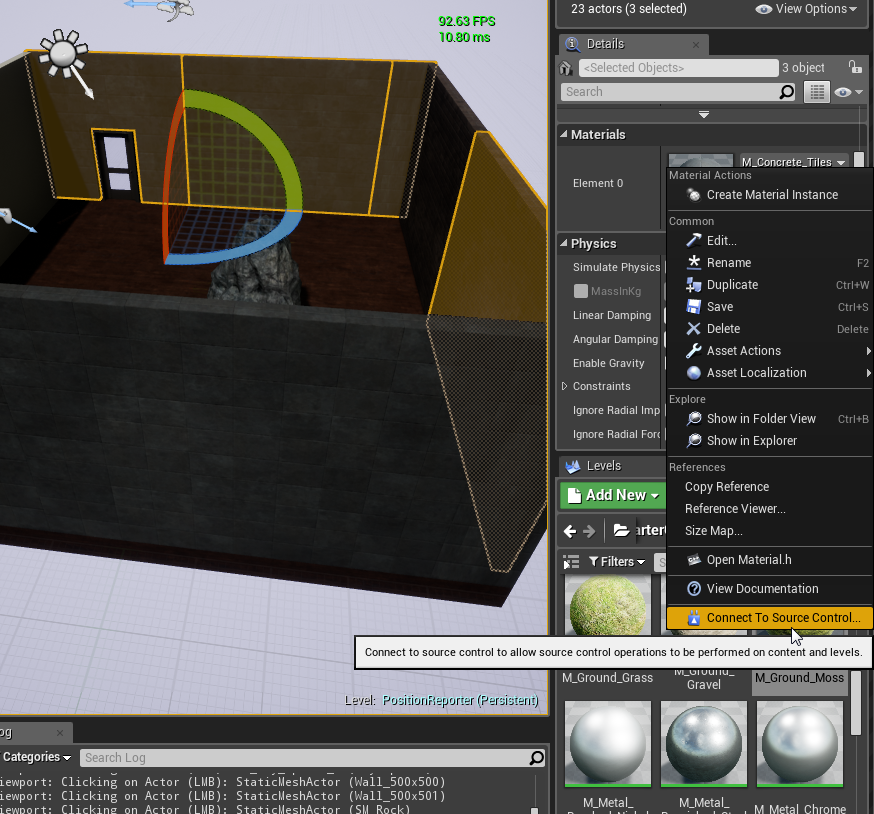 umbral frigate
"I'm in"
livid haven
Is there a button up top to apply the material to the level editor's selection?
umbral frigate
hmm I'm looking but I don't think so... http://i.imgur.com/Fd3i0nc.png
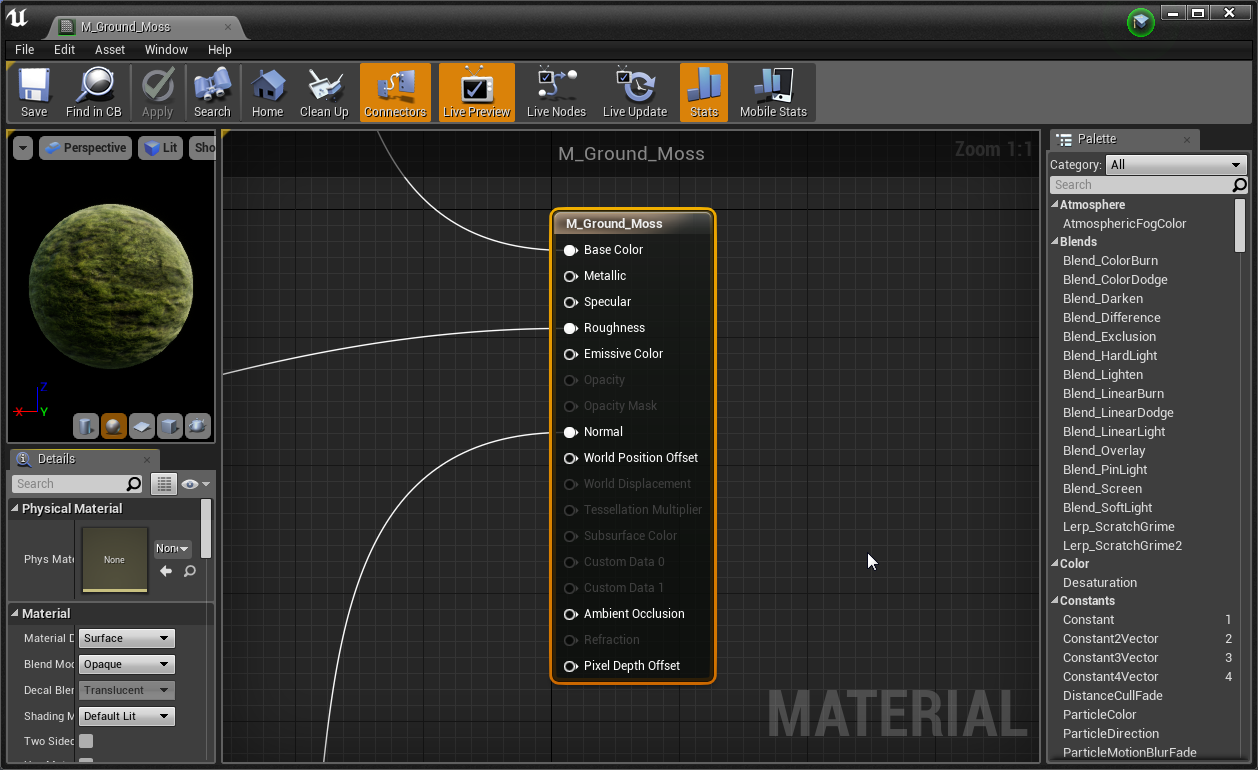 livid haven
It would be that Apply button that's disabled, I think.
So, no dice. Not sure why it's disabled.
Is it disabled if you select only one actor?
Maybe it's disabled when you have multiple actors selected?
(Either way, this won't do you any good after all.)
umbral frigate
It's always disable regardless, maybe it's to apply changes to the material and not the material to actors?
Yup, that's it:
http://i.imgur.com/caB79f0.png
 livid haven
Ah, not a workflow I usually get in to.
umbral frigate
thanks
livid haven
Sorry, no dice after all.
umbral frigate
🍻
grim ore
this is what I was referring to , http://i.imgur.com/PoS5qLe.jpg
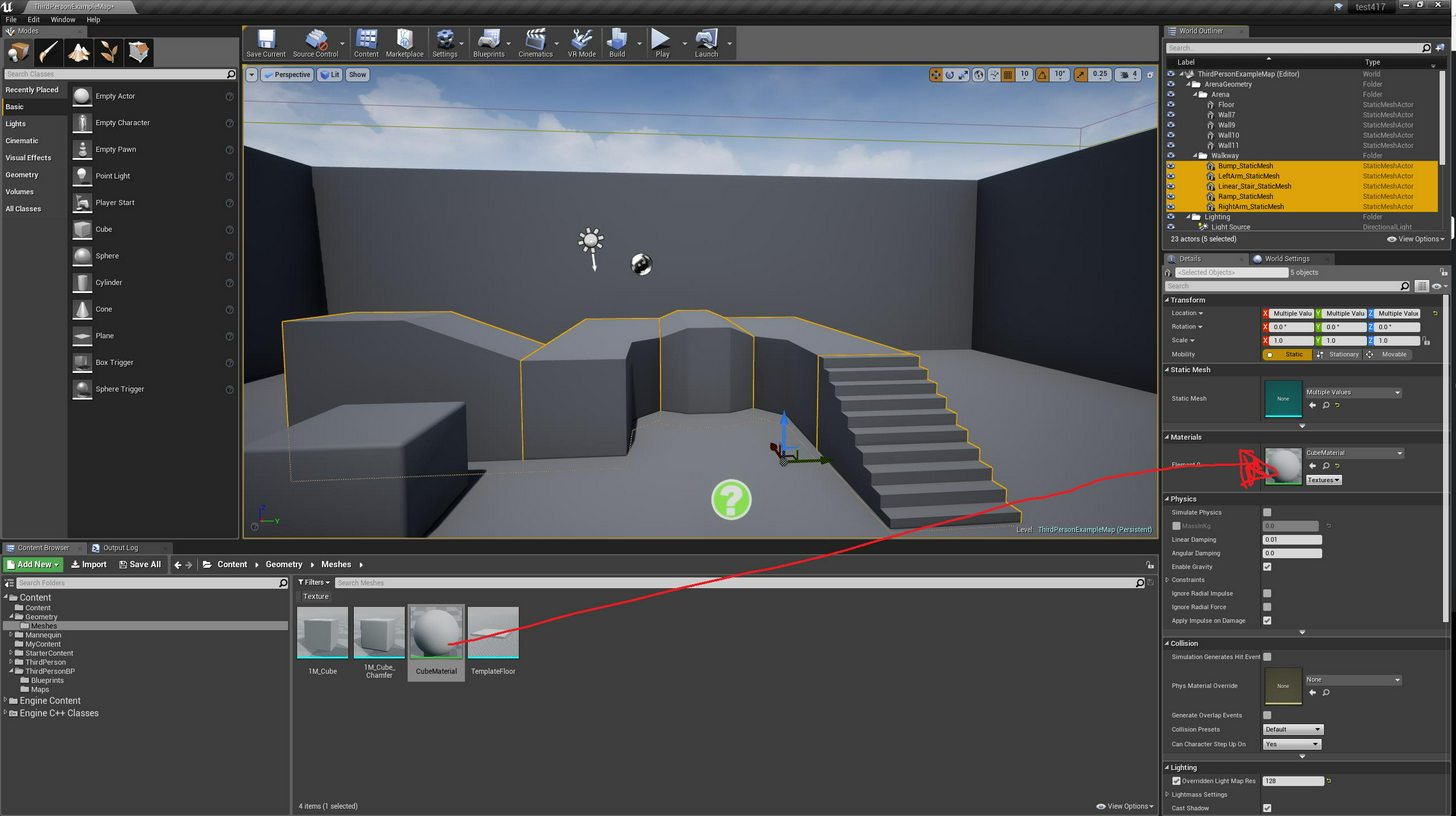




and yes you would have to drag X times for each material you are replacing, there is no shortcut for meshes that I am aware of. There are shortcuts for geometry brushes
That sounds like someone should make a plugin to do that tho 😃
umbral frigate
You mean a script or a feature request? x)
grim ore
someone could make some "helper" utilities and bundle it as a plugin and toss in on the marketplace
plush yew
Please welcome @short beacon to the community! :beers:
Please welcome @cinder haven to the community! :beers:
 cinder haven
hello
grim ore
Hola
pallid compass
@grim ore u can set binds up for pretty much ANYTHING, i cant remember how but its in some dev tools somewhere in the editor
Does anyone know what are the peformance impacts of skeletal meshs? like what causes frame drops with lots of them, and does rigid and soft skinned impact that