#ue4-general
1 messages · Page 94 of 1
 paper kernel
but there's no guarantee your animation assets support such heavy blending, it might not look all that great
 plush yew
Please welcome @ember wolf to the community! :beers:
Please welcome @unborn glade to the community! :beers:
plush yew
Please welcome @humble pike to the community! :beers:
plush yew
Please welcome @plush yew to the community! :beers:
plush yew
Please welcome @opaque sonnet to the community! :beers:
Please welcome @opaque basalt to the community! :beers:
 thorn topaz
I have an object that I want to rotate towards the player so it is always pointing at them. However, I need it to ignore the z rotation.
 glossy flame
By "z rotation" I'm guessing you mean up and down rather than yaw?
thorn topaz
Yea, essentially I have a joystick and you "grab" it so then it points towards your controller
however, I need it to not rotate by the yaw because that's not how joysticks work
thorn topaz
imagine you grab a joystick with your hand
you can move your hand forward and back (pitch)
and left and right (roll)
you can't rotate it in your hand
(yaw)
glossy flame
Ah okay, I understand what you mean now
thorn topaz
so I have it targeting the hand, that's easy. but I need to keep it from rotating in the yaw direction
thorn topaz
@glossy flame any ideas?
plush yew
hows the Linux UE4 client these days.
glossy flame
@thorn topaz to be honest, I'm not really sure. I know you can clamp rotation axes for movement, but that would have no effect on the math itself
thorn topaz
yea and everything I search just comes up with actual controllers
 late sundial
Top of the day all ^_^
Does packaging for 32-Bit even matter for a steam-VR release or should I just go 64-bit since 64-bit is compileing easyer for me?
 cloud cobalt
64-bit is a low fraction of Steam users, and it probably has a very low overlap with VR
cloud cobalt
Yeah, my bad
glossy flame
Yeah, IIRC Oculus only supports 64-bit anyways, not sure about Vive
cloud cobalt
According to Steam, you can find around 4% of modern 32b Windows
Plus 0.8% of Windows XP no one should even target
Mac & Linux is larger than 32b at this point
plush yew
Please welcome @marsh mirage to the community! :beers:
Please welcome @marsh smelt to the community! :beers:
Please welcome @golden condor to the community! :beers:
late sundial
@cloud cobalt @glossy flame Thank you much for the information. Yeah I'm just gunna go full 64 and not worry about the 32bit bugs
plush yew
Please welcome @warm crystal to the community! :beers:
 golden condor
hi
 modern root
When ever we check in our BuiltData (lighting info etc) to version control, on the receiving end unreal never seems to load the built data, we always seem to have rebuild lighting. Is that an actual bug or just the way it is?
late sundial
Hey hey all;
I just got our game early testing build on steam, not public yet. Does anyone know if there is anything I need to add, command line or engine wise, to force the game to always and only start in Steam VR?
plush yew
Please welcome @plush yew to the community! :beers:
late sundial
And just found
Steamworks>Installation>Launch Options> "Launch SteamVR App"
late sundial
While I may be a bit utterly panic stricken at my looming release day. Actualy seeing our unlisted steam store and clicking download and being able to play a functional near complete build. Holy frikin wow...Its been a long road. Huazzah 😃
 brave horizon
@late sundial what game ?
late sundial
Hangry Bunnies From Mars
late sundial
Why ty ty ^_^
we're putting final smidge'n on and last bit of balanceing. That chaos at the end stuff. Aye, its 3 weeks out form release if everything goes according to plan
plush yew
Please welcome @marsh basalt to the community! :beers:
 south ridge
Congrats @late sundial
I just finished some paperwork stuff and we are going to get on steam too, but far from release (but not too far from open beta aka early access)
late sundial
@brave horizon Oh Heck no lol. I've been doing 14 hour shifts 6-7 days a week for 5 months. I know thats nothing compared to some of course. Dont get me wrong, this was totaly frikin awesome to get to do. Its jsut this alreay recieved its fair share of feature bloat. Also we only had 6 months to develope it in and it was my first time out codeing/blueprinting a game. But I am still proud of it. I think it turned out pretty kewl
I mean there are toooons of things I would totaly love to add given resources and time, regular time lol. But I think it totaly achieved what I set out to do with it 😃
It feels like a good sollid fun ride. To me at leat 😛 . The testers have had a ball too
south ridge
What's your game about? Just in general words
late sundial
"Face off against an invading horde of adorable little killers with a serious case of mankind munchies! Join the Critter Death Squad and arm yourself to the teeth with ridiculous transforming weapons, face off against hundreds of onscreen bunnies, & fight to keep New Los Angeles off the dinner menu!"
south ridge
Cool
late sundial
If the testers didn't have fun I would have dropped it like an ugly baby, but people were hoot'n and jumpin around so I ran with it
late sundial
Nice!
I was about to ask, whats everyone else working on?
What kind of simulator?
south ridge
A hardcore engineering train simulator 😄
We've got a full model of the train, every single component, all electric relays and so on physically simulated
And all the dynamics of motion, lots of infrastructure of the real metro
late sundial
Holy frikin heck. That sounds awesome getting to build all the componants and bits and getting it all to work together
south ridge
Well, you don't built the train, you operate it
But you can do all the engineering operations done IRL
We don't have a repair UI, but it's something we are thinking of adding. The physics engine supports it
south ridge
Every single button, valve and switch, yes
late sundial
Thats a pretty render
south ridge
It's a screenshot 😛
south ridge
It's a bit old too, from this spring. I've since updated the rendering tech for tunnels and stuff
late sundial
Ours is a little less realistic lol
late sundial
Still, that screenshot is already pretty up there. Cant waite to see what come sof it. Is there somewhere I can follow?
south ridge
http://devblog.foxworks.cz/ this is probably a good spot
We're not quite full on public yet
It's extremely annoying, but I can't post everything we do to the dev blog 😄
late sundial
What the XD holy what the flippin man, you were not kidding when you said ultra realistic
south ridge
It goes like "Can I post about this new fancy feature?" "Nope" "Can I post about this new simulation feature?" "Nope". So I can mostly post about train engineering, but it takes some time to prepare post nicely
late sundial
hahahah I know exactly how you feel
I had to get in some pretty heavy head to heads to get my co-horts to allow me to keep a public dev log
south ridge
The next post will also be on a device in the train
Called a thyristor braking controller 😄
late sundial
Man, you should be frikin proud, this is nuts, like next level attension to detail kinda on the edge of sanity lol
south ridge
We have lots of engineering data on the trains and the system
And.. we're not bound by any NDA from any of the companies
late sundial
Might want to possibley use it for a VR train operator simulator when its all said and done
late sundial
VR trainer operator education I mean
south ridge
Currently only 45 FPS mode, but it's mostly UE4 issues and not the actual game performance
late sundial
oh oh sweet
south ridge
We also do that yeah 😛
late sundial
your already there then, nice
south ridge
Industrial version of the sim is available
late sundial
Good thinking though. VR as a education tool I think is gunna land some people some very nice contracts
And at the same time, get to work on cool train stuff, win win
Im off to more balancing. Good luck! Nice to meet yah though ^_^
south ridge
See ya
I'm gonna go draw some schematics
We're an engineering company first and foremost
I have a (digital) stack of schematics I need to combine and redraw a nice schematic of our own to use for engineering purposes
plush yew
Please welcome @plush yew to the community! :beers:
plush yew
Please welcome @craggy grove to the community! :beers:
Please welcome @empty wraith to the community! :beers:
 cloud latch
hi all, so I'm trying to find more details about the Tutorials option under the engine section of project settings. What it is, how to use it etc, but, as you can imagine, searching for tutorials and unreal engine with other things to try specify that doesn't go well, and the docs just say it's for selecting which tutorials to package with it, which isn't terribly helpful. Anyone happen to know where I can find out more?
yeah, the exact wording is "Tutorials - Allows you to set which tutorials are available in this project." with no further links or other apparently associated information
 safe rose
@cloud latch You get your answer?
cloud latch
@safe rose To the tutorials setting? I haven't managed to find anything. Searching just leads me to lots of different tutorials 😃
cloud latch
sorry, MP?
 worn granite
marketplace
safe rose
Marketplace
worn granite
Were you wanting to use the in-editor tuts?
cloud latch
ahhhh okay - so it's about editor tool tutorials, rather than ingame runtime ones?
worn granite
Also last time I checked the tutorial BPs are just plain sad to make
not sure why they want them for MP packs
cloud latch
@safe rose yeah - I'd implemented mine in UMG widgets, but then saw this and wondered if I'd missed a better system for it.
worn granite
god no
safe rose
Aye, I don't think most people would consider using them for actual game builds
cloud latch
Thanks for the details, @safe rose and @worn granite
plush yew
Please welcome @sage heath to the community! :beers:
 sage heath
howdy
any idea where i can find unrealpak.exe? it's not in my C:\Program Files\Epic Games dir at all
 real geyser
Well, I finally finished season 3 of Dragon Ball Z.
plush yew
Please welcome @loud verge to the community! :beers:
 weary basalt
@sage heath It should be in \Engine\Binaries\Win64\
plush yew
Where do i create a animation for my image, i thought it was there and you could just click "add"

?????
worn granite
nope
its a different panel
that it looks like you closed
get it back from the window thing in the navbar
 warm mountain
hey guys say if I need to design a scene for a level, based off an actual place
if I need to redesign, should I lighting wise
take a few rendered shots of the place in a 3d software and make it into an enviromental map?
or should I go out to the place and take a few shots of the place and sew it into an environmental map?
what would be more accurate lighting wise?
 languid shard
hey everyone ! is there a way to display a custom engine name in the launcher instead of "Other" ?
plush yew
Please welcome @raw dawn to the community! :beers:
Please welcome @plush yew to the community! :beers:
Hello
anyone wanna jump on voice?
 loud verge
hi all im new and im interested in what kind of a job and how much money can some one make whit the unreal engine and is there a lot of companies looking for ppl to hire cuz i really find the engine interesting and cool
paper kernel
mmm, no
 wary wave
you should probably just google something like 'game industry jobs'
cloud cobalt
As a rule of thumb, the game industry is really competitive and they are really few jobs compared to how many people want them
paper kernel
not to mention there are 100 better ways to make money
cloud cobalt
I don't know about "better" ways, but yeah, if money is a motivation, games are not how to get some
wary wave
I made a money once
loud verge
well its not a problem if there are not a lot of jobs for it its still going to be a hobby of mine but im still learning it yesterday i made my first landscape so im really new but it looks cool btw any guides you can recommend
plush yew
you can make a ton of money in the game field. thats out of question, but will you enjoy it as much as it sounds? Will you get there soon, or ever? That question depends on your own motivation and drive.
Getting a job in the game industry is already a challenge in itself, but then making it to a well paid position in a larger company is the real deal.
paper kernel
I'd say there are plenty of people who really don't really care how much they get paid if the project is interesting enough
plush yew
well it needs to pay at least enough for people to live the lives they are comfortable with
in the long run at least
paper kernel
obviously
 devout gulch
@paper kernel and that's actually problem with game industry
it's why peopl are really underpaid compared to other
paper kernel
but it's also an industry riddled with resume liars, so companies are bit scared to pay
plush yew
not really, Id say this creative field is one of the areas where people really cant lie about their resumes.
if you have a kickass reel and the interview confirms what you show there, you are very likely to get a job.
Lying about a demo reel and skill sets or even using other peoples reels is very easily uncovered once you start working and prove to be useless. If that happens, your carreer is literally over.
paper kernel
that, or you end up with need for speed game
plush yew
Please welcome @dusk charm to the community! :beers:
plush yew
Please welcome @shrewd shuttle to the community! :beers:
 shrewd shuttle
Hey Guys can you help me with this, please?
 whole quarry
I doubt anyone can help with that
Since there is no error shown
@shrewd shuttle
Oh, offline already
¯_(ツ)_/¯
shrewd shuttle
nah im back
cloud cobalt
Yeah there is no error here. Is this a C++ project ? Packaged game ?
shrewd shuttle
This
whole quarry
Is "Dis" a community project or something?
shrewd shuttle
No
whole quarry
You're not giving a lot of information to solve your issue
Im sure you can share more about the problem @shrewd shuttle
whole quarry
Thats no excuse..
shrewd shuttle
aww
whole quarry
Is it a own project, is it a community project? Is it a C++ project? Is it a BP project? Does it occur in the editor on in a build? What were you doing when it crashed?
shrewd shuttle
Community project
Its a BP
And the error is in the build
The crash occurs when i start it up
whole quarry
Have you tried to run it in Editor as Stand-Alone?
shrewd shuttle
no
whole quarry
Try it..
shrewd shuttle
k
wary wave
I just opened up the RiverMaker blueprint in the Kite demo to take a look
whoever made this should be beaten with a stick
plush yew
you violent person
paper kernel
yea example projects aren't the most enjoyable to take apart
wary wave
it looks like someone literally has thousands of monkeys in a room, and waits for them to accidentally push out functional blueprints
the nodes are vomited randomly into the event graph, and then connected up
they're everywhere, no organisation at all
plush yew
post a screenshot mate, now you got me hooked
paper kernel
then dont peek into the materials, it's worse in N'th degree
wary wave
in some cases there are totally redundant nodes
I'd post a screenshot but I've spent half an hour untangling it already
plush yew
post a screenshot of the untangled network then 😉
 paper kernel
uh-oh-spagheddii-oh
plush yew
wow, cant even imagine how the initial version must have loooked like 😮
wary wave
this also using a quintuple nested loop
I'm not sure how this BP ever worked
not without hitting the iteration limits
paper kernel
if you do the math real close, you might fall just under the max limit
plush yew
whats the iteration limit?
wary wave
the iteration limit is a built in check to prevent infinite loops, default is 1 million
plush yew
uh higher than I thought
wary wave
though it works on instruction counts, so a for loop is 4 instructions
(so 250,000 spins of a single for loop)
paper kernel
even 1 million causes a solid 10sec freeze on i7
plush yew
so thats in one tick then?
paper kernel
seems to be function, so yes
wary wave

now I can actually read it and work out what it's doing
@plush yew
this is the original:
https://snag.gy/98C3Ph.jpg
 wary wave
oh god it has a function

seriously, WTF
you know what, screw this, it isn't worth my time
whole quarry
That looks like bondage
 buoyant echo
bondage is a lot tight-ier. 😉
 sterile cairn
That just hurts to look at.
I'd want to spend a lot of time trying to clear that all up.
At least use local variables to store the inputs so that you don't have as many wires going around.
 violet cape
The Sun Temple demo is very well optimized, not sure about the Kite Demo though
it's pretty amazing that it's meant for mobile, yet it's so damn detailed
wary wave
Kite demo needs a top end GPU and 24GB of memory to run at 30fps xD
cloud cobalt
Kite borders on unusable, even on a developer computer
It was never meant to be released to anyone
 half mango
anyone experienced with blender to UE importing want to accept a small fee to fix this problem for me?
 digital anchor
what problem
whole quarry
@half mango Whats the problem you're having?
whole quarry
Did you made a 2nd UV channel and made new UV map (Lightmap) on that 2nd UV channel, then on importing disabled the "Generate Lightmap" option?
half mango
i'm probably just doing something really stupid, i would rather someone download my .blend and i send them money
and tell me what im doing wrong
yes
half mango
it's not
they still overlap
somehow
even basic objects
everyone said that to me but it's broken
will reinstalling UE help?
half mango
you want my .blend file? i will paypal you £5
whole quarry
No, i'm not at home now
half mango
world settings?
whole quarry
No, the Ligh settings of the light sources
i.e. Direction Light or w/e you're using as light sources
whole quarry
Can you post a screenshot of the problem?
whole quarry
Have you double checked the normals that they're facing the right direction?
whole quarry
It seems like there is an Ambient Occlusion texture added in the material
plush yew
Please welcome @spice dust to the community! :beers:
 spice dust
Hi
whole quarry
Hi
half mango
hmm now my normals are beings trange
strange
they won't point either in or out
when flipping
i imported from sketchup first
into blender
coulkd that be a problem/
spice dust
anyone know how to keep the proxy server turned off?
everytime i turn it off it keeps checking itself
whole quarry
@half mango It might help to only export the Selected Objects
@spice dust What are you talking about?
half mango
one at a time?
whole quarry
You can have multiple objects selected, it will import them as induvidial objects
 frank escarp
wich makes the lightmaps go haywire
spice dust
Under Connections the lan settings, the proxy thing keeps checking it self
whole quarry
lan settings?
spice dust
pc
half mango
man this is insane
spice dust
not unreal
spice dust
i know]
plush yew
Please welcome @slate cairn to the community! :beers:
Please welcome @fair nymph to the community! :beers:
 fair nymph
hey 😄
plush yew
Please welcome @mint rose to the community! :beers:
 keen nebula
I've got nothing. I have 0 ideas for a game right now. I need inspiration.
I've spent a lot of time doing tutorials and reading about the engine and now I don't know what to do with it.
wary wave
Two hours of my life wasted:
https://www.youtube.com/watch?v=4AA4b9Ct8Vw&feature=youtu.be

what the actual?
 pallid compass
LOL WHAT
wary wave
I can't even
pallid compass
U got debug version of the engine built?
I would love to know wtf is causing that
wary wave
sadly not
pallid compass
u tried standalone?
wary wave
this is a level design tool
pallid compass
thats the second strangest thing iv ever seen in ue4
Nothing beats mine though
U ready for this
 cinder iron
here
pallid compass
When ever i booted up my game
The music of the birds from the start kit level
Would start playing
wary wave
(video above - scroll up)
pallid compass
Only on the first instance of the game
wary wave
lol
pallid compass
random bird noises
from no where
checked reference viewer, nothing
made fresh level, gamemode, etc
everything
Still same thing
had to delete the starter content to make it go away
cinder iron
wat @wary wave hahahhaha
stop breaking the engineeee
hold on let me check it closer
 pallid compass
sorry if u dont mind me asking ambershee
Where are you from
That youtube name
I know someone irl with similar name
wary wave
I'm British but travel a lot
pallid compass
wth
Same
Well not the traveling
Any chance u been or around / from liverpool?
wary wave
I used to live in Manchester
pallid compass
Ahh might just be similar named friend i knew awhile ago haha
wary wave
@cinder iron - there's code you can't see that scales the width on a per-segment basis (the struct contains a float for the scale)
but yes, depending on whether it's public or not, it breaks D:
 cinder iron
check if you are using any negative scale value unintencionally
wary wave
the values are '1' across the board (always manually defined) - what you're seeing is more or less impossible
or supposed to be anyway
cinder iron
check what is happening on spline 5
because the 4 first splines seem to be gucci
thats unconsistent
lol
splinepoints*
wary wave
I'm just going to leave it public because it's a tool
plush yew
Please welcome @analog zenith to the community! :beers:
Please welcome @green spindle to the community! :beers:
half mango
anyone else experienced with blender to UE importing and lightmaps? will give £15 for anyone to solve this problem
 craggy nymph
@half mango you're going about it the wrong way. Just ask your question and people will be glad to help you out for free, because people in general are friendly and helpful. That's the point of this discord channel. If you start offering money, it looks like a business deal and you're offering way too little. For most people here with experience £15 is not even worth the hassle to ask you for further details about your issue.
half mango
sry but i already asked it and nobody knows how lol
craggy nymph
Just recently saw a really nice explanation of exactly this phenomenon https://www.youtube.com/watch?v=cVwFZEW3z3g

Well, try one more time. I'm sure lots of people didn't see your question 😃
Ah, I see, just scrolled up a bit.
Yeah, seems like something very basic. I've got to go in 10 minutes, but if you feel like sending me your blend file, I'll take a look at it when I'm back (in 5+ hours)
Or just post more screenshots of your uv setup, etc and people might be able to help.
 spice urchin
yup get hyper specific with question, show screens
the questions that get answered the slowest are the questions that are intentionally vague and hypothetical
when we get specifics of what exactly is being attempted, WHY, and HOW it is being done (screens), it becomes very clear why things are working the way they are
 stoic moth
how can i rotate along the local X axis an actor that has the ProjectileMovement and Rotation Follows Velocity checked ?
imagine a rocket following a target, but i also want this rocket to roll in flight
adding Rotation Movement as well, seems to get ignored and overrided by the ProjectileMovement component
plush yew
Please welcome @austere yacht to the community! :beers:
buoyant echo
Following what @spice urchin is saying.. What sounds better to help someone?
"Guys, I'm stuck in this exercise for math."
OR
"Guys, I'm stuck trying exercise #43, on the part where I have to divide the denominator. Is this result wrong? If so, can anyone tell me what I did wrong? [Picture attached]"
¯_(ツ)_/¯
 austere yacht
Ive never created a game. What is the process after you have the idea, mechanics come first right?
spice urchin
prototype
buoyant echo
Mechanics usually, yes.
spice urchin
so essentially yes, mechanics. unless you have zero technical people, then you just keep making art until someone can prototype for you...seriously this happens more often than it should
buoyant echo
^
austere yacht
I would rather learn how to build it, its essentially programming without writing anything right?
austere yacht
Yes.
buoyant echo
That's visual scripting, if irc
austere yacht
Isnt it essentially the same thing as programming though? I mean the logic in it, how you build up all the parts that you need and so on.
buoyant echo
Sort of, yeah.
plush yew
anyone here used world machine before
austere yacht
So say i just want to make an old game in unreal engine 4, you make all the parts of the old game in the new engine. And if I cant see how to create the needed parts, im just lacking the knowledge of basic programming?
spice urchin
@plush yew yeah, extensively, what's the question?
buoyant echo
@austere yacht more or less.
Some things that are done in older games are visual magic, etc.
austere yacht
The first thing I want to do is how to move around the camera with the arrowkeys so I cant say that its something difficult at the moment.
buoyant echo
Read up on the documentation, then. Anything basic is usually covered there, or follow through some tutorials in youtube.
Most of the basics/generic advanced things are covered.
austere yacht
Any series you recommend?
buoyant echo
@grim ore has an awesome series HTF.
https://www.youtube.com/channel/UCOVfF7PfLbRdVEm0hONTrNQ

YouTube
This channel is dedicated to exploring Unreal Engine 4 and the Blueprint programming language that it uses. You can think of it as a companion to the API doc...
UE4 itself has its own series.
https://www.youtube.com/user/UnrealDevelopmentKit/playlists?shelf_id=17&view=50&sort=dd

YouTube
Welcome to the official Unreal Engine channel! Unreal Engine 4 is a complete suite of real-time 3D tools made by developers, for developers. Create and take ...
@fierce tulip has awesome tutorials on VFX.
https://www.youtube.com/user/vladderbeest

YouTube
Besides a few personal things, this channel will mostly be about pewpewpewparticle effects. 99% of those will be made within ue4 with the use of a variety of...
Dean Ashford does some pretty neat BP and Mats.
https://www.youtube.com/channel/UCAaWnOJ4iFSQluBVNS2d-Ew

YouTube
Tutorial account of Dean Ashford. I'm a 3rd year video game art student at Southampton Solent, training to be an environment and technical artist. If you hav...
spice urchin
there's so much UE4 documentation/resources and tutorials you can basically just google any topic and you'll find a specific tutorial or specific answer to any question...it's kinda ridiculous
austere yacht
Thats reassuring, its only a matter of asking the right question then?
buoyant echo
Yep.
spice urchin
ya be super specific, there's 0% chance you'll be first one to ask it
buoyant echo
0.01%* ;P
 buoyant echo
@austere yacht I posted the youtubes for those people I mentioned.
austere yacht
Oh right, many thanks!
buoyant echo
Also, for level design(I however, can't vouch for it, but I've seen them around.):
https://www.youtube.com/user/WorldofLevelDesign

YouTube
I drink, eat and sleep level design and game environment art. My name is Alex Galuzin. I am the creator of World of Level Design.com I love level design and ...
Of course. We're here to help each other out. 😃
austere yacht
Yeah youve been helpful already so i have no doubts in that 😄
spice urchin
@plush yew i didn't really care much for the tiled build output options in World Machine, Instead I went with a larger 4033x4033 output then uprezzed that to 8129, then we chopped up the results in Unreal 4 to be separate streaming levels
austere yacht
How hard is it to find artists to make art for a game?
buoyant echo
Free artists= hard.
Paid artists = easy
Also depends on what type of art.
2d? 3d? Meshes, Mats, Textures?
There's all types. 😃
austere yacht
Hmm. Converting 8-dimensional RTS units from 1998 into UE4 for example
buoyant echo
If by units you mean humanoids, vehicles, etc, you'd look for a 3d artist that specializes in meshes.
If you want to recreate the aesthetic more or less, (IF they were pixels) you can have someone do 2d art, and stick to planes to represent them, using flipbooks.
(A UE4 feature)
It's all up to how you want to do it aesthetically. ¯_(ツ)_/¯
plush yew
Please welcome @regal beacon to the community! :beers:
Please welcome @kindred crater to the community! :beers:
Please welcome @sleek atlas to the community! :beers:
 sharp crest
When I download content from the marketplace into my project, if the project is open it just wont do anything after I select it and press download. Might wonna add a message that says something like "Cant install content while project is open".
cloud cobalt
Not the best play to say it 😃
plush yew
Please welcome @waxen kettle to the community! :beers:
 humble rivet
How are friendly pawns determined in the strategy game tutorial ? as i am looking in the blueprint of the Wall_arbalest but I don't see anything there... ?
plush yew
Please welcome @final roost to the community! :beers:
 hard minnow
Hey, I'm in trouble and could use little help. So I saved my project, did something wrong and it crashed. I opened the project again, it said that since the project has crashed, maybe you wanna restore something, I clicked "skip" since I've saved it right before the crash. But it loaded my project from like yesterday. What do I do now?
plush yew
Please welcome @verbal ermine to the community! :beers:
cloud cobalt
Bug reports
 verbal ermine
Hey there
sterile cairn
What are some good, up to date, alternatives to BLUI/RadiantUI?
austere yacht
If youre making an RTS, is it best to use a pawn for each unit? Can a pawn be used as a unit with for example spells or does that have to be a character then?
plush yew
Please welcome @mental crane to the community! :beers:
plush yew
@glacial pollen sorry ;l
 proper quiver
why does UE4 hafve redirectors anyway? when I move something it creates a dangling redirector, how annoying
cinder iron
@proper quiver and they are slightly broken
Try always to decide in a first instance the directory and the name of the file
Linter and ue4 naming convention docs can help you in that
plush yew
Please welcome @stiff elm to the community! :beers:
Please welcome @abstract sandal to the community! :beers:
weary basalt
@proper quiver It exists to save time. Assume you have an asset that is referenced more than 1000 times. Moving or renaming that asset would mean you have to update those 1000 references to the new asset. Assume you also have an potato PC. Updating these references could take an very very long time.
While its updating those refs you also wont be able to use the editor.
Its an small price to pay for super fast referencing. If you clean your redirectors after you make an asset change like that then you really havent got much to worry about as they wouldn't accumulate.
plush yew
Please welcome @minor vault to the community! :beers:
proper quiver
@weary basalt thanks for the explanation, it does clutter up the filesys but I guess you're right I can just maintain it by fixing it up regularly
sharp crest
Random question guys, what theme would you perfer for a game? Scifi or Magic?
plush yew
Please welcome @rain wren to the community! :beers:
weary basalt
@sharp crest I like both, so do both. 😛
sharp crest
@weary basalt Dont cheat, you gotta decide. xD
 bleak copper
I wonder if Epic announced the redacted project yet...

Posted this a few hours ago and no-one replied. Just realized it was in introductions. >.>;;; My bad.
"Hmm... quiet chat today..."
 polar hawk
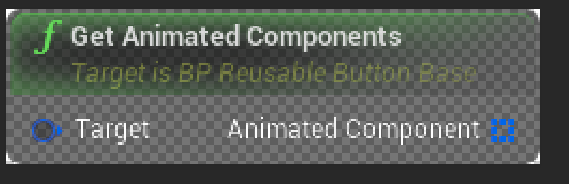
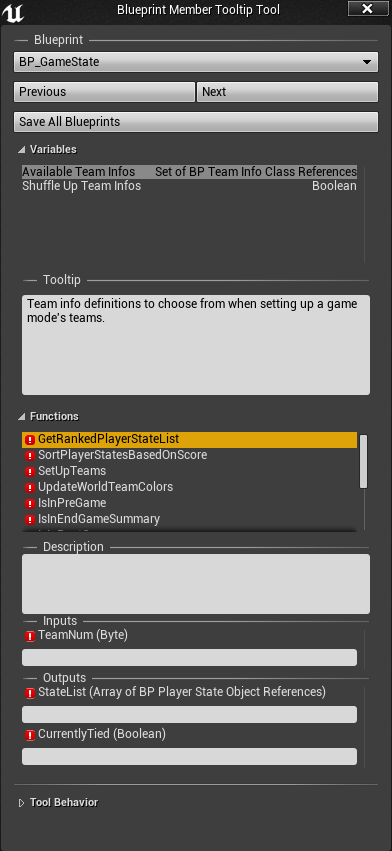
If anyone is interested, here is what a blueprint node looks like in pure isolation (rendered on top of nothing)
What I mean specficially is: (in photoshop)
 plush yew
Please welcome @exotic turtle to the community! :beers:
 exotic turtle
Yo!
plush yew
Please welcome @glad chasm to the community! :beers:
 sullen sonnet
Someone help me please in the #animation
plush yew
Please welcome @runic fjord to the community! :beers:
polar hawk


Trying to mimic @ffejnosliw's @UnrealEngine BP+API ref. I can now export my BPs to @dokuwiki format. Still very much WIP. #gamedev #indiedev https://t.co/sZuy1jcNMy
 Twitter
 mental shale
has there been a smash clone made in ue4 yet?
 upbeat trench
next Smash game is by Ubisoft using UE4
mental shale
lol
upbeat trench
they should make it so you can have the Kart in Smash too
mental shale
pfft
upbeat trench
then I can toadie boost everyone to death 😛
sage heath
@weary basalt re finding unrealpak.exe, that's what i thought, but it's missing from that dir
All I have in /c/Program Files (x86)/Epic Games/Launcher/Engine/Binaries/Win64 are CrashReportClient.exe UnrealCEFSubProcess.exe UnrealVersionSelector.exe
EpicGamesLauncher.exe UnrealEngineLauncher.exe
i'm using the launcher, fwiw
weary basalt
Download another version of the Engine, see if it has it as well.
weary basalt
No worries lol
plush yew
Please welcome @rough tendon to the community! :beers:
 unreal plover
Is there a way to add Sockets in SkeletalMesh via C++?
sullen sonnet
Still need help at #animation
plush yew
Please welcome @dark hemlock to the community! :beers:
mental shale
For some reason, I cant put my finger on why PUBG's graphics look pretty bad
safe rose
@fierce tulip BTW, I ran into that issue about the references of things in maps not being redirected properly.... over 100 errors on each map...rofl
"Fix Up Redirectors" my ass
 short onyx
I have a 1/5 chance that my engine freez when a compile my character blueprints :/ (i don't have any loop or error in it)
plush yew
Please welcome @timber rampart to the community! :beers:
sullen sonnet
Does anyone know how this technique is called where your fps camera shows an arm with a gun but if its from third person, it looks different? Pretty much every major fps games do this.
like it looks perfect in fps but in reality its much lower.
paper kernel
huh, suddenly Epic launcher and engine wants firewall permit
 tall pendant
tencent bro 
 cobalt owl
How can i remove i.e. physics engine component from project? I need to lean this project as much as i can for visual novel (which engine components can i exclude for project like this?)
paper kernel
isn't UE4 bit heavy engine for a VN?
Question: How do I make a splitscreen without making another player
like, I want to show 2 camera feeds to one player
plush yew
Please welcome @patent eagle to the community! :beers:
plush yew
Please welcome @stiff quartz to the community! :beers:
paper kernel
It's not bad with render targets 🤔

but I can imagine it being super heavy
and not very scaleable
cobalt owl
Yeah, that'h why i want to lean it 😄
paper kernel
I don't think you can disable it as a whole, being very integrated part of the engine
but you should look some of the docs from last megajam about reducing engine components
iirc some people got as low as 20-30MB on shipping build
plush yew
Please welcome @keen frigate to the community! :beers:
 surreal viper
yeah but why...
 lost ember
lazyness /s
sullen sonnet
Does anyone know how this technique is called where your fps camera shows an arm with a gun but if its from third person, it looks different? Pretty much every major fps games do this.
like it looks perfect in fps but in reality its much lower.
 cursive dirge
@cobalt owl I don't think you can remove physics engine without custom engine code, it's heavily integrated to ue4 components, I dunno if swapping to 2D physics would allow stripping physx though (never used 2d physics in unreal)
all in all, you are not saving a lot of space by that and definitely not worth the trouble if you release on desktop
we are talking about ~10 MB
or, it was about that in 4.13 with older physx, but I'd be surprized if newer physx wouldn't be in the same ballpark
cobalt owl
I need to make sure that unused components won't be running for 2d paper game
And also lean cooked version as much as i can
plush yew
Please welcome @ebon magnet to the community! :beers:
tall pendant
yeah. wouldn't be something like ren'py or nscripter better suited for a visual novel?
ue4 for a visual novel sounds funky
cursive dirge
also total overkill (and if you plan on selling it, also most expensive option)
plush yew
Please welcome @grim silo to the community! :beers:
 grim silo
Hello
plush yew
Please welcome @royal escarp to the community! :beers:
 mortal grail
erm, the "create destrucible mesh" isnt showing up when i right click on static meshes in the file/contest browser?
content*
sharp crest
damt why is there no punching animation for the Unreal character lol
So many gun stuff anims but no even one punching anim xD
plush yew
Please welcome @ripe flax to the community! :beers:
plush yew
Please welcome @raven phoenix to the community! :beers:
plush yew
Please welcome @fading owl to the community! :beers:
Please welcome @zealous fern to the community! :beers:
Please welcome @plush yew to the community! :beers:
Please welcome @plush yew to the community! :beers:
this discord server is dead
Heya.
 fading owl
how is this server dead?
 zealous fern
^^ Same question lol
plush yew
Please welcome @plush yew to the community! :beers:
plush yew
Please welcome @plush yew to the community! :beers:
 inner mountain
Hey everyone!
What are you using as a task-tracker/planning/roadmap tool for your game projects?
 barren ferry
GitLab 😃
whole quarry
A to-do list
inner mountain
@barren ferry using GitLab as a git hosting as well, but can't use Issues...
as for myself, using mind maps for both roadmap/planning and as a task tracker 😄
plush yew
Please welcome @graceful zephyr to the community! :beers:
 vale halo
Hack 'n Plan works pretty nicely,but odin looks promising
 graceful zephyr
Thanks!
vale halo

ODIN Tracker
ODIN Tracker is a suite of tools (Issue/Task, Capture, QA, & Time Tracker)
bundled into an Unreal Engine 4 Plugin that is currently in development by
Binary Sword Pty Ltd.
 wet spire
Is anyone else having issues with Surface Snapping? I don't have it enabled, but UE4 seems to think I do. I have tried this https://www.google.com/url?sa=t&rct=j&q=&esrc=s&source=web&cd=1&cad=rja&uact=8&ved=0ahUKEwjd9LrD7sDVAhUn94MKHUFOC_0QFggmMAA&url=https%3A%2F%2Fanswers.unrealengine.com%2Fquestions%2F34054%2Fbsp-brushes-and-and-other-meshes-keep-snapping-to.html&usg=AFQjCNFCrFRFWDlLDPqLxm-KI_7pEvDFlg but that didn't help. I can't freely move anything in the level.
south ridge
@inner mountain we use kanboard for tracking near-term tasks and stuff that has to be done in nearest time
wet spire
Oh, wait i found it, it was enabled. I am an idiot
south ridge
https://kanboard.net/ it's basically a trello thing that you host locally
We also are working on a custom issue tracker for submitting bugs for our game (it will replace the kanboard for public bug submissions). We put long-term plans into memos and documents
 vestal cloak
Is there a plugin that sets up cars?
sharp crest
There is no plugin for it because it's built it :p xD
You can use the vehicle template or the advanced vehicle template to see how it works and how to set it up @vestal cloak
vestal cloak
True
 knotty pilot
Do you guys have any suggestions for game engines that are multiplayer friendly, work well with 2D games, and use lua? My brother and I tried making a game together using LOVE2D, but we couldn't get past the multiplayer problems.
safe rose
This is an Unreal Engine Server
plush yew
Please welcome @leaden wigeon to the community! :beers:
knotty pilot
I didn't really have anywhere else to ask.
I figured at the least I'd get scolded and directed to a better Discord server for that question.
safe rose
@knotty pilot better is subjective
However...I am still confused how you got to this server
Anyway, GDL is your best bet
knotty pilot
I've been here for a while.
I've played with Unreal a bit.
I've been told in the past that using it for 2D games isn't the best.
 final owl
yo
when is the next sale on marketplace
i want to buy stuff but everythings so expensive
 fierce tulip
still cheaper than spending the time to make it all yourself :p
hard minnow
Hey, I've just finished epic's "introduction to blueprints" tutorial on youtube, as well as some other tutorials of the same level. What am I to do next? I can't find a proper tutorial for me to watch/read now since they all start from the beginning. Any suggestions?
 astral pond
depends on what you have in your mind
set your own goals... like damn i want a cut scene with with this animations or something.. try somethings by yourself
sullen sonnet
Does anyone know how this technique is called, or how to do it where your fps camera shows an arm with a gun but if its from third person, it looks different? Pretty much every major fps games do this.
like it looks perfect in fps but in reality its much lower.
weary basalt
An viewmodel?
sullen sonnet
can't find anything with that name
 grim ore
it might not have a name, that sounds like just a normal FPS camera setup with arms
similar to the default FPS template?
sullen sonnet
yes but what if im using third person template and i have the camera on the head. My character is holding a gun normally from a third person but i can't see it from the head camera. How do i do it so it looks from the head camera and from third person?
 fossil ore
Out of blue, does anyone knows If its possible to limit ExponentialHeightFog to be only in one room?
 ashen brook
yo, anyone know if there's something borked with custom anim notifies in 4.16?
added a custom notify to a few sequences but it's not showing up in my animBP
nvm... editor restart fixed it >_>
plush yew
Please welcome @plush yew to the community! :beers:
plush yew
Please welcome @lilac wraith to the community! :beers:
plush yew
Please welcome @naive remnant to the community! :beers:
knotty pilot
@safe rose
"[6:24 PM] VictorBurgos: Anyway, GDL is your best bet"
I can't find anything on this.
grim ore
Gdl?
 maiden swift
@grim ore @knotty pilot He was referring to Game Developer's League, I think.

We set out with a goal to create a community built for game developers by game developers.
Join the Discord - http://discord.gg/gamedev
Tweets
887
Followers
1353
Twitter
plush yew
Please welcome @quasi otter to the community! :beers:
fading owl
potato
 brittle stream
Hey, is there anyone here who knows about packaging for Android devices?
And long time no speak 😅
Trying to package the UnrealMatch3 game for my Xiaomi Mi Mix Global version, apparently it's an ARM64 device. First time trying packaging for android (hence why I'm using Unrea Match).
plush yew
Please welcome @gentle ledge to the community! :beers:
 past bloom
On the left is the level editor, and on the right is the BP Class Editor. Why does it do that ?
https://cdn.discordapp.com/attachments/221798862938046464/343739669806186496/unknown.png
 brittle stream
Why does it do what?
sharp crest
^
past bloom
Look the box collision on the right, it's a rectangle of the same size, and on the left it's a box in the middle of nowhere
brittle stream
Check if you have a box collision in your components tab, if not, try dragging it out into the level again. Also, it looks like you're selecting more than one object in the outliner, check to see there's not a box underneathe that you're selecting (that isn't part of the class editor).
past bloom
In fact, the whole platform is a BP Class and the obstacle is a Child Actor Component
The level is pretty much empty, with only this BP Class
brittle stream
Try checking both blueprints to see if they have a box that looks like it.
Or if you're creating it in the construction script.
brittle stream
😄 Glad you solved it, all the best
past bloom
Thanks
wary wave
there is something really wrong with blueprints in 4.16:
https://snag.gy/Y1FE26.jpg

couple that with this gem from Friday:
https://www.youtube.com/watch?v=4AA4b9Ct8Vw
plush yew
Please welcome @narrow harness to the community! :beers:
wary wave
:/
paper kernel
usually when you pull them on the graph before compiling
meanwhile, my UMG wrap box had one job
and it failed it
humble rivet
Is there a way to visualize a radius setup in BP ? Like pawnsensing ?
paper kernel
draw debug sphere/cylinder/circle
 errant lintel
@wary wave, did you try to right click the node and click "Refresh Node" ?
wary wave
I didn't know that was a thing to be fair
however, I did just replace the functions
didn't take long
paper kernel
refresh node doesn't fix it
refresh fixes any input/output mismatches but you still get the compile error
👏
plush yew
Please welcome @abstract narwhal to the community! :beers:
paper kernel
waow
LogBlueprintUserMessages: [TeamSelect_PlayerListWidget_C_2] X=-86331770649064767488.000 Y=0.000
now that is some UI transform
 abstract narwhal
for when you want to draw your UI two continents east of the monitor's location
 floral lion
anyone familiar with packaging ... ? UnrealBuildTool: ERROR: Non-editor build cannot depend on non-redistributable modules.
:x
 upper heart
anyone have a lot of navmesh experience?
should it be generating the navmesh past walls? mine seems to be generating the navmesh on parts of meshes that aren't reachable
for example here
that area isn't reachable. it's behind walls
floral lion
@upper heart probably it is in the volume defining your navmesh
but it shouldn't matter - as there is no way for characters to go there - as there are no links / connections
upper heart
yes it is within the volume. can't really limit things from being in the volume very easily
just kind of weird that it doesn't check and see if it is reachable
yes i know but i use the navmesh for other things
like spawning pickups
floral lion
well how should it check that?
it can be either: outer one is valid and inner one is rubbish or vice versa
upper heart
start from a point on the map and check if it's reachable
but yeah it's not a problem for my ai
floral lion
And to test if it is reachable you do what?
upper heart
but i randomly spawn powerups on the map and am using navmesh for that. so i spawn them at reachable locations
floral lion
build a navmesh?
well - you can for sure exclude said area
for your spawns
like just doing what you said ...
testing if it is reachable
humble rivet
How do You connect a 'Branch' with 'Get ActorLocation' ? ??
floral lion
you don't
upper heart
sure, I can. thought navmesh could do it so was looking into that. i guess it doesn't know about reachability
floral lion
GetActorLocation is a pure node - no exec pin required
@upper heart it knows about reachability - but only after it is generated
humble rivet
I want to track the location of an actor that has a tag
floral lion
promote to variable (the output of GetActorLocation)
upper heart
@floral lion oh okay hm yeah i thought it must since there are Agent Height, Agent Radius, etc fields on it. GetRandomReachablePointInRadius was still giving me spawns on places like that tho
humble rivet
Like this?
floral lion
@humble rivet yeah but you might get faster help in #blueprint
upper heart
@floral lion changing Agent Height recalculates the navmesh and I can see it changing my navmesh depending on it. For example, if I set it to a high value then the navmesh is no longer in this short tunnel of mine. So it is taking reachability into account in some fashion
floral lion
you could also place an obstactle there
upper heart
walls aren't obstacles?
ah you mean directly on the area where the navmesh is
yeah that won't help there are a lot of areas on some maps like that
i thought it walked the mesh with the "agent" while calculating
brittle stream
Does anyone know if Epic are planning to do livestream training on packaging?
humble rivet
@floral lion It doesn't work 😦
upper heart
you don't have anything going into your exec pin of your branch
humble rivet
yep, what could I use as excute though? Event tick is used for the main part of the blueprint
upper heart
no idea what you are doing, just telling you why it isn't working lol
humble rivet
Basically I am trying to rotate .. toward the actor with the tag.
it is not a player and it should only rotate toward the actors with the given tag.
upper heart
tick could work, sometimes overkill but go for it
humble rivet
even with event tick it is not working :
floral lion
@upper heart actually walls are obstactles but for nav meshs it only cuts out the part where it intersects with the navmesh 😃
upper heart
right, that's what I'm seeing
Draw Path Colliding Geometry on the RecastNavMesh is interesting
the way the path renders when i recalculate it's like it just goes right through the wall when it calculates
@floral lion so is GetRandomReachablePointInRadius supposed to about reachability? would that part of my navmesh that I took a screenshot of be "reachable" according ot it?
floral lion
Not so familiar with NavMeshs - already have hit my borders there
But I would say yes it is technically reachable and i don't know exactly about GetRandomReachablePointInRadius function args
upper heart
okay strange. i don't remember recast working like this when i used it in unity
 heady bridge
Hey everyone, is 426mb size too big for a material?
or do I need to calm down a bit? lol
upper heart
one material? lol
upper heart
what resolution is that?
heady bridge
8k, I was trying to make it as small as possible for 8k and get away with it, but I don't think it's possible without diminishing quality at this point lol
errant lintel
@heady bridge, why you need 8k textures ?
austere yacht
Does the player character count as an actor?
glossy flame
I guess you could put it that way, yeah
A character is an actor
It's just a basic inheritance system—a character is a pawn, a pawn is an actor
austere yacht
Can several characters be made to do things at the same time? Or are pawns better suited for that?
glossy flame
Not really sure what you mean by that
It's a core principle of inheritance that any derived class can be used as a base class reference completely fine
So: anything that requires a pawn would be able to be fed a character reference
austere yacht
but not vice versa?
glossy flame
Correct
If something requires a character reference, it needs to be fed a character or a derived type of character
austere yacht
So for example in an rts. Im guessing each unit doesnt have to be a character since units dont require to know things like how to jump and so on?
Though the character class has collision and thats pretty handy
glossy flame
A character is a subclass of pawn that has a built-in capsule component and CharacterMovementComponent, so if that sounds like your units, you might want to think about using it
Realistically, you usually won't use all of a class' features when working in an engine with a set framework
heady bridge
@errant lintel I just wanted to see how crisp I could make the materials look lol
glossy flame
And in the same respect, a pawn is a subclass of actor that allows it to be 'controlled' by a controller, which are good built-in features for something a player uses as their 'player' in-game
austere yacht
So they are pretty close to each other.
plush yew
Please welcome @novel cobalt to the community! :beers:
austere yacht
Welcome!
So characters can be manipulated in ways such as several characters being selected at the same time and all getting an order to do things? It doesnt have to be a pawn for things like that?
austere yacht
And a character is a pawn with more capabilities?
austere yacht
But not vice versa. How much more expensive are characters than pawns?
glossy flame
I couldn't tell you, to be honest
I know the CharacterMovementComponent isn't a super light component to run, especially if you have 10s of characters using it
But I can't give you exact numbers or anything like that
austere yacht
So even more so if you have 400 or 800 units at the same time?
glossy flame
Yeah.
Once you get to really large scales, even having that many actors can be problematic, especially if they're all ticking
You have to make use of clever techniques, like pooling or having a central manager that does most of the logic instead of having each individual unit doing it
That seems to go against rules of abstraction, but sometimes it's necessary for performance concerns
austere yacht
So like a hivemind for a group of pawns?
glossy flame
Yeah, but the units probably wouldn't actually be pawns at that point
I would suggest just seeing how things play out in terms of performance.
Doing too much initially when it might not even be a big issue isn't great
I'm not sure if it'll be an issue to worry about myself. I was just putting that out there as a potential concern for the future
austere yacht
No but its a very valid concern, thanks for voicing it. Honestly i dont know why im asking about questions so far ahead, still havent managed to understand the basics haha.
So say in the top-down template, you as the player control one character from above. But as soon as you want to control several, the player has to become something other than the character right?
glossy flame
You would probably have to write some custom controlling code, yeah
By default, UE4 gives you a controller that controls one pawn.
It's not like the only thing that a controller does is relay events to a pawn though, it has much bigger implications in the framework, especially in MP
austere yacht
Or else shenanigans like those in the dayz mod happen?
glossy flame
Not really sure what you're referring to :p
austere yacht
People could easily manipulate code and cheat whilst getting away with it basically. So a good place to for example do the blueprints for camera movement and unit selection would be in the controller-blueprint? Basically everything that each player will have access to.
south ridge
Also there is a problem in UE4
Updating transforms is conceptually invalid in UE4
When you move an actor, you're updating transforms of all its children components
Which is pretty bad. I have actors with hundreds of components... and it's a noticeable overhead even on a handful of them
austere yacht
So it becomes a question of how simple you can make the actors? What are transforms btw?
grim ore
The Location, Rotation, and Scale. The root thingy for most things that are present in a world
austere yacht
Oh right. So the more parts an actor has, the more updates per event happen?
pallid compass
modeling away in zbrush
suddenly turning smooth preview on mashing polyframe vanish
i am 100% done today
south ridge
Transform is a matrix of component to world transformation
It is required by the rendering engine to draw the component
Transforms are cached and only updated if the object moves... In our case, our objects always move and never rest
Our solution is going to be not updating transforms for objects, whose moving parent is not visible on the screen and they are out of range
Such objects will be added to a special list that is checked once in a while and updated when they suddenly DO satisfy the conditions
But I haven't started work on that yet
plush yew
Please welcome @somber crow to the community! :beers:
Please welcome @cerulean nova to the community! :beers:
 cerulean nova
heya 😃
Is there someone who may want to help me from time to time and i can ask some questions? 😃
 halcyon marsh
Hello everyone my friend did a game for android but the playstore accepte only app with 100 mb or less, anyone have a solution please : / ?
 meager bridge
Make the game more extemce
plush yew
Please welcome @queen pawn to the community! :beers:
halcyon marsh
@meager bridge can you be more precise please ^^ ?
halcyon marsh
i was thinking to create a downloader
plush yew
Please welcome @queen wolf to the community! :beers:
halcyon marsh
but i have no idea on how to code that ><
 keen birch
Just dropping this here as well as #graphics
I'm currently trying to figure out if it's possible in any way get the WorldAlignedTexture node working with channel-packed (MRA) textures - anyone have any idea on how to do it? WAT requires a T2D, and replacing the T2D with a texture sample in the function doesn't work as it uses the set-up shown in the picture below.
So far I can only come up with just copy-pasting the entire function into my material four times 😛 (Not exactly desirable)
 queen wolf
hey I need some help with this problem im having. After I release one of my movement keys my character still plays the animation for around 1 sec until completely stopping. Anyone know how to fix this problem?

 brisk osprey
plush yew
brisk osprey
plush yew
Please welcome @rigid tundra to the community! :beers:
Please welcome @sharp fiber to the community! :beers:
 sacred crater
 plush yew
Please welcome @cloud nexus to the community! :beers:
cinder iron
@sacred crater are you on 4.17 preview?
plush yew
Please welcome @olive schooner to the community! :beers:
 grave spruce
sullen sonnet
grave spruce
sullen sonnet
Does anyone know how to properly show your character holding a gun in FPS camera but with a third person template?
sullen sonnet
How do you register a level location for player death. For example if the player falls of the map and to register that?
glossy flame
I believe there's a kill volume by default
If you want more control over how it works, making a simple actor to do it would be pretty trivial
 oblique sorrel
Having trouble building my game for release... I'm getting only one error:
Program.Main: ERROR: AutomationTool terminated with exception: AutomationTool.AutomationException: Stage Failed. Missing receipt 'OneGun.target'. Check that this target has been built.
sullen sonnet
can't i just set the location of the map where he reaches certain height he gets destroyed ?
@oblique sorrel build your game first fully and then try again
oblique sorrel
I've been following this guide: https://docs.unrealengine.com/latest/INT/Engine/Deployment/Releasing/
Creating a release versioned project with cooked content for distribution.
But I'll build the game and try again
sullen sonnet
in the build button on top, make sure you built everything
and the lighting to production quality
@glossy flame Are you able to help me?
oblique sorrel
Okay, so I built all levels, lighting with production quality, and I get the same error
plush yew
Please welcome @errant cedar to the community! :beers:
oblique sorrel
Guess I'll send people project files and instructions how to download Unreal and launch the game that way ¯_(ツ)_/¯
glossy flame
@sullen sonnet if you mean like a step-by-step, not really, it should be a really simple thing if you just want to destroy the actor
Make an actor, add a collision volume, add an overlap event on that volume, destroy the actor (possibly checking if it's a player)
sullen sonnet
i somewhat figured it out, but now how do i check if it destroyed the player?
plush yew
Please welcome @feral vortex to the community! :beers:
 feral vortex
Howdy, y'all
plush yew
Please welcome @tired quarry to the community! :beers:
 tired quarry
\o/
sullen sonnet
damn wish this discord would be more helpful 😦
feral vortex
@sullen sonnet Are you having a bad time with it?
sullen sonnet
well it's nice but there's nearly no one that can help
feral vortex
Dang, sorry to hear that. I'm a noob and need a lot of help myself, I was hoping this would be the place to meet up and chat about issues and whatnot
glossy flame
Sorry man @sullen sonnet, I've been in and out tonight
sullen sonnet
@feral vortex i haven't but might have to try
glossy flame
What do you mean "how do I check if it's been destroyed"? If you destroy an actor, it's destroyed :p
sullen sonnet
@glossy flame and np
glossy flame
It might take a second to GC which you have no control over
oblique sorrel
This chat can be dead at times, yeah
Usually I just throw in a question once a day and wait if it catches anyone's attention
sullen sonnet
well im trying to respawn a player but i can't figure out how to trigger the respawn i setup.
polar hawk
Spent a lot of effort automating something I didn't want to do by hand. Now I can click one button and something that would have taken me forever is done in less than 30 seconds. Its something that only has to be done about once a month though....
I click the button, output looks good, and now go.. 'now what'
<_<
sullen sonnet
oook...
weary basalt
Did you finish your documentation tool @polar hawk
polar hawk
Pretty much
Now I have to write the actual documentation
And now I hate myself for how many functions I have
sullen sonnet
@feral vortex see what i mean lol
weary basalt
Now you need an tool that documents as you write stuff haha
polar hawk
I already had to write this window just so I could write my documentation
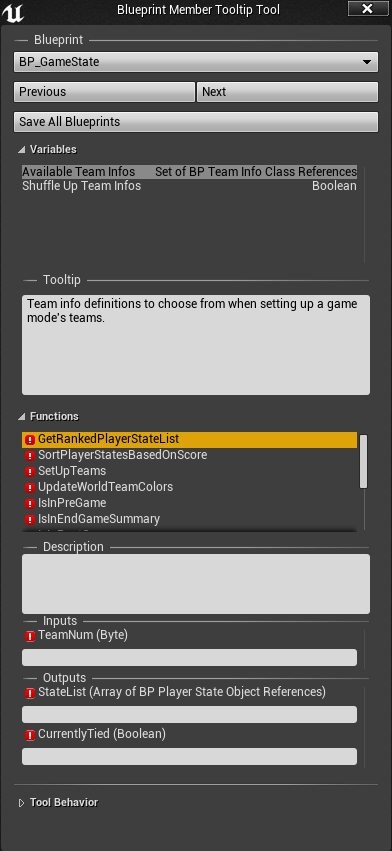
Its not pretty but its hella functional
sullen sonnet
can you @weary basalt or @polar hawk help me please?
polar hawk
Whats your question :p
weary basalt
Whats up
sullen sonnet
im trying to respawn a player but i can't figure out how to trigger the respawn i setup.
polar hawk
Alex Trebek: You must state your answer in the form of a question
sullen sonnet
The player enters killz volume
dies
but don't know how to trigger respawn when the character dies from killz volume.
polar hawk
What have you tried?
sullen sonnet
nothing cuz i don't know how to do it any way lol
oblique sorrel
Quick question: is the packaged build (file > package project > windows >64 bit) good enough to send to someone so they can play around and test it, or do I need to do something more?
sullen sonnet
@polar hawk
polar hawk
@oblique sorrel Should be good. Unless your target has never ever ran a game before
oblique sorrel
Cool, thanks
polar hawk
Then they're going to have to run the epic redist (basically installs directx and other nonsense)
oblique sorrel
Then I'll just zip it and send it
weary basalt
@sullen sonnet You can try and make an function call OnDestroyed Event that will end up respawning you character.
sullen sonnet
What do i add after the event




 sullen sonnet
ok but i don't want to press a key to kill the actor
polar hawk
You scrolled through without reading, aye?
plush yew
Please welcome @mighty sonnet to the community! :beers:
plush yew
Please welcome @distant marlin to the community! :beers:
sullen sonnet
it worked @polar hawk ty
 tender sigil
Is there areason all my exports for the sqeunce come out choppy and at very low frame rates? I am running off the defualt settings at it takes 20-30mins for the 30s clip to render
 waxen tiger
hey guys how do i move stuff between scenes, in unity i just drag anything in the project, it makes a prefab out of it, then i drop it in another scene - done, how do i do it in ue?
polar hawk
Cry
a lot
UE4 doesn't have a 1:1 for unity prefabs
You can use the merge actors tool and stuff but, its not the same workflow
waxen tiger
what is the workflow?
shouldnt it be like a very simple thing to do, serialize a blueprint as new object..
polar hawk
Thats what the merge actor tool does
However editing it after its been merged isn't as nice as Unity
waxen tiger
doc says it merges meshes
i simply need to "save" my character controller as it is right now setup in the scene
polar hawk
Yup, it merges meshes which is the only way to go from world placed collection of meshes to any form of prefab
Ah, if you're making changes to a blueprint in the world that you want to save to the blueprint defaults
waxen tiger
yeah as a new blueprin
polar hawk
Theres a button in the top right of the details pane that'll let you apply your changes
I don't know if there is a button to save changes as a new blueprint
Theres definitely one to apply as defaults to current blueprint
waxen tiger
thanks i can hack around by duping it before apply
as for meshes you can always make a new bp and dump your meshes in it
i would castrate for dumping meshes directly in the scene
btw do you know how the character controller is implemented in ue, in terms of like, in unity it uses physx cc, which doesnt even calculate slope
the slope is baked into surfaces on edit time, and then controller simply reads the underlying surface, and whats the worst - its a boolean state - can/cant walk
polar hawk
Its complex and theres a lot of things that go into it and basically no but yes
It doesn't do any form of slope baking
waxen tiger
thus in unity you get stuck on stairs, you jitter on sharp edges, you will hate your life calculating sliding direction when you have many collisions
plush yew
Please welcome @oak nymph to the community! :beers:
polar hawk

My custom @UnrealEngine Blueprint -> Documentation tool #wip: Tool to make editing tooltips easier + @doxygen + @dokuwiki export. #gamedev https://t.co/tciIWqvwoT
Twitter
plush yew
Please welcome @drifting pebble to the community! :beers:
wary wave
spline meshes can't use material instance dynamic??
ah wait no, a node was connected in the wrong way, disregard xD
plush yew
if anybody wants to waste their time explaining some code comments, from the documentation, to me, I'd greatly appreciate it
plush yew
it's this part of the "Components and Collision" guide
I'm not interested in actually following the guide I'm just referencing it
// Get (and then clear) the movement vector that we set in ACollidingPawn::Tick
FVector DesiredMovementThisFrame = ConsumeInputVector().GetClampedToMaxSize(1.0f) * DeltaTime * 150.0f;
but no movement vector was set in ACollidingPawn::Tick, and I don't know how it's clearing a specific movement vector based on that code