#ue4-general
1 messages · Page 63 of 1
 lofty edge
o7
 rapid oak
yout need and input in that nodes object pin
something like
get owning player controller
then from it get hud
then cast to hud
"i think"
 pallid compass
rapid oak
pallid compass
rapid oak
lmfao
ummm
you are using a player controller?
try this sheet then
get player pawn
cast to it
then get player controller
then cast to it
then hook that sumbeetch up
ui stuff has always been the bane of my existence
pallid compass
1 sec will check
 dusk mantle
 oak smelt
Somethings not right here... Did I accidentally clone myself?
pallid compass
yes
oak smelt
Awesome, glad to see it works. Carry on
 ebon sparrow
Anyone ever found triggers/OnActorBeginOverlap to act weird? I have a trigger box that doesn't fire OnActorBeginOverlap when I actually stand on it with the player character, but it does fire if I stand somewhere else and rotate almost 360 degrees on the spot
pallid compass
Why is this not moving my widget :/
 stiff marlin
@keen birch yeah they did, actually.
pallid compass
Am i missing something super obvious D:
pallid compass
myb?
 golden island
maybe
pallid compass
what is it?
golden island
hmmmm
pallid compass
i dont understand why it aint working
pallid compass
set alignment does not work either
golden island
Try thinking this all in ur head. Step by step
pallid compass
thats not really helpful
golden island
I am more in programming. I don't do blueprints that much
golden island
So, as I do with my code, try thinking ur "blueprint logic" in ur head
pallid compass
acording to the wiki its right
golden island
go over it over and over until u notice a mistake
lol
wiki
xD
Few days ago I was going nuts on how my code doesn't work. Then I noticed that fuking ":" is missing lol
pallid compass
lmao amazing
 sterile cairn
Is there a way to get multiple animations/poses in a single pose asset? I'm trying to create a FACS-based facial animation and the pose asset seems to be the way to do it. I can't find a way to import multiple animation sequences into a single one. :/ (Also asked this in #animation )
lofty edge
If anyone is using UE4.12 or 4.13, do not update Windows 10 to the new Creators update. It will break your menus and render the engine basically unusable.
I just rolled back and my problems have gone.
golden island
@lofty edge Why are u using older version?
lofty edge
@golden island the logistics of custom engine changes and upgrading
😛
We've been waiting for 4.16 to drop before spending a week or two ugprading
 quartz patrol
Any date announced for 4.16?
sterile cairn
SOON™
golden island
@lofty edge ok boss :D
quartz patrol
😄
 floral pagoda
 keen cradle
 fiery harbor
you can read through everything on github
when I say next week I obviously mean the preview, stable release of 4.16 will probably be in something like 6 weeks
pallid compass
anyone know why this does not work?
 tender violet
is this referring to the rhirenderthread?
Stop Reason: : Thread 'RenderThread 3' (101010) Segmentation violation encountered at 0x000000004b53960c.
The instruction at 0x000000004b53960c referenced memory at 0x00000000003ffc00.
The memory could not be written.
 real geyser
So I have a lot of strings in the format" x=75488734.44 y=546345345.85 z=8884323.21.
"
How do I break these strings up, insert commas on too separate the numbers, while deleting the "variable=" portions of the strings?
(I am doing this for the sake of number crunching on an excell sheet
 upper yew
Is 4.15's hot reloading deature for code only? Or models and textures as well?
real geyser
@still horizon um both? I found a work around by saving it as a txt fule and using find and replace all. Not great for large amount of data mind you but in my potentially small datasett it could work.
 still horizon
if its a vector you can split the pin and just get the float values and use append to make the string
if you want something more like regex, you can use this https://www.unrealengine.com/marketplace/low-entry-extended-standard-library

This plugin provides you with blueprints that add general functionality and improvements.
there is a replace characters node
 plush yew
Apologies for the wall of text here..... Some of our game dev students are experiencing UE4 Editor Menu bugs (basically the drop down menus don't work so the Editor is useless) in versions 4.12.5. This happens after installing the Windows 10 Creators Update. The only work arounds I can find are source code changes for source builds or updating to UE4 4.15.1 anyone else had this issue / know another solution?
fiery harbor
@plush yew I heard many people have this issue, so there's likely nothing you can do
either remove the new windows update, or update unreal engine
 onyx pewter
Hi guys, this is the "Stat net" as far as I know. But has this been removed? Or how can I retrieve this kind of information about networking of my application?
plush yew
@fiery harbor cheers yer that's what we'll do eventually 😄
 dusky chasm
hi! could someone tell me where do you store your large projects? I've been developing a game for over a year and we are currently using 50gb at githost, and it's growing exponentially. Soon we will have a lot of problems
 craggy nymph
If you get yourself the right webhosting plan with ssh access you can set up your git repo on your own server. Usually you can upgrade disk space if needed.
dusky chasm
yeah, that's what we thought, but is this size normal?
craggy nymph
My plan has 250 GB by default.
I don't have much experience with different hosting services though, so no idea if it's the same for other providers.
Oh, not sure I understood you correctly. Are you asking if 50 GB is normal for a project?
lofty edge
Afternoon gents.
dusky chasm
@craggy nymph yeah, we have not tons of assets and even so the size is escalating very fast
craggy nymph
Well, I can't say anything about your project, but my solo project I'm working on for about 1 year now is at 100 GB, another project I work on with a team is at several hundred GB. Of course size depends on what you include in your git repo. Whether you include your source asset files as backup and your custom build engine or not, makes a huge difference.
 heavy flicker
Anyone have any idea why my particle pops in and ut when i try and look at it and away?
 rose bison
you need to set up fixed bounds
 magic scarab
I found a great paper on using graph rewriting for procedural quest generation http://gram.cs.mcgill.ca/papers/kybartas-14-analysis.pdf
 deep tree
quick ue4 question, anyone know how to change or expand the level outof bounds? i'm making a sidescroller and in the current project if the character goes out an arbitrary level bounds he seems to disappear
rose bison
disable bounds check
but you probably want to keep the character centered around (0,0,0)
to avoid floating point imprecision
plush yew
rose bison
👍
you should still consider rebasing the character
they kill your pawn for a reason by default
depending on how large your levels get
plush yew
i know in network play when you turn off bounds check and go past that default number listed in killz things start to get reeeealy funky
 past lintel
Hey guys! I'm not a game designer nor a programmer, I just want to stick something together for demonstration and learning purposes. I already find my way around the UE and managed to set up a room with a couple of static objects inside. Next step is to add interactions (simple ones) to these objects. It won't be a game but rather a industry configurator which makes use of VR technology. So I want to program some simple interactions in VR such as switching colors on objects, moving objects by attachning and detatching them to my virtual hand, "snapping" objects together, opening doors in VR, so not by clicking a button but by moving your hand while holding the handle, stuff like that. I have a HTC Vive here and the UE and some simple models. Now I have no Idea where to start looking for learning resources regarding VR interaction programming. Do I even need to program? I don't know. Maybe these" blueprints" are useful in that regard. I am proficient in 3D Software since I am a 3D Artist by trade and now want to develop some simple interactions in the UE in VR. Can you point out some resources where I can start learning about this? And also would someone be willing to provide some kind of contact for me to ask these "simple" questions one has when learning new software which isn't in the manual exactly? 😛
 brazen igloo
when i package for Linux on WIndows, how do i set it up to target only up to OpenGL3.3? I opened the Linux PlatformSetting and changed TargetRHI from GLSL_430 to GLSL_320 or 330. But whenever i start the packaged game, it tries to inialize a OpenGL 4.3 context 😐
and ofcourse it fails to do so -.-
brazen igloo
got it, -opengl3
onyx pewter
@past lintel Simple questions? 😄
A short video of my VR application ;D
https://drive.google.com/open?id=0B3iJQxRkDWURLTMwYUdxYTl3R1U

Google Drive
 gentle crypt
Hi Where can i find this project in UE4 launcher? https://youtu.be/5FRH1oJHOvA?list=PLZlv_N0_O1gaf1Nl6U7PScusD1hVrt53I&t=75

Join Epic Games for a look at creating interactive 2D fluid simulations to add a new level of physical realism - or just fantastical effects - to your enviro...
 cursive dirge
@gentle crypt go to learn tab, get content examples (for water material) and Open World Demo Collection for the environment
water thing is probably in map "BlueprintRenderToTarget"
gentle crypt
the content example shows how the fluid. im mainly interested in the underwater post process effect. im trying to figure out how they made the post process only happen under water when the camera is partially underwater. Normally when the camera everlaps the collision box it affects the whole area and would like to know how to stop that.
 light thunder
I want to take this curve
and make this one like it, but the auto setting doesn't work good, is there another way I don't know about other than just manually adjusting it?
 glossy hemlock
Is there any way to give an actor z axis physics (fall and bounce) but not x or y axis physics (rolling, sliding, horizontal movement)?
cursive dirge
you could just remove the middle points both and change the point type in the bottom
then use the tangent controls to adjust the shape to match your target
or well, you probably want one point in the 0 and one on the top
light thunder
what key interpolatoin type do I want?
cursive dirge
and one in the middle
and just adjust the middle point
it's easiest
well, you have like few options
I can't remember the names out of my head but it should be self-explanotary
and if it's not, it's quick enough to test them all 😃
light thunder
craggy nymph
Just a thought: if you know the equation of the curve you're trying to match, you could simply do the math directly instead of using a curve to look up the values.
light thunder
Do I straighten tangets or flatten them? or not bother with that setting?
I don't unfortunately
I have enough for some keyframes
but that's about it
so the values are perfect but the curve angle is just off
 floral heart
Which nozzle's curve are you trying to do?
light thunder
the 1.375 one
I used the keyframes and the values are all right
maybe there's some online curve equation generator I could input those keyframes

MyCurveFit
An online curve-fitting solution making it easy to quickly perform a curve fit using various fit methods, make predictions, export results to Excel/PDF/Word/PowerPoint, perform a custom fit through a user defined equation and share results online.
craggy nymph
I'd plot the points you've got, fit a curve to those points and use the equation of that curve. Any plotting software can do curve fitting.
light thunder
ONE keyframe and it looks better than what I had
Not sure if I will be able to get it into an equation from there though
glossy hemlock
Is there anyway I can change the default scene root without changing the scale of any components attached to it?
light thunder
@craggy nymph Can excel do that?
craggy nymph
I'm pretty sure it can. But the website you linked also gives you the equation of the curve.
light thunder
um, where?
craggy nymph
light thunder
I don't see those options...hmmm
must have some adblocker...came up in microsoft edge but not chrome
How do I take that equation into unreal to make a float curve asset ?
floral heart
1.08x*x - 0.08x
light thunder
?
floral heart
Or 1.036x*x - 0.036x, rather.
Edit: Or the actual fit with a second order polynomial was y = 0.00168082 - 0.03518305*x + 1.032287*x^2, I guess it depends how much approximation you can tolerate.
The data was
0.2    0.446
0.4    0.642
0.6    0.785
0.8    0.893
1.0 1.0```With the second column as X.
light thunder
I have the equation what do I do with it?
y = 18282540 + (0.4649631 - 18282540)/(1 + (x/106711900000)^0.4998586)
craggy nymph
With the equation you don't need a curve asset anymore. Just use your input as x and you get y.
light thunder
hmmm....
craggy nymph
You just do the math in blueprint
light thunder
which function am I using though? I'm searching for curve, equation, etc?
@craggy nymph I just don't know how to put that into blueprint, I have the equation
floral heart
Ooh, this one's nice.
Admittedly it's based on that graph you posted, so the GPM is on the X axis.
craggy nymph
@light thunder you just do the math with nodes.
Or use the math node instead, it looks cleaner.
The math expression node allows you to type in a math expression and builds the appropriate sub-graph to create that expression.
floral heart
light thunder
ah thank you @craggy nymph @floral heart
glossy hemlock
How do I change project settings through blueprint? I need to change my gamemode from thirdperson to vehicle using a blueprint.
 potent lark
I think you just possess a different pawn when necessary?
plush yew
hi guys
plush yew
anyone working on a open worlds mmo game
floral heart
There probably is. Pray for them.
 last loom
@plush yew @floral heart I accept prayers of all denominations especially agnostic 😄
plush yew
hi
last loom
wha's up
what's*
So yeah @plush yew I'm working on a multiplayer open world... idk how massive the engine will handle, but I'm keeping it open
last loom
The Freyed Lands
I got some videos on youtube that I've been streaming while I work on it, just finished character creation more or less (nothing too fancy, just race, hair color, and some text description variables) but all working in multiplayer on steam n everything
and all my races/gender combos use the same skeleton, armor and animations (with tweaks of course to differentiate the animations) but the pipeline is smooth so far
well ok females have diff armor but all fems share the same, all males share the same, from giants to dwarves, using Set Master Pose component and scaling
 errant barn
@last loom do you have a link to youtube vid?
last loom
I kinda don't feel like linking to anything specific cause it's all like 1 or 2 days old and it always looks better every day... but
this one is pretty good: https://www.youtube.com/watch?v=A9i9m9St9_w

Going live at 12:00 NOON EST Taking the plunge into artificial intelligence! Also some voice acting and grass/foliage! Feel free to ask me about any of my bl...
the frame rate is crap in my broadcast
but it's going smooth at 60 fps for the most part
last loom
thanks let me know what you think, I don't get a lot of feedback 😄
my buddy Alodar is a big streamer on Wow and he just makes fun of me for trying 😄
errant barn
lol well wow has its player base thatll watch anything wow related 😛 there is far less devs
last loom
yea I should just import one of those Goldshire remake maps and do my playtesting there 😄
errant barn
rofl yeah, I noticed most the highest hit ue4 videos use someone elses IP in the title
last loom
mario, zelda, etc, true
that shouldn't be taken as a market indicator, tho
that's just youtube search results cross multiplying leading people to see them the most
errant barn
Yeah, I guess its still good exposure for UE4
 grim juniper
Where's the option to export a static mesh? I can't find it. :/
 sharp nymph
Does anyone follow this style guide? https://github.com/Allar/ue4-style-guide

GitHub
ue4-style-guide - An attempt to make Unreal Engine 4 projects more consistent
 ruby aspen
so i made a class parented to actor, and there's no material category, which makes sense since it's an actor and not staticmeshactor. but if I add a staticmeshcomponent to it, shouldn't I be able to see the material category on that? because I can't 😦
floral heart
@grim juniper Asset Actions -> Export
Probably.
grim juniper
Yup, and I'm dumb. 
errant barn
@sharp nymph I follow it loosely.
sharp nymph
Is there any benefit to the file prefixes? I mean, you can just filter if you want to find a specific type
floral heart
There was before the filter was created, probably.
errant barn
I like searching for T_ sometimes
Also if you name your source assets T_Brick_D.png makes it easier in windows as well
Its also been standard at 3 places Ive worked
 worn granite
There's not as much benefit if you only use the editor, but it might be helpful to programmers @sharp nymph
sharp nymph
thanks for the input
pallid compass
How do Z order work if u add two dif canvas's to ur screen
glossy hemlock
I need to make a flying vehicle for my third person game. Making the mesh shouldend be a problem but I don't know how to do the mounting or riding blueprints. Any ideas?
quartz patrol
@glossy hemlock I think u need This: https://docs.unrealengine.com/latest/INT/Gameplay/HowTo/PossessPawns/Blueprints/
Illustrates using the Possess node in Blueprints to switch between and control multiple characters.
glossy hemlock
That is so simple. I have tried to posses other pawns so many times but I always failed. Thanks.
quartz patrol
np, glad to help 😃
glossy hemlock
I got it to the point were I can posses a FlyingPawn from the flying game type in the third person game. It lets me steer left and right but not up and down. It also constantly moves forward. Any way to add up and down steering plus breaking?
quartz patrol
Maybe you should add movement input?
glossy hemlock
I don't completely understand the movement input stuff. I made its so that when you are the spaceship the looking up and down for third person is steering up and down. Do you know how to make looking left or right in third person steer the ship left or right?
rose bison
quartz patrol
Thats probably what u need
 tulip ibex
Is there a quick way of getting say the third person starter content imported into the first person template?
tulip ibex
Ahh great, thanks
If I want to expose a variable, that contains a couple of options in a drop down list, what's the best variable type?
Array?
quartz patrol
Array i guess
tulip ibex
Turns out it's an Enum, so I think that's working, thanks 😃
 drowsy peak
Ive finally drawn a blank. How would you guys handle seamless loopable proc gen worlds
pallid compass
Anyone good with data structures i have quick question
drowsy peak
@pallid compass What kind?
pallid compass
So say for inventory system for data structures
I have base structure thats like
Name
Icon
Type
and i want another custom structure in it for the type
But u cant have like 3 data structures that are dif in the same slot can you? D:
drowsy peak
Deep breaths man lol. Are you doing it in Blueprint?
pallid compass
Yeah
Feel like i have to have all types of equipment / items in the same type of structure
drowsy peak
Screenshot your current array?
pallid compass
to be able to access it properly
Current Base structure
Example of item
I feel like i have to use the same basic item struct for everything or it wont be compatiable
At the moment im storing the current basic structure in the array
Then i went to put the equipment stuff in and realised "wait u cant have dif types of data in the same struct slot"
So im guessing i need to have every type for every item in it?
drowsy peak
Have you tried using another project as a point of reference?
Right now it appears youre over complicating things and struggling because of it.
pallid compass
no i havent iv been learning on my own
drowsy peak
Ah
pallid compass
So obviously right
drowsy peak
Alright atleast you got your basis.
pallid compass
I can only use 1 type of data structure in my inventory array
So if i have dif types of items, how do i ref them in the structure with out having like 10 dif structures inside my structure
drowsy peak
Take a look at this https://wiki.unrealengine.com/Blueprint_Inventory
glossy hemlock
I like this inventory more. https://drive.google.com/file/d/0B1qQwwk__judYXpTelIyaUhpbEE/view
Google Docs
drowsy peak
Yeah work on simplifying your code and expanding on it
drowsy peak
What youre doing rn is harmful performance wise.
pallid compass
ah right okay
drowsy peak
Gl man if I can find a better ref Ill mention ya.
pallid compass
so if i ref in the structure
Base item
can i only ref Base item
Or can i Ref children of it?
out of curiosity
drowsy peak
Like multiple connected items?
pallid compass
mfw i thought it be better to use data structures than actors
no
Like
Creating a child of the base bp
drowsy peak
It should be able to ref the children
pallid compass
ok awesome
drowsy peak
If my memory serves me right
Also since I see slots and it looks like youre taking a widget/umg approach take this. https://docs.unrealengine.com/latest/INT/Videos/PLZlv_N0_O1gZalvQWYs8sc7RP_-8eSr3i/

Video Tutorial Series
Skim through it a bit, it should help
 hybrid scroll
Is it possible to switch the viewmode between lit, unlit, wireframe, lighting only, etc. during play in editor?
 lethal spear
F keys
pallid compass
the fuq do i get stat values from a actor ref?
 hazy lynx
Hi all!
I'm wondering, what is actually an advantage of using pak files for release builds?
and what is considered best practice when distributing over steam, packed or unpacked?
@pallid compass EDIT: sorry, ignore the question, I see now
pallid compass
Tried to use actors for items instead of data tables and struct but
Just seams kinda stupid
glossy hemlock
I have a rocket that is supposed to explode when it hits the ground. I have it set up with a on component hit event but it doesn't trigger when it hits the landscape as I want it to. Is there any way to make the landscape trigger hit events on other actors?
drowsy peak
@glossy hemlock Have it create a invisible expanding sphere without a collider that matches the explosion. Set in then to apply the trigger hit events on whatever it touches.
glossy hemlock
I mean that the explosion never happens because the hit event is supposed to trigger the explosion. How do I make the hit event recognize hitting the landscape?
drowsy peak
Oh I misunderstood mb
@glossy hemlock k I got you buddy. If you havent already you can give the projectile a radial impulse and in the blueprint youd get that radial impulse and run it into a fire impulse as a target. Afterwards you can connect a spawn emitter node to it.
You should be able to expand from there
Make sure it has a doOnce node as well btw
glossy hemlock
I have every thing already except for expand. How do I do that?
drowsy peak
Elaborate a bit more? (Im a bit drowsy sorry)
glossy hemlock
when I fire the missle it just flies through the ground. The ground is a landscape. when it hits the ground the hit event should trigger but it does not. How do I make the hit event trigger when the missle hits the landscape (and how do I stop it from flying through the landscape)?
drowsy peak
Does the missle have a physical collider?
Booting unreal so I can help ya out a bit better.
glossy hemlock
I don't know what that is.
drowsy peak
Does it have a collider so it can make contact with the ground?
Usually something flying through means it doesnt have any collision.
glossy hemlock
It has an capsle colision and a projectile movement compponent and a static mesh
drowsy peak
tsk. May I see the code?
glossy hemlock
Here it is.
drowsy peak
Is the component fired from something?
Like a rocket launcher or is it just dropped
Also I dont see a collisioncomponent so that may be an issue.
glossy hemlock
It has the capsule collision. It is fired via a spawn actor node.
drowsy peak
Gotcha
Sorry if im taking too long just recreating your script so i can see exactly what the problem is
glossy hemlock
I will check bake later. I am afk now.
drowsy peak
kk
sharp nymph
For melee combat, does anyone have a recommended approach? Should I just use a collision primitive component on my character, or should I use tracers fired by an anim notify state?
I was leaning toward the latter, but it looks like vars are readonly in BPs, so I'm worried I won't be able to control how often it happens
drowsy peak
I feel a limited range raycast is the way to go after the anim runs
sharp nymph
I suppose I could always fallback to the other if it turns out too slow
glossy hemlock
I am Back
drowsy peak
@glossy hemlock The reason it fell through the ground is the collider settings are not blocking the floor.
glossy hemlock
how do I change them?
drowsy peak
Click on your colldier capsule component, look in the details panel, and scroll until you see colliders
There are presets that you can play with
I used block-all
Found this tutorial as well which is worth a look

In this tutorial, using the first person template, we will change the projectile to react like a rocket/grenade launcher. I also cover some more features wit...
In the comments section, a user named fixed92 pointed out the issues with the program which applies to the way we both made it.
glossy hemlock
Mine still won't explode. It only explodes if I speed up too much and it hits me.
glossy hemlock
Not the landscape, actors, pawns. I am the only thing it explodes on.
drowsy peak
The fix to that is by modifying the "Custom..." Preset and setting the collider to overlap on World Static and ignore Pawns.
Also substitue oncomponenthit for event hit
glossy hemlock
still nothing.
drowsy peak
._. life is pain.
glossy hemlock
yep :p
drowsy peak
Im accepting this challenge 😠
Basic shit like this shouldnt be kicking my ass. I just need a coke and Ill brb.
glossy hemlock
ok.
glossy hemlock
I remade the blueprint and it has the same problem
drowsy peak
God damn it.
glossy hemlock
Bye.
drowsy peak
?
Figured it out finally
@glossy hemlock I used the FPS Template Projectile's BP and removed the simulating phsyics function and set its colliders to block everything.
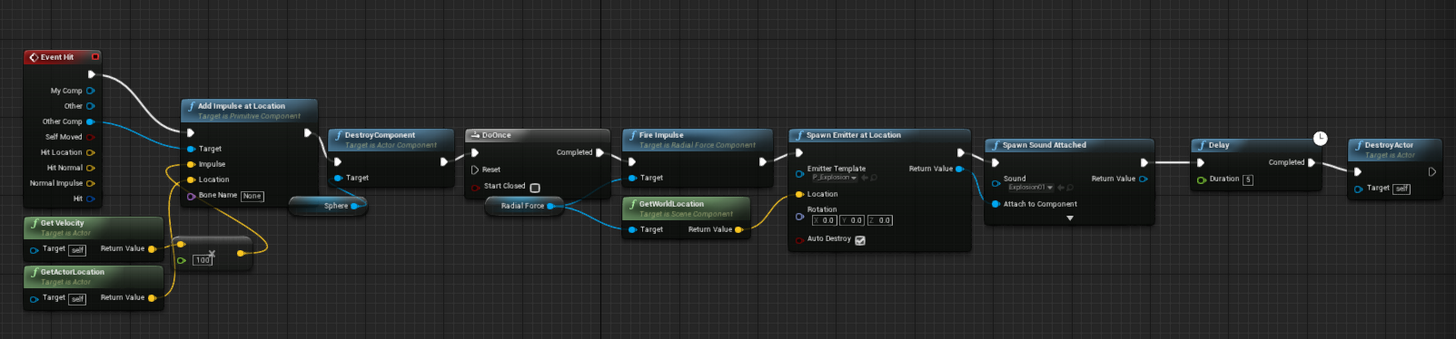
The collision also must be slightly bigger than the mesh btw
 wide shard
A certain tutorial i'm following is using a lot of "CastTo" blueprint nodes to check inheritance and run logic. I.E.: casting an item to item_weapon to check if it's a weapon (since all the game's weapons inherit from it).
Is there a better way to make this check? I feel like checking if the item is able to cast to it is a clunky and wasteful way to make the check, although i have no specific knowledge of the process to back that up.
drowsy peak
You could set up a Line Trace to outline and display what the item is then pick it up?
wide shard
eh this is specifically for sorting items in my UI for the inventory
I've got all the pickup functionality and spiffy stuff working great, just getting the UI going
but i made ite,m categories of like, weapon, consumable, etc. and i'm going to be having the items be childs of these objects depending on what type of item it is
and i just want an easy way to check what type of blueprint it inherited from, but I feel like using CastTo is... not correct if all i'm doing is checking the inheritance
knowing this would be useful for cases where i would need to make this check outside of this instance as well
i just see people using castto, i see others using 'class is a child of' i'm just wondering which of these is the best fit for what i'm trying to do, i feel like the CastTo is very wasteful, but I don't want to discredit the tutorial author, maybe he had a good reason for using it instead of something like 'is a child of'
maybe the single CastTo is faster than 'get class' + 'is a child of' + 'branch' ?
although speed isn't super important in this case, I still want to know
drowsy peak
I feel neither way is wrong personally, but CastTo may be a simpler approach
wide shard
I just feel like I shouldn't be using it if i'm not making any use of the actual functionality of CastTo
drowsy peak
Elaborate a bit more?
wide shard

doesn't this look a bit wasteful, all those casts just to check
it's a tutorial, so i wanted to follow it pretty closely just to see how it turns out but
drowsy peak
Actually its fuffiling its purpose from the looks since its accessing the properties of other blueprints
drowsy peak
A Cast is meant to check properties of other blueprints so Im assuming its sequencing if its whatever its supposed to be.
wide shard
that's my point, isn't a cast used to change one type of object into another that is higher up the chain, so you could maybe store a bunch of the same thing or like
casting isn't generally used as an inheritance check, is it?
drowsy peak
It can be used as one
Example Use Cases
Below are a few examples of when Blueprint Casting could be used:
You want to access a specialized version of another Blueprint.
Character walks into fire causing a Health Value to deplete.
Cast to your special Character Blueprint to access and change the Health Value.
Your character dies and you need to respawn them.
Cast to your special Game Mode Blueprint to execute a respawn script.
You want to access multiple Blueprints of the same class and modify them all the same way.
You have several lights in your level and you want them all to turn on or off when an event occurs.
Cast to your Light Blueprint and execute a function that turns the light off.
You want to access a specific Child Blueprint.
You have several Blueprints based off an Animal Blueprint (Cat, Dog, Bird) and you want to access one of the animals.
Cast to Cat, Cast to Dog or Cast to Bird to access their respective Blueprints and unique functionality.
Basically it can be used for a inheritance check
wide shard
none of those things says using it as an inheritance check, they are all about using the functionality of the new casted object
which this is not doing at all, the pin is empty
drowsy peak
Let me see the tutorial?
wide shard
the rest of the tutroial doesn't really matter in this particular instance i woudl think, but here you go anyway http://shootertutorial.com/2015/12/15/complete-skyrim-like-inventory-tutorial/

he uses CastTo to make these checks every time
basically, i have an object called Item
it has some stats, and i have made some objects inheriting from it like item_weapon, item_consumable, etc
with extra stats
i will later be making specific items
and inheriting from wherever is appropriate
in this part i'm sorting items in the inventory screen
drowsy peak
Oh I found a very good analogy for casts
wide shard
so i need to run a check if an item is a weapon or whatever
drowsy peak
A cast will not create an object or find anything. It's part of the inheritance principle. Basically it's like asking your friend if one of his parents was tall. He can answer yes or no. But you have to ask your friend. If you just ask a wall it won't answer.
wide shard
hmm maybe i had the wrong idea about casting then
drowsy peak
Yeah.
wide shard
i was under the impression that it tries to build a new object in memory based on the parent, and if it fails then it returns failure and you do whatever with taht
drowsy peak
Oh no no no no
It's purely to get a child of that actor or check if a specific object belongs to that type.
wide shard
so if i cast a sword for example, which inherits from item_weapon, to item_weapon, it does not create an instance of item_weapon in memory with some of the matching properties of sword?
drowsy peak
All it does is basically say. "Hey Sword. Isn't your parent a sword" The cast responds "No shit."
wide shard
so on that pin then, that says 'as item_weapon', if I drag that pin off and set an item_weapon variable to it, it won't put anything in? because it didn't create an item_weapon in memory? I'm just double checking, because it seems like i would be able to do that.
drowsy peak
It runs through the sequence, identifies it, then sets it from the looks.
"A player decides he want to sort his drug & gun cache by category" < Should I continue this analogy xD
wide shard
alright i think I understand a bit more, sorry if i'm coming off as confrontational, i'm just really trying to conceptualize what is actually happening with CastTo, since i thought i understood casting objects
drowsy peak
Nah you're furthering my agenda
I sit in unreal chat rooms waiting for questions so I learn something new to apply later
By doing the research and justification on top of my existing experience I learn and refine efficiently.
last loom
has anyone noticed some weird buffering/choppiness when streaming/recording on OBS from Play in Editor?
wide shard
some other people were talking about that in the streaming channel i believe
last loom
just me 😦
wide shard
ah
last loom
lol unless it was a while ago, I'll go check
wide shard
no I only use OBS for my 3ds, sorry
last loom
yeah just me there
drowsy peak
@last loom Might need to lower your bitrate
last loom
hmm my friend suggested raising it from 1500 default to 3000
so you think back to 1500?
wide shard
what quality are you streaming in, like resolution
last loom
1080
wide shard
i wouldn't suggest 1500
last loom
but it was totally fine before the patch
er before I switched from 4.12.4
now I'm on 4.14.3
it's gotta be some engine setting
unless the bitrate happened simultaneously
and I didn't think about it 😄
drowsy peak
720p 30fps and 1800-2000 kbits is the gold zone for unpartnered streamers fam
last loom
hmm I raised OBS' priority is that what you mean?
unpartnered? #noob
it was working fine before tho 😄 I'll try 1500 bitrate
but it also happens when recording
wide shard
no i mean, check out your cpu usage to see if it's getting capped or whatever, maybe the new engine update is eating cycles
last loom
yeah
it looks fine in editor tho
like it runs at 60 fps
but the recording is choppy
and only the play in editor window itself
I recorded a video earlier
wide shard
how about local recording
wide shard
ah that's choppy too?
last loom
haha 😄
wide shard
i mean the final test is to raise the bitrate to like 20 000 or something and record a video w/o streaming
and if it's still choppy then for sure not hte bitrate
have you tried the whatsitcalled, playing in a seperate window
i guess if you aren't desktop capturing that would mess things up a little
last loom
hmm
wide shard
you could also try desktop capture
see if that makes the choppyness go away
but then you gotta be super cautious of not revealing a bunch of personal shit on that monitor
wide shard
ah cool
oh one more idea to throw out, are other streams choppy, ones that aren't yours
last loom
yeah I'm seeing it in VLC player
only when Play in Editor is running tho
if it's minimized it happens too
but in game it was running at 120 fps
wide shard
ah right, that's right the local was choppy too durr
last loom
I saw Greggy's looked choppy
but I only saw it for a min before he went offline
haven't caught him again since
I have it open with unitgraph up, the engine is running smooth as butter
so that's weird
as soon as play in editor stops, it works fine
sorry noe PIE
it's New EditorWIndow
I guess that's PIE too
but it was fine in 4.12
ooh there's editor settings for live streaming, but I feel like that's not the same thing?
flying around in the level editor itself streams fine, too
could it actually be because I'm playing too many frames and recording only 30? :/
like is there a way to frame limit UE?
well, it's not the bit rate, or the OBS fps, it shouldn't be the resolution because I never changed that...
t.MaxFPS fixed it!
wide shard
gj
well i distilled down my question with CastTo and posted it to the answerhub to see if i can get some more feedback
with pretty pictures of course
basically which of these could be considered better etc
last loom
what's your question per se? I just checked some of the convo w breezee
wide shard
basically which of those is the better practice, performance or otherwise
wide shard
is see both used a lot so
wide shard
one one hand, more BP nodes, on the other hand, cast has extra functionality that i'm not using
last loom
idk how blueprints actually work under the hood 😄
wide shard
sometimes you can expand them but
last loom
theoretically, wouldn't nodes only affect the editor performance?
wide shard
i forget how
last loom
once you compile it, it becomes C++
wide shard
there is more to it than that
last loom
true 😄
wide shard
it becomes C++ but i'm pretty sure those two pictures i offered still compile down to different things, even in C++ lol
in my scenario this calculation is not being done on a per frame basis or anything like that, so it doesn't really matter performance wise, but i know there has to be advantages to using one or the other, and i REALLY want to know
maybe i should post it in the blueprint channel here too
 dawn linden
I don't think it really matters, certainly not performance-wise, it should come down to essentially the same thing.
The first one is a bit confusing because you ignore the cast output. BP really should have a node for IsA like in C++.
wide shard
it does, you just have to get the class first
in the second example
well
IsA is for specific objects
they have that too
but you can't IsA to compare an object to a class
at least not in this scenario from what I understand
floral heart
I read once someone figured that blueprint added overhead for each node. Kind of horrific, really.
dawn linden
I don't follow, BP has an IsA node? I don't see one.
floral heart
They have a way to cook Blueprint to C++, but I think that only applies on cook, not for PIE, and only if you set for it.
wide shard
let me see if i can find the node
it uses the == object
like object == object, which i thought was the IsA in the C++
maybe that compares members though
uh oh, maybe it doesn't have an IsA
dawn linden
Right, that's a completely different check, comparing if it's the same object.
I think BP doesn't have IsA, which in C++ basically does the exact same as the second version above. So if I were using BP a lot, I'd probably just make a shared macro with those nodes, and use that everywhere.
Or even implement it with the cast version in case that's marginally faster - at least from the point of view of reading the blueprints that use it, the meaning is more obvious.
wide shard
dang
last loom
really sucks when you wanna show off smooth frame rates
it's good most of the time
but stutters on a fast pan
which doesnt happen in game 😦
wide shard
well it's the game that counts heh
last loom
😄
my friend judges my game solely on looks 😦
he;s a big streamer so I want him to like it 😄
wide shard
lol, you could always pack it up for him and have him run it
last loom
no way he'd spend the time 😄
"friend"
let's say guild leader from GW2
big streamer
😛
nah he's cool tho
wide shard
eh, it's hard to get people interested in something when they aren't already
last loom
he sent the time getting a friend to mail me a newspaper because my photo was in it from his town
we all work in different ways 😛
I can send him this for now, it's close enough
weird tho, it looked fiiiine before 4.14
 lament tiger
Well, no idea this is correct channel but have some question about the packaing project.
We want to reduce texture resolutions while packaging automatically. This is possible?
We want this because we want smallest package size for just gameplay testing.
last loom
I think that's why they suggest boxing out a level with BSPs before putting in the graphics
but maybe there's a way
lament tiger
Well, actually project is not newly started. Currently packaged project size is 6GB.
We are just testing actual game, not just prototype.
sharp nymph
plush yew
hi guys
plush yew
is this about the editor
lament tiger
@sharp nymph thanks! will look it.
plush yew
whos making a game
errant barn
I am 😄
errant barn
Indeed
 tall pendant
unlock?
 mild crystal
yeah, it has weird lines on it, no idea what I have done
cant move the camera or select anything
tried to google it but kept getting questions about in game cameras not moving
tall pendant
it says something on the bottom about sequencer
mild crystal
that is to due with it being in cinematic
tall pendant
hmm ok i never worked with sequencer. isn't there any doc you can have a look at? Theres got to be some info whats going on.
i think i can't help you with your issue. Sorry.
mild crystal
rasberries, thanks anyway
 cinder iron
Hey well i found out u was writing on the wrong chat. Do you know if there is any AAA company out there that uses Substance plugin for UE4 instead going with the traditional import-check-import-check-import-check-done?
glossy hemlock
@drowsy peak I remade that blueprint you send in my missile but it still will not work. It is sad because it should be so simple.
 empty belfry
Any idea why a pawn will not use a Nav Agent or why it will not move?
glossy hemlock
How do I get decals to work properly? They change the surface but it looks nothing like the material I assign to the decal.
empty belfry
@glossy hemlock Make sure the your turning them right. They need to be placed in the right angle or they will be heavily distorted
*that you're
glossy hemlock
Thanks. I will try that.
I tried but it is still weird. The ground and the decal are supposed to be the same material.
last loom
Can anyone suggest a quick and easy way to smoothly interpolate (just basically where do I put the vinterp to), for when you're running forwardand holding the camera still with the mouse, then run forward+left or forward+right or even just switch to right, and the character SNAPS to that direction? When you use the basic movement component, face a direction with the controller and press forward, the character starts moving in that direction while they start TURNING towards it..... I know I saw this turning code buried in there somewhere, just curious how I should approach implementing it if any pro tips?
or if there's a simple way to blur between animations? for example, switching between Anim States?
quartz patrol
@glossy hemlock Can be that Decal is Emmisive?
glossy hemlock
How do I change the emmisive?
last loom
if there's a wire going into "emissive" on the material blueprint...... unplug it 😄 or replace it with a "constant" (right click and type constant) and set that to 0
or there may be a drop-down menu on the left panel, the details window?
maybe something set to emissive there
glossy hemlock
Is all of this in the decal or the material? The decal doesn't have any of that and I havent checked the material.
quartz patrol
Material
glossy hemlock
I just tried all of that and the decal is the same.
glossy hemlock
01001000 01100101 01111001 00100000 01000010 01110010 01100101 01100101 01111010 01100101 00100001
hazy lynx
hey all! Can anyone help me understand how projectile movement works with collisions? I have a rootcomponent as a box with projectileMovement acting on it. If all collision channels are set to ignore, my projectile acts normally. If I set worldStatic and/or worldDynamic to block, sometimes my projectiles just stop. Their welocity is valid, they shouldn't have hit anything, I capture no hit events, but they just stop
Also, I put breakpoints in projectileMovement StopSimulating, HandleBlockingHit and HandleImpact, nothing gets hit
 gloomy apex
hey
since this is general, might as well ask here, now i have worked a bit like 2 weeks with ue4, i will study game design next year, but I am also a hardcore gamer, i wanted to ask someone with experiance working level design and preformace optimizations with unreal
there is a new game called playerunkown's battlegrounds that uses ue4
its early access so preformance is shit across the board, but so was Paragon last year, and now its maybe the best looking game to date. So I want to make a comparison between the level of fidelity that Ghost Recon wildlands has, and how beautifull and quite optimised that game runs
so my question is can UE4 provide that level of fidelity and detail with a good 40-60 fps
 vale osprey
@gloomy apex any engine can if you can make changes to source and optimize what is necessary to optimize for a specific game
it's almost never about the engine but the resources you have to reach your goal and compromises you have to do to achive it
wide shard
I would say just take a look at the games epic is making with the engine, i'm pretty sure if they couldn't hit 40-60 fps with great visual fidelity they would have dumpstered a lot of those long ago.
 zinc bison
does anyone know if performance is better with many actors, or many components?
or does it depend
and not really an answerable question
vale osprey
it depends
overall, many components is not a great idea as each component needs to update its position (when it's derived from scene component)
zinc bison
ah i see
i think in my case it might not matter because the object would always be moving
so the actor would be updating position anyway
uhh do you know if the components still update position when hidden?
is there a way to force it to not update its position in certain situations?
vale osprey
component will update its position always, there is no way to prevent it from that as far as I know
what you can do if this is performance critical is "pack" components into a single component by making a custom c++ component
but then again, first you have to see with profile that this is the problem
zinc bison
yeah its not critical Im just curious about it I guess, and whether it could potentially be a problem
packing components into a single component hm yeah i guess that would solve the issue
vale osprey
anything can be a potential problem when taken to extreme 😄
wide shard
do actors not update their possitions or something?
vale osprey
they do but actors have other things too, basically turning 100 actors into 100 components or 100 components into a 100 actors might or might not get a better performance, its all situational
zinc bison
what if all logic and calculations were the same? would you say a component is better
or nah
vale osprey
practicall example from the things I have to deal with on tanks - having all elements like road-wheels, sprockets and etc as separate static mesh components is bad for performance, in my case I can pack most of them into a skeletal mesh
zinc bison
hmm
wide shard
if they were all separate actors it would be just as bad though right
vale osprey
yeah + on top of that you would need to manage their references and there won't be such thing as relative transform
on components you can at least disable Tick, which does a lot of stuff under the hood
on actors you can't as far as I know
but actors can process and bind events, components can't
hazy lynx
SetActorTickEnabled(false);
wide shard
so what's this component always update their position stuff, i thought everything spawned in world would update it's position while moving
vale osprey
@hazy lynx but does it actually do something to it?
hazy lynx
as far as I've seen' actor stops ticking
vale osprey
ohh, ok, nice to know. It didn't work in my case long moons ago, I might have botched something 😄
zinc bison
I guess really, the two are almost the same anyway so it probably doesnt matter much.
wide shard
yeah i think it's more of a question of structure rather than performance, probably a case-by-case sort of answer
zinc bison
yeah
ultimately its probably more important to choose the one that makes sense for your design?
vale osprey
@wide shard lets say you have a vehicle - root component is chassis and there are plenty of all kind of things attached to it like wheels, doors and etc.
zinc bison
like whats easiest to work with
vale osprey
what engine does is update world space transform of each component on every frame, regradless if its necessary or not
that update is not a simple matrix trasformation but a recursive function with few hundread lines of code doign all kind of things
wide shard
so if you have something that doesn't move around much, best not to use components then
zinc bison
hm i see
vale osprey
it doesn't matter if it moves or not, update will happen anyway
wide shard
my point was, seperating all those components into actors that move around seems just as bad
ass teh origional question was "should i use actors or components"
wide shard
ah
vale osprey
it depends
zinc bison
ya
weird it has some recursive functions going on though
not something i would really expect when it comes to location
vale osprey
simply because one component can have another component as its child and so on
zinc bison
ah, right
ive been kinda looking into object pooling, i guess you would really want to pool actors not components
because of that
vale osprey
well, it depends 😄
vale osprey
what problem are you trying to solve?
zinc bison
no problem, just trying to understand things conceptually without looking through a ton of source code
i was asking about hiding the components and whether it prevents the update of position because of the object pooling
vale osprey
object pooling deals with a different problem - memory allocation in real time
zinc bison
yeah i know, but if you have a bunch of components in the pool
and they are all updating
even though they arent really doing anything
vale osprey
yeah, that is a good question
zinc bison
and an actor could NOT be updating
or something
then i wonder if actors are better for the pooling
but yeah this is stuff i'd probably have to like, seriously read the source code to really determine
cant expect someone else to know it all
vale osprey
depends, lets say you have a vehicle with a rocket launch system that can launch 60 rockets a minute. Spawning a single rocket a second won't be a big issue but if you have plentry of those vehicles it might well be
so you could make actor pool for rockets
but how big it should be? should it cover case of all machines launching at the same time?
in this case you could do pooling on the level of a single vehicle
as let's say i rocket can't exist for more than 10 seconds it means that you don't need more than 60/10 = 6 rockets pool
you could still make it as an actor pool if you have some safe marging and use it intelegently
like allow pool to extend when more vehicles are added but extending over multiple frames and not at ones
zinc bison
yeah
vale osprey
and then you did all that work without testing if it was a problem at all from the beginning 😄
zinc bison
hah! yeah I actually dont think i will be doing an object pooler right now 😛
I will probably only do it if i come across a problem
i stress tested a bit and it handled situations well beyond what i will be doing most likely
so im not super concerned, i just want to have a little knowledge in case that time comes
glossy hemlock
@drowsy peak I tried your blueprint and I havent ever given a projectile simulate physics though (what a supprise 😦 ) it still doesent work.
glossy hemlock
flying through the landscape, only pushing physics actors, and only exploding if I touch them.
drowsy peak
Just use the first person template's projectile and modify it.
 foggy oxide
To make for VR, I should make everything scale accurate right?
I was playing bayonetta and scale was all over the place
So I should keep mesh dimension ratios same as irl?
tall pendant
Bayonetta wasn't made with VR in mind. You should plan on VR before the project start.
wide shard
I think valve did a post talking about that really early on, how they found out you should do that because they found that most of their lightbulbs in HL2 were the size of grapefruits in VR
foggy oxide
lol
so, I am making a mech game. Should I translate 10 meters height of mech as 10,000 ue cm?
I want to support both vr and normal desktop
what i mean to say is, to keep all meshes in ratios as same as irl
wide shard
ahh mechs, the ultimate untapped genre, my favorite
wide shard
you could probably tell i liked them just from my discord avatar
but anyway about scaling, i don't know
wide shard
ah like zone of the enders and stuff
 wide shard
oh that's what you meant
foggy oxide
colors are customizable
wide shard
like humanoid instead of gun on wheels
wide shard
i don't know where you can mess with scale with UE4 but i'm sure there is a way, if you just wanted to change what the units represent
tall pendant
if you plan for VR support use the editor in VR mode to get the scale right from the beginning.
foggy oxide
I dont have Vive right now
wide shard
i mean if he models to scale in his 3d program it should be fine
tall pendant
hmm oo you have an Oculus?
wide shard
but the problem is how will the engine handle super large mechs, or is there a way to change what the units represent
foggy oxide
the ratios will be same that is what matters
tall pendant
without HMD its probably its not ideal to work on scale
foggy oxide
i can divide all values by 10 or 100
tall pendant
i wouldn't count on theo. calcs tbh
foggy oxide
Well best apporach right now would be to
wide shard
one problem that arises though from scaling things up is gravity, gravity doesn't scale up, so you would have to change that
not a biggie though
wide shard
no, it doesn't affect gravity
so if your robot is 100m tall
it still falls at 9.8 m/s/s
so it's going to appear to fall slower if it appears 'person size' in rendering
hard to put into words
foggy oxide
If it appears person size, that means the environment props are larger than they should be
wide shard
no i mean
take a 2m tall person and raise him above the ground his own height
he falls down as fast as you'd expect
take a 100m tall robot and raise him 100m off the ground
takes a lot longer
sso if all you do is scale everything so that 2m appears to be 100m in engine
you need to make sure the gravity is still 9.8 relative to your scale
otherwise the robot will fall in the same amount of time as the person to hit the ground
which is way faster than 9.8 m/s/s
wide shard
it's a common problem in most mech games
that they never adress
but hey
if that doesn't work for your style of game, foget it
foggy oxide
no no
wide shard
sometimes realism is boring
wide shard
yeah probably wouldn't feel great for a jump to take like 10 sseconds lol
but realistically speaking it's something many mech games forget
glossy hemlock
@drowsy peak It finally works! (kind of). The projectiles explode but I need one more thing. How do I change the force of the explosion (how far it pushes physics actors)?
 ruby cairn
is there anyone out there who can recommend some tutorial videos for creating vfxs in ue.
drowsy peak
@glossy hemlock Increase the impulse
glossy hemlock
thanks.
drowsy peak
How did you solve the problem btw @glossy hemlock
floral heart
To be fair, a 100m robot is huge. An A380 has an 80m wingspan and weighs 370 tons (metric)
glossy hemlock
If you mean the projectile problem i did as you said. Copy and pasted the first person projectile into my game, changed the mesh to a missle, and added explosions. @drowsy peak
drowsy peak
Ah sweet
light thunder
Anyone work with curve equations and unreal? I could use some advise while I still have some hair...
floral heart
@light thunder poke
light thunder
I'm almost certain this keeps failign to provide the correct answer when I put it into Unreal
Could someone help me re-write the equation (I know I have to use pow(base, exponent) for example
but I want to make sure I'm not screwing up the parenthisis
What did I do wrong ?
This is another version of the equation that seems to parse but doesn't actually work (outputs either zero or 8)
Poke back @floral heart
What scares me is the fact that when I manually graph it out I get the same answer, like my curve equation is somehow screwed up, but I test it on the website and it works
floral heart
Hold on
light thunder
website equation , you can see right side box I tested it and got a realistic answer
Here is what is driving the input (200 )
And the result should be something like 790... NOT 8
light thunder
Also, why is that watch COMPLETELY USELESS? It should display the data and it doesn't, why? (even though I can hover over and retrieve the data)
floral heart
Though I think that formula you're using is actually meant to take in the GPM and output the pressure, not vice versa. 😛
light thunder
Here is mine....PLEASE tell me I did something wrong
hmmm....how would I flip that around to test? flip my axis in my curve generator?
There is something to what you said...but here is where I am confused... I did it earlier and it worked fine
floral heart
You put the final addition after the division, which doesn't work.
light thunder
Is yours evaluating correctly? I got zero when I tried to make the changes
try it with an input of 200 and tell me what you get please
This equation is EVIL. I am convinced
floral heart
It does output zero. Could be the floats in UE4 don't have high enough precision. E.g. it starts with (200 / 578052), a very tiny number. Then it essentially multiplies that by itself, yielding an even tinier number.
light thunder
hmm...i'll try shortening down the decimals..that's a good idea
tried 5 decimal places...no dice...I'll try just 3 decimal points
floral heart
Then you add 1 to it. Which is basically 1. Then (0.5 - aHugeNumber)+(theSameHugeNumber) is divided by 1. Kind of silly.
 torpid hedge
Click startting node of the function, press F9 to toggle brakepoint and see what the values are
light thunder
lol I know, I was just making the curves manually as an asset but the shape of the curve was always wrong or jagged
this is in a function library, will UE let me do that?
torpid hedge
Ah, editor probably will show them out of scope then
floral heart
Yeh, the formula is probably borked. It basically amounts to (0 * 1) [after crude floating point precision]. I'm afraid to know how you got it to output 8.
light thunder
Okay, so I moved the function to the actual BP but for some reason it's not showing me the value being inputed...maybe that's causing the issue
floral heart
Anyway here's what you should do:
Go back to mycurvefit.
Put your table in.
Click "swap".
Click "Fit Method", hover to "Non Linear", click "Power Curve".
light thunder
maybe because it's a return value and not a proper variable? that doesn't make any sense but I'm not a BP expert
I don't think that's right @floral heart it doesn't match the shape of the curve I got from manufacturer.... also I did this one before (the 1st curve) and it worked fine
in fact, this one evaluates perfectly
So I literally copied and pasted it but just substituted values
floral heart
The manufacturer's curve takes the flow in GPM (as X) and outputs the pressure (as Y).
Anyway, you could just take the same instructions but skip the "swap" step.
light thunder
I'm just telling you, as far as I know, this other fuction I did the exact same way
and it works
see above where I show the nodes that make it up
son of a bitch @floral heart I think you're right
I checked my other equation and the curve did flip but it works
And I'm an idiot for questioning your wisdom
let's see if this changes things
Can you help me parse y = 13115.17 + (0.1703809 - 13115.17)/(1 + (x/26782.26)^0.5226928) into proper UE format?
floral heart
Okay, I see earlier I was wrong about the function I made in blueprint. You are actually right about the order of the nodes.
Thing is, when I put 200 into your function, I get 36,000,000 (!!)
light thunder
Ironically it's actually easier just to graph the nodes manually that try to figure out the order of operations with so many parenthesis
yeah that's not good....
UGH not working
oh thank god
i was going to lose my friggin mind
THANK YOU @floral heart , for helping me figure this out
Not sure I would have realized the swap thing anytime soon
And thank you @torpid hedge for helping me with the process
Last favor @floral heart can you help me parse this equation, y = 13115.17 + (0.1703809 - 13115.17)/(1 + (x/26782.26)^0.5226928) into proper UE format?
It keeps going red but I feel like my () are all good
torpid hedge
I have the experience that math node = bad, horrible and will just make your brain hurt
Its fine for pretty simple stuff
But like that one its better to do by hand
fiery harbor
math = c++
floral heart
13115.17+(0.1703809-13115.17)/(1+pow((x/26782.26),0.5226928))
P.S. I'm a derp-face putting add nodes where I should be putting subtract nodes.
That's pastable into the math expression node, and when you put in 200 you get 941.515.
light thunder
THANK YOU
Could you explain a bit why you knew to flip things around? I want to understand the logic
floral heart
Mycurvefit gives you the function for Y. The graph's Y axis is for pressure (PSI/BAR), so you get the function for pressure, not the function for flow.
Putting in flow and returning pressure seemed like an odd thing to me, and then I saw the rest of your blueprint where you were putting in pressure (presumably as PSI) and returning flow (as GPM).
Edit: Consistent terminology. I'd be getting some bad marks right now!
light thunder
No this is perfect thank you. It is more clear to me
light thunder
@floral heart Oh, I swaped the axis but I never did the power thing...my numbers still work...does that matter as much?
oh my god I see
y = 67.80534*x^0.4969377 is a hell of a lot easier to write / BP
It varies a few points, I wonder which one is more accurate? I would think the longer equation
floral heart
It's an approximation by the curve fitter, I'd say either one is accurate to the nearest 5.
Well, maybe not as the numbers get larger.
The manufacturer's graph is likely an approximation too, from a simplified power curve (since it neatly returns multiples of 10).
And, for what it's worth, the power curve returns 0 when x is 0, which is nice.
 tidal lichen
How can I find out the height of a mesh in unreal?
light thunder
@floral heart Any idea how I would make this into a curve using the website? This is odd, I really only care about horizontal distance but they have 4 separate curves ...I'd like to know the distance given X psi
floral heart
Maybe make one curve for (PSI, Horizontal Distance) and one curve for (PSI, Vertical Distance).
light thunder
My first instinct is to ignore heigth and just use horizontal distance, however, there's no way to say, after this point, it's zero
They don't state it but there is a critical velocity where you can't push water any faster (and get any further distance)
Hmm..it KINDA works, I get the horizontal distance but unless I manually clamp it (which probably isn't accurate ether)
like at 100 psi, I get 210 feet, like the graph says
but when I do 200 psi, I get 331 feet, which wouldn't really happen
I'd have to gradually clamp it off somehow, scale it down
floral heart
Actually, it might. With enough pressure, you should be able to send the water rocketing off at escape velocity, no?
light thunder
no, because you are limited by the dimensions of the actual nozzle
doesn't matter how fast you push people into a subway, there's a max 'flow rate;
how would I turn this into a bell curve?
floral heart
Well, theoretically speaking, you can squeeze those people tight until they behave like a liquid. (Not that any of them will live.)
You'd use a different curve than the power curve. I was trying out a few but I hit a limit and have to create an account.
light thunder
well, blood is 75% water and water is incompressible...CHECKMATE
floral heart
The incompressibility is why the flow rate increases as the pressure increases.
light thunder
You might be right but the nozzle manufacturer's would have included this....
floral heart
So arguably it's the water that makes it possible to squeeze people through a fire hose. Otherwise you just get this oozing jam with an absurdly high molecular density.
light thunder
here it is : critical velocity is described as the “practical limit at which water can be flown through a line.” If the velocity is increased beyond this point, the friction is so great that the water in the line will be agitated by that resistance. And, the stream coming out of the nozzle will be ineffective and fall apart. Also worth mentioning is those pressures will have reached the upper threshold of what a two-person crew can handle as the nozzle reaction (NR) will be tremendous. At critical velocity, we observed the 100-psi nozzle still “attempting” to maintain a manageable pattern. The 75-psi nozzle stream started to dramatically fall apart, and there was a visible difference in distance. The 50-psi nozzle was affected even greater than that. So at higher pressures, the effectiveness of these streams is more influenced using the 50- and 75-psi nozzles.
So anyway, what would the way to decrement that function...your max horizontal range is probably 210 feet, you can pump more volume but your range will decrease
oh wait...nevermind I think I know what to do
I'll just add more values that decrement
It' will make a bell curve that is probalby not accurate but who the hell knows
floral heart
Don't forget to choose Fit Curve -> Non Linear -> Bell Curve.
light thunder
found that
son of a bitch - 213.1057e^(-(x - 101.0712)^2/(250.63346^2))
that ought to be super fun to blueprint
I'm not even going to TRY to type that into an expression node
How do I do the E symbol?
y = 213.1057e^(-(x - 101.0712)^2/(250.63346^2)) is it saying (x-101.0712) squared, or is it saying (x-101.0712 to the exponent value of 2 divided by (2*50.63346^2)?
Like for (2*50.63346^2) I first square the 50.63346 and THEN I multiply by 2 correct? that's order of operations for exponentials first?
floral heart
So many parentheses!
light thunder
dude i know
here
If you can tell me an easier way to use a bell curve ,I'm all ears!
1 - How do I do the stupid e thing?
2- exponentials are always first for order of operations right? (see my previuos comments)
floral heart
PEMDAS
Parentheses, exponents, mult/div, add/sub.
I thought I had it, but it just gives me values around 200.
light thunder
how do I use e?
floral heart
e(X) = e^(X)
light thunder
hmm...I think i actually got this
lethal spear
e = 2.7182818284590452353602874713527
light thunder
wat?
I am Aneyrism man!
Now, the number is probably not accurate, if you pumped it at 200 psi, you wouldn't actually get just 30 feet (most likely) but you would see a drop in your distance to be sure...main thing is, I know how to encode a bell curve
tidal lichen
When I import a skeletal mesh from blender, its sockets are 100 times larger than supposed to be. Why does that happen?
zinc bison
fbx export settings probably
has anyone used the object pool plugin? does it work with components?
all the examples use actors so Im assuming thats the case
nvm yeah its just actors
what the, do UParticleSystemComponents automatically get pooled if you dont autodestroy them? I noticed a bool "bAllowRecycling" thats set to true by default
and it almost sounds like if you dont destroy them, they will be reused when needed automatically?
actually it says only some systems
so must not be reliable
thought you might find that interesting
because of our conversation earlier about components
i need to read source but i bet it disables a lot of functionality that you were talking about earlier
all it does is disableds tick though, for the most part
which honestly is probably all you really need to do
it cant update its position if its not ticking
torpid hedge
I'm having a weird problem. I made a menu widget few days ago. Then I had to reinstall windows and unreal engine after switching to new sdd. Now if I try to import the old menu uasset into the ue, it wont regocnize it
Ue does find the other umg assets i imported but not the main menu widget
torpid hedge
Problem solved, the menu widget uasset was not compiled/saved correctly, got corrupted and that's why it was not showing up in the content browser
glossy hemlock
I made this ship that you possses and unposses to resemble getting in and out of. There is only one problem. When I unposses it it is supposed to (using level blueprint) set the word transform of my third person character to the world transform of one of the ships components. Instead it normally puts me at one of the following locations: back where I started the level, above the ship where I fall into it and re posses it, halfway across the map far away from the ship, or next to the ship as it is supposed to put me. If anyone can help please do.
 green spear
Anyone have a good tutorial on setting up a good skin material? (Except the "Creating Human Skin" on UE wiki)


 sturdy magnet
Hey all, I posted this on reddit, but have only got one reply so far. Basically over the past few days I've been thinking about how to implement a turn-based battle system with an overworld (Final Fantasy, Pokemon, Persona). And wondering the best way to manage the transition between the overworld a battle system (different scenes? enum states?) Any ideas will be appreciated https://www.reddit.com/r/unrealengine/comments/66xfzd/how_to_go_about_implementing_an/

reddit
The past few days I've been thinking the best way to do this. Say you have an overworld when you control a character walk around, explore etc....
green spear
@quartz patrol No, I didn't. Thanks a lot. Will check it out.
quartz patrol
np 😃
vale osprey
@zinc bison unfortunately I don't think its the case, I have ticking disabled on most of my components
needs more testing
light thunder
@glossy hemlock Run a print function of the world transform data for the ship component...you need to make sure you are getting the transform data...remember you'll need a relative offset if the component is INSIDE the ship
glossy hemlock
where would I run the print function?
light thunder
@glossy hemlock Some sort of event tick that gets the location of the ship wherever it is
Because you want to have the player be 'teleported' to whever the ship is, whenever you press the key to exit it
So you need to constantly know where the ship is
glossy hemlock
Would this work?
light thunder
What is calling Tick3 though? if you run it, are you constantly seeing that execution wire light up?
light thunder
instert a print fuction that prints the value of that world lolcatoin variable
right after it is set
you can split it and just grab one of the vector points, like the x axis, as long as it is changing
then drive the vehicle and you should see that value changing (as long as you are moving the vehicle enough to change it, don't run it in the same axis, you need to make the value change....so if your Z was height and your object doesn't rise, then do NOT use that as a test to see if the value is changing, because it never will)
glossy hemlock
Everything changes as normal.😑
light thunder
show me how you are moving the actor...it can get confusing....
glossy hemlock
moving the ship or moving the player to the arrow point?
light thunder
moving the player
It can get confusing when you use SetWorldTransform or SetRelativeTransform
glossy hemlock
I use the flat out teleport node.