#ue4-general
1 messages · Page 58 of 1
 leaden onyx
drop this into content browser
and then drag it from content browser to material where nodes are
 eager sparrow
That means opening it on my desktop 😂
 wanton talon
@eager sparrow did you just take a picture of your screen with your phone? just use printscreen?
eager sparrow
tablet i'm awful with it 😛
wanton talon

wikiHow
The Print Screen function on your computer is great for saving an image of your monitor. You can use this for help troubleshooting a problem, to explain to someone how to do something in Windows, or to save a conversation for posterity....
eager sparrow
yeah my laptop and I don't get on it's stopped typing backwards at least 😛
wanton talon
laptop keyboards are no different, they ahve a PrtScr button
eager sparrow
ooo i found the starter content but i still wana learn how to make my own materials etc
leaden onyx
yeah but you can study them
to see how they work
it might be a bit frightening at start though
eager sparrow
yeah that's true i can see how to make the different textures though the structure
true hence why i come in here and bug you guys
though i really need to email my presentation quick before me boss kills me 😛
does anyone know of any good video editors also cus i do stuff on youtube also
 cursive swift
video editor ?
free almost none
payd well
sony vegas
adobe premiere
ho that thing on itune
cant remember the name since macs are jokes
iClip or movie something like
Yeah i Movie
you can also simply edit on youtubeyou know
and that s free.
eager sparrow
i miss having movie maker i knew haow to use that 😛
I use bandicam for on screen recording but your talking to a broke ex uni student lol
wanton talon
if you have an nvidia gpu, you can use shadow play to record your screen
eager sparrow
so if I wana add a tutorial thing in it how do i go about that or is there an assest for that??
also how to i change how the character looks??
cus right now bob is nude 😛 and that isn't cool 😛
wanton talon
you should be going through tutorials
eager sparrow
I know i have been I just can't see the context menu haha
I'm just clarifying i'm not going insane 😛
 oblique fern
a destructible object tends to bounce around and some pieces freeze in mid air, what is going on?
 onyx sky
What are the methods to highlight a mesh?
 kindred viper
custom depth is a good way. Check out Tom Looman's tutorial
custom stencil is another way if you want to do it via post processing apparent

Unreal Engine 4 introduced a new depth buffer along with their PBR rendering system. It’s called “Custom Depth” and can be used for effects like the selection outline that is buil…
wanton talon
anyone know how i can alternate between different materials for a specific foliage?
is it with a material parameter collection?
i basically want the material to choose 1 of 3 vectors
arbitrarily
okay i guess for foliage it's not possible
because then it would require another instance altogether since the parameters change
aka more drawcalls
 vale osprey
@wanton talon instances have a random parameter exposed to materials
I don't think you can populate it with your own random numbers but engine does it for you
wanton talon
it makes sense with the word "instance", otherwise a different color would just be a different instance thus it breaks batching im guessing
vale osprey
correct, you can use that random for pretty much anything what is allowed in the material editor
like render all instances with a random number smaller than 5 using POM and the rest as bump-map or what ever
as long as you can use that rand as switch for the logic
 honest vale
reflection captures nor skylight seem to capture particles :\
has anyone ran into the same problem?
just wondering if it's possible and I'm just doign something wrong
vale osprey
@wanton talon it's called "Per Instance Random" afaik
wanton talon
thank you anyway, im not pressed to fiddle with something that seems counter intuitive it was just a passing interest since im fiddling with foliage
fiddle fiddle
vale osprey
well you don't need different material to have different colors
color can be based on a position of the object, or it's rotation or using a lookup texture and combination of other things
it can be based on noise which is modulated by the vertex color
in principal, you need different materials only when you have to use completely different base materials, like defaul lit or translucent
these type of changes you can't do dynamically in material graph
 plush yew
why i cant rotate CameraActor?
clicking rotate tool
appears to have no effect for some reason
anyone?
 bleak remnant
hey beloved UE4 community! :)) What were your reasons for leaving Unity for UE4, or picking UE4 over Unity?
plush yew
just found out that controlling the editor viewport camera with a controller makes things million times easier
 south ridge
Unity didn't have source code available
 worn granite
I knew C++ and UE4 was really cool
oblique fern
a destructible object I made tends to bounce around and some pieces freeze in mid air, what is going on?
 safe rose
Lame ue4 physics
I'm having the same issue in my work project
99% sure it's due to premature sleeping
you can adjust to custom sleep, but hasn't worked for me yet
@oblique fern
oblique fern
@safe rose i'm finding this, not sure where it is yet.. setSleepThreshold()
safe rose
aye
safe rose
?
plush yew
And probably hardware bound perhaps
plush yew
talking the same topic
oblique fern
this is irritating
 vale silo
I don't know what I did, but player starts ejected in PIE and when I hit F8 to possess, screen is always black 😦 How to fix ?
plush yew
@vale silo too late for undo?
vale silo
yeah
I ejected yesterday and the saved Project
today it starts ejected and I can't possess player again
 tepid steeple
I found an error on a docs page (https://docs.unrealengine.com/latest/INT/Programming/UnrealArchitecture/Reference/Interfaces/) is there an easy way to edit it?
 floral heart
Yes.
If you work for Epic.
eager sparrow
Morning troopers 👍👍
Well in the UK it is anyway 😂😂, managed to add the material onto my scene finally though it's kinda harvto hide a screen from your brother before he sees his game 😂😂
Hard to*
 cursive dirge
@oblique fern can you just change the sleep family into sensitive?
the default setting is at least too agressive for regular physics sim
but if you get random freezing in air, it could be a physx bug on 4.14+
I've seen it happen few times
 zenith night
Help please!.. i can't find any help regarding this at all - I'm having an odd issue where I'm working on scenes downloaded from tutorials and even if in windows explorer I can see files I need under content - 'materials' / 'textures' / 'meshes' they are not available to me in the UE4 content browser. I thought it might be a problem with UE 4.15 but I have now tried UE 4.13 and have the same issue.
'you can delete the asset registry cache which is found inside Game/Intermediate/CachedAssetRegistry.bin when the editor isn't running, which will force a re-population of the assets.' - that didn't work
It doesn't seem to matter which project either, the 'kite demo' opens but it's stripped down, missing a lot of meshes - makes me think it might be some Ram/memory issue but I've got 128 gb RAM and 70gb on my C drive - could it be faulty ram?
safe rose
try to fix up redirectors
it's looking for files at a certain reference that is not there anymore
If you click on any one of those errors
you will notice that it's blank
if you are seeing them in windows explorer, just reimport them
zenith night
I think there's more to it than that, I can't reimport - if you look at the next image I post it shows on the left the materials that I can see in the content browser, in the middle is all the materials that I am told are missing which are in the same directory in windows which you can see on the right - what is really peculiar is that if I search for any of those materials in windows explorer that are shown in the UE4 content browser I can find them, if I search in Windows explorer for any materials that are not shown in in UE4 it cannot find them - so perhaps not a software issue but a server issue?
honest vale
managed to crash the engine by causing an access violation in crowd manager >_>
eager sparrow
yeah I lost all my materials from my scene I definetly saved it all last night
honest vale
UE4Editor_AIModule!UCrowdFollowingComponent::UpdateCachedDirections() [d:\build++ue4+release-4.15+compile\sync\engine\source\runtime\aimodule\private\navigation\crowdfollowingcomponent.cpp:334]
it's possible to disable the crowd stuff, isn't it?
eager sparrow
whats the crowds stuff?
honest vale
it does some AI steering stuff with navigation
eager sparrow
ahhh i see
honest vale
it's odd since I just have a simple pawn with floating pawn movement component and I'm trying to do random walk in behaviour tree
with a character it works fine but this crashes the engine
eager sparrow
Though from what the it guy said about my laptop typing backwards it was a code I wrote incorrectly 😂😂
Genius. ^^
That and my service language pack was out of date
 jovial beacon
if we clone the github repo and build the engine ourselves, how can we utilize the marketplace? the epic launcher doesn't have the ability to add custom source builds, yet the marketplace is only functional through the epic launcher? i cannot seem to add content to projects from marketplace assets, it fails without error while appearing to allow me to add content packs to projects in my user folder.
honest vale
@jovial beacon you can just copy paste content from projects that use the launcher version of the engine
easiest way is to use the migrate tool in the content browser
it finds all referenced assets and moves those too
jovial beacon
well what i mean is, if i hit the marketplace button on the main UI toolbar in UE, nothing happens at all. if i use the launcher to access the marketplace, it lists packs i have purchased but wont allow me to install content. does it get saved somewhere to disk where i can manually copy it?
honest vale
it should show up in the "Vault" section of the launcher
you're saying it doesn't appear there?
jovial beacon
when i open the vault, it lists the assets i want but only offers "Add to Project..." which fails. i dont see why i cant just download the content in a package or zip or something in my browser..
honest vale
do you have a binary version of the engine installed in launcher?
jovial beacon
it sees my projects in the user documents folder and has write access, but without error adds nothing to the project
no, i do not. ive already got a second SSD dedicated to UE, i dont need more copies
honest vale
maybe install a single binary and add content to that and then migrate
jovial beacon
i want to choke a developer even more now. facepalm cant they just give us a damned download link in the browser... unreal is right
cursive dirge
well, you'd technically want to get the assets for the engine version your custom build is based on
honest vale
generally speaking I don't think marketplace content is even guaranteed to work in source built versions since you might have modified it making the asset types incompatible
jovial beacon
yeah, and it lets me pick 4.15, etc
but then nothing happens
no new files added, just acts like everything is done
project unmodified
honest vale
well that's weird
cursive dirge
you did use the checkbox that lets you pick files for different engine versions?
but yeah, if anything else fails, install binary version of the engine on HDD etc
jovial beacon
with no binary distro engine installed, all i can do is choose the version from the list and hit 'add to project'
cursive dirge
yeah, that's the thing
you actually select a version that matches your source code?
cursive dirge
if you pick a newer engine version than your custom build is, it'll fail, no doubt about it
jovial beacon
im running 4.15
cursive dirge
oh ok
jovial beacon
no other versions as of today
jovial beacon
no
jovial beacon
i have absolutely nothing positive to say. thanks anyway, i'm off. have a good night
zenith night
UE4 is getting right on my tits!
Can't even place a character to have the f**cker walk in the scene!...
here's my scene, it's simple, I used the 3rd person scene and deleted the assets, then placed a simple floor with collision, when I press play the camera view is in a totally different place and I can't move
When I press play I get this view, up in the air..
It seems to happen when I move the character away from the initial place he was at when I opened the thirdperson scene, is there something that stops that character from being moved anywhere in a scene?
 vocal halo
Hey guys ! I would like to ask you some help. I making a demoreel for my last year of school and i would make a render in Clay/Texture/lightning etc.. I have make a camera with the LevelSequence, it's ok. But my question is : Can i choise a some of.. render mode ? Tell to unreal don't take a texture in the render ? Choise a specific channel for the render ? (Lit, unlit, wireframe, lightning only maybe ?) Thank ! And sorry if it's not good channel for this ^^
 plucky acorn
Please has anyone had an issue with the live GPU profiler introduced in 4.14 not showing any GPU stats? On some machines no stats are showing (either using the 'stat gpu' console command or through the frontend profiler) - it does work on some machines but not on others (GTX 760 card) - thank you!
 sterile cairn
What is the best way to have an NPC turn their heads towards a point in space? (I asked in #animation but all I got was a stupid joke)
 rare sparrow
Look at/AIM Node in the AnimBlueprint I think
oblique fern
any reason i have shards of destructible broken glass hanging in mid air? Makes me almost want to make a composite model of individual broken pieces and import them instead, at least they will be separate pieces reacting to physics and not one piece that can fall asleep at a moment's notice..
 sharp crest
When I open my game after packaging. No problem in the editor. Anyone knows wtf?
 spice urchin
@messem10-Work i'm not a specialist at that topic, but the answer depends a little on what quality of "head" we're talking about. My first inclination is to make head a completely separate mesh or skeletal mesh that's attached to character Blueprint, then drive the rotation of the separate element separately to coincide with a linetrace or something to where you've clicked
if you don't do this, you're having to deal with the animations currently in the existing skeletal mesh, which might mean doing some sort of blend between "Head Turn left 45 Degrees Animation" and "Head Look Up 45 Degrees animation" etc and sorta figuring out what numbers get you approximately the right look
that would be less precise but probably higher quality
i'm sure there are even better answers out there, but maybe that'll be a start
 feral echo
Is there any way to change actor mesh in game with static light? If I have only baked light, is there any way to pre-bake light for other static mesh?
I'm looking for a way to change several meshes via button in game, but prebaked light stoping me..
cursive dirge
yes
put phys materials to the physics objects / colliders that have lower restitution values
@plush yew ^
cursive dirge
np
it's always under collision for components that can contribute to physics sim
you can also set that by material / from phat
but for static meshes/primitive collision shapes, that's where you usually set it
 opal hornet
Hey is there a way to create a "block mouse hit zone" for UMG in RTS/ARPG games? My current setup has an image background and buttons in the foreground, however clicking on any location that isnt a button results in the character moving to the hit location "behind" the UI
 lost cliff
Does anyone know how I can make a flat color skybox ?
I always have light related problems
presence or absence
 worthy iris
Anyone getting a sign in error on the launcher?
 earnest briar
yes I cant login either.
 faint cypress
does anyone know why in robo recall a lot of the lighmaps are overridden to random values like eg. 800, 252 etc rather than power of two?
safe rose
@faint cypress Lightmaps are real?
faint cypress
@safe rose i dont even know whats real anymore...
safe rose
lol
@faint cypress Well, I thought I read that they faked lighting
That's why I was actually asking
But, I mean, they have lightmaps, so obviously they are still getting some lighting
Or they have them but aren't being used
faint cypress
yeah i was just messing about in the project and noticed it but you might be right
faint cypress
Cheers @safe rose ill defo test with other values. I used to create grids eg, 514 pixels, 2 for the padding and snap my uvs to the pixels (helped alot with leaks etc) but i just assumed using the power of 2 was an easy way to judge the size of a lightmap or atleast something to aim for, as any other value would just be like randomly pulling a number from thin air as they are infinite 😒
like i find it hard to image someone going "yeah this lightmap is defo a 957, nailed it" and i dont understand how it could mipmap which is probably not possible.....anyway cheers ill look into robo recall a bit more and see what their deal is.
oblique fern
i have an image, white in center with alpha on outsides, when i pull it up in the texture viewer it looks fine. when i set visiblity while ingame, it shows up as a solid white square. what is going on?
this is UMG image i'm toggling visibility on
safe rose
@oblique fern putting it on what?
You have it inside a material?
You need to use the alpha
for opacity
oblique fern
alpha is set to 1 on the brush, guessing 0 would maek it transparent
not inside a material, it's on the hud
safe rose
@oblique fern Make it a material
use the alpha
use the material for your HUD
I am assuming you are using UMG
oblique fern
yes using umg. instead of image, how do i use a material instead?
why cant i just toggle visibility as i can with text?
maybe i should put the 2d image in a panel or some container and toggle its visibility
oblique fern
this doesn't work either when i bind the visiblity button, seems it never gets called. only teh brush binding does.. https://answers.unrealengine.com/questions/496300/trying-to-change-visibility-of-umg-widget.html
 fallow heath
Quick question for you folks. How should I handle a single player or instanced sublevel inside a multiplayer game? Think garage in GTA or a menu as a 3d scene. I really don't want to unload the level every time I want to edit a character.
 twilit pivot
If you have the GTA garage, then you would load the next level while the cutscene is playing, I think the garage is a seperate level within GTA
Not so sure what the "menu as a 3D scene" is supposed to mean though?
fallow heath
I'm basically trying to make a vehicle editing garage for multiplayer.
twilit pivot
So basically like the Los Santos Customs within GTA, but instead of being an extra store, it is their garage?
fallow heath
And I'm trying to find a way to be able to have a 3d scene clientside without disconnecting and unloading the map
twilit pivot
The Los Santos Customs would be most similar to a sub level loading on the fly
fallow heath
Never really played GTA but something like that
basically where every player has their own clientside instance of it, but stay connected to the server
twilit pivot
LSC is a sublevel, I think they load it based on player proximity? not sure though.
But in your case, hmm
I wonder if you could load in a sublevel somewhere outside the main level, so you basically move the camera there and have the player do their stuff
fallow heath
If it was single player I could just have a room under the map or something they get teleported to, but in multiplayer I need every player who enters the room to be on their own
Hmm maybe a sublevel where nothing replicates. It only has to be client side
twilit pivot
Can you set a sublevel to be loaded individually per client?
So it would be like the singleplayer solution, but since everyone has their own instance it doesn't matter
But I don't know if it is possible to do this by default, haven't dealt with MP too much
fallow heath
I think I might not need to use sublevels per se, I think just a room under the map would work. Ever player would technically be in the same room but nothing gets spawned server side until they go back to the overworld
basically their vehicle gets converted to a "recipe" each way
kinda like Kerbal Space Program, going between the hanger and launch pad
Basically picture "Kerbal Twisted Metal", that's what I'm working on.
 mint raptor
If I do most of my input stuff in C++ can I do it in blue print as well? RIght now if I call Input Axis from BP it seems to take it away from the C++
 rain storm
yo guys
i had this system that used socket tags with static meshes
and the static mesh editor's socket editor allow me to enter tags on sockets
but the skeletal mesh editor doesnt seem to have a way to enter tags
anyone know if im just looking in the wrong place or whatever?
https://i.gyazo.com/8417500e87230f0e6fec01f171c794a4.png
for static mesh
https://i.gyazo.com/08876507062f09265e779587950c7cb7.png
and for skeletal


fyi im getting the sockets in c++ and checking their tags
never mind
they dont have tags at all
 past pilot
anyone know what i need to do to fix render target tracking? i have an actor that moves. it has a render capture camera on it. I have a UI with a mini map with a material instance set to the render target. This works seemingly perfectly until another actor with a screen capture camera is intorduced. Then its like it gets confused as to which camera to follow.
past pilot
cant even seem to disable the camera
 lone swallow
i don't suppose this is the right place, but where is the best place to find like temporary, placeholder assets?
 whole quarry
content samples
lone swallow
right. i mean more
 snow spindle
hi!
guys, do you know how change details on my distributed .exe ?
I mean this options ->
lone swallow
in the editor, Settings > Project Settings
there's a whole bunch of stuff you can change in there, including version number, application name, the icon, etc
 winged totem
I'm in the process of preparing to start a UE4 project for a medium sized team, and was wondering if anyone has any recomendations. I'm not really worried about setting up SVN, or that side of things, but more best practices when it comes to dealing with change. My main concern is keeping things stable for the content production side while the development side is able to iterate quickly
 heady root
Hi did anyone experience auto resolution bug? When I set any resolution in fullscreen mode and I press alt+tab several times the resolution in some cases changed to the lowest.
 quartz ether
 light thunder
Has anyone here played around with reading values from a Bluetooth device like a wearable or a heart rate monitor and reading them in Unreal?
 wanton vine
has anyone running a AMD gpu tried to use the Nvidia VXGI version of the engine?
is this still tied to only maxwell and above Nvidia GPU's?
 swift yarrow
@fallow heath is there anywhere in your map you can hide a room?
floral heart
https://youtu.be/QGIKrD7uHu8?t=411
Ryan is able to use in-editor handles to change some object and get results. Now, theoretically this can be done by getting the position/rotation of a component in the construction script... but that doesn't work because:
https://answers.unrealengine.com/questions/313788/construction-script-doesnt-get-properties-that-are.html
So how else could he be doing it?

 woven creek
bump again, guys. Anyone was able to open 4.15 maps in 4.14?
safe rose
You can go up, but down, 9/10 times no
 livid haven
@woven creek Version control will save your ass in a case like this.
woven creek
@livid haven yep lesson learnt haha. In my case fortunately we're doing animation production and decided to move to 4.15, the maps are created in 4.15 and I want to open them in 4.14.3 to test VXGI while waiting for VXGI to catch up
Xenthor Xi has that ported to 4.15 but he's not sharing the build at the moment, I guess I'll need to leave this as it is ATM
 blazing shell
I was sent a uproject file and upon opening it said i needed to install visual studio. so i am sitting here waiting for ages because it says Waiting For Download To Complete... 100%
I am not sure if it is doing anything
"To open this project you must first install Visual Studio 2015.
Would you like to download and install it now?"
 steep trout
So, my game has been packaged for OSX and works great, except... when I try to skip my game's intro video (company logo, unreal logo, etc) the game just crashes and throws no error prompt. If I allow the video to play out, or I wait for some amount of time, it loads the game and plays perfectly. Has anyone heard of this before? Not sure how to resolve.
oblique fern
i added the UE4 logo startup movie MP4 but it gets cut off as soon as the main menu starts up. is there a way to have it play to full length, before switching to the main menu?
 cloud cobalt
Not helpful, but why are you doing that ?
The UE4 logo is neither required nor allowed
You need to ask permission from Epic first
oblique fern
no? thought it would be something they would want
cloud cobalt
It's not
oblique fern
doesn't make any sense but ok
cloud cobalt
Here is what you actually need to do in your game
(adding legal mentions to credits)
cloud cobalt
You're welcome
 digital wave
How do you open a project from a older version to a new one? Im trying to open a 4.8 project in 4.15 but it never goes past 39% loading. -.- had some extensive work done on the character behaviour and i dont want to start over again. 😦
vale osprey
@digital wave in browser right click on project file and choose switch version
but make a backup first!
after switching, delete Intermediate folder
it will take a while to start as engine needs to update things
cloud cobalt
As the usual advice goes, use source control, too
digital wave
this is so confusing. im just starting with it. not counting the mentioned project, i just did some stuff on the character long time ago, made a copy of the project and that was it. now i kinda want to give it a go at trying to actually make something and want to continue from that project. do i need the 4.8 installed as well?
because i dont get any switch version dialog. after trying to load the project it now shows in the launcher its 4.15 which is not true.
cloud cobalt
You don't need 4.8
You just need to load it with 4.15 basically
And wait
If after like one hour it's stuck, then try with 4.11 first and then 4.15, for example
4.8 is old
digital wave
ok, ill leave it to load. how can i like extract the third person character assets and bps to copy to the new clean project?
i tried to copy them from third person template to the blank template but when i place the bp the character is invisible.
where could i follow up some instructions on stuff like that? turns out, its bad starting from templates. that way you actually miss how to make a game mode to actually place your character there.
 fossil ore
Can someone help me? When I drop a blueprint ThirdPersonCharacter into the map. It doesn't start from it.
I've been messing around with spawns before... but now dropping a mannequin with a blueprint does nothing.
digital wave
heh, got the same issue
did you try going to Edit > Project Settings > Maps And Modes > Default Game Mode and settings it to third person?
Also, notice that you have controls mapped in Input in that same Project Settings UI
digital wave
yeah im trying to use a 3rdP character in a blank world, have imported the input and have set the game mode but im still unable to control the pawn. -.-
feral echo
anyone encountered strange thing with level streaming, like if some particle effect wont start playing when stream level load..
 proper quiver
hey guys, any advice on sharing lighting + post processing across maps?
I only want to maintain one set of world lights / direction light but I need either two maps.. or two game modes
I want to create a building editor that's within my game, but not with the rest of my game stuff
and so the lighting needs to stay consistent, even though I want none of the other game objects
 bitter iris
I get an error whilst importing mixamo animations to ue4. Any ideas how I can over come this?
oblique fern
how do i keep event anydamage from damaging the capsule component and only damage the mesh itself? using linetrace for bullets
i got it.. set capsule to ignore visible line traces
plush yew
@bitter iris Afaik mixamo no longer supports import to UE4, or something along those lines
bitter iris
It does because alot of people are still importing. Just doesnt work for me
plush yew
@bitter iris Which version of the engine are you in? It probably still works in older versions. I saw someone who made a workaround for it but it was a bit of a process.
Would anyone know why AIPawns EQS-queries doesn't work once they are spawned within a level that has been streamed? Everything works well if I set the level to be "always loaded". Registering the PlayerPawn manually as a perception stimuli source after level has been streamed in crashes the editor
bitter iris
Im using 4.15
Ill try working in 4.14 as i used to he able to use it and 4.15 is useless to me
sharp crest
How would I go about making a voxel world? Like Minecraft.. But not only with cube shapes(most yea but not only)
I tried using mesh instances but when the chunk generates there is a ton of lags
 dim arch
Hey does anyone know what node to use to blend colour into a grrayscale texture
Basically add hue and saturation but no value
plush yew
I dont know what I'm talking about but if I had to guess I'd say use the alpha channel
 kindred mountain
@sharp crest in short, with a lot of work,
sharp crest
@kindred mountain Can you explain a bit?
kindred mountain
it's just a difficult thing to engineer in a performant manner
probably want some kind of LOD chunk system using a combination of PMC/RMC and ISMC
it may look simple because it's made of big blocks and crap textures, but it's a most defnitely non-trivial coding exercise to build a 3d deformable voxel world
there are plenty of examples out there but I don't know if any have released their code
cloud cobalt
Lots of people have being doing stuff like this since Minecraft but performance is always one of the main concerns
Even in terms of basic geometry cost, Minecraft-like worls are not that trivial
@sharp crest The only real answer for performance issues is : profile it
Use "stat unit" to see if the performance is bad because of game code or GPU
Then either profile the gme code or the GPU
sharp crest
@cloud cobalt How do I "profile" it?
cloud cobalt
@sharp crest First step is "stat unit" in console to check what's using more performance
vale osprey
so don't add them, make a pool
sharp crest
What
vale osprey
object pool - is a container of bunch of instances of an object that you can re-use
pools are populated just ones or very rarely, for the whole purpose of avoiding dynamic creation of instances
sharp crest
Hmm can you show me an example? No idea where to even start with that xD
vale osprey
it's just a general principal
have looked on the forums and answer hub?
this was asked many times already
sharp crest
Yea, dont find anything useful, I also asked there and got no answers
vale osprey
how are you generating chunks right now?
sharp crest
I check if the chunk is missing if if it does I create a chunk actor where it's missing
Not sure how to actually generate the blocks tho
vale osprey
sharp crest
So just replace to ierarchicalInstancedStaticMeshComponent from
InstancedStaticMeshComponent?
vale osprey
try that
sharp crest
It doesnt exist in blueprints right?
sharp crest
@vale osprey Seems the same
vale osprey
it could be logic that you use to add instances
sharp crest
http://prntscr.com/el3wfs
And after that it calculates the noise and adds the instance
 vale osprey
why do you need 3 loops?
sharp crest
To generate the blocks of the chunk..
vale osprey
so frist two loops is an index of the chunk and last one is blocks in chunks?
sharp crest
It's X Y Z
light thunder
Here's an interesting question - How do you paint the INSIDE of a sphere or otherwise simple static mesh?
or i guess the question is, how do you create SIDES to the inside of said object
vale osprey
@sharp crest I don't see how it's relevant to the "logic" of adding instance, this just defines amount of instances that you add
anyway
worn granite
seems like just using the loops for their indices to drive an offset.
Yeah using a pool would work a lot better
Probably don't need to touch the spawner itself, just add pooling. That'd be a good start anyway
sharp crest
How would I do that?
worn granite
You're gonna have to manage what needs to be a tangible block at any given time and separate data from world state a bit
Then, rather than just adding an instance, you move the ones you have when you can.
That's the basic idea anyway
sharp crest
Hmm.. xD Well got another question.. There is a way to teleport a player to a different level without it changing it to everyone(server)? And also keep his character object and stuff..
I will probably need to overhaul a ton of the engine code right? xD
sterile cairn
Anyone know where we can go to report an error/bug with UE4? Changing the default format of your audio playback device results in UE4 crashing, even though the game/project isn't playing. (ie. Only the editor is open)
 fierce tulip
answerhub
 scarlet echo
[QUESTION] is UnrealAlexander currently away on 1 week leave? I vaguely remember either him or Chance stating that on Twitter earlier in the week
anyway it's nothing really urgent,
mainly just regarding updating our UE4 Spotlight thumbnail (if possible) and also if I could get my UE4 forum thread name changed which aparently normal moderators cannot do but super moderators / Epic Staff can?
if Alex is away it would be much appreciated if someone could point me in the right direction of who to contact for these specific requests or I'll just wait until next week or whenever he gets back from leave
 maiden prawn
Hello everyone. I have a strange problem. Starter Content is not loading. I create a new Project and choose with Startercontnent. But the project is Blank with not content. Any sugguestions?
maiden prawn
I just solved it by downloading the engine again
heady root
hey i've got question I've gamepad connect event and when pad is connected I want to disable mouse input how to do it?
cursive swift
Hola
oblique fern
is there a way to break a destructible into separate physical objects (debris), so i can turn off simulate physics ?
 leaden perch
Hello all
I'm building Quest creation tools for me and my designers, but I need a little more guidance on how to use UE4 to do so
We want to be able to place waypoints in the world, that have animations and logic for each Quest
But there isn't a good way to set Actors as "disabled" in the editor, so all waypoints are active, animating, and checking state from game start.
So if a player wanders over to a waypoint that is not the "current" waypoint, they can see the waypoint and other effects
Is there a better way to approach this?
worn granite
How are you connecting your quest markers?
Cause something like this should be tied to a quest and be able to disable itself if its not the active marker
leaden perch
It's pretty involved at this point. Quests are Actors; Quests have An array of Steps, which are structs which have Conditions and Actions
But UE4 doesn't provide a way to disable Actors
Marking a collision volume as HiddenInGame does not hide anything attached to that (such as particle effects)
worn granite
Well the first thing I'd do is tie the actor to the step and have a way to check if its the active step
Then you can deactivate its components.
And set hidden/no collision (just in case)
leaden perch
Is there a way to recursively deactivate?
worn granite
I think there's a checkbox to deactivate children
worn granite
But if not its really easy to get all the components
you can even do so by tag or class
worn granite
How do you mean?
leaden perch
Disabling tick, collision, and visuals doesn't disable the Pawn's AI controller
Which will continue getting ticks unless it is also disavled
Would be super cool if Epic figured this out for us
worn granite
Well do your AI have to be persistent?
If they can, I would spawn them in based on points that can otherwise be hidden
Kind of like player starts
But if they have to be persistent you can create a decorator which can ensure the specific quest state doesn't trigger until needed
leaden perch
It's just wider consideration. Just trying to find a more elegant solution. Doesn't seem like there is a better way 😦
But thanks for the advice!
 grim cargo
hi guys.. i have 2 target point here.. and the ai goes to point.. how can i add multiple targetpoint ? im using flipflop
 untold girder
Simply don't use flipflop
There are tutorials about this
I personally would just have an int named "activePoint" or whatever which the checkpoint's int. If it's 0, go to first checkpoint, increase lastPoint. If it's 1, go second checkpoint, etc
@grim cargo
grim cargo
@untold girder favor.. can you give me some link of tutorial about that because i dont know what i search in google

 fluid tide
Warning: Starting HotReload took 0.0s. CompilerResultsLog: New page: Compilation - Mar 17, 2017, 11:22:12 AM CompilerResultsLog: Info Compiling game modules for hot reload CompilerResultsLog: Info Performing 5 actions (2 in parallel) CompilerResultsLog: Info projCharacter.cpp CompilerResultsLog: Info C:\Users\DWalsh\Documents\Unreal Projects\proj\Source\proj\projCharacter.cpp: fatal error C1853: 'C:\Users\DWalsh\Documents\Unreal Projects\proj\Intermediate\Build\Win64\UE4Editor\Development\proj\PCH.proj.h.pch' precompiled header file is from a previous version of the compiler, or the precompiled header is C++ and you are using it from C (or vice versa) CompilerResultsLog: Info projGameMode.cpp CompilerResultsLog: Info C:\Users\DWalsh\Documents\Unreal Projects\proj\Source\proj\projGameMode.cpp: fatal error C1853: 'C:\Users\DWalsh\Documents\Unreal Projects\proj\Intermediate\Build\Win64\UE4Editor\Development\proj\PCH.proj.h.pch' precompiled header file is from a previous version of the compiler, or the precompiled header is C++ and you are using it f rom C (or vice versa) CompilerResultsLog: Info proj.generated.cpp CompilerResultsLog: Info C:\Users\DWalsh\Documents\Unreal Projects\proj\Intermediate\Build\Win64\UE4Editor\Inc\proj\proj.generated.cpp: fatal error C1853: 'C:\Users\DWalsh\Documents\Unreal Projects\proj\Intermediate\Build\Win64\UE4Editor\Development\proj\PCH.proj.h.pch' precompiled header file is from a previous version of the compiler, or the precompiled he ader is C++ and you are using it from C (or vice versa) CompilerResultsLog: Info ERROR: UBT ERROR: Failed to produce item: C:\Users\DWalsh\Documents\Unreal Projects\proj\Binaries\Win64\UE4Editor-proj-3344.dll CompilerResultsLog: Info Total build time: 3.90 seconds (Local executor: 0.00 seconds) LogMainFrame: MainFrame: Module compiling took 5.490 seconds Warning: HotReload failed, recompile failed

(Fresh C++ project to fvck arround, openned the VS2015 and changed camera boom lenght to 110 instead of 300)
worn granite
try it w/o hot reload
 deep tree
simple question that im not sure how to google: when i import skeletal meshes into ue4 they get all rounded and lumpy even if the models themselves were angular. i don't want the lumpy look(imagine a low poly sword model getting turned into a pool noodle by ue4). what am i doing wrong?
eager sparrow
Hey guys for a side scroller when adding a new level will the character still spawn in the new level map??
I'm hoping to build the game for a 13 year old so any tips for making it as 13 year old boy friendly would be great :)
eager sparrow
Also don't do what I did and forget to build your levels and save work 😂😂
 dim hemlock
@deep tree sounds like the tangents / binormals / smoothing grps are not properly exported
@eager sparrow if the level is set to use your character as default, and you have a start point, it should do yes
eager sparrow
Mmm if I send a screenshot or screen video thing later hopefully should explain what's going on as I can't find the pointactor option when I'm making the new actor as the collectible item
 somber condor
Guys I'm trying to record my Pawn's Movements using Sequencer Recorder. It works fine with recording StaticMeshComponents of the Pawn. but I also have a Cable component inside my pawn (End Location attached to Pawn's hands). my problem is when I record my Pawn, It doesn't record Cable Component's End Location at all.... Is this a problem with sequence recorder ?
sharp crest
Hmm guys when I do travelworld (name) it sort of opens a new server
I want to do that if I'm on a server and I use this command(or any other way of doing that?) it will teleport only me to the specific world but I will still stay on the server
So if someone else does that command he will be with me in the same world
Explained it a bit better here: https://answers.unrealengine.com/questions/577587/how-to-teleport-the-player-to-a-different-level-bu.html
Please help if you know :P
 heavy flicker
Is there a command to check which textures use the most memory?
bitter iris
Has anyone got the Rebels character pack?
honest vale
debugging cooking fails is kinda painful
first cooking fails for some reason and I find and fix the problem
second cook fails and I debug that
then the cooking finally works and goes through
after that the packaging fails
bitter iris
Anyone know how to fix this error
Warning No smoothing group information was found in this FBX scene. Please make sure to enable the 'Export Smoothing Groups' option in the FBX Exporter plug-in before exporting the file. Even for tools that don't support smoothing groups, the FBX Exporter will generate appropriate smoothing data at export-time so that correct vertex normals can be inferred while importing.
light thunder
I'm using actors as references (their tags actually) so I can use their transform data to teleport the player throughout the map, but I have a question about filtering out these actors from the static meshes and particle emitters that use the same tag....shoudl I just use a different tag type for them? (instead of scenario1, I might use scenario1_pitstop) or is there a way to filter out JUST those type of actors without directly referencing them?
fossil ore
I'm not sure If this is the right place but can someone explain why baking light causes model to be dark?
fossil ore
Daaamn boi
plush yew
yeah that happened to me and I watched a video how to fix it
 spice scarab
Good day everybody!
About "Minimum LODs";
If I set some mesh to have its minimum LOD as "1" (lower poly) instead of "0" (highest poly) does the level still load the high poly version or take more memory because of the LOD 0 still existing or is the engine so smart that it just loads the LODs that it needs?
leaden perch
Hello everyone
I've set up some macros to enable and disable Actors
But if I set "Actor Hidden in Game" in the Editor, even if I call "Set Actor Hidden in Game", the actor is never rendered again.
Here is the Enable macro:
From the discussion I had earlier: I am trying to disable steps of my quest system that are not currently active. But this has been a HUGE pain as Actors do not have a simple "Enable"/"Disable" function
Why is the "Set Actor Hidden in Game" call not working when i set that value to TRUE in the editor (meaning the Actor does not become visible again after calling that)?
 storm venture
Quick question, if someone made a level layout which is a blatant copy of another game's level layout, could they get in trouble?
More specifically, could I recreate Time Splitters 2's Siberia level in my own game safely?
 weary basalt
Yes, that is their IP, just because you build it from scratch doesnt mean it then becomes yours
leaden perch
Is my question better suited for the programming or blueprint channels?
 analog summit
Hi there, i'm trying to export the FPS rigg from unreal so that i can animate my own fps animatino with that rigg. But can't figure out how to do it with the controller and the mesh. So i'm wondering if any of you have done this or know the pipe line for it.
Also curious if there is a way to get the fps rigg and the gun rigg as the same animation and not seperat, when exporting from maya to Ue4?
Thank you for any answeres 😃
 static viper
its easier and better to create your own
light thunder
Can someone advise what is happening here...the first image is in the editor, however, when I hit play, in downscales everything, (not just landscape. static meshes too) it seems to be inconsistent but i'm not sure
spice scarab
@light thunder Might be your video card memory causing your textures to "pop" from clear to blur and back randomly... or then it's just engine scalability settings. Try going Cinematic. Id it's something else you better ask someone who knows more about this stuff.. : )
If it's your video card memory open your grass texture and check if it's 4k... then where it says "LOD" place 1 instead of 0 and it scales the 4k texture to 2k. Might give you a nice boost.
ps. If this is what you require you might want to do this with the normal-/roughness maps (etc.) of the same grass.
 empty belfry
Hey there, i want to set up navigation so that creatures with a bigger collision capsule who do not fit through a small gap walk around the gap instead of getting stuck and i want to do this without nav modifier volumes since they would require to search for all of the gaps and placing nav mod volumes one by one, which is pretty tiresome when you have 18 big Levels. Any solutions?
eager sparrow
Um yeah I. Having some troubles making my end event trigger box 😔😔
The person I'm making the game has decided he doesn't wana collect stuff at least 😂😂
fossil ore
Can someone explain me this mystery?
Left side is a totally fresh project with exactly the same map used on the right side.
Right side is old project with minor changes.
Why It doesn't WORK right?
Now nothing works :(
sharp crest
Anyone can help? https://answers.unrealengine.com/questions/577587/how-to-teleport-the-player-to-a-different-level-bu.html How To Teleport The Player To A Different Level But Still Stay On The Same Server (So if others teleport to this level they can see each other)
sharp crest
http://prntscr.com/elu9ui Is this cube 100 pixels?
 kindred viper
no its 100x100x100 units
sharp crest
Ok so how do I know the pixels?
@kindred viper
I can put how many pixels I know right? xD
kindred viper
that would have to be worked out from screenspace values I guess.
sharp crest
So how much I want pretty much?
kindred viper
well the mesh is going to be 100x100x100 no matter where it is, but it's size and coverage of pixels will differ based on various numbers coming from things like viewport scale, fov, distance from cam etc. There may be something in the HUD class to work out an objects screenspace size but I haven't looked into the hud class for a long time. Its a place to start though as its got a lot of handy functions for such things
sharp crest
k
eager sparrow
Arg 😠 my end on play box trigger isn't working 😤😤
 devout tiger
Does anyone know what's up with using the Events track in a Level Sequence? It looks like it can only call things on the level blueprint, kinda curious as to why that is - as in, why Sequences can't call events/functions on objects in the scene otherwise
 hybrid scroll
Where / how can I get settings of the editor camera (the one used when working in the editor)? For example if I want to set auto exposure to the same value as my player character?
light thunder
How do I change the pivot point of a static mesh in the actual static mesh properties (as opposed when it is in the actual world and you right click on it?)
 candid smelt
if i had some math/vector/rotator questions, which channel would i pop those in?
 trail sage
Anybody gotten this issue trying to generate project files on a new branch?
honest vale
@fossil ore I don't see any problem in the pics. What is it?
 ebon dagger
Is perforce still the industry standard for video game SCM? Does it still have a free license for indie devs?
cloud cobalt
Yes for the content side (though programmers will probably rather use Git or something like that and put binaries on perforce)
And yes, kind of : they do if you're < 5 people on the team
There used to be a goot deal, but they cut it to just 5 users
plush yew
hello!
Has anyone here managed to configure unreal crash reporter to send reports to a custom location?
I have built my CrashReportReceiver.exe and am able to run it on my local machine. I try setting DataRouterUrl in my built project to "localhost", "172.0.0.1" or "https://172.0.0.1" but none of those seem to be working (i don't get any logs saved). If anyone knows how to properly configure that, I'll be grateful
cloud cobalt
Last time I checked there was no real support for this
Epic even said that the report was essentially useless to anyone outside Epic
That maybe outdaded though 😃
plush yew
this looks like people are doing stuff with it
here is also a big thread about it, but nothing about configuring
but nothing concerning my issues 😦
plush yew
Hey guys.
I have a little issue here :)
Hope somebody can help me
I wrote a custom Editor Plugin (custom BlueprintEditor which generates a RuntimeAsset)
I only have one Module at the moment.
I saw in "Extending the Editor" Tutorial that he made 2 Modules
A Runtime Module and
a Editor Module
Should I also implement it that way?
I think keeping it my way could result in packaging problems
oblique fern
if anyone has played bf3, bf4, bf1.. there are indicators showing where an objective is when you are facing it. like the flag base or spotted enemies.. how could i do that in UE?
or if the flag is over a hill several miles away, it still shows up as an icon when you are facing it with 'km' text under it showing distance.
MW2:mercenaries did that with ease, so it can't be too hard
 pallid talon
@oblique fern My guess would be a sprite/3D UI actor that spawns only visible to the player at the target location, then using a Get Distance To in the blueprint, can be displayed above the sprite/UI actor revealing its distance. Something like this?
sterile cairn
I'm having issues with my LookAt nodes in my animation graph. I'm able to get it to rotate a bone to look at something left and right. When I go to set the LookUp axis, which is correctly set due to the skeleton bone, it looks up and down but no longer looks left or right.
Anyone know of a fix?
oblique fern
i'll try it @pallid talon , thanks
 dark musk
heh what, update to UE4.15 is 2GB?
plush yew
can anyone help me confirm, when I set SetActorRelativeLocation, what is the X axis of the vector I'm entering, the world X, or the attached vector forward?
dark musk
it's in the name: relative location is relative to the vector you're inputting it to. SetActorLocation would just set it to world X
empty belfry
Can anyone tell me why Navigation on the red navmesh ocassionally works and sometimes it does not work at all seemingly all random. I'm using 2 Nav agents.
oblique fern
i tried to create a new montage under the same skeletal animation, it crashes when i add the animation to the new slot
 agile sluice
Hey all, how do I rotate a bone's one axis in component space but another axis in world space? or is this possible?
oblique fern
i did a set skeletal mesh to a 2nd gun, then i tried playing bb2_reload_MTG created from teh anim file, but it doesn't play. i can only play the first gun reload animation when selected. what am i doing wrong?
the bb2_shoot_MTG (for montage) works fine
fierce tulip
use imgur or gyazo or the likes
oblique fern
there was a outtage
sterile cairn
Working on a plugin and the GENERATED_BODY() is giving me P_NATIVE_BEGIN and P_NATIVE_END errors. I cannot find anything outside of one reference online about this and I was wondering if any of you knew of a fix.
I already deleted the binaries and intermediate folders to no avail.
 violet cove
Hey guys, how do I install plugins for 4.15?
4.15 isnt showing up in my epic games fodler
 orchid sable
hey guys, anyone have experience getting the 4.15 video textures working? I've followed the examples in the docs here: https://docs.unrealengine.com/latest/INT/Engine/MediaFramework/HowTo/FileMediaSource/index.html
but just get a black screen on the material
Describes how to use the File Media asset to play videos inside a level.
mint raptor
Can we legally use Materials and/or Logic from the Mod section of Unreal like from Robo Recall or the Fun House ?
floral heart
only for the prog they came with.
light thunder
How do I make a light ignore a static mesh? (it is a light I'm putting inside a light fixture but the static mesh happens to be solid and is blocking most of the light)
This is what is happening
Two sided mesh lighting is disabled on the fixture mesh
 final stone
hey guys, I have a quick question. I opened up a scene I made before I updated to 4.15.1. I noticed my camera renders are a bit blurry compared to what I had before. Is there a setting where I can remove the blur?
weary basalt
Did the AA method get defaulted to TXAA? FXAA gets a crisper render than TXAA
final stone
Thanks, I believe that did it
 solar herald
Does this mean that FXAA has not only better performance but also looks better?
floral heart
Epic's TXAA isn't exactly marvelous as-is.
 sinful umbra
its TAA not TXAA
weary basalt
Eitherway FXAA in my opinion actually looks better
floral heart
(I'm not sure why that X keeps creeping into TAA in my mind.) I've always been happy with FXAA. Not sure if there's a specific resolution that it looks particularly blurry in.
weary basalt
Pretty sure its just habit
solar herald
Today's games are so blurry that anti aliasing is not required
 modern root
TXAA is an actual thing, its nvidia's implementation of TAA.
Personally, I'm all about that MSAA. But mostly due to our project, the crisper the better.
kindred viper
MSAA gets a good rep but TAA is still winning the aliasing wars for me
modern root
That's fair, all depends on the game imo.
kindred viper
yeah and renderer type
Carmack is insistent though that forward renderer and MSAA is the way to make VR. Not entirely convinced yet but what do I know.
modern root
I think it makes sense, you'd probably want detail as crisp as possible. TAA is nice, but adds a lot of blur
kindred viper
yeah its a downside when you are focusing but overall it looks better than FXAA, which doesn't seem to actually do anything on the slimmer objects
it only seems to be a probably at distance too but for screenwide appearance, it suits my vision
*problem
 cyan iron
Hi, anyone happen to know if there is a way to see how many foliage instances have been selected when selecting them with lasso select? 🤔
 magic scarab
Does anyone have any idea of why a controller i have plugged in isnt being detected by UE4, but windows is showing all of the inputs?
fierce tulip
what kind of controller?
fierce tulip
hmm no clue actually, should work straight out of the box
fierce tulip
its why I purchased xbox 360 controllers for pc, never have any issues with that
magic scarab
ill try a different controller
bleak remnant
what do you guys think of a remote indie game team?
fierce tulip
that really depends on the expertise of the team
if its a group of newbs, dont expect much
if its veterans, it could work extremely well
bleak remnant
yeah they wouldn't have enough exposure to how game development works
If you paid them a full salary for an experienced developer I mean
My fiancee's going to medical school in a not-so-tech-savvy city, basically the problem here
Need to hire some talent outside of this city
fierce tulip
if its about paying you need solid contracts, and someone with the knowledge on how long work would take so someone cant piss you over and say he spend 10 hours if it only took him 5
kindred viper
worst part of freelancing. guessing the hours it will take.
bleak remnant
In this case, communication is the problem here, and project management
JIRA should be good for this
and Slack :))
fierce tulip
yea, sometimes I think i can do something in an hour or two and end up working 10h on it, and vice versa
kindred viper
@bleak remnant yeah you can do a lot with just discord + teamviewer + source control server
bleak remnant
It's amazing how remote teams are possible nowadays, although it comes with a heap of challenges. But the pros of a remote team is so great; the amount of talent out there around the world, even outside of the US.
@fierce tulip what do you mean by solid contracts?
fierce tulip
well, thats a broad thing. but minimum AND maximum hours of work they can do.
buddy of mine got screwed over quite bad when they didnt set a maximum hours/month and the guy spend 12 hours a day, four weeks straight.
kindred viper
12 hours a day, 4 days straight is standard for me. Minus 11 hours for discord banter :p
bleak remnant
And that's why I'm avoiding getting a contractor on hourly and instead salary based
hahahahaha @kindred viper
bleak remnant
oh man, any reason in particular?
@fierce tulip
more flexibility and work-life balance?
also do you find that working contract jobs, you learn more than a full time salary guy?
because you're delving into many different projects
fierce tulip
I like my freedom, if I wanted a steady salary id just work at an office.
but im weird
both can earn you quite some money, if you deliver good work
 mortal crown
guys i need some help with a game i am helping with, it's a rpg top down game, and i can't seem to find any help on how to make transitions in leves, for example, like completing a mission or overlapping a trigger and it automatically changes the player to another level
does it work with level streaming or level sequence from the blueprints?
 tawdry quail
is there any way to make the editor stick with the naming conventions? Like when I create a bp the name already starts with BP_ ; when I create a material instance it goes MI_materialname instead of materialname_inst
hybrid scroll
is anyone here using AWS to host perforce?
kindred viper
@tawdry quail not without writing it into the code but that would be a handy plugin to have I think.
tawdry quail
I'd be more than happy to dig in the source for this, I'll see what I can do 😃
sterile cairn
Anyone know of some good tutorials or guides for the Replay System (aka. "demo net driver") in UE4? I looked around to no avail, but someone might have a good place to look.
 round iron
not sure if this is the right channel to post in, but I can't seem to edit my BP_SkySphere material, I just get this in the material slot
I can't assign any material I want
worn granite
Somewhere theres a node creating a material instance
Likely in construction script
Replace the mat there
I'd make that a var
and then you can change it anytime you want
 worn merlin
Anyone ever used GameUserSettings.ini?
My DesiredScreenWidth has changed to 640 and DesiredScreenHeight = 360
Game looks so pixelated, I can't seem to change it back to 1280 x 720
plush yew
where can i start about learning to use the github version?
 grand lake
Is anyone aware of the differences between running a dedicated server on Linux or Windows? Are there any performance differences or pros/cons on the OS of choice?
 tropic spruce
A windows dedicated server will basically act like a listen server and a linux dedicated server will work like a classic dedicated server, from my experience i have seen a slightly larger overhead in using windows than linux.
 true scaffold

Garden Wars can be summed up as a definitely-not-profitable project, that almost pays for itself in other ways (but not quite). Here are the top 8 reasons why development was tougher than it should have been.
fierce tulip
ooh spoondog port mortem
probably not enough yo momma jokes
dont make me come and slap you @true scaffold if your next project takes way longer than expected
true scaffold
oh, next one is like 2 years minimum @fierce tulip
but its not a little pissy cartoon thing
fierce tulip
suuure, id say that too if it helps delaying the inevitable me slapping you
true scaffold
its ok, the next one is going to be so good I'll actually enjoy the slap in a disturbing kind of way
fierce tulip
id enjoy it too
hehe
still though, hope you and the mrs worked it out and that there are no frustrations.
 worn mirage
soooo..... when in the game state does the player spawn?
 light vigil
I can't login to UDN, anyone else have this issue?
 split bloom
Guys, what is better, set the Camera inside my player blueprint? or set it outside and like pin it to the player?
 fallen schooner
I'd say outside. It gives you more fine control
If I purchase a plugin from the Unreal marketplace, can another person use it if they are using the same project via repository?
 earnest cape
 pallid flint
For all of those who are trying to use "MakeHuman" Avatars for NPCS/Players Etc. And are having a hardtime retargeting the animations, and such: http://pastebin.com/w7HjbFC7 ~ Made a Script to make your Life easier. Set your End Frame for your Animation, go to Pose Mode, Select all the Bones besides the pelvis Bone, and then click MISC and you`ll see the UE4 Button, click it. And wait. Should fix all your Bone Displacement Issues. 😄 Enjoy ❤ ~ This is a Blender Script by the Way Lulz
 kindred viper
when did they start having problems? It used to retarget just fine for me
pallid flint
Ever notice your bones are not quite aligned?
finger bones are just omfg
export a animation and bring it into blender and check it out.
kindred viper
well last time I did it was in 2015 so things might be different now.
pallid flint
Hmm
True Prolly.
No idea
I only just started using Make Human
and UE4 Together
found out abuncha fun limitations, and lil things
for the most part however its pretty easy/awesome to bring over a charactr in under 20mins
gotta repaint them of course
and maybe some touchup here and there
but all in all, quick when you just need some filler generated
and the default ue4 dummie just wont do.
 wild latch
Hey do you use the animations available at mixamo.com ? When I used it the mapping between the make human skeleton and the mixamo skeleton was weird, especially with the fingers... Does your script can help fix that ?
pallid flint
it fixes their issues with freaking out
if thats what you mean
making a gif to show
pallid flint
 snow spindle
hi guys
do you know how can I check if prerequisites are installed? I am trying to make a custom launcher and I don't know how check this ... :S
 feral kiln
Hi guys
 polar verge
Supp!
feral kiln
Yo! Do you know where I can get free meshes or blueprints? 😃
fierce tulip

Here, you will find only free, high quality materials (Mat), static meshes (SM), textures (TX), special effects (FX), audio packs and so on from various authors. All authors are freely distributing…
that and some of the free content in learning tab and marketplace
feral kiln
thanks man 😄
feral kiln
Hey guys. How do you make a floating island? or something that floats in the air.
fierce tulip
you drag it up the z-axis :p
feral kiln
That easy? I'm newbs here.
honest vale
static meshes are static unless you set them to simulate physics
 glacial belfry
Hello everyone. Quick general question. We are exploring the possibility of outsourcing a part of a project, and we're on the fence about wether we should go Unity or Unreal. The specific need we have is to create a mobile app with two modules.
- has the possibility of going online, check for updates to a manifest file(JSON) and download new assets(video/images) to display.
- External control app(running on another mobile device, connected on the same wifi) that allows us to change whatever the mobile app is displaying.
Is this possible in Unreal with an experienced C++ programmer? If so, we will probably add it to the #career-chat.
plush yew
Guys, how to import alembic files from Houdini to Unreal
 flat spade
@glacial belfry about the second point: how responsive do you expect it to be? I mean the latency
glacial belfry
@flat spade not that fast, we are not talking precision
flat spade
under 50 ms? 1 sec? 1 minute?
glacial belfry
1-2 sec would be max I guess
useabillity wise, however we can change that depending on the tech
 earnest panther
Hey all, I just installed a fresh prebuilt 4.15.1 on macOs, and I cannot package anything... getting "'AutomationTool.exe': No such file or directory."... Am I missing something simple?
flat spade
@glacial belfry I think it can be done even faster and yeah, this project is possible with an experienced c++/ue4 programmer.
glacial belfry
@flat spade Cool, thanks for the info 😃
I will forward this info to my project manager and we see if we can offer up the contract
earnest panther
very bizzarre... i deleted the engine directory, and repaired through the launcher and it seems to be working now...
 clever solstice
hey ! where can I assign colison mesh to a prop ?
leaden perch
@clever solstice "A prop" being...? An Actor? A StaticMesh?
clever solstice
static
leaden perch
Generally, you can add a collision volume under the Add Component menu
Search for "collision"
The Add Component menu should be a big green button in the inspector panel for your StaticMesh Actor.
fierce tulip
the more complex that collision mesh, the more costly it is. which is why its often suggested to try and get away with said box, capsule, and spheres
clever solstice
I understand that but I did that already in max and want to use that as colider
is that possible to do ?
fierce tulip
it should, but then again I just send the mesh I need to my blueprint/coder buddy :p
cursive dirge
@clever solstice https://docs.unrealengine.com/latest/INT/Engine/Content/FBX/StaticMeshes/index.html#collision
Setting up, exporting, and importing Static Meshes using the FBX content pipeline.
you need to name the collision mesh with UCX_ prefix
clever solstice
and import together with the mesh as 1 obj ?
clever solstice
ok thanks @cursive dirge
cursive dirge
but in nutshell, you can just include all in single fbx
worn mirage
I'm trying to spawn a static mesh... it's spawns fine from the level BP but doesn't seem to be visible when spawned from the Player Controller.... any ideas?
IsValid on the return value is true
heavy flicker
Building lighting fails and it tells me to theck message log and all it says it map needs lighting rebuilt
 arctic tree
http://prntscr.com/en9hey Any thoughts on what is causing all the CPU Stalls?

 sullen swift
anyone else using perforce helix? the beta is discontinueing and i cant find any pricing info on the the real deal... grr
worn mirage
Isn't helix aimed at larger teams that can probably afford it..... Right?
orchid sable
anyone know if epic is ever going to fix the issue of not being able to truely remove or move folders & contents? it seems like for years ive been reading about and experiencing issues where files never actually get moved/removed...even w/ fix redirects
sullen swift
anyone have a template for p4 workspace with unreal?
 opal spindle
Anyone know if there are any licensing terms for professional bussiness for using UE4?
kindred viper
of course there is. 😉
cursive dirge
same as for everyone
@opal spindle https://www.unrealengine.com/faq
jump to section releasing products
Generally, you are obligated to pay to Epic 5% of all gross revenue after the first $3,000 per game or application per calendar quarter, regardless of what company collects the revenue. For example, if your product earns $10 from sales on the App Store, the royalty due is $0.50 (5% of $10), even though you would receive roughly $7 from Apple after they deduct their distribution fee of roughly $3 (30% of $10).

Royalty payments are due 45 days after the close of each calendar quarter. Along with the payment, you must send a royalty report on a per-product basis.```I have a dedicated work laptop and they were unsure if it was allowed to have UE4 on it
cursive dirge
well, there are two things you need to consider then
your company may have their own policy what you can install on the laptop, some are really strict
 scarlet kelp
So basically the only way using the UE4 would cost money is if the game you make earns you more than 3k within 3 months?
cursive dirge
and from Epics side, they only allow UE4 to be accessed by person why has signed their EULA
so you can't let anyone on your company to get access to UE4 unless they have done that
@scarlet kelp true
scarlet kelp
yeah like the total receivings from payments combined
cursive dirge
if you sell it on some distribution channel that takes 30%, you will not pay that 5% from the 70% you get yourself, but from the 100% of the price that customer paid
cursive dirge
so technically, if you make really bad deals, you still have to pay 5% of the sales even when you don't make any money yourself yet 😄
scarlet kelp
True
cursive dirge
like, if your company has a loan to cover development costs, you still pay 5% of the sales even before you break even yourself and can pay the loan
scarlet kelp
Not like my projects would earn me any money, but it can't hurt to know how it works. Thanks 0lento
cursive dirge
np
btw
they didn't have 3k limit per quarter in the beginning
they added that when someone asked how he'd transfer some fractions of a dollar from his games ad revenue to Epic
it would have just added more paperwork for everyone
so they added the limit
scarlet kelp
Smart move tho imo
 lavish crow
guys could anyone help me out with a small github problem ive got
it says its stuck at checking out files
cloud cobalt
Also how long has it been ?
lavish crow
about 30 min
cloud cobalt
Because that can be slow
cursive dirge
make sure you don't have editor open
cloud cobalt
okay
lavish crow
and its not open
cursive dirge
close everything that might use the file
cloud cobalt
That can't be 30min slow
cursive dirge
yeah, it shouldn't
cloud cobalt
Do you have enough space ?
lavish crow
yes 😃
cursive dirge
oh, it's with lfs
lavish crow
ye i think it might be the fault
.umap uses lfs fro transfer
for
so i found out that i have a TPOS file in my levels
which is a 150 mb level i think and tracked by lfs
but its in TMP0 format
at 0kb so its probably that it gets stuck on
 versed pawn
Did anyone ever used spline mesh components before?
cloud cobalt
I have
cursive dirge
still better to just ask the question directly 😃
there's always someone who's used the thing
@versed pawn ^
versed pawn
I'm struggling at spawning a mesh only at the first and last point of the spline
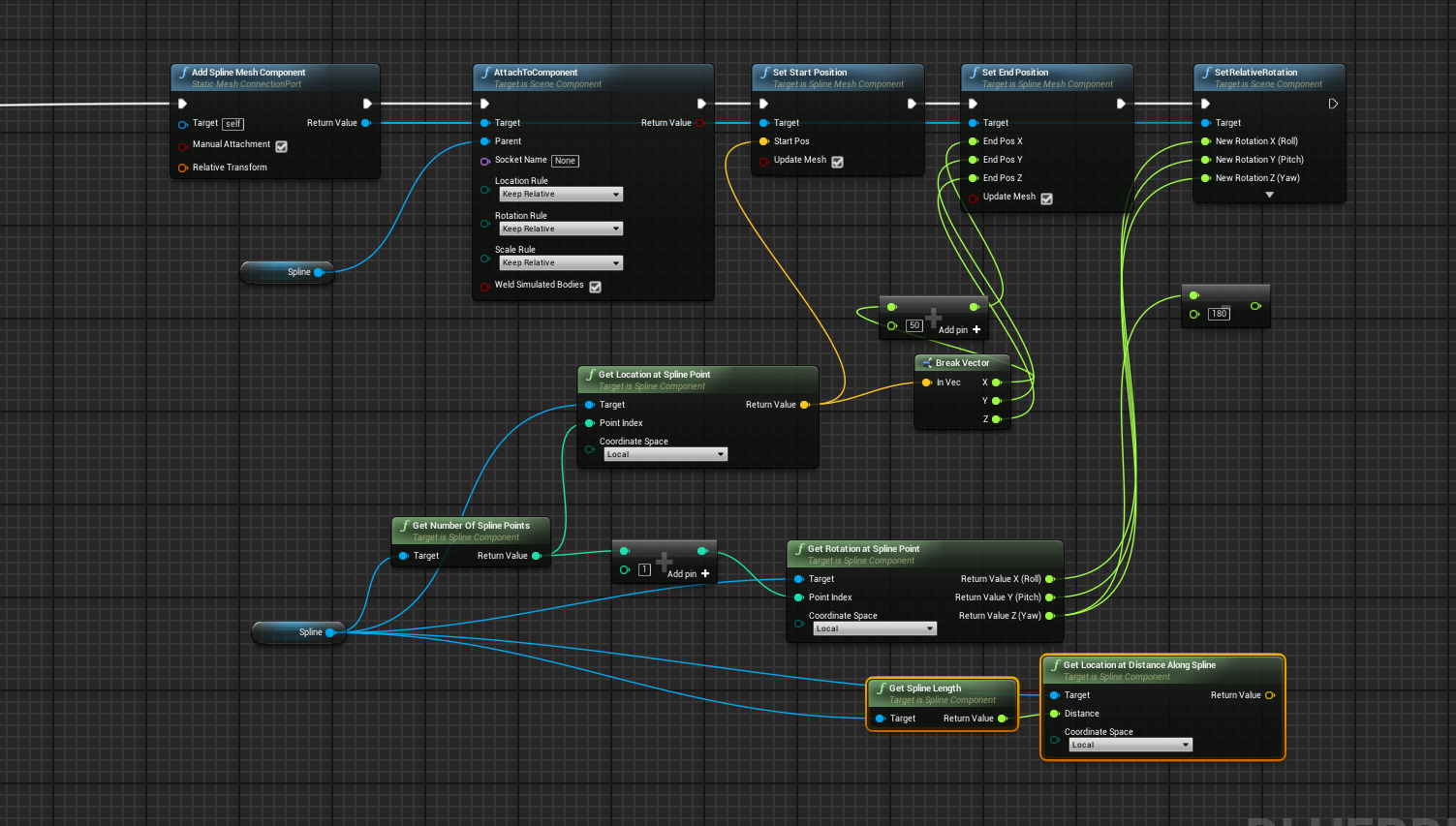
I already got the connecting of spline meshes one after another, but I just can't seem to place the meshes at the end and starting points. Right now, I spawn the mesh and attach it to the Spline component, and I set it's start and end position for the last spline point. But of course that's not good, because it's still attached to the spline component which has it's root at the first spline point. Not sure if I'm clear enough
cursive dirge
@versed pawn if you chain them, wouldn't you just want to spawn a mesh for all starting points and only to last oned end point?
all in all, you get the world positions with GetLocationAtDistanceAlongSpline
distance for starting point is 0 and distance for end point is length of the spline
I can't remember what the node was for blueprints but it's GetSplineLength in c++
versed pawn
Yes, but when I add a spline mesh, it gets attached to the spline itself. Here is what I mean:
This is the spline and at it's end, it's my other mesh.
But if I do any type of change to the end point, it get's offsetted. As you can see here, it's rotating around the spline's first point
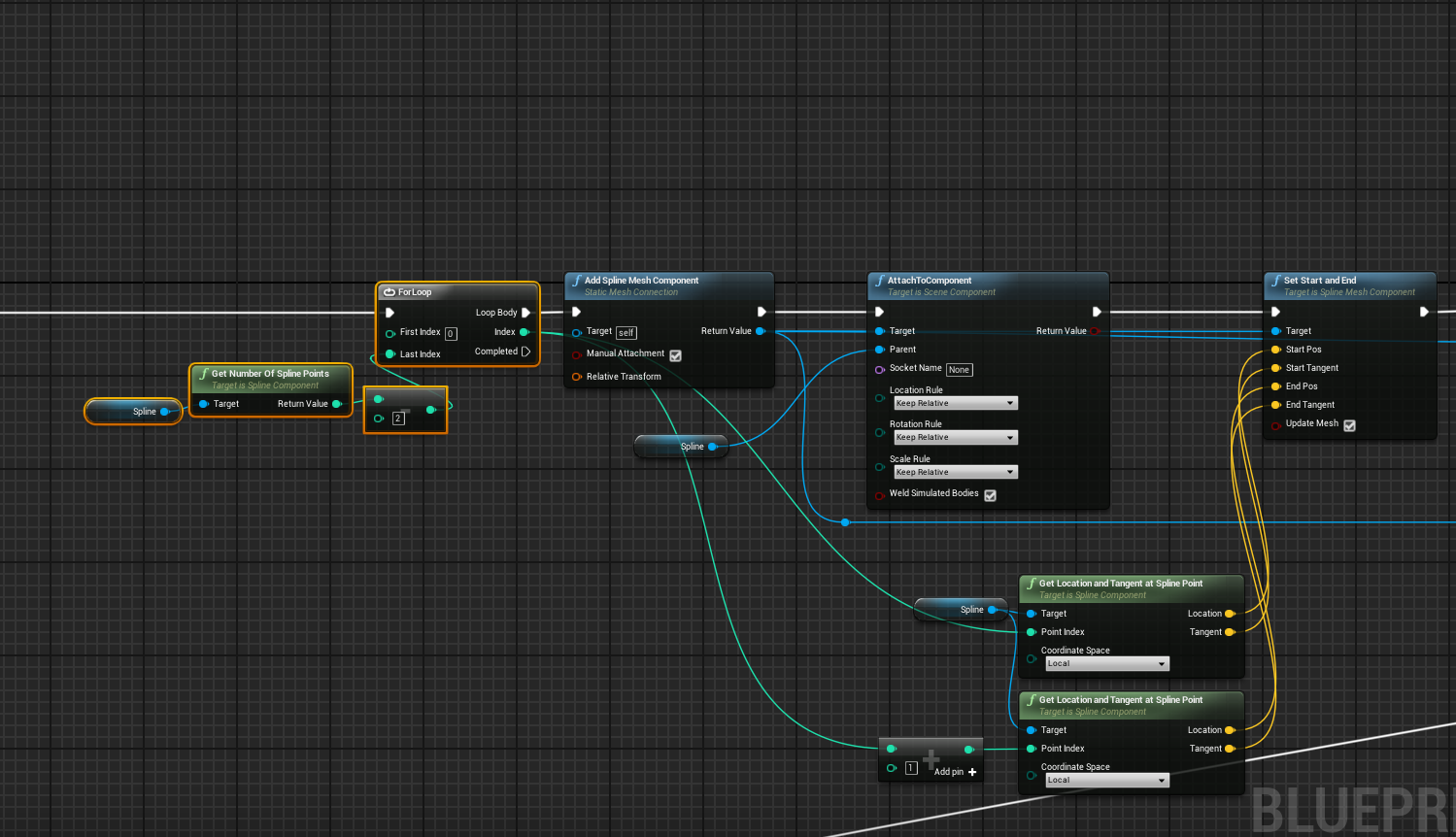
This is where I spawn the connections. It works as it should.
This is where I spawn the end point
 cursive dirge
@versed pawn if you don't want it to follow the spline, simply don't attach it to spline
you could have a separate scene component as your actors root component
and attach the mesh there
same with splinecomponent, just set it as root components child
versed pawn
Hmm I'll try that. Thanks!
 rigid kayak
Any1 know how to convert a spline mesh into a static mesh?
plush yew
@rigid kayak can't you just export it as an FBX and then remove the unneeded stuff in maya/blender/3ds
and then reimport it as a static mesh
Why does it matter though?
rigid kayak
Im using spline meshes to make some distant low poly tree lines
But its not very optimized (afaik each spline mesh component results in 1 draw call)
I've tried the convert to static mesh action but it only results in 1 undeformed static mesh (just the original source mesh)
BUT
I just found out that the merge actors works!
plush yew
Nice!
 tall juniper
Anybody else having very slow download speeds when running the setup script from github?
Also incredibly inconsistent varies from 0 - 3 mb/s
cloud cobalt
That's pretty expected given you're getting lots of different files
arctic tree
is there a channel best to discuss profiling?
cursive dirge
the one that covers your programming method, #blueprint or #cpp, or if it's related to renderer, you could try #graphics
@arctic tree ^
arctic tree
what if you use a mix of BP and c++?
rigid kayak
RIP unreal docs?
versed pawn
@cursive dirge Just a quick update. I arrived at home, did what you said and It worked! Thanks a bunch!
cursive dirge
np
 tall edge
hm, any word on the 4.16 release?
plush yew
What should an artist be required to know?
 tacit chasm
It seems to me, user input should all be handled in a PlayerController class/bp which in turn calls/triggers functions/events on a PlayerCharacter class/bp.
yet you often see, even in Epic's own code, the PlayerController is bypassed an input handled in the PlayerCharacter class. Is the first statement correct in that the intended/best practice way is to handle user input in the PlayerController class and not the PlayerCharacter and examples where you see otherwise are just the result of quick and dirty development?
honest vale
I'd do everything in the controller
and keep the pawn as controller agnostic as possible
cursive dirge
it's cleaner design alright
pawn doesn't really need to know about the input handling
magic scarab
So the "Able Ability System" https://www.unrealengine.com/marketplace/able-ability-system was just released. Is there any benifit to using this rather than just coding everything in blueprint and doing it the normal way?
worn granite
Kind of looks like an extension
You'd be unable to replicate all the features in BP
So that would be like never using the AI tools and just doing it yourself in BP
@magic scarab
its a bit beyond something like AoC
dim hemlock
@tacit chasm I remember reading a post saying that keeping all controls in the controller instead of character helps protect against speedhacking
 digital canyon
Hey, I'm trying to use the Mobile Patching system introduced in 4.14 in an android game. Everything's going alright (fetching content via http, downloading and installing it on the device) but the Mount operation fails every single time. The error message only says "Mount failed". Any ideas?
spice urchin
@rigid kayak yes i know how to convert spline mesh to static
@rigid kayak to convert spline to static mesh, take your landscape, put it at highest LOD (lowest polygon) and export the landscape as FBX
then open that in 3d package, like 3d max, select by element, select the landscape itself, delete
and the spline meshes will be all that's left
then you can do whatever you want to them, do new UV's etc, or just save it back out as static mesh to Unreal 4. if you don't scale or move it you'll be able to place it in same spot in level by just setting translate to 0,0,0 too
 obsidian wing
So I've been having some build issues that last couple days. Would anyone mind helping me out?
There is the output log
I'm really confused by what it means by '/Game/' in my file path. Mostly because I have no Game folder in my project. Is it referring to the the main "Content" folder?
cloud cobalt
Yes
obsidian wing
okay, so why is it saying that is not a standard unreal filename?
cloud cobalt
It says that it's because of the trailing /
But you might want to tell more about what you're doing here
plush yew
Hi everyone. Does someone know a good answer to this issue? https://answers.unrealengine.com/questions/528340/414-lighting-scenarios-vr-lag.html I already asked in #virtual-reality two times but no response at all =/
I have the same issue with the vive and lighting scenarios
light thunder
I'm looking to learn Maya for simple animations (to use in Unreal) - I've taken courses on Udemy before, can anyone recommend a good course? There are several on animation and I'm on a limited budget
I'm asking here because I'm sure there is some overlap that people in here might know
kindred viper
im not joking when I say this but the official tutorials for MayaLT are fantastic. It will take you less than a day to learn to use the interface and know how to manipulate things. The rest is just practice.
 cloud loom
Is there a global setting for optimizations, specifically graphics like shadows and LODding for games that work at different scales? like for example a level that is at 10x the normal scaling?
cloud loom
hmm, sounds too easy.. tnx 😃
plush yew
importing certificate for ios but dont know where to put the password it just stuck at "importing certificate please wait"
cloud loom
hmm, this reads more as tech scalability, what I mean is the actual size of levels. Things like cascaded shadow maps have a limit of 20000 from what I could find which is not enough in my case. So I'm wondering if there is a way to adjust the optimizations based of the size of objects in a level. or instead should one just fake it
Using the scalability settings I can prob fix some issues here and there but was wondering if there is a size of level setting or so
plush yew
Does anyone have experience with making 360 degree videos in unreal?
anyone got any help?
cursive swift
I tryto get some help for something but people just talk avoer you and basicayl do not respond xD
plush yew
prefer unity community, they actually answer
light thunder
It's tricky guys, sometimes it's a matter of timing
You have to understand, no one here is getting paid, and EVERYONE is busy doing their own projects or lives...they just might not see your question
The other problem with, at least for me, is there is no way to filter out notifications in the discord app...you are either getting ALL of them, I haven'tr figured out how to make only a certain room/channel notify me
plush yew
right click room and mute
kindred viper
@light thunder : right click a channel name and you can mute it
light thunder
@kindred viper @plush yew thanks
The best advice, as Marc will tell you because I ask a ton of stuff here, is try to distill your question into the smallest chunk of information, the smallest step.... the simpler it is the more likely someone will take the time from their day to answer it....also, you'll find that this breaking down of the problem REALLY helps solve it sometimes
"A problem well stated is halfway solved"
plush yew
my question wasn't a difficult one, just wondering why importing certificate won't show password pop up. got it to work, but now getting an error, but rather just fix error myself than sitting hoping someone will reply.
kindred viper
that is a pretty edge case question though. I mean how many people import certificates? 😄
plush yew
anyone who works with ios
kindred viper
probably could use a specific channel for that really. Surprised there isn't a mobile chan
oh there is
i have it muted
plush yew
there is, but general seemed active.
light thunder
Here is a question - Can I add a static mesh as a reference in the skeleton shaping tool? Would help with position of limbs...
plush yew
Not touched that myself
oblique fern
is it possible to export a prefab or bundle out of UE, to import it into another artist's UE?
plush yew
hey all
can anyone help me understand direction output parameter in function APlayerController::DeprojectScreenPositionToWorld
it is a direction from where exactly?
oblique fern
is it called migrate?
worn granite
migrate is for local projects
But you can migrate it into a local project, zip it up and send it to them, and then they can unzip it and open it before migrating into their project.
If you wanted to be super safe.
Otherwise you can just make sure you don't miss anything and you can send them a zip directly
Or you can use source control
oblique fern
ty
vale osprey
@worn granite do you know if there is a Layman discription of what that ability is. I've watched his videos and sounds very interesting but I think I'm just missing paradigm of what it is.
I mean Able Ability System
worn granite
I'm actually not familiar with it at all
vale osprey
maybe with concept?
worn granite
I just looked at it. He's got some kind of extended functionality that might build off of AnimMontage
And ties into gameplay abilities or something.
Its like the difference between using behavior trees vs just using BP and Persona
at first glance
worn granite
probably not a bad idea
 exotic cairn
Is there a way to view Sum Triangles in a scene with LOD meshes?
 quiet falcon
Hello anyone can help, pretty simple question how do i get explosion to go off in cinematic view i added it to the level sequencer and it stills doesnt go off!
 heady bridge
Are particle effects in engines just 2D sprites? or is there a better version of them similar to Maya fluid similations?
 rotund summit
Most particle effects in games are sprite based
It's great for performance
But you can also have particles that simulate physics collisions
I don't believe UE4 comes with a fluid sim out of the box, depending on what you mean by 'Maya fluid simulations'
heady bridge
by the fluid sim I meant the way you can create particles and what not in external 3D applications like Maya, which don't use sprites, but thanks for confirming it's mainly sprites.
rotund summit
Also, check this out it's cool https://www.youtube.com/watch?v=Yd4blFeRTEw

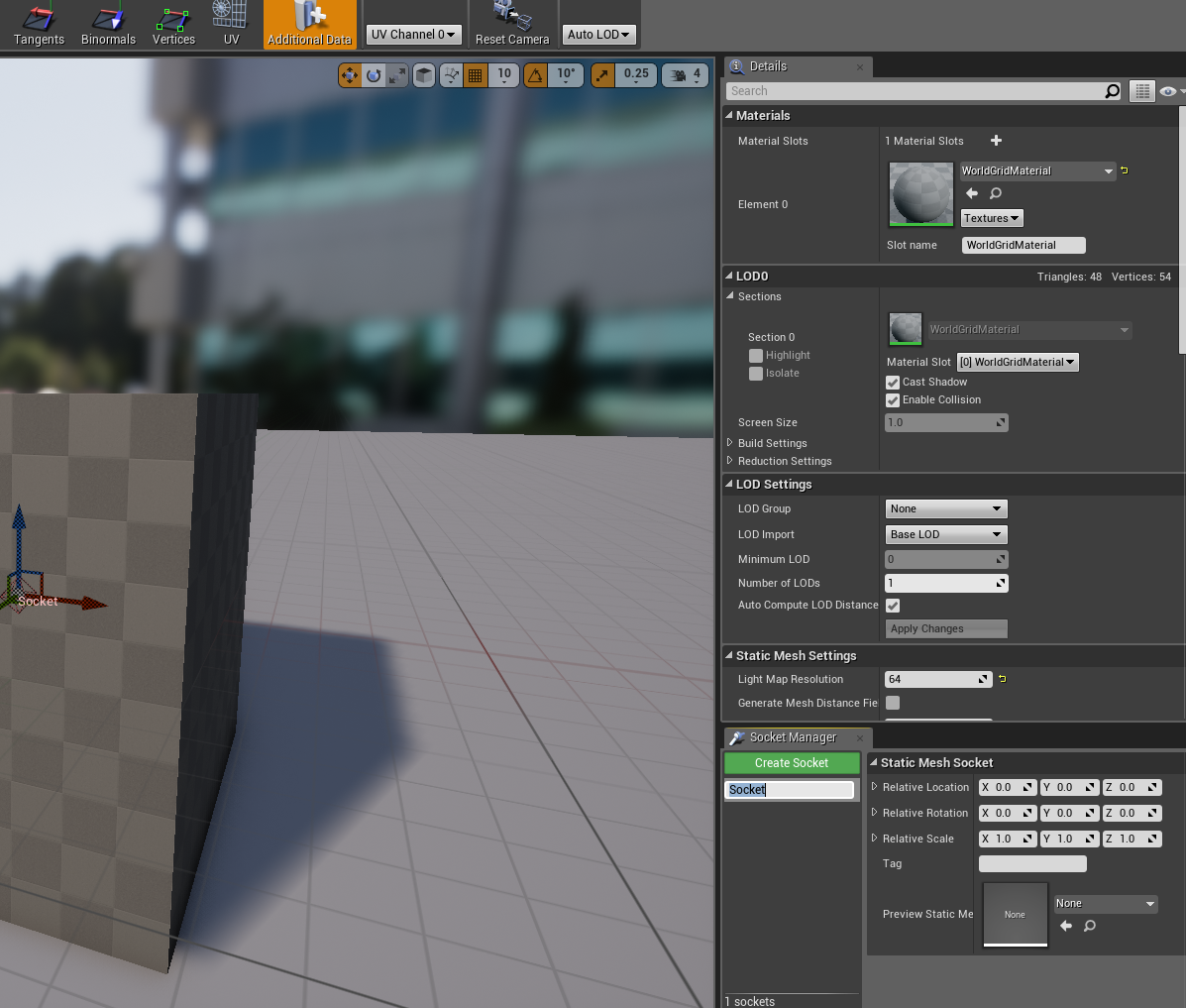
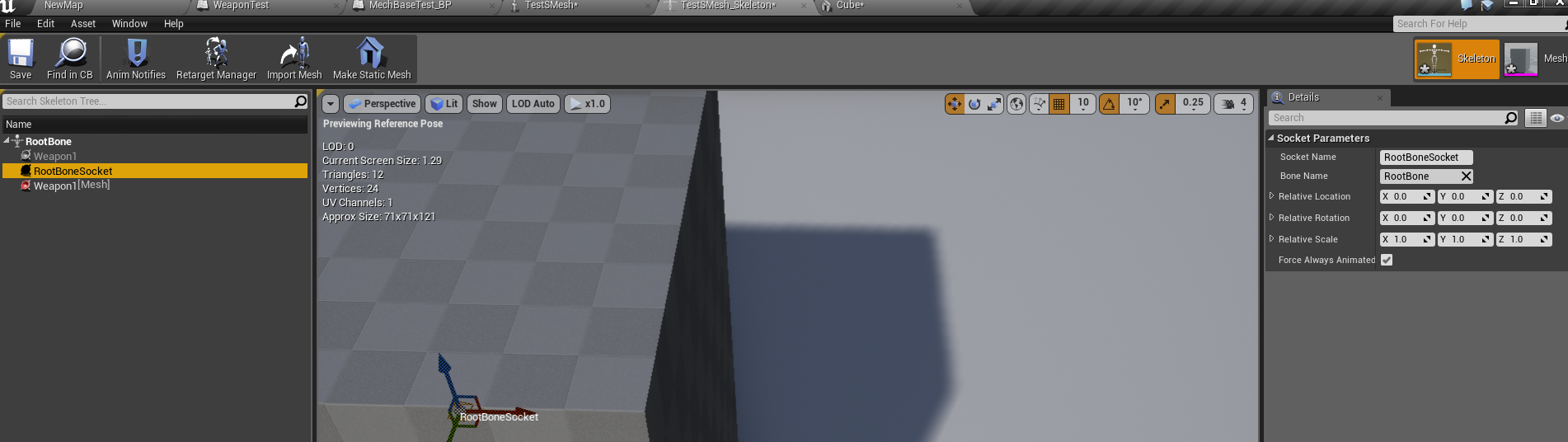

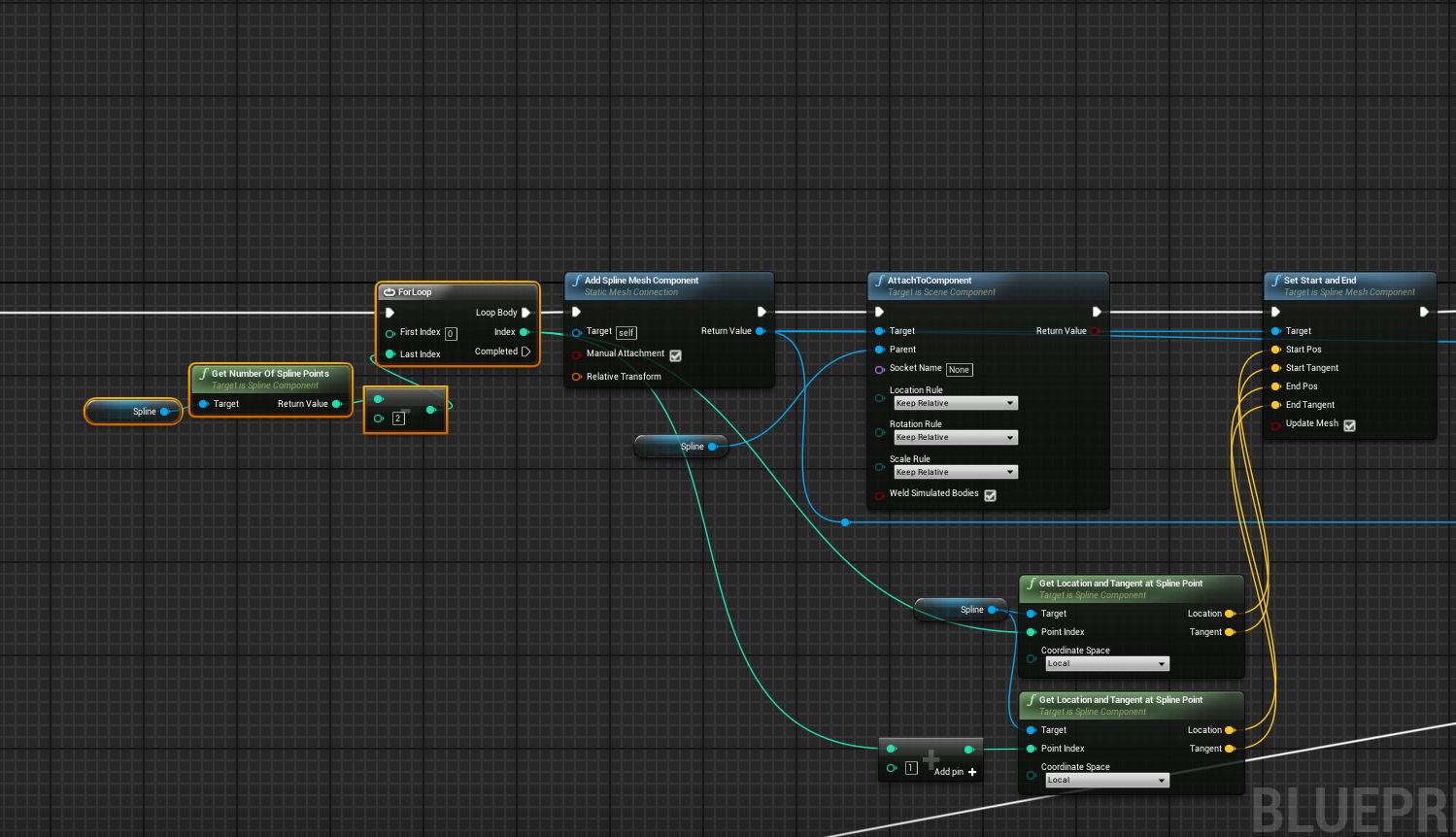
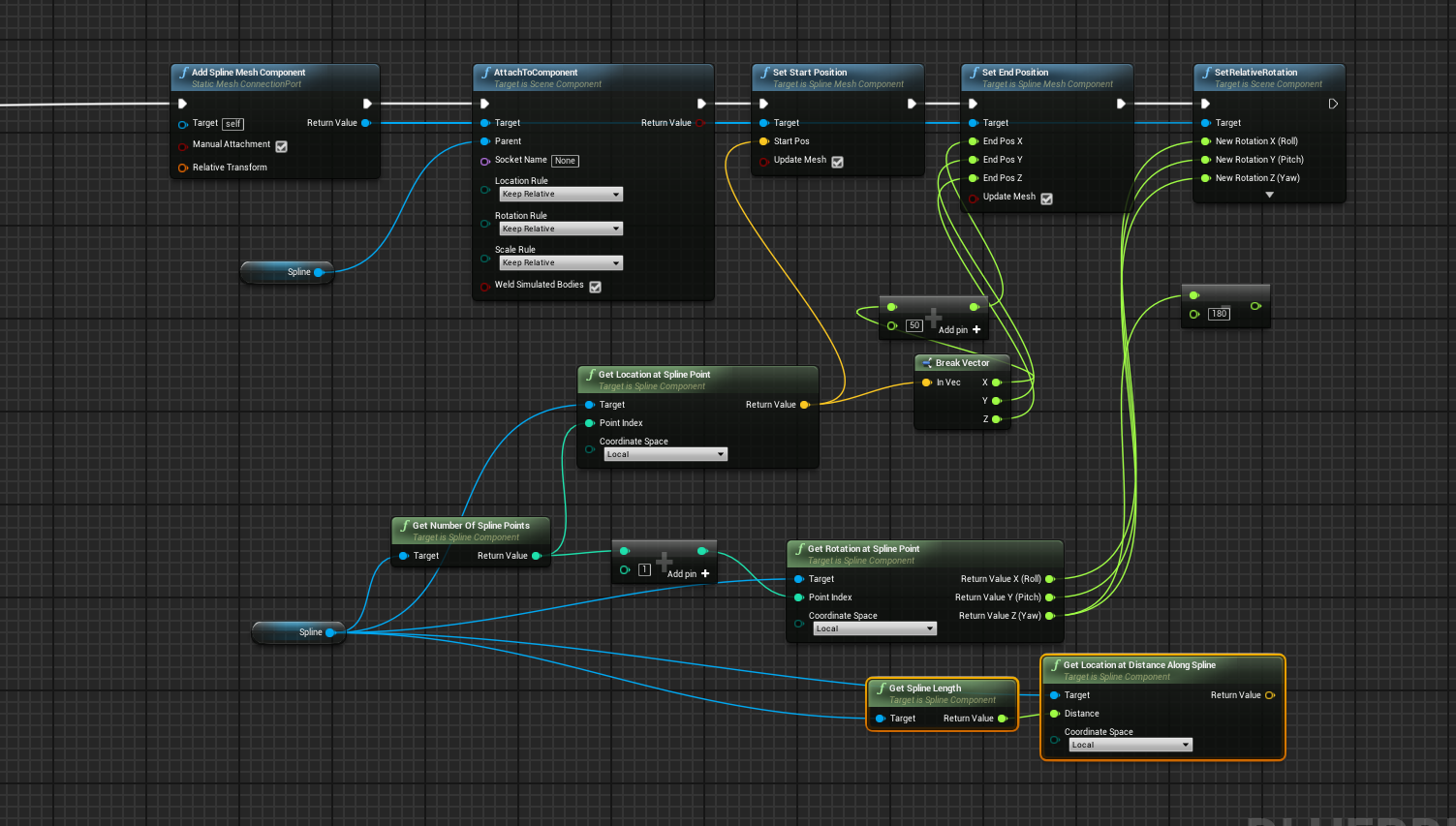 heady bridge
that's really cool, would love to do that stuff in games lol
rotund summit
one dayyy
There is a lot you can do with effects shaders/post processing as well for particles
I'm not really practiced in it, but i've seen it done
heady bridge
do you know what the best practice is to get the sprites outside of the engine?
like to make them yourself? for example realistic fire?
heady bridge
I don't know many ways of doing so, everything online tells me to just use in engine editors, which isn't very helpful lol
rotund summit
Well you can find some free use fire textures
heady bridge
I don't like using anything pre made
rotund summit
well this is just the source
then you could go in and pick out a few fiery wisps that you like
then the trick is mixing and matching and deforming and moving those in the engine
heady bridge
I know of people creating fire simulations in blender or maya, and baking them into sprite sheets
rotund summit
Yea you can do animated sprites
so you could have like a looping 'flickering flame' anim
rendering out a sim in blender or maya would be one way to generate those textures
heady bridge
That could be the best option I have without buying Houdini lol
rotund summit
Particle tutorials! https://docs.unrealengine.com/latest/INT/Videos/PLZlv_N0_O1gYDLyB3LVfjYIcbBe8NqR8t/OXK2Xbd7D9w/index.html

For the full tutorial playlist:
there's also a recent convo in #graphics where simonschreibt answers a similar question about creating an explosion and sounds like he knows more about it than I do
heady bridge
Thanks, I checked out a video he linked, about Fallout 4 mushroom cloud, it seems very interesting, baking simulations seems to be the best way to do things, but also mixing in gradiants help smooth it, I will do it this way
feral kiln
hey guys
 swift spindle
does anyone remember the name of the ue4 plugin that lets you display on multi screens... for setups like multi wall projectors ? plz pm me with the answer if you do >.<
 harsh tiger
Hey, do you guys know of any great basic beginner youtubers for UE4? Looking for a Youtube series to work through to help me learn the basic for college. Thanks!
 spark garden
try Katies channel

YouTube
Blueprint Games LTD. is an independent games company. Our first release, RELAPSE, is due for release 2017! Subscribe to our channel for updates, sneak peaks ...
and of course, the official unrealengine channel has some great beginner tutorials
 timber relic
Got a stupid question. I'm doing some transforms on leg bones - is there a quick and easy way to make sure the character's foot doesn't go through the ground?
Basically 'when I make the leg longer' 'lift character in appropriate manner' (I'm not doing asymmetric legs, that's just asking for trouble)
Or is there a 'just don't let feet penetrate mesh when making legs longer' thing.
(also important if making a car into a monster truck, I suppose)
(which is a thing planned shortly)
harsh tiger
@spark garden thanks
 sinful juniper
Hi, is there a ue vfx for asking about cascade?