#ue4-general
1 messages · Page 31 of 1
 fresh osprey
 near sundial
Hi, does anyone know how can I get number of currently connected Game Contollers? Either from C++ or BP.
 lilac stirrup
Does anyone know where the default value of the far clip plane is being defined in? (Or at least what value is it being set to?)
I see the near clip plane in project settings, but I don't see the zfar.
lilac stirrup
I see 🤔
Let's say, I would like to map the depth value starting from the camera position up to let's say 10 meters in front of it, map them within a range of 0 to 1.
Was assuming that I can do this by doing some distance comparison with the zfar, but not sure how to do it with the far plane being infinite.
Any suggestion what I can do to perform this?
lilac stirrup
CMIIW, my terminology and knowledge is a bit limited here.
I got DeviceDepth value from a SceneCaptureComponent, from what I read it returns Z value in 0-1 range, I'm assuming this is the value for each pixel/entry in the depth buffer after processing all the rendered objects?
0 is when on the near plane, 1 at the far plane?
I would like to get those depth values, and map them into a range of 0 to 1 (0 at the camera, 1 at 10 m).
Thought that I'll be able to do this if I knew the zfar, but I assume that's not the approach here.
Any idea?
lilac stirrup
The DeviceDepthInRGB seems to be 0 near 1 far already from the vusualization I did, the further the whiter, not sure why it's not reversed.
That aside, I end up using SceneDepthInR instead, it provides metric distance, so I'll just use that.
Thanks for the help @shy nacelle .
 heady ridge
Is there more to landscapes than creating the map, adding mountains/valleys and then texture/buildings? Or it's one of the simplest part of making a game?
 charred raptor
Alright how hard would it be to make a procedural generation subway train routes that will go on forever, and have every few stations look different depending of which area you are in.
Like one station will look dirty and run down if in a low income area or a station will look clean in a high income area, and or if one station look abandoned in the abandoned area.
I want to make a walking sim of the subway and ride in it without it being in a loop.
 olive vine
Good evening. Anyone able to help with some weird dependancy issues?
I've been working with the player and AI controller for the past few weeks. Until now, everything's been compiling fine.
I created a new C++ class, Room, and decided to include the Player and AI Controller headers. Including them creates a mess of compile errors. The header and .cpp file for Room is otherwise blank.

 olive vine
Because this seems to be isolated to Room.h, does this mean I should be fine if I just create a new C++ class?
Thank you for the info. So it sounds like my Player and AI controller work with each other, but at some point got corrupted and won't work with new C++ classes?
 onyx viper
does anybody know how do i prevent destructible mesh chunks from flying off on hit ?
 obsidian quartz
Hi! My scenecapture blueprint captures the niagara system as it should and which is a child of the scenecapture but I want to use it as 'Only owner see' at which point it disappears from the scenecapture2d. Does anyone have any experience with this?
 mild agate
has anyone here ever done a press kit for their game?

 errant blade
I moved all my project files into a new folder (in-engine) and every single reference in my entire project broke
I thought I had a backup, but I forgot to click "paste"
Is there any chance whatsoever of fixing this, or is my entire project just gone like that?
I do not have any version control software
errant blade
I wish it was at least that but no, I knew the dangers, I just didn't realize I hadn't clicked paste and copied something else, so I found myself with no backup while I thought I had one
So its just a bummer, not even a lesson
 glacial parcel
hi, how can i use glossiness texture on material?
 errant blade
I managed to just about fix it!!!!
What I did was move the files to their original locations in the file browser (out of engine) BEFORE opening any files up... Managed to trick lots of them into recovering their old references
Some are still broken, but my project is no longer fully gone
 wary gyro
Is there any way to fix this? It's a node from an old plugin, and I tried defining the module as Developer and UncookedOnly in the file, but it didn't work

 gusty sequoia
hi, i notice that the "Positive Bounds Extension" option on Skeletal Mesh editor dont actually change the mesh bounds of the object is on the world, do i need to something else to apply that new bounds or it is bugged?
olive vine
I think I've resolved my issue by reverting a few commits and recreating some blueprints. Thank you.
I also enabled live coding.
 summer meteor
Anyone know why a change of about 50 floor panels to block all in a blueprint is taking like 3 hours plus?
I made a mansion to the wrong scale and made it into a blueprint a year ago so I could scale it without distortion, all works great but it takes forever to change anything in it.
Anyway to speed it up?
 mental gust
Is there a way to disable the rollover popup that shows mesh/material information? It is constantly getting in the way
The answer is this:
To disable ALL tooltips use console command "Slate.AllowToolTips 0" (not recommended).
You can just delay tooltips by using command: "Slate.TooltipSummonDelay <DelayTimeInSeconds>"
 teal flint
this isn't strictly related to development but i'm unsure where else to say this: i was messing with global shaders in my own project, and later i tried opening several different ue4 games, all of which no longer open because worldgridmaterial shader map isn't valid anymore

i have no idea how me modifying global shaders in a completely unrelated project broke every ue4 game i have on my machine
okay, so one game didn't break, being deep rock galactic
that's a thing?
should've realized
that's probably what i broke then
i didn't edit the editor asset myself, i just made new global shaders and the shadermap recompiled
wait, are ddcs even used in packaged games?
i'm talking about packaged games that i didn't write myself
that somehow broke because of my experimentation in my own project
hm
 raw heath

Hello, does anybody know why i cant get my virtual texture?
(height and material maps are correctly done in the right corner)
 subtle marten
question, what does this mean? ```LowLevelFatalError [File:Unknown] [Line: 130]
MallocBinned2 Corruption Canary was 0x3941, should be 0xf317
Crash in runnable thread FAsyncLoadingThread```
 tough thicket
I wanted to try and remake the knife fighting system from Resident Evil 4, so i made a blend with swing hi mid and low but i cant seem to figure out how to fire off an animation given an aimpitch
I can do it with a blend inside the animation states, but its kinda ass
(with no loop on and reset on blend change)
Maybe someone knows what im talking about
 raven nest
is adding/subtracting a DateTime and Timespan broken or is there some trick to it?
raven nest
oh, it's actually Date Time from String causing me grief.. the data seems correct though 🤔
 tiny pawn
im a somewhat beginner in ue4
i dont know what to start learning for my game
i want to learn how to make hitboxes, healthbars, animations, etc. but i dont know if i should just jump at it or find some kind of step by step
ping me if you respond lol


 pallid knoll
is it easily fixable or?
 analog ridge
pallid knoll
is it easily fixable or?
analog ridge
pallid knoll
is it easily fixable or?
I think you can safely ignore that if that error doesn't spoil your lighting or even bothers your game quality cuz that's what people do
 lavish kernel
Yo was wondering if I could get some help with using visual studio with ue instead of blue prints
I’m pressing compile then pressing play but I’m not seeing basic prints, I think I’m using it wrong ?
Is there a step im missing
Thanks
heady ridge
can I remove these if I'm just learning UE?

i dont want to make linux/ios stuff
I saw it
it's 90% of the same as UE5, and doesn't take up 500gb, so im fine
heady ridge
I mean for UE4
 oak patio
it still isn't, 4.27 is the latest
you don't want to be on 4.27 though
you want to be on 5.3/5.2
oak patio
heady ridge
I just explained that I dont want to use ue5 for now
Yes but the reasoning is not based in reality
heady ridge
there is 0 reason for a total beginner to do ue5 over 4, the stuff im learning is the same in both engines
oak patio
There is no reason not to.
If filesize is your concern then Unreal is certainly not the right engine. It's massive, the projects are massive, it's all massive
oak patio
heady ridge
there is 0 reason for a total beginner to do ue5 over 4, the stuff im learning ...
You got that the wrong way round
heady ridge
no
oak patio
the stuff you're learning is not the same, and no new materials can apply to you.
you're also locking yourself into engine issues that can never possibly be fixed and in general missing out on a ton of great things
heady ridge
I will swap when I feel like it, for now im fine on 4
heady ridge
im doing this as a hobby, there is nothing to handicap
im having fun, thats all i care about
oak patio
most people here are doing it as a hobby. using a less powerful, less complete version of the engine is just artificially limiting yourself.
Even the people doing it for fun are on ue5
and good luck if you have a ue4 specific issue, this channel is hella inactive
and god forbid you run into a 4.27 engine bug that will never ever be fixed
 bronze compass
oak patio
it still isn't, 4.27 is the latest
bronze compass
oak patio
it still isn't, 4.27 is the latest
wdym there's 4.28 👀
 vale abyss
Hey everyone, I have an issue with my landscape material and have no idea what's going on, has anybody seen this before? https://youtu.be/32PFKLCVYQw
For more context, the material changes as I move closer/father from the landscape.
Fixed by messing around with LODs
 pliant isle
got banned from unity discord. this is why unreals better 🙏
 fierce blaze
hey
i want to make vr shooter game and i want to make pistol in vr in ue4 can someone suggest me some videos(tutorials) PLZ!!!
oak patio
you won't get any good tutorials for things like vr shooters
 plush yew
does anyone know how i can align multiple objects?
 halcyon bough
plush yew
does anyone know how i can align multiple objects?
halcyon bough
plush yew
does anyone know how i can align multiple objects?
In what regard? Could be as simple as a construction script function that linetraces and sets the objects position at the impact point with its normal being the objects UP vector
plush yew
halcyon bough
In what regard? Could be as simple as a construction script function that linetr...
i just wanna align multiple objects to have the same Y location
because when i select all of them it says Multiple Values there

no because they gonna merge all into one
something like this
 plush yew
oak patio
Did you even try it
plush yew
oak patio
Did you even try it
yes
 rare tartan
Does anyone know why all of the megascans materials are just black in UE4?
Unreal Engine Version: 4.27.2-18319896+++UE4+Release-4.27 for macOS
Quixel Bridge Version 2022.0.8 (2022.0.8)
I created a new third person blueprints project, then opened bridge, downloaded and exported the assets into the project.
But everything is black, and double-clicking the material to edit it shows that it's definitely not setup right.
Does anyone know why this happened, or how I can fix it?

 halcyon bough
plush yew
yes
halcyon bough
plush yew
yes
That’s kinda how coordinate systems work? Do you mean Z but come from unity? Otherwise all I can recommend is giving them enough spacing on X to ensure they don’t clash on Y when they all align on the axis…
 azure shore
I cant believe my game that looks like THIS consistently makes my fans louder than any game I play. no one can even run this, its ridiculous

I must really just suck at optimisation THAT much but even just having unreal editor open in a map does the same thing I just dont get it
azure shore
capped it at 120fps, as that actually improved performance for my friend, but I’ll check that too
plush yew
Does anyone know why my lights are randomly switched off whenever i open/close the editor
they switch on, only if i move them
azure shore
I think Im having the same thing actually, if you open the map twice do they come back on?


 peak hare
holy fuck i thought i had accidentally corrupted my whole project just then
peak hare
yeah i am using usb sticks :/
I'm sure you are right+
I was too lazy to figure the github stuff out so was relying on a usb, problem being when I try and back up from the USB I get clashes with same file names so isn't very useful method
azure shore
thanks, couldnt find an option anywhere
dont think it changed anything though, probably wasnt even enabled
oh this is insane I literally barely have to touch anything and the fans just crank right up
azure shore
but as I said I capped at 120, and it never drops below that anyway
azure shore
man, a whole discussion about this but no actual cause of the problem https://forums.tomshardware.com/threads/unreal-engine-4-makes-my-970-buzz-loudly.2227559/
Tom's Hardware Forum
Whenever im using Unreal Engine 4 editor or playing a game made in Unreal Engine 4 my Galax EXOC GTX 970 buzzes really loudly but in any other game which also puts it at 99% usage it doesn't. My temps stay low (Below 65 degrees) and its not my fans as even if I manually turn down my fan speeds...
its 100% a buzzing for me too, not just fans loudly spinning
tough thicket
so why is it so common to see games with custom servers like ARK, Pantropy, Palworld compared to idk maybe the same idea of small sandbox servers but a inventory/stats shared on all the servers?
like diablo i guess
oak patio
Because shipping servers for your community to run is a lot cheaper than implementing the backend needed to have shared inventory on all servers
Plus for a lot of games it just simply doesn't work
Imagine if you could just build up your army on a low player ark server, then join a comp server and stomp everyone
tough thicket
oak patio
Because shipping servers for your community to run is a lot cheaper than impleme...
Shouldnt this be easy on steam? im not quite there yet lol
oak patio
no
steam doesn't give you the server you'd need to pay for to sync the data across all servers
it also doesn't write the code needed to do that
tough thicket
ah so maybe just plan 4 official servers and see how it goes
oak patio
don't plan any official servers if you're just going to "see how it goes"
you will go in the red
you don't do something like that without a proven interest and funding
tough thicket
money isnt the issue
oak patio
money is always the issue
tough thicket
already 10k invested
oak patio
That's not a lot to guarantee the success of a game using official servers
tough thicket
just asking questions on server cause no one can actually answer it properly
like you dont even have your own game and talking like you know
"brr its expensive"
oak patio
lmao
you know how much marketing campaigns cost right?
you know the success rate of indies right?
you know how much it costs to guarantee a userbase that recoups your costs right?
unless you have the mega bucks, or get that proven interest and community, ship community servers
otherwise it's too much of a gamble
oak patio
lol

 lost isle
I have these issues with my unreal 4.27.1 angelscript build

 valid raven
hello, I am trying to make a cooldown timer for a game i'm making. in this, the cooldown is a float, and depends on the ability used. Functionally, I have no issues, but visually i'm struggling to think of a way to cleanly auto-update the text on screen with the accurate cooldown information. Specifically, If i use a timer, or a delay, at no point do those nodes have an output for what number they're at right in that instance.
I want to update relatively accurately, down to roughly a hundreth of a second
does anyone have an idea for how I could either set up a new timer which can output a float and display that on the hud, or otherwise find some way to get that information accurately displayed to the user?
this isn't exactly what I have, the full version is really messy and includes other code, but this is functionally how it works

all of the tutorials i've seen use world delta time which i'm not really sure works for my use case
since I don't want to update based on when the world started, just when a button is pressed
something tells me I can use deltatime from tick to slowly subtract from a float, and update that every tick
but i'm unsure how expensive that is, if anyone knows of a better way please advise
 inland silo
Igot FPS locket at 30 i tried t.maxFPS 120 is there another way to remove that ?

 lilac cipher
Hey, tell me please - maybe someone knows. Is there any way to select all needs review in translate in one move?
How and where is this saved in external files?
valid raven
did not know that but i'm already doing my own thing 😭
 raven bane
Does anyone know a good tutorial for an online leaderboard?
oak patio
You won't get a good one, no
Especially not something that hints at a game being taken to shipping
tough thicket
raven bane
Does anyone know a good tutorial for an online leaderboard?
i think you can use like sql or something
raven bane
tough thicket
i think you can use like sql or something
I found this plugin so I think Ill just use this

Unreal Engine
Save your valuable time when implementing SteamAPI Leaderboards (... and more) for your Steam Game when you use the Leaderboard Integration plugin for blueprints!
Thanks tho
tough thicket
Goodluck!
 royal arrow
Hey guys. Today I tried duplicating and renaming a project to use as a base for a new project and I'm running into an issue. I got the project to compile in VS (it's a C++ project) and finally got it to launch, but I'm getting a crash at around 90% load time that gives me a ton of these errors:
SNMAS is the old project name and StarlightBuilders is the new one. Anyone know what step I'm missing to get my .uassets to properly reference the correct project scripts?
 royal arrow
How/where do I go about doing that?
Yeah. I was just coming back to say I googled it and thanks. Lol sorry.
royal arrow
Got it! Thanks again! : )
olive vine
Good evening. I've run into an issue where my game is crashing even while paused. Any ideas?

thx
is this the proper way to add a second command? the UnrealVS doc doesn't say.

ty
azure shore
azure shore
I dont get what you mean
alright 
 jaunty matrix
hi im on an older version of ue and i have no idea what could have made this happen but suddenly my animations just dont change to anything anymore. all the bones are still the same and the animations, with the model that is used, can be placed but for some reason animations wont switch
it doesnt show the tab but im clicking on the other animations
 nova kayak
Anyone got any idea what would cause this strange lighting effect?

Unfortunately not in this case 😦

I think I found the problem though, it's the hair
Not sure how to fix it though lol
Yeah, it doesn't help that i'm using grooms, not the most stable of things on Unreal
I think it's due to voxelising the groom but I'm not going to turn that off, the artifacts look better than not properly shaded hair
nova kayak
Thanks for the help either way! 😄
 blissful wharf
hi, i have a problem
i tried loading an old 4.27 project but i cant load any of my uasset and umap files anymore
my only guess is that they depend on the Bridge plugin
when i install bridge and install the plugin to 4.27 it installs a megascans plugin and not a bridge plugin though
so i basically cant open any of my blueprints and maps anymore
"Failed to load map!
LVL_Main.umap appears to be an asset file."
this is the error i get
and all my blueprints and uasset files simply dont appear in the editor, but they exist in the folders

this is the error i get first time opening the project
wait the project says "EngineAssociation": "5.0"
facepalm
that makes sense ofc
hm but iam pretty sure i didnt use 5.0 for that project
weird
but it has
    "Plugins": [
        {
            "Name": "SQLiteCore",
            "Enabled": true
        },
        {
            "Name": "SQLiteSupport",
            "Enabled": true
        },
        {
            "Name": "Bridge",
            "Enabled": true,
            "SupportedTargetPlatforms": [
                "Win64",
                "Mac",
                "Linux"
            ]
        }
    ],
in it
so i guess i actually did use 5.0
cause i dont think Bridge was even in 4.27
is there any way to make it go back to 4.27? i somehow dislike 5 with abandoning physx and stuff
sadly i didnt make a repo cause there were too many files exceeding space limits 😐
github has a filesize limit i think
 rigid root
Hi, I have a problem with a StaticMesh component in a blueprint, what settings in a project could be influencing the Current Max Draw Distance, since it seems not to be able to change past 1500 on maps, on blueprints it works flawlessly though, why is that?
 blissful wharf
the camera
clip plane distance
although every camera can have different clip planes
so maybe theres another setting somewhere
actually 1500 is pretty far
rigid root
I can't see the clip plane distance parameter in the camera component, is it somewhere else?
blissful wharf
the problem is that you get floating point errors at higher numbers
unless your near plane is pretty close
rigid root
oh, forgot to note that I am using a perspective camera
blissful wharf
oh wait in unreal 3000 is only 30 meters right?
rigid root
not an orthographic camera which would have the clip planes
rigid root
blissful wharf
oh wait in unreal 3000 is only 30 meters right?
1 unreal unit is 1 cm, 100 uu = 1 meter
blissful wharf
that is the distance until lod level changes
rigid root
yes
we use it like culling actually (don't judge, it's too big of a project to revamp xd)

 blissful wharf
doesnt git push also require some extra plugin or so to push large files? git lfs was it right?
rigid root
yup don't forget to git lfs install once per PC user
well actually it's optional if you have unlimited space, if you use third party hosts like github/gitlab it allows you to put more large files into your project, because they have a special additional storage for split up large files
 dark ginkgo
I want to ask how can I uninherited the static mesh component and make the default screen root the root component
 rigid root
Hi, I have a problem with a StaticMesh component in a blueprint, what settings i...
rigid root
rigid root
Hi, I have a problem with a StaticMesh component in a blueprint, what settings i...
Found the solution for the problem if anyone is interested:
In UE4.27.2 the current max draw distance is not being updated if you set the desired one through entering it with the keyboard. If you set the desired max draw distance with the slider, it also updates the current max draw distance
tiny pawn
curious about what begin-playground vc is
 winter vapor
Hey! I need some help, when packaging my game, the save stuff stops working, but works in editor…
 jagged patio
The UE4-MyProject5 Editor has crashed and will close
Assertion failed: ResourceTableFrameCounter == INDEX_NONE
[File:D:\R-W\UnrealEngine\Engine\Source\Runtime\Windows\D3D11RHI\Private\D3D11Texture.cpp] [Line: 2260]
ANyone knows how to resolve this?
oak patio
Nope. Not enough info there
We'd need a full crash log with debug symbols for an idea
As a general rule of thumb
jagged patio
Does this help?
 spice ruin
Looks like d3d11 failed to find a texture and threw a hissy fit.
Or, rather, the d3d11 rhi Epic has written.
Does it crash again when you restart and it tries to compile shaders again?
jagged patio
yes it crashed when i restart
jagged patio
jagged patio
Does this help?
Anyone?
 trim glacier
Hey,
you can I set a per platform LOD via the device profile.ini? I want to cut out all LOD0 for a specific platform for a quick test. However manually editing each asset is out of question for a quick test. Is there a useful cvar for this?
 brazen aspen
Hello, does anyone use Rider with UE 4.27? Anytime I try to open a BP function in C++, it does says "Reading C++ Symbols", but never shows it in the IDE. I have tried to set the Source Code Editor in Editor Preferences to Rider 232 ... UProject (experimental), Rider 232 ..., and UProject (experimental), however, none of them seem to work. To open the IDE I'm using the uproject, so I would imagine that one of the variants with "UProject" in them would work 🤔

 steel kelp
nvm
oak patio
brazen aspen
Hello, does anyone use Rider with UE 4.27? Anytime I try to open a BP function i...
Do you actually have the source code installed?
brazen aspen
oak patio
Do you actually have the source code installed?
Do you mean the debug symbols? Currently I don't have them, but I'm downloading them at the moment
 oak patio
Wait for those debug symbols, and if it's still a no, then chalk it up to the system being very broken :P
(It's already very broken, so don't worry)
brazen aspen
It works in UE 5.3, so it shouldn't be broken 😔
oak patio
What functions are you trying to open?
oak patio
brazen aspen
It works in UE 5.3, so it shouldn't be broken 😔
not all the time. it gets lost and points incorrectly very commonly
 dusty wave
hello, i just joined and i need urgent help with a very begginer level project im working on, where can i post the issue?
dusty wave
my issue is that i am creating a very basic shooter game with very simple AI, i did the ai from a blueprint help video and it worked fine (it was supposed to follow the player) I think i pressed something with my unreal engine because now when i start the game, the camera doesnt lock into the first person character it was supposed to lock into until i press possess on the top right, also my ai is just standing stationary even though i did not change a single thing in their or my characters blueprint.
onyx viper
how to prevent some clusters of geometry collection from breaking in ue5 ?
like we could select clusters to not break in apex destruction in ue4
oak patio
dusty wave
my issue is that i am creating a very basic shooter game with very simple AI, i ...
You're on Simulate mode. there's a drop down on the play button to switch to play mode.
Also, since you're new, switch to UE5 and read the top pin 🙂
onyx viper
onyx viper
how to prevent some clusters of geometry collection from breaking in ue5 ?
like ...
oh yes thanks
dusty wave
oak patio
You're on Simulate mode. there's a drop down on the play button to switch to pla...
Thank you i will try it once i get home
dusty wave
oak patio
You're on Simulate mode. there's a drop down on the play button to switch to pla...
THANK YOU SO MUCH IT BUGGED ME SO MUCH NOW IT WORKS
 boreal crown
How could I set a value in a data asset of a specific static mesh component found in a blueprint, such that if it’s renamed it doesn’t break anything?
boreal crown
Or I guess a better question is how does unreal uniquely identify a static mesh component in a blueprint without using its name, as those can be changed?
olive vine
Is there a way to both view blocking collision and the navmesh? I understand there are ways to view them individually, but I'd like to combine the two.
I'm finding areas where there are elements that have collision but don't affect navigation. I'd like to expedite the process of eliminating these without having to go back and forth between views.
dusty wave
can anyone help with an issue
this is the blueprint of my bullet from the first person game unreal gives me

this is the part of the blueprint of my enemy that is supposed to make them die but it doesnt work

any idea why?
you don't need to fix this btw the thing im trying to do is that shooting the enemies makes them die, any suggestions on how i can do it will help alot
although fixing it would help alot 😢
dusty wave
also why does my firs person gamemode bp open like this, i want to add stuff but its just a grey screen, any help with this?
 dusty wave
also why does my firs person gamemode bp open like this, i want to add stuff but...
dusty wave
dusty wave
also why does my firs person gamemode bp open like this, i want to add stuff but...
solved both ty
fierce blaze
hey
i want to make a vr gun reloading system can someone help me PLZ!!!!!!!
olive vine
Good evening. I have a parent actor and three child actors. I'd like the parent actor to rotate without affecting the child actors. When the parent moves, I'd like the child actors to also move. Any recommendations how to go about this? Currently, when the parent rotates, the child actors are moving to match the rotation.

 runic fern
Goodday
How to fix these errors Please ?
when I cook the content or package same errors .
I've tried to refresh all nodes
delete Intermediate , saved, binaries , build
Also Tried to Remove World Context from BPL Files Same errors
Tried to disable the datasmith .
Version : UE4.27.2
Solved : Was Deleting any Unconnected Functions have Errors or missing Inputs even if not executed
 tough thicket
olive vine
Good evening. I have a parent actor and three child actors. I'd like the parent ...
tough thicket
olive vine
Good evening. I have a parent actor and three child actors. I'd like the parent ...
2d? 3d? Are those child actors or child components because if they were spawned by the center actor then you could just go to the movement component of those "children actors" and set the rotation rate to 0,0,0 , or maybe orient rotation, camera direction to movement might do it
Child components? all in 1 actor? maybe if you see the transforms at the top of the component set mobility to static
olive vine
tough thicket
2d? 3d? Are those child actors or child components because if they were spawned ...
3d and child actors. when set to static they remain stationary.
olive vine
Here's an example video. I'd like them to stay stationary when the player character is rotating, but move when the player moves.
olive vine
solved it with this!

 little crypt
Is someone down to help me with 3d widgets for a game called dead by daylight, please, if Yes i would be very thankful
 toxic lily
question, probably pretty simple but cant seem to find out how to do this.
I have a melee weapon and a "cancel/blocked hit" animation i want to play if i swing and hit a wall or solid static object, however im not actually sure how to actually check if im hitting specifically a wall or static mesh

does anyone know how id check for that?
oak patio
a wall is a static mesh
toxic lily
yes, but im unsure how to check if im hitting a static object only, so i can set a branch/bool check to play the cancel anim for that
i understand the logic, but im unsure of the order of nodes or how to actually write that
 dire zealot
 ruby bridge
packing error, please help...
ruby bridge
packing error, please help...
seems like niagara is telling you this LogSlate: Only BGRA pngs, bmps or icos are supported in by External Image Picker
ruby bridge
dire zealot
seems like niagara is telling you this LogSlate: Only BGRA pngs, bmps or icos ar...
i used a lot of niagara effect.... how can I check each of those...
ruby bridge
i can say it sloved ....I import too many stuff from marketplace lol. and i didn't add those maps i want to pack in the game, after I select all levels, it works. Most likely the error is caused by something I'm not using.
 steep flame
Hi, is it possible to have an instanced static mesh component have a diferent material for each instance?
Not true, but yeah
olive vine
Good morning. May I get some advice for static meshes that remain after calling DestroyActor?
 oak patio
the easiest one is to double, triple, and quadruple check that there aren't aany stray duplicates or mishaps happening ther
olive vine
you know what, I think I see the actor count going up significantly higher than it should in that video
the object is currently setup to spawn on detect overlap of assigned character.
I'll change it so that there's a bool on overlap. if false, spawn the object then set to true. if true, don't spawn.
 quasi flume
Good evening ! I have an issue where my localization assets only shows English even if I have multiple cultures, gather/compile text works fine and L10N folder (localization one) is created with the cultures. Any suggestion / help will be super appreciated, can't find the solution over unreal forums:
 summer meteor
Anyone got any ideas as to why that square is lighter than the others? (its only that corner too?)
 inland silo
Hello
I have a unreal project working on for up to 9 month now it says out of video memory when trying to open it (im using RX 6600 XT 8gb) in a game with stylized rendering most textures like 512
summer meteor
inland silo
Hello
I have a unreal project working on for up to 9 month now it says out of v...
have you put up streamingpool? check google on putting up your streamingpool size
inland silo
i fixed the problem inside windows there an option called virtual memory ( using rom as ram ) i turn this off last day now i set it back to on and its working fine
 limber pebble
Genuine question: Why do people still use ue4 if there is a ue5?
oak patio
limber pebble
Genuine question: Why do people still use ue4 if there is a ue5?
some people have projects they launched, some have projects too far through to update the engine safely, and some might not want any of the shinies, and the extra storage space that comes with
I mean the debug symbols alone from 4.26 - 5.3 have gone from 30GB to 80GB
There's also people that will be modding UE4 games
for example, Ark's modkit is modified UE4
limber pebble
ahh, all good points 
 placid dirge
I'm trying to make a UI that shows the current song playing in a Sound Cue. Can someone point me in the right direction?
olive vine
Any advice for rough edges where environment pieces meet the floor? Is the secret adding dirt skirts to everything?

 real heath
olive vine
Any advice for rough edges where environment pieces meet the floor? Is the secre...
real heath
olive vine
Any advice for rough edges where environment pieces meet the floor? Is the secre...
A common technique is to use RVT for the landscape which you can then read in your rock materials and blend for some distance above the landscape
Otherwise using scatter and such to break it up
 bright sigil
olive vine
Any advice for rough edges where environment pieces meet the floor? Is the secre...
bright sigil
olive vine
Any advice for rough edges where environment pieces meet the floor? Is the secre...
SSAO
olive vine
I'm not familiar with RVT or SSAO. May I get a tl;dr while I'm working on something else?
 prime tulip
How do you fix auto exposure from going batsh*t crazy in your actor viewports? I mean like the viewport thingy windows you get when you for example click open a static or skeletal mesh. For some reason all my stuff goes supernova quantillion sun brightness intensity. (I don't want to disable auto exposure completely as in-game it's actually nice)

Not exactly handy to preview meshes and stuff 
I found this. But this doesn't save, so each time you open a new mesh, it resets to enabled.

So yeah, pretty much useless that setting
 vagrant pagoda
Is the MAX mesh uv channels still 8?
 green phoenix
is there a way to disable mesh distance field from 100 meshes, beside doing it by hand one by one?
vagrant pagoda
Check out Property matrix you can do batch change of properties. @green phoenix
green phoenix
Oh nice, i didn't knew about this, but still, you can't modify the mesh distance resolution scale from here @vagrant pagoda
 green phoenix
Nope that only works if you have Off by default in your project
since mine is everything ON, i can't use that
vagrant pagoda
If you just select the 100 meshs cant you change it in the details. cause it will have it as multiple no?
green phoenix
everything has tthis option deactivated

so activating it its pointless, because the mesh distance field are already ON
I asume you can use this way to activate mesh distance field in a project with mesh distance field Off by default
see, the checkbox is disabled but it has mesh distance field resolution
 olive vine
Hell yeah, lads. Just got off a call with head of production. They're impressed with my squad ai project. They're encouraging an idea of getting me a mentor to transition into an SDET role to help alleviate the workload of engineers who don't have time for small, low risk tasks that would improve the quality of life in other departments. Thank you for all your help.
 west oasis
hello all!
I have an environment pack that was designed for UE 4.26, Eastern Europe Slums.
However when i copy the assets into the content folder in a different version of the editor, say 4.27, then load my project, the assets do not appear in my content drawer.
What's going on?
I have also tried this with the version it was made for, 4.26, with the same results.
edit:
well i'll be dog-gone.
I just tried copying all the source folders into my content folder instead of using a subfolder and it worked
 fierce tulip
install it trough the launcher into 4.26, then either update the project to 4.27, or migrate all the content trough the content browser into a 4.27 and up project.
and yea, it needs the exact same folder structure, else stuff breaks.
west oasis
all the content just magically appeared when i copied the source folders directly into the content folder instead of using a subfolder.
Weird.
at least i figured out my issue
its strange though. when i load the demo umap it came with it only loads the basic landscape, no meshes or anything
i will try this experiment on 4.26
ok i just tried it.
still having the same issues
west oasis
ok got it to work.
 kind moon
Hello good! Does anyone know why when trying to export my game on Android I get this error?

I am using Unreal Engine 4.27
 native sparrow
can anyone tell me how can i add knockback to enemy with while enemy in animation
 dull fulcrum
native sparrow
can anyone tell me how can i add knockback to enemy with while enemy in animati...
dull fulcrum
native sparrow
can anyone tell me how can i add knockback to enemy with while enemy in animati...
AddImpulse() should work if you’re looking to knock a physics-enabled thing back
native sparrow
dull fulcrum
AddImpulse() should work if you’re looking to knock a physics-enabled thing back
i will try bro
brazen aspen
Hello, does anyone know whether it's possible to use C++20 with UE4? It looks like it's impossible to do so using the binaries downloaded from Epic Games Launcher. Do I need to re-compile the engine from source using a newer compiler?
tough thicket
why is my ai so slow to respond on my landmass compared to a new level
id imagine it has to do with the height of the actors
no idea what to do must be the easiest fix in the world though
errant blade
any idea why i dont get the same options on my simple mesh as a friend does?

 tough thicket
I have this really big level and can only see my traces from a certain angle, they work but kinda hard to debug inside my game world
peak hare
errant blade
any idea why i dont get the same options on my simple mesh as a friend does?
Is it imported?
errant blade
peak hare
Is it imported?
Migrated from another project
trim glacier
Hi,
is there any kind of guide or tutorial for Epic Store Achievements? There seams to be nothing useful at all on this topic.
We have existing Steam, Playstation, Xbox and Switch titles we would like to release on EGS but we need to match Achievements. However we struggle to find Informations on how to pass them trough so that Steam and Epic Achievements work at the same time, if there is any special setup required and basically the entire workflow.
Anything around?!
 floral onyx
Hi, I don't see the option of cooking and packaging the project what should I do
 oak patio
click the launch button instead near the play one
 wooden apex
hey this isnt a problem but what is the diference between this and this?

what can do the upper node and the lower?
so if i wanted to make a simple check if there is any widgets visible i would use the class one ?
im having hard time figuring it out how to check if there are any widget visible
how would you do it?>
hm
runic fern
Hello guys I have a question please , If im creating a custom app launcher..
What is the best practice to connect the app with unreal to update and check the version ?
 crisp delta
anyone knows how to fix standalone mode opening in this res?

editor preferences says its set to 720p but still opens like that and i'm annoyed because i have to press alt enter 2 times so it'll stay 720p
 ocean moth
crisp delta
anyone knows how to fix standalone mode opening in this res?
ocean moth
crisp delta
anyone knows how to fix standalone mode opening in this res?
add this
 crisp delta
ty
oak patio
don't handle game user settings in the level bp
handle it in a settings menu
or on begin play of the game instance or something
ocean moth
oak patio
don't handle game user settings in the level bp
oh you're right
 silk heron
Hello!
A newbie here and wondering if anyone might be able to help:
I'm simply looking to ADD TEXT to a STATIC MESH "sign" prop that has been created.
The goal is to simply add different slogans and colors to the SM sign to save out as different props for attaching to metahuman hands. Nothing fancy.
Is there a straight forward way to do this in ue4.27 (sadly, stuck in legacy!).
Any pointers & tips much appreciated!
I've somehow had a hard time locating a basic tutorial on this! 🤯
Thank you Laura! I've been looking for a tutorial as I haven't gotten it to work. Totally not familiar with BP's
I've gotten this far, but not sure where to go from here to add Text to the Static Mesh. It doesn't need to do anything fancy. It just needs to move with the Static Mesh.

Not sure what to do next (super newbie). 😕
 silk heron
Okay. Thank you. So, I can type a this basic text, and also move/adjust placement. However I cannot change the material or color of the text (as shown, I tried to make Text Render Color black). Any changing of text material or font and the text just disappears.
 silk heron
Thank you, Laura!
dull fulcrum
trim glacier
Hi,
is there any kind of guide or tutorial for Epic Store Achievements? There s...
olive vine
Can iphone games be programmed in c++? I think I've heard ios apps are programmed in Swift. Guessing that's a language exclusively for apple software?
real heath
olive vine
Can iphone games be programmed in c++? I think I've heard ios apps are programme...
yes. Swift is the default/common language for apps. But unreal games are built and deployed to ios regularly
olive vine
Thank you. I'm thinking of building a game for the gf as a gift. Do you know if touch input is fairly easy to test with PIE? I don't have my own iphone to load the app onto.
real heath
Haven't worked with mobile for ages, but from memory there used to be an app by epic on the stores that passed through touch controls
real heath
olive vine
Thank you. I'm thinking of building a game for the gf as a gift. Do you know if ...
^
olive vine
thx
trim glacier
dull fulcrum
https://dev.epicgames.com/docs/epic-games-store/services/epic-achievements/achie...
Yeah this was waht I found and it does not help at all with the setup. It covers only the EGS part but not the unreal engine part.
dull fulcrum
trim glacier
Yeah this was waht I found and it does not help at all with the setup. It covers...
trim glacier
dull fulcrum
and https://docs.unrealengine.com/4.27/en-US/ProgrammingAndScripting/Online/EOS/
Yeah there is still the issue that it's overwriting the default Online Subsystem. Which would cause the Steam version to no longer work correctly.
 old tinsel
Can someone help me with this project..? I'm kinda new to this (VR things) I watched YouTube videos but not help full kindly gimme some idea of this project how I can make this. i want to develop a small basic game for my kid. she is 10 years old a do gymanstics, i want her to work with AR on Balance Beam and Uneven Bars in order to deal with her fears. do you think that you can develop a game that will simulate those?
 manic pier
Anyone knowledgeable about Navmeshes that understand why triangular holes are generated sometimes?
Apologies for the shoddy water ontop of it, can't hide it, but there's a detached bit of triangle in this specific area that I believe is causing movement issues during gameplay
 manic pier
This is UE4.26.2 for reference
 sleek fable
Anyone know how to prevent pixelation on UI in Unreal, I have this selection cursor in 4K(just in case) my import settings has no compression in texture settings but I got those pixelations in the widget

It prevents creating dynamic health bars(increasing max hp) for me because the smaller the tiles the pixelation got worse and since unreal does not support any SVG format I cannot draw vector images either
So if anyone can help it is much appreciated, thx in advance btw if anyone interested 
This is the pixelated one, they're the same resolution btw
 sleek fable
Hey guys I just figured it out it was about photoshop setup, just in case if you are drawing really small things like that try to use ppc(pixel/centimeters) not pixel/inch, it causes bleedings because pixel/inch is not pixel perfect
brazen aspen
Hello, I'm trying to use Live Coding, but it fails to do anything. Previously, it was working perfectly, however, it stopped working accidentally. Anytime I try build the project, it builds exactly 64 cpp files, all related to the RiderLink. I only try to use it when editing source files, not headers. This is the whole log I have when I try to build: https://gist.github.com/Tonetfal/3ecc66433d66d2aff9ffd9058aa733de
Does anyone know what might be the issue?
Hm, I've tried to remove it previously, but it didn't work. Can't recall what the log looked like, but I'll try again
The thing that it was working like 2 weeks ago in the same project. I haven't updated anything since then
I mean, the live coding didn't work, not that I couldn't delete the plugin 😛
Deleting it doesn't seem to work. I tried to edit one line in a small source file, but it tried to re-compile 3 source files, which took like 20 seconds, even though previously it was taking at most a few seconds to recompile bunch of them.
  Building 3 actions with 16 processes...
    [1/3] SharedPCH.UnrealEd.NonOptimized.ShadowErrors.cpp
    Detected compiler newer than Visual Studio 2019, please update min version checking in WindowsPlatformCompilerSetup.h
    [2/3] Module.NodeGraphAssistant.gen.cpp
    [3/3] Module.NodeGraphAssistant.cpp
  Total time in Parallel executor: 18.29 seconds
  Total execution time: 19.74 seconds
I can't change that header with the engine build from the Epic Launcher, right?
Alright, can you please remind what is the property I have to change in the build.cs to change it?
Where can I find this file? I need newer compilers since I work on UE5 as well
Yeah, I do have one, which has only two lines. Actually though, isn't it global? I guess I should modify the one that is inside the project, so that it doesn't affect other UE versions

 alpine sluice
Does anyone here use Unreal Engine with Rider on Linux? I'm trying to get blueprint nodes to take me to the c++ source when I click "goto definition", but it doesn't do anything besides showing "reading c++ symbols". I have the rider link and rider integration plugins installed but still no luck.
olive vine
Good evening. Does anyone have advice for using the foliage tool? It seems it's not working on surfaces that are more vertical.
 carmine magnet
Anyone here that can help me with a problem Im trying to figure out in blueprint/ actor hierarchy's
is it possible to find a actor inside another actor? that was attached to that actor prior I cant find a answer anywhere so I came here as a last resort
this is what im basically trying to do
 peak hare
olive vine
peak hare
olive vine
What is your 'max' value for groundslopeangle?
peak hare
carmine magnet
Anyone here that can help me with a problem Im trying to figure out in blueprint...
Pretty sure a mesh is an object not an actor
Give more information about what you are trying to do
olive vine
peak hare
What is your 'max' value for groundslopeangle?
Min 0 max 359
peak hare
I'm not sure if align to normal overrides random pitch angle but try turning that (the latter)to 1 or 2, or off
Try putting max slope to 180
carmine magnet
peak hare
Pretty sure a mesh is an object not an actor
Nah the actor I'm trying to find is connected to one of the meshes sockets but it doesn't show up there yet because a another blueprint moves it to the character mesh actor
If that's not possible is there a way I can have a Boolean added to the actor and basically read from it there instead of the actor inside?
 proven peak
Hey, I have a quick question. I have a nav mesh bounds volume in my scene and these destructible blocks. After I destroy some of them the nav mesh doesn't fill in the gaps. How do I change that or is it not possible? Thanks

 oak patio
 tiny zodiac
and "Enable Reinstancing"
olive vine
proven peak
Hey, I have a quick question. I have a nav mesh bounds volume in my scene and th...
An alternative to this is to also implement navlinks.
they bridge gaps between the navmesh.
proven peak
olive vine
An alternative to this is to also implement navlinks.
I don't have any of the settings mentioned above but I have navlink settings

what should I do
olive vine
I'll boot up my project. One moment.
proven peak
thanks 🙏
olive vine
Option 1:
 proven peak
that works for me. Is it optimised well tho? Like does it impact performance significantly
olive vine
I wouldn't know anything about how it affects perf.
Option 2: nav link.

AI can path between navlinks
In my project, I tell them to interact with an object and blow it up. They can then path to the other side using the navlinks. You don't have to tell them specifically to use them. They'll just path to their intended destination as if the navlink was part of the navmesh.
@proven peak Did these solutions help?
proven peak
olive vine
<@749582867733938256> Did these solutions help?
thanks for help man, I appreciate that. The thing I was looking for was the option 1. It runs on set tick so performance shouldn't be a problem. again, thanks
carmine magnet
carmine magnet
this is what im basically trying to do
I looked deeper into the problem I'm having and it seems it's not detecting on the overlap event because I have no collision setting on the actor I'm trying to detect. But I need it disabled so it doesn't interact with anything on the player character. Is there anything that I can do to detect the actor with no collision enabled?
 north gull
wheres the ai controller

 alpine glacier
Wait, am I blind or is the ue5 general chat gone?
 sick trail
Anyone knows if there is a possibility to change UI scale in game using console command ?
oak patio
alpine glacier
Wait, am I blind or is the ue5 general chat gone?
It's not gone, and you're not blind either (probably).
You either have the general category not expanded (The arrow should be pointing down, rather than towards the category name)
Or, it's discord's great feature they rolled out that hides most of the channels by default for some unknown reason. You'll want to tick this box to unlock all the channels
 valid raven
hello friends, I am having an issue that i would like another set of eyes on.
I am spawning an actor where the player looks, perpendicular to the surface you're looking at. so far so good, that part works perfectly.
Then, the spawned actor is spawning a lot of projectiles in a straight line. that part works, no issues.
Then, I tried giving the projectiles some variance so as not to shoot in a perfectly straight line. there seems to be an issue when spawning on the ground (or otherwise a surface looking straight up)
yall will not believe it but it fixed itself while i was demonstrating
and i have no clue how
classic game dev
 upper crypt
Hello can somebody help me with this? my Ammo counter ist also clipping i gave it already the "DontClip" Material function i also decreased the scale in depth parameter but it doesnt help very much
i also tried "two sided" and created an material instance of it but also doesnt help
nvm i fixed itttttt
i increased the bounds scale of the widget to 80, i tried 2 it didnt work so i had to directly go up to 80😂
valid raven
https://cdn.discordapp.com/attachments/1154687997250379867/1208628092692594778/2024-02-17_23-11-47.mp4?ex=65e3f9a0&is=65d184a0&hm=4b474691953a45d7b15d756734d1663db2ed12e7784a06ba953bd079f19bde7a& not asking for help this time, just proud of my gloopy lava (they are actually a collection of spheres, shooting about 150 a second, with a shader put onto them that makes them attracted to each other, stretching like really powerful gravity)
analog ridge
I want to know whether there is a bp script for the recoil system of i follow virtus videos for fps shooters using tps template
If so pls send it
I found this for unity sorry but can anyone rep it in blueprint (not cpp):
- Attach empty game object to the recoilMod transform;
- Attach weapon game object
- Set maxRecoil (This current setup assumes your rotating on the X axis)
- Change recoilSpeed to suit (currently it is set to return to original rotation at half recoilSpeed)
Code (csharp):
var recoilMod : Transform;
var weapon : GameObject;
var maxRecoil_x : float = -20;
var recoilSpeed : float = 10;
var recoil : float = 0.0;

function Update() {
    if(Input.GetMouseButtonDown(0))
    {
        //every time you fire a bullet, add to the recoil.. of course you can probably set a max recoil etc..
        recoil+= 0.1;
    }

    recoiling();
}

function recoiling() {
    if(recoil > 0)
    {
        var maxRecoil = Quaternion.Euler (maxRecoil_x, 0, 0);
        // Dampen towards the target rotation
        recoilMod.rotation = Quaternion.Slerp(recoilMod.rotation, maxRecoil, Time.deltaTime * recoilSpeed);
        weapon.transform.localEulerAngles.x = recoilMod.localEulerAngles.x;
        recoil -= Time.deltaTime;
    }
    else
    {
        recoil = 0;
        var minRecoil = Quaternion.Euler (0, 0, 0);
        // Dampen towards the target rotation
        recoilMod.rotation = Quaternion.Slerp(recoilMod.rotation, minRecoil,Time.deltaTime * recoilSpeed / 2);
        weapon.transform.localEulerAngles.x = recoilMod.localEulerAngles.x;
    }
}
Ping me if you can
proven peak
Hey, I've been having some issues with get hit under cursor by channel. The problem is this weird jittery effect. I using this to rotate the player towards my mouse pointer but I noticed that it jitters. I made a debug sphere and indeed it jitters. What can be cause of this? I made blank project and it works just fine. Would appreciate any suggestions.


Same happens if I try to make a line trace that goes from camera to the cursor location. It moves super jittery and weird I have no idea what's causing this
tiny zodiac
oak patio
and "Enable Reinstancing"
cant find that one
proven peak
proven peak
Hey, I've been having some issues with get hit under cursor by channel. The prob...
I made a new player blueprint in the same project and the issue is the same so it isn't any setting inside my character blueprint
valid raven
brutal but mad respect
valid raven
hey guys, is there a way to take a float, round it to the nearest whole number, and then store the remainder?
i want the player's damage to be multiplied by a number taken out of a logarithm, but I want the health to look like a whole number
and yet I don't want to remove any decimal damage they do
alternatively, if there's just a way to round a number, which i can google, I might be able to just display the rounded number
while keeping the actual number under the good
hood*
found it thank you @valid raven
 rigid yacht
can someone help with a foliage material?
rigid yacht
So i extract a tree model from a game and it comes with four separate textures though i’m not sure where to plug in when i make a new material
Ok i’ll show now 👍
Done
 worn viper
Hey all, wondering if someone could offer some input on an issue we're curently seeing in packaged android builds (not occurring in editor). We have a persistent level and are streaming in sub-levels containing other sections of the game world.
We are noticing that occasionally random static mesh actors within these levels are offset visually from where they should be appearing. What makes it stranger is that leaving the level and then re-entering the assets are often back in their intended location. This is happening in multiple levels throughout the game with no apparent commonality between them.
Anyone experienced similar? Thanks in advance!
 tough bear
Hey Everyone,
I am unable to install ue4. I had it sometime ago - but as I changed my PC, i am trying to find how to intall the ue4 (any version would work)
but all i get is this.

got it , thanks
i opened a ue4 project in ue5 - why does everyone looks like a horror character 😆
 analog ridge
I want to know whether there is a bp script for the recoil system if i follow virtus videos for fps shooters using tps template
Pls help it is urgent
oak patio
couldn't you very easily verify that by just looking at the videos
He's either going to make it in blueprints or not
 hollow pilot
hi I just wanted to know how to close a widget with a button right now I can only close it with the mouse cursor pls help its urgent
oak patio
hollow pilot
hi I just wanted to know how to close a widget with a button right now I can onl...
Do the thing you do for closing it with the cursor, and hook that up to the event when you click a button
hollow pilot
@oak patio ok will try that thank you
hollow pilot
hi does anyone know how to set up an AI enemy in a 2d game in Unreal 4.27 YouTube just has a 3d game tutorial I'm not sure if that same blue prints code applies to a 2d game? I'm very new to Unreal Engine please help.
so those videos still should work?
 lyric flare
hi
 fathom saffron
I need some help putting a space skybox in the game
fierce tulip
if we consider the 4th dimension to be time, UE already got you covered.
About a year ago someone was editing the engine to do 7 or 8 dimensions, showed their stuff in the voicechat occasionally. quite mindboggling.

 jade surge
Learned this the really hard way. Really wish unreal made that known somewhere in the template
 white thicket
Does anyone know commercial games using Lightmass? I asked chat-gpt-4 that and it trolled me by listing Fortnite(, which doesn't use static lighting at all), and Hellblade(, which uses Enlightnen).
I think so too, but any specific titles would be helpful if you know. Do you think Hogwarts Legacy uses Lightmass?
it' easy to find games with Englithen because they credit it, but for lightmass I dont know.
ok Thank you!
hollow pilot
S
manic pier
manic pier
Anyone knowledgeable about Navmeshes that understand why triangular holes are ge...
Still looking with any assistance to this issue 🙌 There are other areas where this happens in the navmesh, but no movement issues during gameplay are present.
I'm not entirely sure if the movement issues have to do with this or not, but the thought is there. I also suspect the issue may otherwise be due to the landscape's edit layers.
The landscape in our project's level has two edit layers: one default layer and a second layer on top for sculpting and painting in areas with water, this was set up by the previous level artist and I don't know how fully how they work together, it seems like the landscape collisions between them conflict sometimes when landscape sculpting is done on both layers in the same area for example.
The player character walks in the air above the landscape in the problematic area. If you keep going, the character falls down an invisible one way "ledge", which blocks movement from the other direction and prevents you from going back the way you came from.
I can't show in-game footage of this issue due to NDA unfortunately.

 candid grail
I am sorry :)
azure shore
is there a way I can start ripping stuff out of an unreal project I have tried so hard but I really dont see any other way I can optimise my game
for a start the player and all enemies use a custom physics controller, but the game has basically no graphics so its nothing to do with graphics causing awful performance
real heath
azure shore
for a start the player and all enemies use a custom physics controller, but the ...
well before you start ripping stuff out, the best thing to do is checkout the guides in #profiling . Theres are variety of tools available to narrow down where performance issues are coming from
azure shore
yeah I have tried that a bit but none of it made any sense to me. its like a bit of everything all adding up together, not any specific things being the most taxing
I was wondering if by default unreal has anything that would unnecessarily slow it down (like that isnt needed for a non realistic game) but I assume its not that simple
real heath
azure shore
I was wondering if by default unreal has anything that would unnecessarily slow ...
well, yes, theres a bunch of plugins enabled you can disable. There's a bunch of cvar settings you can tweak. You can reduce tickrate on actors that don't need every frame updates. Just running the game without the editor can also be a signficant performance boost. Unfortunately though, without learning the profiling tools, it can be hard to objectively quantify and judge what the slowdowns are and exactly what imprvoement you are getting with each change
azure shore
but Im sure it was just a bit of everything, which makes sense because of how much I got going on with the player and the npcs at once. I cannot see any way to work without tick events
maybe I just suck at programming more than I even realise but what DOESNT make sense is how loud my pc gets when just building a level in the editor, the fps is fine but what would even be causing the fans to boost up like that with nothing going on
real heath
azure shore
but Im sure it was just a bit of everything, which makes sense because of how mu...
I didn't say no tick events. I said reduce tickrate. Surely theres things happening 100m away that won't be that problematic if updated every 2-3 frames
azure shore
oh no I just reminded myself of that, since thats the only thing it could logically be, as I have a lot
real heath
azure shore
maybe I just suck at programming more than I even realise but what DOESNT make s...
the editor constantly renders, so the CPU is constant sending draw calls to the GPU and the GPU is constantly rendering. You can limit FPS or turn off realtime updates so it only updates when you change a setting, drag an object etc
azure shore
those are what I saw in the profiler but I cant really see any I dont need, they all go straight to single branches so are often doing nothing anyway though
I tried disabling realtime but it made it hard to work with. there should be no gpu problems from a game with no textures or any materials more complex than solid colours
real heath
azure shore
I tried disabling realtime but it made it hard to work with. there should be no ...
except that it tries to render as fast as possible, so it's not doing nothing just because you have a basic level, it's just doing it really fast. Perhaps limit the fps to 60fps in the editor
azure shore
interesting, I can try that
but still, the game runs great for me in a packaged build, like 10 times better than in editor of course, but some of my friends cant even hit 100fps on their pcs which arent great but should be capable
real heath
azure shore
but still, the game runs great for me in a packaged build, like 10 times better ...
editor adds a bunch of overhead, so it's expected to be slower than the game.
But honestly mate, you are shooting in the dark without profiling
I know the tools seem unintuitive, but It is very much worth your time learning them
azure shore
yeah but as I said, it seems to just point to all my tick events. which makes sense but I dont know what to do with them. most of them arent suitable for timers either
since its my custom physics controller I think most of it is just unavoidable
real heath
is this all in BP or are you using c++ here too?
azure shore
only bp, I was wondering if c++ would help, I dont know a bit of coding (was learning it for 3 years in highschool, none of it would stick) but at this point Im willing to give it a try since it should be familiar enough
real heath
Move expensive stuff to c++ if you can, otherwise you will just have to accept the fact that you only have a given amount of work acceptable per frame. You will need to identify the expensive stuff happening in tick and either reduce the tickrate for certain actors, or work out what can be cached and only updated every so often. Theres usually a bunch of things that need to happen per frame but you can calculate the end result once, cache that and just lerp on tick etc. Work out what can be cached
azure shore
how much difference does bp usually make? is it really that heavy?
real heath
azure shore
only bp, I was wondering if c++ would help, I dont know a bit of coding (was lea...
BP is great for event based stuff, but yeah tick stuff and tight loops can see big benefits in c++
real heath
azure shore
how much difference does bp usually make? is it really that heavy?
it's interpreted, it's quite expensive. Usually doesn't matter in the slightest for event based stuff.
but yeah, stuff that runs regularly can add up a lot
especially concerning is the fact you refer to a custom physics controller. Thats potentially a lot of math to be running in the VM
azure shore
oh yeah I didnt mention my game is 2d perspective so its a lot less than itd need for 3d, but theres still a lot of little things for specific cases and little corrections, theres also things like ledge grabbing, rope swinging, dodge rolls etc just a bunch of mechanics that add up
 rustic panther
azure shore
how much difference does bp usually make? is it really that heavy?
rustic panther
azure shore
how much difference does bp usually make? is it really that heavy?
https://youtu.be/V707r4bkJOY old but still relevant

ブループリントとC++のパフォーマンスの比較をしてみました。ブループリントのネイティブ化をした結果も動画の後半に載せています。
I tried to compare the performance of blueprint and C++. Blueprint Nativization is posted in the latter half of the movie.
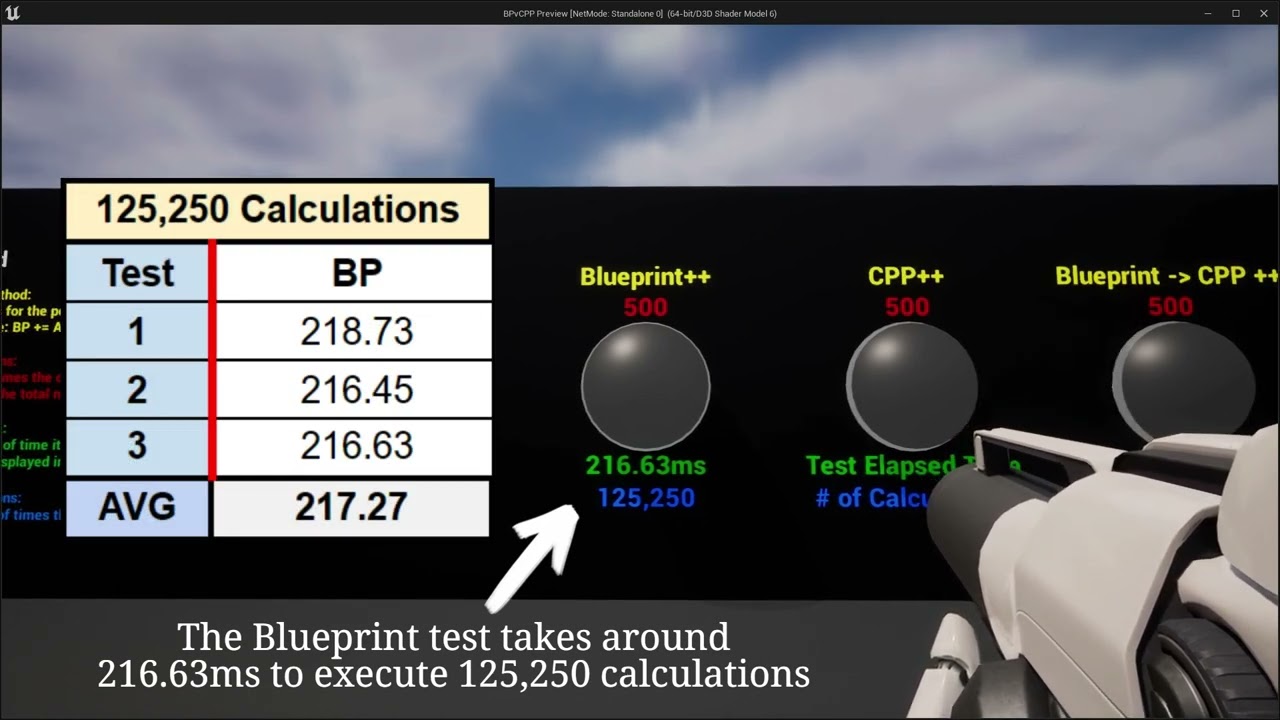
We setup a test environment to run some simple tests to determine the difference in performance between using Blueprints and C++. While this is on a very basic level of testing we want to have a good baseline before we start testing further and get into more advanced logic.
We don't intend for this to be an end all be all decider. And while we...
azure shore
oh wow
real heath
rustic panther
https://youtu.be/V707r4bkJOY old but still relevant
That's a pretty good indicator, but it was run in editor. AFAIK should run faster in game mode, although still quite slow
rustic panther

This is a follow up video to our first video showing the difference between the different testing environments and the impact they have on performance. Thank you for the great comments on the first video. If you haven't watched the first video you can see it with the link below. It helps explain in better detail what is happening on screen.
htt...
here's built
azure shore
so what I should do from here is start converting whatever scripts I can to c++ functions? honestly learning coding is very daunting to me and as I said none of it would ever stick for me but if its gonna help that much then looks like Ill need to
most things should translate over fairly obviously right? like blueprints are still kinda coding
real heath
rustic panther
https://youtu.be/yk2J1sdQ-5I
now that's great. Still slow AF, but shipping build 10x faster than PIE is also good info
rustic panther
ya it's really interesting
real heath
azure shore
most things should translate over fairly obviously right? like blueprints are st...
Theres a decent getting started guide by epic on the learning center. You can start by just moving individual functions to C++, you don't have to reimplement whole actors, change parent hierarchies etc
rustic panther
it's important to note these examples are extremes... if you're just flipping a bool or setting a float in BP that's fine
azure shore
yeah I noticed just from those videos that it works together. I assume most of the time you can just freely combine it
real heath
azure shore
yeah I noticed just from those videos that it works together. I assume most of t...
and thats absolutely the way to do it. Both have advantages. Theres plenty of stuff thats annoying or outright bad to do in C++ vs just using the BP tools available

Epic Developer Community
Have you mastered Blueprints and want to take the next step into C++ to leverage more from the engine? It's easier than you think! In this tutorial, you...

Epic Developer Community
Experience the best of both worlds with Blueprints and C++ in Unreal Engine. With best coding practices, you can structure projects to be more efficient...
rustic panther
thinking about looping through even 10 things in BP gives me heartburn, these examples are looping 500+ times
Blueprint TIP OF THE DAY for Unreal Engine Gamedevs
Node Calls/Counts have a big impact.
Just using an array, to pass data between events within the same blueprint... will save you overhead.
Here is UE5 Unreal Insights of 1,000 debug points being spawned. With 1 call vs 1000

 Twitter
·
Twitter
·
here's another related tip
real heath
rustic panther
thinking about looping through even 10 things in BP gives me heartburn, these ex...
The error'd ones most definitely hit the 1,000,000 instruction counter for inifinite loop detection
azure shore
funnily enough, my game has a level editor which has to go through a bunch of loops to load levels every time, which is already pretty quick but Id love to see how fast it is as code instead
real heath
if you hit it, the first thing you should be doing is going "oh wow, what did i do wrong?", not "hmmm, i better change that" lol
real heath
azure shore
funnily enough, my game has a level editor which has to go through a bunch of lo...
depends on the details, could be absolutely fine, especially if that loading is just kick stuff off to c++ anyway with load streaming level etc
 gaunt abyss
@vital boltWrong channel, check out the #rules
#instructions
 vital bolt
gaunt abyss
<@807936284177203221>Wrong channel, check out the <#809148428922781737>
<#78055...
vital bolt
gaunt abyss
<@807936284177203221>Wrong channel, check out the <#809148428922781737>
<#78055...
 proven peak
So I attach an actor to my component. But how do I detach it? The only node I can find is detach from actor that seems to have no effect
 peak hare
Well a component isn't an actor
proven peak
peak hare
Well a component isn't an actor
? I attached an actor to a component and the only thing I can do is this

which is not working
peak hare
Yeah because you attached an actor to a component, not an actor, and there is no detach from component node
Try attaching it to an actor
 tranquil apex
Hey, do any of you know how I can set in UE4.27 that placed objects (build) can be canceled again? So back into the inventory? Does anyone know a guide/tutorial for this?
oak patio
That highly depends on the build system
 robust lava
Hello how are you doing today? 🙂
 oak zinc
Hello. I have one question. I use the ue 4.27 and I'm working with it in full screen mode, but if I open a blueprint window it doesn't go all the way down
 tranquil apex
oak patio
That highly depends on the build system
tranquil apex
oak patio
That highly depends on the build system
like placeable
oak patio
yes I know, but it depends heavily on your implementation of said system
tranquil apex
oak patio
yes I know, but it depends heavily on your implementation of said system
i want create a mod for a game so i can do it in the bp?
oak patio
we can't possibly know that
It depends on the game, and modding games isn't something we really do here anyway
No tutorial will teach you how to implement that feature for a very specific framework in an existing game
 dusk tartan
Hello. I have.. child actor. And when i delete it from the content browser, it crashes unreal engine. 4.27.
it is not used in levels, not open in editor window, i just tryna move or delete it and it crashes the editor.
any suggestions?
"fix redirections" didnt do anything
upd: it seems to crash editr with simply rightclicking that actor in the content browser now
upd2: i just deleted that object in windows explorer, while UE editor was closed. hopefully tehre are no hidden links or rreferences i cannot see, and it wont gib me issues
azure shore
Im honestly gonna give up my whole project Ive been working on for over 2 years because I just cannot optimise it
Ive tried everything man its hopeless
it looks like THIS MAN

WHO MAKES A GAME THAT LOOKS LIKE THIS AND CANT RUN IT
all these enemies here, have their tick events literally disabled, simply them just EXISTING kills the fps whatever I do
they are made up of multiple skeletal meshes for customisation, tried taking that out, doesnt affect anything (I have a similar system in another game project that can easily run with at least 30 enemies at once), Ive tried removing any unnecessary components, when I profile it I check GameThread and it just takes me down the list down to literally just all the tick events, WHICH IVE DISABLED TO TEST IT
nothing is HAPPENING
WHAT IS SO DEMANDING
oh yeah checked anim graph too btw, not that either
tough thicket
azure shore
oh yeah checked anim graph too btw, not that either
I would screenshare and look
otherwise idk
Lighting is the biggest monster
maybe anti aliasing next
also check scalability settings at the top
azure shore
no, look there is basically nothing to render here
if there are no enemies placed I get maximum fps
tough thicket
Hmm idk unless those models are double sided / high poly
azure shore
 azure shore
I am just never gonna find out
tough thicket
azure shore
I am just never gonna find out
im looking at your instagram and not sure how your having issues
azure shore
huh
oak patio
azure shore
WHO MAKES A GAME THAT LOOKS LIKE THIS AND CANT RUN IT
Are they using the CMC?
and default animation setups?
Because they kill you at scale
azure shore
they use a custom physics controller but thats only a few tick events since its 2d, and theyre also disabled while Im testing here with no tick events. cmc still exists within each actor but it doesnt seem possible to delete it because they have to be character class to use montages properly, but I dont know if its doing anything while inactive
and their animation blueprint is the same as with any 3d game but it didnt make any difference with that disabled too
 sick escarp
oak patio
Because they kill you at scale
sick escarp
oak patio
Because they kill you at scale
I've still managed to hit 55 FPS in packaged with more AI's on screen, about 35 with a lot more on screen
azure shore
yeah as I said my other game which is 3d can handle at least 30 before any noticeable fps drop. this drops to 30fps with just 20
sick escarp
The difference in editor and packaged can be huge though
tough thicket
if your in your editor you probably still have real time thumbnails enabled
kills your fps
 unreal comet
When I server travel from lobby to my level all players load and it's fine, but for some reason when I server travel back to the lobby, 90% of the time clients crash with a fatal error. They see the lobby but it crashes. Why is this?
Also note, my lobby uses a different game mode and player controller than my actual levels.
Also, is there a way to fully reload the current level so that all player controllers are wiped? I currently just server travel to the current level, but variables in the player controller don't reset, and widgets like the hud don't reset.
 sturdy matrix
Sorry for the random question, I have a player starting point in my environment I rotated the player to face the direction I wanted, however after packaging the project and run some player commands the orientation is all wrong. Is there a way to make sure the orientation I set on the component will be its 0,0,0 orientation?
 open laurel
Hi ! I hope you doing well ! I imported models but they are too small so I would like to enlarge them. So I can use "Build Scale" to scale down or scale up. My question is if I use this, could I have complications later when I spawn a static mesh or whatever? (PS: I don't have the original models so it's impossible to re-import them)
tough thicket
open laurel
Hi ! I hope you doing well ! I imported models but they are too small so I would...
Hmm not sure what Build Scale is but the only issues i know with that are if you try to use sockets and physics
open laurel
tough thicket
Hmm not sure what `Build Scale` is but the only issues i know with that are if y...
Hmm, yeah that wouldn't surprise me... Thanks for the answer!
robust lava
Hi, i have a question, does some here use app blackbox for code. Is it better than chatgpt?
oak patio
none of the llm's are particularly good for unreal code
 thick haven
how would i make fighting game style motion inputs?
 solid holly
Can anyone give me a short explanation of how to use interfaces to share a variable between 2 blueprints? I can't seem to work it out.
Firstly I have to find out why when I call the function from BP_A, the second BP doesnt respond, help? (BP_A EVENT BEGIN: Function --- BP_B EVENT Function: Print String)
Is this not how it works?
 frigid gate
Ahh mb
native sparrow
mm anyone can tell me that how can i make headblast in unreal
 low lava
I'm trying to figure out how to async save. I understand I need to bind a UObject FAsyncSaveGameToSlotDelegate:
OnSavedDelegate.BindUObject(this, &UMySaveGame::Internal_OnAsyncSaveFinished);
Where do I do this? In the constructor?
Do I need to unbind somewhere?
thick haven
thick haven
how would i make fighting game style motion inputs?
But yeah, finding fighting game stuff for unity on yt is rare so any ideas?
tough bear
Hey fellas -- is there any free chat plugin for ue 4 ?
anyone aware of this ?
just want to create a chat between player and npc
 rich reef
tough bear
Hey fellas -- is there any free chat plugin for ue 4 ?
anyone aware of this ?
rich reef
tough bear
Hey fellas -- is there any free chat plugin for ue 4 ?
anyone aware of this ?

www.google.com
 north condor
anyone familialar withe the physically accurate quadcopter template?
plush yew
Anyone know how to usually indie gamedev recruiting people for their project? I don't know much of it since I never done one and I'm a loner too
rich reef
plush yew
Anyone know how to usually indie gamedev recruiting people for their project? I ...
Game jams could be a fun start https://itch.io/jams
Each jam usually links to some forum or online chat where you can find teams. I would recommend trying to find a team with members that have shippped some previous projects
plush yew
rich reef
Game jams could be a fun start https://itch.io/jams
Each jam usually links to s...
Thanks for the help!
 half grove
rich reef
Game jams could be a fun start https://itch.io/jams
Each jam usually links to s...
half grove
rich reef
Game jams could be a fun start https://itch.io/jams
Each jam usually links to s...
Never took part in any jams, but can solo devs take part in most of these or just small teams? Usually you just hear about small dev teams taking part and winning in them.
rich reef
half grove
Never took part in any jams, but can solo devs take part in most of these or jus...
Sure, some jams have special awards just for solo devs
half grove
rich reef
Sure, some jams have special awards just for solo devs
Didn't know that, I guess it's work keeping an eye out for those jams.
 oak patio
UI docking guide
If it won't go, close and reopen the window, editor, or reset the layout
tough bear
rich reef
https://www.google.com/search?q=unreal+engine+dialogue+system
actually these are all for ue 5, i need somebody who has some sound experience and can help trouble shoot
oak patio
If you want personal troubleshooting from an experienced individual, you're probably looking for #hire-a-freelancer
 sharp cove
hey, did you found it ? ^^
 thin tendon
sharp cove
hey, did you found it ? ^^
thin tendon
sharp cove
hey, did you found it ? ^^
I never found a way to access what was implemented by Epic. I had to come up with my own solution.
sharp cove
thin tendon
I never found a way to access what was implemented by Epic. I had to come up wit...
have you tested this one
https://docs.unrealengine.com/5.3/en-US/BlueprintAPI/Interchange/Node/Camera/GetCustomFarClipPlane/

Get Custom Far Clip Plane
 brazen egret
how does matinee camera shake differ from the camera shake base?
 loud flicker
hi, anyone can tell me how to add third person character to the player start ? thx

 loud flicker
yeah but how can i have this ?

 slow violet
loud flicker
yeah but how can i have this ?
slow violet
loud flicker
yeah but how can i have this ?
The PlayerStart doesn't have a mesh because it's meant to be generic (you may not know what kind of player you are starting there).
If the goal is to have a visual representation of the Character/Pawn you are spawning at that slot (if that is fixed) you could override the PlayerStart Class add a SKM Component to it that only draws in the editor.
It all depends really on what you are trying to achieve.
sharp cove
thin tendon
I never found a way to access what was implemented by Epic. I had to come up wit...
can i ask what solution you found?
 marsh valley
I really wish we could create text blocks for commenting/documentation in Blueprints. I know we can create create comments from selection, but there's only so much text you can fit in those boxes before it starts to become unwieldy, and nodes tend to create a lot of white space that could be filled with handy notes if we could create text-blocks ^.^
Amazing, thanks for the info!
 full mist
does anyone know why hitting f to focus/snap the viewport to a blueprint seems to be very zoomed out regardless of the size of the meshes in the blueprint? im wondering if there's a setting i can change
 spare trench
full mist
does anyone know why hitting f to focus/snap the viewport to a blueprint seems t...
spare trench
full mist
does anyone know why hitting f to focus/snap the viewport to a blueprint seems t...
its possible a small part of the mesh is floating somewhere farway in the same bp, so when you press f it focuses on both from a zoomed out view to take both in
 arctic plover
Probably a stupid question but - is there a way to add "favourites" in the UI somehow? There are some blueprints I need to edit now and then and I always have to search them again by typing part of the identifier etc. Is there a way to maybe "pin" certain blueprints or assets that I reuse all the time?
 late girder
arctic plover
Probably a stupid question but - is there a way to add "favourites" in the UI so...
late girder
arctic plover
Probably a stupid question but - is there a way to add "favourites" in the UI so...
they are called Collections
arctic plover
late girder
they are called Collections
Ah, thank you very much! 😊
 hollow fulcrum
guys I am having an issue with custom version of unreal. not sure where should I ask for help
When I import the mesh in unreal, the normals get weird. why? how do I fix this?

It's not an import export setting problem.
My system, my friend's system or coworker's system. No matter the project, or 3D software. No matter from where I get the FBX, it imports with wrong normals in custom version of ue4.27
If I export a mesh from this custom ue4, and then reimport the same mesh back into it, the normals get weird
I tried reinstalling the engine too but it didn't work
I tried in my coworkers system, but for their unreal it imports correctly, so they exported their mesh and send it to me, then again it didn't work on mine
can anyone help with this?
 pseudo void
Not sure on the best channel to ask this. For someone completely new to unreal engine and game development. I have read some mentions on reddit that ue 5 is more drag and droppy and stuff just works than ue 4. For that reason, is it actually better to start learning with ue 4 to have a better general knowledge of things or is that stupid and you should to start with ue 5 and avoid learning deprecated things?
hollow fulcrum
pseudo void
Not sure on the best channel to ask this. For someone completely new to unreal e...
well, I am not a beginner. Been using ue4 since 5 years now. It's just that this is the first time I have used a custom build version of ue4 but now it doesn't work
 charred bramble
hollow fulcrum
When I import the mesh in unreal, the normals get weird. why? how do I fix this?
charred bramble
hollow fulcrum
When I import the mesh in unreal, the normals get weird. why? how do I fix this?
Hi! 👋
Can you specify what do you mean by normal maps "getting weird"?
There might be a possibility of it being the "Inverted Y/Green Channel" issue? (its a DirectX/Open GL format issue)
Did you try enabling the "Flip Green Channel" in the texture settings?
If that's not the case,
It might be worth copying all the engine of your coworkers system to yours and retesting it that way.
thin tendon
sharp cove
can i ask what solution you found?
I created a macro to set the render distances of meshes at runtime.
sharp cove
thin tendon
I created a macro to set the render distances of meshes at runtime.
ha ok with volume culling like and draw distance
what was interesting With the far view plane was the fact all the landscape is disapeearing also , interesting for opti
thin tendon
sharp cove
ha ok with volume culling like and draw distance
So the engine has built in for every mesh a desired max render distance value. You don't need to do anything except set this value to what you need. You can also use this for landscape foliage etc (if needed). By putting it into a macro you don't have to rewrite the blueprint code 100 times. All you have to do is decide when to call the macro and set your render distance.
sharp cove
thin tendon
So the engine has built in for every mesh a desired max render distance value. Y...
understood thanks 👍
hollow fulcrum
charred bramble
Hi! 👋
Can you specify what do you mean by normal maps "getting weird"?
There m...
not normal map, the vertex normals of the mesh. if you see in the screen shot, they are not poking outward perpendicularly as they should, instead they are all pointing in one direction
 mossy hearth
Hey everyone. Honestly its always been my passion to create video games, but i cant seem to learn fast enough to make anything. I can say i've dabbled in materials and created terrain using heightmap data, really fun btw. But not any game, just maps i should say. I found a tutorial on how to make a diablo style game but the tutor who sold the classes bailed out and took away all of the content off the platform, which really sucked, I found another one but it was in portugez and lets say i tried. The point of all this is that im looking for long term friends to share knowledge and help each other learn how to make games! Time zones and busy schedules can be a deterrent, but I assure you I will give all that I can and would put time asside for small projects. Here are some examples of the work ive done overall in UE4. Thanks for everyone contined support and have a great day!


@shy nacelle Thank you. Ill look into these different sub genres and continue the hunt.
 lilac star
I feel annoyed about this... well the story is I'm trying to put a child widget landmark into a parent widget map, and the landmark has two buttons, and i want to set its second button to specific events, so there are about 20 landmarks in the map, each one needs to bind with specific event, and thus these red lines created lol

trying to figuring out a better way to bind it, but seems didnt work out
all things running normal, but these lines... braindamage lol
solid holly
lilac star
I feel annoyed about this... well the story is I'm trying to put a child widget ...

 gilded lion
yo does anyone know why when a random integer node chooses a random integer, the integer it gives remains the same the rest of the game? how do i make it give me a new integer each time the command runs?
 solid holly
Not really sure but, make a new integer variable, after delay set int to random
Then to condition int == 1
solid holly
gilded lion
yo does anyone know why when a random integer node chooses a random integer, the...
Try it
gilded lion
solid holly
Not really sure but, make a new integer variable, after delay set int to random
...
im not sure what u mean, do i put another random integer after the delay and connect it back to the branch?
solid holly
- Create new integer
- Set integer to random, using that function
- Whenever you run the command it will set it to another random number
- In the condition instead of the random number generator put the integer
solid holly
gilded lion
im not sure what u mean, do i put another random integer after the delay and con...
Yeah I think so
 solid holly
Perfect
Did it work?
Branch
Work >true > cipher happy
>false > cipher cries in pillow
solid holly
gilded lion
Your code is kinda messy
Friendly advice to make it cleaner
Double tap the lines so you can move them however you like
solid holly
No problem! 👍
gilded lion
solid holly
Your code is kinda messy
Friendly advice to make it cleaner
Double tap the lines...
lol i generally leave it messy while i still work on it and just clean it up after its all good and working
solid holly
Ah good to know
vale abyss
what would the best way to go about updating text values on a widget when pressing either left left/right arrow keys or using the D-Pad on a gamepad? I'd only want to update the value that is currently highlighted, like so:

 short canopy
Someone know how to make fn mods with pak files like skins and stuff
hollow fulcrum
hollow fulcrum
When I import the mesh in unreal, the normals get weird. why? how do I fix this?
@stoic quiver
solid holly
Hello
Is there like a file I can download online that explains all nodes in UE4?
Like what they do, how they work, how to use them.
solid holly
Oh :<
oak patio
It would require intimate knowledge of the entire engine which just isn't possible
solid holly
Thanks anyway
oak patio
If Mathew Wadstein has done a video on the node you're looking for, he's normally a good resource.
Other than that it's mainly experience, playing around, contextual guesses, and as a fallback, reading the source code of the node.
 opaque seal
hi guys
i have problem in reatargeting a animation that is created for my mixamo skeleton for metahuman skeleton
my chracater looks like this when i play retargeted animation
can someone help me?

 finite stratus
Is it possible to make a 2d/3d hybrid game on ue4?
Ty I'll try it
I want to use ue5 at home but my school uses ue4
The pcs can't handle ue5 sadly
That's what my teacher told me
brazen egret
how to perfectly align wall actors?
 sturdy matrix
really dumb question but does anyone know why i cant see the loaded map? 😭

 molten solstice
Hi! I started a project with the TopDown preset. When I use left mouse, my character moves to the location and if I holding left mouse, it follows the direction of my cursor. I would like the character to move ONLY when the player hold the left mouse button and no moves automatically to the clicked location. Is it simple to do?
Because when my character is respawned he wants to reach the previous location of the left mouse
 neat stratus
Hi guys! Can you help me out with this? I black corner just popped on my screen when i hit play, even when i package the project. Also is happening with other projects i open (Its a Vr project, Im opening it with the Quest 3)
 vale abyss
Hello, I'm trying to use CommonUI framework in my game but seeing the following error in the output log when using CommonActionWidget
LogUIActionRouter: Error: Cannot create action binding for widget [UI_InteractTextPopup_C_0] - no action provided.```
Can anybody help? I found the same error on the forums with no answer https://forums.unrealengine.com/t/no-action-binding-for-widget-error/1315295
EDIT: Resolved by Project Settings -> Common Input and refresh my Input Data blueprint. Literally all I did was select "Clear" and then select the exact same blueprint and it started working. pliant tangle
i changed targeted RHIs (among other things) and now i can't open my project.
making a new project works fine. is there a way to change RHIs in like an .ini file or something?
 oak patio
Yes. DefaultEngine.ini contains the RHI info
What's your gpu though? Nearly everything supports SM5 so that's concerning
opaque seal
opaque seal
hi guys
i have problem in reatargeting a animation that is created for my mixamo...
someone help me about this?
azure shore
is there even a proper paste at cursor function in the editor? I dont even know what "paste here" is doing half the time
pliant tangle
oak patio
What's your gpu though? Nearly everything supports SM5 so that's concerning
excellent! yeah i'm pretty sure that error message is just a bug in unreal because i'm running a 3060 and i can run anything on steam afaik. i'll go find the RHI seetings in that ini file
 pliant tangle
oak patio
Yes. DefaultEngine.ini contains the RHI info
pliant tangle
oak patio
Yes. DefaultEngine.ini contains the RHI info
you're a bloody legend, thank you. i took the whole [/Script/WindowsTargetPlatform.WindowsTargetSettings] chunk out of the ini and that fixed it. i owe you a homemade loaf of old fashioned brown bread my good sir.
 strong oxide
Is it possible to add a force or impulse to a Cable Component? I've tried almost everything in ue4.27 and I keep getting this "Invalid Simulate Options: Body (.CableComponent) is set to simulate physics but Collision Enabled is incompatible"
I've tried all this ```cpp
CableComponent->SetSimulatePhysics(true);
CableComponent->bEnableCollision = true;
CableComponent->SetCollisionEnabled(ECollisionEnabled::QueryAndPhysics);
CableComponent->SetCollisionResponseToAllChannels(ECollisionResponse::ECR_Block);
CableComponent->SetGenerateOverlapEvents(true);
spare trench
Save Game not working after packaging the game on Android. I've even checks Use DIR files option from the project settings and used external storage permission. Still not working on Android but working fine on Editor
oak patio
pliant tangle
you're a bloody legend, thank you. i took the whole [/Script/WindowsTargetPlatfo...
Glad it worked for you!
 tight steppe
https://www.youtube.com/watch?v=s_UQYuM1RWU
I saw this video on how to spawn rain around a player, but this adds it to the Character's blueprint. Is there a way to make particle systems like this follow a player around but only in a certain level? And have different levels have different particle systems? For example, a rain level, snow level, blowing dust level

Hey guys, in today's video I'm going to be showing you how to create beautiful looking rain for your games. This is an efficient and scalable method, with working collision so there is no rain inside.
Rain For Low-End PCs: https://youtu.be/NLXVGwXw9QQ
Rain On Windows: https://youtu.be/SYZLZrNUPLo
#Ue4 #UnrealEngine4 #Ue4Tutorial
______________...
tight steppe
Was under the impression that the technique would attach to the character and persist between levels. sorry
neat stratus
Could anyone help me with the question i asked earlier? Im truly lost
tight steppe
Attaching it to the character is the point. I don't want to place it in the map, I want it to follow the character around the map wherever it goes. Having the particles cover every square inch of the map isn't what I'm trying to do
tough thicket
if i have 3 skeleton mesh for modular character what node is it so they all use the same anim bp?
its a node you use on event tick or begin play
SetMasterPoseComponent
 orchid void
Can I use PakFileUtilities within editor?
heady ridge
anyone got a good guide for basic combat w bluepring? cant find any at the pinned msgs
 proven lake
could anyone tell how can i reference ActorA in a component on ActorB ?
like in unity we can just drag drop other gameobjects inpublic field of type GamObject ?
is anyone alive ?
valid raven
hello everyone, I have an idea for an ability/attack in my game, but need some help on how to achieve certain functionality.
the idea for the attack is to spawn a bunch of cones around the player, say 40, which are floating around in space but anchored to their position relative to the player. some time after they spawn in, one by one they are unanchored from the player and shoot towards wherever the player is looking.
I have a rough idea on how i want to do the rest of it, but i'm not sure how to anchor them to the player
if there is a way to spawn in a blueprint and then achor it to another object, and then unanchor it, please let me know. thank you in advance
valid raven
ooooooh perfect thanks
valid raven
also, this is a materials question, but i have an attack that utilizes spheres with a lava texture on them, and i was wondering if there was any way to have the material not rotate with the sphere itself
valid raven
once again here to ask for your help, I have a line trace, it works the way i want it to, and then pushes up a location (either the hit location if it hit something, or the end of the line trace if it did not hit something.

the goal is for a bullet to be spawned anywhere and go to the target (which is where the line trace is)
for that, i have a cone with no physics or collision

I set 2 vector variables, 1 being the line trace location and the other being the bullets current location. I also set the rotation to point towards the line trace location

then i set the 2 interp points and set the duration

the rotation works correctly, however no matter what i do it seems the interp is instantaneous
no matter what the duration is set to
well actually, sorry. it points towards the right direction and then seemingly disappears
i don't know where it goes
this is how the cones look when spawned in the world, and for now i'll only have it rotate and not interp

as you can see it rotates fine

which tells me the location vectors are fine
so something is wrong with how i interp them
upon closer inspection they're teleporting to 0,0 ish

using this method the values in the array are being set


 sick crane
Anyone know if I can keep my game in unlit mode when packeged in ue4? I cant seem to find anything online saying it or anywhere in ue... I like the way it looks so I wanna use it with unlit.
tough thicket
sick crane
Anyone know if I can keep my game in unlit mode when packeged in ue4? I cant see...
you would need to use unlit materials
tough thicket
sick crane
Ok I will look more online lol
if you open a new material its one of the final options, by default its lit and its how you switch it to things like post process unlit and translucent i believe
sick crane
Is their a way to just make everything unlit easily? If not they I will just go through each texture/material
 heady valve

Guys, I've been trying to figure this out for days but can't find any info on how I'd do this. Could anyone point me in the right direction. I want to create a snake character that will look (aim) at the player character (like the gif) and shoot venom. Any clues what tutorials, etc, or things I should read about to figure out how to do this? Trying to figure out how to do this. Thanks for any help y'all can provide. 🙂
tough thicket
sick crane
Is their a way to just make everything unlit easily? If not they I will just go ...
set a master material next time
heady valve
Ah, thank you. 🙂
sick crane
tough thicket
set a master material next time
Ty didnt think of that lol
I will look into master materials now.
 pale elbow
Is there somewhere I can ask questions about Unreal Engine 2?
 gentle quail
oh, got it. I'll remove my message
 thick sluice
is there a specific channel for cooking error help? I cant find my specific issue anywhere 😦
 oak tapir
Türk var mı?
 sturdy trench
oak tapir
Türk var mı?
sturdy trench
oak tapir
Türk var mı?
Türkçe konuşan var ama burada İngilizce konuşuluyor
oak tapir
biz arkadaşlarımla ue4 te birşeyler yapmaya çalışıyoruz ama bilmediğimiz için birşey yapamadık bende türkçe konuşan birinin bize yardım etmesi için buraya geldim ingilizce az biliyoruz
sturdy trench
Bu sektör maalesef İngilizce olmadan seni bir yere götürmüyor, sunucu kuralları gereği de İngilizce konuşmak zorundayız 🙂
oak tapir
yardım eder misin ?
sturdy trench
Sunucunun dışarısında özel yardımda bulunmuyorum, ilgili kanallarda İngilizce olarak paylaşırsan benden daha yetenekli insanlardan da yardım alabilirsin
oak tapir
tamam teşekkürler
 steady hawk
Can somebody help me, please! How do i set up sequencer to render a looped image sequence? i tryed everyhing and it renders ok in sequence preview but in movie render que it renders from 1-150 frame and it isnt looped. 😦
tough thicket
I have no idea
 quaint beacon
How can I scale something inside scroll box?

 sturdy matrix
Is it safe to download environments from other sources besides the marketplace?
sturdy matrix
its https://unityunreal.com/unreal-engine-assets/ue-environments/
I just need set environments to do some robotics tests and the marketplace didnt have that many free
Unity / Unreal Engine content for game development
Free download assets for Unreal Engine 4/5: 3d models of environment to fill the game levels: houses, buildings, nature, city blocks, fantasy castles, caves, cliffs, landscapes and more.
are there any other sources besides marketplace ?
sturdy matrix
would you be kind enough to tell me some?
quaint beacon
quaint beacon
How can I scale something inside scroll box?
Ok, I figured it out by using Size Box inside Scroll Box.
 tame stag
Is it possbile to change the Camera sensor width/height in runtime? maybe with a slider widget?
fierce blaze
hey
i have this problem in my vr game
as you can see my character walks over the knife and attaches but if i go to pick up with my hands just dont follow me the knife.Can someone help me with that


i have 2 diferent types of code
and this 2 types has the same isue
 paper island
PLEASE HELP! This has me stumped.... Probably an easy solution, but i just want to get back to work..
After using a 3d program unreal has started doing this in my viewport. Its like a strange orthographic view. It starts by default now after a engine restart and even a PC restart? What have i done? I was using combinations of ALT+middle mouse button in a 3d application while unreal was running and now this has happened? Also i know that F will focus on an object, bu im only doning this to center my viewport. WASD no longer works either. This is really annoying as i want to continue my dev work after my normy job. Any help would be appreciated.
heres the issue: https://www.youtube.com/watch?v=adPcHz-_xlA

After using a 3d program unreal has started doing this in my viewport. Its like a strange orthographic view. It starts by default now after a engine restart and even a PC restart? What have i done? I was using combinations of ALT+middle mouse button in a 3d application while unreal was running and now this has happened? Also i know that F will f...
opaque seal
hi guys
i have problem in grooms of my character
i have a sequence and an animation for my character, when i play animation on my character in sequence this happens to my groom
how can i fix it? can someone help me about it?

 hushed bluff
Is it possible to export a material from a game and then import it into UE?
hushed bluff
Any guide on the subject?
oak patio
none we could share here
hushed bluff
Maybe share it somewhere else then? 😄
tame stag
Hey guys, I need to tell my packaged game the position of the game window. I know there are command line arguments for the editor like "WinX" and "WinY". But how to do it for a packaged game?
oak patio
hushed bluff
Maybe share it somewhere else then? 😄
No, I mean, reverse engineering is against the #rules
hushed bluff
Guess I'll just forget about it then...
 bold apex
I have question, generally if I wanted to replicate gameplay of Snowrunner in UE4 (or UE5) - that is, slow-paced driving of off-road trucks through difficult terrain... what would be a good starting point? I tried the car blueprint that comes with UE and a couple of blueprints that are for free on marketplace, but they all seem very simplistic or designed for racing and driving over rough terrain makes the cars go nuts, not to mention driving over things like logs does not work, because the wheels are usually single raycast
I did some game development in Unity including rigging some not-too-complex vehicles, but things work a lot differently in UE and I am a bit out of my depth at the moment
quaint beacon
Hello,
I've just found a great tip about Unreal. The Epic Games launcher opens up every time we open any Unreal project. In order to stop it from launching. You've to create an empty text file in (Unreal Dir) / Engine / Build and name it PerforceBuild.txt
olive vine
Good morning. Is there a way to hide/filter collections? I want to only see my local collections; not shared collections created by colleagues.

 obtuse stump
Is there any NavMesh legends who can help me to have a decent navmesh? I tweak the values but it only gets worse even with videos
 olive vine
Not a legend. I would only advise that you check your collision settings. What specifically would you like to fix about this?
tough thicket
obtuse stump
Is there any NavMesh legends who can help me to have a decent navmesh? I tweak t...
what about you use some nav bounds
and raise your settings again
dont really need that couch navigation though so set it to floor, and change the couch cannoy be step on or cannot generate nav
obtuse stump
My AI goes fine but.. sometimes he does goofy stuff
not everytime but when it happens he gets glitched in door arches or walks sliding along the wall
breaking the experience
tough thicket
navigation has always been shit
obtuse stump
tough thicket
navigation has always been shit
How do they make good AI in proper games then? like idk.. madison
or RE7
Like I just want a puppet to not do weird stuff
that's all I ask hahaha
Not asking for mr. x from RE2 Remake
 vocal rune
alot of bools 🤷♂️
 fast cradle
Im curious if anyone here has ever got PSO caching to work with android/Meta Quest. I can't seem to get the documentation to work for me in UE4.27
solid holly
Hey guys
So with terrain generation
I heard in large open spaces, the objects from a far have decreased faces so that it increases performance
Do I have to code that or does the engine do that automaticaly?
obtuse stump

 tough thicket
for what? trash blowing in the wind?
 cunning rock
Is that per enemy, or including a management system?
 outer epoch
Hi
boreal crown
how can i call the function/event attached to one of my axis mappings?
 steep steeple
hello does anyone know what is causing the terrain to do this?
steep steeple
Thank you!
 steady tree
Trying to add a streamed level instance with baked light to another level with baked light, however, as soon as its turned on or loaded into to the level all moveable static meshes turn dark.
The only thing that worked was rebaking the sublevel inside persistent, but I can't do that since it will cause light artifacts intersecting with the persistent level because I can't move the sublevel due it being loaded multiple times at different locations ( when opening the door the basic room level is loaded behind the door ).

 sick escarp
Any ideas how to lerp linear color in a range like this where 0 & 1 are the same but .5 has a different color?
 steady tree
thank you!
steady tree
Still a bit glitchy when loading the level in but much better then before
gilded lion
Hey does anyone know how I can properly texturize a 3d object I made? I have made this material but it doesnt really work how I want it to when I apply it somewhere.


its kinda stretching the texture rather than just covering the model with itself
tough thicket
gilded lion
Hey does anyone know how I can properly texturize a 3d object I made? I have mad...
i think you need a text corn node pulled off your uv on the texture sample
text cord
gilded lion
Whats a text cord
solid holly
gilded lion
Whats a text cord
If I remember corectly, it was how many faces u want the texture to repeat
Or idk
heady ridge
what corrupted my project? the map doesnt load anymore

nope
I made this following a tutorial and didn't do anything after
 sinful tendon
I'm following a advanced unreal engine tutorial and i was able to get the source setup and running after fixing the Commit.gitdeps.xml problem and in installed the UnrealVS.vsix for VS2019

ill try and set it up and see if it fixed the link errors and problems with unreal engine 4 linking and working with Visual studios.
 sinful tendon
top pinned message?
this?

i don't see UE5 to UE4 mode unless you are talking about graphics and speed setting witch I'm not worried about. i want to make sure i follow along with the tutorial in a way where i don't have to worry about updating any code yet.
 oak patio
those are what kill you on ue5 though
sinful tendon
oak patio
those are what kill you on ue5 though
whenever i work with UE5 i always turn off all the graphics settings and leave the texture quality on high

how do i find out what failed?
I figured out the problem i was having. i somehow missed setting the project to C++ and it didn't link when create ting a Blueprint project. it works now

 whole cedar
does anyone has this already build so i can use it?
https://github.com/SpeculativeCoder/UnrealEngine-HTML5-ES3?tab=readme-ov-file

GitHub
Unreal Engine 4.27 HTML5 ES3 (WebGL 2) / 4.24 HTML5 ES2 (WebGL 1) - SpeculativeCoder/UnrealEngine-HTML5-ES3
i need for the 4.27
sinful tendon
STUPID RED SQUIGELY LINE!


I'm venting over the nonexistent red squiggly line
its not a problem but its still annoying
the tutorial is fine.
I plan to move back over to UE5
solid holly
Hey guys
I can change the default and startup level to any level the engine comes with by default
But I can't change it to a level that I created, what am I doing wrong?
Nvm I found the problem
 sinful tendon
solid holly
https://tenor.com/view/hitting-someone-with-a-bat-hitting-a-guy-into-a-screen-hi...
sinful tendon
solid holly
https://tenor.com/view/hitting-someone-with-a-bat-hitting-a-guy-into-a-screen-hi...
same
prime tulip
Hello. I have a strange issue / bug that makes it so my gridlines always disappear in my non-3d viewports. How can I fix this?

Sometimes they are visible and sometimes they aren't. I can't pinpoint when or why they appear and disappear. It seems to be very random.
mossy hearth
Can my assets from UE4 be used in UE5? I have allot and when I purchased assets it specifically labeled for unreal 4. etc. Just worried that ill only be able to use them on UE4
 faint hound
Could please someone help me with a smol issue.
I'm using physics asset for given meshes that the character has. This physics asset is also used for hit detection. Now when the character is running, and someone tries to shoot at him, the physics asset capsule collisions are correctly positioned as is the mesh. The issue begins when the character is lying down and moving (no issue when standing still), then the shooter sees the mesh correctly as it is, but the physics asset's capsule collisions are rendered below the mesh by a certain margin. Because of that, the shooter isn't able to register a hit, even tho when trying to simulate the linetrace on both simulated and authority proxy, the character is hit, but the autonomous (shooter) proxy, doesn't register a hit.
Any help is greatly appreciated. 🙏
 fossil socket
mossy hearth
Can my assets from UE4 be used in UE5? I have allot and when I purchased assets ...
fossil socket
mossy hearth
Can my assets from UE4 be used in UE5? I have allot and when I purchased assets ...
UE5 should be backwards compatible with almost, if not all UE4 assets. It just doesn't work the other way round
valid raven
hello, having an issue with alignment on attached actors. i am trying to spawn an actor that attaches to the player, which then spawns another 40 actors that hover around the player. however, when they spawn in, not only are they not spawning together( which means something is moving differently than others) but they're spawned rotated horizontally
 tall osprey
where is the settings in the editor to increase this zoom limit form 10cm to 20cm ?

solved, found

 jagged apex
Hey! Did you find any solution for your problem? I need make a simple protection for my offline app and adb device ID number would be very useful
steep steeple
Does anyone know a solution to fix this dodgy foot IK?
i just don't know why its tracing to 2 locations...

this only happens on weird angles
or not even weird really
works like normal on a slope
 mossy hearth
Does anyone know of a good automaterial tutorial? I just imported a heightmap and cant seem to find a decent tutorial
 toxic lily
Question
Working on some cloth attatchments, and i have an issue where an upper arm is pulling the back head cloth with it, despite the headpiece not being weight painted to the arm, and not having a collission capsule to interfere with it

does anyone know what might be causing this?

 drifting geode
jagged apex
Hey! Did you find any solution for your problem? I need make a simple protection...
drifting geode
jagged apex
Hey! Did you find any solution for your problem? I need make a simple protection...
Hey @jagged apex no I haven't found anything. But thinking again about this, maybe the MAC Address?
 dry marlin
Hello can someone help me/us? we are o 4.27 and someone even if i don't have internet is hacking into my computer where I have the project on
Because all of a sudden things change
and I cannot do anything about it
gilded lion
hey does anyone know a way to make a ui displayed on a physical mesh. I have this computer 3d model and I want to make a ui that will be on its screen for the player to interact with
tough thicket
dry marlin
Hello can someone help me/us? we are o 4.27 and someone even if i don't have int...
they shouldnt be able to modify files while unreal is open so dont close it
gilded lion
how do i display a widget through it
dry marlin
tough thicket
they shouldnt be able to modify files while unreal is open so dont close it
Who might be who attacks me ? And why?
oak patio
I highly doubt someone is hacking you. First of all if you aren't connected to the internet someone can't remote in and change things.
If you're concerned about a virus, do a virus scan.
Neither of those things affect unreal projects though in subtle ways. You typically get one of two things, they go nuclear and encrypt everything and demand a ransom, or they are as stealthy as possible and inject phishing links into places, and steal passwords and such
No one's hacking people to subtly change an unreal project
 devout temple
so i had one question, is there a bit list of unreal engine 4 graphics stuff i can use in the Engine.ini ?
example:
r.FXAA.Quality=0
r.TemporalAA.Quality=3
r.TSR.History.R11G11B10=1
r.TSR.History.ScreenPercentage=100
r.TSR.History.UpdateQuality=0
r.TSR.History.GrandReprojection=0
r.TSR.ShadingRejection.Flickering=0
r.TSR.Velocity.Extrapolation=0
r.TSR.RejectionAntiAliasingQuality=0
real heath
devout temple
so i had one question, is there a bit list of unreal engine 4 graphics stuff i c...
Under the menus of your version of unreal, I think help maybe, there's "Console Commands" and it will list every one available on your version including any comments for it
devout temple
real heath
Under the menus of your version of unreal, I think help maybe, there's "Console ...
is there a list already made online some place?
real heath
probably someone has uploaded it, but it changes every version
easier just to generate your own
it's 1 click
devout temple
real heath
it's 1 click
i ask because my pc cant run the engine :)
if its one click, if u got time think u can generate a list for me?
txt
tall osprey
why player spawned even if the level is not loaded 100% ?
but the AI spawned when the level loaded 100%
the behavior makes the player to leave the landscape and fly in air
 floral edge
Hello to all! I have a little problem with organization quest state. Here is the issue: I have n quests and their state in map - it's ok. But! I want to save more then status: 1. Executor(Who accept the quest), 2. Days to expire, 3. Executor's fraction 4. And status as well.
I tried to create base c++ class for this and work with him in mad like TMap<int32,QuestState> questState, but UE refuse to compile with reason like "class must be UCLASS or something". Have any tips on this?
 foggy pivot
devout temple
is there a list already made online some place?
foggy pivot
devout temple
is there a list already made online some place?
Quick google search found this thing. https://framedsc.com/GeneralGuides/ue4_commands.htm
Ok. Seems like it's just an online re-post of what you can get directly from the engine when you click "Help > Console Variables"
devout temple
foggy pivot
Ok. Seems like it's just an online re-post of what you can get directly from the...
thanks,
 humble sonnet
Hello guys I have published my steam game months ago and it was a fail I want to remake it all on unreal ( it was on godot ) and even make it new concept a 3D platformer game not 2D with new concept , I can push it and change everything on the old game version ? I don't want to pay 100 dollar again
oak patio
humble sonnet
Hello guys I have published my steam game months ago and it was a fail I want t...
You sure can, but it won't succeed if it's already failed. If it flopped in it's first few months, it won't get revived. Steam considers those pages dead mostly
humble sonnet
I got 100 daily visits without even marketing the game
oak patio
That's great!
It doesn't change the fact that you only get one go at the store page though.
 glad jasper
tough bear
glad jasper
tough bear
please please help 🙏🏻
tough bear
Hi all,
can you please help here : While packaging a build in UE4.27 all has been done. I got the apk but while installing on my android 12 device, I get the error message ::
"error while parsing the apk"
would u know any solution?
Thanks
 rain venture
is it true that unreal engine 4 has higher cpu usage than unreal engine 5? 🤔
rain venture
hmm
opaque seal
hi guys
i have a problem in my metahuman face control rig
in seuquence when i move my metahuman face it doesnt move
does anyone know how to fix it?
tough thicket
opaque seal
hi guys
i have a problem in my metahuman face control rig
in seuquence when i mo...
youll need to plug in the montage group to your anim bp
or whatever your using
 neon aurora
Hi everyone, I'm having a problem where a character will weirdly jitter when standing on a moving platform, but only in the packaged build.
I checked with breakpoints and it seems that ACharacter::SetBase is called over and over again because the character is switching between being on the ground and in the air constantly.
Again, this only happens in the packaged build, in editor everything is fine. Anyone have any idea on how to fix that? I tried enabling CCD, but to no avail.
Edit: This question might be better off in the physics chat, I'll repost it there
 gray fox
Anyone know how to fix glowing hair cards in unreal engine 4?
 obtuse stump
I've imported a premade map but the fps are f***ed... How do I find out what's causing this fps lag? (Especially when I look in a wide angle)
 copper kestrel
Anybody khow how to fix that. When i am adding animation in blendspace its showing animation should be non additive
 tough thicket
copper kestrel
Anybody khow how to fix that. When i am adding animation in blendspace its showi...
tough thicket
copper kestrel
Anybody khow how to fix that. When i am adding animation in blendspace its showi...
i only know how to do it from the matrix property editor or whatever
right click the animation inside the explorer
open with matrix whatever
then probably animations tab on right
and set to non-additive
plush yew
obtuse stump
I've imported a premade map but the fps are f***ed... How do I find out what's c...
mostly high detail meshes, are you using LODs?
or high resolution textures
like 16k textures
or even 4k