#ue4-general
1 messages · Page 19 of 1
 drowsy snow
 pallid olive
drowsy snow
Still far from toughest.
pallid olive
drowsy snow
Still far from toughest.
Name a harder task?
 grim ore
implementing rollback netcode?
managing 1 million concurrent users in one area in an online game running on a mobile device?
pallid olive
Directly believe u Matheww haha. Didnt even touch multiplayer
 oak patio
Sound design is also much harder imo
 plush yew
what is happening? My mouse is double clicking everywhere.... just now some pointlight was added and I can't delete it
I can move the light but it won't allow me to delete it
 sage coral

This is how I feel dealing with trying to understand the logic of the pc and why randomly some things fix the seam issue with my modular character, everything works but I think most can relate lol
 verbal moss
sage coral
This is how I feel dealing with trying to understand the logic of the pc and why...
verbal moss
sage coral
This is how I feel dealing with trying to understand the logic of the pc and why...
Yup, i completely understand how you feel
It's not expensive anymore with UE4 and UE5. Or even Unity. It will cost you time. There's a lot of good free assets and always grab the free monthly ones too. Theres a very steep learning curve. But youtubers and Unreal learning portal will help you in learning. Also learning some 3d modeling program like Blender for when you need to make your own assets.
oak patio
Also if you don't want to pay money be prepared to learn a lot of skills.
Sound design, animation, modelling, UI design, marketing etc.
If you don't want to learn any of the above it's gonna cost you, for instance I buy music packs because Im no composer
verbal moss
yeah, theres youtube channels dedicated to royalty free songs too
oak patio
Though royalty free does not mean free to use commercially. Even with royalty free and supposed copyright free tracks always check the license
verbal moss
yeah.
After learning Blender, I have concluded that i'm willing to pay somebody else to create assets for me
oak patio
Even if it says "No copyright" in the title it probably has a license somewhere, and music is even worse in copyright as it has two types, the performance and the piece. A certain performance may be copyright free but that doesn't mean the song being played is
verbal moss
I always check with the artist. From my experience, most are pretty chill with how you use their songs. Just credit them for it.
There are some really nice building asset packs in the marketplace that I cant afford lol
 craggy coral
 rose cloak
Why arent these warnings showned in the Output Log ? They only shows when I enter a blueprint that are missing key assignment.
It makes it pretty difficuslt to locate not assigned keys if the warnings are not shown in Output Log. Is there a trick or am I missing something here ?

 normal oxide
What's the best way to rig a model for compatibility with the UE mannequin (without using tools like ARP)? I tried making something with the same bone hierarchy/naming but everything was still borked in the engine...
 thin tendon
normal oxide
What's the best way to rig a model for compatibility with the UE mannequin (with...
thin tendon
normal oxide
What's the best way to rig a model for compatibility with the UE mannequin (with...
I would say that if you have a matching skeleton. When you import try importing it to use an existing skeleton already in the project. Instead of bringing a new one in with it.
might work might not. But worth a shot
normal oxide
thin tendon
I would say that if you have a matching skeleton. When you import try importing ...
Yeah, I tried using the default TP skeleton when importing the character but both the scaling and movement were wildly off when trying to use animations...
thin tendon
normal oxide
Yeah, I tried using the default TP skeleton when importing the character but bot...
I found this link . In the video he uses an addon. but there is a comment that is interesting. https://www.youtube.com/watch?v=8Ad4v7x41RA&ab_channel=RakizFarooq

Use Blender and Uefy 2.0 to quickly rig unreal mannequin for animation and export to the engine with a rigify rig in a few easy steps. Tutorial contains detailed description of how to use a blender rigged mannequin to share animations across characters.
website: https://www.rakiz.com/uefy
UPDATE 4: With the release of Uefy v2.5.0 onwards the m...
the comment - I think it would help if you explained to people why they have to standardize around a skeleton built in Blender. This is because Maya/FBX/UE support per-bone orientation information, while Blender only supports bones facing towards +Y.
The default UE4 mannequin has left leg bones that point towards -X and right-leg bones that point towards +X. Blender is not capable of preserving this information through an import/export cycle. The only solution is to build a skeleton inside Blender which has all bones in the Blender dictated orientation, and standardize on THAT rig in Unreal.
normal oxide
That is interesting...
 dreamy wasp
If you have a TimerBy Event looping, is there a way to stop it?
oak patio
dreamy wasp
If you have a TimerBy Event looping, is there a way to stop it?
Clear and invalidate timer by handle
dreamy wasp
I will look that up.
thin tendon
dreamy wasp
If you have a TimerBy Event looping, is there a way to stop it?
Alternatively you can also use gating variables in most of your events and functions. A boolean. Make the first node a branch in them all. So you can tell the code if it needs to fire. And it has a way to stop and interrupt itself.
dreamy wasp
but a branch will just stop the event from doing its thing, it wont stop it from firing, correct? Its like using a branch on tick. it dosent stop tick, it just stops whats after the branch. right?
thin tendon
dreamy wasp
but a branch will just stop the event from doing its thing, it wont stop it from...
This is correct. But its good practice, this way if it gets called when you don't want it to it can skip over the rest of the code. Its great for stuff like an AI you want to suddenly stop attacking.
dreamy wasp
what im trying to do, is have a gun shoot (spawn projectile) every 1 second, when the player enters the collision, and stop firing when they end overlap. but i dont want to use tick
thin tendon
For that def use the timer handle
dreamy wasp
thnaks

What is the Clear Timer Node in Unreal Engine 4
Source Files: https://github.com/MWadstein/wtf-hdi-files
exactly what i needed
 coarse jetty
quick question, can i make box brush not affect navigation? can't find anything related thanks

 wind mantle
I'm not very good at navigation but isn't there blocking volumes you can place around that
 azure zephyr
Hello anyone has this problem? I Use one computer to make the scene and looks like 1st photo, with nice textures but then I change teh computer to render and looks odd


I was trying to change LODs but I work with -1/0 and is very strange
wind mantle
When I open a new level the navmesh the navigation doesnt work. Why is this, how can I fix this problem? If I run the level twice it works on the second load but not on the first.
wind mantle
Solved it!
wind mantle
As soon as I check-in on Perforce the navigation doesn't work on the map I just ran 'Build' on. It works locally, when I restart UE it works. But once I check-in on perforce it stops working and I have to run 'Build' again. Anyone has a clue why this happens?
First I had the issue above but I managed to get that working by untoggling

Force Rebuild on Load
if that's on the navigation wont load when I load a map but now I have this other issue and it's infuriating
 dim elm
Anyone knows how to shape Shift a character to different or any target? Like COD prop hunt?
oak patio
dim elm
Anyone knows how to shape Shift a character to different or any target? Like COD...
I mean prop Hunt will just change the mesh in question
dim elm
oak patio
I mean prop Hunt will just change the mesh in question
I just wanted to do it like the game Prototype...i mean like from one character to totally different character
 visual wigeon
Hi people! does someone here know how to share a sublevel and still get correct static visibility for each persistent level? what happens now is that when I bake the visibility for one level the visibility for the other persistent level gets corrupted in the shared sublevel area
verbal moss
dim elm
I just wanted to do it like the game Prototype...i mean like from one character ...

This episode we take a look at one method of transforming an NPC into another. Follow along and take notes as we talk about how to create the polymorph spell seen in many games such as World of Warcraft.
Support me on Patreon and get access to videos early, join our developer community on Discord, get exclusive behind the scenes videos on my pr...
Maybe this might help?
plush yew
I think this isn't a mouse's switch failure, unwanted double clicks. I just noticed that when I click and hold to move the camera, if I do it fast, the cursor selects something in the view and immediately stops moving the camera.
Now I see it. When I'm moving the camera, if the cursor goes outside the viewpoint's boundaries, it automatically reverts to selection and stops the camera's movement
plush yew
noticed another behavior. If the perspective viewport is fullsize, I have this problem of the mouse selecting stuff out of nowhere. If the viewport is minimized, the cursor's behavior is normal
dim elm
verbal moss
https://youtu.be/nhfGfpu-5fw
Thanks 👍
 twin warren
Hello
 visual geyser
Does anyone know if there a content example for the water system for UE4.27? Or where can I find a starting point for an Ocean/Shore with foam and interaction with rocks and shoreline?
twin warren
visual geyser
Does anyone know if there a content example for the water system for UE4.27? Or ...
@plush yew can't you do them in 3d
twin warren
visual geyser
Does anyone know if there a content example for the water system for UE4.27? Or ...
You looking for a reference right
 long schooner
I got a question about something, more to know if its doable.
-
in a First P. View, can I do an effect of the character tearing up. If its somewhat doable, would it be through like vignette and stuff
-
i want my character to do a writing animation but as it goes, the paper would update for every word/character. Someone told me an animated Widget but I want it to look as realistic as possible, so I was thinking to set a video player on the paper and do a video that would be basically writing. Is there an easier way to do that idea? I didnt really know where to ask and both ideas are nowhere to be seen on internet
drowsy snow
long schooner
I got a question about something, more to know if its doable.
1) in a First P....
Answer for #2:
Fake it by making the character writing off screen or don't mind the inaccuracies, or better yet, obscure the page he/she is writing on with different camera angle. Even AAA studios with cinematic anims like Naughty Dog or Rockstar Games don't do writing animation on screen with accurate scribbling

 alright will do that
drowsy snow
alright will do that
drowsy snow
FWIW both The Last Of Us 2 and Red Dead Redemption 2 made some cut on realism with some animations just fine.
long schooner
If anything, couldnt I make the character animation move in front of the camera and with a widget just pop up some text behind?
 real heath
Even movies do that. They cut angle just as the actor goes to write, and then cut back to this page of beautiful script
long schooner
long schooner
If anything, couldnt I make the character animation move in front of the camera ...
Or would the widget always go in front of everything
drowsy snow
long schooner
I got a question about something, more to know if its doable.
1) in a First P....
Answer for #1:
If by tearing up you mean crying, cranking up the depth of field should be enough. Humans can't see with focus when they're crying. Adding the crying voice also help sells the impression.
long schooner
drowsy snow
Answer for #1:
If by tearing up you mean crying, cranking up the depth of field...
Depth of field and maybe a lil blur ye?
drowsy snow
long schooner
Depth of field and maybe a lil blur ye?
The DOF itself gives off the proper defocus blur already
long schooner
Oh
Oh wait DOF aint FoV, why didnt I think of it sooner 
That makes things way simplier than I thought

drowsy snow
If you really want to have first person writing animation, you got to be strategic with the timing. I'd say it works best when the character reaches tail end of the writing, scribbling the final letter.
long schooner
drowsy snow
If you *really* want to have first person writing animation, you got to be strat...
Ye thats what I was thinking
And before going for the next line, thats where the widget would put the words
drowsy snow
Of course the specific workarounds would be depend on the scene. e.g. for writing about past memory, intersperse with flashback imagery.
drowsy snow
long schooner
And before going for the next line, thats where the widget would put the words
No need for widgets, just a material with gradient map at the final letter to finish the scribbling
drowsy snow
long schooner
A material of the fully finished letter?
Texture of the whole handwriting, with the final letter drawn as gradient map, smooth-stepped with increasing value. Giving off the impression of tracing the letter.
Think of it like gradient transition in video editimg software.
long schooner
By smooth stepped, you mean like with a timeline right?
Imma have to do some more research on texture and materials, I’m not even sure how I would proceed since its not my forte 😂 but thank you, I appreciate the tip ill apply it when im ready
drowsy snow
Not really, smoothstepping in this case would be limiting the gradient map
long schooner
Isn’t that the exact thing I actually need lol?
 drowsy snow
So for example smoothstep between 0.4 and 0.5, it would make anything darker than 40% white become 0% white (or black), anything brighter than 50% white will become 100% white.
The idea would be to have a Blueprint changing the smooth step range, so the letter become progressively opaque
long schooner
Oh 
drowsy snow
It's kinda overwhelming at first, so I'd suggest testing with simpler gradient map.
Once it clicked, it really clicked and become trivial
long schooner
Yeah its sorta all these parameters that’s overwhelming, like Divide, multiplys and atuff
But i guess I gotta check a few tutorials on Materials and Textures
One thing tho: If I want the paper to be sorta yellowish, wouldnt the gradient opacity make the paper fully white?
Thats a dumb question im sure but Thats my process of learning 
drowsy snow
long schooner
One thing tho: If I want the paper to be sorta yellowish, wouldnt the gradient o...
That's the thing: you would have the handwriting texture separate, but still in the same material
So it's like layering the handwriting texture on top of the paper texture
long schooner
So:
Make a material
1- Which contains a Linear gradient on the Y axis AND (a multiply parameter?)
2 - in that same Material have the handwriting as texture and the paper color separately
3- Plug the linear gradient to the handwriting Texture?
4- Go in blueprint to play with the multiply parameter
5- and voila? If im smart enough?
wind mantle

How can I avoid this problem?
I made functions to simulate input and to be able to skip frames in a separate module

 raw cedar
Is there a way to enable Address Sanitizer or Thread Sanitizer for a uproject? Getting some odd segfaults
wind mantle
How can I make them not editor only?
oak patio
If they're editor only, there's a good reason for it
wind mantle
Well what is editor only, I made them
oak patio
Oh bugger you did indeed.
I thought you were trying to call built in editor only functions lmao
wind mantle
😄
I want to use these functions for my automation tests so that I can "Delay until" a condition that skips a frame each time until the condition is met. And also be able to simulate input hence the functions were made
real heath
wind mantle
How can I make them not editor only?
Are they in an editor module?
wind mantle
Frick... yes they are, Type = Editor
real heath
😄
wind mantle
Thanks for pointing it out, should've known
real heath
Yep, gonna have to move them to another module
 boreal crown
Is it weird that my player controllers constructor is being called multiple times when starting PIE?
pallid olive
hello guys is it possible to add socket location in a anim montage ?
 stray bridge
I have a problem slicing procedural meshes. Slicing creates two new meshes but if i slice in a certain direction then one of the new meshes may have two loose parts that are joined together as one, including collision. Any ideas or algorithms to fix this?. I know Blender has "Separate by loose parts" which would work perfectly, but i'm not quite sure how it works to implement it and i need it to work within Unreal at runtime.

 sharp willow
stray bridge
I have a problem slicing procedural meshes. Slicing creates two new meshes but i...
sharp willow
stray bridge
I have a problem slicing procedural meshes. Slicing creates two new meshes but i...
Welcome to the world of Concave shapes.
This is not a simple problem to solve.
 crimson vale
hi i have a big problem with my project: i wanted to move all of my folders to one big folder but them it created duplicates that i couldn't delete so i restarted the editor to delete them but then everytime i tried to open something it just crashed so i closed the editor to move all of the folders to their original place and now i can open them but all of the references are gone
 obtuse stump
Hello guys, do you know if there's a command to remove every kind of hud from the viewport (like selection outlines, icons, arrows) to take screenshots properly without worrying about anything ?

 regal mulch
obtuse stump
Hello guys, do you know if there's a command to remove every kind of hud from th...
regal mulch
obtuse stump
Hello guys, do you know if there's a command to remove every kind of hud from th...
Shouldn't highresscreenshot already not show ui?
plush yew
I think I've lost one or two changes in my level. It asked me to recover the last session from some unsuccessful engine closing. I clicked "skip" and now I can't see that recovery field again.
obtuse stump
regal mulch
Shouldn't highresscreenshot already not show ui?
How do I take a proper 1920x1080 screenshot? They are high resolution and it's good but when I resize them via internet they get stretched and are bad
 spice ruin
"Resize them via internet" ?!
obtuse stump
spice ruin
"Resize them via internet" ?!
Yes I use a tool on internet
obtuse stump
spice ruin
"Resize them via internet" ?!
any other solutions?
spice ruin
Paint?
 young basin
Is there someone with at least light experience with Wwise?
Audio won't pause when game is paused it's very odd
And pause event feature is hella delayed
young basin
nvm there was delay in wwise events directly. i had to go on the wwise app and remove that delay :)
visual geyser
twin warren
You looking for a reference right
Just looking for a starting point. I was hoping epic released a content example scene for their water system.
 potent prawn
Looking for Info/support.
Running UE 4.26 from VStudio (Debug Game Editor, Win 64).
I have a level which is only a floor.
I drag and drop a Navigation Modifier Volume on it.
I hit Build Paths.
NMV does not cutout the navmesh at all. It's considered a convex shape since it's brush based.
If I check the box "Mask Fill Collision Underneath for Navmesh", it's instead considered as a Box and works!
I tried also using the Nav Modifier Component on Simple Cube, Empty Actor etc... Same result, as soon as the shape is convex... it does not modify the navmesh anymore....
BUT
Someone not launching the editor from VStudio... instead just launching the binary... has it working in all cases?
Anyone encountered that before?
regal mulch
potent prawn
Looking for Info/support.
Running UE 4.26 from VStudio (Debug Game Editor, Win ...
Well launching your project via uproject file uses DevEditor binaries
Since you say you use vs with debug game binaries, my random guess would be that you are testing with 2 different binaries and your DevEditor ones are outdated
potent prawn
regal mulch
Since you say you use vs with debug game binaries, my random guess would be that...
I'd say they are not. DevEditor is used by our content creators, we are pretty much sync to the same CL and navigation settings wise, nothing has been touched from defaults... or modified since then.
regal mulch
Just saying, if you modified code and compiled debug game then your dev editor would be behind
Recompile dev editor and start the uproject, check if it's still the same
Better save than sorry
potent prawn
Guess it's worth a try at this point.
 autumn flame
obtuse stump
also if there's a button to pause the viewport play
autumn flame
obtuse stump
also if there's a button to pause the viewport play
Pause / Break
twin warren
visual geyser
Just looking for a starting point. I was hoping epic released a content example ...
Oky
 blissful ibex
Hello so, anybody have problems when starting UE4? Because its crashing every time for me and i kinda tried everything except uninstalling
drowsy snow
blissful ibex
Hello so, anybody have problems when starting UE4? Because its crashing every ti...
Can you show the crash report?
 odd swan
crimson vale
hi i have a big problem with my project: i wanted to move all of my folders to o...
odd swan
crimson vale
hi i have a big problem with my project: i wanted to move all of my folders to o...
maybe try refreshing the nodes that have broken pin links
blissful ibex
drowsy snow
Can you show the crash report?
Oh well, im waiting it to reinstall, hope that works
Well, it just keeps crashing
blissful ibex
For anyone having the same problem, deleting the derived data cache in AppData\Local\UnrealEngine(unreal version) worked for me
dreamy wasp
So my game is VR, and when I play in the editor, it plays in a small window.
After my build, it plays full screen on the monitor.
How do I stop this?
I checked the GameUserSettings.ini file, and it looks correct.
Is there another place this could be set?
[/Script/Engine.GameUserSettings]
bUseVSync=False
ResolutionSizeX=900
ResolutionSizeY=500
LastUserConfirmedResolutionSizeX=900
LastUserConfirmedResolutionSizeY=500
WindowPosX=-1
WindowPosY=-1
FullscreenMode=2
LastConfirmedFullscreenMode=2
PreferredFullscreenMode=2
Version=5
AudioQualityLevel=0
FrameRateLimit=0.000000
DesiredScreenWidth=900
bUseDesiredScreenHeight=False
thin tendon
dreamy wasp
So my game is VR, and when I play in the editor, it plays in a small window.
Aft...
try checking this link out https://www.youtube.com/watch?v=RGxGmYMiKKY&t=31s&ab_channel=MathewWadstein

What is the Game User Settings: Fullscreen Mode Node in Unreal Engine 4
Source Files: https://github.com/MWadstein/wtf-hdi-files
dreamy wasp
Yeah, but that is more like, if you want to change the settings while in game.
The GameUserSettings.ini is supposed to set it for the build, correct?
My build goes full screen, when every time I play in editor, it plays windowed.
That's my problem.
thin tendon
dreamy wasp
Yeah, but that is more like, if you want to change the settings while in game.
T...
where it says
FullscreenMode=2
LastConfirmedFullscreenMode=2
try changing these to a 1 or a 0
Even try searching for windowed mode or windowed. To see if there is a value there you can change
dreamy wasp
remember this is VR, so there has to be a vr display window somewhere, right?
 slender lichen
not necessarily.
what version of ue4 are you using?
and what HMD are you using to launch the gmae?
slender lichen
the in editor could just be a setting in the editor window, I always launch in window as I test bc I have that window on another screen entirely.
You can set the game to launch in windowed mode each time by adding the following lines to the gamesettings.ini file:
javascript
Copy code
[/Script/Engine.GameUserSettings]
FullscreenMode=0
LastConfirmedFullscreenMode=0
This sets the FullscreenMode to 0, which corresponds to windowed mode, and the LastConfirmedFullscreenMode to the same value to ensure the game launches in windowed mode even after changing resolutions or other graphics settings.
change your =2 >> =0 like @thin tendon said.
dreamy wasp
So we are clear.... I am not viewing the game though the Display VR View selection in the SteamVR control window. The game gets launched and should normally open a small display showing what the hmd should be seeing. but this is not the DisplayVRView from the headset, because I dont see all the UI stuff.
dreamy wasp
k. will try
slender lichen
word, let us know the results.
dreamy wasp
waiting for it to build, because only this build has this issue..
same deal. Full screen. no mouse
slender lichen
and you can guarantee that it's pulling from that file?
huh, google lies, go figure 😄
https://docs.unrealengine.com/4.27/en-US/API/Runtime/Engine/GameFramework/UGameUserSettings/
int32 FullscreenMode Game window fullscreen mode 0 = Fullscreen 1 = Windowed fullscreen 2 = Windowed
Stores user settings for a game (for example graphics and sound settings), with the ability to save and load to and from a file.
2 is right.
there's no way around that, tis the file UE creates when a build is made.
dreamy wasp
It must be pulling form somewhere else, is what im saying.
I'm looking at GAMENAME/saved/Config/Windows/GameUserSettings.ini
slender lichen
no, i'm with you, but in this regards unless you coded resolution and what not elsewhere this is the default engine location.
the expectation is something like beat saber where you can run the game from steam, and the executable is a window.
dreamy wasp
DefaultGame engine is at the same level as the gamename. Same folder.
So it has UE_4.25 UE4.27 UE_5.1 and then all my project folders.
The build is one set lower in a folder called Unreal Projects/Builds
The build does not seem to have a user folder or file I can alter
slender lichen
So ark and conan both put their gamesettings.ini in the same dir as the .exe
/ark-survival-evolved/ShooterGame/Saved/Config/WindowsServer/GameUserSettings.ini
\Conan\ConanSandbox\Saved\Config\WindowsServer\ServerSettings.ini
I know this from modding them both. tis 1am and I happened in to the thread on the way out, but now you have my curiosity, allow me some time to google further tomorrow while I ponder away and if I get something I will get back to you.
Builds when packaged are standalone, you could put it in it's own folder on a drive like c:/<game> if you haven't done that perhaps try that and then run the .exe from there.
dreamy wasp
I'm going through VisualStudio and finding all the fullscreen references.
I found 2 in a file called GameEngine.cpp there is no 0 1 2 after it. just eWindowMode==Fullscreen
slender lichen
Also, just to make sure we are referencing the same thing, when you are saying build, you mean packaging the game for shipment? or previewing in the editor, with the build?
dreamy wasp
Shipping
dreamy wasp
np
slender lichen
yeah, ill dig, sorry I dont have more.
thin tendon
dreamy wasp
I'm going through VisualStudio and finding all the fullscreen references.
I foun...
Instead of eWindowMode==Fullscreen try eWindowMode==Windowed or something similar
 quiet ledge
I bought a animated mesh that came in a bunch of different pieces. What's the best way to combine the sections? (i.e. Head, Armor, Boots, etc.) Should I attempt it in blender? Or is there an option in unreal that's effective?
thin tendon
quiet ledge
I bought a animated mesh that came in a bunch of different pieces. What's the be...
If it is in separate pieces it is probably meant to be a modulated character. Meaning you will have to set up a character blueprint to combine them all into one character
quiet ledge
Okay, thank you.
 earnest basin
If I wanna add a plugin from src, I just add:
- Add it to \Plugins
- GenerateProjectFiles.bat
- Setup.bat
- Open UE4.sln >> build
...anything else? When I go to the build target window in the sln, I don't see the plugin. I feel like I'm missing a step.
oh wait , I think that's it O_O
dreamy wasp
quiet ledge
I bought a animated mesh that came in a bunch of different pieces. What's the be...
Lots of characters now, have 2 folders. 1 folder should be the single mesh body. The other folder will have pieces. It's made in pieces, so you can hack stuff off. Zombies and knights come like this.
There should be tutorials on yt for this.
quiet ledge
dreamy wasp
Lots of characters now, have 2 folders. 1 folder should be the single mesh body....
Thank you. It's definitely the better way to do it, I'm just unsure how to make it work in my scenario and the modular-ability isn't needed in my context. I saw a Mesh Merger in the marketplace for $100, maybe it works ok, I dunno.
thin tendon
quiet ledge
Thank you. It's definitely the better way to do it, I'm just unsure how to make ...
Don't buy an asset just to merge things into a single mesh. you could do it very quickly with blender
quiet ledge
thin tendon
Don't buy an asset just to merge things into a single mesh. you could do it ver...
I've tried to "Join" them in blender but it didn't work and I've tried to reparent them to the root, but they seem to lose weight painting on some parts. I've also tried looking for a video on how to do it in blender, but I couldn't find one. Then when I do try to do Blender stuff I always lose my root bone. I dunno, $100 seems like a steal, lol.
thin tendon
quiet ledge
I've tried to "Join" them in blender but it didn't work and I've tried to repare...
ok well there is also this video that can help you out https://www.youtube.com/watch?v=7IUpa3Pxqug&ab_channel=UnrealEngine

The stories you create aren't static, so why should the look of your characters be? Using the UE5 Lyra Sample Project as a starting point, this session will discuss various techniques available to add, swap, and customize your characters.
We’re excited to bring you sessions from Unreal Fest 2022, available to watch on demand: https://www.unreal...
quiet ledge
Thank you, I'll give it a watch 🙂
 magic quarry
Hey guys
I have this Reload Animation that is playing correctly but after it plays, the magazine gets flipped and stuck on the top at the end, I don't know why this is happening, can anyone please help?
 magic quarry
Anyone?
potent prawn
potent prawn
Looking for Info/support.
Running UE 4.26 from VStudio (Debug Game Editor, Win ...
@regal mulch Debug or Dev Editor did not work. Binaries neither on my machine. It's pretty bad since I can't find any information on why it's happening at all.
 tardy birch
magic quarry
I have this Reload Animation that is playing correctly but after it plays, the m...
tardy birch
magic quarry
I have this Reload Animation that is playing correctly but after it plays, the m...
It's difficult to find out as we don't have enough information. I imagine the magazine is attached to a socket? Maybe there's an offset that you're setting after the animation?
magic quarry
tardy birch
It's difficult to find out as we don't have enough information. I imagine the ma...
Yup attached to a Socket, I am using a SceneComponent that is attached to the Player's Hand and when the Player performs the Reload Animation the Magazine follows the Transform of the Hand's Scene Component every second till the animation ends and then goes back to the initial transform
tardy birch
magic quarry
Yup attached to a Socket, I am using a SceneComponent that is attached to the Pl...
I mean that sounds like it should work. Usually there's some ways to perform the same thing a bit better. Perhaps you don't need the SceneComponent, and just attach the magazine to your skeletal mesh's hand bone/socket once the animation starts and when it's over you attach it to your weapon's socket. I'd recommend looking at the Shooter example or even UE5's Lyra to deconstruct how they did the reloading.
magic quarry
Thanks, I'll see 🙂
tardy birch
Was wondering if anybody knew how to save a high res screenshot on to the user’s drive in a packaged game. It works fine in the editor. It saves the screenshot to the specified path and name from the open/save function.
 visual geyser
Can I get a 360 HDRI out using path tracer?
Anyone know what's causing these broken lightmass bakes?
 crimson vale
hey is it possible to get a texture 2d from a texture object?
i'm using the download image function and it returns a texture object but i want to apply it to a widget
 topaz thunder
I'm looking into making a multiplayer game and I plan on using linux to host the dedicated server, I was wondering if It'll work with Ubuntu? Or does it work for only specific branches of linux?
real heath
topaz thunder
I'm looking into making a multiplayer game and I plan on using linux to host the...
Our development and support teams currently use the latest version of Ubuntu; as a result, we may not be able to provide support for other Linux distributions (including other versions of Ubuntu).
topaz thunder
Thats perfect! Thank you
 mortal jacinth
my powers put guys im scared 😦
 slow rover
mortal jacinth
my powers put guys im scared 😦
slow rover
mortal jacinth
my powers put guys im scared 😦
oh no lol
i hope not a lot of progress is gone…
oak patio
mathewW's stuff for documentation, benui also has some good ones iirc.
and the only other ones are videos that teach computer science/programming fundamentals like oop and decomposition
understanding how to break down problems and utilise oop to solve them is 90% of the battles. and its something tutorials dont teach, in fact i imagine its purposefulyl avoided so you keep relying on tutorials
yes
 upbeat spruce
is there a way to make the editor zoom in on the actor components instead of the components + the root?
magic quarry
oak patio
understanding how to break down problems and utilise oop to solve them is 90% of...
Some tutorials do
I don't think people who make tutorials have the intention of purposefully hiding information haha, they just want to help people
thin tendon
Mathew W and Ryan Layley both do great tutorials. Also William Faucher does some great stuff to.
 spice ruin
Did you include the module in your build.cs?
A lacking include would be an undefined symbol, not a link error.
Also that class isn't exported.
So you can instantiate it yourself.
I think
I know nothing about oculus sadly, but sure.
Well you have 2 different checks.
One is Linux and one is Android...
I imagine so
But the entitlement proxy isn't referenced anywhere else except in its own header and cpp file
You could absolutely change the source!
It is not.
wind mantle
Ok
 scenic nebula
How come if I add a sphere to a mesh/model from basic shapes/meshes in UE4 and merge them with a game model (as a learning test), (the sphere is transparent and has a weak glow effect), it makes the game crash when I go remotely near the object or even load in?
spice ruin
"merge them with a game model" ?
scenic nebula
Merge two meshes/models togheter
spice ruin
Merge them how?
scenic nebula
so they are one static mesh
But different materials
I want to see if I can make a blur or glowing effect by using meshes around a static mesh.
by using another mesh
like can i make a bubble/sphere of water around a mesh, with a dynamic magnifying effect
that sphere being another mesh simply made transparent etc. by using a material
 fossil gorge
Hey, Anyone else encountered this error before and found a solution ? https://forums.unrealengine.com/t/commenting-out-landscape-assertion-check-is-it-safe/151252/3
I'd like to avoid building the engine, we made it so far without doing that (13 days until release)
 pallid olive
hi fellow devs got a question about ammo

so basically when enemy shoots and hits fellow npc it does damage

tried something like this
or cant instigator be childeren of parent
childeren cant == to parent ?
drowsy snow
scenic nebula
I want to see if I can make a blur or glowing effect by using meshes around a st...
Do you have any existing visual reference?
 waxen coral
Hello, anyone knows why sometimes BP position in the level is reset after editing and saving this BP? It's not construction script in my case, it's empty.
thin tendon
pallid olive
or cant instigator be childeren of parent
I don't think it works that way. But what I would do for what you are doing. Create an interface for the ammo, character and AI to inherit. Then pass information using the interface. For example create an interface event OnDamage. So it only gets called on actors with the interface. You could also use this same setup to pass a character reference from player to ammo and then to the AI.
pallid olive
thin tendon
I don't think it works that way. But what I would do for what you are doing. Cre...
to be honoust made 2 ammos one for enemy one for player, but got 2 weapons so default ammo class can spawn properly
scenic nebula
drowsy snow
Do you have any existing visual reference?
No, it's just a thing I thought to be possible. And even if this effect is not possible by this method maybe I can do something else with it.
Is there some way to fix blender error due to naming scheme "sphere. 003" etc. Not allowing the send to unreal add on to function properly, requiring renaming every time.
 crystal hornet
Hey guys!
I'm trying to use a skylight

it works if I have an exponentialHeightFog activated
if I hide the fog, the level's background becomes black (which I prefer for this indoor scene)
BUT the skylight doesn't work anymore:

How could I have that black background, while keeping the skylight as if there was the heightfog?
plush yew
Hi, I'm very new to Unreal Engine 4 and I'm looking for an in-depth tutorial on how to make a ghibli environment using Unreal Engine 4 (similar to genshin/BOTW)
Does anyone know if there are any good tutorials/classes out there for that? Its fine if the class costs money. not an issue to me
drowsy snow
plush yew
Hi, I'm very new to Unreal Engine 4 and I'm looking for an in-depth tutorial on ...
It mainly comes down to the modelling and texturing.
At most the stuff you do in UE is to tweak the specular and do color grading
plush yew
drowsy snow
It mainly comes down to the modelling and texturing.
At most the stuff you do i...
That makes a lot more sense, I'm still learning what I need to do in blender vs UR4
Thank you
 fierce agate
Why megascans doesn't appear in plugins?
 fierce agate
Do mega scans works in unreal 4.27.2?
 glacial otter
The plugin isn't available for Unreal 4. You need to use standalone quixel bridge (or use their website), download the assets and import them in your project as any other asset.
fierce agate
glacial otter
The plugin isn't available for Unreal 4. You need to use standalone quixel bridg...
Thank you bro
 earnest cloak
hey how do i move the pivot point in the asset editor ? I moved the pivot to the corner in the view point but it still in the center like in the picture


 azure shore
I just do it by attaching some other component like a scene and then parenting the other thing to it, and then offsetting how you need
 final onyx
Is it possible to trim the edges off a landscape brush after I've finished my map? Quite often I don't Know how big my level will be. So I make a big landscape brush to start... Now I'm finished I realise it was way too big but can't resize or I'll mess my level up...
 real zephyr
Does anyone know why BC5 normal maps always show up with an alpha channel, even though in the 4.27 docs BC5 is said to not support alpha?


On top of that, checking Compress Without Alpha doesn't seem to change the resource size the way it does with other formats. This doesn't make sense to me.
 grave nebula
real zephyr
On top of that, checking Compress Without Alpha doesn't seem to change the resou...
grave nebula
real zephyr
On top of that, checking Compress Without Alpha doesn't seem to change the resou...
Just the way it is.
 quaint fox
is there any way to scroll to the selected item in the world outliner?
 steel pasture
mortal jacinth
unreal time
steel pasture
mortal jacinth
unreal time
What u are making tho ?
steel pasture
fierce agate
Why megascans doesn't appear in plugins?
U can import assets in otherway to watch on yt u will get it
steel pasture
crystal hornet
How could I have that black background, while keeping the skylight as if there w...
Lower the radius
steel pasture
mortal jacinth
ps1 horror game!
ps1 💀
mortal jacinth
yes sir psx graphics to create a silent hill type game
id rather do that than the ue5 type super computer graphics i mean cmon..
the ps1 stuff allows me to learn more about making graphics and this is teaching me about different lighting strategies, (flashing lights on police cars, flickering lights on traffic lights and street lights)
azure shore
yeah always easier to make any other graphics style than realistic, or at least easier to make it consistent
though idk if youve noticed already, but unreal will make it harder for you in some ways by trying to make it realistic when thats not what you want
Ive been hoping to find out at some point if theres anything I can do to cut down filesize and improve performance for my game, since its very simple graphics but just the fact that it uses unreal means people with bad computers wont be able to run it
oak patio
azure shore
Ive been hoping to find out at some point if theres anything I can do to cut dow...
That's just plain untrue. Unreal can make really low requirements projects. You can't blame the engine for not optimizing
azure shore
no Im saying I want to find out how
oak patio
Sure unreals default renderer likes to make things realistic, but you can always get around that by modifying the engine
azure shore
if youre a coder sure
oak patio
Well I mean if you're not a coder you shouldn't really be aiming to modify graphics?
Or pay someone else to do it
azure shore
see how ironic this is
Im doing the most simplified graphics I can because I dont have the budget for anything more
just wondering if theres anything I can remove or disable that dont need to be there
 rain pebble
Any idea on how to make a nemesis system like in the lotr games?
plush yew
is this a bug? by default, at least in 768p screens, that X is impossible to click because look at where it is
 grim ore
chances are its not tested for low HD screens, you can move the details panel or resize it if needed.
real heath
Yep, i'd guess the UI default sizes target 1080p. But you can resize that panel as MathewW said
 fathom epoch
Hey all, attempting to create a shader that uses Distance Fields, however neither the visualizer nor the shaders seem to work.
Scalability is set to Ultra
Generating Mesh Distance Fields is on in the settings
Extend default luminance range in auto exposure settings is off
Creating a new project is absolutely not possible.
Any suggestions welcome : )
UE 4.27.2
real heath
fathom epoch
Hey all, attempting to create a shader that uses **Distance Fields**, however ne...
what do you see if you go to Show-> Visualise->GlobalDistanceField?
fathom epoch
It looks about the same as lit, just slightly brighter
real heath
... it should look like a grey blobby representation of your scene


that setting should produce something like that
real heath
interesting....
fathom epoch
Yep, been banging my head on this for a few hours
real heath
and you restarted the editor since you turned on "Generate Distance Fields" in project settings?
fathom epoch
Yep, restarted, relaunched
real heath
maybe dig into ProjectDir\Config\DefaultEngine.ini and make sure nothing is overriding the generate distance field settings
real heath
[/Script/Engine.RendererSettings]
r.GenerateMeshDistanceFields=True
r.DistanceFieldBuild.Compress=False
you want to make sure there aren't any double entries like any of those lines
maybe even compare each line between your new proejct and your existing one, look for anything that looks wrong
fathom epoch
Nope, only mentioned once in the file
I might have figured it out though, I don't think anyone else checked on generate mesh distance fields
For any of the meshes.
real heath
you could check this section
[/Script/HardwareTargeting.HardwareTargetingSettings]
TargetedHardwareClass=Desktop
AppliedTargetedHardwareClass=Desktop
DefaultGraphicsPerformance=Maximum
AppliedDefaultGraphicsPerformance=Maximum
or, compare with the new project i think is the best bet
fathom epoch
So it's compiling shaders rn, that might just be it
real heath
yeah that could definitely be it
fathom epoch
Will let you know, thanks for the help either way Boris!
real heath
np
mortal jacinth

Unreal Engine
After a long time, we are back with a new huge pack. Now it’s a Gigapack. That contains lots of meshes ( 2000+ Unique Meshes ) / characters/ vehicles/ buildings but most importantly +1 year of our team effort.
shi looks good ong
might have to snatch
plush yew
now I've found what causes massive performance loss in UE4. Having multiple assets open in the editor is what makes the FPS drop to a slideshow
I cannot leave any asset open
mortal jacinth
hey yall is there anyway to check how much time I have on UE4?
real heath
plush yew
I cannot leave any asset open
You can turn off real-time updates on each viewport
It's because it's trying to draw them all constantly
 eager kraken
If i work on my project from 2 devices with different OS, in this case windows 10 and 11. Will there be any problem with the binaries build and such?
 pine remnant
i need to make a game that makes procedual biomes like 7 days to die but i cant find a good tutorial, does anyone know?
dreamy wasp
I'm having some issues with Spawning in VR.
seems the very first time the player spawns, they spawn in the correct location, but when the level get reloaded, after death, or from hoping levels, they tend to spawn off center.
The player should be spawning at 0 0 0 , and it says 0 0 0 when they respawn, but they are clearly about 1/2 meter to the right of where they should be.
I just dont understand why, the first time they load the level, its fine, but subsiquent loads, its off.
oak patio
pine remnant
i need to make a game that makes procedual biomes like 7 days to die but i cant ...
Yeah that's pretty advanced. You've either got a couple years of learning and a lot of c++ ahead, or buying a plugin that does it for you
pine remnant
oak patio
Yeah that's pretty advanced. You've either got a couple years of learning and a ...
can you show me or tell me where a plugin like that is?
oak patio
pine remnant
can you show me or tell me where a plugin like that is?
It's seems with some advanced knowledge of the voxel plugin you can do it. There appears to be some guides online for biome gen with the Voxel Plugin Pro
The only downside is it's £350
There's another plugin I saw called procedural biomes that's free ATM. But not sure how good it is
pine remnant
oak patio
It's seems with some advanced knowledge of the voxel plugin you can do it. There...
this plugin will let me publish a game that creates its own dungeons and worlds correct?
oak patio
Procedural dungeons probably not but it can do procedural worlds. I reccomend doing your own research into it
pine remnant
i will its ,just unreal promotes creating open worlds in all the demos and what not, but form my search this week, i cant seem to find it. im can make the maps for my game by hand, but ill need a way for my game to pick the different maps for the same zone. like if a man is going through a 3 floor cave, and they get to the end of cave 1, i want the game to pick what floor 2 will look like. im really surprised this stuff is hard to find. never winter has been out for more then 5 years and it has a procedural generator lol
oak patio
pine remnant
i will its ,just unreal promotes creating open worlds in all the demos and what ...
Open worlds are easy. Procedural ones aren't. Quick, reliable proc gen is very hard to do. You want get tutorials for it because it's just too complex and if you're at the point where you can make such a system, you don't need a tutorial for it.
Neverwinter may have had it despite being an older game, but it was also developed by a team of 75 people
plush yew
This may be a stupid thing to do
But what do I put in there if what I'm trying to cast is an actor?
 mortal jacinth
pine remnant
can you show me or tell me where a plugin like that is?
mortal jacinth
pine remnant
can you show me or tell me where a plugin like that is?
the procedural biomes asset pack that was free would do the trick
but like changing depending on the time and month is going to take a lot of tutorials and a lot of time, id suggest checking youtube!
 deft kindle
hey simple question, where i can find a list of the exact release date of each UE4 version ?
mortal jacinth
google each version and then put date of release after it
deft kindle
i want a list
wind mantle
So depending if Im testing, lets say I have a function ”IsRunningTest() I want to be able to have a static seed for calling random numbers and when IsRunningTest is false I want the normal randomness. Whats the best solution? I probs should use random stream, should I set its seed every tick or how can I approach this?
This to have the same behaviour every time Im running the test and when in live version I want the randomness
Any suggestions is appreciate
mortal jacinth
deft kindle
i want a list
how many versions? i mean it’s up to what 4.29? you gotta google 9 times bro and put it into a google doc
if you want when i get home i’ll make one for you and send it here
 tender pecan
deft kindle
hey simple question, where i can find a list of the exact release date of each U...
tender pecan
deft kindle
hey simple question, where i can find a list of the exact release date of each U...
go to UE source on git, and issue:
git --no-pager log --tags --simplify-by-decoration --pretty="format:%ci %d"
 manic prawn
Unable to rename Custom Launch Profiles

nvm, had to clone the project to solve the issue
oak patio
plush yew
This may be a stupid thing to do
But what do I put in there if what I'm trying ...
A reference to the object. In this case you'd need a reference to the button
 gilded cave
Has anyone encountered this renaming issue?
I've renamed a folder in the content browser, and went through all of my levels/ blueprints to ensure they are correctly using the renamed folder path. But, on reloading the project, the old folder gets regenerated. The new folder is empty and the content stays in the old folder
oak patio
mortal jacinth
and knows what vehicles were driven in 1996?
If im not mistaken some of the cheaper models like the VW Golf and the Ford Fiesta were used quite a lot. in fact its still quite common to see 95-00 of both of those today.
The Ford KA also entered production in 1996
https://www.retromotor.co.uk/features/britain-favourite-cars-1995/
A more exhaustive list there
if youre looking for reference materials
sage coral
Can anyone tell me whats going on with the light baking here? I dont have any lights in the scene so Im confused where this orange hue is coming from
 mortal jacinth
oak patio
If im not mistaken some of the cheaper models like the VW Golf and the Ford Fies...
mortal jacinth
oak patio
If im not mistaken some of the cheaper models like the VW Golf and the Ford Fies...
hell yeah I have a golf in my game
the other one is a generic sedan but kinda looks like a Ford Mondeo
so ig I did well
the other is a VW Transport van, might have to model a Transit
I watched 'The Bill" a UK police show so I could get some of the vehicles too


here are the cars of the Coldharbour Metropolitan Police!
btw its a ps1 graphical game
long schooner
does anyone know why my camera offsets if i stay idle? like i didnt do anything to it, it justs offsets, i have a feeling it would be because of the animation but idk.
All i did was put third game mode, take the camera, attach it to the head socket and thats about it
 north flower
just tried to export what should be a .tga file from UE4 but it tries to save it as a .t3d or .copy file
what gives?
other .tga files in the same asset folder export just fine
 haughty falcon
i had an old copy of my player in my project but ue4 was being super werid about it like thinking i was still trying to edit player-BP-OLD so i just had to cut it out

no idea why it was doing that tho
 static viper
mortal jacinth
static viper
mortal jacinth
They look great
 narrow badger
how do i make the mouse cursor be active when i open my game
i have to click once for it to become active
 trim spruce
There's an editor setting to auto-capture input or something along those lines iirc
 narrow badger
doesnt work do i need to restart
or make anyother settings

i got it working thanks
how do i make the normal cursor disappear too on launch
when the launchmovies are playing
steel pasture
mortal jacinth
btw its a ps1 graphical game
how will it look in ps3 ?
 tulip mortar
Hey can some one tell me how to align Aim Down Sight with Line Trace Channel. The cross hair is aligned with line trace channel but aim down sight is not. Help please.
mortal jacinth
steel pasture
how will it look in ps3 ?
?
mortal jacinth
steel pasture
how will it look in ps3 ?
its a ps1 style pc game?
 solar sedge
does anyone know the best way for mod support?
i tried the ugc plugin but could never package the game or any mods
I just wanna do a map system like RL but I think they use UDK
dreamy wasp
Quick question: In the ini files or something, I remember a line about how sound is treated when the mouse is over the window.
Can anyone remember that line of code?
I keep thinking it was window focus" or something similar.
real heath
dreamy wasp
Quick question: In the ini files or something, I remember a line about how sound...
https://forums.unrealengine.com/t/how-can-i-keep-audio-from-losing-focus-when-not-in-editor/287745/6

Epic Developer Community Forums
This has been moved to the Engine.ini file as of 4.6: GConfig->GetFloat(TEXT("Audio"), TEXT("UnfocusedVolumeMultiplier"), UnfocusedVolumeMultiplier, GEngineIni); In the DefaultEngine.ini or any of the Engine config files where you would need to change this just set: [Audio] UnfocusedVolumeMultiplier=1.0
dreamy wasp
awesome. Thanks.
steel pasture
mortal jacinth
its a ps1 style pc game?
Oh ok
steel pasture
tulip mortar
Hey can some one tell me how to align Aim Down Sight with Line Trace Channel. Th...
I have a way bro if u want i can help u dm me
pine remnant
Oo so im not touching camera speed, i must be accdiently hitting something , but i slow down allof a sudden when using the right mouse hold and wasd keys. increasing the camera speed doesnt help much
can anyone tell me what the buttion is that makes your move speed slow to a crawl please ty,
 stiff bane
pine remnant
Oo so im not touching camera speed, i must be accdiently hitting something , but...
stiff bane
pine remnant
Oo so im not touching camera speed, i must be accdiently hitting something , but...
you mean the camera of the engine it self?
right top of the viewport is a camera icon i believe
you can change speed there
and also with you scroll wheel while holding right click
 nimble flame
Hello, how would I go about making a plugin work with a modified version of Unreal Engine 4.26?
 neon wedge
How do i get steam VR to stop turning on everytime i open editor?
I believe I already turned off the plugin but that doesn't work
thin tendon
neon wedge
How do i get steam VR to stop turning on everytime i open editor?
I remember there used to be an issue if you had steam vr plugin enabled it would do this. Try that.
steel pasture
pine remnant
Oo so im not touching camera speed, i must be accdiently hitting something , but...
at that time u should have done undo
quaint fox
my packaged build keeps starting in fullscreen mode, despite the last settings saying it should be windowed... is that a bug on my part, or just a weird behavior of the engine/gameusersettings?
 ashen root
hi everyone. has someone had this problem? render target doesn't work in package build. flag "render on pause" is set

 neon grove
what should be the normal camera FOV for a game?
because 90 is default but it feels all stretched
i hear mosrt games have 60 but the problem is that in unreal it zooms in the camera way too much
static viper
60 is way toooo small lol
90 to 110 is common
there is also horizontal and vertical stretching
or fov
spice ruin
It depends on the system.
Console games have much less fov than pc gamers.
They tend to sit further from the screen.
So 50 or 60 is their usual. 90 or whatever for pc gamers.
fathom epoch
real heath
you could check this section
```
[/Script/HardwareTargeting.HardwareTargetingSet...
This is also set to how it is written here, only once
 haughty steppe
I have show camera frustums flag enabled yet I dont see them at all. What can be a problem?
spice ruin
Do you have any cameras?
haughty steppe
yeah
spice ruin
It may only work on camera actors, not camera components
Oh you have one there, nevermind.
haughty steppe
i stopped simulation and they appeared. Wtf I did it several times already
They are not shown during gameplay. Is it intended? If so how do I turn them on
neon grove
spice ruin
Console games have much less fov than pc gamers.
yeah but the thing is 90 gives the fish eye effect, i think minecraft for example has 60 and unity also has 60 by default, 60 gives you a more inmersive and cinematic
but for some reason in unreal 60 zooms in way too much, for example when you rotate the camera it doesnt feel like its rotating on the camera axis, but rather it feels like the camera is attached to a long stick that it rotating
 winged cloak
I want to try gaming in 1440p, but how much will that affect my game development?
oak patio
winged cloak
I want to try gaming in 1440p, but how much will that affect my game development...
how would it?
i mean you might like gaming too much and forget to dev
but you arent going to be doing both at the same time so its redundant
mortal jacinth
hey quick question, am I allowed to post my game somewhere for people to get it here, or is advertising not allowed (been in this discord for a while and actually finished a game for once 💀 )
spice ruin
mortal jacinth
ah nice thanks!
dreamy wasp
anyone know any good tutorials on hod to reset the camera position in VR?
In most games you can hold the menu button for a few seconds, and the world snaps to face your current position.
Looking to do that.
pallid olive
hello for animated widget can we animation be made in external software and import it here in UE
basicly comes down to importing .Gif
 austere swan
Will they ever fully finish their plugins that are in beta??
Otherwise I guess we'd have to fiddle with the code ourselves if can.
 peak hare
hey guys does anyone have any experience in aerial melee combat design, i am struggling to come up with a combat system that feels good
especially with units that move at high speed in 3d
 sour gale
peak hare
hey guys does anyone have any experience in aerial melee combat design, i am str...
sour gale
peak hare
hey guys does anyone have any experience in aerial melee combat design, i am str...
have you built a simpler version of what you want to build? do you have any inspirations that are maybe not exactly what you want, but could be technically enlightening to naively clone -- then afterward you'll have the fundamentals down to build what you actually want
peak hare
it's already fairly simple, i only have two basic attack types atm
 modern kite
Has anyone ever patched his game? My workflow doesn't work and I get an error after putting in my patch pak
 meager solar
Hey gang. I'm working on a new (fairly simple) project. It's derived from the first person template, and has some assets brought over from another project. When I Alt+P to run it in PIE... I can't move around using WSAD. I'm not sure why. There's a Player start node, a gametype and map in the project settings. I'm not certain where to check the key bindinds. The camera just stays stuck, and wont even rotate with the mouse.
Any suggestions for getting control back?
meager solar
Figured it out.
Was missing bindings in Projects Settings/Engine/Input/Bindings.

 shy nebula
Hey guys. Is there any way to get your public IP address and port using game session nodes?
I've successfully been able to host/join game sessions but there doesn't seem to be a way to get your IP address from it. I was thinking that I would need to find another way. "Take note I do not have plugin support"
sage coral
Any tips on how to make a load screen like the classic style resident evil?
I wanna do somethin like the door open anim for example but I'm not sure if these need to be a level by itself or if I can do it via sub level.
haughty falcon
Why does unreal engine tend to make ghost files? Basically I have a version of my blueprint which doesn’t show up in editor but exists in file explorer that’s odd right?
real heath
haughty falcon
Why does unreal engine tend to make ghost files? Basically I have a version of m...
My guess is that's a redirector. You have moved or renamed the blueprint and that is left behind. You can change your content drawer filters to show them, and you can remove them by right clicking the folder in the content browser and choosing "Fixup Redirectors"
It's left behind so other blueprints and assets that reference that asset can still find it after the move. The fixup redirectors action can use a lot of memory or take some time as it has to load and save every asset that has a reference to that redirector. It's a bit of a editor workflow optimisation, otherwise renaming and moving assets would be extremely painful. You can get it all done, and then do the fixup redirectors, rather than waiting each time you do a move or rename
 gentle forge
Is there anywhere specific I can ask about a graphics issue that is effecting some of my unreal engine 4 games? (they may use UE5 actually I'm not sure)
real heath
gentle forge
Is there anywhere specific I can ask about a graphics issue that is effecting so...
Are you the developer or a customer of these games? The advice you'll get around here will be more developer focused and talk about changes and modifications in the editor and engine. You can ask those questions here. If you are a customer of these games, you might get better advice from the developers of those games, or in the communities for those games.
gentle forge
Thanks for the help :) I am a customer, but this specific error doesn't seem to happen to anyone else in those communities (I have tried). So I was wondering if people who work with UE more regularly have seen it
 chilly crow
guys do you have idea how to set collision box to detect ground? Its generated from heigh map box are set to overlap all and generate overlap events idk what to do more

i am printing hello message when box getting overlaped
but i am not printing it when I touch ground
 true ridge
chilly crow
but i am not printing it when I touch ground
true ridge
chilly crow
but i am not printing it when I touch ground
Check the collision response channels of both your ground and plane.
spice ruin
It's not enough that the plane just blocks the ground. The ground also has to block the plane.
Make sure they block each other's collision type/channel.
pallid olive
anyone an idea of how to retrigger collision
for example detect object but the object is still in range but retrigger again after some time
chilly crow
spice ruin
Make sure they block each other's collision type/channel.
they do but I still can go through
spice ruin
Shrug

 opal seal
**A quick question regarding toggling rotating actors and splinepoints:
**
-
How do you toggle between rotating all actors around their individual pivots VS rotating all actors around the last selected actor?
-
How do you toggle between rotating all spline points arund their individual locations VS rotating them around the last selected spline point?
I've done 1 accidentally once but I can't remember how to do it again and I can't find anything online.
 gray tundra
Hello, I have a question about light reflections.
Despite raising the r.RayTracing.LightCulling.Cells value to 32, reflections of lights in my scene are failing to render at a distance. Why could this be?
Any advice would be appreciated. 🙂
Cheers.
 reef ridge
why does the glb/gltf export do this to textures?
and how do I fix it?

 visual geyser
how do you get bloom without the crappy lens elements glare stuff?
autumn flame
Lens Flare in Post Processing
mortal jacinth
visual geyser
how do you get bloom without the crappy lens elements glare stuff?
for me? I used UE4 and used Dynamic Volumetric Sky with custom settings I used.
visual geyser
mortal jacinth
for me? I used UE4 and used Dynamic Volumetric Sky with custom settings I used.
This stuff? I want the glow but not the flares

Also can I select objects from the outliner and convert them into a actor blue print from the level?
mortal jacinth
oh that aint me my b
visual geyser
shit son
 flat turret
What is an example mp4 video streaming servers like AWS S3(it costs too much) ?
 shadow mural
Can somebody please tell me if this course is about creating game-ready model? https://www.youtube.com/watch?v=WffGxrWD6NE

Here is a preview for a course on how to createa stylized 3D Outdoor environment with Maya, Zbrush, Substance Painter and Unreal Engine 4.
Get the course here, it's amazing:
https://gumroad.com/a/159233139
It is a narrated course made by my friend 3DEx and you will learn how to model assets with Maya, how to sculpt them in a stylized way with ...
 outer vigil
Hello, i was wondering if a dedicated server is supposed to load all the levels before creating the game session (world generation etc)
dreamy wasp
I remember there being a way you could update the Image of an actor, or Model, in the Folders view.
Anyone know how to do that?
I have a few models that saved their view far away, so I can't tell what's what easily.
oak patio
flat turret
What is an example mp4 video streaming servers like AWS S3(it costs too much) ?
considering AWS are on the cheaper end of server hosting that i have seen you might be outta luck
if it costs too muich to have an mp4 streaming server. dont have one. ive never seen a game that needs it
 red condor
i want to know is it necessary to use hands for the player and for other player full body
i am learning unreal engine 4
thats why
i want to know how to do only hands animations for the player camera
but full body animations for other person camera
how can i do this
please help
sage coral
Whats the best way to go about making tears on a player model? I havent found too much into on this online. I know Ill prob need to use something like a panner to make it look like the tears appear. If anyone knows of any documentation or youtube tutorials all is appreciated 🙂
static viper
a second uv channel for the face area
and then you make a mask
and use a lerp
that can look really amazing
sage coral
@static viper Thank you for the advice much appreciated 🙂
pallid olive
hi got a question about trigger volume box, can this be attach to a actor or placed in a actor ?
or make a look a like with box collision
oak patio
pallid olive
or make a look a like with box collision
Yeah just make an overlap all box collision. They're exactly the same functionally anyway
pallid olive
oak patio
Yeah just make an overlap all box collision. They're exactly the same functional...
Hey brother, was curious how to implement retrigger in collision. Like target object has triggered overlapp event but after 2sec its still in range how can the logic fire again
oak patio
pallid olive
Hey brother, was curious how to implement retrigger in collision. Like target ob...
Start a looping timer for 2 seconds on overlap. On end overlap clear and invalidate the timer
oak patio
Np
 knotty plank
Hi
I submitted a form to the epic games self publishing closed beta
How will it take for them to respond
knotty plank
knotty plank
I submitted a form to the epic games self publishing closed beta
Its been 2 weeks since I did this
oak patio
knowing epic, a long whle more
 lament basin
Can a bp actor hold another bp actor inside? like how prefabs work in unity
oak patio
lament basin
Can a bp actor hold another bp actor inside? like how prefabs work in unity
yes but dont. child actor components are horrible. instead, spawn and attach the object
lament basin
oak patio
yes but dont. child actor components are horrible. instead, spawn and attach the...
ah i see, child actors. thanks. Okay i will take note of that.
 silent rampart
Does anyone what is wrong with my BP?

Everything works except playing the level sequenec
When the bp triggers, it disables input, the set timer by event works and enables input
But the sequence doenst play
 solemn goblet
Hey there! Any tips to optimize a project for iphone 8 level of performance (?
 grizzled hornet
hi! what's the standard approach to restrict, in game, actors' rendering to only a specific camera?
 lament ledge
silent rampart
lament ledge
silent rampart
Try play (sequence player)
 light thunder
What ini/preferences file controls the "Collections" aspect of the content browser? I want to include that in my version control
 nimble ibex
h!
i have a massive problem wtih sequencr
sooo my level sequence ignores FADE
and it showed something like "cancellining fade" when i started the game
 vast breach
Hi! I hope you all well , I’m facing a big bug in unreal 4 and 5 , the vehicle is not moving, like this video.
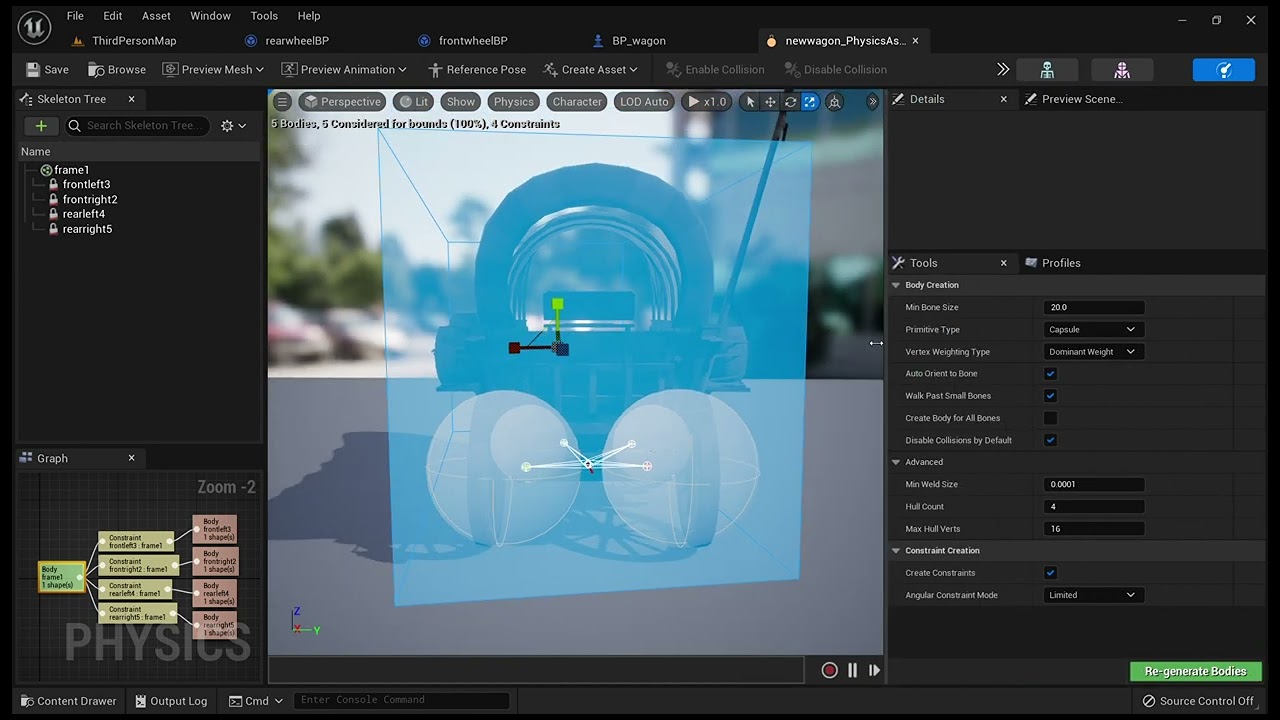
my vehicle pawn does not move. anyone see anything out of place?
 azure bloom
If I included all relevant maps in the ProjectLauncher settings do I also need to list them in the Project Settings here?
 sage coral
Are these artifacts known as vertex fogging? and if so is there a way to get rid of this when using forward shading?
 light thunder
How do I open that asset directly? navigating to the folder is going to take a lot longer if I have a large error list
 light thunder
sage coral
Are these artifacts known as vertex fogging? and if so is there a way to get rid...
light thunder
sage coral
Are these artifacts known as vertex fogging? and if so is there a way to get rid...
check #graphics they would know probably but it might take awhile to answer
 frosty robin
Does anyone know if MegaScan Trees are being worked on besides the one type?
 rugged sorrel
@south yoke can i dm u about ur job post
 dapper otter
💀
 azure bloom
Okay, damndest thing just happened to me
ERROR: Project 'C:/Program Files/Epic Games/UE_4.26/' does not exist
When I try and build
Will Verify files and see how it goes
 glacial laurel
Since 4.21 have they changed how stencil works for boats to keep water out of the inside of the boat?
 south yoke
rugged sorrel
<@425982271489835008> can i dm u about ur job post
south yoke
rugged sorrel
<@425982271489835008> can i dm u about ur job post
For sure
azure bloom
yeah no idea, I've done probably 100 builds and now this strange error
 silent ermine
Hey, im new to UE (4.27) just doing some basics, is there a way to stop textures from scaling with the actor (i think its called)
 silent ermine
Hey, im new to UE (4.27) just doing some basics, is there a way to stop textures...
silent ermine
silent ermine
Hey, im new to UE (4.27) just doing some basics, is there a way to stop textures...
here is the texture itself

is there a simple fix for this?
do i need to make a new texture for every block is use?
thin tendon
silent ermine
Hey, im new to UE (4.27) just doing some basics, is there a way to stop textures...
The line is from your UV mapping of the model. It signifies that is the edge of a uv map face (a seam).
the wall on the left is one face. The wall above the door is another face.
The best way to adjust the scaling is to remap the UVs to be the same scale using blender or some other 3d modelling software
silent ermine
thanks
silent rampart
lament ledge
Try play (sequence player)
still not working
 timid cloak
 shut stream
hey folks,where do i ask technical stuff about unreal games and the unreal engine?
 brave lynx
Hello everyone!
a little beginner question: i have the bug in my spline that the previous segment is always disabled. could you help me see why that is? sincerely

 thin tendon
shut stream
hey folks,where do i ask technical stuff about unreal games and the unreal engin...
thin tendon
shut stream
hey folks,where do i ask technical stuff about unreal games and the unreal engin...
General questions go here for unreal 4. For more specific stuff there a a bunch of other channels. Lighting questions in #lighting for example.
thin tendon
brave lynx
Hello everyone!
a little beginner question: i have the bug in my spline that the...
Try this mate. Section length should be equal to the length of your mesh.

 ancient spade
Did any of you guys get your twitter account locked for 12 hours for violating the rules while just posting a video of your game. Considering the video begin this
https://www.youtube.com/watch?v=HRH3gAoyFkE
Here's a short intro pllayed the second time you start the game after finishing the first cutscene entering the NYX.
I've did it with 2 accounts and they both got locked
lament ledge
silent rampart
still not working
Send a screenshot
lament ledge
Oooh
 robust lintel
How can i save game settings?
 narrow zealot
Hey. I'm using UE 4.27 and it has this really annoying keyboard shortcut by default, that's Ctrl+left click will move a selected object along the X-axis. I absolutely hate that. Only problem is, I cannot find it anywhere in the Keyboard Shortcuts to disable it. Any idea where it might be?
spice ruin
I don't think you can. It's pretty baked into the viewport/gizmo.
Right click does a differnet axis and both does the 3rd.
static viper
ancient spade
I've did it with 2 accounts and they both got locked
what was the reason
ancient spade
@static viper I've tried to upload that video as a tweet and the reason my accounts got suspended for 12 hours is this:
Violating our rules against posting or sharing privately produced/distributed intimate media of someone without their express consent.
Makes no sense
ancient spade
it's just a short intro of my game
ancient spade
I've reported by contacting twitter support cause it's a mess if this happens randomly
ancient spade
static viper
youtube and vimeo links work perfectly
I know. I just had the video there
didn't even know why it happened then tried with my other account and got locked for the same reason
ancient spade
yah, but I wonder how the system checks the content of a video
static viper
they tell you
ancient spade
Maybe the "X" of POLIEXA seemed like something sexual to the system xD
cause if you see the video, it does in the X with the camera...... maaaybeee... 😄
ancient spade
static viper
there is nothing anyone here can do now
I'm aware of that. I've asked cause maybe someone had the same issue and solved it some how. Fortunately the account is suspended for 12 hours, not permanently
@static viper Also, I remember you for helping me a while ago, sorting out my performance issue 😄
static viper
sure
mortal jacinth
ay does anyone here speak Korean?

i would like to translate this
nvm
교통안전 - Traffic Safety
sage coral
Just had a little question, I have turned my pass on for my masked and opaque "going through the nightmare of recompiling all the shaders lol" From my understanding and what I read the Early Z pass should make it so masked materials are easier on performance?
How exactly does this work to be more precise what exactly even is an Early Z pass and how does it help the game and foliage so significant?
More just a knowledge question cause Im fascinated by how it works
 rare hawk
Anyone ever used Components for handling States (Fire, Reload etc)? What are the advantages and disadvantages? Is it only for better organisation?
 lofty rampart
Presumably they could be reused on different actors
rare hawk
lofty rampart
Presumably they could be reused on different actors
hmm yea but their logic would have to be changed for each type of actor, right? So there isnt much difference to having everything directly in the actors Or is it perhaps for replication purposes or something?
lofty rampart
Depends on what you're making, if you just had selectable fire modes with different rates of fire you could probably get all that into a component and just control it with setting variables while using the same logic
Replicating fewer things is always better than replicating more things, I would think
So I doubt it's for that, lol
The purpose of components is to hold reusable logic that can be shared between different types of actors
So you don't have to add the same code in more than one place
This can also be done with inheritance on the actors if they all descend from the same parent
So for weapon states I'm not sure it makes sense to me, but, hey, we all do things differently, lol
That being said I have a few components on my characters that I really only use for organization of code
rare hawk
lofty rampart
This can also be done with inheritance on the actors if they all descend from th...
 yea its weird, but I have seen this "putting everything into components thing" on big games so I thought there must be some benefits. Maybe it is really only for managing code because of the scope of projects, so the source doesnt get too cluttered
lofty rampart
I mean... each of mine have a pretty specific set of concerns, but I definitely don't put everything into components
 dusk nebula
Components don't cause any extra overhead so you could just use it to make things more self-contained. It potentially opens you up to granting or disabling specific functionality when you want, like how in the Arkham games Batman will collect various pieces of equipment that can then be utilized
The "can be granted to multiple actors" thing is merely an advantage to components / a guideline for best practice, but you could use them in the way I described no problem
mortal jacinth
guys me and my gf broke up i need the unreal community to support me in these times
tender pecan
mortal jacinth
guys me and my gf broke up i need the unreal community to support me in these ti...
tender pecan
mortal jacinth
cold
 mortal jacinth
damn that’s crazy 😝
brave lynx
thin tendon
Try this mate. Section length should be equal to the length of your mesh.
thank you! my issue was that i didnt feed in the latest index 🙂 so the previous pipes always got deleted!
Also, some additional fixes, in case anyone needs it:

 trail kernel
Hi i hv created a material which uses wrld position to project texture sample. It also using rotateaboutaxis node to rotate thoe workd position given axis. The custom function just converting 0 to 360 to 0 and 1 which that node takes in.
https://youtu.be/9H8l_9hCQkk
Here is it in action
https://youtu.be/BifAnWxosiA
Now i want to make the world position rotate and project along the directional light vector, there are nodes like atmospheric light vector but question is how i can get the axis and rotation

 pallid olive
hi sometimes when using hud/widget ref and set event it doesnt fire off
for example opacity
timid cloak
pallid olive
in video games if you have shield and health displayed in a progress bar
are these 2 seperated widgets ?
like on top of each other
 azure summit
Is there a way to extrude/inflate vertexes in a skeletal mesh, whether via material or CPP?
Trying to set up a toon outline for a mesh with custom normals & vertex colours without post processing, and without having to rig up an identical mesh to the same skeleton (have something that allows a rendersection in the mesh to inherit the polygons of another rendersection).
All tutorials include using VertexNormalWS which doesn't work for custom normal meshes and have tried generating maps to help with this with no luck currently
Basically want to simulate if the mesh was completely smooth normal-wise, like this cube for example to avoid gaps in the outline (Left = Default Maya Cube. Right = Default Maya Cube with smoothed normals)
 grave nebula
azure summit
Is there a way to extrude/inflate vertexes in a skeletal mesh, whether via mater...
grave nebula
azure summit
Is there a way to extrude/inflate vertexes in a skeletal mesh, whether via mater...
Bake extra set of normals
timid cloak
pallid olive
like on top of each other
Yes
azure summit
grave nebula
Bake extra set of normals
From my own tests, I hadn't gotten good results, but it could be that there's a better way of doing it or I'm misunderstanding something.
Are there any good recommended resources?
grave nebula
azure summit
From my own tests, I hadn't gotten good results, but it could be that there's a ...
my own tests, I hadn't gotten good results There isn't good or not good results. It either works or it does not. If it did not, you did something wrong.
azure summit
Then perhaps you could elaborate?
grave nebula
azure summit
Then perhaps you could elaborate?
just bake direction where vertex needs to move into two UV sets, that is it.
 grand quail
So I've been beating my head against an Unreal project for several months.
Frequently the documentation I come across doesn't have the answers I need, and even YouTube tutorials often let me down.
I'm a software engineer with experience in Unity, but I want to take advantage of UE's capabilities.
But it seems like UE is frequently fighting me when I try to do things in a "best practices" way and instead asks me to do things with more kludge or duplicated work across my blueprints.
Is there any free course anyone can recommend? Some "trick" to thinking the way UE wants me to? I'm honestly surprised at what people can do with the engine without proper documentation. I've heard they just read through the UE source to learn?
autumn flame
grand quail
So I've been beating my head against an Unreal project for several months.
Frequ...
Can't generally say much without knowing the exact problems you're encountering
You can check pinned comments but most of the knowledge you'll get by just working on it and searching / trying to figure out specific problems, documentation can be lacking indeed, bur going down the rabbit hole of the problems you encounter you'll figure it out by yourself or by someone who had your problem somewhere and got solved / random user made document in the pits of hell
For example if you want naming conventions you have Allar's, if you want a network compendium there's Exi's, if you want to know about GAS there's Tranek's, if you want better lens flares there's Froyok's, technical art stuff you have Asher's etc etc...
 vital flicker
Hey everyone! I've been using an actor that emits audio and it follows the player's Y and Z axis. It's important for my map but was wondering if there's a way to limit the Z-axis number? Basically, I want it to follow my Z axis until I reach the very top so that the sound always sounds like it's coming slightly below the player. That's kinda why I have the -190 attached to the Z axis which works well for the most part, it just doesn't quite sound right when I'm at the highest point in my map, where the sound still sounds like it's only slightly below the player.
 timid cloak
Ohh glorius 🍝
https://media.discordapp.net/attachments/752110974562992188/1074368229780238376/image.png

Btw, can i set physics constraints only for rotation
?
timid cloak
static viper
this actually looks quite nice low
Its only a beginning
 ivory tinsel
Is there a way to fix this weird behaviour of the camera?
This is the structure of the Pacman BP. I have the Capsule Comp collision set to block all dynamic if that's of any relevance

I suspect it's the spring arm colliding with the walls
pallid olive
ivory tinsel
Is there a way to fix this weird behaviour of the camera?
go to the collision of meshes and set collision Camera to Ignore
 harsh ginkgo
Question somewhat related to bp and somewhat related to garbage collector. I have an object that is created and returned in a function (blueprint). It has its lifetime and then should be destroyed by gc - this happened as long as the function was void, but I need a function to return this object. Now obj list returns to me that these objects are in memory even after gc. Is this because it is in return and blueprint keeps them in memory all the time? It seems that gc does not destroy it because it is "stored" in the return of this function?
spice ruin
If it's a non-pure node (it has exec pins) that may be the case.
harsh ginkgo
yeah i need to perform some tests, but after 10 minutes nothing changes...
spice ruin
You can always specifically destroy it 😛
harsh ginkgo
UObject?
how?
so i find out some solution, I need this return but not in every case - instad of calling the create function in event graph i can do it in another function. Then the output is not cached
tricky, but it works
 ocean hemlock
Hey all, will disk defragmentation affect dependancies for my projects or break any links?
 shrewd forum
hello im beginner at ue4, i download a ready assest pack and i click enable on plugins but where is the assest i cant see on content
ivory tinsel
shrewd forum
hello im beginner at ue4, i download a ready assest pack and i click enable on p...
Put the downloaded Assets folder in your project folder->Content
Then a message in unreal will come up asking you to import these assets
click import all and you're good to go
Is it possible to Create an AIController to posses a Pawn and have the Pawn move to follow another pawn? or does the AIController have to be implemented on a character (because of the character movement component) ?
shrewd forum
ivory tinsel
Put the downloaded Assets folder in your project folder->Content
Then a message ...
I downloaded it from the Epic Market, so I don't know where the assets I downloaded are, shouldn't it come to the content itself?
ivory tinsel
In my case I'm trying to get an enemy pawn to follow the main pawn around a maze, I've got my nav mesh right and all but the enemy pawn doesn't move
ivory tinsel
shrewd forum
I downloaded it from the Epic Market, so I don't know where the assets I downloa...
I think there's a Add To Project button in Epic? I'm not sure
 coral field
Hey all,
We're trying to use SetWorlOrigin to fix precision issues when are away from the world origin.
Unfortunately doing so is not updating any water bodies using the Water plugin.
The water bodies disappear, making us think it's not getting the offset information.
If you've run into this or know how to add an offset to the water system I'd really appreciate your help!

 coarse pond
Looking for help with framerate optimization! Anyone here an expert at optimization for a RPG hack n slash?

 frosty acorn
how do i enaable event driven loader
peak hare
dont know
reef ridge
how do you use the gltf exporter correctly? its the only thing export that auto assigns all the textures correctly in other applications
but it screws up the textures big time
 soft dawn
i dont know why but i can seem to create new project in unreal 4.27

the path is correct and i also change / to \ as well but its not working
 weary basalt
soft dawn
i dont know why but i can seem to create new project in unreal 4.27
weary basalt
soft dawn
i dont know why but i can seem to create new project in unreal 4.27
Make sure you have enough space on that disk
soft dawn
i do
dreamy wasp
How do you load up the AutoSaved file?
Is that file a full copy of the project?
I am asking because My idiot roommate blew a breaker, and the power went out while my file was open.
I just saved like 3 minutes earlier, but now when I open the file, none of the windows I had open are there, and all the colors of all the folders I had are gone, so everything is grey again. My Filters for selecting things like Meshes, Levels, etc, are gone, and the lighting is set back to LIT, instead of Unlit (which is how I work).
The project seems to be ok, as far as I can tell, but all the UI stuff seems reset to default.
Only on that project save. The earlier saves have all the colors and eveyrhitng is fine.
static viper
timid cloak
https://cdn.discordapp.com/attachments/869790756984991805/1074970287944257618/My...
did you make all these meshes 😮
it looks great
 rapid nest

does anyone has any idea why traveling to few maps crash with this
only on shipping
development/test/debug is ok 🙂
timid cloak
static viper
did you make all these meshes 😮
No, 90% of them is from megabricks or other sites, i made gonk droid tho
and added rigs
and animations
and coin
timid cloak
yep
timid cloak
idk
i dont make any money with these assets so i dont care xD
thats question for people owning the site
static viper
how are you getting the models tho
timid cloak
static viper
no its your responsibility
i dont share them so no
static viper
will you share the game when its done?
timid cloak
game yes, assets no
static viper
then it is your responsiblity.
static viper
yes but this server is not bound to your country.
its english
so international law applies.
so back at you.
its your responsiblity to check the legal site.
lego might sue you
and we dont want none of that
so be careful.
static viper
you laugh now but be aware of the server rules here
timid cloak

how I make so fast tho :0
Stay updated with this project and more!
Twitter: https://twitter.com/ThrillDaWill
Twitch: https://www.twitch.tv/thrilldawill
Itch.io: https://thrilldawill.itch.io/
https://thrilldawill.itch.io/l3go-st4r-w4rs-lol
static viper
especially nr 5
timid cloak
Nobody sued him]
timid cloak
As i wrote, i dont sell their intelectual properity, dont steal (directly) nor claim any rights to it
static viper
but youre making a game with it which you stated, you want to share.
that is were trouble could start.
you must check your legal situation.
static viper
well. i gave you a warning. i really tried. dont be sad when something happens 😦
timid cloak
:>
dreamy wasp
timid cloak
:>
You don't have to take credit for creating something to get a copywrite strike. If you do not have the rights for something, it's not yours to sell, even a likeness.
redbubble sells shirts, so does zazzle, and amazon. zazzle and amazon are real strict about even hinting at something. I had a shirt with a square rabbit on it, with the word "Beware" below it. Amazon felt that was close enough to Monty Python Holy Grail, and told me to take it down.
I had a shirt on Zazzle, that was a Krav Maga Shirt. They said the Chinese word for Knife was too close to the Krav Maga logo, so I had to change the shirt.
redBubble has tons of stuff that are using intilectual property like Star Wars, but they have a deal with Disney. The shirts get uploaded, and a team reviews them, and they can be sold.
 rotund hatch
Hi
 timid cloak
Can i somehow improve alembics perfomance ? Or turm alembic file into less perfomance expensive format?
shy nebula
Dumb question but is it at all possible to add a plugin without source control?
 brittle gulch
Hi there! Is it possible to reimport a skeletal mesh with the same skeleton but with renamed bones?
timid cloak
You can always import it as separate skeletal mesh and use retarget to make animations work
Or just reimort mesh with all animations at once
 modern quest
Hello, could someone help me with a slider, I have a material, but the color of the cube does not change
oak patio
modern quest
Hello, could someone help me with a slider, I have a material, but the color of ...
Gonna need a little more information than that and some screenshots
modern quest
With this material I cannot make it change color, on the other hand if it is a ConstantVector4 instead of Skin Saturation, if it changes, I suppose I am doing something wrong in the parameters or I don't know


 glacial arch
Hey guys, any clue if there's a way to scale up on-screen messages such as "stat fps" display?
 frigid mauve
Hey guys! I need an advise from experienced programmers. I'm stuck with working with unreal. When I wanna do something, usually I can't find any helpful tutorial or documentation. I feel I need to learn some intermediate stuff inside unreal to have a skill to find solutions myself, without googling. I know Unreal basics, c++ and blueprint, but how can I learn more, to feel more comfortable with UE? I know, that samples is very helpful, but I wanna make RTS games, and there are very few examples of something similar. Are there any books?
 bleak locust
I tried to import a character model from blender to UE4. A lot of the weights are off but that's not the issue, the issue is that I can't move left/right/forward/back, and when I jump the character flies into the air and gets stuck in the air. How do I fix this?
rotund hatch
hello unreal engine 4 gets stuck in 3-4 seconds
ivory tinsel
is it possible to make an AI controller (possessing a pawn) try to get as far away from a target as possible?
I'm trying to make a pacman game, I want the enemy to try and get as far away from the player as possible when the player picks up a powerup
sharp willow
World Normal is Surface Direction, isn't it?
spice ruin
Surface direction might be orthogonal to normal
Something like that. Though I am only conjecturing.

 hoary inlet
how do i fix my gun facing the wrong way?
 spice ruin
Rotate the mesh in your DCC before exporting it or rotate it when attaching it to your player.
hoary inlet
what's a dcc
spice ruin
I'm sure there's probably rotation settings in the import settings too.
Digital content creator.
hoary inlet
i replaced a different gun with the one in the pic
hoary inlet
spice ruin
Digital content creator.
where is that at
spice ruin
If you don't know, it won't help.
 ornate shard
Hello, I was wondering is orthographic camera currently bugged in ue4?
In perspective, the preview is chill. Whereas, if I enable orthographic, the result is borked:


This is just a basic test scene, so no shaders should be messing this up
If this is the wrong channel, apologies, i'll move it :p
(This is on 4.27.2)
 fierce tulip
@ornate shard ortho never worked properly. also anything depth-related wont work.
ornate shard
Oh :(
fierce tulip
generally we suggest people to just use a camera with a very low fov
 upper tendon
hope i don't interrupt anything, but i've been having some nightmares with the post processing volume all day if anyone wouldn't mind taking a look whenever they're free
i've looked all over and i'm kind of at my wits end haha
ornate shard
fierce tulip
generally we suggest people to just use a camera with a very low fov
Appreciate the advice
shrewd forum
if i make level design with ue5 can my friend open my project with ue4?
spice ruin
Okay?
neon wedge
shrewd forum
if i make level design with ue5 can my friend open my project with ue4?
No you can only upgrade from ue4 to 5. you cant go down from ue5
shrewd forum
i cant find good level design tutorial for ue4 can someone suggestion
mortal jacinth
hoary inlet
how do i fix my gun facing the wrong way?
go to blender, rotate the model, reimport
done

 manic sequoia
hey I've been using UE5 for a project for work.. but then we decided to DOWNGRADE.. which it did need to happen.. but anyway.. this isn't working in UE4.27

what do I have to do to assign a parent socket in 4.27?

clicking the magnifier does nothing
Do i just need to do it in the construction script??
mortal jacinth
spice ruin
Also, which cat shat on your pizza? 😂
sausage
spice ruin
Odd name for a cat.
mortal jacinth
yes.
 umbral gate
Hey I just finished setting up my Reverb G2 and 3090. The Vr template works butter smooth, but every other template stutters and has massive problems when using the play in vr button. I read to use the pixeldesnsity cmd to bring some of the performance back, but this seems hacky and there is still something sucking up performance. What is the default ue4 vr project doing that gives it better performance?
 floral girder
Hey so I'm kind of stumped on a math problem

so basically I have 2 values that will be added up into an overall value
the top values base value is 1 (translated into 100 to make math easier) and the bottoms base value is 0.5 (translated into 50)
The top value affects 80% of the final value and bottom value affects 20% of the final value
I then bring back 2 decimals, and this is what I get

The calculation printed on screen
If I change the bottom value, you will see it barely affects the final value (red), as it only affects 20% of the final output

The real value of the bottom/orange value is 0.3

I now changed the turqoise/top value to 0.7
so I think you get the idea
now here is where my true problem lies
As mentioned previously the bottom/oranges value base is 0.5
anything below or above that is bad
so what I want to do is if the bottom/orange true value (not the calculated value through the blueprint) is 0.7, I want the calculated value to end up as 0.12
as if the bottom/orange value was 0.3
For my math wizards out there, what the heck do I do?
I've tried dividing it by -2.5, multiplying it by 2.5,
nothing seems to be working and it the system doesn't really work as intended that way
I know this is quite complicated, and doesn't have much to do with UE4 other than doing it in bps
so if anyone can point me a place where people are more suited to answer that'll be just as fine
bleak locust
Is there a way I can make 3rd person camera clip through objects
 round light
hey everyone, looking for a little help. ive make a mob spawner that i can destroy but now i want to be able to spawn this spawner in at different locations around my map that you seek out and destroy like a portal or a mob gate, then check if the mob spawner is destroy and delay then spawn another gate, any tips?
i.e. how to spawn an actor at different locations. then check if that actor is destroy - wait - then spawn another
 copper bobcat
round light
i.e. how to spawn an actor at different locations. then check if that actor is d...
copper bobcat
round light
i.e. how to spawn an actor at different locations. then check if that actor is d...
You can handle it from the game mode class or create another class (Level manager) to handle spawn and destroy the enemies.
copper bobcat
bleak locust
Is there a way I can make 3rd person camera clip through objects
Select the spring arm and uncheck Do Collision Test
bleak locust
based
round light
i ended up rigging this up

just need to add the different location points it could spawn with some arrows
and make it choose randomly from an array of those arrow
s

does the trick for me
 normal breach
hi y'all, I need to optimize loading times and I suspect that a certain level has a ton of hard references needlessly raising its load times. Is there any tool I can use to check up on the hard refs?
Listing them by "weight" would be the best

 meager stone
reef ridge
how do you use the gltf exporter correctly? its the only thing export that auto ...
meager stone
reef ridge
how do you use the gltf exporter correctly? its the only thing export that auto ...
can you share the project with us? I know when glTF Exporter is baking materials and generating textures it relies on the on your lightmap UVs so make sure they are set properly. Else you can also try to set "Simple" in "Bake Material Input"
reef ridge
meager stone
can you share the project with us? I know when glTF Exporter is baking materials...
One example of it doing such is when exporting the megascans abandoned apartment, it screws up textures, but I will try the simple bake material!
Also is there any way to reduce the size of the glb's when importing into something like unity?
that megascan for instance takes up around 25ish gigs to preview/load in unity as a glb(this is a common issue with a lot of glb scenes I am finding, and wondering if theres something I am doing wrong)
I use glb because it auto-assigns the metallic, emission, and roughness textures, vs fbx which only does albedo(and is a hassle cuz you also have to export the textures seperately)
 potent igloo
Friends, I have a problem that there is no texture from 3dmax datasmith to ue5, do you know how to solve this problem
 fallow hornet
anyone have an experience where the high quality render setting in movie render queue output doesn't match the viewport? If so how have you worked around this?
reef ridge
meager stone
can you share the project with us? I know when glTF Exporter is baking materials...
holy shit the simple material thingy fixes all these problems so far
its so much faster, doesnt take like 2-3 hours to export, instead around 3 minutes
AND IT FIXES THE TEXTURES
TYSM!
frosty robin
I know this isn't really the proper place for it, but wondering if someone who has a knack for researching places would want to work on a project in unreal 4, for Ground Branch and Ready Or Not?
filling out a form would probbly be a waste of time so i figure i'd just ask
frosty robin
potent igloo
Friends, I have a problem that there is no texture from 3dmax datasmith to ue5, ...
Possible to load up the same textured material in Material Editor?
potent igloo
frosty robin
Possible to load up the same textured material in Material Editor?
There is no texture when importing into ue. I don't know why, but I downloaded the model vrey renderer material from the website.
 lofty lodge
if i remember correctly, there was a pointer component that would act as a laser pointer more or less and show you what you were hitting. does anyone know what it was called? im in ue4.26 im looked through all the components and couldn't find it.
im also in a pawn if thats important btw
i want to say its the arrow component, but i dont think its that
nvm. its a line trace
sage coral
Anyone got any tips for postprocess on making the lighting look more ps2ish?
timid cloak
I love how very small test scene bake lighting for like 30min
i dont want to know how long does take bake lighting in open words in unreal engine 4 xD
or maybe i messed up some settings
Ahh i made volume too big xD
dreamy wasp
question about velocity.
I have a guy on a moving platform that need to smack an enemy. It seems to be taking the speed of the platform into account on thrusts.
During a L/R swing, the damage is correct, but he doesn't even need to thrust forward, and the enemy takes damage.
Is there a way to subtract the forward speed from the weapon, so that it only gets the relative speed?
both player and enemy are on the same moving platform.
If the player is facing forward, he hits every time.
When he faces backward (toward the rear of the platform) the hit takes like half damage.
 hidden dew
Hi all. I don't understand components a lot. To use an Instanced Static Mesh I have to use an ISM Component.. that's about all I know.
My question is, what's the difference in meaning between using a component and using a member variable?
For example, I could make a "CellsManager" or a "CellsManagerComponent". What would the difference be between those 2 things?
--> Bonus Q: Can a non-component member variable have a component?
dreamy wasp
hidden dew
Hi all. I don't understand components a lot. To use an Instanced Static Mesh I h...
youTube is the best guid to this, but the short of it is that you can make a bunch of changes to something, and all the instanced versions of it will also get those changes. you dont need to go into every item and make the same changes. Like a material. You make a base material, and then you cna make instances that do slightly different things.
Blueprints are the same. Make an instance and then you can have.... lets say a gun. In the instance you change the style of gun. You go from a 9mm to a 45. Then you only need to make a few changses in th einstance. like spawn size of bullets, and the mesh
hidden dew
... Are you sure that's talking about components ?
Procedural Mesh Component, Static Mesh Component, etc
timid cloak

Learn Game Development The Right Way
https://www.awesometuts.com/ultimate-game-dev-academy-dis?utm_medium=youtube&utm_source=tutorial_video&utm_campaign=you_will_not_become_a_game_dev
Website
https://www.awesometuts.com
Support Awesome Tuts
https://www.awesometuts.com/donate
Join Our Discord Server
https://discord.gg/SUGm9PY
3 Day Free Train...
So true
Same with blender
 late solstice
Hi guys,
I've got a problem where my PaperCharacter isn't casting any shadows, despite checking that options in details.
It's using MaskedLitSpriteMaterial. The project is using the first person template. Raytracing-based shooting works with the character.
I've tried rebuilding the lighting; it doesn't cast a shadow on a plane, so I don't think the landscape is the issue; when I create a new project, the problem persists (I've used a different template, shown in screenshots).
I've got no idea what may be causing this, the same setup works for other people.


 timid cloak
Hi, i have question. If i want make cape for character, can i have cape as separate object while making cape react to character model physical assets ?
timid cloak
ohh its going through mesh even as single character
 ancient spade
Hey guys.
Why is my editor grouping wave tabs into one?

I need to open multiple wave files in separate tabs but it won't let me
 solar pumice
Hey guys, so my artist have given me a room mesh as a single fbx file which I've imported and immediately collisions weren't working any my player was falling through. I went into the static mesh component and selected auto convex collisions, clicked apply and then save. I went back into the game and refreshed everything but still no collisions. So I went back to the static mesh and the collisions are gone again (the collisions accuracy settings have reset) but I can still see them when I clicked on show simple collisions
Really confused here so I would appreciate some help


 acoustic forum
idk where the option to change it is
real heath
acoustic forum
idk where the option to change it is
On your camera/cine camera, and/or in your post process volume
 narrow loom
hey does anyone know a tutorial on how to make a race winner? Like 3 laps, first one to win gets a text displayed
odd swan
narrow loom
hey does anyone know a tutorial on how to make a race winner? Like 3 laps, first...
shouldn’t be too tough…create an integer variable and increment it every time they finish a lap, and at the same time check if the variable’s value =3, if true use a widget to display the text
narrow loom
odd swan
shouldn’t be too tough…create an integer variable and increment it every time th...
and how do increase it btw?
im new
odd swan
narrow loom
and how do increase it btw?
“increment” node increases the value by one when it’s called, hook the integer variable to that
narrow loom
odd swan
“increment” node increases the value by one when it’s called, hook the integer v...
oh
thx
and 1 more question
how do i make it player based?
each person each position
and usable in mutliplayer too
odd swan
well, if there are multiple characters in the game they will all have their own instance of that variable. as far as multiplayer goes you’d want to make the variable replicated and set it on the server
narrow loom
odd swan
well, if there are multiple characters in the game they will all have their own ...
oh what about A.I
position for a.i
odd swan
narrow loom
oh what about A.I
what do you mean
narrow loom
like a.i racers
that will compete with u
oh wait
it doesnt matter for them
only of they win
 frosty epoch
Will there be UE 4.28?
Hmm according to this link it existed https://github.com/microsoft/vscode-cpptools/issues/8560
GitHub
Bug type: Language Service Describe the bug OS and Version: Windows 10 21H2 VS Code Version: 1.63.1 C/C++ Extension Version: 1.8.0-insiders2 Steps to reproduce get ue4.28 source code, create defaul...
real heath
frosty epoch
Will there be UE 4.28?
No
peak hare
Hi guys, I am looking to optimise my game which is currently lagging heavily at times. At the moment when I have large number of skeletal meshes on screen at once, I am getting GPU bound (not in pixel shader because massively lowering screen res does nothing). I am getting large number of draw calls at times (1000+) and also my depth drawing sometimes gives me huge ms. I think there are 2 main possible culprits:
A) I am only using 4 materials per skeletal mesh, all of which are pretty simple with the exception that one is a transluscent material. I can LOD my SMs so that the material is only translucent close up; but I would like to identify if this is actually what is causing the issue first.
B) Each skeletal mesh has a health bar above itself which is visible across most of the map, so that the UI of the player looking at the meshes can be displaying dozens of health bars at the same time; is this very costly on performance? Sometimes the health bars look like they are competing with their Z order.
I would like to know what 'depth drawing' actually refers to, whether it is related to translucency (if so, is there a way to limit the number of translucent objects I can look through at once before further ones are rendered opaque or transparent? The translucent components are small and I don't care about visual perfection) or is more likely to be related to the UI issue (I may need to rethink when the healthbars appear and only render them when an enemy takes damage, say) - or is it something else, say tri count (each SM is about 25k vertices)?
real heath
peak hare
Hi guys, I am looking to optimise my game which is currently lagging heavily at ...
It sounds like you are guessing and poking in the dark at these performance problems. Have a look at the pinned messages in #profiling there are a heap of inbuilt tools to help understand what is causing performance problems
While there are good practices to follow regarding minimising performance issues, when you encounter them, always follow the data, or you'll end up spending lots of time on things that have minimal performance impact
peak hare
I appreciate what you are saying, I still struggle to understand how the profiler works although I try to use it sometimes. At the moment I am using stat scenerendering, have determined I am GPU bound and not in the pixel shader and that one big problem I have is depth drawing. In fact about 1 minute ago I turned off 'render in depth pass' for the health bars and massively lowered the ms increase caused by 'the 'depthdrawing' stat, while they are still visible as before.
real heath
Type profilegpu in the console and it'll show an expandable list of things that are happening in a frame on the gpu
Depth pass is a render of the scene rendering only depth data so when it does the actual drawing pass with textures etc it does less overdraw, as it can test if the currently rendering pixel is behind an object that is yet to be drawn
So it can quickly reject pixels without doing all the texture samples etc
real heath
peak hare
Hi guys, I am looking to optimise my game which is currently lagging heavily at ...
In terms of limiting overdraw for translucent objects, no you can't really, as there is no cheap method to check maximum visibility depth without actually rendering the pixels. The best you can do is use masked materials where possible, and do what you can to minimise overlap
Disabling health bars beyond a certain distance as you suggested is a great idea too
Can help with performance, but also visual clutter
peak hare
Yes distance and also relevance.
I'll looking more into profile GPU, in fact seems more performant to turn off 'render in main pass'.
real heath
That may be the case if you are draw call constrained. But that's not a good rule of thumb to follow. There are options in the project settings rendering tab to change the early z pass to full, partial etc that can be worth looking at on a project to project basis
Again, there's so many different things that can affect it, blindly changing settings is really the wrong way to go about it. You need to see what your draw calls are at, you need to dig through profile gpu, you need to see so much more of what's happening to make good informed decisions about what you should change. Turning off draw in passes may "work", but the ultimate fix may make those changes unnecessary, and possibly problematic
odd swan
I have some concerns about my landscape resolution, to say the least. I have no clue how this happened. Is there a way to restore the resolution to its proper size?
 narrow badger
Opinions about the steam page?
https://t.co/MeqLrq1FpP

Remorses is a first person psychological horror game that delivers an immersive, horrific and absolutely terrifying experience through investigation and surviving in sinister enviroments. Solve puzzles, explore, craft your way to freedom and most importantly, stay alive by any means necessary.
ocean hemlock
Anyone know how i can get a tile based movement system working? This is a 2.5D game featuring this kind of tile movement. I have no idea how to really start, i know it would require a algorithm like A* or Dijkstra, but not sure how i could implement something or if there is documentation about it
https://media.discordapp.net/attachments/221798862938046464/1076165849888604261/image.png


How could i have a blueprint create a sort of grid
 sly goblet
How do i fix ghosting effect? It's not TAA issue, tried to disable whole AA, same issue
 spice ruin
Looks l ike motion blur?
sly goblet
No, it's off